instrument panel ISUZU TROOPER 1995 Owner's Guide
[x] Cancel search | Manufacturer: ISUZU, Model Year: 1995, Model line: TROOPER, Model: ISUZU TROOPER 1995Pages: 1928
Page 1280 of 1928
8 -90 CHASSIS ELECTRICAL
GLOVE BOX ILLUMINATION SWITCH
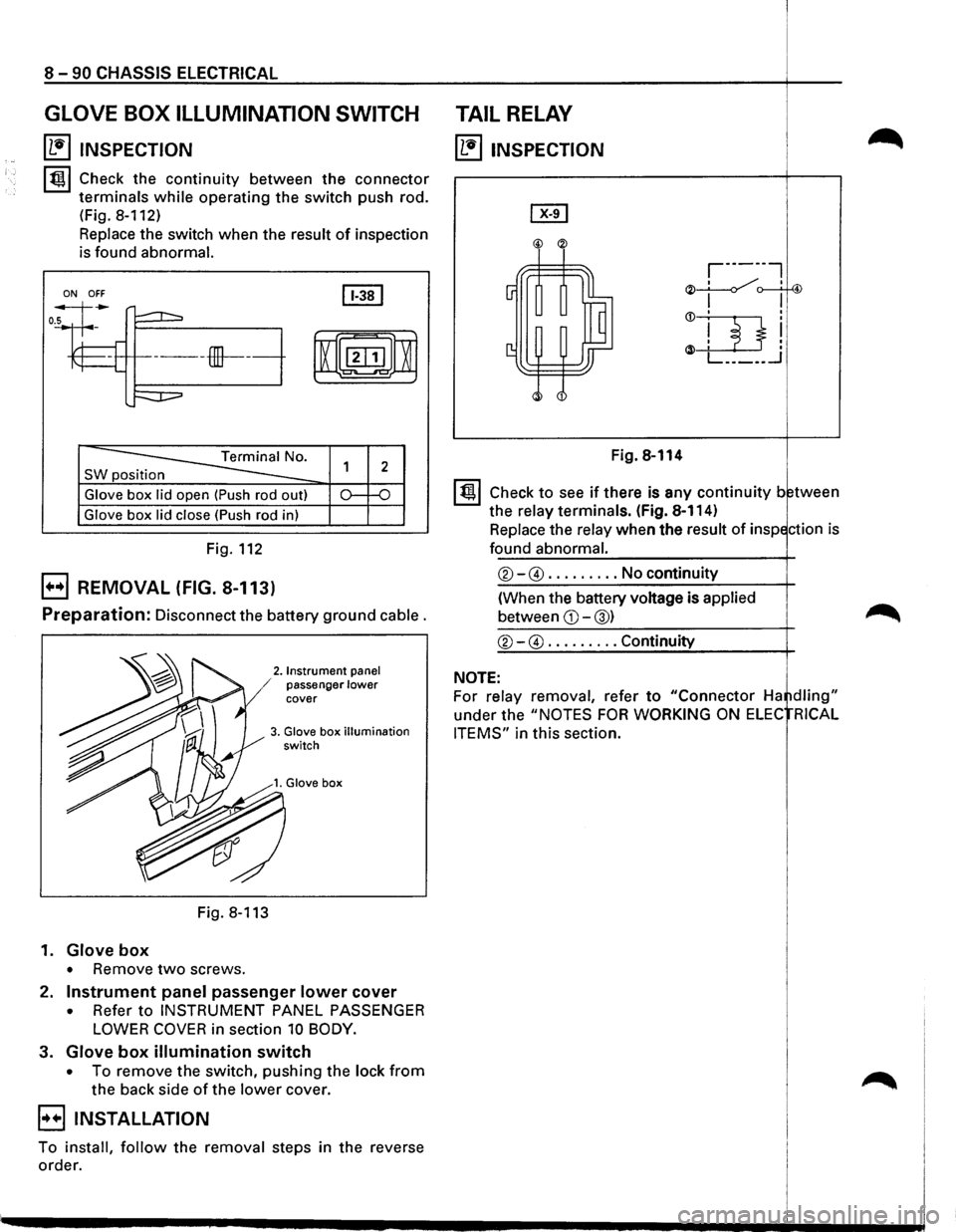
~ INSPECTION
lt!ll Check the continuity between the connector
terminals
while operating the switch push rod.
(Fig.
8-112)
Replace the switch when the result of inspection
is found
abnormal.
ON OFF
SW position
Glove box lid open (Push rod out)
Glove box lid close (Push rod in)
Fig. 112
EJ REMOVAL (FIG. 8-113)
Preparation: Disconnect the battery ground cable.
2. Instrument panel / passenger lower cover
3. Glove box illumination switch
Fig. 8-113
1.
Glove box
• Remove two screws.
2.
Instrument panel passenger lower cover
• Refer to INSTRUMENT PANEL PASSENGER
LOWER COVER in section 10 BODY.
3. Glove box illumination switch
• To remove the switch, pushing the lock from
the back side of the lower cover.
EIINSTALLATION
To install, follow the removal steps in the reverse
order.
TAIL RELAY
~ INSPECTION
Fig. 8-114
I t!ll Check to see if there is any continuity between
the
relay terminals. (Fig. 8-114)
Replace the
relay when the result of inspection is
found abnormal.
®-@ ......... No continuity
(When the battery voltage is
applied
between CD-@) ~
®-@ ......... Continuity
NOTE:
For relay removal, refer to "Connector Ha ~dling"
under the "NOTES FOR WORKING ON ELEC RICAL
ITEMS"
in this section.
Page 1293 of 1928
![ISUZU TROOPER 1995 Owners Guide REAR DEFOGGER SWITCH
(1!] INSPECTION
I~~ Check to see if there is any continuity between
the terminals
of the defogger switch. (Fig. 8-127)
Replace the switch, when the result
of inspecti](/img/61/57183/w960_57183-1292.png "ISUZU TROOPER 1995 Owners Guide REAR DEFOGGER SWITCH
(1!] INSPECTION
I~~ Check to see if there is any continuity between
the terminals
of the defogger switch. (Fig. 8-127)
Replace the switch, when the result
of inspecti")
REAR DEFOGGER SWITCH
(1!] INSPECTION
I~~ Check to see if there is any continuity between
the terminals
of the defogger switch. (Fig. 8-127)
Replace the switch, when the result
of inspection
is found abnormal.
a [~~·~] ]]
r ~)
~0. s 1
4
ON o-r--0---
OFF o-~
Fig. 8-127
B REMOVAL (FIG. 8-128)
5. Rear defogger switch
Fig. 8-128
[ill
5 2 1 s
-o
~
4. Instrument panel
.cluster assembly
CHASSIS ELECTRICAL 8-103
Preparation: Disconnect the battery ground cable.
1.
Front console assembly
2. Lower cluster assembly
3. Instrument panel driver lower cover
4. Instrument panel cluster assembly
• Refer to FOG LIGHT SWITCH removal steps
in
this section.
5.
Rear defogger switch
• To remove the switch, pushing the lock from
the back side of the cluster assembly.
E) INSTALLATION
To install, follow the removal steps in the reverse
order, noting
the following point.
1. Push in the switch with your fingers until it locks
securely.
REAR DEFOGGER HEAT WIRES
w CAUTION:
• Heat wires are printed on the inner side of
the rear glass.
To clean, use a
soft cloth and wipe horizon
tally along the wires.
• Never use glass cleaner or equivalent.
~ INSPECTION
It~ I Measure the voltage of heat wire.
Repair the heat wire
when the result of inspection
is found abnormal.
'f CAUTION:
• When measuring voltage, wind a piece of
tin foil around the tip of the negative probe
and press
the foil against the wire with your
finger (Fig. 8-129).
1. Turn the starter switch on.
2. Turn the rear defogger switch on.
3. Measure the voltage between the three points
on
the heat wire and the(-) terminal with a voltmeter.
4. Check that the voltage becomes smaller from ®
to @to© (Fig. 8-130).
5. If there is a place where the voltage suddenly
changes
to OV, there is a OPEN CIRCUIT between
there and the
prior point.
Page 1312 of 1928
8-122 CHASSIS ELECTRICAL
rn
~~:::1
ill I -
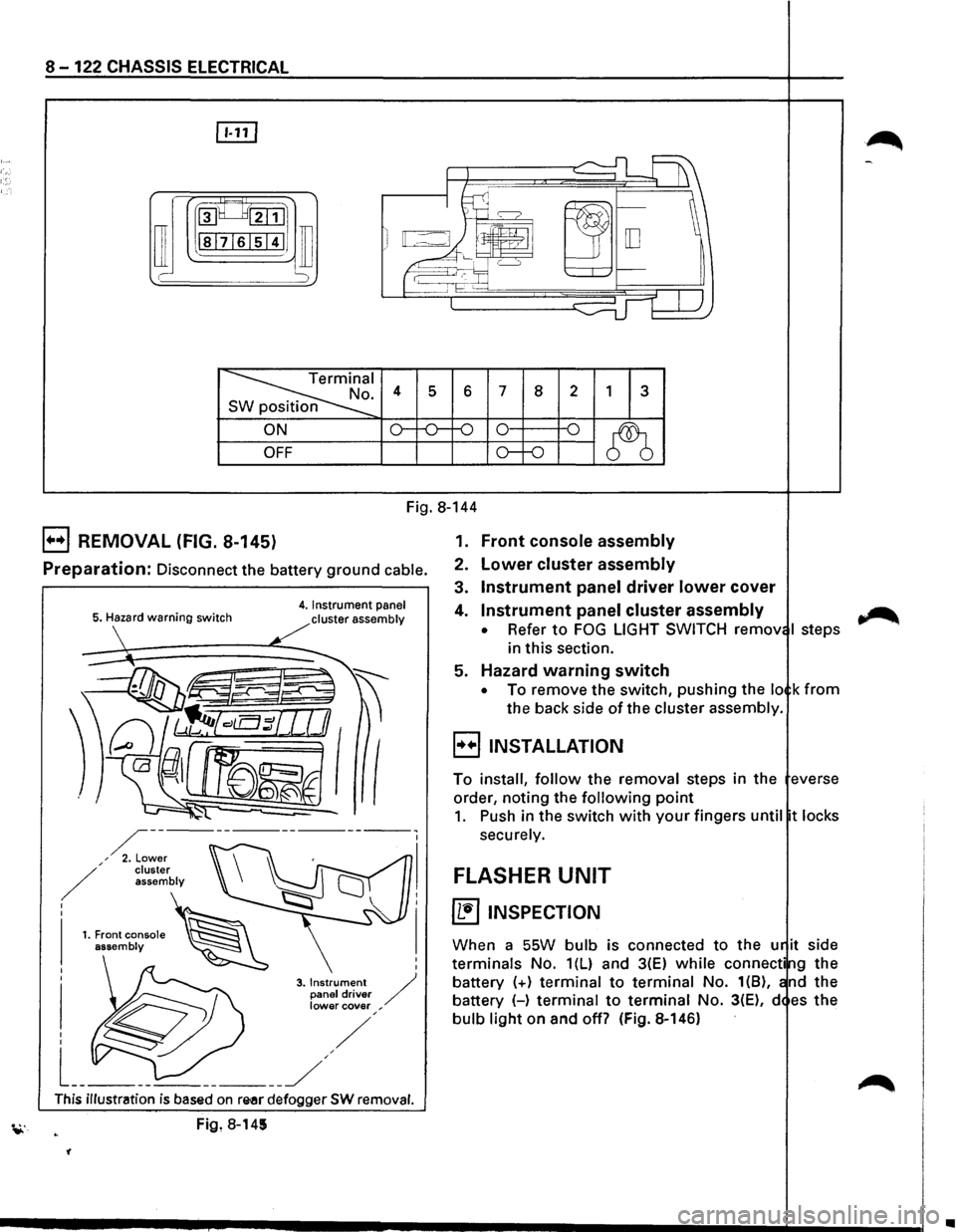
~I . 4 s 6 7 8 2 1 3 n
ON o--o-f-0 0 -o
~ OFF o--o
Fig. 8-144
B REMOVAL (FIG. 8-145)
Preparation: Disconnect the battery ground cable.
5. Hazard warning switch 4. Instrument panel
cluster assembly
I
I
3. Instrument / panel driver lower cover ,
This illustration is based on re-ar defogger SW removal.
Fig, 8-145
'(
1. Front console assembly
2. Lower cluster assembly
3. Instrument panel driver lower cover
4. Instrument panel cluster assembly
• Refer to FOG LIGHT SWITCH remov I steps
in this section.
5. Hazard warning switch
• To remove the switch, pushing the lo k from
the back side of the cluster assembly.
B INSTALLATION
To install, follow the removal steps in the everse
order, noting the
following point
1. Push in the switch with your fingers until t locks
securely.
FLASHER UNIT
~ INSPECTION
When a SSW bulb is connected to the u it side
terminals No. 1(L) and 3(E) while connecti g the
battery
(+) terminal to terminal No. 1(8), nd the
battery (-)
terminal to terminal No. 3(E), d es the
bulb light on and off? (Fig. 8-146)
~
•
Page 1315 of 1928
HORN SWITCH
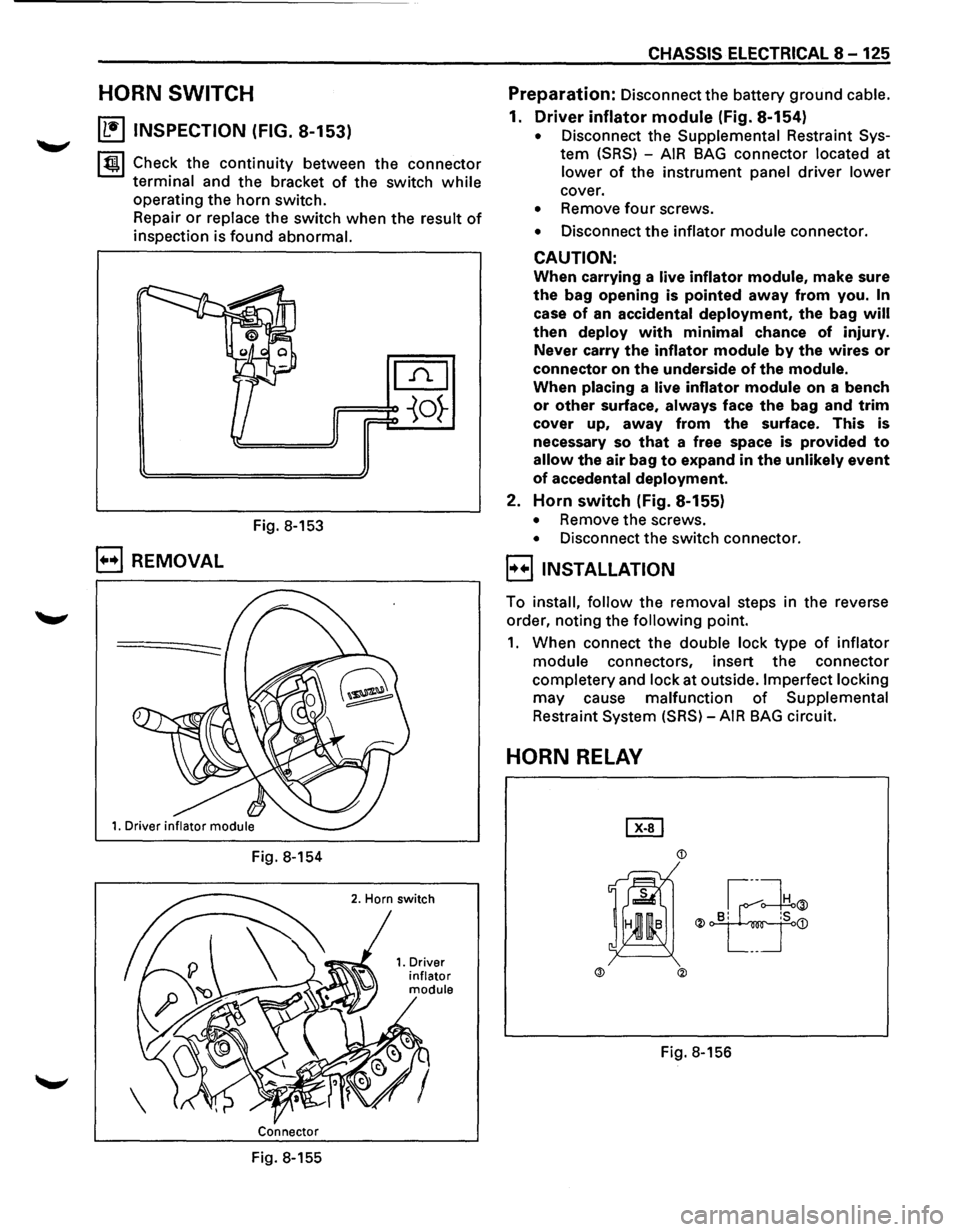
~ INSPECTION (FIG. 8-153)
~~~ Check the continuity between the connector
terminal and the bracket of the switch while
operating the horn switch.
Repair
or replace the switch when the result of
inspection is found abnormal.
Fig. 8-153
B REMOVAL
Fig. 8-154
Connector
Fig. 8-155
CHASSIS ELECTRICAL 8-125
Preparation: Disconnect the battery ground cable.
1. Driver inflator module (Fig. 8-154)
• Disconnect the Supplemental Restraint Sys
tem (SRS) -AIR BAG connector located at
lower of the instrument panel driver lower
cover.
• Remove four screws.
• Disconnect the inflator module connector.
CAUTION:
When carrying a live inflator module, make sure
the bag opening is pointed away from you. In
case of an accidental deployment, the bag will
then deploy with minimal chance of injury.
Never carry
the inflator module by the wires or
connector on the underside of the module.
When placing a live inflator module on a bench
or other surface, always face the bag and trim
cover up, away from the surface. This is
necessary so
that a free space is provided to
allow the air bag to expand in the unlikely event
of accedental deployment.
2. Horn switch (Fig. 8-155)
• Remove the screws.
• Disconnect the switch connector.
l·u·IINSTALLATION
To install, follow the removal steps in the reverse
order, noting the
following point.
1. When connect the double lock type of inflator
module connectors, insert the connector
completery and lock at outside. Imperfect locking
may cause malfunction of Supplemental
Restraint System (SRS)-AIR BAG circuit.
HORN RELAY
Page 1362 of 1928
8 -172 CHASSIS ELECTRICAL
CRUISE CONTROL
GENERAL DESCRIPTION
The circuit consists of the starter switch, cruise main switch, control switch, control unit, pump and actuator,
brake switch, clutch switch (M/T),
mode switch (Nf), vehicle speed sensor (incorporated into speedometer),
and indicator lights.
The cruise
control system keeps the vehicle running at a fixed speed until a signal canceling this speed is
received.
When the vehicle is in a running state with the main switch on, the battery voltage is applied to the control
unit. When a signal from the control switch is input into the control unit, while the vehicle is in this state, the
cruise control actuator is activated
to operate the system.
Also,
while the system is operating, the "AUTO CRUISE" indicator light in the instrument panel cluster lights
up.
Refer
to Section 98 "CRUISE CONTROL" for detail.
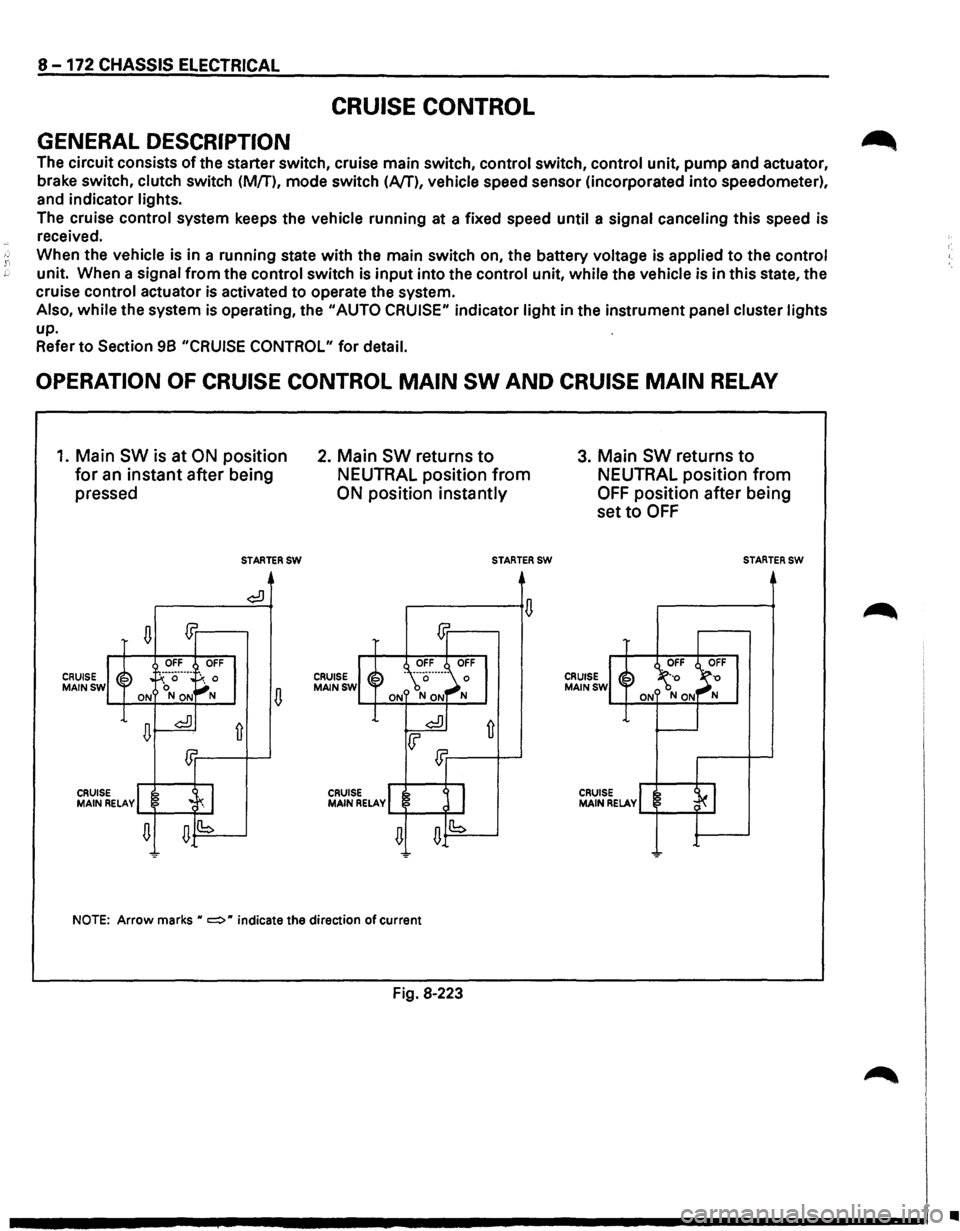
OPERATION OF CRUISE CONTROL MAIN SW AND CRUISE MAIN RELAY
1. Main SW is at ON position
for an instant after being
pressed
CRUISE MAINSW
n m
OFF OFF
~~ . !-':··a··---
~: 0 ON NON
n~
£Jr
CRUIS MAIN ~ELAvl .c~ I
n n(b
-
STARTERSW
¢:!)
fi
2. Main SW returns to
NEUTRAL position from
ON position instantly
CRUISE MAINSW
CRUISE MAIN RELAY
STARTERSW
NOTE: Arrow marks H c:::::> H indicate the direction of current
Fig. 8·223
3. Main SW returns to
NEUTRAL position from
OFF position after being
set
to OFF
CRUISE MAINSW
CRUISE MAIN RELAY
STARTERSW
..
Page 1368 of 1928
8 -178 CHASSIS ELECTRICAL
ANTI-LOCK BRAKE SYSTEM (ABS)
GENERAL DESCRIPTION
The circuit consists of the starter switch, stoplight switch (vehicle w/o cruise control), brake switch (vehicle
with cruise control), hydraulic unit, electronic brake control module, wheel speed sensor, G sensor, ABS and
4WD indicator, 4WD switch and data link connector.
When the service brake is applied while in the running mode,
the EBCM (Electronic Brake Control Module)
judges
which wheel is about to lock by using the wheel rotation speed signals sent from the four ABS speed
sensors at the
front and rear wheels. And the brake fluid pressure applied to the four wheels is controlled by
a hydraulic unit to prevent the wheels from locking.
Based on the wheel rotation speed signals
input from the ABS sensor, the EBCM sends out signals to the
solenoid valve in the hydraulic unit
to increase, maintain or decrease the brake fluid pressure. The solenoid
valve uses this signal
to control the fluid pressure which is applied to the calipers of the disk brakes of the
front wheels. (The system also controls at the same time the fluid pressure applied to the rear wheels.)
• EBCM (Electronic brake control module)
The EBCM uses the signals sent from the speed sensor to control the operation of the hydraulic unit.
When any malfunction occurs in the ABS, the
EBCM activates the fail-safe fuction while turning on the
ABS warning light.
• Hydraulic unit
The hydraulic unit consists of the motor, plunger pump, solenoid valve, and fluid pressure control
valves. The exterior
of the unit has a relay box consisting of the motor relay and valve relay. Three
solenoid valves, the
two of which are provided at the front wheels and the one at the rear wheels, control
the fluid pressure
of these wheels.
• Speed sensor
The speed sensor consists of the sensor and the rotor. It sends the EBCM the AC voltage generated by
the rotation of the rotor as the vehicle speed signal. ~
• G-sensor
The G-sensor, installed inside the center console, sends out signals to the EBCM by detecting the
decelerating speed
of the vehicle.
• ABS warning light
The ABS warning light in the instrument panel, lights up when any malfunction occurs in the ABS. It also
lights up
with the starter key at the "ON" position, as a self-check.
Refer
to Section 5A4, "ANTI-LOCK BRAKE SYSTEM" for detail.
II
Page 1375 of 1928
CHASSIS ELECTRICAL 8-185
REAR WHEEL ANTI-LOCK BRAKE SYSTEM (RWAL)
GENERAL DESCRIPTION
The circuit consists of the starter switch, stoplight switch (vehicle w/o cruise control), brake switch (vehicle
w/cruise control). RWAL controller, RWAL speed sensor, RWAL valve, brake differential switch, 4WD switch,
parking brake
SW, indicator light (RWAL, 4WD, BRAKE), and test connector.
In this system, when the service brake is applied the RWAL controller judges the wheel rotation difference
signals which have been sent from the RWAL speed sensor at the rear axle differential. The anti-lock valves
control
the brake fluid pressure which is applied to the rear wheels to prevent the wheels from locking.
When starting the engine, the RWAL indicator in the instrument panel lights up at the same time as the brake
indicator
to inform the driver that the system is operating normally. (The light goes off after two seconds.)
Refer
to Section 5A3, "RWAL (REAR WHEEL ANTI-LOCK BRAKE SYSTEM)" for detail.
Page 1417 of 1928
![ISUZU TROOPER 1995 Owners Guide ~ INSPECTION
I 4131 2 1 i~~j
l~ 101918 71615 jJ [ill]
~
s 6 7 8 2 3 s position
CD
OFF
~ ON o-~
...... ~ ~ ...... OFF
CD ~ ON o-~
Fig. 8-263
Check
the continuity between the connector
te](/img/61/57183/w960_57183-1416.png "ISUZU TROOPER 1995 Owners Guide ~ INSPECTION
I 4131 2 1 i~~j
l~ 101918 71615 jJ [ill]
~
s 6 7 8 2 3 s position
CD
OFF
~ ON o-~
...... ~ ~ ...... OFF
CD ~ ON o-~
Fig. 8-263
Check
the continuity between the connector
te")
~ INSPECTION
I 4131 2 1 i~~j
l~ 101918 71615 jJ [ill]
~
s 6 7 8 2 3 s position
CD
OFF
~ ON o-~
...... ~ ~ ...... OFF
CD ~ ON o-~
Fig. 8-263
Check
the continuity between the connector
terminals of the switch. (Fig. 8-263)
Repair
or replace the switch when the result of
inspection is found abnormal.
E) REMOVAL (FIG. 8-264)
Preparation: Disconnect the battery ground cable.
This illustration is based on rear defogger SW removal.
Fig. 8-264
'-"' 1. Front console assembly
2. lower cluster assembly
3. Instrument panel driver lower cover
4. Instrument panel cluster assembly
CHASSIS ELECTRICAL 8-227
o Refer to FOG LIGHT SWITCH removal steps in
this section.
5. Rear wiper & washer switch
• To remove the switch, pushing the lock from
the back side of the cluster assembly.
B INSTALLATION
To install, follow the removal steps in the reverse
order, noting the
following point.
1. Push the switch with your fingers until it locks
securely.
REAR WIPER MOTOR
~ INSPECTION
Fig. 8-265
With the battery
(+)terminal connected to the wiper
motor connector termina12l G-6 land the H terminal
to the connector 41 G-6 I, check to see if the motor
rotates. (Fig. 8-265)
Repair
or replace the motor when the result of
inspection is found abnormal.
E) REMOVAL (FIG. 8-266)
Preparation: Disconnect the battery ground cable.
-,
Fig. 8-266
Page 1432 of 1928
8-242 CHASSIS ELECTRICAL
STARTER SWITCH
Refer to "START AND CHARGING" of this section.
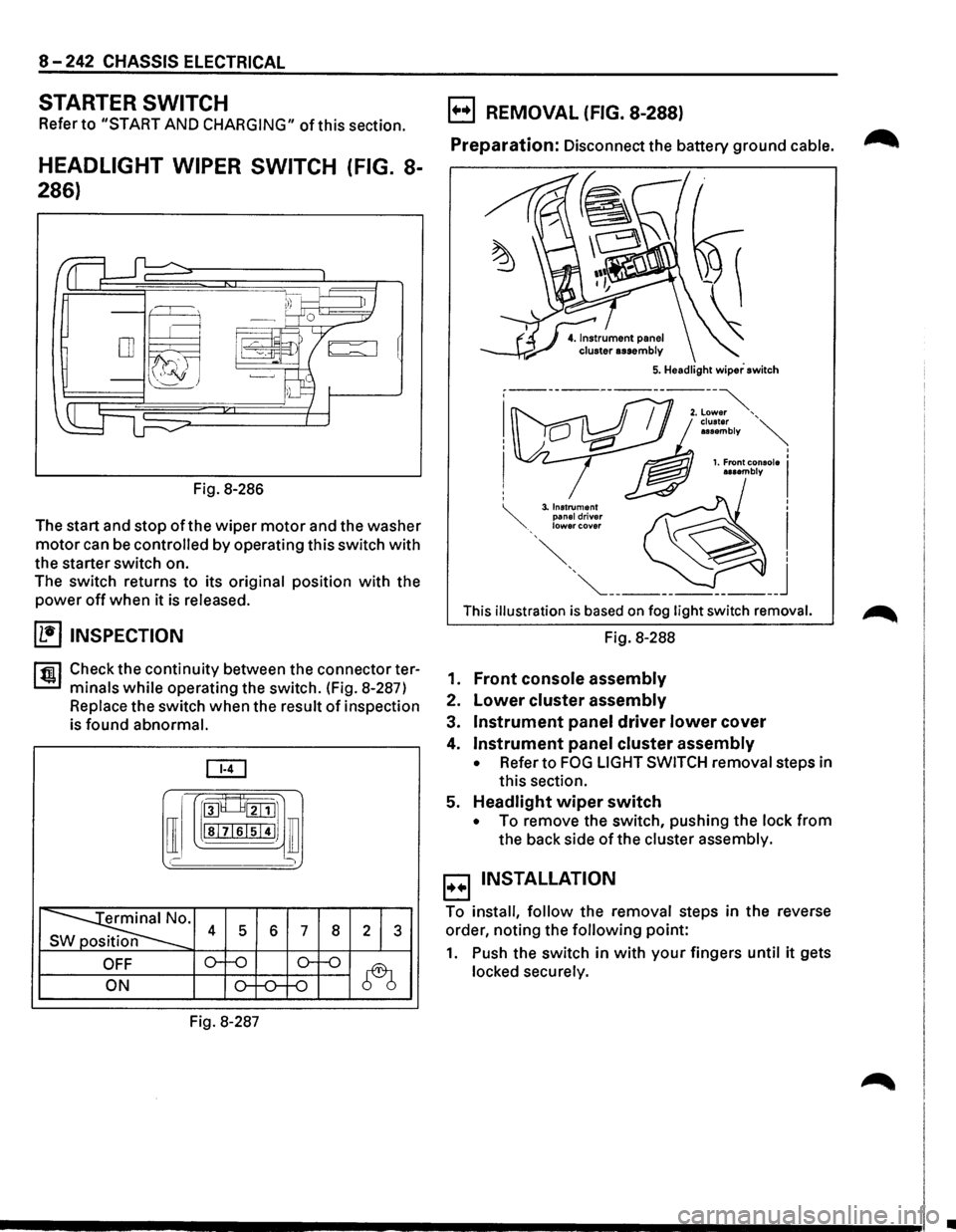
HEADLIGHT WIPER SWITCH (FIG. 8-
286)
Fig. 8-286
The start and stop
of the wiper motor and the washer
motor can be controlled by operating this switch with
the starter switch on.
The switch returns to its
original position with the
power off when it is released.
(1!] INSPECTION
rfiil Check the continuity between the connector ter
L:::.I minals while operating the switch. (Fig. 8-287)
Replace the switch when the result of inspection
is
found abnormal.
[ill
[I
roo8___8tillJ1
lsl7lslsi4IJ ill
' )
~· s 4 5 6 7 8 2 1 3
OFF o--o o-f-o
~ ON o-f-0--f-0
Fig. 8-287
B REMOVAL (FIG. 8-288)
Preparation: Disconnect the battery ground cable. ~
This illustration is based on fog light switch removal.
Fig. 8-288
1.
Front console assembly
2. Lower cluster assembly
3. Instrument panel driver lower cover
4. Instrument panel cluster assembly
• Refer to FOG LIGHT SWITCH removal steps in
this section.
5.
Headlight wiper switch
• To remove the switch, pushing the lock from
the back side of the cluster assembly.
B INSTALLATION
To install, follow the removal steps in the reverse
order, noting the
following point:
1. Push the switch in with your fingers until it gets
locked securely.
•
Page 1434 of 1928
![ISUZU TROOPER 1995 Owners Guide 8-244 CHASSIS ELECTRICAL
HEADLIGHT WASHER MOTOR
(b!] INSPECTION
Fig. 8-292
With the washer
motor connector 1 I C-361 connected
to the battery(+) terminal, and the connector 2 IC-361
to the](/img/61/57183/w960_57183-1433.png "ISUZU TROOPER 1995 Owners Guide 8-244 CHASSIS ELECTRICAL
HEADLIGHT WASHER MOTOR
(b!] INSPECTION
Fig. 8-292
With the washer
motor connector 1 I C-361 connected
to the battery(+) terminal, and the connector 2 IC-361
to the")
8-244 CHASSIS ELECTRICAL
HEADLIGHT WASHER MOTOR
(b!] INSPECTION
Fig. 8-292
With the washer
motor connector 1 I C-361 connected
to the battery(+) terminal, and the connector 2 IC-361
to the battery (-) terminal, check to see if the motor
rotates smoothly. (Fig. 8-292)
Repair
or replace the motor when the result of inspec
tion is found abnormal.
E) REMOVAL AND INSTALLATION
1•+1 Refer to the removal and installation steps ofthe
windshield washer tank/motor under "WIND
SHIELD WIPER/WASHER
AND REAR WIPER/
WASHER"
in this section.
HEADLIGHT WIPER TIMER
B REMOVAL (FIG. 8-293)
Preparation: Disconnect the battery ground cable.
~Hdl"h··· 5. ea 19 t w1per timer
Fig. 8-293
1. Front console assembly
2. Lower cluster assembly
3. Glove box assembly
4. Instrument panel passenger lower cover
• Refer to INSTRUMENT PANEL ASSEMBLY in
Section 10 BODY.
5. Headlight wiper timer
B INSTALLATION
To install, follow the removal steps in the reverse
order.