lock ISUZU TROOPER 1995 Workshop Manual
[x] Cancel search | Manufacturer: ISUZU, Model Year: 1995, Model line: TROOPER, Model: ISUZU TROOPER 1995Pages: 1928
Page 1247 of 1928
~ INSPECTION
I~ I There should be continuity in either A or 8 when
a circuit tester is connected with diode terminal.
(Fig. 8-75)
Replace the diode when the result of inspection
is found abnormal.
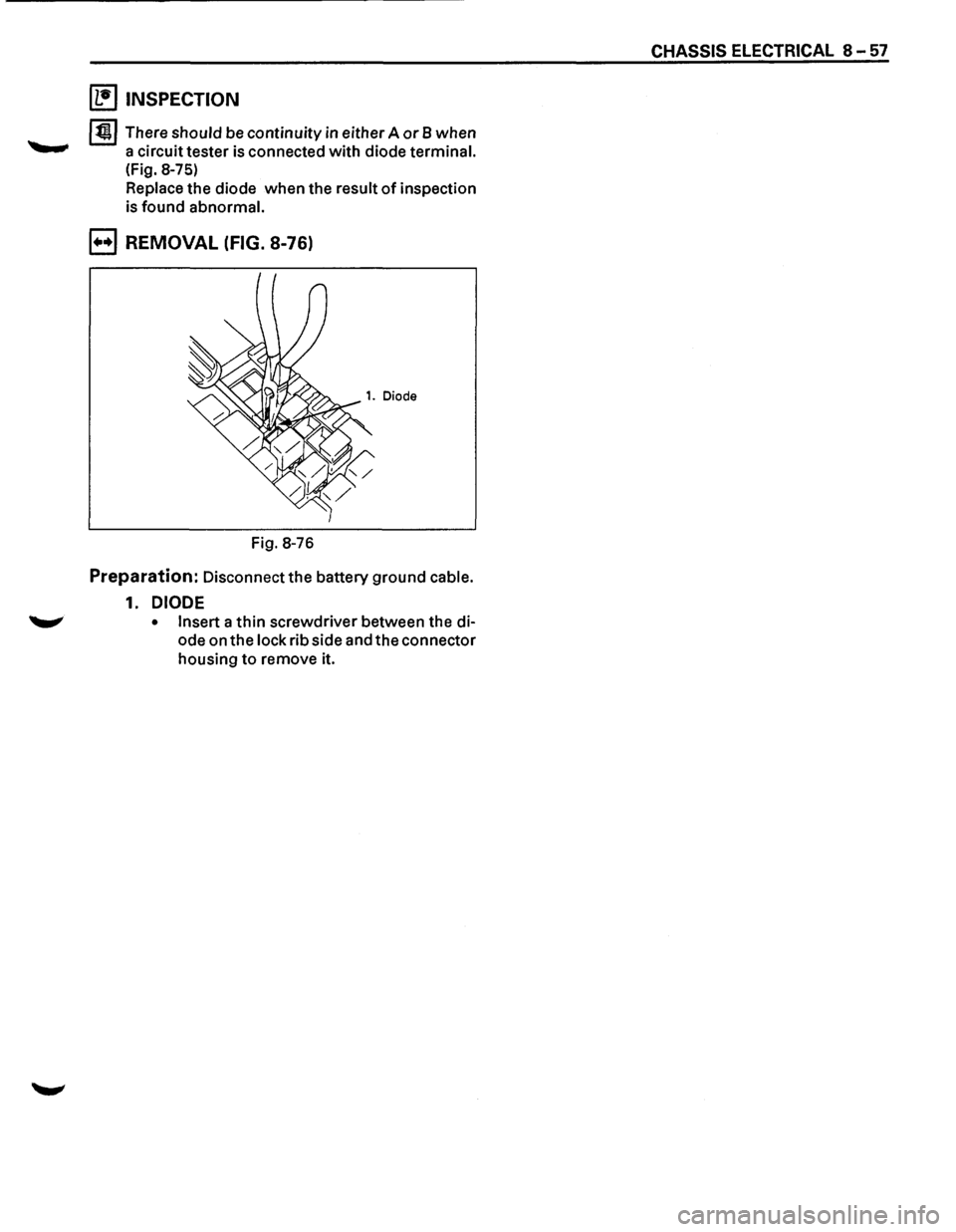
B REMOVAL (FIG. 8-76)
Fig. 8-76
Preparation: Disconnect the battery ground cable.
1. DIODE
• Insert a thin screwdriver between the di
ode on
the lock rib side and the connector
housing to remove it.
CHASSIS ELECTRICAL 8-57
Page 1260 of 1928
I ..
8 -70 CHASSIS ELECTRICAL
When placing a live inflator module on a bench
or other surface, always face the bag and trim
cover up, away from the surface. This is neces
sary so that a free space is provided to allow the
air bag to expand in the unlikely event of acci·
dental
deployment.
4. Steering wheel
• Refer to STEERING WHEEL REPLACEMENT in
Section 3F4.
5. Lighting switch (Combination switch)
• Disconnect the switch connector.
• Remove four screws.
• Remove the lighting switch together with SRS
coil assembly.
'\f CAUTION:
Do not remove SRS coil assembly from the com·
bination switch assembly.
E) INSTALLATION
To install, follow the removal steps in the reverse
order, noting the
following points.
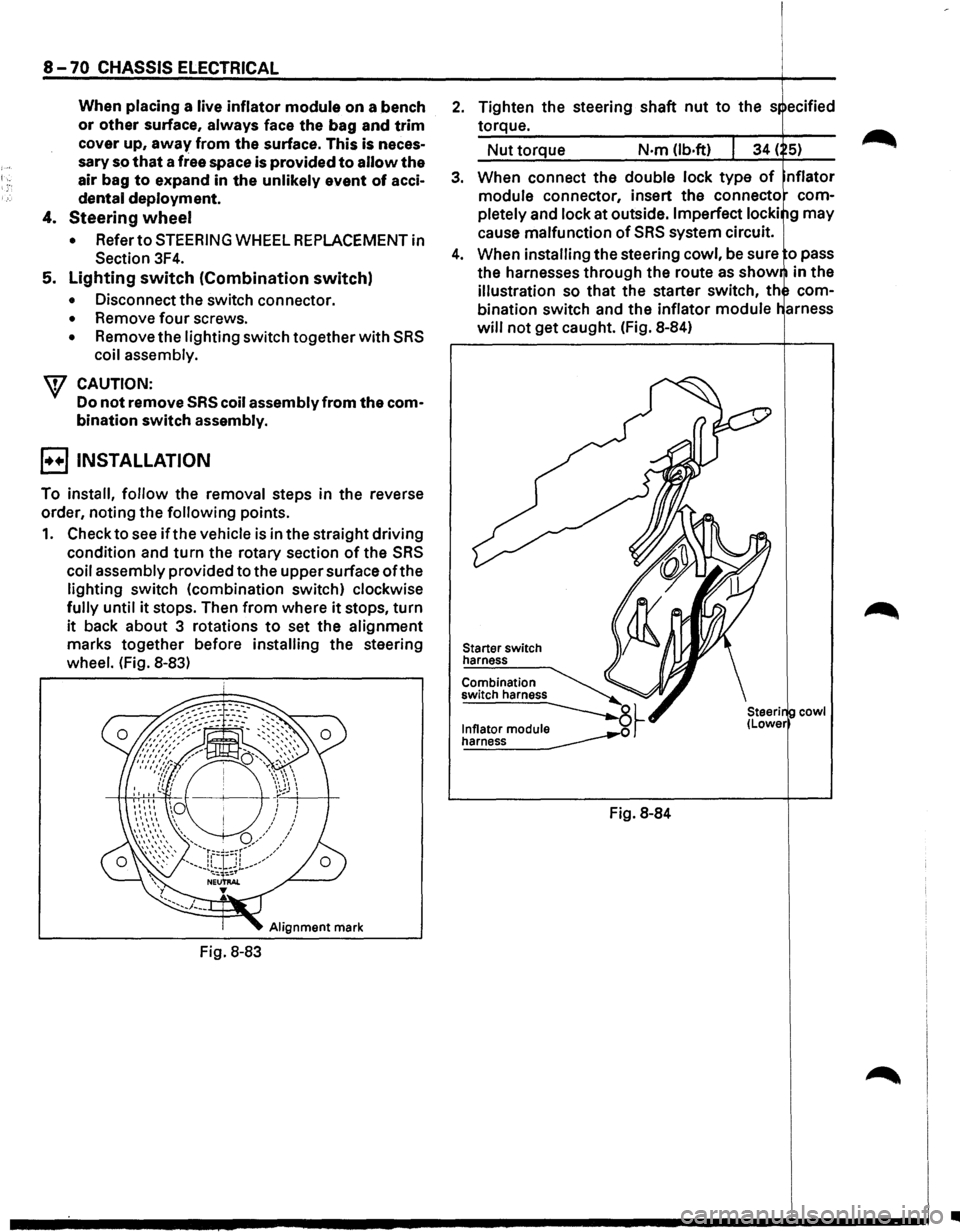
1. Check to see if the vehicle is in the straight driving
condition and turn the rotary section of the SRS
coil assembly provided to the upper surface ofthe
lighting switch (combination switch) clockwise
fully until it stops. Then from where it stops, turn
it back about 3 rotations to set the alignment
marks together before installing the steering
wheel. (Fig. 8-83)
Alignment mark
Fig. 8-83
2. Tighten the steering shaft nut to the s ecified
torque.
Nut torque N·m (lb.ft)
3. When connect the double lock type of nflator
module connector, insert the connecto com
pletely
and lock at outside. Imperfect locki g may
cause malfunction of SRS system circuit.
4. When installing the steering cowl, be sure o pass
the harnesses
through the route as show in the
illustration so that the starter switch, th com
bination switch and the inflator module
will not get caught. (Fig. 8-84)
Starter switch
harness
Combination
switch harness
~~ ~
Fig. 8-84
cowl
•
Page 1261 of 1928
DIMMER·PASSING SWITCH (COMBI
NATION SWITCH)
The headlight beams can be turned to high and low
alternately by pulling the switch lever up to the limit.
Also, the passing light can be flashed by operating the
switch lever within the range before the dimmer
switch has been changed over. The switch lever
returns automatically to its original position.
CHASSIS ELECTRICAL 8 -71
~ INSPECTION
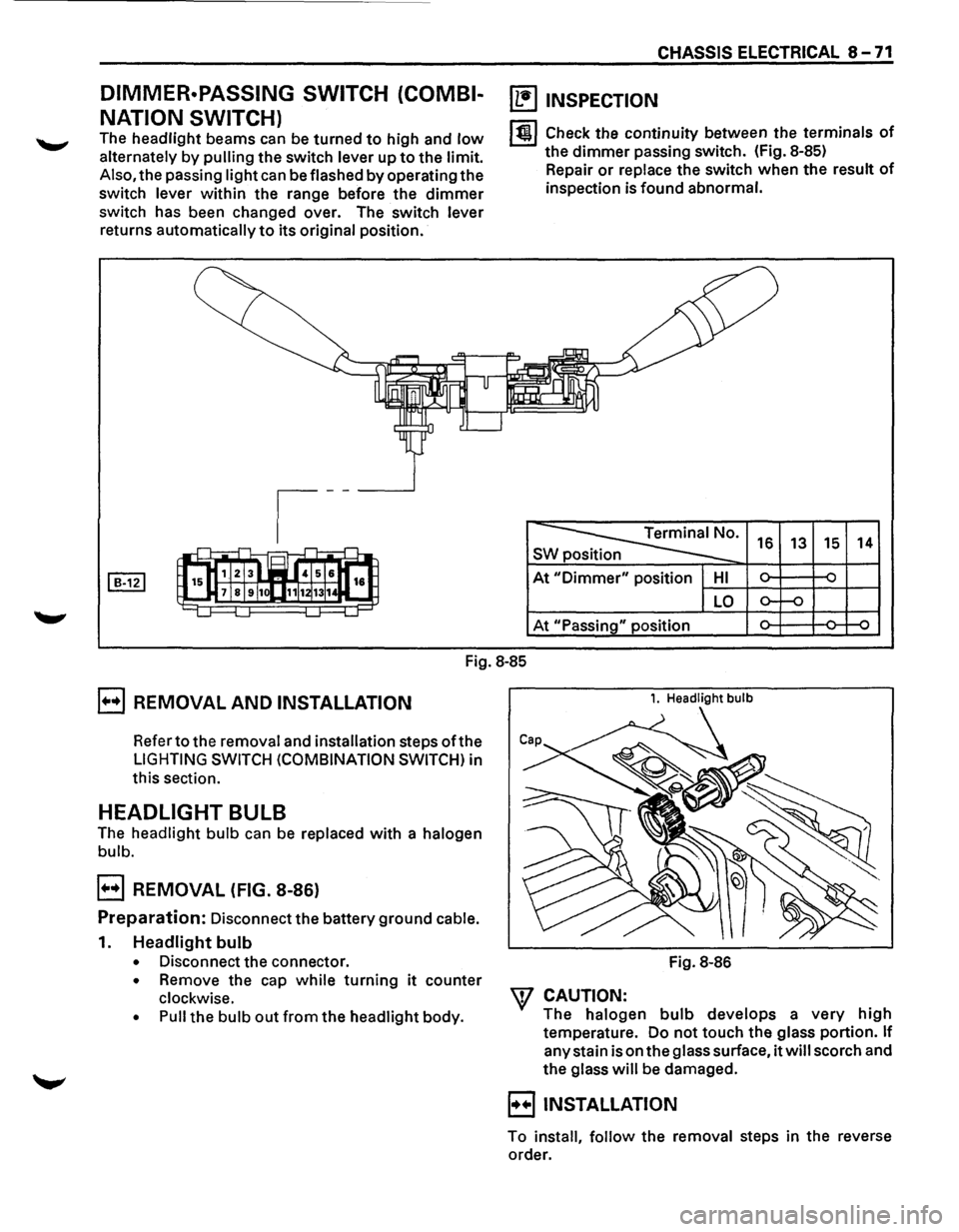
lt!l Check the continuity between the terminals of
the dimmer passing switch. (Fig. 8-85)
Repair
or replace the switch when the result of
inspection is found abnormal.
~· s 16 13 15 14
At "Dimmer" position HI ~ ~ -
LO o-f-o
At "Passing" position ~ ~ ~
Fig.
8-85
E] REMOVAL AND INSTALLATION
Refer to the removal and installation steps oft he
LIGHTING SWITCH (COMBINATION SWITCH) in
this section.
HEADLIGHT BULB
The headlight bulb can be replaced with a halogen
bulb.
E] REMOVAL (FIG. 8-86)
Preparation: Disconnect the battery ground cable.
1. Headlight bulb
• Disconnect the connector.
• Remove the cap while turning it counter
clockwise.
• Pull the bulb out from the headlight body.
1. Headlight bulb
Fig. 8-86
W CAUTION:
The halogen bulb develops a very high
temperature. Do not touch the glass portion. If
any stain is on the glass surface, it will scorch and
the glass will be damaged.
B INSTALLATION
To install, follow the removal steps in the reverse
order.
Page 1264 of 1928
8-74 CHASSIS ELECTRICAL
FOG LIGHT SWITCH
~ INSPECTION
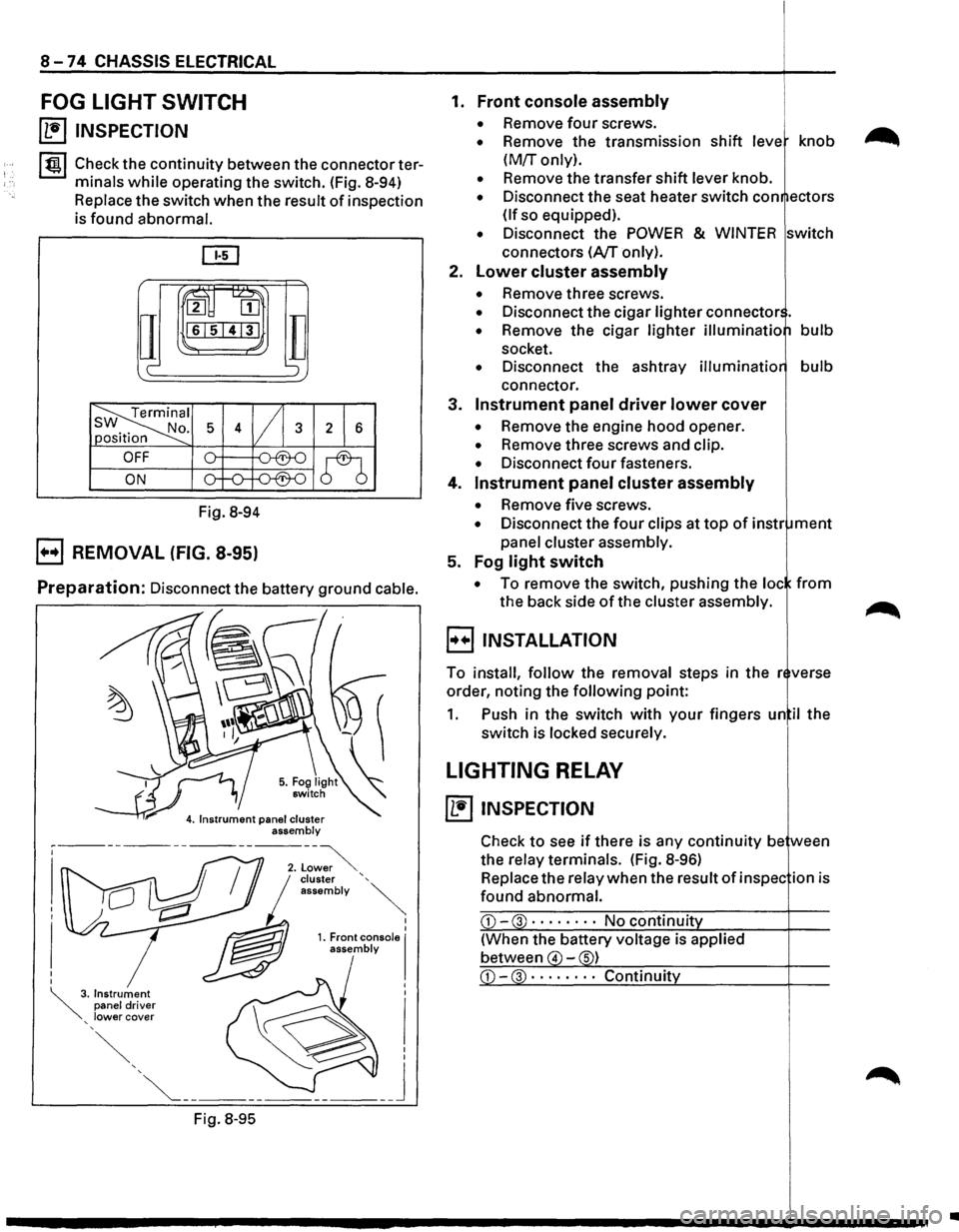
I tgj Check the continuity between the connector ter
minals
while operating the switch. (Fig. 8-94)
Replace the switch when the result of inspection
is found abnormal.
ru~
IT
2 [II
161514131
c-
Fig. 8-94
B REMOVAL (FIG. 8-95)
TI ';
Preparation: Disconnect the battery ground cable.
Fig.
8-95
I I 1. Front console I assembly
1. Front console assembly
• Remove four screws.
• Remove the transmission shift leve knob
(M!r only).
• Remove the transfer shift lever knob.
• Disconnect the seat heater switch con ectors
(If so equipped).
• Disconnect the POWER & WINTER switch
connectors
(A/T only).
2.
Lower cluster assembly
• Remove three screws.
• Disconnect the cigar lighter connector .
• Remove the cigar lighter illuminatio bulb
socket.
• Disconnect the ashtray illuminatio bulb
connector.
3.
Instrument panel driver lower cover
• Remove the engine hood opener.
• Remove three screws and clip.
• Disconnect four fasteners.
4.
Instrument panel cluster assembly
• Remove five screws.
• Disconnect the four clips at top of instr ment
panel cluster assembly.
5. Fog
light switch
• To remove the switch, pushing the loc from
the back side of the cluster assembly.
B INSTALLATION
To install, follow the removal steps in the r verse
order, noting the
following point:
1. Push in the switch with your fingers un il the
switch is locked securely.
LIGHTING RELAY
~ INSPECTION
Check to see if there is any continuity be ween
the relay terminals. (Fig.
8-96)
Replace the relay when the result of in spec ion is
found abnormal.
CD-3 · · · · • · · · No continuit
(When the battery voltage is applied
between
4 -s)
•
Page 1277 of 1928
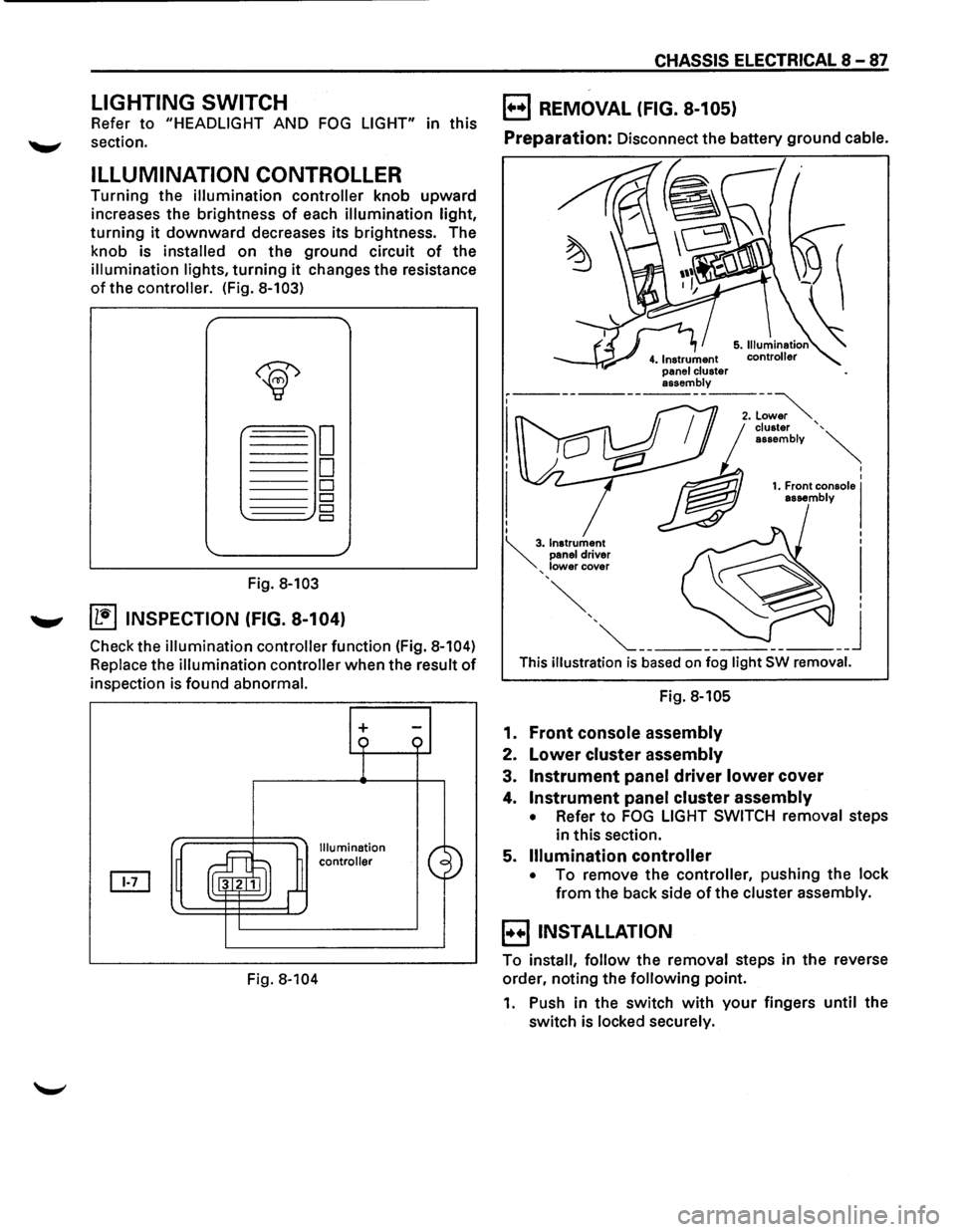
LIGHTING SWITCH
Refer to "HEADLIGHT AND FOG LIGHT" in this
~ section.
ILLUMINATION CONTROLLER
Turning the illumination controller knob upward
increases the brightness
of each illumination light,
turning it downward decreases its brightness. The
knob is
installed on the ground circuit of the
illumination lights, turning it changes the resistance
of the controller. (Fig. 8-103)
Fig. 8-103
....._., ~ INSPECTION (FIG. 8-104)
Check the illumination controller function (Fig. 8-104)
Replace the illumination controller when the result of
inspection is found abnormal.
Fig.
8-104
+
Illumination
controller
CHASSIS ELECTRICAL 8-87
B REMOVAL (FIG. 8-105)
Preparation: Disconnect the battery ground cable.
This illustration is based on fog light SW removal.
Fig. 8-105
1. Front console assembly
2. Lower cluster assembly
3. Instrument panel driver lower cover
4. Instrument panel cluster assembly
• Refer to FOG LIGHT SWITCH removal steps
in this section.
5.
Illumination controller
• To remove the controller, pushing the lock
from the back side of the cluster assembly.
B INSTALLATION
To install, follow the removal steps in the reverse
order, noting the
following point.
1. Push in the switch with your fingers until the
switch is locked securely.
Page 1278 of 1928
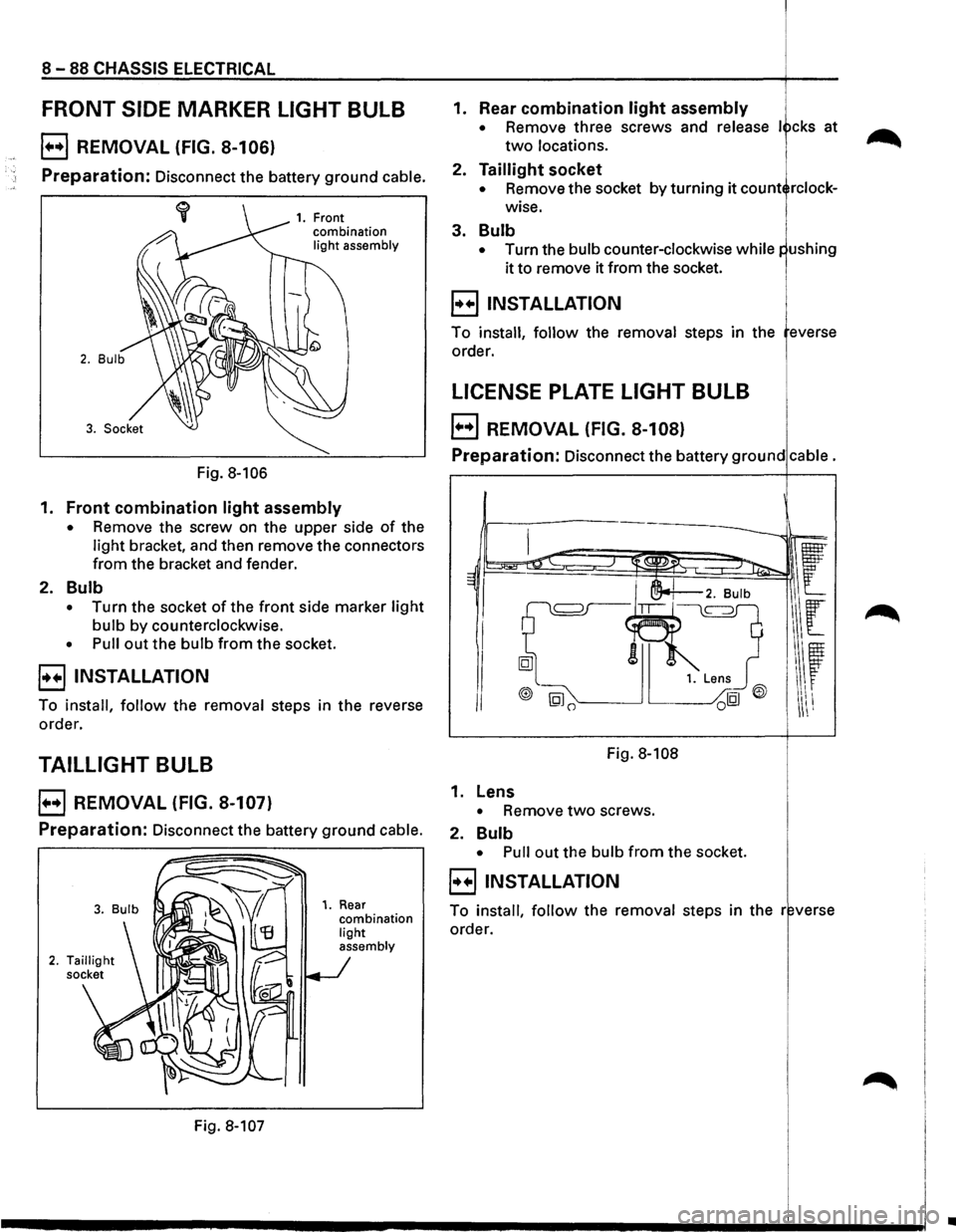
8 -88 CHASSIS ELECTRICAL
FRONT SIDE MARKER LIGHT BULB
E) REMOVAL (FIG. 8-106)
Preparation: Disconnect the battery ground cable.
Fig. 8-106
1. Front
combination
light assembly
1. Front combination light assembly
• Remove the screw on the upper side of the
light bracket, and then remove the connectors
from the bracket and fender.
2. Bulb
• Turn the socket of the front side marker light
bulb by counterclockwise.
• Pull out the bulb from the socket.
8 INSTALLATION
To install, follow the removal steps in the reverse
order.
TAILLIGHT BULB
EJ REMOVAL (FIG. 8-107)
Preparation: Disconnect the battery ground cable.
Fig. 8-107
1. Rear combination light
assembly
1. Rear combination light assembly
• Remove three screws and release I cks at
two locations.
2. Taillight socket
• Remove the socket by turning it count rclock
wise.
3. Bulb
• Turn the bulb counter-clockwise while
it to remove it from the socket.
8 INSTALLATION i
To install, follow the removal steps in the everse
order.
LICENSE PLATE LIGHT BULB 1.
E) REMOVAL (FIG. 8-108)
Preparation: Disconnect the battery ground cable.
Fig. 8-108
1. Lens
• Remove two screws.
2.
Bulb
• Pull out the bulb from the socket.
8 INSTALLATION
To install, follow the removal steps in the r verse
order.
..
Page 1279 of 1928
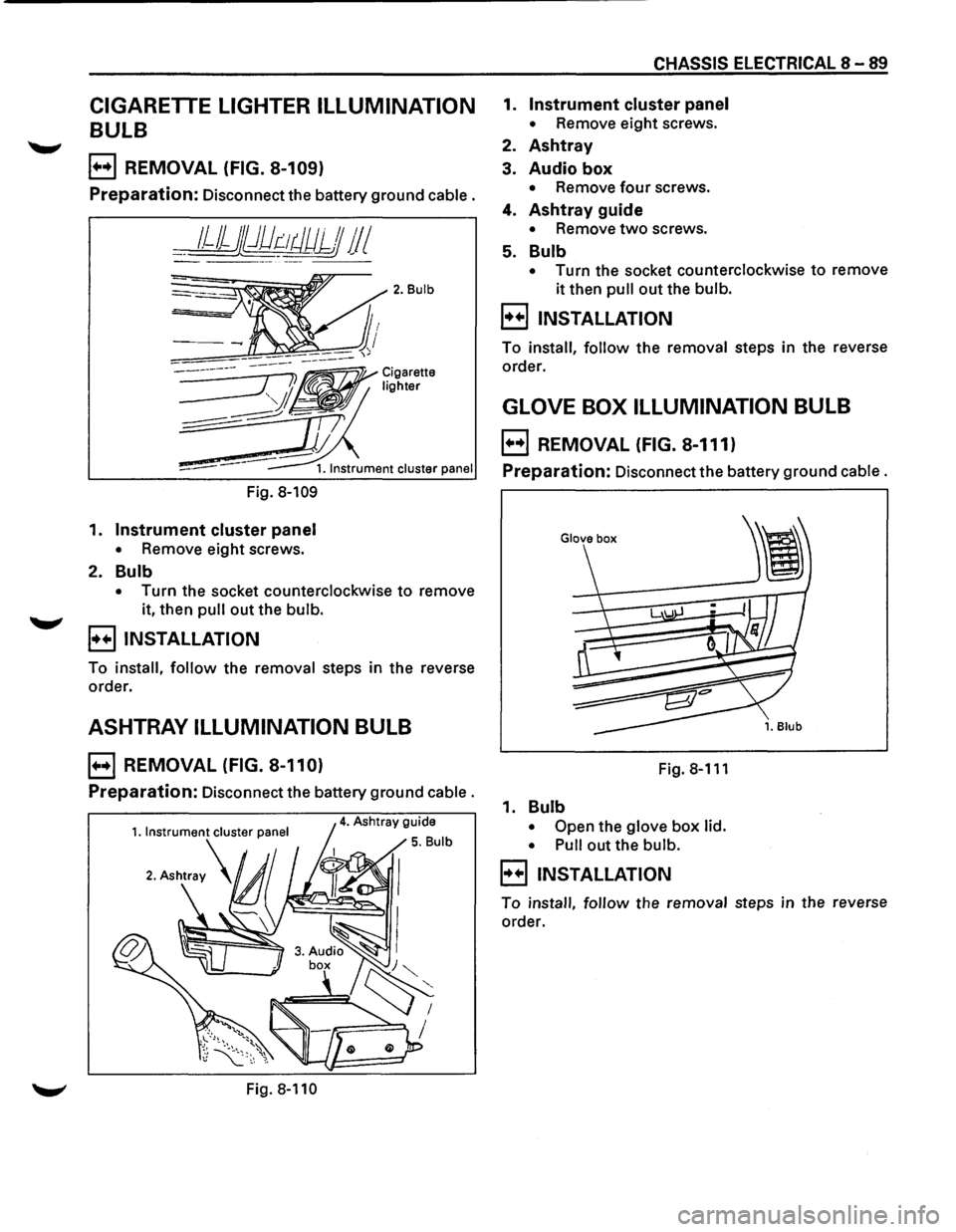
CIGARETTE LIGHTER ILLUMINATION
BULB
E) REMOVAL (FIG. 8-109)
Preparation: Disconnect the battery ground cable.
__ 1JJjj})dr:-~tJUJJJ 11 I
Fig. 8-109
1. Instrument cluster panel
• Remove eight screws.
2. Bulb
2. Bulb
• Turn the socket counterclockwise to remove
it, then
pull out the bulb.
B INSTALLATION
To install, follow the removal steps in the reverse
order.
ASHTRAY ILLUMINATION BULB
E) REMOVAL (FIG. 8-110)
Preparation: Disconnect the battery ground cable.
Fig. 8-110
CHASSIS ELECTRICAL 8-89
1. Instrument cluster panel
• Remove eight screws.
2. Ashtray
3. Audio box
• Remove four screws.
4. Ashtray guide
• Remove two screws.
5. Bulb
• Turn the socket counterclockwise to remove
it then pull out the bulb.
B INSTALLATION
To install, follow the removal steps in the reverse
order.
GLOVE BOX ILLUMINATION BULB
E) REMOVAL (FIG. 8-111)
Preparation: Disconnect the battery ground cable.
Fig.8-111
1. Bulb
• Open the glove box lid.
• Pull
out the bulb.
B INSTALLATION
To install, follow the removal steps in the reverse
order.
Page 1280 of 1928
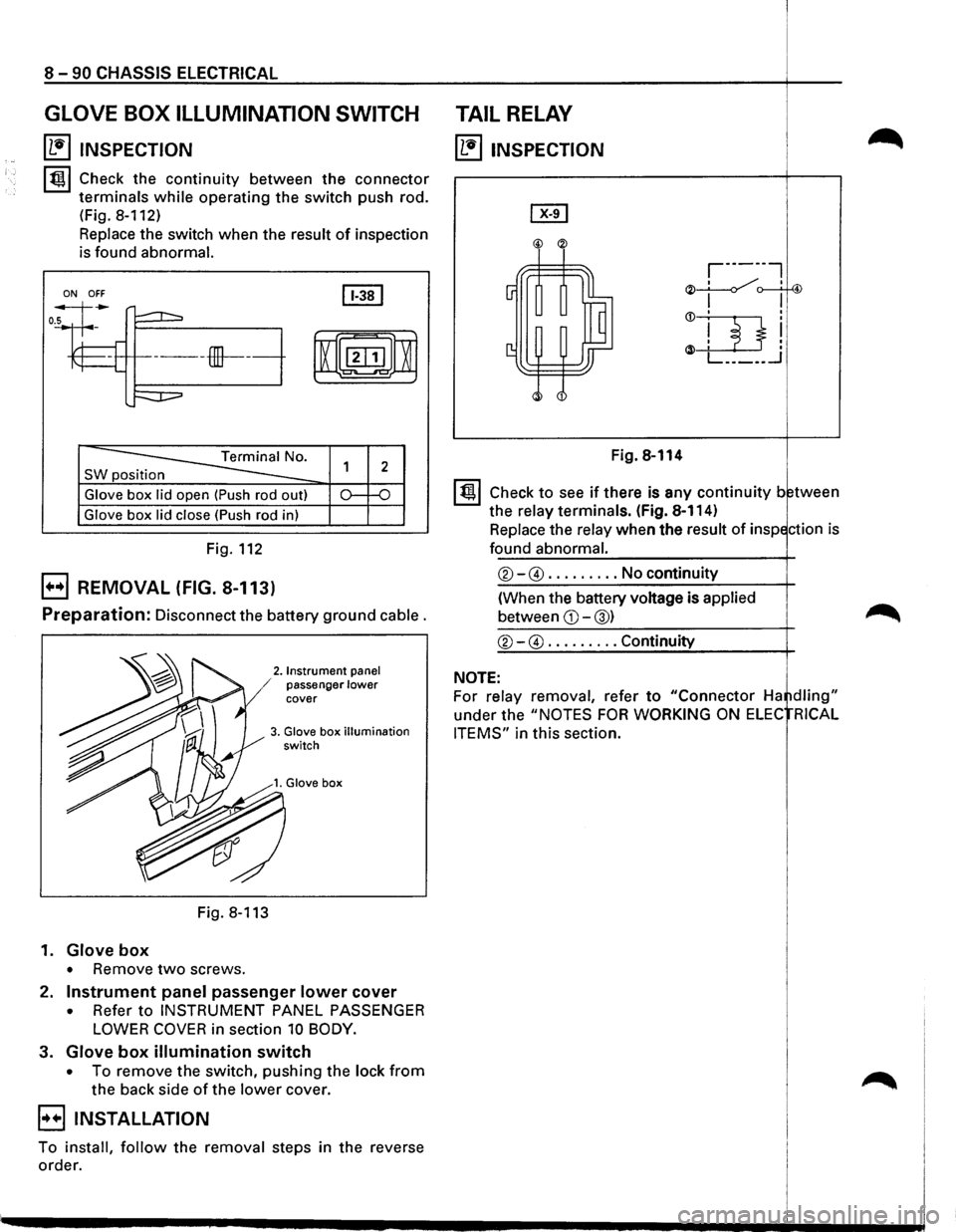
8 -90 CHASSIS ELECTRICAL
GLOVE BOX ILLUMINATION SWITCH
~ INSPECTION
lt!ll Check the continuity between the connector
terminals
while operating the switch push rod.
(Fig.
8-112)
Replace the switch when the result of inspection
is found
abnormal.
ON OFF
SW position
Glove box lid open (Push rod out)
Glove box lid close (Push rod in)
Fig. 112
EJ REMOVAL (FIG. 8-113)
Preparation: Disconnect the battery ground cable.
2. Instrument panel / passenger lower cover
3. Glove box illumination switch
Fig. 8-113
1.
Glove box
• Remove two screws.
2.
Instrument panel passenger lower cover
• Refer to INSTRUMENT PANEL PASSENGER
LOWER COVER in section 10 BODY.
3. Glove box illumination switch
• To remove the switch, pushing the lock from
the back side of the lower cover.
EIINSTALLATION
To install, follow the removal steps in the reverse
order.
TAIL RELAY
~ INSPECTION
Fig. 8-114
I t!ll Check to see if there is any continuity between
the
relay terminals. (Fig. 8-114)
Replace the
relay when the result of inspection is
found abnormal.
®-@ ......... No continuity
(When the battery voltage is
applied
between CD-@) ~
®-@ ......... Continuity
NOTE:
For relay removal, refer to "Connector Ha ~dling"
under the "NOTES FOR WORKING ON ELEC RICAL
ITEMS"
in this section.
Page 1284 of 1928
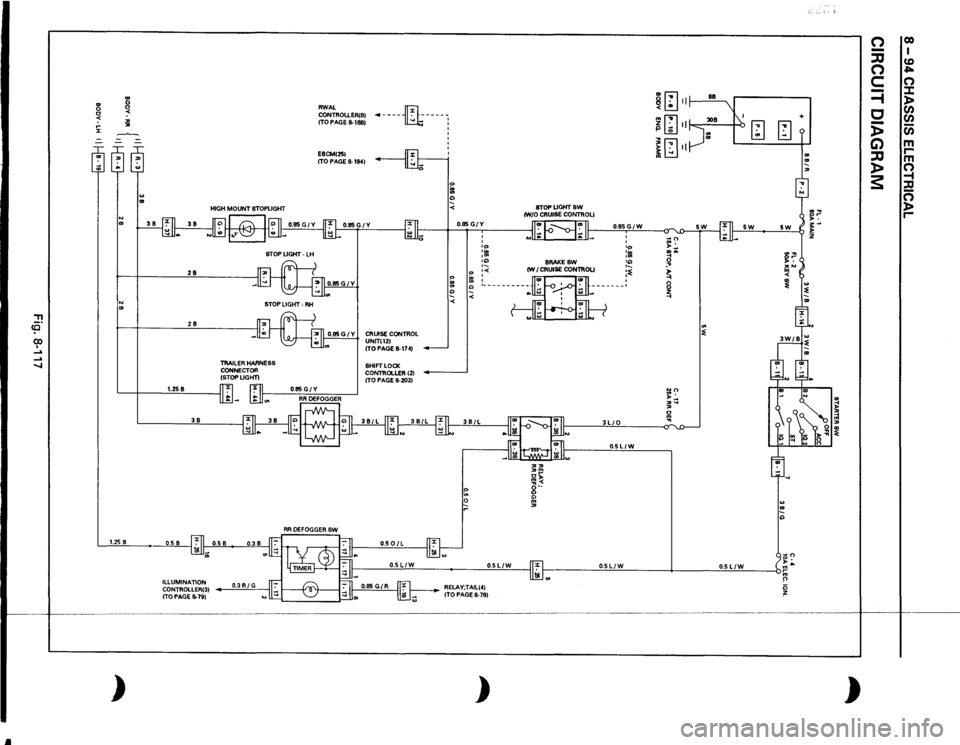
Jl
::!! co (X) I .....
..... ....,
l'l ~ .... J::
.. .. .. .. l'l ~ ~
28 28
STOP LIGHT •
LH
STOP
LIGHT·
RH
TRAILER HARNESS
CONNECTOR
(STOPLIGHT)
RWAL CONTROU.ER(B)
(TO PAGE 8-188)
·-----m:----1
E8CM(25)
(TO
PAGE
8-194)
0.85 G I y I CRUISE CONTROL
UNIT(12) ITO PAGE
8-174)
SHIFT LOCK
CONTROLLER 121
(TO
PAGE
8-202)
0
I
I
1.258
~~~~
r:u
0~~:~------
I
·-
38
1.25
8
0.5 8
0.501L
0.85
GIY :;: 0
I ' IO ... , .. '" ·-
0
•<
~
:
" <
STOPUGHTSW (W/0
CRUISE CONTROL) II
I
I II
8RAKESW
(WI
CRUISE CONTROL) ,, :»m or;;: Ill< o·· " " m ,
I
1-11
0.85GIW 3LIO
'
' •o :m :~ :~
0.5LIW
8
.
ill
-
.. m < .. mm ~ liJ
Ill <::::
-w
I b
[;Jm
I[;Jn ~ § .., :::
5W
"' ~
.. " ..,
II
0.5LIW
•
0.5LIW
11'."1
0.5LIW
I
0.5L/W
b •
Ill -
)
ILLUMINATION CONTROLLER(3) (TO PAGE 8-79)
0.3RIG
RELAY;TAIL(4)
(TO
PAGE 8-78)
)
+ .. .. ,
)
0 -:::0 0 c =i c i> G) :::0 )> s:
00 I CD ""' 0 :I: )> CJ)
CJ) (i) m rm 0 -i :c 0 )> r-
Page 1291 of 1928
STARTER SWITCH
Refer to "START AND CHARGING" in this section.
'-' STOPLIGHT SWITCH (FOR VEHICLES
W/0 CRUISE CONTROL)
~ INSPECTION
1. Check to see if the stoplight switch is installed
correctly
to the specified position. Adjust the
position when the result
of the inspection is
found abnormal.
·
2. Check to see if there is any continuity between
the terminals
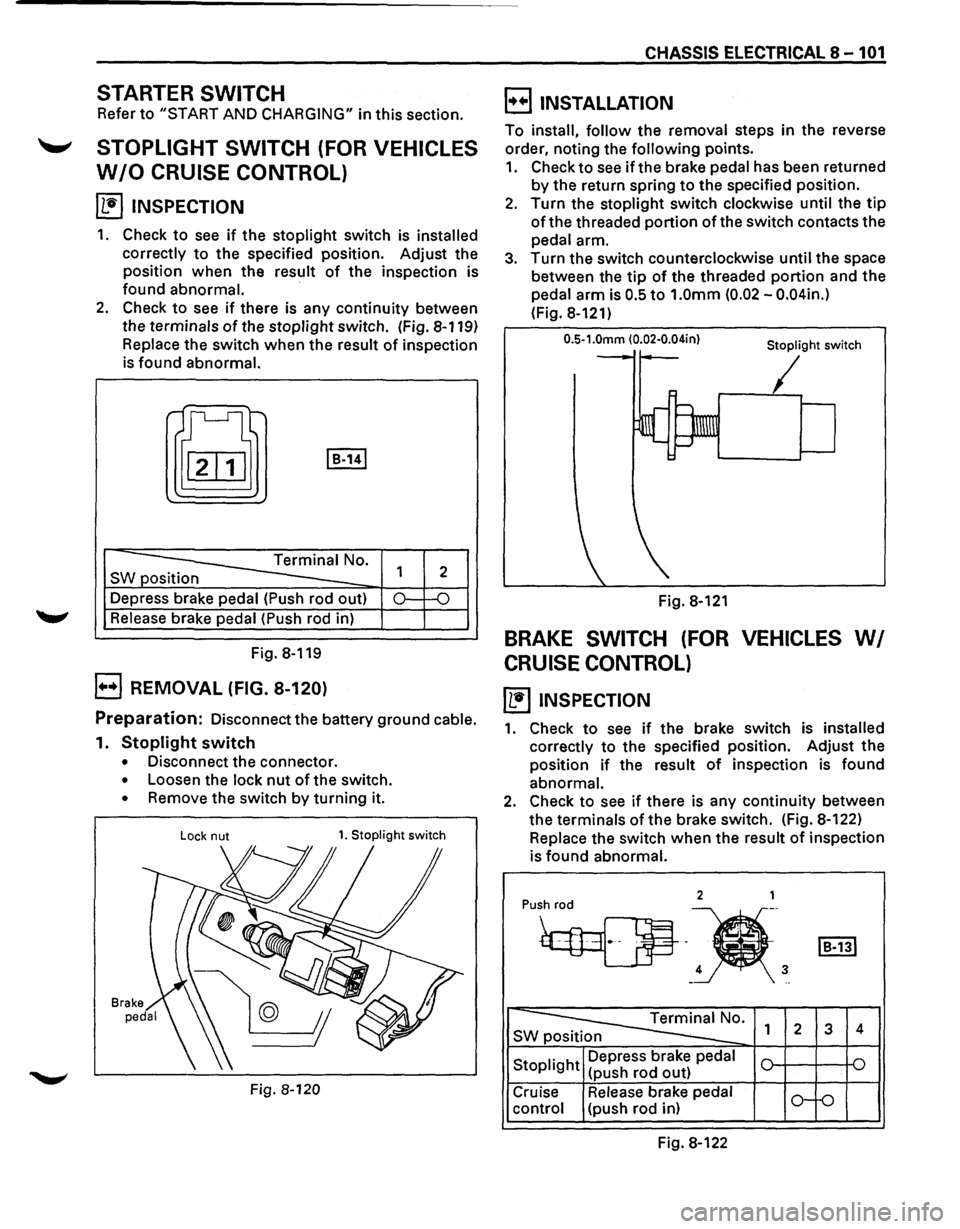
of the stoplight switch. (Fig. 8-119)
Replace the switch when the result of inspection
is found abnormal.
t[J I B-141
-----==== Terminal No.
SW position
--Depress brake pedal (Push rod out)
Release brake pedal (Push rod in)
Fig. 8-119
B REMOVAL (FIG. 8-120)
1
2
0.: -o
Preparation: Disconnect the battery ground cable.
1. Stoplight switch
• Disconnect the connector.
• Loosen the lock nut of the switch.
• Remove the switch by turning it.
Lock nut 1. Stoplight switch
Fig. 8-120
CHASSIS ELECTRICAL 8-101
B INSTALLATION
To install, follow the removal steps in the reverse
order, noting the
following points.
1. Check to see if the brake pedal has been returned
by the return spring to the specified position.
2. Turn the stoplight switch clockwise until the tip
of the threaded portion of the switch contacts the
pedal arm.
3. Turn the switch counterclockwise until the space
between the
tip of the threaded portion and the
pedal arm is
0.5 to 1.0mm (0.02 -0.04in.)
(Fig. 8-121)
0.5-1.0mm (0.02·0.04in} Stoplight switch
Fig. 8-121
BRAKE SWITCH (FOR VEHICLES WI
CRUISE CONTROL)
~ INSPECTION
1. Check to see if the brake switch is installed
correctly
to the specified position. Adjust the
position
if the result of inspection is found
abnormal.
2. Check to see if there is any continuity between
the terminals
of the brake switch. (Fig. 8-122)
Replace the switch
when the result of inspection
is
found abnormal.
2 1
Pu•h
4 3 -..
~0. SWp 1 2 3 4
Stoplight Depress
brake pedal
(push rod out)
Cruise Release brake pedal
o-f-o control (push rod in)
Fig. 8-122