lock ISUZU TROOPER 1995 Workshop Manual
[x] Cancel search | Manufacturer: ISUZU, Model Year: 1995, Model line: TROOPER, Model: ISUZU TROOPER 1995Pages: 1928
Page 1368 of 1928
8 -178 CHASSIS ELECTRICAL
ANTI-LOCK BRAKE SYSTEM (ABS)
GENERAL DESCRIPTION
The circuit consists of the starter switch, stoplight switch (vehicle w/o cruise control), brake switch (vehicle
with cruise control), hydraulic unit, electronic brake control module, wheel speed sensor, G sensor, ABS and
4WD indicator, 4WD switch and data link connector.
When the service brake is applied while in the running mode,
the EBCM (Electronic Brake Control Module)
judges
which wheel is about to lock by using the wheel rotation speed signals sent from the four ABS speed
sensors at the
front and rear wheels. And the brake fluid pressure applied to the four wheels is controlled by
a hydraulic unit to prevent the wheels from locking.
Based on the wheel rotation speed signals
input from the ABS sensor, the EBCM sends out signals to the
solenoid valve in the hydraulic unit
to increase, maintain or decrease the brake fluid pressure. The solenoid
valve uses this signal
to control the fluid pressure which is applied to the calipers of the disk brakes of the
front wheels. (The system also controls at the same time the fluid pressure applied to the rear wheels.)
• EBCM (Electronic brake control module)
The EBCM uses the signals sent from the speed sensor to control the operation of the hydraulic unit.
When any malfunction occurs in the ABS, the
EBCM activates the fail-safe fuction while turning on the
ABS warning light.
• Hydraulic unit
The hydraulic unit consists of the motor, plunger pump, solenoid valve, and fluid pressure control
valves. The exterior
of the unit has a relay box consisting of the motor relay and valve relay. Three
solenoid valves, the
two of which are provided at the front wheels and the one at the rear wheels, control
the fluid pressure
of these wheels.
• Speed sensor
The speed sensor consists of the sensor and the rotor. It sends the EBCM the AC voltage generated by
the rotation of the rotor as the vehicle speed signal. ~
• G-sensor
The G-sensor, installed inside the center console, sends out signals to the EBCM by detecting the
decelerating speed
of the vehicle.
• ABS warning light
The ABS warning light in the instrument panel, lights up when any malfunction occurs in the ABS. It also
lights up
with the starter key at the "ON" position, as a self-check.
Refer
to Section 5A4, "ANTI-LOCK BRAKE SYSTEM" for detail.
II
Page 1375 of 1928
CHASSIS ELECTRICAL 8-185
REAR WHEEL ANTI-LOCK BRAKE SYSTEM (RWAL)
GENERAL DESCRIPTION
The circuit consists of the starter switch, stoplight switch (vehicle w/o cruise control), brake switch (vehicle
w/cruise control). RWAL controller, RWAL speed sensor, RWAL valve, brake differential switch, 4WD switch,
parking brake
SW, indicator light (RWAL, 4WD, BRAKE), and test connector.
In this system, when the service brake is applied the RWAL controller judges the wheel rotation difference
signals which have been sent from the RWAL speed sensor at the rear axle differential. The anti-lock valves
control
the brake fluid pressure which is applied to the rear wheels to prevent the wheels from locking.
When starting the engine, the RWAL indicator in the instrument panel lights up at the same time as the brake
indicator
to inform the driver that the system is operating normally. (The light goes off after two seconds.)
Refer
to Section 5A3, "RWAL (REAR WHEEL ANTI-LOCK BRAKE SYSTEM)" for detail.
Page 1382 of 1928
8-192 CHASSIS ELECTRICAL
TRANSMISSION CONTROL MODULE (TCM)
GENERAL DESCRIPTION
The circuit consists of the starter switch, TCM, mode switch, brake switch, speed sensor, kick down switch,
Power and
Winter switches, Throttle Position (TP) sensor, Engine Control Module (ECM), barometer sensor,
adapter case, main case,
warning light (CHECK TRANS, NT OIL TEMP) and indicator light (WINTER DRIVE,
POWER DRIVE).
The TCM, based on the predetermined shifting characteristics and lockup operating valve, provides the
optimum shifting control to the varying vehicle running condition. The following input signals are sent to the
TCM: select lever position from the mode switch, running mode from the POWER & WINTER switches,
throttle opening from the TP sensor, vehicle speed from the vehicle speed sensor and engine speed from the
ECM are sent to the TCM. After receiving these signals, the TCM determines the vehicle running condition,
and
it sends output signals to each solenoid to control shifting.
When the
TCC solenoid is engaged, the lockup mechanism operates.
The shift
solenoid 2.3 and 1.2/3.4 selects the shift gear position.
The force
motor controls the line pressure to improve shifting.
Also, when the TCM detects an abnormal signal from the transmission or sensor, it will cause the "CHECK
TRANS"
light on the warning box to flash in order to inform the driver of the malfunction.
Refer to section 7 A "AUTOMATIC TRANSMISSION" for details.
•
Page 1390 of 1928
8 -200 CHASSIS ELECTRIC'Al
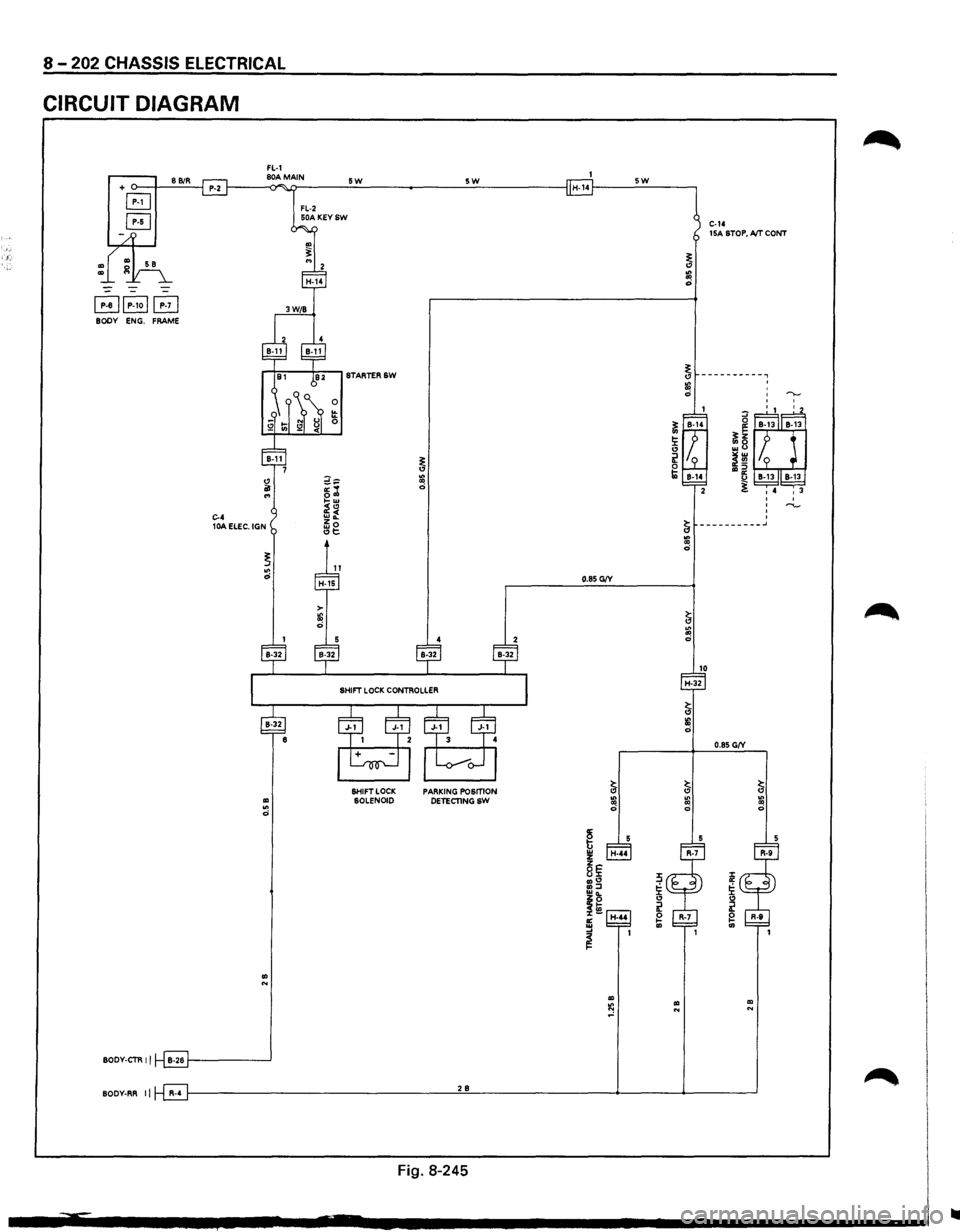
A/T SHIFT LOCK
GENERAL DESCRIPTION
This circuit consists of the starter switch, stoplight switch (vehicle w/o cruise control), brake switch (vehicle
w/cruise control),
shift lock controller, stoplight, backup light and mode switch.
The shift lock system is designed not
to allow the shift lever to be shifted from the "P" position to any other
position
without depressing the brake pedal while the starter switch is turned on.
The solenoid pin at the
lower portion of the shift lever retracts when the brake pedal is not depressed, thus
causing the shift lever cam
to be locked by the link lever.
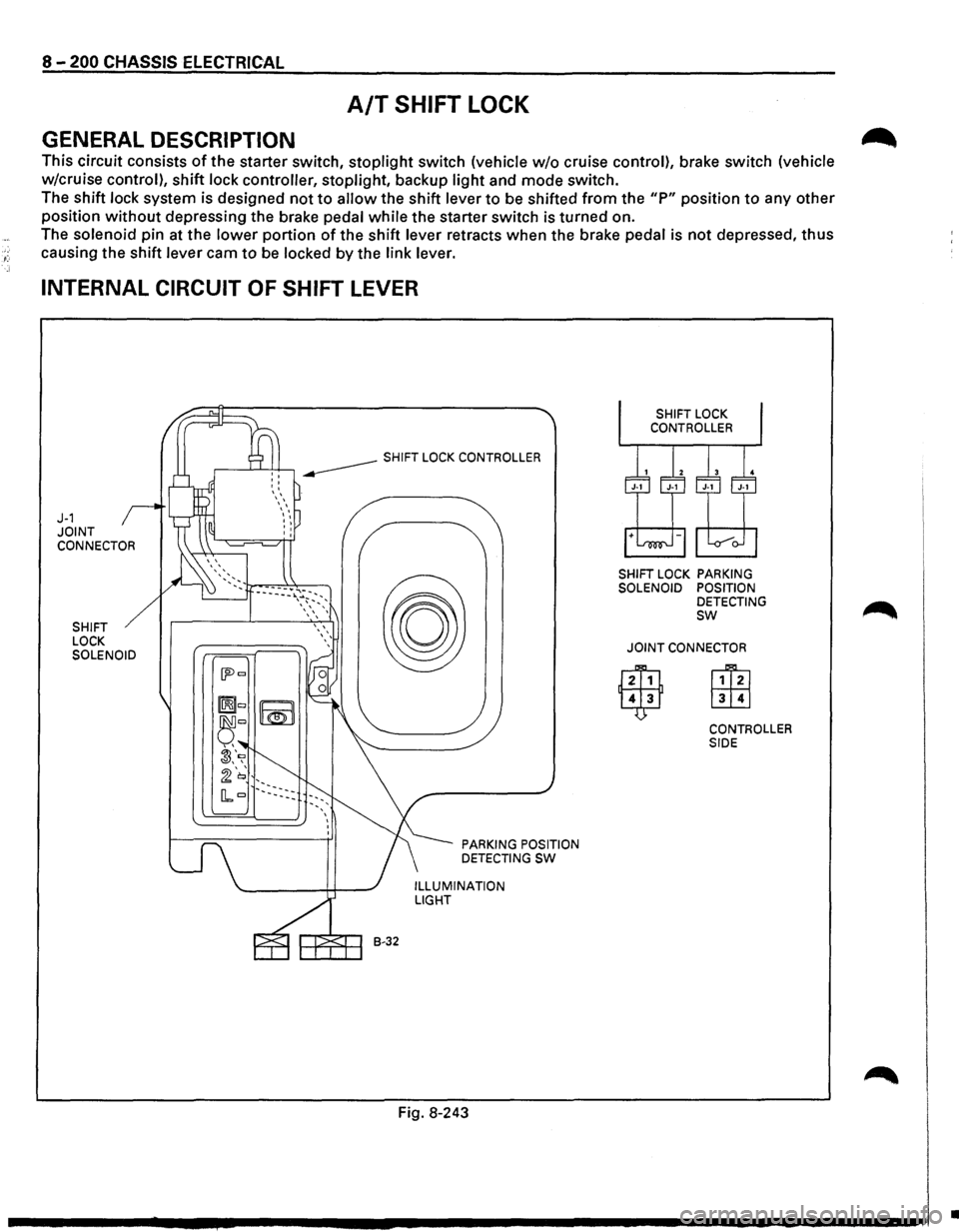
INTERNAL CIRCUIT OF SHIFT LEVER
J-1 JOINT CONNECTOR
SHIFT
LOCK
SOLENOID
B-32
PARKING POSITION
DETECTING SW
ILLUMINATION LIGHT
Fig. 8-243
SHIFT LOCK PARKING
SOLENOID POSITION
DETECTING
sw
JOINT CONNECTOR
CONTROLLER
SIDE
•
Page 1391 of 1928

"T1 ce· 00 I N ~ ~
(
BRAKE
SW
(W/CRUISE
CONTROL)
STOPLIGHT
SW
(W/0
CRUISE CONTROL)
SHIFT
LEVER
" ""'
SHIFT
LOCK
CONTROLLER
""''
RELAY
& FUSE
BOX
(FL-1,
FL-2)
(
STARTERSW
BRAKE
PEDAL
STOP
LIGHT
(LH)
\R-7 "-TRAILER
HARNESS
CONNECTOR
(H-44)
(
;g ~ r-0 0 ~ 5 z
0 :J: ~ en u; m rm ~ :a g reo I N 0 ....
Page 1392 of 1928
<(
8 -202 CHASSIS ELECTRICAL
CIRCUIT DIAGRAM
FL-1 + o--t---'8'-'Bi::.:R-'--j P-2 f-----<80)"A~M>i.ATIN ___ _;_5..::W:.__ ______ :.__5:_:W:;_ _____ --I H-14f----_:5_:W:.._ __ ---,
B
B
~~P-1oj~ BODY ENG. FRAME
.. .. 0
.. N
BODY-CTR II B-26 1-------'
FL-2 50A KEYSW
0 !!: 0
SHIFT LOCK SOLENOID PARKING POSmON
DETECTINGSW
C-14 15A STOP, A/T CONT
BODY-RR II R-4 f---------------------'2'-'B'------------4-----4------'
Fig. 8-245
..
Page 1394 of 1928
·;.
8 -204 CHASSIS ELECTRICAL
STARTER SWITCH
Refer to "START AND CHARGING" in this section.
STOPLIGHT
STOPLIGHT SWITCH
BRAKE SWITCH
Refer to "STOPLIGHT AND REAR DEFOGGER" in
,c, this section.
SHIFT LOCK CONTROLLER
Refer to the shift lock controller in Section 7 A
"AUTOMATIC TRANSMISSION."
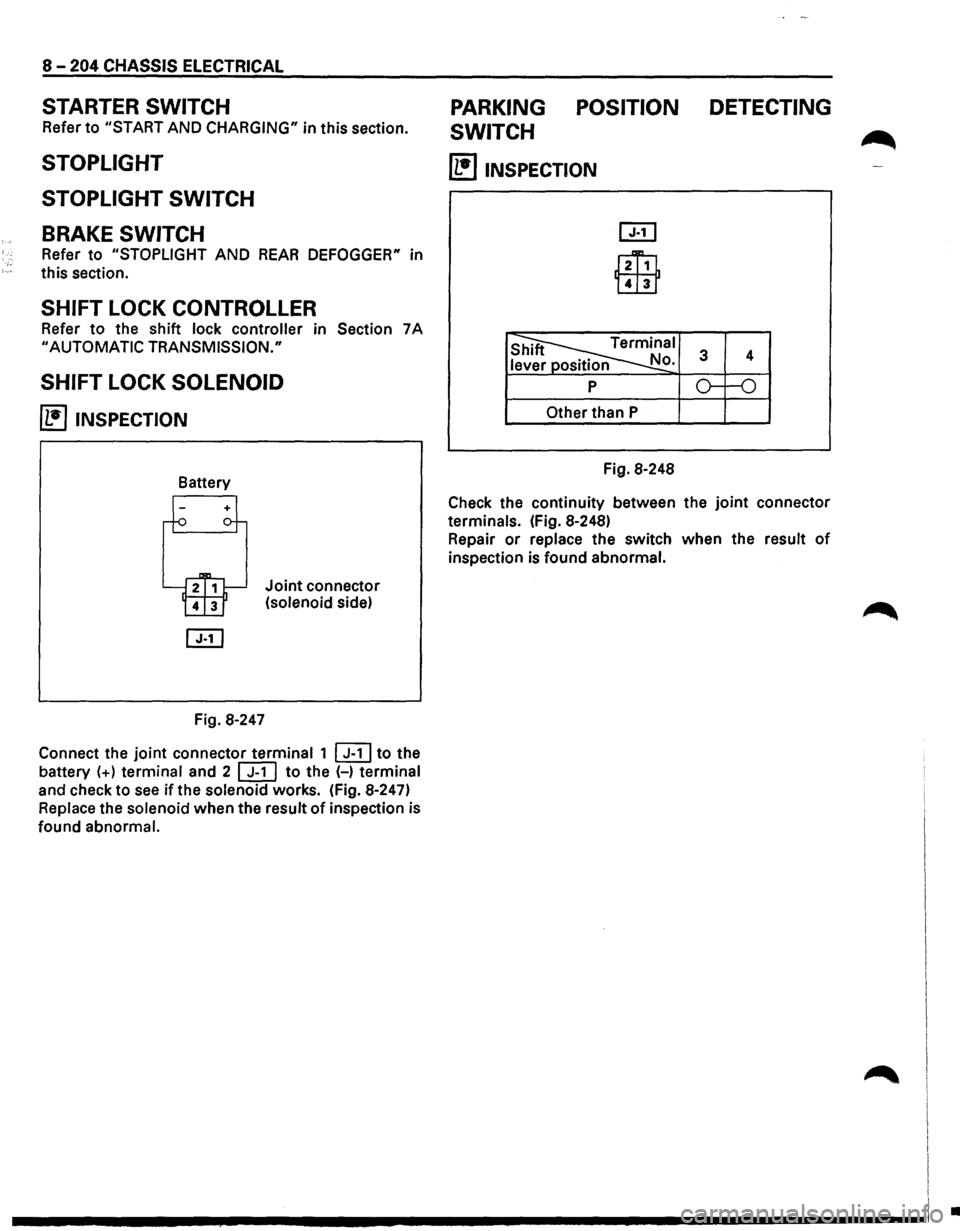
SHIFT LOCK SOLENOID
~ INSPECTION
Fig. 8-247
Joint connector
(solenoid side)
Connect the
joint connector terminal 1 ~to the
battery
(+) terminal and 2 [ill to the (-) terminal
and check to
see if the solenoid works. (Fig. 8-247)
Replace the solenoid when the result
of inspection is
found abnormal.
PARKING POSITION DETECTING
SWITCH
~
(1!]1NSPECTION
l2Ti1
Lill1
Other than P
Fig. 8-248
Check the continuity between the
joint connector
terminals. (Fig. 8-248)
Repair
or replace the switch when the result of
inspection is found abnormal.
I
I I
.............. ~ ................................ -----------------1 .
Page 1417 of 1928
![ISUZU TROOPER 1995 Workshop Manual ~ INSPECTION
I 4131 2 1 i~~j
l~ 101918 71615 jJ [ill]
~
s 6 7 8 2 3 s position
CD
OFF
~ ON o-~
...... ~ ~ ...... OFF
CD ~ ON o-~
Fig. 8-263
Check
the continuity between the connector
te](/img/61/57183/w960_57183-1416.png "ISUZU TROOPER 1995 Workshop Manual ~ INSPECTION
I 4131 2 1 i~~j
l~ 101918 71615 jJ [ill]
~
s 6 7 8 2 3 s position
CD
OFF
~ ON o-~
...... ~ ~ ...... OFF
CD ~ ON o-~
Fig. 8-263
Check
the continuity between the connector
te")
~ INSPECTION
I 4131 2 1 i~~j
l~ 101918 71615 jJ [ill]
~
s 6 7 8 2 3 s position
CD
OFF
~ ON o-~
...... ~ ~ ...... OFF
CD ~ ON o-~
Fig. 8-263
Check
the continuity between the connector
terminals of the switch. (Fig. 8-263)
Repair
or replace the switch when the result of
inspection is found abnormal.
E) REMOVAL (FIG. 8-264)
Preparation: Disconnect the battery ground cable.
This illustration is based on rear defogger SW removal.
Fig. 8-264
'-"' 1. Front console assembly
2. lower cluster assembly
3. Instrument panel driver lower cover
4. Instrument panel cluster assembly
CHASSIS ELECTRICAL 8-227
o Refer to FOG LIGHT SWITCH removal steps in
this section.
5. Rear wiper & washer switch
• To remove the switch, pushing the lock from
the back side of the cluster assembly.
B INSTALLATION
To install, follow the removal steps in the reverse
order, noting the
following point.
1. Push the switch with your fingers until it locks
securely.
REAR WIPER MOTOR
~ INSPECTION
Fig. 8-265
With the battery
(+)terminal connected to the wiper
motor connector termina12l G-6 land the H terminal
to the connector 41 G-6 I, check to see if the motor
rotates. (Fig. 8-265)
Repair
or replace the motor when the result of
inspection is found abnormal.
E) REMOVAL (FIG. 8-266)
Preparation: Disconnect the battery ground cable.
-,
Fig. 8-266
Page 1420 of 1928
8-230 CHASSIS ELECTRICAL
-~ ~-
20 mm 10.79 in)
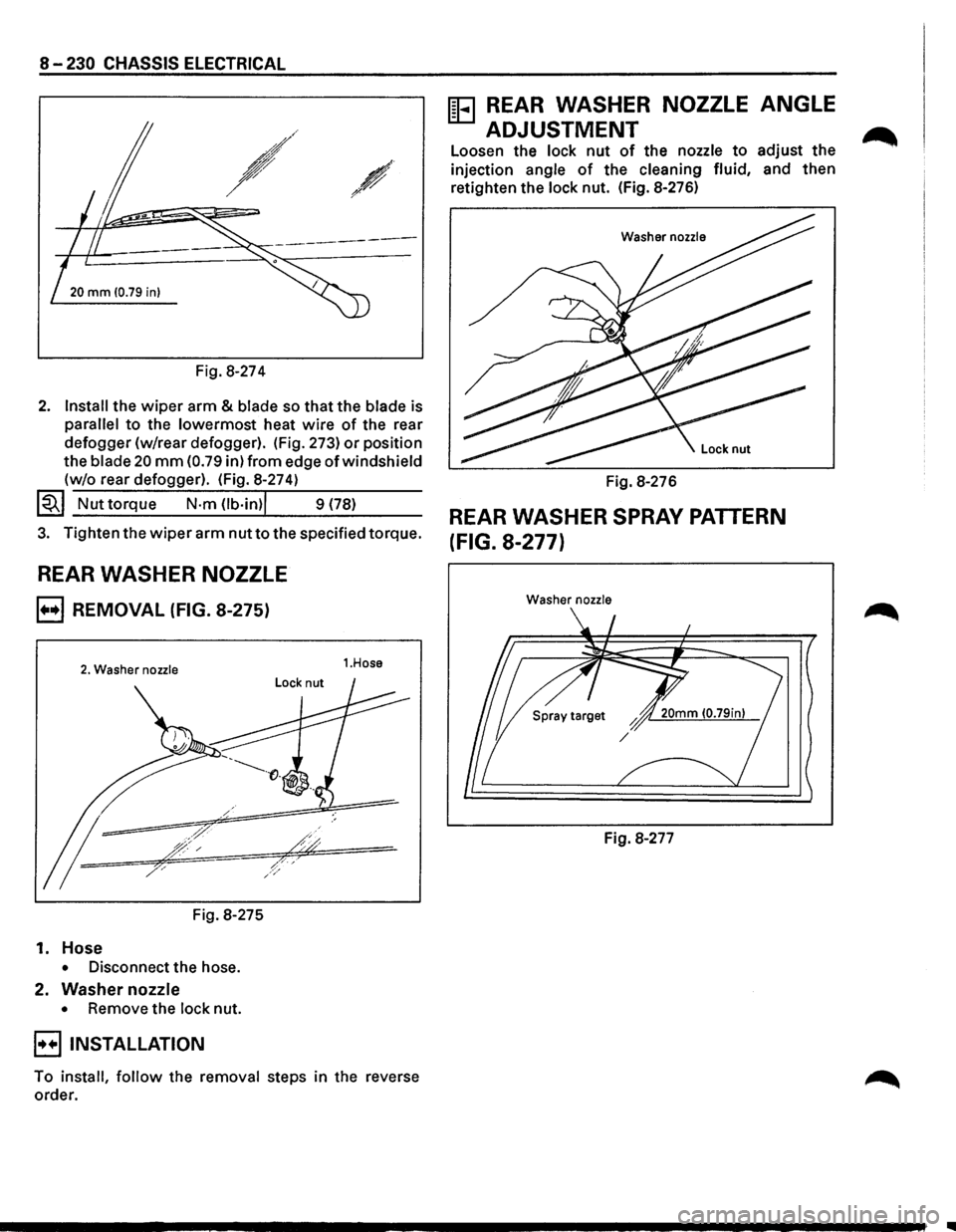
Fig. 8-274
2. Install the wiper arm & blade so that the blade is
parallel to the lowermost heat wire of the rear
defogger (w/rear defogger). (Fig. 273)
or position
the
blade 20 mm (0.79 in) from edge of windshield
(w/o rear defogger). (Fig. 8-274)
~~~ Nut torque N·m Ob·in)l 9 (78)
3. Tighten the wiper arm nut to the specified torque.
REAR WASHER NOZZLE
B REMOVAL (FIG. 8-275)
2. Washer nozzle
Fig. 8-275
1. Hose
• Disconnect the hose.
2. Washer nozzle
• Remove the lock nut.
B INSTALLATION
1.Hose
To install, follow the removal steps in the reverse
order.
ffi3 REAR WASHER NOZZLE ANGLE
ADJUSTMENT
Loosen the lock nut of the nozzle to adjust the
injection angle of the cleaning fluid, and then
retighten the lock nut. (Fig. 8-276)
Washer nozzle
Fig. 8-276
REAR WASHER SPRAY PATTERN
(FIG. 8-277)
Washer nozzle
Fig. 8-277
..
Page 1421 of 1928
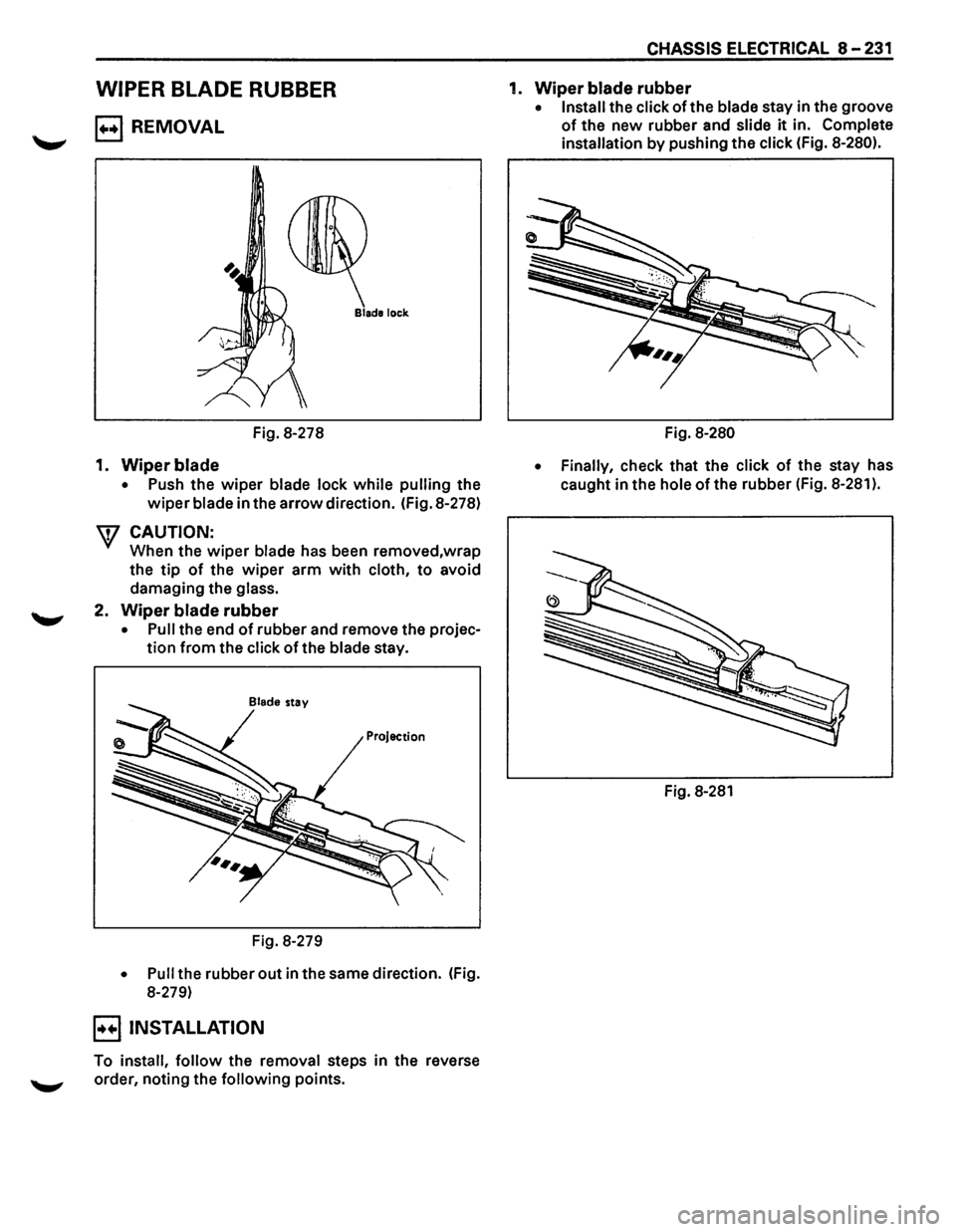
WIPER BLADE RUBBER
B REMOVAL
Fig. 8-278
1. Wiper blade
• Push the wiper blade lock while pulling the
wiper blade in the arrow direction. (Fig. 8-278)
W CAUTION:
When the wiper blade has been removed,wrap
the
tip of the wiper arm with cloth, to avoid
damaging the
glass.
2. Wiper blade rubber
• Pull the end of rubber and remove the projec
tion from the click of the blade stay.
Blade stay
Projection
Fig. 8-279
• Pull the rubber out in the same direction. (Fig.
8-279)
B INSTALLATION
To install, follow the removal steps in the reverse
'--"' order, noting the following points.
CHASSIS ELECTRICAL 8-231
1. Wiper blade rubber
• Install the click of the blade stay in the groove
of the new rubber and slide it in. Complete
installation by pushing the click (Fig. 8-280).
Fig. 8-280
• Finally,
check that the click of the stay has
caught in the
hole of the rubber (Fig. 8-281 ).
Fig. 8-281