heater ISUZU TROOPER 1995 Manual PDF
[x] Cancel search | Manufacturer: ISUZU, Model Year: 1995, Model line: TROOPER, Model: ISUZU TROOPER 1995Pages: 1928
Page 1568 of 1928
8-378 CHASSIS ELECTRICAL
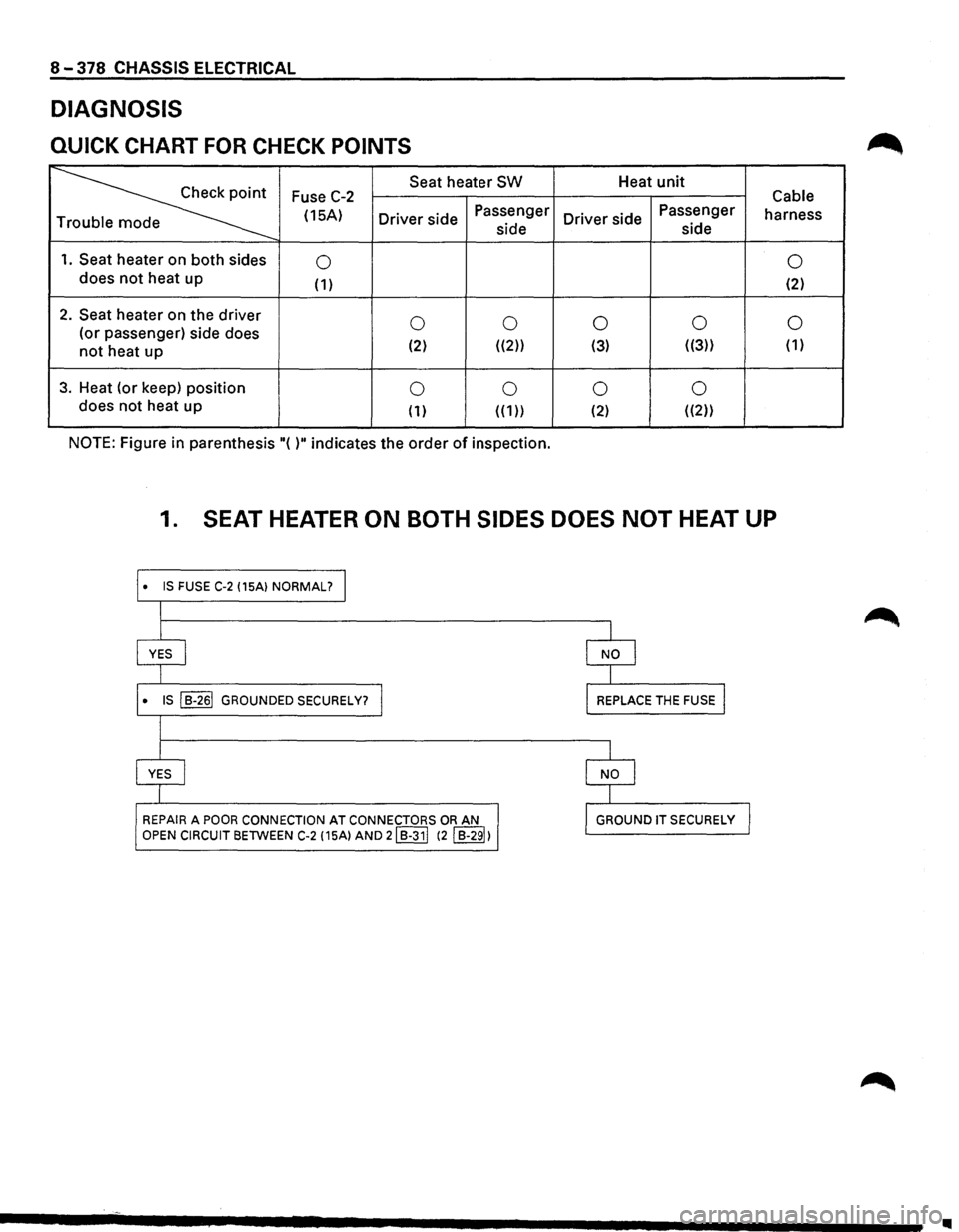
DIAGNOSIS
QUICK CHART FOR CHECK POINTS
~
Seat heater SW Heat unit Fuse C-2 Cable
(15A)
Driver side Passenger
Driver side Passenger
harness
e side side
1. Seat heater
on both sides 0 0 does not heat
up (1) (2)
2. Seat heater on the driver 0 0 0 0 0 (or
passenger) side does
not heat up (2) ((2)) (3) ((3))
( 1)
3. Heat (or keep) position 0 0 0 0 does
not heat up
( 1) ( ( 1)) (2) ((2))
NOTE: Figure in parenthesis "( )" indicates the order of inspection.
1. SEAT HEATER ON BOTH SIDES DOES NOT HEAT UP
• IS FUSE C-2 (15A) NORMAL? I
I
I
YES I
l
• IS ~ GROUNDED SECURELY? I
l
l
YES I
I
REPAIR A POOR CONNECTION AT CONNECTORS OR AN
OPEN CIRCUIT BETWEEN C-2 (15A) AND 21 B-311 (2 I B-291)
I
I NO I
I
l REPLACE THE FUSE I
I
I NO I
I
l GROUND IT SECURELY J
Page 1569 of 1928
CHASSIS ELECTRICAL 8-379
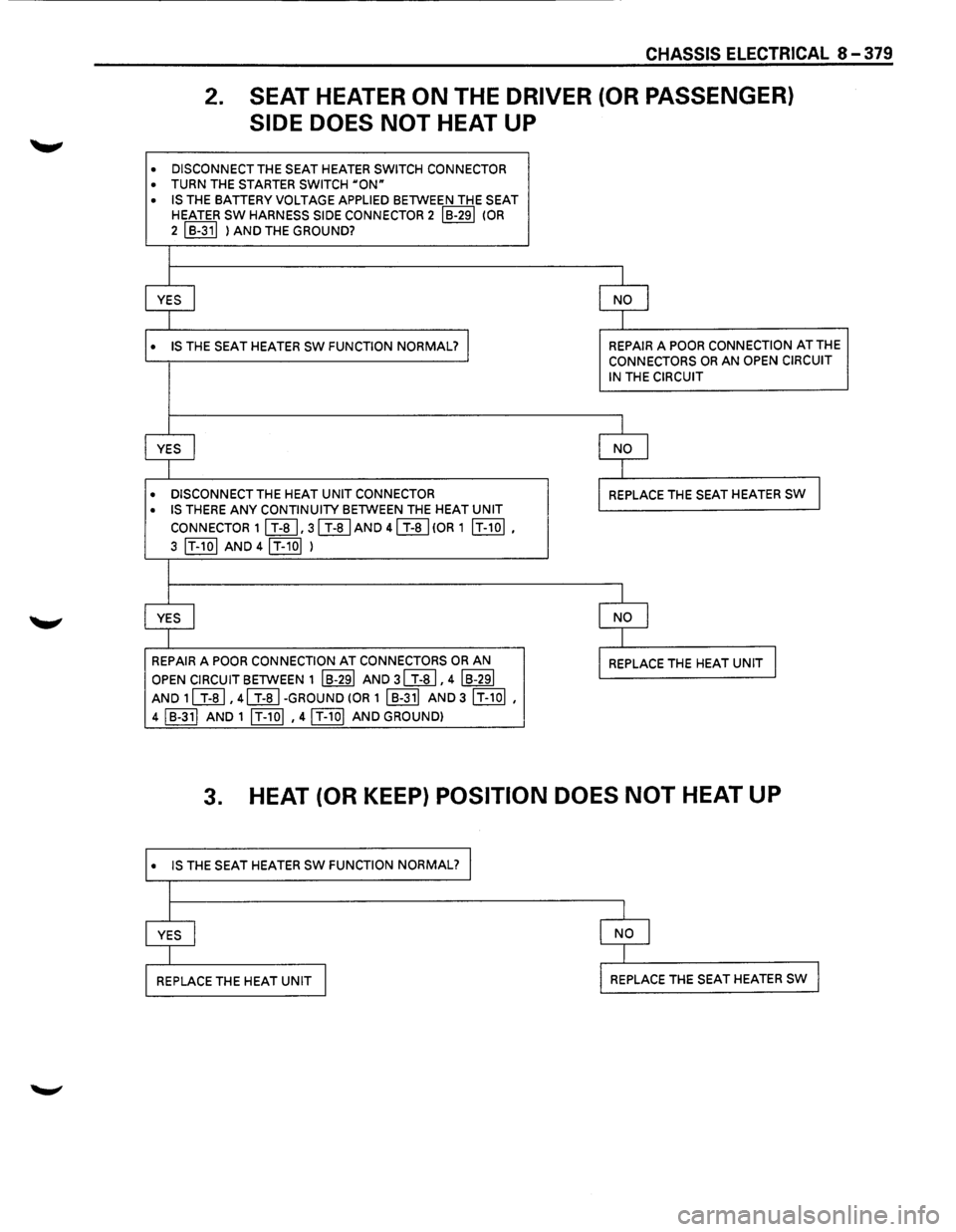
2. SEAT HEATER ON THE DRIVER (OR PASSENGER)
SIDE DOES NOT HEAT UP
• DISCONNECT THE SEAT HEATER SWITCH CONNECTOR
• TURN THE STARTER SWITCH uoN"
• IS THE BATTERY VOLTAGE APPLIED BETWEEN THE SEAT HEATER SW HARNESS SIDE CONNECTOR 2 IB-291 (OR
2 I B-311 ) AND THE GROUND?
I
YES
I NO I
1
• IS THE SEAT HEATER sw FUNCTION NORMAL? I REPAIR A POOR CONNECTION AT THE CONNECTORS OR AN OPEN CIRCUIT
IN
THE CIRCUIT
I
YES
I NO l
I
• DISCONNECT THE HEAT UNIT CONNECTOR REPLACE THE SEAT HEATER SW I
• IS THERE ANY CONTINUITY BETWEEN THE HEAT UNIT
CONNECTOR 11 T-a I. 31 T-al AND 41 T-ai(OR 1 IT-101.
3 IT-101 AND 4IT-10I )
l
YES I NO l
I
REPAIR
A POOR CONNECTION AT CONNECTORS OR AN REPLACE THE HEAT UNIT l
OPEN CIRCUIT BETWEEN 1 IB-291 AND 31 T-al. 4 IB-291
AND 1l T-al. 41 T-al-GROUND (OR 1 I B-311 AND 3 IT-1ol •
4 I B-311 AND 1 IT-101 • 41 T-101 AND GROUND)
3. HEAT (OR KEEP) POSITION DOES NOT HEAT UP
• IS THE SEAT HEATER SW FUNCTION NORMAL?
Page 1570 of 1928
8-380 CHASSIS ELECTRICAL
STARTER SWITCH
Refer to "START AND CHARGING" in this section.
SEAT HEATER SWITCH
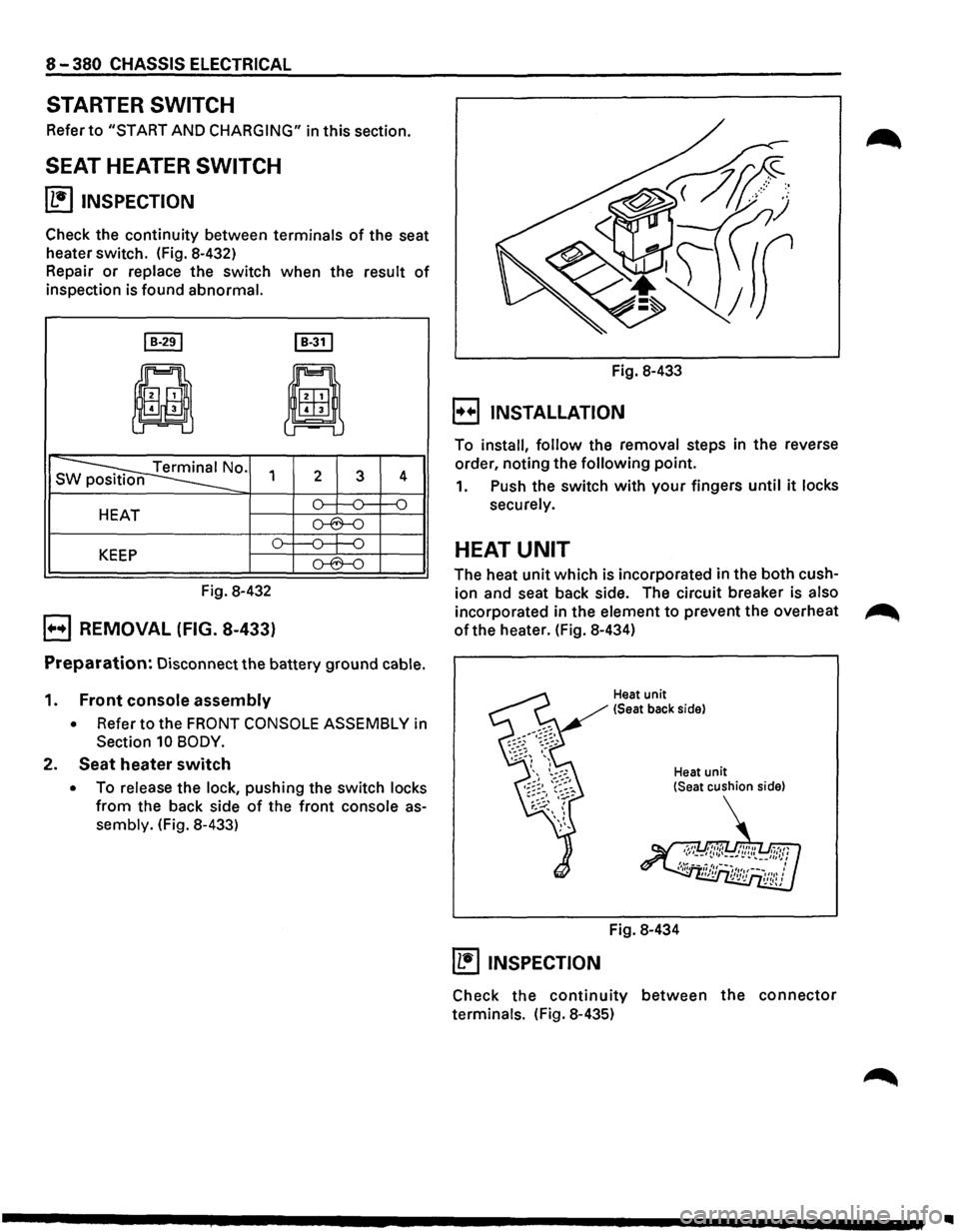
~ INSPECTION
Check the continuity between terminals of the seat
heater switch. (Fig. 8-432)
Repair
or replace the switch when the result of
inspection is found abnormal.
I B-291 I B-31 I
ji
8
s ~0. 1 2 3 4
HEAT o--:---0= f--0
o-6--0
o---0---j-0 KEEP o-6--0
Fig. 8-432
B REMOVAL (FIG. 8-433)
Preparation: Disconnect the battery ground cable.
1. Front console assembly
• Refer to the FRONT CONSOLE ASSEMBLY in
Section 10 BODY.
2. Seat heater switch
• To release the lock, pushing the switch locks
from the back side of the front console as
sembly. (Fig. 8-433) Fig.
8-433
B INSTALLATION
To install, follow the removal steps in the reverse
order, noting the
following point.
1. Push the switch with your fingers until it locks
securely.
HEAT UNIT
The heat unit which is incorporated in the both cush
ion and seat back side. The circuit breaker is also
incorporated in the element to prevent the overheat ~
of the heater. (Fig. 8-434)
Heat unit
(Seat back side)
Heat
unit (Seat cushion side)
Fig. 8-434
~ INSPECTION
Check the continuity between the connector
terminals. (Fig. 8-435)
..
Page 1571 of 1928
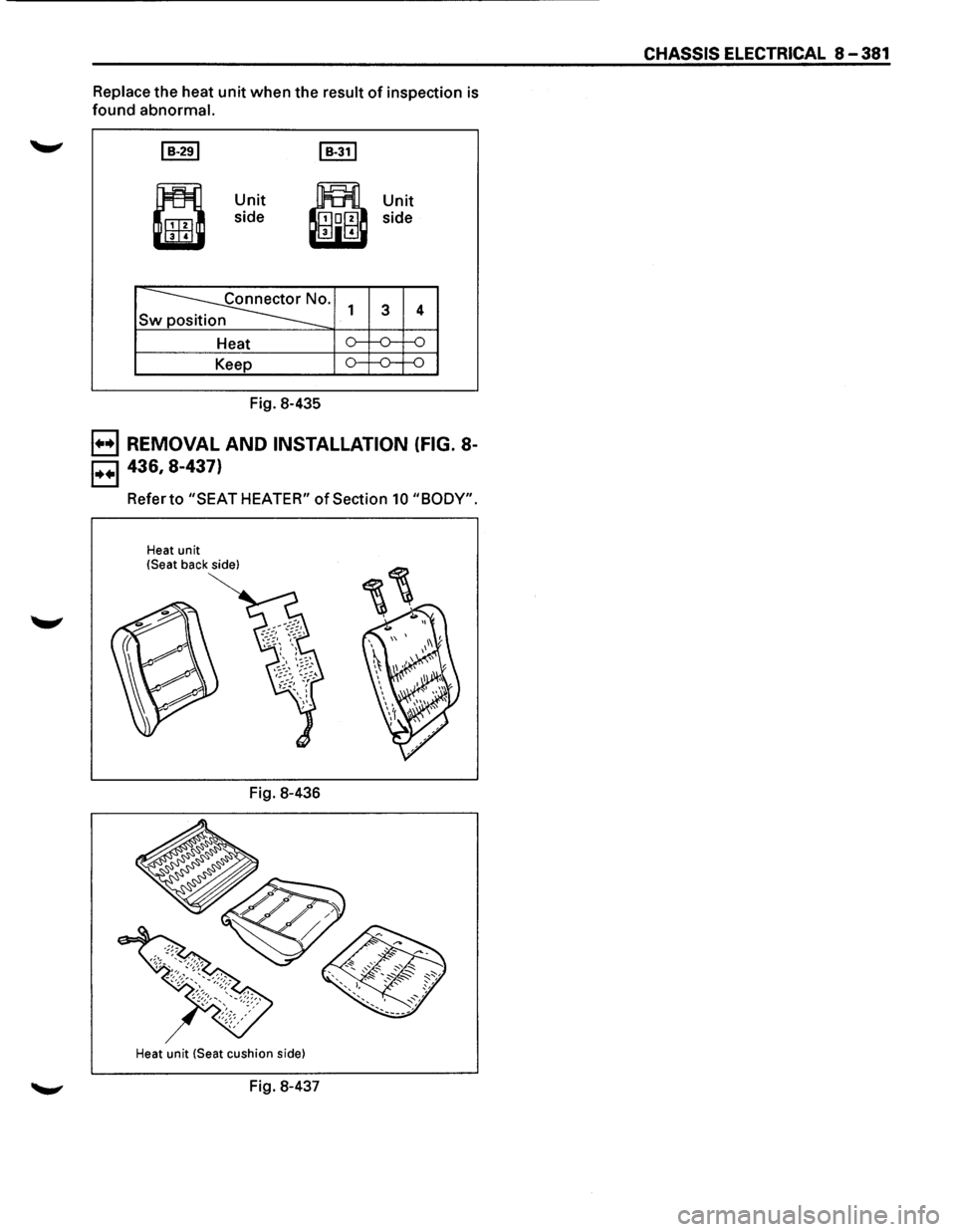
Replace the heat unit when the result of inspection is
found abnormal.
~
•
Unit
side
~· Sw
Heat
Keep
Fig. 8-435
1
,.....
o-
Unit
side
3
,.....
4
,.....
---o--o
B REMOVAL AND INSTALLATION (FIG. 8-
B 436, 8-437)
Referto "SEAT HEATER" of Section 10 "BODY".
Heat unit
!Seat back side)
Fig. 8-436
Heat unit (Seat cushion side)
Fig. 8-437
CHASSIS ELECTRICAL 8-381
Page 1614 of 1928
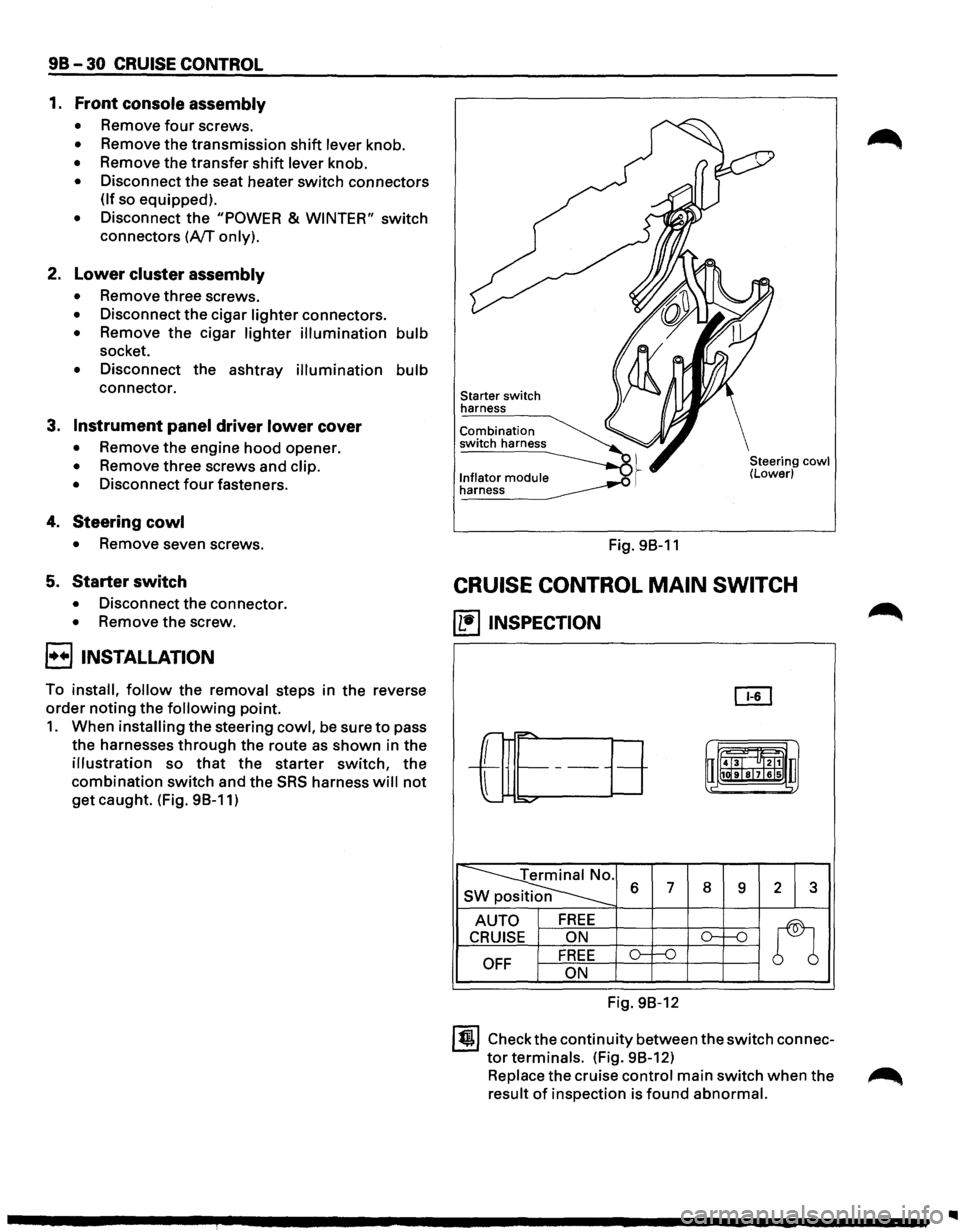
9B-30 CRUISE CONTROL
1. Front console assembly
• Remove four screws.
• Remove the transmission shift lever knob.
• Remove the transfer shift lever knob.
• Disconnect the seat heater switch connectors
(If so equipped).
• Disconnect the "POWER & WINTER" switch
connectors (A/T only).
2. Lower cluster assembly
• Remove three screws.
• Disconnect the cigar lighter connectors.
• Remove the cigar lighter illumination bulb
socket.
• Disconnect the ashtray illumination bulb
connector.
3. Instrument panel driver lower cover
• Remove the engine hood opener.
• Remove three screws and clip.
•
Disconnect four fasteners.
4. Steering cowl
• Remove seven screws.
5. Starter switch
• Disconnect the connector.
• Remove the screw.
8 INSTALLATION
To install, follow the removal steps in the reverse
order noting the following point.
1. When installing the steering cowl, be sure to pass
the harnesses
through the route as shown in the
illustration so that the starter switch, the
combination switch and the SRS harness will not
get caught. (Fig. 98-11)
Starter switch
harness
Combination
switch harness
l._n!~~~o!_ module __..o .~ ~
Fig. 98-11
Steering cowl (Lower)
CRUISE CONTROL MAIN SWITCH
(1!1 INSPECTION
OI1
r-="'
-L
r= t-------uii4J~l "ltl1 u
l
1111ilr9Tsl7lels .,
:::o.,..o-
~ s 6 7 8 9 2 3
AUTO FREE
n
CRUISE ON ()-1---n
OFF FREE o-f--0
ON
Fig. 98-12
ltjl Check the continuity between the switch connec
tor terminals. (Fig. 98-12)
Replace the cruise control main switch when the ~
result of inspection is found abnormal.
Page 1782 of 1928
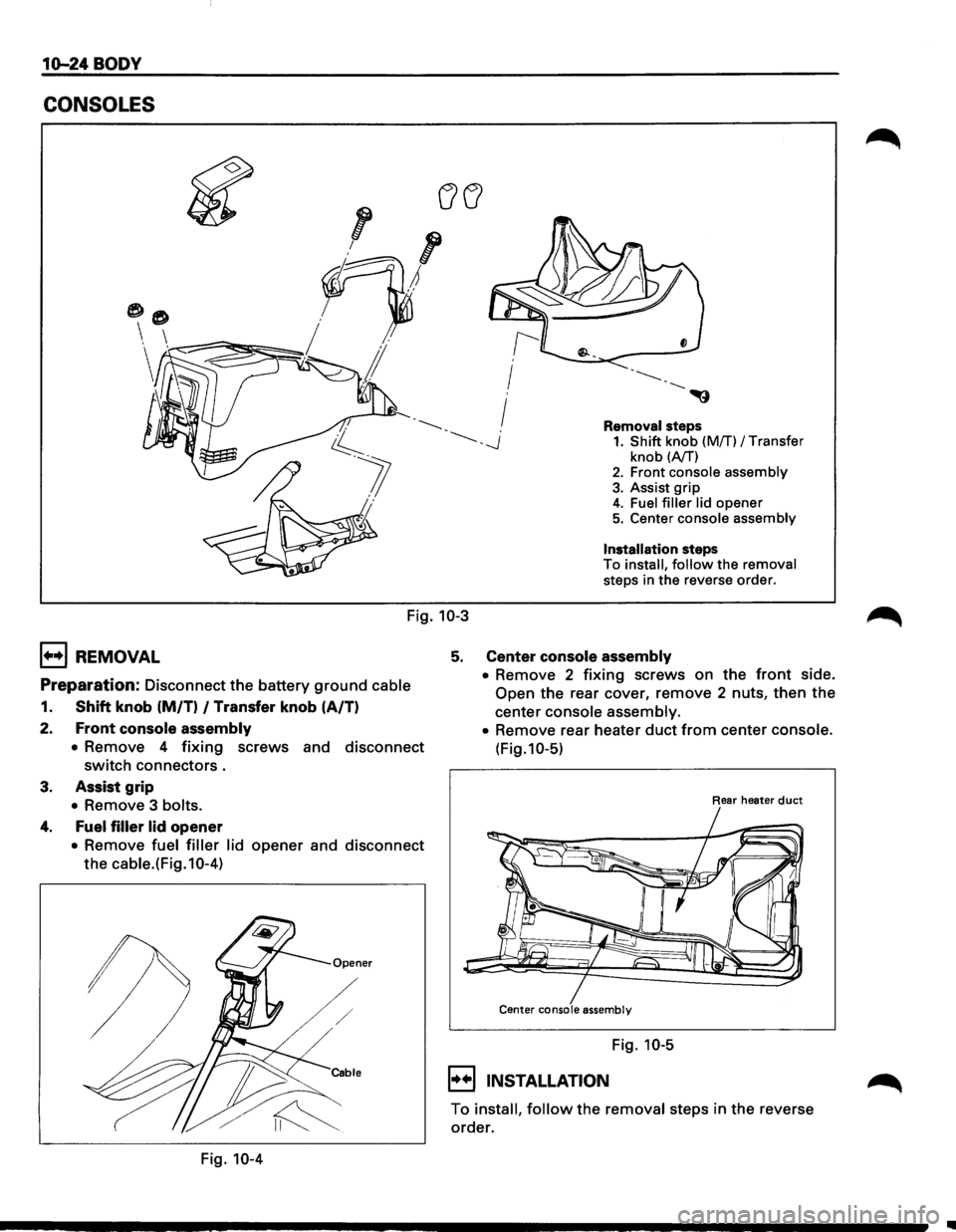
10-24 BODY
CONSOLES
Removal steps 1. Shift knob (Mff) I Transfer
knob (A/T) 2. Front console assembly
3. Assist grip 4. Fuel filler lid opener 5. Center console assembly
Installation steps
To install, follow the removal
steps in the reverse order.
Fig. 10-3
1+•1 REMOVAL
Preparation: Disconnect the battery ground cable
1. Shift knob (M/T) I Transfer knob (A/T)
2.
Front console assembly
• Remove 4 fixing screws and disconnect
switch connectors.
3. Assist grip
• Remove 3 bolts.
4. Fuel filler lid opener
• Remove fuel filler lid opener and disconnect
the cable.(Fig.10-4)
Fig. 10-4
5. Center console assembly
• Remove 2 fixing screws on the front side.
Open the rear cover, remove 2 nuts, then the
center console assembly.
•
Remove rear heater duct from center console.
(Fig.10-5)
Rear heater duct
Center console assembly
Fig. 10-5
I••IINSTALLATION
To install, follow the removal steps in the reverse
order.
Page 1787 of 1928
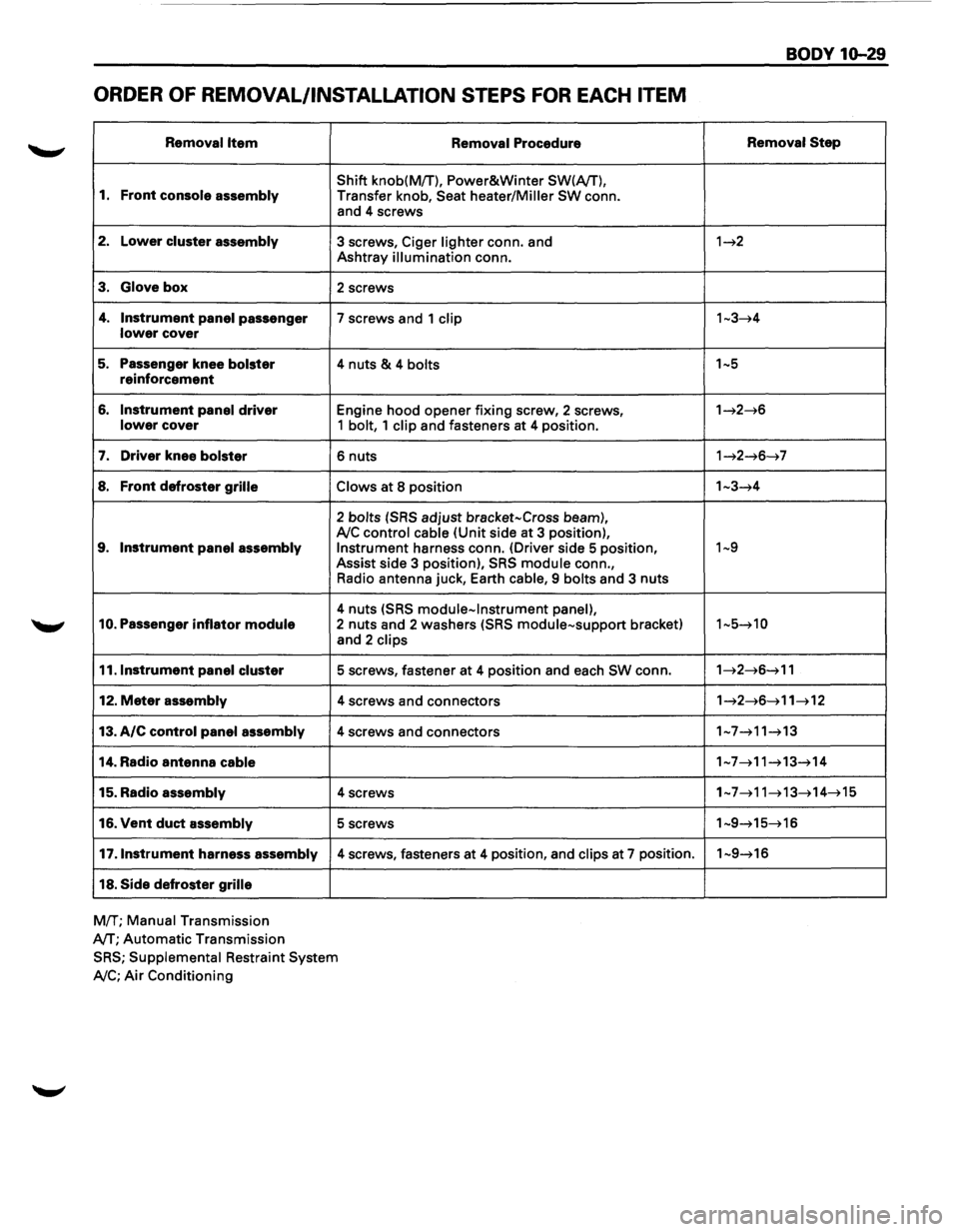
ORDER OF REMOVAL/INSTALLATION STEPS FOR EACH ITEM
Removal Item
1. Front console assembly
2. Lower cluster assembly
3. Glove box
4. Instrument panel passenger lower cover
5. Passenger knee bolster reinforcement
6. Instrument panel driver lower cover
7. Driver knee bolster
8. Front defroster grille
9. Instrument panel assembly
10. Passenger inflator module
11.1nstrument panel cluster
12. Meter assembly
13. A/C control panel assembly
14. Radio antenna cable
15. Radio assembly
16. Vent duct assembly
17 .Instrument harness assembly
18. Side defroster grille
MfT; Manual Transmission
A/T;
Automatic Transmission Removal
Procedure
Shift
knob(MfT), Power&Winter SW(A/T),
Transfer knob, Seat heater/Miller SW conn.
and 4 screws
3 screws, Ciger lighter conn. and
Ashtray illumination conn.
2 screws
7 screws and 1 clip
4 nuts & 4 bolts
Engine hood opener fixing screw, 2 screws, 1 bolt, 1 clip and fasteners at 4 position.
6 nuts
Claws at 8 position
2 bolts (SRS adjust bracket-Cross beam), A!C control cable (Unit side at 3 position), Instrument harness conn. (Driver side 5 position,
Assist side 3 position), SRS module conn.,
Radio antenna juck, Earth
cable, 9 bolts and 3 nuts
4 nuts (SRS module-Instrument panel), 2 nuts and 2 washers (SRS module-support bracket)
and 2 clips
5 screws, fastener at 4 position and each SW conn.
4 screws and connectors
4 screws and connectors
4 screws
5 screws
4 screws, fasteners at 4 position, and clips at 7 position.
SRS; Supplemental Restraint System
A!C; Air Conditioning
BODY 10-29
Removal Step
1~2
1~3~4
1~5
1~2~6
1~2~6~7
1-3~4
1~9
1-5~10
1~2~6~11
1~2~6~11~12
1-7~11~13
1-7~11~13~14
1~7~11~13~14~15
1-9~15~16
1-9~16
Page 1852 of 1928
1Q-94 BODY
5. Front cover
6. Front lower cover
7. Rear cover
8. Outer cover
• Disconnect the switch connectors and
remove the harness
fixing clips.
9. Switch assembly
•
Remove the switch fixing screws from the
outer cover.
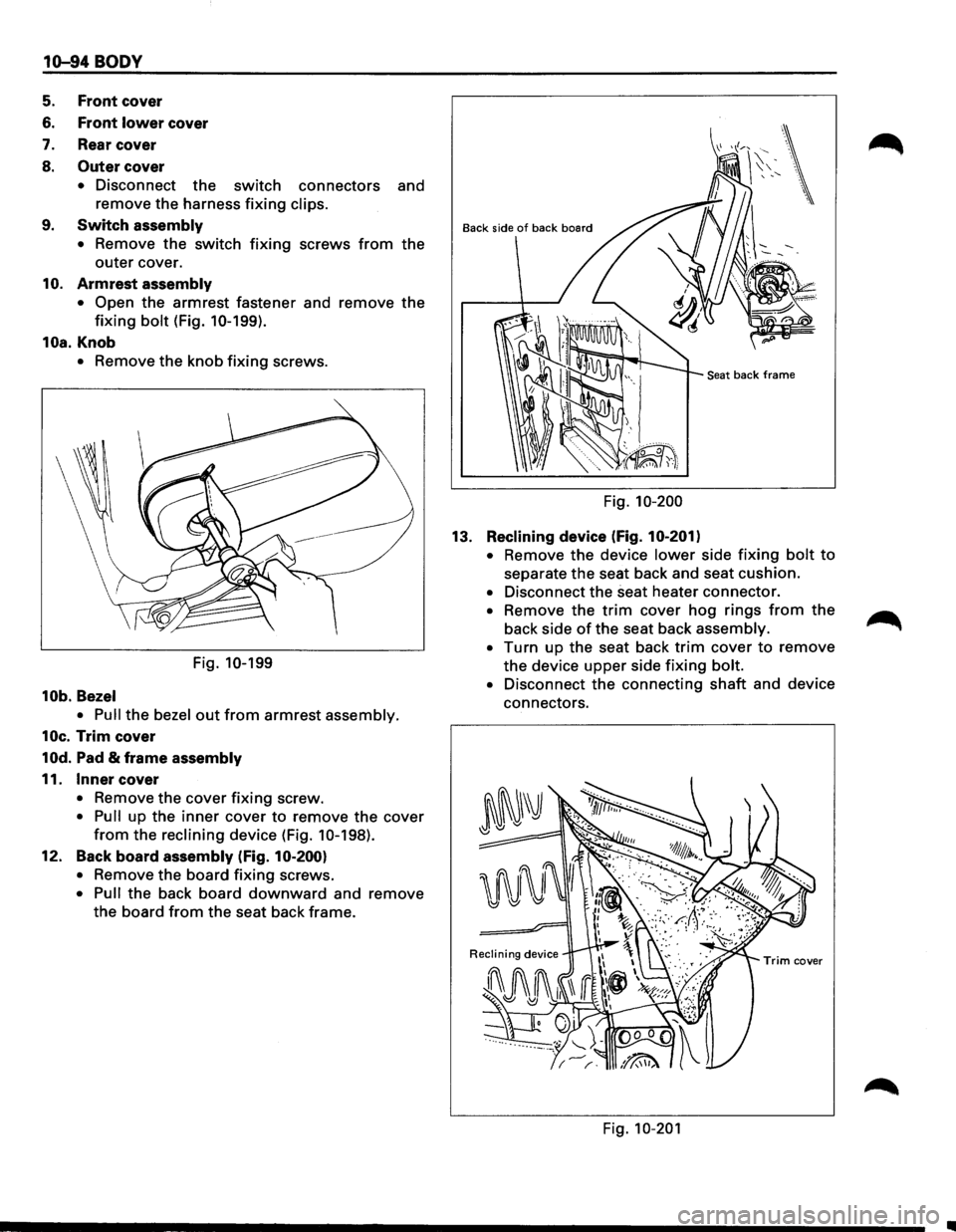
10. Armrest assembly
• Open the armrest fastener and remove the
fixing bolt (Fig. 10-199).
10a.Knob
• Remove the knob fixing screws.
Fig.
10-199
10b. Bezel
• Pull
the bezel out from armrest assembly.
10c. Trim cover
10d. Pad & frame assembly
11. Inner cover
• Remove the cover fixing screw.
• Pull up the inner cover to remove the cover
from the reclining device (Fig. 10-198).
12. Back
board assembly (Fig. 10-200)
•
Remove the board fixing screws.
• Pull the back board downward and remove
the board from the seat back frame.
Back side of back board
Seat back frame
Fig. 10-200
13.
Reclining device (Fig. 10-201)
•
Remove the device lower side fixing bolt to
separate the seat back and seat cushion.
• Disconnect the seat heater connector.
• Remove the trim cover hog rings from the
back side of the seat back assembly.
• Turn up the seat back trim cover to remove
the device upper side fixing bolt.
• Disconnect the connecting shaft and device
connectors.
Fig. 10-201
Page 1853 of 1928
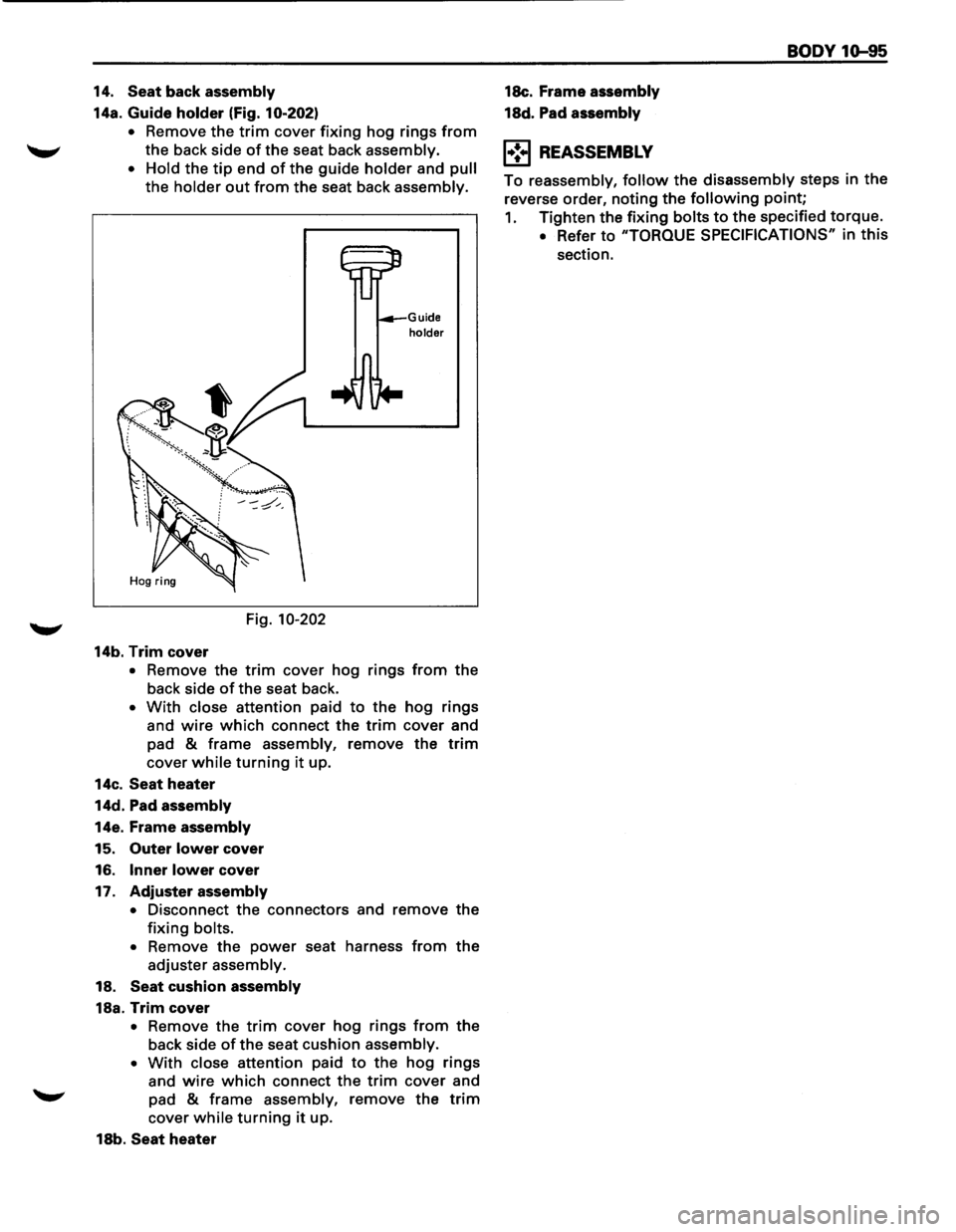
14. Seat back assembly
14a. Guide holder (Fig. 10-202)
•
Remove the trim cover fixing hog rings from
the back side of the seat back assembly.
•
Hold the tip end of the guide holder and pull
the holder out from the seat back assembly.
Fig.
10-202
14b. Trim cover
Guide holder
• Remove the trim cover hog rings from the
back side of the seat back.
• With close attention paid to the hog rings
and
wire which connect the trim cover and
pad
& frame assembly, remove the trim
cover while turning it up.
14c.
Seat heater
14d. Pad assembly
14e. Frame assembly
15. Outer lower cover
16.
Inner lower cover
17.
Adjuster assembly
•
Disconnect the connectors and remove the
fixing bolts.
• Remove the power seat harness from the
adjuster assembly.
18.
Seat cushion assembly
18a. Trim cover
• Remove the trim cover hog rings from the
back side of the seat cushion assembly.
• With close attention paid to the hog rings
and
wire which connect the trim cover and
"-"" pad & frame assembly, remove the trim
cover while turning it up.
18b.
Seat heater 18c.
Frame
assembly
18d. Pad assembly
1•:.1 REASSEMBLY
BODY 1Q-95
To reassembly, follow the disassembly steps in the
reverse order, noting
the following point;
1. Tighten the fixing bolts to the specified torque.
• Refer to "TORQUE SPECIFICATIONS" in this
section.