Audio JAGUAR XF 2009 1.G Manual PDF
[x] Cancel search | Manufacturer: JAGUAR, Model Year: 2009, Model line: XF, Model: JAGUAR XF 2009 1.GPages: 391, PDF Size: 19.32 MB
Page 319 of 391
319
Telephone
Directory contact types
If your phone supports contact type data, you
will be able to see a contact type icon in the
vehicle's phonebook dire ctory. These can be
seen on the right-hand side of each contact in
the directory and will indicate one of the
following types:
Deleting names from the directory
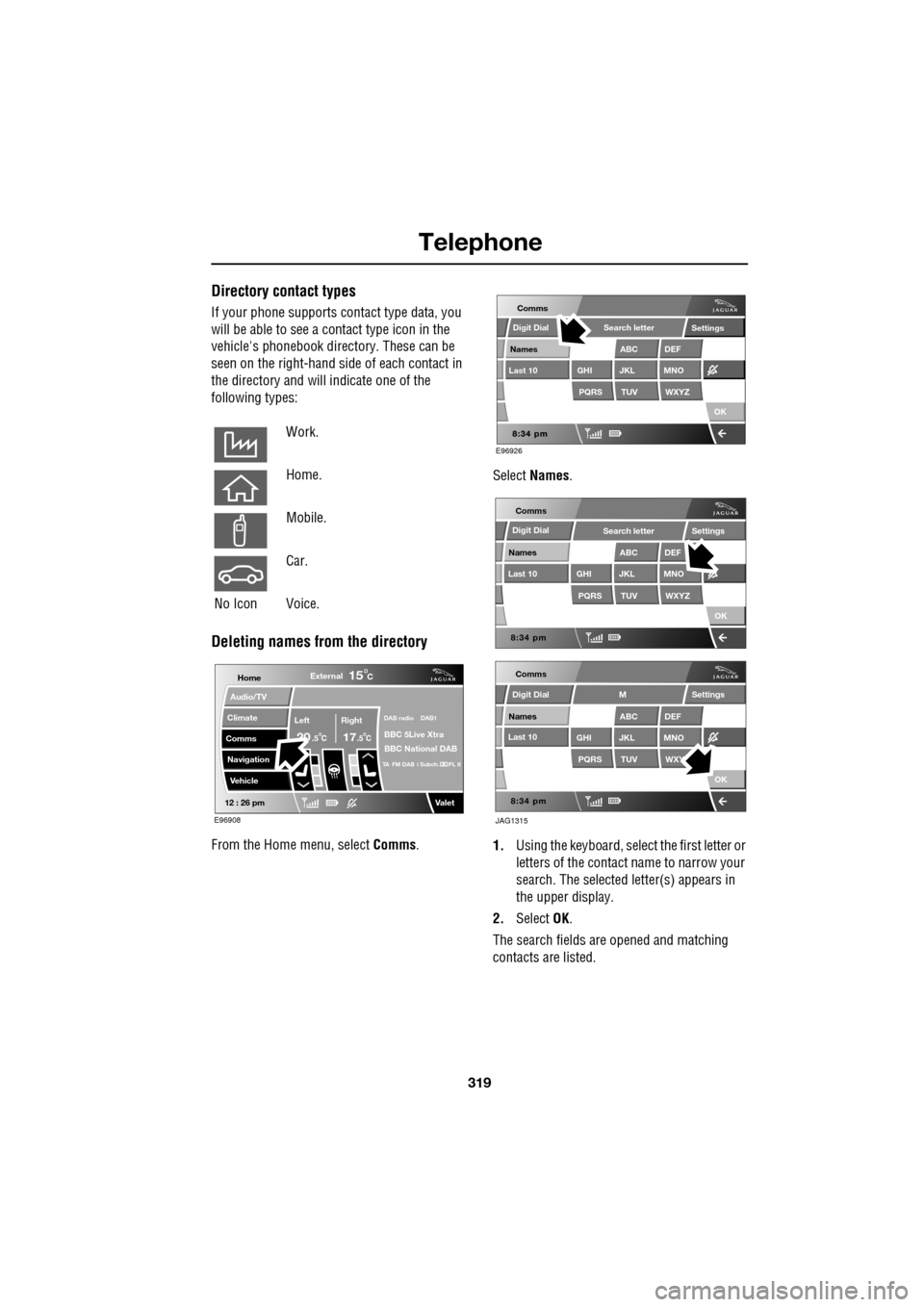
From the Home menu, select Comms. Select
Names .
1. Using the keyboard, select the first letter or
letters of the contact name to narrow your
search. The selected letter(s) appears in
the upper display.
2. Select OK.
The search fields ar e opened and matching
contacts are listed.
Work.
Home.
Mobile.
Car.
No Icon Voice.
Home
Audio/TV
Climate
Comms
Navigation
VehicleExternal
Left Right
20 17CC
15C
.5 .5
DAB radio DAB1
BBC 5Live Xtra
BBC National DAB
TA FM DAB i Subch. PL II
Valet12 : 26 pm
E96908
E96926
Comms
Digit Dial
Names
Last 10
Settings
PQRS
GHITUV
ABC
JKL
WXYZ
DEF
MNO
Search letter
OK
Comms
Comms
Names
Last 10
Settings
PQRS
GHITUV
ABC
JKL
WXYZ
DEF
MNO
Search letter
OK
Names
Last 10
Settings
PQRS
GHITUV
ABC
JKL
WXY
DEF
MNO
M
OK
JAG1315
Digit Dial
Digit Dial
Page 320 of 391
Telephone
320
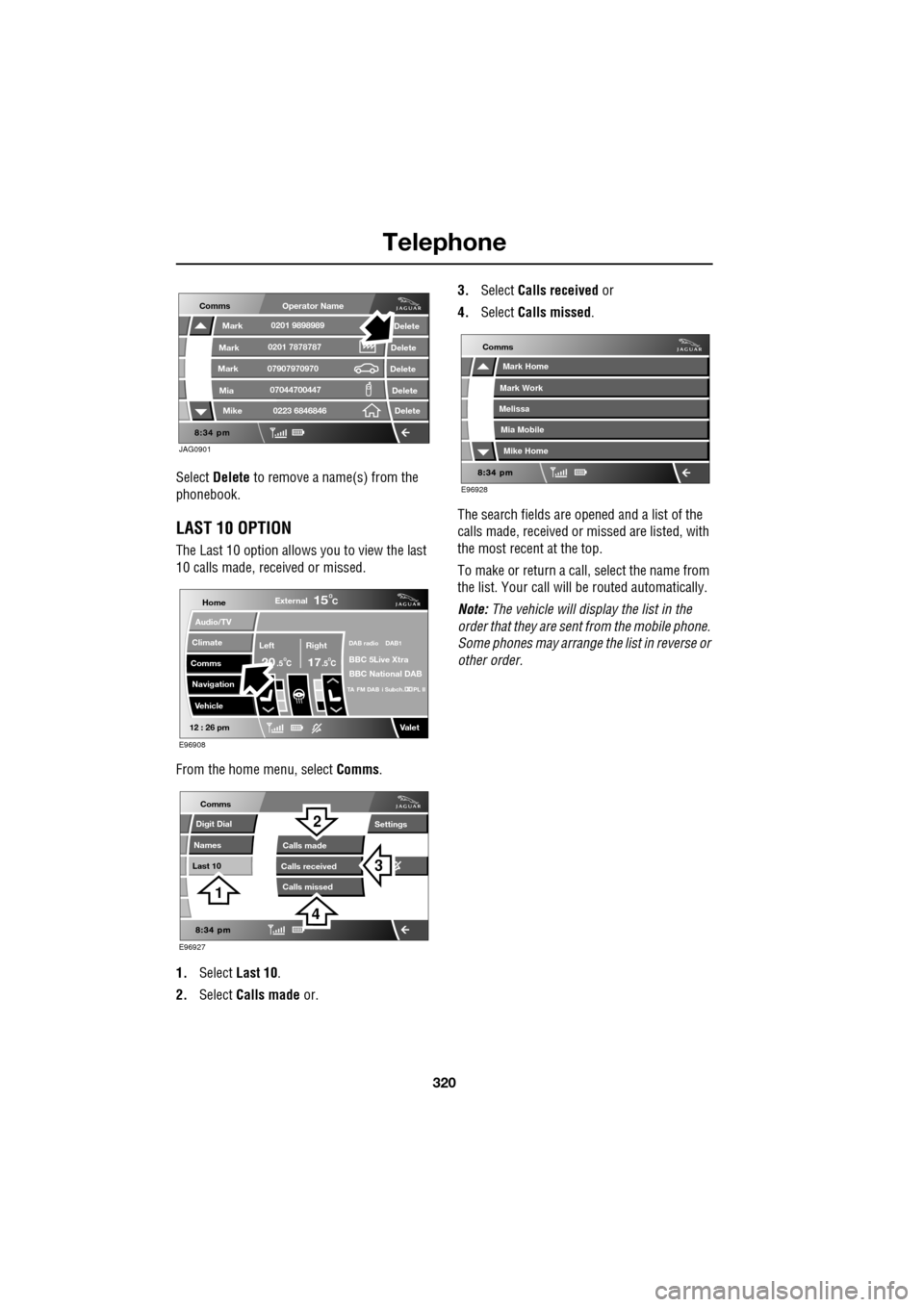
Select Delete to remove a name(s) from the
phonebook.
LAST 10 OPTION
The Last 10 option allows you to view the last
10 calls made, received or missed.
From the home menu, select Comms.
1. Select Last 10 .
2. Select Calls made or. 3.
Select Calls received or
4. Select Calls missed .
The search fields are opened and a list of the
calls made, received or missed are listed, with
the most recent at the top.
To make or return a call, select the name from
the list. Your call will be routed automatically.
Note: The vehicle will display the list in the
order that they are sent from the mobile phone.
Some phones may arrange the list in reverse or
other order.
JAG0901
Comms
Delete
Delete
Delete
Delete
Delete
Mark
Mark
Mark
Mike
Mia0201 9898989
0201 7878787
0223 6846846
07907970970
07044700447
Operator Name
Home
Audio/TV
Climate
Comms
Navigation
VehicleExternal
Left Right
20 17CC
15C
.5 .5
DAB radio DAB1
BBC 5Live Xtra
BBC National DAB
TA FM DAB i Subch. PL II
Valet12 : 26 pm
E96908
E96927
Comms
Digit Dial
Names
Last 10
Settings
Calls missedCalls made
Calls received
3
2
1
4
E96928
Comms
Mark Home
Mark Work
Melissa
Mike Home
Mia Mobile
Page 328 of 391
Television
328
GENERAL INFORMATION
Introduction
TV viewing is possible when the vehicle is
stationary with the transmission in the P (Park)
position. The TV pictur e can be viewed in
preview mode or full-screen.
If the vehicle is moving when TV is selected or
if the vehicle is driven off when the TV is
operating, a warning message will display, the
TV picture will cease and only audio reception
is available.
Note: Japan market: The TV will operate
normally up to speeds of 5 km/h (3 mph), after
which the TV picture will cease and only audio
reception is available.
TV sound is provided through the audio system
speakers.
TV reception
Repositioning the vehicle may improve the
picture whereas in diffic ult locations (distant
transmitter, hills etc.), reception may not be
possible at all. Sound quality may also be
affected to a lesser degree by loss of signal,
which can give rise to variable quality over
short distances while on the move.
Note: Television systems re quire consistent
and strong signals for go od quality reception.
These signals are affected by transmitter
coverage and surrounding features (hills, high
buildings, trees etc.) which will reduce the
signal, thus redu cing picture quality.
TV inhibit with vehicle moving
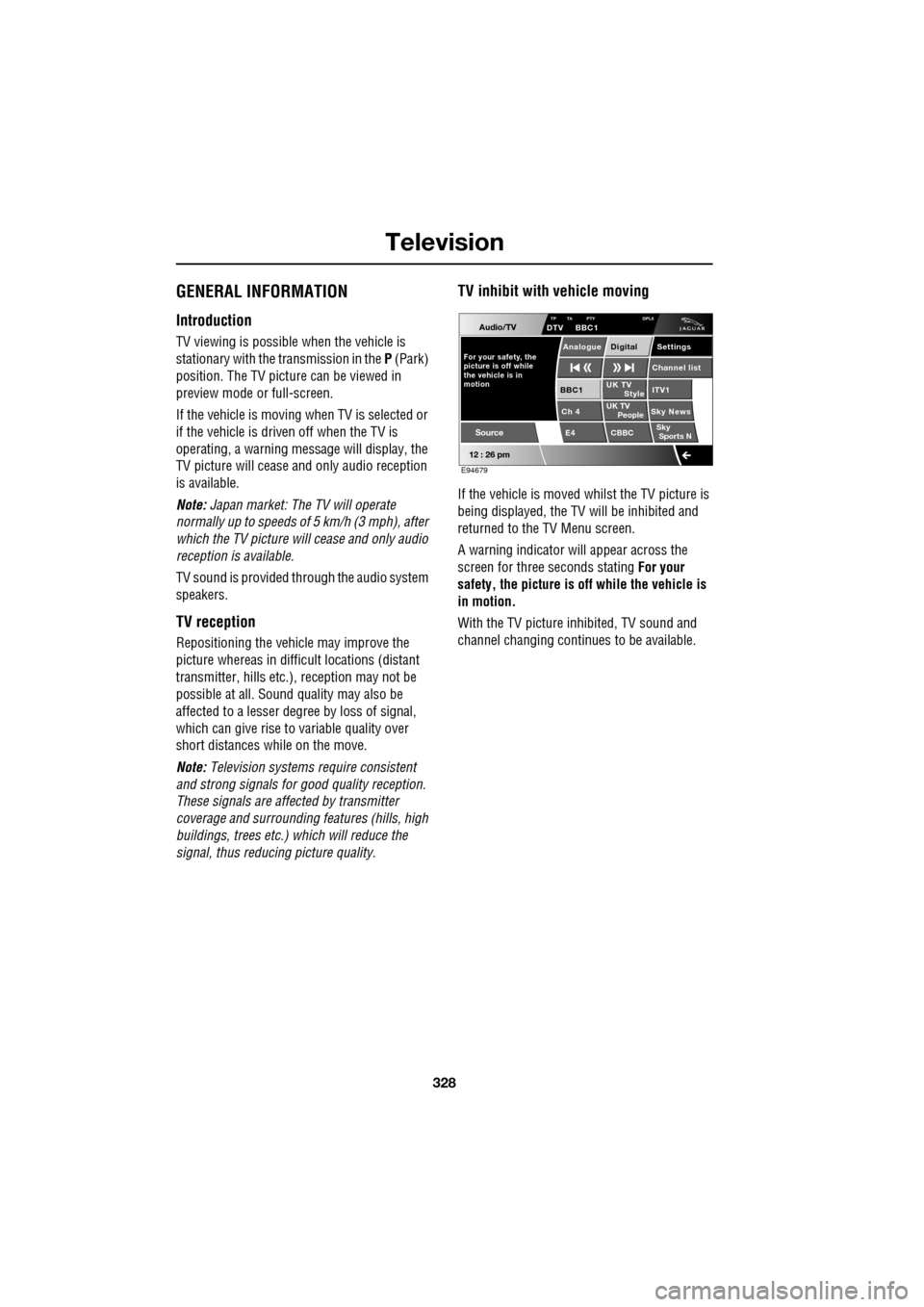
If the vehicle is moved whilst the TV picture is
being displayed, the TV will be inhibited and
returned to the TV Menu screen.
A warning indicator will appear across the
screen for three seconds stating For your
safety, the picture is of f while the vehicle is
in motion.
With the TV picture inhibited, TV sound and
channel changing contin ues to be available.
Audio/TV
12 : 26 pm
UK TV
ITV1
Ch 4 Sky News E4 CBBCBBC1
Settings
Channel list
TP TA PTY DPLIIDTV BBC1
Style
UK TV People
SkySports N
Source
For your safety, the
picture is off while
motion the vehicle is inAnalogue Digital
E94679
Page 329 of 391
329
Television
TELEVISION CONTROLS
TV controls
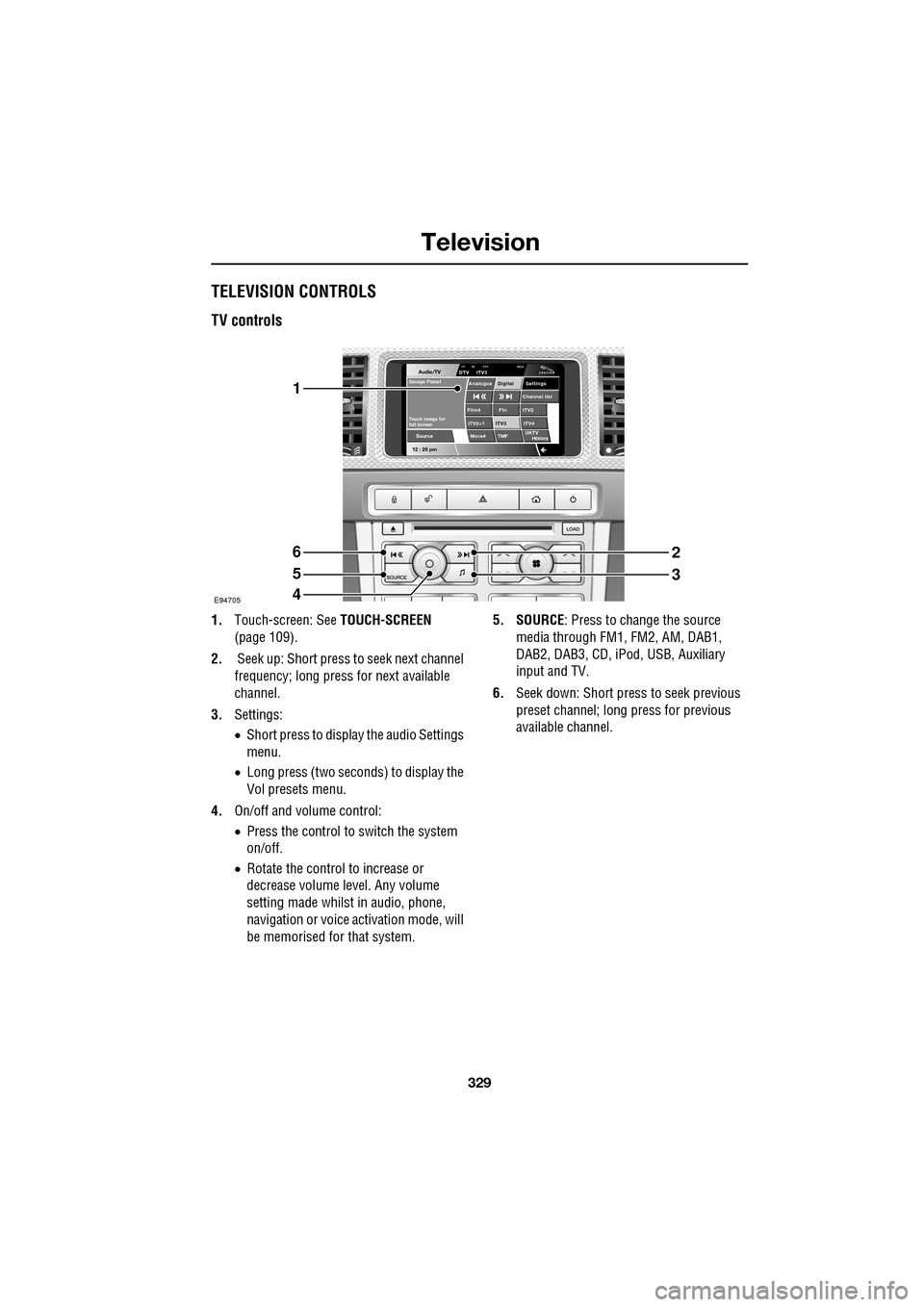
1.Touch-screen: See TOUCH-SCREEN
(page 109).
2. Seek up: Short press to seek next channel
frequency; long press for next available
channel.
3. Settings:
•Short press to display the audio Settings
menu.
• Long press (two seconds) to display the
Vol presets menu.
4. On/off and volume control:
•Press the control to switch the system
on/off.
• Rotate the control to increase or
decrease volume level. Any volume
setting made whilst in audio, phone,
navigation or voice ac tivation mode, will
be memorised for that system. 5. SOURCE
: Press to change the source
media through FM1, FM2, AM, DAB1,
DAB2, DAB3, CD, iPod, USB, Auxiliary
input and TV.
6. Seek down: Short press to seek previous
preset channel; long press for previous
available channel.
Audio/TV
12 : 26 pmMore4 TMF
TP TA PTY DPLIIDTV ITV3
UKTV
HistorySource
ITV2
ITV2+1 ITV4Film4
Settings
Channel listAnalogue Digital
Ftn
ITV3
Touch image for
full screen
Savage Planet
E94705
1
6
5
4
2
3
Page 330 of 391
Television
330
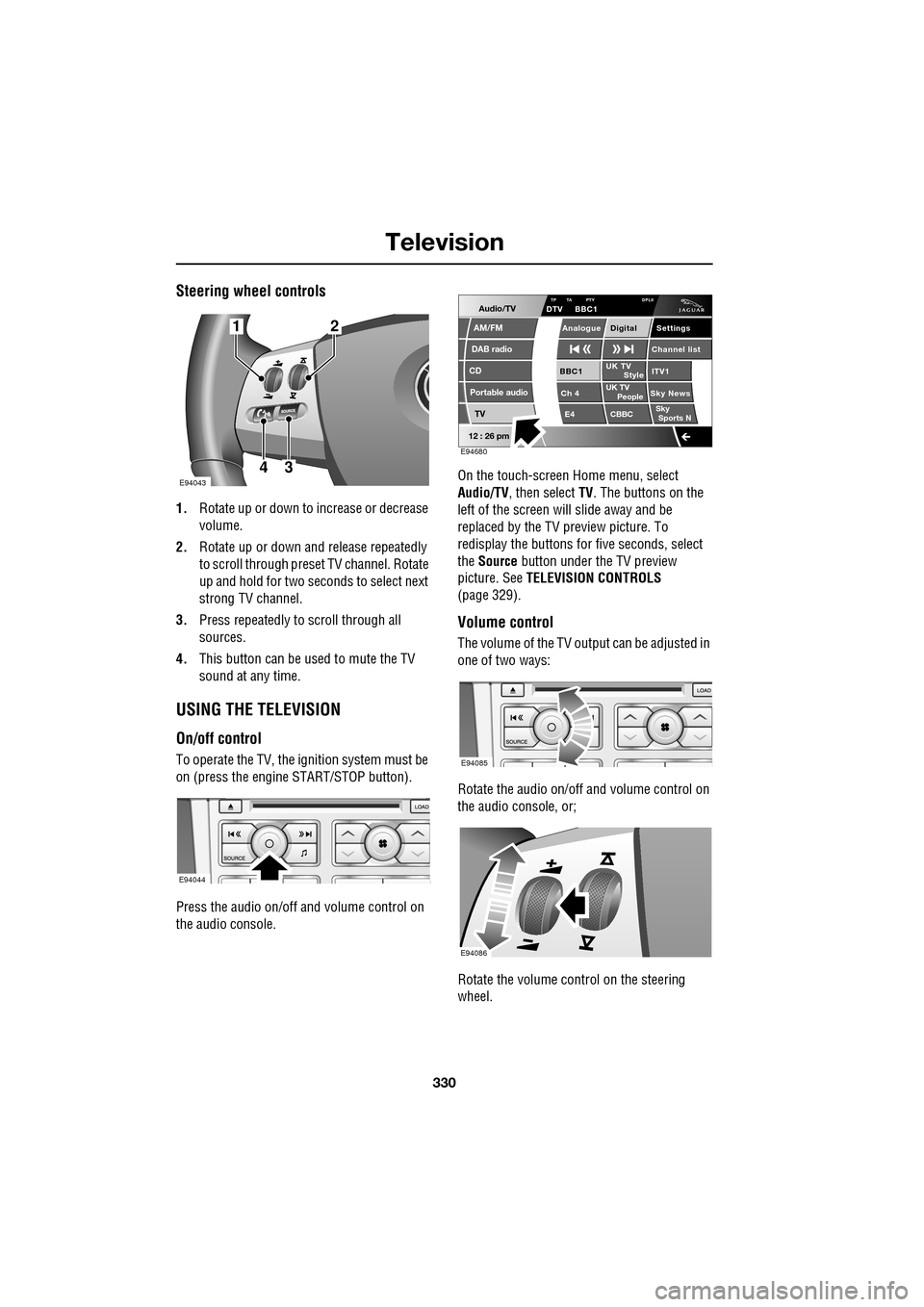
Steering wheel controls
1.Rotate up or down to increase or decrease
volume.
2. Rotate up or down and release repeatedly
to scroll through preset TV channel. Rotate
up and hold for two seconds to select next
strong TV channel.
3. Press repeatedly to scroll through all
sources.
4. This button can be used to mute the TV
sound at any time.
USING THE TELEVISION
On/off control
To operate the TV, the ignition system must be
on (press the engine START/STOP button).
Press the audio on/off and volume control on
the audio console. On the touch-screen
Home menu, select
Audio/TV , then select TV. The buttons on the
left of the screen will slide away and be
replaced by the TV preview picture. To
redisplay the buttons for five sec onds, select
the Source button under the TV preview
picture. See TELEVISION CONTROLS
(page 329).
Volume control
The volume of the TV output can be adjusted in
one of two ways:
Rotate the audio on/off and volume control on
the audio console, or;
Rotate the volume control on the steering
wheel.
E94043
12
43
E94044
Audio/TV
DAB radio
CD
AM/FM
12 : 26 pm
Portable audio
TV
UK TV ITV1
Ch 4 Sky News E4 CBBCBBC1
Settings
Channel list
TA PTY DPLIIDTV BBC1
Style
UK TV People
SkySports NTP
Analogue Digital
E94680
E94085
E94086
Page 331 of 391
331
Television
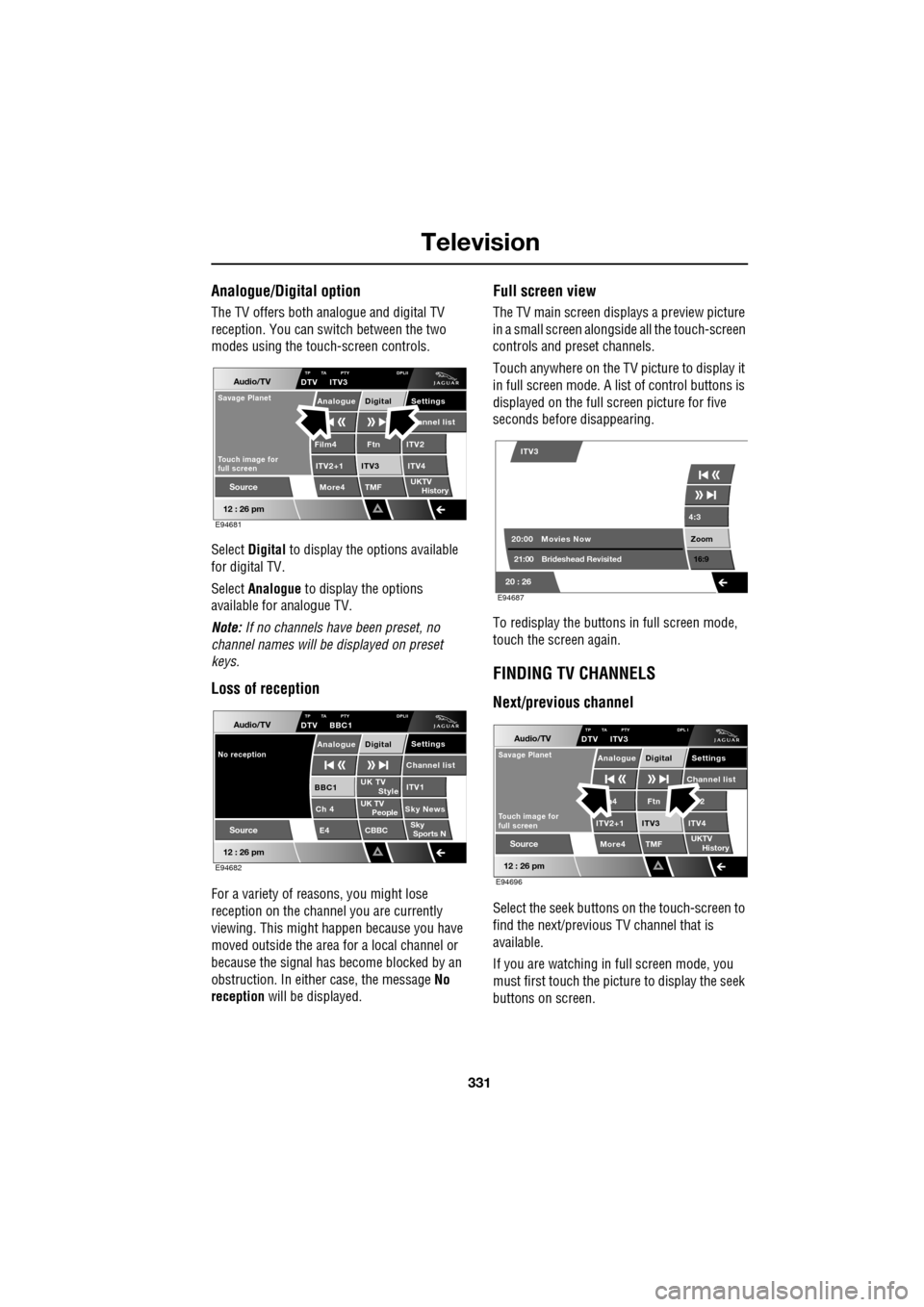
Analogue/Digital option
The TV offers both analogue and digital TV
reception. You can switch between the two
modes using the touc h-screen controls.
Select Digital to display the options available
for digital TV.
Select Analogue to display the options
available for analogue TV.
Note: If no channels have been preset, no
channel names will be displayed on preset
keys.
Loss of reception
For a variety of reasons, you might lose
reception on the channel you are currently
viewing. This might happen because you have
moved outside the area for a local channel or
because the signal has become blocked by an
obstruction. In either case, the message No
reception will be displayed.
Full screen view
The TV main screen disp lays a preview picture
in a small screen alongsid e all the touch-screen
controls and preset channels.
Touch anywhere on the TV picture to display it
in full screen mode. A list of control buttons is
displayed on the full screen picture for five
seconds before disappearing.
To redisplay the buttons in full screen mode,
touch the screen again.
FINDING TV CHANNELS
Next/previous channel
Select the seek buttons on the touch-screen to
find the next/previous TV channel that is
available.
If you are watching in full screen mode, you
must first touch the picture to display the seek
buttons on screen.
Audio/TV
12 : 26 pm
More4 TMF
TP TA PTY DPLIIDTV ITV3
UKTV
HistorySource
ITV2
ITV2+1 ITV4Film4
Settings annel listAnalogue Digital
Ftn
ITV3
Touch image for
full screen
Savage Planet
E94681
Audio/TV
12 : 26 pm
UK TV ITV1
Ch 4 Sky News E4 CBBCBBC1
Settings
Channel list
TP TA PTY DPLIIDTV BBC1
Style
UK TV People
SkySports N
Source
No receptionAnalogue Digital
E94682
4:3
Zoom 16:9
ITV3
20:0021:00 Movies Now
Brideshead Revisited
20 : 26 E94687
Audio/TV
12 : 26 pm
More4 TMF
TP TA PTY DPL IDTV ITV3
UKTV
HistorySource
2
ITV2+1 ITV4m4
Settings
Channel listAnalogue Digital
Ftn
ITV3
Touch image for
full screen
Savage Planet
E94696
Page 332 of 391
Television
332
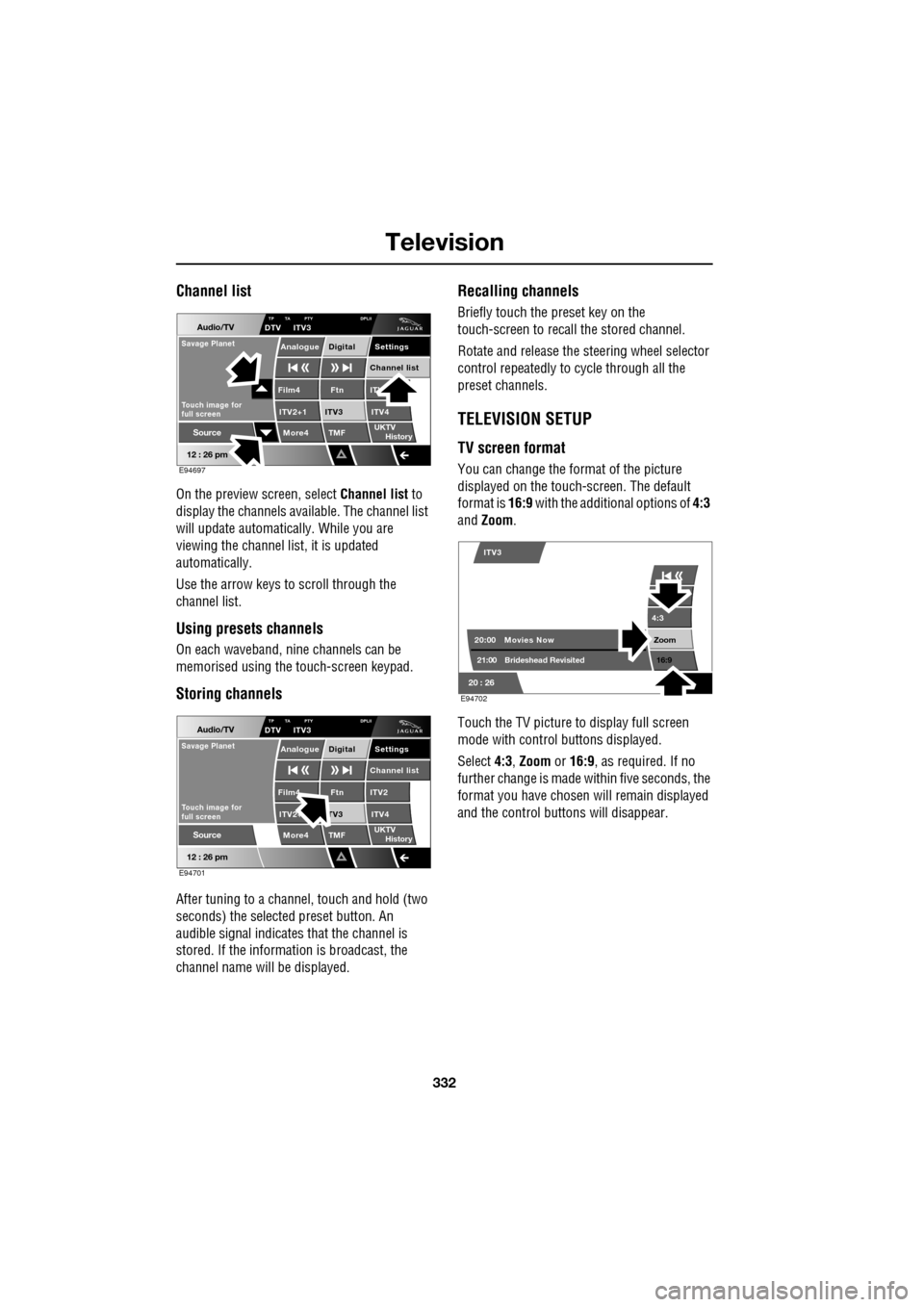
Channel list
On the preview screen, select Channel list to
display the channels available. The channel list
will update automatically. While you are
viewing the channel list, it is updated
automatically.
Use the arrow keys to scroll through the
channel list.
Using presets channels
On each waveband, ni ne channels can be
memorised using the touch-screen keypad.
Storing channels
After tuning to a channe l, touch and hold (two
seconds) the selected preset button. An
audible signal i ndicates that the channel is
stored. If the informat ion is broadcast, the
channel name wi ll be displayed.
Recalling channels
Briefly touch the preset key on the
touch-screen to recall the stored channel.
Rotate and release the steering wheel selector
control repeatedly to cycle through all the
preset channels.
TELEVISION SETUP
TV screen format
You can change the format of the picture
displayed on the touch-screen. The default
format is 16:9 with the additional options of 4:3
and Zoom .
Touch the TV picture to display full screen
mode with control buttons displayed.
Select 4:3, Zoom or 16:9 , as required. If no
further change is made within five seconds, the
format you have chosen will remain displayed
and the control butt ons will disappear.
Audio/TV
12 : 26 pm
More4 TMF
TP TA PTY DPLIIDTV ITV3
UKTV
HistorySource
ITV
ITV2+1 ITV4Film4
Settings
Channel listAnalogue Digital
Ftn
ITV3
Touch image for
full screen
Savage Planet
E94697
Audio/TV
12 : 26 pm
More4 TMF
TP TA PTY DPLIIDTV ITV3
UKTV
HistorySource
ITV2
ITV2+ ITV4Film4
Settings
Channel listAnalogue Digital
Ftn
TV3
Touch image for
full screen
Savage Planet
E94701
4:3
Zoom 16:9
ITV3
20:0021:00 Movies Now
Brideshead Revisited
20 : 26 E94702
Page 333 of 391
333
Television
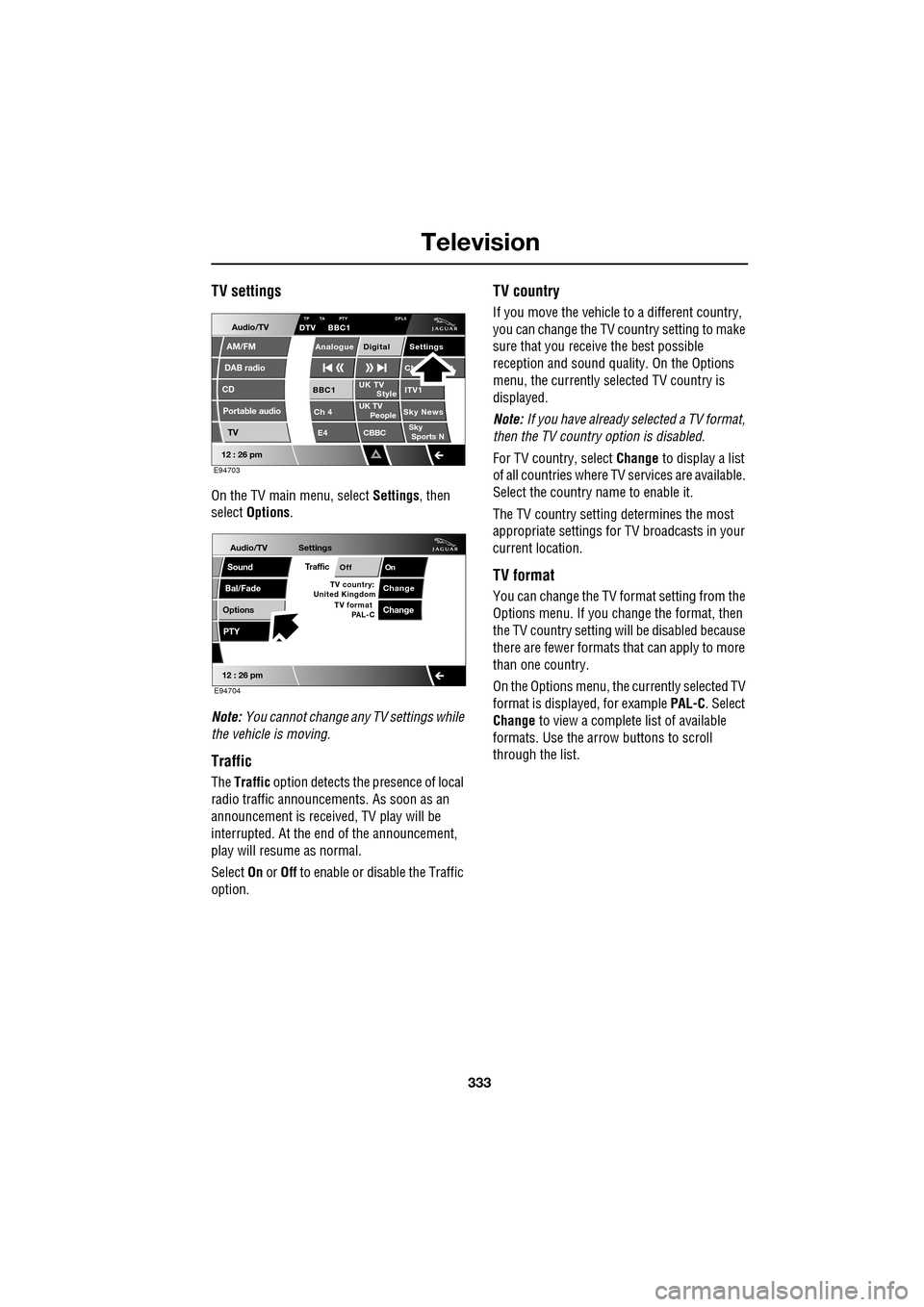
TV settings
On the TV main menu, select Settings, then
select Options .
Note: You cannot change any TV settings while
the vehicle is moving.
Traffic
The Traffic option detects the presence of local
radio traffic announcements. As soon as an
announcement is received, TV play will be
interrupted. At the end of the announcement,
play will resume as normal.
Select On or Off to enable or disable the Traffic
option.
TV country
If you move the vehicle to a different country,
you can change the TV c ountry setting to make
sure that you receive the best possible
reception and sound quali ty. On the Options
menu, the currently sele cted TV country is
displayed.
Note: If you have already selected a TV format,
then the TV country option is disabled.
For TV country, select Change to display a list
of all countries where TV services are available.
Select the country na me to enable it.
The TV country setting determines the most
appropriate settings for TV broadcasts in your
current location.
TV format
You can change the TV format setting from the
Options menu. If you change the format, then
the TV country setting will be disabled because
there are fewer formats that can apply to more
than one country.
On the Options menu, the currently selected TV
format is displayed, for example PAL-C. Select
Change to view a complete list of available
formats. Use the arrow buttons to scroll
through the list.
Audio/TV
DAB radio
CD
AM/FM
12 : 26 pm
Portable audio
TV
UK TV ITV1
Ch 4 Sky News E4 CBBCBBC1
Settings
Ch t
TA PTY DPLIIDTV BBC1
Style
UK TV People
SkySports NTP
Analogue Digital
E94703
Audio/TV
Bal/Fade
Options
Sound
12 : 26 pm
Settings
TrafficOnOff
ChangeTV country:
PTY
United Kingdom TV format
PAL-CChange
E94704
Page 336 of 391
Navigation system
336
GETTING STARTED
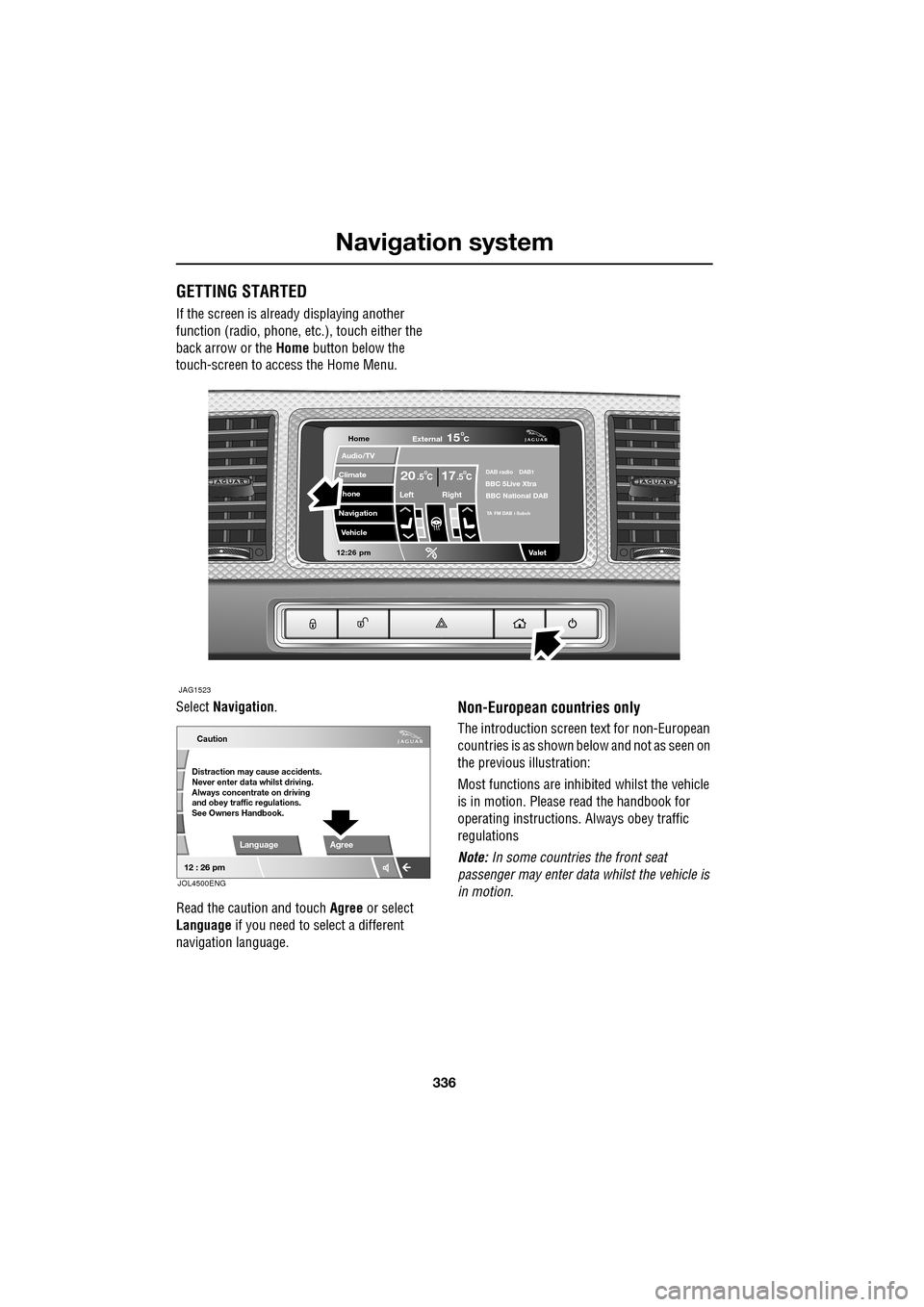
If the screen is already displaying another
function (radio, phone, etc.), touch either the
back arrow or the Home button below the
touch-screen to access the Home Menu.
Select Navigation .
Read the caution and touch Agree or select
Language if you need to select a different
navigation language.
Non-European countries only
The introduction screen text for non-European
countries is as shown be low and not as seen on
the previous illustration:
Most functions are inhibited whilst the vehicle
is in motion. Please read the handbook for
operating instructions. Always obey traffic
regulations
Note: In some countries the front seat
passenger may enter data whilst the vehicle is
in motion.
Home
Audio/TV
Climate
hone
Navigation
Vehicle
Valet12:26 pm
JAG1523
External15C
Left Right
20 17CC.5 .5DAB radio DAB1BBC 5Live Xtra
BBC National DAB
TA FM DAB i Subch
Caution
Distraction may cause accidents.
Never enter data whilst driving.
Always concentrate on driving
and obey traffic regulations.
See Owners Handbook.
Language Agree
12 : 26 pm
JOL4500ENG
Page 340 of 391
Navigation system
340
MEASUREMENT UNITS
Distances are shown on the screen and given in
voice guidance, either in metric units
(kilometres and metres) or in Imperial units
(miles and yards) and can only be changed
from the vehicle touch-screen menu, not from
the navigation system menu.
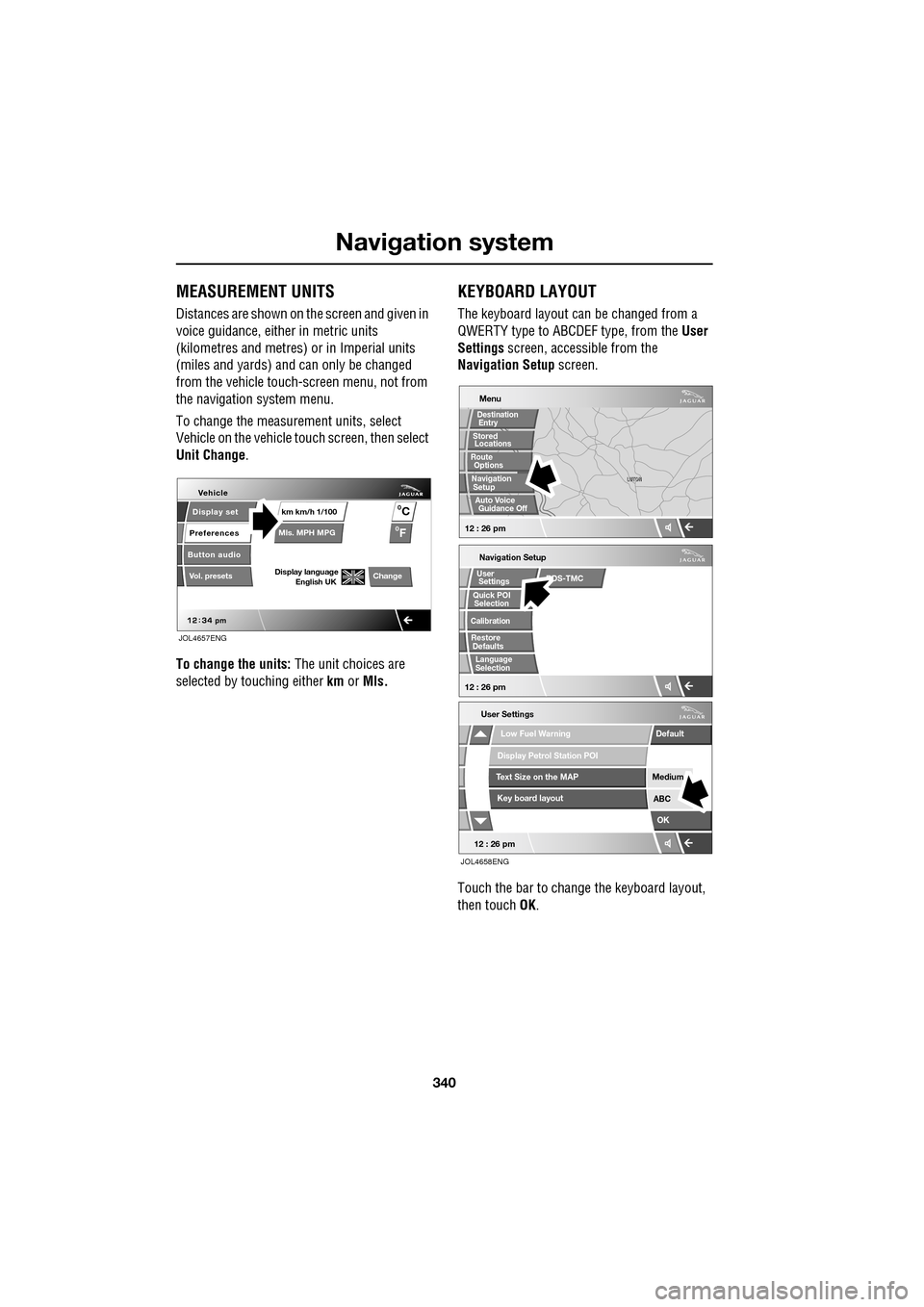
To change the measur ement units, select
Vehicle on the vehicle touch screen, then select
Unit Change .
To change the units: The unit choices are
selected by touching either km or Mls.
KEYBOARD LAYOUT
The keyboard layout ca n be changed from a
QWERTY type to ABC DEF type, from the User
Settings screen, accessible from the
Navigation Setup screen.
Touch the bar to change the keyboard layout,
then touch OK.
Display set
Preferences
Button audio
Mls. MPH MPG km km/h 1/100
VehicleF
C
0
0
Display language English UKVol. presetsChange
JOL4657ENG
Navigation Setup
Selection
Calibration
RestoreUser
Settings
Defaults Quick POI
12 : 26 pm
RDS-TMC
Language
Selection
12 : 26 pm
Low Fuel Warning
User Settings
Display Petrol Station POI
Text Size on the MAP
Key board layout
Medium
OK
Default
ABC
JOL4658ENG
LUTON
LUTON
Menu
12 : 26 pm
Stored
Destination
Auto Voice
Entry
Guidance Off
Locations
Navigation SetupRoute Options