wheel JAGUAR XJ6 1994 2.G Repair Manual
[x] Cancel search | Manufacturer: JAGUAR, Model Year: 1994, Model line: XJ6, Model: JAGUAR XJ6 1994 2.GPages: 521, PDF Size: 17.35 MB
Page 246 of 521
Brakes
12.7 HYDRAULICCONTROL MODULE- RENEW
SRO 70.60.18
70.60.1
9
Refer to Section 12.4, Brake System Bleeding before carrying out this procedure. Pay particular attention to the warn- ings and cautions relating to brake fluid, cleanliness and cleaning materials.
W: The illustration shows the hydraulic control module of a 6 cyl. vehicle with traction control. Hydraulic control
modules on non-traction control vehicles have only three outlet ports. Apart from this, the removal procedure
is the same for all vehicles.
. Raise the vehicle.
Displace the bleeder screw dust cap of the front LH caliper.
The dust cap will remain captive
on the bleed screw.
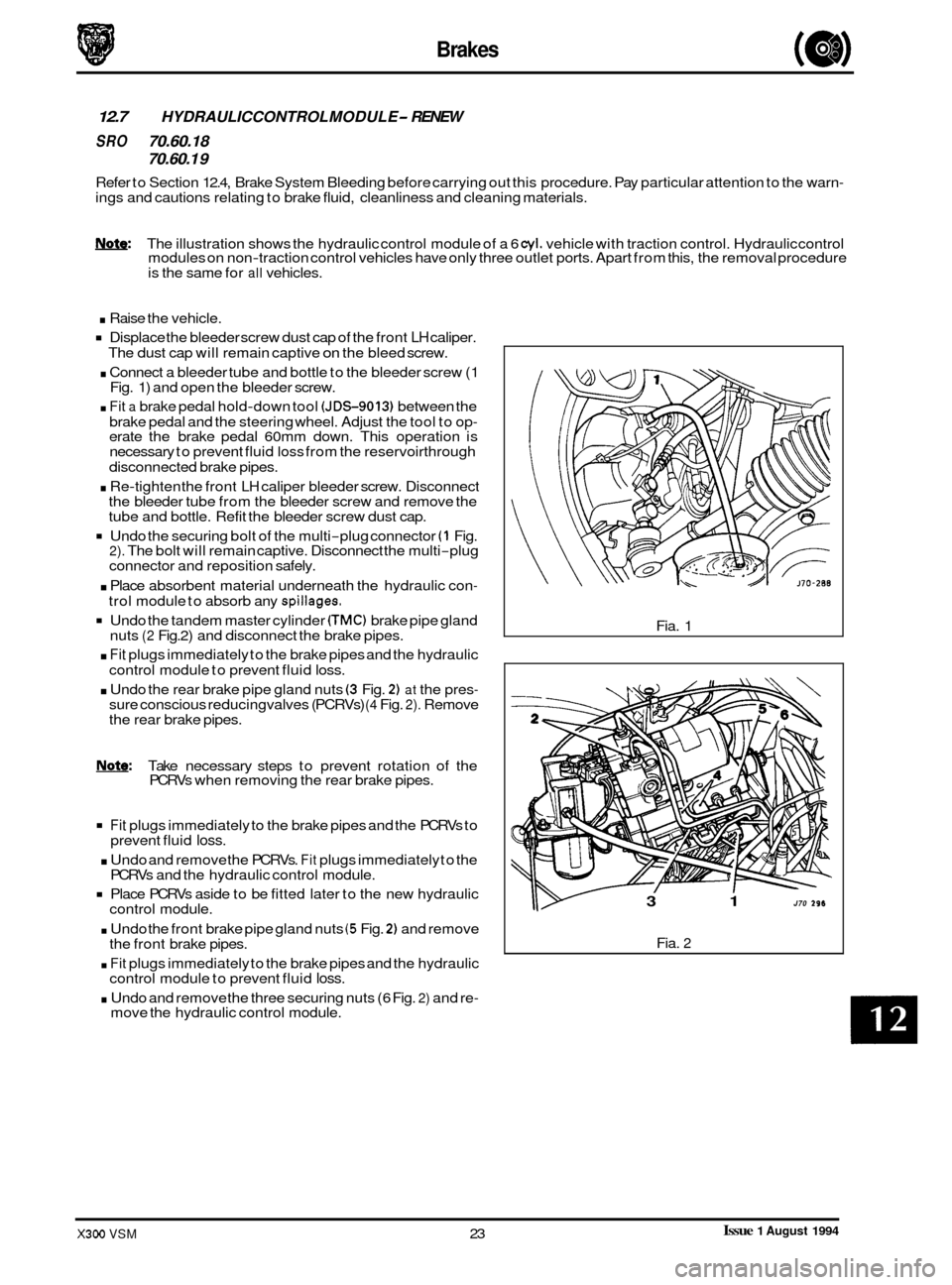
. Connect a bleeder tube and bottle to the bleeder screw (1
Fig. 1) and open the bleeder screw.
. Fit a brake pedal hold-down tool (JDS-9013) between the
brake pedal and the steering wheel. Adjust the tool to op
- erate the brake pedal 60mm down. This operation is
necessary to prevent fluid loss from the reservoirthrough
. Re-tighten the front LH caliper bleeder screw. Disconnect
the bleeder tube from the bleeder screw and remove the
tube and bottle. Refit the bleeder screw dust cap.
Undo the securing bolt of the multi-plug connector (1 Fig. 2). The bolt will remain captive. Disconnect the multi-plug
connector and reposition safely.
. Place absorbent material underneath the hydraulic con-
trol module to absorb any spillages.
Undo the tandem master cylinder CTMC) brake pipe gland
nuts (2 Fig.2) and disconnect the brake pipes.
. Fit plugs immediately to the brake pipes and the hydraulic
control module to prevent fluid
loss.
. Undo the rear brake pipe gland nuts (3 Fig. 2) at the pres- sure conscious reducing valves (PCRVs) (4 Fig. 2). Remove
the rear brake pipes.
disconnected brake pipes.
Note: Take necessary steps to prevent rotation of the
PCRVs when removing the rear brake pipes.
Fit plugs immediately to the brake pipes and the PCRVs to
. Undo and remove the PCRVs. Fit plugs immediately to the
Place PCRVs aside to be fitted later to the new hydraulic
. Undo the front brake pipe gland nuts (5 Fig. 2) and remove
. Fit plugs immediately to the brake pipes and the hydraulic
. Undo and remove the three securing nuts (6 Fig. 2) and re-
0 prevent fluid loss.
PCRVs and the hydraulic control module.
control module.
the front brake pipes.
control module to prevent fluid
loss.
move the hydraulic control module. Fia.
1
3 1 J70 296
Fia. 2
Issue 1 August 1994 X300 VSM 23
Page 248 of 521
Brakes
12.8
SRO 70.60.21
PRESSURE CONSCIOUS REDUCING VALVES - RENEW
Refer to Section 12.4, Brake System Bleeding before carrying out this procedure. Pay particular attention to the warn- ings and cautions relating to brake fluid, cleanliness and cleaning materials.
Note: The illustration shows the hydraulic control module of a 6 cyl. vehicle with traction control. Hydraulic control
modules on non-traction control vehicles have only three outlet ports. Apart from this, the removal procedure
is the same for all vehicles.
. Raise the vehicle.
Displace the bleeder screw dust cap of the front LH caliper.
The dust cap will remain captive on the bleed screw.
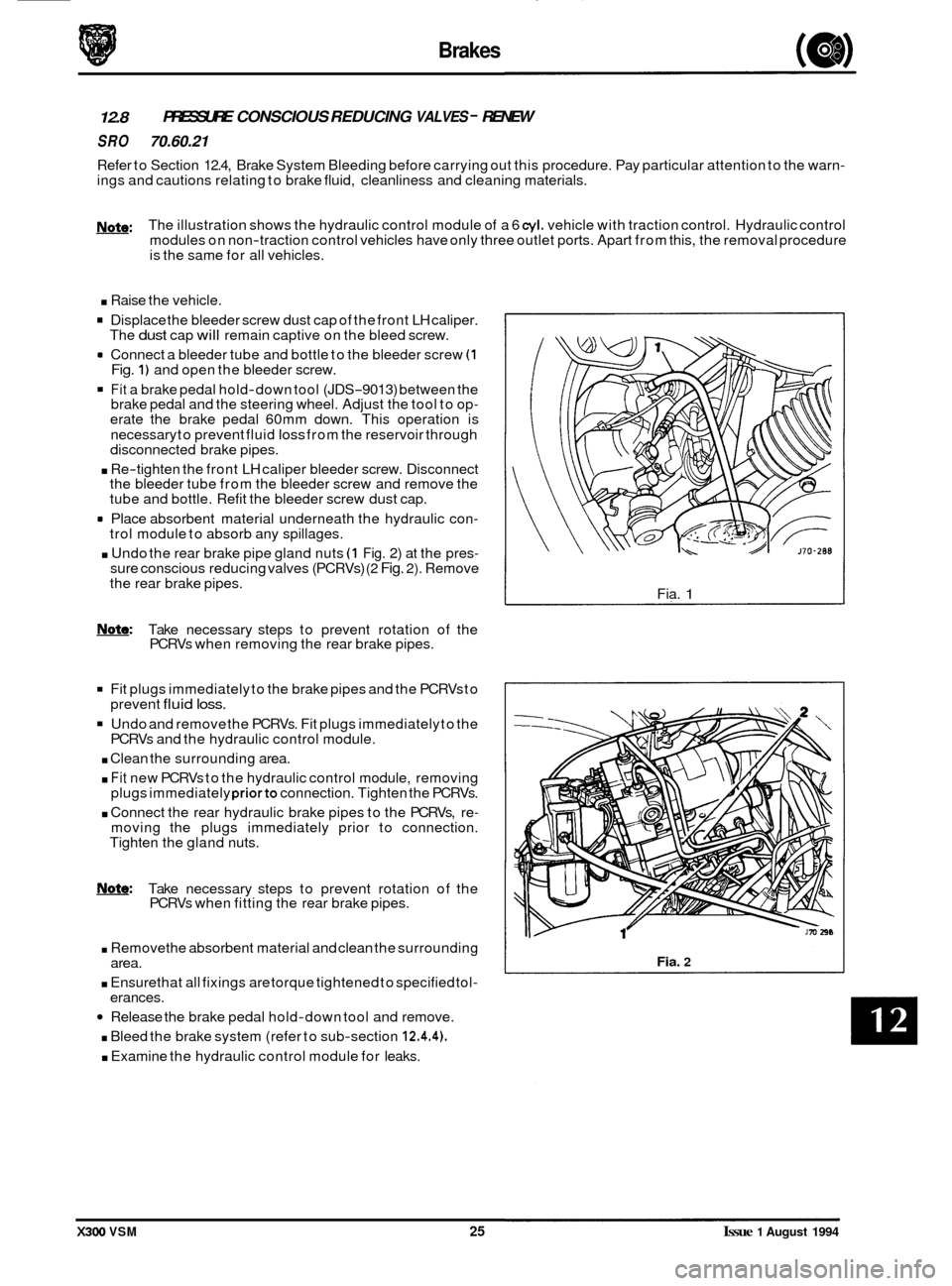
rn Connect a bleeder tube and bottle to the bleeder screw (1 Fig. 1) and open the bleeder screw.
Fit a brake pedal hold-down tool (JDS-9013) between the
brake pedal and the steering wheel. Adjust the tool to op- erate the brake pedal 60mm down. This operation is
necessary to prevent fluid
loss from the reservoir through
disconnected brake pipes.
. Re-tighten the front LH caliper bleeder screw. Disconnect
the bleeder tube from the bleeder screw and remove the
tube and bottle. Refit the bleeder screw dust cap.
rn Place absorbent material underneath the hydraulic con- trol module to absorb any spillages.
. Undo the rear brake pipe gland nuts (1 Fig. 2) at the pres- sure conscious reducing valves (PCRVs) (2 Fig. 2). Remove
the rear brake pipes.
m: Take necessary steps to prevent rotation of the
PCRVs when removing the rear brake pipes.
Fit plugs immediately to the brake pipes and the PCRVs to
Undo and remove the PCRVs. Fit plugs immediately to the
. Clean the surrounding area.
. Fit new PCRVs to the hydraulic control module, removing
plugs immediately priorto connection. Tighten the PCRVs.
. Connect the rear hydraulic brake pipes to the PCRVs, re- moving the plugs immediately prior to connection.
Tighten the gland nuts.
prevent
fluid loss.
PCRVs
and the hydraulic control module.
0
Note: Take necessary steps to prevent rotation of the
PCRVs when fitting the rear brake pipes.
. Removethe absorbent material and clean the surrounding
. Ensure that all fixings are torque tightened to specified tol-
Release the brake pedal hold-down tool and remove.
. Bleed the brake system (refer to sub-section 12.4.4).
. Examine the hydraulic control module for leaks.
area.
erances. Fia.
1
Fia. 2
X300 VSM 25 Issue 1 August 1994
Page 276 of 521
Body Components & Trim ~
issue 1 August 1994 X300 VSM 21
13.3.17 Fascia Board, Renew
SRO 76.46.01
. Remove
the battery cover and disconnect the battery.
Remove the drivers side and passenger side underscuttle
pads, see sub
-sections 13.3.19 and 13.3.20.
. Remove the drivers airbag module, see section 15.5.
Remove the steering wheel, section 10.
Remove the drivers side and passenger side fascia closing
. Remove the fascia center veneer panel, see subsection
Remove the fascia board for access, see subsection
. Disconnect the air conditioning differential potentiometer
Remove the differential potentiometer assembly.
. Displace and reposition the through panel connectors
from the fascia assembly.
. Displace the fascia vent motor / gearbox assemblies har- ness multi-plug from the mounting bracket.
. Disconnect and reposition the fascia harness to console
harness
multi-plug from the mounting bracket.
. Disconnect the BPU harness multi-plugs.
Remove the tiestraps securing the harness to the fascia.
. Reposition the fascia on a bench.
= Displace and reposition the solar sensor assembly from
Disconnect the solar sensor harness multi-plug.
Remove the solar sensor assembly.
= Undo and remove the defrost vents securing screws.
Displace and reposition the defrost vent assemblies.
. Disconnect the tweeter speaker harness multi-plugs.
. Remove the defrost vent assemblies.
. Displace the fascia harness grommet from the fascia.
. Route the harness through the aperture.
Remove the fascia harness assembly.
. Undo and remove passenger airbag deployment door to
fascia securing bolts ( one bolt is removed with the fascia).
. Displace and remove the deployment door assembly.
. Undo and remove the passenger airbag module to fascia
. Displace and remove the airbag module assembly.
. Undo and remove the airbag module I BPU mounting
bracket assembly to fascia securing nuts 1 bolts.
= Displace and remove the mounting bracket assembly.
. Retrieve the spacing washers.
. Displace and remove the side vent outlets from the fascia.
. Displace and remove the side vent ducts securing clips.
. Displace and remove the side vent ducts.
. Undo and remove the center vent flap assembly to fascia
. Displace and remove the center vent flap assembly.
Undo and remove fascia location bracket securing nuts.
Displace and remove the location bracket.
panels, see
sub
-sections 13.3.22 and 13.3.21.
13.3.23. 13.3.17.
harness multi
-plug.
the fascia.
securing bolts.
securing nuts.
Page 278 of 521
Body Components & Trim
. Reposition and fit the motor/gearbox assemblies harness
. Fully seat the through panel connectors to the fascia.
. Place the air conditioning differential potentiometer to the
fascia and route the differential potentiometer harness
through the vent aperture.
. Reconnect the differential potentiometer harness multi-
Plug.
Refit the fascia board.
. Refit the center veneer panel.
. Refit the fascia closing panels.
. Refit the steering wheel.
. Refit the drivers airbag module.
. Refit the underscuttle pads.
. Reconnect the battery and refit the battery cover.
multi
-plug
to the mounting bracket.
X300 VSM 23 Issue 1 August 1994
Page 279 of 521
~~ Body Components & Trim
e 13.3.18 Fascia 6oard - Remove
For Access And Refit
SRO 76.46.01/90
. Remove the battery cover. Disconnect the battery.
Remove the drivers side and passenger side underscuttle
. Remove the drivers airbag module, see section 15.5.
. Remove the steering wheel, section 10.
9 Remove the drivers side fascia closing panel, see sub-sec-
. Remove the passenger side fascia closing panel, see sub-
. Remove the fascia center veneer panel, see subsection
. Undo and remove the fascia tie bar securing nuts.
. Displace the tie bars.
. Undo and remove the instrument housing /fascia switch-
. Reposition the multi-plug mounting bracket.
. Disconnect the steering column control module multi-
. Disconnect the fascia switchpack harness multi-plugs.
. Displace and reposition the instrument pack for access.
. Disconnect the instrument pack harness multi-plugs.
. Remove the instrument pack / fascia switchpack assem-
. Disconnect the right hand fascia harness to cabin harness
. Disconnect the column switchgear and column motors
Disconnect the ignition switch harness multi-plug.
. Disconnect the exciter coil harness multi-plug.
. Disconnect the speaker tweeter harness multi-plug.
. Disconnect the speed control control module harness
. Undo and remove the fascia to center console securing
. Displace and remove the passenger side outlet duct.
. Disconnect the fascia harness to console harness multi-
9 Disconnect the let3 hand fascia harness to cabin harness
. Undo and remove the fascia ground eyelets to bodysecur-
. Displace and reposition the ground eyeletsfrom the stud.
. Displace and reposition the airbag control module from
Undo and remove the fascia assembly lower securing nut.
. Undo and remove the fascia outer body bracket to fascia
Carefully displace the fascia rearwards.
pads, see
sub
-sections 13.3.19 and 13.3.20.
tion 13.3.22.
section 13.3.21.
13.2.23.
pack securing screws.
0 plugs.
bly.
multi
-plug.
harness multi
-plug.
multi
-plug.
screws.
0 plugs.
multi
-plug.
ing nut.
the mounting bracket.
securing bolts.
m
0
X300 VSM Issue 1 August 1994 24
Page 280 of 521
Body Components & Trim -
. From behind the fascia passenger side, disconnect the
passenger airbag harness multi-plug.
. With assistance, remove the fascia from the vehicle and
place on a suitably protected bench.
Place the fascia
in position in the vehicle with the center
location peg correctly engaged.
Reconnect the passenger airbag module harness multi-
Plug.
. Carefully fit and align the fascia to the mounting position.
. Fit and tighten the fascia to outer body brackets securing
bolts.
Fit and tighten the fascia assembly lower securing nut.
Reposition and
fit the airbag control module to the mount-
ing bracket.
Reposition and fit the fascia harness ground eyelets to the
ground stud.
Fit and tighten the ground eyelet securing
nut.
harness multi-plug. . Reconnect the left hand fascia harness to cabin housing
. Reconnect the fascia harness to console harness multi- plugs.
Fit and align the passenger side outlet duct.
. Fit and tighten the fascia to console securing screws.
. Reconnect the speed control harness multi-plug.
. Reconnect the speaker tweeter harness multi-plug.
. Reconnect the exciter coil harness multi-plug.
Reconnect the column switchgear and column motor har-
. Reconnect the right hand fascia harness to cabin harness
. Place the instrument pack / fascia switchpack in position.
. Reconnect the instrument pack harness multi-plugs.
. Reposition and fitthe instrument packassemblytothefas-
cia.
Reconnect the fascia switchpack harness multi-plugs.
Reconnect the steering column harness multi
-plugs.
. Reposition and fit the switchpack harness multi-plug mounting bracket.
ness
multi
-plugs.
multi-plug.
. Fit and tighten the instrument pack/ switchpack securing
bolts.
- Fit and align the fascia tie bars.
. Fit and tighten the tie bar securing nuts.
9 Refit the center veneer panel.
Refit the fascia closing panels.
. Refit the steering wheel.
. Refit the drivers airbag module.
. Refit the underscuttle pads.
. Reconnect the battery and refit the battery covers.
Issue 1 August 1994 X300 VSM 25
Page 288 of 521
Body Components & Trim -
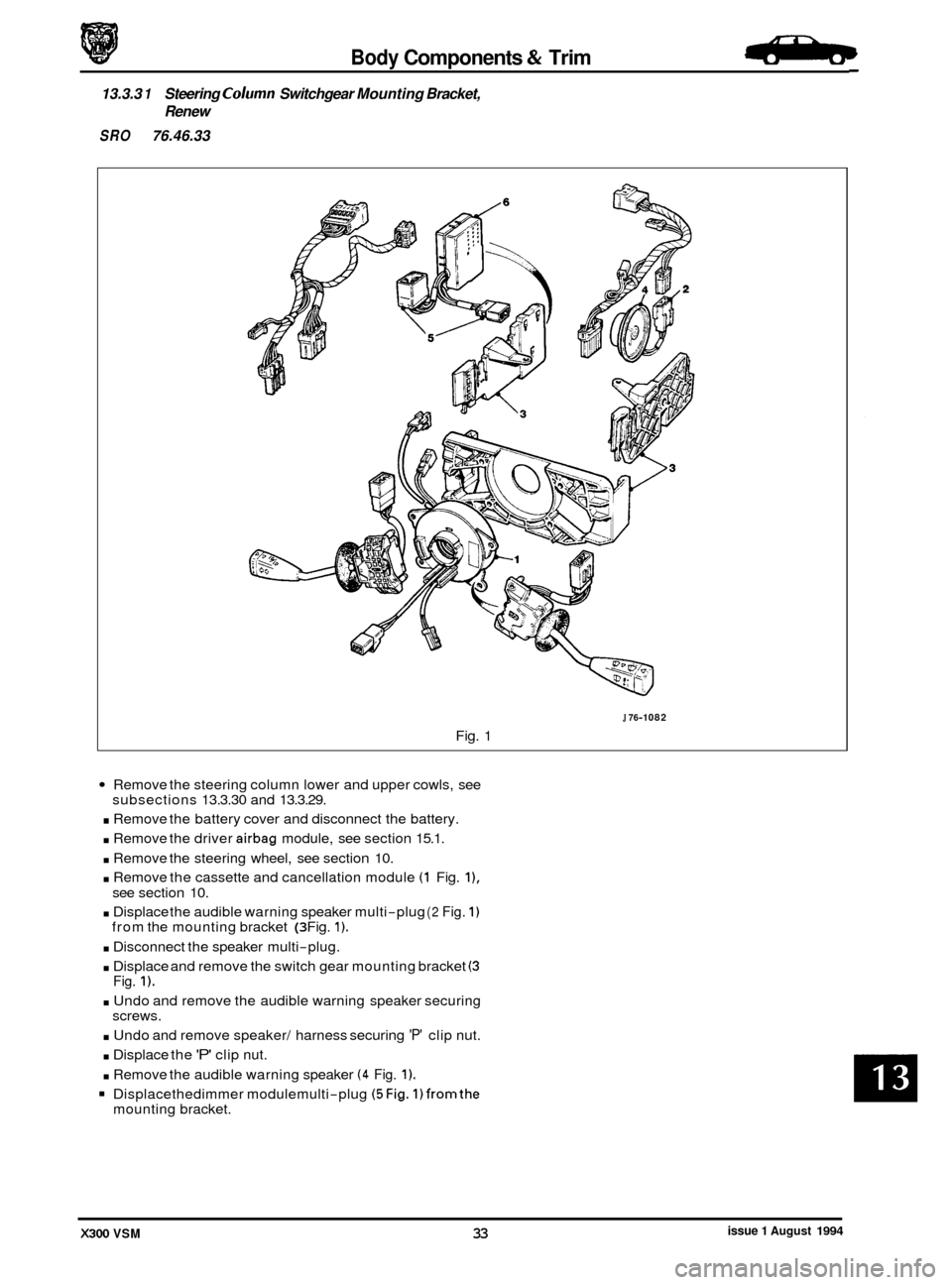
13.3.3 1 Steering Column Switchgear Mounting Bracket,
Renew
SRO 76.46.33
J 76-1 082
Fig. 1
Remove the steering column lower and upper cowls, see
. Remove the battery cover and disconnect the battery.
. Remove the driver airbag module, see section 15.1.
. Remove the steering wheel, see section 10.
. Remove the cassette and cancellation module (1 Fig. I),
. Displace the audible warning speaker multi-plug (2 Fig. 1)
. Disconnect the speaker multi-plug.
. Displace and remove the switch gear mounting bracket (3
. Undo and remove the audible warning speaker securing
. Undo and remove speaker/ harness securing 'P' clip nut.
. Displace the 'P' clip nut.
. Remove the audible warning speaker (4 Fig. 1).
Displacethedimmer modulemulti-plug (5Fig. 1)fromthe
subsections 13.3.30 and 13.3.29.
see section 10.
from the mounting bracket
(3 Fig. 1).
Fig. 1).
screws.
mounting bracket.
issue 1 August 1994 X300 VSM 33
Page 289 of 521
Body Components & Trim
J76-1082
Fig. 1
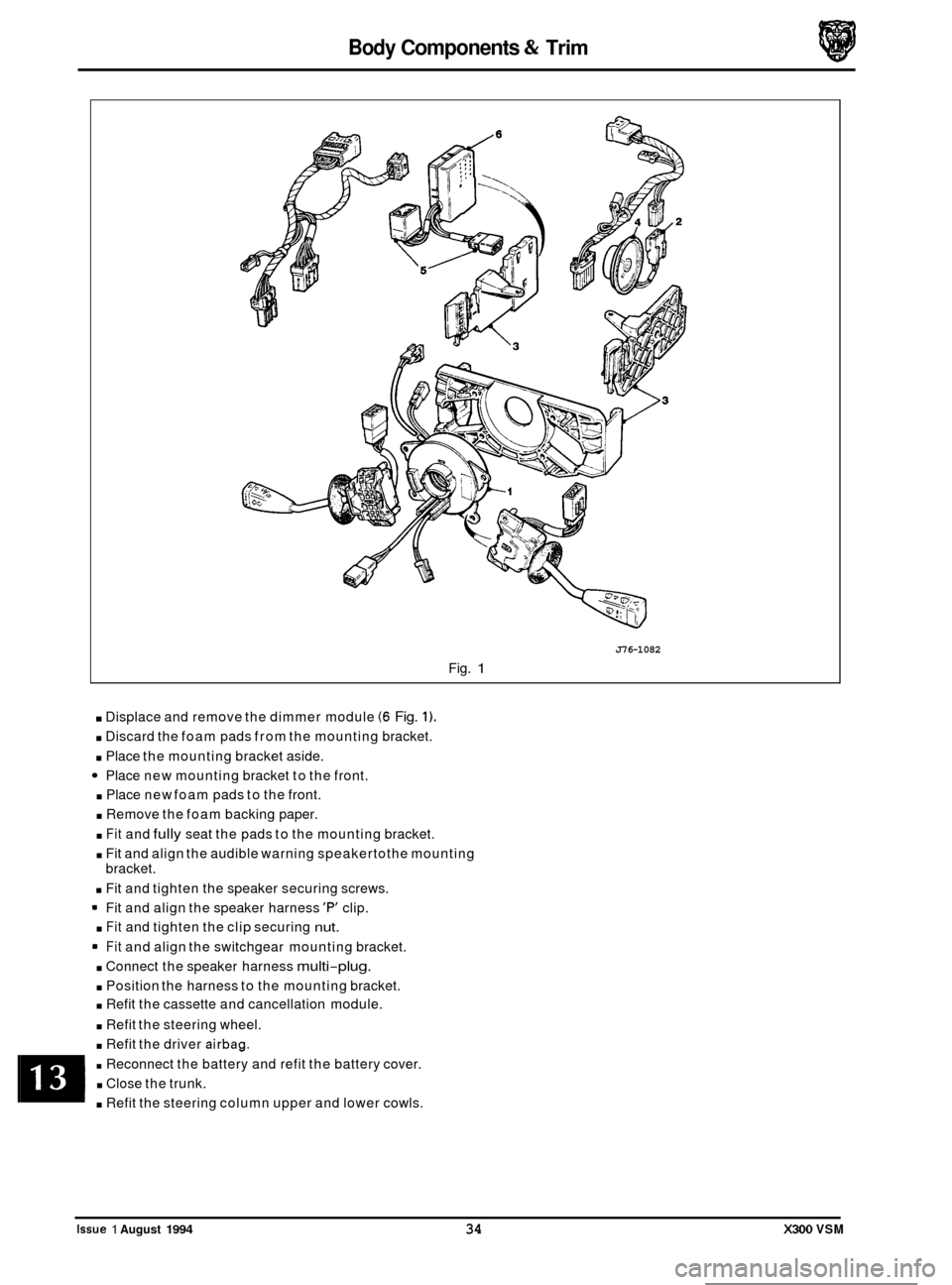
. Displace and remove the dimmer module (6 Fig. 1).
. Discard the foam pads from the mounting bracket.
. Place the mounting bracket aside.
Place new mounting bracket to the front.
. Place new foam pads to the front.
. Remove the foam backing paper.
. Fit and fully seat the pads to the mounting bracket.
. Fit and align the audible warning speakertothe mounting
bracket.
. Fit and tighten the speaker securing screws.
Fit and align the speaker harness
'F" clip.
. Fit and tighten the clip securing nut.
Fit and align the switchgear mounting bracket.
. Connect the speaker harness multi-plug.
. Position the harness to the mounting bracket.
. Refit the cassette and cancellation module.
. Refit the steering wheel.
. Refit the driver airbag.
. Reconnect the battery and refit the battery cover.
. Close the trunk.
. Refit the steering column upper and lower cowls.
0
0
0
0
Issue 1 August 1994 34 X300 VSM
Page 293 of 521
13.4 TRUNK
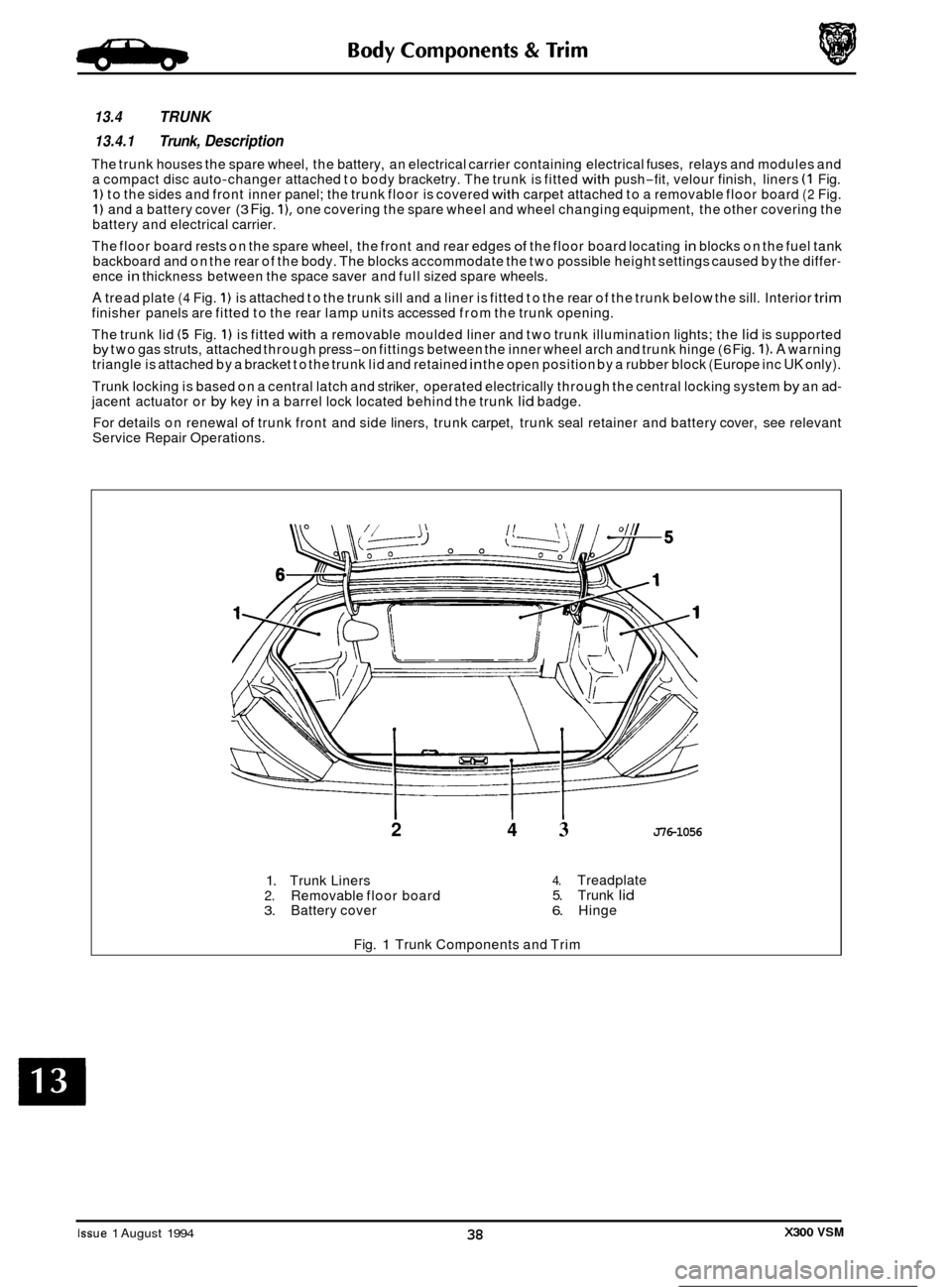
13.4.1 Trunk, Description
The trunk houses the spare wheel, the battery, an electrical carrier containing electrical fuses, relays and modules and
a compact disc auto-changer attached to body bracketry. The trunk is fitted with push-fit, velour finish, liners (1 Fig. 1) to the sides and front inner panel; the trunk floor is covered with carpet attached to a removable floor board (2 Fig. 1) and a battery cover (3 Fig. I), one covering the spare wheel and wheel changing equipment, the other covering the
battery and electrical carrier.
The floor board rests on the spare wheel, the front and rear edges
of the floor board locating in blocks on the fuel tank
backboard and on the rear of the body. The blocks accommodate the two possible height settings caused by the differ- ence in thickness between the space saver and full sized spare wheels.
A tread plate (4 Fig. 1) is attached to the trunk sill and a liner is fitted to the rear of the trunk below the sill. Interior trim finisher panels are fitted to the rear lamp units accessed from the trunk opening.
The trunk lid
(5 Fig. 1) is fitted with a removable moulded liner and two trunk illumination lights; the lid is supported by two gas struts, attached through press-on fittings between the inner wheel arch and trunk hinge (6 Fig. 1). A warning
triangle is attached by a bracket to the trunk lid and retained in the open position by a rubber block (Europe inc UK only).
Trunk locking is based on a central latch and striker, operated electrically through the central locking system
by an ad- jacent actuator or by key in a barrel lock located behind the trunk lid badge.
For details on renewal
of trunk front and side liners, trunk carpet, trunk seal retainer and battery cover, see relevant
Service Repair Operations.
2 4 3 J76-1056
1. Trunk Liners 2. Removable floor board 3. Battery cover
4. Treadplate 5. Trunk lid 6. Hinge
Fig.
1 Trunk Components and Trim
Issue 1 August 1994 X300 VSM 38
Page 318 of 521
Climate Control Systems
8. AUTO selection display.
9. EXTERIOR temperature selection button. There are two modes:
a) Press and immediate release; provides timed display of four (4) seconds.
b) Press and hold for two (2) seconds; 'latches' the mode until operator over-ride.
10. A/C push-on / push-off button will either engage or disengage (as indicated by the state lamp) the refrigeration
system compressor. The state lamp is also used as a compressor speed fault indicator,see System protection, this
section.
11. AUTO push-on button and state lamp. When selected and the state lamp lit, the A/C mode is selected and control
of demand temperature, fans speed, and air distribution is automatic. AUTO is cancelled by selection of any 'dis- tribution' button, A/C off, or manual FANS SPEED.
12. DEFROST push
-on / push-off button and state lamp. When engaged, air is distributed to the screen at maximum
fans speed and the heated front screen elements (where fitted) are ener ized. The heated front screen is automati- cally timed for a six (6) minute cycle but may be cancelled by pressing tfe HEATED FRONT SCREEN button. Auto- matic temperature control is retained and the fans speed may be manually reduced. Deselection will return the
system to the previous state and selection of AUTO will resume automatic system control.
13. The push
-on / push-off (F) button with state lamp manually controls the HEATED FRONT SCREEN (where fitted).
This facility allows rapid screen de-icing using laminated electrical heating elements to supplement the hot air
defrost.
14. The push-on / push-off (R) button with state lamp manually controls the HEATED REAR SCREEN and door mirror
glass heating elements for a timed cycle of; screen twenty (20) minutes and mirrors eleven (1 1) minutes.
m: The state lamp will remain lit after the mirror timer has gone through its 11 minute cycle and will not go out
until either completion of the 20 minute screen cycle or manual override.
15. TEMPERATURE decrease button
in IoC or I0F steps.
16. TEMPERATURE increase button in
IoC or I0F steps.
w: Automatic temperature control operates over the range 17OC to 31OC (61OF to 90OF). Extreme limits selected
by items 15 and 16 ('Lo' and 'Hi') provide maximum cooling or heating at maximum fans speed.
17. FACE level manual distribution over
-ride push-on / push-off button and state lamp.
0 18. Bi LEVEL (foot and face) manual distribution over-ride push-on / push-off button and state lamp.
19. FOOT level manual distribution over
-ride push-on / push-off button and state lamp.
20. DEMIST (screen and foot) level manual distribution over
-ride push-on / push-off button and state lamp.
!Y&Q: Selection of AUTO will over-ride any manual setting and deselection of any manual distribution will revertthe
system to AUTO distribution.
21. FACE VENTTEMPERATURE CONTROL thumb
-wheel. Situated between dash centre face level vents to reduce face
air outlet temperature relative to that of the foot-well.
Issue 1 August 1994 X300 VSM 5