display Lexus IS300h 2017 Owner's Manual
[x] Cancel search | Manufacturer: LEXUS, Model Year: 2017, Model line: IS300h, Model: Lexus IS300h 2017Pages: 692, PDF Size: 163.7 MB
Page 351 of 692
3514-5. Using the driving support systems
4
Driving
IS300h_EE(OM53D89E)
■Operation of the air conditioning system in Eco drive mode
Eco drive mode controls the heating/cooling operations and fan speed of the air condi-
tioning system to enhance fuel efficiency. To improve air conditioning performance, adjust the fan speed or turn off Eco drive mode.
■Automatic deactivation of sport mode and customized mode
If the power switch is turned off after driv ing in sport mode or customized mode, the drive mode will be changed to normal mode.
■Driving mode pop-up display (veh icles with a 10.3-inch display)
When the driving mode is changed, the sele cted driving mode will be temporarily dis- played on the side display. ( P. 464)
Page 354 of 692
3544-5. Using the driving support systems
IS300h_EE(OM53D89E)
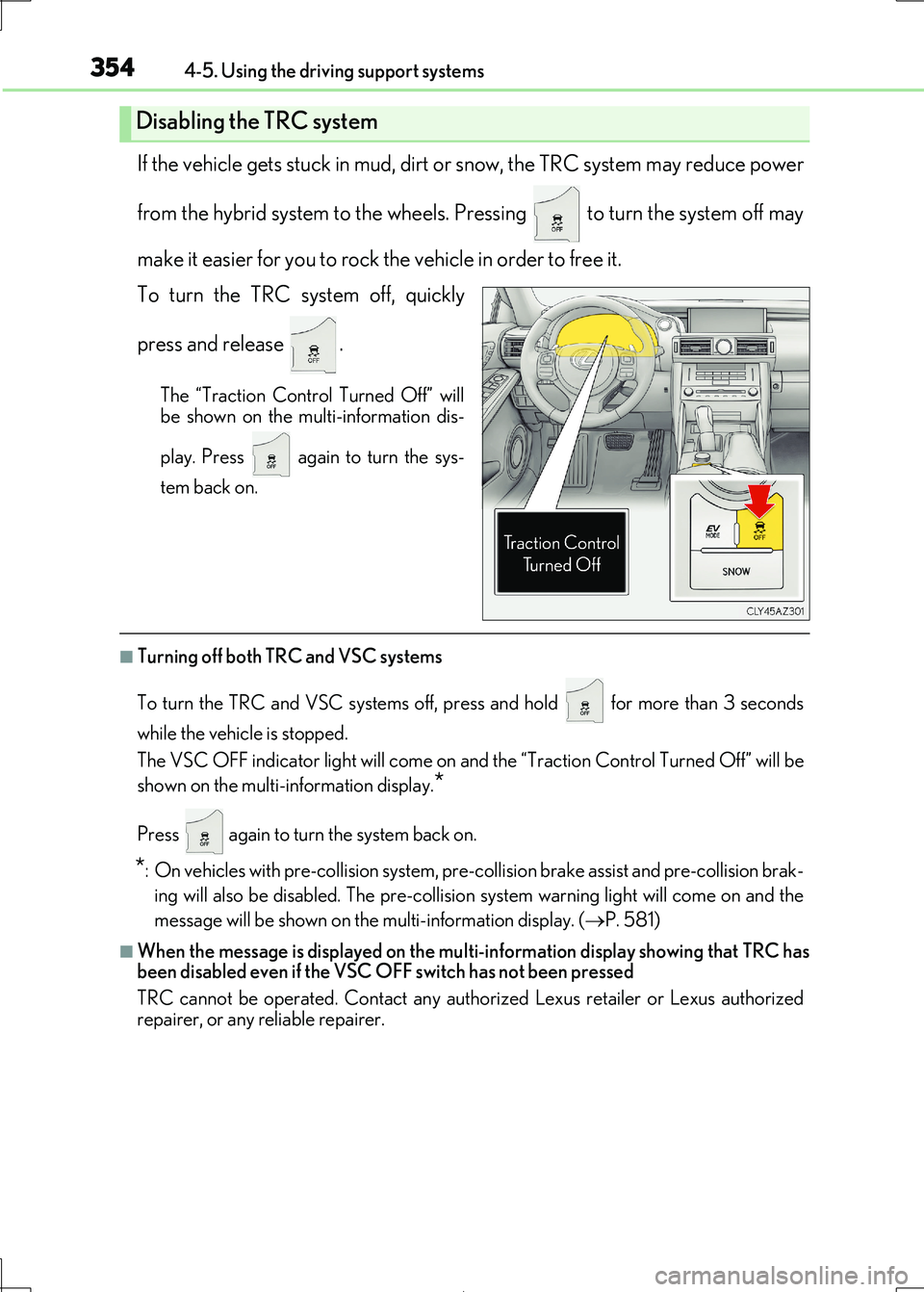
If the vehicle gets stuck in mud, dirt or snow, the TRC system may reduce power
from the hybrid system to the wheels. Pressing to turn the system off may
make it easier for you to rock the vehicle in order to free it.
To turn the TRC system off, quickly
press and release .
The “Traction Control Turned Off” will
be shown on the multi-information dis-
play. Press again to turn the sys-
tem back on.
■Turning off both TRC and VSC systems
To turn the TRC and VSC systems off, pr ess and hold for more than 3 seconds
while the vehicle is stopped.
The VSC OFF indicator light will come on an d the “Traction Control Turned Off” will be
shown on the multi-information display.*
Press again to turn the system back on.
*: On vehicles with pre-collision system, pre-co llision brake assist and pre-collision brak-
ing will also be disabled. The pre-collision sy stem warning light will come on and the
message will be shown on the multi-information display. (P. 581)
■When the message is displayed on the multi-information display showing that TRC has
been disabled even if the VSC OFF switch has not been pressed
TRC cannot be operated. Contact any authorized Lexus retailer or Lexus authorized
repairer, or any reliable repairer.
Disabling the TRC system
Page 358 of 692
358
IS300h_EE(OM53D89E)
4-6. Driving tips
◆Using Eco drive mode
When using Eco drive mode, the torq ue corresponding to the accelerator
pedal depression amount can be generate d more smoothly than it is in normal
conditions. In addition, the operation of the air conditioning system (heating/
cooling) will be minimized, im proving the fuel economy. (P. 348)
◆Use of Hybrid System Indicator
The Eco-friendly driving is possible by keeping the indicator needle (except F
SPORT models) or bar display (F SPOR T models) of Hybrid System Indicator
within the Eco area. ( P. 109)
◆Shift lever operation
Shift the shift lever to D wh en stopped at a traffic light, or driving in heavy traf-
fic, etc. Shift the shift lever to P when parking. When using the N, there is no
positive effect on fuel consumption. In the N, the gasoline engine operates but
electricity cannot be genera ted. Also, when using the air conditioning system,
etc., the hybrid battery (tractio n battery) power is consumed.
◆Accelerator pedal/brake pedal operation
●Drive your vehicle smoothly. Avoid abrupt acceleration and deceleration.
Gradual acceleration and deceleration will make more effective use of the
electric motor (traction motor) withou t having to use gasoline engine power.
●Avoid repeated acceleration. Repeated acceleration consumes hybrid bat-
tery (traction battery) power, resulting in poor fuel consumption. Battery
power can be restored by driving with the accelerator pedal slightly released.
◆When braking
Make sure to operate the brakes gently and in a timely manner. A greater
amount of electrical energy can be regenerated when slowing down.
Hybrid vehicle driving tips
For economical and ecological driving, pay attention to the following points:
Page 366 of 692
366
IS300h_EE(OM53D89E)
5-1. Basic Operations
Lexus Display Audio
system ..........................................368
Steering wheel audio
switches....................................... 374
USB/AUX ports ........................ 375
5-2. Setup
Setup menu .................................. 378
General settings......................... 379
Voice settings .............................. 382
Display settings ...........................383
5-3. Using the audio system
Selecting the audio
source ..........................................385
Optimal use of the audio
system ..........................................386
Audio settings ............................. 387
Audio menu screen
operation ..................................... 391
5-4. Using the radio
Radio operation.......................... 394
5-5. Playing an audio CD and
MP3/WMA/AAC discs
CD player operation ................ 396
Page 367 of 692

367
5
Lexus Display
Audio system
IS300h_EE(OM53D89E)
5-6. Using an external device
Listening to an iPod ...................402
Using USB memory
device...........................................406
Using the AUX port .................... 411
5-7. Connecting Bluetooth®
Steps for usin g Bluetooth®
devices.......................................... 412
Registering a Bluetooth®
device............................................ 414
Selecting a Bluetooth®
device............................................ 415
Connecting a Bluetooth®
audio player ................................ 416
Connecting a Bluetooth®
phone .............................................417
Displaying a Bluetooth®
device details ............................. 418
Detailed Bluetooth®
settings.......................................... 419
5-8. Bluetooth® Audio
Listening to Bluetooth®
Audio............................................420
5-9. Bluetooth® Phone
Using a Bluetooth®
Phone.............................................421
Making a call................................ 423
Receiving a call ........................... 426
Speaking on the phone ........... 427
Using a Bluetooth® phone
messages.................................... 429
Using the steering wheel
switches....................................... 432
Bluetooth® phone
settings ........................................ 433
5-10. Phonebook
Contact settings ......................... 435
Messaging setting .....................438
5-11. Bluetooth®
What to do if...
(Troubleshooting)................... 439
Bluetooth®................................... 442
5-12. Other function
“Information” screen.................450
MirrorLink™ ................................. 451
USB photo .................................... 455
Speech command system ...... 457
Some of the functions cannot be operated while driving.
Page 368 of 692
368
IS300h_EE(OM53D89E)
5-1. Basic Operations
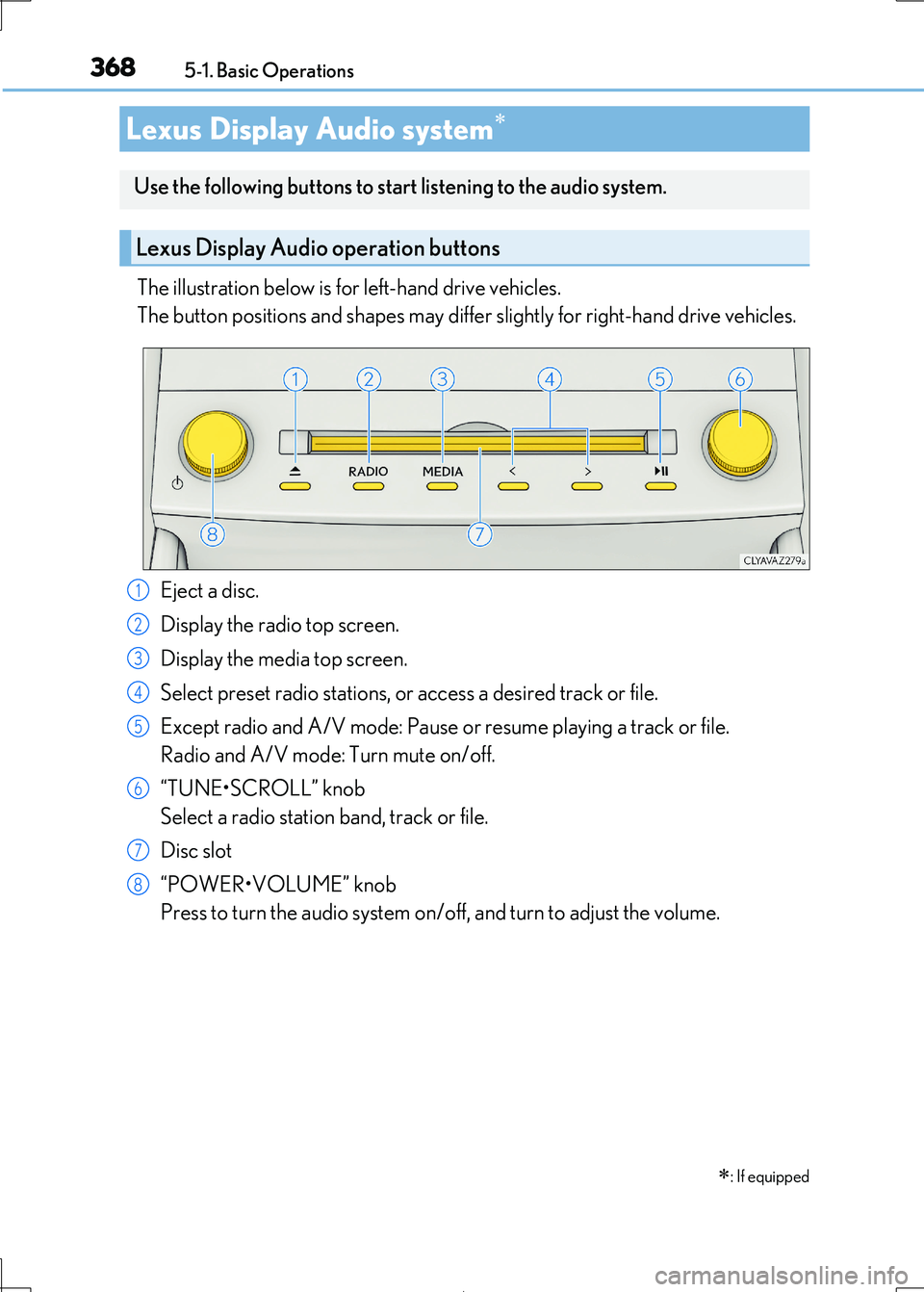
The illustration below is for left-hand drive vehicles.
The button positions and shapes may differ slightly for right-hand drive vehicles.
Eject a disc.
Display the radio top screen.
Display the media top screen.
Select preset radio stations, or access a desired track or file.
Except radio and A/V mode: Pause or resume playing a track or file.
Radio and A/V mode: Turn mute on/off.
“TUNE•SCROLL” knob
Select a radio station band, track or file.
Disc slot
“POWER•VOLUME” knob
Press to turn the audio system on/o ff, and turn to adjust the volume.
Lexus Display Audio system
: If equipped
Use the following buttons to star t listening to the audio system.
Lexus Display Audio operation buttons
1
2
3
4
5
6
7
8
Page 369 of 692
3695-1. Basic Operations
5
Lexus Display Audio system
IS300h_EE(OM53D89E)
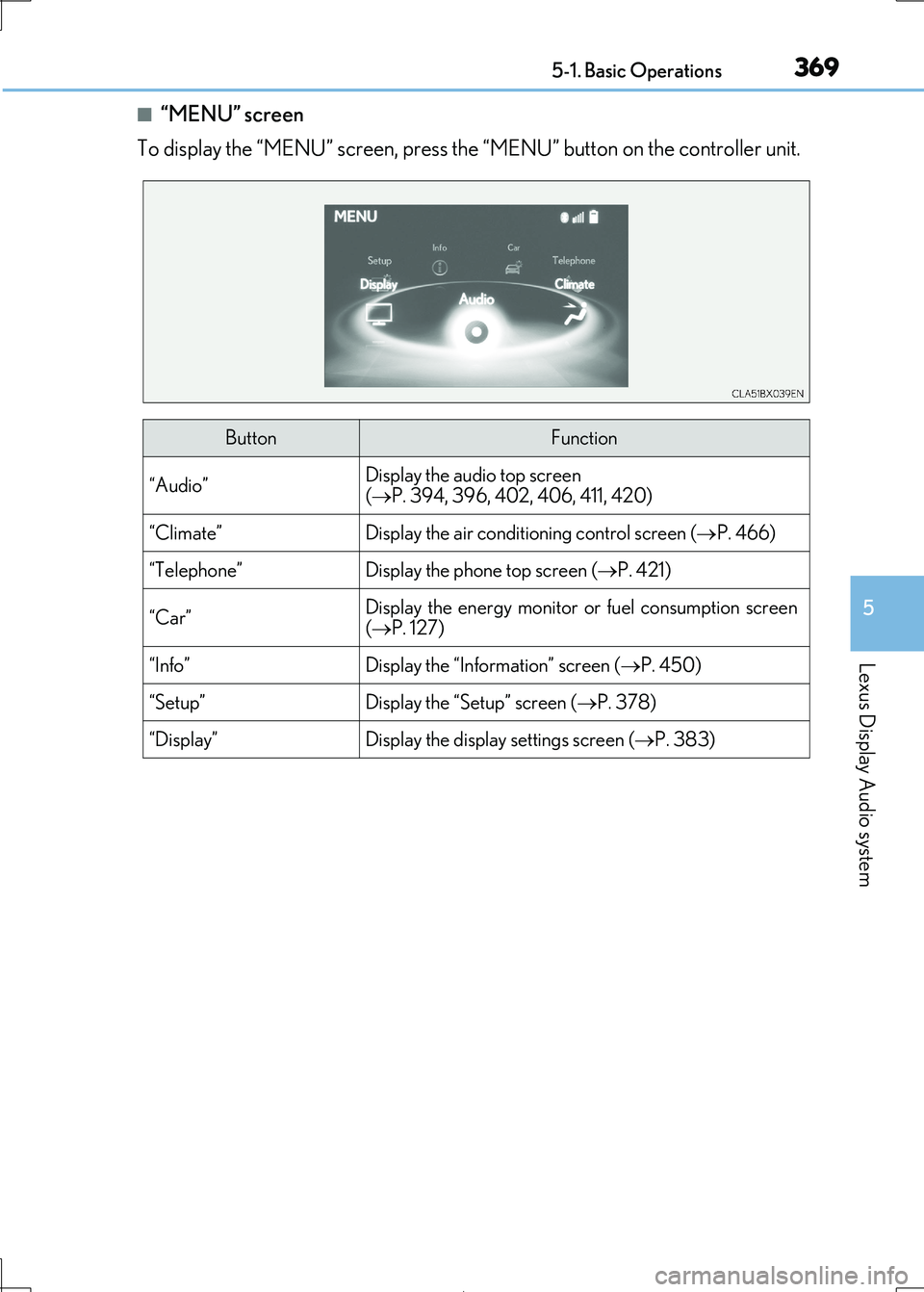
■“MENU” screen
To display the “MENU” screen, press the “MENU” button on the controller unit.
ButtonFunction
“Audio”Display the audio top screen
( P. 394, 396, 402, 406, 411, 420)
“Climate”Display the air conditioning control screen (P. 466)
“Telephone”Display the phone top screen (P. 421)
“Car” Display the energy monitor or fuel consumption screen
( P. 127)
“Info”Display the “Information” screen (P. 450)
“Setup”Display the “Setup” screen (P. 378)
“Display”Display the display settings screen (P. 383)
Page 370 of 692
3705-1. Basic Operations
IS300h_EE(OM53D89E)
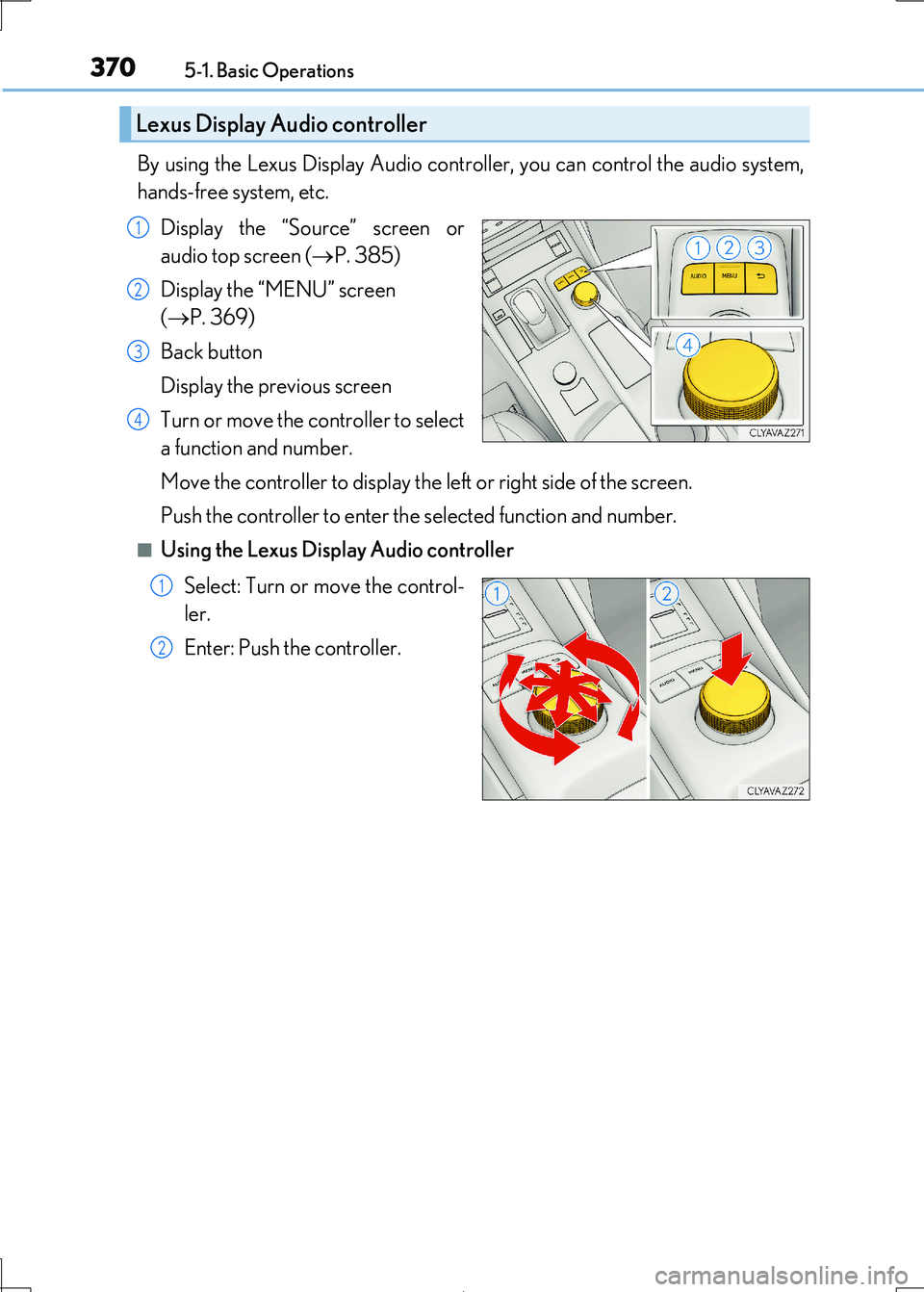
By using the Lexus Display Audio controller, you can control the audio system,
hands-free system, etc.
Display the “Source” screen or
audio top screen ( P. 385)
Display the “MENU” screen
( P. 369)
Back button
Display the previous screen
Turn or move the controller to select
a function and number.
Move the controller to display the left or right side of the screen.
Push the controller to enter the selected function and number.
■Using the Lexus Display Audio controller
Select: Turn or move the control-
ler.
Enter: Push the controller.
Lexus Display Audio controller
1
2
3
4
1
2
Page 371 of 692
3715-1. Basic Operations
5
Lexus Display Audio system
IS300h_EE(OM53D89E)
■Basic screen operation
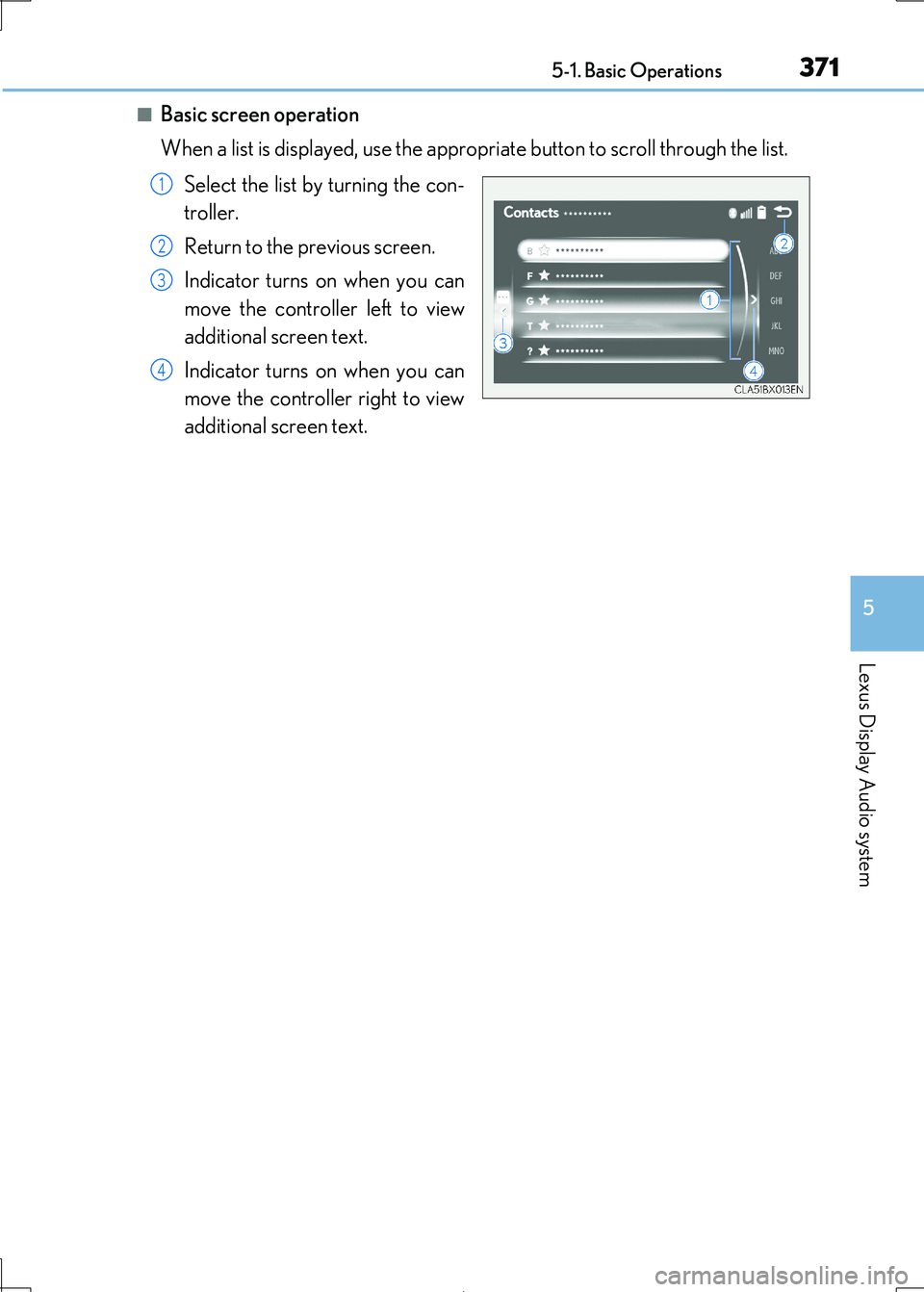
When a list is displayed, use the approp riate button to scroll through the list.
Select the list by turning the con-
troller.
Return to the previous screen.
Indicator turns on when you can
move the controller left to view
additional screen text.
Indicator turns on when you can
move the controller right to view
additional screen text.
1
2
3
4
Page 373 of 692
3735-1. Basic Operations
5
Lexus Display Audio system
IS300h_EE(OM53D89E)
■When using the screen
●Under extremely cold conditions, the Lexus Display Audio controller may react slowly.
●If the screen is cold, the display may be dark, or the system may seem to be operating slightly slower than normal.
●The screen may seem dark and hard to se e when viewed through sunglasses. Change
your angle of viewing, adjust the display on the “Display” screen (P. 383) or remove your sunglasses.
■Using cellular phones
Interference may be heard through the audi o system’s speakers if a cellular phone is being used inside or close to the vehi cle while the audio system is operating.
WARNING
■Using the Lexus Display Audio controller
Be careful when touching the Lexus Display Audio controller in extreme temperatures as it may become very hot or cold due to the temperature inside the vehicle.
NOTICE
■To prevent Lexus Display Au dio controller malfunction
●Do not allow the Lexus Display Audio controller to come into contact with food, liq-
uid, stickers or lit ci garettes as doing so may cause it to change color, emit a strange
odor or stop functioning.
●Do not subject the Lexus Display Audio cont roller to excessive pressure or strong
impact as the controller may bend or break off.
■To prevent 12-volt battery discharge
Do not leave the audio system on longer than necessary when the hybrid system is off.
■To avoid damaging the audio system
Take care not to spill drinks or other fluids on the audio system.