change time LEXUS RX350 2015 User Guide
[x] Cancel search | Manufacturer: LEXUS, Model Year: 2015, Model line: RX350, Model: LEXUS RX350 2015Pages: 886, PDF Size: 11 MB
Page 233 of 886
2332-4. Using other driving systems
2
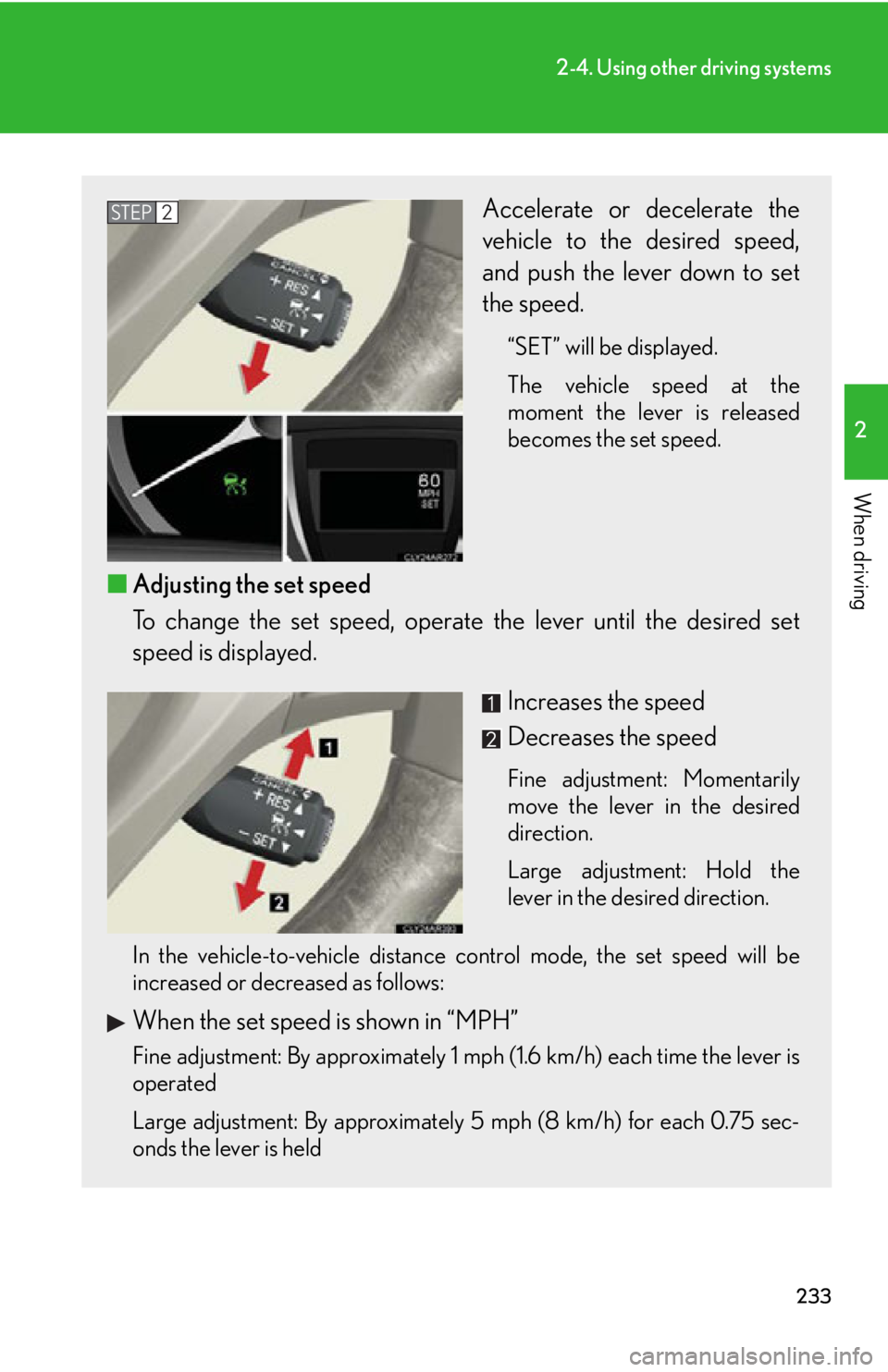
When driving Accelerate or decelerate the
vehicle to the desired speed,
and push the lever down to set
the speed. “SET” will be displayed.
The vehicle speed at the
moment the lever is released
becomes the set speed.
■ Adjusting the set speed
To change the set speed, operate the lever until the desired set
speed is displayed.
Increases the speed
Decreases the speed Fine adjustment: Momentarily
move the lever in the desired
direction.
Large adjustment: Hold the
lever in the desired direction.
In the vehicle-to-vehicle distance control mode, the set speed will be
increased or decreased as follows:
When the set speed is shown in “MPH”
Fine adjustment: By approximately 1 mph (1.6 km/h) each time the lever is
operated
Large adjustment: By approximately 5 mph (8 km/h) for each 0.75 sec-
onds the lever is held STEP 2
Page 234 of 886
2342-4. Using other driving systems
When the set speed is shown in “km/h” Fine adjustment: By approximately 0.6 mph (1 km/h) each time the lever is
operated
Large adjustment: By approximately 3.1 mph (5 km/h) for each 0.75 sec-
onds the lever is held
In the constant speed control mode ( P. 238), the set speed will be
increased or decreased as follows:
Fine adjustment: By approximately 1 mph (1.6 km/h) each time the lever is
operated
Large adjustment: The set speed can be increased or decreased continu-
ally until the lever is released.
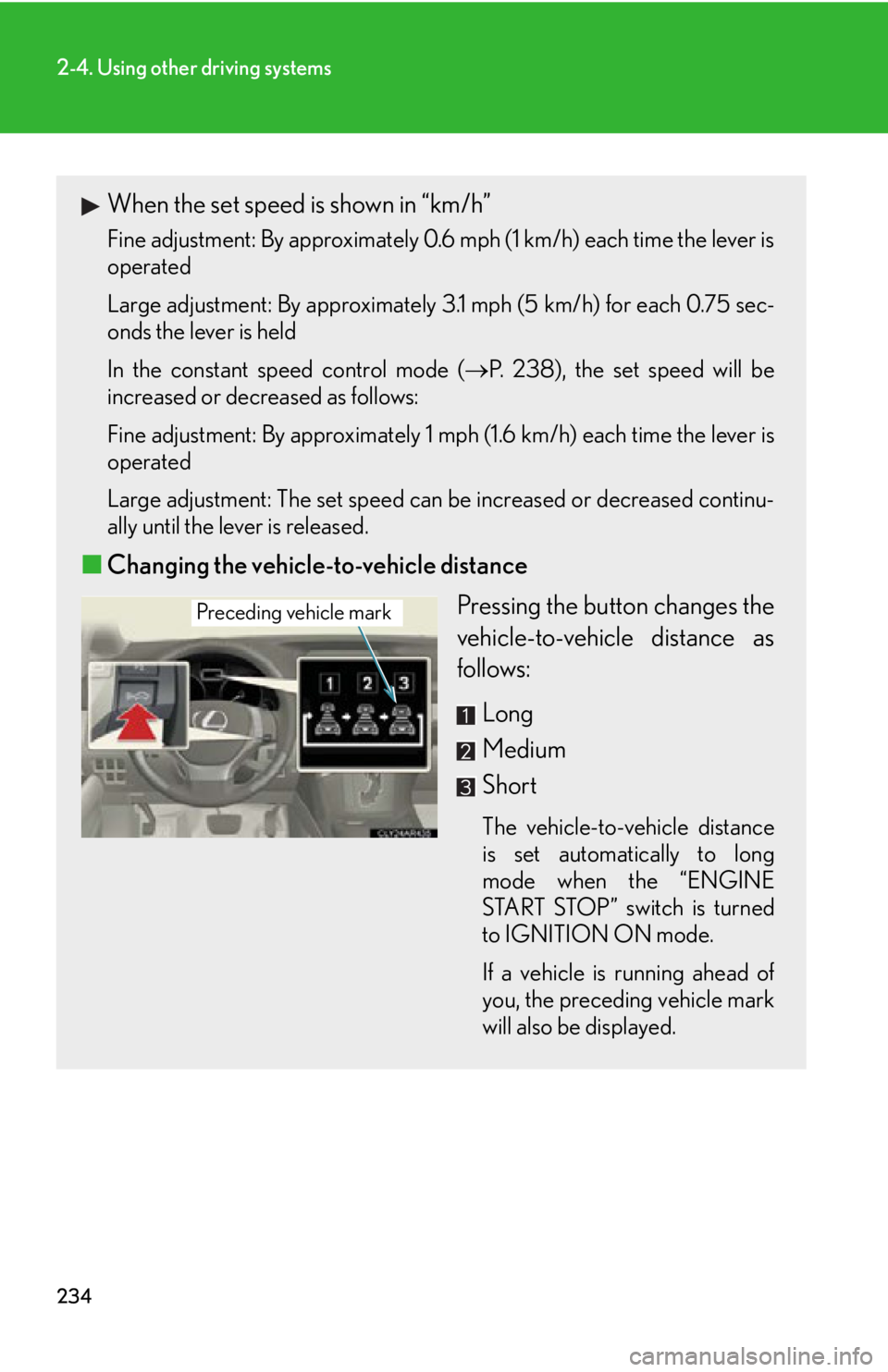
■ Changing the vehicle-to-vehicle distance
Pressing the button changes the
vehicle-to-vehicle distance as
follows:
Long
Medium
Short The vehicle-to-vehicle distance
is set automatically to long
mode when the “ENGINE
START STOP” switch is turned
to IGNITION ON mode.
If a vehicle is running ahead of
you, the preceding vehicle mark
will also be displayed.Preceding vehicle mark
Page 257 of 886
2572-4. Using other driving systems
2
When driving ■
Selecting a language (English, French or Spanish)
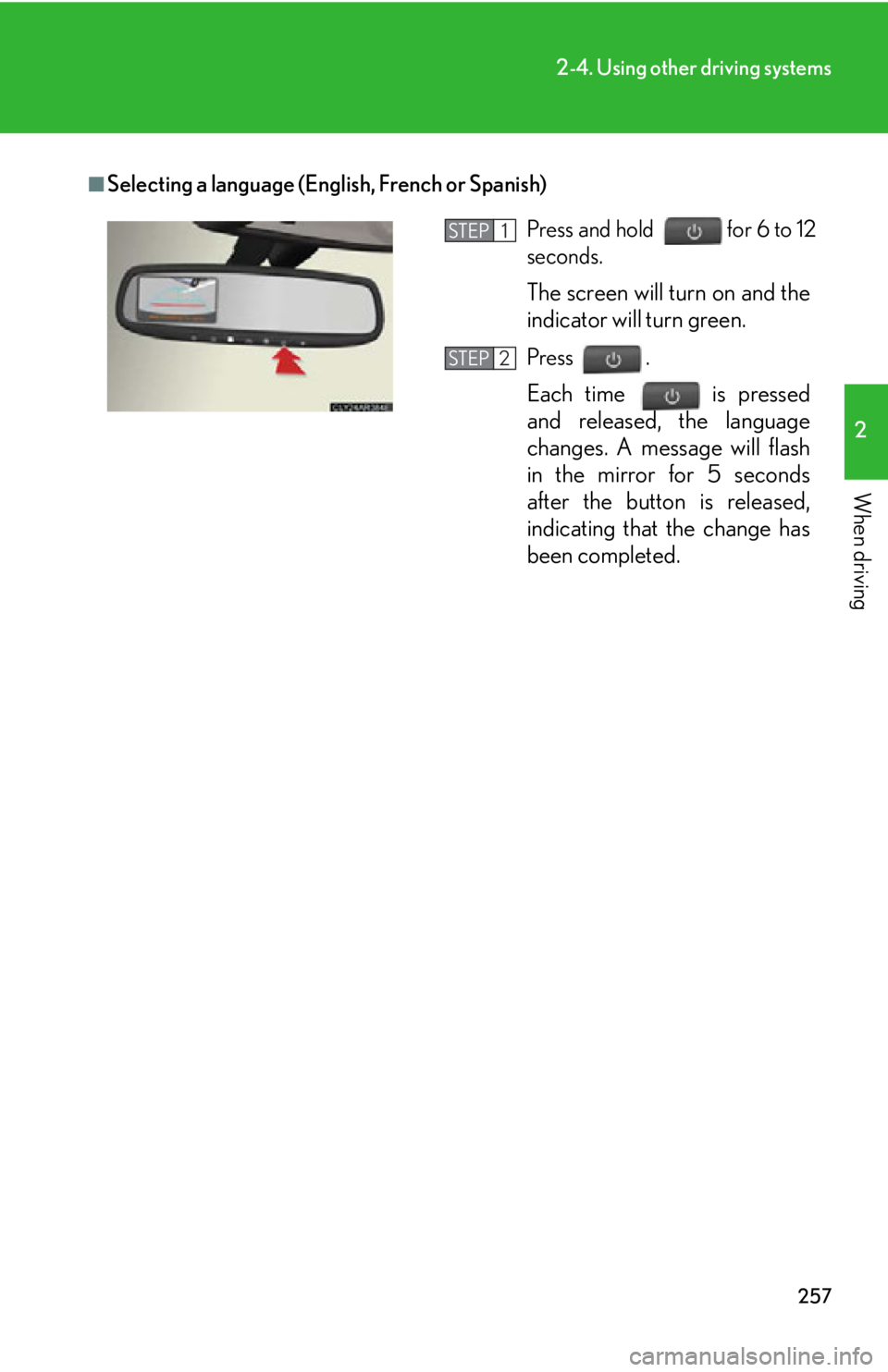
Press and hold for 6 to 12
seconds.
The screen will turn on and the
indicator will turn green. Press .
Each time
is pressed
and released, the language
changes. A message will flash
in the mirror for 5 seconds
after the button is released,
indicating that the change has
been completed. STEP 1
STEP 2
Page 291 of 886

2912-4. Using other driving systems
2
When driving CAUTION■
Cautions regarding the use of the system
The driver is solely responsible for safe driving. Always drive safely, taking care to
observe your surroundings.
The Blind Spot Monitor is a supplementary system which alerts the driver that a
vehicle is present in the blind spot. Do not overly rely on the Blind Spot Monitor. The
system cannot judge if it is safe to change lanes, therefore over reliance could cause
an accident resulting in death or serious injury. According to conditions, the system
may not function correctly. Therefore the driver’s own visual confirmation of safety
is necessary.■
Handling the radar sensor
One Blind Spot Monitor is installed inside the left and right side of the vehicle rear
bumper respectively. Observe the followin g to ensure the Blind Spot Monitor can
function correctly.
●
Do not subject the sensor or surrounding area on the bumper to a strong impact.
If the sensor moves even slightly off position, the system may malfunction and
vehicles that enter the detection area ma y not be detected. If the sensor or sur-
rounding area is subject to a strong impact, always have the area inspected by
your Lexus dealer.●
Do not disassemble the sensor.
●
Do not attach accessories or stickers to the sensor or surrounding area on the
bumper.
●
Do not modify the sensor or surrounding area on the bumper.
●
Do not paint the sensor or surrounding area on the bumper. ●
Keep the sensor and its surrounding area
on the bumper clean at all times.
Page 347 of 886
3473-2. Using the air conditio ning system and defogger
3
Interior features Adjusting the settings manually
■ Basic setting
To turn on the air conditioning system and adjust the fan speed,
press on to increase the fan speed and to
decrease the fan speed or select “ ” of to increase the
fan speed and “ ” to decrease the fan speed.Press to turn the fan off.
To adjust the temperature setting, press or select of the
“TEMP” to increase the temperature and or to
decrease the temperature. When is selected (the indicator on is on) or the pas-
senger’s side temperature control bu tton is pressed, the temperature
for the driver and passenger seat s can be adjusted separately.
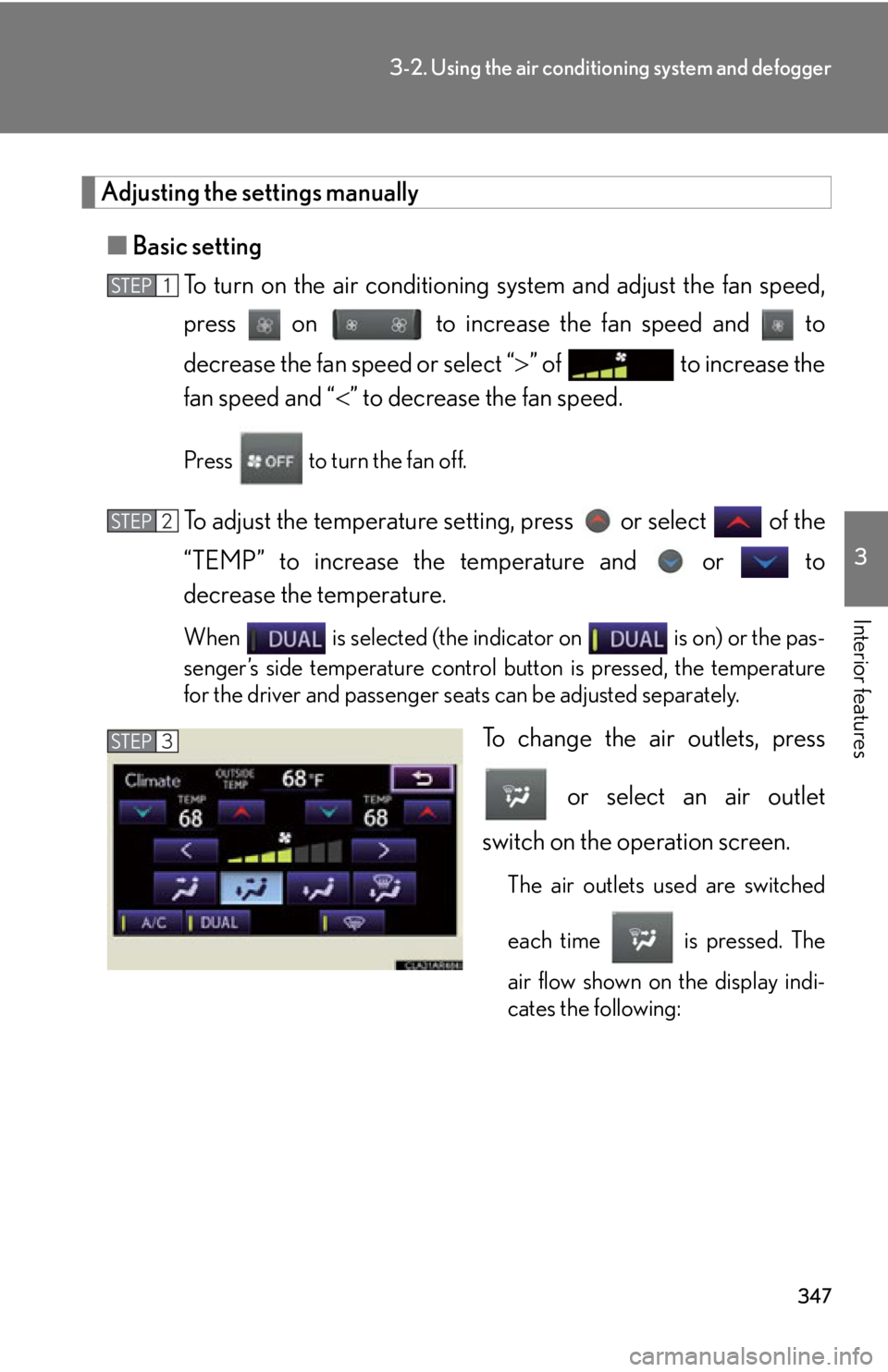
To change the air outlets, press
or select an air outlet
switch on the operation screen. The air outlets used are switched
each time is pressed. The
air flow shown on the display indi-
cates the following:STEP 1
STEP 2
STEP 3
Page 355 of 886
3553-2. Using the air conditio ning system and defogger
3
Interior features Adjusting the settings manually
■ Basic setting
To turn on the air conditioning system and adjust the fan speed,
press on to increase the fan speed and to
decrease the fan speed. To turn the fan off, press .
To adjust the temperature setting, press on to increase
the temperature and to decrease the temperature. When is pressed (the indicator on is on) or the passen-
ger’s side temperature control button is pressed, the temperature for
the driver and passenger seats can be adjusted separately.
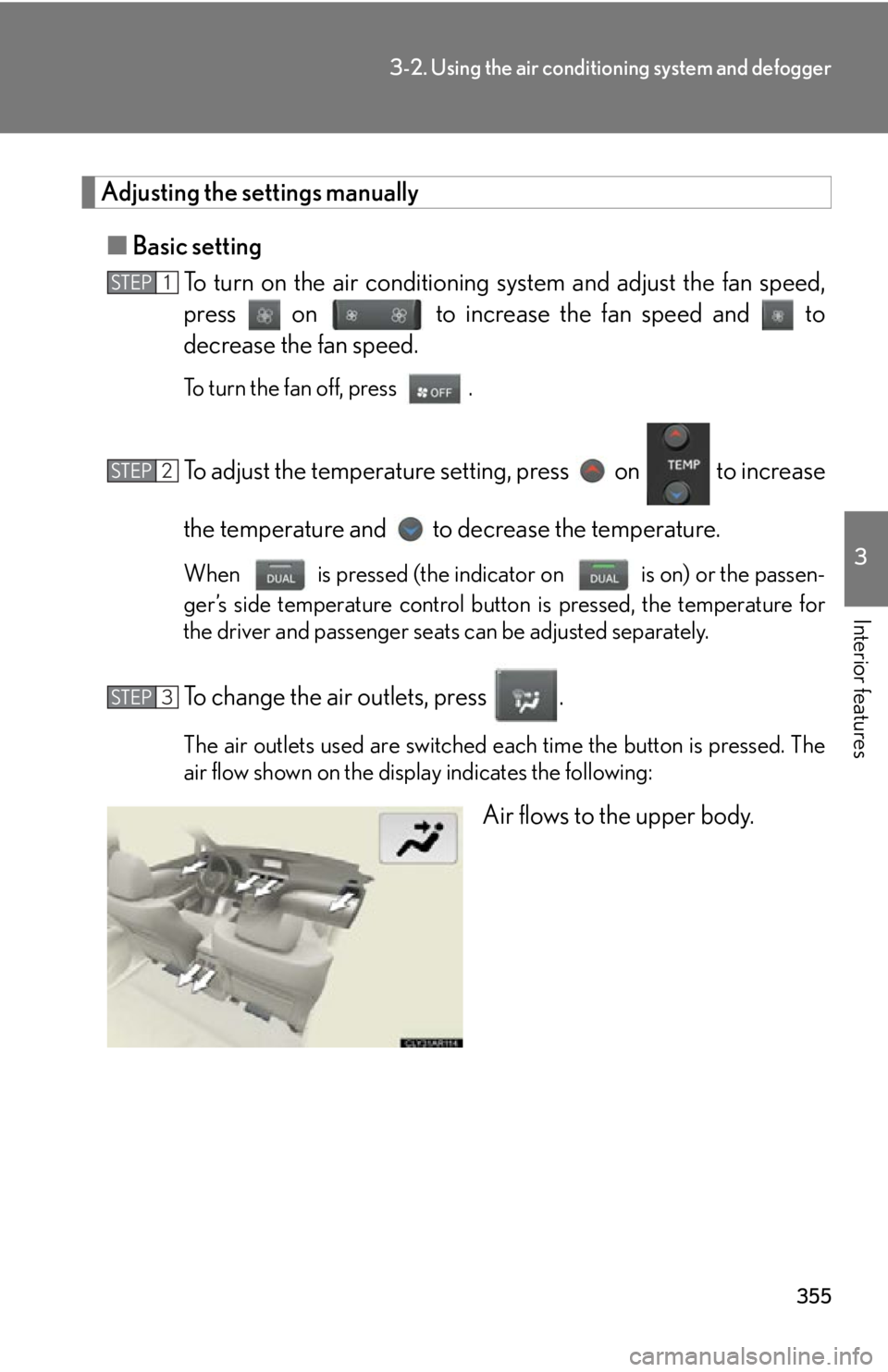
To change the air outlets, press . The air outlets used are switched each time the button is pressed. The
air flow shown on the display indicates the following:
Air flows to the upper body.STEP 1
STEP 2
STEP 3
Page 361 of 886
3613-2. Using the air conditio ning system and defogger
3
Interior features Rear window defogger switch Defoggers are used to defog the rear window, and to remove raindrops,
dew and frost from the outside rear view mirrors.
Vehicles with a navigation system
Owners of models equi pped with a navigation system should refer to
the “Navigation System Owner’s Manual”.
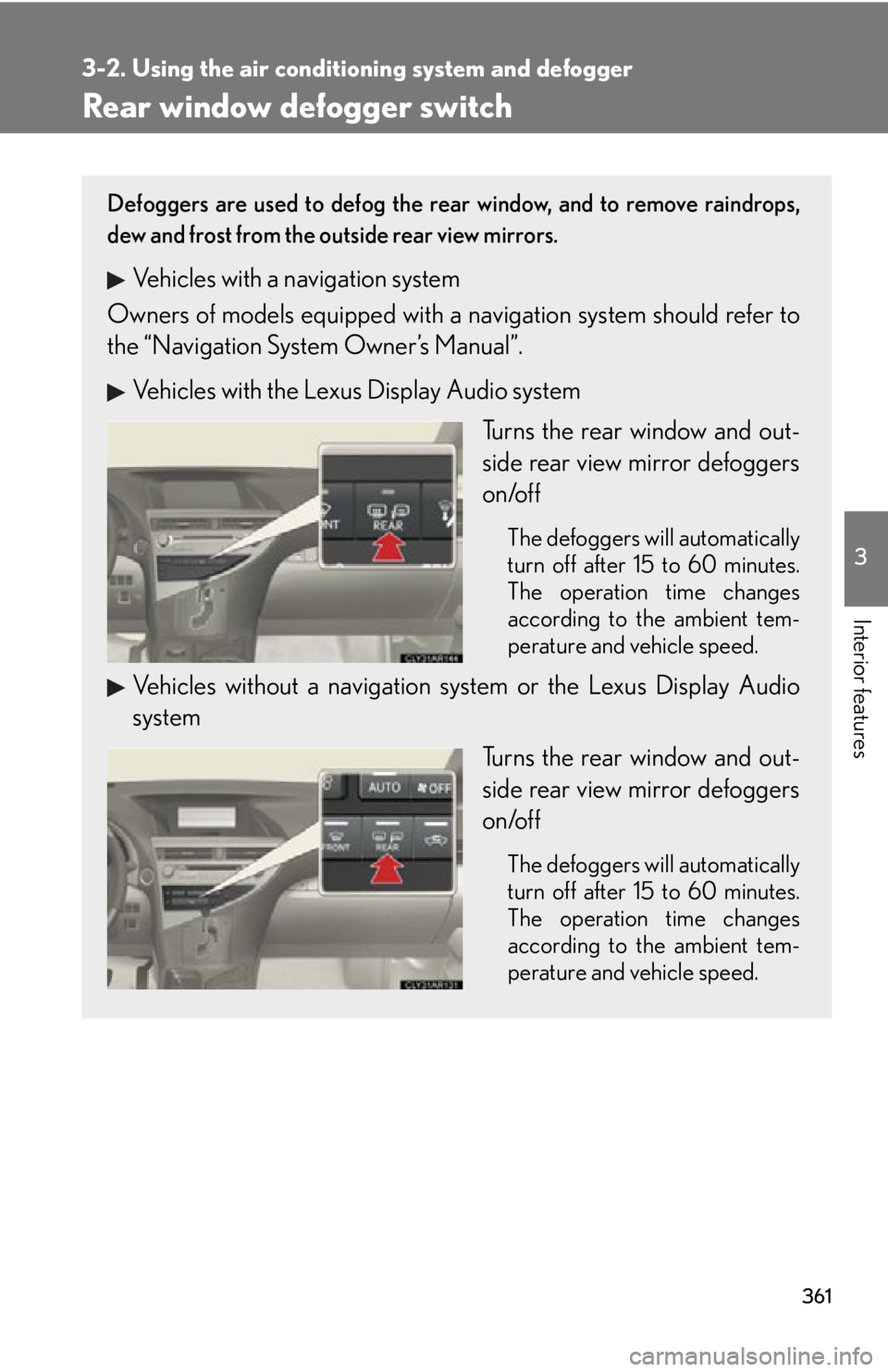
Vehicles with the Lexus Display Audio system
Turns the rear window and out-
side rear view mirror defoggers
on/off The defoggers will automatically
turn off after 15 to 60 minutes.
The operation time changes
according to the ambient tem-
perature and vehicle speed.
Vehicles without a navigation sy stem or the Lexus Display Audio
system
Turns the rear window and out-
side rear view mirror defoggers
on/off The defoggers will automatically
turn off after 15 to 60 minutes.
The operation time changes
according to the ambient tem-
perature and vehicle speed.
Page 366 of 886
3663-3. Using the Lexus Display Audio system
Switching the audio source
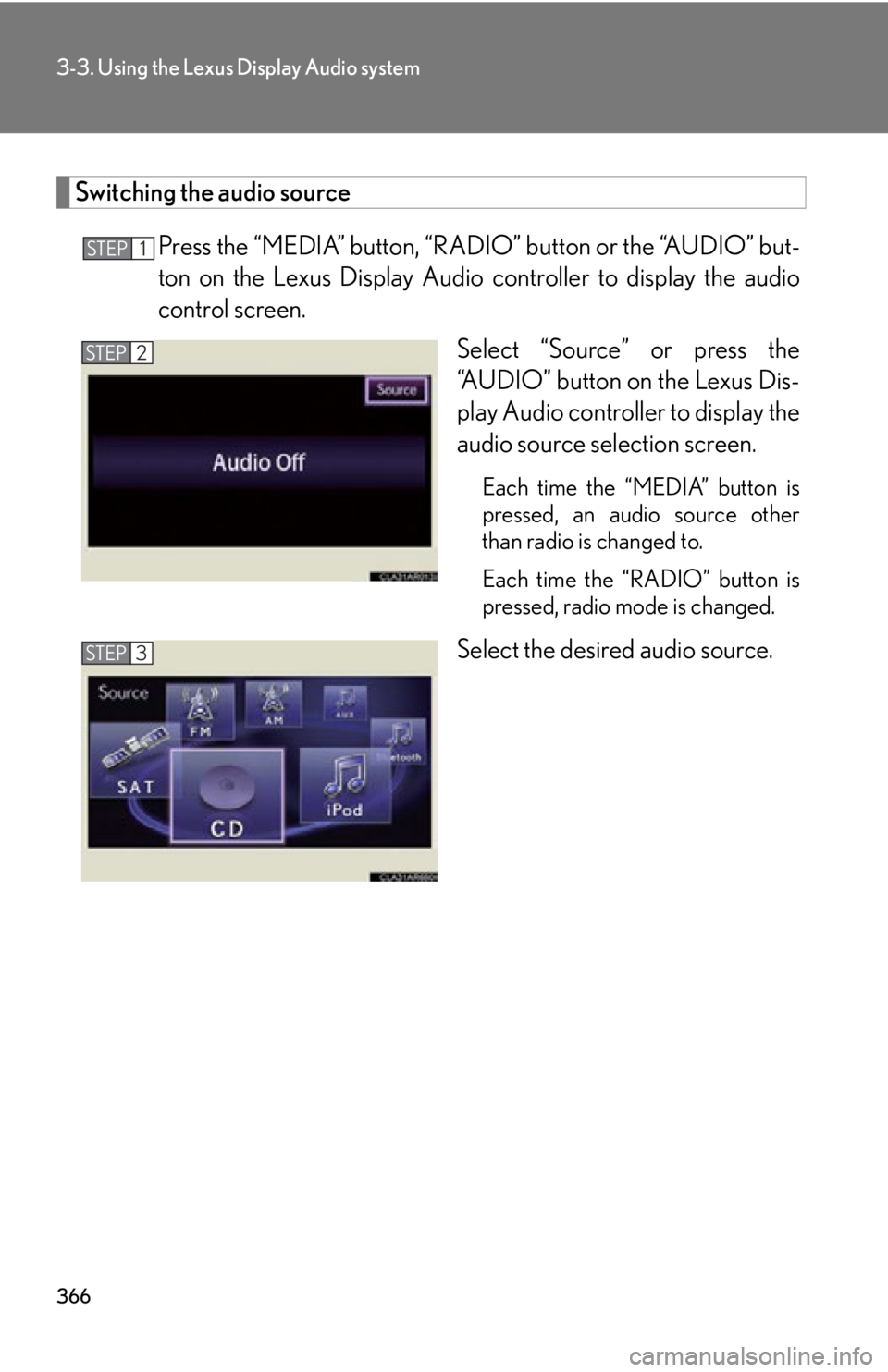
Press the “MEDIA” button, “RAD IO” button or the “AUDIO” but-
ton on the Lexus Display Audio controller to display the audio
control screen.
Select “Source” or press the
“AUDIO” button on the Lexus Dis-
play Audio controller to display the
audio source selection screen. Each time the “MEDIA” button is
pressed, an audio source other
than radio is changed to.
Each time the “RADIO” button is
pressed, radio mode is changed.
Select the desired audio source.STEP 1
STEP 2
STEP 3
Page 372 of 886
3723-3. Using the Lexus Display Audio system
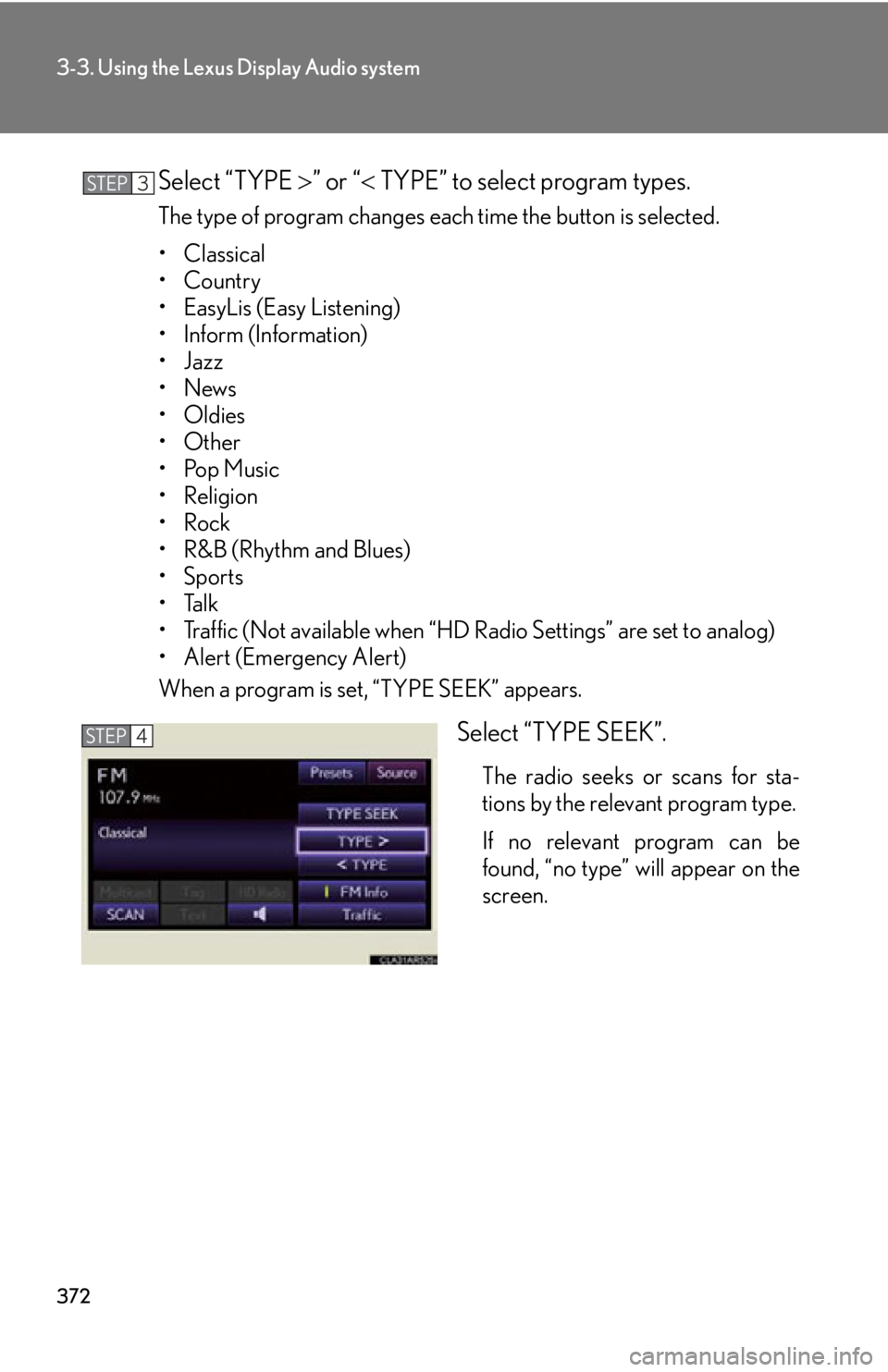
Select “TYPE ” or “ TYPE” to select program types.The type of program changes each time the button is selected.
• Classical
•Country
• EasyLis (Easy Listening)
• Inform (Information)
•Jazz
•News
• Oldies
•Other
•Pop Music
• Religion
•Rock
•R&B (Rhythm and Blues)
•Sports
•Talk
• Traffic (Not available when “HD Radio Settings” are set to analog)
• Alert (Emergency Alert)
When a program is set, “TYPE SEEK” appears.
Select “TYPE SEEK”. The radio seeks or scans for sta-
tions by the relevant program type.
If no relevant program can be
found, “no type” will appear on the
screen.STEP 3
STEP 4
Page 375 of 886
3753-3. Using the Lexus Display Audio system
3
Interior features ■ Selecting a desired type
Select “Options”.
Select “TYPE ” or “ TYPE” to select program types.The type of program changes each time the button is selected.
( P. 3 7 1 )
When a program is set, “TYPE SEEK” appears.
Select “TYPE SEEK”. The radio seeks or scans for stations by the relevant program type.
If no relevant program can be fo und, “no type” will appear on the
screen.
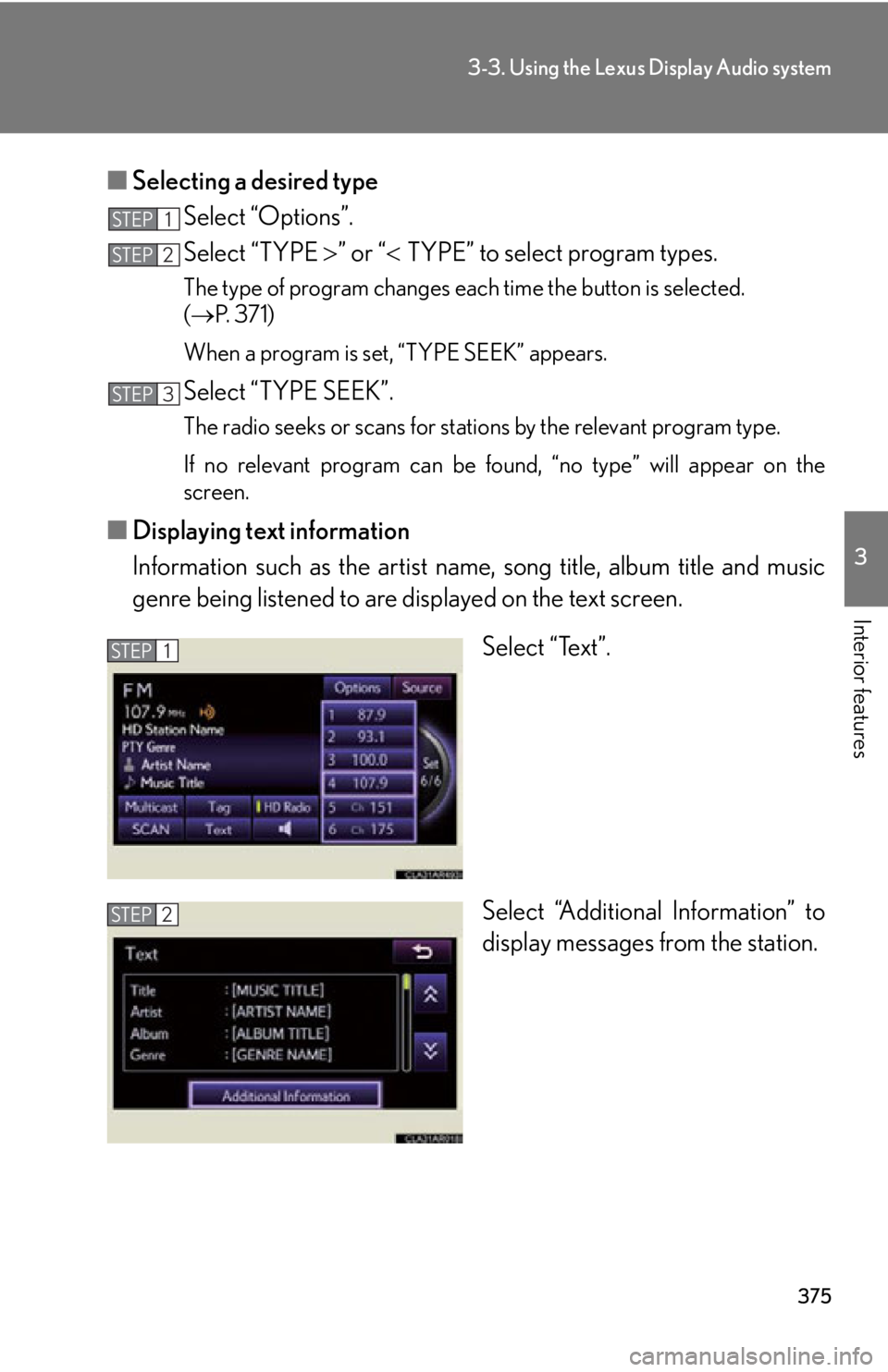
■ Displaying text information
Information such as the artist name, song title, album title and music
genre being listened to are displayed on the text screen.
Select “Text”.
Select “Additional Information” to
display messages from the station.STEP 1
STEP 2
STEP 3
STEP 1
STEP 2