Rear LINCOLN MKZ 2013 Owner's Guide
[x] Cancel search | Manufacturer: LINCOLN, Model Year: 2013, Model line: MKZ, Model: LINCOLN MKZ 2013Pages: 474, PDF Size: 3.79 MB
Page 67 of 474
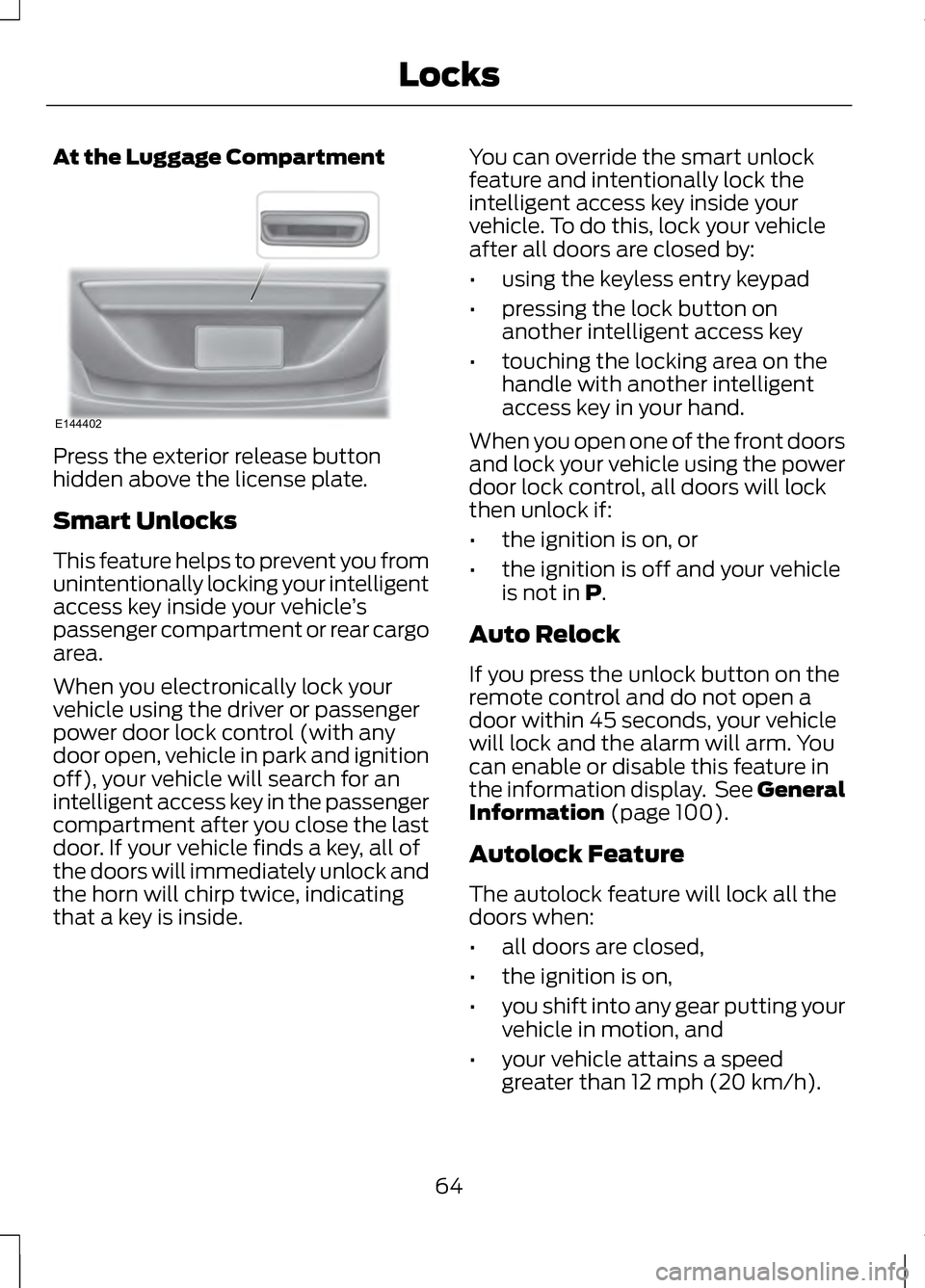
At the Luggage Compartment
Press the exterior release button
hidden above the license plate.
Smart Unlocks
This feature helps to prevent you from
unintentionally locking your intelligent
access key inside your vehicle
’s
passenger compartment or rear cargo
area.
When you electronically lock your
vehicle using the driver or passenger
power door lock control (with any
door open, vehicle in park and ignition
off), your vehicle will search for an
intelligent access key in the passenger
compartment after you close the last
door. If your vehicle finds a key, all of
the doors will immediately unlock and
the horn will chirp twice, indicating
that a key is inside. You can override the smart unlock
feature and intentionally lock the
intelligent access key inside your
vehicle. To do this, lock your vehicle
after all doors are closed by:
•
using the keyless entry keypad
• pressing the lock button on
another intelligent access key
• touching the locking area on the
handle with another intelligent
access key in your hand.
When you open one of the front doors
and lock your vehicle using the power
door lock control, all doors will lock
then unlock if:
• the ignition is on, or
• the ignition is off and your vehicle
is not in P.
Auto Relock
If you press the unlock button on the
remote control and do not open a
door within 45 seconds, your vehicle
will lock and the alarm will arm. You
can enable or disable this feature in
the information display. See General
Information
(page 100).
Autolock Feature
The autolock feature will lock all the
doors when:
• all doors are closed,
• the ignition is on,
• you shift into any gear putting your
vehicle in motion, and
• your vehicle attains a speed
greater than 12 mph (20 km/h).
64
LocksE144402
Page 78 of 474
ADJUSTING THE STEERING
WHEEL
WARNING
Do not adjust the steering wheel
when your vehicle is moving.
Note:
Make sure that you are sitting in
the correct position. See Sitting in the
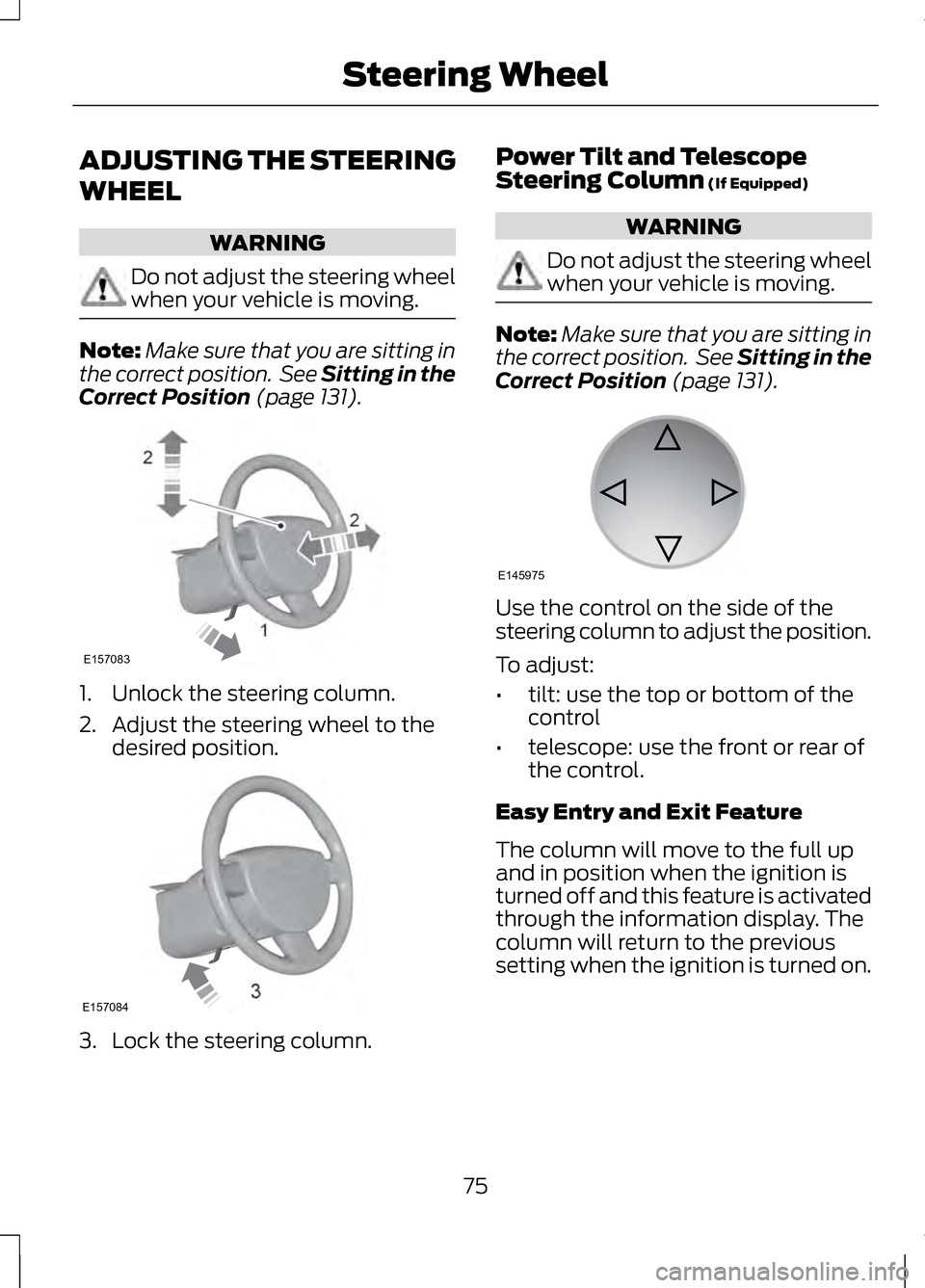
Correct Position (page 131). 1. Unlock the steering column.
2. Adjust the steering wheel to the
desired position. 3. Lock the steering column. Power Tilt and Telescope
Steering Column
(If Equipped) WARNING
Do not adjust the steering wheel
when your vehicle is moving.
Note:
Make sure that you are sitting in
the correct position. See Sitting in the
Correct Position
(page 131). Use the control on the side of the
steering column to adjust the position.
To adjust:
•
tilt: use the top or bottom of the
control
• telescope: use the front or rear of
the control.
Easy Entry and Exit Feature
The column will move to the full up
and in position when the ignition is
turned off and this feature is activated
through the information display. The
column will return to the previous
setting when the ignition is turned on.
75
Steering Wheel2
2
1E157083 E157084 E145975
Page 89 of 474
Front Interior Lamp
Note:
The front interior lamp switches
are on the overhead console. The exact
location of each switch on the
overhead console depends upon which
roof, sunroof, and window shade
features are equipped on the vehicle.
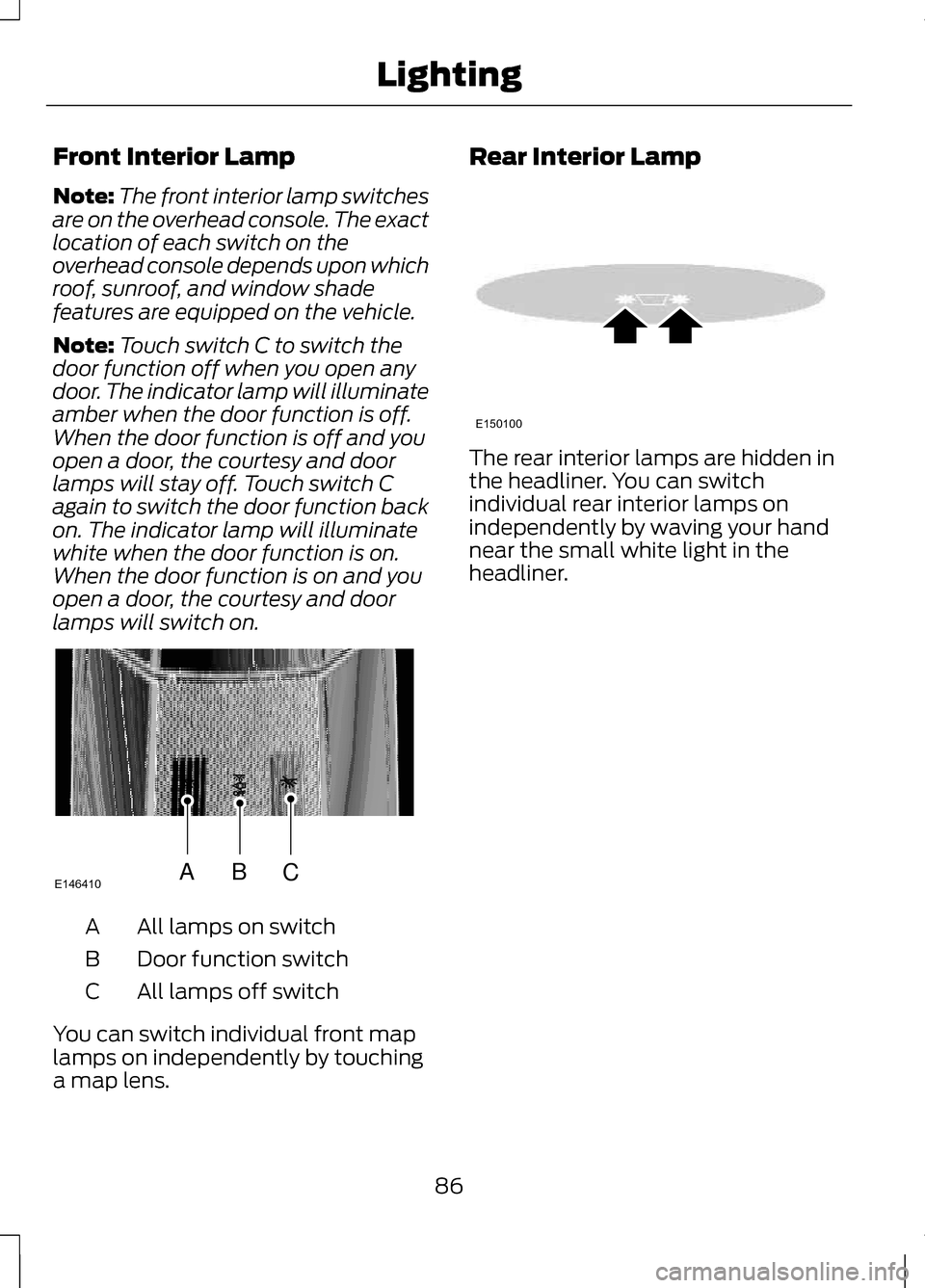
Note: Touch switch C to switch the
door function off when you open any
door. The indicator lamp will illuminate
amber when the door function is off.
When the door function is off and you
open a door, the courtesy and door
lamps will stay off. Touch switch C
again to switch the door function back
on. The indicator lamp will illuminate
white when the door function is on.
When the door function is on and you
open a door, the courtesy and door
lamps will switch on. All lamps on switch
A
Door function switch
B
All lamps off switch
C
You can switch individual front map
lamps on independently by touching
a map lens. Rear Interior Lamp
The rear interior lamps are hidden in
the headliner. You can switch
individual rear interior lamps on
independently by waving your hand
near the small white light in the
headliner.
86
LightingABCE146410 E150100
Page 90 of 474
POWER WINDOWS
WARNINGS
Do not leave children
unattended in your vehicle and
do not let them play with the power
windows. They may seriously injure
themselves. When closing the power
windows, you should verify they
are free of obstructions and make sure
that children and pets are not in the
proximity of the window openings. Note:
You may hear a rumbling noise
when just one of the windows are open.
Lower the opposite window slightly to
reduce this noise.
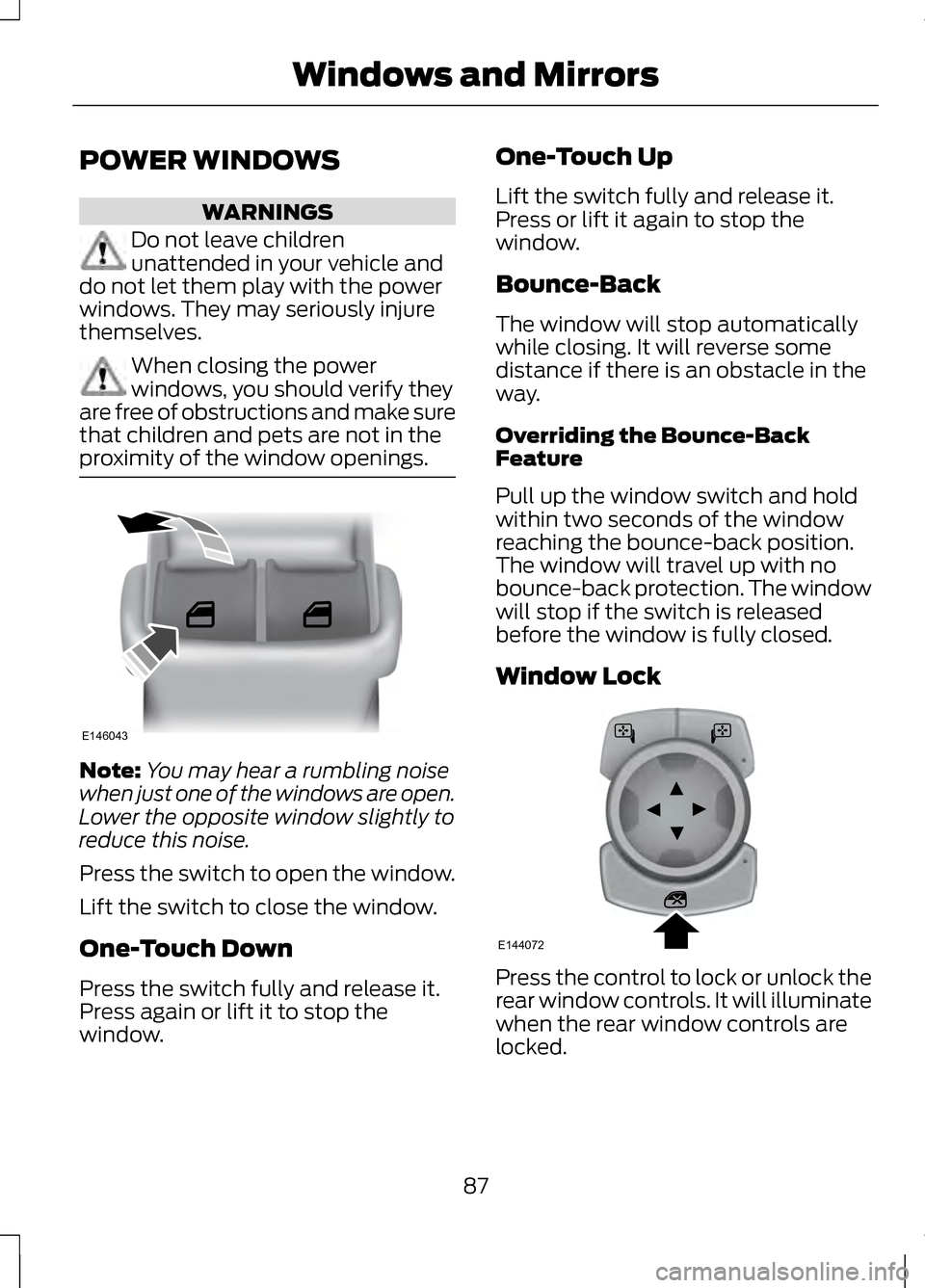
Press the switch to open the window.
Lift the switch to close the window.
One-Touch Down
Press the switch fully and release it.
Press again or lift it to stop the
window. One-Touch Up
Lift the switch fully and release it.
Press or lift it again to stop the
window.
Bounce-Back
The window will stop automatically
while closing. It will reverse some
distance if there is an obstacle in the
way.
Overriding the Bounce-Back
Feature
Pull up the window switch and hold
within two seconds of the window
reaching the bounce-back position.
The window will travel up with no
bounce-back protection. The window
will stop if the switch is released
before the window is fully closed.
Window Lock
Press the control to lock or unlock the
rear window controls. It will illuminate
when the rear window controls are
locked.
87
Windows and MirrorsE146043 E144072
Page 93 of 474
The image of the approaching vehicle
is small and near the inboard edge of
the main mirror when it is at a
distance. The image becomes larger
and begins to move outboard across
the main mirror as the vehicle
approaches (A). The image will
transition from the main mirror and
begin to appear in the blind spot
mirror as the vehicle approaches (B).
The vehicle will transition to your
peripheral field of view as it leaves the
blind spot mirror (C).
Blind Spot Monitor (If Equipped)
See
Blind Spot Monitor (page 212).
INTERIOR MIRROR WARNING
Do not adjust the mirror when
your vehicle is moving.
Note:
Do not clean the housing or
glass of any mirror with harsh
abrasives, fuel or other petroleum or
ammonia-based cleaning products.
You can adjust the interior mirror to
your preference. Some mirrors also
have a second pivot point. This lets
you move the mirror head up or down
and from side to side. Auto-Dimming Mirror
Note:
Do not block the sensors on the
front and back of the mirror. Mirror
performance may be affected. A rear
center passenger or raised rear center
head restraint may also block light
from reaching the sensor.
The mirror will dim automatically to
reduce glare when bright lights are
detected from behind your vehicle. It
will automatically return to normal
reflection when you select reverse
gear to make sure you have a clear
view when backing up.
SUN VISORS Rotate the sun visor toward the side
window and extend it rearward for
extra shade.
90
Windows and MirrorsE138666
Page 94 of 474
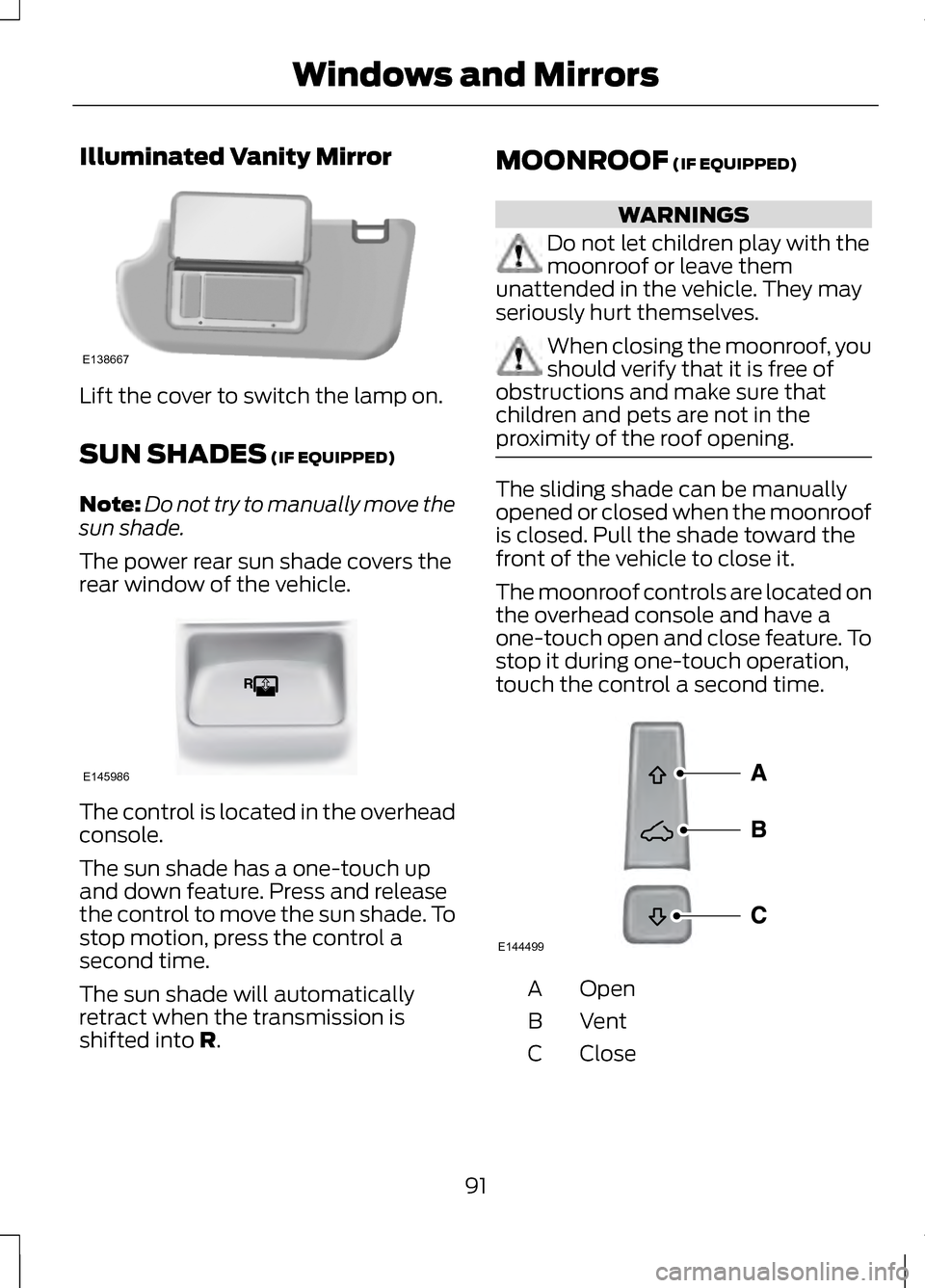
Illuminated Vanity Mirror
Lift the cover to switch the lamp on.
SUN SHADES (IF EQUIPPED)
Note: Do not try to manually move the
sun shade.
The power rear sun shade covers the
rear window of the vehicle. The control is located in the overhead
console.
The sun shade has a one-touch up
and down feature. Press and release
the control to move the sun shade. To
stop motion, press the control a
second time.
The sun shade will automatically
retract when the transmission is
shifted into
R. MOONROOF
(IF EQUIPPED) WARNINGS
Do not let children play with the
moonroof or leave them
unattended in the vehicle. They may
seriously hurt themselves. When closing the moonroof, you
should verify that it is free of
obstructions and make sure that
children and pets are not in the
proximity of the roof opening. The sliding shade can be manually
opened or closed when the moonroof
is closed. Pull the shade toward the
front of the vehicle to close it.
The moonroof controls are located on
the overhead console and have a
one-touch open and close feature. To
stop it during one-touch operation,
touch the control a second time.
Open
A
VentB
Close
C
91
Windows and MirrorsE138667 E145986 E144499
Page 105 of 474
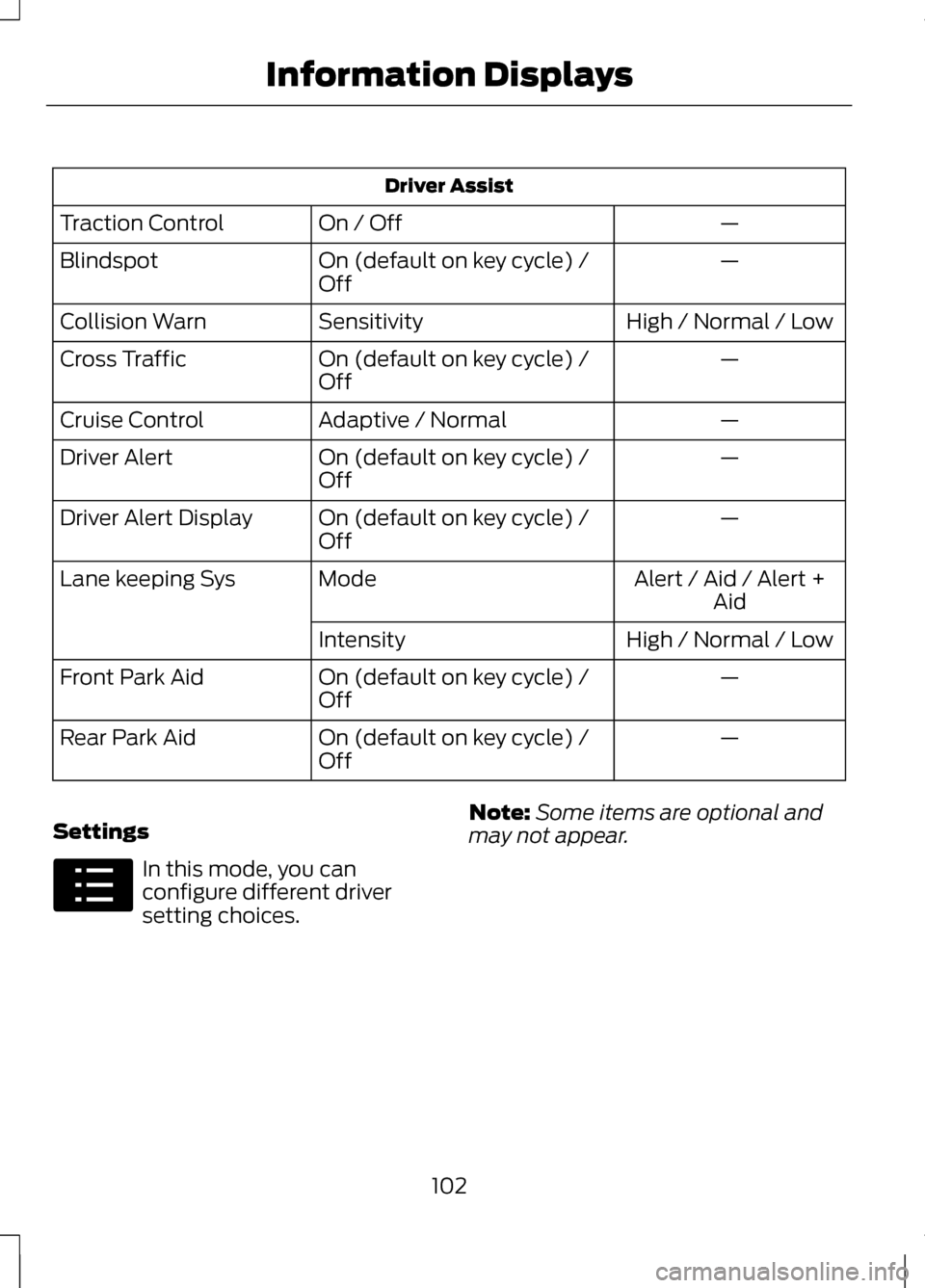
Driver Assist
—
On / Off
Traction Control
—
On (default on key cycle) /
Off
Blindspot
High / Normal / Low
Sensitivity
Collision Warn
—
On (default on key cycle) /
Off
Cross Traffic
—
Adaptive / Normal
Cruise Control
—
On (default on key cycle) /
Off
Driver Alert
—
On (default on key cycle) /
Off
Driver Alert Display
Alert / Aid / Alert +Aid
Mode
Lane keeping Sys
High / Normal / Low
Intensity
—
On (default on key cycle) /
Off
Front Park Aid
—
On (default on key cycle) /
Off
Rear Park Aid
Settings In this mode, you can
configure different driver
setting choices.
Note:
Some items are optional and
may not appear.
102
Information DisplaysE100023
Page 119 of 474
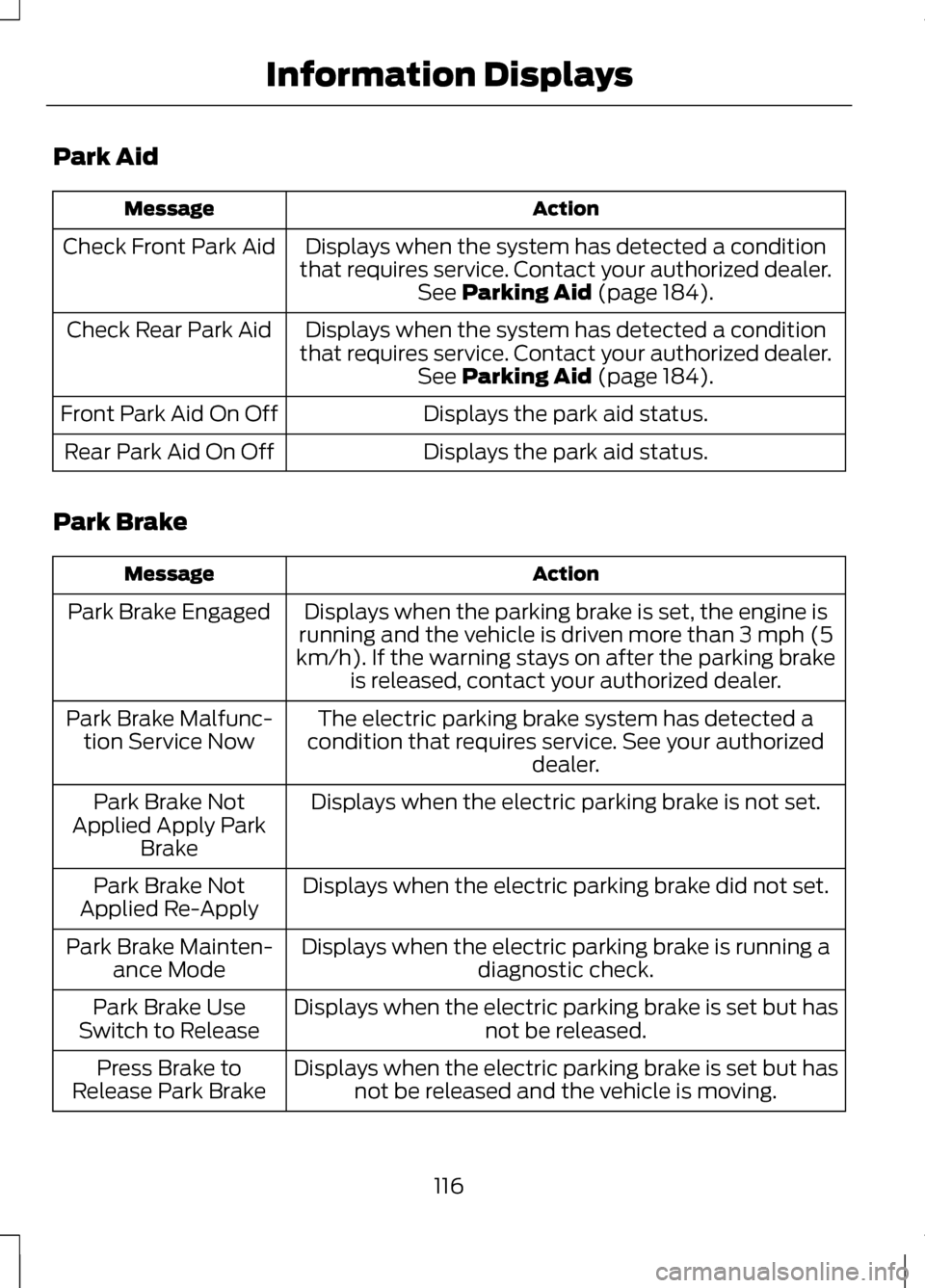
Park Aid
Action
Message
Displays when the system has detected a condition
that requires service. Contact your authorized dealer. See Parking Aid (page 184).
Check Front Park Aid
Displays when the system has detected a condition
that requires service. Contact your authorized dealer. See
Parking Aid (page 184).
Check Rear Park Aid
Displays the park aid status.
Front Park Aid On Off
Displays the park aid status.
Rear Park Aid On Off
Park Brake Action
Message
Displays when the parking brake is set, the engine is
running and the vehicle is driven more than 3 mph (5
km/h). If the warning stays on after the parking brake is released, contact your authorized dealer.
Park Brake Engaged
The electric parking brake system has detected a
condition that requires service. See your authorized dealer.
Park Brake Malfunc-
tion Service Now
Displays when the electric parking brake is not set.
Park Brake Not
Applied Apply Park Brake
Displays when the electric parking brake did not set.
Park Brake Not
Applied Re-Apply
Displays when the electric parking brake is running adiagnostic check.
Park Brake Mainten-
ance Mode
Displays when the electric parking brake is set but has not be released.
Park Brake Use
Switch to Release
Displays when the electric parking brake is set but hasnot be released and the vehicle is moving.
Press Brake to
Release Park Brake
116
Information Displays
Page 130 of 474
A/C: Press the button to turn on or turn off the air conditioning system.
To improve air conditioning when starting your vehicle, drive with the
windows slightly open for two to three minutes. Use A/C with
recirculated air to improve cooling performance and efficiency.
F
MAX A/C:
Press the button to switch on. Recirculated air is distributed
through the instrument panel air vents, air conditioning is automatically
adjusted to the highest speed and the temperature dial returns to the
full cool position. This re-cooling of the interior is more economical
and efficient.
G
AUTO:
Press the button to switch on. Recirculated air flows through
the instrument panel air vents, air conditioning automatically adjusts
to the highest speed and the temperature dial returns to the full cool
position. This re-cooling of the interior is more economical and efficient.
H
Heated rear window:
Turns the heated rear window on and off. See
Heated Windows and Mirrors (page 128).
I
Defrost:
Distributes air through the windshield defroster vents and
de-mister vents. You can also use this setting to defog and clear the
windshield of a thin covering of ice.
J
HINTS ON CONTROLLING
THE INTERIOR CLIMATE
General Hints
Note: Prolonged use of recirculated
air may cause the windows to fog up.
Note: You may feel a small amount of
air from the footwell air vents
regardless of the air distribution setting.
Note: To reduce humidity build-up
inside your vehicle, do not drive with
the system switched off or with
recirculated air always switched on.
Note: Do not place objects under the
front seats as this may interfere with
the airflow to the rear seats. Note:
Remove any snow, ice or leaves
from the air intake area at the base of
the windshield.
Automatic Climate Control
Note: Do not adjust the settings when
your vehicle interior is extremely hot or
cold. The system automatically adjusts
to the previously stored settings. For
the system to function efficiently, the
instrument panel and side air vents
should be fully open.
Note: At low ambient temperatures
with AUTO selected, the system directs
air toward the windshield and side
windows for as long as the engine
remains cold.
Note: When you switch the system off,
outside air cannot enter your vehicle.
127
Climate Control
Page 131 of 474
Note:
When the system is in AUTO
mode, and the interior and exterior
temperatures are high, the system
automatically selects recirculated air
to maximize cooling of the interior.
When the system reaches the selected
air temperature, it automatically
switches to outside air.
Note: When you select windshield
defrosting and defogging, the
instrument panel and footwell level
functions automatically switch off and
air conditioning switches on. Outside
air flows into your vehicle.
Heating the Interior Quickly
1. Press the AUTO button.
2. Adjust the temperature control to the desired setting.
Recommended Settings for
Heating
1. Press the AUTO button.
2. Adjust the temperature control to a comfortable setting.
Cooling the Interior Quickly
1. Press the AUTO button.
2. Adjust the temperature control to the desired setting.
Recommended Settings for
Cooling
1. Press the AUTO button.
2. Adjust the temperature to a comfortable setting. Side Window Defogging in Cold
Weather
1. Press the defrost button.
2. Adjust the temperature control to
the desired setting.
HEATED WINDOWS AND
MIRRORS
Heated Rear Window
Note: You must switch the ignition on
to use this feature.
Press the button to clear the rear
window of thin ice and fog. Press the
button again within 10 minutes to
switch it off. It switches off
automatically after 10 minutes, or
when you switch the ignition off.
Do not use razor blades or other
sharp objects to clean the inside
of the rear window or to remove
decals from the inside of the rear
window. This may cause damage
to the heated grid lines, which your
warranty does not cover.
Heated Exterior Mirror
Note: Do not remove ice from the
mirrors with a scraper or attempt to
readjust the mirror glass if it has frozen
in place. These actions could cause
damage to the glass and mirrors.
Note: Do not clean the housing or
glass of any mirror with harsh
abrasives, fuel or other
petroleum-based cleaning products.
128
Climate Control