light LINCOLN NAVIGATOR 2022 Manual Online
[x] Cancel search | Manufacturer: LINCOLN, Model Year: 2022, Model line: NAVIGATOR, Model: LINCOLN NAVIGATOR 2022Pages: 646, PDF Size: 7.29 MB
Page 391 of 646
Apply just enough power to the wheels to
climb the hill. Too much power causes the
tires to slip, spin or lose traction, and you
could lose control of your vehicle. When
descending a steep hill, do not descend the
hill in neutral. Avoid sudden hard braking to
keep the front wheels rolling and to maintain
your vehicle's steering.
Note:
Your vehicle has anti-lock brakes,
apply the brakes steadily. Do not pump the
brakes.
Note: If your vehicle gets stuck driving on
hilly or sloping terrain, it could be rocked out
by shifting between forward and reverse
gears, stopping between shifts in a steady
pattern. Press lightly on the accelerator in
each gear.
Note: Do not rock your vehicle if the engine
is not at normal operating temperature, as
damage to the transmission could occur.
Note: Do not rock your vehicle for more than
a minute, as damage to the transmission
and tires could occur or the engine could
overheat. DRIVING IN SAND
When driving over sand, try to keep all four
wheels on the most solid area of the trail.
Steadily drive through the terrain. Apply the
accelerator slowly and avoid excessive
wheel slip. Do not drive your vehicle in deep
sand for an extended period of time. This
could overheat the system. A message
appears in the instrument cluster display.
Note:
If your vehicle gets stuck driving on
hilly or sloping terrain, it could be rocked out
by shifting between forward and reverse
gears, stopping between shifts in a steady
pattern. Press lightly on the accelerator in
each gear.
Note: Do not rock your vehicle if the engine
is not at normal operating temperature, as
damage to the transmission could occur.
Note: Do not rock your vehicle for more than
a minute, as damage to the transmission
and tires could occur or the engine could
overheat DRIVING THROUGH SHALLOW
WATER WARNING: Do not attempt to cross
a deep or flowing body of water. Failure to
follow this instruction could result in the
loss of control of your vehicle, personal
injury or death.
Note: Driving through standing water can
cause vehicle damage.
Note: Engine damage can occur if water
enters the air filter.
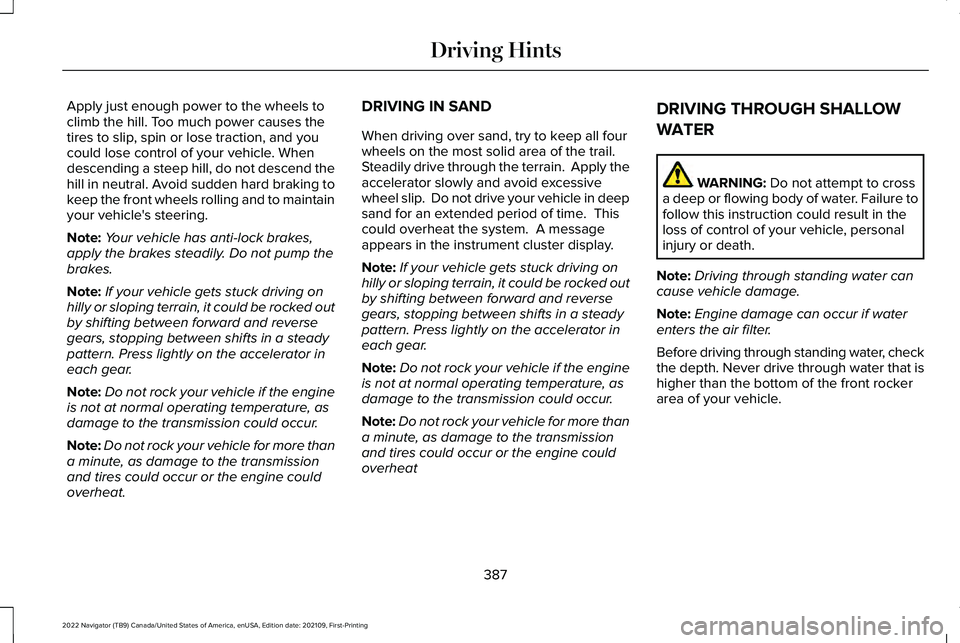
Before driving through standing water, check
the depth. Never drive through water that is
higher than the bottom of the front rocker
area of your vehicle.
387
2022 Navigator (TB9) Canada/United States of America, enUSA, Edition date: 202109, First-Printing Driving Hints
Page 392 of 646
When driving through standing water, drive
very slowly and do not stop your vehicle.
Your brake performance and traction could
be limited. After driving through water and
as soon as it is safe to do so:
•
Lightly press the brake pedal to dry the
brakes and to check that they work.
• Turn the steering wheel to check that the
steering power assist works.
Check the function of the following:
• Horn
• Exterior lights FLOOR MATS WARNING: Use a floor mat designed
to fit the footwell of your vehicle that does
not obstruct the pedal area. Failure to
follow this instruction could result in the
loss of control of your vehicle, personal
injury or death. WARNING:
Pedals that cannot move
freely can cause loss of vehicle control and
increase the risk of serious personal injury. WARNING:
Secure the floor mat to
both retention devices so that it cannot slip
out of position and interfere with the
pedals. Failure to follow this instruction
could result in the loss of control of your
vehicle, personal injury or death. WARNING:
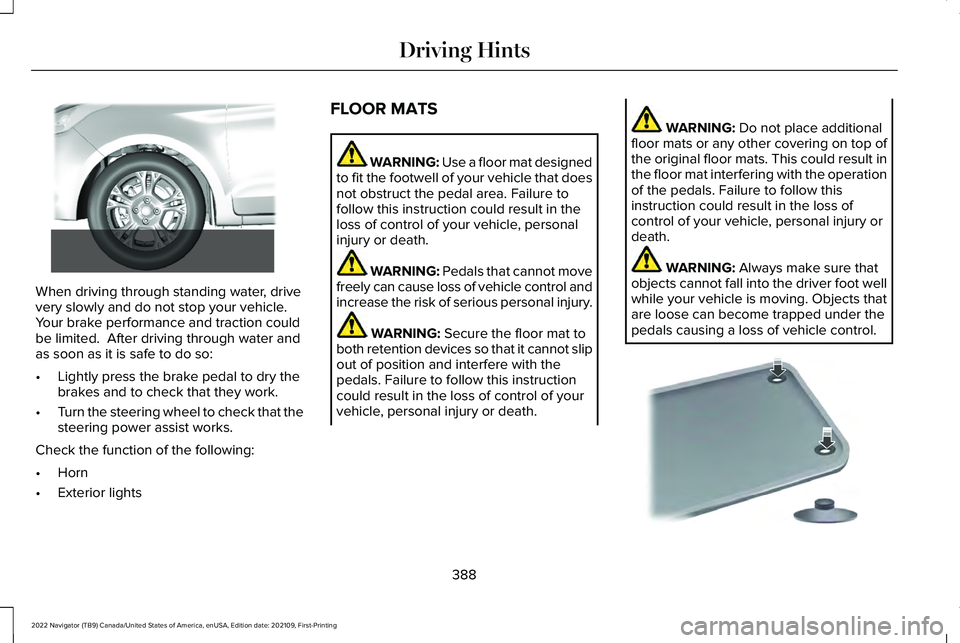
Do not place additional
floor mats or any other covering on top of
the original floor mats. This could result in
the floor mat interfering with the operation
of the pedals. Failure to follow this
instruction could result in the loss of
control of your vehicle, personal injury or
death. WARNING:
Always make sure that
objects cannot fall into the driver foot well
while your vehicle is moving. Objects that
are loose can become trapped under the
pedals causing a loss of vehicle control. 388
2022 Navigator (TB9) Canada/United States of America, enUSA, Edition date: 202109, First-Printing Driving Hints E266447 E142666
Page 395 of 646
If you need to arrange roadside assistance
for yourself, Lincoln reimburses a reasonable
amount for towing to the nearest Lincoln
dealership within 100 mi (160 km). To obtain
reimbursement information, United States
clients, call 1-800-521-4140. Clients need to
submit their original receipts.
Vehicles Sold in Canada: Getting
Roadside Assistance
To fully assist you should you have a vehicle
concern, Lincoln offers a complimentary
roadside assistance program. This program
is eligible within Canada or the continental
United States.
The service is available 24 hours a day,
seven days a week.
This program is separate from the New
Vehicle Limited Warranty, beginning from
the original warranty start date and lasts the
life of the vehicle for the original owner.
Subsequent owners receive coverage that
is concurrent with the 6 years or
70,000 mi
(110,000 km), whichever occurs first,
powertrain warranty coverage period. Note:
Canadian roadside coverage and
benefits may differ from the U.S. coverage.
For complete program coverage details,
review your warranty guide, contact your
dealer, call us in Canada at 1-844-665-2007,
or visit our website at
www.lincolncanada.com.
If you purchased your vehicle in Canada and
require roadside assistance, please call
1-844-665-2007 or contact Roadside
Assistance using the Lincoln Way mobile
app.
Note: For quick reference, complete the
roadside assistance identification card found
in the glove compartment of your vehicle
and place it in your wallet.
SWITCHING THE HAZARD
FLASHERS ON AND OFF The hazard flasher button is on the
instrument panel. Press the button
to switch the hazard flashers on if
your vehicle is creating a safety hazard for
other road users. When you switch the hazard flashers on, all
front and rear direction indicators flash.
Note:
The hazard flashers operate when the
ignition is in any position, or if the key is not
in the ignition. The battery loses charge and
could have insufficient power to restart your
vehicle.
Press the button again to switch them off.
JUMP STARTING THE VEHICLE
JUMP STARTING PRECAUTIONS WARNING:
Batteries normally
produce explosive gases which can cause
personal injury. Therefore, do not allow
flames, sparks or lighted substances to
come near the battery. When working near
the battery, always shield your face and
protect your eyes. Always provide correct
ventilation.
391
2022 Navigator (TB9) Canada/United States of America, enUSA, Edition date: 202109, First-Printing Crash and Breakdown Information
Page 402 of 646
4. Switch your vehicle off by pressing the
push button ignition switch once. A
message appears in the instrument
cluster display.
5. Switch your vehicle to accessory mode by pressing the push button ignition
switch once without pressing the brake
pedal.
6. Press and hold the brake pedal.
7. Using the instrument cluster controls on the steering wheel, select Settings.
8. Select
Neutral Tow.
9. Press and hold the
OK button until a
confirmation message appears in the
information display.
Note: If completed successfully, the
information display shows
Neutral Tow
Enabled Leave Transmission in Neutral.
This indicates that your vehicle is safe to tow
with all wheels on the ground.
Note: If you do not see a confirmation
message in the instrument cluster display,
you must perform the procedure again from
the beginning. Note:
You may hear noise as the transfer
case shifts into its neutral position. This is
normal.
10. Release the brake pedal.
11. Leave the transmission in neutral (N) and switch your vehicle off by pressing
the push button ignition switch once
without pressing the brake pedal.
Switching
Neutral Tow Off
1. With your vehicle properly secured to the
tow vehicle, press and hold the brake
pedal and start the engine.
2. Switch your vehicle off by pressing the push button ignition switch once and
release the brake pedal.
3. Place your vehicle in accessory mode by
pressing the push button ignition switch
once without pressing the brake pedal.
4. Press and hold the brake pedal.
5. Shift into park (P).
6. Release the brake pedal. Note:
If completed successfully, the
instrument cluster displays
2H and Neutral
Tow Disabled.
Note: You must perform the switching
neutral tow on and switching neutral tow off
procedures again from the beginning if the
indicator light and message do not display.
Note: You may hear a noise as the transfer
case shifts out of its neutral position. This is
normal.
7. Apply the parking brake, then disconnect
your vehicle from the tow vehicle.
8. Release the parking brake, start the engine, and shift into drive (D) to make
sure the transfer case is out of the neutral
tow position.
9. If the transfer case does not successfully
shift out of its neutral position, set the
parking brake. Have your vehicle
checked as soon as possible.
Resolving the Shift Delayed Drive Forward
Message
1. Press and hold the brake pedal.
2. Start your vehicle.
398
2022 Navigator (TB9) Canada/United States of America, enUSA, Edition date: 202109, First-Printing Towing Your Vehicle
Page 410 of 646
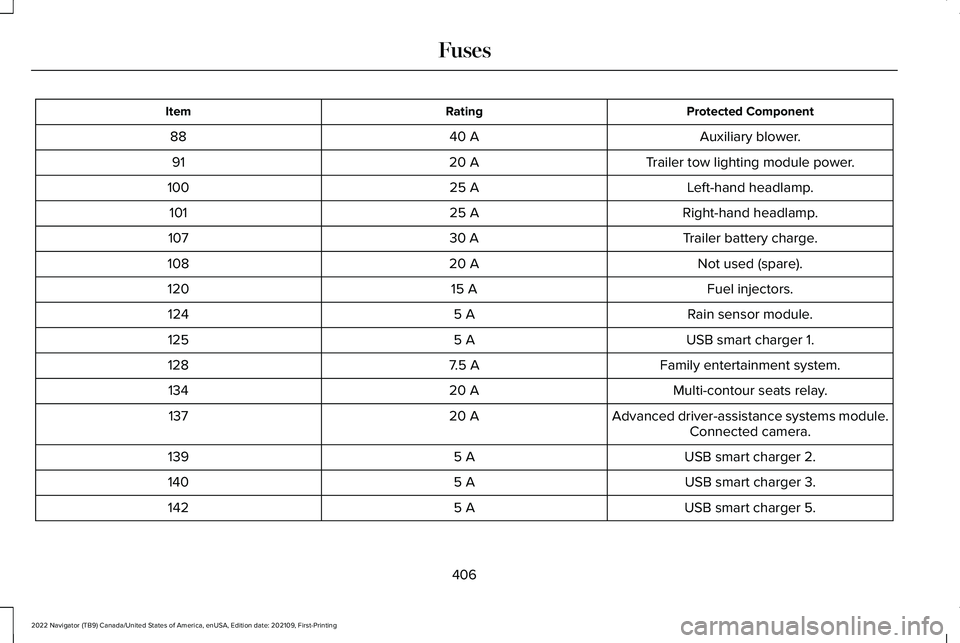
Protected Component
Rating
Item
Auxiliary blower.
40 A
88
Trailer tow lighting module power.
20 A
91
Left-hand headlamp.
25 A
100
Right-hand headlamp.
25 A
101
Trailer battery charge.
30 A
107
Not used (spare).
20 A
108
Fuel injectors.
15 A
120
Rain sensor module.
5 A
124
USB smart charger 1.
5 A
125
Family entertainment system.
7.5 A
128
Multi-contour seats relay.
20 A
134
Advanced driver-assistance systems module.
20 A
137
Connected camera.
USB smart charger 2.
5 A
139
USB smart charger 3.
5 A
140
USB smart charger 5.
5 A
142
406
2022 Navigator (TB9) Canada/United States of America, enUSA, Edition date: 202109, First-Printing Fuses
Page 427 of 646
Change the engine air filter element at the
proper intervals. See Normal Scheduled
Maintenance (page 532).
When changing the engine air filter, use only
the air filter element listed.
See Motorcraft
Parts (page 470).
Note: Failure to use the correct air filter
element may result in severe engine
damage. Resulting component damage may
not be covered by the vehicle Warranty.
Note: When servicing the air cleaner, do not
allow foreign material to enter the air
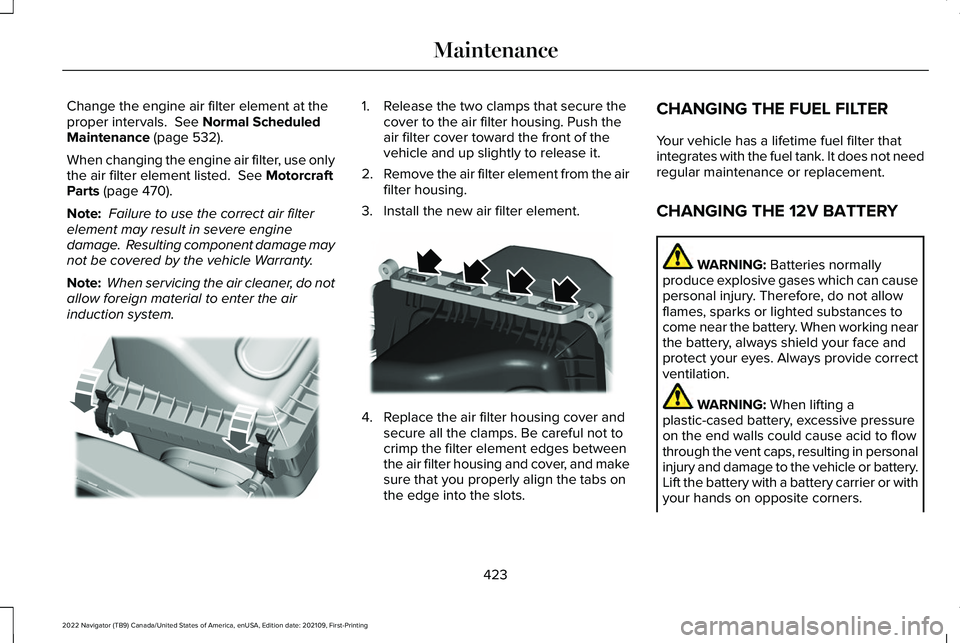
induction system. 1. Release the two clamps that secure the
cover to the air filter housing. Push the
air filter cover toward the front of the
vehicle and up slightly to release it.
2. Remove the air filter element from the air
filter housing.
3. Install the new air filter element. 4. Replace the air filter housing cover and
secure all the clamps. Be careful not to
crimp the filter element edges between
the air filter housing and cover, and make
sure that you properly align the tabs on
the edge into the slots. CHANGING THE FUEL FILTER
Your vehicle has a lifetime fuel filter that
integrates with the fuel tank. It does not need
regular maintenance or replacement.
CHANGING THE 12V BATTERY
WARNING:
Batteries normally
produce explosive gases which can cause
personal injury. Therefore, do not allow
flames, sparks or lighted substances to
come near the battery. When working near
the battery, always shield your face and
protect your eyes. Always provide correct
ventilation. WARNING:
When lifting a
plastic-cased battery, excessive pressure
on the end walls could cause acid to flow
through the vent caps, resulting in personal
injury and damage to the vehicle or battery.
Lift the battery with a battery carrier or with
your hands on opposite corners.
423
2022 Navigator (TB9) Canada/United States of America, enUSA, Edition date: 202109, First-Printing MaintenanceE248801 E248800
Page 430 of 646
Remove and Reinstall the Battery
Install a battery approved for use by our
specifications. See Capacities and
Specifications (page 469).
To disconnect or remove the battery, do the
following:
1. Apply the parking brake and switch the ignition off.
2. Switch all electrical equipment off, for example lights and radio.
3. Wait a minimum of two minutes before disconnecting the battery.
Note: The engine management system has
a power hold function and remains powered
for a period of time after you switch the
ignition off. This is to allow the system to
store diagnostic and adaptive tables.
Disconnecting the battery without waiting
can cause damage not covered by the
vehicle warranty.
4. Disconnect the negative battery cable terminal.
5. Disconnect the positive battery cable terminal. 6. Remove the battery securing clamp.
7. Remove the battery.
8.
To install, reverse the removal procedure.
Note: Before reconnecting the battery, make
sure the ignition remains switched off.
Note: Make sure to fully tighten the battery
cables.
If you disconnect or replace the vehicle
battery, you must reset the following
features:
• Window bounce-back.
See Opening and
Closing the Windows (page 133).
• Clock Settings.
• Pre-set radio stations.
Battery Disposal Make sure that you dispose of old
batteries in an environmentally
friendly way. Seek advice from
your local authority about recycling old
batteries. ADJUSTING THE HEADLAMPS
Vertical Aim Adjustment
The headlamps on your vehicle are properly
aimed at the assembly plant. If your vehicle
has been in an accident, contact an
authorized dealer to check and realign your
headlamps.
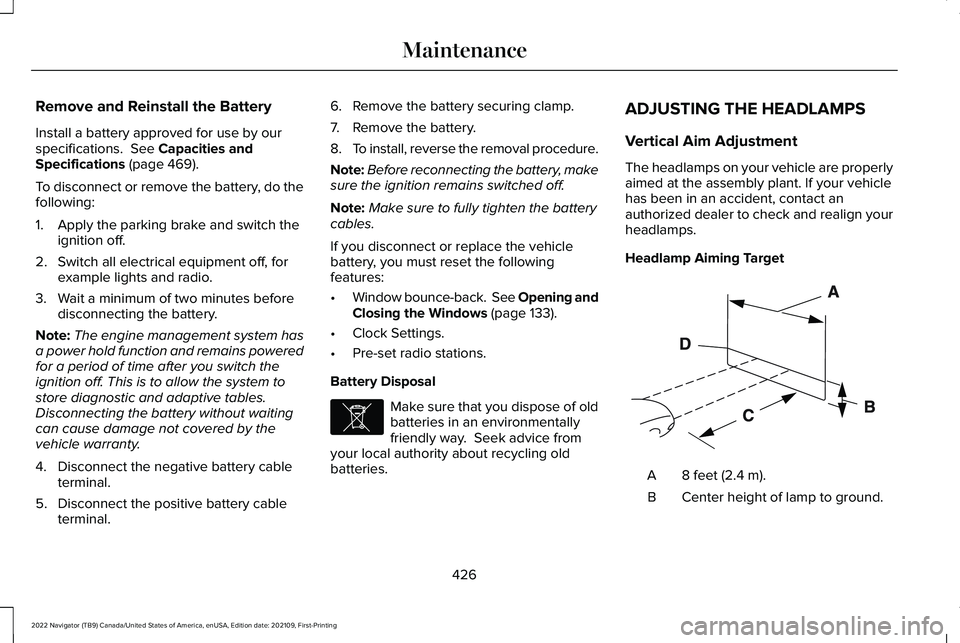
Headlamp Aiming Target
8 feet (2.4 m).
A
Center height of lamp to ground.
B
426
2022 Navigator (TB9) Canada/United States of America, enUSA, Edition date: 202109, First-Printing MaintenanceE107998 E142592
Page 431 of 646
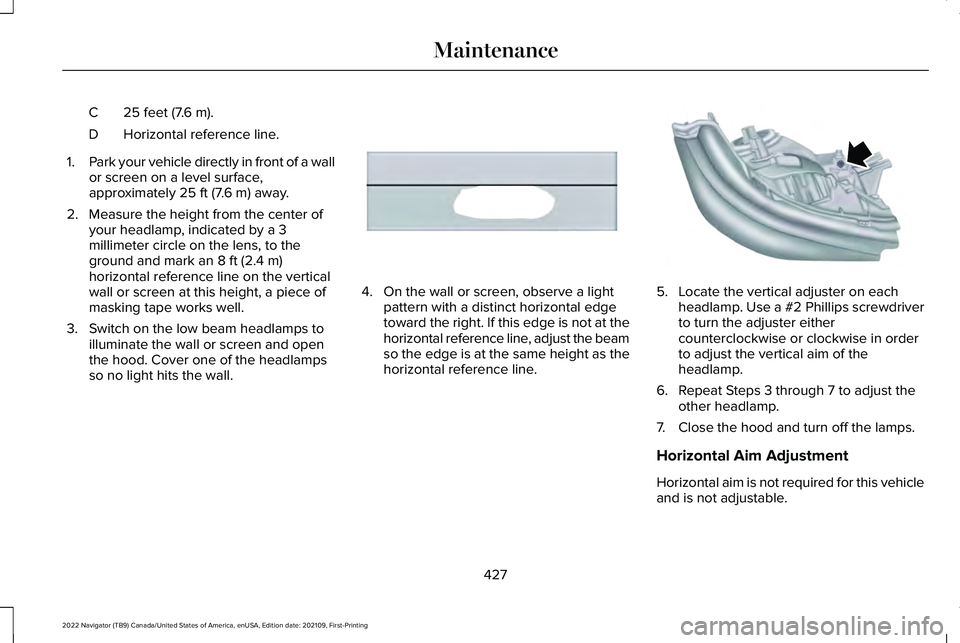
25 feet (7.6 m).
C
Horizontal reference line.
D
1. Park your vehicle directly in front of a wall
or screen on a level surface,
approximately 25 ft (7.6 m) away.
2. Measure the height from the center of your headlamp, indicated by a 3
millimeter circle on the lens, to the
ground and mark an
8 ft (2.4 m)
horizontal reference line on the vertical
wall or screen at this height, a piece of
masking tape works well.
3. Switch on the low beam headlamps to illuminate the wall or screen and open
the hood. Cover one of the headlamps
so no light hits the wall. 4. On the wall or screen, observe a light
pattern with a distinct horizontal edge
toward the right. If this edge is not at the
horizontal reference line, adjust the beam
so the edge is at the same height as the
horizontal reference line. 5. Locate the vertical adjuster on each
headlamp. Use a #2 Phillips screwdriver
to turn the adjuster either
counterclockwise or clockwise in order
to adjust the vertical aim of the
headlamp.
6. Repeat Steps 3 through 7 to adjust the other headlamp.
7. Close the hood and turn off the lamps.
Horizontal Aim Adjustment
Horizontal aim is not required for this vehicle
and is not adjustable.
427
2022 Navigator (TB9) Canada/United States of America, enUSA, Edition date: 202109, First-Printing MaintenanceE167358 E163806
Page 438 of 646
For heavy stains, spot clean the area. If a ring
forms on the fabric, clean the entire area
immediately, but do not oversaturate or the
ring could set.
We recommend that you only clean your
floor mats in the following way:
1. Remove dust and loose dirt with a
vacuum cleaner.
2. Wash rubber floor mats using mild soap and lukewarm or cold water.
3. Completely dry the floor mat before placing them back in your vehicle.
CLEANING SEATBELTS WARNING: Do not use cleaning
solvents, bleach or dye on the vehicle's
seatbelts, as these actions may weaken
the belt webbing.
1. Wipe the surface with a soft, damp cloth
and a mild soap and water solution. Dry
the area with a clean, soft cloth. CLEANING MOONROOF TRACKS
1. Remove debris from the tracks with a
vacuum cleaner.
2. Wipe the bulb seal and mating painted roof metal surface with a soft, damp cloth
and a mild soap and water solution.
Note: The moonroof rail tracks are greased
to maintain proper functionality. Do not wipe
off the grease.
REPAIRING MINOR PAINT
DAMAGE
Authorized dealers have touch-up paint to
match your vehicle ’s color. Your vehicle
color code is printed on a sticker on the front,
left-hand side door jamb. Take your color
code to your authorized dealer to make sure
you get the correct color.
Before repairing minor paint damage, use a
cleaner to remove particles such as bird
droppings, tree sap, insect deposits, tar
spots, road salt and industrial fallout. Read the instructions before using cleaning
products.
WAXING YOUR VEHICLE
Wax the high-gloss painted surface of your
prewashed vehicle once or twice a year.
We recommend that you only use an
approved quality wax that does not contain
abrasives. Follow the manufacturer's
instructions to apply and remove the wax.
For additional information and assistance,
we recommend that you contact an
authorized dealer.
When washing and waxing, park your vehicle
in a shaded area out of direct sunlight.
Note:
Avoid waxing unpainted or low-gloss
black colored parts, they discolor over time.
434
2022 Navigator (TB9) Canada/United States of America, enUSA, Edition date: 202109, First-Printing Vehicle Care
Page 439 of 646
PREPARING YOUR VEHICLE FOR
STORAGE
If you plan on storing your vehicle for 30
days or more, the following maintenance
recommendations ensures your vehicle stays
in good operating condition.
Under various conditions, long-term storage
may lead to degraded engine performance
or failure unless you use specific precautions
to preserve your vehicle.
General
•
Store all vehicles in a dry, ventilated
place.
• If vehicles are stored outside, they
require regular maintenance to protect
against rust and weather damage.
• Make sure all linkages, cables, levers and
pins under your vehicle are covered with
grease to prevent rust. •
Move vehicles at least 25 ft (7.5 m) every
15 days to lubricate working parts and
prevent corrosion.
• Fill the fuel tank with high-quality fuel
until the first automatic shutoff of the fuel
pump nozzle.
Engine
• Change the engine oil and filter prior to
storage because used engine oil contains
contaminants which may cause engine
damage.
• Start the engine every 15 days for a
minimum of 15 minutes. Run at fast idle
with the climate controls set to defrost
until the engine reaches normal
operating temperature.
• With your foot on the brake, shift through
all the gears while the engine is running. Body
•
Wash your vehicle thoroughly to remove
dirt, grease, oil, tar or mud from exterior
surfaces, rear-wheel housings and the
underside of front fenders.
• Periodically wash your vehicle if it is
stored in exposed locations.
• Touch-up exposed or primed metal to
prevent rust.
• Cover chrome and stainless steel parts
with a thick coat of auto wax to prevent
discoloration. Re-wax as necessary when
you wash your vehicle.
• Lubricate all hood, door and luggage
compartment hinges and latches with a
light grade oil.
• Cover interior trim to prevent fading.
• Keep all rubber parts free from oil and
solvents.
435
2022 Navigator (TB9) Canada/United States of America, enUSA, Edition date: 202109, First-Printing Storing Your Vehicle