ESP MERCEDES-BENZ C-CLASS COUPE 2015 Repair Manual
[x] Cancel search | Manufacturer: MERCEDES-BENZ, Model Year: 2015, Model line: C-CLASS COUPE, Model: MERCEDES-BENZ C-CLASS COUPE 2015Pages: 385, PDF Size: 13.12 MB
Page 180 of 385
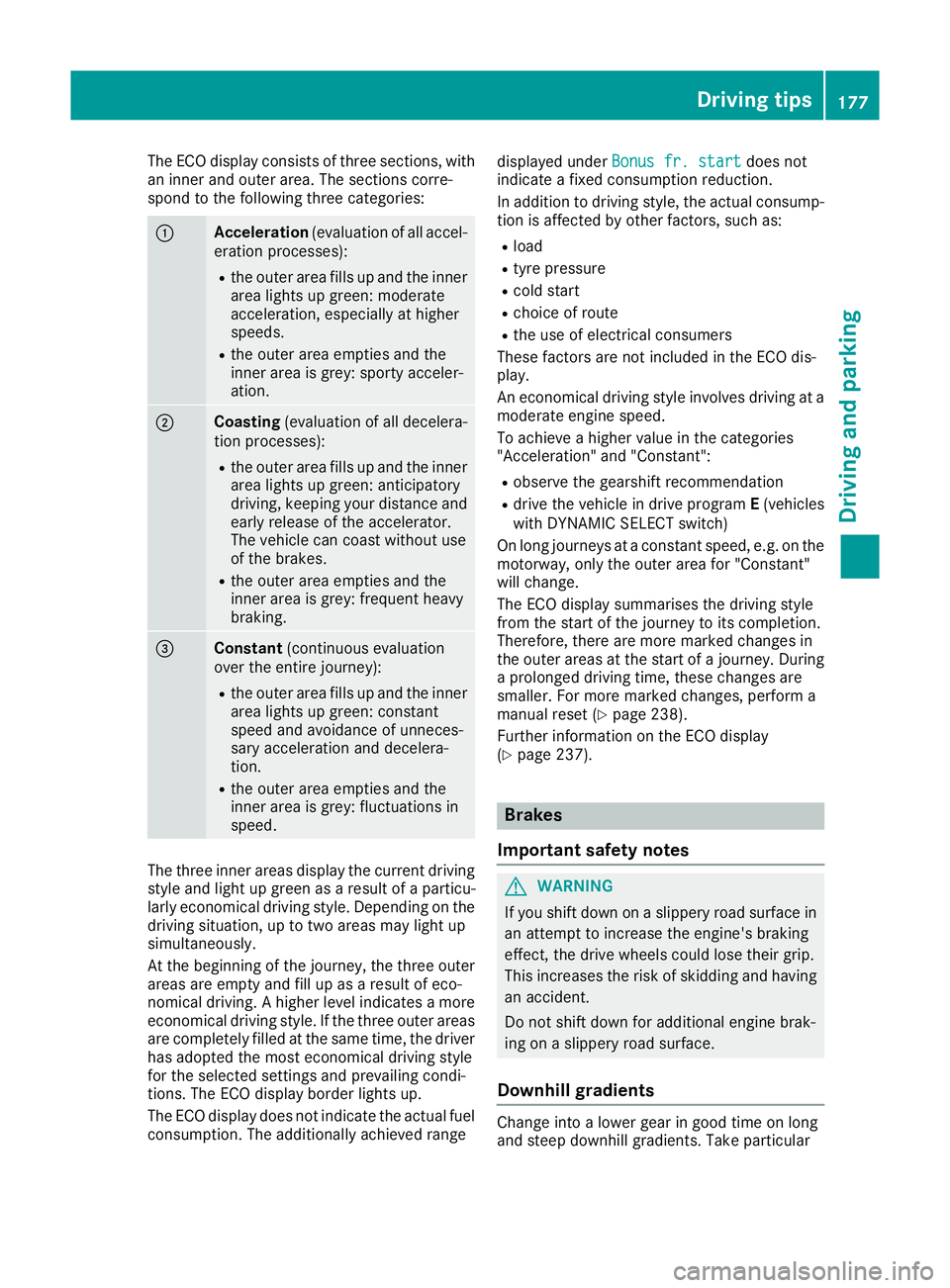
The ECO display consist
softhree sections, with
an inner and outer area. The section scorre-
spond to the following three categories: :
Acceleration
(evaluation of all accel-
eration processes):
R the outer area fills up and the inner
area lights up green: moderate
acceleration ,especially at higher
speeds.
R the outer area empties and the
inner area is grey: sporty acceler-
ation. ;
Coasting
(evaluation of all decelera-
tion processes):
R the outer area fills up and the inner
area lights up green: anticipatory
driving, keeping your distance and
early release of the accelerator.
The vehicle can coast without use
of the brakes.
R the outer area empties and the
inner area is grey: frequent heavy
braking. =
Constant
(continuous evaluation
over the entir ejourney):
R the outer area fills up and the inner
area lights up green: constant
speed and avoidance of unneces-
sary acceleration and decelera-
tion.
R the outer area empties and the
inner area is grey: fluctuations in
speed. The three inner areas display the current driving
style and light up green as aresult of aparticu-
larly economical driving style. Dependin gonthe
driving situation, up to two areas may light up
simultaneously.
At the beginning of the journey, the three outer
areas are empty and fill up as aresult of eco-
nomical driving. Ahigher level indicates amore
economical driving style. If the three outer areas
are completely filled at the same time, the driver
has adopted the most economical driving style
for the selected settings and prevailing condi-
tions. The ECO display border lights up.
The ECO display does not indicate the actual fuel consumption. The additionally achieved range displayed under
Bonus fr. start Bonus fr. start does not
indicate afixed consumption reduction.
In addition to driving style, the actual consump- tion is affected by other factors, such as:
R load
R tyre pressure
R cold start
R choice of route
R the use of electrical consumers
These factor sare not included in the ECO dis-
play.
An economical driving style involves driving at a
moderate engine speed.
To achieve ahigher value in the categories
"Acceleration" and "Constant":
R observe the gearshift recommendation
R drive the vehicle in drive program E(vehicles
with DYNAMIC SELECT switch)
On long journeys at aconstant speed, e.g. on the
motorway, only the outer area for "Constant"
will change.
The ECO display summarises the driving style
from the start of the journey to its completion.
Therefore, there are more marked changes in
the outer areas at the start of ajourney. During
ap rolonged driving time, these changes are
smaller. For more marked changes, perform a
manual reset (Y page 238).
Further information on the ECO display
(Y page 237). Brakes
Important safety notes G
WARNING
If you shift down on aslippery road surface in
an attempt to increase the engine's braking
effect ,the drive wheels could lose their grip.
This increases the risk of skidding and having
an accident.
Do not shift down for additional engine brak-
ing on aslippery road surface.
Downhill gradients Change into
alower gear in good time on long
and steep downhill gradients. Take particular Driving tips
177Driving and parking Z
Page 182 of 385
High-performance and ceramic brakes
(Mercedes-AMG vehicles) The AMG brake systems are designed for heavy
loads. This may lea dtonoise when braking. This
is dependent on:
R speed
R braking force
R environmental conditions, such as tempera-
ture and humidity
The wea rofindividua lbrake system compo-
nents such as the brake pads/linings or brake
discs depends on individuald riving style and
operating conditions.
For this reason, it is impossible to state amile-
age (service life )that wil lbevalidu nder all cir-
cumstances. An aggressive driving style will
lea dtoh igh wear. You can obtai nmore infor-
mation on this from aqualified specialist work-
shop.
Brake pads/linings and discs that are either new or have been replaced only achieve optimum
braking effect after severa lhundre dkilometres
of driving. Compensate for the reduced braking
effect by applying greater force to the brake
pedal. Always be aware of this and adapt your
driving and braking accordingly during the run-
ning-in period.
Excessive heavy braking results in correspond-
ingly high brake wear. Observe the brake wear
warning lamp in the instrument cluste rand note
any brake status messages in the multifunction
display .Ifyou regularl ydrive at high speeds, it is
particularly important to have the brake system
checked and maintained regularly. Driving on wetr
oads
Aquaplaning If wate
rhas accumulated to acertain depth on
the road surface, there is adange rofa quaplan-
ing occurring, even if:
R you are driving at low speeds
R the tyres have adequate tread depth
For this reason, drive in the following manner in
the event of heavy rain or in conditions in which aquaplaning can occur:
R lower you rspeed
R avoi dtyre ruts R
avoi dsudden steering movements
R brake carefully
Driving on flooded roads !
Bear in mind that vehicles travelling in front
or in the opposite direction create waves. This may caus ethe maximu mpermissible water
depth to be exceeded.
These notes must be observed under all cir-
cumstances. You coul dotherwise damage
the engine, the electronics or the transmis-
sion.
If you must drive on stretches of road on which
wate rhas collected, please bea rinmind that:
R in the case of standing water, the wate rlevel
must be no higher than the lower edge of the vehicl ebody
R you should drive no faster than walking pace Winter driving
G
WARNING
If you shift downonas lippery road surface in
an attempt to increas ethe engine's braking
effect, the drive wheels coul dlose their grip.
This increases the risk of skidding and having
an accident.
Do not shift dow nfor additiona lengine brak-
ing on aslippery road surface. G
DANGER
If the exhaust pipeisb locked or adequate
ventilation is not possible,p oisonous gases
such as carbon monoxide (CO )may enter the
vehicle. This is the case, e.g. if the vehicle
become strappe dinsnow. There is arisk of
fatal injury.
If you leave the engine or the auxiliary heating
running, make sure the exhaust pipea nd area
around the vehicl eare clea rofsnow. To
ensure an adequate supply of fresh air, open a windo wont he side of the vehicl ethat is not
facing into the wind.
Have you rvehicl ewinterproofed at aqualified
specialist worksho patthe onset of winter. Driving tips
179Driving and parking Z
Page 183 of 385
You should drive particularly carefully on slip-
pery road surfaces. Avoid sudden acceleration,
steerin gand braking manoeuvres .Donot use
cruis econtrol or DISTRONIC PLUS.
If the vehicle threaten stoskid or cannot be
stopped when movin gatlow speed:
X Vehicles with manual transmission: shift
to neutral.
X Vehicles with automatic transmission:
shift the transmission to position
N.
X Try to brin gthe vehicle under control by using
correctiv esteering.
The outsid etemperature indicator is not
designed to serv easanice-warnin gdevic eand
is therefore unsuitable for that purpose.
Changes in the outsid etemperature are dis-
played afte rashortdelay.
Indicated temperatures just above the freezing
point do not guarantee that the road surfac eis
free of ice. The road may still be icy, especially in wooded areas or on bridges .The vehicle could
skid if you fail to adapt your drivin gstyle. Always
adapt your drivin gstyle and drive at aspeed to
suit the prevailin gweather conditions.
You should pay special attention to road condi-
tion swhen temperatures are around freezing
point.
Further information on drivin gwith sno wchains
(Y page 356).
Further information on drivin gwith summer
tyres (Y page 355).
Observe the notes in the "Winter operation" sec-
tion (Y page 355). Driving systems
Mercedes-Benz Intelligent Drive
Mercedes-Ben zIntelligent Drive stands for inno-
vativ edriver assistanc eand safet ysystems
which enhance comfort and support the driver in critical situations .With these intelligent co-ordi-
nated systems Mercedes-Ben zhas set amile-
stone on the path towards autonomous driving.
Mercedes-Ben zIntelligent Drive embraces all
elements of active and passive safet yinone well
thought-out syste m–for the safet yofthe vehi-
cle occupant sand that of other road users.
Further information on drivin gsafet ysystems
(Y page 66). Cruise control
Genera lnotes Cruise control maintains
aconstan troad speed
for you. It brakes automatically in order to avoid
exceeding the set speed. Change int oalower
gear in good tim eonlong and steep downhill
gradients. Take particular not eofthis when driv-
ing aladen vehicle and when towin gatrailer. By
doing so, you will make use of the braking effect
of the engine. This relieve sthe load on the brake
syste mand prevent sthe brakes from overheat-
ing and wearing too quickly.
Use cruis econtrol only if road and traffic con-
dition sare appropriate for maintainin gasteady
speed for aprolonged period. You can store any
road speed above 30 km/h.
Important safet ynotes If you fail to adapt your drivin
gstyle, cruis econ-
trol can neither reduce the risk of an accident
nor override the laws of physics .Cruise control
cannot tak eintoa ccount road, weather or traffic
conditions. Cruise control is only an aid. You are responsible for the distance to the vehicle in
front, for vehicle speed, for braking in good time,
and for stayin ginlane.
Do not use cruis econtrol:
R in road and traffic condition swhich do not
allow you to maintain aconstan tspeed, e.g. in
heavy traffic or on windin groads
R on smoot horslippery roads. Braking or accel-
erating can cause the drive wheels to lose
traction and the vehicle could the nskid
R when there is poor visibility, e.g. due to fog,
heavy rain or snow
If there is achange of drivers, advise the new
driver of the speed stored.
i The speed indicated in the speedometer
may diffe rslightly from the speed stored. 180
Driving systemsDriving and parking
Page 184 of 385
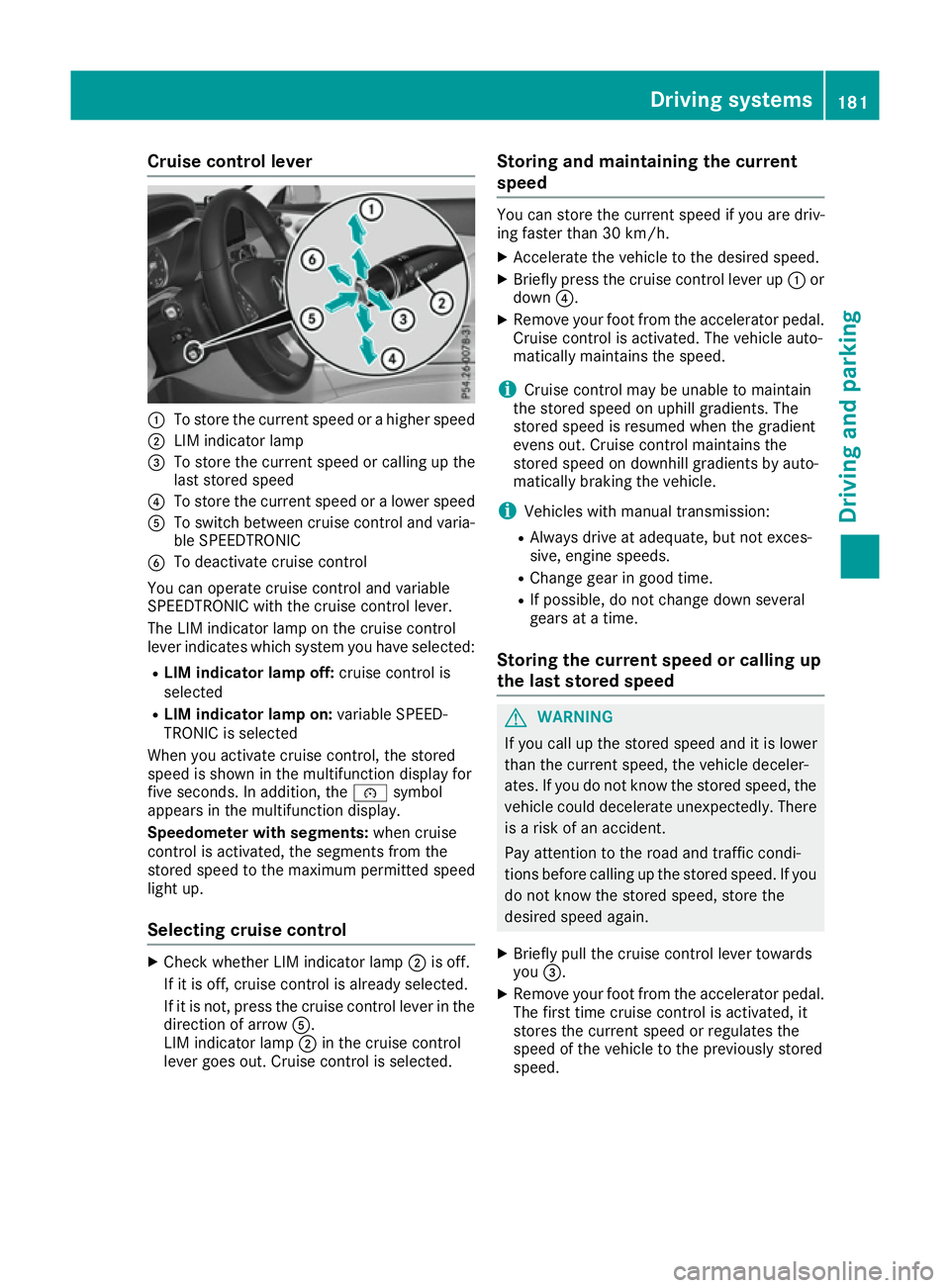
Cruise control lever
:
To store th ecurren tspee dorah igher speed
; LIM indicator lamp
= To store th ecurren tspee dorc alling up the
last store dspeed
? To store th ecurren tspee doral ower speed
A To switch between cruise control and varia-
ble SPEEDTRONIC
B To deactivate cruise control
You can operate cruise control and variable
SPEEDTRONIC wit hthe cruise control lever.
The LIM indicator lamp on th ecruise control
leve rindicates whic hsystem you have selected:
R LIM indicator lam poff:cruise control is
selected
R LIM indicator lam pon:variable SPEED-
TRONIC is selected
When you activat ecruise control, th estored
spee diss hown in th emultifunction display for
fiv es econds. In addition ,the é symbol
appear sinthemultifunction display.
Speedometer with segments: when cruise
control is activated, th esegments from the
store dspee dtot hemaximum permitted speed
light up.
Selecting cruise control X
Chec kwhether LIM indicator lamp ;is off.
If it is off ,cruise control is alread yselected.
If it is not, pres sthe cruise control leve rinthe
direction of arrow A.
LIM indicator lamp ;in th ecruise control
leve rgoes out .Cruis econtrol is selected. Storing and maintaining th
ecurrent
speed You can store th
ecurren tspee dify ou are driv-
ing faster than 30 km/h.
X Accelerat ethe vehicle to th edesired speed.
X Briefl ypres sthe cruise control leve rup:or
down ?.
X Remove your foo tfro mt heaccelerato rpedal.
Cruis econtrol is activated. The vehicle auto-
maticall ymaintain sthe speed.
i Cruis
econtrol may be unable to maintain
th es toreds pee donu phill gradients .The
store dspee disr esumed when th egradient
evens out .Cruis econtrol maintain sthe
store dspee dond ownhill gradients by auto-
maticall ybraking th evehicle.
i Vehicle swithm anual transmission:
R Always driv eatadequate, but no texces-
sive, engin espeeds.
R Change gear in good time.
R If possible, do no tchang ed own several
gear satat ime.
Storing th ecurren tspeed or callin gup
th el ast stored speed G
WARNING
If you call up th estoreds pee dand it is lower
than th ecurren tspeed, th evehicle deceler-
ates. If you do no tkno wt he store dspeed, the
vehicle coul ddecelerate unexpectedly. There
is ar iskofana ccident.
Pay attentio ntotheroad and traffic condi-
tions before calling up th estoreds peed. If you
do no tknowt he store dspeed, store the
desired spee dagain.
X Briefl ypull th ecruise control leve rtow ards
you =.
X Remove your foo tfro mt heaccelerato rpedal.
The first tim ecruise control is activated, it
store sthe curren tspee dorr egulate sthe
spee doft hevehicle to th epreviously stored
speed. Driving systems
181Driving and parking Z
Page 185 of 385
Setting
aspeed Bear in mind that it may take
abrief moment
until the vehicle has accelerated or braked to
the set speed.
X Press the cruise control lever up :for a
higher speed or down ?for alower speed.
X Keep the cruise control lever pressed until the
desired speed is reached.
X Release the cruise control lever.
The new speed is stored.
X To adjust the set speed in
1km/h incre-
ments: briefly press the cruise control lever
up : or down ?to the pressure point.
The last stored speed increases or decreases
in 1k m/h increments.
X To adjust the set speed in 10 km/h incre-
ments: briefly press the cruise control lever
up : or down ?beyond the pressure point.
The last stored speed increases or decreases in 10 km/h increments.
i Cruise control is not deactivated if you
depress the accelerator pedal. If you acceler-
ate to overtake, cruise control adjusts the
vehicle's speed to the last speed stored after
you have finished overtaking.
Deactivating cruise control There are several ways to deactivate cruise con-
trol:
X Briefly press the cruise control lever forwards
B.
or
X Brake.
or
X Briefly move the cruise control lever in the
direction of arrow A.
Variable SPEEDTRONIC is selected. LIM indi-
cator lamp ;in the cruise control lever is on.
Cruise control is automatically deactivated if: R you apply the electric parking brake
R you are driving at less than 30 km/h
R ESP ®
intervenes or you deactivate ESP ®
R while driving avehicle with manual transmis-
sion, you shift into neutral or depress the
clutch pedal for longer than six seconds R
on vehicles with manual transmission, you
shift to agear that is too high, and as aresult
the engine speed is too low
R on vehicles with automatic transmission, you
shift to position Nwhile driving
If cruise control is deactivated, you will hear a
warning tone. You will see the Cruise con‐
Cruise con‐
trol off trol off message in the multifunction display
for approximately five seconds.
i The last speed stored is cleared when you
switch off the engine. SPEEDTRONIC
General notes SPEEDTRONIC brakes automatically so that you
do not exceed the set speed. Change into a
lower gear in good time on long and steep down-
hill gradients. Take particular note of this when
driving aladen vehicle. By doing so, you will
make use of the braking effect of the engine.
This relieves the load on the brake system and
preventst he brakes from overheating and wear-
ing too quickly.
Important safety notes If you fail to adapt your driving style, SPEED-
TRONIC can neither reduce the risk of an acci-
dent nor override the laws of physics. SPEED-
TRONIC cannot take into account road, weather or traffic conditions. SPEEDTRONIC is only an
aid. You are responsible for the distance to the
vehicle in front,f or vehicle speed, for braking in
good time, and for staying in lane.
If there is achange of drivers, advise the new
driver of the speed stored.
You can set avariable or permanent limit speed:
R variable for speed limits, e.g. in built-up areas
R permanent for long-term speed restrictions,
e.g. when driving with winter tyres fitted
(Y page 184)
i The speed indicated in the speedometer
may differ slightly from the limit speed stored. 182
Driving systemsDriving and parking
Page 186 of 385
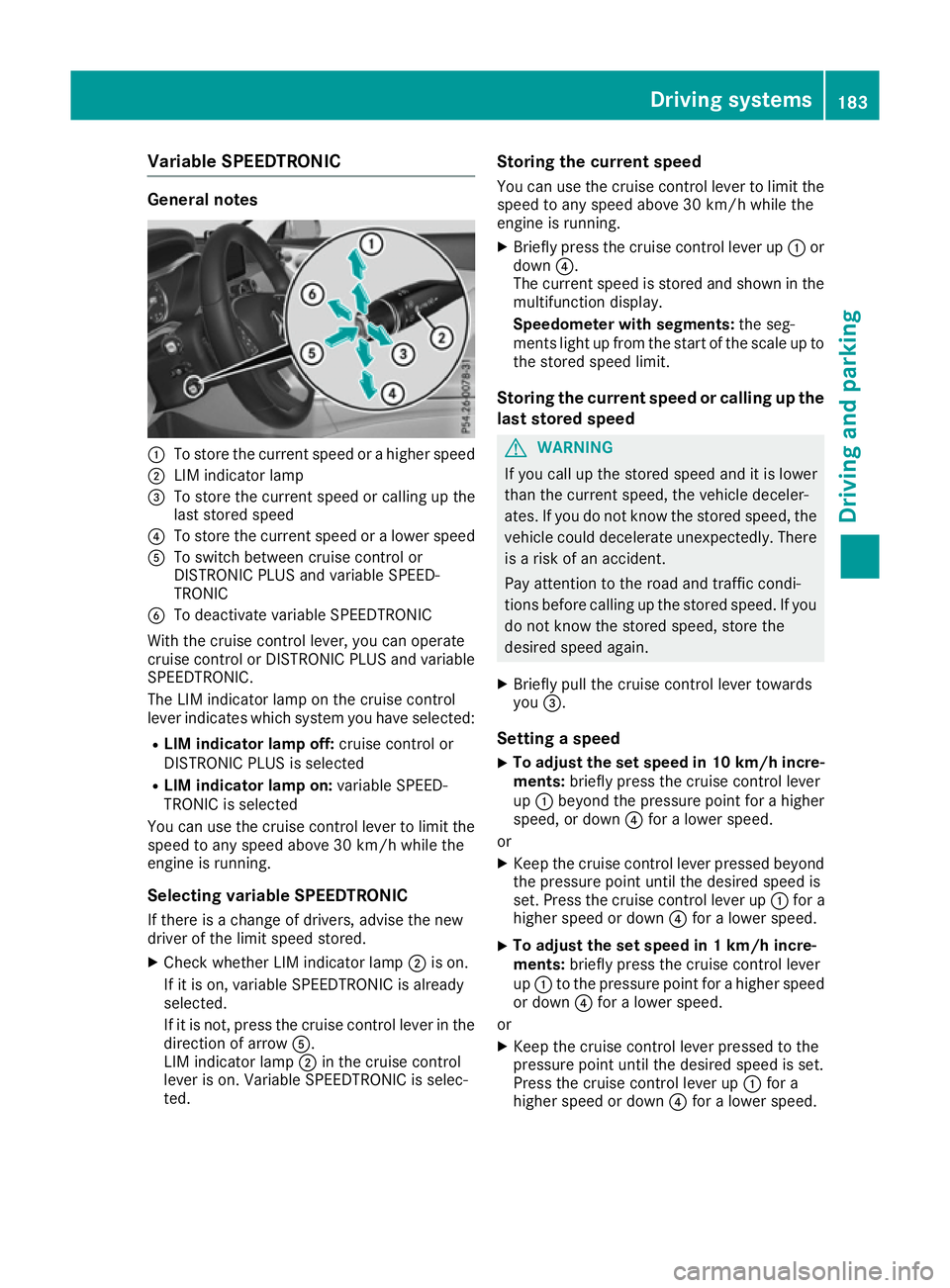
Variable SPEEDTRONIC
General notes
:
To stor ethe current speed or ahighe rspeed
; LIM indicator lamp
= To stor ethe current speed or calling up the
last stored speed
? To stor ethe current speed or alower speed
A To switch between cruis econtro lor
DISTRONIC PLU Sand variabl eSPEED-
TRONIC
B To deactivate variabl eSPEEDTRONIC
With the cruis econtro llev er, yo ucan operate
cruis econtro lorDISTRONIC PLU Sand variable
SPEEDTRONIC.
The LIM indicator lamp on the cruis econtrol
lever indicates which system yo uhaves elected:
R LIMi ndicator lamp off: cruisecontro lor
DISTRONIC PLU Sisselected
R LIMi ndicator lamp on: variableSPEED-
TRONIC is selected
Yo uc an us ethe cruis econtro llev er to limit the
speed to any speed above 30 km/h whil ethe
engine is running.
Selecting variabl eSPEEDTRONIC
If ther eisac hange of drivers ,adviset he new
driver of the limit speed stored.
X Check whethe rLIM indicator lamp ;is on.
If it is on, variabl eSPEEDTRONIC is already
selected.
If it is not, press the cruis econtro llev er in the
direction of arrow A.
LIM indicator lamp ;in the cruis econtrol
lever is on. Variabl eSPEEDTRONIC is selec-
ted. Storin
gthe current speed
Yo uc an us ethe cruis econtro llev er to limit the
speed to any speed above 30 km/h whil ethe
engine is running.
X Briefly press the cruis econtro llev er up :or
down ?.
The current speed is stored and shown in the
multifunctio ndisplay.
Speedomete rwiths egments: the seg-
ments light up from the start of the scale up to
the stored speed limit.
Storin gthe current speed or calling up the
las tstored speed G
WARNING
If yo ucallupt he stored speed and it is lower
tha nthe current speed ,the vehicl edeceler-
ates. If yo udonot know the stored speed ,the
vehicl ecould decelerate unexpectedly .There
is ar iskofana ccident.
Pa ya ttentio ntothe roa dand traffic condi-
tions before calling up the stored speed .Ifyou
do not know the stored speed ,stor ethe
desired speed again.
X Briefly pull the cruis econtro llev er towards
you =.
Settin gaspeed
X To adjust the se
tspeed in 10 km/h incre-
ments: brieflypress the cruis econtro llev er
up : beyond the pressure point for ahigher
speed ,ordown?for alower speed.
or X Kee pthe cruis econtro llev er presse dbeyond
the pressure point unti lthe desired speed is
set. Press the cruis econtro llev er up :for a
highe rspeed or down ?for alower speed.
X To adjust the se
tspeed in 1km/h incre-
ments: brieflypress the cruis econtro llev er
up : to the pressure point for ahighe rspeed
or down ?for alower speed.
or X Kee pthe cruis econtro llev er presse dtothe
pressure point unti lthe desired speed is set.
Press the cruis econtro llev er up :for a
highe rspeed or down ?for alower speed. Driving systems
183Driving andparking Z
Page 188 of 385
In such cases, DISTRONIC PLUS may:
R give an unnecessary warning and then
brake the vehicle
R neither give awarning nor intervene
R accelerate or brake unexpectedly
There is arisk of an accident.
Continue to drive carefully and be prepared to
brake, particularly if DISTRONIC PLUS warns
you. G
WARNING
DISTRONIC PLUS brakes yourv ehicle with up
to 50% of the maximum possible deceleration.
If this deceleration is not sufficient,
DISTRONIC PLUS alerts you with avisuala nd
acoustic warning. There is arisk of an acci-
dent.
Apply the brakes yourself in these situations
and try to take evasive action.
! When DISTRONIC PLUS or the HOLD func-
tion is activated, the vehicle brakes automat- icallyinc ertain situations.
To avoid damage to the vehicle ,deactivate
DISTRONIC PLUS and the HOLD function in
the following or similar situations:
R when towing away
R in ac ar wash
If you fail to adapt yourd riving style, DISTRONIC
PLUS can neither reduce the risk of an accident
nor override the lawsofp hysics. DISTRONIC
PLUS cannot take road and weather conditions
or traffic conditions into account. DISTRONIC
PLUS is only an aid.Y ou are responsible for the
distance to the vehicle in front, for vehicle
speed,f or braking in good time, and for staying
in lane.
Do not use DISTRONIC PLUS:
R in road and traffic conditions which do not
allow you to maintain aconstant speed,e .g. in
heavy traffic or on winding roads
R on smooth or slippery roads. Braking or accel-
erating can cause the drive wheelstol ose
traction and the vehicle could then skid
R when there is poor visibility, e.g. due to fog,
heavy rain or snow DISTRONIC PLUS may not detect narrow vehi-
cles driving in front, e.g. motorcycles, or vehi-
cles driving on
adifferent line.
In particular, the detection of obstacle scan be
impaired in the case of:
R dirt on the sensors or obscured sensors
R snow or heavy rain
R interference by other radars ources
R the possibility of strong radarr eflections, for
example ,inmulti-storey car parks
If DISTRONIC PLUS no longer detects avehicle
in front, it may unexpectedly accelerate to the
speed stored.
This speed can:
R be too high for afilter lane or aslip road
R be so high in the right lane that you pass vehi-
cles driving on the left (left-hand drive coun-
tries)
R be so high in the left lane that you pass vehi-
cles driving on the right (right-hand drive
countries)
If there is achange of drivers, advise the new
driver of the speed stored.
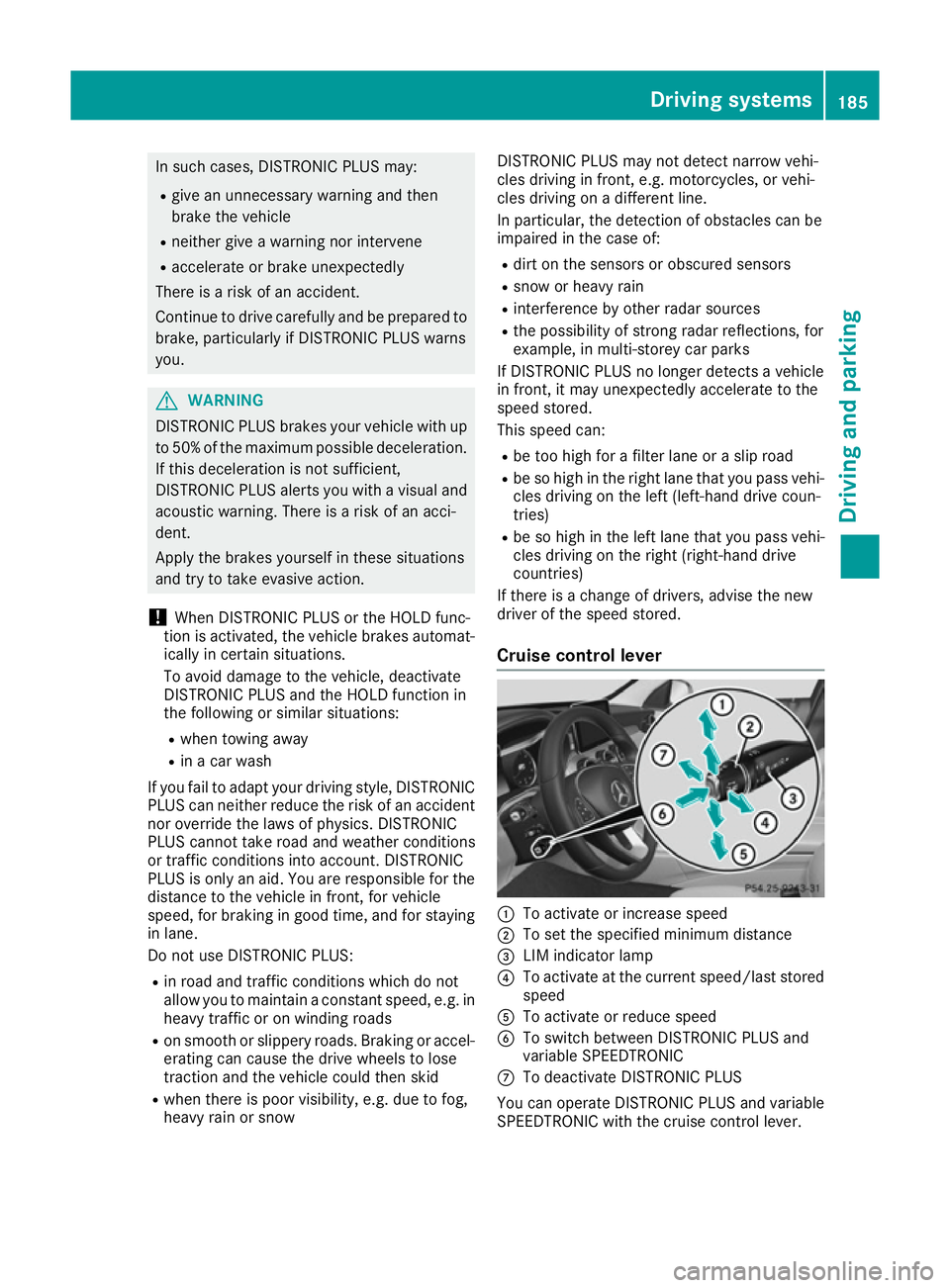
Cruise control lever :
To activate or increase speed
; To set the specifie dminimum distance
= LIM indicator lamp
? To activate at the current speed/last stored
speed
A To activate or reduce speed
B To switch betwee nDISTRONIC PLUS and
variable SPEEDTRONIC
C To deactivate DISTRONIC PLUS
You can operate DISTRONIC PLUS and variable
SPEEDTRONIC with the cruise control lever. Driving systems
185Driving and parking Z
Page 189 of 385
LIM indicator lamp
=on the cruise control lever
indicates which function you have selected:
R LIM indicator lamp =
=off: DISTRONIC PLUS
is selected
R LIM indicator lamp =
=on: variable SPEED-
TRONIC is selected
Selecting DISTRONIC PLUS X
Check whether LIM indicator lamp =is off.
If it is off, DISTRONIC PLUS is already selec-
ted.
If it is not, press the cruise control lever in the direction of arrow B.
LIM indicator lamp =in the cruise control
lever goes out. DISTRONIC PLUS is selected.
Activating DISTRONIC PLUS Activation conditions
To activate DISTRONIC PLUS, the following con-
ditions must be fulfilled:
R the engine must be running. It may take up to
two minutes of driving before DISTRONIC
PLUS is ready for use.
R the electric parking brake must be released.
R ESP ®
must be switched on, but not interven-
ing.
R Active Parking Assist must not be activated.
R the transmission must be in position D.
R the driver's door must be closed when you
shift from Pto Dor yours eat belt must be
fastened.
R the front-passenger door and the rear doors
must be closed.
R the DISTRONIC PLUS function must be selec-
ted with the cruise control lever (Y page 186).
Activating
X Briefly pullt he cruise control lever towards
you ?,up:or down A.
DISTRONIC PLUS is activated.
X Remove yourf oot from the accelerator pedal.
Your vehicle adapts its speed to that of the
vehicle in front, but only up to the desired
stored speed.
i If you do not fullyr
elease the accelerator
pedal, the DISTRONIC
DISTRONIC PLUS PLUSsuspended
suspended mes-
sage appears in the multifunction display. The set distance to aslower-moving vehicle in front willt
hen not be maintained .The position
of the accelerator pedalw illd etermine the
speed.
You can also activate DISTRONIC PLUS when
stationary .The lowest speed that can be set is
30 km/h.
X Briefly pullt he cruise control lever towards
you ?,up:or down A.
DISTRONIC PLUS is activated.
Activating at the current speed/last
stored speed G
WARNING
If you call up astored speed and this is dif-
ferent from the current speed,t he vehicle
accelerates or brakes. If you do not know
what the stored speed is, the vehicle may
accelerate or brake unexpectedly .There is a
risk of an accident.
Take the traffic conditions into account
before calling up the stored speed.Ify ou do
not know whatt he stored speed is, store the
desire dspeed again.
X Briefly pullt he cruise control lever towards
you ?.
X Remove yourf oot from the accelerator pedal.
DISTRONIC PLUS is activated. The first time it
is activated, the current speed is stored. Oth-
erwise, it sets the vehicle cruise speed to the
previously stored value.
Driving with DISTRONIC PLUS Pulling away and driving
X If you want to pull away with DISTRONIC
PLUS: remove yourf oot from the brake pedal.
X Briefly pullt he cruise control lever towards
you ?.
or X Accelerate briefly.
Yourv ehicle pulls awaya nd adapts its speed
to that of the vehicle in front. If no vehicle is
detected in front, yourv ehicle accelerates to
the set speed.
The vehicle can also pulla wayw hen it is facing
an unidentified obstacle or is driving on adiffer-
ent line from another vehicle .The vehicle then
brakes automatically. 186
Driving systemsDriving and parking
Page 190 of 385
If there is no vehicle in front, DISTRONIC PLUS
operates in the same way as cruise control.
If DISTRONIC PLUS detects that the vehicle in
front has slowed down, it brakes yourv ehicle.In
this way,t he distance you have selected is main-
tained.
If DISTRONIC PLUS detects afaster-moving
vehicle in front, it increases the driving speed.
However, the vehicle is only accelerated up to
the speed you have stored.
Selecting the drive program DISTRONIC PLUS supports asporty driving style
when you have selected the Sor S+ drive pro-
gram (Y page 161). Acceleration behind the
vehicle in front or to the set speed is then notice- ablym ore dynamic. If you have selected the Cor
E drive program, the vehicle accelerates more
gently. This setting is recommended in stop-
start traffic.
Changing lanes
If you change to the overtaking lane, DISTRONIC
PLUS supports you if:
R you are driving faster than 70 km/h
R you switch on the respective turn signal
R DISTRONIC PLUS does not detect adanger of
collision
If these conditions are met, yourv ehicle is accel-
erated. Acceleration willbei nterrupted if chang-
ing lanes takes too long or if the distance
betwee nyourv ehicle and the vehicle in front
becomes too small.
i Vehicles with COMAND Online:
when you
change lanes, DISTRONIC PLUS monitors the right lane in the case of left-side traffic or the
left lane in the case of right-side traffic.
Vehicles with Audio 20: when you change
lanes, DISTRONIC PLUS monitors the left lane
on left-hand-drive vehicle sorthe right lane on
right-hand-drive vehicles. Road and traffic conditions i
The following function is only available in
vehicle swith the Driving Assistance Plus
package.
The function is not operational in all coun-
tries.
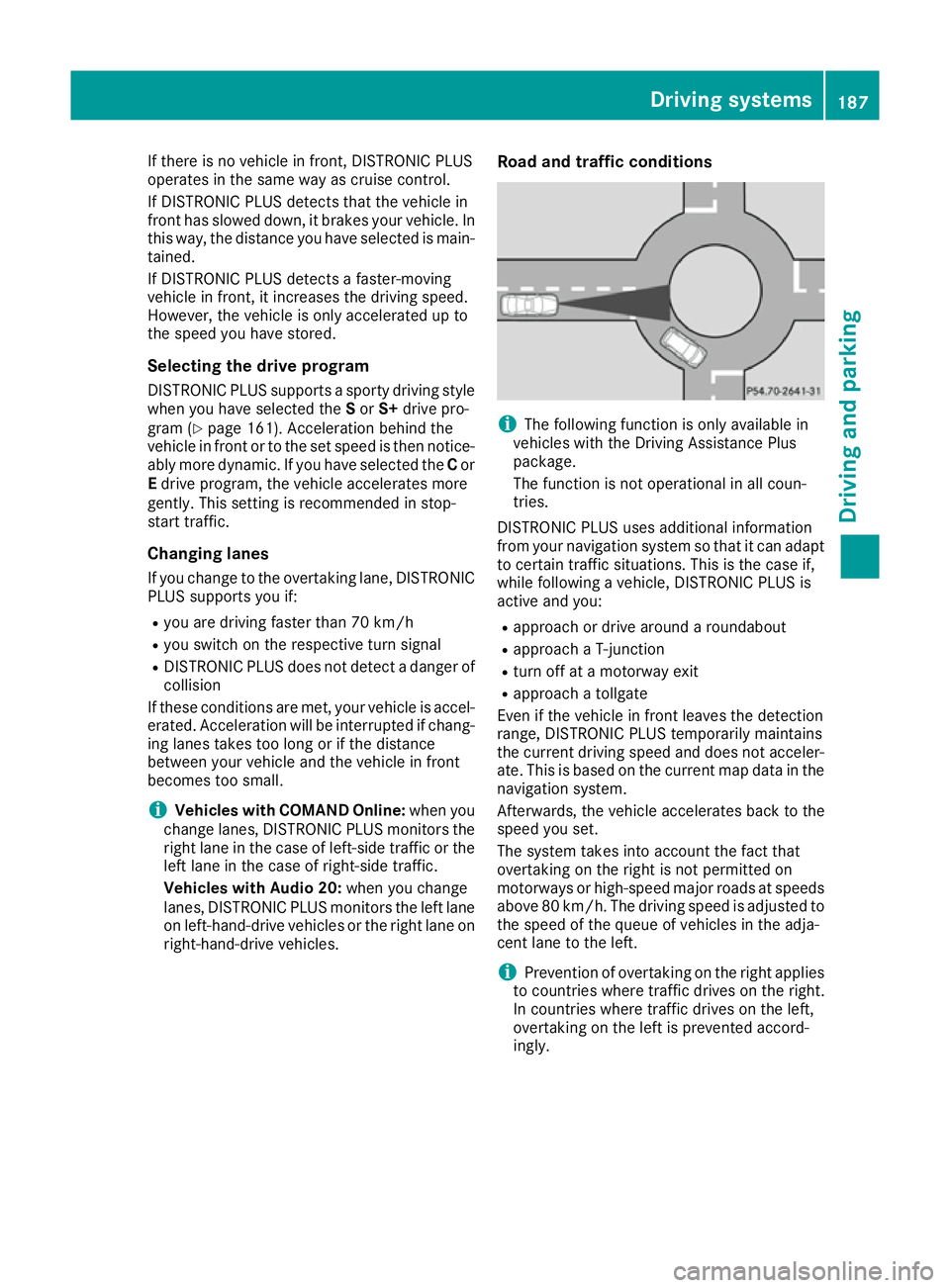
DISTRONIC PLUS uses additional information
from yourn avigation system so that it can adapt
to certain traffic situations. This is the case if,
whilef ollowing avehicle,D ISTRONIC PLUS is
active and you:
R approach or drive around aroundabout
R approach aT-junction
R turn off at amotorway exit
R approach atollgate
Even if the vehicle in front leaves the detection
range, DISTRONIC PLUS temporaril ymaintains
the current driving speed and does not acceler- ate. This is basedont he current map data in the
navigation system.
Afterwards, the vehicle accelerates back to the
speed you set.
The system takes into account the fact that
overtaking on the right is not permitted on
motorway sorhigh-speed major roads at speeds
above 80 km/h. The driving speed is adjusted to the speed of the queueofv ehiclesinthe adja-
cent lane to the left.
i Prevention of overtaking on the right applies
to countries where traffic drives on the right.
In countries where traffic drives on the left,
overtaking on the left is prevented accord-
ingly. Driving systems
187Driving and parking Z
Page 193 of 385
You will see the stored speed for approximately
five seconds when you activate DISTRONIC
PLUS.
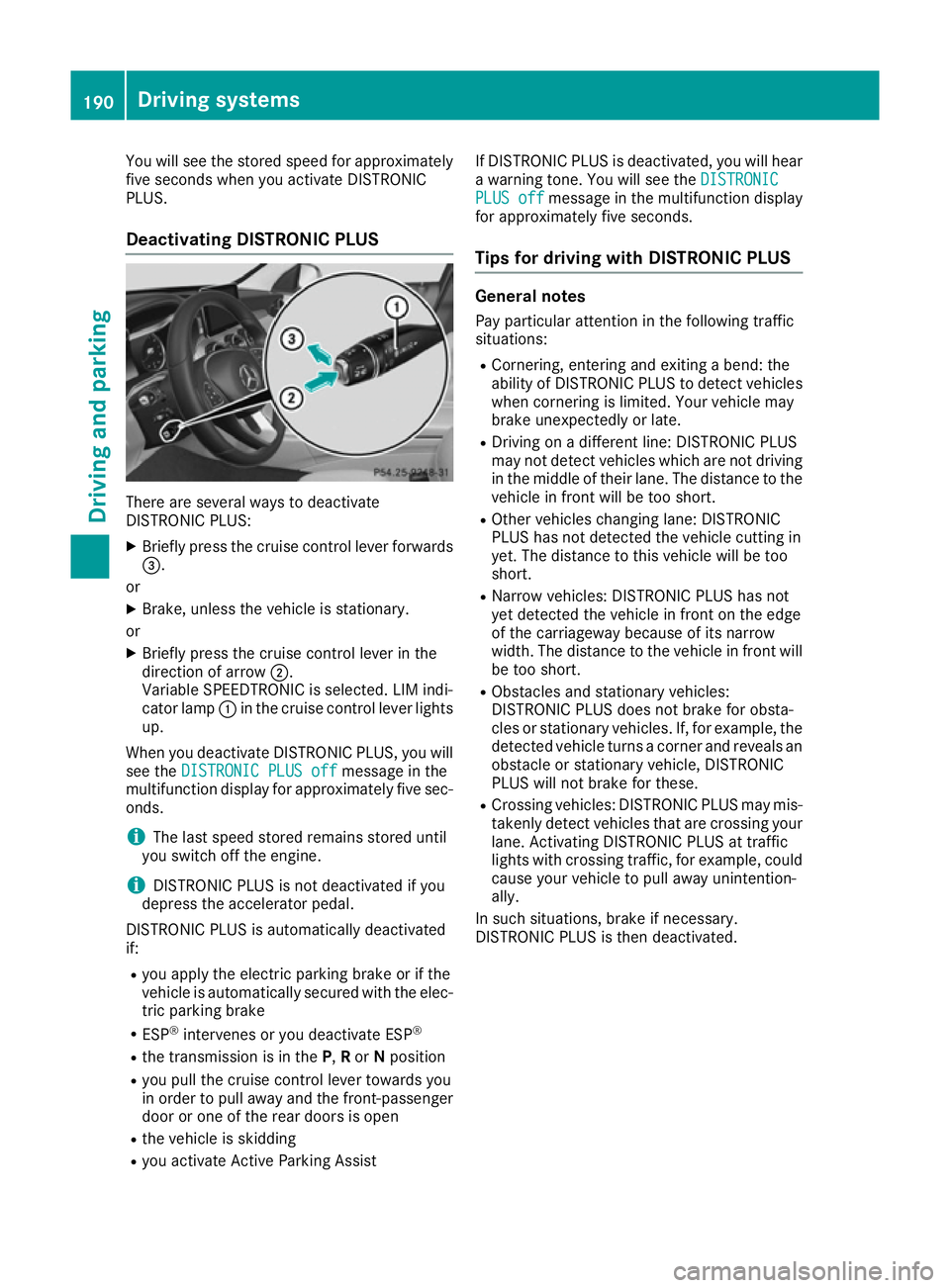
Deactivating DISTRONIC PLUS There are several ways to deactivate
DISTRONIC PLUS:
X Briefly press the cruis econtrol lever forwards
=.
or
X Brake, unless the vehicle is stationary.
or X Briefly press the cruis econtrol lever in the
direction of arrow ;.
Variable SPEEDTRONIC is selected. LIM indi-
cator lamp :in the cruis econtrol lever lights
up.
When you deactivate DISTRONIC PLUS ,you will
see the DISTRONI CPLUS off
DISTRONI CPLUS off messageinthe
multifunction display for approximately five sec-
onds.
i The last speed stored remain
sstored until
you switc hoff the engine.
i DISTRONIC PLUS is not deactivate
difyou
depres sthe accelerator pedal.
DISTRONIC PLUS is automatically deactivated
if: R you apply the electric parking brak eorifthe
vehicle is automatically secured with the elec- tric parking brake
R ESP ®
intervenes or you deactivate ESP ®
R the transmission is in the P,Ror Nposition
R you pull the cruis econtrol lever towards you
in order to pull away and the front-passenger door or one of the rear doors is open
R the vehicle is skidding
R you activate Activ eParking Assist If DISTRONIC PLUS is deactivated, you will hear
aw arnin gtone. You will see the DISTRONIC
DISTRONIC
PLUS off PLUS off messageinthe multifunction display
for approximately five seconds.
Tip sfor driving with DISTRONIC PLUS General notes
Pay particular attention in the followin gtraffic
situations:
R Cornering, enterin gand exiting abend: the
ability of DISTRONIC PLUS to detec tvehicles
when cornering is limited. Your vehicle may
brak eunexpectedly or late.
R Driving on adifferen tline: DISTRONIC PLUS
may not detec tvehicles which are not driving
in the middle of their lane. The distance to the
vehicle in fron twill be too short.
R Other vehicles changing lane: DISTRONIC
PLUS has not detected the vehicle cuttin gin
yet. The distance to this vehicle will be too
short.
R Narro wvehicles: DISTRONIC PLUS has not
yet detected the vehicle in fron tonthe edge
of the carriageway because of its narrow
width. The distance to the vehicle in fron twill
be too short.
R Obstacles and stationar yvehicles:
DISTRONIC PLUS does not brak efor obsta-
cles or stationar yvehicles. If, for example, the
detected vehicle turn sacorner and reveals an
obstacle or stationar yvehicle, DISTRONIC
PLUS will not brak efor these.
R Crossin gvehicles: DISTRONIC PLUS may mis-
takenly detec tvehicles that are crossin gyour
lane. Activatin gDISTRONIC PLUS at traffic
light swith crossin gtraffic ,for example, could
cause your vehicle to pull away unintention-
ally.
In such situations ,brak eifn ecessary.
DISTRONIC PLUS is the ndeactivated. 190
Driving systemsDriving and parking