lock MERCEDES-BENZ SPRINTER 2013 MY13 Operator’s Manual
[x] Cancel search | Manufacturer: MERCEDES-BENZ, Model Year: 2013, Model line: SPRINTER, Model: MERCEDES-BENZ SPRINTER 2013Pages: 334, PDF Size: 3.88 MB
Page 249 of 334
Adding washer fluid
X
Mix the washe rfluid to the appropriate
mixing ratio in a container beforehand.
X Open the hood (Y page 240).
X Pull cap 0005on the washer fluid reservoir
upwards at the tab.
X Add the premixed washer fluid.
X Press cap 0005onto the filler neck until it
engages audibly.
X Close the hood. Fuel system
Draining the fuel filter G
WARNING
Fuel is highly flammable. Improper handing of
fuel creates a risk of fire and explosion.
Avoid fire, open flames ,smoking and creating
sparks under all circumstances. Switch off the
ignitio nand auxiliary heating before carrying
ou tw ork to the fuel system. Always wear
protective gloves. H
Environmental note
Dispose of the water-fuel mixture in an
environmentally responsible manner.
! When the 000Eindicator lamp lights up,
drain the fuel filter with water separator
immediately. Otherwise, the engine may be
damaged. If the
000E indicator lamp in the instrument
cluster goes on, drain the fuel filter with water
separator 0026immediately.
i We recommend that you have this
maintenance work carried out at a qualified
specialist workshop.
X Park the vehicle safely and secure it from
rolling away.
X Switch off the auxiliary heating system .
X Switch off the engine.
X Open the hood (Y page 240).
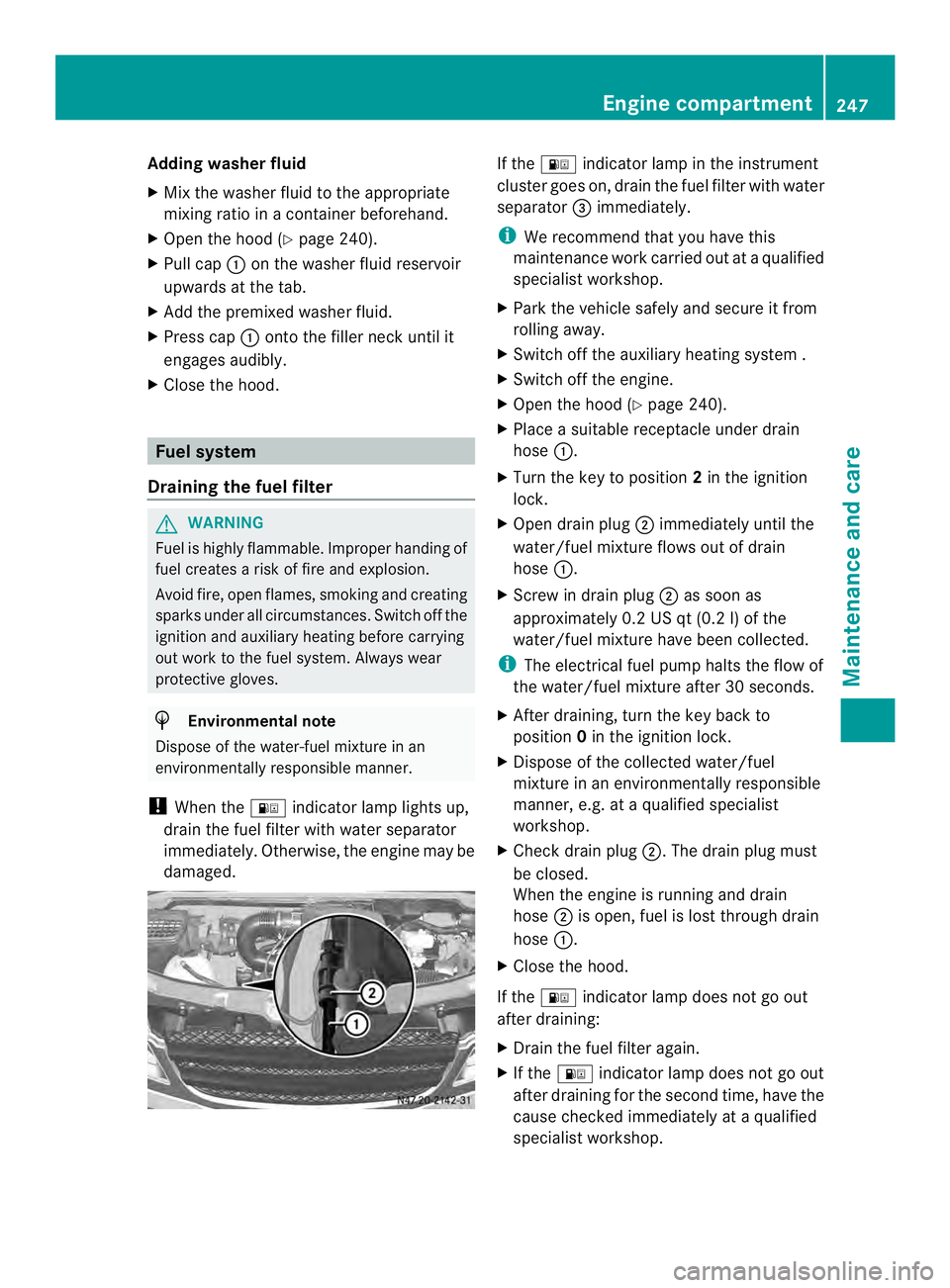
X Place a suitable receptacle under drain
hose 0005.
X Turn the key to position 2in the ignition
lock.
X Open drain plug 0006immediately until the
water/fuel mixture flows out of drain
hose 0005.
X Screw in drain plug 0006as soon as
approximately 0.2 US qt (0.2 l) of the
water/fuel mixture have been collected.
i The electrical fuel pump halts the flow of
the water/fuel mixture after 30 seconds.
X After draining, turn the key back to
position 0in the ignition lock.
X Dispose of the collected water/fuel
mixture in an environmentally responsible
manner, e.g. at a qualified specialist
workshop.
X Check drain plug 0006.The drain plug must
be closed.
When the engine is running and drain
hose 0006is open, fuel is lost through drain
hose 0005.
X Close the hood.
If the 000E indicator lamp does not go out
after draining:
X Drain the fuel filter again.
X If the 000E indicator lamp does not go out
after draining for the second time, have the
cause checked immediately at a qualified
specialist workshop. Engine compartment
247Maintenance and care Z
Page 251 of 334
i
Maintenance services must be carried out
in accordance with the provisions and
recommendations in the Maintenance
Booklet.
Not doing so could void the warranty claim
and lead to refusal of goodwill gestures
after the manufacturer has submitted a
damage report.
i Observe the information on Sprinter
original parts in the "Technical data"
section (Y page 314). Service interval display
General notes As
ervice that is due is displayed in the service
interval display about 1monthi nadvance. A
message is then displayed while the vehicle
is in motion or when the ignition is switched
on.
i The service interval display does not
provide information about the oil level. The
service interval display should therefore
not be confused with the 001Cengine oil
level display.
The service due date is displayed in days or
miles (kilometers), depending on the total
distance driven.
The symbols or letters on the service display
show the type of service that is due.
0002 orA for a minor service
0003 orB for a major service
Service due date display Vehicles with steering wheel buttons:
the
following messages may be displayed.
R 0002 Service A due in ... days R
0002 Service A due in ... mi (km )
R 0002 Service A Carry out now Vehicles without steering wheel buttons:
the following messages may be displayed.
R
0002 for service A
R 0003 for Service B
Additionally, you will see the remaining
distance in miles ( mi ) or kilometers (km ) or the
remaining time in days ( d ).
Service due date has been exceeded Vehicles with steering wheel buttons:
if
you have missed the service due date, one of
the following messages appears in the display
and warning tone also sounds.
R 0002 Service A overdue by ... days R
0002 Service A overdue by ... mi (km )
Vehicles without steering wheel buttons:
if you have missed the service due date, the
0002 or0003 symbol for the service flashes
for 10 seconds after the ignition is switched
on. A minus sign also appears in front of the
service due date.
Calling up the service due date X
Turn the key to position 2in the ignition
lock.
The display is activated.
Vehicles without steering wheel buttons
X Press the 0004menu button on the
instrument cluster repeatedly until the
0002 or0003 symbol for the service
appears in the display.
Additionally, you will see the remaining
distance in miles ( mi ) or kilometers (
km ) or
the remaining time in days (d ).
Vehicles with steering wheel buttons
X Press the 0010or0007 button on the
steering wheel until the standard display
(Y page 182) appears in the display.
X Press the 0001or0009 button on the
steering wheel repeatedly until the service Maintenance
249Maintenance and care Z
Page 253 of 334
Installing/removing the floor
covering (starter battery)
G
WARNING
Objects in the driver' sfootwell can restric tthe
pedal travel or obstruct adepressed pedal.
The operating and road safety of the vehicle
is jeopardized. There is a risk of an accident.
Make sure that all objects in the vehicle are
stowed correctly, and that they cannot enter
the driver's footwell. Install the floormats
securely and as specified in order to ensure
sufficien tclearance for the pedals. Do not use
loose floormats. X
Switch off all electrical consumers.
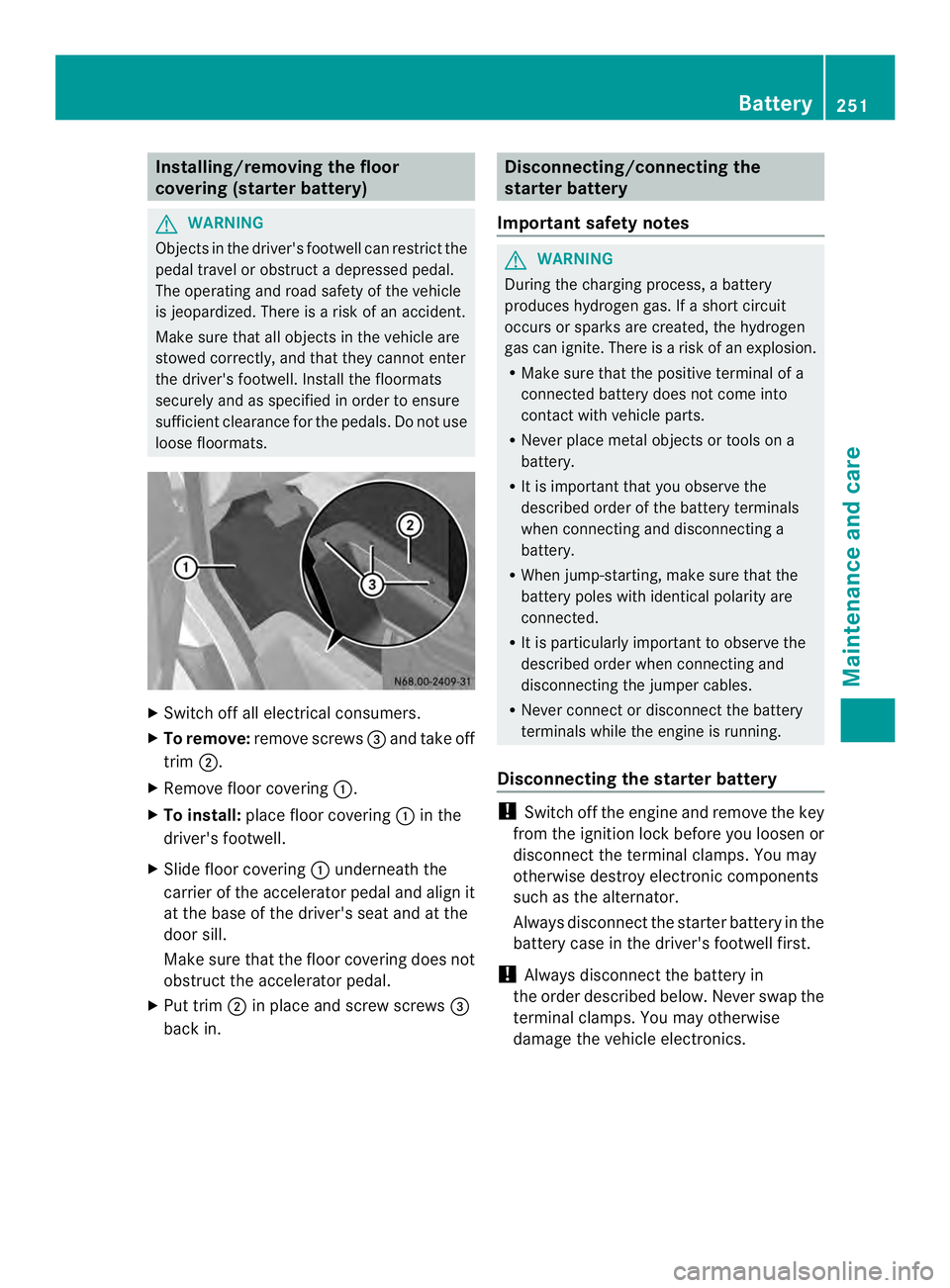
X To remove: remove screws 0026and take off
trim 0006.
X Remove floor covering 0005.
X To install: place floor covering 0005in the
driver's footwell.
X Slide floor covering 0005underneath the
carrier of the accelerator pedal and align it
at the base of the driver's seat and at the
door sill.
Make sure that the floor covering does not
obstruct the accelerator pedal.
X Put trim 0006in place and screw screws 0026
back in. Disconnecting/connecting the
starter battery
Important safety notes G
WARNING
During the charging process, a battery
produces hydroge ngas. If a shor tcircuit
occurs or sparks are created, the hydrogen
gas can ignite. There is a risk of an explosion.
R Make sure that the positive terminal of a
connected battery does not come into
contact with vehicle parts.
R Never place metal objects or tools on a
battery.
R It is important that you observe the
described order of the battery terminals
when connecting and disconnecting a
battery.
R When jump-starting, make sure that the
battery poles with identical polarity are
connected.
R It is particularly important to observe the
described order when connecting and
disconnecting the jumper cables.
R Never connect or disconnect the battery
terminals while the engine is running.
Disconnecting the starter battery !
Switch off the engine and remove the key
fro mt he ignition lock before you loosen or
disconnectt he terminal clamps. You may
otherwise destroy electronic components
such as the alternator.
Always disconnectt he starter battery in the
battery case in the driver's footwell first.
! Always disconnectt he battery in
the order described below. Never swap the
terminal clamps. You may otherwise
damage the vehicle electronics. Battery
251Maintenance and care Z
Page 254 of 334
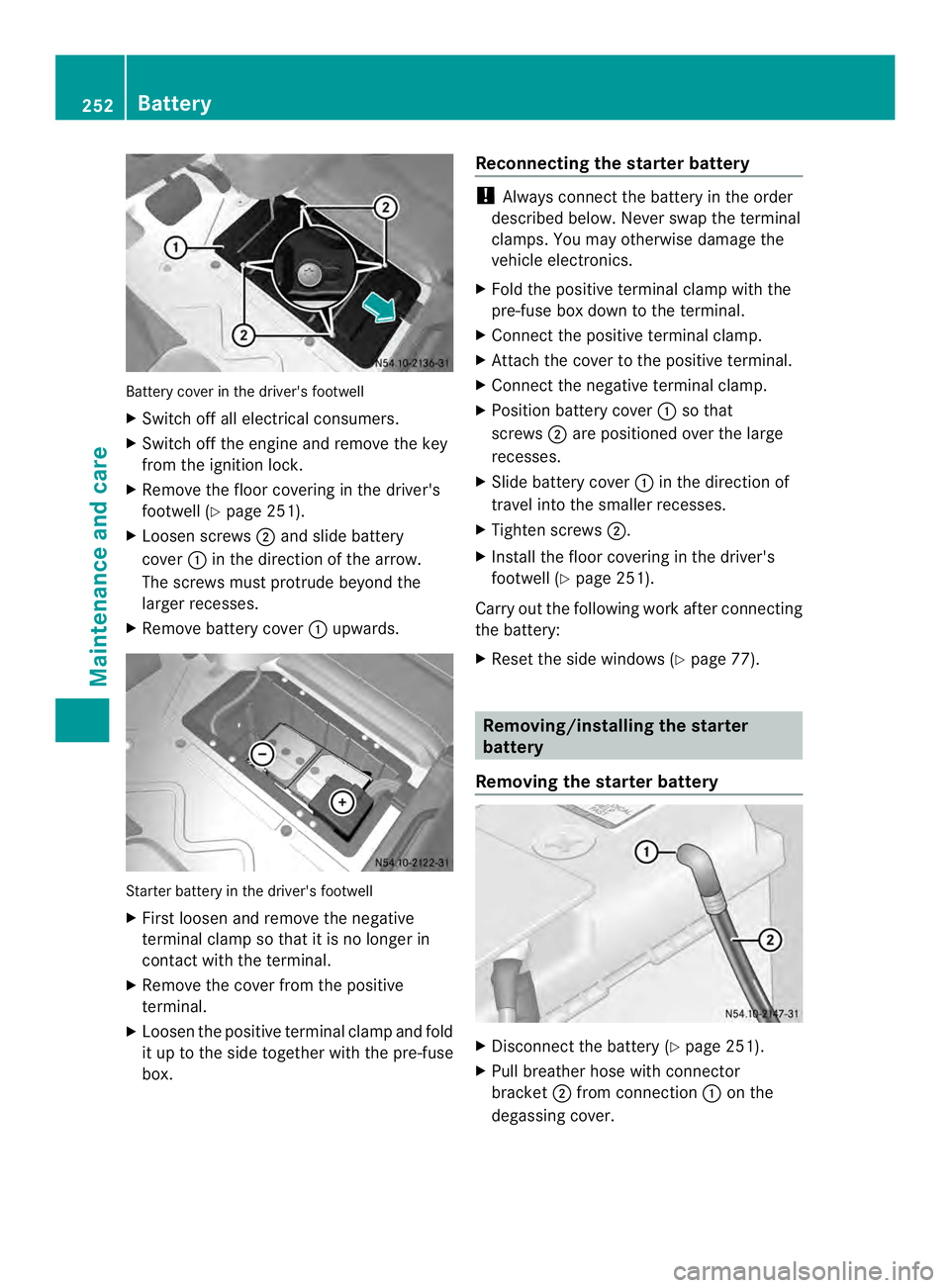
Battery cover in the driver's footwell
X
Switch off all electrical consumers.
X Switch off the engine and remove the key
from the ignition lock.
X Remove the floor covering in the driver's
footwell (Y page 251).
X Loosen screws 0006and slide battery
cover 0005in the direction of the arrow.
The screws mus tprotrude beyond the
larger recesses.
X Remove battery cover 0005upwards. Starter battery in the driver's footwell
X
First loosen and remove the negative
terminal clamp so that it is no longer in
contact with the terminal.
X Remove the cover from the positive
terminal.
X Loosen the positive terminal clamp and fold
it up to the side together with the pre-fuse
box. Reconnecting the starter battery !
Always connect the battery in the order
described below. Never swap the terminal
clamps. You may otherwise damage the
vehicle electronics.
X Fold the positive terminal clamp with the
pre-fuse box downt o the terminal.
X Connect the positive terminal clamp.
X Attach the cover to the positive terminal.
X Connect the negative terminal clamp.
X Position battery cover 0005so that
screws 0006are positioned over the large
recesses.
X Slide battery cover 0005in the direction of
travel into the smaller recesses.
X Tighten screws 0006.
X Install the floor covering in the driver's
footwell (Y page 251).
Carry out the following work after connecting
the battery:
X Reset the side windows (Y page 77). Removing/installing the starter
battery
Removing the starter battery X
Disconnect the battery (Y page 251).
X Pull breather hose with connector
bracket 0006from connection 0005on the
degassing cover. 252
BatteryMaintenance and care
Page 255 of 334
X
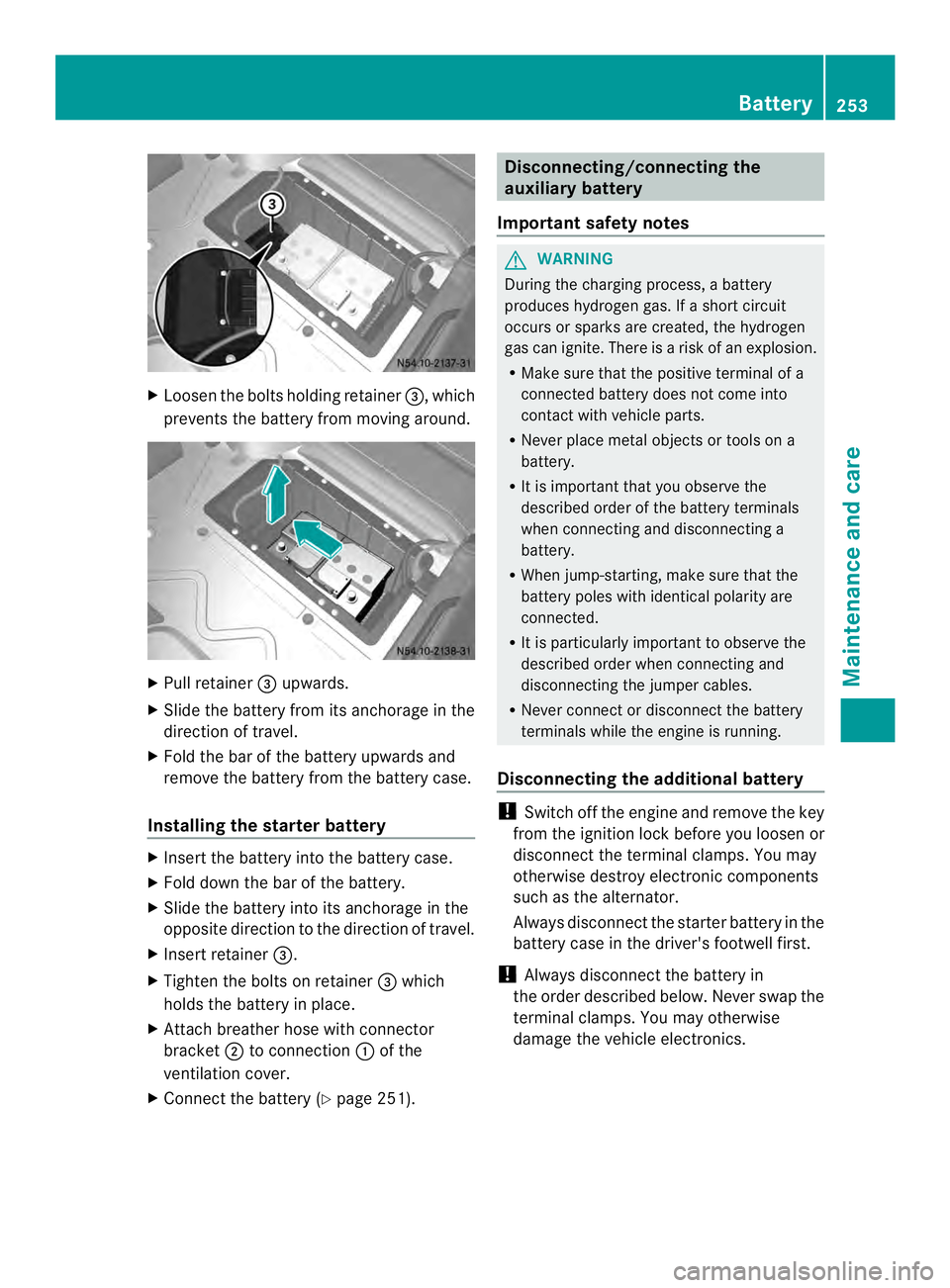
Loosen the bolts holding retainer 0026, which
prevents the battery from moving around. X
Pull retainer 0026upwards.
X Slide the battery from its anchorage in the
direction of travel.
X Fold the bar of the battery upwards and
remove the battery from the battery case.
Installing the starter battery X
Insert the battery into the battery case.
X Fold down the bar of the battery.
X Slide the battery into its anchorage in the
opposite direction to the direction of travel.
X Insert retainer 0026.
X Tighten the bolts on retainer 0026which
holds the battery in place.
X Attach breather hose with connector
bracket 0006to connection 0005of the
ventilation cover.
X Connect the battery (Y page 251). Disconnecting/connecting the
auxiliary battery
Important safety notes G
WARNING
During the charging process, a battery
produces hydrogen gas. If a short circuit
occurs or sparks are created, the hydrogen
gas can ignite. There is a risk of an explosion.
R Make sure that the positive terminal of a
connected battery does not come into
contact with vehicle parts.
R Never place metal objects or tools on a
battery.
R It is important that you observe the
described order of the battery terminals
when connecting and disconnecting a
battery.
R When jump-starting, make sure that the
battery poles with identical polarity are
connected.
R It is particularly important to observe the
described order when connecting and
disconnecting the jumper cables.
R Never connect or disconnect the battery
terminals while the engine is running.
Disconnecting the additional battery !
Switch off the engine and remove the key
from the ignition lock before you loosenor
disconnec tthe terminal clamps. You may
otherwise destroy electronic components
such as the alternator.
Always disconnectt he starter battery in the
battery case in the driver's footwell first.
! Always disconnectt he battery in
the order described below. Never swap the
terminal clamps. You may otherwise
damage the vehicle electronics. Battery
253Maintenance and care Z
Page 256 of 334
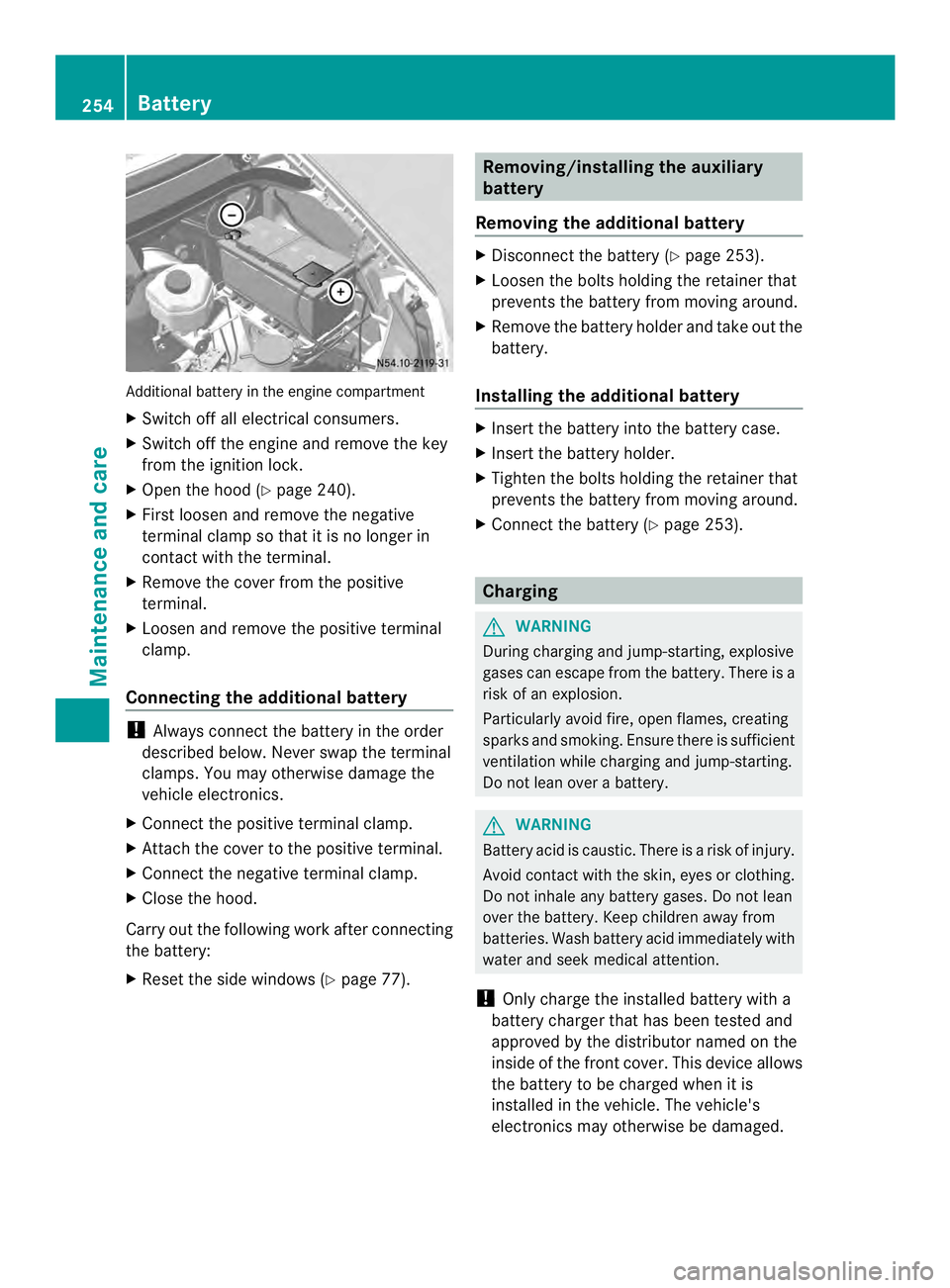
Additional battery in the engine compartment
X
Switch off all electrical consumers.
X Switch off the engine and remove the key
from the ignition lock.
X Ope nthe hood (Y page 240).
X First loosen and remove the negative
terminal clamp so that it is no longer in
contact with the terminal.
X Remove the cover from the positive
terminal.
X Loosen and remove the positive terminal
clamp.
Connecting the additional battery !
Always connect the battery in the order
described below. Never swap the terminal
clamps. You may otherwise damage the
vehicle electronics.
X Connect the positive terminal clamp.
X Attach the cover to the positive terminal.
X Connect the negative terminal clamp.
X Close the hood.
Carry out the following work after connecting
the battery:
X Reset the side windows (Y page 77). Removing/installing the auxiliary
battery
Removing the additional battery X
Disconnect the battery (Y page 253).
X Loosen the bolts holding the retainer that
prevents the battery from moving around.
X Remove the battery holder and take out the
battery.
Installing the additional battery X
Insert the battery into the battery case.
X Insert the battery holder.
X Tighten the bolts holding the retainer that
prevents the battery from moving around.
X Connect the battery (Y page 253). Charging
G
WARNING
During charging and jump-starting, explosive
gases can escape from the battery. There is a
risk of an explosion.
Particularly avoid fire, open flames, creating
sparks and smoking. Ensure there is sufficient
ventilation while charging and jump-starting.
Do not lean over a battery. G
WARNING
Battery acid is caustic. There is a risk of injury.
Avoid contact with the skin, eyes or clothing.
Do not inhale any battery gases. Do not lean
over the battery. Keep children away from
batteries. Wash battery acid immediately with
water and seek medical attention.
! Only charge the installed battery with a
battery charger that has been tested and
approved by the distributor named on the
inside of the front cover. This device allows
the battery to be charged when it is
installed in the vehicle. The vehicle's
electronics may otherwise be damaged. 254
BatteryMaintenance and care
Page 257 of 334
X
Recharge the removed battery. Observe
the notes in the operating instructions for
your battery charger.
X Install the battery. Observe the notes on
reconnecting the battery.
i If batteries are no tbeing used, you should
charge them once a month.
It is also possible to charge the starter
battery using the jump-starting connection
point in the engine compartment
(Y page 267). Care
! Dirty battery clamps and battery surfaces
cause leak currents which lead to the
batteries discharging.
! Do not use cleaning agents containing
fuel. Cleaning agents containing fuel
corrode the battery housing.
! If dirt gets into the battery cell, battery
self-discharge will increase and the battery
may be damaged.
The following points on battery care must be
observed:
X Regularly chec kthe battery terminals and
the fastening of the negative cable to the
chassis to ensure that they are firmly
seated.
X Always keep the battery terminals and
battery surfaces clean and dry.
X Lightly grease the undersides of the battery
terminals with acid-resistant grease.
X Only clean the batteries when the caps are
screwed on.
Otherwise, dirt could get into the battery
cells.
X Unscrew the caps and clean blocked
breathers with a suitable tool such as a
piece of wire.
If you do not unscrew the caps for cleaning,
there is a risk of short circuit. The breathers in the caps and the cell
ventilation tubes must be open. Otherwise,
gas cannot escape.
X Only clean the battery casing with a
commercially available cleaning product. Care
Notes on care
G
WARNING
If you use openings in the bodywork or
detachable parts as steps, you could:
R slip and/or fall
R damage the vehicle and cause yourself to
fall.
There is a risk of injury.
Always use secure climbing aids, e.g. a
suitable ladder.
! For cleaning your vehicle, do not use any
of the following:
R dry, rough or hard cloths
R abrasive cleaning agents
R solvents
R cleaning agents containing solvents
Do not scrub.
Do not touch the surfaces or protective
films with hard objects, e.g. a ring or ice
scraper. You could otherwise scratch or
damage the surfaces and protective film.
! Do not park the vehicle for an extended
period straight after cleaning it, particularly
after having cleaned the wheels with wheel
cleaner. Wheel cleaners could cause
increased corrosion of the brake discs and
brake pads/linings. For this reason, you
should drive for a few minutes after
cleaning. Braking heats the brake discs and
the brake pads/linings, thus drying them.
The vehicle can then be parked. Care
255Maintenance and care Z
Page 260 of 334
!
Do not fold the windshield wipers away
from the windshield unless the hood is
closed. Otherwise, you could damage the
hood.
! Hold the wiper arm securely when folding
back. The windshield could be damaged if
the wiper arm smacks against it suddenly.
! Do not use dry cloths, abrasive products,
solvents or cleaning agents containing
solvents to clean the inside of the windows.
Do not touch the insides of the windows
with hard objects, e.g. an ice scraper or
ring. There is otherwise a risk of damaging
the windows.
Before cleaning the windshield
X Turn the key to position 0in the ignition
lock or remove it.
X Fold the windshield wiper arms away from
the windshield until you feel them engage.
Before switching the ignition on again, fold
the windshield wipers back into position.
Cleaning the windows
X Cleant he inside and outside of the
windows with a damp cloth and a cleaning
agent that is recommended and approved
for Sprinter vehicles. Exterior
Cleaning the wheels !
Do not use any acidic or alkaline cleaning
agents. They can cause corrosion on the
wheel bolts (wheel nuts) or the retainer
springs for the wheel-balancing weights.
! Do not park the vehicle for an extended
period straight after cleaning it, particularly
after having cleaned the wheels with wheel
cleaner. Wheel cleaners could cause
increased corrosion of the brake discs and
brake pads/linings. For this reason, you
should drive for a few minutes after
cleaning. Braking heats the brake discs and the brake pads/linings, thus drying them.
The vehicle can then be parked.
If you clean the wheels with a power washer,
observe the safety notes for the power
washer (Y page 257). You could otherwise
damage the tires.
Cleaning the wiper blades G
WARNING
You could become trapped by the windshield
wipers if they start moving while cleaning the
windshield or wiper blades. There is a risk of
injury.
Always switch off the windshield wipers and
the ignition before cleaning the windshield or
wiper blades.
! Do not fold the windshield wipers away
from the windshield unless the hood is
closed. Otherwise, you could damage the
hood.
! Do not pull the wiper blade. Otherwise,
the wiper blade could be damaged.
! Do not clean wiper blades too often and
do not rub them too hard. Otherwise, the
graphite coating could be damaged. This
could cause wiper noise.
! Hold the wiper arm securely when folding
back. The windshield could be damaged if
the wiper arm smacks against it suddenly.
X Turn the key to position 0in the ignition
lock or remove it.
X Fold the windshield wiper arms away from
the windshield until you feel them engage.
X Carefully clean the wiper blades with a
damp cloth.
X Fold back the wiper arms before switching
on the ignition.
Cleaning the exterior lighting !
Only use cleaning agents or cleaning
cloths which are suitable for plastic light
lenses. Unsuitable cleaning agents or 258
CareMaintenance and care
Page 262 of 334
Cleaning the electrical step
Clean the electrical step at least once a
month
.Make sure that no dirt accumulates in
the housing or on the step.
X Extend the electrical step (Y page 72).
X Close the sliding door until the door lock
engages.
The electrical step remains extended for
cleaning.
X Clean the electrical step and the housing
with a power washer.
X Afte rcleaning, spray the step guides on
each side with silicone spray when the
housing and electrical step are dry.
Do not use oil or grease as a lubricant.
X Retract the electric step.
Cleaning the trailer tow hitch !
Do not clean the ball coupling with a
power washer. Do not use solvents.
! Observe the notes on care in the
Operator's Manual for the trailer tow hitch
and the ball coupling manufacturer.
You can also have the maintenance work on
the ball coupling and the trailer tow hitch
carried out by a qualified specialist workshop. Interior
Cleaning the display !
For cleaning, do not use any of the
following:
R alcohol-based thinner or gasoline
R abrasive cleaning agents
R commercially-available household
cleaning agents
These may damage the display surface. Do
not put pressure on the display surface
when cleaning. This could lead to
irreparable damage to the display. X
Switch off the audio equipmen tormonitor
of the rear-view camera and allow to cool.
X Clean the display surface with a
commercially available microfiber cloth
and cleaner for TFT/LCD displays.
X Dry the display surface using a dry
microfiber cloth.
Cleaning the plastic trim G
WARNING
Care products and cleaning agents containing
solvents cause surfaces in the cockpit to
become porous. As a result, plastic parts may
come loose in the event of air bag
deployment. There is a risk of injury.
Do not use any care products and cleaning
agents to clean the cockpit.
! Do not affix the following to plastic
surfaces:
R stickers
R films
R scented oil bottles or similar items
You can otherwise damage the plastic.
! Do not allow cosmetics, insect repellent
or sunscreen to come into contact with the
plastic trim. This maintains the high-quality
look of the surfaces.
X Wipe the plastic trim and the cockpit with
a damp, lint-free cloth, e.g. a microfiber
cloth.
X Heavy soiling: use a mild detergent.
Cleaning the steering wheel and
selector lever X
Thoroughly wipe with a damp cloth.
Cleaning the trim elements !
Do not use solvent-based cleaning agents
such as tar remover, wheel cleaners,
polishes or waxes. There is otherwise a risk
of damaging the surface. 260
CareMaintenance and care
Page 266 of 334
Useful information
This Operator's Manual describes all models
as well as standard and optional equipment
of your vehicle that were available at the time
of going to print. Country-specific variations
are possible. Note that your vehicle may not
be equipped with all of the described
functions. This also applies to systems and
functions relevant to safety.
Read the information on qualified specialist
workshops (Y page 26). Where will I find...?
Vehicle tool kit
General notes The vehicle tool kit is in the stowage
compartment in the footwell on the co-
driver's side. For vehicles without a spare
wheel, the Premium tire sealant and the tire
inflation compressor are in the stowage
compartment in the right-hand door sill.
The vehicle tool kit consists of:
R a towing eye
R a lug wrench
R 2o pen-end wrenches
R a screwdriver with Torx ,Phillips and slotted
bits
i Vehicles without a spare wheel are not
equipped with the tools needed to change
a wheel when they leave the factory, e.g. a
jack. In the event of a flat tire, these
vehicles are equipped with a tire sealant
and a tire inflation compressor. Country-
specific variations are possible. Stowage compartment in the co-
driver's footwell Unlocking and removing the cover
X
Turn quick-release fastener 0005counter-
clockwise or clockwise 0009.
X Slightly raise and pull out the cover. Removing the vehicle tool kit and the jack
X
If necessary, use tool 4
0026 for the DEF tank
fuel filler cap to remove the fixture.
X Remove vehicle tool kit 0024.
X Pull up quick-release lever 0025and unhook
the retaining strap of jack 0023.
X Lift jack 0023upwards out of the holder.
i When stowing away the jack, place it in
the holder as shown in the illustration.
Make sure that the retaining strap of the
jack is hooked in and tensioned.
4 Chassis Cab only. 264
Where will I find...?Breakdown assistance