change wheel MERCEDES-BENZ SPRINTER 2013 MY13 Operator’s Manual
[x] Cancel search | Manufacturer: MERCEDES-BENZ, Model Year: 2013, Model line: SPRINTER, Model: MERCEDES-BENZ SPRINTER 2013Pages: 334, PDF Size: 3.88 MB
Page 152 of 334
cross the border, bu
tas close to it as
possible.
When you return from your journey, and as
close to the border as possible, you will need
to:
R remove the adhesive surfaces from your
halogen headlamps and clean the glass of
the headlamps if necessary
R have the Bi-Xenon headlamps reset to
asymmetrical low beam at aqualified
specialist workshop Transport by rail
Transporting your vehicle by rail may be
subject to certain restrictions or require
special measures to be taken in some
countries due to varying tunnel heights and
loading standards.
You can obtain further information from any
authorized Sprinte rdealer. Braking
Important safety notes G
WARNING
If you shift down on a slippery road surface in
an attempt to increase the engine's braking
effect, the drive wheels could lose their grip.
There is an increased danger of skidding and
accidents.
Do not shift down for additional engine
braking on a slippery road surface.
Downhill gradients !
Depressing the brake pedal constantly
results in excessive and premature wear to
the brake pads.
On long and steep downhill gradients, you
should change down to shift range 0009or0008
in good time. This should be observed in
particular when driving with a laden vehicle
and when towing a trailer. i
You must also change the shift range in
good time when cruise control is switched
on.
You thereby make use of the braking effec tof
the engine and do not have to brake as often
to maintain the speed. This relieves the load
on the service brake and prevents the brakes
fro mo verheating and wearing too quickly.
Heavy and light loads G
WARNING
If you rest yourf oot on the brake pedal while
driving, the braking system can overheat. This
increases the stopping distance and can even
cause the braking system to fail. There is a
risk of an accident.
Never use the brake pedal as a footrest .Never
depress the brake pedal and the accelerator
pedal at the same time.
! Depressing the brake pedal constantly
results in excessive and premature wear to
the brake pads.
If the brakes have been subjected to a heavy
load, do not stop the vehicle immediately.
Drive on for a short while. The brakes are
cooled down more quickly in the airflow.
Wet road surfaces If you have been driving for a long time in
heavy rain without braking
,there may be a
delayed response when you first apply the
brakes. This may also occur after driving
through a car wash or deep water.
You must depress the brake pedal more
firmly. Maintain a longer distance to the
vehicle in front.
While paying attention to the traffic
conditions, you should brake the vehicle
firmly after driving on a wet road surface or
through a car wash. This heats the brake
discs, so that they dry more quickly, which
protects them against corrosion. 150
Driving tipsDriving and parking
Page 155 of 334
Driving off-road
Important safety notes G
WARNING
If you drive on a steep incline at an angle or
turn when driving on an incline, the vehicle
could slip sideways, tip and rollover. There is
a risk of an accident.
Always drive on a steep incline in the line of
fall (straight up or down )and do not turn the
vehicle. G
WARNING
Whe ndriving off-road, yourb ody is subject to
forces from all directions, due to the uneven
surface. You could be thrown from your seat,
for instance. There is a risk of injury.
Always wear a seat belt, even when driving off-
road. G
WARNING
If you drive over obstacles or in ruts, the
steering wheel may jerk out of your grip,
causing injury to your hands.
Always hold the steering wheel firmly with
both hands. When driving over obstacles, you
must expect steering forces to increase
briefly and suddenly. G
WARNING
Flammable materials, e.g. leaves, grass or
branches, may ignite if they come into contact
with hot parts of the exhaust system for
extended periods. There is arisk of fire.
When driving off-road or on unpaved surfaces,
chec kthe underside of the vehicle at regular
intervals. In particular, remove any trapped
parts of plants or other flammable material. If
there is any damage, inform a qualified
specialist workshop.
! When driving off-road or on unpaved
surfaces, check the underside of the
vehicle and the wheels and tires at regular
intervals. In particular, remove any trapped
foreign objects, e.g. stones and branches. Such foreign objects may:
R
damage the chassis, the fuel tank or the
brake system
R cause imbalances and thus vibrations
R be flung out when you continue driving
If there is any damage, inform a qualified
specialist workshop.
When driving off-road and on construction
sites, sand, mud and water mixed with oil, for
example, may get into the brakes. This may
lead to a reduction in braking performance or
total brake failure, also as a result of
increased wear. The braking characteristics
will vary depending on the material that has
got into the system. Cleant he brakes after
driving off-road. If you then notice reduced
braking performance or hear scraping noises,
have the brake system checked at a qualified
specialist workshop. Adjust your driving style
to the changed braking characteristics.
Driving off-road or on construction sites
increases the possibility of vehicle damage
which may in turn lead to the failure of certain
assemblies and systems. Adapt your driving
style to the off-road driving conditions. Drive
carefully. Have any vehicle damage rectified
at a qualified specialist workshop as soon as
possible.
When driving on rough terrain, do not shift the
transmission into the neutral position. You
could lose control when attempting to brake
the vehicle with the service brake. If your
vehicle cannot manage an uphill slope, drive
back down the slope in reverse gear.
When loading your vehicle for driving off-road
or on a construction site, keep the vehicle's
center of gravity as low as possible.
Rules for driving off-road !
Always bear the vehicle's ground
clearance in mind and avoid obstacles, e.g.
deep ruts. Driving tips
153Driving and parking Z
Page 157 of 334
steering, chassis and exhaust system for
any damage.
X Check the service brake for operating
safety, e.g. carry out a brake test.
X If you notice strong vibrations after driving
off-road, check the wheels and drive train
for foreign objects again. Remove any
foreign objects which can lead to
imbalances and thus cause vibrations. Driving systems
Cruise control
Important safety notes Observe the notes on braking in the "Driving
tips" section (Y
page 150).
If you fail to adapty our driving style or if you
are inattentive, cruise control can neither
reduce the risk of an accident nor override the
laws of physics. Cruise control cannot take
road, weather and traffic conditions into
account .Cruise control is only an aid.Y ou are
responsible for the distance to the vehicle in
front, for vehicle speed and for braking in
good time.
Do not use cruise control:
R in traffic conditions that are unsuitable for
driving at a constant speed, e.g. in heavy
traffic, on winding roads or off-road
R on slippery roads. Brakin goraccelerating
may cause the drive wheel sto lose traction
and the vehicle could then skid.
R when there is poor visibility, e.g. due to fog,
heavy rain or snow
If there is a change of drivers, make sure that
you inform the new driver about the set cruise
speed.
General notes Cruise control maintains the speed of the
vehicle for you.
Use cruise control if road and traffic
conditions make it appropriate to maintain a steady speed for a prolonged period. You can
set any speed from 20 mph upwards in
increments of 1 mph.
Use cruise control if road and traffic
conditions make it appropriate to maintain a
steady speed for a prolonged period. You can
set any speed from 20 mph upwards in
increments of 1 mph.
i
If you have set km/h as the unit for the
digital speedometer (Y page 185), you can
set any speed from 30 km/h upwards in
increments of 1 km/h.
i Cruise control should not be activated
when driving off-road or on construction
sites.
Cruise control may not be able to maintain
the stored speed on uphill or downhill
gradients. If the gradient evens out and the
vehicle's speed does not fall below 20 mph
(30 km/h), the stored speed is resumed.
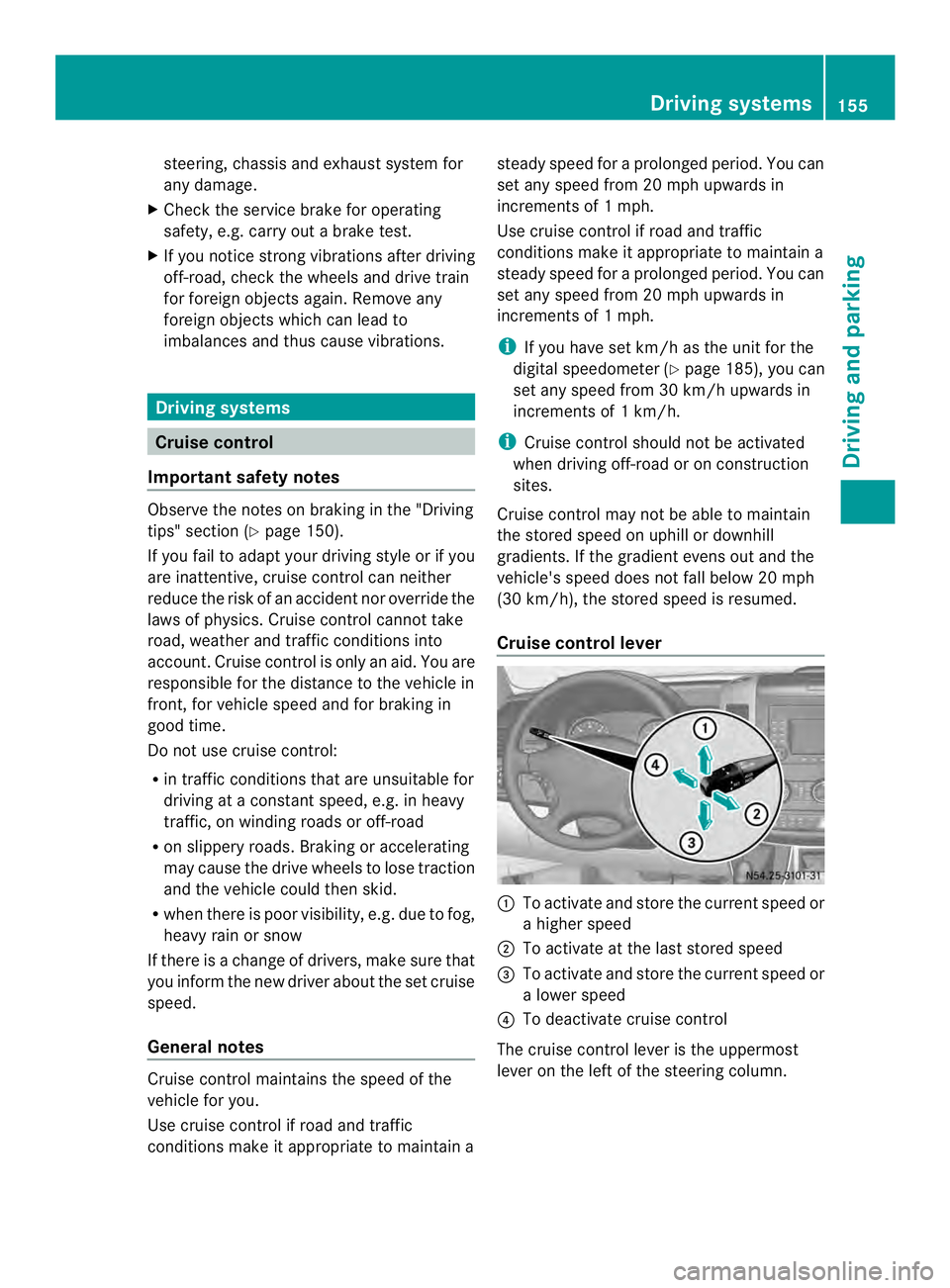
Cruise control lever 0005
To activate and store the current speed or
a higher speed
0006 To activate at the last stored speed
0026 To activate and store the current speed or
a lower speed
0025 To deactivate cruise control
The cruise control lever is the uppermost
lever on the left of the steering column. Driving systems
155Driving and parking Z
Page 159 of 334
Deactivating cruise control
There are various ways to deactivate cruise
control:
X Briefly press the cruise control lever
forwards 0025.
Or
X Apply the brakes.
The last speed set remains stored. The last
speed stored is deleted when you switch off
the engine.
Cruise control is deactivated automatically
when:
R you apply the brakes
R you apply the parking brake and the 000B
indicator lamp in the instrument cluster
lights up
R you are driving slower than 20 mph
(30 km/h)
R you shift the automatic transmissio nto
neutral position Nwhile the vehicle is in
motion
R ESP ®
or ASR intervenes
R there is a malfunction in the ESP ®
, ASR or
ABS system
Problems with cruise control On vehicles with steering wheel buttons, the
speed canno
tbe set when cruise control is
activated.
The display is showing a message of high
priority and cannot therefore show a change
in speed.
X Proceed as instructed by the message in
the display.
X Deactivate cruise control PARKTRONIC
Important safety notes PARKTRONIC is only an aid. It cannot replace
your own awareness of the immediate
surroundings. You are responsible for safe maneuvering, parking and pulling away. When
maneuvering, parking and pulling away, make
sure that there are no persons, animals or
objects in the maneuverin
garea.
PARKTRONIC does not account for obstacles
that are:
R beneath its detection range, e.g. persons,
animals or objects
R above its detection range, e.g. overhanging
loads, overhangs or truck loading ramps
PARKTRONIC is an electronic parking aid with
ultrasonic sensors. It indicates the distance
between yourv ehicle and an objec tvisually
and audibly.
Your vehicle features two separate sound
emitters with different frequencies for the
warning tones. The warning ranges in front of
and behind the vehicle are indicated by
different warning tones.
PARKTRONIC is activated automatically when
you:
R tur nthe key to position 2in the ignition lock
R release the parking brake and
R move the selector lever to D,Nor R.
PARKTRONIC is deactivated at speeds above
11 mph (18 km/h). PARKTRONIC is
reactivated at speeds below 10 mph
(16 km/h).
PARKTRONIC monitors the area around your
vehicle with sensors in the front and rear
bumpers.
Range of the sensors !
Pay particular attention to obstacles
above or below the sensors when parking,
such as flower pots or trailer towbars.
PARKTRONIC does not recognize such
objects when they are in the immediate
vicinity of the vehicle. You could damage
the vehicle or objects. Driving systems
157Driving and parking Z
Page 173 of 334
is installed and secured correctly before every
journey.
If your vehicle is equipped with a Sprinter
trailer tow hitch, you need a ball coupling that
is approved for the trailer tow hitch.
When mounting and removin gthe approved
ball coupling, observe the relevant
information in the operating instructions of
the ball coupling manufacturer.
If you cannot mount the ball coupling
correctly, remove it. In this case, the ball
coupling may not be used for towing a trailer.
Notes on the permissible dimensions and
weights can also be found on the
identification plate of the trailer tow hitch.
You can obtain advice from a qualified
specialist workshop. Coupling up a trailer
! Do not connect the trailer's brake system
(if featured) to the hydraulic brake system
of the towing vehicle, as the latter is
equipped with an anti-lock brake system.
Doing so will result in a loss of function of
the brake systems of both the vehicle and
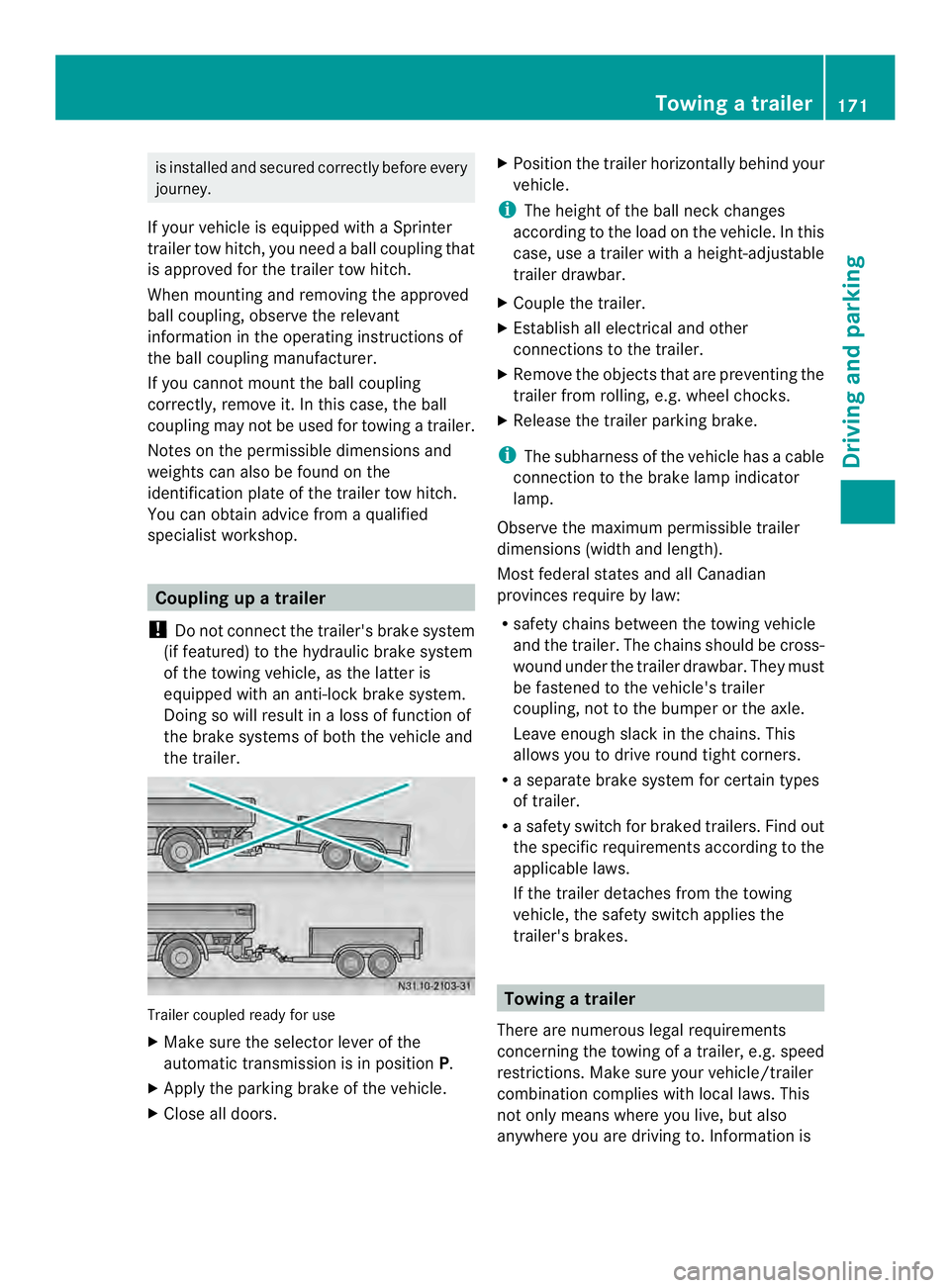
the trailer. Trailer coupled ready for use
X
Make sure the selector lever of the
automatic transmission is in position P.
X Apply the parking brake of the vehicle.
X Close all doors. X
Position the trailer horizontally behind your
vehicle.
i The height of the ball neck changes
according to the load on the vehicle. In this
case, use a trailer with aheight-adjustable
trailer drawbar.
X Couple the trailer.
X Establish all electrical and other
connections to the trailer.
X Remove the objects that are preventing the
trailer from rolling, e.g. wheel chocks.
X Release the trailer parking brake.
i The subharness of the vehicle has a cable
connection to the brake lamp indicator
lamp.
Observe the maximum permissible trailer
dimensions (width and length).
Most federal states and all Canadian
provinces require by law:
R safety chains between the towing vehicle
and the trailer. The chains should be cross-
wound under the trailer drawbar. They must
be fastened to the vehicle's trailer
coupling, not to the bumper or the axle.
Leave enough slack in the chains. This
allows you to drive round tight corners.
R a separate brake system for certain types
of trailer.
R a safety switch for braked trailers. Find out
the specific requirements according to the
applicable laws.
If the trailer detaches from the towing
vehicle, the safety switch applies the
trailer's brakes. Towing
atrailer
There are numerous legal requirements
concerning the towing of a trailer, e.g .speed
restrictions. Make sure your vehicle/trailer
combination complies with local laws. This
not only means where you live, but also
anywhere you are driving to. Information is Towing
atrailer
171Driving an d parking Z
Page 179 of 334
R
press the 0007reset button
R switch on the lights
The display switches off automatically after
approximately 30 seconds if:
R the vehicle lighting is not switched on.
R the key is in position 0in the ignition lock. Instrument lighting
When the lights are switched on, you can
adjust the brightness of the instrument
cluster lighting using the 000Eand 000Fbuttons.
X To brighten: press the000Ebutton.
X To dim: press the 000Fbutton.
i Vehicles with automatic headlamp mode:
the instrument lighting also adapts to
automatic headlamp mode. Tachometer
! Do not drive in the overrevving range, as
this could damage the engine. H
Environmental note
Avoid driving at high engine speeds. This
unnecessarily increases the fuel consumption
of your vehicle and harms the environmen tas
a result of increased emissions.
The red band in the tachometer indicates the
engine's overrevving range.
To protect the engine, the fuel supply is
interrupted when the red band is reached. Outside temperature
You should pay special attention to road
conditions when temperatures are around
the freezing point.
On vehicles without steering wheel buttons
(Y page 178) and on vehicles with steering
wheel buttons (Y page 182), the outside
temperature display is in the display. Changes in the outside temperature are
displayed after a shor
tdelay. Speedometer
The speed can also be shown in the display.
You can find information on the digital
speedometer for vehicles without steering
wheel buttons under (Y page 178) and for
vehicles with steering wheel buttons under
(Y page 182).
i In some countries, a warning sounds
when the vehicle reaches the maximum
speed limit, e.g. at 75 mph ( 120 km/h). Trip odometer
X To reset: make sure that the display is
showing the trip odometer if you have a
vehicle with steering wheel buttons
(Y page 182).
X Press and hold the 0007reset button until the
trip odometer is reset to 0.0 .
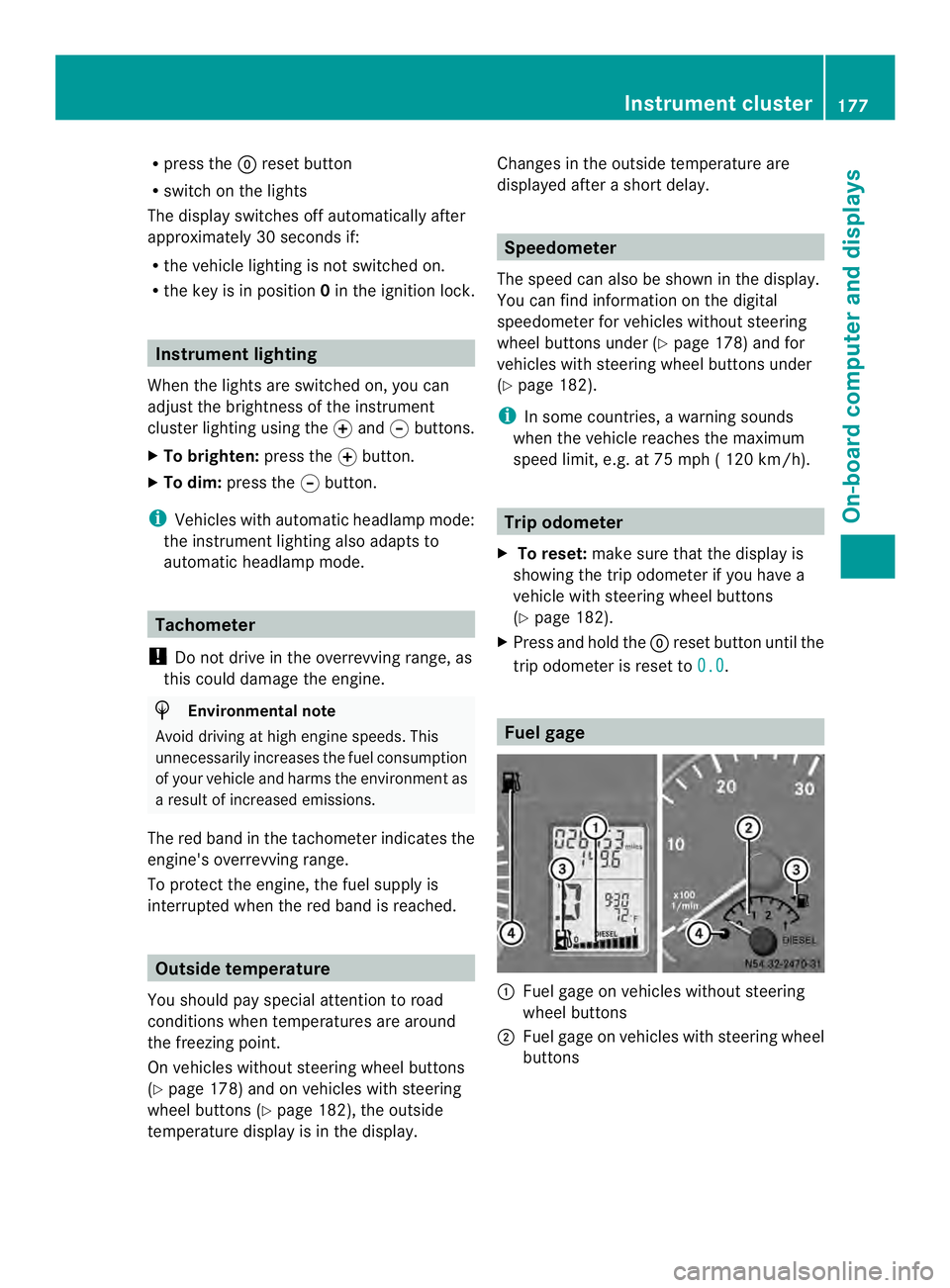
Fuel gage
0005
Fuel gage on vehicles without steering
wheel buttons
0006 Fuel gage on vehicles with steering wheel
buttons Instrument cluster
177On-board computer and displays Z
Page 180 of 334
0026
Fuel fille rflap location indicator 000F: the
fuel filler flap is on the left-hand side. Fuel
filler flap location indicator 001E:the fuel
filler flap is on the right-hand side
0025 Reserve fuel warning lamp (Y page 216)DEF gauge
Vehicles without steering wheel
buttons If the supply of DEF is less than 1.5 US gal
(5.5 l), the 0009indicator lamp lights up and
the 0002dEF Chk display message appears.
If the supply of DEF falls below the reserve
range of 0.8 US gal (3.0 l), the 0009indicator
lamp lights up and the 0002StArtS RExxdisplay message appears. In the display,
xxcorresponds to the number of possible
remaining engine starts (16
to
0 ).
Further information on DEF consumption can
be found in the "Service products and filling
capacity" section (Y page 320).
Vehicles with steering wheel buttons If the supply of DEF is less than 1.5 US gal
(5.5 l), the Check Diesel Exhaust Fluid See Operator's Manual message is shown
in the display.
If the supply of DEF falls below the reserve
range of 0.8 US gal (3.0 l), the 0009xxstarts remaining message is displayed. In
the display, xx corresponds to the number of
possible remaining engine starts (16 to
0 ).
Further information on DEF consumption can
be found in the "Service products and filling
capacity" section (Y page 320). On-board computer (vehicles without
steering wheel buttons)
Operating the on-board computer
General notes The on-board computer is activated as soon
as you turn the key to position
1in the ignition
lock.
The on-board computer shows vehicle
information and settings in the display.
You can control the displaya nd the settings
in the on-board compute rusing the
adjustment buttons on the instrument
cluster.
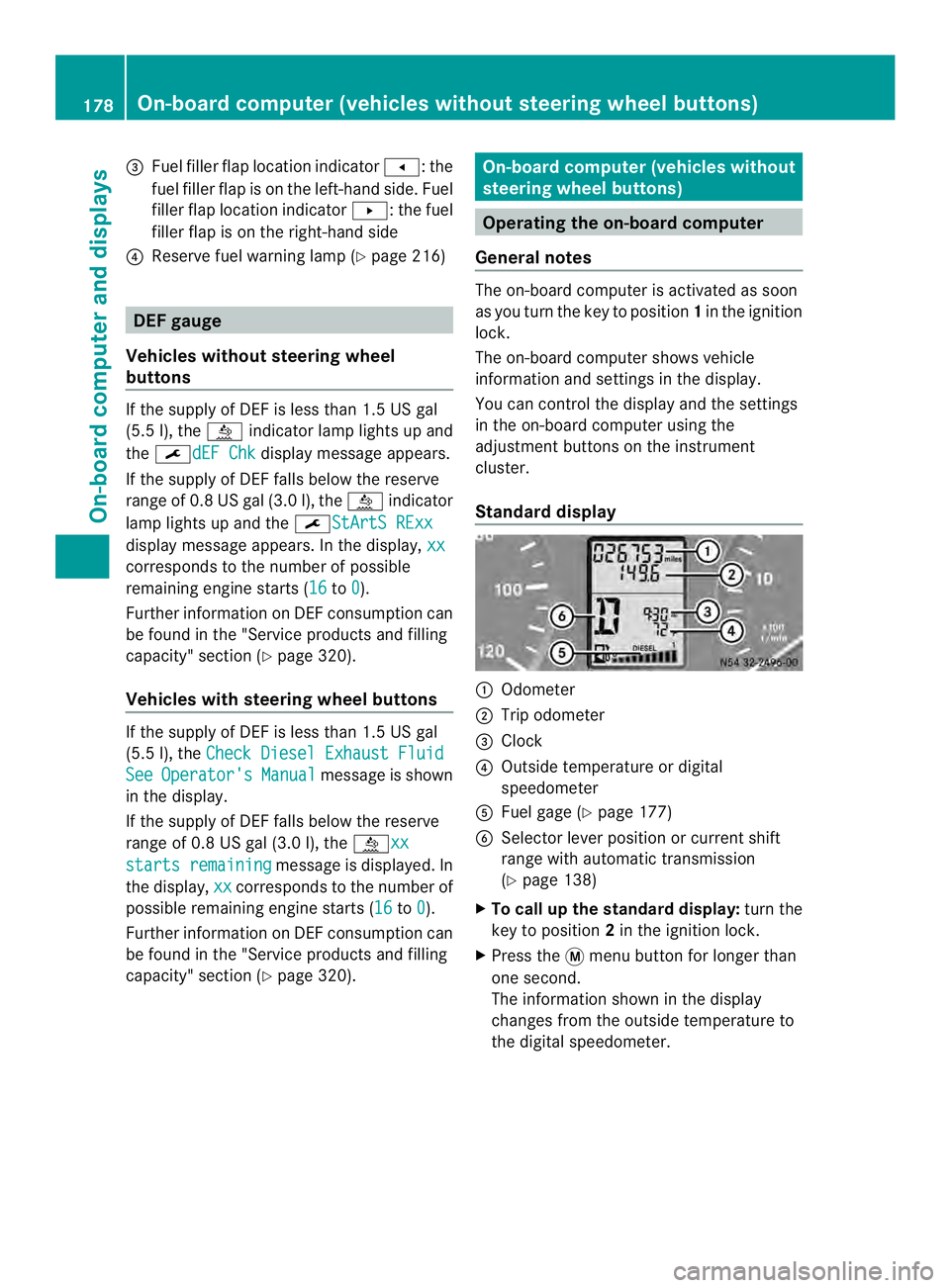
Standard display 0005
Odometer
0006 Trip odometer
0026 Clock
0025 Outside temperature or digital
speedometer
0023 Fuel gage (Y page 177)
0024 Selector lever position or current shift
range with automatic transmission
(Ypage 138)
X To call up the standard display: turn the
key to position 2in the ignition lock.
X Press the 0004menu button for longer than
one second.
The information shown in the display
changes from the outside temperature to
the digital speedometer. 178
On-board computer (vehicles without steering wheel buttons)On-board computer and displays
Page 181 of 334
Menus in the on-board computer
Overview If you wish to exit a menu and go to the
standard display:
X Press the 0004menu button for longer than
one second.
Or
X Do not press any button for 10 seconds.
The display accepts the changed settings.
Using the 000E,000F,0004or0007 adjustment
buttons, you can select the following
functions:
R Calling up the service due date
(Y page 249)
R Checking the oil level (Y page 242)
R Preselecting/setting the auxiliary heating
switch-on time ( Ypage 119)
R Tire pressure monitor (Y page 281)
R Setting the time (Y page 179)
R Setting daytime running lamp mode
(Y page 179)
Setting the time X
Turn the key to position 2in the ignition
lock.
X Press the 0004menu button repeatedly until
the hours figure flashes.
X Press the 000Eor000F button to set the hour.
X Press the 0007reset button.
The minute display flashes.
X Press the 000Eor000F button to set the minute.
i If you keep the 000Eor000F button pressed,
the value will change continuously.
Setting daytime running lamp mode For safety reasons, it is only possible to
change this setting when the vehicle is
stationary. The factory setting is
On in
countries in which daytime running lamp
mode is mandatory. X
Turn the key to position 2in the ignition
lock.
X Press the 0004menu button repeatedly until
the 0004 indicator lamp flashes and the
on or
OFF message appears in the display.
X Press the 000Eor000F button to activate or
deactivate daytime running lamp mode.
If you have activated daytime running lamp
mode and the light switch is set to 000C, the
following light up automatically when the
engine is running:
R Parking lamps
R Low-beam headlamps
R Tail lamps
R License plate lamp
i USA only:
If you turn the light switch to 000Bor
0004, the corresponding light switches on.
If you turn the light switch to 0007, daytime
running lamp mode stays switched on.
Canada only:
If you turn the light switch to 0004, the low-
beamh eadlamps switch on. If you turn the
light switch to 000Bor0007, daytime
running lamp mode stays switched on. On-boar
dcomputer (vehicles without steering wheel buttons)
179On-board computer and displays Z
Page 182 of 334
On-boar
dcomputer (vehicles with
steering wheel buttons) Operating the on-board computer
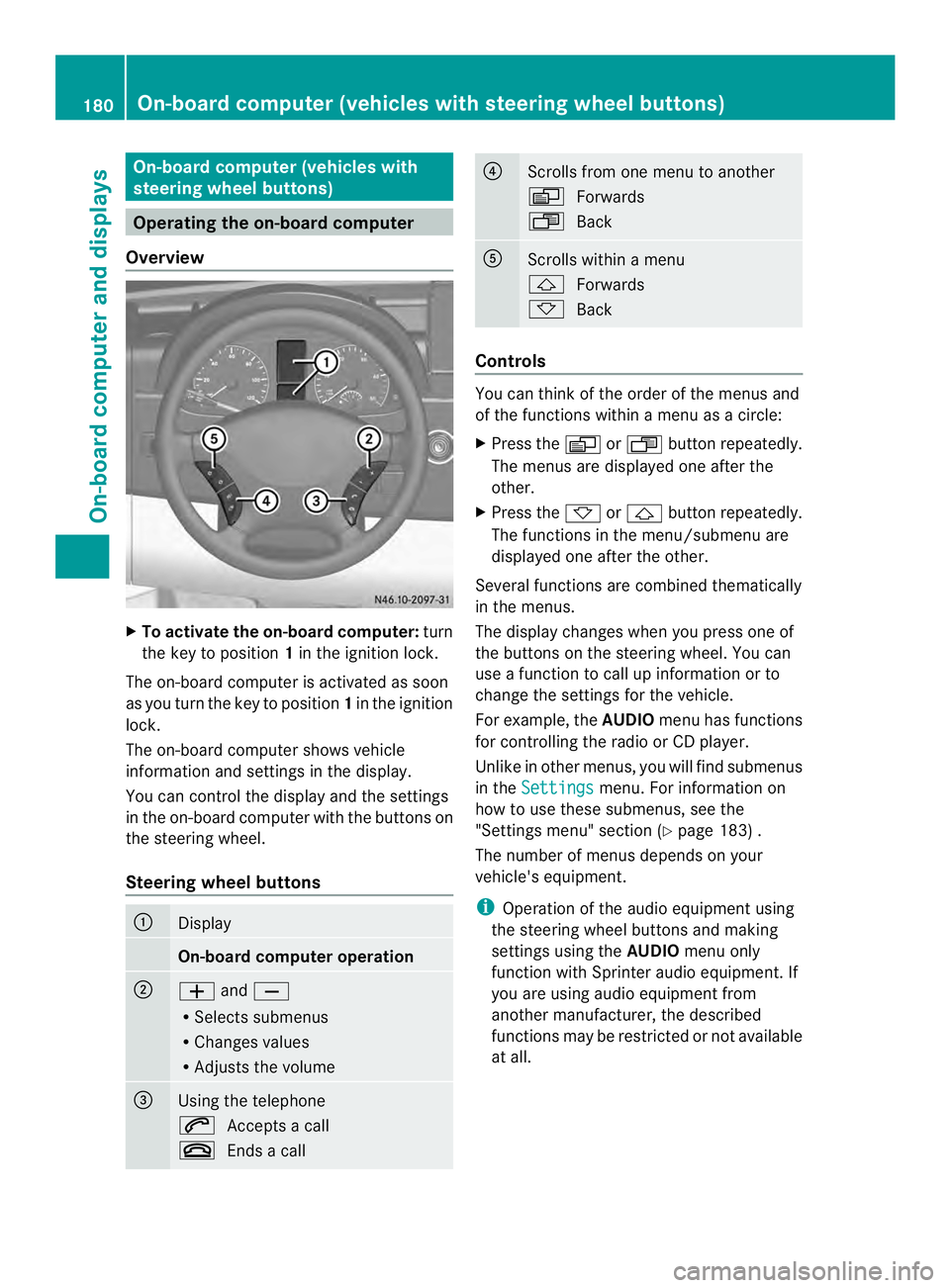
Overview X
To activat ethe on-board computer: turn
the key to position 1in the ignition lock.
The on-board computer is activated as soon
as you turn the key to position 1in the ignition
lock.
The on-board computer shows vehicle
information and settings in the display.
You can control the displaya nd the settings
in the on-board compute rwith the buttons on
the steering wheel.
Steering wheel buttons 0005
Display
On-board computer operation
0006
0011
and0012
R Selects submenus
R Changes values
R Adjusts the volume 0026
Using the telephone
0001
Accepts a call
0005 Ends a call 0025
Scrolls from one menu to another
0010
Forwards
0007 Back 0023
Scrolls within a menu
0001
Forwards
0009 Back Controls
You can think of the order of the menus and
of the functions within a menu as a circle:
X
Press the 0010or0007 button repeatedly.
The menus are displayed one after the
other.
X Press the 0009or0001 button repeatedly.
The functions in the menu/submenu are
displayed one after the other.
Several functions are combined thematically
in the menus.
The display changes when you press one of
the buttons on the steering wheel. You can
use a function to call up information or to
change the settings for the vehicle.
For example, the AUDIOmenu has functions
for controlling the radio or CD player.
Unlike in other menus, you will find submenus
in the Settings menu. For information on
how to use these submenus, see the
"Settings menu" section (Y page 183) .
The number of menus depends on your
vehicle's equipment.
i Operation of the audio equipmen tusing
the steering wheel buttons and making
settings using the AUDIOmenu only
function with Sprinter audio equipment. If
you are using audio equipment from
another manufacturer, the described
functions may be restricted or not available
at all. 180
On-board computer (vehicles with steering wheel buttons)On-board computer and displays
Page 185 of 334
Using the steering wheel buttons
X
Switch on the audio equipment (see the
separate operating instructions).
X Press the 0010or0007 button repeatedly
until the station selected appears in the
display.
The kind of search depends on the setting
for radio station selection (Y page 188).
The nearest stored station will be selected
or the station search starts (except on
Audio 20).
X Press the 0001or0009 button to select the
desired station.
i You can only store new stations on the
audio system itself. See the separate
operating instructions.
You can also operate the audioe quipment
in the same way as usual.
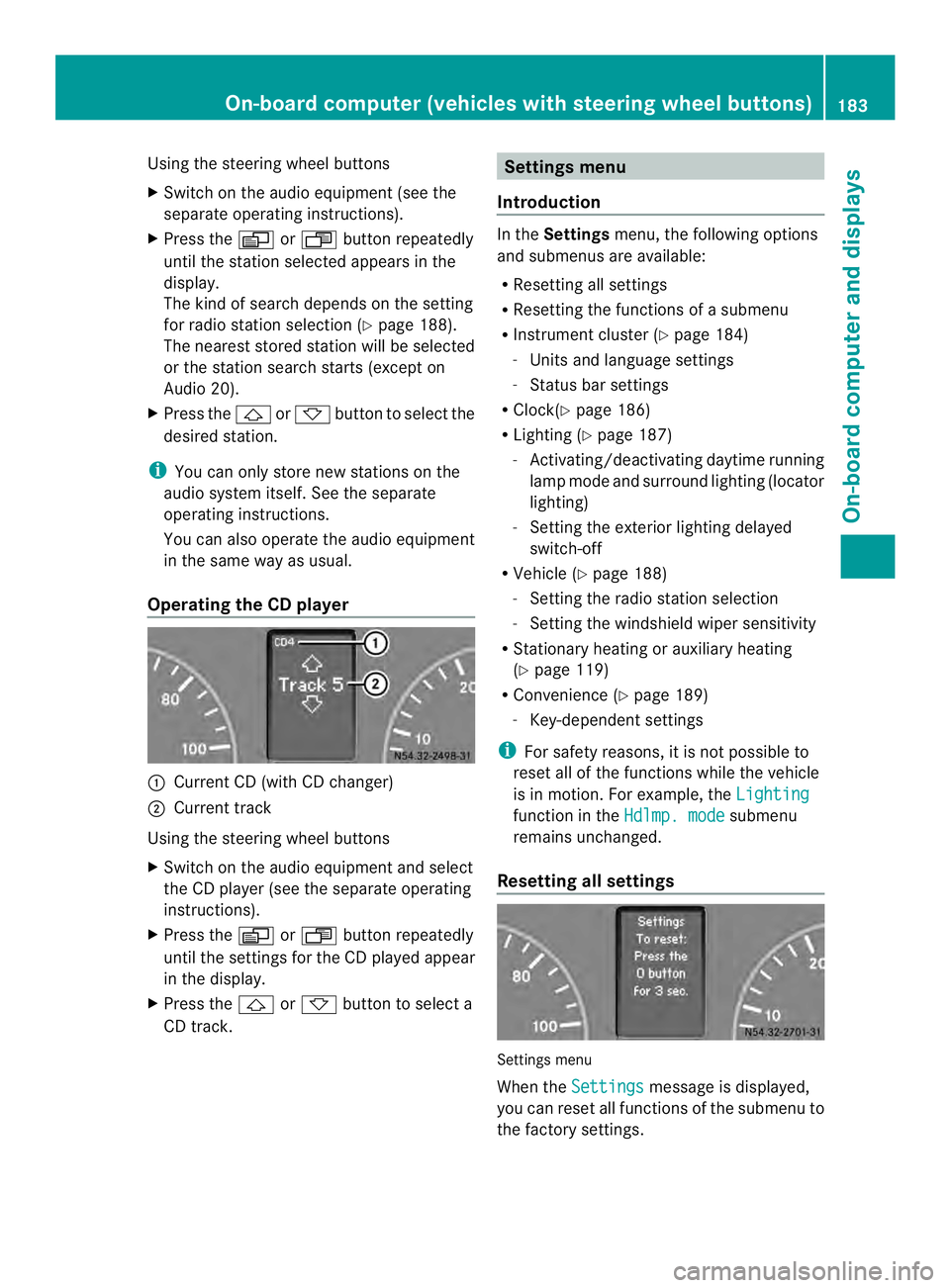
Operating the CD player 0005
Current CD (with CD changer)
0006 Current track
Using the steering wheel buttons
X Switch on the audio equipment and select
the CD player (see the separate operating
instructions).
X Press the 0010or0007 button repeatedly
until the settings for the CD played appear
in the display.
X Press the 0001or0009 button to select a
CD track. Settings menu
Introduction In the
Settings menu, the following options
and submenus are available:
R Resetting all settings
R Resetting the functions of a submenu
R Instrument cluster (Y page 184)
- Units and language settings
- Status bar settings
R Clock( Ypage 186)
R Lighting (Y page 187)
- Activating/deactivating daytime running
lamp mode and surround lighting (locator
lighting)
- Setting the exterior lighting delayed
switch-off
R Vehicle (Y page 188)
- Setting the radio station selection
- Setting the windshield wiper sensitivity
R Stationary heating or auxiliary heating
(Y page 119)
R Convenience (Y page 189)
- Key-dependent settings
i For safety reasons, it is not possible to
reset all of the functions while the vehicle
is in motion. For example, the Lighting function in the
Hdlmp. mode submenu
remains unchanged.
Resetting all settings Settings menu
When the
Settings message is displayed,
you can reset all functions of the submenu to
the factory settings. On-boar
dcomputer (vehicles with steering wheel buttons)
183On-board computer and displays Z