tow MERCEDES-BENZ SPRINTER 2013 MY13 Operator’s Manual
[x] Cancel search | Manufacturer: MERCEDES-BENZ, Model Year: 2013, Model line: SPRINTER, Model: MERCEDES-BENZ SPRINTER 2013Pages: 334, PDF Size: 3.88 MB
Page 144 of 334
lock in parking position
P, e.g. to have the
vehicle towed away. Refueling
Important safety notes
G
WARNING
Fuel is highly flammable. Improper handing of
fuel creates a risk of fire and explosion.
Avoid fire, open flames ,smoking and creating
sparks under all circumstances. Switch off the
engine and, if applicable, the auxiliary heating
before refueling. G
WARNING
Fuel is poisonous and hazardous to health.
There is a risk of injury.
You must make sure that fuel does not come
into contact with your skin, eyes or clothing
and that it is not swallowed. Do not inhale fuel
vapors .Keep fuel away from children.
If you or others come into contact with fuel,
observe the following:
R Wash away fuel from skin immediately
using soap and water.
R If fuel comes into contact with your eyes,
immediately rinse them thoroughly with
clean water. Seek medical assistance
without delay.
R If fuel is swallowed, seek medical
assistance without delay. Do not induce
vomiting.
R Immediately change out of clothing which
has come into contact with fuel. G
WARNING
If you mix diesel fuel with gasoline, the flash
point is lower than that of pure diesel fuel.
When the engine is running, exhaust system
components could overheat without being
noticed. There is a risk of fire.
Never refuel with gasoline. Never mix gasoline
with diesel fuel. H
Environmental note
If fuels are handled improperly, they pose a
danger to persons and the environment. Do
not allow fuels to run into the sewage system,
the surface waters, the ground water or into
the ground.
! Do not use gasoline to refuel vehicles with
a diesel engine. Even small amounts of
gasoline will cause damage to the fuel
system and engine.
! Do not switch on the ignition if you
accidentally refuel with the wrong fuel.
Otherwise, the fuel will enter the fuel lines.
Notify a qualified specialist workshop and
have the fuel tank and fuel lines drained
completely.
! Overfilling the fuel tank could damage the
fuel system.
! Take care not to spill any fuel on painted
surfaces. You could otherwise damage the
paintwork.
! Filter the fuel before transferring it to the
vehicle if you are refueling the vehicle from
barrels or containers.
This will preven tmalfunctions in the fuel
system due to contaminate dfuel.
Further information on fuel and on fuel grades
can be found in the "Technical data" section
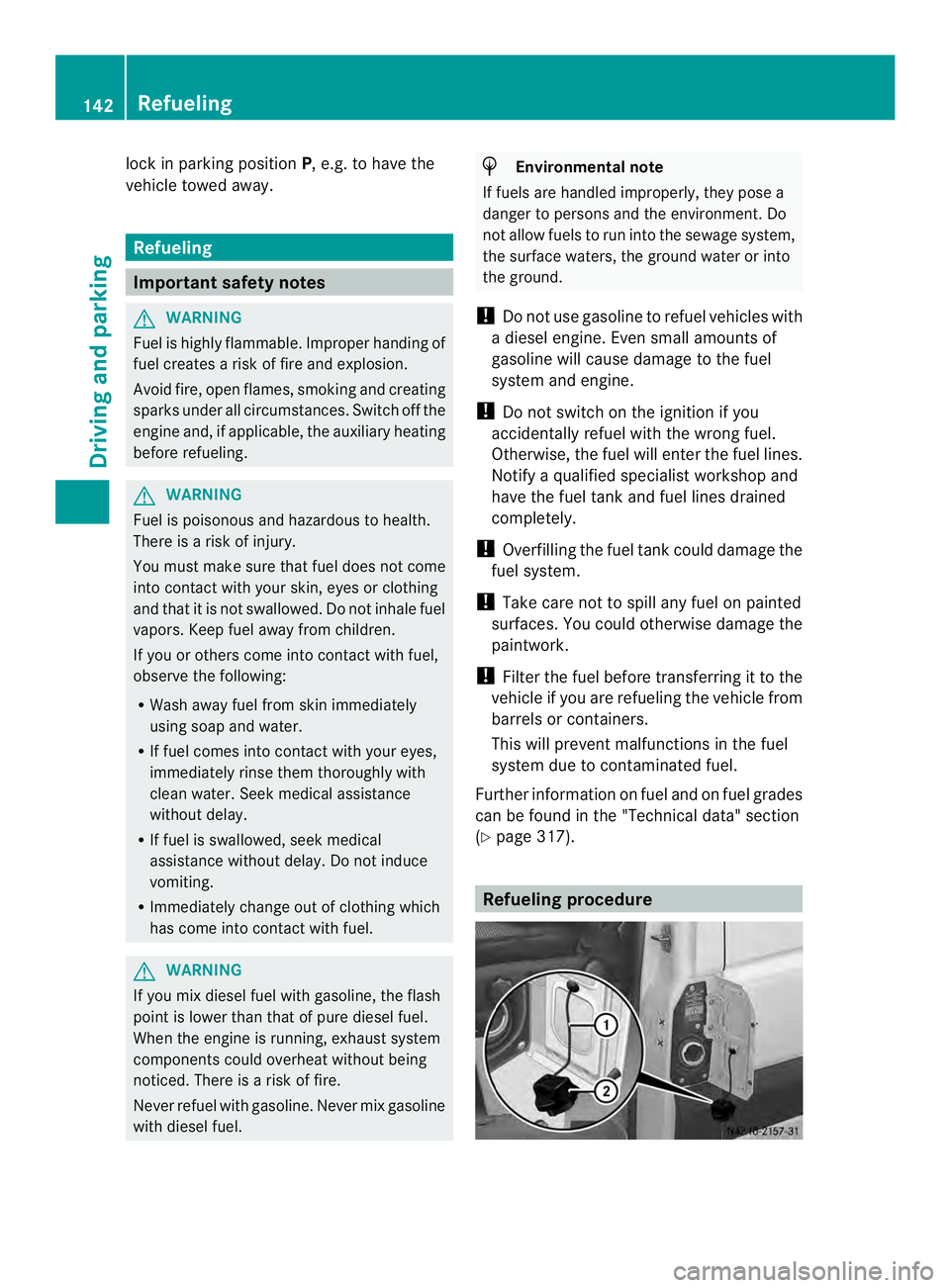
(Y page 317). Refueling procedure142
RefuelingDriving and pa
rking
Page 147 of 334
X
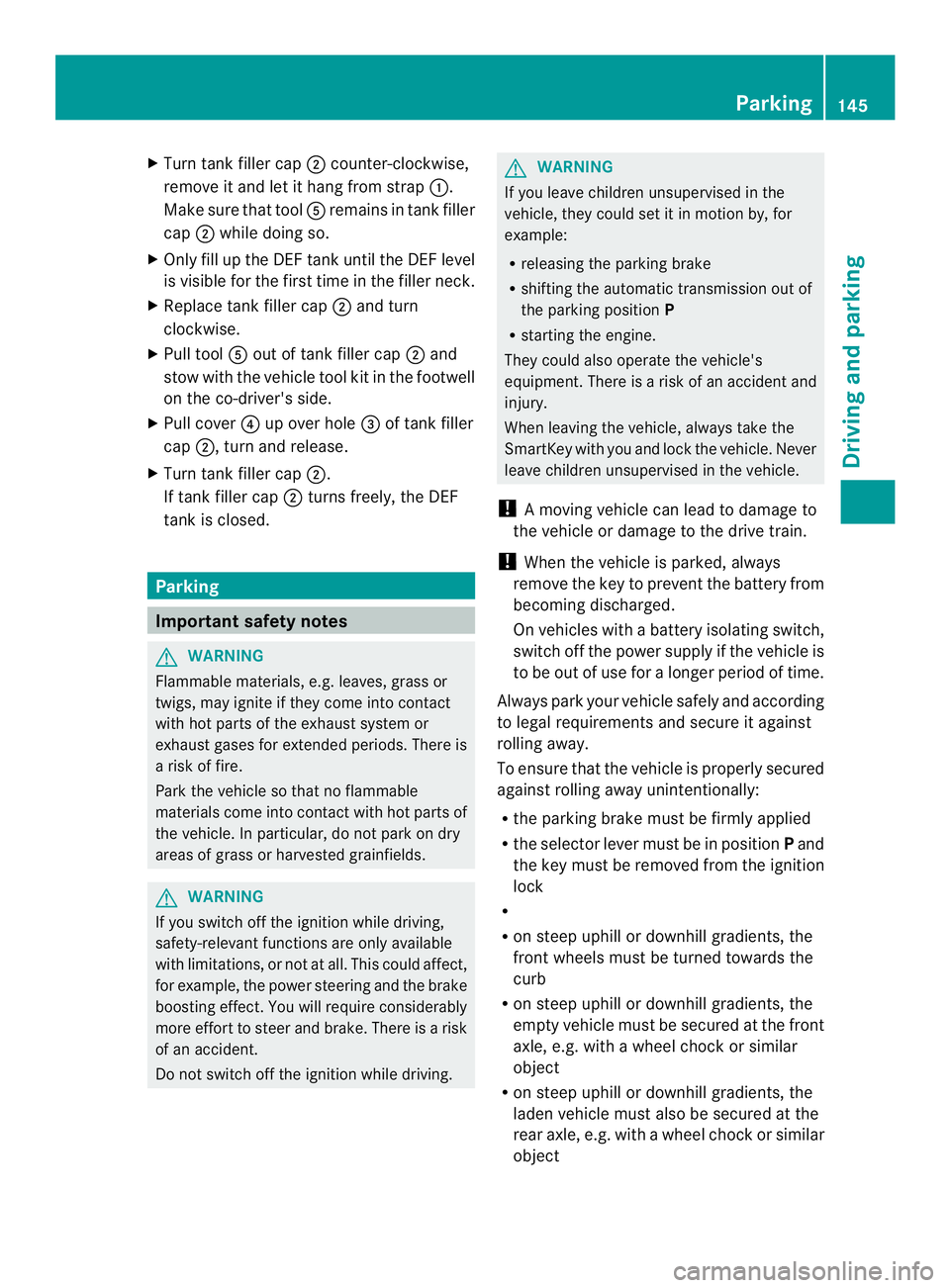
Turn tank filler cap 0006counter-clockwise,
remove it and let it hang from strap 0005.
Make sure that tool 0023remains in tank filler
cap 0006while doing so.
X Only fill up the DEFt ank until the DEFlevel
is visible for the first time in the filler neck.
X Replace tank filler cap 0006and turn
clockwise.
X Pull tool 0023out of tank filler cap 0006and
stow with the vehicle tool kit in the footwell
on the co-driver's side.
X Pull cover 0025up over hole 0026of tank filler
cap 0006, turn and release.
X Turn tank filler cap 0006.
If tank filler cap 0006turns freely, the DEF
tank is closed. Parking
Important safety notes
G
WARNING
Flammable materials, e.g. leaves, grass or
twigs, may ignite if they come into contact
with hot parts of the exhaust system or
exhaust gases for extended periods. There is
a risk of fire.
Park the vehicle so that no flammable
materials come into contact with hot parts of
the vehicle. In particular, do not park on dry
areas of grass or harvested grainfields. G
WARNING
If you switch off the ignition while driving,
safety-relevant function sare only available
with limitations, or not at all.T his could affect,
for example, the power steering and the brake
boosting effect.Y ou will require considerably
more effort to steer and brake. There is a risk
of an accident.
Do not switch off the ignition while driving. G
WARNING
If you leave children unsupervised in the
vehicle, they could set it in motion by, for
example:
R releasing the parking brake
R shifting the automatic transmission out of
the parking position P
R starting the engine.
They could also operate the vehicle's
equipment. There is a risk of an accident and
injury.
When leaving the vehicle, always take the
SmartKey with you and lock the vehicle. Never
leave children unsupervised in the vehicle.
! Am oving vehicle can lead to damage to
the vehicle or damage to the drive train.
! When the vehicle is parked, always
remove the key to prevent the battery from
becoming discharged.
On vehicles with a battery isolating switch,
switch off the power supply if the vehicle is
to be out of use for a longer period of time.
Always park your vehicle safely and according
to legal requirements and secure it against
rolling away.
To ensure that the vehicle is properly secured
against rolling away unintentionally:
R the parking brake must be firmly applied
R the selector lever must be in position Pand
the key must be removed from the ignition
lock
R
R on steep uphill or downhill gradients, the
front wheels must be turned towards the
curb
R on steep uphill or downhill gradients, the
empty vehicle must be secured at the front
axle, e.g. with a wheel chock or similar
object
R on steep uphill or downhill gradients, the
laden vehicle must also be secured at the
rear axle, e.g. with a wheel chock or similar
object Parking
145Driving and parking Z
Page 149 of 334
X
Apply the parking brake.
X Turn the key to position 0in the ignition
lock and remove it.
The immobilize ris activated.
X Secure the vehicle to prevent it from rolling
away (Y page 145). Wheel chock
Use the wheel chock or asimilar object to
prevent the vehicle fro mrolling away, e.g.
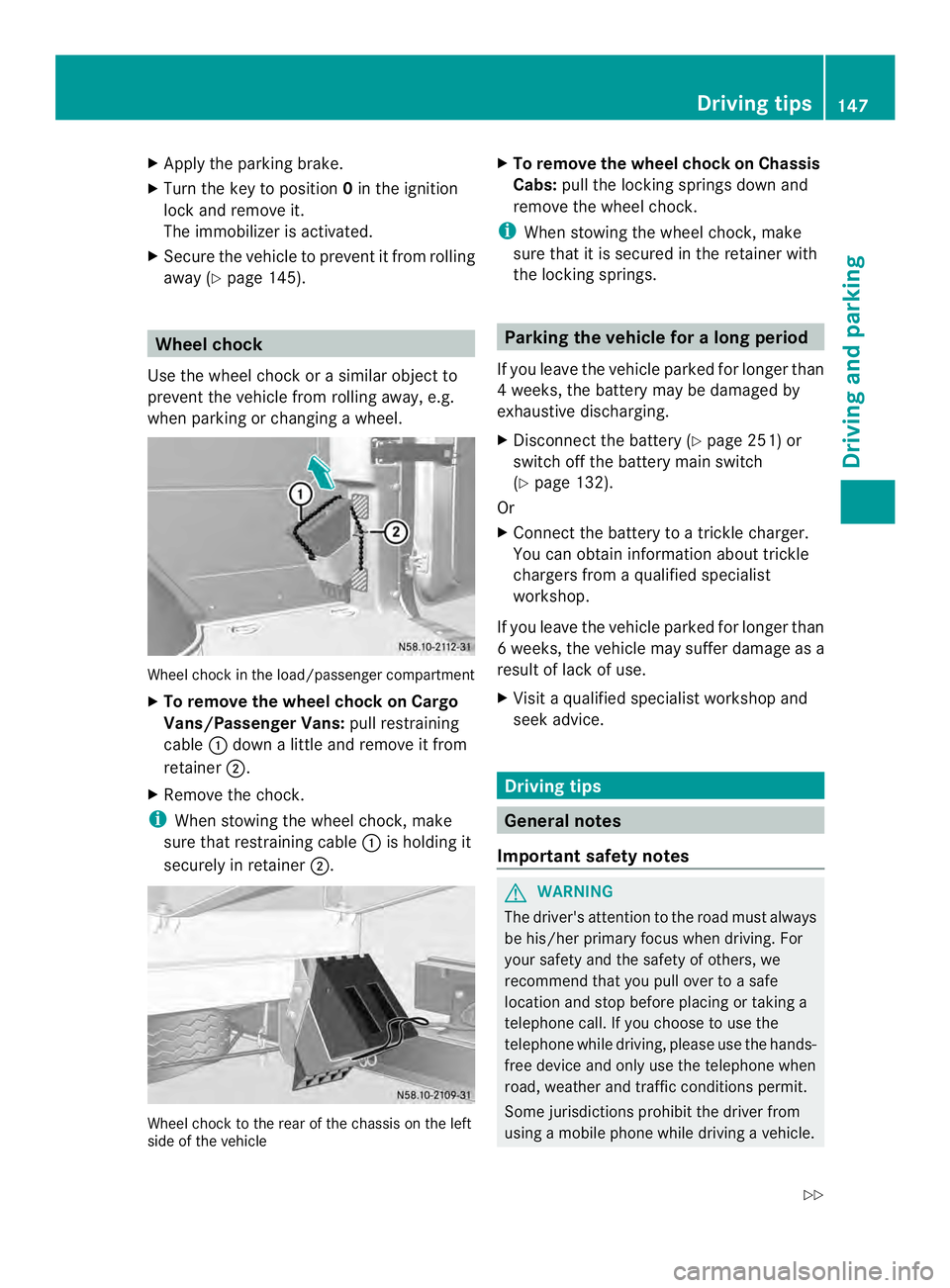
when parking or changing awheel. Wheel chock in the load/passenger compartment
X To remove the wheel chock on Cargo
Vans/Passenger Vans: pull restraining
cable 0005down a little and remove it from
retainer 0006.
X Remove the chock.
i When stowing the wheel chock, make
sure that restraining cable 0005is holding it
securely in retainer 0006. Wheel chock to the rear of the chassis on the left
side of the vehicle X
To remove the wheel chock on Chassis
Cabs: pull the locking springs down and
remove the wheel chock.
i When stowing the wheel chock, make
sure that it is secured in the retainer with
the locking springs. Parking the vehicle for
along period
If you leave the vehicle parked for longer than
4w eeks, the battery may be damaged by
exhaustive discharging.
X Disconnect the batter y(Ypage 251) or
switch off the battery main switch
(Y page 132).
Or
X Connect the battery to a trickle charger.
You can obtain information about trickle
chargers from a qualified specialist
workshop.
If you leave the vehicle parked for longer than
6w eeks, the vehicle may suffer damage as a
result of lack of use.
X Visit a qualified specialist workshop and
seek advice. Driving tips
General notes
Important safety notes G
WARNING
The driver's attention to the road must always
be his/her primary focus when driving. For
your safety and the safety of others, we
recommend that you pull over to a safe
location and stop before placing or taking a
telephone call. If you choose to use the
telephone while driving, please use the hands-
free device and only use the telephone when
road, weather and traffic conditions permit.
Some jurisdictions prohibit the driver from
using a mobile phone while driving a vehicle. Driving tips
147Driving and parking
Z
Page 152 of 334
cross the border, bu
tas close to it as
possible.
When you return from your journey, and as
close to the border as possible, you will need
to:
R remove the adhesive surfaces from your
halogen headlamps and clean the glass of
the headlamps if necessary
R have the Bi-Xenon headlamps reset to
asymmetrical low beam at aqualified
specialist workshop Transport by rail
Transporting your vehicle by rail may be
subject to certain restrictions or require
special measures to be taken in some
countries due to varying tunnel heights and
loading standards.
You can obtain further information from any
authorized Sprinte rdealer. Braking
Important safety notes G
WARNING
If you shift down on a slippery road surface in
an attempt to increase the engine's braking
effect, the drive wheels could lose their grip.
There is an increased danger of skidding and
accidents.
Do not shift down for additional engine
braking on a slippery road surface.
Downhill gradients !
Depressing the brake pedal constantly
results in excessive and premature wear to
the brake pads.
On long and steep downhill gradients, you
should change down to shift range 0009or0008
in good time. This should be observed in
particular when driving with a laden vehicle
and when towing a trailer. i
You must also change the shift range in
good time when cruise control is switched
on.
You thereby make use of the braking effec tof
the engine and do not have to brake as often
to maintain the speed. This relieves the load
on the service brake and prevents the brakes
fro mo verheating and wearing too quickly.
Heavy and light loads G
WARNING
If you rest yourf oot on the brake pedal while
driving, the braking system can overheat. This
increases the stopping distance and can even
cause the braking system to fail. There is a
risk of an accident.
Never use the brake pedal as a footrest .Never
depress the brake pedal and the accelerator
pedal at the same time.
! Depressing the brake pedal constantly
results in excessive and premature wear to
the brake pads.
If the brakes have been subjected to a heavy
load, do not stop the vehicle immediately.
Drive on for a short while. The brakes are
cooled down more quickly in the airflow.
Wet road surfaces If you have been driving for a long time in
heavy rain without braking
,there may be a
delayed response when you first apply the
brakes. This may also occur after driving
through a car wash or deep water.
You must depress the brake pedal more
firmly. Maintain a longer distance to the
vehicle in front.
While paying attention to the traffic
conditions, you should brake the vehicle
firmly after driving on a wet road surface or
through a car wash. This heats the brake
discs, so that they dry more quickly, which
protects them against corrosion. 150
Driving tipsDriving and parking
Page 154 of 334
Driving in winter
General notes G
WARNING
If you shift down on a slippery road surface in
an attempt to increase the engine's braking
effect, the drive wheels could lose their grip.
There is an increased danger of skidding and
accidents.
Do no tshift down for additional engine
braking on a slippery road surface. G
DANGER
If the exhaust pipe is blocked or adequate
ventilation is not possible, poisonous gases
such as carbon monoxide (CO) may enter the
vehicle. This is the case, e.g. if the vehicle
becomes trapped in snow. There is a risk of
fatal injury.
If you leave the engine or the auxiliary heating
running, make sure the exhaust pipe and area
around the vehicle are clear of snow. To
ensure an adequate supply of fresh air, open
a window on the side of the vehicle that is not
facing into the wind.
Have your vehicle winterproofed at a qualified
specialist workshop in good time at the onset
of winter.
i Do not cover the radiator, e.g. with a
winter cover. The measurements of the on-
board diagnostic system may otherwise
return inaccurate values. Some of these
values are legally prescribed and must
therefore always be exact.
Observe the notes in the "Winter operation"
section (Y page 276).
Driving with summer tires Observe the notes in the "Winter operation"
section (Y page 276). Slippery road surfaces G
WARNING
If you shift down on a slippery road surface in
an attempt to increase the engine's braking
effect, the drive wheels could lose their grip.
There is an increased danger of skidding and
accidents.
Do not shift down for additional engine
braking on a slippery road surface. G
WARNING
The outside temperature indicator is not
designed to serve as an ice-warning device
and is therefore unsuitable for that purpose.
Indicated temperatures just above the
freezing point do not guarantee that the road
surface is free of ice. The road may still be icy,
especially in wooded areas or on bridges.
! Vehicles with automatic transmission
may roll only briefly in the neutral position
N.P rolonged rolling of the wheels, e.g.
when being towed, will result in
transmission damage.
If the vehicle threatens to skid or cannot be
stopped when moving at low speed:
X Shift the transmission to neutral position
N.
X Try to maintai ncontrol of the vehicle using
corrective steering.
Drive particularly carefully on slippery roads.
Avoid sudden acceleration, steering and
braking maneuvers. Do not use cruise
control.
You can find further information on winter
tires and snow chains in the "Wheels and
tires" section (Y page 276).152
Driving tipsDriving and parking
Page 156 of 334
Obstacles may damage the following parts
of the vehicle:
R
the chassis
R the drive train
R the fuel and supply tanks
For this reason, you should always drive
slowly when driving off-road. If you have to
drive over obstacles, have the co-driver
direct you.
i We recommend that you additionally
carry a shovel and a recovery rope with
shackle in the vehicle.
R Ensure that loads and items of luggage are
securely stowed or lashed down
(Y page 232).
R Before driving off-road, stop the vehicle and
shift to a low gear.
R If the surface demands it, temporarily
deactivate ASR when pulling away
(Y page 58).
R Only drive off-road with the engine running
and a gear engaged.
R Drive slowly and smoothly. Walking pace is
necessary in many situations.
R Avoid spinning the drive wheels.
R Make sure that the wheels always remain
in contact with the ground.
R Drive with extreme care over unknown
terrain where you can only see for a short
distance. As a precaution, get out of the
vehicle to take a look at the route to be
taken in advance.
R Check the water depth before fording.
R Watch out for obstacles (e.g. rocks, holes,
tree stumps and ruts).
R Avoid edges where the surface could
crumble or break away.
Checklist after driving off-road !
If you detect damage to the vehicle after
driving off-road, have the vehicle checked
immediately at a qualified specialist
workshop. Off-road driving places a higher demand on
your vehicle than normal road operation.
Check your vehicle after driving on rough
terrain. By doing so you will notice any
damage in good time and reduce the risk of
an accident for yourselfa
nd otherroad users.
Clean your vehicle thoroughly before driving
on public roads.
Observe the following points after driving off-
road, on construction sites and before driving
on public roads:
X Activate ASR (Y page 58).
X Clean the headlamps and tail lamps and
check them for damage.
X Clean the front and rear license plates.
X Clean the windshield, windows and exterior
mirrors.
X Clean the steps, door sills and grab
handles.
This increases safety of footing.
X Clean the wheels/tires, wheel housings
and the underbody of the vehicle with a
water jet.
This increases road grip, especially on wet
road surfaces.
X Check the wheels/tires and wheel
housings for trapped foreign objects and
remove them.
Trapped foreign objects can damage the
wheels/tires and may be flung out from the
vehicle when you continue driving.
X Check the underbody for trapped branches
or other parts of plants and remove them.
Trapped branches or other parts of plants
increase the risk of fire and can cause
damage to fuel lines, brake hoses and the
rubber bellows of axle jointsa nd drive
shafts.
X Clea nthe brake disks, brake pads and axle
joints, particularly after operation in sand,
mud, grit/gravel, water or similarly dirty
conditions.
X Check the entire floor assembly, the tires,
wheels, bodywork structure, brakes, 154
Driving tipsDriving and parking
Page 158 of 334
LIM indicator lamp
0024shows you which
function you have selected:
R LIM indicator lamp off: cruise control is
selected.
R LIM indicator lamp lit: variable
SPEEDTRONIC is selected.
Activation conditions To activate cruise control, all of the following
activation conditions must be fulfilled:
R the parking brake must be released. The
000B indicator lamp in the instrument
cluster is off
R you are driving faster than 20 mph
(30 km/h)
R the brake pedal is depressed
i Other drive and brake systems not
described in this Operator's Manual, such
as a retarder, may affect cruise control. You
can find information on this in the separate
operating instructions provided by the
body manufacturer.
Storing and maintaining the current
speed X
Accelerate the vehicle to the desired speed
above 20 mph (30 km/h).
X Briefly push the cruise control lever up 0005
or down 0026.
X Release the accelerator pedal.
Cruise control is activated. The current
speed is stored.
Resuming the stored speed G
WARNING
If you call up the stored speed and it differs
from the current speed, the vehicle
accelerates or decelerates. If you do not know
the stored speed, the vehicle could accelerate
or brake unexpectedly .There is a risk of an
accident. Pay attention to the road and traffic
conditions before calling up the stored speed.
If you do not know the stored speed, store the
desired speed again.
X Briefly pull the cruise control lever towards
you 0006.
X Release the accelerator pedal.
Cruise control is activated and resumes the
vehicle's speed to the last speed stored.
i When you pull the cruise control level
towards you for the first time after starting
the engine, cruise control adopts the
current speed.
Setting the speed It may be a moment before the vehicle starts
to accelerate or brake to the set speed. Take
this delay into account when setting the
speed.
X
Briefly push the cruise control lever
upwards 0005to increase the speed or
downwards 0026to reduce the speed.
The last speed stored is increased/
reduced in increments of 1 mph (1 km/h).
Or
X Press and hold the cruise control lever
up 0005 or down 0026until the desired speed
has been reached.
X Release the cruise control lever.
The current speed is stored.
i Cruise control is not deactivated if you
depress the accelerator pedal. If you
accelerate briefly to overtake, for example,
cruise control resumes the vehicle’s speed
to the last speed stored after you have
finished overtaking. 156
Driving systemsDriving and parking
Page 159 of 334
Deactivating cruise control
There are various ways to deactivate cruise
control:
X Briefly press the cruise control lever
forwards 0025.
Or
X Apply the brakes.
The last speed set remains stored. The last
speed stored is deleted when you switch off
the engine.
Cruise control is deactivated automatically
when:
R you apply the brakes
R you apply the parking brake and the 000B
indicator lamp in the instrument cluster
lights up
R you are driving slower than 20 mph
(30 km/h)
R you shift the automatic transmissio nto
neutral position Nwhile the vehicle is in
motion
R ESP ®
or ASR intervenes
R there is a malfunction in the ESP ®
, ASR or
ABS system
Problems with cruise control On vehicles with steering wheel buttons, the
speed canno
tbe set when cruise control is
activated.
The display is showing a message of high
priority and cannot therefore show a change
in speed.
X Proceed as instructed by the message in
the display.
X Deactivate cruise control PARKTRONIC
Important safety notes PARKTRONIC is only an aid. It cannot replace
your own awareness of the immediate
surroundings. You are responsible for safe maneuvering, parking and pulling away. When
maneuvering, parking and pulling away, make
sure that there are no persons, animals or
objects in the maneuverin
garea.
PARKTRONIC does not account for obstacles
that are:
R beneath its detection range, e.g. persons,
animals or objects
R above its detection range, e.g. overhanging
loads, overhangs or truck loading ramps
PARKTRONIC is an electronic parking aid with
ultrasonic sensors. It indicates the distance
between yourv ehicle and an objec tvisually
and audibly.
Your vehicle features two separate sound
emitters with different frequencies for the
warning tones. The warning ranges in front of
and behind the vehicle are indicated by
different warning tones.
PARKTRONIC is activated automatically when
you:
R tur nthe key to position 2in the ignition lock
R release the parking brake and
R move the selector lever to D,Nor R.
PARKTRONIC is deactivated at speeds above
11 mph (18 km/h). PARKTRONIC is
reactivated at speeds below 10 mph
(16 km/h).
PARKTRONIC monitors the area around your
vehicle with sensors in the front and rear
bumpers.
Range of the sensors !
Pay particular attention to obstacles
above or below the sensors when parking,
such as flower pots or trailer towbars.
PARKTRONIC does not recognize such
objects when they are in the immediate
vicinity of the vehicle. You could damage
the vehicle or objects. Driving systems
157Driving and parking Z
Page 162 of 334
X
Press the 000Cbutton.
If PARKTRONIC is deactivated, the
indicator lamp in the switch lights up.
Towing atrailer PARKTRONIC detects a coupled trailer if your
vehicle is equipped with the corresponding
electrical installations for trailer towing.
PARKTRONIC is deactivated for the rea
rarea
when you establish an electrical connection
between yourv ehicle andatrailer. If you use
an adapter for the socket, remove it from the
socket after detaching the trailer. Otherwise,
PARKTRONIC remains deactivated for the
rear area.
Remove a detachable trailer coupling if it is
no longer required .PARKTRONIC measures
the minimum detection range to an obstacle
fro mt he bumper, not the ball coupling. 160
Driving systemsDriving and parking
Page 163 of 334
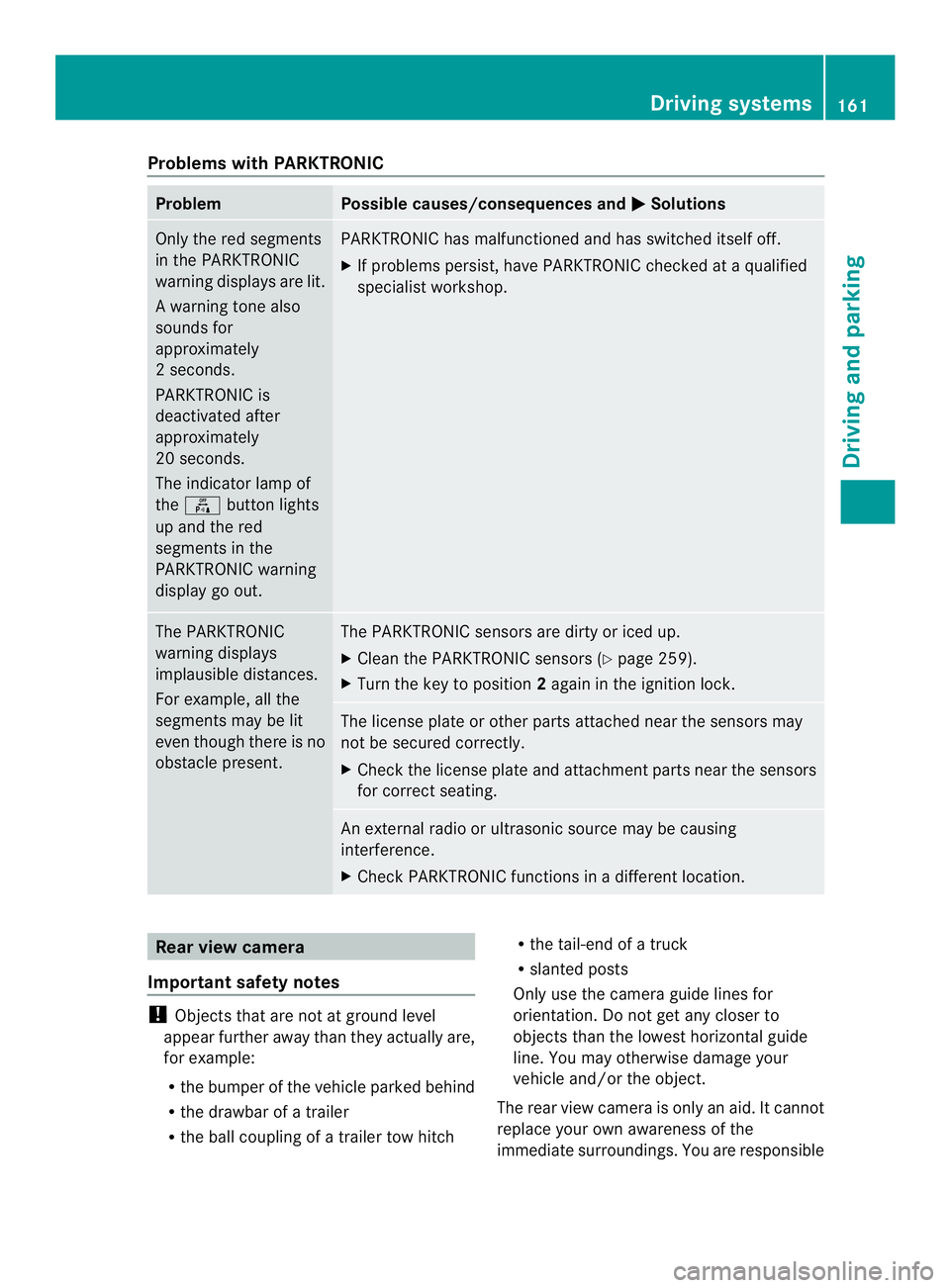
Problems with PARKTRONIC
Problem Possible causes/consequences and
0004 Solutions
Only the red segments
in the PARKTRONIC
warning displays are lit.
Aw
arning tone also
sounds for
approximately
2s econds.
PARKTRONIC is
deactivated after
approximately
20 seconds.
The indicator lamp of
the 000C button lights
up and the red
segments in the
PARKTRONIC warning
display go out. PARKTRONIC has malfunctioned and has switched itself off.
X
If problems persist, have PARKTRONIC checked at a qualified
specialist workshop. The PARKTRONIC
warning displays
implausible distances.
For example, all the
segments may be lit
even though there is no
obstacle present. The PARKTRONIC sensors are dirty or iced up.
X
Clean the PARKTRONIC sensors (Y page 259).
X Turn the key to position 2again in the ignition lock. The license plate or other parts attached near the sensors may
not be secured correctly.
X
Check the license plate and attachment parts near the sensors
for correct seating. An external radio or ultrasonic source may be causing
interference.
X
Check PARKTRONIC functions in a different location. Rear view camera
Important safety notes !
Objects that are not at ground level
appear further away than they actually are,
for example:
R the bumper of the vehicle parked behind
R the drawbar of a trailer
R the ball coupling of a trailer tow hitch R
the tail-end of a truck
R slanted posts
Only use the camera guide lines for
orientation. Do not get any closer to
objects than the lowest horizontal guide
line. You may otherwise damage your
vehicle and/or the object.
The rear view camera is only an aid. It cannot
replace your own awareness of the
immediate surroundings. You are responsible Driving systems
161Driving and parking Z