wheel MERCEDES-BENZ SPRINTER 2019 MY19 with 7” screen
[x] Cancel search | Manufacturer: MERCEDES-BENZ, Model Year: 2019, Model line: SPRINTER, Model: MERCEDES-BENZ SPRINTER 2019Pages: 354, PDF Size: 6.15 MB
Page 165 of 354
Canceling a brake application of
Active Brake
Assi st
Yo u can cancel a brake application of Active
Brake Assi stat any time by:
R Fully depressing the accelerator pedal or with
kickdown.
R Fully releasing the brake pedal (only during
situation-dependent braking assis tance).
Ac tive Brake Assi stmay cancel the brake applica‐
tion when one of thefo llowing conditions is fulfil‐
led:
R You maneuver toavo idthe obs tacle.
R Thereis no longer a risk of collision.
R An obs tacle is no longer de tected in front of
yo ur vehicle.
Sy stem limitations
The sy stem may be impaired or may not function
in thefo llowing situations:
R The sensors are af fected bysno w,rain, fog or
heavy spr ay.
R The sensors are dirty, fogged up, damaged or
co vered.
R The sensors are af fected byinter fere nce from
ot her radar sources, e.g. strongradar reflec‐
tions in parking garage s.
R If a loss of tire pressure or a defective tire has
been de tected and displa yed.
R Full sy stem per form ance is not available for a
fe w seconds af ter switching on the ignition or
af te r driving off.
The sy stem may not react cor rectly in thefo llow‐
ing situations:
R In complex traf fic situations, objects may not
al wa ys be clear lyde tected.
R Pedestrians or vehicles mo vequickly into the
de tection range of the sensors.
R Pedestrians are obscured by other objects.
R In bends with a nar rowradius. Setting
Active Brake Assi st Requ
irements:
R The ignition is switched on Multimedia sy
stem:
4 © 5
Settings 5
Assistance
5 Active Brake Assist
The following settings are available:
R Early
R Medium
R Late #
Select a setting.
The Medium setting is selec ted automatically
eve rytime the engine is star ted.
Deactivating Active Brake Assi st
% It is
recommended that Active Brake Assi stis
alw ays left activated. #
Select Off.
The dis tance warning function and autono‐
mous braking function are deactivated.
% When
Active Brake Assi stis deactivated, the
00D4 symbol appears inthest atus area of
th e multifunction displa y. Cruise control
Fu
nction of cruise control
Cruise cont rol accelerates and brakes theve hicle
automatically in order tomaintain a pr eviously
st ored speed.
If yo u accelerate toove rtake, forex ample, the
st ored speed is not dele ted. If youre mo veyour
fo ot from the accelerator pedal af terove rtaking,
cruise control will resume speed regulation back
to thestored speed.
Cruise contro l is operated using the cor respond‐
ing steering wheel buttons. You can store any
ro ad speed abo ve15 mp h (20 km/h).
If yo ufa ilto adapt your driving style, cruise con‐
trol can neither reduce therisk of an accident nor
ove rride the la wsof ph ysics. It cannot take into
account road, weather or traf fic conditions.
Cruise control is only an aid. You are responsible
fo rth e dis tance totheve hicle in front, forve hicle
speed, braking in good time and forst ay ing in
yo ur lane.
Displa ysinthe multifunction display
The status of cruise control and thestored speed
are shown in the multifunction displa y. Driving and pa
rking 141
Page 166 of 354
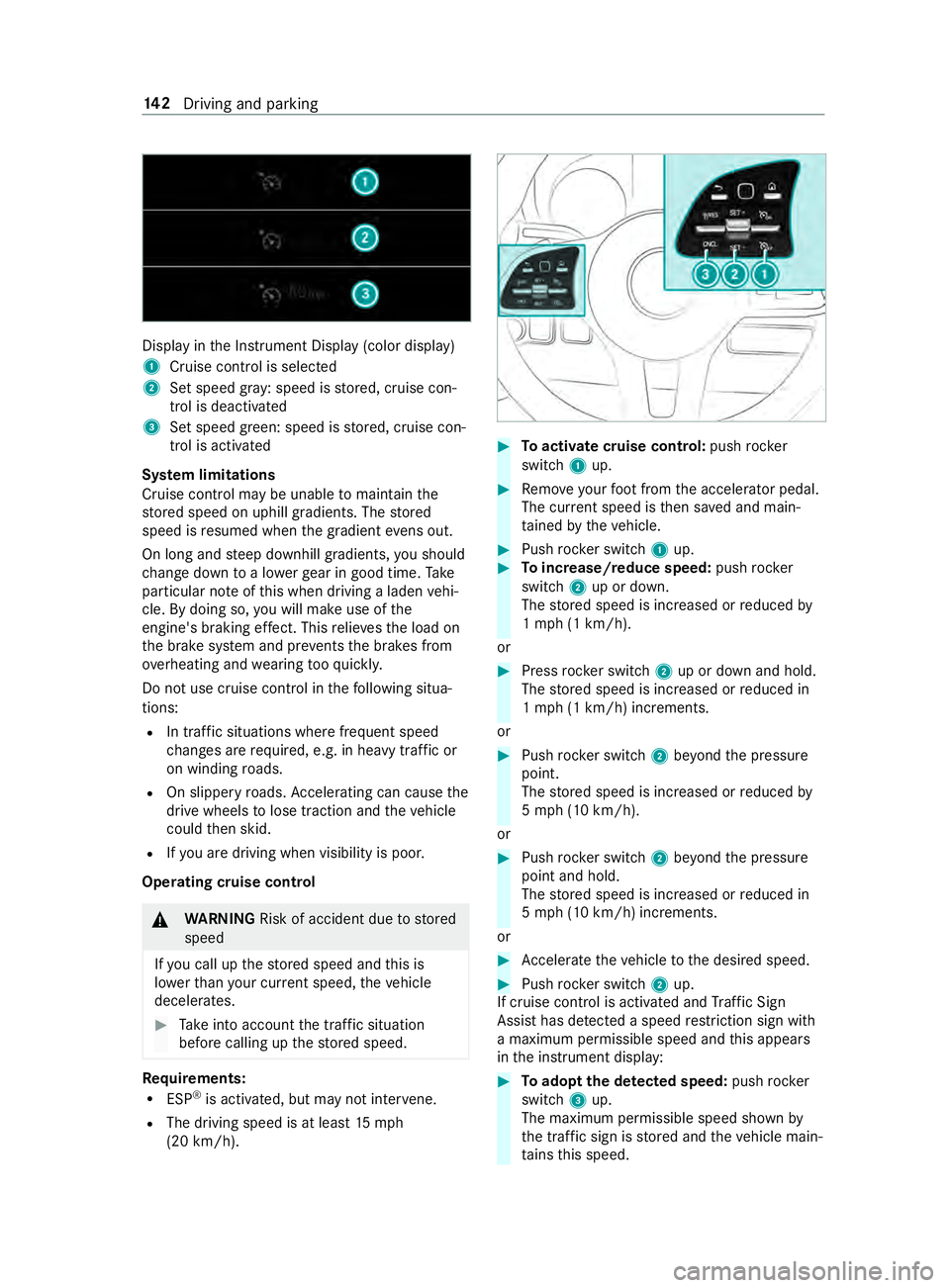
Displ
ayinthe Instrument Display (color display)
1 Cruise cont rol is selec ted
2 Set speed gr ay: speed is stored, cruise con‐
trol is deactivated
3 Set speed green: speed is stored, cruise con‐
trol is activated
Sy stem limitations
Cruise control may be unable tomaintain the
st ored speed on uphill gradients. The stored
speed is resumed when the gradient evens out.
On long and steep downhill gradients, you should
ch ange down toa lo werge ar in good time. Take
particular no teofthis when driving a laden vehi‐
cle. By doing so, you will make use of the
engine's braking ef fect. This relie vesth e load on
th e brake sy stem and pr events the brakes from
ove rheating and wearing tooqu ickl y.
Do not use cruise control in thefo llowing situa‐
tions:
R In traf fic situations whe refrequent speed
ch anges are requ ired, e.g. in heavy traf fic or
on winding roads.
R On slippe ryroads. Accele rating can cause the
drive wheels tolose traction and theve hicle
could then skid.
R Ifyo u are driving when visibility is poor.
Operating cruise cont rol&
WARNING Risk of accident due tostored
speed
If yo u call up thestored speed and this is
lo we rth an your cur rent speed, theve hicle
decelerates. #
Take into account the tra ffic situation
before calling up thestored speed. Re
quirements:
R ESP ®
is activated, but may not inter vene.
R The driving speed is at least 15mph
(20 km/h). #
Toactivate cruise control: pushrock er
switch 1up. #
Remo veyour foot from the accelerator pedal.
The cur rent speed is then sa ved and main‐
ta ined bytheve hicle. #
Push rocker switch 1up. #
Toincrease/reduce speed: pushrock er
switch 2up or down.
The stored speed is increased or reduced by
1 mp h (1 km/h).
or #
Press rocker switch 2up or down and hold.
The stored speed is increased or reduced in
1 mp h (1 km/h) increments.
or #
Push rocker switch 2beyond the pressure
point.
The stored speed is increased or reduced by
5 mp h (10 km/h).
or #
Push rocker switch 2beyond the pressure
point and hold.
The stored speed is increased or reduced in
5 mp h (10 km/h) increments.
or #
Accele rate theve hicle tothe desired speed. #
Push rocker switch 2up.
If cruise cont rol is activated and Traf fic Sign
Assi sthas de tected a speed restriction sign wi th
a maximum permissible speed and this appears
in the instrument display: #
Toadopt the de tected speed: pushrocker
switch 3up.
The maximum permissible speed shown by
th e traf fic sign is stored and theve hicle main‐
ta ins this speed. 14 2
Driving and pa rking
Page 167 of 354
#
Todeactivate cruise control: pushrock er
switch 3(CNCL) down.
If cruise cont rol is deactivated, it can be reactiva‐
te d as follo ws:
R rock er switch 2(SET+) or (SET-) stores the
cur rent speed and theve hicle maintains this
speed
R rock er switch 3(RES) calls up the last speed
st ored and theve hicle maintains this speed
% Ifyo u brake, deactivate ESP ®
or if ESP ®
inter‐
ve nes, cruise control is deacti vated.
When you swit choff theve hicle, the last
speed stored is cleared. Ac
tive Di stance Assist DISTRO NICFu
nction of Active Di stance Assist DISTRO NIC
Ac tive Dis tance Assi stDISTRONIC maintains the
set speed on free-flowing roads. If vehicles ahead
are de tected, the set dis tance is maintained, if
necessa ryuntil theve hicle comes toa halt. The
ve hicle accelerates or brakes depending on the
dis tance totheve hicle in front and the set speed.
Speed and dis tance are set and stored on the
st eering wheel. The speed can be set in thera nge
between 15mp h (20 km/h) and 99 mph
(160 km/h) or between 15mp h (20 km/h) and
th eve hicle's maximum speed.
Other features of Active Dis tance Assi st
DISTRONIC:
R Depending on the preselected dis tance,
DISTRONIC inter venes ei ther dynamically
(short dis tance) or tosave fuel (long dis‐
ta nce).
R Depending on theve hicle mass de tected, the
dynamics of the DISTRONIC inter vention are
re duced.
R Rapid acceleration tothestored speed is initi‐
ated if the turn signal indicator is switched on
to change totheov ertak ing lane.
Ac tive Dis tance Assi stDISTRONIC is only an aid.
The driver is responsible forth e dis tancetothe
ve hicle in front, forve hicle speed and for braking
in good time.
Sy stem limitations
The sy stem may be impaired or may not function
in thefo llowing ins tances:
R The radar sensors are af fected bysno w,rain,
fo g, heavy spr ay,gl are, direct sunlight or
greatly varying ambient light. R
The radar sensors may malfunction in parking
ga rage s or on roads with steep uphill or
downhill gradients.
R Ifth era dar sensors are dirty or co vered.
R On icy or slippery roads, braking or accelerat‐
ing can cause the drive wheels tolose trac‐
tion and theve hicle could then skid.
R Stationary objects are not de tected if these
we renot pr eviously de tected as moving.
R On bends, target vehicles may be lost or not
re cognized cor rectl y.As a result, a target
ve hicle is not used toregulate the speed
which may lead tounwa nted accele ration.
Do not use Active Dis tance Assi stDISTRONIC in
th ese situations. &
WARNING Risk of accident from acceler‐
ation or braking byActive Dis tance Assi st
DISTRONIC
Ac tive Dis tance Assi stDISTRONIC may accel‐
erate or brake in thefo llowing cases, for
ex ample:
R Ifth eve hicle pulls away using Active Dis‐
ta nce Assi stDISTRONIC.
R Ifth estored speed is called up and is con‐
siderably faster or slo werth an the cur‐
re ntly driven speed.
R IfAc tive Dis tance Assi stDISTRONIC no
longer de tects a vehicle in front or does
not react toreleva nt objects. #
Always carefully obser vethe traf fic con‐
ditions and be ready tobrake at all
times. #
Take into account the tra ffic situation
before calling up thestored speed. &
WARNING Risk of accident due toinsuf‐
fi cient deceleration byActive Dis tance
Assi stDISTRONIC
Ac tive Dis tance Assi stDISTRONIC brakes
yo ur vehicle with up to50% of the maximum
possible deceleration. If this deceleration is
not suf ficient, Active Dis tance Assi st
DISTRONIC alerts you with a visual and
acoustic warning. #
Inthese cases, adjust your speed and
ke ep a suf ficient dis tance. #
Brake theve hicle yourself and/or take
ev asive action. Driving and parking
14 3
Page 171 of 354
Re
ar view camera Fu
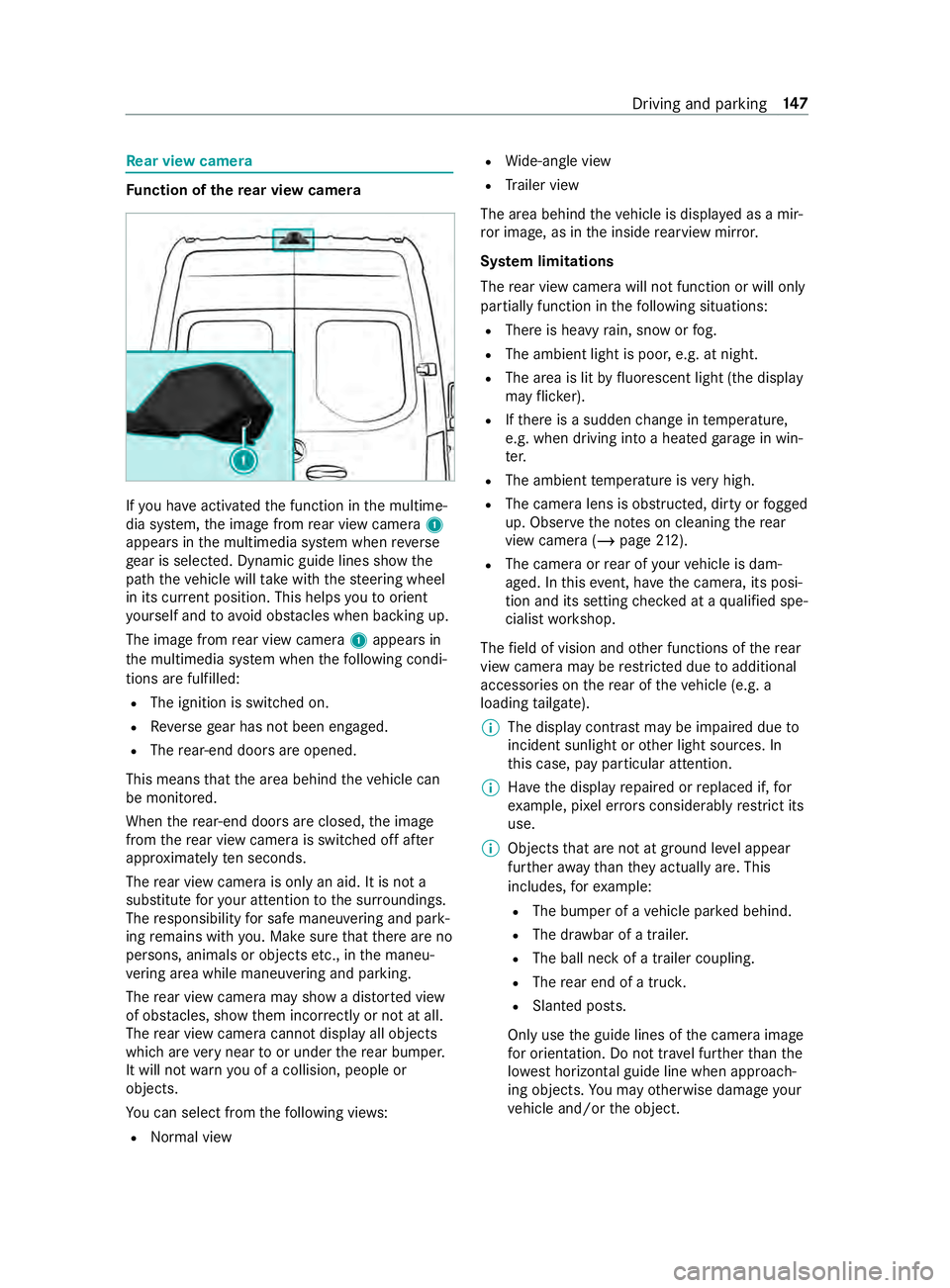
nction of there ar view camera If
yo u ha veactivated the function in the multime‐
dia sy stem, the image from rear view camera 1
appears in the multimedia sy stem when reve rse
ge ar is selec ted. Dynamic guide lines show the
path theve hicle will take with thesteering wheel
in its cur rent position. This helps youto orient
yo urself and toavo id obs tacles when ba cking up.
The image from rear view camera 1appears in
th e multimedia sy stem when thefo llowing condi‐
tions are fulfilled:
R The ignition is switched on.
R Reversege ar has not been engaged.
R The rear-end doors are opened.
This means that the area behind theve hicle can
be monitored.
When there ar-end doors are closed, the image
from there ar view camera is swit ched off af ter
appr oximately ten seconds.
The rear view camera is only an aid. It is not a
substitute foryo ur attention tothe sur roundings.
The responsibility for safe maneu vering and pa rk‐
ing remains with you. Make sure that there are no
persons, animals or objects etc., in the maneu‐
ve ring area while maneuvering and pa rking.
The rear view camera may show a dis torted view
of obs tacles, show them incor rectly or not at all.
The rear view camera cannot display all objects
which are very near toor under there ar bumper.
It will not warnyou of a collision, people or
objects.
Yo u can select from thefo llowing vie ws:
R Norma l view R
Wide-angle view
R Trailer view
The area behind theve hicle is displa yed as a mir‐
ro r image, as in the inside rearview mir ror.
Sy stem limitations
The rear view camera will not function or will only
partially function in thefo llowing situations:
R There is heavy rain, snow or fog.
R The ambient light is poor, e.g. at night.
R The area is lit byfluorescent light (the displ ay
may flic ke r).
R Ifth ere is a sudden change in temp erature,
e.g. when driving into a heated garage in win‐
te r.
R The ambient temp erature is very high.
R The camera lens is obstructed, dirty or fogged
up. Obser vethe no tes on cleaning there ar
view camera (/ page212).
R The camera or rear of your vehicle is dam‐
aged. In this event, ha vethe camera, its posi‐
tion and its setting checked at a qualified spe‐
cialist workshop.
The field of vision and other functions of there ar
view camera may be restricted due toadditional
accesso ries on there ar of theve hicle (e.g. a
loading tailgate).
% The display contrast may be impaired due
to
incident sunlight or other light sources. In
th is case, pay particular attention.
% Ha
ve the display repaired or replaced if, for
ex ample, pixel er rors considerably restrict its
use.
% Objects that are not at ground le vel appear
fur ther aw ay than they actually are. This
includes, forex ample:
R The bumper of a vehicle par ked behind.
R The dr awbar of a trailer.
R The ball neck of a trailer coupling.
R The rear end of a truc k.
R Slanted posts.
Only use the guide lines of the camera image
fo r orientation. Do not tr avel fur ther than the
lo west horizontal guide line when approach‐
ing objects. You may otherwise damage your
ve hicle and/or the object. Driving and parking
147
Page 172 of 354
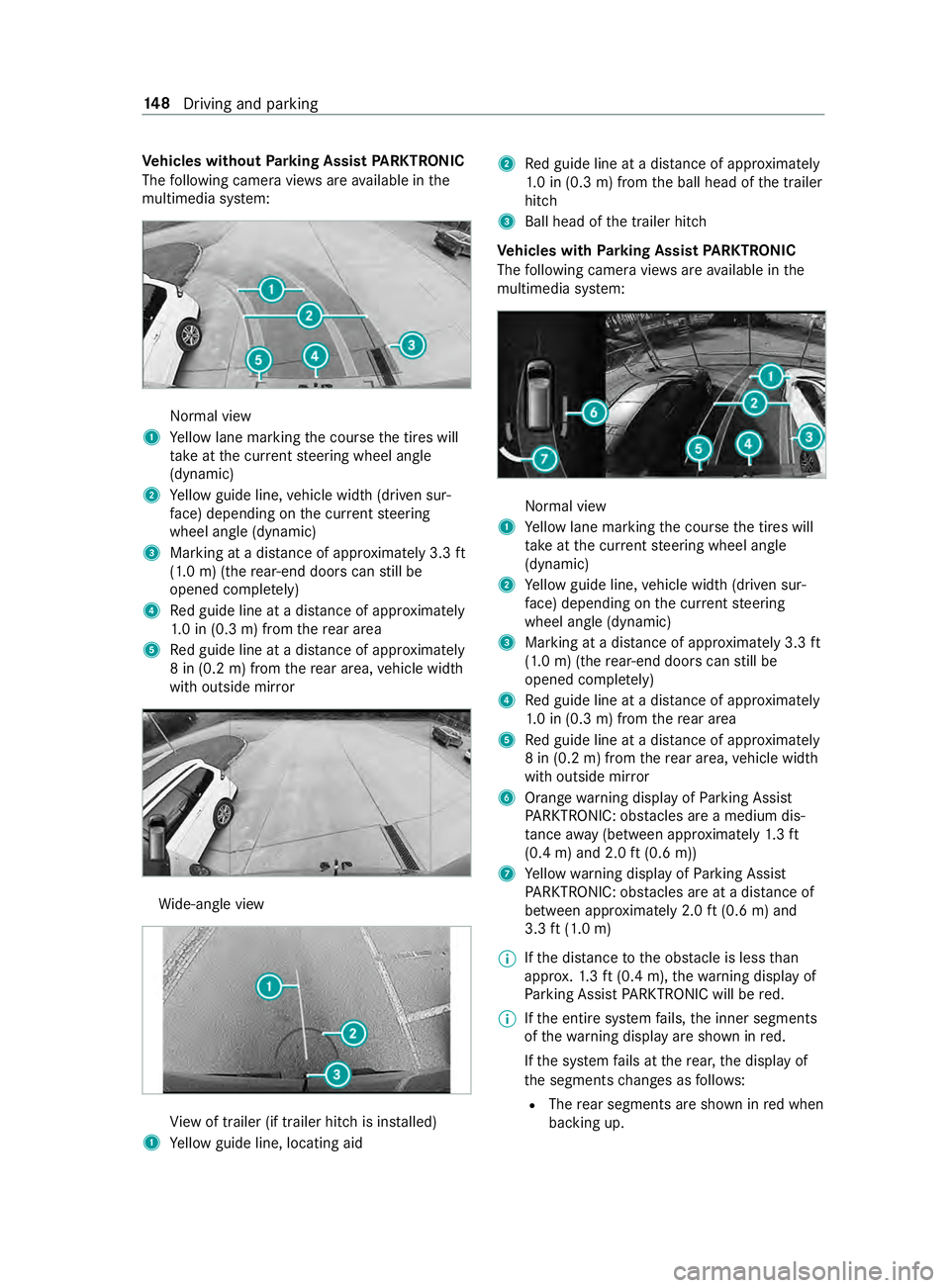
Ve
hicles without Parking Assist PARKTRONIC
The following camera vie wsare available in the
multimedia sy stem: Normal view
1 Yellow lane marking the course the tires will
ta ke atthe cur rent steering wheel angle
(dynamic)
2 Yellow guide line, vehicle width (driven sur‐
fa ce) depending on the cur rent steering
wheel angle (dynamic)
3 Marking at a dis tance of appr oximately 3.3 ft
(1.0 m) (the rear-end doors can still be
opened comple tely)
4 Red guide line at a dis tance of appr oximately
1. 0 in (0.3 m) from there ar area
5 Red guide line at a dis tance of appr oximately
8 in (0.2 m) from there ar area, vehicle width
with outside mir ror Wi
de-angle view Vi
ew of trailer (if trailer hitch is ins talled)
1 Yellow guide line, locating aid 2
Red guide line at a dis tance of appr oximately
1. 0 in (0.3 m) from the ball head of the trailer
hitch
3 Ball head of the trailer hitch
Ve hicles with Parking Assist PARKTRONIC
The following camera vie wsare available in the
multimedia sy stem: Normal view
1 Yellow lane marking the course the tires will
ta ke atthe cur rent steering wheel angle
(dynamic)
2 Yellow guide line, vehicle width (driven sur‐
fa ce) depending on the cur rent steering
wheel angle (dynamic)
3 Marking at a dis tance of appr oximately 3.3 ft
(1.0 m) (the rear-end doors can still be
opened comple tely)
4 Red guide line at a dis tance of appr oximately
1. 0 in (0.3 m) from there ar area
5 Red guide line at a dis tance of appr oximately
8 in (0.2 m) from there ar area, vehicle width
with outside mir ror
6 Orange warning display of Parking Assist
PA RKTRONIC: obstacles are a medium dis‐
ta nce away (between appr oximately 1.3 ft
(0.4 m) and 2.0 ft(0.6 m))
7 Yellow warning display of Parking Assist
PA RKTRONIC: obstacles are at a dis tance of
between appr oximately 2.0 ft(0.6 m) and
3.3 ft(1.0 m)
% If
th e dis tance tothe obs tacle is less than
appr ox.1. 3 ft (0.4 m), thewa rning display of
Pa rking Assist PARKTRONIC will be red.
% If
th e entire sy stem fails, the inner segments
of thewa rning display are shown in red.
If th e sy stem fails at there ar, the display of
th e segments changes as follo ws:
R The rear segments are shown in red when
backing up. 14 8
Driving and pa rking
Page 173 of 354
R
The rear segments are hidden when driv‐
ing forw ards.
If Pa rking Assist PARKTRONIC is deactivated,
th ewa rning display fades out. Wi
de-angle view Vi
ew of trailer (if trailer hitch is ins talled)
1 Yellow guide line, locating aid
2 Red guide line at a dis tance of appr oximately
1. 0 in (0.3 m) from the ball head of the trailer
hitch
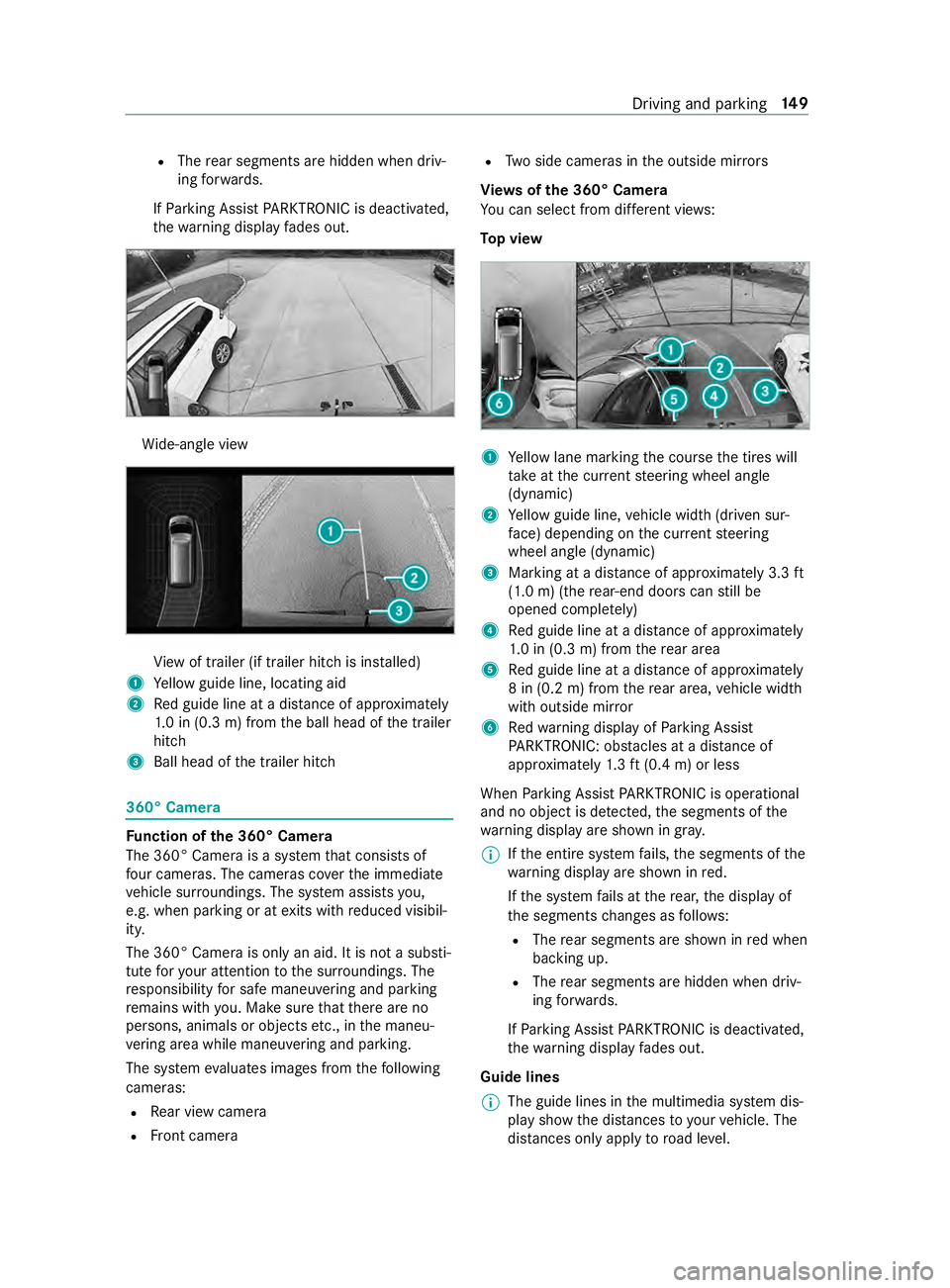
3 Ball head of the trailer hitch 360° Camera
Fu
nction of the 360° Camera
The 360° Camera is a sy stem that consists of
fo ur cameras. The cameras co verth e immediate
ve hicle sur roundings. The sy stem assists you,
e.g. when parking or at exits with reduced visibil‐
ity.
The 360° Camera is only an aid. It is not a substi‐
tute foryo ur attention tothe sur roundings. The
re sponsibility for safe maneu vering and pa rking
re mains with you. Make sure that there are no
persons, animals or objects etc., in the maneu‐
ve ring area while maneuvering and pa rking.
The sy stem evaluates images from thefo llowing
cameras:
R Rear view camera
R Front camera R
Two side cameras in the outside mir rors
Vi ew s of the 360° Camera
Yo u can select from dif fere nt vie ws:
To p view 1
Yellow lane marking the course the tires will
ta ke atthe cur rent steering wheel angle
(dynamic)
2 Yellow guide line, vehicle width (driven sur‐
fa ce) depending on the cur rent steering
wheel angle (dynamic)
3 Marking at a dis tance of appr oximately 3.3 ft
(1.0 m) (the rear-end doors can still be
opened comple tely)
4 Red guide line at a dis tance of appr oximately
1. 0 in (0.3 m) from there ar area
5 Red guide line at a dis tance of appr oximately
8 in (0.2 m) from there ar area, vehicle width
with outside mir ror
6 Redwa rning display of Parking Assist
PA RKTRONIC: obstacles at a dis tance of
appr oximately 1.3 ft (0.4 m) or less
When Parking Assist PARKTRONIC is operational
and no object is de tected, the segments of the
wa rning display are shown in gray.
% If
th e entire sy stem fails, the segments of the
wa rning display are shown in red.
If th e sy stem fails at there ar, the display of
th e segments changes as follo ws:
R The rear segments are shown in red when
backing up.
R The rear segments are hidden when driv‐
ing forw ards.
If Pa rking Assist PARKTRONIC is deactivated,
th ewa rning display fades out.
Guide lines
% The guide lines in
the multimedia sy stem dis‐
play show the dis tances toyour vehicle. The
dis tances only apply toroad le vel. Driving and parking
14 9
Page 174 of 354
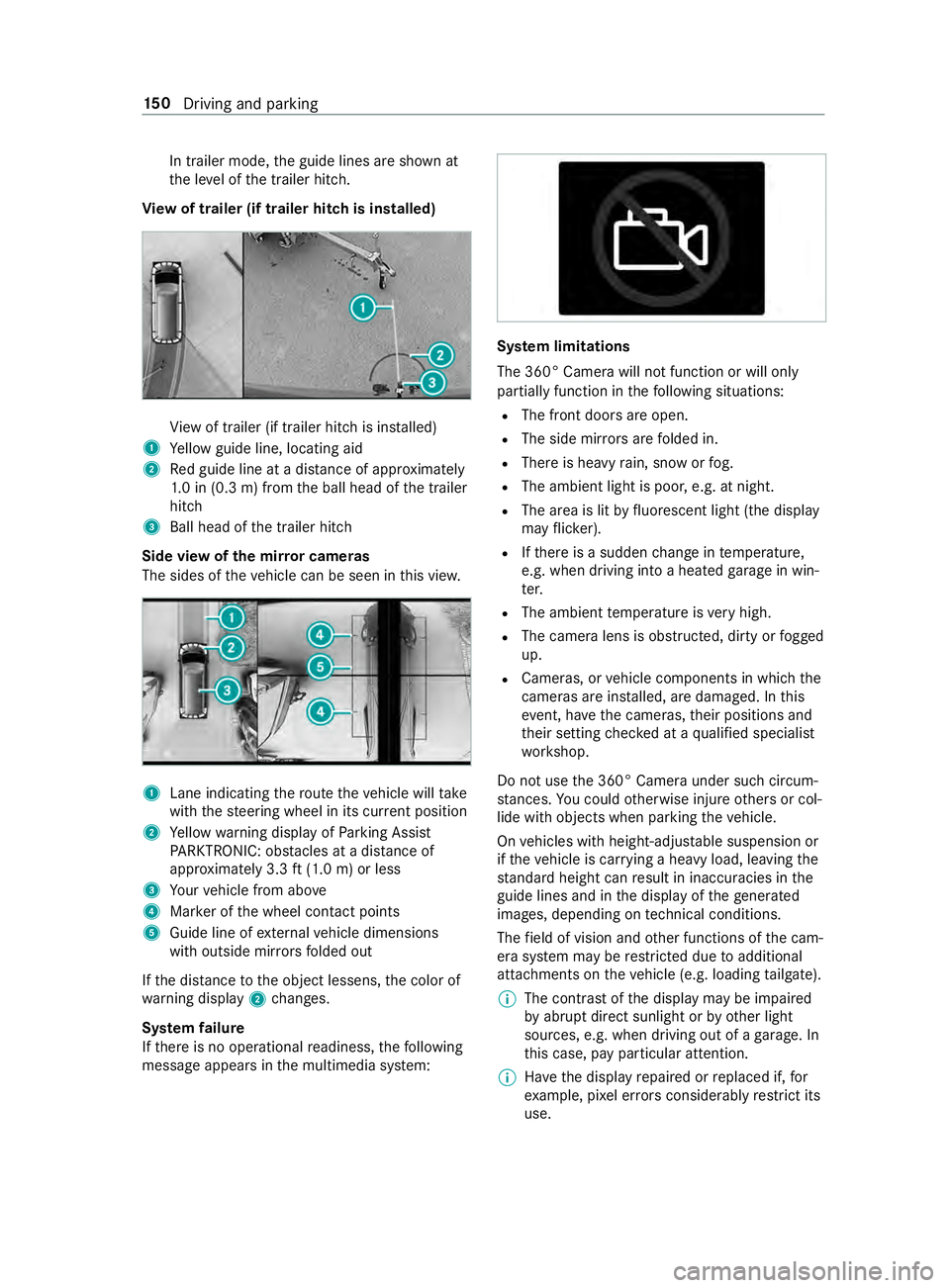
In trailer mode,
the guide lines are shown at
th e le vel of the trailer hitch.
Vi ew of trailer (if trailer hit chis installed) Vi
ew of trailer (if trailer hitch is ins talled)
1 Yellow guide line, locating aid
2 Red guide line at a dis tance of appr oximately
1. 0 in (0.3 m) from the ball head of the trailer
hitch
3 Ball head of the trailer hitch
Side view of the mir ror came ras
The sides of theve hicle can be seen in this vie w. 1
Lane indicating thero ute theve hicle will take
with thesteering wheel in its cur rent position
2 Yellow warning display of Parking Assist
PA RKTRONIC: obstacles at a dis tance of
appr oximately 3.3 ft(1.0 m) or less
3 Your vehicle from abo ve
4 Marker of the wheel contact points
5 Guide line of extern al vehicle dimensions
with outside mir rors folded out
If th e dis tance tothe object lessens, the color of
wa rning display 2changes.
Sy stem failure
If th ere is no operational readiness, thefo llowing
message appears in the multimedia sy stem: Sy
stem limitations
The 360° Camera will not function or will only
partially function in thefo llowing situations:
R The front doors are open.
R The side mir rors are folded in.
R There is heavy rain, snow or fog.
R The ambient light is poor, e.g. at night.
R The area is lit byfluorescent light (the displ ay
may flic ke r).
R Ifth ere is a sudden change in temp erature,
e.g. when driving into a heated garage in win‐
te r.
R The ambient temp erature is very high.
R The camera lens is obstructed, dirty or fogged
up.
R Cameras, or vehicle components in which the
came ras are ins talled, are damaged. In this
eve nt, ha vethe cameras, their positions and
th eir setting checked at a qualified specialist
wo rkshop.
Do not use the 360° Camera under such circum‐
st ances. You could otherwise injure others or col‐
lide with objects when parking theve hicle.
On vehicles with height-adjus table suspension or
if th eve hicle is car rying a heavy load, leaving the
st andard height can result in inaccuracies in the
guide lines and in the display of thege nerated
ima ges, depending on tech nical conditions.
The field of vision and other functions of the cam‐
era sy stem may be restricted due toadditional
attachments on theve hicle (e.g. loading tailgate).
% The contrast of
the display may be impaired
by abrupt direct sunlight or by other light
sources, e.g. when driving out of a garage . In
th is case, pay particular attention.
% Ha
ve the display repaired or replaced if, for
ex ample, pixel er rors considerably restrict its
use. 15 0
Driving and pa rking
Page 179 of 354
Lane
Keeping Assist and Active Lane Keeping
Assist Fu
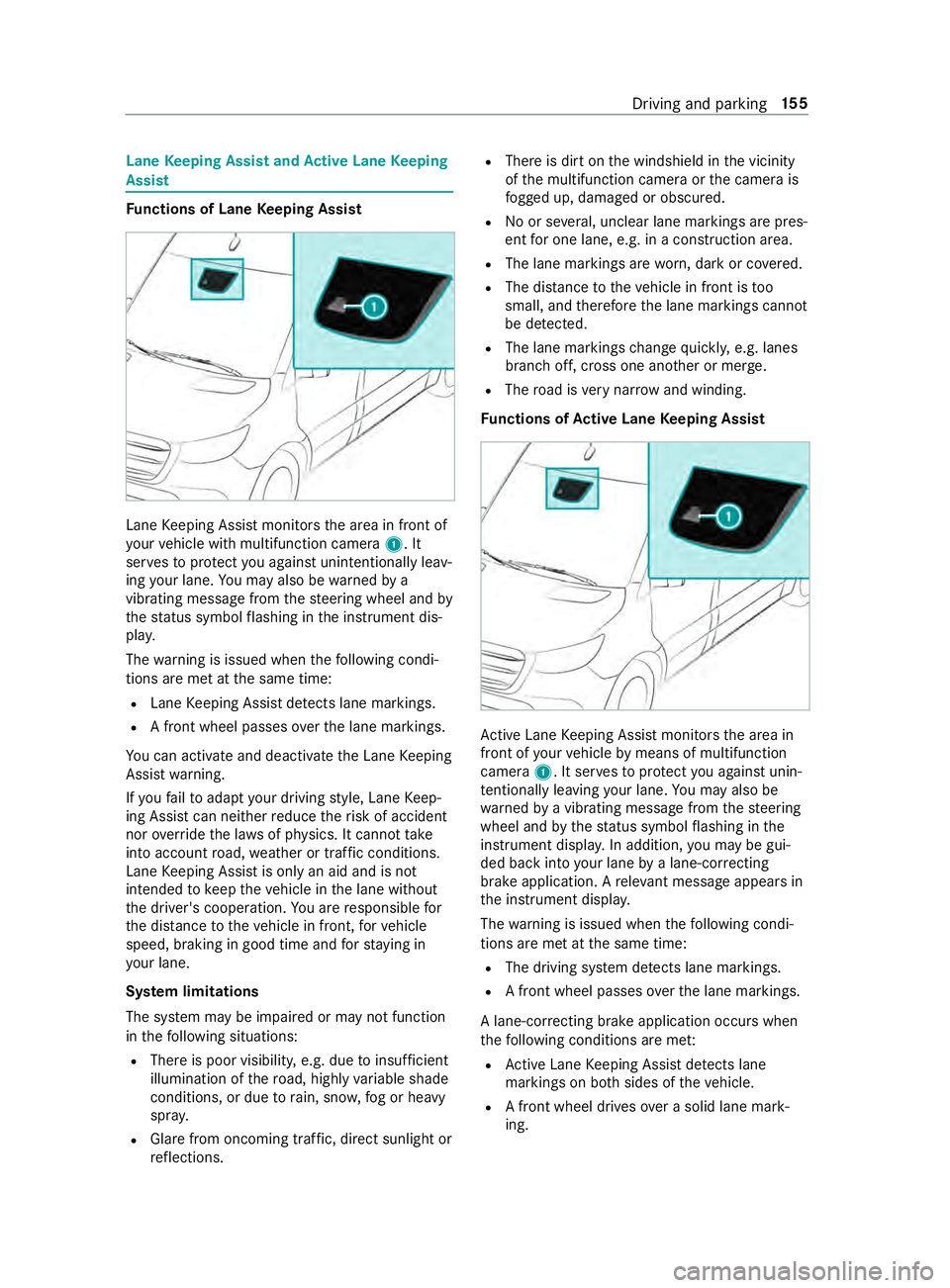
nctions of Lane Keeping Assist Lane
Keeping Assist monitors the area in front of
yo ur vehicle with multifunction camera 1. It
ser vesto protect you against unin tentionally le av‐
ing your lane. You may also be warned by a
vibrating messa gefrom thesteering wheel and by
th est atus symbol flashing in the instrument dis‐
pla y.
The warning is issued when thefo llowing condi‐
tions are met at the same time:
R Lane Keeping Assist de tects lane markings.
R A front wheel passes overth e lane markings.
Yo u can activate and deactivate the Lane Keeping
Assist warning.
If yo ufa ilto adapt your driving style, Lane Keep‐
ing Assist can neither reduce therisk of accident
nor override the la wsof ph ysics. It cannot take
into account road, weather or traf fic conditions.
Lane Keeping Assist is only an aid and is not
intended tokeep theve hicle in the lane without
th e driver's cooperation. You are responsible for
th e dis tance totheve hicle in front, forve hicle
speed, braking in good time and forst ay ing in
yo ur lane.
Sy stem limitations
The sy stem may be impaired or may not function
in thefo llowing situations:
R There is poor visibilit y,e.g. due toinsuf ficient
illumination of thero ad, highly variable shade
conditions, or due torain, sno w,fog or heavy
spr ay.
R Glare from oncoming traf fic, direct sunlight or
re flections. R
There is dirt on the windshield in the vicinity
of the multifunction camera or the camera is
fo gged up, damaged or obscured.
R No or se veral, unclear lane markings are pres‐
ent for one lane, e.g. in a construction area.
R The lane markings are worn, dark or co vered.
R The dis tance totheve hicle in front is too
small, and therefore the lane markings cann ot
be de tected.
R The lane markings change quickl y,e.g. lanes
branch off, cross one ano ther or mer ge.
R The road is very nar row and winding.
Fu nctions of Active Lane Keeping Assist Ac
tive Lane Keeping Assist monitors the area in
front of your vehicle bymeans of multifunction
camera 1. It ser vesto protect you against unin‐
te ntionally le aving your lane. You may also be
wa rned bya vibrating message from thesteering
wheel and bythest atus symbol flashing in the
instrument displa y.In addition, you may be gui‐
ded back into your lane bya lane-cor recting
brake application. A releva nt messa geappears in
th e instrument displa y.
The warning is issued when thefo llowing condi‐
tions are met at the same time:
R The driving sy stem de tects lane markings.
R A front wheel passes overth e lane markings.
A lane-cor recting brake application occu rswhen
th efo llowing conditions are me t:
R Active Lane Keeping Assist de tects lane
markings on bo thsides of theve hicle.
R A front wheel drives over a solid lane mark‐
ing. Driving and parking
15 5
Page 184 of 354
#
Shift the selector le verto position 005D. #
Apply theve hicle's parking brake. #
Close all the doors. #
Position the trailer on a le vel sur face behind
th eve hicle.
% The ball head height
changes depending on
th eve hicle's load. In this case, use a trailer
with a height-adjus table trailer dr awbar. #
Couple up the trailer. #
Establish all electrical and other connections
to the trailer. #
Remo veobjects or devices which pr eventthe
trailer from rolling, e.g. wheel choc ks. #
Release the trailer's parking brake.
% The
vehicle harness has a cable connection
to the brake light indicator lamp.
Obser vethe maximum permissible trailer dimen‐
sions (width and length).
Most US states and all Canadian pr ovinces pre‐
scribe thefo llowing points, and you are ur gently
re commended tocomply wi th these:
R Safetych ains between theto wing vehicle and
th e trailer. The chains should be routed in a
criss-cross pat tern under the trailer dr awbar.
They must be connected tothe trailer tow
hitch and not tothe bumper or totheve hicle
axle.
Lea vesuf ficient sla ckinthech ains. This
allo wsforeve n sha rpcornering.
R A separate brake sy stem is requ ired for cer‐
ta in trailers.
R A saf etyfe ature is requ ired for braked trailers.
De term ine the specific requ irements acco rd‐
ing tothere leva nt la ws.
If th e trailer becomes de tach ed from theto w‐
ing vehicle, the saf etyfe ature triggers the
trailer brakes and can thus reduce the danger.
Un coupling a trailer &
WARNING Risk of being crushed and
becoming trapped when uncoupling a
trailer
When uncoupling a trailer wi than engaged
ine rtia-activated brake, your hand may
become trapped between theve hicle and the
trailer dr awbar. #
Do not uncouple trailers with an
engaged overrun brake. Do not uncouple a trailer with an
overrun brake in
a st ate of overrun. Otherwise, there bound of the
ove rrun brake can damage your vehicle. #
Shift the selector le verto position 005D. #
Apply theve hicle's parking brake. #
Close all the doors. #
Apply the trailer's parking brake. #
Secure the trailer against rolling away with a
wheel chock or similar object. #
Remo vethe trailer cables and saf etych ains. #
Uncou plethe trailer. Information about
towing a trailer Operating a trailer is subject
tomany statutory
re gulations such as speed restrictions.
Many states also requ ire an auxiliary separate
functional braking sy stem when towing a weight
th at exc eeds a cer tain limit. Foryo ur saf ety, it is
re commended touse a separate functional brak‐
ing sy stem on any towe dve hicle.
Make sure that your trailer combination meets
local regulations. This not only applies to your
place of residence, but also to your destination.
In fo rm ation on this can be obtained from the
police and local authorities.
Comply with thefo llowing when driving with a
trailer:
R Practice cornering, stopping and backing up
in a traf fic-free location. In this wa y,yo u will
ga in driving experience and become accus‐
to med tothe new handling characteristics.
R Before driving, check thefo llowing:
- that the trailer tow hit chand ball coupling
are secure
- that the saf ety swit chfor braked trailers is
functioning cor rectly
- that the saf etych ains are secure and
undamaged
- that the electrical connections are secure
- that the lights are functioning cor rectly
- the wheels for dama geand cor rect tire
pressure (/ page 232)
R Adjust the outside mir rors so that you ha ve a
clear view of there ar section of the trailer.
R Ifth e trailer is equipped with an individual
braking sy stem, check before each journey
whe ther the brakes are functioning cor rectl y. 16 0
Driving and pa rking
Page 188 of 354
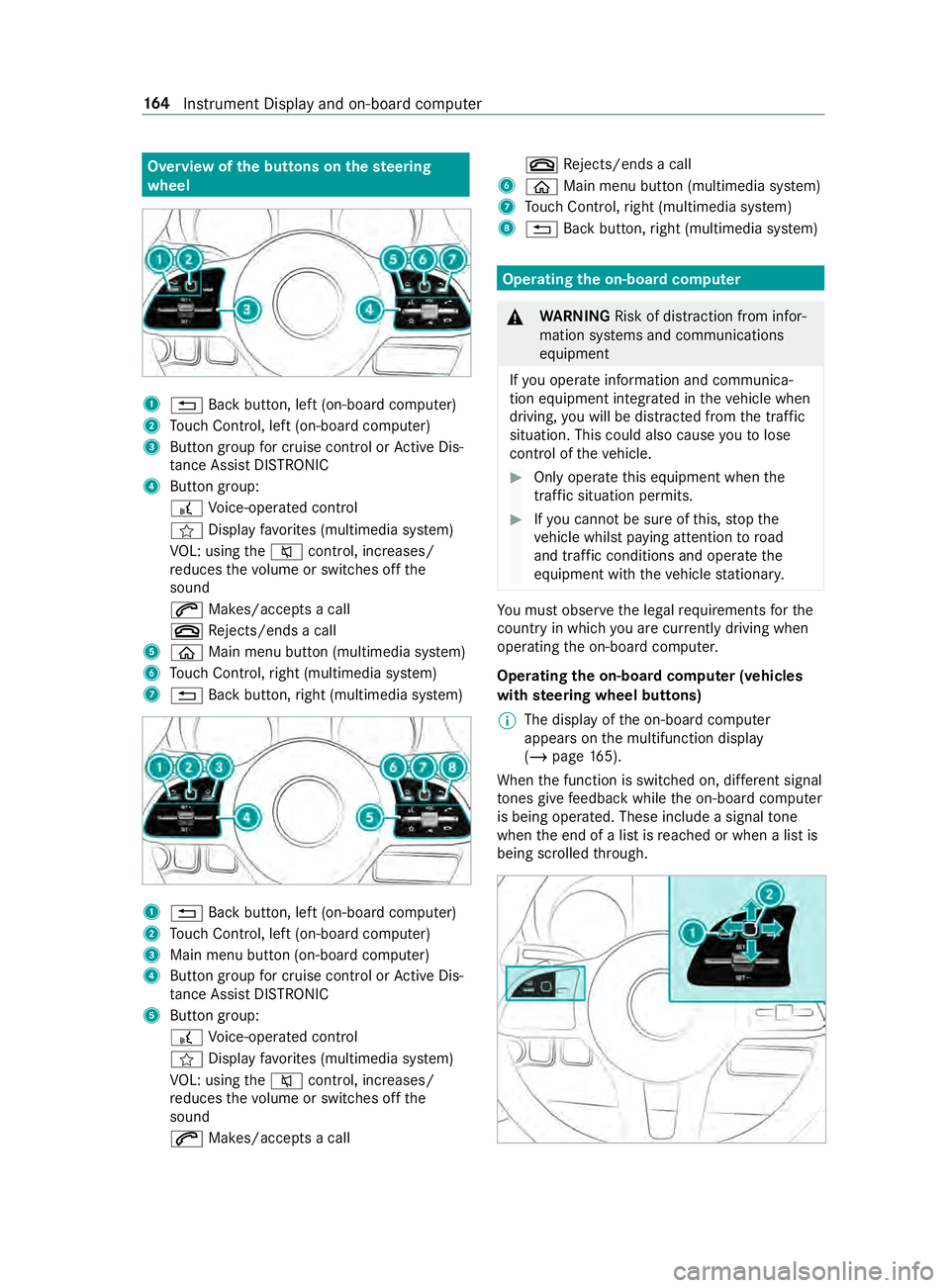
Overview of
the but tons on thest eering
wheel 1
0038 Back button, left (on-board computer)
2 Touch Control, left (on-board computer)
3 Button group for cruise control or Active Dis‐
ta nce Assi stDISTRONIC
4 Button group:
£ Voice-opera ted control
004B Display favo rite s (multimedia sy stem)
VO L: using the0063 control, inc reases/
re duces thevo lume or switches off the
sound
0061 Makes/accepts a call
0076 Rejects/ends a call
5 00E2 Main menu button (multimedia sy stem)
6 Touch Control, right (multimedia sy stem)
7 0038 Back button, right (multimedia sy stem) 1
0038 Back button, left (on-board computer)
2 Touch Control, left (on-board computer)
3 Main menu button (on-board computer)
4 Button group for cruise control or Active Dis‐
ta nce Assi stDISTRONIC
5 Button group:
£ Voice-opera ted control
004B Display favo rite s (multimedia sy stem)
VO L: using the0063 control, inc reases/
re duces thevo lume or switches off the
sound
0061 Makes/accepts a call 0076
Rejects/ends a call
6 00E2 Main menu button (multimedia sy stem)
7 Touch Control, right (multimedia sy stem)
8 0038 Back button, right (multimedia sy stem) Operating
the on-boa rdcompu ter &
WARNING Risk of distraction from infor‐
mation sy stems and communications
equipment
If yo u operate information and communica‐
tion equipment integ rated in theve hicle when
driving, you will be distracted from the tra ffic
situation. This could also cause youto lose
control of theve hicle. #
Only operate this equipment when the
traf fic situation permits. #
Ifyo u cannot be sure of this, stop the
ve hicle whilst paying attention toroad
and traf fic conditions and ope rate the
equipment with theve hicle stationar y. Yo
u must obse rveth e legal requirements forthe
country in whi chyou are cur rently driving when
ope rating the on-board computer.
Operating the on-boa rdcompu ter (vehicles
with steering wheel but tons)
% The display of
the on-board computer
appears on the multifunction display
(/ page 165).
When the function is switched on, dif fere nt signal
to nes gi vefeedback while the on-board computer
is being operated. These include a signal tone
when the end of a list is reached or when a list is
being scrolled thro ugh. 16 4
Instrument Display and on-board computer