wheel MERCEDES-BENZ SPRINTER 2019 MY19 with 7” screen
[x] Cancel search | Manufacturer: MERCEDES-BENZ, Model Year: 2019, Model line: SPRINTER, Model: MERCEDES-BENZ SPRINTER 2019Pages: 354, PDF Size: 6.15 MB
Page 141 of 354
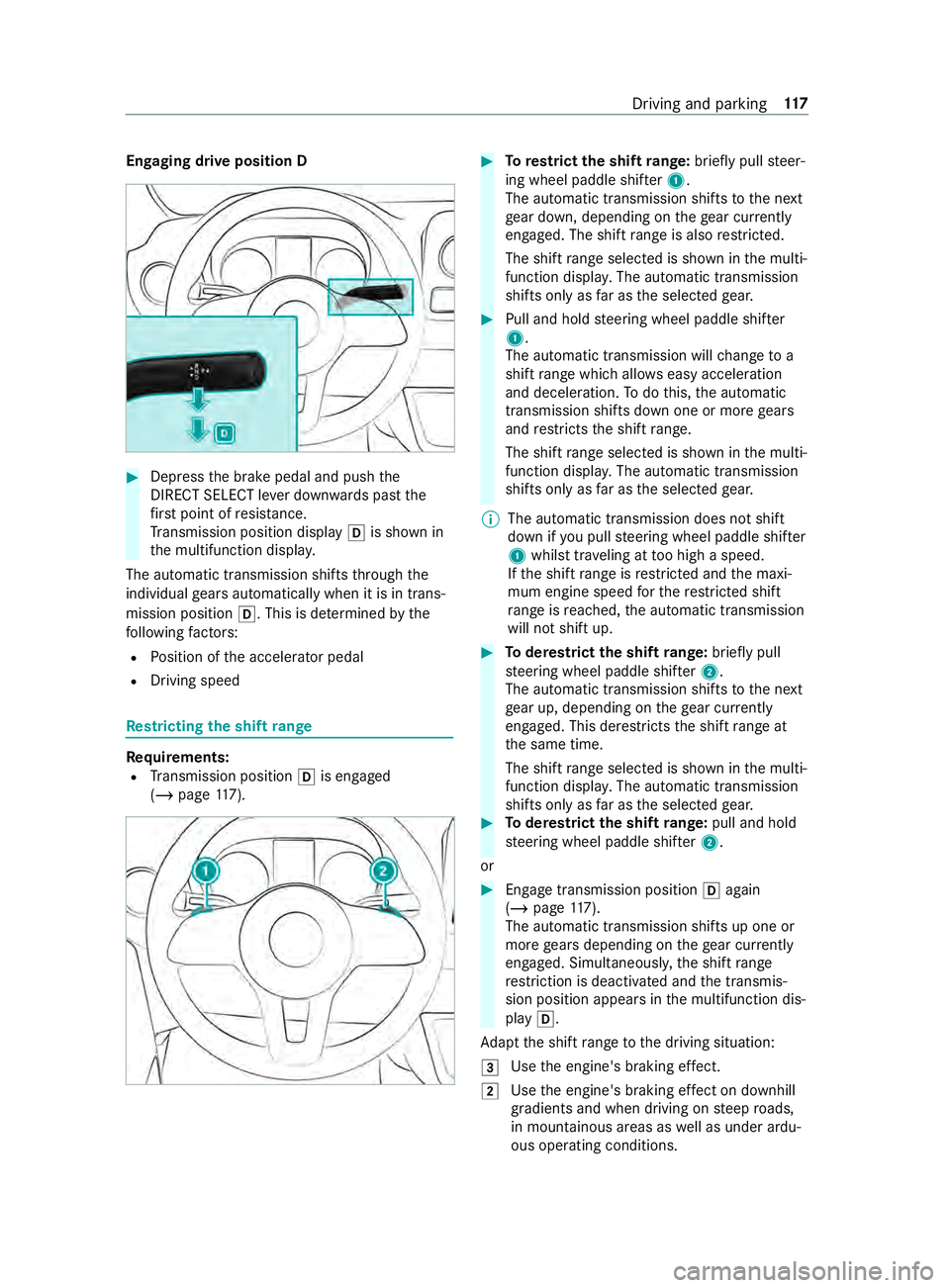
Engaging drive position D
#
Dep ress the brake pedal and push the
DIRECT SELECT le ver down wards past the
fi rs t point of resis tance.
Tr ansmission position display 005Bis shown in
th e multifunction displa y.
The automatic transmission shifts thro ugh the
individual gears automatically when it is in trans‐
mission position 005B. This is determ ined bythe
fo llowing factors:
R Position of the accelerator pedal
R Driving speed Re
stricting the shift range Re
quirements:
R Transmission position 005Bis engaged
(/ page 117). #
Torestrict the shift range: briefly pull steer‐
ing wheel paddle shif ter1.
The automatic transmission shifts tothe next
ge ar down, depending on thege ar cur rently
engaged. The shi ftrange is also restricted.
The shi ftrange selected is shown in the multi‐
function displa y.The automatic transmission
shifts only as far as the selected gear. #
Pull and hold steering wheel paddle shif ter
1 .
The automatic transmission will change to a
shift range which allo wseasy acceleration
and deceleration. Todo this, the automatic
transmission shifts down one or more gears
and restricts the shift range.
The shi ftrange selected is shown in the multi‐
function displa y.The automatic transmission
shifts only as far as the selected gear.
% The automatic transmission does not shift
down if
you pull steering wheel paddle shif ter
1 whilst tr aveling at too high a speed.
If th e shift range is restricted and the maxi‐
mum engine speed forth ere stricted shi ft
ra nge is reached, the automatic transmission
will not shift up. #
Toderestrict the shi ftrange: briefly pull
st eering wheel paddle shif ter2.
The automatic transmission shifts tothe next
ge ar up, depending on thege ar cur rently
engaged. This de restricts the shift range at
th e same time.
The shift range selected is shown in the multi‐
function displa y.The automatic transmission
shifts only as far as the selected gear. #
Toderestrict the shi ftrange: pull and hold
st eering wheel paddle shif ter2.
or #
Engage transmission position 005Bagain
(/ page 117).
The automatic transmission shi fts up one or
more gears depending on thege ar cur rently
engaged. Simultaneously, the shift range
re striction is deactivated and the transmis‐
sion position appears in the multifunction dis‐
play 005B.
Ad apt the shift range tothe driving situation:
0049 Use
the engine's braking ef fect.
0048 Use
the engine's braking ef fect on downhill
gradients and when driving on steep roads,
in mountainous areas as well as under ardu‐
ous operating conditions. Driving and parking
117
Page 142 of 354

0047
Use
the engine's braking ef fect on extremely
st eep downhill gradients and on long down‐
hill stre tches. Using kickdown
#
For maximum acceleration: depressthe
accelerator pedal be yond the pressure point. #
Ease off the accelera tor pedal once the
desired speed is reached. All-wheel drive
Note
s on all-wheel drive All-wheel drive ensures permanent drive
for all
fo ur wheels, and toget her with ESP ®
it impr oves
th e traction of theve hicle.
The traction contro l ofthe all-wheel drive also
ta ke s place via the brake sy stem. Therefore, the
brake sy stem can overheat during extreme off-
ro ad use. In this case, ease off the accelerator
pedal or stop toallow the brake sy stem tocool
down.
If a driven wheel spins due toinsuf ficient trac‐
tion, obser vethefo llowing no tes:
R When pulling away, make use of the traction
cont rol integrated in ESP ®
. Depress the
accelerator pedal as far as necessar y.
R Take your foot off the accelera tor pedal,
slowly, while theve hicle is in motion.
In wintry driving conditions, alw ays use winter
tires (M+S tires) and, if necessar y,snow chains
(/ page 233). Only in this wa y can the maximum
ef fect of all-wheel drive be achie ved.
Use DSR (Downhill Speed Regulation) when driv‐
ing downhill off-road (/ page120).
If yo ufa ilto adapt your driving style or if you are
inat tentive, the all-wheel drive sy stem can neither
re duce therisk of an accident nor override the
la ws of ph ysics. The all-wheel drive sy stem can‐
not take road, weather and traf fic conditions into
account. The all-wheel drive sy stem is only an
aid. You are responsible for maintaining a safe
dis tan ce from theve hicle in front, forve hicle
speed, for braking in good time and forst ay ing in
lane. *
NO
TERisk of damage tothe driv etra in
and the brake sy stem If
yo u operate vehicles with all-wheel drive on
a one-axle test st and, you may damage the
driv etra in or the brake sy stem. #
A function or per form ance test should
only be car ried out on a two-axle test
st and. #
Ifyo u wish tooperate theve hicle on
such a test st and, please consult a
qu alified specialist workshop in
advance. *
NO
TERisk of damage tothe transfer
case If
yo uto w theve hicle with a raised axle, the
trans fer case can getdamaged. Such damage
is not co veredby Mercedes-Benz Limited
Wa rrant y. #
Neverto w theve hicle with a raised axle. #
Only tow theve hicle with all wheels on
th e ground or fully raised. #
Notethe instructions on towing the
ve hicle with full contact with the ground
fo r all wheels. Engaging all-wheel drive
Conditions
for en gaging/disengaging
Yo u can engage and deactivate the all-wheel drive
when stationary or while driving slowl y.
When stationar y,thefo llowing must be obser ved:
R The engine is running.
R The steering wheel in thest ra ight-ahead posi‐
tion.
If th e all-wheel drive cann otbe engaged when
st ationary: #
Vehicles with automatic transmission:
shift the selector le ver from 005Cto005B from
005B to005C from 005Cto005E and back to005C .
Engaging and disengaging the all-wheel drive
can be made easier in this wa y.
Obser vethefo llowing when driving slowly:
R The engine is running.
R The vehicle is not tr aveling fasterthan
6.2 mph (1 0 km/h).
R The vehicle is not being driven around a bend. 11 8
Driving and pa rking
Page 143 of 354
If it is not possible
toengage all-wheel drive when
th eve hicle is rolling: #
Vehicles with automatic transmission:
brief lymo vethe selector le verto 005C . Engaging/disen
gaging all-wheel drive *
NO
TERisk of damage tothe transfer
case If
yo ustep on the accelerator pedal while the
all-wheel drive is engaged or disen gage d, the
trans fer case may be dama ged. #
Do not step on the accelera tor pedal
when the indicator lamp in the switch
fo rth e all-wheel drive is flashing. #
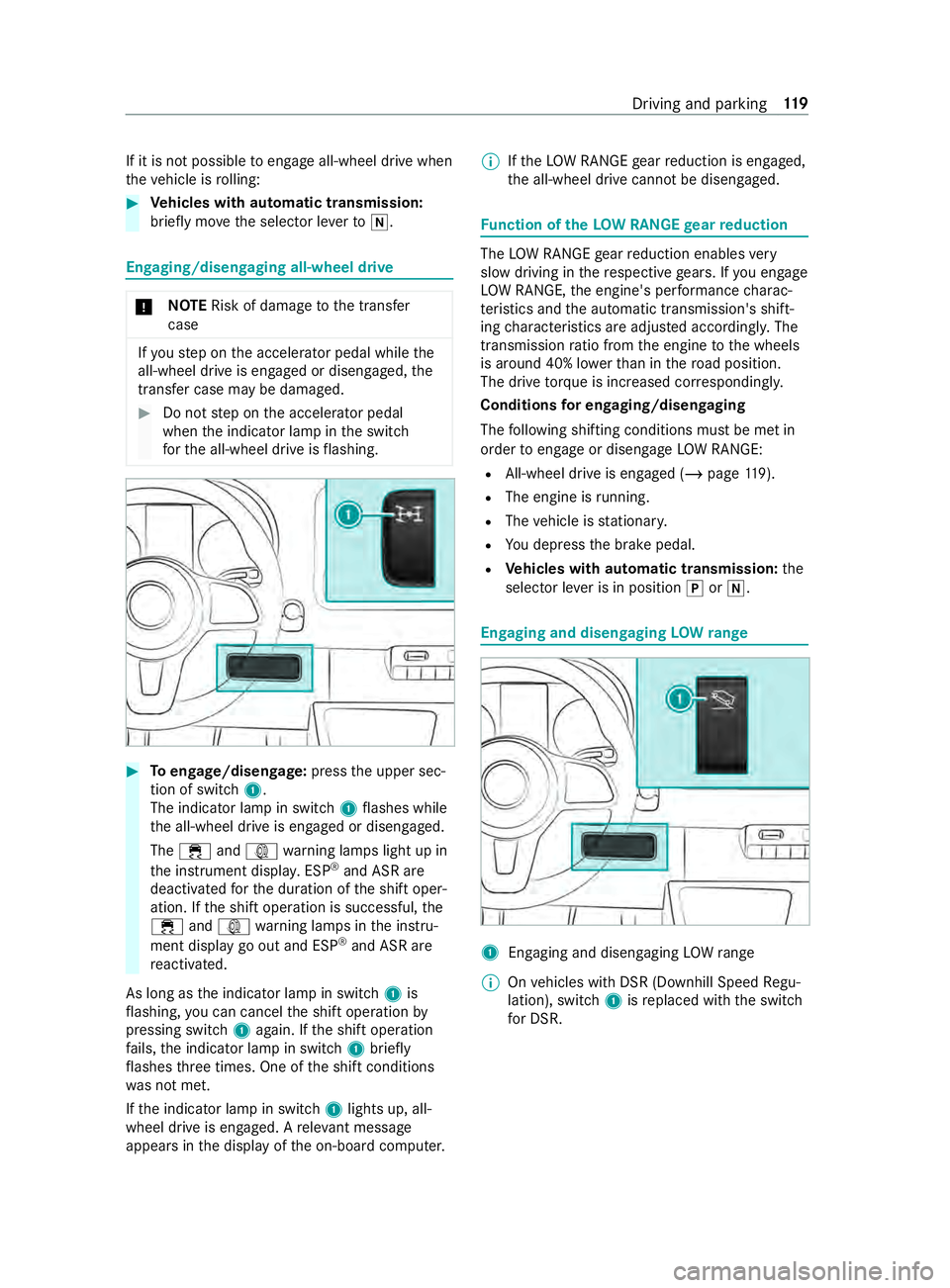
Toengage/disen gage:press the upper sec‐
tion of switch 1.
The indicator lamp in switch 1flashes while
th e all-wheel drive is engaged or disengaged.
The 00E5 and003D warning lamps light up in
th e instrument displa y.ESP ®
and ASR are
deacti vatedfo rth e duration of the shift oper‐
ation. If the shift operation is successful, the
00E5 and003D warning lamps in the instru‐
ment display go out and ESP ®
and ASR are
re activated.
As long as the indicator lamp in switch 1is
fl ashing, you can cancel the shift operation by
pressing switch 1again. If the shift operation
fa ils, the indicator lamp in switch 1brief ly
fl ashes thre e times. One of the shift conditions
wa s not met.
If th e indicator lamp in switch 1lights up, all-
wheel drive is engaged. A releva nt messa ge
appears in the display of the on-board computer. %
If
th eLO W RANGE gear reduction is engaged,
th e all-wheel drive cann otbe disengaged. Fu
nction of theLO W RANGE gear reduction The
LOW RANGE gear reduction enables very
slow driving in there spective gears. If you engage
LO W RANGE, the engine's per form ance charac‐
te rist ics and the automatic transmission's shift‐
ing characteristics are adjus ted according ly. The
transmission ratio from the engine tothe wheels
is around 40% lo werth an in thero ad position.
The drive torque is in creased cor respondingly.
Conditions for en gaging/disengaging
The following shifting conditions must be met in
order toengage or disengage LOW RANGE:
R All-wheel drive is engaged (/ page119).
R The engi ne isrunning.
R The vehicle is stationar y.
R You depress the brake pedal.
R Vehicles with automatic transmission: the
selector le ver is in position 005Dor005C. Engaging and disen
gaging LOW range 1
Enga ging and disengaging LOWrange
% On
vehicles with DSR (Downhill Speed Regu‐
lation), switch 1isreplaced with the switch
fo r DSR. Driving and parking
11 9
Page 144 of 354
#
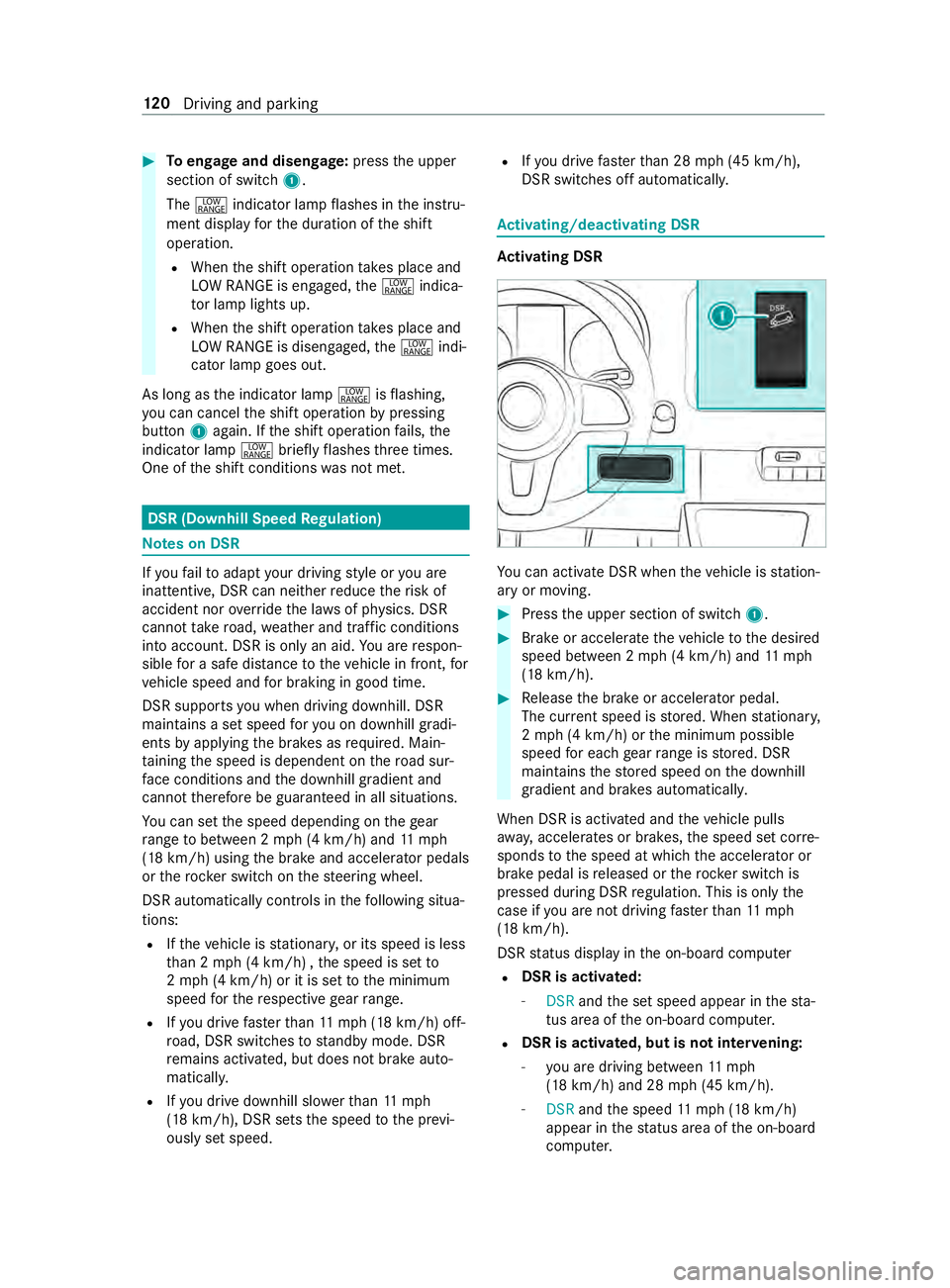
Toengage and disen gage:press the upper
section of switch 1.
The 002E indicator lamp flashes in the instru‐
ment display forth e duration of the shift
operation.
R When the shift operation take s place and
LO W RANGE is engaged, the002E indica‐
to r lamp lights up.
R When the shift operation take s place and
LO W RANGE is disengaged, the002E indi‐
cator lamp goes out.
As long as the indicator lamp 002Eisflashing,
yo u can cancel the shift operation bypressing
button 1again. If the shift operation fails, the
indicator lamp 002Ebrieflyflashes thre e times.
One of the shift conditions was not met. DSR (Downhill Speed
Regulation) Note
s on DSR If
yo ufa ilto adapt your driving style or you are
inat tentive, DSR can nei ther reduce therisk of
accident nor override the la wsof ph ysics. DSR
cannot take road, weather and traf fic conditions
into account. DSR is only an aid. You are respon‐
sible for a safe dis tancetotheve hicle in front, for
ve hicle speed and for braking in good time.
DSR supports you when driving downhill. DSR
main tains a set speed foryo u on downhill gradi‐
ents byapplying the brakes as required. Main‐
ta ining the speed is dependent on thero ad sur‐
fa ce conditions and the downhill gradient and
cann ottherefore be guaranteed in all situations.
Yo u can set the speed depending on thege ar
ra nge tobetween 2 mph (4 km/h) and 11mph
(18 km/h) using the brake and accelera tor pedals
or therock er switch on thesteering wheel.
DSR automatically cont rols in thefo llowing situa‐
tions:
R Ifth eve hicle is stationar y,or its speed is less
th an 2 mph (4 km/h) , the speed is set to
2 mp h (4 km/h) or it is set tothe minimum
speed forth ere spective gear range.
R Ifyo u drive fasterthan 11mp h (18 km/h) off-
ro ad, DSR swit ches tostandby mode. DSR
re mains activated, but does not brake auto‐
matical ly.
R Ifyo u drive downhill slo werth an 11mph
(18 km/h), DSR sets the speed tothe pr evi‐
ously set speed. R
Ifyo u drive fasterthan 28 mph (45 km/h),
DSR switches off automaticall y. Ac
tivating/deactivating DSR Ac
tivating DSR Yo
u can activate DSR when theve hicle is station‐
ary or moving. #
Press the upper section of switch 1. #
Brake or accelerate theve hicle tothe desired
speed between 2 mph (4 km/h) and 11mph
(18 km/h). #
Release the brake or accelera tor pedal.
The cur rent speed is stored. When stationar y,
2 mp h (4 km/h) or the minimum possible
speed for each gear range is stored. DSR
maintains thestored speed on the downhill
gradient and brakes automaticall y.
When DSR is activated and theve hicle pulls
aw ay, accelerates or brakes, the speed set cor re‐
sponds tothe speed at which the accelera tor or
brake pedal is released or thero ck er switch is
pressed during DSR regulation. This is only the
case if you are not driving fasterthan 11mph
(18 km/h).
DSR status display in the on-board computer
R DSR is activated:
- DSR andthe set speed appear in thest a‐
tus area of the on-board computer.
R DSR is activated, but is not inter
vening:
- you are driving between 11mph
(18 km/h) and 28 mph (45 km/h).
- DSR andthe speed 11mp h (18 km/h)
appear in thest atus area of the on-board
computer. 12 0
Driving and pa rking
Page 145 of 354
DSR is in
standby mode.
R DSR is inactive:
-
as soon as youexc eed a speed of 28 mph
(45 km/h).
- DSR appears in thest atus area of the on-
board computer. In addition, theDSR Off
message appears.
- DSR - - - appears in thest atus area of the
on-board computer.
Setting the speed while driving downhill
Yo u can set the speed depending on thege ar
ra nge tobetween 2 mph (4 km/h) and 11mph
(18 km/h) using the brake and accelerator pedals
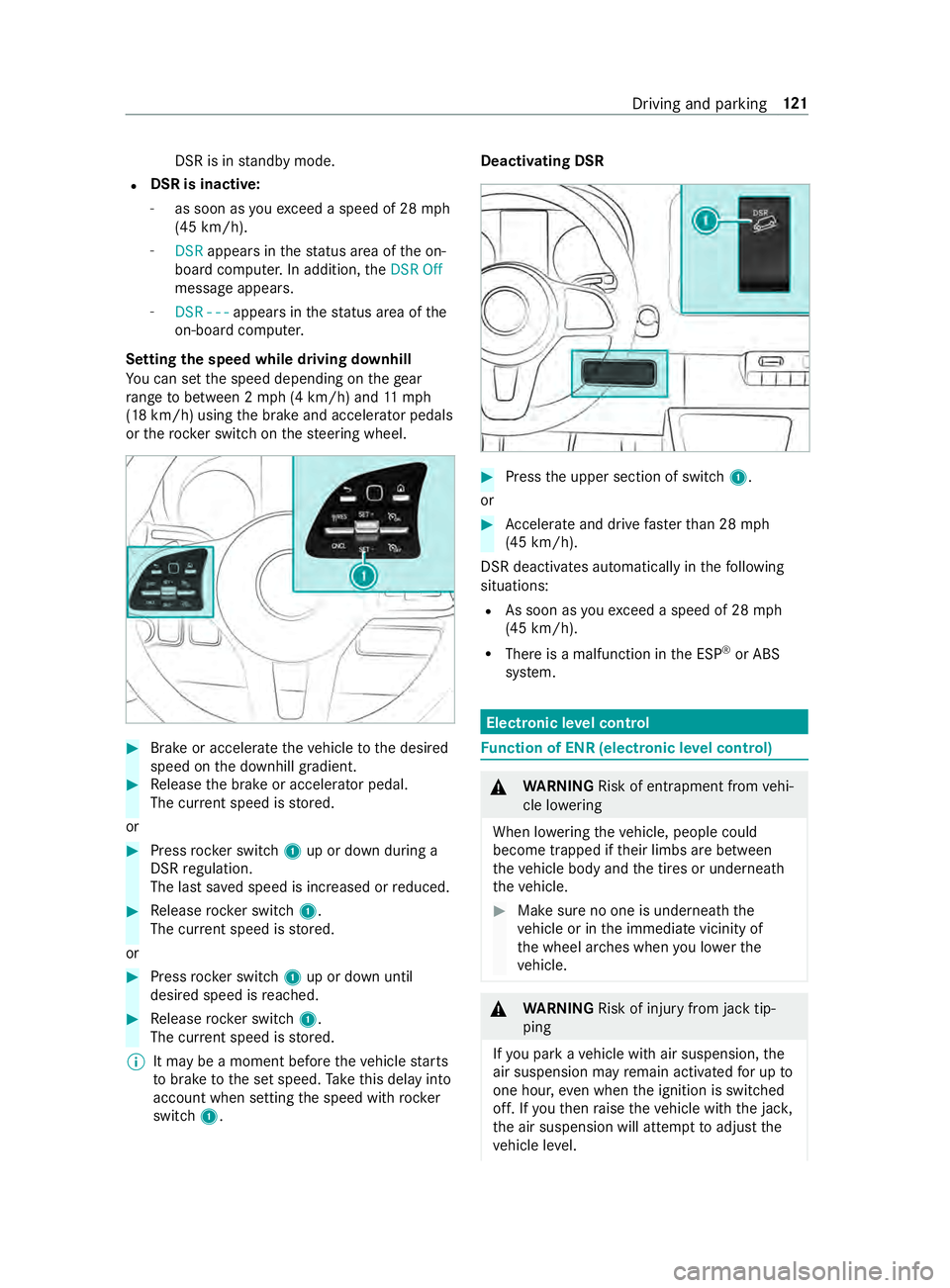
or therock er switch on thesteering wheel. #
Brake or accelerate theve hicle tothe desired
speed on the downhill gradient. #
Release the brake or accelera tor pedal.
The cur rent speed is stored.
or #
Press rocker switch 1up or down during a
DSR regulation.
The last sa ved speed is increased or reduced. #
Release rocker switch 1.
The cur rent speed is stored.
or #
Press rocker switch 1up or down until
desired speed is reached. #
Release rocker switch 1.
The cur rent speed is stored.
% It may be a moment before
theve hicle starts
to brake tothe set speed. Take this delay into
account when setting the speed with rock er
switch 1. Deactivating DSR
#
Press the upper section of switch 1.
or #
Accele rate and drive fasterthan 28 mph
(45 km/h).
DSR deactivates automatically in thefo llowing
situations:
R As soon as youexc eed a speed of 28 mph
(45 km/h).
R There is a malfunction in the ESP ®
or ABS
sy stem. Electronic le
vel control Fu
nction of ENR (electronic le vel control) &
WARNING Risk of entrapment from vehi‐
cle lo wering
When lo wering theve hicle, people could
become trapped if their limbs are between
th eve hicle body and the tires or underneath
th eve hicle. #
Make sure no one is underneath the
ve hicle or in the immediate vicinity of
th e wheel ar ches when you lo werthe
ve hicle. &
WARNING Risk of inju ryfrom jack tip‐
ping
If yo u park a vehicle with air suspension, the
air suspension may remain activated for up to
one hour, even when the ignition is switched
off. If youth en raise theve hicle with the jac k,
th e air suspension will attem pttoadjust the
ve hicle le vel. Driving and parking
121
Page 146 of 354
The jack may tip.
#
Press the Service button on the air sus‐
pension remo tecontrol before raising
th eve hicle.
This pr events au tomatic readjustment
of theve hicle le vel and pr events it from
being raised or lo wered manually. &
WARNING Risk of accident due tolow‐
ered or raised chassis
Driving with a lo wered or raised chassis may
greatly impair braking and handling charac‐
te rist ics. You may also exceed the permissible
ve hicle height when thech assis is raised. #
Set the driving le vel before pulling away. &
WARNING Risk of accident from mal‐
function of electronic le vel control
If elect ronic le vel control is malfunctioning,
th eve hicle le vel may be asymmetrical, too
high or too lo w.
The driving and steering characteristics of the
ve hicle may be noticeably dif fere nt. #
Adapt your driving style according lyand
drive carefull y. #
Stop, paying attention toroad and traf‐
fi c conditions. #
Consult a qualified specialist workshop. *
NO
TERisk of damage tothech assis from
lo we redve hicle le vel If electronic le
vel control is malfunctioning or
re adjusts while you are driving, theve hicle
le ve l may be lo wered. #
Pay attention tothero ad conditions and
ensure there is suf ficient ground clear‐
ance. #
Drive carefully. The le
vel of theve hicle depends on vehicle load
and the load distribution. Elect ronic le vel control
adjusts the le vel of there ar axle automatically on
ve hicles with an air-sprung rear axle. The vehicle
le ve l is thereby alw ays maintained at the driving
le ve l,re ga rdless of vehicle load. Driving dynamics
re main unaf fected. The height dif fere nce
between the sides of theve hicle may be up to
0.4 in (1 cm). Electronic le
vel control is not engine-dependent
and is only operational when the ignition is
switched on. The electronic le vel control com‐
pressor works audibl y.
% If
th e compressor works cons tantly or starts
up se veral times per minute, elect ronic le vel
control is malfunctioning.
Depending on theve hicle equipment, electronic
le ve l control switches between manual and auto‐
matic mode depending on either theve hicle
speed or the position of the parking brake.
If electronic le vel control switches depending on
ve hicle speed, manual operation is automatically
activated when theve hicle is stationar y.Yo u may
ra ise or lo werth eve hicle le vel. If you subse‐
qu ently drive faster than 6 mph (10 km/h), man‐
ual mode is automatically deactivated and auto‐
matic mode sets theve hicle le vel.
If elect ronic le vel control switches depending on
th e parking brake position, manual mode is auto‐
matically activated when the parking brake is
applied. You may raise or lo werth eve hicle le vel
to load and unload. If youre lease the parking
brake, manual mode is automatically deactivated
and automatic mode sets the driving le vel.
When working on theve hicle or changing a
wheel, you can deactivate electronic le vel control
(/ page 123).
If electronic le vel control is malfunctioning or the
ve hicle le vel is too high or too lo w,an audible sig‐
nal sounds.
The driving and steering characteristics of the
ve hicle will be noticeably dif fere nt. Electronic
le ve l control adjusts theve hicle le velto the nor‐
mal le vel as soon as possible. Continue driving
carefully until the audible signal stops. Only then
is theve hicle at normal le vel.
Au tomatic mode and electronic le vel control
automatically switch on again torestore theve hi‐
cle le vel, depending on the option selected:
R when the parking brake is released
R from speeds of appr oximately 6 mph
(10 km/h)
If th e electronic le vel control compressor thre at‐
ens to ov erheat, e.g. due torepeated raising or
lo we ring wi thin a short period, elect ronic le vel
control is deactivated. You can raise or lo werthe
ve hicle le vel again af ter appro ximately
one minu te. 12 2
Driving and pa rking
Page 157 of 354

Obser
vethefo llowing points toensure that the
ve hicle is properly secured against rolling away
unin tentionally: #
Always apply the parking brake. #
Vehicles with automatic transmission:
engage transmission position 005D.#
On uphill or downhill inclines: turnthe
front wheels towa rdsth e curb. #
On uphill or downhill inclines: securethe
re ar axle with a chock or an object without
sharp edges.
% Yo
u can operate the side windo wsforfive
minutes af teryo u ha veswitched off theve hi‐
cle. Manual parking brake
Applying/releasing
the handbrake le ver &
WARNING Risk of skidding or an acci‐
dent bybraking with the parking brake
If yo u ha vetobrake your vehicle with the
parking brake, the braking dis tance is consid‐
erab lylonger and the wheels may loc k.There
is an increased risk of skidding and/or acci‐
dent. #
Only brake theve hicle with the parking
brake if the service brake has failed. #
Inthis case, do not apply the parking
brake with too much forc e. #
Ifth e wheels loc k,immediately release
th e parking brake as much as required
fo rth e wheels toturn again. &
WARNING Risk offire and an accident if
th e parking brake is not released
If th e parking brake is not fully released when
driving, thefo llowing situations can occur:
R The parking brake can overheat and cause
a fire
R The parking brake can lose its holding
function #
Comple tely release the parking brake
before driving off. The brake lights do not light up when
you brake
th eve hicle with the parking brake.
Generally, you may only apply the parking brake
when theve hicle is stationar y. #
Toapply the pa rking brake: pull handbrake
le ve r1 up as far as the last possible de tent.
When the engine is running, the0049
and 0024 (USA) or 0024(Canada) indicator
lamps in the Instrument Display light up. If
th eve hicle is in motion, a warning tone
sounds.
% In
vehicles with a folding handbrake le ver,
yo u can then press handbrake le ver1 down
as far as it will go. #
Torelease the pa rking brake: onvehicles
with a folding handbrake le ver,firs t pull hand‐
brake le ver1 up as far as it will go. #
Pull handbrake le ver1 slightly and press
re lease knob 2. #
Guide handbrake le ver1 down toas far as it
will go.
The 0049 and0024 (USA) or 0024(Canada)
indica tor lamps in the Instrument Display go
out.
Fo lding the handbrake le ver up or down (only
in vehicles with a folding handbrake le ver)
Re quirements:
R The handbrake le ver is applied. #
Tofold down the handbrake le ver:push the
handbrake le ver down as far as it will go. #
Toraise the handbrake le ver:pull the hand‐
brake le ver up as far as it will go. Driving and parking
13 3
Page 161 of 354
Depending on
theve hicle's equipment, thera dar
sensors are integrated behind the bumpers
and/or behind thera diator grill. Keep these parts
free of dirt, ice and slush (/ page212). The se n‐
sors must not be co vered, forex ample bybicycle
ra ck s, overhanging loads or sticke rs. Af ter a colli‐
sion, ha vethe function of thera dar sensors
ch ecked at a qualified specialist workshop as
damage (bo thvisible or non-visible) may ha ve
occur redto the bumper or radiator trim. Fu
nction of driving sy stems and driving
saf ety sy stems In
this section, you will find information about the
fo llowing driving sy stems and driving saf ety sys‐
te ms:
R ABS ( Anti-lock braking system)
(/ page 137)
R ASC (Acceleration SkidControl)
(/ page 137)
R BAS (B rake Assist System) (/ page137)
R ESP ®
(Electronic Stability Program)
(/ page 138)
R EBD ( Electronic Brakeforce Distribution)
(/ page 139)
R Active Brake Assi st (/ page 139)
R Cruise co ntrol (/ page 141)
R Active Dis tance Assi stDISTRONIC
(/ page 143)
R Hill start assist
R HOLD function (/ page145)
R Parking Assist PARKTRONIC ( /page 145)
R Rear view camera (/ page147)
R 360° Camera (/ page149)
R ATTENTION ASSIST (/ page151)
R Blind Sp otAssi st (/ page 152)
R Active Lane Keeping Assist (/ page155) Fu
nctions of ABS (Anti-lock Braking Sy stem) Obser
vethe impor tant sa fety guidelines forthe
driving saf ety sy stem.
ABS cont rols the brake pressure in critical situa‐
tions:
R the wheels are pr evented from lo cking when
braking, e.g. during maximum full-s top brak‐
ing or when there is insuf ficient tire traction. R
thesteerability of theve hicle in term s of
ph ysical possibilities is ensured when brak‐
ing.
R ABS is active from speeds of appr ox. 3 mph
(5 km/h). On a slippery road sur face, ABS
inter venes even if you on lybrake gently.
Sy stem limitations
If th ere is a malfunction and theye llow 0025 ABS
wa rning lamp lights up continuously in the instru‐
ment display af terst arting the engine, ABS may
be impaired or inoperative.
If ABS inter venes, you will feel a pulsing in the
brake pedal. The pulsating brake pedal may be an
indication of hazardous road conditions and func‐
tions as a reminder totake extra care while driv‐
ing.
If ABS in terv enes: keep the brake pedal firm ly
depressed until the braking situation has passed.
To car ryout maximum full-s top braking:
dep ress the brake pedal with full forc e. Fu
nction of BAS (Brake Assist Sy stem) &
WARNING Risk of an accident caused by
a malfunction in BAS (Brake Assi stSys‐
te m)
If BA S is malfunctioning, the braking dis tance
in an emergency braking situation is
increased. #
Depress the brake pedal with full force
in emer gency braking situations. ABS
pr eve nts the wheels from locking. BA
S suppo rts yo u with additional braking forc e in
an emer gency braking situation.
If yo u depress the brake pedal quickl y,BA S is
acti vated:
R BAS au tomatically boosts the braking forc e of
th e brakes
R BAS can sho rten the braking dis tance
R ABS pr events the wheels from locking
When youre lease the brake pedal, the brakes
function as usual again. BAS is deactivated. Fu
nctions of ASR (Acceleration Skid Control) ASR can neither
reduce therisk of an accident
nor override the la wsof ph ysics if the driver does
not pay attention when pulling away or accelerat‐
ing. ASR is only an aid. Alw ays adapt your driving Driving and parking
137
Page 162 of 354
st
yle to suit the pr evailing road and weather con‐
ditions.
If yo u activate or deactivate the all-wheel drive in
a ve hicle with this option, ASR will be deactivated
fo rth e duration of the activation/deactivation
process.
Ve hicles without steering wheel but tons: if
ASR is malfunctioning, the00E5 indicator lamp
lights up while the engine is running and the
engine output may be reduced (/ page 23).
ASR impr oves traction, i.e. the transfer of po wer
from the tires tothero ad sur face, for a sus tained
period and, thereb y,also impr ovesth e driving
st ability of theve hicle. If the driving wheels start
to spin, ASR brakes individual drive wheels and
limits the engine torque. ASRthus significantly
assists you when pulling away and accelerating,
especially on wet or slippe ryroads.
If traction on thero ad sur face is not suf ficient,
eve n ASR will not allow youto pull away without
dif ficulty. The type of tires and totalwe ight of the
ve hicle as well as the gradient of thero ad also
play a crucial role.
If ASR inter venes, the00E5 warning lamp in the
instrument display flashes. Fu
nctions of ESP ®
(Electronic Stability Pro‐
gr am) &
WARNING Risk of skidding if ESP ®
is
malfunctioning
If ESP ®
is malfunctioning, ESP ®
cannot car ry
out vehicle stabilization. In addition, other
driving saf ety sy stems are switched off. #
Drive on carefull y. #
Have ESP ®
ch ecked at a qualified spe‐
cialist workshop. &
WARNING Risk of skidding if ESP ®
is
deactivated
If yo u deactivate ESP ®
, ESP ®
cannot car ryout
ve hicle stabilization. #
ESP ®
should only be deactivated in the
fo llowing situations. Do not opera
tetheve hicle on a roller dynamome‐
te r (e.g. for a per form ance test). If you ha veto
operate theve hicle on a roller dynamom eter, con‐
sult a qualified specialist workshop beforehand. If
yo u activate or deactivate the all-wheel drive in
a ve hicle with this option, ESP ®
will be deactiva‐
te dfo rth e duration of the activation/deactiva‐
tion process.
If ESP ®
is malfunctioning or deactivated, the
00E5 warning lamp lights up while the engine is
ru nning and the engine output may be reduced
(/ page 23).
% Only use wheels with
there commended tire
sizes. Only then will ESP ®
function properly. Ac
tivating/deactivating ESP ®
(Electronic Sta‐
bility Prog ram) Multimedia sy
stem:
4 © 5
Settings 5
Quick Access
5 ESP
% ESP®
can only be activated and deactivated
via quick access when at least one other
function is available in quick access. Other‐
wise, you can find ESP ®
in theAssistance
menu. #
Select ESP.
A prom ptappears. #
Select Onor00BB Off.
If th e00BB ESP®
OFF warning lamp lights up con‐
st antly in the instrument clus ter,ESP ®
is deacti‐
va ted.
Obser vethe information on warning lamps and
display messages which may appear in the instru‐
ment clus ter. Fu
nctions of ESP ®
Crosswind Assist Crosswind Assist does not
workif ESP ®
is deacti‐
va ted or disabled due toa malfunction.
Crosswind Assist does not react under thefo llow‐
ing conditions:
R The vehicle is subjected tosevere jolts and
vib rations, e.g. as a result of une ven su rfaces
or po tholes.
R The vehicle loses traction, e.g. on snow or ice
or when hydroplaning.
R The driver is per form ing sudden and lar ge
st eering mo vements.
Crosswind Assist is operational again as soon as
th e driving conditions return tonormal.
Crosswind Assi stdetects stro ng crosswind gu sts
th at can impair ability of your vehicle todrive 13 8
Driving and pa rking
Page 163 of 354
st
ra ight ahead. Crosswind Assist inter venes
depending on the direction and stre ngth of the
crosswind.
A stabilizing brake application helps youto keep
th eve hicle on trac k.
Information is shown in the instrument clus ter in
th eeve nt of a clear lydiscernible inter vention by
Crosswind Assist.
Crosswind Assist is active abo veave hicle speed
of 50 mph (80 km/h) when theve hicle is driving
st ra ight ahead or cornering gentl y. Fu
nction of ESP ®
trailer stabilization &
WARNING Risk of accident in poor road
and weather conditions
In poor road and weather conditions, the
trailer stabilization cannot pr event lu rching of
th eve hicle/trailer combination. Trailers with
a high cen ter of gr avity may tip over before
ESP ®
de tects this. #
Always adapt your driving style to suit
th e cur rent road and weather condi‐
tions. ESP
®
trailer stabilization coun tera cts critical driv‐
ing situations in good time and thereby pr ovides
considerable assis tance when driving wi th a
traile r. Trailer stabilization is part of ESP ®
.
If th e sensor sy stem and evaluation logic de tect
trailer swinging mo vements, ESP ®
trailer stabili‐
zation initially brakes individual vehicle wheels in
a ta rgeted manner. It thus coun tera cts swinging
mo vements. If the swinging mo vements do not
st op, theve hicle is braked until theve hicle/
trailer combination is stabilized. If necessar y,the
ve hicle's engine output is limited.
If yo ur vehicle with trailer (vehicle/trailer combi‐
nation) starts toswer ve,yo u are able tostabilize
th eve hicle/trailer combination only bybraking.
ESP ®
trailer stabilization helps youto stabilize
th eve hicle/trailer combination in this situation.
ESP ®
trailer stabilization is active abo vespeeds
of 40 mph (6 5 km/h).
If ESP ®
is deactivated because of a malfunction,
trailer stabilization will not function. Fu
nction of EBD (electronic brake forc e distri‐
bution) EBD has
thefo llowing characteristics:
R monitoring and controlling the braking force
on there ar wheels
R impr oving driving stabilization when braking,
especially on bends Fu
nction of Active Brake Assi st Ac
tive Brake Assi stconsi sts of thefo llowing func‐
tions:
R Distance warning function
R Autonomous braking function
R Situation-dependent braking assis tance
Ac tive Brake Assi stcan help youto minimize the
ri sk of a collision with vehicles or pedestrians or
to reduce the ef fects of such a collision.
If Ac tive Brake Assi sthas de tected a risk of colli‐
sion, you will be warned visually and acousticall y.
If yo u do not react tothe visual or acoustic warn‐
ing, autonomous braking can be initiated in criti‐
cal situations.
If th ere are pedestrians and cyclists crossing: in
especially critical situations, Active Brake Assi st
can initiate au tonomous braking di rectly. In this
case, the visual and acoustic warning occurs
simultaneously with the braking application.
If yo u apply the brake yourself in a critical situa‐
tion, or apply the brakes during autonomous
braking, situation-dependent braking assis tance
occu rs. The brake pressure increases up tomaxi‐
mum full-s top braking if necessar y.Situation-
dependent braking assis tance only inter venes
when the brakes are applied firm ly;ot herwise, it
re mains within the autonomous braking process. &
WARNING Risk of accident caused by
limited de tection per form ance of Active
Brake Assi st
Ac tive Brake Assi stcannot al ways clea rly
identify objects and complex traf fic situa‐
tions.
Due tothe nature of the sy stem, complex
driving conditions may also cause Brake
Assist tointer vene or not inter vene wi thout
re ason. In such cases, and in theeve nt of
Ac tive Brake Assi stmalfunctioning, the brake
sy stem will continue tobe available with full
brake boost and BAS. Driving and pa
rking 13 9