ignition switch wiring dia MITSUBISHI 380 2005 Workshop Manual
[x] Cancel search | Manufacturer: MITSUBISHI, Model Year: 2005, Model line: 380, Model: MITSUBISHI 380 2005Pages: 1500, PDF Size: 47.87 MB
Page 404 of 1500
SYMPTOM PROCEDURES
SIMPLIFIED WIRING SYSTEM (SWS)54B-404
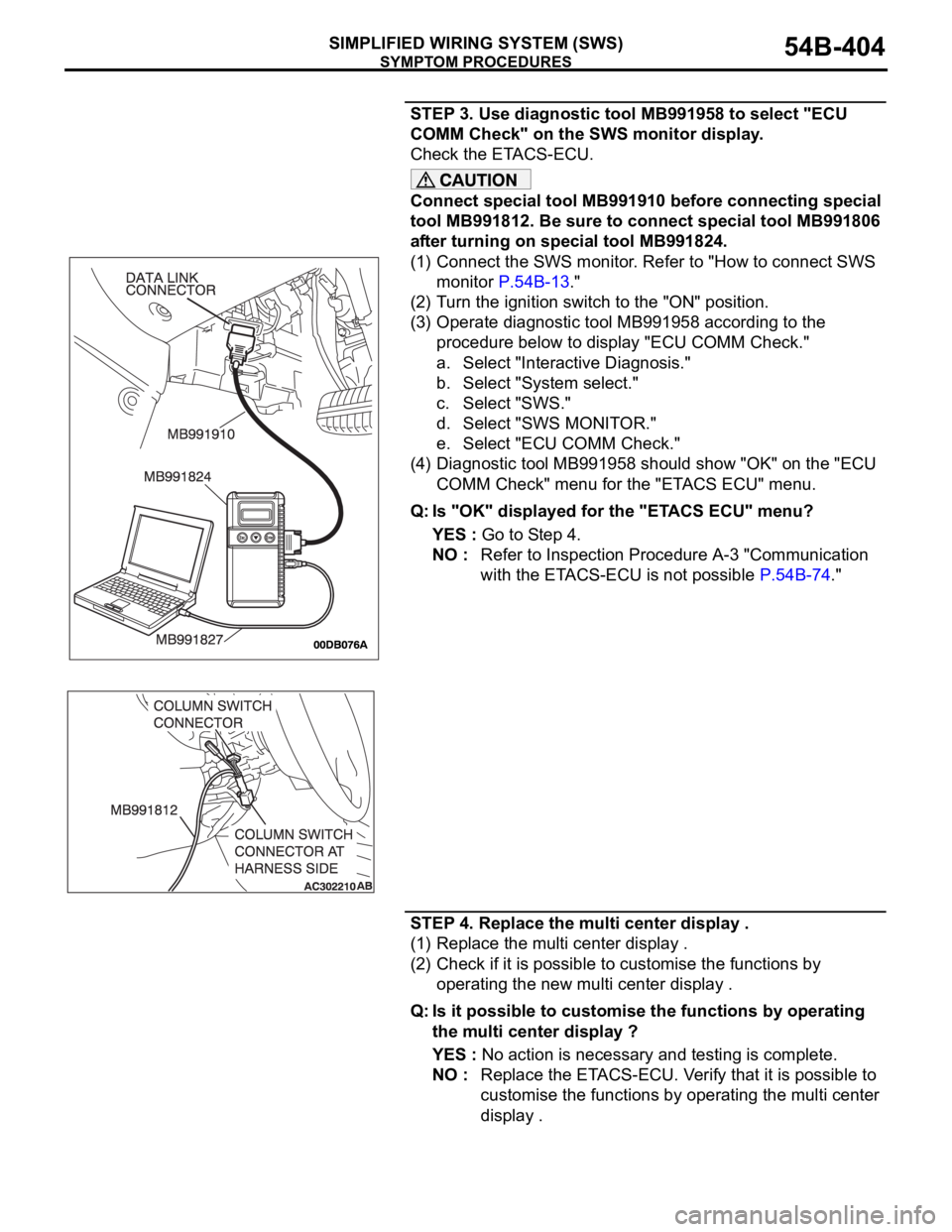
STEP 3. Use diagnostic tool MB991958 to select "ECU
COMM Check" on the SWS monitor display.
Check the ETACS-ECU.
Connect special tool MB991910 before connecting special
tool MB991812. Be sure to connect special tool MB991806
after turning on special tool MB991824.
(1) Connect the SWS monitor. Refer to "How to connect SWS
monitor P.54B-13."
(2) Turn the ignition switch to the "ON" position.
(3) Operate diagnostic tool MB991958 according to the
procedure below to display "ECU COMM Check."
a. Select "Interactive Diagnosis."
b. Select "System select."
c. Select "SWS."
d. Select "SWS MONITOR."
e. Select "ECU COMM Check."
(4) Diagnostic tool MB991958 should show "OK" on the "ECU
COMM Check" menu for the "ETACS ECU" menu.
Q: Is "OK" displayed for the "ETACS ECU" menu?
YES : Go to Step 4.
NO : Refer to Inspection Procedure A-3 "Communication
with the ETACS-ECU is not possible P.54B-74."
STEP 4. Replace the multi center display .
(1) Replace the multi center display .
(2) Check if it is possible to customise the functions by
operating the new multi center display .
Q: Is it possible to customise the functions by operating
the multi center display ?
YES : No action is necessary and testing is complete.
NO : Replace the ETACS-ECU. Verify that it is possible to
customise the functions by operating the multi center
display .
Page 405 of 1500
INPUT SIGNAL PROCEDURES
SIMPLIFIED WIRING SYSTEM (SWS)54B-405
INPUT SIGNAL PROCEDURES
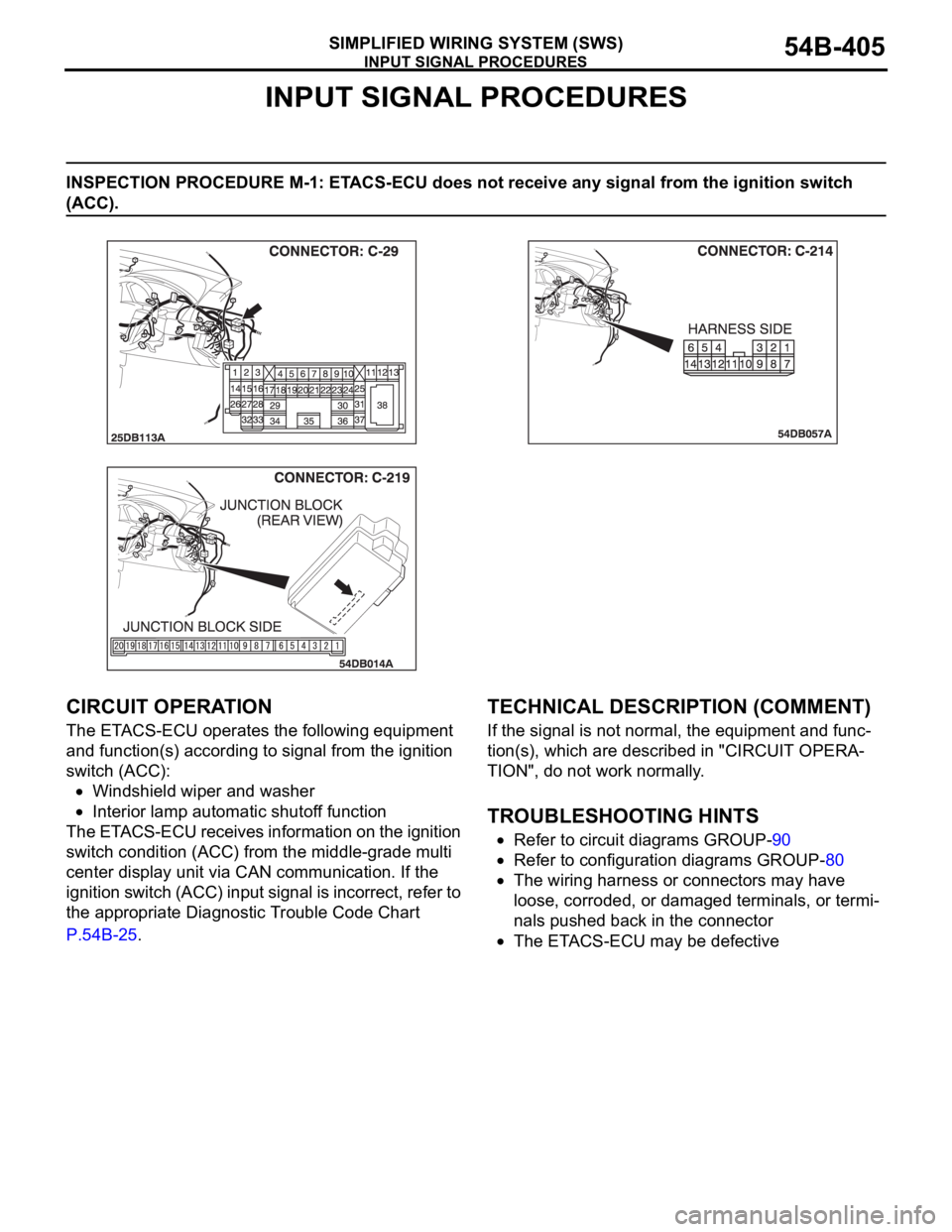
INSPECTION PROCEDURE M-1: ETACS-ECU does not receive any signal from the ignition switch
(ACC).
.
CIRCUIT OPERATION
The ETACS-ECU operates the following equipment
and function(s) according to signal from the ignition
switch (ACC):
Windshield wiper and washer
Interior lamp automatic shutoff function
The ETACS-ECU receives information on the ignition
switch condition (ACC) from the middle-grade multi
center display unit via CAN communication. If the
ignition switch (ACC) input signal is incorrect, refer to
the appropriate Diagnostic Trouble Code Chart
P.54B-25.
.
TECHNICAL DESCRIPTION (COMMENT)
If the signal is not normal, the equipment and func-
tion(s), which are described in "CIRCUIT OPERA-
TION", do not work normally.
.
TROUBLESHOOTING HINTS
Refer to circuit diagrams GROUP-90
Refer to configuration diagrams GROUP-80
The wiring harness or connectors may have
loose, corroded, or damaged terminals, or termi-
nals pushed back in the connector
The ETACS-ECU may be defective
Page 406 of 1500
INPUT SIGNAL PROCEDURES
SIMPLIFIED WIRING SYSTEM (SWS)54B-406
DIAGNOSIS
Required Special Tool:
MB991223: Harness Set
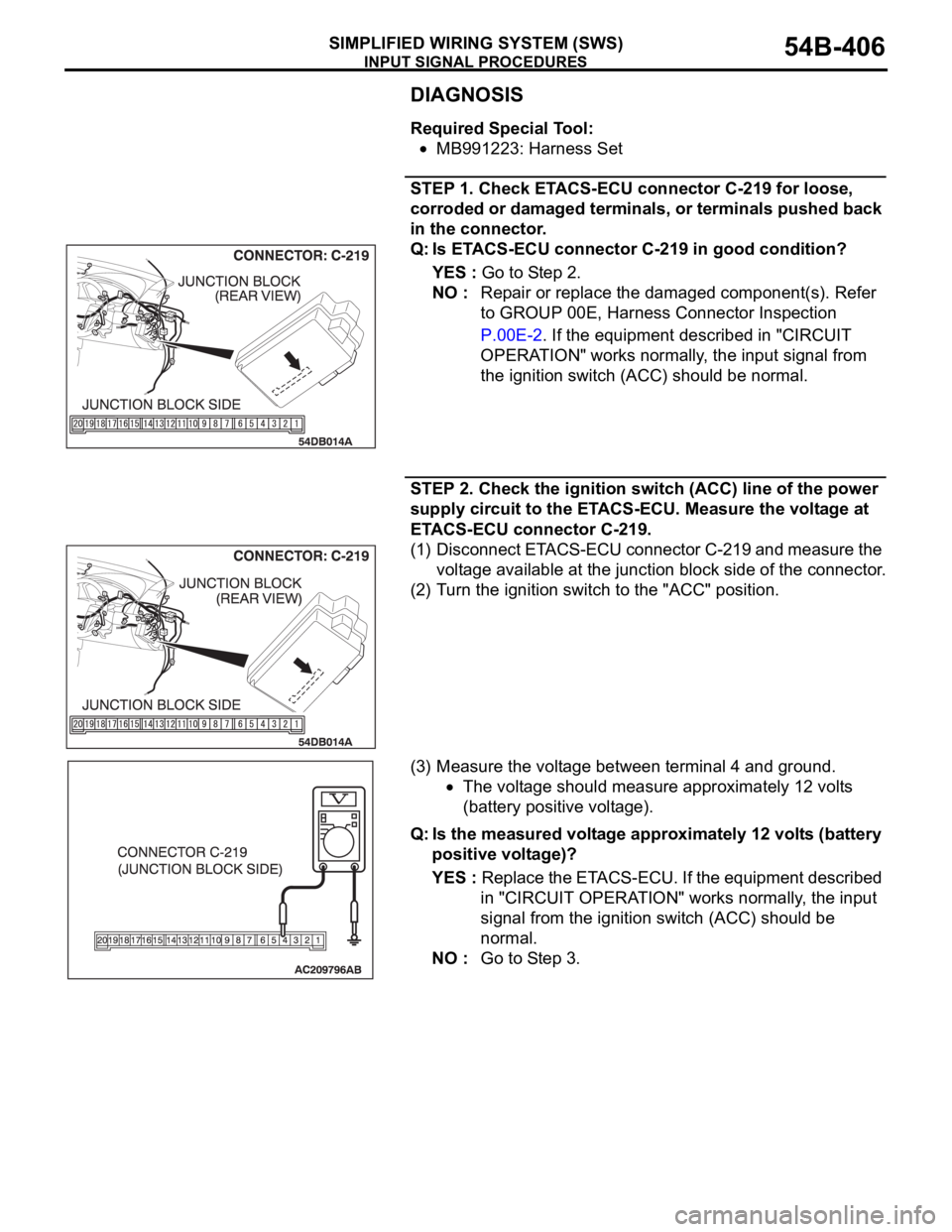
STEP 1. Check ETACS-ECU connector C-219 for loose,
corroded or damaged terminals, or terminals pushed back
in the connector.
Q: Is ETACS-ECU connector C-219 in good condition?
YES : Go to Step 2.
NO : Repair or replace the damaged component(s). Refer
to GROUP 00E, Harness Connector Inspection
P.00E-2. If the equipment described in "CIRCUIT
OPERATION" works normally, the input signal from
the ignition switch (ACC) should be normal.
STEP 2. Check the ignition switch (ACC) line of the power
supply circuit to the ETACS-ECU. Measure the voltage at
ETACS-ECU connector C-219.
(1) Disconnect ETACS-ECU connector C-219 and measure the
voltage available at the junction block side of the connector.
(2) Turn the ignition switch to the "ACC" position.
(3) Measure the voltage between terminal 4 and ground.
The voltage should measure approximately 12 volts
(battery positive voltage).
Q: Is the measured voltage approximately 12 volts (battery
positive voltage)?
YES : Replace the ETACS-ECU. If the equipment described
in "CIRCUIT OPERATION" works normally, the input
signal from the ignition switch (ACC) should be
normal.
NO : Go to Step 3.
Page 407 of 1500
INPUT SIGNAL PROCEDURES
SIMPLIFIED WIRING SYSTEM (SWS)54B-407
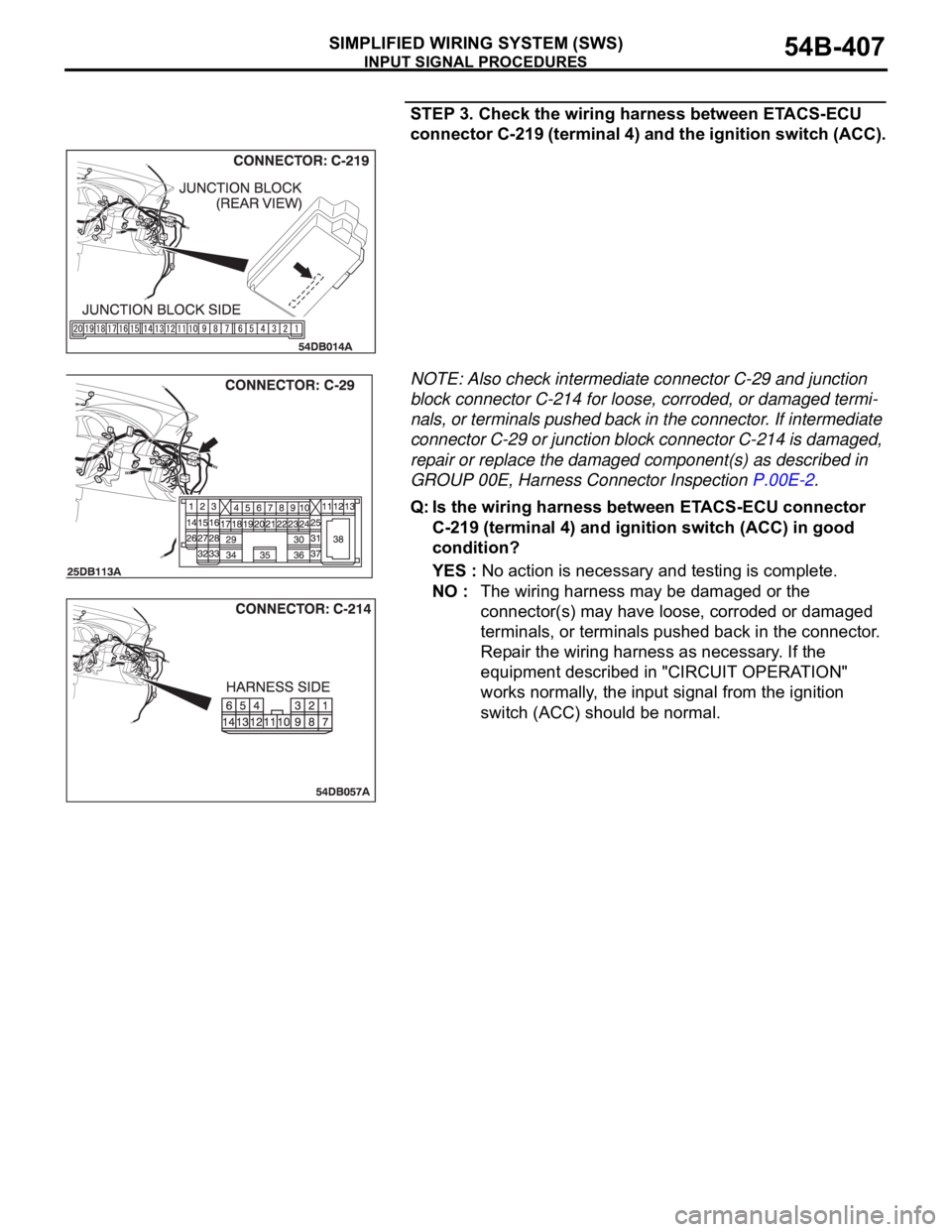
STEP 3. Check the wiring harness between ETACS-ECU
connector C-219 (terminal 4) and the ignition switch (ACC).
NOTE: Also check intermediate connector C-29 and junction
block connector C-214 for loose, corroded, or damaged termi-
nals, or terminals pushed back in the connector. If intermediate
connector C-29 or junction block connector C-214 is damaged,
repair or replace the damaged component(s) as described in
GROUP 00E, Harness Connector Inspection P.00E-2.
Q: Is the wiring harness between ETACS-ECU connector
C-219 (terminal 4) and ignition switch (ACC) in good
condition?
YES : No action is necessary and testing is complete.
NO : The wiring harness may be damaged or the
connector(s) may have loose, corroded or damaged
terminals, or terminals pushed back in the connector.
Repair the wiring harness as necessary. If the
equipment described in "CIRCUIT OPERATION"
works normally, the input signal from the ignition
switch (ACC) should be normal.
Page 408 of 1500
INPUT SIGNAL PROCEDURES
SIMPLIFIED WIRING SYSTEM (SWS)54B-408
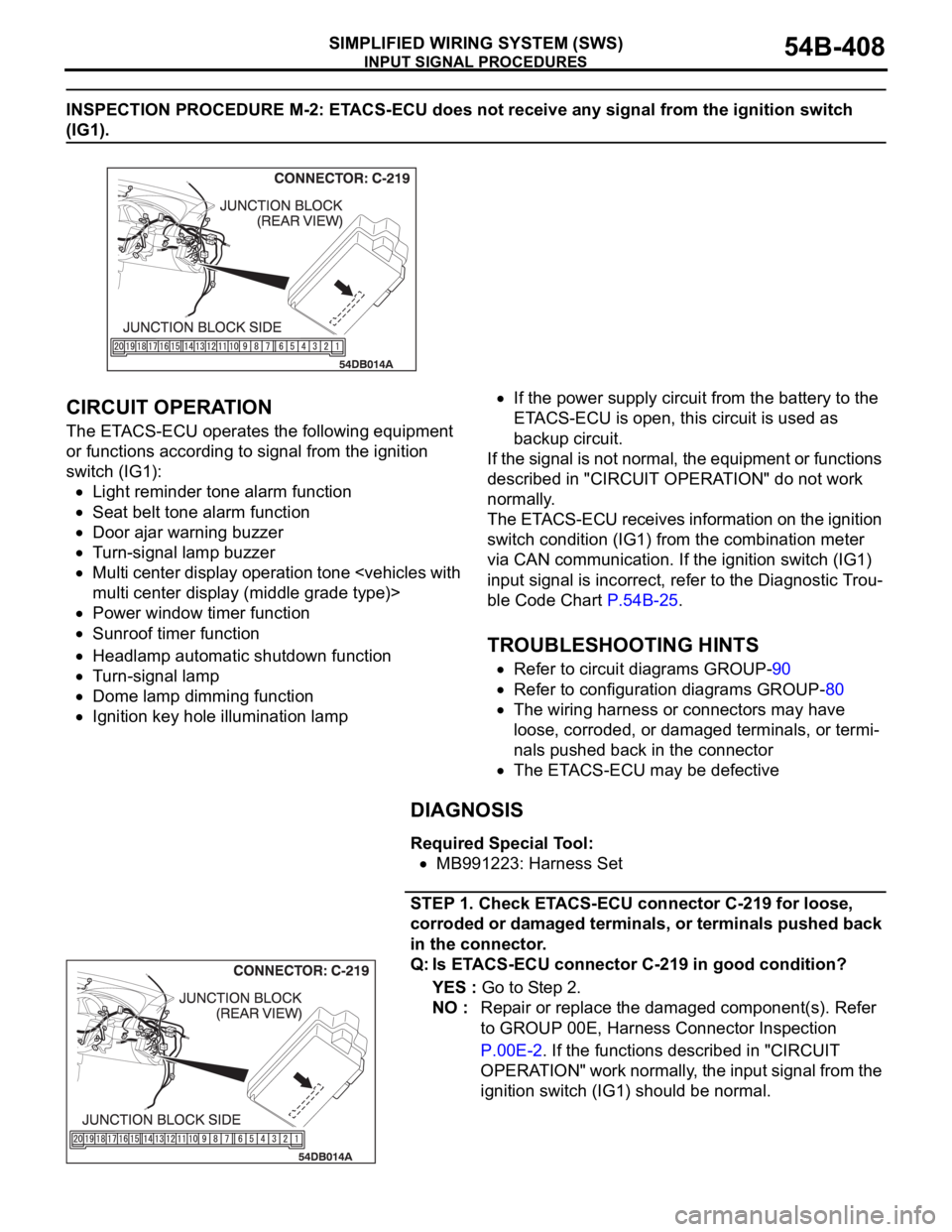
INSPECTION PROCEDURE M-2: ETACS-ECU does not receive any signal from the ignition switch
(IG1).
.
CIRCUIT OPERATION
The ETACS-ECU operates the following equipment
or functions according to signal from the ignition
switch (IG1):
Light reminder tone alarm function
Seat belt tone alarm function
Door ajar warning buzzer
Turn-signal lamp buzzer
Multi center display operation tone
Power window timer function
Sunroof timer function
Headlamp automatic shutdown function
Turn-signal lamp
Dome lamp dimming function
Ignition key hole illumination lamp
If the power supply circuit from the battery to the
ETACS-ECU is open, this circuit is used as
backup circuit.
If the signal is not normal, the equipment or functions
described in "CIRCUIT OPERATION" do not work
normally.
The ETACS-ECU receives information on the ignition
switch condition (IG1) from the combination meter
via CAN communication. If the ignition switch (IG1)
input signal is incorrect, refer to the Diagnostic Trou-
ble Code Chart P.54B-25.
.
TROUBLESHOOTING HINTS
Refer to circuit diagrams GROUP-90
Refer to configuration diagrams GROUP-80
The wiring harness or connectors may have
loose, corroded, or damaged terminals, or termi-
nals pushed back in the connector
The ETACS-ECU may be defective
DIAGNOSIS
Required Special Tool:
MB991223: Harness Set
STEP 1. Check ETACS-ECU connector C-219 for loose,
corroded or damaged terminals, or terminals pushed back
in the connector.
Q: Is ETACS-ECU connector C-219 in good condition?
YES : Go to Step 2.
NO : Repair or replace the damaged component(s). Refer
to GROUP 00E, Harness Connector Inspection
P.00E-2. If the functions described in "CIRCUIT
OPERATION" work normally, the input signal from the
ignition switch (IG1) should be normal.
Page 414 of 1500

INPUT SIGNAL PROCEDURES
SIMPLIFIED WIRING SYSTEM (SWS)54B-414
CIRCUIT OPERATION
The ETACS-ECU operates the following functions or
systems according to signal from the front door
switches:
Light reminder tone alarm function
Door ajar warning buzzer
Forgotten key reminder
Power window timer function
Sunroof timer function
Keyless entry system
Timed locking mechanism
Headlamp automatic shutdown function
Dome lamp
Interior lamp automatic-shutdown function
Ignition key hole illumination lamp
Door-ajar indicator lamp
.
TECHNICAL DESCRIPTION (COMMENT)
If the signal is not normal, the functions or systems
described in "CIRCUIT OPERATION" do not work
normally. If the signal is not normal, the front door
switches or the ETACS-ECU may be defective.
.
TROUBLESHOOTING HINTS
Refer to circuit diagrams GROUP-90
Refer to configuration diagrams GROUP-80
The front door switches may be defective
The wiring harness or connectors may have
loose, corroded, or damaged terminals, or termi-
nals pushed back in the connector
The ETACS-ECU may be defective
Page 415 of 1500
INPUT SIGNAL PROCEDURES
SIMPLIFIED WIRING SYSTEM (SWS)54B-415
DIAGNOSIS
Required Special Tools:
MB991223: Harness Set
MB991958: Diagnostic Tool (MUT-III Sub Assembly)
MB991824: Vehicle Communication Interface (V.C.I.)
MB991827: MUT-III USB Cable
MB991910: MUT-III Main Harness A
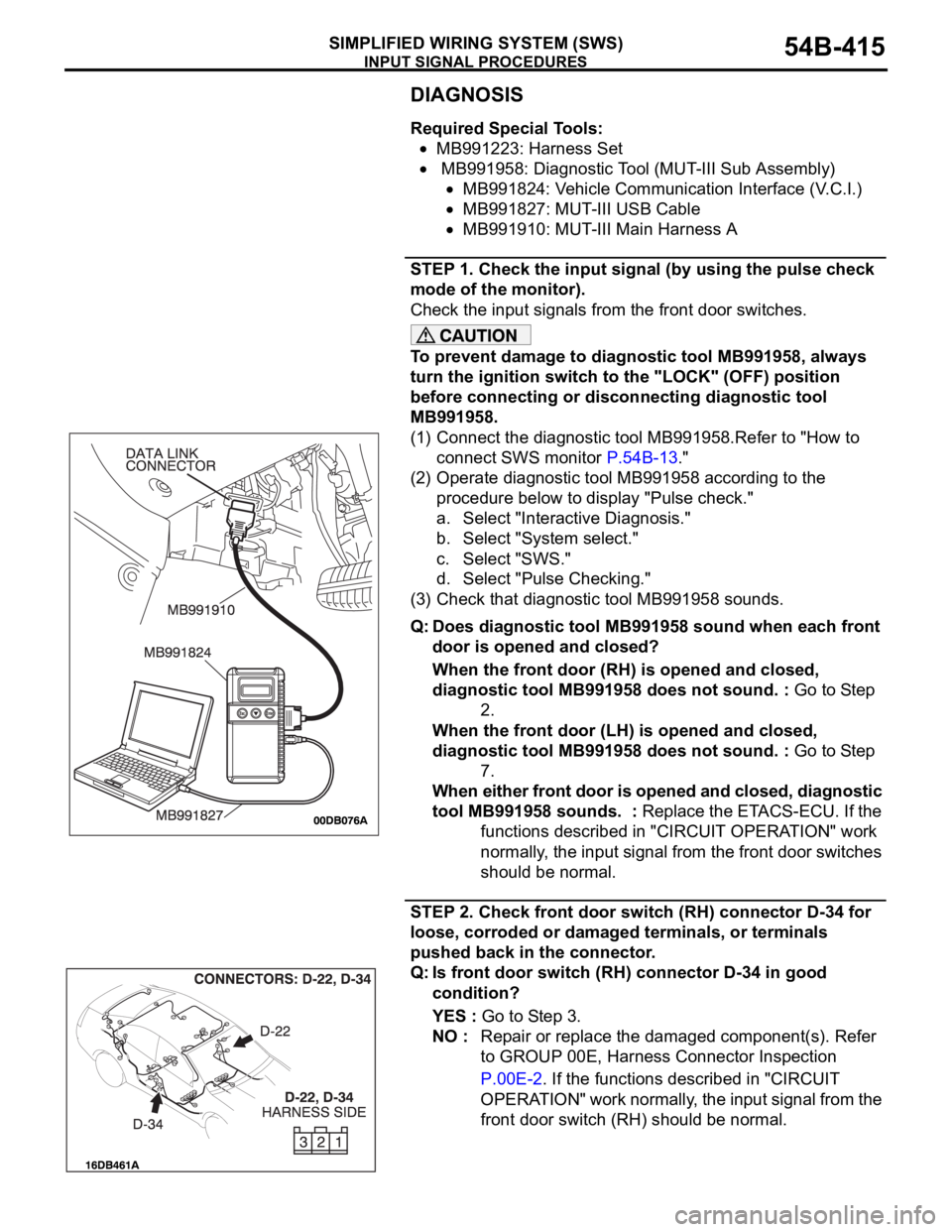
STEP 1. Check the input signal (by using the pulse check
mode of the monitor).
Check the input signals from the front door switches.
To prevent damage to diagnostic tool MB991958, always
turn the ignition switch to the "LOCK" (OFF) position
before connecting or disconnecting diagnostic tool
MB991958.
(1) Connect the diagnostic tool MB991958.Refer to "How to
connect SWS monitor P.54B-13."
(2) Operate diagnostic tool MB991958 according to the
procedure below to display "Pulse check."
a. Select "Interactive Diagnosis."
b. Select "System select."
c. Select "SWS."
d. Select "Pulse Checking."
(3) Check that diagnostic tool MB991958 sounds.
Q: Does diagnostic tool MB991958 sound when each front
door is opened and closed?
When the front door (RH) is opened and closed,
diagnostic tool MB991958 does not sound. : Go to Step
2.
When the front door (LH) is opened and closed,
diagnostic tool MB991958 does not sound. : Go to Step
7.
When either front door is opened and closed, diagnostic
tool MB991958 sounds. : Replace the ETACS-ECU. If the
functions described in "CIRCUIT OPERATION" work
normally, the input signal from the front door switches
should be normal.
STEP 2. Check front door switch (RH) connector D-34 for
loose, corroded or damaged terminals, or terminals
pushed back in the connector.
Q: Is front door switch (RH) connector D-34 in good
condition?
YES : Go to Step 3.
NO : Repair or replace the damaged component(s). Refer
to GROUP 00E, Harness Connector Inspection
P.00E-2. If the functions described in "CIRCUIT
OPERATION" work normally, the input signal from the
front door switch (RH) should be normal.
Page 421 of 1500
INPUT SIGNAL PROCEDURES
SIMPLIFIED WIRING SYSTEM (SWS)54B-421
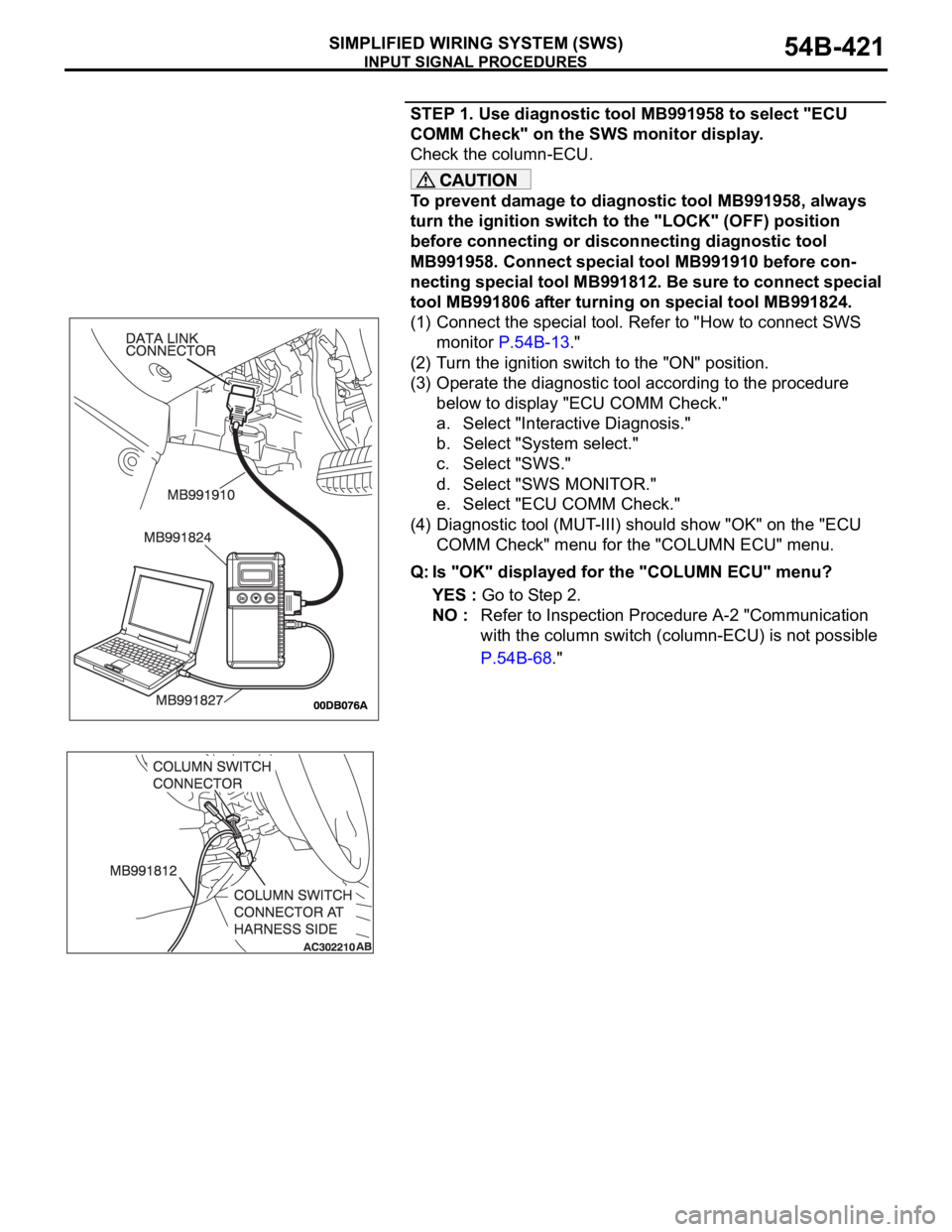
STEP 1. Use diagnostic tool MB991958 to select "ECU
COMM Check" on the SWS monitor display.
Check the column-ECU.
To prevent damage to diagnostic tool MB991958, always
turn the ignition switch to the "LOCK" (OFF) position
before connecting or disconnecting diagnostic tool
MB991958. Connect special tool MB991910 before con-
necting special tool MB991812. Be sure to connect special
tool MB991806 after turning on special tool MB991824.
(1) Connect the special tool. Refer to "How to connect SWS
monitor P.54B-13."
(2) Turn the ignition switch to the "ON" position.
(3) Operate the diagnostic tool according to the procedure
below to display "ECU COMM Check."
a. Select "Interactive Diagnosis."
b. Select "System select."
c. Select "SWS."
d. Select "SWS MONITOR."
e. Select "ECU COMM Check."
(4) Diagnostic tool (MUT-III) should show "OK" on the "ECU
COMM Check" menu for the "COLUMN ECU" menu.
Q: Is "OK" displayed for the "COLUMN ECU" menu?
YES : Go to Step 2.
NO : Refer to Inspection Procedure A-2 "Communication
with the column switch (column-ECU) is not possible
P.54B-68."
Page 424 of 1500
INPUT SIGNAL PROCEDURES
SIMPLIFIED WIRING SYSTEM (SWS)54B-424
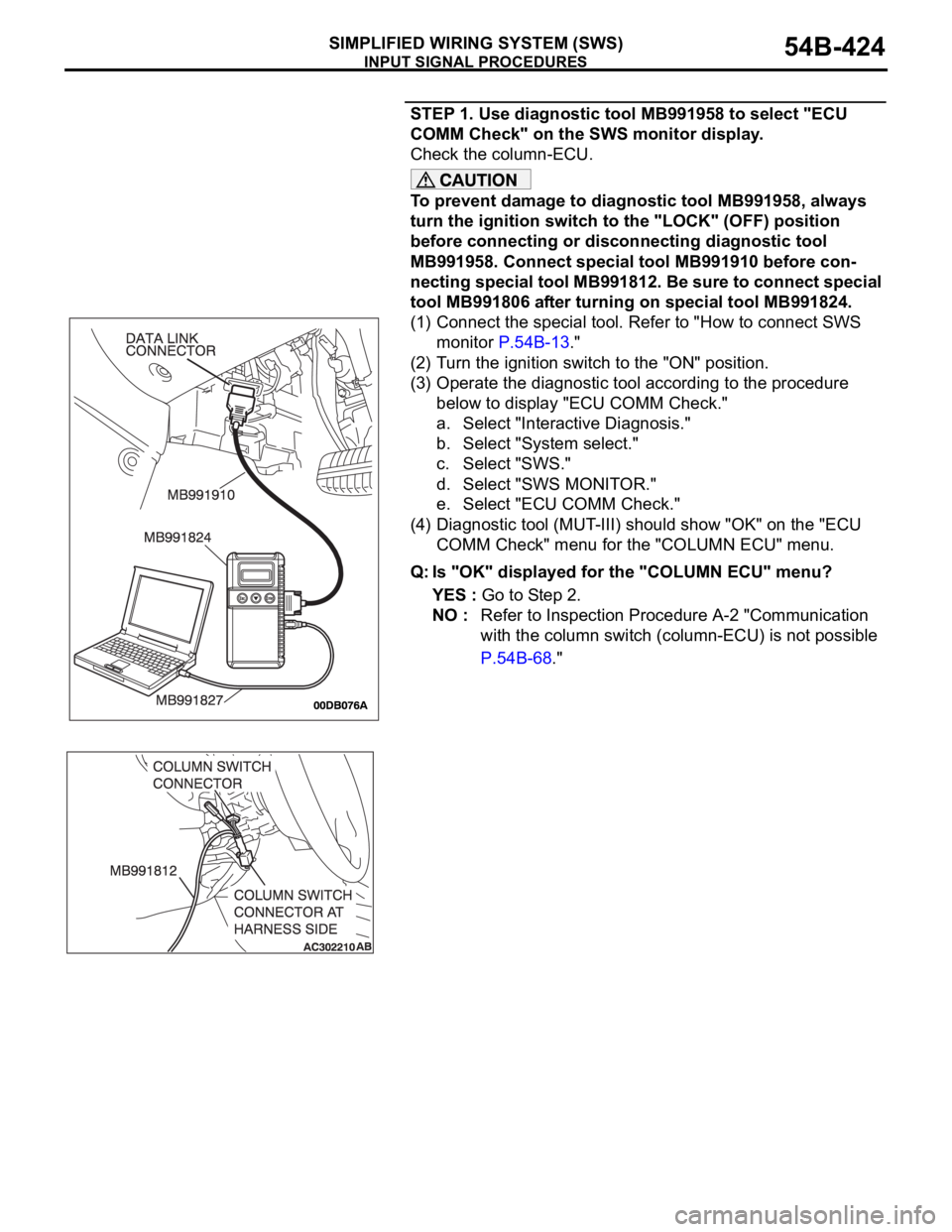
STEP 1. Use diagnostic tool MB991958 to select "ECU
COMM Check" on the SWS monitor display.
Check the column-ECU.
To prevent damage to diagnostic tool MB991958, always
turn the ignition switch to the "LOCK" (OFF) position
before connecting or disconnecting diagnostic tool
MB991958. Connect special tool MB991910 before con-
necting special tool MB991812. Be sure to connect special
tool MB991806 after turning on special tool MB991824.
(1) Connect the special tool. Refer to "How to connect SWS
monitor P.54B-13."
(2) Turn the ignition switch to the "ON" position.
(3) Operate the diagnostic tool according to the procedure
below to display "ECU COMM Check."
a. Select "Interactive Diagnosis."
b. Select "System select."
c. Select "SWS."
d. Select "SWS MONITOR."
e. Select "ECU COMM Check."
(4) Diagnostic tool (MUT-III) should show "OK" on the "ECU
COMM Check" menu for the "COLUMN ECU" menu.
Q: Is "OK" displayed for the "COLUMN ECU" menu?
YES : Go to Step 2.
NO : Refer to Inspection Procedure A-2 "Communication
with the column switch (column-ECU) is not possible
P.54B-68."
Page 432 of 1500
INPUT SIGNAL PROCEDURES
SIMPLIFIED WIRING SYSTEM (SWS)54B-432
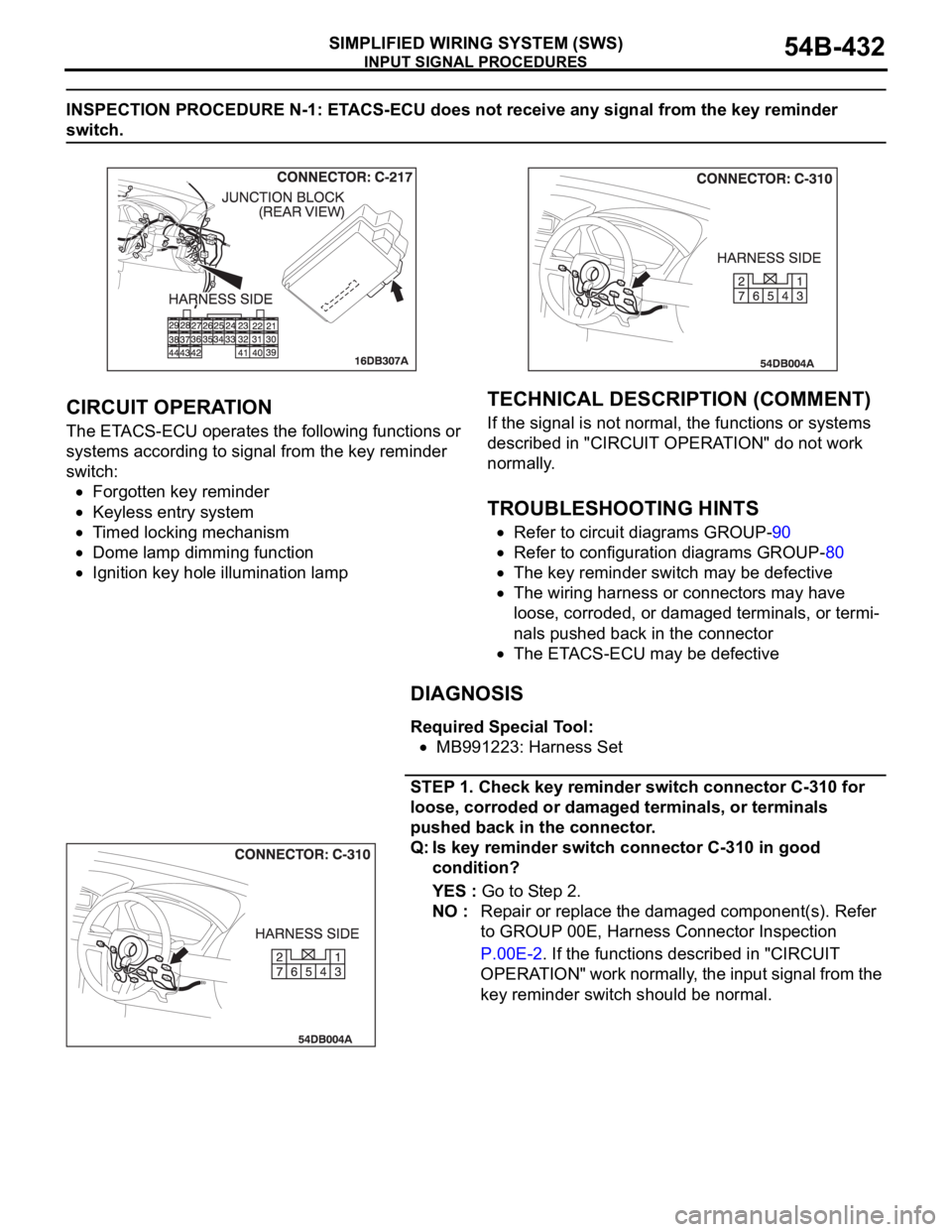
INSPECTION PROCEDURE N-1: ETACS-ECU does not receive any signal from the key reminder
switch.
.
CIRCUIT OPERATION
The ETACS-ECU operates the following functions or
systems according to signal from the key reminder
switch:
Forgotten key reminder
Keyless entry system
Timed locking mechanism
Dome lamp dimming function
Ignition key hole illumination lamp
.
TECHNICAL DESCRIPTION (COMMENT)
If the signal is not normal, the functions or systems
described in "CIRCUIT OPERATION" do not work
normally.
.
TROUBLESHOOTING HINTS
Refer to circuit diagrams GROUP-90
Refer to configuration diagrams GROUP-80
The key reminder switch may be defective
The wiring harness or connectors may have
loose, corroded, or damaged terminals, or termi-
nals pushed back in the connector
The ETACS-ECU may be defective
DIAGNOSIS
Required Special Tool:
MB991223: Harness Set
STEP 1. Check key reminder switch connector C-310 for
loose, corroded or damaged terminals, or terminals
pushed back in the connector.
Q: Is key reminder switch connector C-310 in good
condition?
YES : Go to Step 2.
NO : Repair or replace the damaged component(s). Refer
to GROUP 00E, Harness Connector Inspection
P.00E-2. If the functions described in "CIRCUIT
OPERATION" work normally, the input signal from the
key reminder switch should be normal.