check MITSUBISHI LANCER IX 2006 Service Manual
[x] Cancel search | Manufacturer: MITSUBISHI, Model Year: 2006, Model line: LANCER IX, Model: MITSUBISHI LANCER IX 2006Pages: 800, PDF Size: 45.03 MB
Page 283 of 800
WINDOW GLASS
BODY42-11
HANDLING OF AUTO WINDOW SEALER
Keep the sealant in a cool place, not exposed to the
direct rays of the sun. Do not place any heavy article
on the sealant nor press it, otherwise it will become
deformed. Avoid storing the sealant for more than 6
months, because it will lose its sealing effect.
BODY PINCH-WELD FLANGE SERVICING
Before servicing the body pinch-weld flange, remove
old adhesive completely. If the flange requires paint
-
ing, bake it after painting is completed.
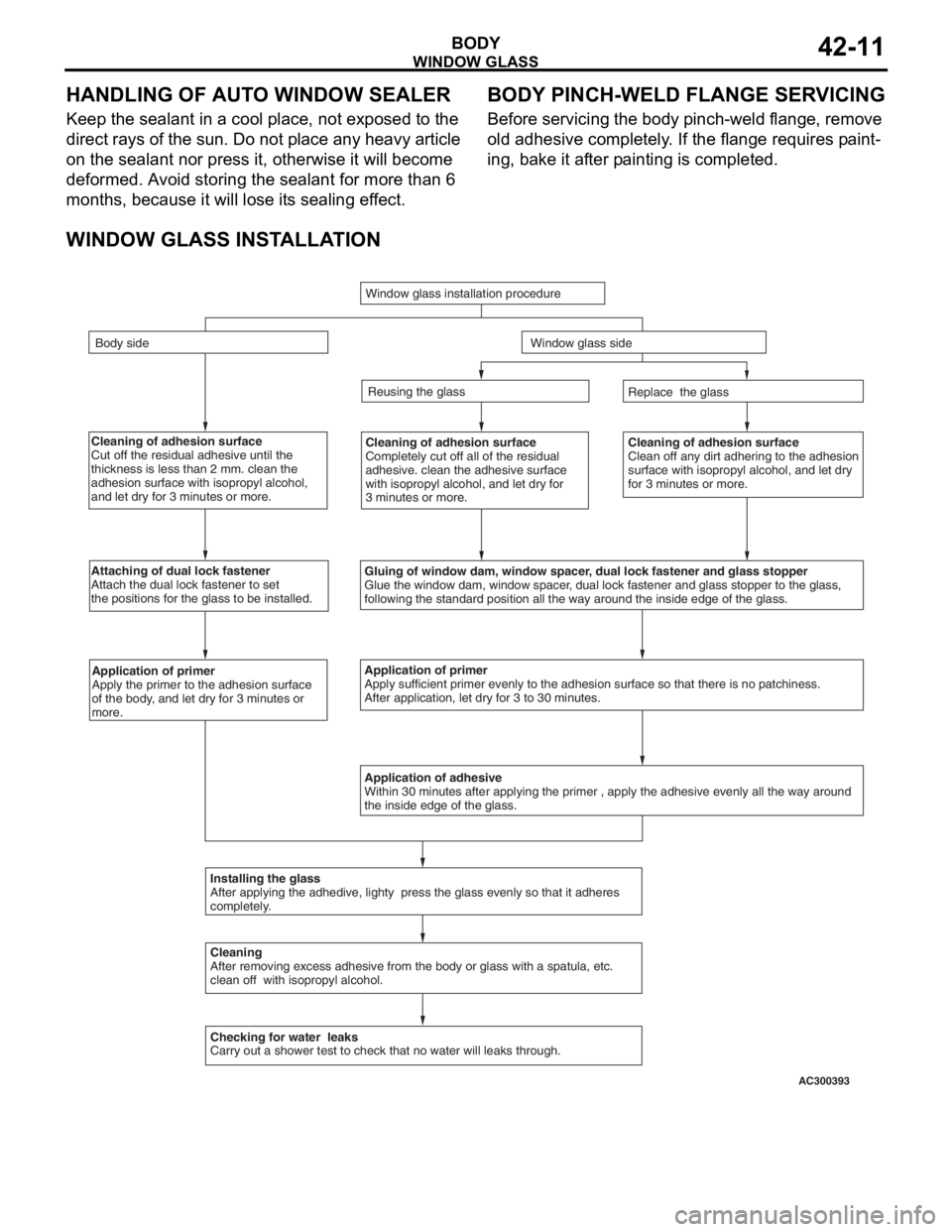
WINDOW GLASS INSTALLATION
Cleaning of adhesion surface
Cut off the residual adhesive until the
thickness is less than 2 mm. clean the
adhesion surface with isopropyl alcohol,
and let dry for 3 minutes or more.Cleaning of adhesion surface
Completely cut off all of the residual
adhesive. clean the adhesive surface
with isopropyl alcohol, and let dry for
3 minutes or more.Cleaning of adhesion surface
Clean off any dirt adhering to the adhesion
surface with isopropyl alcohol, and let dry
for 3 minutes or more.
Attaching of dual lock fastener
Attach the dual lock fastener to set
the positions for the glass to be installed.
Gluing of window dam, window spacer, dual lock fastener and glass stopper
Glue the window dam, window spacer, dual lock fastener and glass stopper to the glass,
following the standard position all the way around the inside edge of th\
e glass.
Application of primer
Apply the primer to the adhesion surface
of the body, and let dry for 3 minutes or
more.Application of primer
Apply sufficient primer evenly to the adhesion surface so that there is \
no patchiness.
After application, let dry for 3 to 30 minutes.
Application of adhesive
Within 30 minutes after applying the primer , apply the adhesive evenly \
all the way around
the inside edge of the glass.
Installing the glass
After applying the adhedive, lighty press the glass evenly so that it a\
dheres
completely.
Cleaning
After removing excess adhesive from the body or glass with a spatula, et\
c.
clean off with isopropyl alcohol.
Checking for water leaks
Carry out a shower test to check that no water will leaks through. Replace the glass
Reusing the glass
Window glass installation procedure
Body side
Window glass side
AC300393
Page 298 of 800
DOOR
BODY42-26
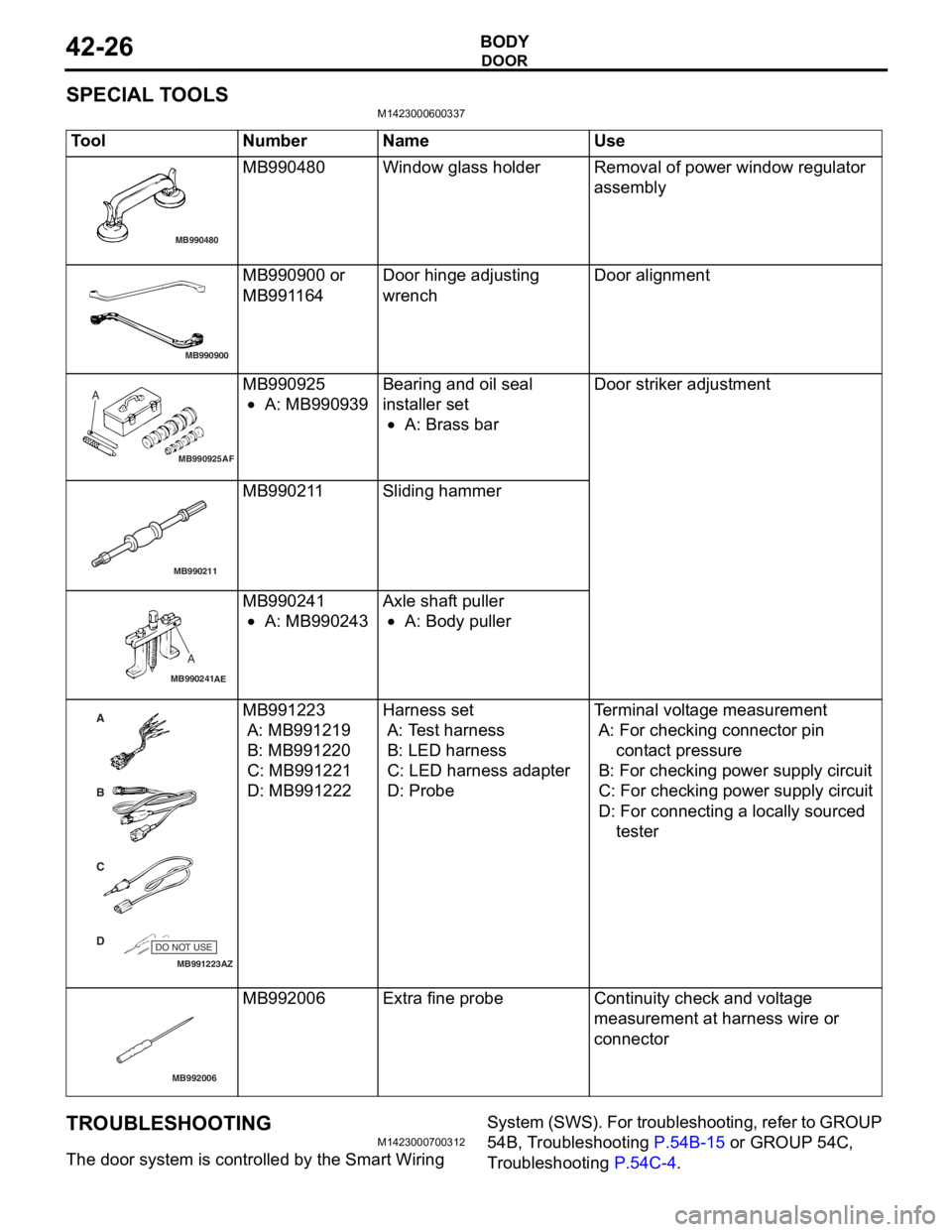
SPECIAL TOOLS
M1423000600337
ToolNumberNameUse
MB990480
MB990480Window glass ho lderRemoval of powe r window reg u lato r
assembly
MB990900
MB990900 or
MB991
164Door hin ge adjust i ng
wre
n chDoor a lign m ent
MB990925AF
AMB990925
•A: MB9909 39
Bearing and o il seal
inst
al ler set
•A: Brass bar
Door striker adjust m ent
MB990211
MB99021 1Sliding ha mme r
MB990241
A
AE
MB990241
•A: MB9902 43
Axle shaft pu ller
•A: Body puller
MB991223
A
D C
B
AZ
DO NOT USE
MB991223
A: MB9912 19
B: MB991220
C: MB99122 1
D: MB991222
Harness se t
A: Te st harness
B: LE D ha rn e s s
C: LE D ha rness ada pter
D: Probe
Te rminal volt age mea s urement
A: For checking con nector pin
c o nt ac t p r es s u re
B: For checking power supply circu i t
C: For checking power supply circu i t
D: For connecting a lo cally sourced
tester
MB992006
MB992 006Extra fine pro b eContinuity check and volt ag e
measu
r emen t at ha rness wire o r
connector
TROUBLESHOOTING
M14230007 0031 2
The door system is con t ro lled by the Smart Wiring Syst em (SWS). Fo r t r o uble s hoo tin g , re fer t o GROUP
54B, T r oublesh ootin g
P.54B-15 or GROUP
54C,
Tr o uble s hoo ting P.5 4 C - 4.
Page 300 of 800
DOOR
BODY42-28
DOOR WINDOW GLASS ADJUSTMENT
M1423001000327
Check that the door glass moves while contacting
the door glass channel when it is raised and lowered
fully. If not, adjust the door window according to the
following procedures.
1. Remove the door trim assembly (Refer to GROUP 52A, Door trim
P.52A-17).
2. Remove the waterproof film (Refer to P.42-39).
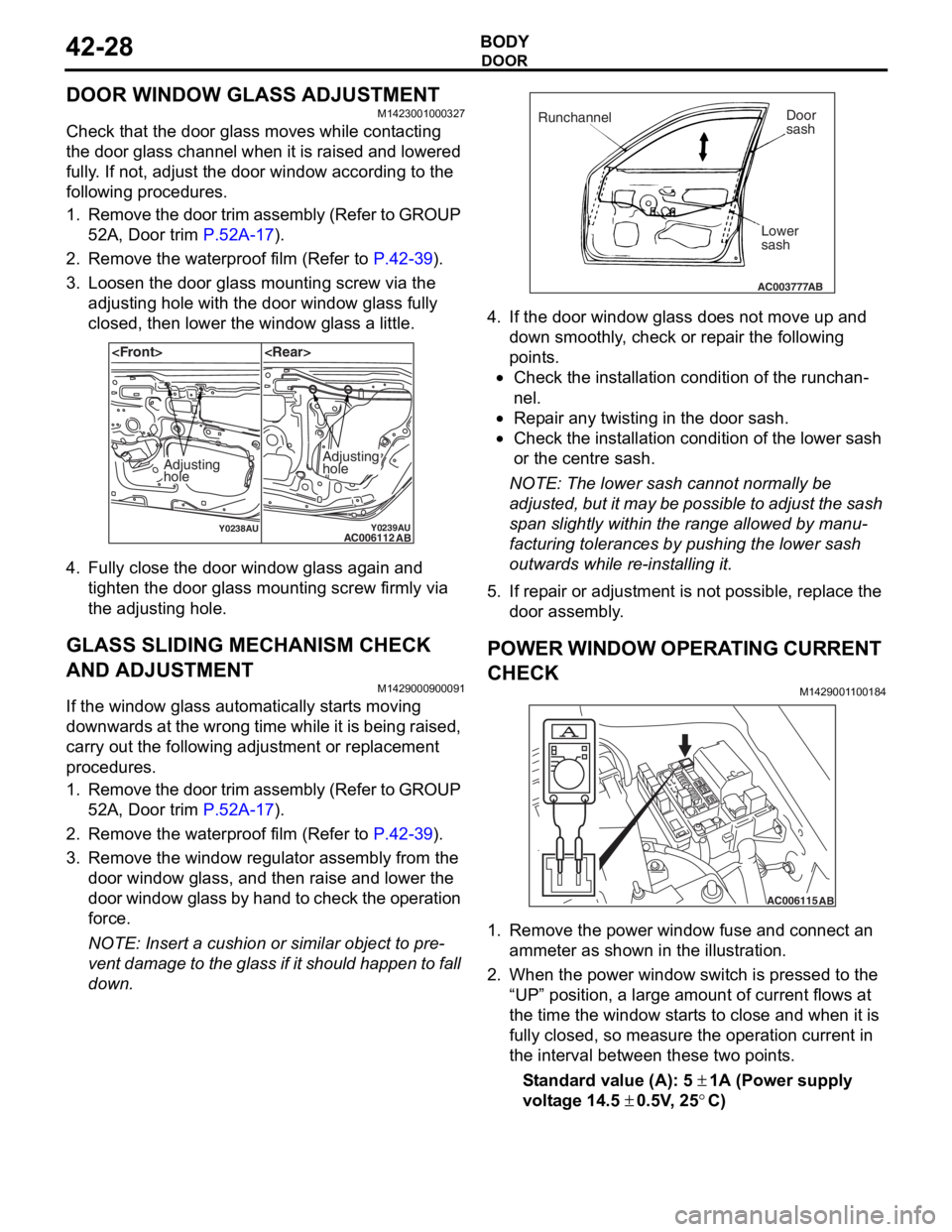
3. Loosen the door glass mounting screw via the adjusting hole with the door window glass fully
closed, then lower the window glass a little.
Y0238AUY0239AUAC006112 AB
Adjusting
holeAdjusting
hole
4.Fu lly close the doo r window g l ass aga in an d
tighten the do or gla s s moun ting scre w firmly via
th e adjusting ho le.
GLASS SLIDING MECHANISM CHECK
AND ADJUSTMENT
M14290009 0009 1
If the window glas s automatically st a r t s moving
downwards at the wron
g time while it is be ing raised ,
carry out th
e following adju s tment or re placeme n t
proce
dures.
1. Remo ve the do or trim assembly (Refer to GROUP
52 A, Door trim
P.52A-17).
2.Remove the water p roof film (Re f er to P.42-39).
3.Remove the win dow regulator a sse mbly from the
do or windo w glass, a nd the n raise and lower th e
door windo w glass b y han d t o che ck the op erat ion
fo rce.
NOTE: Insert a cushion or similar object t o pre-
vent da mage to the gla ss if it shou ld h app en t o f a ll
do
wn .
AC003777
Runchannel Door
sash
Lower
sash
AB
4. If the do or windo w g l ass do es no t move up and
d o wn smoothly , ch eck or rep a ir the followin g
po i n t s .
•Check the inst a lla tion condition of the runch a n-
nel.
•Repa ir a n y twisting in the do or sash.
•Check the inst allation condit i on of the lo we r sash
or th
e ce ntre sash.
NOTE: The lower sa sh canno t normally be
a
d
juste
d , bu t it ma y be po ssible to ad just th e sa sh
sp
an sligh t ly within the ran ge allowed b y manu
-
facturing tolerances by pu shing the lower sash
o
u twards wh ile r e -inst a lling it .
5.If rep a ir or a d justme nt is not po ssible , repla c e th e
d oor assembly .
POWER WINDOW OPERA T ING CURRENT
CHECK
M142900 1 1 0018 4
AC006115AB
1.Remove the po we r window fu se a nd co nnect an
a mme ter as sho w n in th e illustration .
2.Wh en the power win dow switch is presse d to the
“UP” position, a large amou nt of current flows at
th e time the window st a r t s to close and whe n it is
fu lly closed , so measure th e oper ation curren t in
th e int e rval between these two point s.
St andard va lue (A): 5 ± 1A (Power suppl y
volt
age
14.5
± 0 . 5V , 25°C)
Page 301 of 800
DOOR
BODY42-29
3. If the operation current is outside the standard value, refer to GROUP 54B, Troubleshooting
P.54B-15, refer to GROUP 54C, Troubleshooting
P.54C-4.
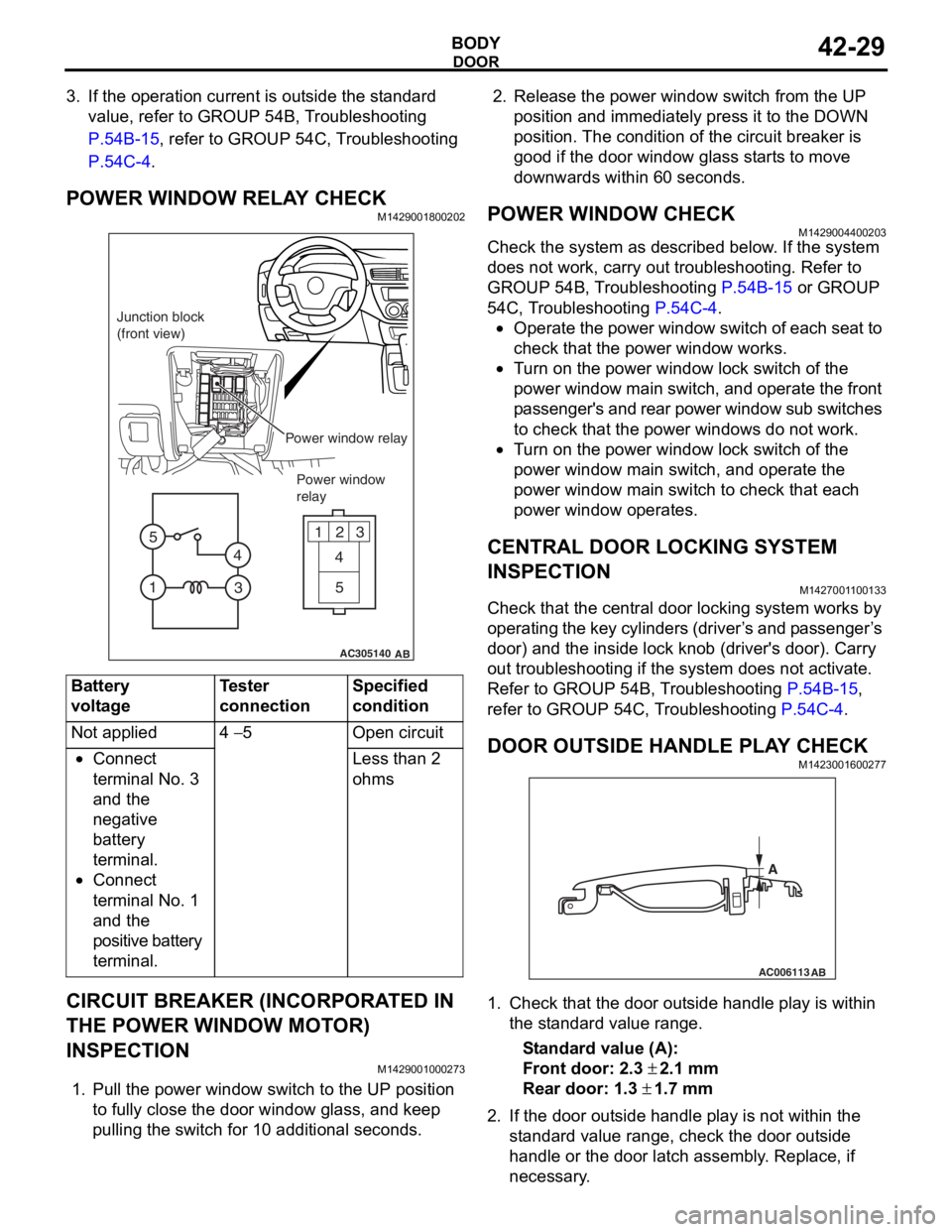
POWER WINDOW RELAY CHECKM1429001800202
AC305140
123
4
5
1 3
4
5
AB
Junction block
(front view)
Power window relayPower window
relay
Bat t ery
voltage
Teste r
co
nnectionSpecified
condition
Not applied4 − 5Ope n ci rcui t
•Connect
te
rmin al No. 3
an
d the
ne
gative
ba
ttery
te
rmin al.
•Connect
te
rmin al No. 1
an
d the
positive batt
e ry
te
rmin al.
Less than 2
ohms
CIRCUIT BREAKER (INCORPORA T ED IN
THE POW
E R W I NDOW MOT O R)
INSPECTION
M14290010 0027 3
1.Pull the p o wer windo w switch to th e UP position
to f u lly close the do or windo w g l ass, an d ke ep
pullin g the switch for 1 0 addition al secon d s.
2.Rele ase the power window switch from t he UP
position an d immediately pre ss it to t he DOW N
position. Th e con d ition of the circu i t brea ker is
goo d if t he doo r window g l ass st art s to mo ve
downward s with in 60 seconds.
POWER WI NDOW CHECKM14290044 0020 3
Check the system a s de scribed b e low . I f the system
does not work, car
r y out troublesh ootin g. Refer to
GROUP 54
B, T r ouble s hoo ting
P.54B-15 or GROUP
54C, T r oublesh ootin g P.54C-4.
•Operate the powe r wind ow switch of e a ch se at to
check that
the power window works.
•Tu rn o n the power wind ow lock switch of the
power wind
ow main swit ch, and ope rate the front
p
a ssenger's and rear power window su b switches
to check th
at the p o wer windo ws do n o t work.
•Tu rn o n the power wind ow lock switch of the
power
window main switch, and operate the
power
window main switch to check tha t each
power window
op erates.
CENTRAL DOOR LOCKING SYSTEM
INSPECTION
M142700 1 1 0013 3
Check that th e ce ntral door locking system wo rks by
op
er atin g th e key cylin de rs (d rive r ’ s an d p a sse n g e r ’ s
door) an
d the inside lock kno b (driver's door). Ca rry
out trou
bleshooting if the system does not activate.
Re
fer to GROUP 54B, T r ou bleshooting
P.54B-15,
refer to GROUP 54 C, T r o uble s hoo ting P.54C-4.
DOOR OUTSIDE HANDLE PL A Y CHECKM14230016 0027 7
AC006113
AB
A
1.Check t hat the door o u t s ide handle play is with in
th e st and ard va lue range.
St andard va lue (A):
Fron t door: 2.3 ± 2.1 m m
Rear door: 1.3 ± 1.7 mm
2. If the do or out side ha ndle play is not wit h in th e
st a ndard valu e rang e, ch eck the do or out side
h andle or the door latch assemb ly . Replace, if
ne c e ss a r y .
Page 302 of 800
DOOR
BODY42-30
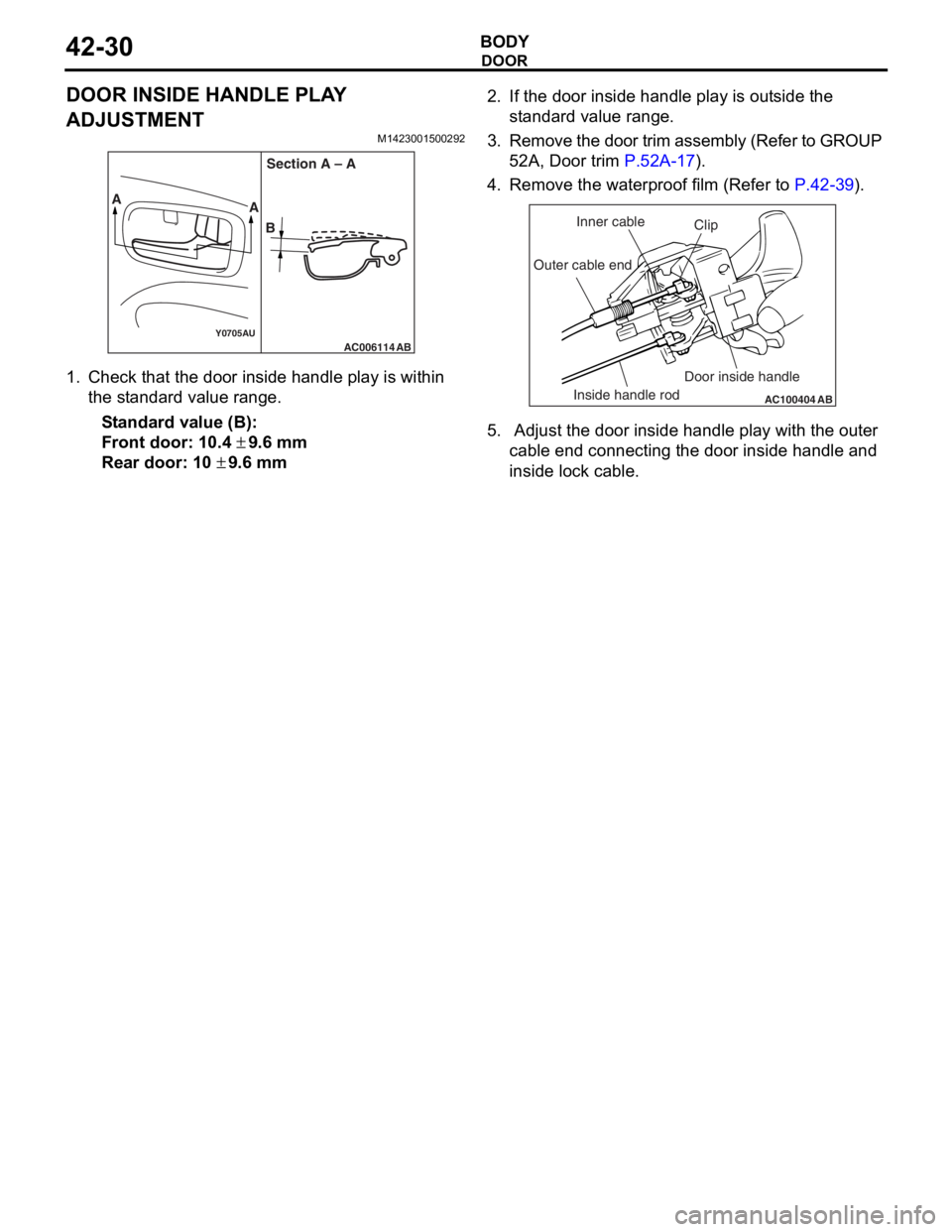
DOOR INSIDE HANDLE PLAY
ADJUSTMENT
M1423001500292
AC006114Y0705AUAB
AA
BSection A – A
1.
Check t hat the door insi de ha ndle play is within
th e st and ard va lue ra nge.
St andard va lue (B):
Fron t door: 10. 4 ± 9.6 mm
Rear door: 10 ± 9.6 mm
2.If the do or inside handle play is ou t s ide the
st a ndard valu e rang e.
3. Remo ve the d oor trim a ssembly (Refer to GROUP
5 2 A, Door trim
P.52A-17).
4.Remove the wate rproof film (Re f er to P.42-39).
AC100404
AB
Clip
Inner cable
Outer cable end
Inside handle rod Door inside handle
5.
Adjust the do or inside handle play wit h the o u ter
cable end conne cting the door inside han dle a nd
inside lo ck cable.
Page 303 of 800
DOOR
BODY42-31
DOOR ASSEMBLY
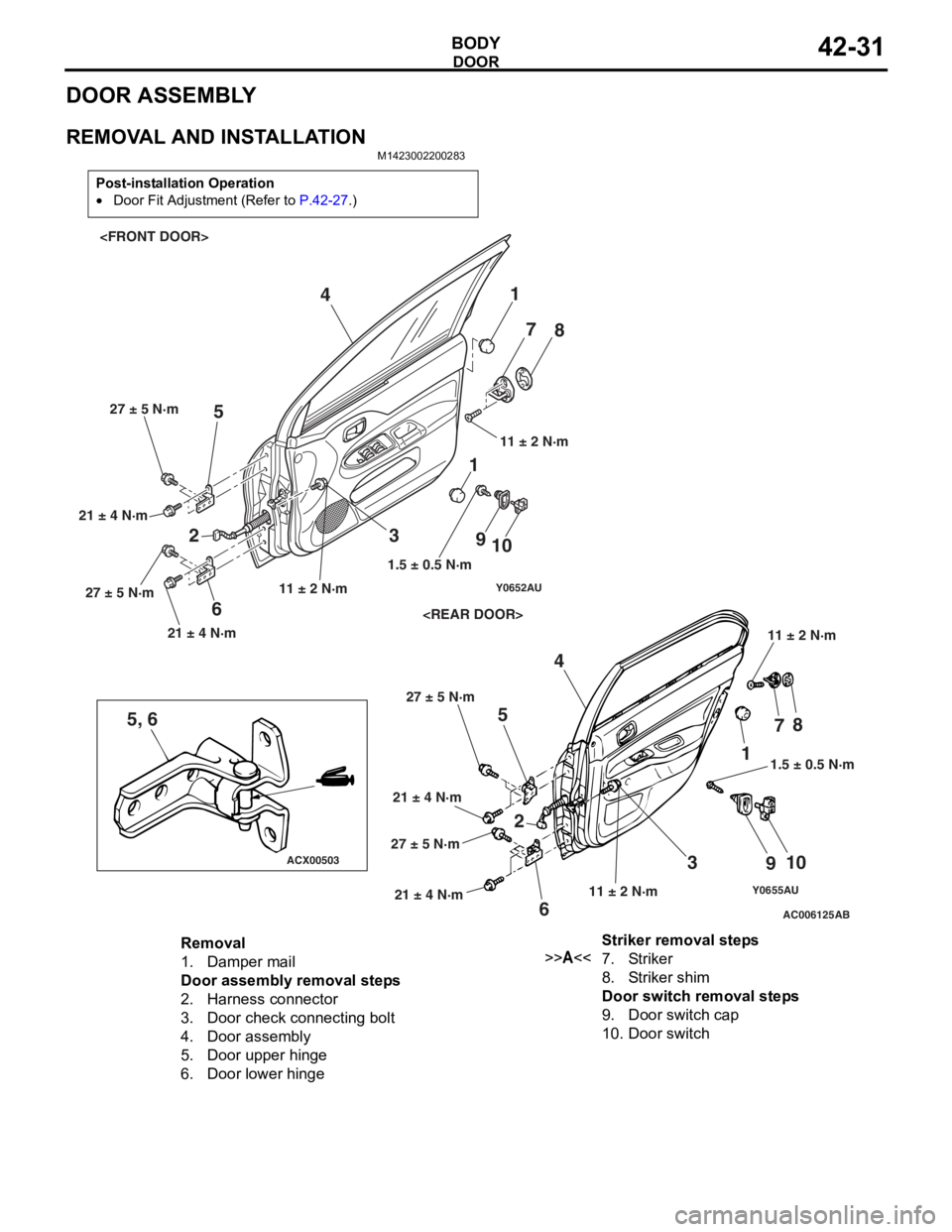
REMOVAL AND INSTALLATION
M1423002200283
Post-installation Operation
•Door Fit Adjustment (Refer to P.42-27.)
Y0655AUAC006125
ACX00503
Y0652AU
5, 6
AB
1
2 3
4
5
6 7
8
9 10
1
23 4
5
6 7
8
9 10
11.5 ± 0.5 N·m
1.5 ± 0.5 N·m
11 ± 2 N·m 11 ± 2 N·m
11 ± 2 N·m
11 ± 2 N·m
21 ± 4 N·m 27 ± 5 N·m
21 ± 4 N·m
27 ± 5 N·m
21 ± 4 N·m
27 ± 5 N·m
21 ± 4 N·m
27 ± 5 N·m
Removal
1.Damper mail
Door assembly removal steps
2.Harness connector
3.Door check connecting bolt
4.Door assembly
5.Door upper hinge
6.Door lower hinge
Striker removal steps
>>A<<7.Striker
8.Striker shim
Door switch removal steps
9.Door switch cap
10.Door switch
Page 304 of 800
DOOR
BODY42-32
INSTALLATION SERVICE POINT
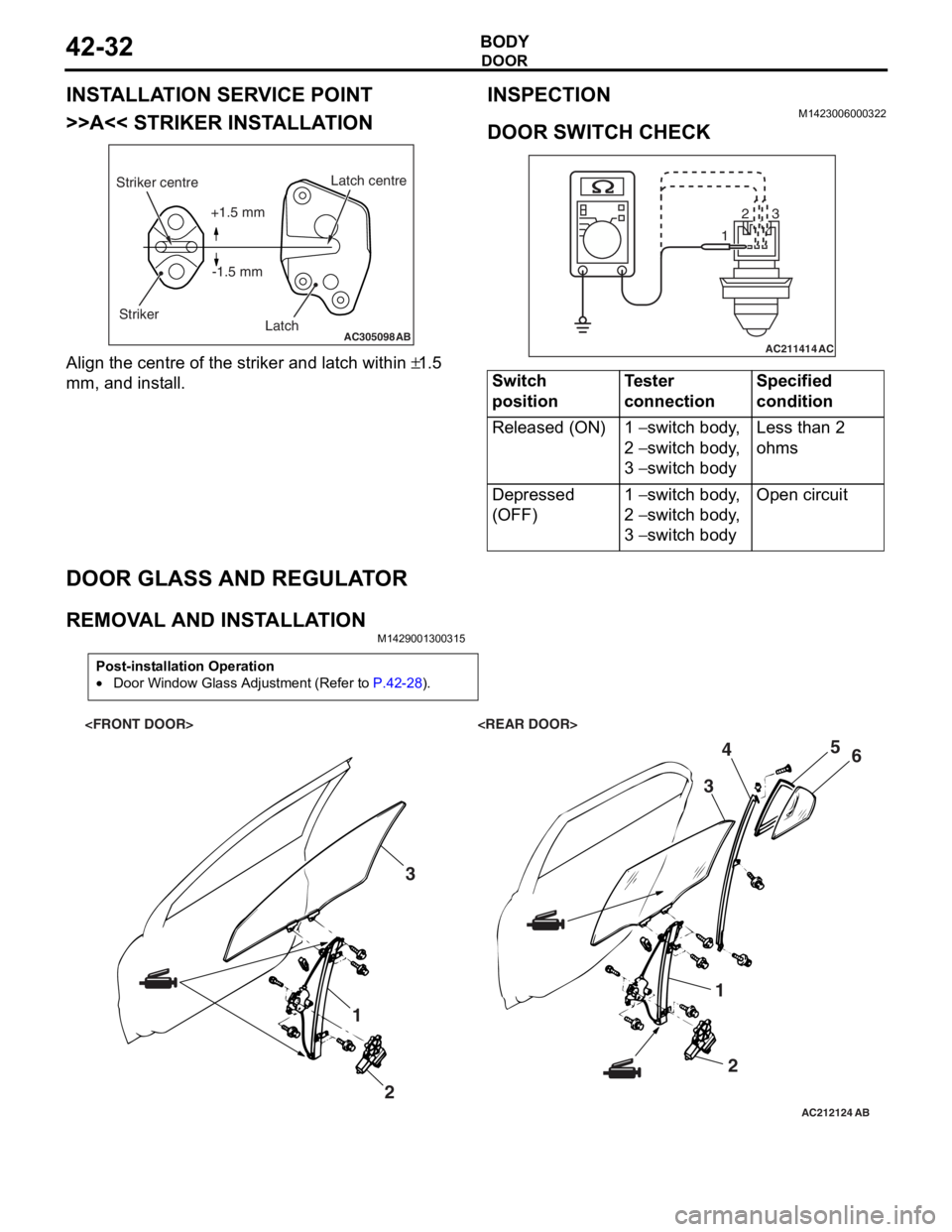
>>A<< STRIKER INSTALLATION
AC305098AB
Striker centreStriker Latch centre
Latch
+1.5 mm
-1.5 mm
Align the centre o f the striker and latch within ±1.5
mm,
and inst
all.
INSPECTION
M1423 0060 0032 2
DOOR SWITCH CHECK
AC211414
123
AC
Switch
positionTester
connectionSpecified
condition
Released (ON)1 − switch body,
2
− switch body,
3
− switch body
Less than 2
ohms
Depressed
(OFF)1 − switch body,
2
− switch body,
3
− switch body
Open circuit
DOOR GLASS AND REGULA T O R
REMOVA L AND INST ALLA TIONM14290013 0031 5
Post-installation Operation
•Door Window Glass Adjustment (Refer to P.42-28).
AC212124AB
1
23
12
3
4
5
6
Page 308 of 800
DOOR
BODY42-36
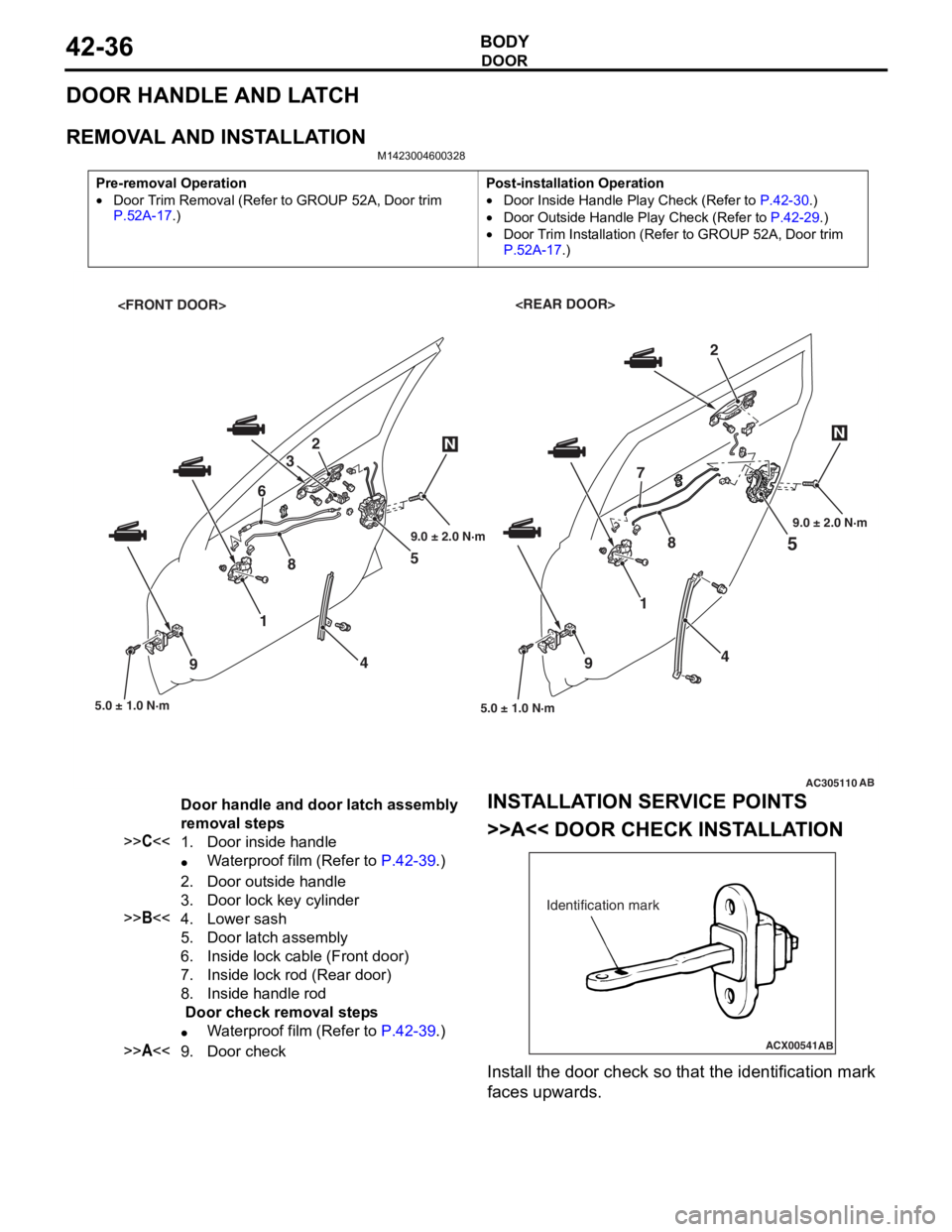
DOOR HANDLE AND LATCH
REMOVAL AND INSTALLATION
M1423004600328
Pre-removal Operation
•Door Trim Removal (Refer to GROUP 52A, Door trim P.52A-17.)
Post-installation Operation
•Door Inside Handle Play Check (Refer to P.42-30.)
•Door Outside Handle Play Check (Refer to P.42-29.)
•Door Trim Installation (Refer to GROUP 52A, Door trim
P.52A-17.)
AC305110
5
5.0 ± 1.0 N·m
1
4
9
2
AB
4 5
2
3
8 7
5.0 ± 1.0 N·m
1
6
9
NN
89.0 ± 2.0 N·m 9.0 ± 2.0 N·m
Door handle and door latch assembly
removal steps
>>C<<1.Door inside handle
•Waterproof film (Refer to P.42-39.)
2.Door outside handle
3.Door lock key cylinder
>>B<<4.Lower sash
5.Door latch assembly
6.Inside lock cable (Front door)
7.Inside lock rod (Rear door)
8.Inside handle rod
Door check removal steps
•Waterproof film (Refer to P.42-39.)
>>A<<9.Door check
INST
ALLA T ION SER VICE POINTS
>>A<< DOOR CHECK INST ALLA TION
ACX00541
Identification mark
AB
Install the d oor check so that th e ide n tification mark
faces upward
s .
Page 309 of 800
ItemIdentification
mark
Front DoorLeft door39L
Right door39R
Rear DoorLeft door40L
Right door40R
DOOR
BODY42-37
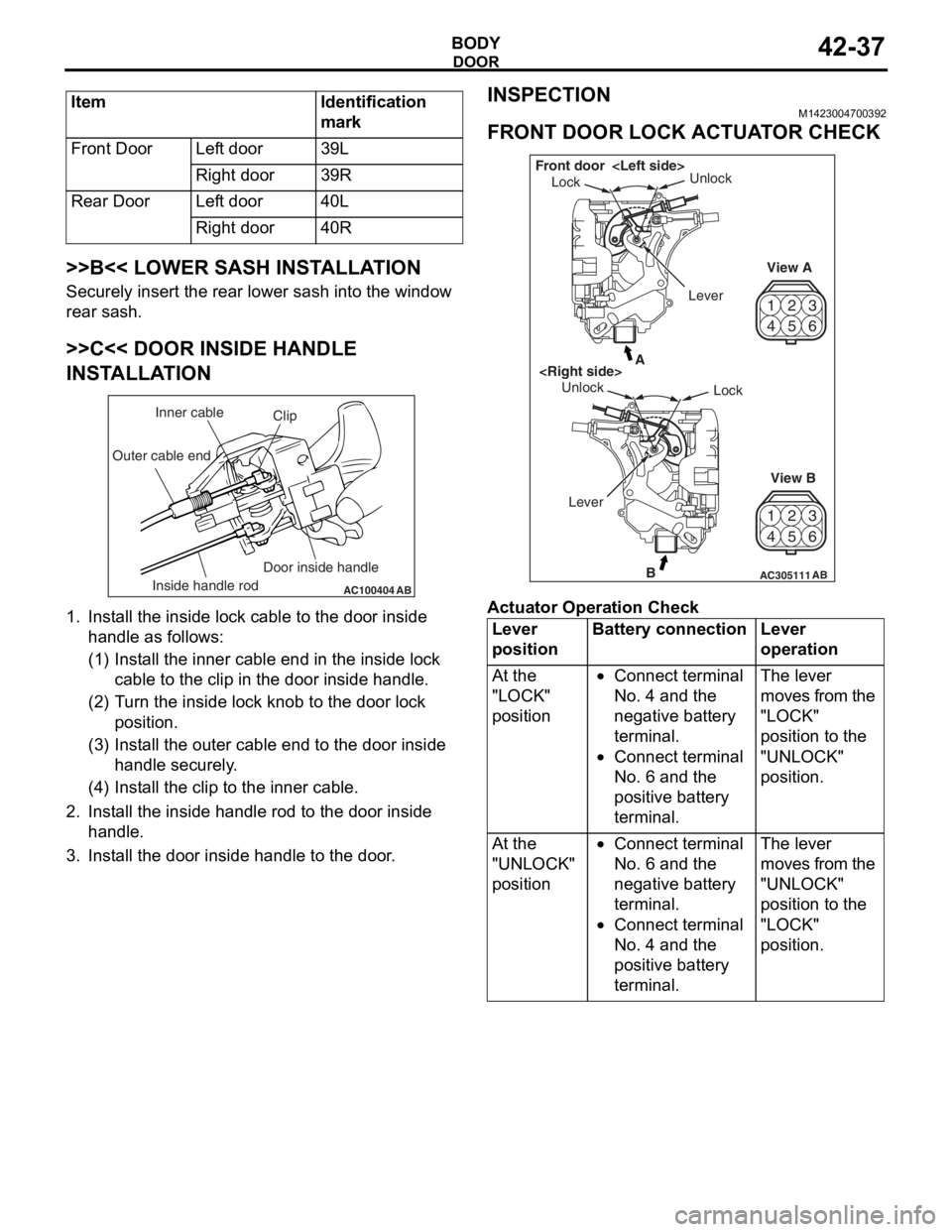
>>B<< LOWER SASH INSTALLATION
Securely insert the rear lower sash into the window
rear sash.
>>C<< DOOR INSIDE HANDLE
INSTALLATION
AC100404AB
Clip
Inner cable
Outer cable end
Inside handle rod Door inside handle
1.
In st all the inside lo ck cable to th e doo r inside
ha ndle as fo llo ws:
(1)I nst a ll the inne r cab l e en d in the in sid e lock
cab l e to the clip in th e door inside h andle .
(2)T urn the inside lock knob to the do or lock
positio n.
(3)I nst a ll the outer cable end to the door inside
hand le secure ly .
(4)I nst a ll the clip to the in ner cable .
2.In st all the inside han dle ro d to th e door inside
ha ndle .
3.In st all the do or inside handle to t he doo r .
INSPECTION
M14230047 0039 2
FRONT DOOR LOCK ACTUA T O R CHECK
42
53
6
1
4 2
53
6
1
AC305111B
A
AB
Lock
Unlock
View A
View B
Unlock
Lock
Front door
Lever
Ac tuator Op era t ion Check
Lever
positionBattery connectionLever
operation
At the
"LOCK"
position•Connect terminal
No. 4 and the
negative battery
terminal.
•Connect terminal
No. 6 and the
positive battery
terminal.
The lever
moves from the
"LOCK"
position to the
"UNLOCK"
position.
At the
"UNLOCK"
position•Connect terminal
No. 6 and the
negative battery
terminal.
•Connect terminal
No. 4 and the
positive battery
terminal.
The lever
moves from the
"UNLOCK"
position to the
"LOCK"
position.
Page 310 of 800
DOOR
BODY42-38
Actuator Switch Check
Lever positionTester
connectionSpecified
condition
At the "LOCK"
position1 − 2Less than 2
ohms
1 − 3Open circuit
At the "UNLOCK"
position1 − 2Open circuit
1 − 3Less than 2
ohms
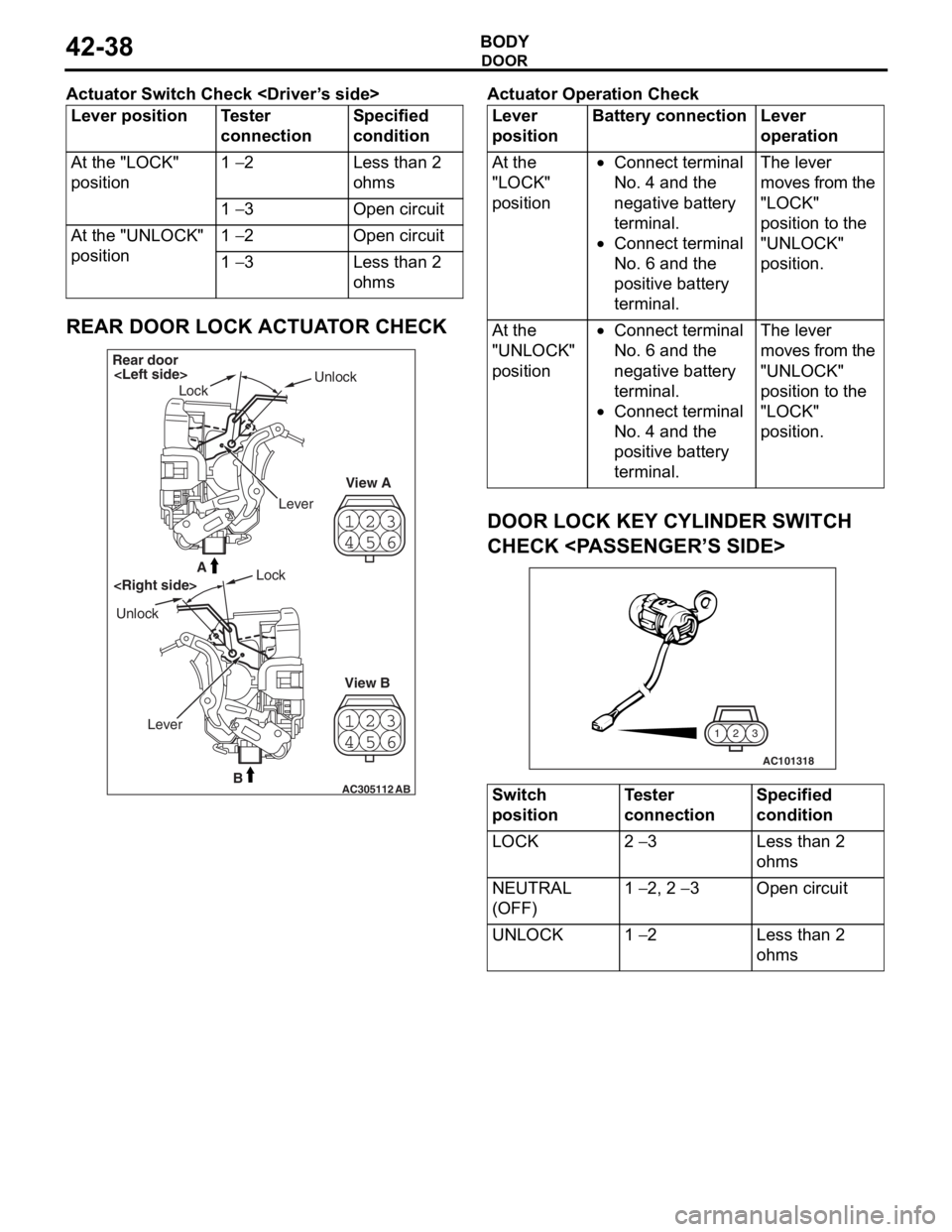
REAR DOOR LOCK ACTUATOR CHECK
23
4 1
56
23
4 1
56
AC305112B
A
AB
Rear door
Lock Unlock
View A
View B
Unlock
Lock
Lever
Ac tuator Op era t ion Check
Lever
positionBattery connectionLever
operation
At the
"LOCK"
position•Connect terminal
No. 4 and the
negative battery
terminal.
•Connect terminal
No. 6 and the
positive battery
terminal.
The lever
moves from the
"LOCK"
position to the
"UNLOCK"
position.
At the
"UNLOCK"
position•Connect terminal
No. 6 and the
negative battery
terminal.
•Connect terminal
No. 4 and the
positive battery
terminal.
The lever
moves from the
"UNLOCK"
position to the
"LOCK"
position.
DOOR LOCK KEY CYLINDER SWITCH
CHECK
AC101318
3
2
1
Switch
positionTester
connectionSpecified
condition
LOCK2 − 3Less than 2
ohms
NEUTRAL
(OFF)1 − 2, 2 − 3Open circuit
UNLOCK1 − 2Less than 2
ohms