Power NISSAN 300ZX 1984 Z31 Electrical System User Guide
[x] Cancel search | Manufacturer: NISSAN, Model Year: 1984, Model line: 300ZX, Model: NISSAN 300ZX 1984 Z31Pages: 116, PDF Size: 3.42 MB
Page 51 of 116
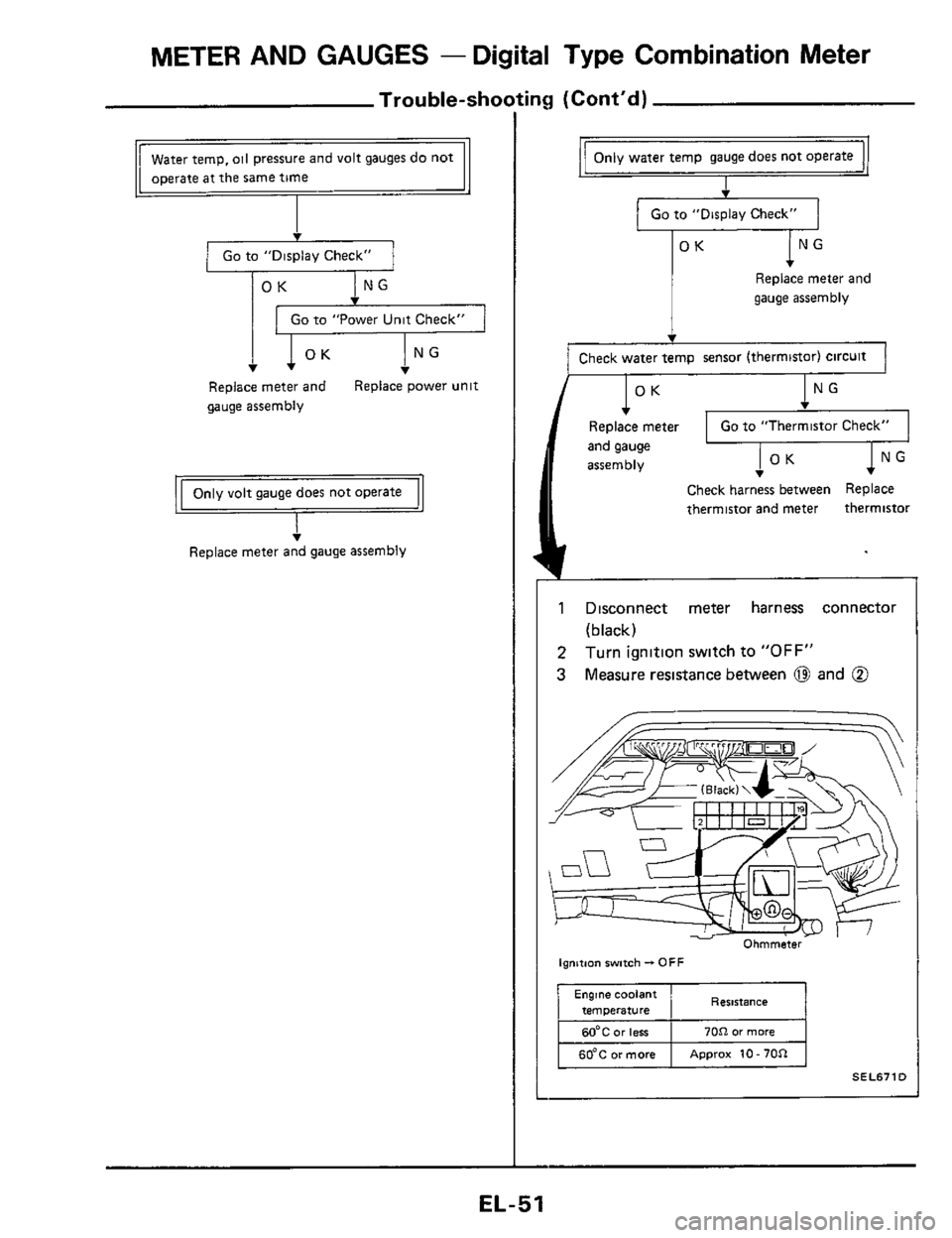
METER AND GAUGES - Digital Type Combination Meter
Trou ble-sho
Go to "Display Check"
OK
Go to "Power Unit Check"
T
Replace meter and
gauge assembly Replace power unit
T Replace meter and gauge assembly
ng (Cont'd)
Only water temp gauge does not operate
I
Go to "Display Check"
T
OK
Replace meter and
gauge assembly
Check water temp sensor (thermistor) Circuit
OK NG
Replace meter
and gauge
assembly
Check harness between Replace
thermistor and meter thermistor
1 Disconnect meter harness connector
2
3
(black)
Turn ignition swltch to "OFF"
Measure resistance between 0 and @
!'W I 1 Ohmmeter
ignition switch - OFF
Resistance
70CI or more
6O'C or more Approx 10 - 70R
SEL6710
EL-51
Page 52 of 116
METER AND GAUGES - Digital Type Combination Meter
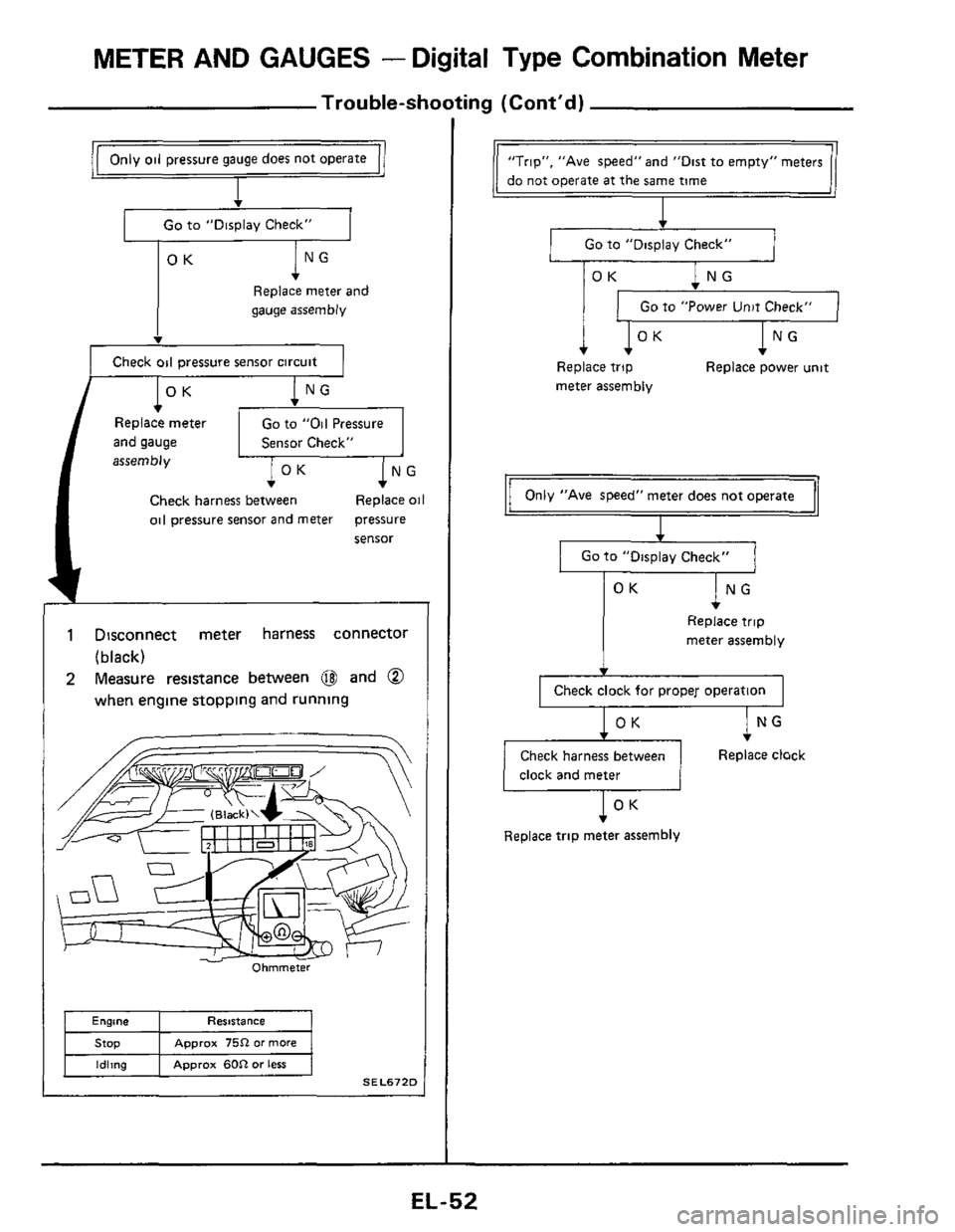
Trouble-shooting (Cont’d)
Go to “Displav Check”
ING OK
Replace meter and
gauge assembly
v
Check oil pressure sensor circuit
OK NG
Go to “Oil Pressure
Sensor Check” Replace meter
and gauge
assembly
Check harness between Replace oil
oil pressure sensor and meter pressure
sensor
1 Disconnect meter harness connector
(black)
2 Measure resistance between @ and @
when engine stopping and running
Ohmmeter
Engine Resistance
Approx 75R or more
Idling Approx 60R or less
SEL672D
“Trip”, ”Ave speed” and “Dist to empty” meters
1 Go to ”Display Check” 1
Go to “Power Unit Check”
Replace trip Replace power unit
meter assembly
Only “Ave speed” meter does not operate
I
I Go to “Display Check“ I
lNG
OK
Replace trip
meter assembly
I Check clock for proper operation I
Check harness between Replace clock
clock and meter
I OK v
Replace trip meter assembly
Page 53 of 116
METER AND GAUGES - Digital Type Combination Meter
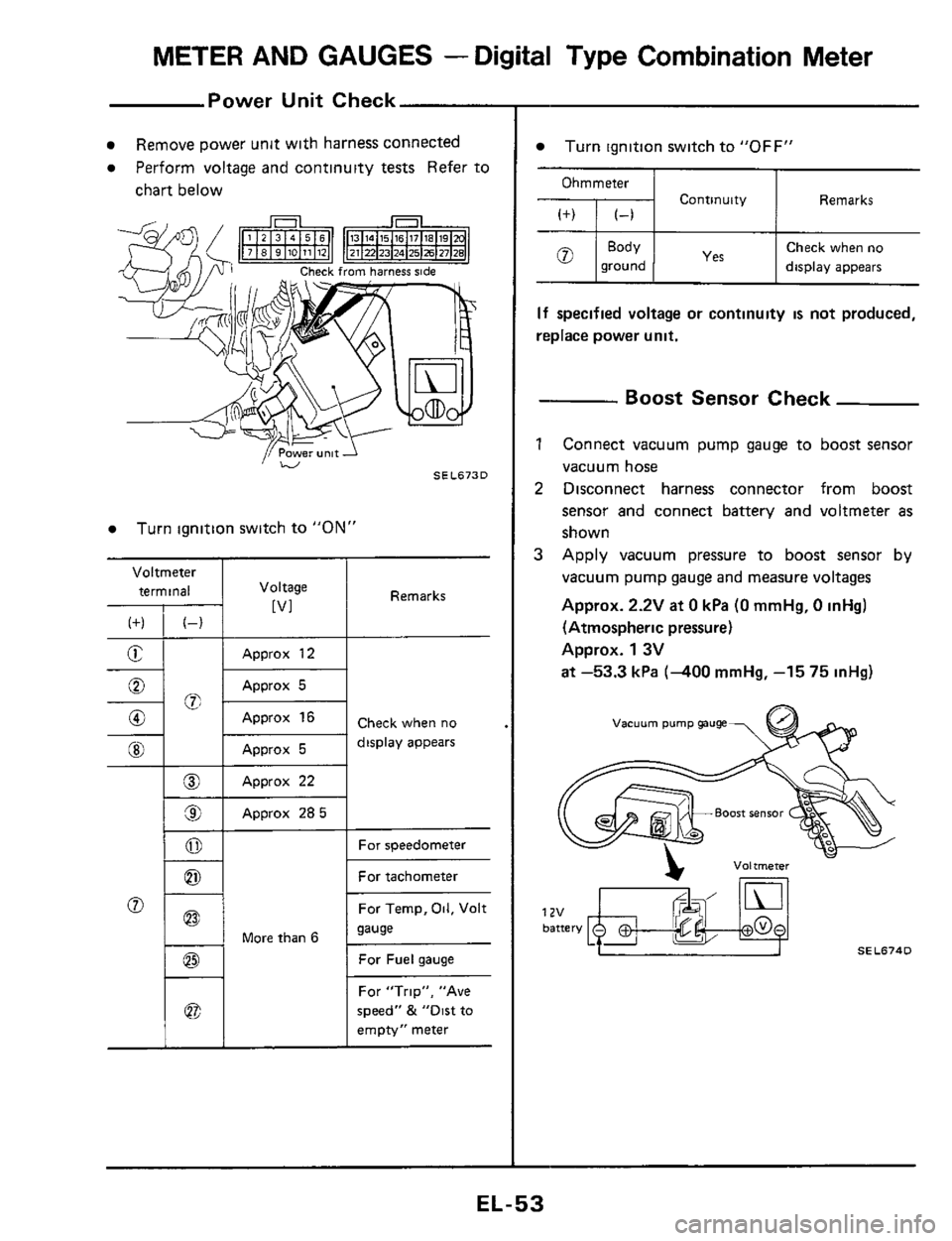
Power Unit Check
Voltmeter
terminal
(f) (-)
E -
-%; 0
0
@I
__
@
9
0
0
Remove power unit with harness connected
Perform voltage and continuity tests Refer to
chart below
I Voltage
[VI
Approx 12
Approx 5
Approx 16
Approx 5
Approx 22
Approx 285
Turn ignition switch to "ON"
1 - 1 More than 6
Remarks
Check when no
display appears
For speedometer
For tachometer
For Temp,
Oil, Volt
sause
For Fuel gauge
For "Trip", "Ave
speed"
& "Dirt to
empty" meter
Turn ignition switch to "OFF"
Ohmmeter
Continuity Remarks
Check when no
ground display appears
If specified voltage or continuity is not produced,
replace power unit.
- Boost Sensor Check
1 Connect vacuum pump gauge to boost sensor
vacuum hose
2 Disconnect harness connector from boost
sensor and connect battery and voltmeter
as
shown
3 Apply vacuum pressure to boost sensor by
vacuum pump gauge and measure voltages
Approx.
2.2V at 0 kPa (0 mmHg, 0 inHg)
(Atmospheric pressure)
Approx.
1 3V
at -53.3 kPa (-400 mmHg, -15 75 inHg)
vacuum pump gauge
SEL674D
EL-53
Page 54 of 116
METER AND GAUGES - Digital Type Combination Meter
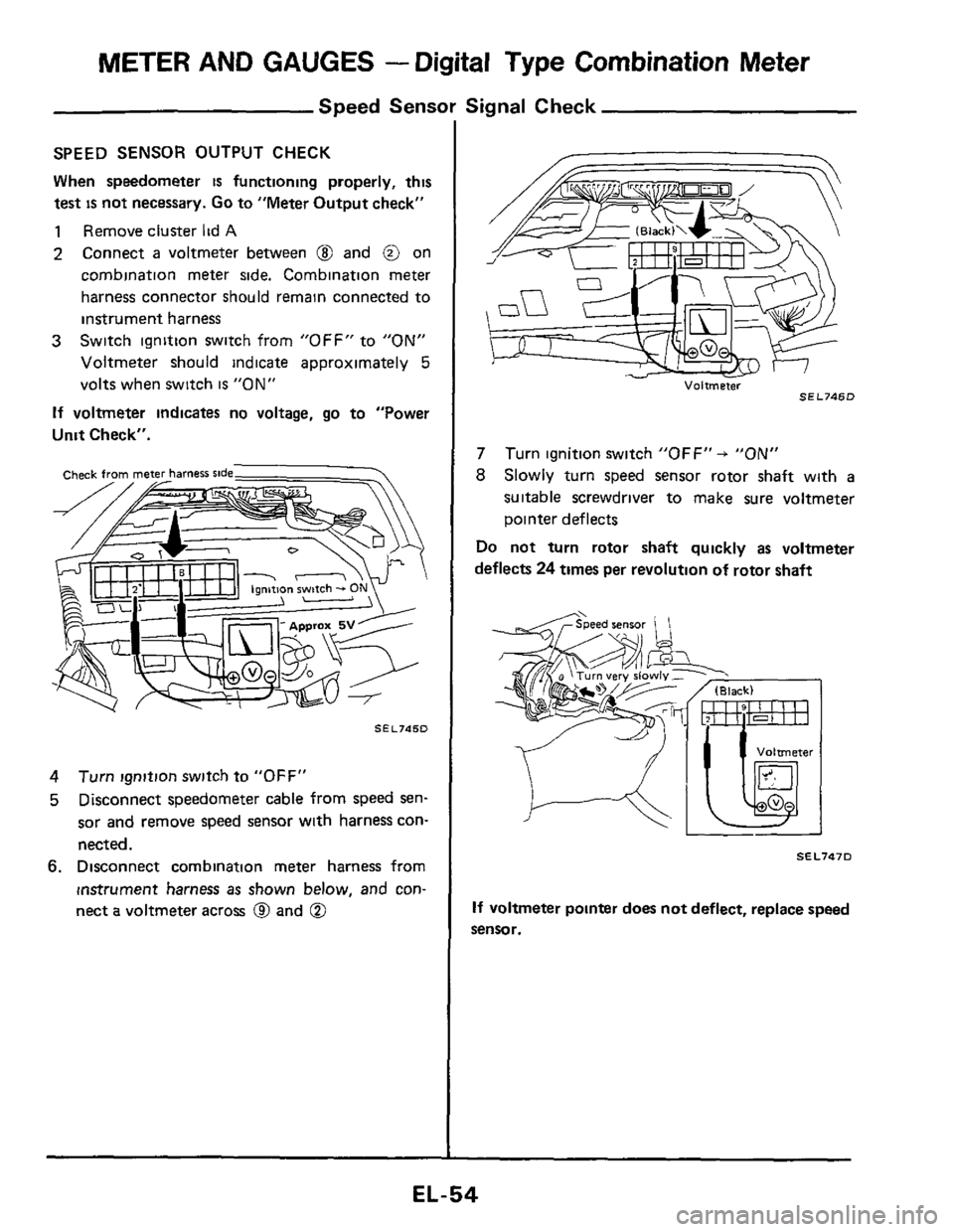
Speed Sensor Signal Check
SPEED SENSOR OUTPUT CHECK
When speedometer
is functioning properly, this
test
is not necessary. Go to "Meter Output check"
1 Remove cluster lid A
2 Connect a voltmeter between @ and @ on
cornbination meter side. Combination meter
harness connector should remain connected to
instrument harness
Switch ignition switch from "OFF" to
"ON"
Voltmeter should indicate approximately 5
volts when switch is "ON"
If voltmeter indicates no voltage, go to "Power
Unit Check".
3
SEL745D
4
5
Turn ignition switch to "OFF"
Disconnect speedometer cable from speed
sen-
sor and remove speed sensor with harness con-
nected.
6. Disconnect combination meter harness from
instrument harness
as shown below, and con-
nect
a voltmeter across @ and @
Voltmeter SEL746D
7
8
Turn ignition switch "OFF" + "ON"
Slowly turn speed sensor rotor shaft with a
suitable screwdriver to make sure voltmeter
pointer deflects
Do not turn rotor shaft quickly as voltmeter
deflects
24 times per revolution of rotor shaft
SEL747D
If voltmeter pointer does not deflect, replace speed
sensor.
EL-54
Page 59 of 116
METER AND GAUGES -Digital Type Combination Gauge
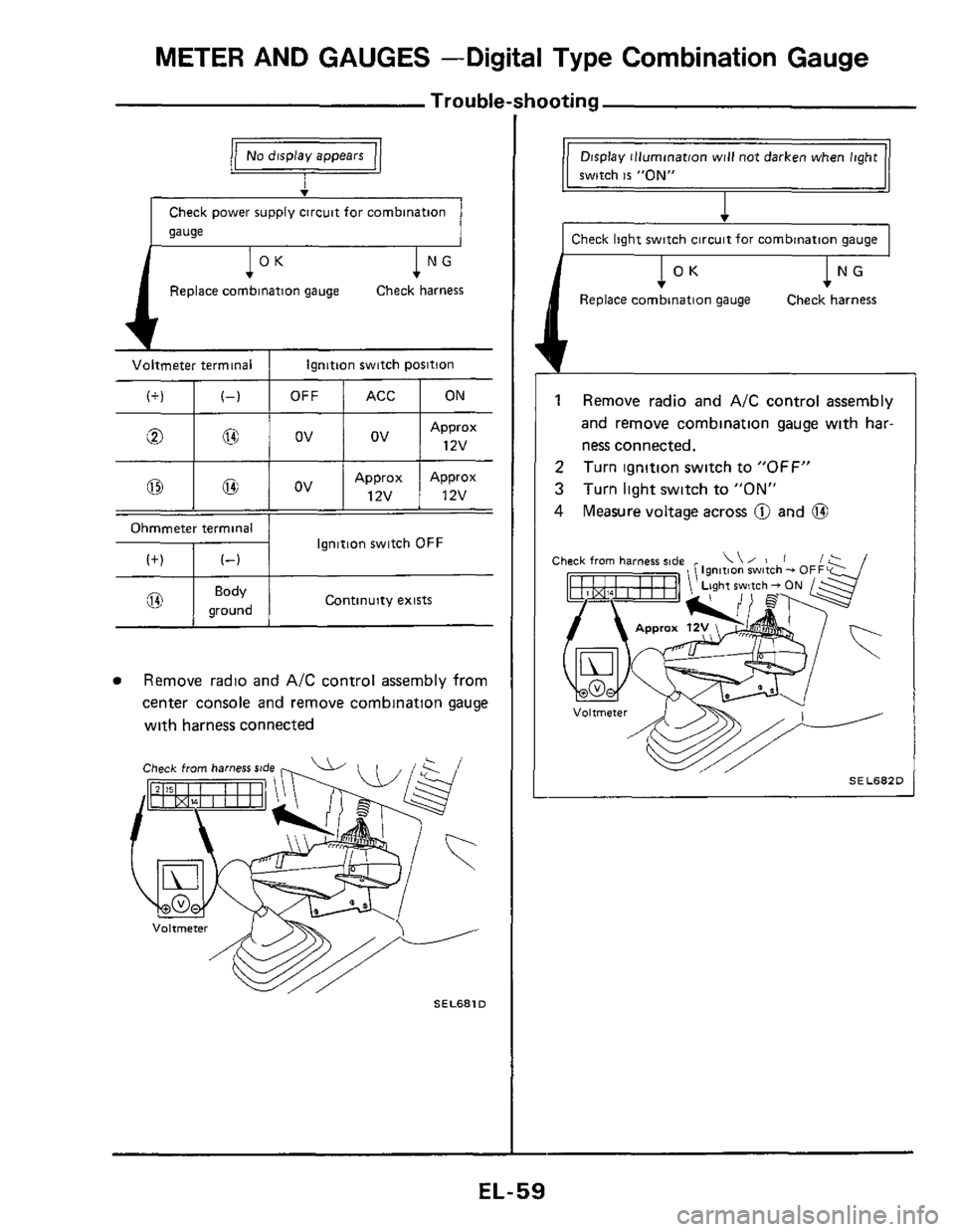
Trouble-shooting
(+)
v
Check power supply circuit for combination
gauge
(-1
l°K 1 NG
Replace combination gauge Check harness
Voltmeter terminal I Ignition switch position
Approx Approx
@ I 03 I OV I 12v ! 12v
Continuity exists @ I gK:d I
Remove radio and A/C control assembly from
center console and remove combination gauge
with harness connected
Check from harness rtde
SEL681D
Display illumination will not darken when light
1 switch is "ON"
I Check light switch circuit for combination gauge I
1 Remove radio and A/C control assembly
and remove combination gauge with har-
ness connected.
Turn ignition switch to
"OFF"
Turn light switch to "ON"
Measure voltage across @ and @
2
3
4
Ignition switch - 0
ht switch - ON
SEL682D L
EL-59
Page 63 of 116
METER AND GAUGES -Digital Type Combination Gauge
@@6
100
100
100
100
010
010
010
010
001
001
001
001
000
000
000
000
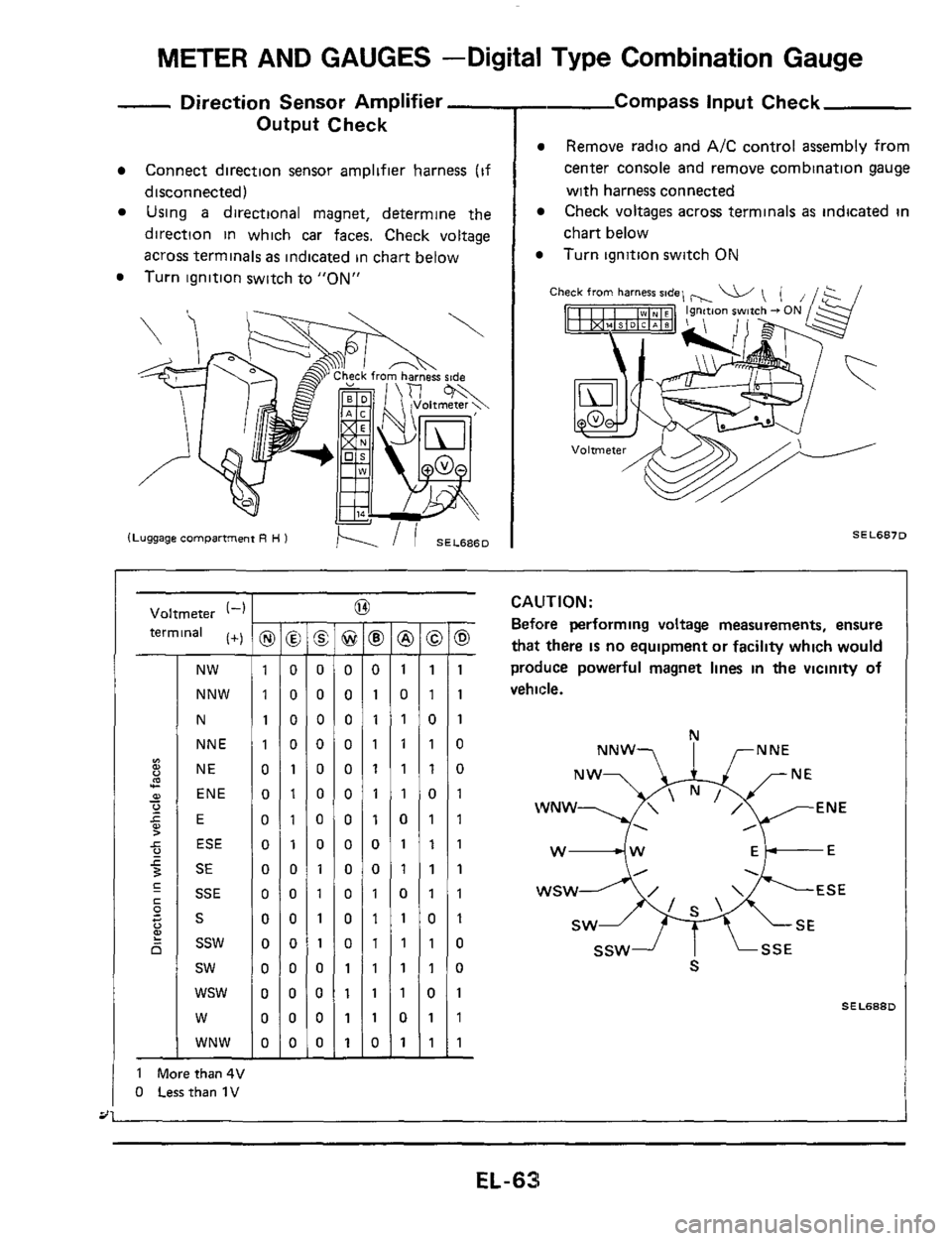
- Direction Sensor Amplifier -
Output Check
Connect direction sensor amplifier harness (if
disconnected)
Using a directional magnet, determine the
direction in which car faces. Check voltage
across terminals
as indicated in chart below
Turn ignition switch to
"ON"
- Compass input Check
Remove radio and A/C control assembly from
center console and remove combination gauge
with harness connected
Check voltages across terminals
as indicated in
chart below
Turn ignition switch ON
Ch
SEL6870
Voltmeter (-1
terminal (+)
NW
NNW
N
NNE
NE
ENE
E
ESE
SE
SSE
S
ssw
sw
wsw
W
WNW
1 Morethan4V
0 Lessthan 1V
I -
@ -
0
0
0
0
0
0
0
0
0
0
0
0
1
1
1
1 -
-
8 -
0
1
1
1
1
1
1
0
0
1
1
1
1
1
1
0 -
-
@ -
1
0
1
1
1
1
0
1
1
0
1
1
1
1
0
1 -
-
-
1
1
0
1
1
0
1
1
1
1
0
1
1
0
1
1
-
-
0 -
1
1
1
0
0
1
1
1
1
1
1
0
0
1
1
1 -
CAUTION:
Before performing voltage measurements, ensure
that there IS no equipment or facility which would
produce powerful magnet lines
in the vicinity of
vehicle.
N
NNW? I rNNE
WNW ENE
. ,
w4w Ek-E
SEL688D
EL-63
Page 83 of 116
TIME CONTROL SYSTEM
Volwnetei terminals
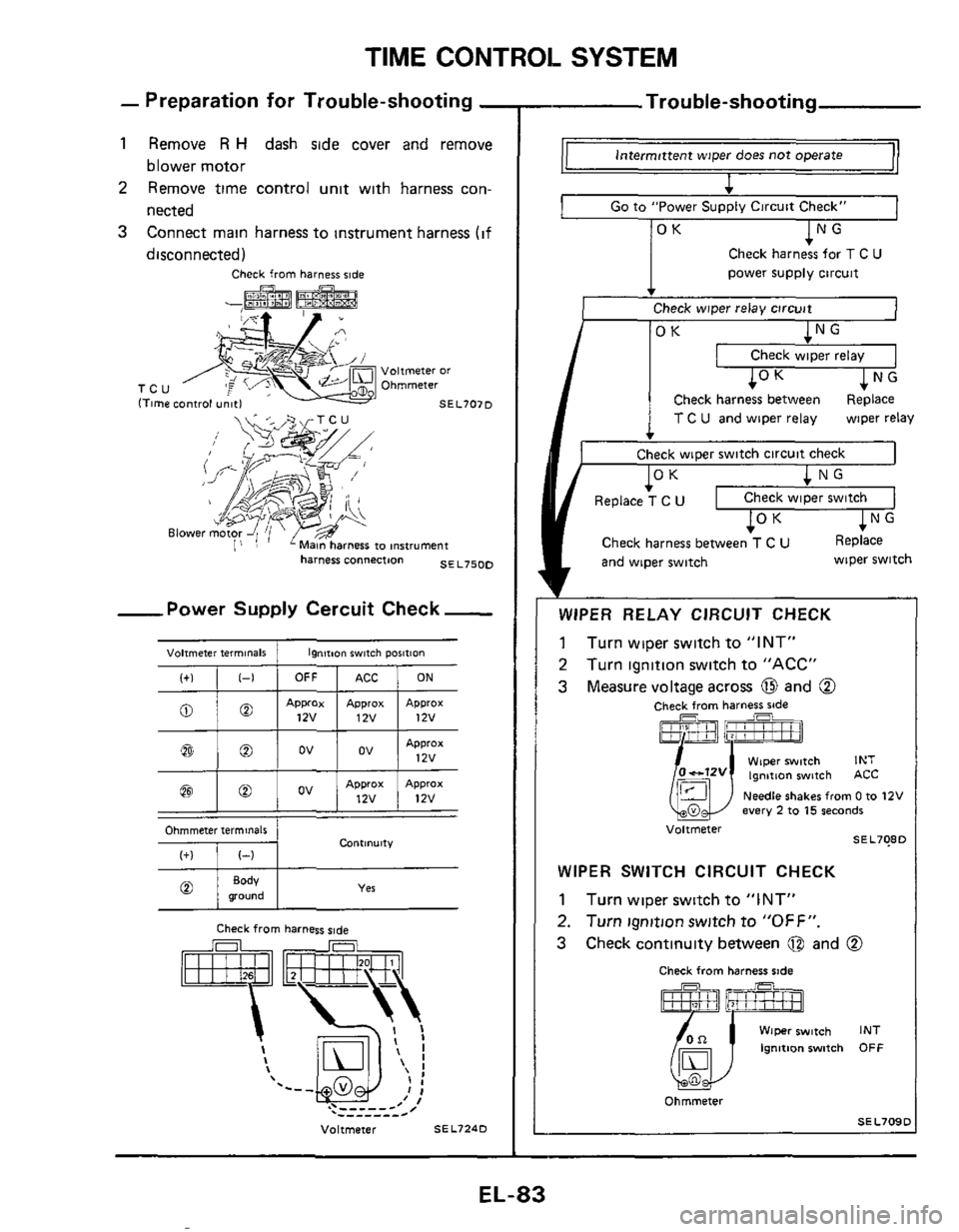
- Preparation for Trouble-shooting -
1 Remove R H dash side cover and remove
blower motor
2 Remove time control unit with harness con-
nected
3 Connect main harness to instrument harness (if
disconnected)
Check from harness ride
Ignition switch pOIitiOn
harness connection SE L750D
I+)
-Power Supply Cercuit Check-
1-1 OFF ACC ON
@
@ 1 @ j ov 1 ov I Approx 17v
ov Approx Approx 12v 12v 0
Contlnult"
- Trou ble-shooting
intermittent wiper does not operate
4
I Go to "Power Supply Circuit Check"
OK NG
Check harness for T C U
power supply circuit
v
Check wiper relay circuit
OK NG
I Check wiDer relav I I
I
I 10 K ~NG
Check harness between Replace
T C U and wiper relay
Check wiper switch circuit check wiper relay
1 OK
I
Replace T C U Check wiper switch
Check harness between T C U Replace
and wiper switch
b
wiper switch
v
WIPER RELAY CIRCUIT CHECK
1 Turn wiper switch to "INT"
2 Turn ignition switch to "ACC"
3 Measure voltage across and 0
Check from harness ride
fTl7rFl
Wiper switch INT 0-12v lgnmon switch ACC
Needle shakes from 0 to 12V every 2 to 15 seconds
SEL708D
Voltmeter u
WIPER SWITCH CIRCUIT CHECK
1 Turn wiper switch to "INT"
2. Turn ignitionswitch to "OFF".
3 Check continuity between @ and @
Check from harness ride
Wiper switch INT
Ignition switch OFF
Ohmmeter
SEL709D
EL-83
Page 85 of 116
TIME CONTROL SYSTEM
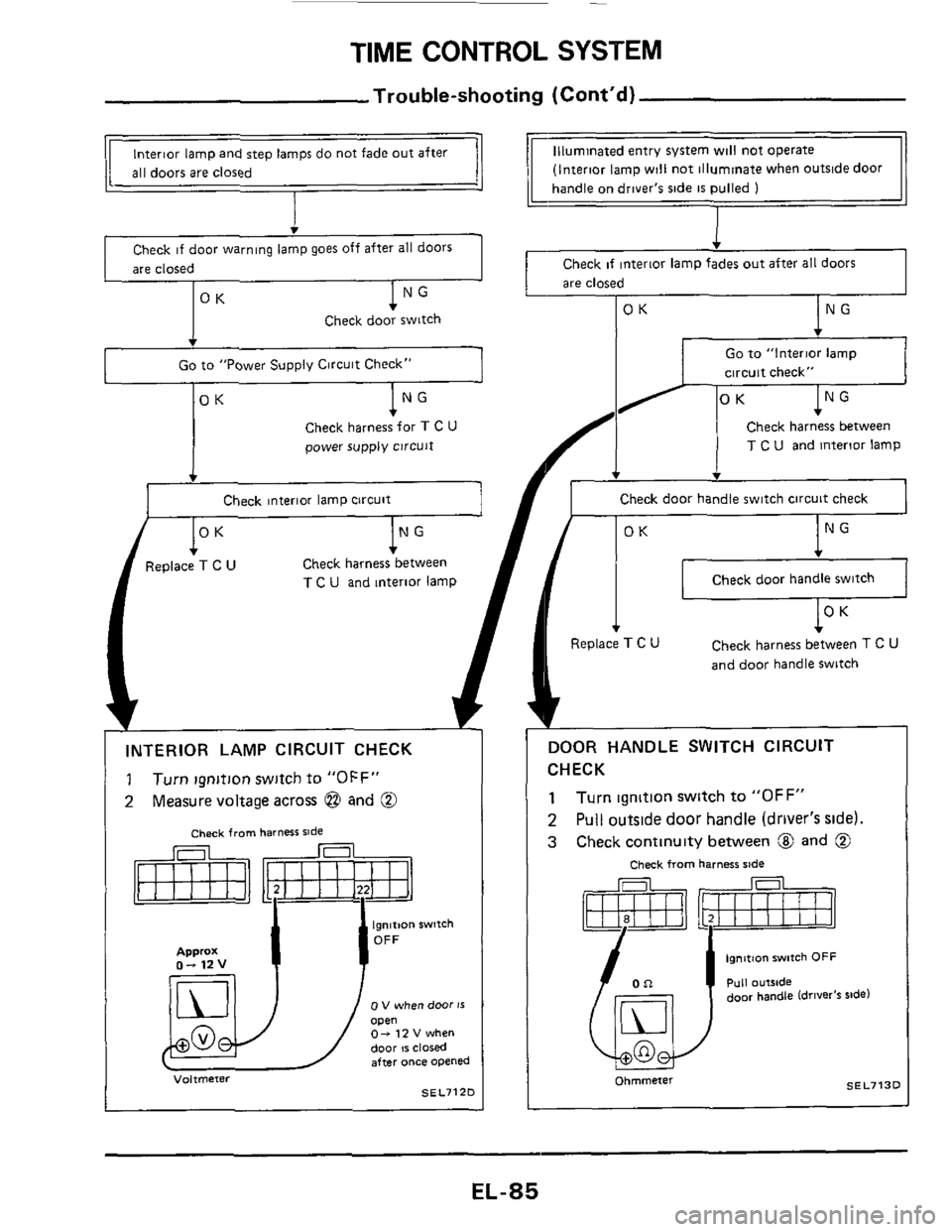
Trouble-shooting (Cont'd)
(Interior lamp will not illuminate when outside door
handle
on driver's side IS pulled 1 I
Interior lamp and step lamps do not fade out after
all doors are closed
Check if door warning lamp goes off after all doors
are closed Check if interior lamp fades out after all doors
are closed
OK NG Check door switch
Go to "Interior lamp
circuit check" Go to "Power Supply Circuit Check"
OK NG
Check harness between
T C U and interior lamp
v
Check door handle switch circuit check
OK NG
Check door handle switch
Replace T C U Check harness between T c u
and door handle switch
NG
Check harness between
T C U and interior lamp
1
INTERIOR LAMP CIRCUIT CHECK
1 Turn Ignition switch to "OFF"
2 Measure voltage across @ and @
Check from harness ride
0 V when door 15 open 0- 12 V when
door IS closed after once opened
SEL7lZO
DOOR HANDLE SWITCH CIRCUIT
CHECK
1
2
3
Turn ignition switch to "OFF"
Pull outside door handle (driver's side)
Check continuity between @ and @
Check from harness sade
I OR
ye?! door handle (driver's rude)
SEL713D ohmmeter
EL-85
Page 86 of 116
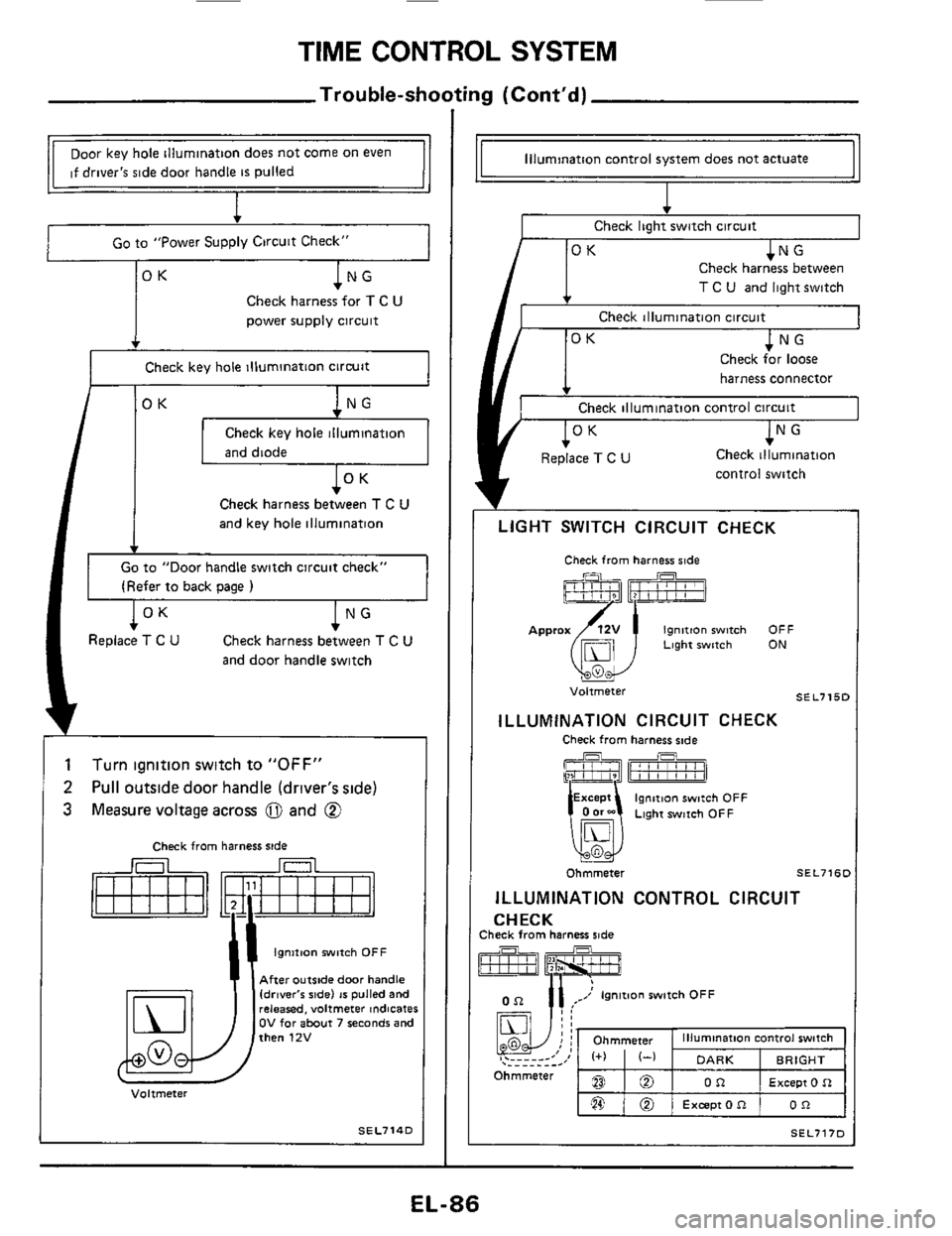
TIME CONTROL SYSTEM
Trouble-shooting (Cont'd)
BO
,@ @
Ohmmeter
Door key hole illumination does not come on even
if driver's side door handle
is pulled
I
illumination control switch
DARK BRIGHT
Except 0 R OR
Excepton OR
I Go to "Power Supply Circuit Check" I
Check harness for T C U
power supply circuit
, rK
Check key hole illumination circuit
I /OK I Check key hole illumination
Check harness between T C U
and key hole illumination
Go to "Door handle switch circuit check"
(Refer
to back oaqe 1
lNG Check harness between T C U
and door handle switch
l°K Replace T C U
1
2
3
Turn ignition switch to "OFF"
Pull outside door handle (driver's side)
Measure voltage across
0 and @
Check from harness side
Ignition witch OFF
After outside door handle Idrlver'r ride) 16 pulled and releared, voltmeter indicates OV for about 7 seconds and then 12V
Voltmeter
SEL714D
Illumination control system does not actuate
Check light switch circuit
T C U and light switch
Check illumination circuit
harness connector
Check illumination control circuit
control switch
LIGHT SWITCH CIRCUIT CHECK
Check from harness side
Ignition witch OFF Approx(i51j Light witch ON
u
SE L715C Voltmeter
ILLUMINATION CIRCUIT CHECK
Check from harness side
EL-86
Page 87 of 116
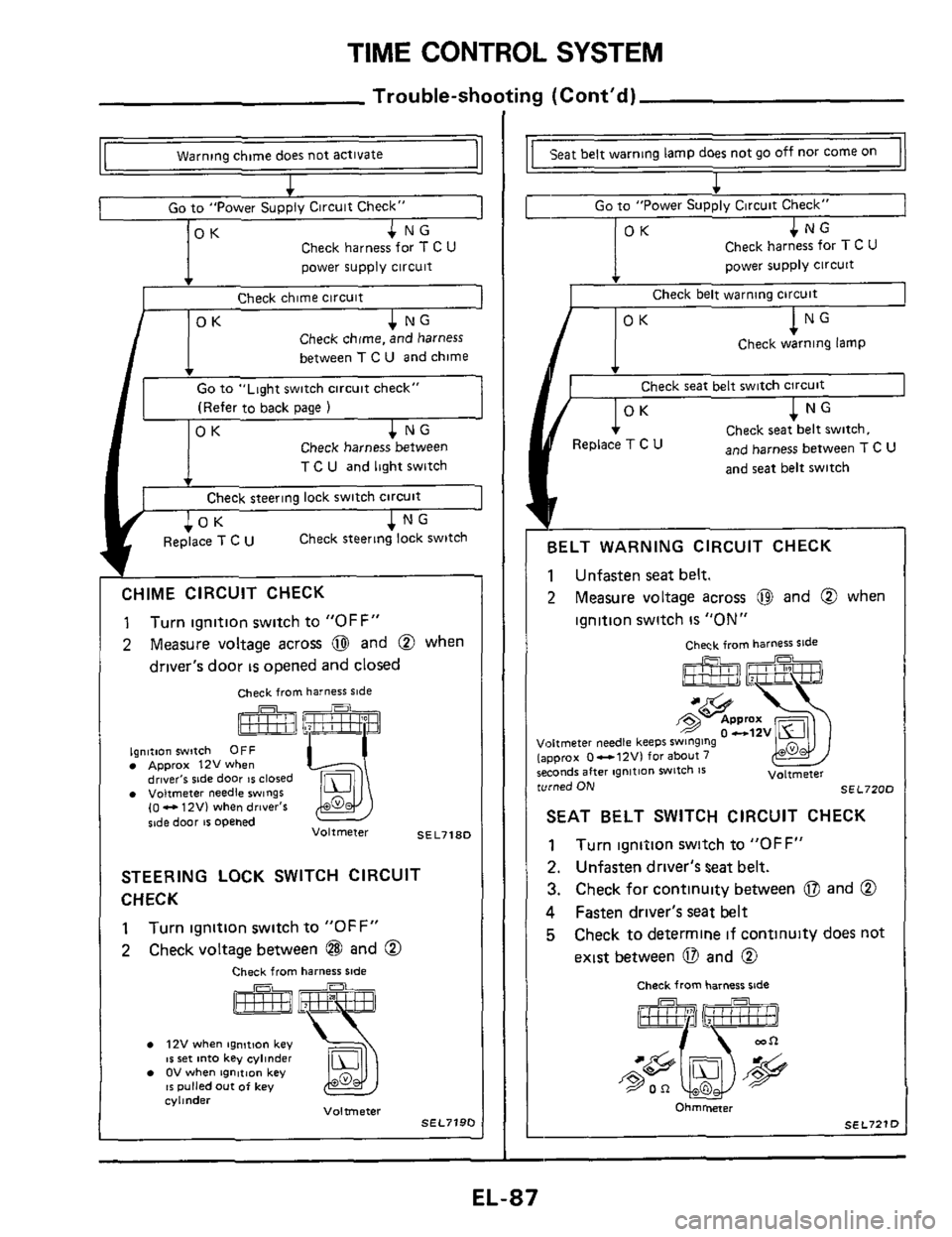
TIME CONTROL SYSTEM
Trouble-shooting (Cont'd)
CHIME CIRCUIT CHECK
1
2
Turn ignition switch to "OFF"
Measure voltage across @ and @ when
driver's door
is opened and closed
Check from harness ride I
I Warning chime does not actlvate
1
I Go to "Power SUDD~V Circuit Check" 1
ignition rwltch OFF Approx 12Vwhen drlver'r stde door IS closed Voltmeter needle swings (0 - 12V) when dnver's
%,de door tr opened SEL718D Voltmeter
STEERING LOCK SWITCH CIRCUIT
CHECK
1
2
Turn ignition switch to "OFF"
Check voltage between @ and @
Check from harness side
12V when ignmon key IS ret into key cyllndei OV when tgnltlon key 16 pulled out of key cylinder Voltmeter SEL7190
lamp does not go off nor come on
I + Go to "Power Supply Circuit Check" 1 1 OK 1 NG
Check harness for T c u
power supply circuit
Check belt warning circuit
OK NG
Check warning lamp
v
Check seat belt switch circuit
OK 1 NG
Check seat belt switch.
and harness between T c u
and seat belt switch
Replace T C U ~~
BELT
WARNING CIRCUIT CHECK
1 Unfasten seat belt.
2 Measure voltage across @I and @ when
ignition switch
is "ON"
Che& from harness ride
0 -12v Joltmeter needle keeps SwlngInQ appr~x 0-12Vl for about 7 ;econdr after ngnition witch Is Voltmeter :urned ON SEL720C
SEAT BELT SWITCH CIRCUIT CHECK
1 Turn ignition switch to "OFF"
2. Unfasten driver's seat belt.
3. Check for continuity between 0 and @
4 Fasten driver's seat belt
5 Check to determine if continuity does not
exist between 0 and @
Check from harness %de
Ohmmeter
SEL7211
EL-87