display NISSAN NAVARA 2005 Repair Workshop Manual
[x] Cancel search | Manufacturer: NISSAN, Model Year: 2005, Model line: NAVARA, Model: NISSAN NAVARA 2005Pages: 3171, PDF Size: 49.59 MB
Page 938 of 3171
DI-28
WARNING LAMPS
WARNING LAMPS
PFP:24814
System DescriptionEKS00MHA
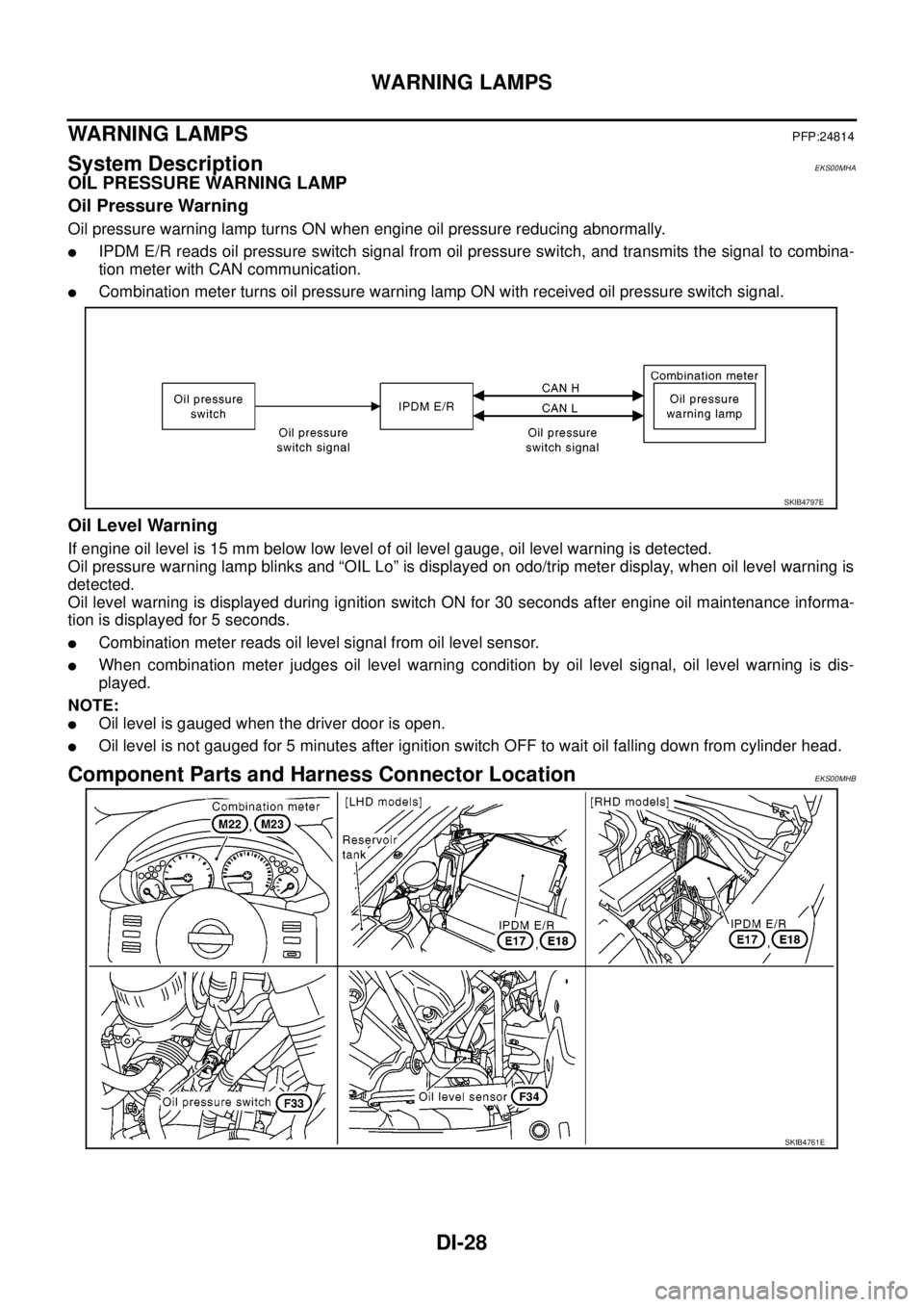
OIL PRESSURE WARNING LAMP
Oil Pressure Warning
Oil pressure warning lamp turns ON when engine oil pressure reducing abnormally.
lIPDM E/R reads oil pressure switch signal from oil pressure switch, and transmits the signal to combina-
tion meter with CAN communication.
lCombination meter turns oil pressure warning lamp ON with received oil pressure switch signal.
Oil Level Warning
If engine oil level is 15 mm below low level of oil level gauge, oil level warning is detected.
Oil pressure warning lamp blinks and “OIL Lo” is displayed on odo/trip meter display, when oil level warning is
detected.
Oil level warning is displayed during ignition switch ON for 30 seconds after engine oil maintenance informa-
tion is displayed for 5 seconds.
lCombination meter reads oil level signal from oil level sensor.
lWhen combination meter judges oil level warning condition by oil level signal, oil level warning is dis-
played.
NOTE:
lOil level is gauged when the driver door is open.
lOil level is not gauged for 5 minutes after ignition switch OFF to wait oil falling down from cylinder head.
Component Parts and Harness Connector LocationEKS00MHB
SKIB4797E
SKIB4761E
Page 956 of 3171
DI-46
WARNING LAMPS
5.CHECK IPDM E/R (CONSULT-II)
Perform self-diagnosis of IPDM E/R. Refer toPG-16, "
CONSULT-II Function (IPDM E/R)".
Self-diagnosis results
No malfunction detected>>Replace combination meter.
Malfunction detected>> Check applicable parts, and repair or replace corresponding parts.
Oil Pressure Warning Lamp Keeps Blinking (Oil Level Is Normal)EKS00MM6
NOTE:
For engine oil level inspection, refer toLU-5, "
ENGINE OIL LEVEL".
If combination meter detects that oil level sensor is open or short circuit, oil level warning is displayed.
1.CHECK OIL LEVEL SENSOR
1. Turn ignition switch OFF.
2. Disconnect oil level sensor connector.
3. Check oil level sensor. Refer toDI-47, "
OIL LEVEL SENSOR".
OK or NG
OK >> GO TO 2.
NG >> Replace oil level sensor.
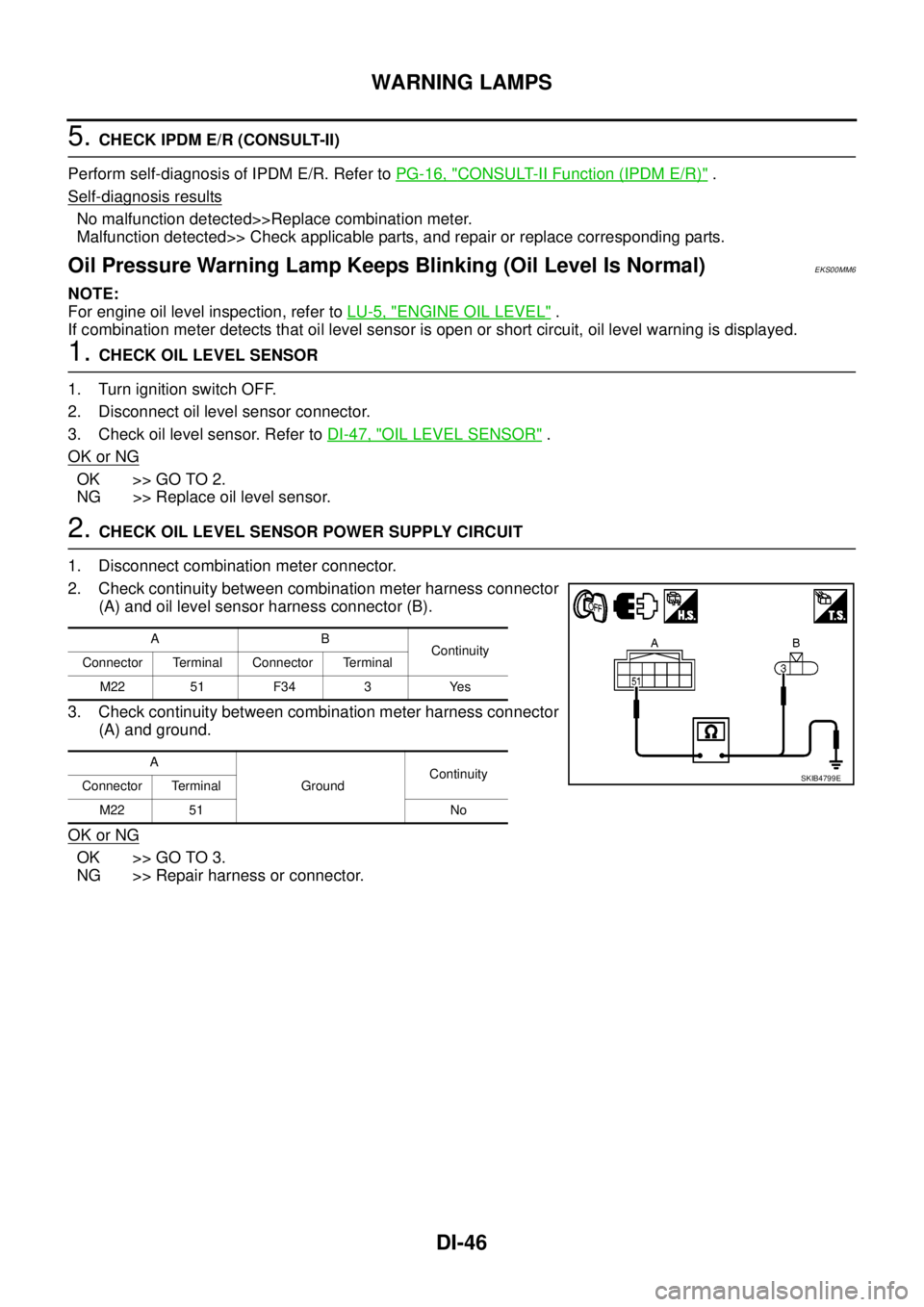
2.CHECK OIL LEVEL SENSOR POWER SUPPLY CIRCUIT
1. Disconnect combination meter connector.
2. Check continuity between combination meter harness connector
(A) and oil level sensor harness connector (B).
3. Check continuity between combination meter harness connector
(A) and ground.
OK or NG
OK >> GO TO 3.
NG >> Repair harness or connector.
AB
Continuity
Connector Terminal Connector Terminal
M22 51 F34 3 Yes
A
GroundContinuity
Connector Terminal
M22 51 No
SKIB4799E
Page 958 of 3171
DI-48
A/T INDICATOR
A/T INDICATOR
PFP:24814
System DescriptionEKS00PDJ
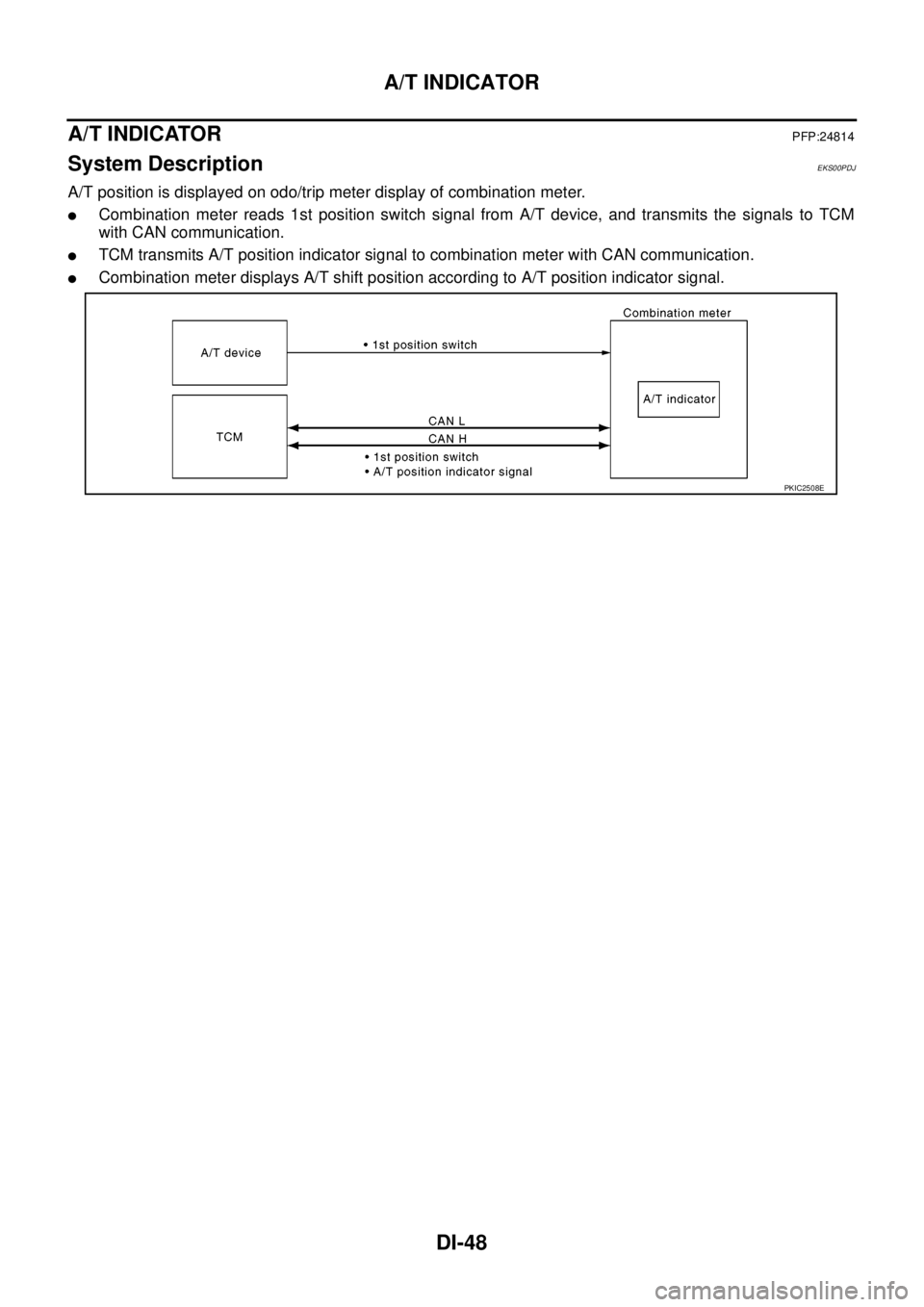
A/T position is displayed on odo/trip meter display of combination meter.
lCombination meter reads 1st position switch signal from A/T device, and transmits the signals to TCM
with CAN communication.
lTCM transmits A/T position indicator signal to combination meter with CAN communication.
lCombination meter displays A/T shift position according to A/T position indicator signal.
PKIC2508E
Page 960 of 3171
DI-50
A/T INDICATOR
A/T Indicator Does Not Illuminate
EKS00PDL
1.CHECK SEGMENT OF A/T INDICATOR
Perform self-diagnosis mode of combination meter. Refer toDI-13, "
Self-Diagnosis Mode of Combination
Meter".
Are all segments displayed?
YES >> GO TO 2.
NO >> Replace combination meter.
2.CHECK COMBINATION METER (CONSULT-II)
Perform self-diagnosis of combination meter. Refer toDI-15, "
CONSULT-II Function (METER)".
OK or NG
OK >> GO TO 3.
NG >> Check applicable part, and repair or replace corresponding parts.
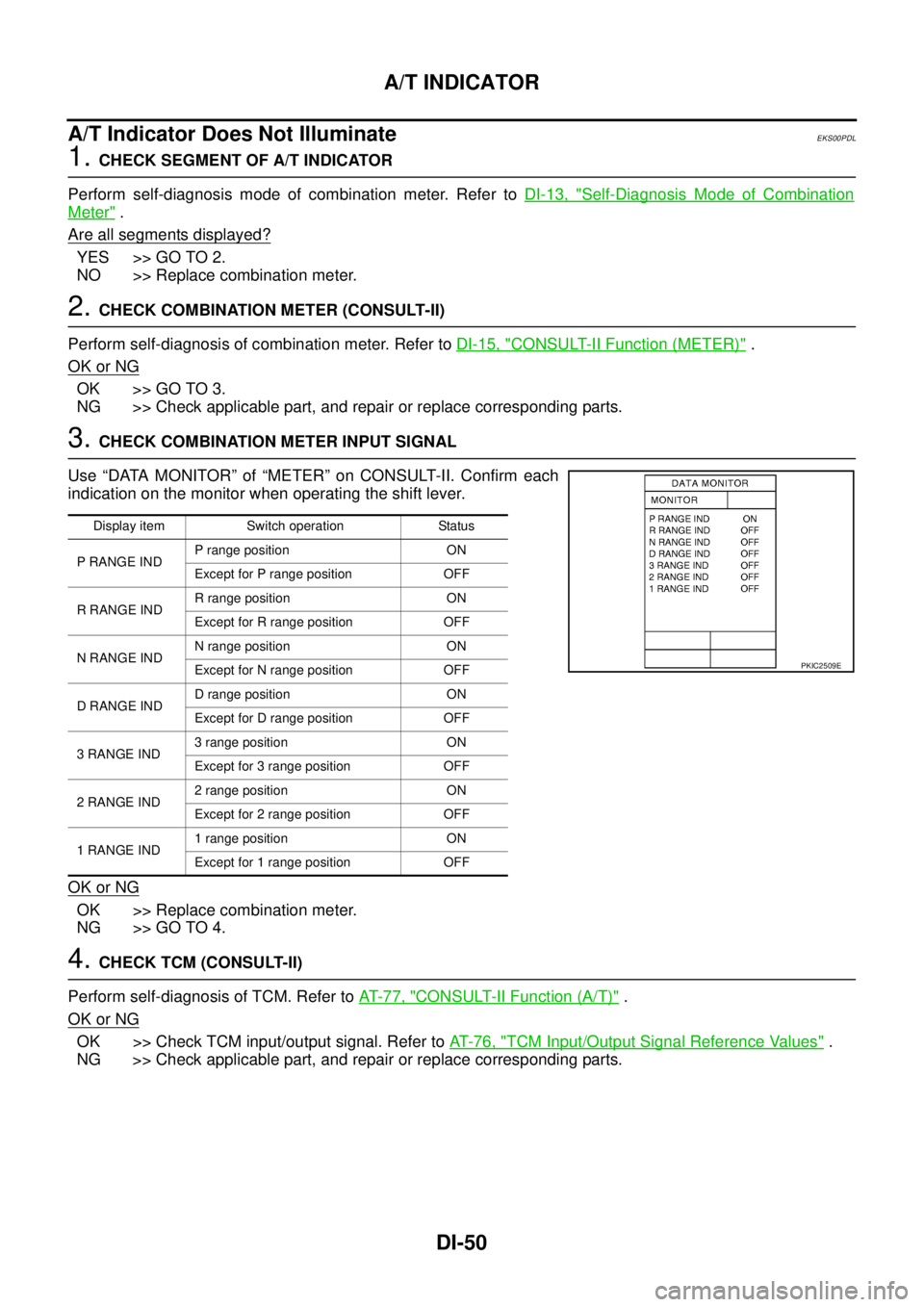
3.CHECK COMBINATION METER INPUT SIGNAL
Use “DATA MONITOR” of “METER” on CONSULT-II. Confirm each
indication on the monitor when operating the shift lever.
OK or NG
OK >> Replace combination meter.
NG >> GO TO 4.
4.CHECK TCM (CONSULT-II)
Perform self-diagnosis of TCM. Refer toAT-77, "
CONSULT-II Function (A/T)".
OK or NG
OK >> Check TCM input/output signal. Refer toAT-76, "TCM Input/Output Signal Reference Values".
NG >> Check applicable part, and repair or replace corresponding parts.
Display item Switch operation Status
P RANGE INDP range position ON
Except for P range position OFF
RRANGEINDR range position ON
Except for R range position OFF
NRANGEINDN range position ON
Except for N range position OFF
DRANGEINDD range position ON
Except for D range position OFF
3RANGEIND3 range position ON
Except for 3 range position OFF
2RANGEIND2 range position ON
Except for 2 range position OFF
1RANGEIND1 range position ON
Except for 1 range position OFF
PKIC2509E
Page 968 of 3171
DI-58
WARNING CHIME
CONSULT-II Function (BCM)
EKS00L9K
CONSULT-II can display each diagnostic item using the diagnostic test modes shown following.
DIAGNOSTIC ITEMS DESCRIPTION
CONSULT-II BASIC OPERATION PROCEDURE
CAUTION:
If CONSULT-II is used with no connection of CONSULT-II CONVERTER, malfunctions might be
detected in self-diagnosis depending on control unit which carry out CAN communication.
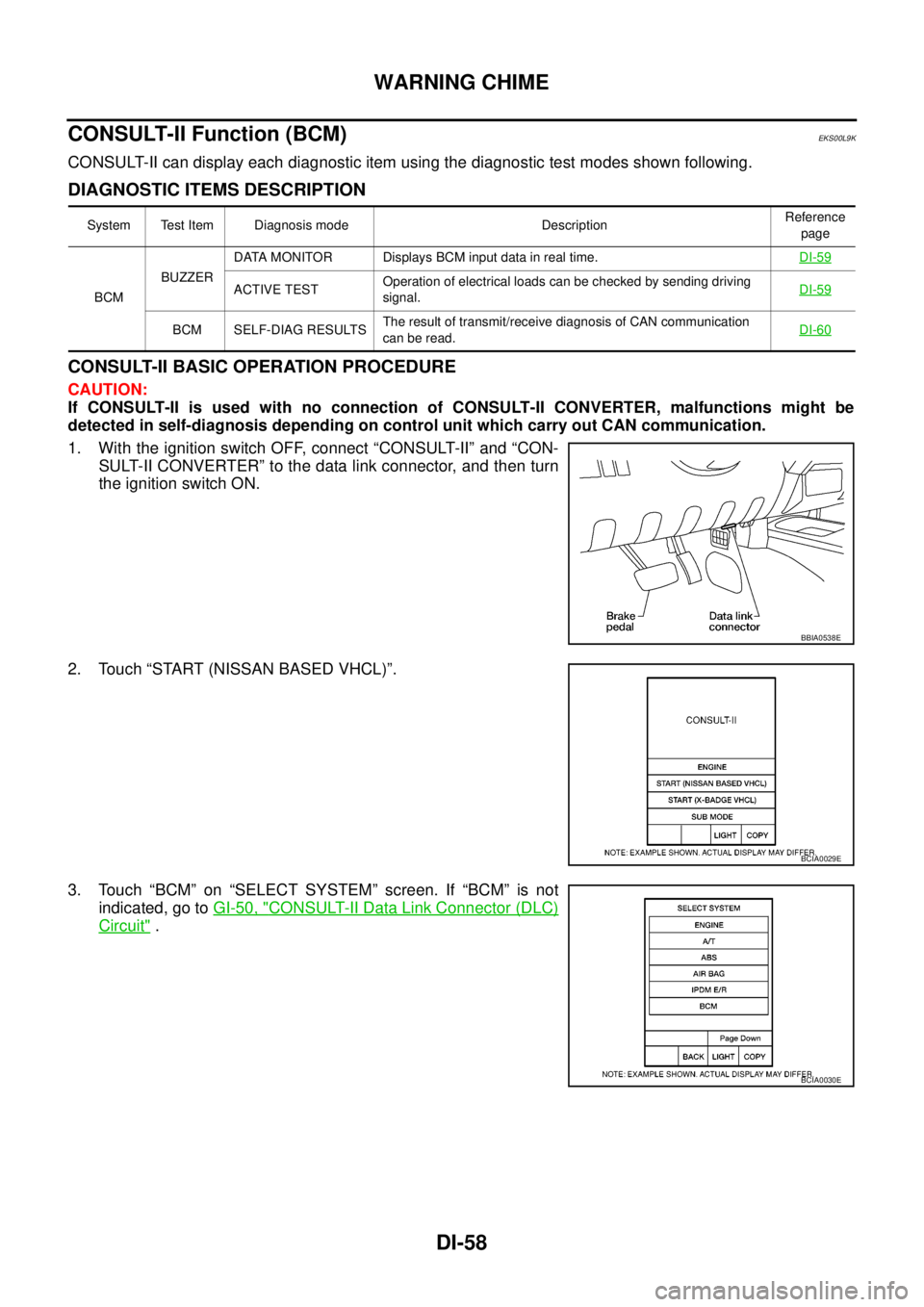
1. With the ignition switch OFF, connect “CONSULT-II” and “CON-
SULT-II CONVERTER” to the data link connector, and then turn
the ignition switch ON.
2. Touch “START (NISSAN BASED VHCL)”.
3. Touch “BCM” on “SELECT SYSTEM” screen. If “BCM” is not
indicated, go toGI-50, "
CONSULT-II Data Link Connector (DLC)
Circuit".
System Test Item Diagnosis mode DescriptionReference
page
BCMBUZZERDATA MONITOR Displays BCM input data in real time.DI-59
ACTIVE TESTOperation of electrical loads can be checked by sending driving
signal.DI-59
BCM SELF-DIAG RESULTSThe result of transmit/receive diagnosis of CAN communication
canberead.DI-60
BBIA0538E
BCIA0029E
BCIA0030E
Page 969 of 3171
WARNING CHIME
DI-59
C
D
E
F
G
H
I
J
L
MA
B
DI
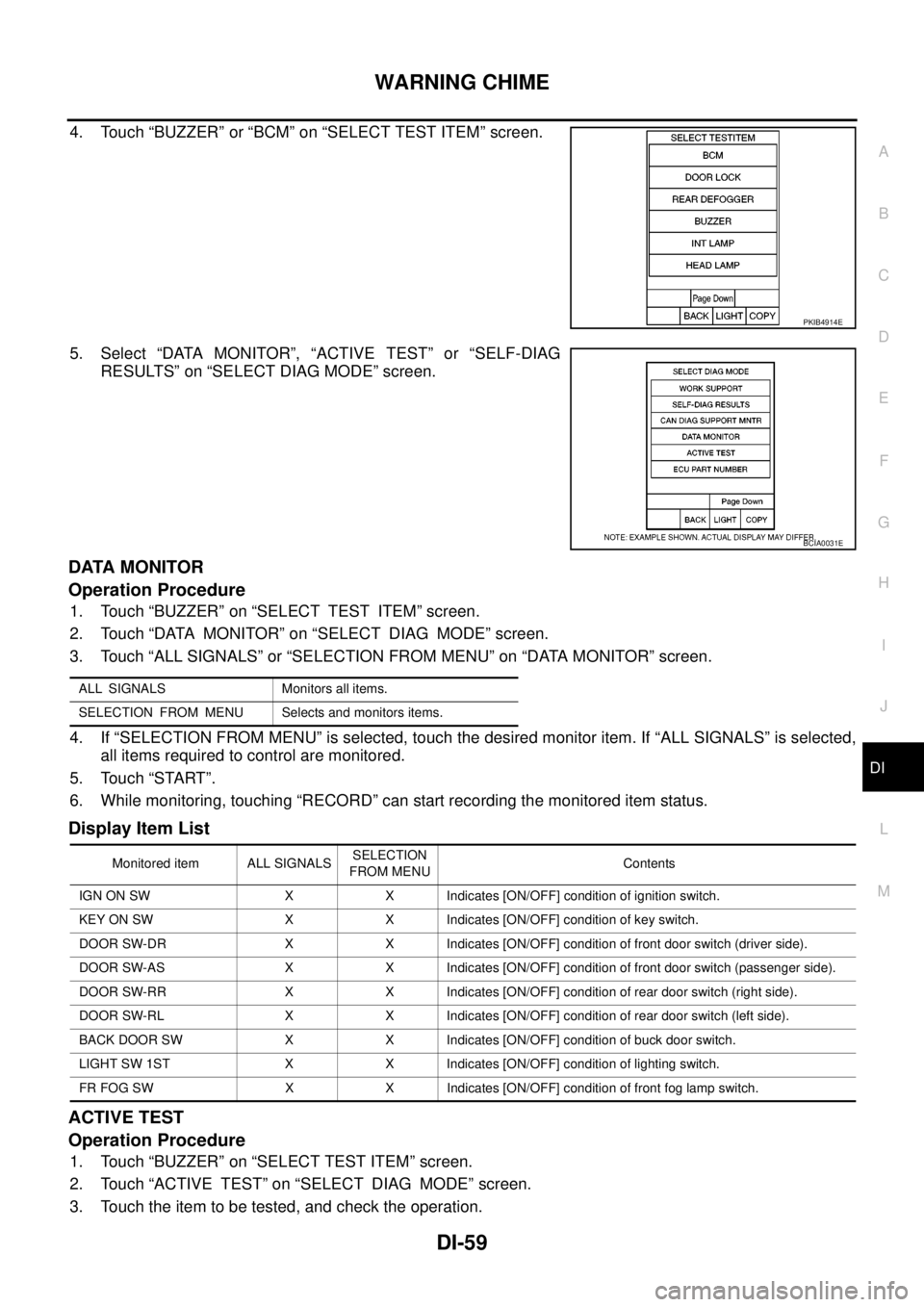
4. Touch “BUZZER” or “BCM” on “SELECT TEST ITEM” screen.
5. Select “DATA MONITOR”, “ACTIVE TEST” or “SELF-DIAG
RESULTS” on “SELECT DIAG MODE” screen.
DATA MONITOR
Operation Procedure
1. Touch “BUZZER” on “SELECT TEST ITEM” screen.
2. Touch “DATA MONITOR” on “SELECT DIAG MODE” screen.
3. Touch “ALL SIGNALS” or “SELECTION FROM MENU” on “DATA MONITOR” screen.
4. If “SELECTION FROM MENU” is selected, touch the desired monitor item. If “ALL SIGNALS” is selected,
all items required to control are monitored.
5. Touch “START”.
6. While monitoring, touching “RECORD” can start recording the monitored item status.
Display Item List
ACTIVE TEST
Operation Procedure
1. Touch “BUZZER” on “SELECT TEST ITEM” screen.
2. Touch “ACTIVE TEST” on “SELECT DIAG MODE” screen.
3. Touch the item to be tested, and check the operation.
PKIB4914E
BCIA0031E
ALL SIGNALS Monitors all items.
SELECTION FROM MENU Selects and monitors items.
Monitored item ALL SIGNALSSELECTION
FROM MENUContents
IGN ON SW X X Indicates [ON/OFF] condition of ignition switch.
KEY ON SW X X Indicates [ON/OFF] condition of key switch.
DOOR SW-DR X X Indicates [ON/OFF] condition of front door switch (driver side).
DOOR SW-AS X X Indicates [ON/OFF] condition of front door switch (passenger side).
DOOR SW-RR X X Indicates [ON/OFF] condition of rear door switch (right side).
DOOR SW-RL X X Indicates [ON/OFF] condition of rear door switch (left side).
BACK DOOR SW X X Indicates [ON/OFF] condition of buck door switch.
LIGHT SW 1ST X X Indicates [ON/OFF] condition of lighting switch.
FR FOG SW X X Indicates [ON/OFF] condition of front fog lamp switch.
Page 970 of 3171
DI-60
WARNING CHIME
4. During the operation check, touching “OFF” deactivates the operation.
Display Item List
SELF-DIAG RESULTS
Operation Procedure
1. Touch “BCM” on “SELECT TEST ITEM” screen.
2. Touch “SELF-DIAG RESULTS” on “SELECT DIAG MODE” screen.
3. Self-diagnosis results are displayed.
Display Item List
NOTE:
If “CAN communication [U1000]” is indicated, print the monitor item, and then go to “LAN System”. Refer to
LAN-3, "
Precautions When Using CONSULT-II".
Trouble DiagnosisEKS00L9I
HOW TO PERFORM TROUBLE DIAGNOSIS
1. Confirm the symptom and customer complaint.
2. Understand the outline of system. Refer toDI-51, "
System Description".
3. Perform the preliminary inspection. Refer toDI-60, "
PRELIMINARY INSPECTION".
4. Referring to trouble diagnosis chart, repair or replace the cause of the malfunction. Refer toDI-61,
"SYMPTOM CHART".
5. Does warning chime system operate normally? If it operates normally, GO TO 6. If not, GO TO 3.
6. INSPECTION END
PRELIMINARY INSPECTION
1.CHECK BCM (CONSULT-II)
Perform self-diagnosis of BCM.Refer toBCS-14, "
CONSULT-II Function (BCM)".
Self
-diagnosis results
No malfunction detected>>GO TO 2.
Malfunction detected>>Check applicable parts, and repair or replace corresponding parts.
2.CHECK COMBINATION METER (CONSULT-II)
Perform self-diagnosis of combination meter. Refer toDI-15, "
CONSULT-II Function (METER)".
Self
-diagnosis results
No malfunction detected>>INSPECTION END
Malfunction detected>>Check applicable parts, and repair or replace corresponding parts.
Test item Malfunction is detected when···
LIGHT WARN ALM This test is able to check light warning chime operation.
IGN KEY WARN ALM This test is able to check key warning chime operation.
KEY REMINDER WARN This test is able to check key reminder warning chime operation.
Monitored Item CONSULT-II display Description
CAN communication CAN communication [U1000] Malfunction is detected in CAN communication.
Page 976 of 3171
DI-66
COMPASS
COMPASS
PFP:24835
System DescriptionEKS00M4Z
This unit displays earth magnetism and heading direction of vehicle.
DIRECTION DISPLAY
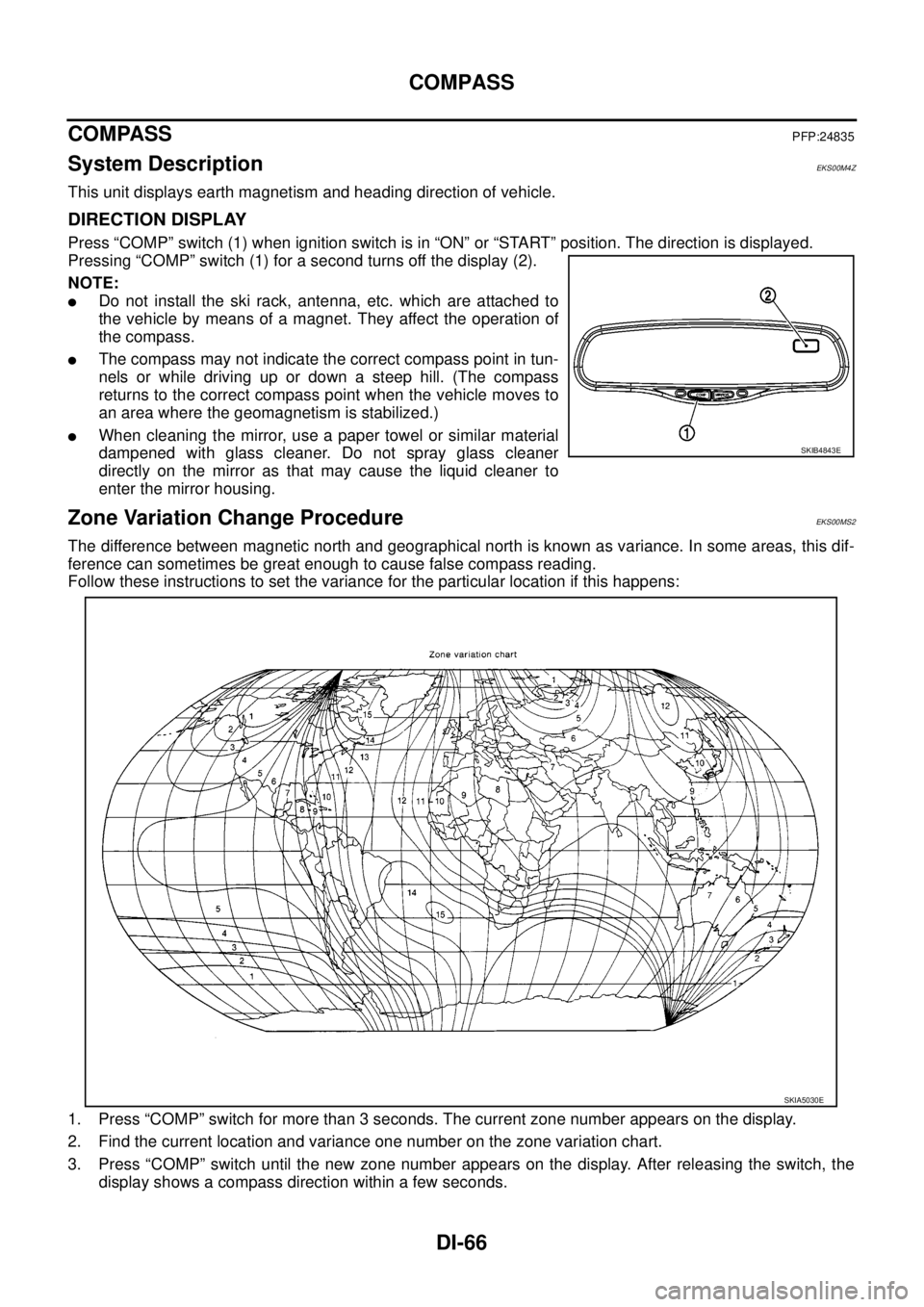
Press “COMP” switch (1) when ignition switch is in “ON” or “START” position. The direction is displayed.
Pressing “COMP” switch (1) for a second turns off the display (2).
NOTE:
lDo not install the ski rack, antenna, etc. which are attached to
the vehicle by means of a magnet. They affect the operation of
the compass.
lThe compass may not indicate the correct compass point in tun-
nels or while driving up or down a steep hill. (The compass
returns to the correct compass point when the vehicle moves to
an area where the geomagnetism is stabilized.)
lWhen cleaning the mirror, use a paper towel or similar material
dampened with glass cleaner. Do not spray glass cleaner
directly on the mirror as that may cause the liquid cleaner to
enter the mirror housing.
Zone Variation Change ProcedureEKS00MS2
The difference between magnetic north and geographical north is known as variance. In some areas, this dif-
ference can sometimes be great enough to cause false compass reading.
Follow these instructions to set the variance for the particular location if this happens:
1. Press “COMP” switch for more than 3 seconds. The current zone number appears on the display.
2. Find the current location and variance one number on the zone variation chart.
3. Press “COMP” switch until the new zone number appears on the display. After releasing the switch, the
display shows a compass direction within a few seconds.
SKIB4843E
SKIA5030E
Page 977 of 3171

COMPASS
DI-67
C
D
E
F
G
H
I
J
L
MA
B
DI
Correction Functions of the Compass DisplayEKS00MS3
AUTOMATIC CORRECTION
The compass display is equipped with automatic correction function. If the direction is not shown correctly,
perform manual correction procedure set out below.
MANUAL CORRECTION PROCEDURE
When the display reads “C” or “CAL”, calibrate the compass by driving the vehicle in 3 complete circles at less
than8km/h(5MPH).
The compass can be calibrated by driving the vehicle on everyday route. The compass is calibrated once it
has tracked 3 complete circles.
In places where the terrestrial magnetism is extremely disturbed, the initial correction procedure may start
automatically.
Page 986 of 3171
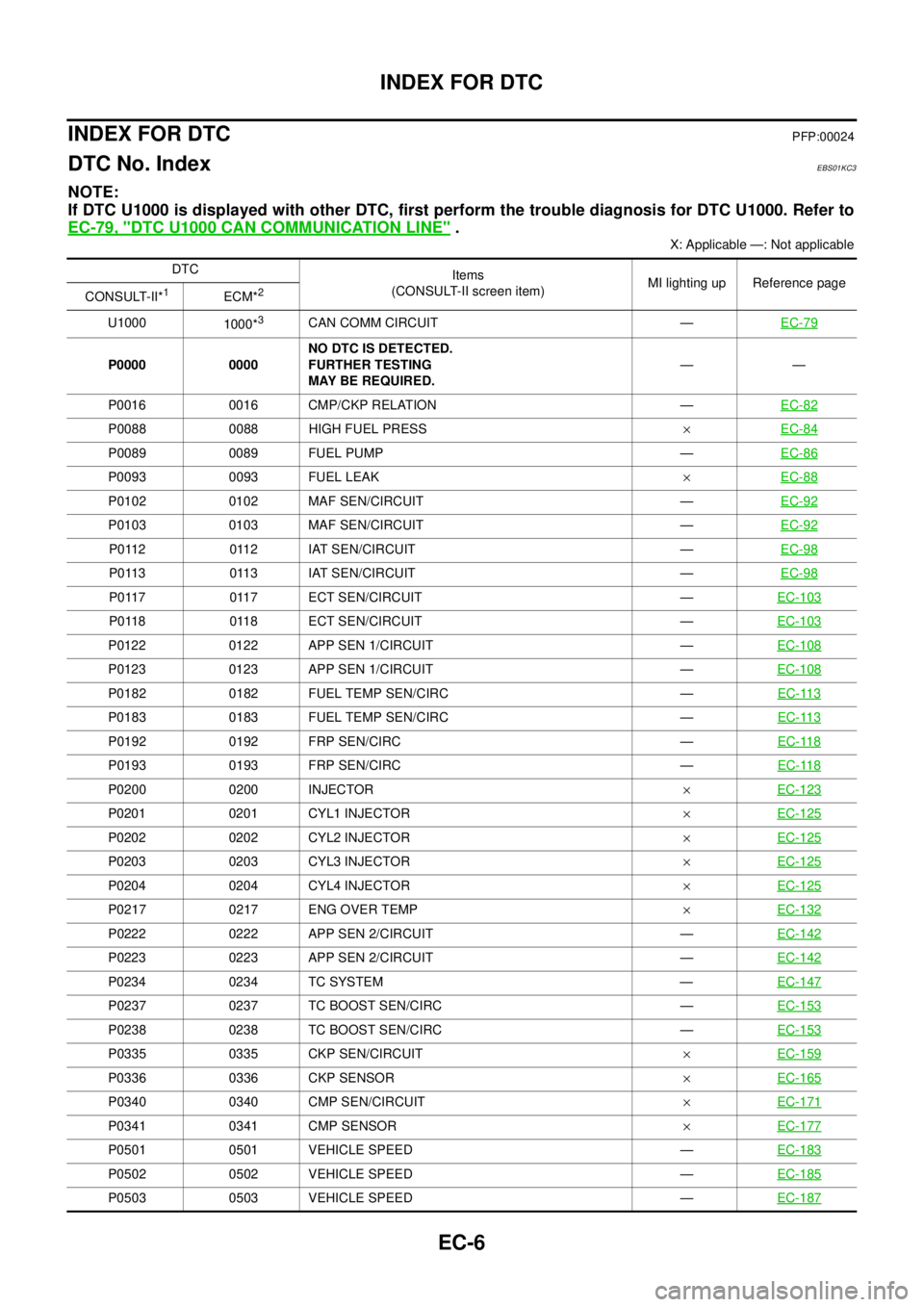
EC-6
INDEX FOR DTC
INDEX FOR DTC
PFP:00024
DTC No. IndexEBS01KC3
NOTE:
If DTC U1000 is displayed with other DTC, first perform the trouble diagnosis for DTC U1000. Refer to
EC-79, "
DTC U1000 CAN COMMUNICATION LINE".
X: Applicable —: Not applicable
DTC
Items
(CONSULT-II screen item)MI lighting up Reference page
CONSULT-II*
1ECM*2
U1000
1000*3CAN COMM CIRCUIT —EC-79
P0000 0000NO DTC IS DETECTED.
FURTHER TESTING
MAY BE REQUIRED.——
P0016 0016 CMP/CKP RELATION —EC-82
P0088 0088 HIGH FUEL PRESS´EC-84
P0089 0089 FUEL PUMP —EC-86
P0093 0093 FUEL LEAK´EC-88
P0102 0102 MAF SEN/CIRCUIT —EC-92
P0103 0103 MAF SEN/CIRCUIT —EC-92
P0112 0112 IAT SEN/CIRCUIT —EC-98
P0113 0113 IAT SEN/CIRCUIT —EC-98
P0117 0117 ECT SEN/CIRCUIT —EC-103
P0118 0118 ECT SEN/CIRCUIT —EC-103
P0122 0122 APP SEN 1/CIRCUIT —EC-108
P0123 0123 APP SEN 1/CIRCUIT —EC-108
P0182 0182 FUEL TEMP SEN/CIRC —EC-113
P0183 0183 FUEL TEMP SEN/CIRC —EC-113
P0192 0192 FRP SEN/CIRC —EC-118
P0193 0193 FRP SEN/CIRC —EC-118
P0200 0200 INJECTOR´EC-123
P0201 0201 CYL1 INJECTOR´EC-125
P0202 0202 CYL2 INJECTOR´EC-125
P0203 0203 CYL3 INJECTOR´EC-125
P0204 0204 CYL4 INJECTOR´EC-125
P0217 0217 ENG OVER TEMP´EC-132
P0222 0222 APP SEN 2/CIRCUIT —EC-142
P0223 0223 APP SEN 2/CIRCUIT —EC-142
P0234 0234 TC SYSTEM —EC-147
P0237 0237 TC BOOST SEN/CIRC —EC-153
P0238 0238 TC BOOST SEN/CIRC —EC-153
P0335 0335 CKP SEN/CIRCUIT´EC-159
P0336 0336 CKP SENSOR´EC-165
P0340 0340 CMP SEN/CIRCUIT´EC-171
P0341 0341 CMP SENSOR´EC-177
P0501 0501 VEHICLE SPEED —EC-183
P0502 0502 VEHICLE SPEED —EC-185
P0503 0503 VEHICLE SPEED —EC-187