4WD NISSAN NAVARA 2005 Repair Owner's Manual
[x] Cancel search | Manufacturer: NISSAN, Model Year: 2005, Model line: NAVARA, Model: NISSAN NAVARA 2005Pages: 3171, PDF Size: 49.59 MB
Page 186 of 3171
AT-178
TROUBLE DIAGNOSIS FOR SYMPTOMS
2.CHECK CONTROL CABLE
Check control cable. Refer toAT- 2 11 , "
Checking of A/T Position".
OK or NG
OK >> GO TO 3.
NG >> Adjust control cable. Refer toAT- 2 11 , "
Adjustment of A/T Position".
3.CHECK STARTING SYSTEM
Check starting system. Refer toSC-27, "
STARTING SYSTEM".
OK or NG
OK >>INSPECTION END
NG >> Repair or replace damaged parts.
In “P” Position, Vehicle Moves When PushedECS00G2D
SYMPTOM:
Even though selector lever is set in the “P” position, the parking mechanism is not actuated, allowing
the vehicle to be moved when it is pushed.
DIAGNOSTIC PROCEDURE
1.CHECK PNP SWITCH CIRCUIT
Perform self-diagnosis. Refer toAT-80, "
SELF-DIAGNOSTIC RESULT MODE",AT-89, "Diagnostic Procedure
Without CONSULT-II".
Do the self-diagnosis results indicate PNP switch?
YES >> Check malfunctioning system. Refer toAT-99, "DTC P0705 PARK/NEUTRAL POSITION
SWITCH".
NO >> GO TO 2.
2.CHECK CONTROL CABLE
Check control cable. Refer toAT- 2 11 , "
Checking of A/T Position".
OK or NG
OK >> GO TO 3.
NG >> Adjust control cable. Refer toAT- 2 11 , "
Adjustment of A/T Position".
3.CHECK PARKING COMPONENTS
Check parking components. Refer toAT- 2 3 0 , "
Parking Components (2WD Models Only)"(2WD models),AT-
263, "DISASSEMBLY"(4WD models).
OK or NG
OK >> GO TO 4.
NG >> Repair or replace damaged parts.
4.CHECK A/T FLUID CONDITION
1. Remove oil pan. Refer toAT- 2 1 8 , "
Control Valve With TCM and A/T Fluid Temperature Sensor 2".
2. Check A/T fluid condition. Refer toAT-43, "
A/T Fluid Condition Check".
OK or NG
OK >>INSPECTION END
NG >> Check malfunction items. If any items are damaged, repair or replace damaged parts. Refer toAT-
53, "Symptom Chart"(Symptom No.58)
Page 245 of 3171
ON-VEHICLE SERVICE
AT-237
D
E
F
G
H
I
J
K
L
MA
B
AT
Rear Oil SealECS00GVM
REMOVAL AND INSTALLATION
Removal
1. Remove rear propeller shaft. Refer toPR-8, "Removal and
Installation".
2. Remove transfer from A/T assembly (4WD models). Refer to
T F - 111 , "
Removal and Installation".
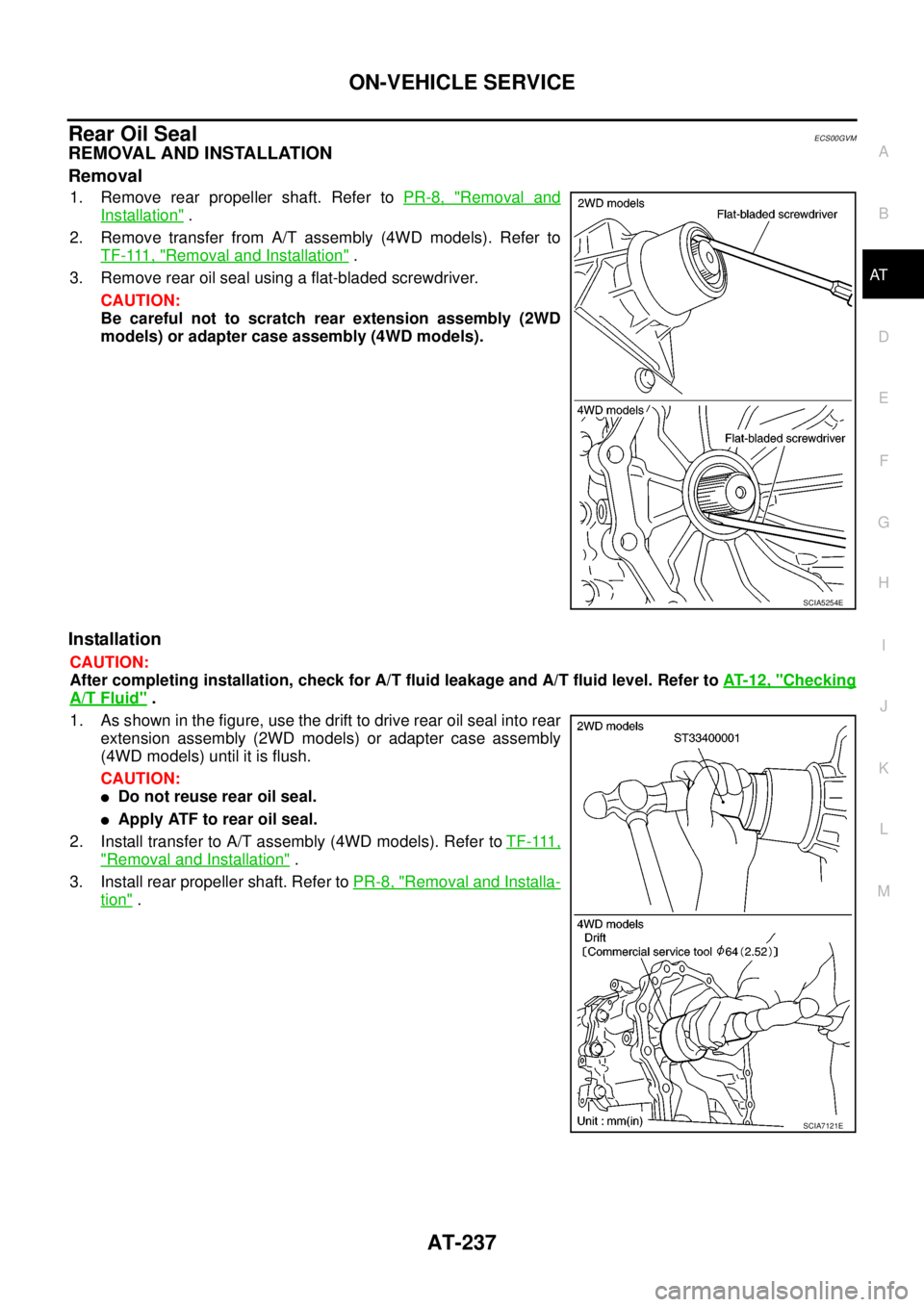
3. Remove rear oil seal using a flat-bladed screwdriver.
CAUTION:
Be careful not to scratch rear extension assembly (2WD
models) or adapter case assembly (4WD models).
Installation
CAUTION:
After completing installation, check for A/T fluid leakage and A/T fluid level. Refer toAT- 1 2 , "
Checking
A/T Fluid".
1. As shown in the figure, use the drift to drive rear oil seal into rear
extension assembly (2WD models) or adapter case assembly
(4WD models) until it is flush.
CAUTION:
lDo not reuse rear oil seal.
lApply ATF to rear oil seal.
2. Install transfer to A/T assembly (4WD models). Refer toT F - 111 ,
"Removal and Installation".
3. Install rear propeller shaft. Refer toPR-8, "
Removal and Installa-
tion".
SCIA5254E
SCIA7121E
Page 256 of 3171
AT-248
TRANSMISSION ASSEMBLY
4WD models
REMOVAL
CAUTION:
When removing A/T assembly from engine, first remove the crankshaft position sensor (POS) from A/
T assembly.
1. Disconnect the battery cable from the negative terminal.
2. Remove engine cover. Refer toEM-20, "
INTAKE MANIFOLD".
3. Remove A/T fluid level gauge.
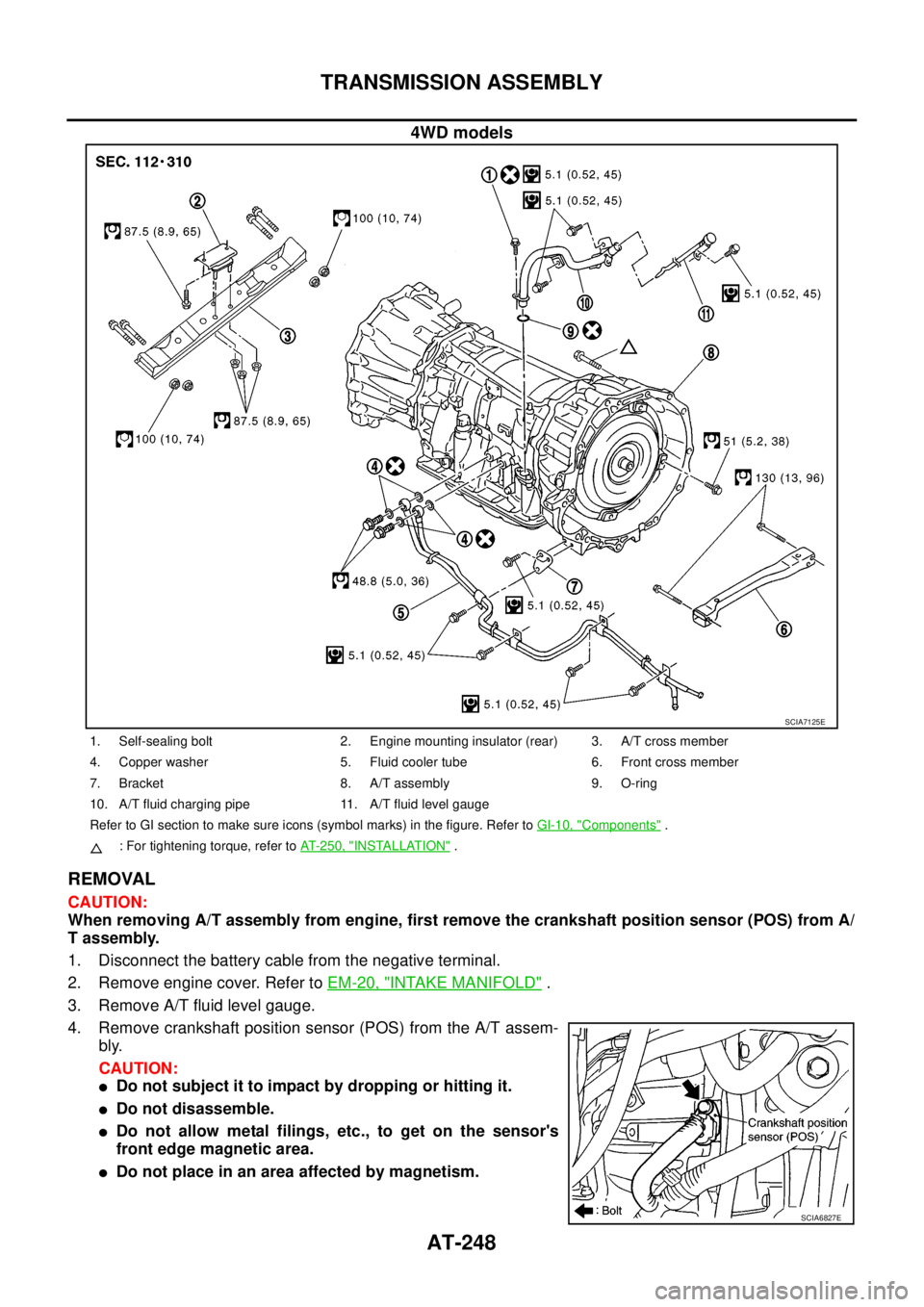
4. Remove crankshaft position sensor (POS) from the A/T assem-
bly.
CAUTION:
lDo not subject it to impact by dropping or hitting it.
lDo not disassemble.
lDo not allow metal filings, etc., to get on the sensor's
front edge magnetic area.
lDo not place in an area affected by magnetism.
SCIA7125E
1. Self-sealing bolt 2. Engine mounting insulator (rear) 3. A/T cross member
4. Copper washer 5. Fluid cooler tube 6. Front cross member
7. Bracket 8. A/T assembly 9. O-ring
10. A/T fluid charging pipe 11. A/T fluid level gauge
Refer to GI section to make sure icons (symbol marks) in the figure. Refer toGI-10, "
Components".
: For tightening torque, refer toAT-250, "
INSTALLATION".
SCIA6827E
Page 257 of 3171
TRANSMISSION ASSEMBLY
AT-249
D
E
F
G
H
I
J
K
L
MA
B
AT
5. Remove front valance center, engine undercover front, engine under cover middle and engine under
coverrear.RefertoEI-15, "
FRONT BUMPER".
6. Remove front cross member.
7. Remove main muffler. Refer toEX-2, "
EXHAUST SYSTEM".
8. Remove rear propeller shaft. Refer toPR-8, "
Removal and Installation".
9. Remove front propeller shaft. Refer toPR-4, "
Removal and Installation".
10. Remove starter motor. Refer toSC-31, "
Removal and Installation".
11. Remove control cable and bracket. Refer toAT- 2 1 0 , "
Control Cable Removal and Installation".
12. Disconnect fluid cooler tube.
13. Remove A/T fluid charging pipe from A/T assembly.
14. Remove O-ring from A/T fluid charging pipe.
15. Plug up openings such as A/T fluid charging pipe hole, etc.
16. Remove rear plate cover from rear plate.
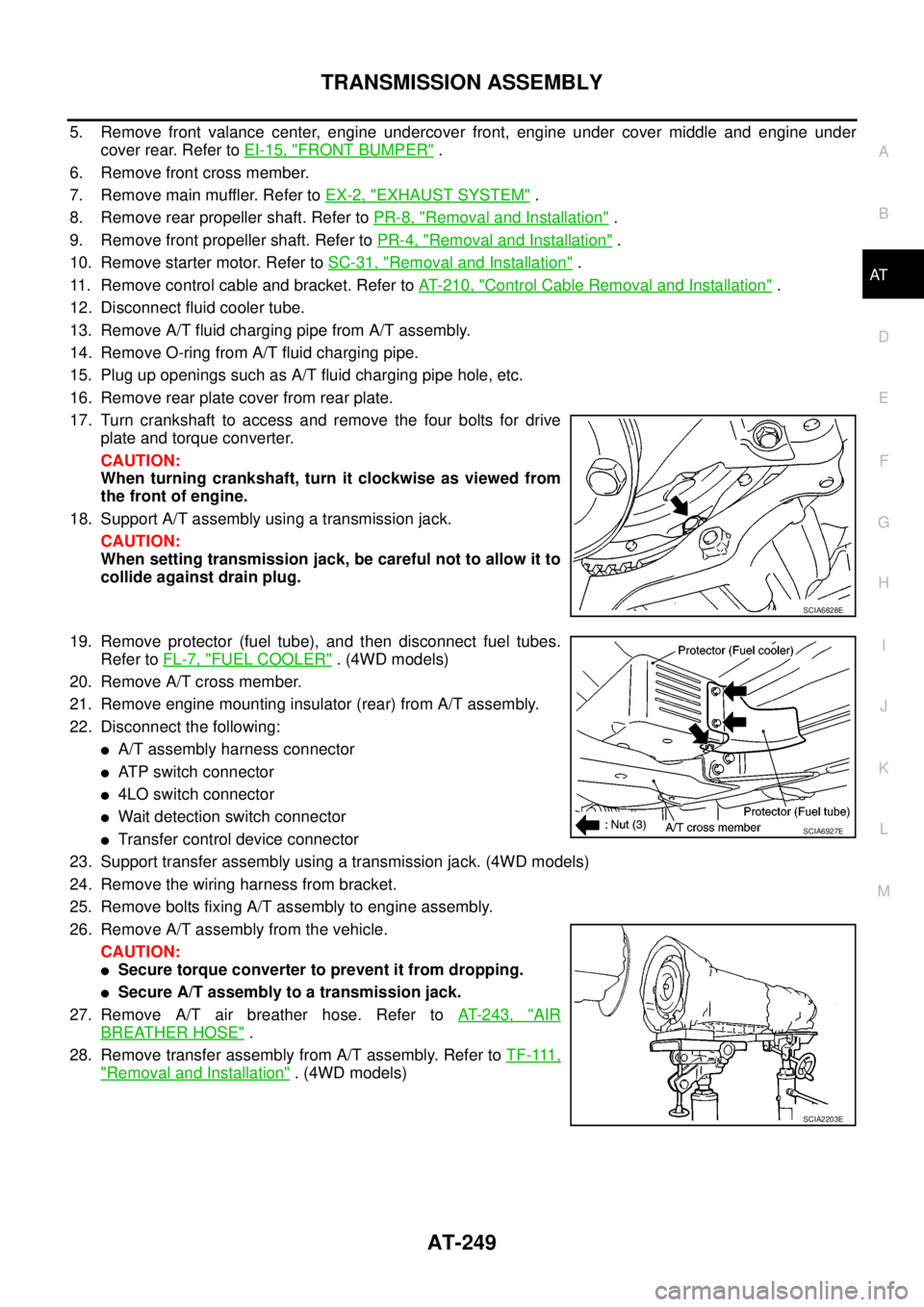
17. Turn crankshaft to access and remove the four bolts for drive
plate and torque converter.
CAUTION:
When turning crankshaft, turn it clockwise as viewed from
the front of engine.
18. Support A/T assembly using a transmission jack.
CAUTION:
When setting transmission jack, be careful not to allow it to
collide against drain plug.
19. Remove protector (fuel tube), and then disconnect fuel tubes.
Refer toFL-7, "
FUEL COOLER". (4WD models)
20. Remove A/T cross member.
21. Remove engine mounting insulator (rear) from A/T assembly.
22. Disconnect the following:
lA/T assembly harness connector
lATP switch connector
l4LO switch connector
lWait detection switch connector
lTransfer control device connector
23. Support transfer assembly using a transmission jack. (4WD models)
24. Remove the wiring harness from bracket.
25. Remove bolts fixing A/T assembly to engine assembly.
26. Remove A/T assembly from the vehicle.
CAUTION:
lSecure torque converter to prevent it from dropping.
lSecure A/T assembly to a transmission jack.
27. Remove A/T air breather hose. Refer toAT- 2 4 3 , "
AIR
BREATHER HOSE".
28. Remove transfer assembly from A/T assembly. Refer toT F - 111 ,
"Removal and Installation". (4WD models)
SCIA6828E
SCIA6927E
SCIA2203E
Page 265 of 3171
OVERHAUL
AT-257
D
E
F
G
H
I
J
K
L
MA
B
AT
4WD models
SCIA7313E
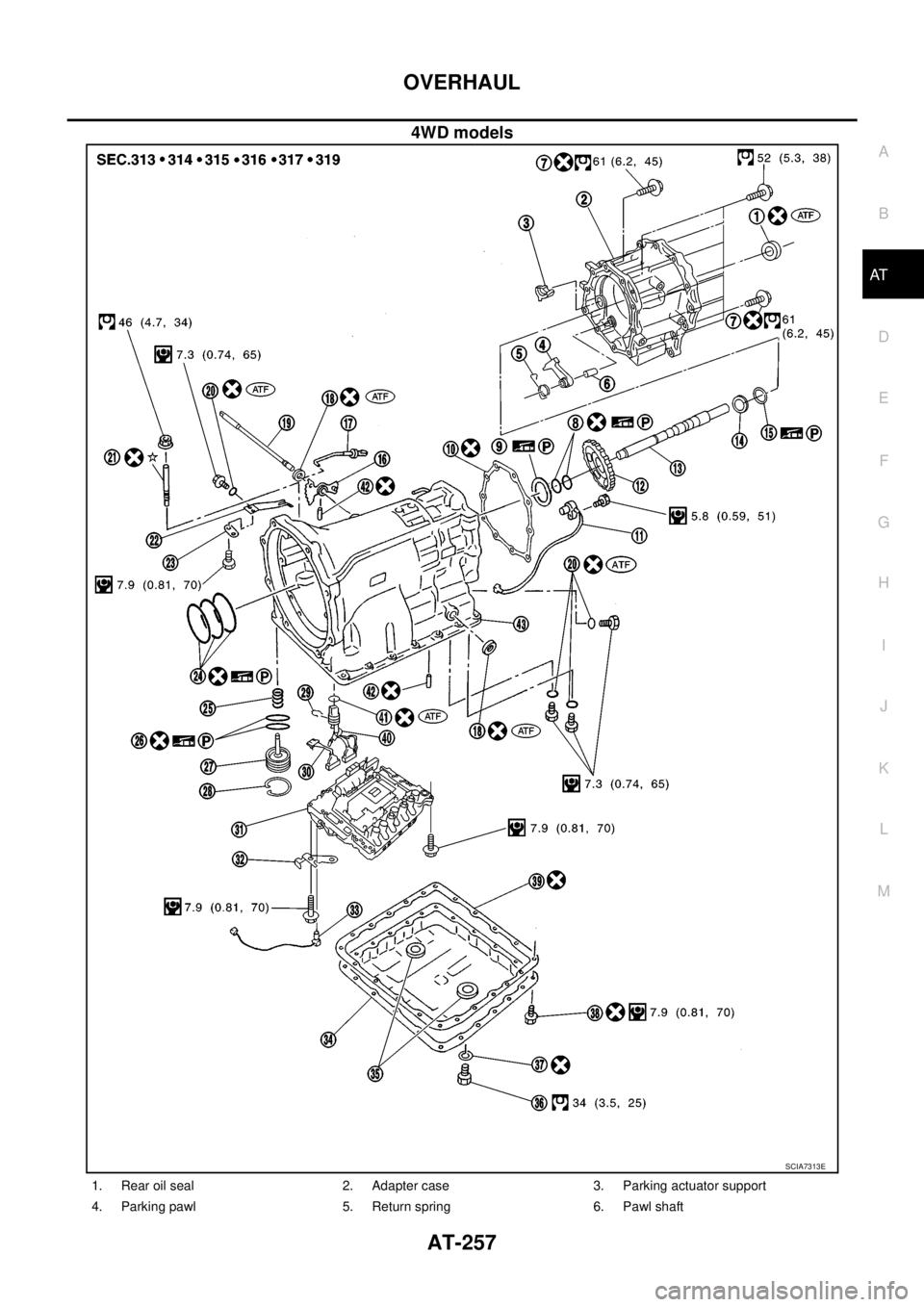
1. Rear oil seal 2. Adapter case 3. Parking actuator support
4. Parking pawl 5. Return spring 6. Pawl shaft
Page 268 of 3171
AT-260
OVERHAUL
4WD models
SCIA5189E
Page 270 of 3171
AT-262
OVERHAUL
4WD models
SCIA7336E
Page 271 of 3171
DISASSEMBLY
AT-263
D
E
F
G
H
I
J
K
L
MA
B
AT
DISASSEMBLYPFP:31020
DisassemblyECS00G3E
CAUTION:
Do not disassemble parts behind drum support. Refer toAT-14, "
Cross-Sectional View (2WD Models)"
,AT-15, "Cross-Sectional View (4WD Models)".
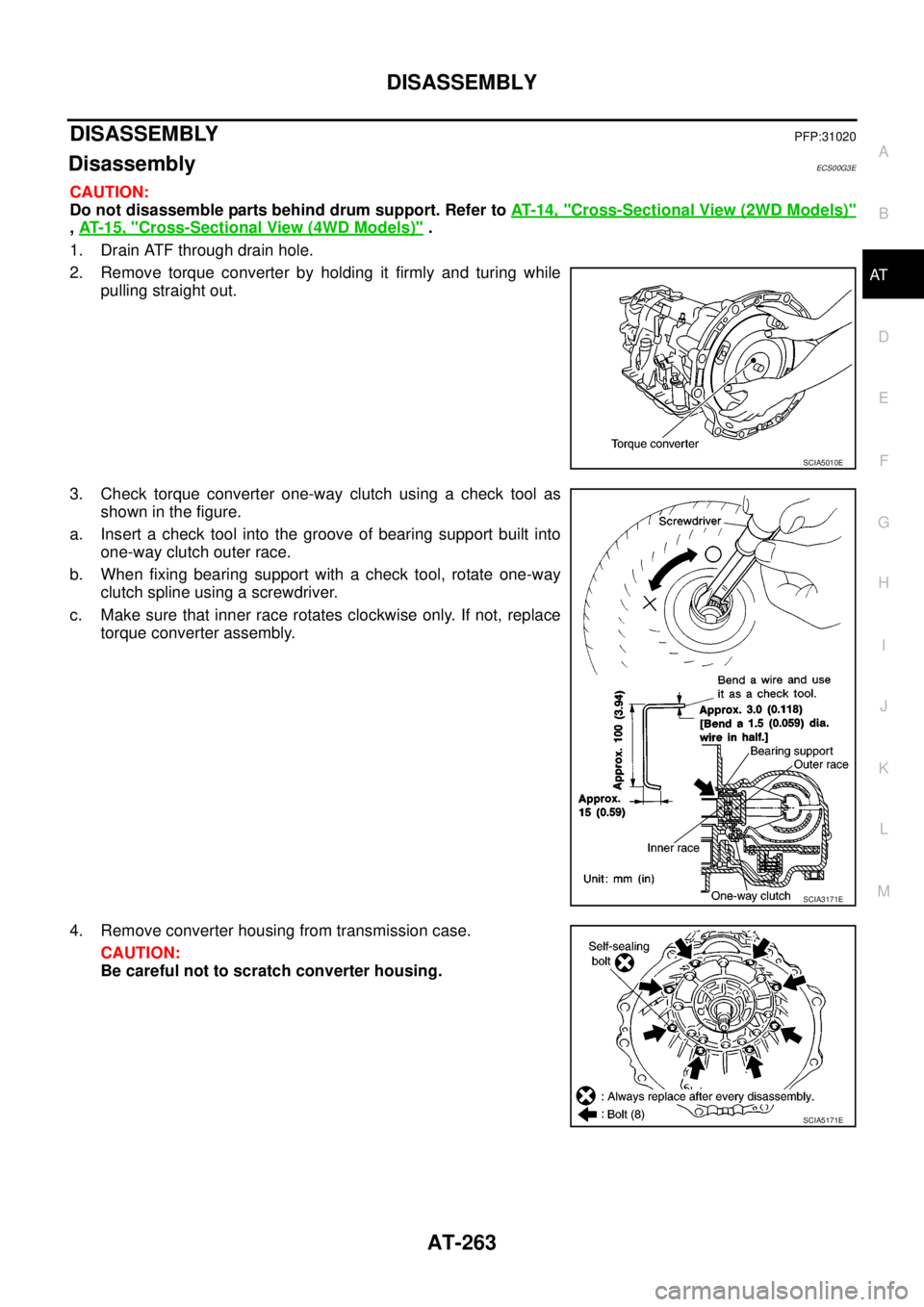
1. Drain ATF through drain hole.
2. Remove torque converter by holding it firmly and turing while
pulling straight out.
3. Check torque converter one-way clutch using a check tool as
showninthefigure.
a. Insert a check tool into the groove of bearing support built into
one-way clutch outer race.
b. When fixing bearing support with a check tool, rotate one-way
clutch spline using a screwdriver.
c. Make sure that inner race rotates clockwise only. If not, replace
torque converter assembly.
4. Remove converter housing from transmission case.
CAUTION:
Be careful not to scratch converter housing.
SCIA5010E
SCIA3171E
SCIA5171E
Page 280 of 3171
AT-272
DISASSEMBLY
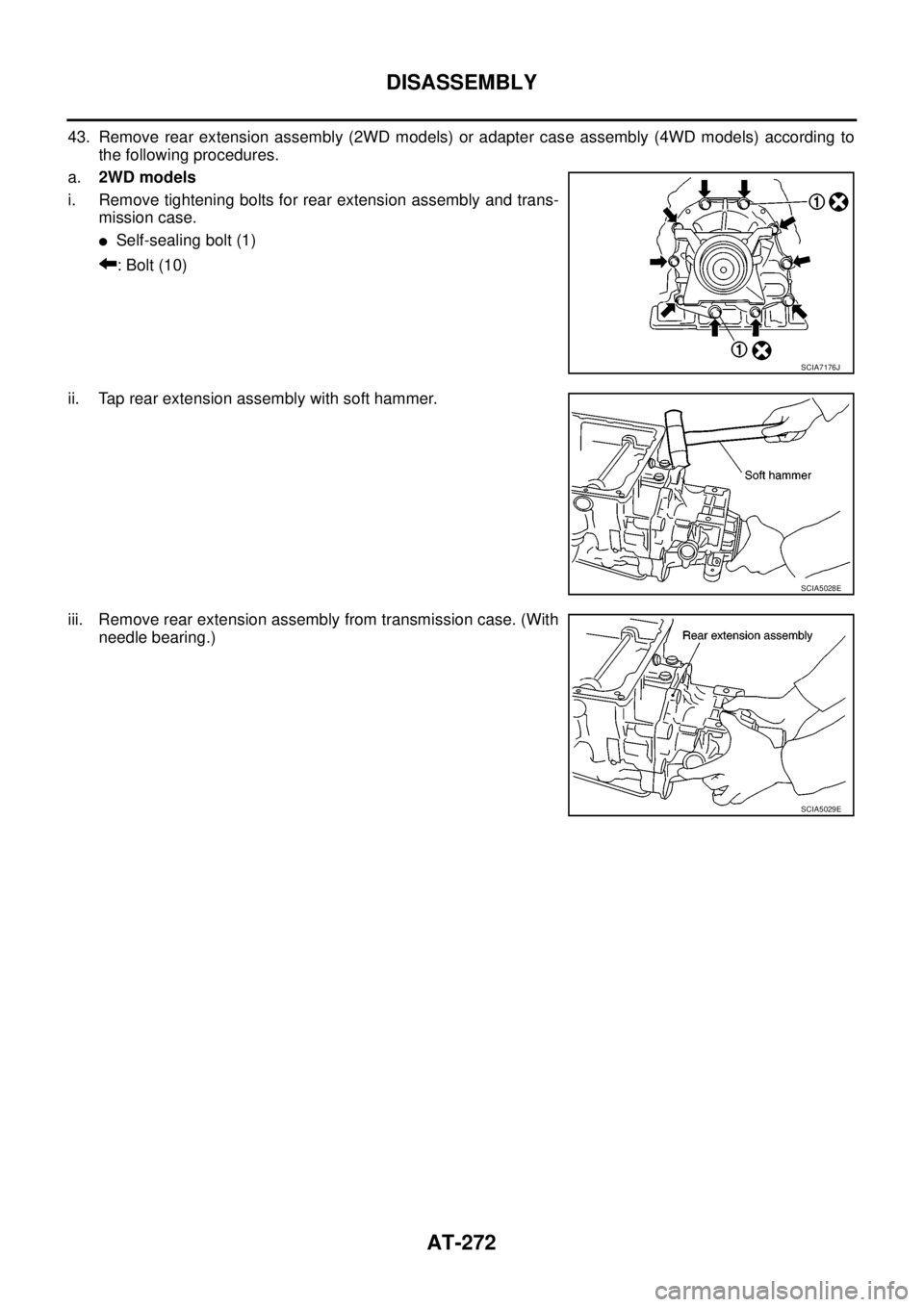
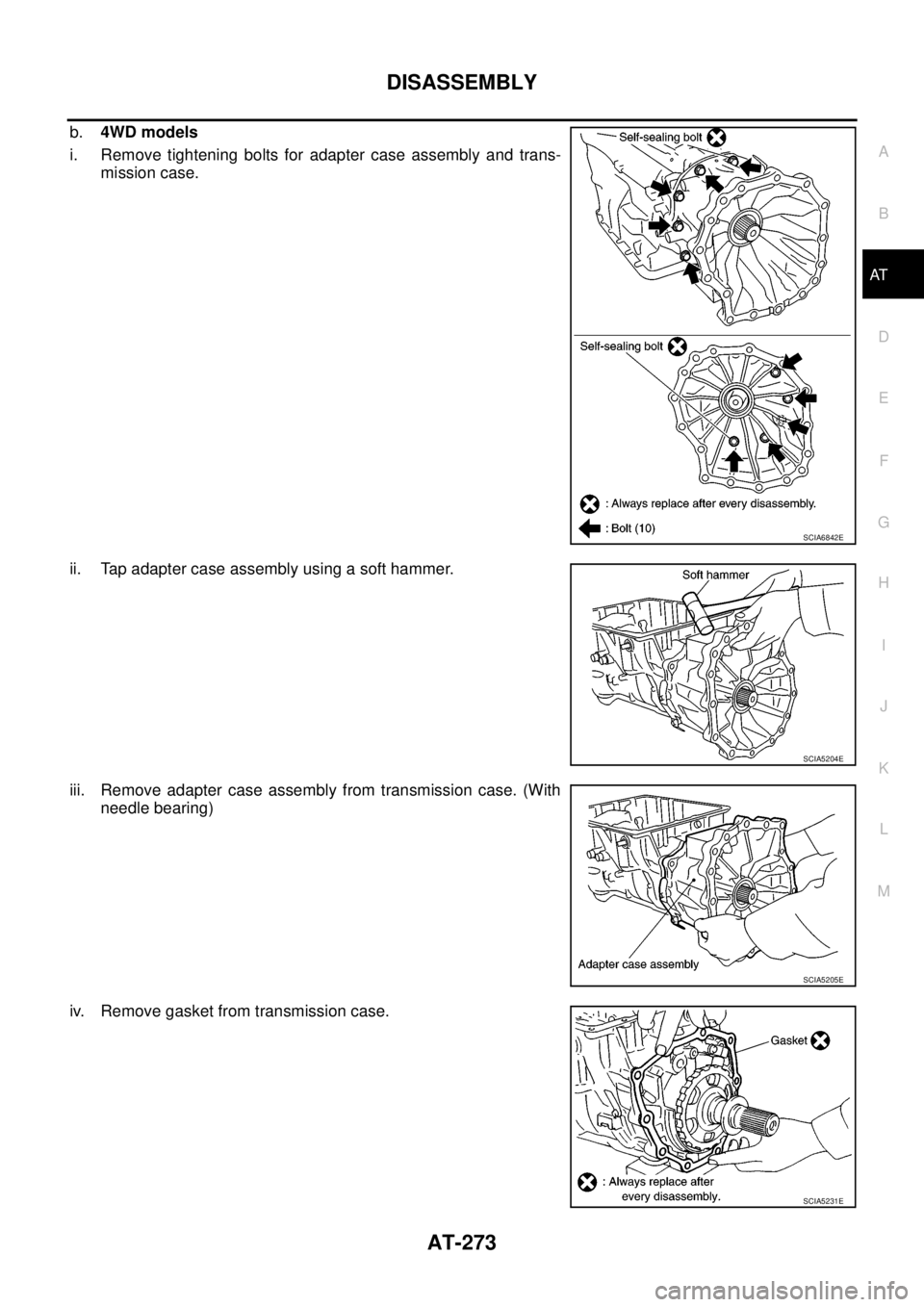
43. Remove rear extension assembly (2WD models) or adapter case assembly (4WD models) according to
the following procedures.
a.2WD models
i. Remove tightening bolts for rear extension assembly and trans-
mission case.
lSelf-sealing bolt (1)
:Bolt(10)
ii. Tap rear extension assembly with soft hammer.
iii. Remove rear extension assembly from transmission case. (With
needle bearing.)
SCIA7176J
SCIA5028E
SCIA5029E
Page 281 of 3171
DISASSEMBLY
AT-273
D
E
F
G
H
I
J
K
L
MA
B
AT
b.4WD models
i. Remove tightening bolts for adapter case assembly and trans-
mission case.
ii. Tap adapter case assembly using a soft hammer.
iii. Remove adapter case assembly from transmission case. (With
needle bearing)
iv. Remove gasket from transmission case.
SCIA6842E
SCIA5204E
SCIA5205E
SCIA5231E