NISSAN NAVARA 2005 Repair Workshop Manual
NAVARA 2005
NISSAN
NISSAN
https://www.carmanualsonline.info/img/5/57362/w960_57362-0.png
NISSAN NAVARA 2005 Repair Workshop Manual
Page 1820 of 3171
CAN COMMUNICATION
LAN-43
[CAN]
C
D
E
F
G
H
I
J
L
MA
B
LAN
NOTE:
*: LHD models only4WD shift switch signal R T
ABS operation signal R T
ABS warning lamp signalRT
Vehicle speed signalRR RRT
RRR RR T
Stop lamp switch signalRT
Front wiper stop position signal R T
Hood switch signal R T
Oil pressure switch signalRT
Rear window defogger control signal R TSignals ECM TCMNAVI
con-
trol
unitDiffer-
ential
lock
con-
trol
unitFront
air
controlBCMCom-
bina-
tion
meterTrans-
fer
con-
trol
unitABS
actua-
tor and
elec-
tric unit
(con-
trol
unit)IPDM
E/R
Page 1907 of 3171
LAN-130
[CAN]
CAN SYSTEM (TYPE 7)
Case 3
Check differential lock control unit circuit. Refer toLAN-299, "Differential Lock Control Unit Circuit Inspection".
PKIC1847E
PKIC1493E
Page 1934 of 3171
CAN SYSTEM (TYPE 9)
LAN-157
[CAN]
C
D
E
F
G
H
I
J
L
MA
B
LAN
Case 3
Check differential lock control unit circuit. Refer toLAN-299, "Differential Lock Control Unit Circuit Inspection".
PKIC1872E
PKIC1493E
Page 1966 of 3171
CAN SYSTEM (TYPE 11)
LAN-189
[CAN]
C
D
E
F
G
H
I
J
L
MA
B
LAN
Case 5
Check differential lock control unit circuit. Refer toLAN-299, "Differential Lock Control Unit Circuit Inspection".
PKIC1901E
PKIC1516E
Page 1998 of 3171
CAN SYSTEM (TYPE 13)
LAN-221
[CAN]
C
D
E
F
G
H
I
J
L
MA
B
LAN
Case 5
Check differential lock control unit circuit. Refer toLAN-299, "Differential Lock Control Unit Circuit Inspection".
PKIC1932E
PKIC1539E
Page 2035 of 3171
LAN-258
[CAN]
CAN SYSTEM (TYPE 15)
Case 7
Check differential lock control unit circuit. Refer toLAN-299, "Differential Lock Control Unit Circuit Inspection".
PKIC1606E
PKIC1566E
Page 2061 of 3171
LAN-284
[CAN]
CAN SYSTEM (TYPE 17)
Case 3
Check differential lock control unit circuit. Refer toLAN-299, "Differential Lock Control Unit Circuit Inspection".
PKIC1972E
PKIC1584E
Page 2076 of 3171
![NISSAN NAVARA 2005 Repair Workshop Manual TROUBLE DIAGNOSIS FOR SYSTEM
LAN-299
[CAN]
C
D
E
F
G
H
I
J
L
MA
B
LAN
NAVI Control Unit Circuit InspectionEKS00PDU
1.CHECK CONNECTOR
1. Turn ignition switch OFF.
2. Disconnect the battery cable from t](/img/5/57362/w960_57362-2075.png "NISSAN NAVARA 2005 Repair Workshop Manual TROUBLE DIAGNOSIS FOR SYSTEM
LAN-299
[CAN]
C
D
E
F
G
H
I
J
L
MA
B
LAN
NAVI Control Unit Circuit InspectionEKS00PDU
1.CHECK CONNECTOR
1. Turn ignition switch OFF.
2. Disconnect the battery cable from t")
TROUBLE DIAGNOSIS FOR SYSTEM
LAN-299
[CAN]
C
D
E
F
G
H
I
J
L
MA
B
LAN
NAVI Control Unit Circuit InspectionEKS00PDU
1.CHECK CONNECTOR
1. Turn ignition switch OFF.
2. Disconnect the battery cable from the negative terminal.
3. Check terminals and connector of NAVI control unit for damage, bend and loose connection (control unit
side and harness side).
OK or NG
OK >> GO TO 2.
NG >> Repair terminal or connector.
2.CHECK HARNESS FOR OPEN CIRCUIT
1. Disconnect NAVI control unit connector.
2. Check resistance between NAVI control unit harness connector
terminals.
OK or NG
OK >> Replace NAVI control unit.
NG >> Repair harness between NAVI control unit and harness
connector B101.
Differential Lock Control Unit Circuit InspectionEKS00PDV
1.CHECK CONNECTOR
1. Turn ignition switch OFF.
2. Disconnect the battery cable from the negative terminal.
3. Check terminals and connector of differential lock control unit for damage, bend and loose connection
(control unit side and harness side).
OK or NG
OK >> GO TO 2.
NG >> Repair terminal or connector.
2.CHECK HARNESS FOR OPEN CIRCUIT
1. Disconnect differential lock control unit connector.
2. Check resistance between differential lock control unit harness
connector M107 terminals 5 and 4.
OK or NG
OK >> Replace differential lock control unit.
NG >> Repair harness between differential lock control unit and
data link connector.
NAVI control unit
connectorTerminalResistance
(Approx.)
B107 71 72 54 – 66W
SKIB4713E
5–4 :Approx.54–66W
PKIA9748E
Page 2088 of 3171
HEADLAMP -CONVENTIONAL TYPE-
LT-5
C
D
E
F
G
H
I
J
L
MA
B
LT
HEADLAMP -CONVENTIONAL TYPE-PFP:26010
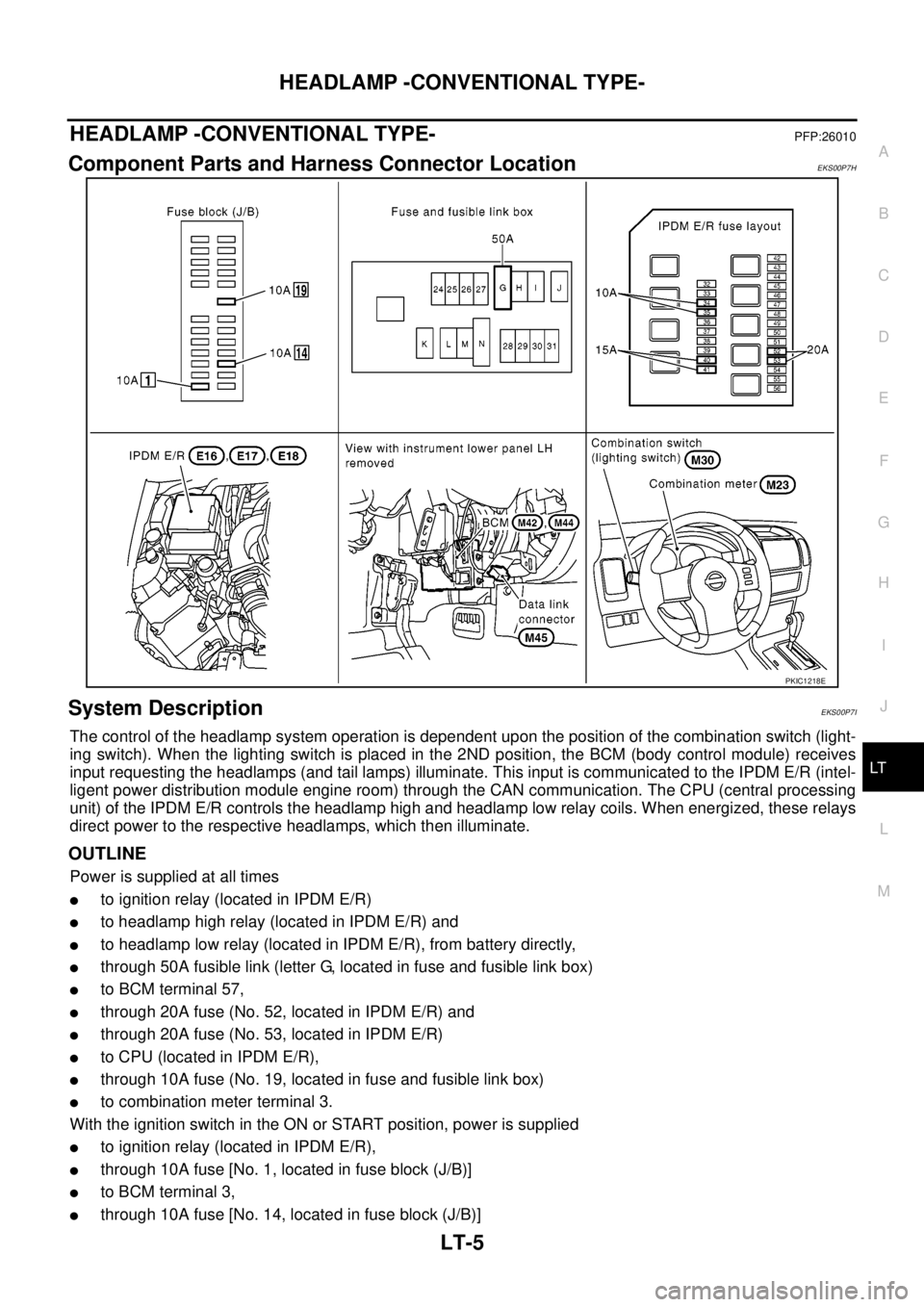
Component Parts and Harness Connector LocationEKS00P7H
System DescriptionEKS00P7I
The control of the headlamp system operation is dependent upon the position of the combination switch (light-
ing switch). When the lighting switch is placed in the 2ND position, the BCM (body control module) receives
input requesting the headlamps (and tail lamps) illuminate. This input is communicated to the IPDM E/R (intel-
ligent power distribution module engine room) through the CAN communication. The CPU (central processing
unit) of the IPDM E/R controls the headlamp high and headlamp low relay coils. When energized, these relays
direct power to the respective headlamps, which then illuminate.
OUTLINE
Power is supplied at all times
lto ignition relay (located in IPDM E/R)
lto headlamp high relay (located in IPDM E/R) and
lto headlamp low relay (located in IPDM E/R), from battery directly,
lthrough 50A fusible link (letter G, located in fuse and fusible link box)
lto BCM terminal 57,
lthrough 20A fuse (No. 52, located in IPDM E/R) and
lthrough 20A fuse (No. 53, located in IPDM E/R)
lto CPU (located in IPDM E/R),
lthrough 10A fuse (No. 19, located in fuse and fusible link box)
lto combination meter terminal 3.
With the ignition switch in the ON or START position, power is supplied
lto ignition relay (located in IPDM E/R),
lthrough 10A fuse [No. 1, located in fuse block (J/B)]
lto BCM terminal 3,
lthrough 10A fuse [No. 14, located in fuse block (J/B)]
PKIC1218E
Page 2111 of 3171
LT-28
HEADLAMP -CONVENTIONAL TYPE-
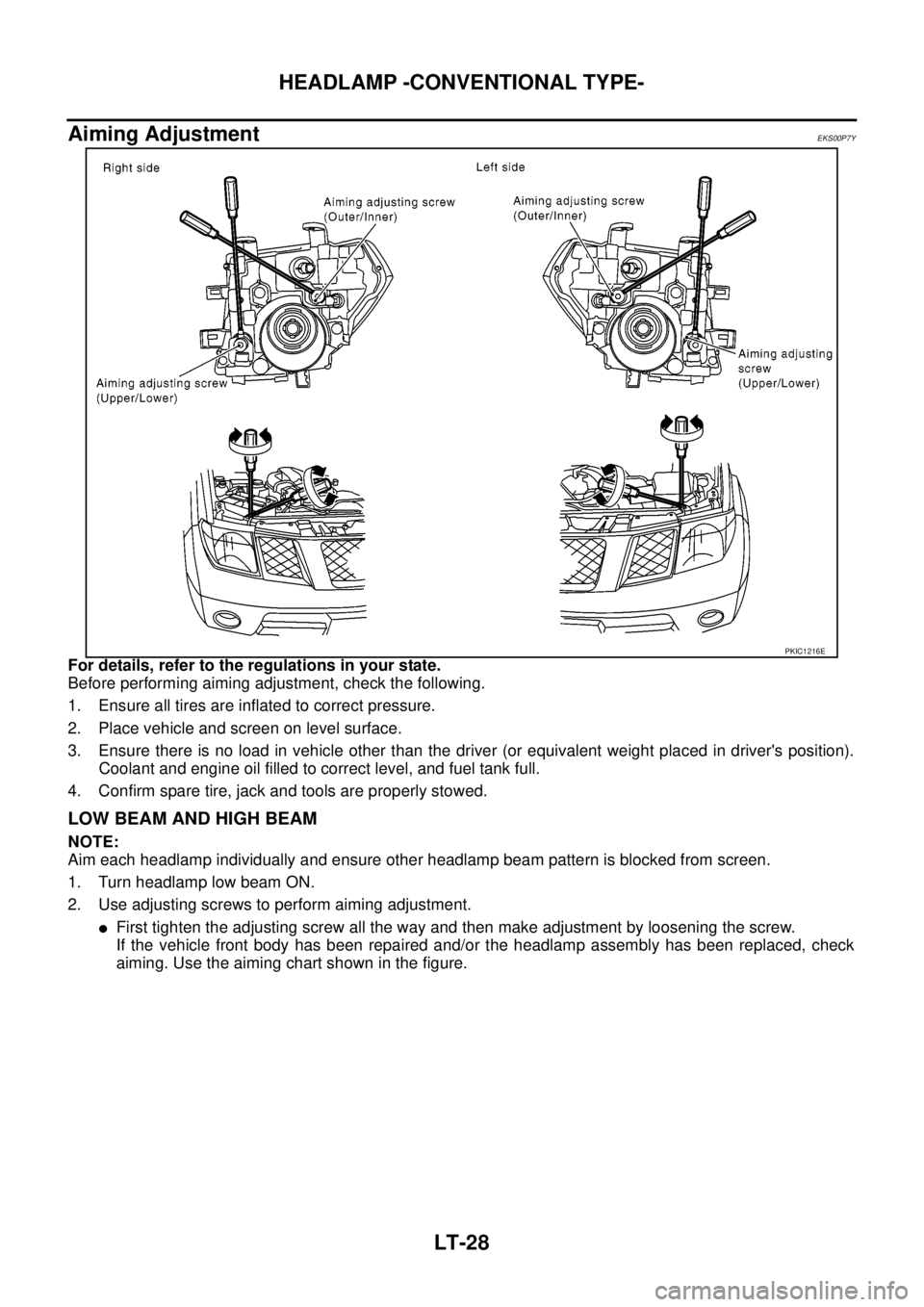
Aiming Adjustment
EKS00P7Y
For details, refer to the regulations in your state.
Before performing aiming adjustment, check the following.
1. Ensure all tires are inflated to correct pressure.
2. Place vehicle and screen on level surface.
3. Ensure there is no load in vehicle other than the driver (or equivalent weight placed in driver's position).
Coolant and engine oil filled to correct level, and fuel tank full.
4. Confirm spare tire, jack and tools are properly stowed.
LOW BEAM AND HIGH BEAM
NOTE:
Aim each headlamp individually and ensure other headlamp beam pattern is blocked from screen.
1. Turn headlamp low beam ON.
2. Use adjusting screws to perform aiming adjustment.
lFirst tighten the adjusting screw all the way and then make adjustment by loosening the screw.
If the vehicle front body has been repaired and/or the headlamp assembly has been replaced, check
aiming. Use the aiming chart shown in the figure.
PKIC1216E
![NISSAN NAVARA 2005 Repair Workshop Manual CAN COMMUNICATION
LAN-43
[CAN]
C
D
E
F
G
H
I
J
L
MA
B
LAN
NOTE:
*: LHD models only4WD shift switch signal R T
ABS operation signal R T
ABS warning lamp signalRT
Vehicle speed signalRR RRT
RRR RR T
Sto](/img/5/57362/w960_57362-1819.png "NISSAN NAVARA 2005 Repair Workshop Manual CAN COMMUNICATION
LAN-43
[CAN]
C
D
E
F
G
H
I
J
L
MA
B
LAN
NOTE:
*: LHD models only4WD shift switch signal R T
ABS operation signal R T
ABS warning lamp signalRT
Vehicle speed signalRR RRT
RRR RR T
Sto")
![NISSAN NAVARA 2005 Repair Workshop Manual LAN-130
[CAN]
CAN SYSTEM (TYPE 7)
Case 3
Check differential lock control unit circuit. Refer toLAN-299, "Differential Lock Control Unit Circuit Inspection".
PKIC1847E
PKIC1493E](/img/5/57362/w960_57362-1906.png "NISSAN NAVARA 2005 Repair Workshop Manual LAN-130
[CAN]
CAN SYSTEM (TYPE 7)
Case 3
Check differential lock control unit circuit. Refer toLAN-299, \"Differential Lock Control Unit Circuit Inspection\".
PKIC1847E
PKIC1493E")
![NISSAN NAVARA 2005 Repair Workshop Manual CAN SYSTEM (TYPE 9)
LAN-157
[CAN]
C
D
E
F
G
H
I
J
L
MA
B
LAN
Case 3
Check differential lock control unit circuit. Refer toLAN-299, "Differential Lock Control Unit Circuit Inspection".
PKIC1872E
PKIC14](/img/5/57362/w960_57362-1933.png "NISSAN NAVARA 2005 Repair Workshop Manual CAN SYSTEM (TYPE 9)
LAN-157
[CAN]
C
D
E
F
G
H
I
J
L
MA
B
LAN
Case 3
Check differential lock control unit circuit. Refer toLAN-299, \"Differential Lock Control Unit Circuit Inspection\".
PKIC1872E
PKIC14")
![NISSAN NAVARA 2005 Repair Workshop Manual CAN SYSTEM (TYPE 11)
LAN-189
[CAN]
C
D
E
F
G
H
I
J
L
MA
B
LAN
Case 5
Check differential lock control unit circuit. Refer toLAN-299, "Differential Lock Control Unit Circuit Inspection".
PKIC1901E
PKIC1](/img/5/57362/w960_57362-1965.png "NISSAN NAVARA 2005 Repair Workshop Manual CAN SYSTEM (TYPE 11)
LAN-189
[CAN]
C
D
E
F
G
H
I
J
L
MA
B
LAN
Case 5
Check differential lock control unit circuit. Refer toLAN-299, \"Differential Lock Control Unit Circuit Inspection\".
PKIC1901E
PKIC1")
![NISSAN NAVARA 2005 Repair Workshop Manual CAN SYSTEM (TYPE 13)
LAN-221
[CAN]
C
D
E
F
G
H
I
J
L
MA
B
LAN
Case 5
Check differential lock control unit circuit. Refer toLAN-299, "Differential Lock Control Unit Circuit Inspection".
PKIC1932E
PKIC1](/img/5/57362/w960_57362-1997.png "NISSAN NAVARA 2005 Repair Workshop Manual CAN SYSTEM (TYPE 13)
LAN-221
[CAN]
C
D
E
F
G
H
I
J
L
MA
B
LAN
Case 5
Check differential lock control unit circuit. Refer toLAN-299, \"Differential Lock Control Unit Circuit Inspection\".
PKIC1932E
PKIC1")
![NISSAN NAVARA 2005 Repair Workshop Manual LAN-258
[CAN]
CAN SYSTEM (TYPE 15)
Case 7
Check differential lock control unit circuit. Refer toLAN-299, "Differential Lock Control Unit Circuit Inspection".
PKIC1606E
PKIC1566E](/img/5/57362/w960_57362-2034.png "NISSAN NAVARA 2005 Repair Workshop Manual LAN-258
[CAN]
CAN SYSTEM (TYPE 15)
Case 7
Check differential lock control unit circuit. Refer toLAN-299, \"Differential Lock Control Unit Circuit Inspection\".
PKIC1606E
PKIC1566E")
![NISSAN NAVARA 2005 Repair Workshop Manual LAN-284
[CAN]
CAN SYSTEM (TYPE 17)
Case 3
Check differential lock control unit circuit. Refer toLAN-299, "Differential Lock Control Unit Circuit Inspection".
PKIC1972E
PKIC1584E](/img/5/57362/w960_57362-2060.png "NISSAN NAVARA 2005 Repair Workshop Manual LAN-284
[CAN]
CAN SYSTEM (TYPE 17)
Case 3
Check differential lock control unit circuit. Refer toLAN-299, \"Differential Lock Control Unit Circuit Inspection\".
PKIC1972E
PKIC1584E")