wheel NISSAN NAVARA 2005 Repair Service Manual
[x] Cancel search | Manufacturer: NISSAN, Model Year: 2005, Model line: NAVARA, Model: NISSAN NAVARA 2005Pages: 3171, PDF Size: 49.59 MB
Page 865 of 3171

CL-1
CLUTCH
C TRANSMISSION/TRANSAXLE
CONTENTS
D
E
F
G
H
I
J
K
L
M
SECTIONCL
A
B
CL
CLUTCH
PRECAUTIONS .......................................................... 2
Service Notice or Precautions .................................. 2
PREPARATION ........................................................... 3
Special Service Tools ............................................... 3
Commercial Service Tools ........................................ 3
NOISE, VIBRATION AND HARSHNESS (NVH)
TROUBLESHOOTING ................................................ 5
NVH Troubleshooting Chart ..................................... 5
CLUTCH PEDAL ........................................................ 6
On-Vehicle Inspection and Adjustment .................... 6
Removal and Installation .......................................... 7
COMPONENTS .................................................... 7
REMOVAL ............................................................. 7
INSPECTION AFTER REMOVAL ......................... 7
INSTALLATION ..................................................... 7
CLUTCH FLUID .......................................................... 8
Air Bleeding Procedure ............................................ 8
CLUTCH MASTER CYLINDER .................................. 9
Components ............................................................. 9
Removal and Installation .......................................... 9
REMOVAL ............................................................. 9
INSTALLATION ..................................................... 9
Disassembly and Assembly ................................... 10
DISASSEMBLY ................................................... 10
INSPECTION AFTER DISASSEMBLY ............... 10
ASSEMBLY ......................................................... 10
OPERATING CYLINDER ...........................................11
Components ............................................................ 11
Removal and Installation ......................................... 11REMOVAL ........................................................... 11
INSTALLATION ................................................... 12
Disassembly and Assembly .................................... 12
DISASSEMBLY ................................................... 12
INSPECTION AFTER DISASSEMBLY ................ 12
ASSEMBLY ......................................................... 12
CLUTCH PIPING ....................................................... 13
Removal and Installation ........................................ 13
CLUTCH RELEASE MECHANISM ........................... 14
Removal and Installation ........................................ 14
COMPONENTS ................................................... 14
REMOVAL ........................................................... 14
INSPECTION AFTER REMOVAL ....................... 15
INSTALLATION ................................................... 15
CLUTCH DISC, CLUTCH COVER AND FLYWHEEL... 17
Removal and Installation ........................................ 17
COMPONENTS ................................................... 17
REMOVAL ........................................................... 17
INSPECTION AND ADJUSTMENT AFTER
REMOVAL ........................................................... 17
INSTALLATION ................................................... 18
SERVICE DATA AND SPECIFICATIONS (SDS) ...... 20
Clutch Control System ............................................ 20
Clutch Master Cylinder ........................................... 20
Clutch Operating Cylinder ...................................... 20
Clutch Disc ............................................................. 20
Clutch Cover ........................................................... 20
Clutch Pedal ........................................................... 20
Page 869 of 3171
NOISE, VIBRATION AND HARSHNESS (NVH) TROUBLESHOOTING
CL-5
D
E
F
G
H
I
J
K
L
MA
B
CL
NOISE, VIBRATION AND HARSHNESS (NVH) TROUBLESHOOTINGPFP:00003
NVH Troubleshooting ChartECS00ICF
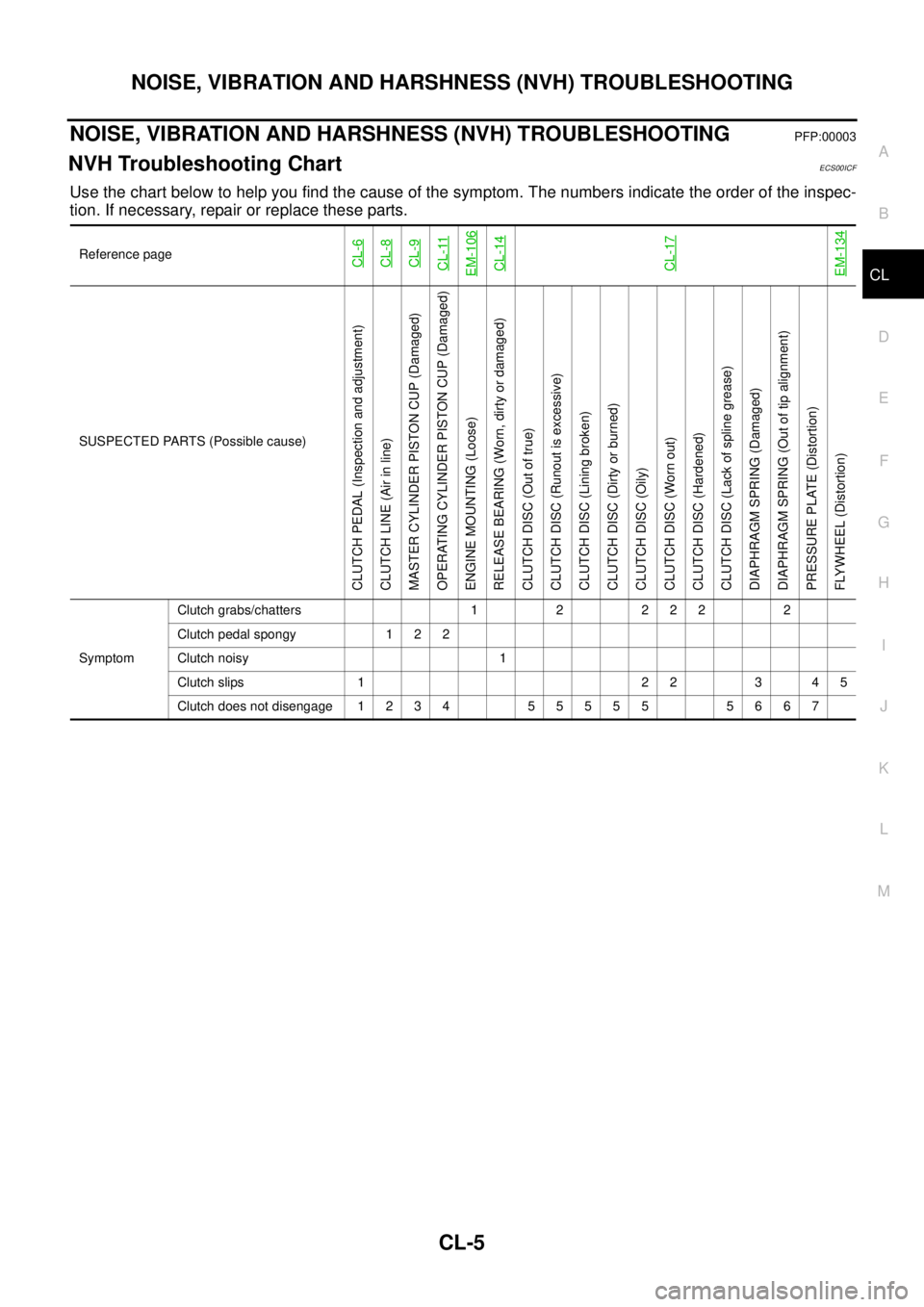
Use the chart below to help you find the cause of the symptom. The numbers indicate the order of the inspec-
tion. If necessary, repair or replace these parts.
Reference pageCL-6CL-8CL-9CL-11EM-106CL-14CL-17EM-134
SUSPECTED PARTS (Possible cause)
CLUTCH PEDAL (Inspection and adjustment)
CLUTCH LINE (Air in line)
MASTER CYLINDER PISTON CUP (Damaged)
OPERATING CYLINDER PISTON CUP (Damaged)
ENGINE MOUNTING (Loose)
RELEASE BEARING (Worn, dirty or damaged)
CLUTCH DISC (Out of true)
CLUTCH DISC (Runout is excessive)
CLUTCH DISC (Lining broken)
CLUTCH DISC (Dirty or burned)
CLUTCH DISC (Oily)
CLUTCH DISC (Worn out)
CLUTCH DISC (Hardened)
CLUTCH DISC (Lack of spline grease)
DIAPHRAGM SPRING (Damaged)
DIAPHRAGM SPRING (Out of tip alignment)
PRESSURE PLATE (Distortion)
FLYWHEEL (Distortion)
SymptomClutch grabs/chatters 1 2 2 2 2 2
Clutch pedal spongy 1 2 2
Clutch noisy 1
Clutch slips 1 2 2 3 4 5
Clutch does not disengage 1 2 3 4 5 5 5 5 5 5 6 6 7
Page 879 of 3171
CLUTCH RELEASE MECHANISM
CL-15
D
E
F
G
H
I
J
K
L
MA
B
CL
INSPECTION AFTER REMOVAL
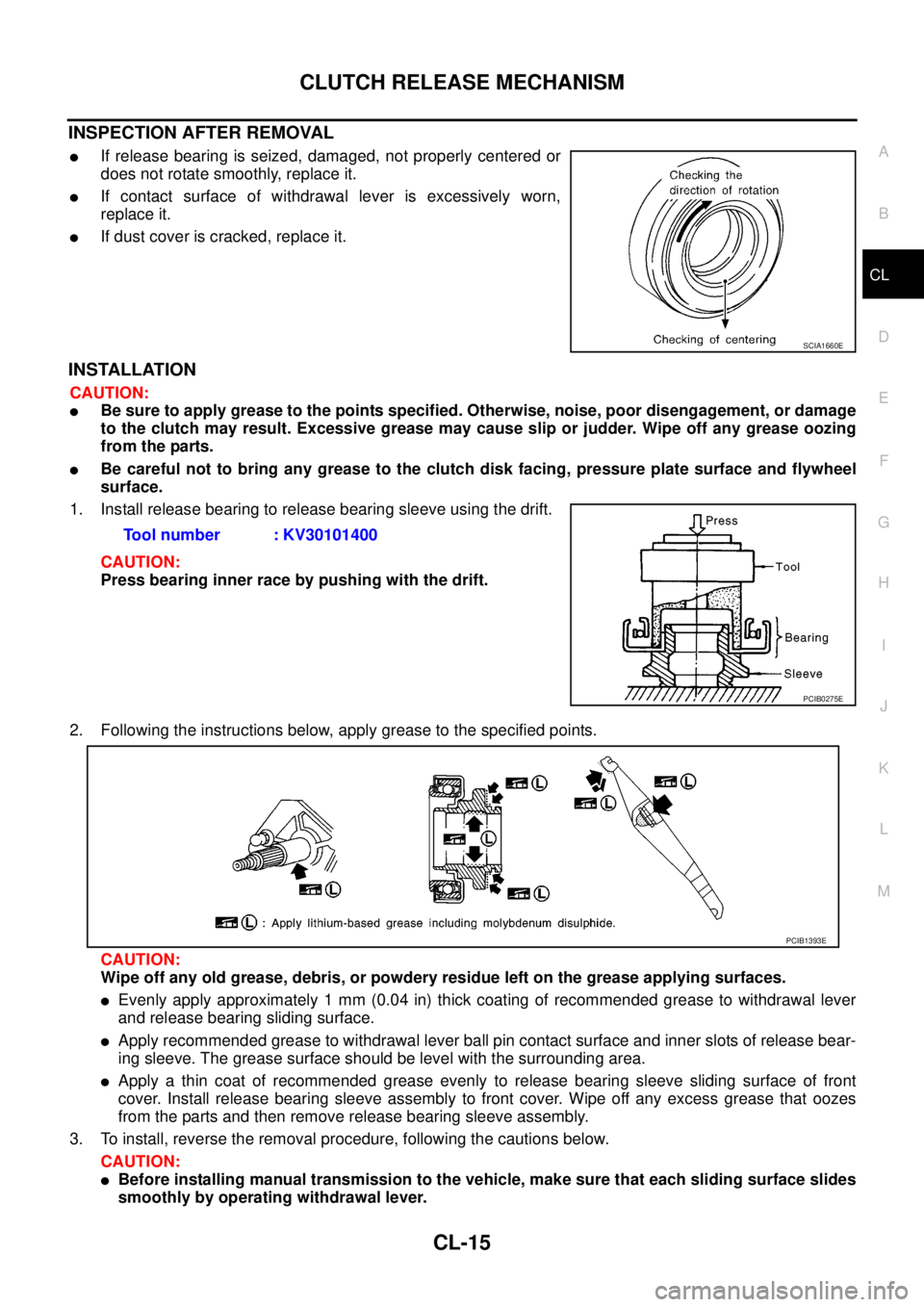
lIf release bearing is seized, damaged, not properly centered or
does not rotate smoothly, replace it.
lIf contact surface of withdrawal lever is excessively worn,
replace it.
lIf dust cover is cracked, replace it.
INSTALLATION
CAUTION:
lBe sure to apply grease to the points specified. Otherwise, noise, poor disengagement, or damage
to the clutch may result. Excessive grease may cause slip or judder. Wipe off any grease oozing
from the parts.
lBe careful not to bring any grease to the clutch disk facing, pressure plate surface and flywheel
surface.
1. Install release bearing to release bearing sleeve using the drift.
CAUTION:
Press bearing inner race by pushing with the drift.
2. Following the instructions below, apply grease to the specified points.
CAUTION:
Wipe off any old grease, debris, or powdery residue left on the grease applying surfaces.
lEvenly apply approximately 1 mm (0.04 in) thick coating of recommended grease to withdrawal lever
and release bearing sliding surface.
lApply recommended grease to withdrawal lever ball pin contact surface and inner slots of release bear-
ing sleeve. The grease surface should be level with the surrounding area.
lApply a thin coat of recommended grease evenly to release bearing sleeve sliding surface of front
cover. Install release bearing sleeve assembly to front cover. Wipe off any excess grease that oozes
from the parts and then remove release bearing sleeve assembly.
3. To install, reverse the removal procedure, following the cautions below.
CAUTION:
lBefore installing manual transmission to the vehicle, make sure that each sliding surface slides
smoothly by operating withdrawal lever.
SCIA1660E
Tool number : KV30101400
PCIB0275E
PCIB1393E
Page 881 of 3171
CLUTCH DISC, CLUTCH COVER AND FLYWHEEL
CL-17
D
E
F
G
H
I
J
K
L
MA
B
CL
CLUTCH DISC, CLUTCH COVER AND FLYWHEELPFP:30100
Removal and InstallationECS00ICR
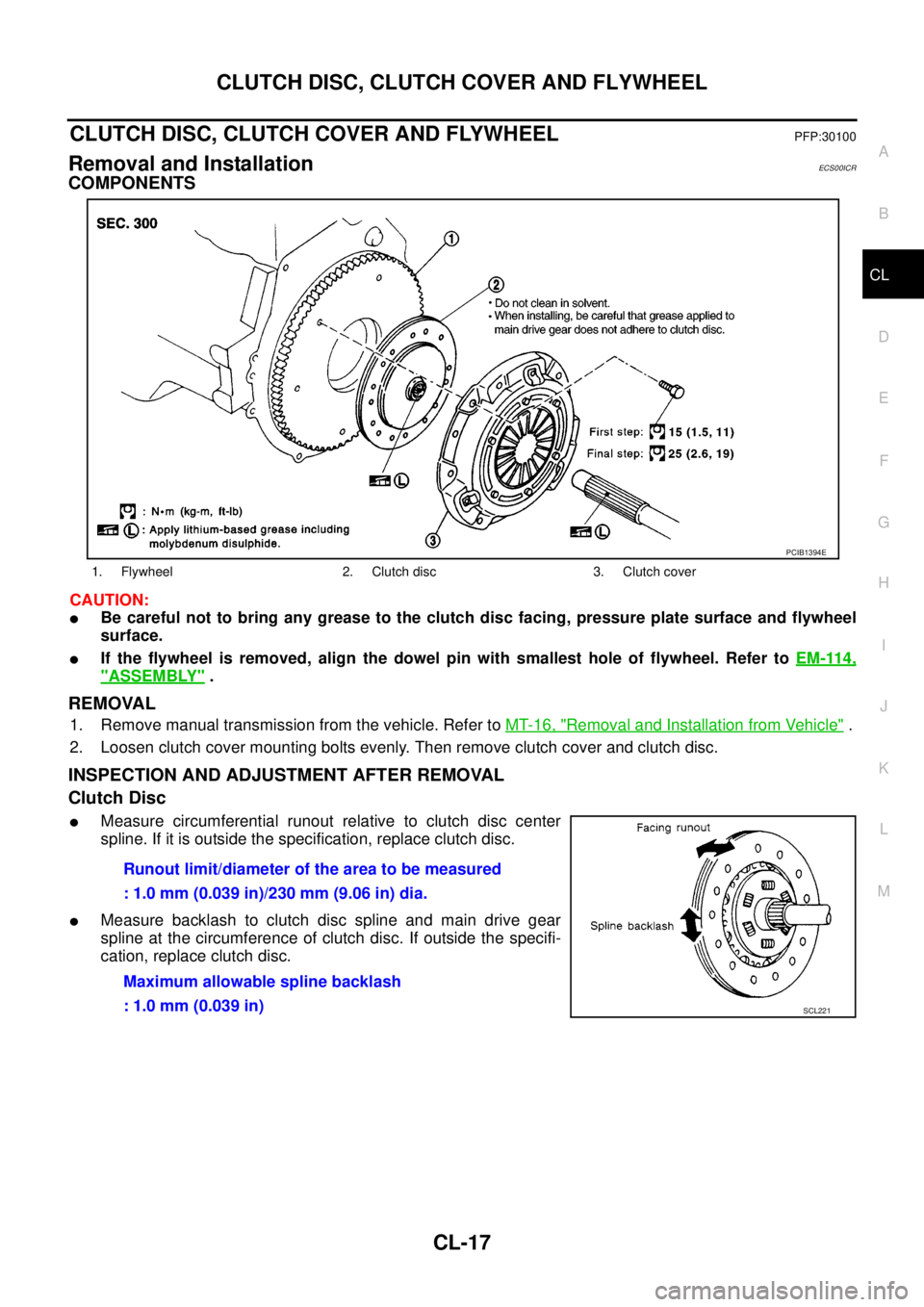
COMPONENTS
CAUTION:
lBe careful not to bring any grease to the clutch disc facing, pressure plate surface and flywheel
surface.
lIf the flywheel is removed, align the dowel pin with smallest hole of flywheel. Refer toEM-114,
"ASSEMBLY".
REMOVAL
1. Remove manual transmission from the vehicle. Refer toMT-16, "Removal and Installation from Vehicle".
2. Loosen clutch cover mounting bolts evenly. Then remove clutch cover and clutch disc.
INSPECTION AND ADJUSTMENT AFTER REMOVAL
Clutch Disc
lMeasure circumferential runout relative to clutch disc center
spline. If it is outside the specification, replace clutch disc.
lMeasure backlash to clutch disc spline and main drive gear
spline at the circumference of clutch disc. If outside the specifi-
cation, replace clutch disc.
1. Flywheel 2. Clutch disc 3. Clutch cover
PCIB1394E
Runout limit/diameter of the area to be measured
: 1.0 mm (0.039 in)/230 mm (9.06 in) dia.
Maximum allowable spline backlash
: 1.0 mm (0.039 in)
SCL221
Page 882 of 3171
CL-18
CLUTCH DISC, CLUTCH COVER AND FLYWHEEL
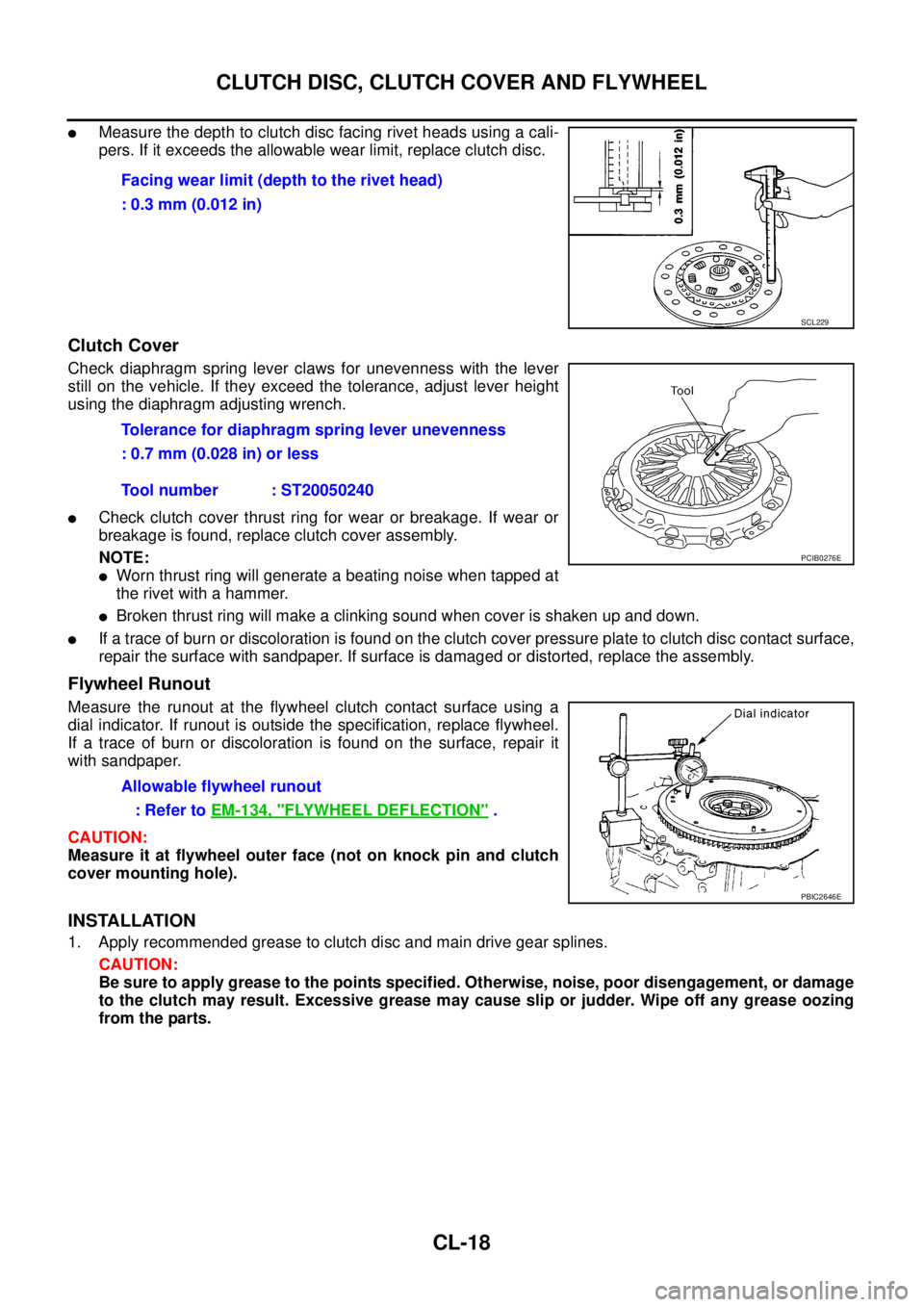
lMeasure the depth to clutch disc facing rivet heads using a cali-
pers. If it exceeds the allowable wear limit, replace clutch disc.
Clutch Cover
Check diaphragm spring lever claws for unevenness with the lever
still on the vehicle. If they exceed the tolerance, adjust lever height
using the diaphragm adjusting wrench.
lCheck clutch cover thrust ring for wear or breakage. If wear or
breakage is found, replace clutch cover assembly.
NOTE:
lWorn thrust ring will generate a beating noise when tapped at
therivetwithahammer.
lBroken thrust ring will make a clinking sound when cover is shaken up and down.
lIf a trace of burn or discoloration is found on the clutch cover pressure plate to clutch disc contact surface,
repair the surface with sandpaper. If surface is damaged or distorted, replace the assembly.
Flywheel Runout
Measure the runout at the flywheel clutch contact surface using a
dial indicator. If runout is outside the specification, replace flywheel.
If a trace of burn or discoloration is found on the surface, repair it
with sandpaper.
CAUTION:
Measure it at flywheel outer face (not on knock pin and clutch
cover mounting hole).
INSTALLATION
1. Apply recommended grease to clutch disc and main drive gear splines.
CAUTION:
Be sure to apply grease to the points specified. Otherwise, noise, poor disengagement, or damage
to the clutch may result. Excessive grease may cause slip or judder. Wipe off any grease oozing
from the parts.Facing wear limit (depth to the rivet head)
: 0.3 mm (0.012 in)
SCL229
Tolerance for diaphragm spring lever unevenness
: 0.7 mm (0.028 in) or less
Tool number : ST20050240
PCIB0276E
Allowable flywheel runout
:RefertoEM-134, "
FLYWHEEL DEFLECTION".
PBIC2646E
Page 883 of 3171
CLUTCH DISC, CLUTCH COVER AND FLYWHEEL
CL-19
D
E
F
G
H
I
J
K
L
MA
B
CL
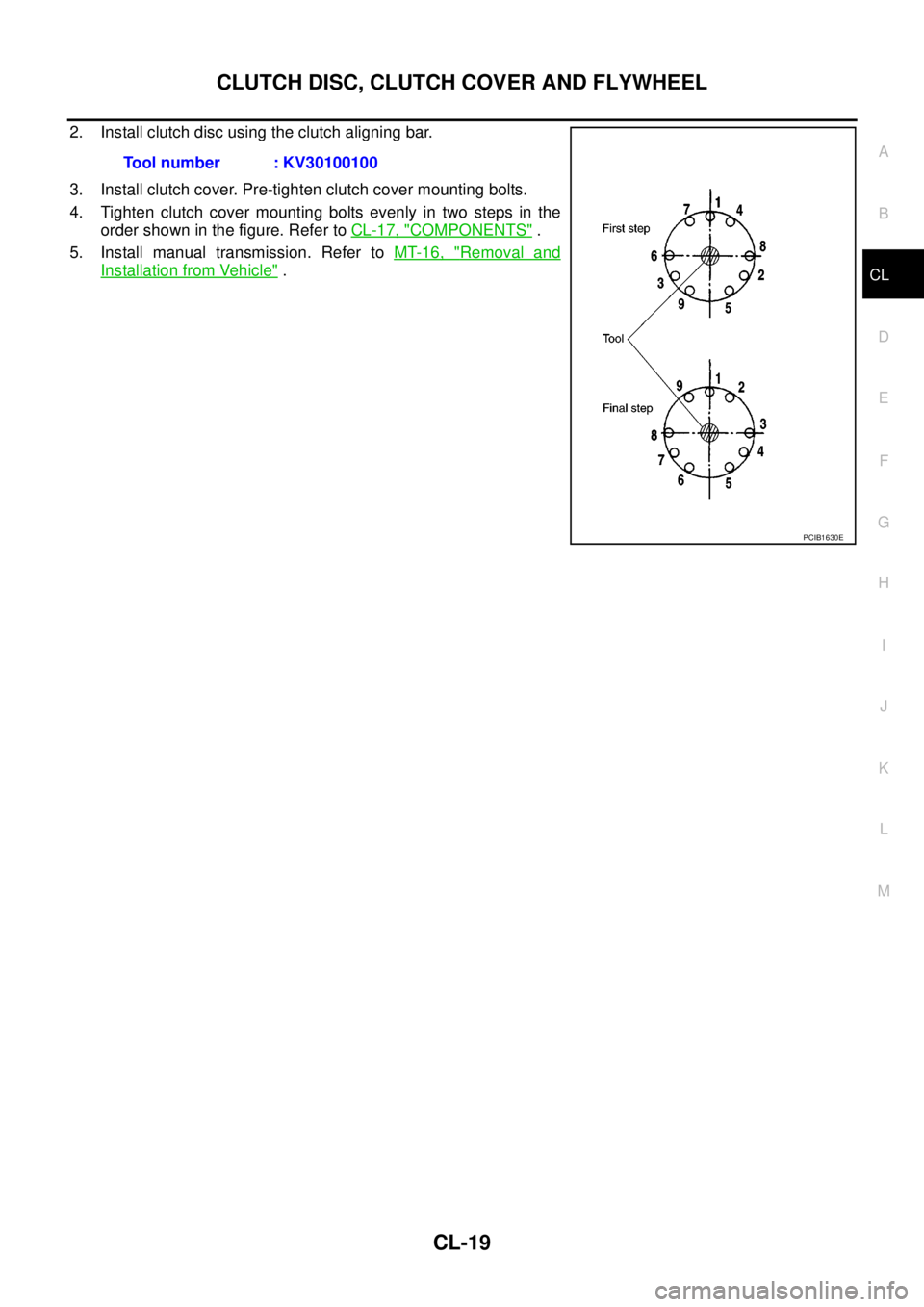
2. Install clutch disc using the clutch aligning bar.
3. Install clutch cover. Pre-tighten clutch cover mounting bolts.
4. Tighten clutch cover mounting bolts evenly in two steps in the
order shown in the figure. Refer toCL-17, "
COMPONENTS".
5. Install manual transmission. Refer toMT-16, "
Removal and
Installation from Vehicle". Tool number : KV30100100
PCIB1630E
Page 889 of 3171

OVERHEATING CAUSE ANALYSIS
CO-5
C
D
E
F
G
H
I
J
K
L
MA
CO
Except cool-
ing system
parts mal-
function— Overload on engineAbusive drivingHigh engine rpm under no
load
Driving in low gear for
extended time
Driving at extremely high
speed
Powertrain system mal-
function
— Installed improper size
wheels and tires
Dragging brakes
Improper ignition timing
Blocked or restricted air
flowBlocked bumper —
— Blocked radiator grilleInstalled car brassiere
Mud contamination or
paper clogging
Blocked radiator —
Blocked condenser
Blocked air flow
Installed large fog lamp Symptom Check items
Page 914 of 3171

DI-4
COMBINATION METERS
COMBINATION METERS
PFP:24814
System DescriptionEKS00L8E
UNIFIED METER CONTROL UNIT
lSpeedometer, odo/trip meter, tachometer, fuel gauge and water temperature gauge are controlled by the
unified meter control unit, which is built into the combination meter.
lWarning lamp and indicator lamp are controlled by signals drawn from each unit with CAN communication
and components connected directly to the combination meter.
lOdo/trip meter display is included in the combination meter, which displays odometer, trip-meter, vehicle
information (trip computer, engine oil maintenance information)
*and A/T position*.
*: Vehicles with each system only.
lClock display is included in the combination meter, which displays current time, ambient air temperature*
and 4WD indicator*.
*: Vehicles with each system only.
lUnified meter control unit corresponds a CONSULT-II function (self-diagnosis results and data monitor).
lThe following items can be checked during self-diagnosis mode.
–Sweep of gauges pointer
–Present gauge values
–Odo/trip meter display and clock display segments
–Condition of warning lamps/indicator lamps controlled by unified meter control unit
–Battery voltage
–Driver's seat belt buckle switch status
–CPU status of unified meter control unit
POWER SUPPLY AND GROUND CIRCUIT
Power is supplied at all times
lthrough 10A fuse [No.19, located in the fuse block (J/B)]
lto combination meter terminal 3.
With the ignition switch in the ON or START position, power is supplied
lthrough 10A fuse [No.14, located in the fuse block (J/B)]
lto combination meter terminal 16.
Ground is supplied
lto combination meter terminals 13 and 23
lthrough grounds M21, M80 and M83.
SPEEDOMETER
The speedometer indicates the vehicle speed.
lABS actuator and electric unit (control unit) converses a pulse signal from wheel sensor to vehicle speed
signal, and transmits vehicle speed signal to combination meter with CAN communication.
lCombination meter converses the vehicle speed signal to angle signal, and commands to speedometer.
TACHOMETER
The tachometer indicates engine speed in revolutions per minute (rpm).
lECM converses a signal from crank position sensor to engine speed signal, and transmits to combination
meter with CAN communication.
lCombination meter converses the engine speed signal to angle signal, and commands to tachometer.
WATER TEMPERATURE GAUGE
The water temperature gauge indicates the engine coolant temperature.
lECM converses a signal from water temperature sensor to engine coolant temperature signal, and trans-
mits to combination meter with CAN communication.
lCombination meter converses the engine coolant temperature signal to angle signal, and commands to
water temperature gauge.
Page 915 of 3171
COMBINATION METERS
DI-5
C
D
E
F
G
H
I
J
L
MA
B
DI
FUEL GAUGE
The fuel gauge indicates the approximate fuel level in the fuel tank.
Combination meter reads a resistor signal from fuel level sensor unit.
Signal is supplied
lto combination meter terminal 9
lthrough fuel level sensor unit terminal 1 and 2
lfrom combination meter terminal 4.
ODO/TRIP METER
lABS actuator and electric unit (control unit) converses a pulse signal from wheel sensor to vehicle speed
signal, and transmits vehicle speed signal to combination meter with CAN communication.
lCombination meter uses the vehicle speed signal to calculate the mileage, and it displays.
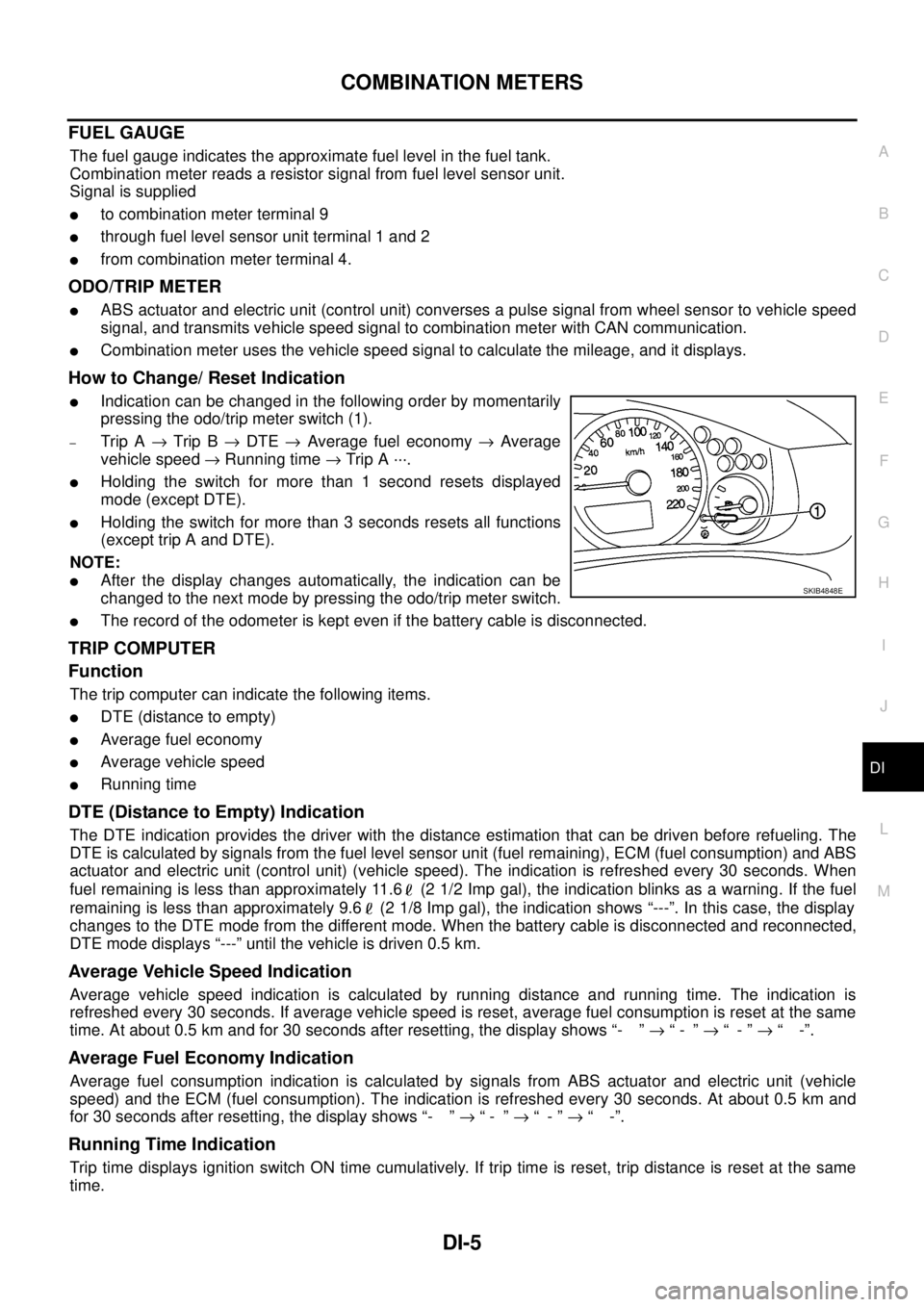
How to Change/ Reset Indication
lIndication can be changed in the following order by momentarily
pressing the odo/trip meter switch (1).
–Trip A®Trip B®DTE®Average fuel economy®Average
vehicle speed®Running time®Trip A ···.
lHolding the switch for more than 1 second resets displayed
mode (except DTE).
lHolding the switch for more than 3 seconds resets all functions
(except trip A and DTE).
NOTE:
lAfter the display changes automatically, the indication can be
changed to the next mode by pressing the odo/trip meter switch.
lThe record of the odometer is kept even if the battery cable is disconnected.
TRIP COMPUTER
Function
The trip computer can indicate the following items.
lDTE (distance to empty)
lAverage fuel economy
lAverage vehicle speed
lRunning time
DTE (Distance to Empty) Indication
The DTE indication provides the driver with the distance estimation that can be driven before refueling. The
DTE is calculated by signals from the fuel level sensor unit (fuel remaining), ECM (fuel consumption) and ABS
actuator and electric unit (control unit) (vehicle speed). The indication is refreshed every 30 seconds. When
fuel remaining is less than approximately 11.6 (2 1/2 Imp gal), the indication blinks as a warning. If the fuel
remaining is less than approximately 9.6 (2 1/8 Imp gal), the indication shows “---”. In this case, the display
changes to the DTE mode from the different mode. When the battery cable is disconnected and reconnected,
DTE mode displays “---” until the vehicle is driven 0.5 km.
Average Vehicle Speed Indication
Average vehicle speed indication is calculated by running distance and running time. The indication is
refreshed every 30 seconds. If average vehicle speed is reset, average fuel consumption is reset at the same
time. At about 0.5 km and for 30 seconds after resetting, the display shows “- ”®“- ”®“-”®“ -”.
Average Fuel Economy Indication
Average fuel consumption indication is calculated by signals from ABS actuator and electric unit (vehicle
speed) and the ECM (fuel consumption). The indication is refreshed every 30 seconds. At about 0.5 km and
for 30 seconds after resetting, the display shows “- ”®“- ”®“-”®“ -”.
Running Time Indication
Trip time displays ignition switch ON time cumulatively. If trip time is reset, trip distance is reset at the same
time.
SKIB4848E
Page 998 of 3171

EC-18
ENGINE CONTROL SYSTEM
System Chart
EBS01KCD
*1: The input signal is sent to the ECM through CAN communication line.
*2: The output signal is sent from the ECM through CAN communication line.
Fuel Injection Control SystemEBS01KCE
SYSTEM DESCRIPTION
Three types of fuel injection control are provided to accommodate engine operating conditions; normal control,
idle control and start control. The ECM determines the appropriate fuel injection control. Under each control,
the amount of fuel injected is adjusted to improve engine performance.
Pulse signals are sent to fuel injectors according to the input signals to adjust the amount of fuel injected to
preset value.
START CONTROL
Input/Output Signal Chart
Input (Sensor) ECM Function Output (Actuator)
lAccelerator pedal position sensor
lFuel rail pressure sensor
lFuel pump temperature sensor
lEngine coolant temperature sensor
lMass air flow sensor
lIntake air temperature sensor
lCrankshaft position sensor
lCamshaft position sensor
lTurbocharger boost sensor
lWheel sensor*1
lIgnition switch
lASCD steering switch
lASCD brake switch
lASCD clutch switch
lSt o p l a m p s w it c h
lAir conditioner switch*1
lFront air control*1
lPark/neutral position switch
lHeat up switch
lRefrigerant pressure sensor
lBattery voltageFuel injection control Fuel injector and Fuel pump
Fuel injection timing control Fuel injector and Fuel pump
Fuel cut control Fuel injector and Fuel pump
Glow control system
Glow relay and glow indicator lamp*
2
ASCD vehicle speed control Fuel injector and Fuel pump
On board diagnostic system
Malfunction indicator (MI)*
2
EGR volume control EGR volume control valve
Cooling fan control
Cooling fan relay*
2
Turbocharger boost controlTurbocharger boost control solenoid
valve
Intake air control valve controlIntake air control valve control solenoid
valve
Air conditioning cut control
Air conditioner relay*
2
Sensor Input Signal to ECM ECM Function Actuator
Engine coolant temperature sensor Engine coolant temperature
Fuel injection
control (start
control)Fuel injector
Fuel pump Crankshaft position sensor Engine speed
Camshaft position sensor Piston position
Ignition switch Start signal
Fuel rail pressure sensor Fuel rail pressure