tow NISSAN NAVARA 2005 Repair Repair Manual
[x] Cancel search | Manufacturer: NISSAN, Model Year: 2005, Model line: NAVARA, Model: NISSAN NAVARA 2005Pages: 3171, PDF Size: 49.59 MB
Page 2957 of 3171
SRS-48
DIAGNOSIS SENSOR UNIT
DIAGNOSIS SENSOR UNIT
PFP:28556
Removal and InstallationEHS001Y0
REMOVAL
CAUTION:
lBefore servicing the SRS, turn the ignition switch off, disconnect both battery cables and wait at
least 3 minutes.
1. Disconnect the connectors for each air bag module and seat belt pre-tensioner.
2. Remove center console. Refer toIP-10, "
INSTRUMENT PANEL ASSEMBLY".
3. Disconnect diagnosis sensor unit connectors.
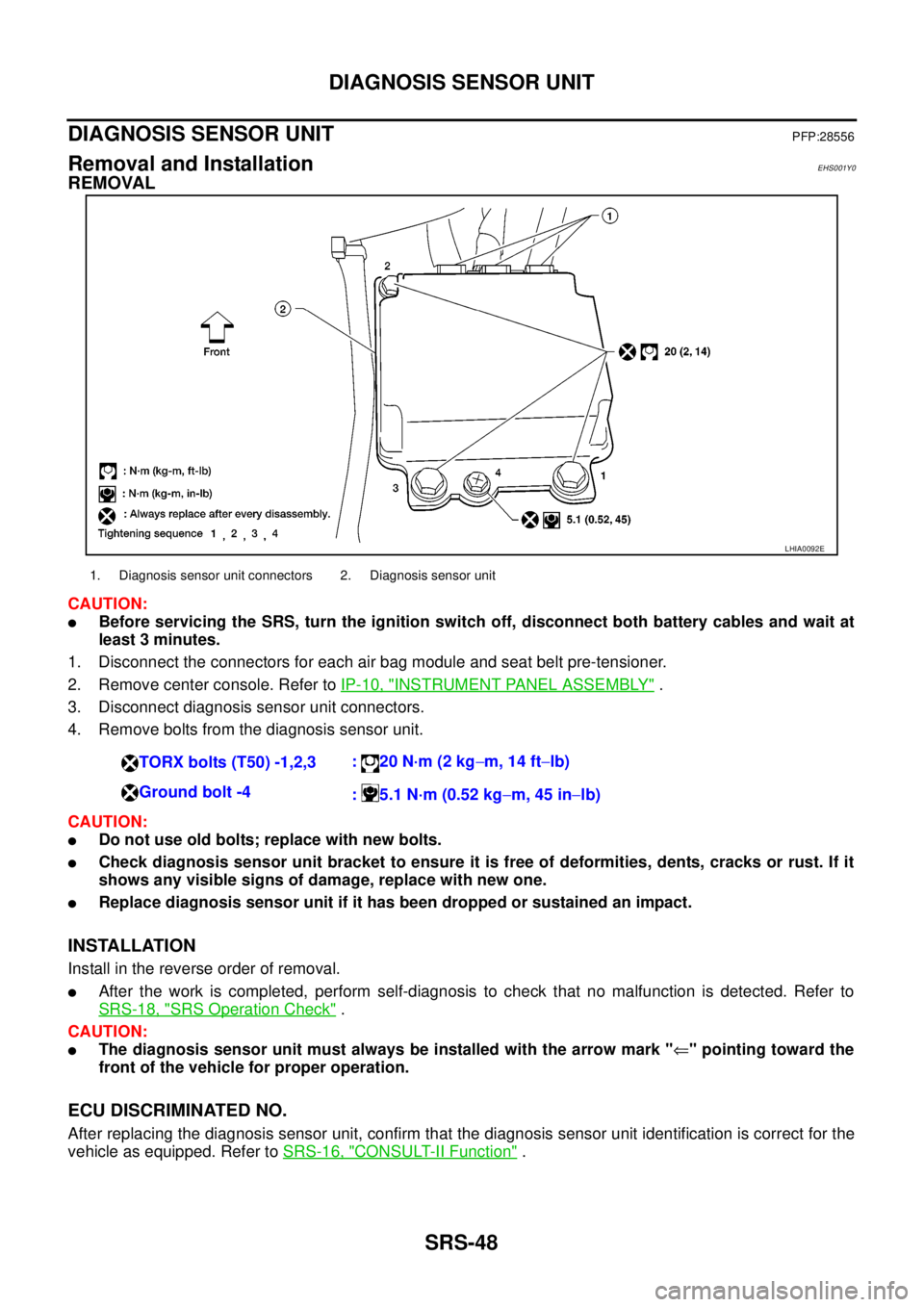
4. Remove bolts from the diagnosis sensor unit.
CAUTION:
lDo not use old bolts; replace with new bolts.
lCheck diagnosis sensor unit bracket to ensure it is free of deformities, dents, cracks or rust. If it
shows any visible signs of damage, replace with new one.
lReplace diagnosis sensor unit if it has been dropped or sustained an impact.
INSTALLATION
Install in the reverse order of removal.
lAfter the work is completed, perform self-diagnosis to check that no malfunction is detected. Refer to
SRS-18, "
SRS Operation Check".
CAUTION:
lThe diagnosis sensor unit must always be installed with the arrow mark "Ü" pointing toward the
front of the vehicle for proper operation.
ECU DISCRIMINATED NO.
After replacing the diagnosis sensor unit, confirm that the diagnosis sensor unit identification is correct for the
vehicle as equipped. Refer toSRS-16, "
CONSULT-II Function".
LHIA0092E
1. Diagnosis sensor unit connectors 2. Diagnosis sensor unit
TORX bolts (T50) -1,2,3:20N·m(2kg-m, 14 ft-lb)
Ground bolt -4
: 5.1 N·m (0.52 kg-m, 45 in-lb)
Page 2973 of 3171
TF-6
PRECAUTIONS
If 4WD shift indicator lamp and 4LO indicator lamp do not indicate proper pattern, install new transfer con-
trol unit and retry the above check.
PrecautionsEDS0031B
lBefore connecting or disconnecting the transfer control unit harness connector, turn ignition
switch “OFF” and disconnect the battery cables. Battery voltage is applied to transfer control unit
even if ignition switch is turned “OFF”.
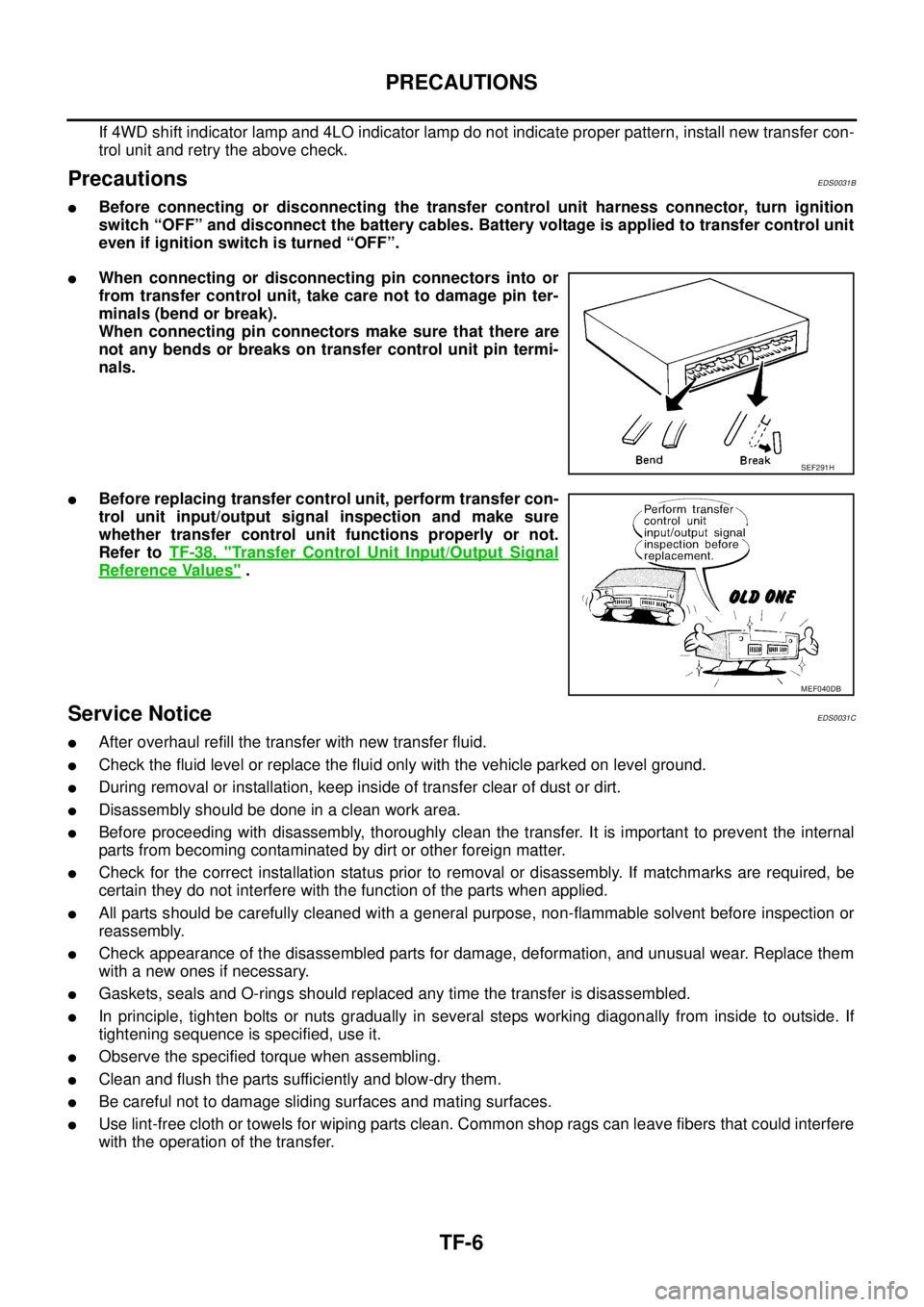
lWhen connecting or disconnecting pin connectors into or
from transfer control unit, take care not to damage pin ter-
minals (bend or break).
When connecting pin connectors make sure that there are
not any bends or breaks on transfer control unit pin termi-
nals.
lBefore replacing transfer control unit, perform transfer con-
trol unit input/output signal inspection and make sure
whether transfer control unit functions properly or not.
Refer toTF-38, "
Transfer Control Unit Input/Output Signal
Reference Values".
Service NoticeEDS0031C
lAfter overhaul refill the transfer with new transfer fluid.
lCheck the fluid level or replace the fluid only with the vehicle parked on level ground.
lDuring removal or installation, keep inside of transfer clear of dust or dirt.
lDisassemblyshouldbedoneinacleanworkarea.
lBefore proceeding with disassembly, thoroughly clean the transfer. It is important to prevent the internal
parts from becoming contaminated by dirt or other foreign matter.
lCheck for the correct installation status prior to removal or disassembly. If matchmarks are required, be
certain they do not interfere with the function of the parts when applied.
lAll parts should be carefully cleaned with a general purpose, non-flammable solvent before inspection or
reassembly.
lCheck appearance of the disassembled parts for damage, deformation, and unusual wear. Replace them
with a new ones if necessary.
lGaskets, seals and O-rings should replaced any time the transfer is disassembled.
lIn principle, tighten bolts or nuts gradually in several steps working diagonally from inside to outside. If
tightening sequence is specified, use it.
lObserve the specified torque when assembling.
lClean and flush the parts sufficiently and blow-dry them.
lBe careful not to damage sliding surfaces and mating surfaces.
lUse lint-free cloth or towels for wiping parts clean. Common shop rags can leave fibers that could interfere
with the operation of the transfer.
SEF291H
MEF040DB
Page 3108 of 3171
WHEEL
WT-3
C
D
F
G
H
I
J
K
L
MA
B
WT
WHEELPFP:40300
InspectionEES002L2
1. Check tires for wear and improper inflation.
2. Check wheels for deformation, cracks and other damage. If
deformed, remove wheel and check wheel runout.
a. Remove tire from wheel and mount wheel on a tire balance
machine.
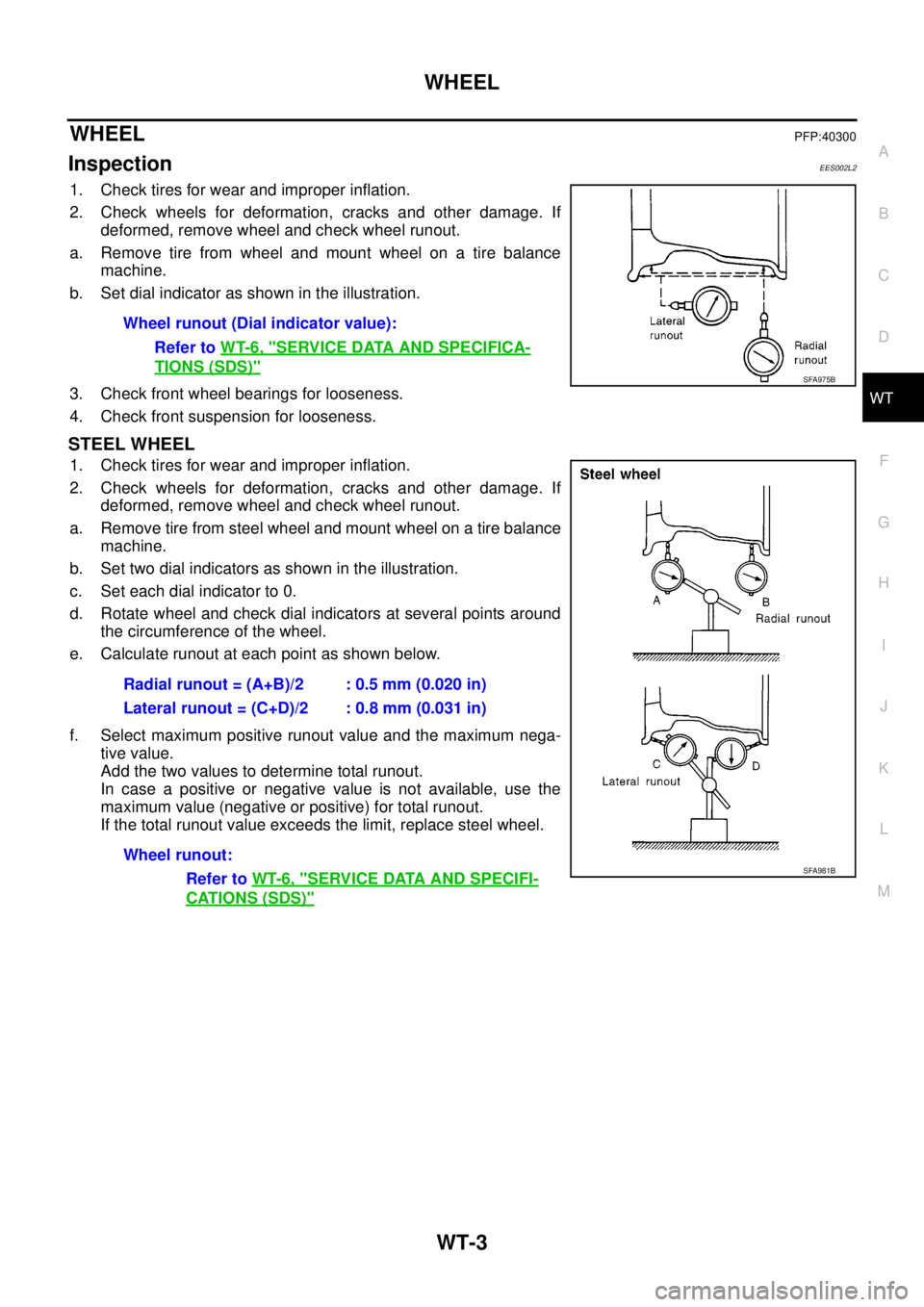
b. Set dial indicator as shown in the illustration.
3. Check front wheel bearings for looseness.
4. Check front suspension for looseness.
STEEL WHEEL
1. Check tires for wear and improper inflation.
2. Check wheels for deformation, cracks and other damage. If
deformed, remove wheel and check wheel runout.
a. Remove tire from steel wheel and mount wheel on a tire balance
machine.
b. Set two dial indicators as shown in the illustration.
c. Set each dial indicator to 0.
d. Rotate wheel and check dial indicators at several points around
the circumference of the wheel.
e. Calculate runout at each point as shown below.
f. Select maximum positive runout value and the maximum nega-
tive value.
Add the two values to determine total runout.
In case a positive or negative value is not available, use the
maximum value (negative or positive) for total runout.
If the total runout value exceeds the limit, replace steel wheel.Wheel runout (Dial indicator value):
Refer toWT-6, "
SERVICE DATA AND SPECIFICA-
TIONS (SDS)"SFA975B
Radial runout = (A+B)/2 : 0.5 mm (0.020 in)
Lateral runout = (C+D)/2 : 0.8 mm (0.031 in)
Wheel runout:
Refer toWT-6, "
SERVICE DATA AND SPECIFI-
CATIONS (SDS)"
SFA981B
Page 3118 of 3171

FRONT WIPER AND WASHER SYSTEM
WW-7
C
D
E
F
G
H
I
J
L
MA
B
WW
MIST OPERATION
When the wiper switch is temporarily placed in the mist position, wiper low speed operation cycles once and
then stops.
For additional information about wiper operation under this condition, refer toWW-5, "
LOW SPEED WIPER
OPERATION".
If the switch is held in the mist position, low speed operation continues.
FAIL-SAFE FUNCTION
The BCM includes fail-safe function to prevent malfunction of electrical components controlled by CAN com-
munications if a malfunction in CAN communications occurs.
The BCM uses CAN communications to stop output of electrical components it controls.
Until the ignition switch is turned OFF, the front wiper system remains in same status as just before fail-safe
control was initiated. (If wiper was in low speed operation just before fail-safe, it continues low speed operation
until ignition switch is turned OFF.)
When fail-safe status is initiated, the BCM remains in standby until normal signals are received.
When normal signals are received, fail-safe status is canceled.
Page 3127 of 3171

WW-16
FRONT WIPER AND WASHER SYSTEM
Terminals and Reference Values for IPDM E/R
EKS00P50
How To Proceed With Trouble DiagnosisEKS00P51
1. Confirm the trouble symptom or customer complaint.
2. Understand the operation description and function description. Refer toWW-4, "
System Description".
3. Perform preliminary inspection. Refer toWW-16, "
Preliminary Inspection".
4. According to the trouble diagnosis chart, repair or replace the cause of malfunction.
5. Does wiper function operate normally? If YES, GO TO 6. If NO, GO TO 4.
6. INSPECTION END
Preliminary InspectionEKS00P52
INSPECTION FOR POWER SUPPLY AND GROUND CIRCUIT
1.CHECK FUSE OR FUSIBLE LINK
Check for blown fuses or fusible link.
OK or NG
OK >> GO TO 2.
NG >> If fuse or fusible link is blown, be sure to eliminate cause of problem before installing new fuse or
fusible link. Refer toPG-4, "
POWER SUPPLY ROUTING CIRCUIT".
Te r m i n a l
No.Wire
colorSignal nameMeasuring condition
Reference value
Ignition
switchOperation or condition
32 GR Low speed signal ON Wiper switchOFF Approx. 0V
LO Battery voltage
35 L High speed signal ON Wiper switchOFF Approx. 0V
HI Battery voltage
38 B Ground ON — Approx. 0V
39 L CAN-H—— —
40 P CAN-L—— —
43 W Wiper auto stop signal ONWiper operating Battery voltage
Wiper stopped Approx. 0V
59 B Ground ON — Approx. 0V
Unit Power source Fuse and fusible link No.
Front washer motor Ignition ON or START 15
Front wiper main relay Battery 39
BCMIgnition ON or START 1
Battery G
Page 3138 of 3171
FRONT WIPER AND WASHER SYSTEM
WW-27
C
D
E
F
G
H
I
J
L
MA
B
WW
6.CHECK IPDM E/R
With CONSULT-ll
1. Connect IPDM E/R connector.
2. Select “IPDM E/R” on CONSULT-II. Select “ACTIVE TEST” on “SELECT DIAG MODE” screen.
3. Select “FRONT WIPER” on “SELECT TEST ITEM” screen.
4. Touch “LO” or “HI” screen.
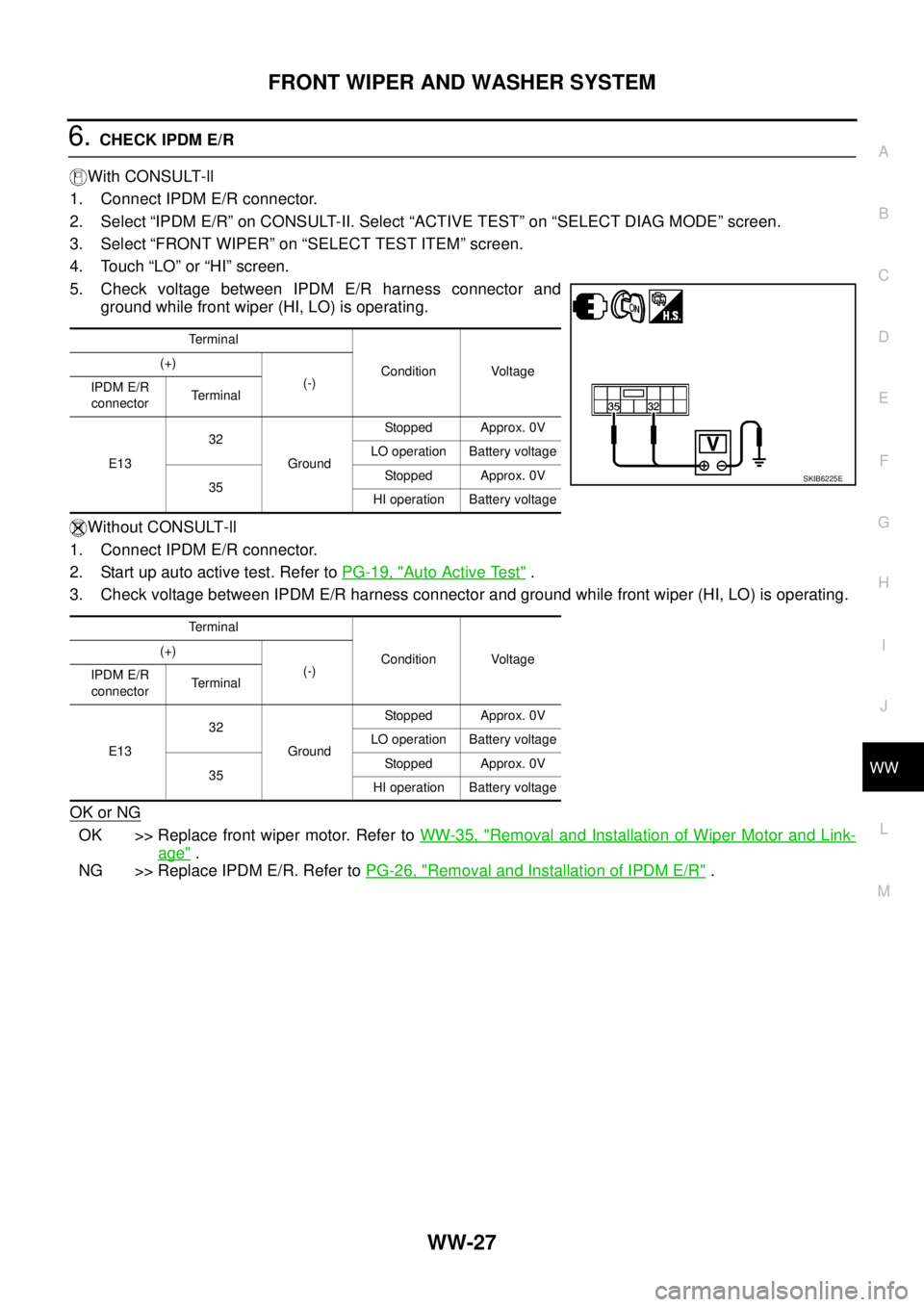
5. Check voltage between IPDM E/R harness connector and
ground while front wiper (HI, LO) is operating.
Without CONSULT-ll
1. Connect IPDM E/R connector.
2. Start up auto active test. Refer toPG-19, "
Auto Active Test".
3. Check voltage between IPDM E/R harness connector and ground while front wiper (HI, LO) is operating.
OK or NG
OK >> Replace front wiper motor. Refer toWW-35, "Removal and Installation of Wiper Motor and Link-
age".
NG >> Replace IPDM E/R. Refer toPG-26, "
Removal and Installation of IPDM E/R".
Te r m i n a l
Condition Voltage (+)
(-)
IPDM E/R
connectorTerminal
E1332
GroundStopped Approx. 0V
LO operation Battery voltage
35Stopped Approx. 0V
HI operation Battery voltage
Te r m i n a l
Condition Voltage (+)
(-)
IPDM E/R
connectorTerminal
E1332
GroundStopped Approx. 0V
LO operation Battery voltage
35Stopped Approx. 0V
HI operation Battery voltage
SKIB6225E
Page 3140 of 3171
FRONT WIPER AND WASHER SYSTEM
WW-29
C
D
E
F
G
H
I
J
L
MA
B
WW
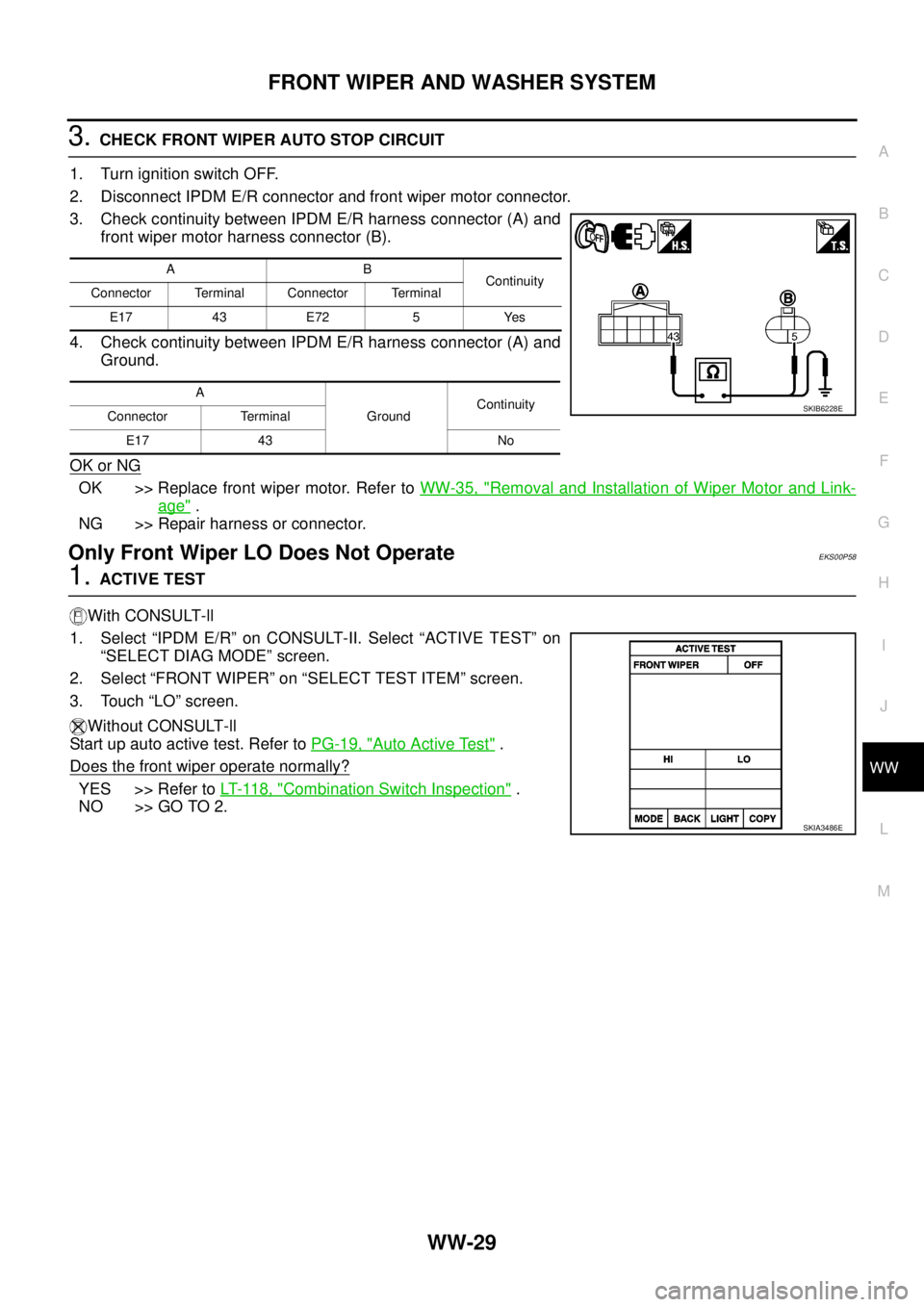
3.CHECK FRONT WIPER AUTO STOP CIRCUIT
1. Turn ignition switch OFF.
2. Disconnect IPDM E/R connector and front wiper motor connector.
3. Check continuity between IPDM E/R harness connector (A) and
front wiper motor harness connector (B).
4. Check continuity between IPDM E/R harness connector (A) and
Ground.
OK or NG
OK >> Replace front wiper motor. Refer toWW-35, "Removal and Installation of Wiper Motor and Link-
age".
NG >> Repair harness or connector.
Only Front Wiper LO Does Not OperateEKS00P58
1.ACTIVE TEST
With CONSULT-ll
1. Select “IPDM E/R” on CONSULT-II. Select “ACTIVE TEST” on
“SELECT DIAG MODE” screen.
2. Select “FRONT WIPER” on “SELECT TEST ITEM” screen.
3. Touch “LO” screen.
Without CONSULT-ll
Start up auto active test. Refer toPG-19, "
Auto Active Test".
Does the front wiper operate normally?
YES >> Refer toLT- 11 8 , "Combination Switch Inspection".
NO >> GO TO 2.
AB
Continuity
Connector Terminal Connector Terminal
E17 43 E72 5 Yes
A
GroundContinuity
Connector Terminal
E17 43 No
SKIB6228E
SKIA3486E
Page 3141 of 3171
WW-30
FRONT WIPER AND WASHER SYSTEM
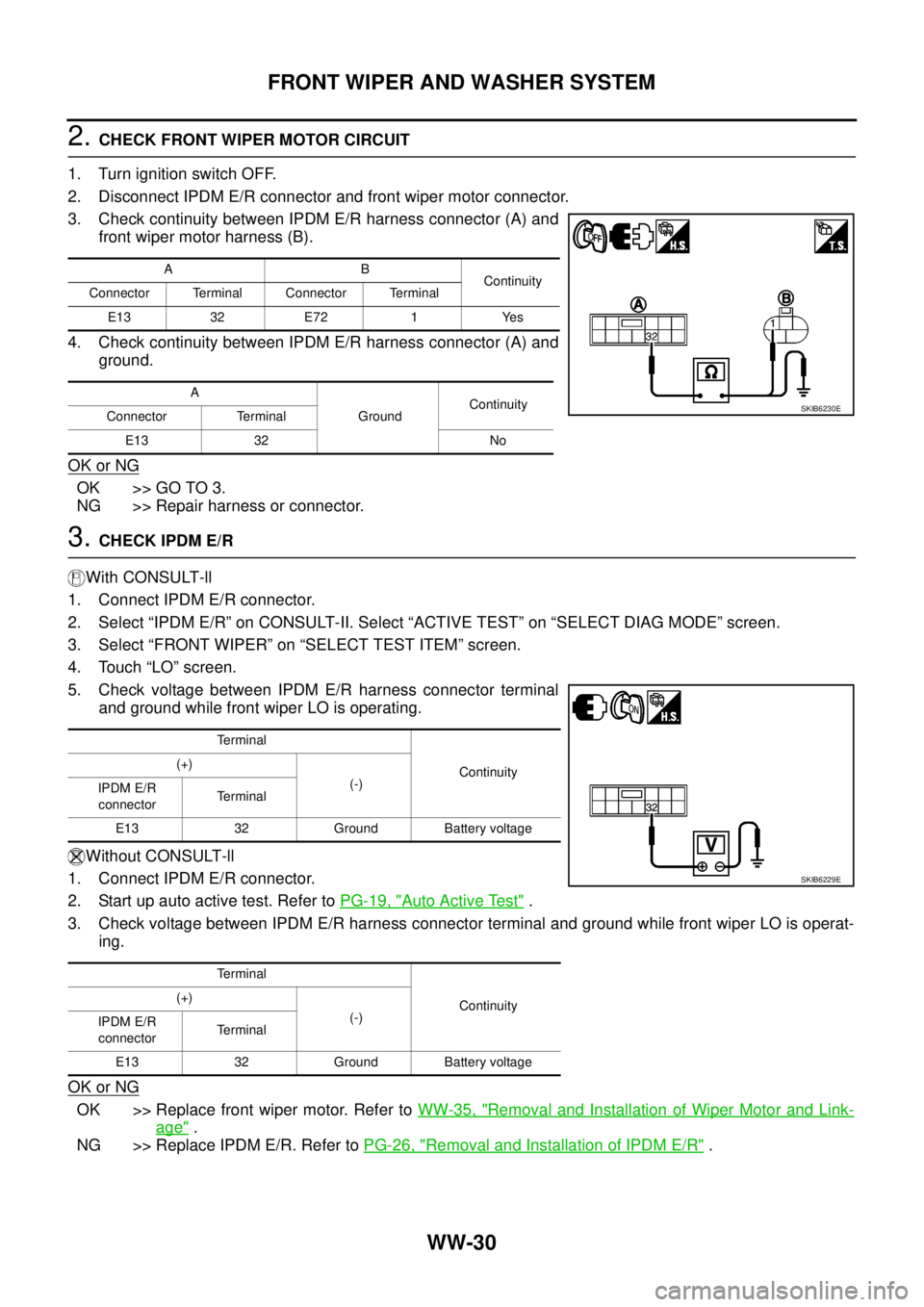
2.CHECK FRONT WIPER MOTOR CIRCUIT
1. Turn ignition switch OFF.
2. Disconnect IPDM E/R connector and front wiper motor connector.
3. Check continuity between IPDM E/R harness connector (A) and
front wiper motor harness (B).
4. Check continuity between IPDM E/R harness connector (A) and
ground.
OK or NG
OK >> GO TO 3.
NG >> Repair harness or connector.
3.CHECK IPDM E/R
With CONSULT-ll
1. Connect IPDM E/R connector.
2. Select “IPDM E/R” on CONSULT-II. Select “ACTIVE TEST” on “SELECT DIAG MODE” screen.
3. Select “FRONT WIPER” on “SELECT TEST ITEM” screen.
4. Touch “LO” screen.
5. Check voltage between IPDM E/R harness connector terminal
and ground while front wiper LO is operating.
Without CONSULT-ll
1. Connect IPDM E/R connector.
2. Startupautoactivetest.RefertoPG-19, "
Auto Active Test".
3. Check voltage between IPDM E/R harness connector terminal and ground while front wiper LO is operat-
ing.
OK or NG
OK >> Replace front wiper motor. Refer toWW-35, "Removal and Installation of Wiper Motor and Link-
age".
NG >> Replace IPDM E/R. Refer toPG-26, "
Removal and Installation of IPDM E/R".
AB
Continuity
Connector Terminal Connector Terminal
E13 32 E72 1 Yes
A
GroundContinuity
Connector Terminal
E13 32 No
SKIB6230E
Terminal
Continuity (+)
(-)
IPDM E/R
connectorTerminal
E13 32 Ground Battery voltage
Terminal
Continuity (+)
(-)
IPDM E/R
connectorTerminal
E13 32 Ground Battery voltage
SKIB6229E
Page 3143 of 3171
WW-32
FRONT WIPER AND WASHER SYSTEM
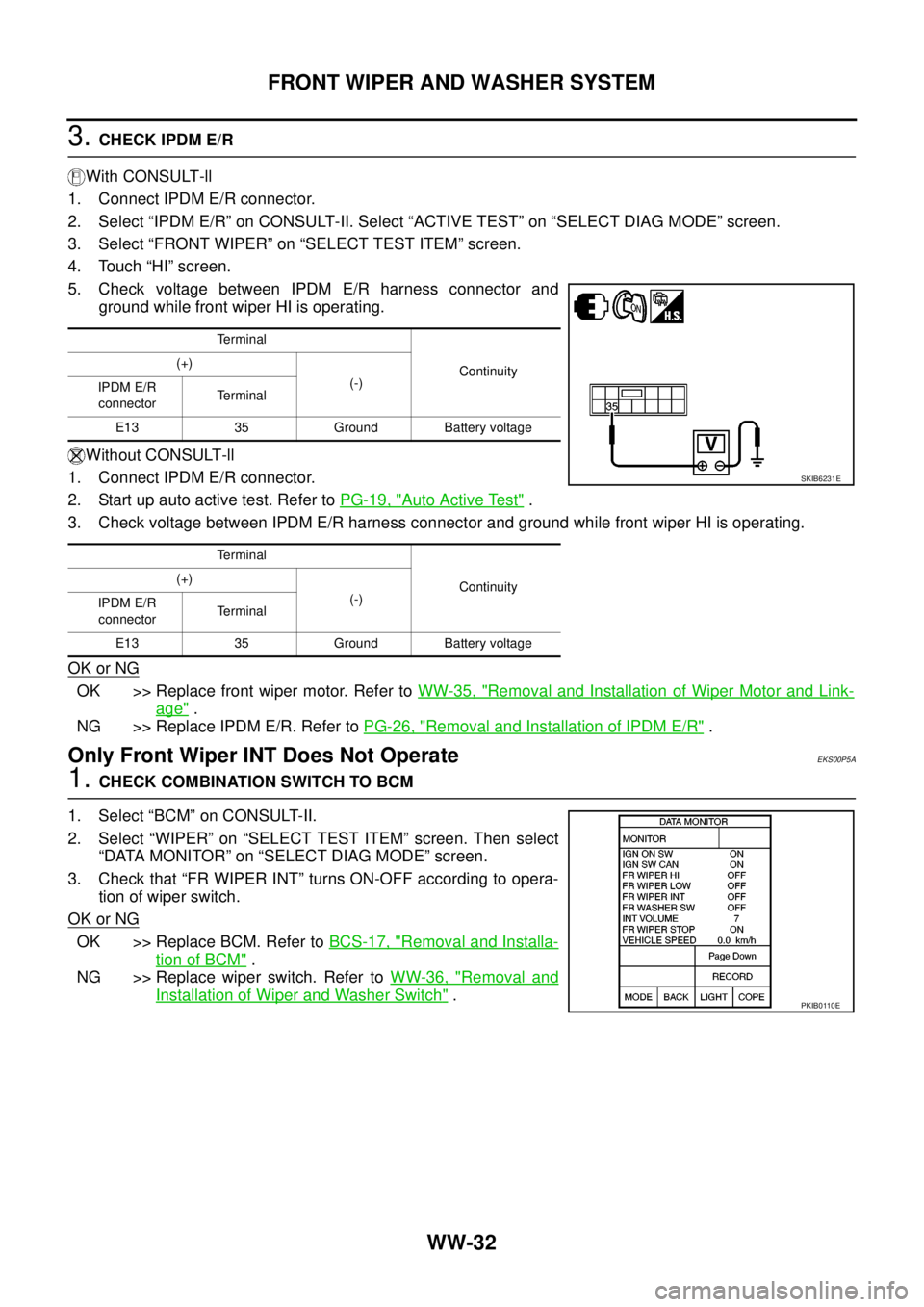
3.CHECK IPDM E/R
With CONSULT-ll
1. Connect IPDM E/R connector.
2. Select “IPDM E/R” on CONSULT-II. Select “ACTIVE TEST” on “SELECT DIAG MODE” screen.
3. Select “FRONT WIPER” on “SELECT TEST ITEM” screen.
4. Touch “HI” screen.
5. Check voltage between IPDM E/R harness connector and
ground while front wiper HI is operating.
Without CONSULT-ll
1. Connect IPDM E/R connector.
2. Startupautoactivetest.RefertoPG-19, "
Auto Active Test".
3. Check voltage between IPDM E/R harness connector and ground while front wiper HI is operating.
OK or NG
OK >> Replace front wiper motor. Refer toWW-35, "Removal and Installation of Wiper Motor and Link-
age".
NG >> Replace IPDM E/R. Refer toPG-26, "
Removal and Installation of IPDM E/R".
Only Front Wiper INT Does Not OperateEKS00P5A
1.CHECK COMBINATION SWITCH TO BCM
1. Select “BCM” on CONSULT-II.
2. Select “WIPER” on “SELECT TEST ITEM” screen. Then select
“DATA MONITOR” on “SELECT DIAG MODE” screen.
3. Check that “FR WIPER INT” turns ON-OFF according to opera-
tion of wiper switch.
OK or NG
OK >> Replace BCM. Refer toBCS-17, "Removal and Installa-
tion of BCM".
NG >> Replace wiper switch. Refer toWW-36, "
Removal and
Installation of Wiper and Washer Switch".
Terminal
Continuity (+)
(-)
IPDM E/R
connectorTerminal
E13 35 Ground Battery voltage
Terminal
Continuity (+)
(-)
IPDM E/R
connectorTerminal
E13 35 Ground Battery voltage
SKIB6231E
PKIB0110E
Page 3144 of 3171
FRONT WIPER AND WASHER SYSTEM
WW-33
C
D
E
F
G
H
I
J
L
MA
B
WW
Front Wiper Intermittent Operation Switch Position Cannot Be AdjustedEKS00P5B
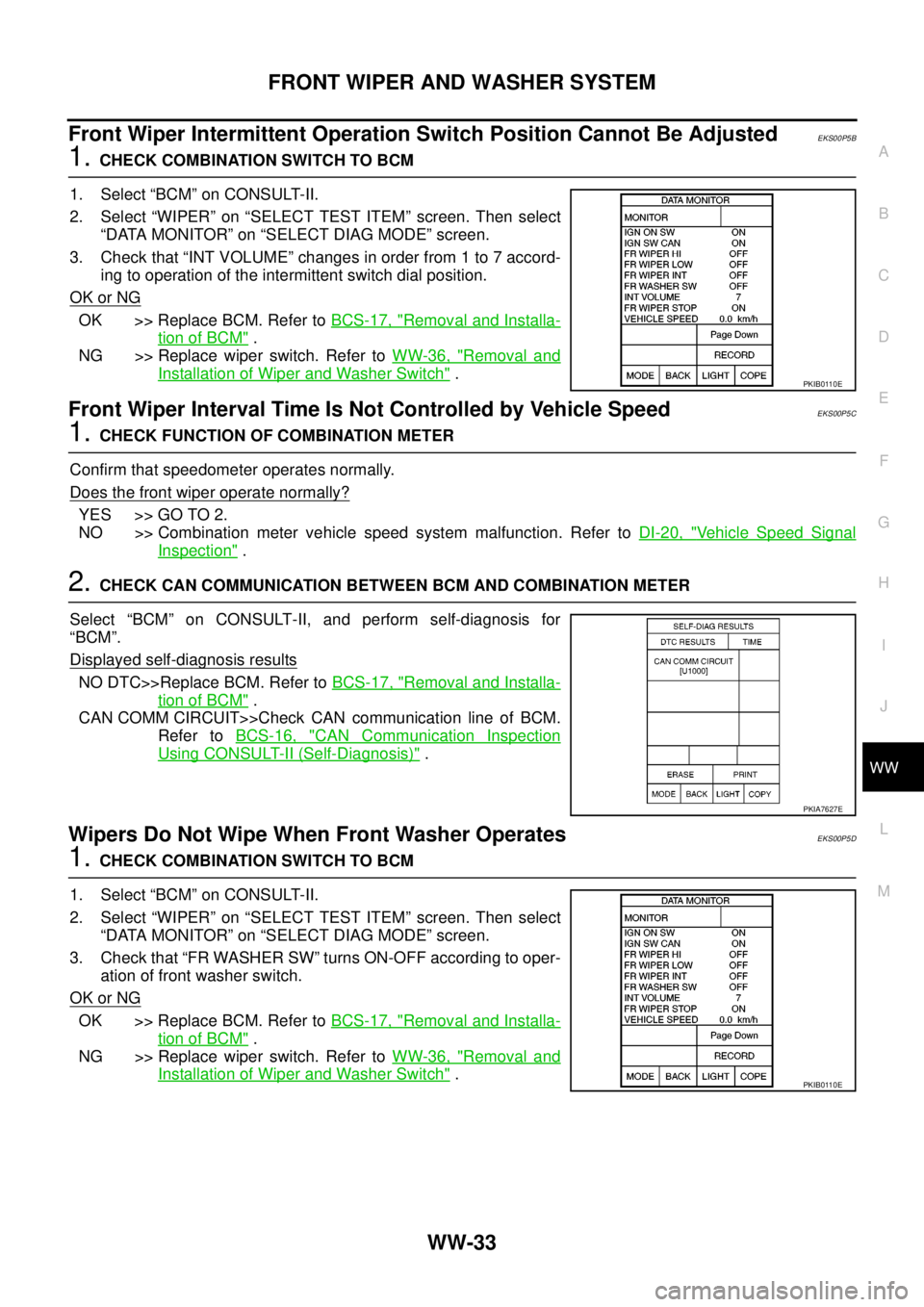
1.CHECK COMBINATION SWITCH TO BCM
1. Select “BCM” on CONSULT-II.
2. Select “WIPER” on “SELECT TEST ITEM” screen. Then select
“DATA MONITOR” on “SELECT DIAG MODE” screen.
3. Check that “INT VOLUME” changes in order from 1 to 7 accord-
ing to operation of the intermittent switch dial position.
OK or NG
OK >> Replace BCM. Refer toBCS-17, "Removal and Installa-
tion of BCM".
NG >> Replace wiper switch. Refer toWW-36, "
Removal and
Installation of Wiper and Washer Switch".
Front Wiper Interval Time Is Not Controlled by Vehicle SpeedEKS00P5C
1.CHECK FUNCTION OF COMBINATION METER
Confirm that speedometer operates normally.
Does the front wiper operate normally?
YES >> GO TO 2.
NO >> Combination meter vehicle speed system malfunction. Refer toDI-20, "
Vehicle Speed Signal
Inspection".
2.CHECK CAN COMMUNICATION BETWEEN BCM AND COMBINATION METER
Select “BCM” on CONSULT-II, and perform self-diagnosis for
“BCM”.
Displayed self
-diagnosis results
NO DTC>>Replace BCM. Refer toBCS-17, "Removal and Installa-
tion of BCM".
CAN COMM CIRCUIT>>Check CAN communication line of BCM.
Refer toBCS-16, "
CAN Communication Inspection
Using CONSULT-II (Self-Diagnosis)".
Wipers Do Not Wipe When Front Washer OperatesEKS00P5D
1.CHECK COMBINATION SWITCH TO BCM
1. Select “BCM” on CONSULT-II.
2. Select “WIPER” on “SELECT TEST ITEM” screen. Then select
“DATA MONITOR” on “SELECT DIAG MODE” screen.
3. Check that “FR WASHER SW” turns ON-OFF according to oper-
ation of front washer switch.
OK or NG
OK >> Replace BCM. Refer toBCS-17, "Removal and Installa-
tion of BCM".
NG >> Replace wiper switch. Refer toWW-36, "
Removal and
Installation of Wiper and Washer Switch".
PKIB0110E
PKIA7627E
PKIB0110E