check engine NISSAN PRIMERA 1999 Electronic Manual PDF
[x] Cancel search | Manufacturer: NISSAN, Model Year: 1999, Model line: PRIMERA, Model: NISSAN PRIMERA 1999Pages: 2267, PDF Size: 35.74 MB
Page 210 of 2267
lApplying brake gradually when shifting or operating clutch.
lLow friction (slippery) road.
lHigh speed concerning.
lDriving over bumps and pot holes.
lEngine speed is over 5,000 rpm with vehicle stopped.
Diagnostic Procedure 11 (ABS Warning lamp
does not come on when ignition switch is
turned ON)
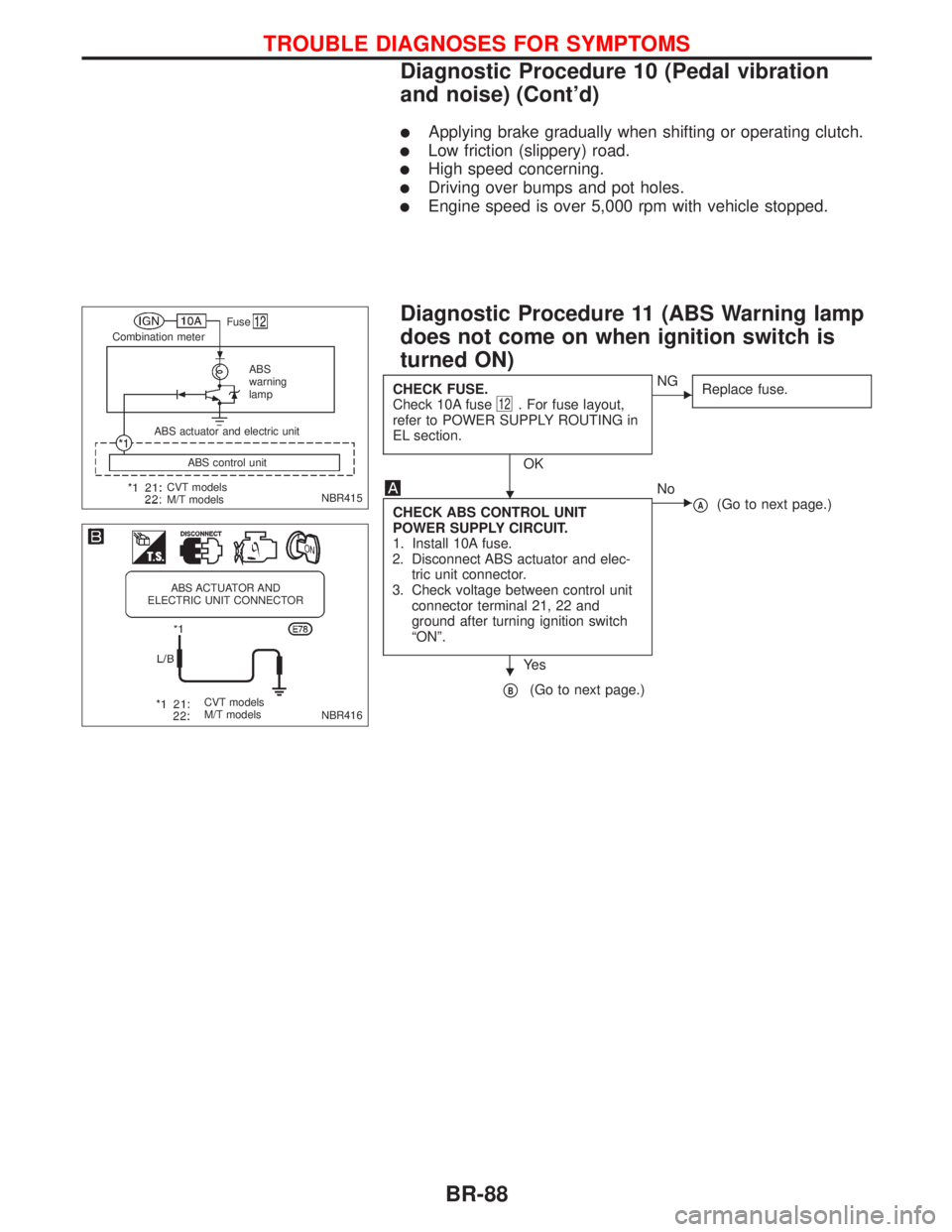
CHECK FUSE.
Check 10A fuse12. For fuse layout,
refer to POWER SUPPLY ROUTING in
EL section.
OK
ENG
Replace fuse.
CHECK ABS CONTROL UNIT
POWER SUPPLY CIRCUIT.
1. Install 10A fuse.
2. Disconnect ABS actuator and elec-
tric unit connector.
3. Check voltage between control unit
connector terminal 21, 22 and
ground after turning ignition switch
ªONº.
Ye s
ENo
pA(Go to next page.)
pB(Go to next page.)
NBR415
.Fuse
Combination meter
ABS
warning
lamp
CVT models
M/T modelsABS control unit ABS actuator and electric unit
NBR416
ABS ACTUATOR AND
ELECTRIC UNIT CONNECTOR
CVT models
M/T models
H
H
TROUBLE DIAGNOSES FOR SYMPTOMS
Diagnostic Procedure 10 (Pedal vibration
and noise) (Cont'd)
BR-88
Page 219 of 2267
Body Front End
lWhen removing or installing hood, place a cloth or other padding on the front fender panels and cowl
top. This prevents vehicle body from being scratched.
lBumper fascia is made of plastic. Do not use excessive force and be sure to keep oil away from it.
lHood adjustment: Adjust at hinge portion.
lHood lock adjustment: After adjusting, check hood lock control operation. Apply a coat of grease to hood
locks engaging mechanism.
lHood opener: Do not attempt to bend cable forcibly. Doing so increases effort required to unlock hood.
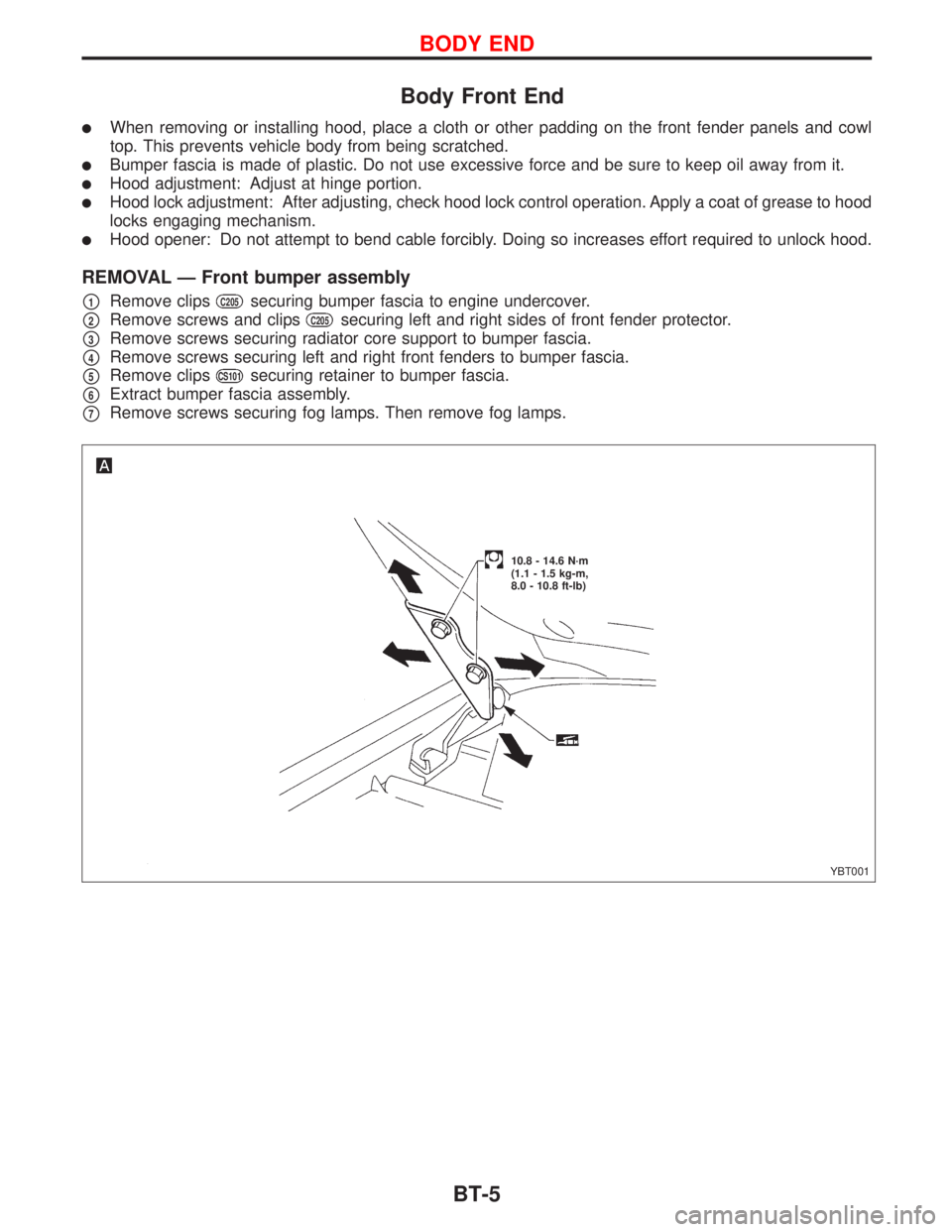
REMOVAL Ð Front bumper assembly
p1Remove clipsC205securing bumper fascia to engine undercover.
p2Remove screws and clipsC205securing left and right sides of front fender protector.
p3Remove screws securing radiator core support to bumper fascia.
p4Remove screws securing left and right front fenders to bumper fascia.
p5Remove clipsCS101securing retainer to bumper fascia.
p6Extract bumper fascia assembly.
p7Remove screws securing fog lamps. Then remove fog lamps.
YBT001
10.8 - 14.6 N´m
(1.1 - 1.5 kg-m,
8.0 - 10.8 ft-lb)
BODY END
BT-5
Page 274 of 2267
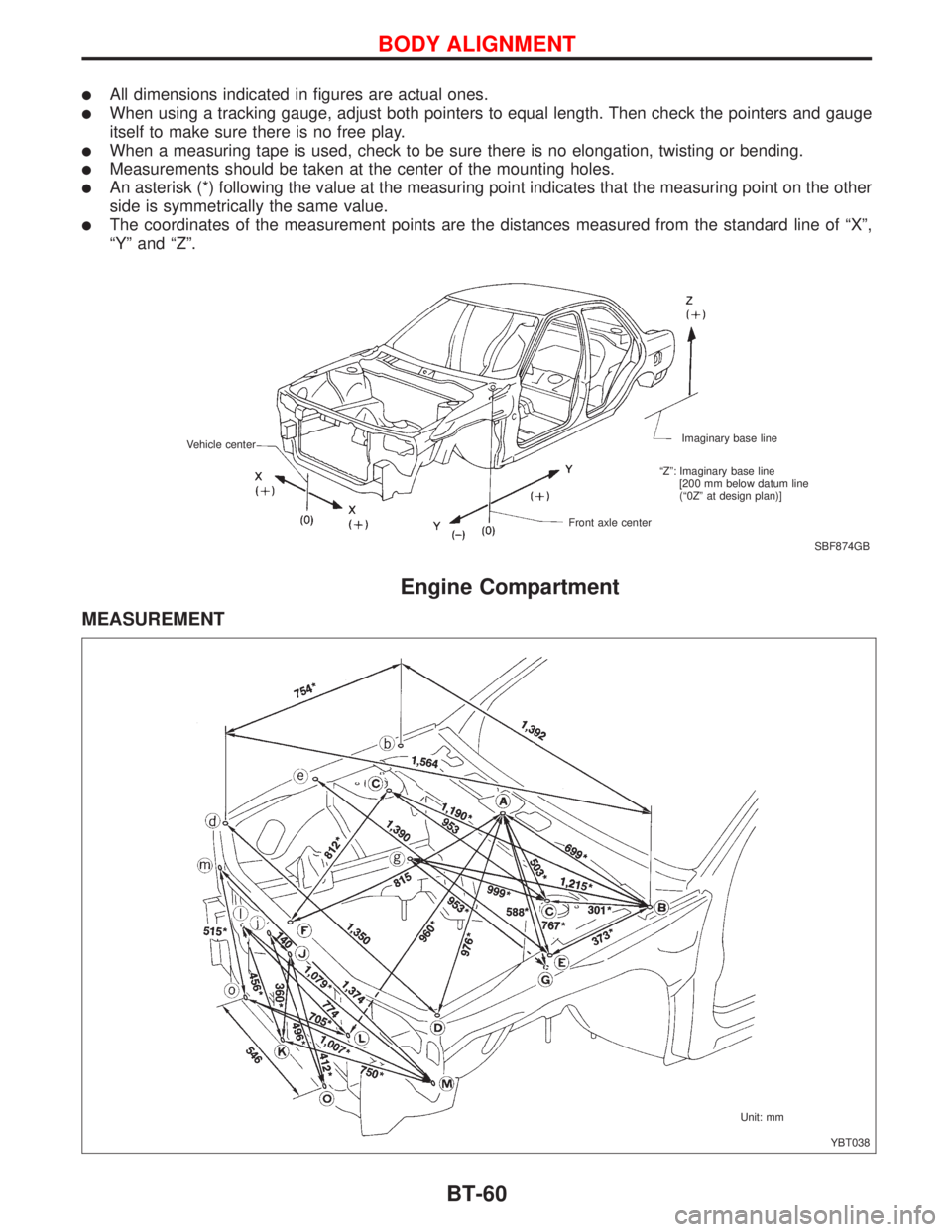
lAll dimensions indicated in figures are actual ones.
lWhen using a tracking gauge, adjust both pointers to equal length. Then check the pointers and gauge
itself to make sure there is no free play.
lWhen a measuring tape is used, check to be sure there is no elongation, twisting or bending.
lMeasurements should be taken at the center of the mounting holes.
lAn asterisk (*) following the value at the measuring point indicates that the measuring point on the other
side is symmetrically the same value.
lThe coordinates of the measurement points are the distances measured from the standard line of ªXº,
ªYº and ªZº.
Engine Compartment
MEASUREMENT
SBF874GB Imaginary base line
Front axle center Vehicle center
ªZº: Imaginary base line
[200 mm below datum line
(ª0Zº at design plan)]
YBT038 Unit: mm
BODY ALIGNMENT
BT-60
Page 281 of 2267
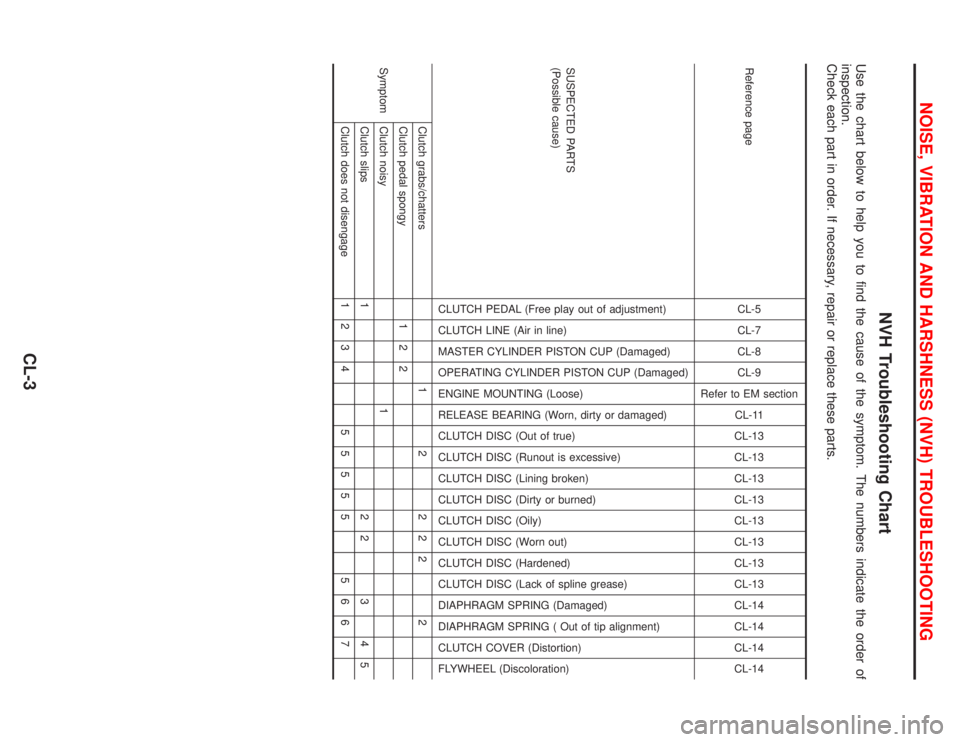
NVH Troubleshooting Chart
Use the chart below to help you to find the cause of the symptom. The numbers indicate the order of
inspection.
Check each part in order. If necessary, repair or replace these parts.
Reference pageCL-5
CL-7
CL-8
CL-9
Refer to EM section
CL-11
CL-13
CL-13
CL-13
CL-13
CL-13
CL-13
CL-13
CL-13
CL-14
CL-14
CL-14
CL-14
SUSPECTED PARTS
(Possible cause)
CLUTCH PEDAL (Free play out of adjustment)
CLUTCH LINE (Air in line)
MASTER CYLINDER PISTON CUP (Damaged)
OPERATING CYLINDER PISTON CUP (Damaged)
ENGINE MOUNTING (Loose)
RELEASE BEARING (Worn, dirty or damaged)
CLUTCH DISC (Out of true)
CLUTCH DISC (Runout is excessive)
CLUTCH DISC (Lining broken)
CLUTCH DISC (Dirty or burned)
CLUTCH DISC (Oily)
CLUTCH DISC (Worn out)
CLUTCH DISC (Hardened)
CLUTCH DISC (Lack of spline grease)
DIAPHRAGM SPRING (Damaged)
DIAPHRAGM SPRING ( Out of tip alignment)
CLUTCH COVER (Distortion)
FLYWHEEL (Discoloration)
SymptomClutch grabs/chatters 1 2 2 2 2 2
Clutch pedal spongy 1 2 2
Clutch noisy 1
Clutch slips 1 2 2 3 4 5
Clutch does not disengage 1 2 3 4 5 5 5 5 5 5 6 6 7
NOISE, VIBRATION AND HARSHNESS (NVH) TROUBLESHOOTING
CL-3
Page 292 of 2267
Clutch Cover and Flywheel
INSPECTION AND ADJUSTMENT
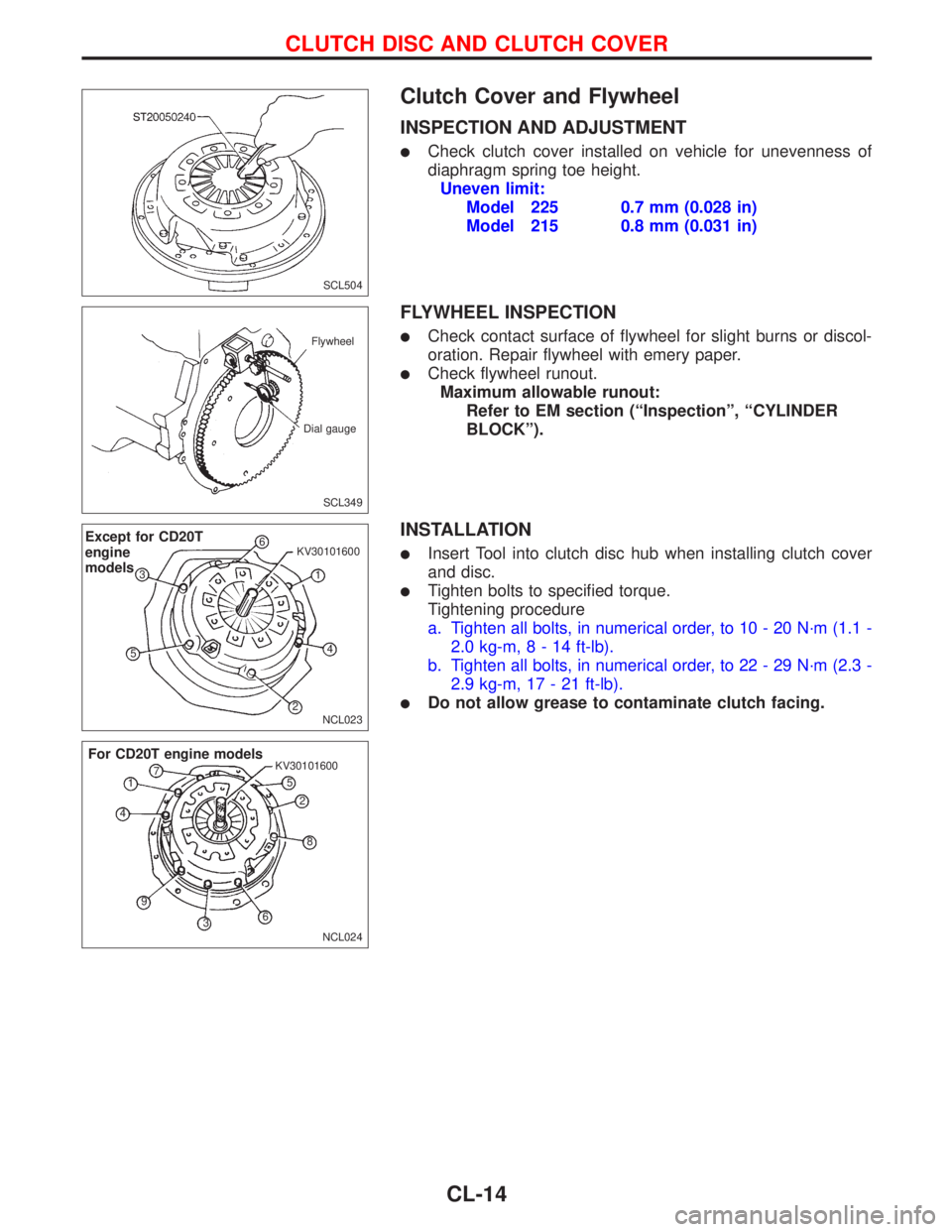
lCheck clutch cover installed on vehicle for unevenness of
diaphragm spring toe height.
Uneven limit:
Model 225 0.7 mm (0.028 in)
Model 215 0.8 mm (0.031 in)
FLYWHEEL INSPECTION
lCheck contact surface of flywheel for slight burns or discol-
oration. Repair flywheel with emery paper.
lCheck flywheel runout.
Maximum allowable runout:
Refer to EM section (ªInspectionº, ªCYLINDER
BLOCKº).
INSTALLATION
lInsert Tool into clutch disc hub when installing clutch cover
and disc.
lTighten bolts to specified torque.
Tightening procedure
a. Tighten all bolts, in numerical order, to 10 - 20 N´m (1.1 -
2.0 kg-m,8-14ft-lb).
b. Tighten all bolts, in numerical order, to 22 - 29 N´m (2.3 -
2.9 kg-m, 17 - 21 ft-lb).
lDo not allow grease to contaminate clutch facing.
SCL504
SCL349 Flywheel
Dial gauge
NCL023
Except for CD20T
engine
models6
1 KV30101600
4
2 53
NCL024 KV30101600
For CD20T engine models
1
2
3 45
6 7
8
9
CLUTCH DISC AND CLUTCH COVER
CL-14
Page 301 of 2267
Precautions
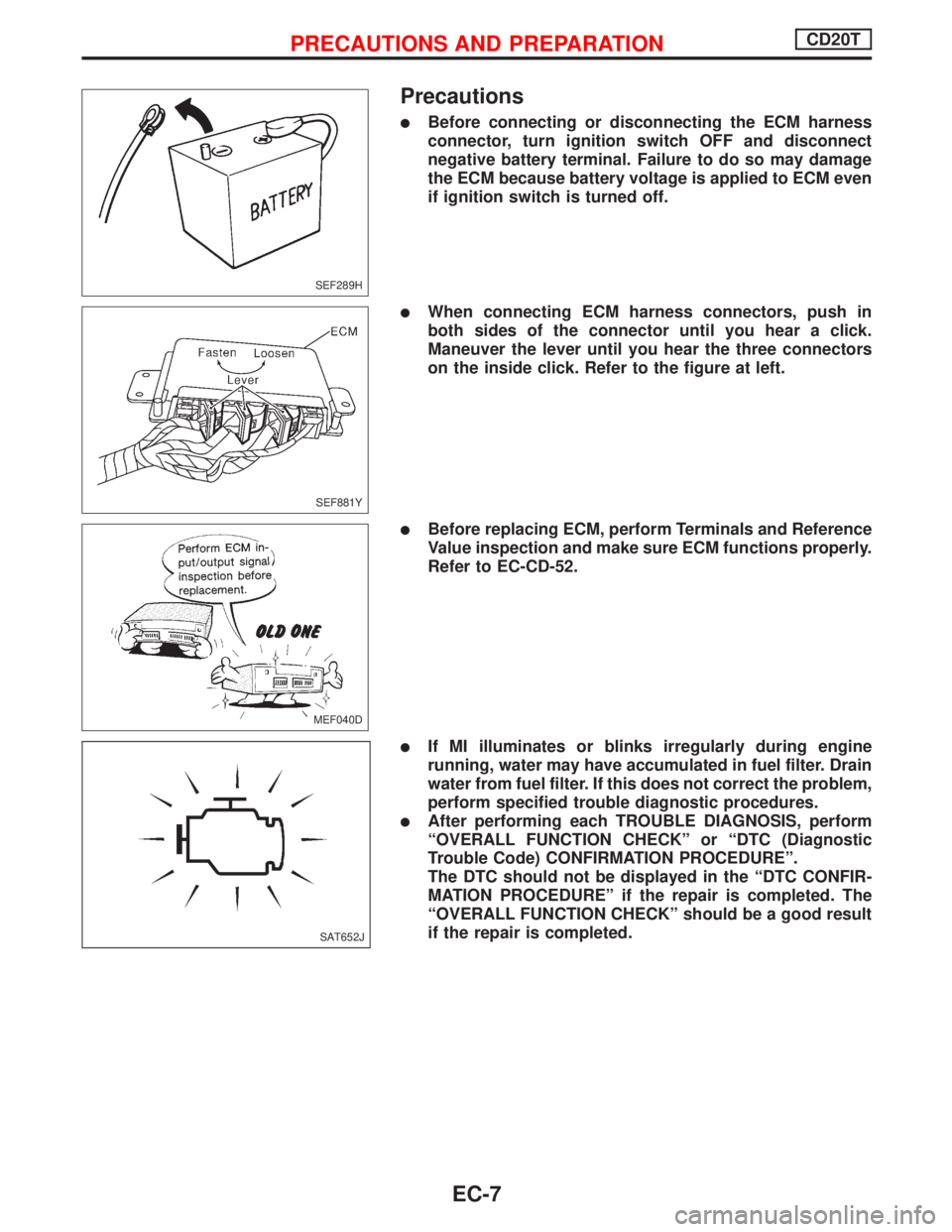
lBefore connecting or disconnecting the ECM harness
connector, turn ignition switch OFF and disconnect
negative battery terminal. Failure to do so may damage
the ECM because battery voltage is applied to ECM even
if ignition switch is turned off.
lWhen connecting ECM harness connectors, push in
both sides of the connector until you hear a click.
Maneuver the lever until you hear the three connectors
on the inside click. Refer to the figure at left.
lBefore replacing ECM, perform Terminals and Reference
Value inspection and make sure ECM functions properly.
Refer to EC-CD-52.
lIf MI illuminates or blinks irregularly during engine
running, water may have accumulated in fuel filter. Drain
water from fuel filter. If this does not correct the problem,
perform specified trouble diagnostic procedures.
lAfter performing each TROUBLE DIAGNOSIS, perform
ªOVERALL FUNCTION CHECKº or ªDTC (Diagnostic
Trouble Code) CONFIRMATION PROCEDUREº.
The DTC should not be displayed in the ªDTC CONFIR-
MATION PROCEDUREº if the repair is completed. The
ªOVERALL FUNCTION CHECKº should be a good result
if the repair is completed.
SEF289H
SEF881Y
MEF040D
SAT652J
PRECAUTIONS AND PREPARATIONCD20T
EC-7
Page 325 of 2267
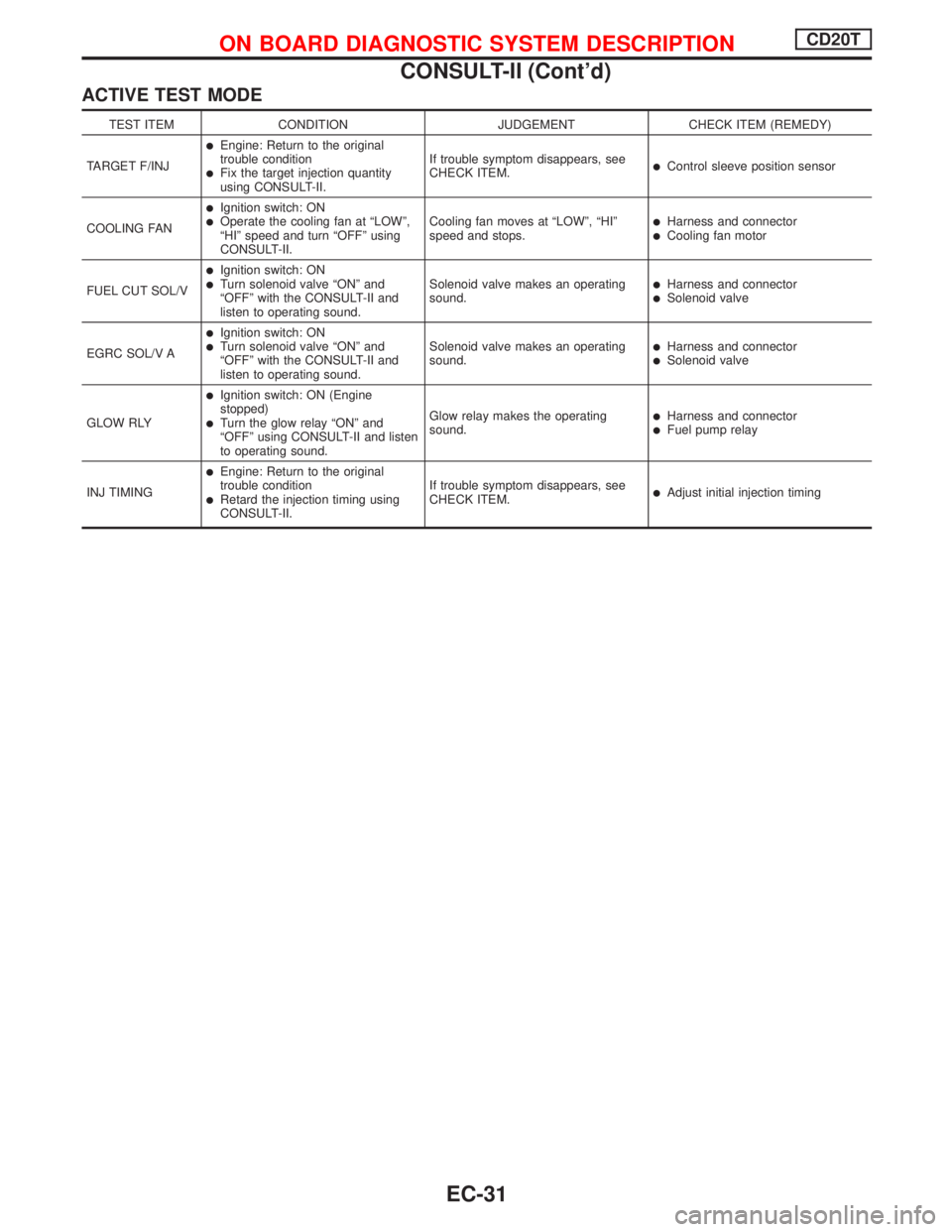
ACTIVE TEST MODE
TEST ITEM CONDITION JUDGEMENT CHECK ITEM (REMEDY)
TARGET F/INJ
lEngine: Return to the original
trouble condition
lFix the target injection quantity
using CONSULT-II.If trouble symptom disappears, see
CHECK ITEM.lControl sleeve position sensor
COOLING FAN
lIgnition switch: ONlOperate the cooling fan at ªLOWº,
ªHIº speed and turn ªOFFº using
CONSULT-II.Cooling fan moves at ªLOWº, ªHIº
speed and stops.lHarness and connectorlCooling fan motor
FUEL CUT SOL/V
lIgnition switch: ONlTurn solenoid valve ªONº and
ªOFFº with the CONSULT-II and
listen to operating sound.Solenoid valve makes an operating
sound.lHarness and connectorlSolenoid valve
EGRC SOL/V A
lIgnition switch: ONlTurn solenoid valve ªONº and
ªOFFº with the CONSULT-II and
listen to operating sound.Solenoid valve makes an operating
sound.lHarness and connectorlSolenoid valve
GLOW RLY
lIgnition switch: ON (Engine
stopped)
lTurn the glow relay ªONº and
ªOFFº using CONSULT-II and listen
to operating sound.Glow relay makes the operating
sound.lHarness and connectorlFuel pump relay
INJ TIMING
lEngine: Return to the original
trouble condition
lRetard the injection timing using
CONSULT-II.If trouble symptom disappears, see
CHECK ITEM.lAdjust initial injection timing
ON BOARD DIAGNOSTIC SYSTEM DESCRIPTIONCD20T
CONSULT-II (Cont'd)
EC-31
Page 327 of 2267
Introduction
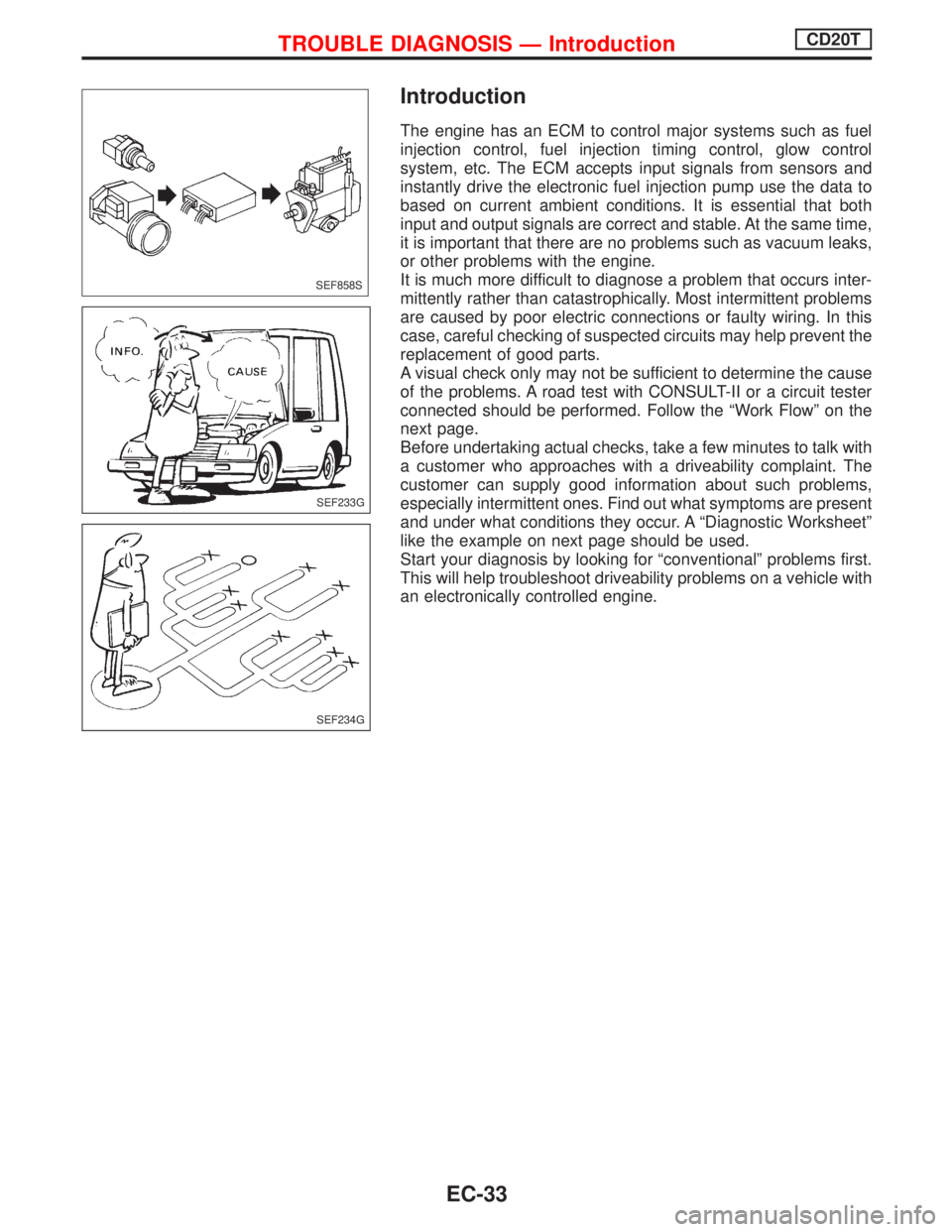
The engine has an ECM to control major systems such as fuel
injection control, fuel injection timing control, glow control
system, etc. The ECM accepts input signals from sensors and
instantly drive the electronic fuel injection pump use the data to
based on current ambient conditions. It is essential that both
input and output signals are correct and stable. At the same time,
it is important that there are no problems such as vacuum leaks,
or other problems with the engine.
It is much more difficult to diagnose a problem that occurs inter-
mittently rather than catastrophically. Most intermittent problems
are caused by poor electric connections or faulty wiring. In this
case, careful checking of suspected circuits may help prevent the
replacement of good parts.
A visual check only may not be sufficient to determine the cause
of the problems. A road test with CONSULT-II or a circuit tester
connected should be performed. Follow the ªWork Flowº on the
next page.
Before undertaking actual checks, take a few minutes to talk with
a customer who approaches with a driveability complaint. The
customer can supply good information about such problems,
especially intermittent ones. Find out what symptoms are present
and under what conditions they occur. A ªDiagnostic Worksheetº
like the example on next page should be used.
Start your diagnosis by looking for ªconventionalº problems first.
This will help troubleshoot driveability problems on a vehicle with
an electronically controlled engine.
SEF858S
SEF233G
SEF234G
TROUBLE DIAGNOSIS Ð IntroductionCD20T
EC-33
Page 330 of 2267
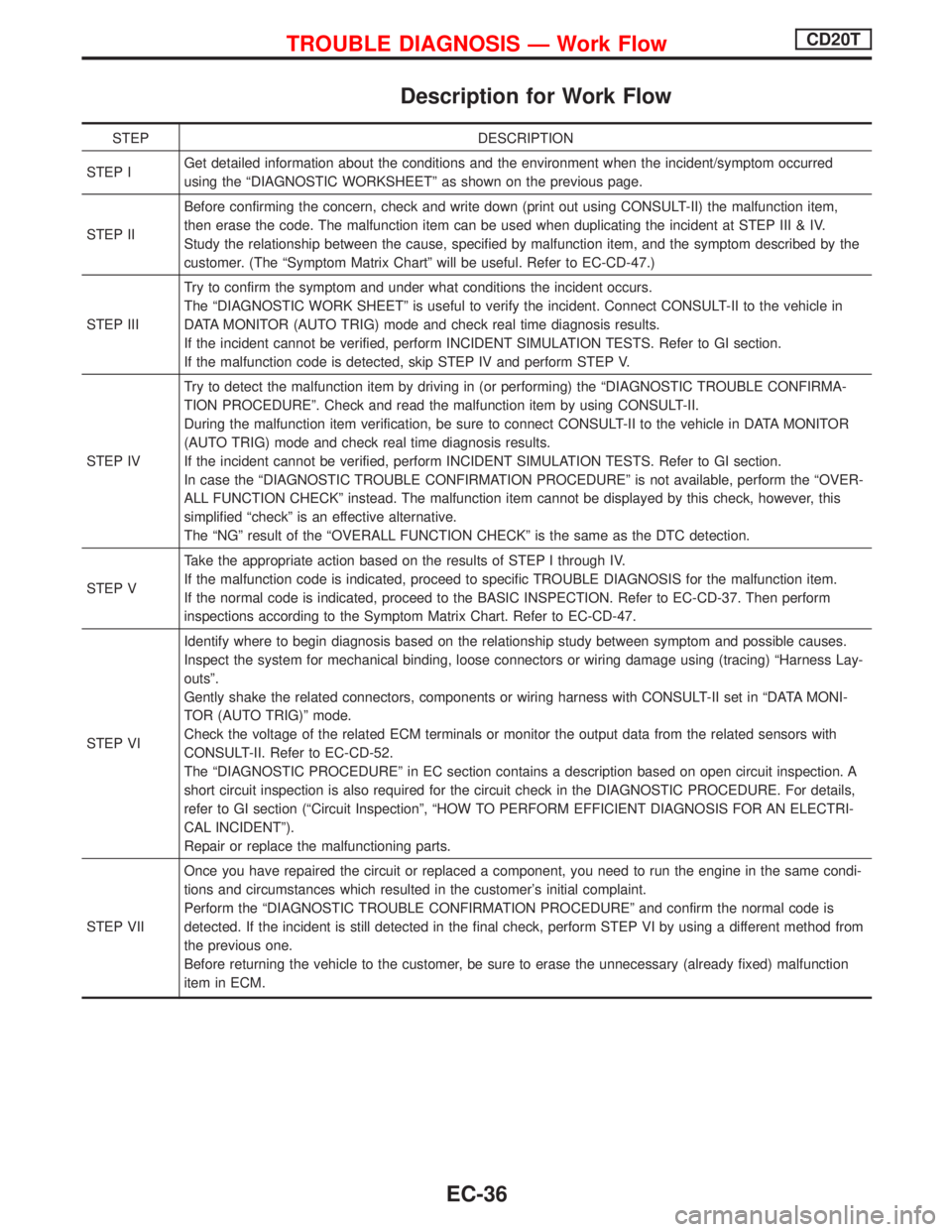
Description for Work Flow
STEP DESCRIPTION
STEP IGet detailed information about the conditions and the environment when the incident/symptom occurred
using the ªDIAGNOSTIC WORKSHEETº as shown on the previous page.
STEP IIBefore confirming the concern, check and write down (print out using CONSULT-II) the malfunction item,
then erase the code. The malfunction item can be used when duplicating the incident at STEP III & IV.
Study the relationship between the cause, specified by malfunction item, and the symptom described by the
customer. (The ªSymptom Matrix Chartº will be useful. Refer to EC-CD-47.)
STEP IIITry to confirm the symptom and under what conditions the incident occurs.
The ªDIAGNOSTIC WORK SHEETº is useful to verify the incident. Connect CONSULT-II to the vehicle in
DATA MONITOR (AUTO TRIG) mode and check real time diagnosis results.
If the incident cannot be verified, perform INCIDENT SIMULATION TESTS. Refer to GI section.
If the malfunction code is detected, skip STEP IV and perform STEP V.
STEP IVTry to detect the malfunction item by driving in (or performing) the ªDIAGNOSTIC TROUBLE CONFIRMA-
TION PROCEDUREº. Check and read the malfunction item by using CONSULT-II.
During the malfunction item verification, be sure to connect CONSULT-II to the vehicle in DATA MONITOR
(AUTO TRIG) mode and check real time diagnosis results.
If the incident cannot be verified, perform INCIDENT SIMULATION TESTS. Refer to GI section.
In case the ªDIAGNOSTIC TROUBLE CONFIRMATION PROCEDUREº is not available, perform the ªOVER-
ALL FUNCTION CHECKº instead. The malfunction item cannot be displayed by this check, however, this
simplified ªcheckº is an effective alternative.
The ªNGº result of the ªOVERALL FUNCTION CHECKº is the same as the DTC detection.
STEP VTake the appropriate action based on the results of STEP I through IV.
If the malfunction code is indicated, proceed to specific TROUBLE DIAGNOSIS for the malfunction item.
If the normal code is indicated, proceed to the BASIC INSPECTION. Refer to EC-CD-37. Then perform
inspections according to the Symptom Matrix Chart. Refer to EC-CD-47.
STEP VIIdentify where to begin diagnosis based on the relationship study between symptom and possible causes.
Inspect the system for mechanical binding, loose connectors or wiring damage using (tracing) ªHarness Lay-
outsº.
Gently shake the related connectors, components or wiring harness with CONSULT-II set in ªDATA MONI-
TOR (AUTO TRIG)º mode.
Check the voltage of the related ECM terminals or monitor the output data from the related sensors with
CONSULT-II. Refer to EC-CD-52.
The ªDIAGNOSTIC PROCEDUREº in EC section contains a description based on open circuit inspection. A
short circuit inspection is also required for the circuit check in the DIAGNOSTIC PROCEDURE. For details,
refer to GI section (ªCircuit Inspectionº, ªHOW TO PERFORM EFFICIENT DIAGNOSIS FOR AN ELECTRI-
CAL INCIDENTº).
Repair or replace the malfunctioning parts.
STEP VIIOnce you have repaired the circuit or replaced a component, you need to run the engine in the same condi-
tions and circumstances which resulted in the customer's initial complaint.
Perform the ªDIAGNOSTIC TROUBLE CONFIRMATION PROCEDUREº and confirm the normal code is
detected. If the incident is still detected in the final check, perform STEP VI by using a different method from
the previous one.
Before returning the vehicle to the customer, be sure to erase the unnecessary (already fixed) malfunction
item in ECM.
TROUBLE DIAGNOSIS Ð Work FlowCD20T
EC-36
Page 331 of 2267
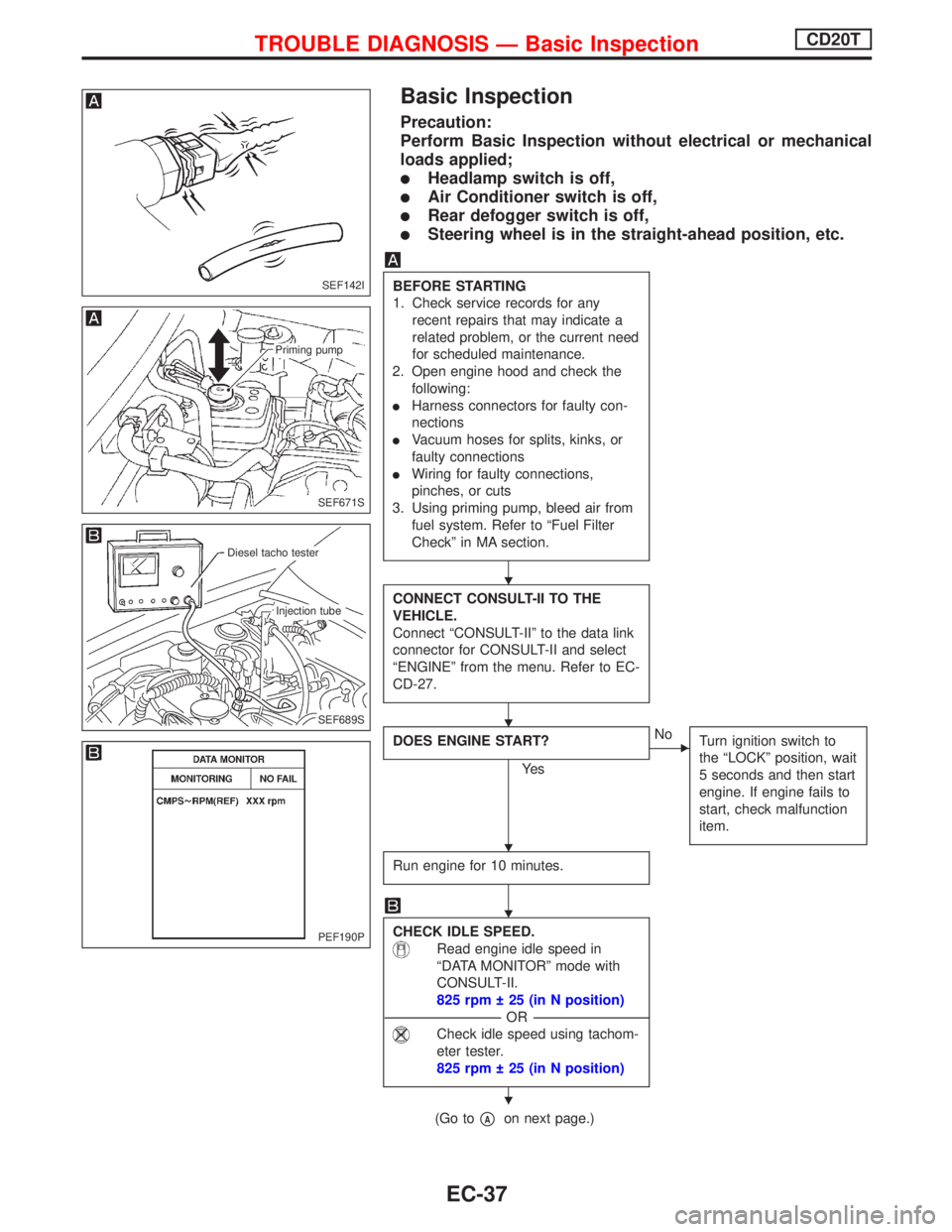
Basic Inspection
Precaution:
Perform Basic Inspection without electrical or mechanical
loads applied;
lHeadlamp switch is off,
lAir Conditioner switch is off,
lRear defogger switch is off,
lSteering wheel is in the straight-ahead position, etc.
BEFORE STARTING
1. Check service records for any
recent repairs that may indicate a
related problem, or the current need
for scheduled maintenance.
2. Open engine hood and check the
following:
lHarness connectors for faulty con-
nections
lVacuum hoses for splits, kinks, or
faulty connections
lWiring for faulty connections,
pinches, or cuts
3. Using priming pump, bleed air from
fuel system. Refer to ªFuel Filter
Checkº in MA section.
CONNECT CONSULT-II TO THE
VEHICLE.
Connect ªCONSULT-IIº to the data link
connector for CONSULT-II and select
ªENGINEº from the menu. Refer to EC-
CD-27.
DOES ENGINE START?
Ye s
ENo
Turn ignition switch to
the ªLOCKº position, wait
5 seconds and then start
engine. If engine fails to
start, check malfunction
item.
Run engine for 10 minutes.
CHECK IDLE SPEED.
Read engine idle speed in
ªDATA MONITORº mode with
CONSULT-II.
825 rpm 25 (in N position)
---------------------------------------------------------------------------------------------------------------------------------OR---------------------------------------------------------------------------------------------------------------------------------
Check idle speed using tachom-
eter tester.
825 rpm 25 (in N position)
(Go topAon next page.)
SEF142I
SEF671S
Priming pump
SEF689S
.Diesel tacho tester
.Injection tube
PEF190P
H
H
H
H
H
TROUBLE DIAGNOSIS Ð Basic InspectionCD20T
EC-37