Trans NISSAN TEANA 2008 Service Manual
[x] Cancel search | Manufacturer: NISSAN, Model Year: 2008, Model line: TEANA, Model: NISSAN TEANA 2008Pages: 5121, PDF Size: 69.03 MB
Page 3435 of 5121
![NISSAN TEANA 2008 Service Manual PCS-44
< FUNCTION DIAGNOSIS >[POWER DISTRIBUTION SYSTEM]
DIAGNOSIS SYSTEM (BCM)
ACTIVE TEST
CLUCH SWNOTE:
This item is displayed, but cannot be monitored.
BRAKE SW 1 Indicates [ON/OFF] condition of b](/img/5/57391/w960_57391-3434.png "NISSAN TEANA 2008 Service Manual PCS-44
< FUNCTION DIAGNOSIS >[POWER DISTRIBUTION SYSTEM]
DIAGNOSIS SYSTEM (BCM)
ACTIVE TEST
CLUCH SWNOTE:
This item is displayed, but cannot be monitored.
BRAKE SW 1 Indicates [ON/OFF] condition of b")
PCS-44
< FUNCTION DIAGNOSIS >[POWER DISTRIBUTION SYSTEM]
DIAGNOSIS SYSTEM (BCM)
ACTIVE TEST
CLUCH SWNOTE:
This item is displayed, but cannot be monitored.
BRAKE SW 1 Indicates [ON/OFF] condition of brake switch.
DETE/CANCL SW Indicates [ON/OFF] condition of the P position.
SFT PN/N SW Indicates [ON/OFF] condition of the P or N position.
S/L -LOCK Indicates [ON/OFF] condition of steering lock unit (LOCK).
S/L -UNLOCK Indicates [ON/OFF] condition of steering lock unit (UNLOCK).
S/L RELAY -F/B Indicates [ON/OFF] condition of steering lock relay.
UNLK SEN -DR Indicates [ON/OFF] condition of driver door UNLOCK status.
PUSH SW -IPDM Indicates [ON/OFF] condition of push-button ignition switch.
IGN RLY1 -F/B Indicates [ON/OFF] condition of ignition relay 1.
DETE SW -IPDM Indicates [ON/OFF] condition of the P position.
SFT PN -IPDM Indicates [ON/OFF] condition of the P or N position.
SFT P -MET Indicates [ON/OFF] condition of the P position.
SFT N -MET Indicates [ON/OFF] condition of the N position.
ENGINE STATE Indicates [STOP/STALL/CRANK/RUN] condition of engine states.
S/L LOCK-IPDM Indicates [ON/OFF] condition of steering lock unit (LOCK).
S/L UNLK-IPDM Indicates [ON/OFF] condition of steering lock unit (UNLOCK).
S/L RELAY-REQ Indicates [ON/OFF] condition of steering lock relay.
VEH SPEED 1 Displays the vehicle speed signal received from combination meter by numerical value [Km/h].
VEH SPEED 2 Displays the vehicle speed signal received from ABS, VDC or CVT by numerical value [Km/h].
DOOR STAT-DR Indicates [LOCK/READY/UNLK] condition of driver side door status.
DOOR STAT-AS Indicates [LOCK/READY/UNLK] condition of passenger side door status.
ID OK FLAG Indicates [SET/RESET] condition of key ID.
PRMT ENG STRT Indicates [SET/RESET] condition of engine start possibility.
PRMT RKE STRTNOTE:
This item is displayed, but cannot be monitored.
KEY SW -SLOT Indicates [ON/OFF] condition of key slot.
TRNK/HAT MNTR Indicates [ON/OFF] condition of trunk lid.
RKE-LOCK Indicates [ON/OFF] condition of LOCK signal from Intelligent Key.
RKE-UNLOCK Indicates [ON/OFF] condition of UNLOCK signal from Intelligent Key.
RKE-TR/BD Indicates [ON/OFF] condition of TRUNK OPEN signal from Intelligent Key.
RKE-PANICNOTE:
This item is displayed, but cannot be monitored.
RKE-P/W OPENNOTE:
This item is displayed, but cannot be monitored.
RKE-MODE CHG Indicates [ON/OFF] condition of MODE CHANGE signal from Intelligent Key.
RKE OPE COUN1When remote keyless entry receiver receives the signal transmitted while operating on Intelligent Key, the
numerical values start changing.
RKE OPE COUN2NOTE:
This item is displayed, but cannot be monitored. Monitor Item Condition
Page 3437 of 5121
![NISSAN TEANA 2008 Service Manual PCS-46
< COMPONENT DIAGNOSIS >[POWER DISTRIBUTION SYSTEM]
U1000 CAN COMM CIRCUIT
COMPONENT DIAGNOSIS
U1000 CAN COMM CIRCUIT
BCM
BCM : DescriptionINFOID:0000000003805725
CAN (Controller Area Network) i](/img/5/57391/w960_57391-3436.png "NISSAN TEANA 2008 Service Manual PCS-46
< COMPONENT DIAGNOSIS >[POWER DISTRIBUTION SYSTEM]
U1000 CAN COMM CIRCUIT
COMPONENT DIAGNOSIS
U1000 CAN COMM CIRCUIT
BCM
BCM : DescriptionINFOID:0000000003805725
CAN (Controller Area Network) i")
PCS-46
< COMPONENT DIAGNOSIS >[POWER DISTRIBUTION SYSTEM]
U1000 CAN COMM CIRCUIT
COMPONENT DIAGNOSIS
U1000 CAN COMM CIRCUIT
BCM
BCM : DescriptionINFOID:0000000003805725
CAN (Controller Area Network) is a serial communication line for real time applications. It is an on-vehicle mul-
tiplex communication line with high data communication speed and excellent error detection ability. Modern
vehicle is equipped with many electronic control unit, and each control unit shares information and links with
other control units during operation (not independent). In CAN communication, control units are connected
with 2 communication lines (CAN H-line, CAN L-line) allowing a high rate of information transmission with less
wiring. Each control unit transmits/receives data but selectively reads required data only.
CAN Communication Signal Chart. Refer to LAN-22, "
CAN Communication Signal Chart".
BCM : DTC LogicINFOID:0000000003805726
DTC DETECTION LOGIC
BCM : Diagnosis ProcedureINFOID:0000000003805727
1.PERFORM SELF DIAGNOSTIC
1. Turn ignition switch ON and wait for 2 seconds or more.
2. Check “Self Diagnostic Result”.
Is
“U1000: CAN COMM CIRCUIT” displayed?
YES >> Refer to LAN-14, "Trouble Diagnosis Flow Chart".
NO >> Refer to GI-35, "
Intermittent Incident".
IPDM E/R
IPDM E/R : DescriptionINFOID:0000000003805728
CAN (Controller Area Network) is a serial communication line for real time applications. It is an on-vehicle mul-
tiplex communication line with high data communication speed and excellent error detection ability. Modern
vehicle is equipped with many electronic control unit, and each control unit shares information and links with
other control units during operation (not independent). In CAN communication, control units are connected
with 2 communication lines (CAN-H line, CAN-L line) allowing a high rate of information transmission with less
wiring. Each control unit transmits/receives data but selectively reads required data only.
CAN Communication Signal Chart. Refer to LAN-22, "
CAN Communication Signal Chart".
IPDM E/R : DTC LogicINFOID:0000000003805729
DTC DETECTION LOGIC
IPDM E/R : Diagnosis ProcedureINFOID:0000000003805730
1.PERFORM SELF DIAGNOSTIC
DTCCONSULT-III display
descriptionDTC Detection Condition Possible cause
U1000 CAN COMM CIRCUITWhen BCM cannot communicate CAN com-
munication signal continuously for 2 seconds
or more.CAN communication system
DTCCONSULT-III display
descriptionDTC Detection Condition Possible cause
U1000 CAN COMM CIRCUITWhen IPDM E/R cannot communicate CAN
communication signal continuously for 2
seconds or moreCAN communication system
Page 3451 of 5121
![NISSAN TEANA 2008 Service Manual PCS-60
< COMPONENT DIAGNOSIS >[POWER DISTRIBUTION SYSTEM]
B261A PUSH-BUTTON IGNITION SWITCH
B261A PUSH-BUTTON IGNITION SWITCH
DescriptionINFOID:0000000003805755
BCM transmits the change in the power s](/img/5/57391/w960_57391-3450.png "NISSAN TEANA 2008 Service Manual PCS-60
< COMPONENT DIAGNOSIS >[POWER DISTRIBUTION SYSTEM]
B261A PUSH-BUTTON IGNITION SWITCH
B261A PUSH-BUTTON IGNITION SWITCH
DescriptionINFOID:0000000003805755
BCM transmits the change in the power s")
PCS-60
< COMPONENT DIAGNOSIS >[POWER DISTRIBUTION SYSTEM]
B261A PUSH-BUTTON IGNITION SWITCH
B261A PUSH-BUTTON IGNITION SWITCH
DescriptionINFOID:0000000003805755
BCM transmits the change in the power supply position with the push-button ignition switch to IPDM E/R via
the CAN communication line. IPDM E/R transmits the power supply position status via CAN communication
line to BCM.
DTC LogicINFOID:0000000003805756
DTC DETECTION LOGIC
DTC CONFIRMATION PROCEDURE
1.PERFORM DTC CONFIRMATION PROCEDURE
1. Press the push-button ignition switch under the following conditions, and wait for at least 1 second.
- Selector lever is in the P or N position.
- Do not depress brake pedal.
2. Check “Self diagnostic result” with CONSULT-III.
Is DTC detected?
YES >> Go to PCS-60, "Diagnosis Procedure".
NO >> INSPECTION END
Diagnosis ProcedureINFOID:0000000003805757
1.CHECK PUSH-BUTTON IGNITION SWITCH OPERATION
Press push-button ignition switch and check if it turns ON.
Does ignition switch turn ON?
YES >> GO TO 2.
NO >> GO TO 4.
2.CHECK IGNITION SWITCH OUTPUT SIGNAL (IPDM E/R)
1. Disconnect push-button ignition switch connector and BCM connector.
2. Check voltage between IPDM E/R harness connector and ground.
Is the inspection result normal?
YES >> GO TO 3.
NO >> Replace IPDM E/R. Refer to PCS-34, "
Removal and Installation".
3.CHECK PUSH-BUTTON IGNITION SWITCH CIRCUIT (IPDM E/R)
1. Disconnect IPDM E/R connector.
2. Check continuity between IPDM E/R harness connector and push-button ignition switch harness connec-
tor.
DTC No.Trouble diagnosis
nameDTC detecting condition Possible cause
B261APUSH-BUTTON IG-
NITION SWITCH BCM detects a difference of signal for 1 second or
more between the following information.
Power supply position by push-button ignition
switch
Power supply position from IPDM E/R (CAN) Harness or connectors
(Push-button ignition switch circuit
is open or shorted.)
(+)
(–)Voltage (V)
(Approx.) IPDM E/R
Connector Terminal
E10 28 Ground Battery voltage
Page 3454 of 5121
![NISSAN TEANA 2008 Service Manual PCS
PUSH-BUTTON IGNITION SWITCH
PCS-63
< COMPONENT DIAGNOSIS >[POWER DISTRIBUTION SYSTEM]
C
D
E
F
G
H
I
J
K
L B A
O
P N
PUSH-BUTTON IGNITION SWITCH
DescriptionINFOID:0000000003805759
BCM transmits the](/img/5/57391/w960_57391-3453.png "NISSAN TEANA 2008 Service Manual PCS
PUSH-BUTTON IGNITION SWITCH
PCS-63
< COMPONENT DIAGNOSIS >[POWER DISTRIBUTION SYSTEM]
C
D
E
F
G
H
I
J
K
L B A
O
P N
PUSH-BUTTON IGNITION SWITCH
DescriptionINFOID:0000000003805759
BCM transmits the")
PCS
PUSH-BUTTON IGNITION SWITCH
PCS-63
< COMPONENT DIAGNOSIS >[POWER DISTRIBUTION SYSTEM]
C
D
E
F
G
H
I
J
K
L B A
O
P N
PUSH-BUTTON IGNITION SWITCH
DescriptionINFOID:0000000003805759
BCM transmits the change in the power supply position with the push-button ignition switch to IPDM E/R via
the CAN communication line. IPDM E/R transmits the power supply position status via CAN communication
line to BCM.
Component Function CheckINFOID:0000000003805760
1.CHECK FUNCTION
1. Select “PUSH SW” in “Data Monitor” mode with CONSULT-III.
2. Check the push-button ignition switch signal under the following condition.
Is the indication normal?
YES >> INSPECTION END
NO >> Go to PCS-63, "
Diagnosis Procedure".
Diagnosis ProcedureINFOID:0000000003805761
1.CHECK PUSH-BUTTON IGNITION SWITCH OPERATION
Press push-button ignition switch and check if it turns ON.
Does ignition switch turn ON?
YES >> GO TO 2.
NO >> GO TO 4.
2.CHECK IGNITION SWITCH OUTPUT SIGNAL (IPDM E/R)
1. Turn ignition switch ON.
2. Disconnect push-button ignition switch connector and BCM connector.
3. Check voltage between IPDM E/R harness connector and ground.
Is the inspection result normal?
YES >> GO TO 3.
NO >> Replace IPDM E/R. Refer to PCS-34, "
Removal and Installation".
3.CHECK PUSH-BUTTON IGNITION SWITCH CIRCUIT (IPDM E/R)
1. Disconnect IPDM E/R connector.
2. Check continuity between IPDM E/R harness connector and push-button ignition switch harness connec-
tor.
3. Check continuity between IPDM E/R harness connector and ground.
Test item Condition Status
PUSH SWPush-button ignition switch is pressed ON
Push-button ignition switch is not pressed OFF
(+)
(–)Voltage (V)
(Approx.) IPDM E/R
Connector Terminal
E10 28 Ground Battery voltage
IPDM E/R Push-button ignition switch
Continuity
Connector Terminal Connector Terminal
E10 28 M101 4 Existed
Page 3495 of 5121
![NISSAN TEANA 2008 Service Manual PCS-104
< ECU DIAGNOSIS >[POWER DISTRIBUTION SYSTEM]
BCM (BODY CONTROL MODULE)
HIGH FLASHER OPERATION
BCM detects the turn signal lamp circuit status by the current value.
BCM increases the turn signa](/img/5/57391/w960_57391-3494.png "NISSAN TEANA 2008 Service Manual PCS-104
< ECU DIAGNOSIS >[POWER DISTRIBUTION SYSTEM]
BCM (BODY CONTROL MODULE)
HIGH FLASHER OPERATION
BCM detects the turn signal lamp circuit status by the current value.
BCM increases the turn signa")
PCS-104
< ECU DIAGNOSIS >[POWER DISTRIBUTION SYSTEM]
BCM (BODY CONTROL MODULE)
HIGH FLASHER OPERATION
BCM detects the turn signal lamp circuit status by the current value.
BCM increases the turn signal lamp blinking speed if the bulb or harness open is detected with the turn signal
lamp operating.
NOTE:
The blinking speed is normal while activating the hazard warning lamp.
DTC Inspection Priority ChartINFOID:0000000003880877
If some DTCs are displayed at the same time, perform inspections one by one based on the following priority
chart.
B2608: STARTER RELAY Inhibit engine cranking500 ms after the following signal communication status becomes
consistent
Starter motor relay control signal
Starter relay status signal (CAN)
B2609: S/L STATUS Inhibit engine cranking
Inhibit steering lockWhen the following steering lock conditions agree
BCM steering lock control status
Steering lock condition No. 1 signal status
Steering lock condition No. 2 signal status
B260A: IGNITION RELAY Inhibit engine cranking500 ms after the following conditions are fulfilled
IGN relay (IPDM E/R) control signal: OFF (Battery voltage)
Ignition ON signal (CAN to IPDM E/R): OFF (Request signal)
Ignition ON signal (CAN from IPDM E/R): OFF (Condition signal)
B260F: ENG STATE SIG LOSTMaintains the power supply
position attained at the time
of DTC detectionWhen any of the following conditions is fulfilled
Power position changes to ACC
Receives engine status signal (CAN)
B2612: S/L STATUS Inhibit engine cranking
Inhibit steering lockWhen any of the following conditions is fulfilled
Steering lock unit status signal (CAN) is received normally
The BCM steering lock control status matches the steering lock
status recognized by the steering lock unit status signal (CAN
from IPDM E/R)
B2617: STARTER RELAY CIRC Inhibit engine cranking1 second after the starter motor relay control inside BCM becomes
normal
B2618: BCM Inhibit engine cranking1 second after the ignition relay (IPDM E/R) control inside BCM be-
comes normal
B2619: BCM Inhibit engine cranking1 second after the steering lock unit power supply output control in-
side BCM becomes normal
B261E: VEHICLE TYPE Inhibit engine cranking BCM initialization
B26E1: ENG STATE NO RES Inhibit engine crankingWhen any of the following conditions is fulfilled
Power position changes to ACC
Receives engine status signal (CAN)
B26E9: S/L STATUS Inhibit engine cranking
Inhibit steering lockWhen BCM transmits the LOCK request signal to steering lock unit,
and receives LOCK response signal from steering lock unit, the fol-
lowing conditions is fulfilled
Steering condition No. 1 signal: LOCK (0 V)
Steering condition No. 2 signal: LOCK (Battery voltage) Display contents of CONSULT Fail-safe Cancellation
Priority DTC
1 B2562: LOW VOLTAGE
2 U1000: CAN COMM CIRCUIT
U1010: CONTROL UNIT (CAN)
3 B2190: NATS ANTENNA AMP
B2191: DIFFERENCE OF KEY
B2192: ID DISCORD BCM-ECM
B2193: CHAIN OF BCM-ECM
Page 3617 of 5121
![NISSAN TEANA 2008 Service Manual PG
STANDARDIZED RELAY
PG-99
< COMPONENT DIAGNOSIS >[POWER SUPPLY&GROUND CIRCUIT]
C
D
E
F
G
H
I
J
K
L B A
O
P N
STANDARDIZED RELAY
DescriptionINFOID:0000000003792683
NORMAL OPEN, NORMAL CLOSED AND MIXE](/img/5/57391/w960_57391-3616.png "NISSAN TEANA 2008 Service Manual PG
STANDARDIZED RELAY
PG-99
< COMPONENT DIAGNOSIS >[POWER SUPPLY&GROUND CIRCUIT]
C
D
E
F
G
H
I
J
K
L B A
O
P N
STANDARDIZED RELAY
DescriptionINFOID:0000000003792683
NORMAL OPEN, NORMAL CLOSED AND MIXE")
PG
STANDARDIZED RELAY
PG-99
< COMPONENT DIAGNOSIS >[POWER SUPPLY&GROUND CIRCUIT]
C
D
E
F
G
H
I
J
K
L B A
O
P N
STANDARDIZED RELAY
DescriptionINFOID:0000000003792683
NORMAL OPEN, NORMAL CLOSED AND MIXED TYPE RELAYS
Relays can mainly be divided into three types: normal open, normal closed and mixed type relays.
TYPE OF STANDARDIZED RELAYS
SEL881H
1M ···················· 1 Make 2M ···················· 2 Make
1T ···················· 1 Transfer 1M·1B ···················· 1 Make 1 Break
SEL882H
Page 3637 of 5121
POWER WINDOW SYSTEM
PWC-7
< FUNCTION DIAGNOSIS >
C
D
E
F
G
H
I
J
L
MA
B
PWC
N
O
P
FUNCTION DIAGNOSIS
POWER WINDOW SYSTEM
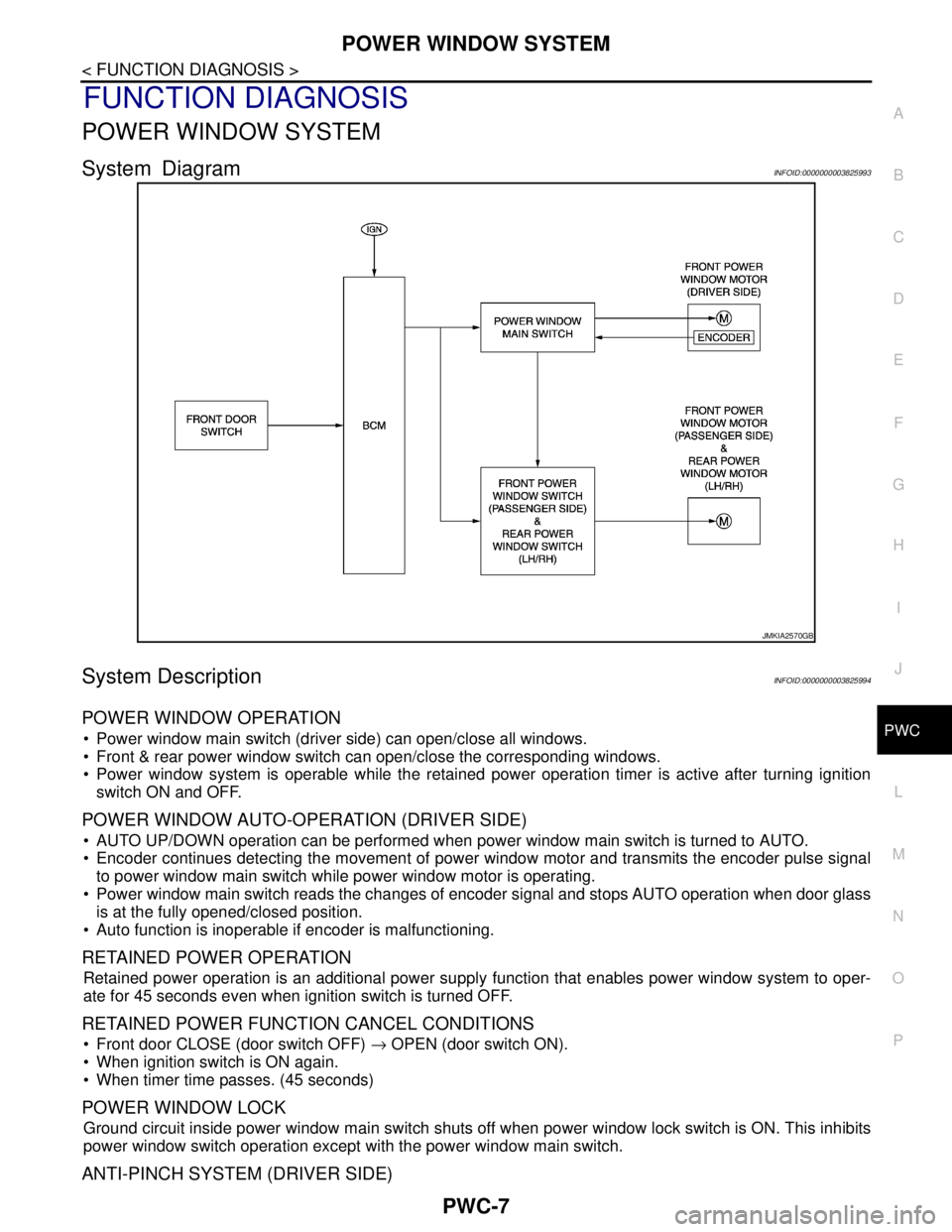
System DiagramINFOID:0000000003825993
System DescriptionINFOID:0000000003825994
POWER WINDOW OPERATION
Power window main switch (driver side) can open/close all windows.
Front & rear power window switch can open/close the corresponding windows.
Power window system is operable while the retained power operation timer is active after turning ignition
switch ON and OFF.
POWER WINDOW AUTO-OPERATION (DRIVER SIDE)
AUTO UP/DOWN operation can be performed when power window main switch is turned to AUTO.
Encoder continues detecting the movement of power window motor and transmits the encoder pulse signal
to power window main switch while power window motor is operating.
Power window main switch reads the changes of encoder signal and stops AUTO operation when door glass
is at the fully opened/closed position.
Auto function is inoperable if encoder is malfunctioning.
RETAINED POWER OPERATION
Retained power operation is an additional power supply function that enables power window system to oper-
ate for 45 seconds even when ignition switch is turned OFF.
RETAINED POWER FUNCTION CANCEL CONDITIONS
Front door CLOSE (door switch OFF) → OPEN (door switch ON).
When ignition switch is ON again.
When timer time passes. (45 seconds)
POWER WINDOW LOCK
Ground circuit inside power window main switch shuts off when power window lock switch is ON. This inhibits
power window switch operation except with the power window main switch.
ANTI-PINCH SYSTEM (DRIVER SIDE)
JMKIA2570GB
Page 3638 of 5121
PWC-8
< FUNCTION DIAGNOSIS >
POWER WINDOW SYSTEM
Pinch foreign material in the door glass during AUTO-UP operation. and it is The anti-pinch function lowers
the door glass 150 mm (5.9 in) or for 2 seconds when detected.
Encoder continues detecting the movement of front power window motor (driver side) and transmits the
encoder pulse signal to power window main switch while front power window motor (driver side) is operating.
Resistance is applied to the front power window motor (driver side) rotation that changes the frequency of
encoder pulse signal if foreign material is trapped in the door glass.
Power window main switch lowers the window glass 150 mm (5.9in) for 2 seconds after it detects encoder
pulse signal frequency change.
OPERATION CONDITION
When front door glass (driver side) AUTO-UP operation is performed (anti-pinch function does not operate just
before the door glass closes and is fully closed)
NOTE:
Depending on environment and driving conditions, if a similar impact or load is applied to the door glass, it
may lower.
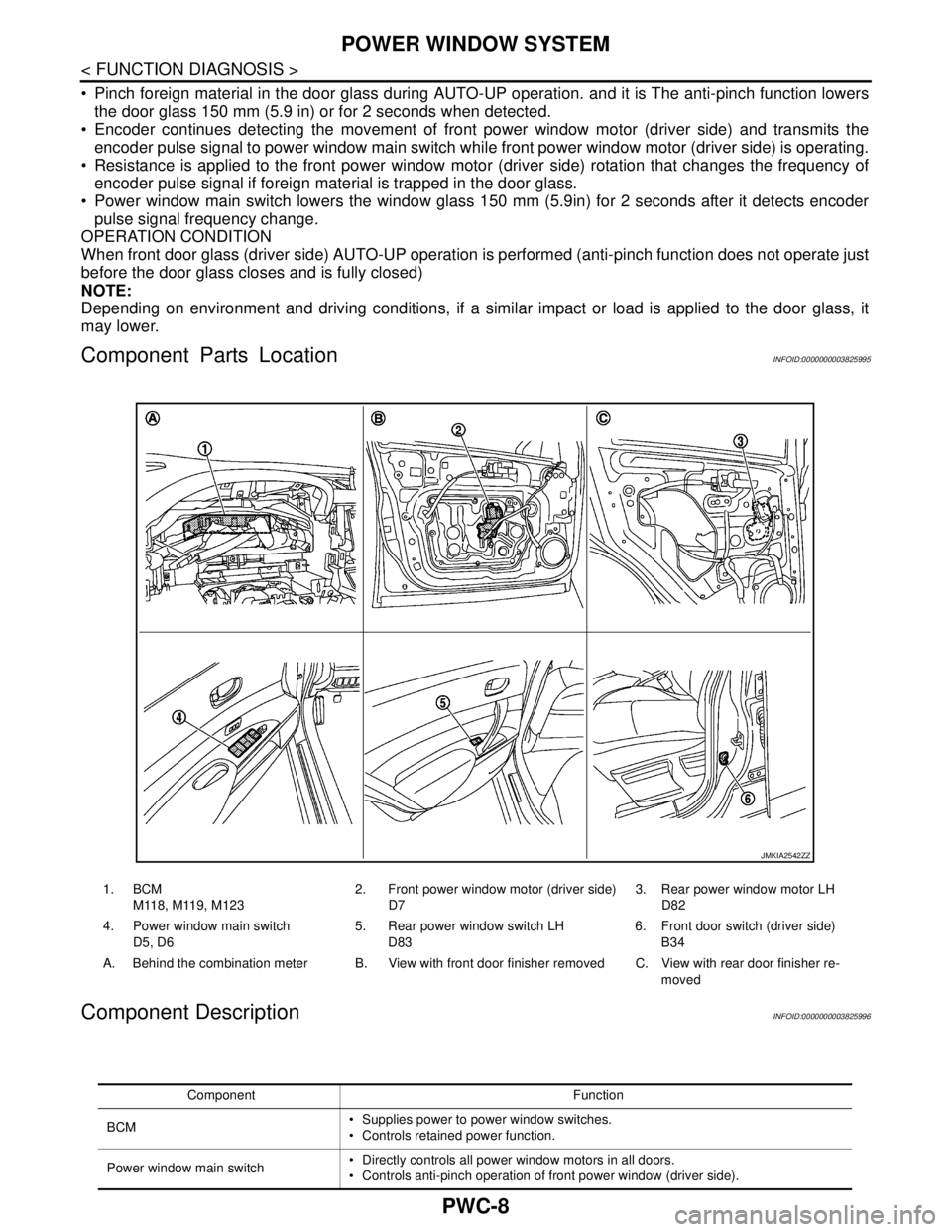
Component Parts LocationINFOID:0000000003825995
Component DescriptionINFOID:0000000003825996
1. BCM
M118, M119, M1232. Front power window motor (driver side)
D73. Rear power window motor LH
D82
4. Power window main switch
D5, D65. Rear power window switch LH
D836. Front door switch (driver side)
B34
A. Behind the combination meter B. View with front door finisher removed C. View with rear door finisher re-
moved
JMKIA2542ZZ
Component Function
BCM Supplies power to power window switches.
Controls retained power function.
Power window main switch Directly controls all power window motors in all doors.
Controls anti-pinch operation of front power window (driver side).
Page 3639 of 5121

POWER WINDOW SYSTEM
PWC-9
< FUNCTION DIAGNOSIS >
C
D
E
F
G
H
I
J
L
MA
B
PWC
N
O
P
Front power window switch (passenger
side)Controls power window motor of front passenger side door.
Rear power window switch (LH & RH) Controls power window motor of rear right and left doors.
Front power window motor (driver side) Integrates the encoder and power window motor.
Starts operating with signals from power window main switch.
Transmits front power window motor (driver side) rotation as a pulse signal to power
window main switch.
Front power window motor (passenger
side)Starts operating with signals from power window main switch & front power window
switch (passenger side).
Rear power window motor (LH & RH)Starts operating with signals from power window main switch & rear power window
switch (LH & RH).
Front door switch (driver side & passen-
ger side)Detects door open/close condition and input to BCM. Component Function
Page 3659 of 5121
ENCODER CIRCUIT
PWC-29
< COMPONENT DIAGNOSIS >
C
D
E
F
G
H
I
J
L
MA
B
PWC
N
O
P
ENCODER CIRCUIT
DescriptionINFOID:0000000003826026
Detects condition of the front power window motor (driver side) operation and transmits to power window main
switch as pulse signal.
Component Function CheckINFOID:0000000003826027
1.CHECK ENCODER OPERATION
Check front driver side door glass and perform AUTO open/close operation normally via power window main
switch.
Is the inspection result normal?
YES >> Encoder operation is OK.
NO >> Refer to PWC-29, "
Diagnosis Procedure"
Diagnosis ProcedureINFOID:0000000003826028
Encoder Circuit Check
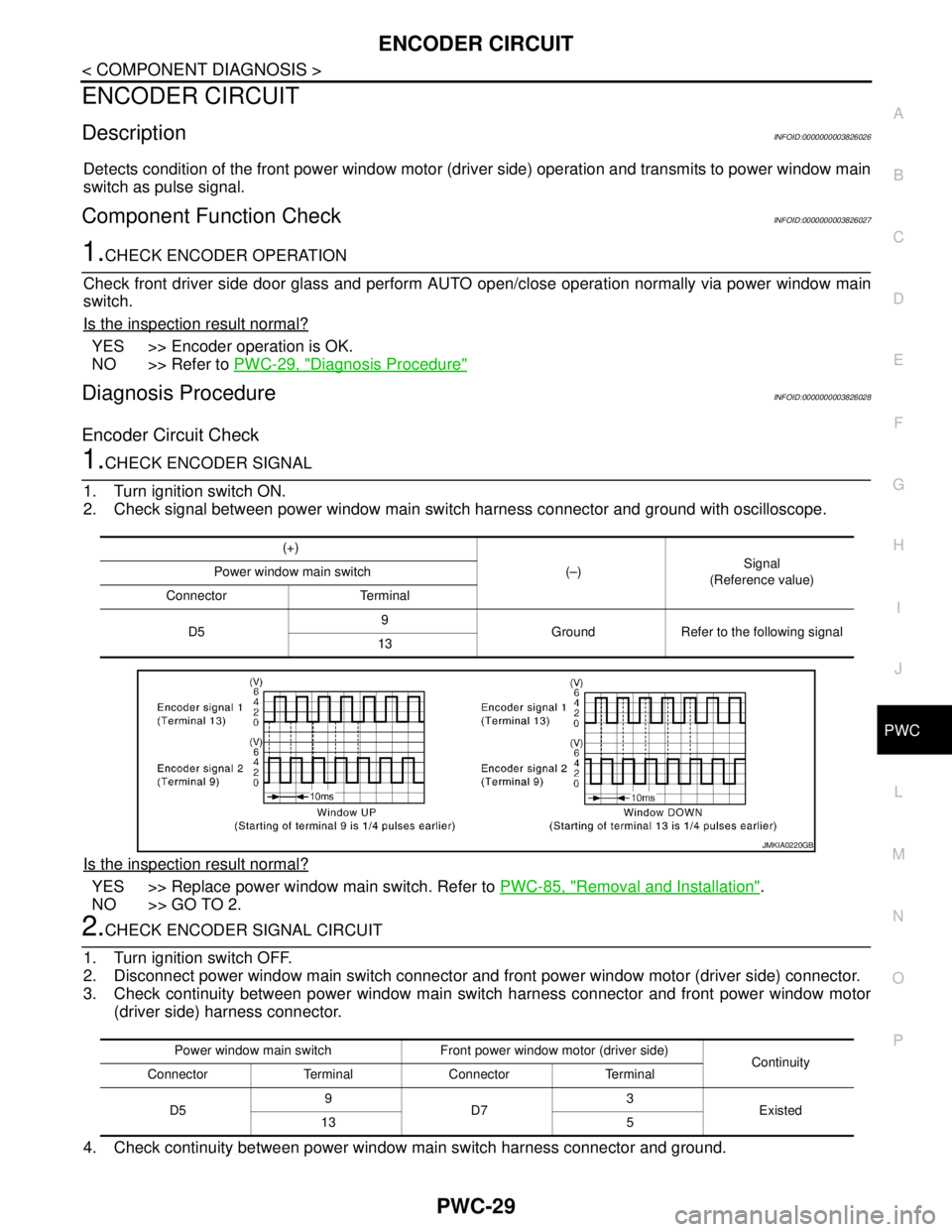
1.CHECK ENCODER SIGNAL
1. Turn ignition switch ON.
2. Check signal between power window main switch harness connector and ground with oscilloscope.
Is the inspection result normal?
YES >> Replace power window main switch. Refer to PWC-85, "Removal and Installation".
NO >> GO TO 2.
2.CHECK ENCODER SIGNAL CIRCUIT
1. Turn ignition switch OFF.
2. Disconnect power window main switch connector and front power window motor (driver side) connector.
3. Check continuity between power window main switch harness connector and front power window motor
(driver side) harness connector.
4. Check continuity between power window main switch harness connector and ground.
(+)
(–)Signal
(Reference value) Power window main switch
Connector Terminal
D59
Ground Refer to the following signal
13
JMKIA0220GB
Power window main switch Front power window motor (driver side)
Continuity
Connector Terminal Connector Terminal
D59
D73
Existed
13 5