Ioni NISSAN TEANA 2008 Service Manual
[x] Cancel search | Manufacturer: NISSAN, Model Year: 2008, Model line: TEANA, Model: NISSAN TEANA 2008Pages: 5121, PDF Size: 69.03 MB
Page 1095 of 5121
![NISSAN TEANA 2008 Service Manual BRC-154
< ON-VEHICLE REPAIR >[VDC/TCS/ABS]
ABS ACTUATOR AND ELECTRIC UNIT (CONTROL UNIT)
ABS ACTUATOR AND ELECTRIC UNIT (CONTROL UNIT)
Exploded ViewINFOID:0000000003767308
Removal and InstallationINFO](/img/5/57391/w960_57391-1094.png "NISSAN TEANA 2008 Service Manual BRC-154
< ON-VEHICLE REPAIR >[VDC/TCS/ABS]
ABS ACTUATOR AND ELECTRIC UNIT (CONTROL UNIT)
ABS ACTUATOR AND ELECTRIC UNIT (CONTROL UNIT)
Exploded ViewINFOID:0000000003767308
Removal and InstallationINFO")
BRC-154
< ON-VEHICLE REPAIR >[VDC/TCS/ABS]
ABS ACTUATOR AND ELECTRIC UNIT (CONTROL UNIT)
ABS ACTUATOR AND ELECTRIC UNIT (CONTROL UNIT)
Exploded ViewINFOID:0000000003767308
Removal and InstallationINFOID:0000000003767299
REMOVAL
CAUTION:
Before servicing, disconnect the battery cable from negative terminal.
To remove brake tube, use a flare nut wrench to prevent flare nuts and brake tube from being dam-
aged. To install, use flare nut crowfoot and torque wrench.
Do not apply excessive impact to ABS actuator and electric unit (control unit), such as dropping it.
Do not remove and install actuator by holding harness.
After work is completed, bleed air from brake tube. Refer to BR-10, "
Bleeding Brake System".
1. Remove cowl top cover. Refer to EXT-20, "
Exploded View".
2. Disconnect ABS actuator and electric unit (control unit) connector.
3. Loosen brake tube flare nuts, then remove brake tubes from ABS actuator and electric unit (control unit).
4. Remove ABS actuator and electric unit (control unit) bracket mounting nuts.
5. Remove ABS actuator and electric unit (control unit) from vehicle.
INSTALLATION
Note the following, and install in the reverse order of removal.
CAUTION:
Before servicing, disconnect the battery cable from negative terminal.
1. ABS actuator and electric unit (control
unit)2. Bushing 3. Bracket
A. From master cylinder secondary side B. From master cylinder primary side C. To front LH brake caliper
D. To rear RH brake caliper E. To rear LH brake caliper F. To front RH brake caliper
: Vehicle front
Refer to GI section GI-4, "
Components" for symbol marks in the figure.
JSFIA0223GB
Page 1097 of 5121
![NISSAN TEANA 2008 Service Manual BRC-156
< ON-VEHICLE REPAIR >[VDC/TCS/ABS]
YAW RATE/SIDE G SENSOR
YAW RATE/SIDE G SENSOR
Exploded ViewINFOID:0000000003767352
Removal and InstallationINFOID:0000000003767353
REMOVAL
CAUTION:
Do not dr](/img/5/57391/w960_57391-1096.png "NISSAN TEANA 2008 Service Manual BRC-156
< ON-VEHICLE REPAIR >[VDC/TCS/ABS]
YAW RATE/SIDE G SENSOR
YAW RATE/SIDE G SENSOR
Exploded ViewINFOID:0000000003767352
Removal and InstallationINFOID:0000000003767353
REMOVAL
CAUTION:
Do not dr")
BRC-156
< ON-VEHICLE REPAIR >[VDC/TCS/ABS]
YAW RATE/SIDE G SENSOR
YAW RATE/SIDE G SENSOR
Exploded ViewINFOID:0000000003767352
Removal and InstallationINFOID:0000000003767353
REMOVAL
CAUTION:
Do not drop or strike yaw rate/side G sensor, or do not use power tool etc., because yaw rate/side G
sensor is sensitive to the impact.
1. Remove center console. Refer to IP-22, "
Exploded View".
2. Remove rear ventilator duct. Refer to VTL-54, "
REAR VENTILATOR DUCT 2 : Exploded View".
3. Disconnect yaw rate/side G sensor harness connector.
4. Remove mounting nuts. Remove yaw rate/side G sensor.
INSTALLATION
Note the following, and install in the reverse order of removal.
CAUTION:
Do not drop or strike yaw rate/side G sensor, or do not use power tool etc., because yaw rate/side G
sensor is sensitive to the impact.
1. Yaw rate/side G sensor 2. Bracket
: Vehicle front
Refer to GI section GI-4, "
Components" for symbol makes in the figure.
JSFIA0224GB
Page 1098 of 5121
![NISSAN TEANA 2008 Service Manual STEERING ANGLE SENSOR
BRC-157
< ON-VEHICLE REPAIR >[VDC/TCS/ABS]
C
D
E
G
H
I
J
K
L
MA
B
BRC
N
O
P
STEERING ANGLE SENSOR
Exploded ViewINFOID:0000000003767354
Removal and InstallationINFOID:000000000376](/img/5/57391/w960_57391-1097.png "NISSAN TEANA 2008 Service Manual STEERING ANGLE SENSOR
BRC-157
< ON-VEHICLE REPAIR >[VDC/TCS/ABS]
C
D
E
G
H
I
J
K
L
MA
B
BRC
N
O
P
STEERING ANGLE SENSOR
Exploded ViewINFOID:0000000003767354
Removal and InstallationINFOID:000000000376")
STEERING ANGLE SENSOR
BRC-157
< ON-VEHICLE REPAIR >[VDC/TCS/ABS]
C
D
E
G
H
I
J
K
L
MA
B
BRC
N
O
P
STEERING ANGLE SENSOR
Exploded ViewINFOID:0000000003767354
Removal and InstallationINFOID:0000000003767355
REMOVAL
1. Remove spiral cable assembly. Refer to SR-9, "Exploded View".
2. Remove steering angle sensor from spiral cable assembly.
INSTALLATION
Note the following, and install in the reverse order of removal.
CAUTION:
Never reuse steering angle sensor.
When installing steering angle sensor, tighten it to the specified torque with an electric screwdriver.
Be sure to tighten it completely with no floating and tilting.
After work, make sure to adjust neutral position of steering angle sensor. Refer to BRC-66,
"ADJUSTMENT OF STEERING ANGLE SENSOR NEUTRAL POSITION : Description".
1. Steering angle sensor
: Vehicle front
Refer to GI section GI-4, "
Components" for symbol marks in the figure.
JSFIA0237GB
Page 1103 of 5121
CHG
CHARGING SYSTEM
CHG-5
< FUNCTION DIAGNOSIS >
C
D
E
F
G
H
I
J
K
L B A
O
P N
FUNCTION DIAGNOSIS
CHARGING SYSTEM
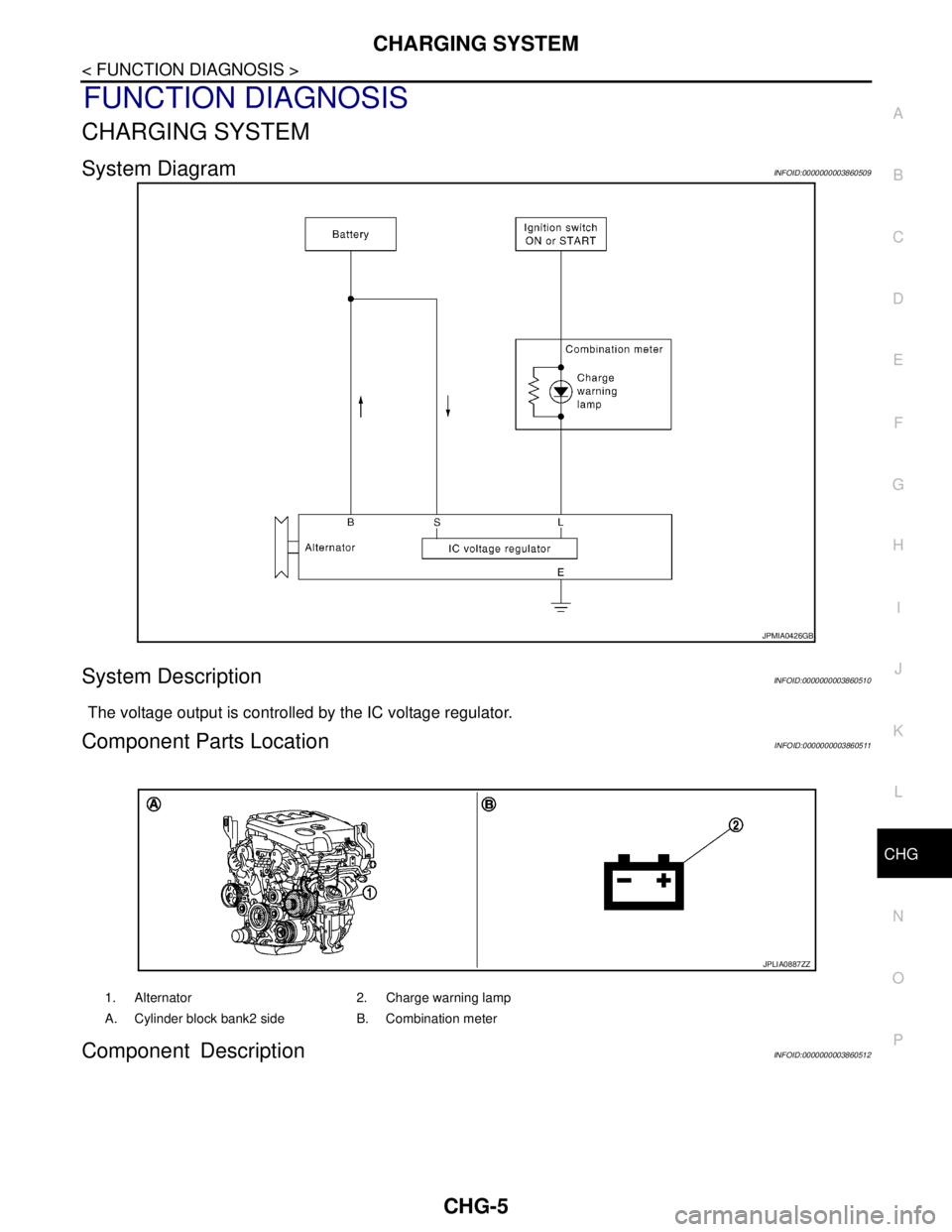
System DiagramINFOID:0000000003860509
System DescriptionINFOID:0000000003860510
The voltage output is controlled by the IC voltage regulator.
Component Parts LocationINFOID:0000000003860511
Component DescriptionINFOID:0000000003860512
JPMIA0426GB
1. Alternator 2. Charge warning lamp
A. Cylinder block bank2 side B. Combination meter
JPLIA0887ZZ
Page 1105 of 5121
CHG
POWER GENERATION VOLTAGE VARIABLE CONTROL SYSTEM
CHG-7
< FUNCTION DIAGNOSIS >
C
D
E
F
G
H
I
J
K
L B A
O
P N
POWER GENERATION VOLTAGE VARIABLE CONTROL SYSTEM
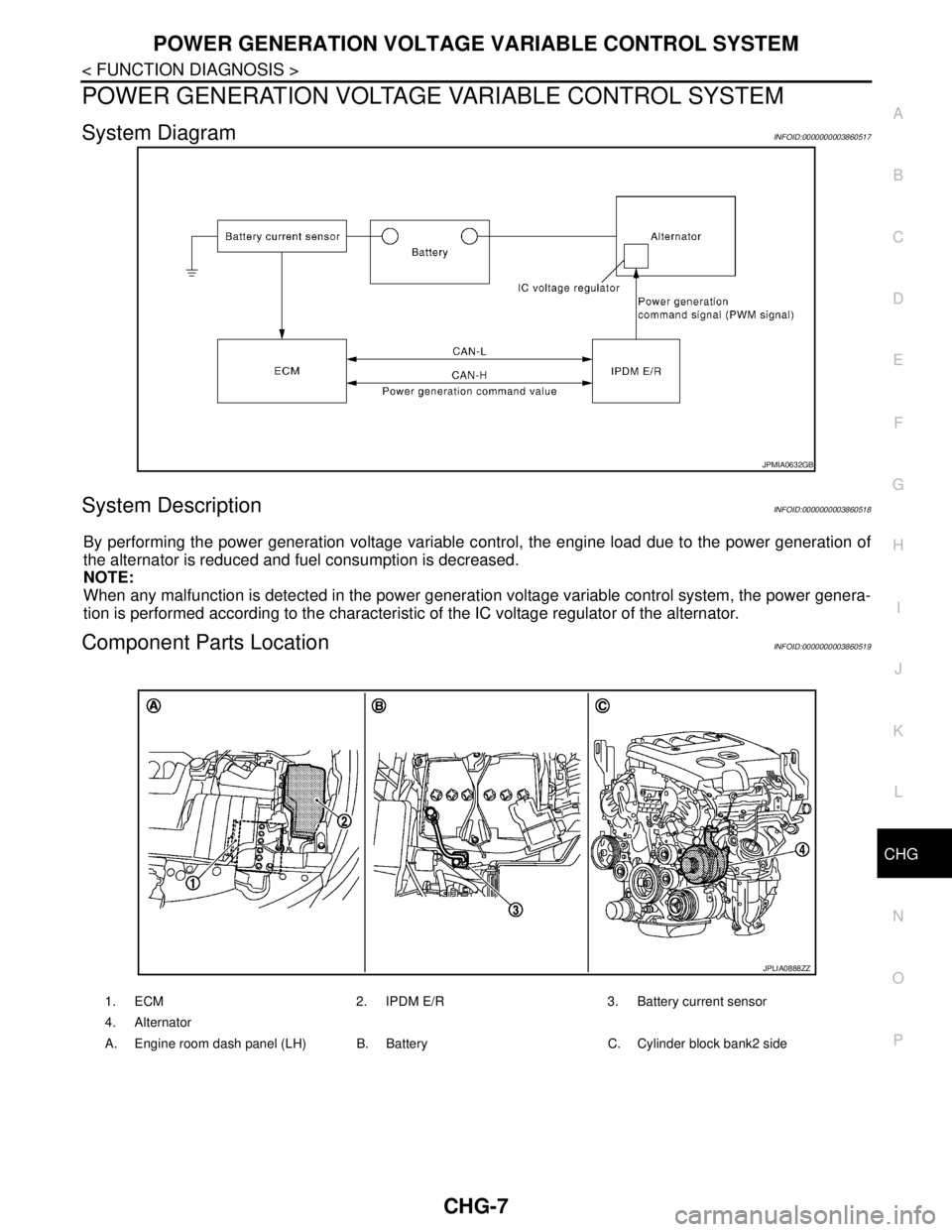
System DiagramINFOID:0000000003860517
System DescriptionINFOID:0000000003860518
By performing the power generation voltage variable control, the engine load due to the power generation of
the alternator is reduced and fuel consumption is decreased.
NOTE:
When any malfunction is detected in the power generation voltage variable control system, the power genera-
tion is performed according to the characteristic of the IC voltage regulator of the alternator.
Component Parts LocationINFOID:0000000003860519
JPMIA0632GB
1. ECM 2. IPDM E/R 3. Battery current sensor
4. Alternator
A. Engine room dash panel (LH) B. Battery C. Cylinder block bank2 side
JPLIA0888ZZ
Page 1107 of 5121
CHG
B TERMINAL CIRCUIT
CHG-9
< COMPONENT DIAGNOSIS >
C
D
E
F
G
H
I
J
K
L B A
O
P N
COMPONENT DIAGNOSIS
B TERMINAL CIRCUIT
DescriptionINFOID:0000000003860521
“B” terminal circuit supplies power to charge the battery and to operate the vehicle’s electrical system.
Diagnosis ProcedureINFOID:0000000003860522
1.CHECK “B” TERMINAL CONNECTION
1. Turn ignition switch OFF.
2. Check if “B” terminal is clean and tight.
Is the inspection result normal?
YES >> GO TO 2.
NO >> Repair “B” terminal connection. Confirm repair by performing complete Starting/Charging system
test. Refer to Technical Service Bulletin.
2.CHECK “B” TERMINAL CIRCUIT
Check voltage between alternator “B” terminal and ground.
Is the inspection result normal?
YES >> GO TO 3.
NO >> Check harness for open between alternator and fusible link.
3.CHECK “B” TERMINAL CONNECTION (VOLTAGE DROP TEST)
1. Start engine, then engine running at idle and warm.
2. Check voltage between battery positive terminal and alternator “B” terminal.
Is the inspection result normal?
YES >> “B” terminal circuit is normal. Refer to CHG-2, "Work Flow".
NO >> Check harness between battery and alternator for poor continuity.
Te r m i n a l s
Voltage (Approx.) (+)
(–)
Alternator “B” terminal Terminal
F59 1 Ground Battery voltage
Te r m i n a l s
Voltage (Approx.)
(+)(–)
Alternator “B” terminal Terminal
Battery positive terminal F59 1 Less than 0.2 V
Page 1108 of 5121
CHG-10
< COMPONENT DIAGNOSIS >
L TERMINAL CIRCUIT (OPEN)
L TERMINAL CIRCUIT (OPEN)
DescriptionINFOID:0000000003860523
The “L” terminal circuit controls the charge warning lamp. The charge warning lamp illuminates when the igni-
tion switch is set to ON or START. When the alternator is providing sufficient voltage with the engine running,
the charge warning lamp will go off. If the charge warning lamp illuminates with the engine running, a malfunc-
tion is indicated.
Diagnosis ProcedureINFOID:0000000003860524
1.CHECK “L” TERMINAL CONNECTION
1. Turn ignition switch OFF.
2. Check if “L” terminal is clean and tight.
Is the inspection result normal?
YES >> GO TO 2.
NO >> Repair “L” terminal connection. Confirm repair by performing complete Starting/Charging system
test. Refer to Technical Service Bulletin.
2.CHECK “L” TERMINAL CIRCUIT (OPEN)
1. Disconnect alternator connector.
2. Apply ground to alternator harness connector terminal.
3. Check condition of the charge warning lamp with the ignition switch in the ON position.
Does it illuminate?
YES >> “L” terminal circuit is normal. Refer to CHG-2, "Work Flow".
NO >> GO TO 3.
3.CHECK HARNESS CONTINUITY (OPEN CIRCUIT)
1. Disconnect the battery cable from the negative terminal.
2. Disconnect the combination meter connector.
3. Check continuity between alternator harness connector and combination meter harness connector.
Is the inspection result normal?
YES >> GO TO 4.
NO >> Repair the harness or connector.
4.CHECK HARNESS CONTINUITY (OPEN CIRCUIT)
Check continuity between combination meter harness connector and fuse block.
Is the inspection result normal?
YES >> GO TO 5.
NO >> Repair the harness.
5.CHECK POWER SUPPLY CIRCUIT
1. Connect the battery cable to the negative terminal.
Alternator harness connector Terminal
GroundCondition
Ignition switch position Charge warning lamp
F60 3 ON illuminate
Alternator harness connector Combination meter harness connector
Continuity
Connector No. Terminal No. Connector No. Terminal No.
F60 3 M34 25 Existed
Combination meter harness connector Fuse block
Continuity
Connector No. Terminal No. Connector No. Terminal No.
M34 2 M3 12C Existed
Page 1110 of 5121
CHG-12
< COMPONENT DIAGNOSIS >
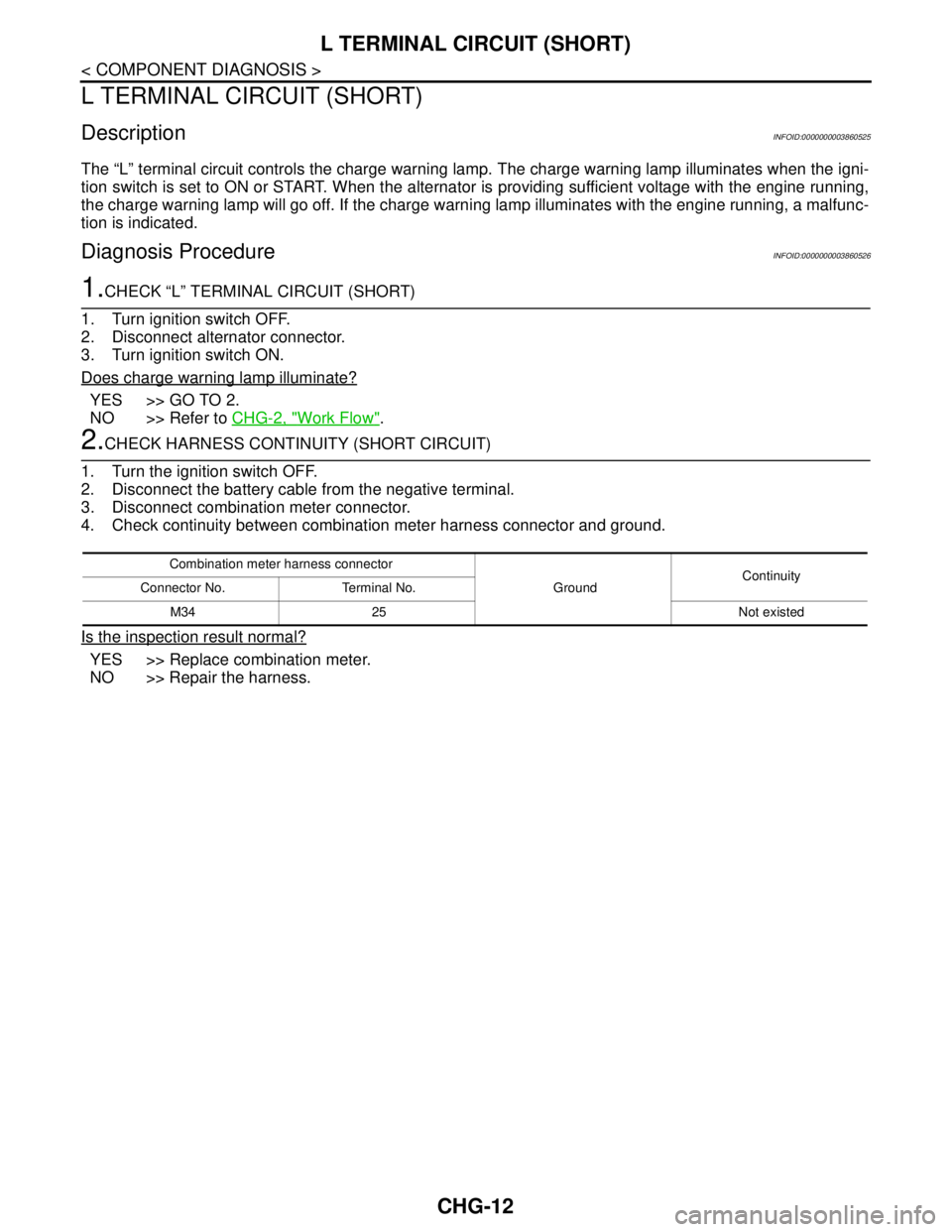
L TERMINAL CIRCUIT (SHORT)
L TERMINAL CIRCUIT (SHORT)
DescriptionINFOID:0000000003860525
The “L” terminal circuit controls the charge warning lamp. The charge warning lamp illuminates when the igni-
tion switch is set to ON or START. When the alternator is providing sufficient voltage with the engine running,
the charge warning lamp will go off. If the charge warning lamp illuminates with the engine running, a malfunc-
tion is indicated.
Diagnosis ProcedureINFOID:0000000003860526
1.CHECK “L” TERMINAL CIRCUIT (SHORT)
1. Turn ignition switch OFF.
2. Disconnect alternator connector.
3. Turn ignition switch ON.
Does charge warning lamp illuminate?
YES >> GO TO 2.
NO >> Refer to CHG-2, "
Work Flow".
2.CHECK HARNESS CONTINUITY (SHORT CIRCUIT)
1. Turn the ignition switch OFF.
2. Disconnect the battery cable from the negative terminal.
3. Disconnect combination meter connector.
4. Check continuity between combination meter harness connector and ground.
Is the inspection result normal?
YES >> Replace combination meter.
NO >> Repair the harness.
Combination meter harness connector
GroundContinuity
Connector No. Terminal No.
M34 25 Not existed
Page 1111 of 5121
CHG
S TERMINAL CIRCUIT
CHG-13
< COMPONENT DIAGNOSIS >
C
D
E
F
G
H
I
J
K
L B A
O
P N
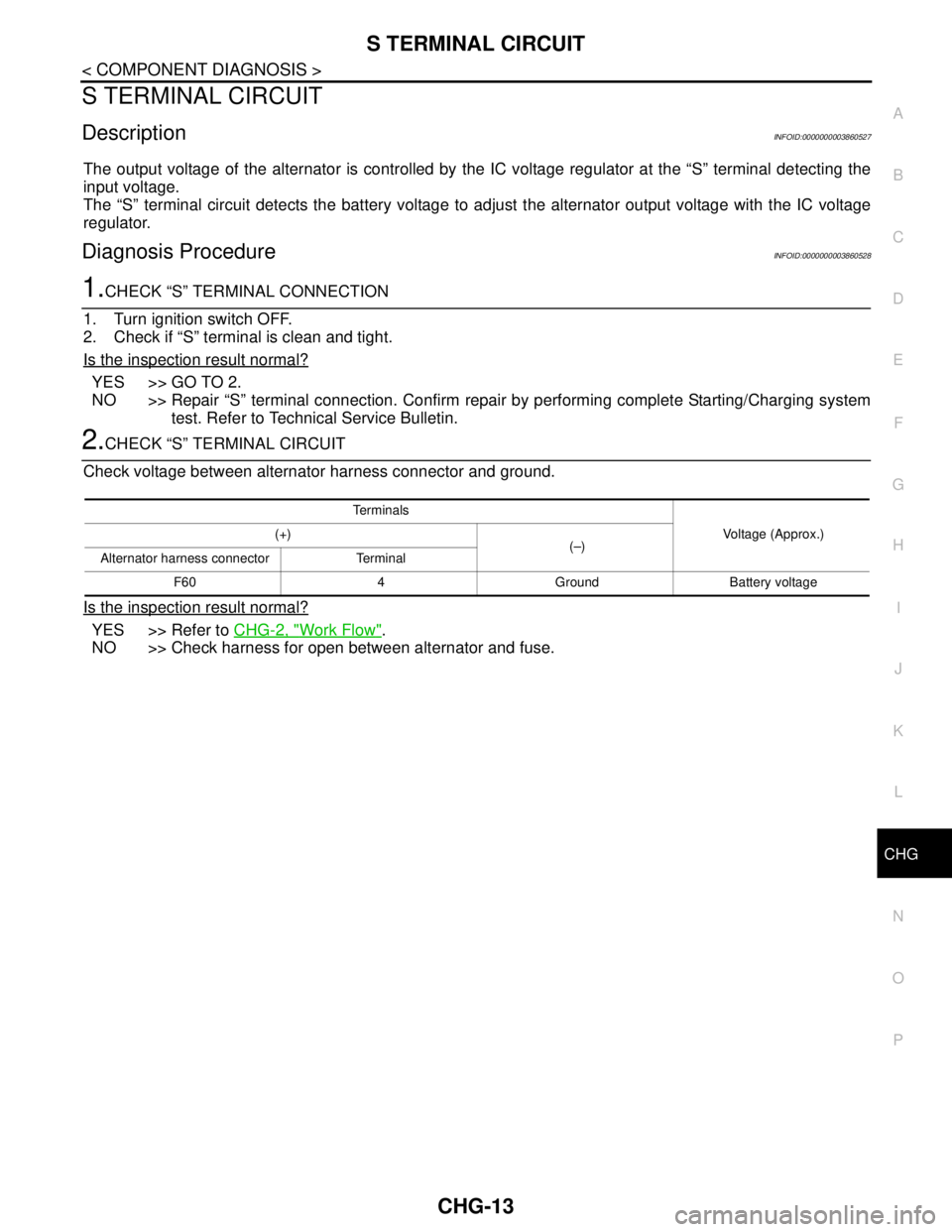
S TERMINAL CIRCUIT
DescriptionINFOID:0000000003860527
The output voltage of the alternator is controlled by the IC voltage regulator at the “S” terminal detecting the
input voltage.
The “S” terminal circuit detects the battery voltage to adjust the alternator output voltage with the IC voltage
regulator.
Diagnosis ProcedureINFOID:0000000003860528
1.CHECK “S” TERMINAL CONNECTION
1. Turn ignition switch OFF.
2. Check if “S” terminal is clean and tight.
Is the inspection result normal?
YES >> GO TO 2.
NO >> Repair “S” terminal connection. Confirm repair by performing complete Starting/Charging system
test. Refer to Technical Service Bulletin.
2.CHECK “S” TERMINAL CIRCUIT
Check voltage between alternator harness connector and ground.
Is the inspection result normal?
YES >> Refer to CHG-2, "Work Flow".
NO >> Check harness for open between alternator and fuse.
Te r m i n a l s
Voltage (Approx.) (+)
(–)
Alternator harness connector Terminal
F60 4 Ground Battery voltage
Page 1120 of 5121
CHG-22
< ON-VEHICLE REPAIR >
ALTERNATOR
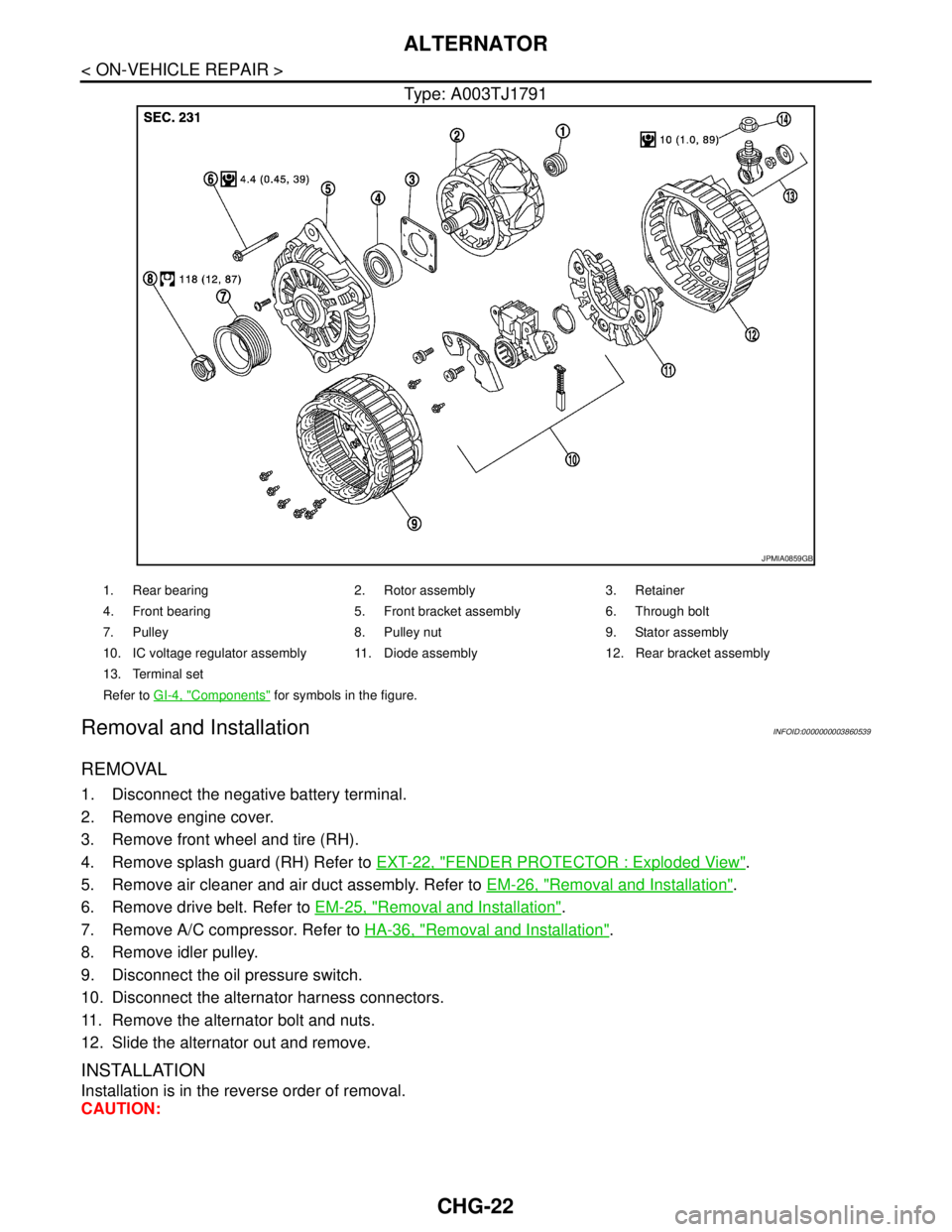
Type: A003TJ1791
Removal and InstallationINFOID:0000000003860539
REMOVAL
1. Disconnect the negative battery terminal.
2. Remove engine cover.
3. Remove front wheel and tire (RH).
4. Remove splash guard (RH) Refer to EXT-22, "
FENDER PROTECTOR : Exploded View".
5. Remove air cleaner and air duct assembly. Refer to EM-26, "
Removal and Installation".
6. Remove drive belt. Refer to EM-25, "
Removal and Installation".
7. Remove A/C compressor. Refer to HA-36, "
Removal and Installation".
8. Remove idler pulley.
9. Disconnect the oil pressure switch.
10. Disconnect the alternator harness connectors.
11. Remove the alternator bolt and nuts.
12. Slide the alternator out and remove.
INSTALLATION
Installation is in the reverse order of removal.
CAUTION:
JPMIA0859GB
1. Rear bearing 2. Rotor assembly 3. Retainer
4. Front bearing 5. Front bracket assembly 6. Through bolt
7. Pulley 8. Pulley nut 9. Stator assembly
10. IC voltage regulator assembly 11. Diode assembly 12. Rear bracket assembly
13. Terminal set
Refer to GI-4, "
Components" for symbols in the figure.