Its control NISSAN TEANA 2014 Service Manual
[x] Cancel search | Manufacturer: NISSAN, Model Year: 2014, Model line: TEANA, Model: NISSAN TEANA 2014Pages: 4801, PDF Size: 51.2 MB
Page 715 of 4801
![NISSAN TEANA 2014 Service Manual
DAS-282
< DTC/CIRCUIT DIAGNOSIS >[MOD]
WARNING SYSTEMS SWITCH CIRCUIT
NO >> Repair harness or connector.
4.CHECK WARNING SYSTEMS SWITCH
SIGNAL INPUT CIRCUIT FOR OPEN
1. Disconnect the ITS control un](/img/5/57390/w960_57390-714.png "NISSAN TEANA 2014 Service Manual
DAS-282
< DTC/CIRCUIT DIAGNOSIS >[MOD]
WARNING SYSTEMS SWITCH CIRCUIT
NO >> Repair harness or connector.
4.CHECK WARNING SYSTEMS SWITCH
SIGNAL INPUT CIRCUIT FOR OPEN
1. Disconnect the ITS control un")
DAS-282
< DTC/CIRCUIT DIAGNOSIS >[MOD]
WARNING SYSTEMS SWITCH CIRCUIT
NO >> Repair harness or connector.
4.CHECK WARNING SYSTEMS SWITCH
SIGNAL INPUT CIRCUIT FOR OPEN
1. Disconnect the ITS control unit connector.
2. Check continuity between the ITS control unit har ness connector and warning system switch harness con-
nector.
Is the inspection result normal?
YES >> GO TO 5.
NO >> Repair the harnesses or connectors.
5.CHECK WARNING SYSTEMS SWITCH SI GNAL INPUT CIRCUIT FOR SHORT
Check continuity between the ITS c ontrol unit harness connector and ground.
Is the inspection result normal?
YES >> Replace the ITS control unit. Refer to DAS-68, "Removal and Installation".
NO >> Repair the harnesses or connectors.
Component InspectionINFOID:0000000009464945
1.CHECK WARNING SYSTEMS SWITCH
Check continuity of warning systems switch.
Is the inspection result normal?
YES >> Inspection End.
NO >> Replace the warning systems switch. Refer to DAS-142, "Removal and Installation"
.
ITS control unit Warning system switch
Continuity
Connector Terminal Connector Terminal
M58 32 M62 6 Yes
ITS control unit GroundContinuity
Connector Terminal
M58 32 No
Terminal Condition Continuity
68 When warning systems switch is pressed Yes
When warning systems switch is released No
Revision: November 20132014 Altima NAMRevision: November 20132014 Altima NAM
Page 716 of 4801
![NISSAN TEANA 2014 Service Manual
DAS
WARNING SYSTEMS ON INDICATOR CIRCUITDAS-283
< DTC/CIRCUIT DIAGNOSIS > [MOD]
C
D E
F
G H
I
J
K L
M B
N P
A
WARNING SYSTEMS ON INDICATOR CIRCUIT
Component Function CheckINFOID:0000000009464946
1.](/img/5/57390/w960_57390-715.png "NISSAN TEANA 2014 Service Manual
DAS
WARNING SYSTEMS ON INDICATOR CIRCUITDAS-283
< DTC/CIRCUIT DIAGNOSIS > [MOD]
C
D E
F
G H
I
J
K L
M B
N P
A
WARNING SYSTEMS ON INDICATOR CIRCUIT
Component Function CheckINFOID:0000000009464946
1.")
DAS
WARNING SYSTEMS ON INDICATOR CIRCUITDAS-283
< DTC/CIRCUIT DIAGNOSIS > [MOD]
C
D E
F
G H
I
J
K L
M B
N P
A
WARNING SYSTEMS ON INDICATOR CIRCUIT
Component Function CheckINFOID:0000000009464946
1.CHECK WARNING SYST EMS ON INDICATOR
1. Turn the ignition switch ON.
2. Select the active test item “BSW ON INDICATOR” of “AVM” with CONSULT.
3. With operating the test item, check the operation.
Is the inspection result normal?
YES >> Inspection End.
NO >> Refer to DAS-283, "Diagnosis Procedure"
.
Diagnosis ProcedureINFOID:0000000009464947
Regarding Wiring Diagram information, refer to DAS-241, "Wiring Diagram".
1.CHECK WARNING ON INDICATOR POWER SUPPLY CIRCUIT
1. Turn ignition switch OFF.
2. Disconnect warning system switch connector.
3. Turn ignition switch ON.
4. Check voltage between warning system switch harness connector and ground.
Is the inspection result normal?
YES >> GO TO 2.
NO >> Repair the warning systems ON indicator power supply circuit.
2.CHECK WARNING SYSTEMS ON INDICATOR SIGNAL FOR OPEN
1. Turn ignition switch OFF.
2. Disconnect the ITS control unit harness connector.
3. Check continuity between the ITS control unit har ness connector and warning system switch harness con-
nector.
Is the inspection result normal?
YES >> GO TO 3.
NO >> Repair the harnesses or connectors.
3.CHECK WARNING SYSTEMS ON INDI CATOR SIGNAL CIRCUIT FOR SHORT
Check continuity between the ITS control unit harness connector and ground.
On : Warning systems ON indicator illuminates
Off : Warning systems ON in dicator is turned OFF
Te r m i n a l s
Vo l ta g e
(Approx.)
(+) (
−)
Warning system switch Ground
Connector Terminal
M62 5 Battery voltage
ITS control unit Warning system switch Continuity
Connector Terminal Connector Terminal
M5833M62 3 Yes
Revision: November 20132014 Altima NAMRevision: November 20132014 Altima NAM
Page 717 of 4801
![NISSAN TEANA 2014 Service Manual
DAS-284
< DTC/CIRCUIT DIAGNOSIS >[MOD]
WARNING SYSTEMS ON
INDICATOR CIRCUIT
Is the inspection result normal?
YES >> GO TO 4.
NO >> Repair the harnesses or connectors.
4.CHECK WARNING SYSTEMS ON IND](/img/5/57390/w960_57390-716.png "NISSAN TEANA 2014 Service Manual
DAS-284
< DTC/CIRCUIT DIAGNOSIS >[MOD]
WARNING SYSTEMS ON
INDICATOR CIRCUIT
Is the inspection result normal?
YES >> GO TO 4.
NO >> Repair the harnesses or connectors.
4.CHECK WARNING SYSTEMS ON IND")
DAS-284
< DTC/CIRCUIT DIAGNOSIS >[MOD]
WARNING SYSTEMS ON
INDICATOR CIRCUIT
Is the inspection result normal?
YES >> GO TO 4.
NO >> Repair the harnesses or connectors.
4.CHECK WARNING SYSTEMS ON INDICATOR
Check the warning systems ON indicator. Refer to DAS-284, "Component Inspection"
.
Is the inspection result normal?
YES >> Replace the ITS control unit. Refer to DAS-68, "Removal and Installation".
NO >> Replace warning systems switch. DAS-142, "Removal and Installation"
.
Component InspectionINFOID:0000000009464948
1.CHECK WARNING SYSTEMS ON INDICATOR
Apply battery voltage to warning systems switch termi nals 3 and 5, and then check if the warning systems ON
indicator illuminates.
Is the inspection result normal?
YES >> Inspection End.
NO >> Replace the warning systems switch. Refer to DAS-142, "Removal and Installation"
.
ITS control unit
GroundContinuity
Connector Terminal
M58 33 No
Te r m i n a l s Condition Warning sys-
tems ON indica-
tor
(+) (-)
53 When the battery voltage is applied On
When the battery voltage is not applied Off
Revision: November 20132014 Altima NAMRevision: November 20132014 Altima NAM
Page 718 of 4801
![NISSAN TEANA 2014 Service Manual
DAS
WARNING BUZZER CIRCUITDAS-285
< DTC/CIRCUIT DIAGNOSIS > [MOD]
C
D E
F
G H
I
J
K L
M B
N P
A
WARNING BUZZER CIRCUIT
Component Function CheckINFOID:0000000009464949
1.CHECK WARNING BUZZER
1. Turn](/img/5/57390/w960_57390-717.png "NISSAN TEANA 2014 Service Manual
DAS
WARNING BUZZER CIRCUITDAS-285
< DTC/CIRCUIT DIAGNOSIS > [MOD]
C
D E
F
G H
I
J
K L
M B
N P
A
WARNING BUZZER CIRCUIT
Component Function CheckINFOID:0000000009464949
1.CHECK WARNING BUZZER
1. Turn")
DAS
WARNING BUZZER CIRCUITDAS-285
< DTC/CIRCUIT DIAGNOSIS > [MOD]
C
D E
F
G H
I
J
K L
M B
N P
A
WARNING BUZZER CIRCUIT
Component Function CheckINFOID:0000000009464949
1.CHECK WARNING BUZZER
1. Turn the ignition switch ON.
2. Select the active test item “BUZZER” of “BCM” with CONSULT.
3. With operating the test item, check the operation.
Is the inspection result normal?
YES >> Inspection End.
NO >> Refer to DAS-285, "Diagnosis Procedure"
.
Diagnosis ProcedureINFOID:0000000009464950
1.CHECK WARNING BUZZER OPERATION
While activating the buzzer with CONSULT, listen for the buzzer sound.
Does warning buzzer sound?
YES >> Replace the ITS control unit. Refer to DAS-68, "Removal and Installation".
NO >> Replace the combination meter (buzzer). On : Warning buzzer is activated.
Off : Warning buzzer is not activated.
Revision: November 20132014 Altima NAMRevision: November 20132014 Altima NAM
Page 719 of 4801
![NISSAN TEANA 2014 Service Manual
DAS-286
< SYMPTOM DIAGNOSIS >[MOD]
MOD SYSTEM SYMPTOMS
SYMPTOM DIAGNOSIS
MOD SYSTEM SYMPTOMS
Symptom TableINFOID:0000000009464951
CAUTION:
Perform the self-diagnosis with CONSULT before th e symptom](/img/5/57390/w960_57390-718.png "NISSAN TEANA 2014 Service Manual
DAS-286
< SYMPTOM DIAGNOSIS >[MOD]
MOD SYSTEM SYMPTOMS
SYMPTOM DIAGNOSIS
MOD SYSTEM SYMPTOMS
Symptom TableINFOID:0000000009464951
CAUTION:
Perform the self-diagnosis with CONSULT before th e symptom")
DAS-286
< SYMPTOM DIAGNOSIS >[MOD]
MOD SYSTEM SYMPTOMS
SYMPTOM DIAGNOSIS
MOD SYSTEM SYMPTOMS
Symptom TableINFOID:0000000009464951
CAUTION:
Perform the self-diagnosis with CONSULT before th e symptom diagnosis. Perform the trouble diagno-
sis if any DTC is detected.
NOTE:
Refer to the following the operation condition of the Moving Object Detection system.
• Moving Object Detection system: DAS-228, "System Description"
.
Symptom Possible cause Inspection item/Reference page
Indicator/warning lamps do not il-
luminate when ignition switch
OFF ⇒ ON. All of indicator/warning
lamps do not illuminate;
• Moving Object Detection warning lamp
• Moving Object Detection
ON indicator
• Warning systems ON indi- cator • Power supply and ground cir-
cuit of ITS control unit
•ITS control unit
• Combination meter Power supply and ground circuit
of ITS control unit. Refer to DAS-
280, "Diagnosis Procedure"
Buzzer is not sounding • Buzzer (combination meter) Refer to
DAS-285, "Component Function Check"
Revision: November 20132014 Altima NAMRevision: November 20132014 Altima NAM
Page 722 of 4801
![NISSAN TEANA 2014 Service Manual
DAS
MOD SYSTEM SETTINGS CANNOT BE TURNED ON/OFF IN VEHICLE INFOR-
MATION DISPLAY
DAS-289
< SYMPTOM DIAGNOSIS > [MOD]
C
D E
F
G H
I
J
K L
M B
N P
A
MOD SYSTEM SETTINGS CANNOT BE TURNED ON/OFF IN VEH](/img/5/57390/w960_57390-721.png "NISSAN TEANA 2014 Service Manual
DAS
MOD SYSTEM SETTINGS CANNOT BE TURNED ON/OFF IN VEHICLE INFOR-
MATION DISPLAY
DAS-289
< SYMPTOM DIAGNOSIS > [MOD]
C
D E
F
G H
I
J
K L
M B
N P
A
MOD SYSTEM SETTINGS CANNOT BE TURNED ON/OFF IN VEH")
DAS
MOD SYSTEM SETTINGS CANNOT BE TURNED ON/OFF IN VEHICLE INFOR-
MATION DISPLAY
DAS-289
< SYMPTOM DIAGNOSIS > [MOD]
C
D E
F
G H
I
J
K L
M B
N P
A
MOD SYSTEM SETTINGS CANNOT BE TURNED ON/OFF IN VEHICLE IN-
FORMATION DISPLAY
DescriptionINFOID:0000000009464954
• Moving Object Detection system setting is not selectable on the vehicle information display screen.
NOTE:
When the ignition switch is in ACC position, Movi ng Object Detection system settings cannot be changed.
- “Moving Object Detection” is not indica ted on the vehicle information display screen.
- The switching between ON and OFF cannot be performed by operating the vehicle information display set-
ting system selection.
- The item “Moving Object Detection” on the vehi cle information display screen is not active.
• The Moving Object Detection system setting diff ers from the one set at the previous driving.
NOTE:
Turn OFF the ignition switch and wait for 5 seconds or more.
Diagnosis ProcedureINFOID:0000000009464955
1.CHECK MOVING OBJECT DE TECTION SYSTEM SETTING
1. Start the engine.
2. Check that the Moving Object Detection system sett ings is selectable on the vehicle information display
screen.
Is the inspection result normal?
YES >> GO TO 3.
NO >> GO TO 2.
2.PERFORM THE SELF-DIAGNOSIS
1. Perform self-diagnosis with CONSULT.
2. Check if the DTC is detected in self-diagnosis re sults of “AVM”, “MULTI AV” and “METER/M&A”. Refer to
the following.
-AVM: DAS-239, "DTC Index"
- MULTI AV (with BOSE): AV-328, "DTC Index"
- MULTI AV (without BOSE): AV-231, "DTC Index"
- METER/M&A: MWI-27, "DTC Index"
Is any DTC detected?
YES >> Repair or replace malfunctioning parts.
NO >> Inspection End.
3.CHECK DATA MONITOR OF ITS CONTROL UNIT
Check that “MOD SELECT” operates normally in “DATA MONITOR” of “AVM” with CONSULT.
Is the inspection result normal?
YES >> Refer to DAS-233, "CONSULT Function (AVM)".
NO >> GO TO 4.
4.CHECK MULTIFUNCTION SWITCH
Operate the multifunction switch to check that the audio, navigation system, and air conditioner operate prop-
erly.
Is the inspection result normal?
YES >> Replace the ITS control unit. Refer to DAS-68, "Removal and Installation".
NO >> Repair or replace malfunctioning parts.
Revision: November 20132014 Altima NAMRevision: November 20132014 Altima NAM
Page 732 of 4801
SYSTEMDEF-7
< SYSTEM DESCRIPTION >
C
D E
F
G H
I
J
K
M A
B
DEF
N
O P
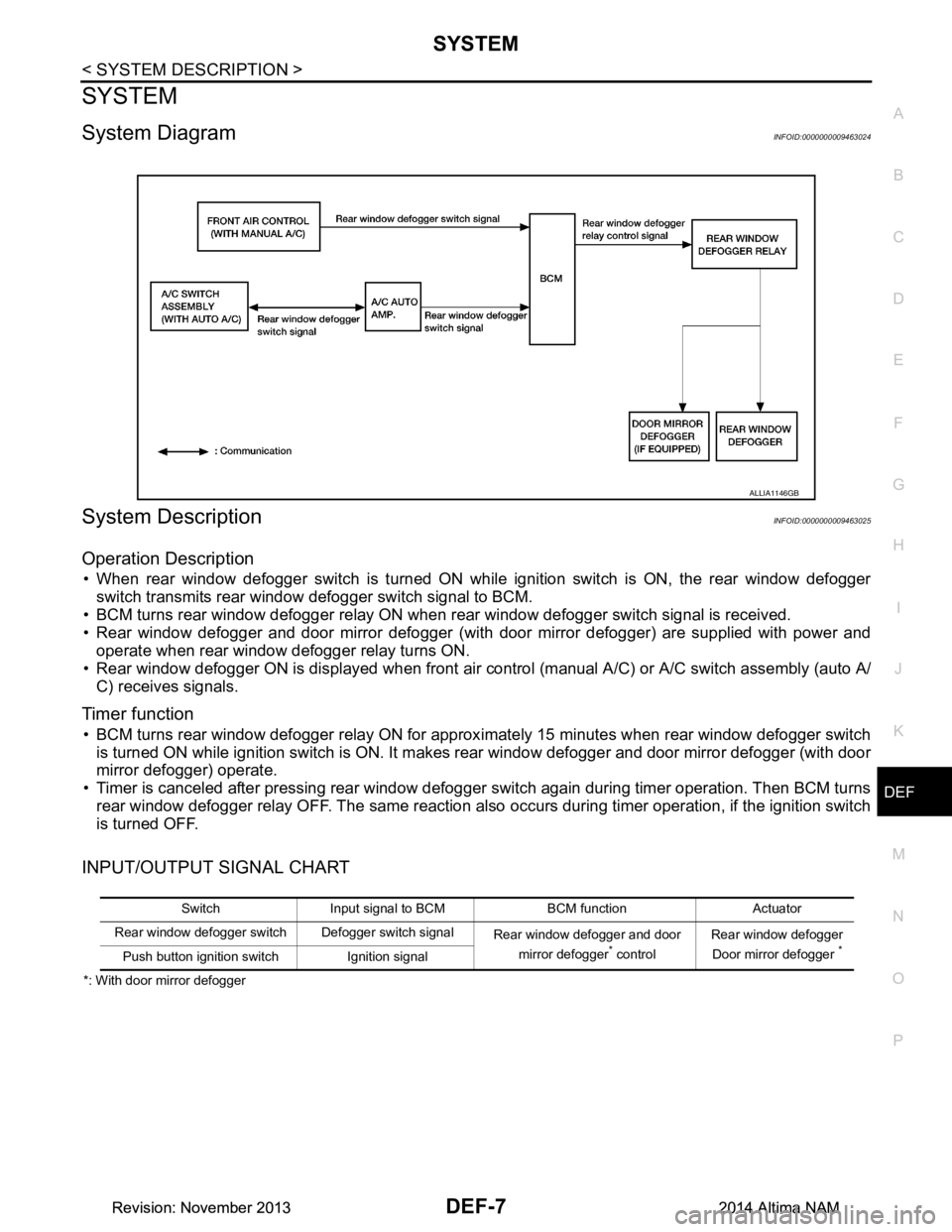
SYSTEM
System DiagramINFOID:0000000009463024
System DescriptionINFOID:0000000009463025
Operation Description
• When rear window defogger switch is turned ON while ignition switch is ON, the rear window defogger switch transmits rear window defogger switch signal to BCM.
• BCM turns rear window defogger relay ON when rear window defogger switch signal is received.
• Rear window defogger and door mirror defogger (with door mirror defogger) are supplied with power and
operate when rear window defogger relay turns ON.
• Rear window defogger ON is displayed when front air c ontrol (manual A/C) or A/C switch assembly (auto A/
C) receives signals.
Timer function
• BCM turns rear window defogger relay ON for approx imately 15 minutes when rear window defogger switch
is turned ON while ignition switch is ON. It makes rear window defogger and door mirror defogger (with door
mirror defogger) operate.
• Timer is canceled after pressing rear window defogger switch again during timer operation. Then BCM turns
rear window defogger relay OFF. The same reaction also occurs during timer operation, if the ignition switch
is turned OFF.
INPUT/OUTPUT SIGNAL CHART
*: With door mirror defogger
ALLIA1146GB
Switch Input signal to BCM BCM function Actuator
Rear window defogger switch Defogger switch signal Rear window defogger and door
mirror defogger
* control Rear window defogger
Door mirror defogger *Push button ignition switch Ignition signal
Revision: November 20132014 Altima NAMRevision: November 20132014 Altima NAM
Page 787 of 4801
COMPONENT PARTSDLK-19
< SYSTEM DESCRIPTION >
C
D E
F
G H
I
J
L
M A
B
DLK
N
O P
INTELLIGENT KEY SYSTEM : Component DescriptionINFOID:0000000009461769
INTEGRATED HOMELINK TRANSMITTER
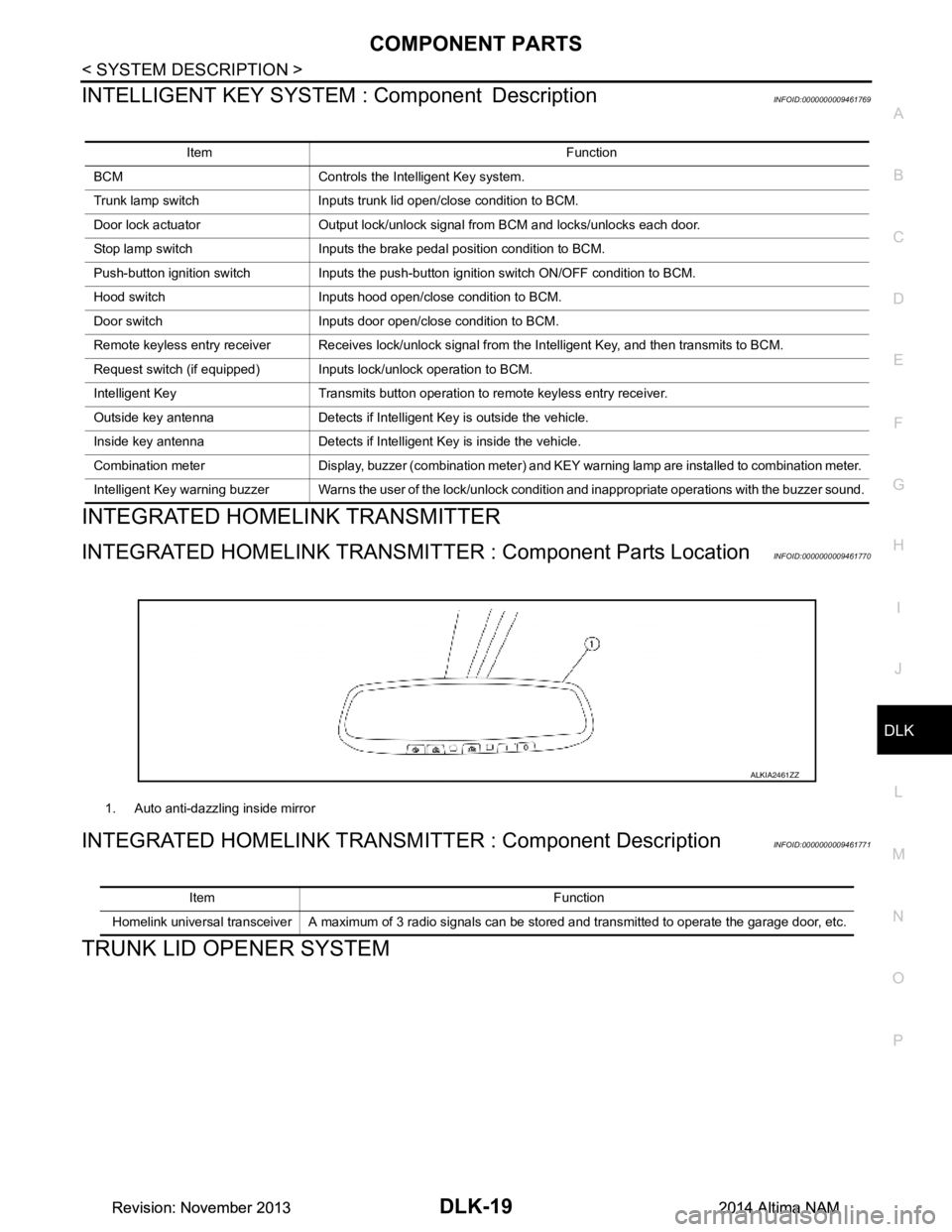
INTEGRATED HOMELINK TRANSMI TTER : Component Parts LocationINFOID:0000000009461770
INTEGRATED HOMELINK TRANSM ITTER : Component DescriptionINFOID:0000000009461771
TRUNK LID OPENER SYSTEM
Item Function
BCM Controls the Intelligent Key system.
Trunk lamp switch Inputs trunk lid open/close condition to BCM.
Door lock actuator Output lock/unlock signal from BCM and locks/unlocks each door.
Stop lamp switch Inputs the brake pedal position condition to BCM.
Push-button ignition switch Inputs the push-button ignition switch ON/OFF condition to BCM.
Hood switch Inputs hood open/close condition to BCM.
Door switch Inputs door open/close condition to BCM.
Remote keyless entry receiver Receives lock/unlock signal from the Intelligent Key, and then transmits to BCM.
Request switch (if equipped) Inputs lock/unlock operation to BCM.
Intelligent Key Transmits button operation to remote keyless entry receiver.
Outside key antenna Detects if Intelligent Key is outside the vehicle.
Inside key antenna Detects if Intelligent Key is inside the vehicle.
Combination meter Display, buzzer (combination meter) and KEY warning lamp are installed to combination meter.
Intelligent Key warning buzzer Warns the user of the lock/unlock condition and inappropriate operations with the buzzer sound.
1. Auto anti-dazzling inside mirror
ALKIA2461ZZ
Item Function
Homelink universal transceiver A maximum of 3 radio signals can be stored and transmitted to operate the garage door, etc.
Revision: November 20132014 Altima NAMRevision: November 20132014 Altima NAM
Page 805 of 4801
SYSTEM (INTELLIGENT KEY SYSTEM)DLK-37
< SYSTEM DESCRIPTION >
C
D E
F
G H
I
J
L
M A
B
DLK
N
O P
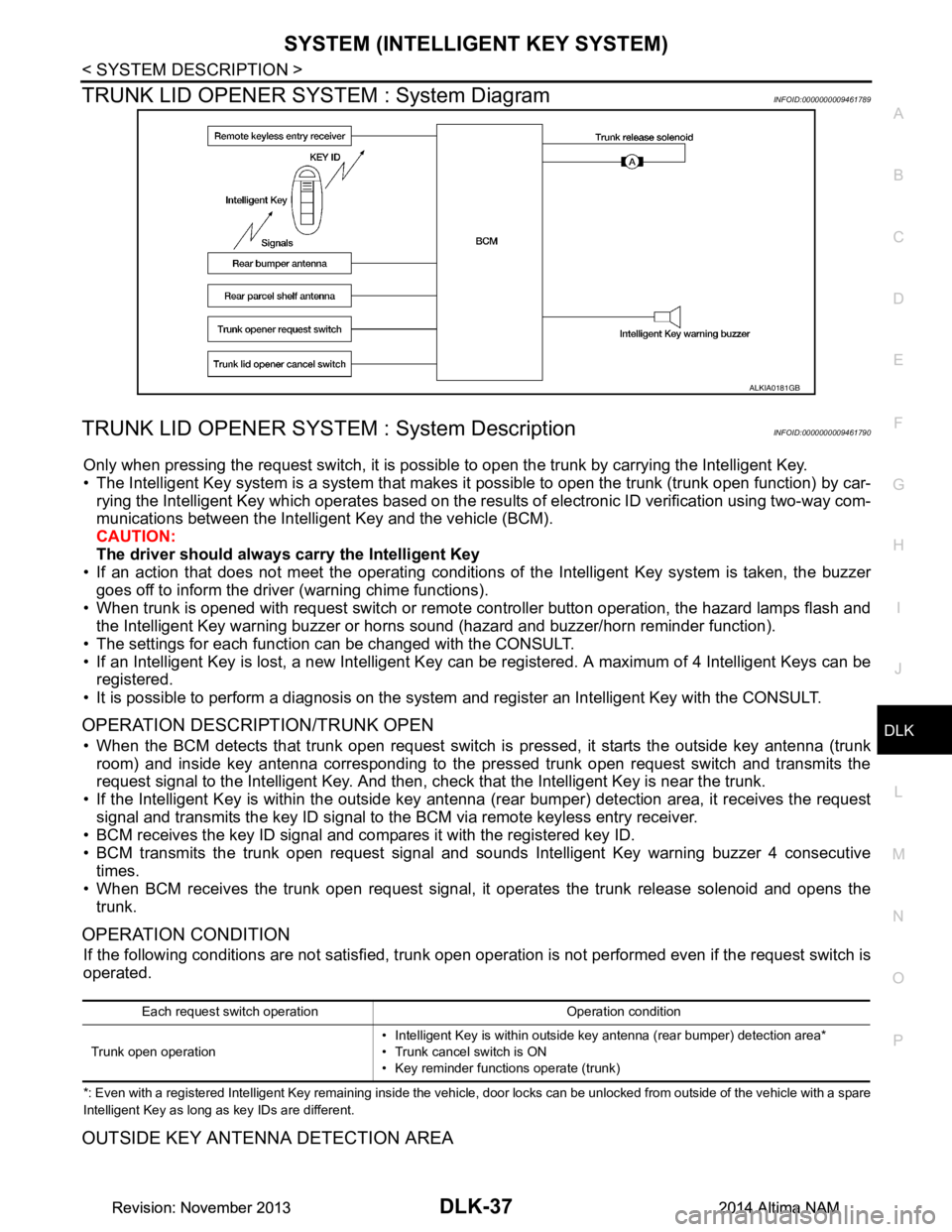
TRUNK LID OPENER SYSTEM : System DiagramINFOID:0000000009461789
TRUNK LID OPENER SYSTEM : System DescriptionINFOID:0000000009461790
Only when pressing the request switch, it is possibl e to open the trunk by carrying the Intelligent Key.
• The Intelligent Key system is a system that makes it possible to open the trunk (trunk open function) by car-
rying the Intelligent Key which operates based on the resu lts of electronic ID verification using two-way com-
munications between the Intelli gent Key and the vehicle (BCM).
CAUTION:
The driver should always carry the Intelligent Key
• If an action that does not meet the operating conditions of the Intelligent Key system is taken, the buzzer
goes off to inform the driver (warning chime functions).
• When trunk is opened with request switch or remote controller button operation, the hazard lamps flash and the Intelligent Key warning buzzer or horns sound (hazard and buzzer/horn reminder function).
• The settings for each functi on can be changed with the CONSULT.
• If an Intelligent Key is lost, a new Intelligent Key can be registered. A maximum of 4 Intelligent Keys can be registered.
• It is possible to perform a diagnosis on the system and register an Intelligent Key with the CONSULT.
OPERATION DESCRIPTION/TRUNK OPEN
• When the BCM detects that trunk open request switch is pressed, it starts the outside key antenna (trunk
room) and inside key antenna corresponding to the pressed trunk open request switch and transmits the
request signal to the Intelligent Key. And then, c heck that the Intelligent Key is near the trunk.
• If the Intelligent Key is within the outside key ant enna (rear bumper) detection area, it receives the request
signal and transmits the key ID signal to the BCM via remote keyless entry receiver.
• BCM receives the key ID signal and compares it with the registered key ID.
• BCM transmits the trunk open request signal and sounds Intelligent Key warning buzzer 4 consecutive
times.
• When BCM receives the trunk open request signal, it operates the trunk release solenoid and opens the trunk.
OPERATION CONDITION
If the following conditions are not satisfied, trunk open operation is not performed even if the request switch is
operated.
*: Even with a registered Intelligent Key remaining inside the vehicle, door locks can be unlocked from outside of the vehicle with a spare
Intelligent Key as long as key IDs are different.
OUTSIDE KEY ANTENNA DETECTION AREA
ALKIA0181GB
Each request switch operation Operation condition
Trunk open operation • Intelligent Key is within outside key antenna (rear bumper) detection area*
• Trunk cancel switch is ON
• Key reminder functions operate (trunk)
Revision: November 20132014 Altima NAMRevision: November 20132014 Altima NAM
Page 806 of 4801
DLK-38
< SYSTEM DESCRIPTION >
SYSTEM (INTELLIGENT KEY SYSTEM)
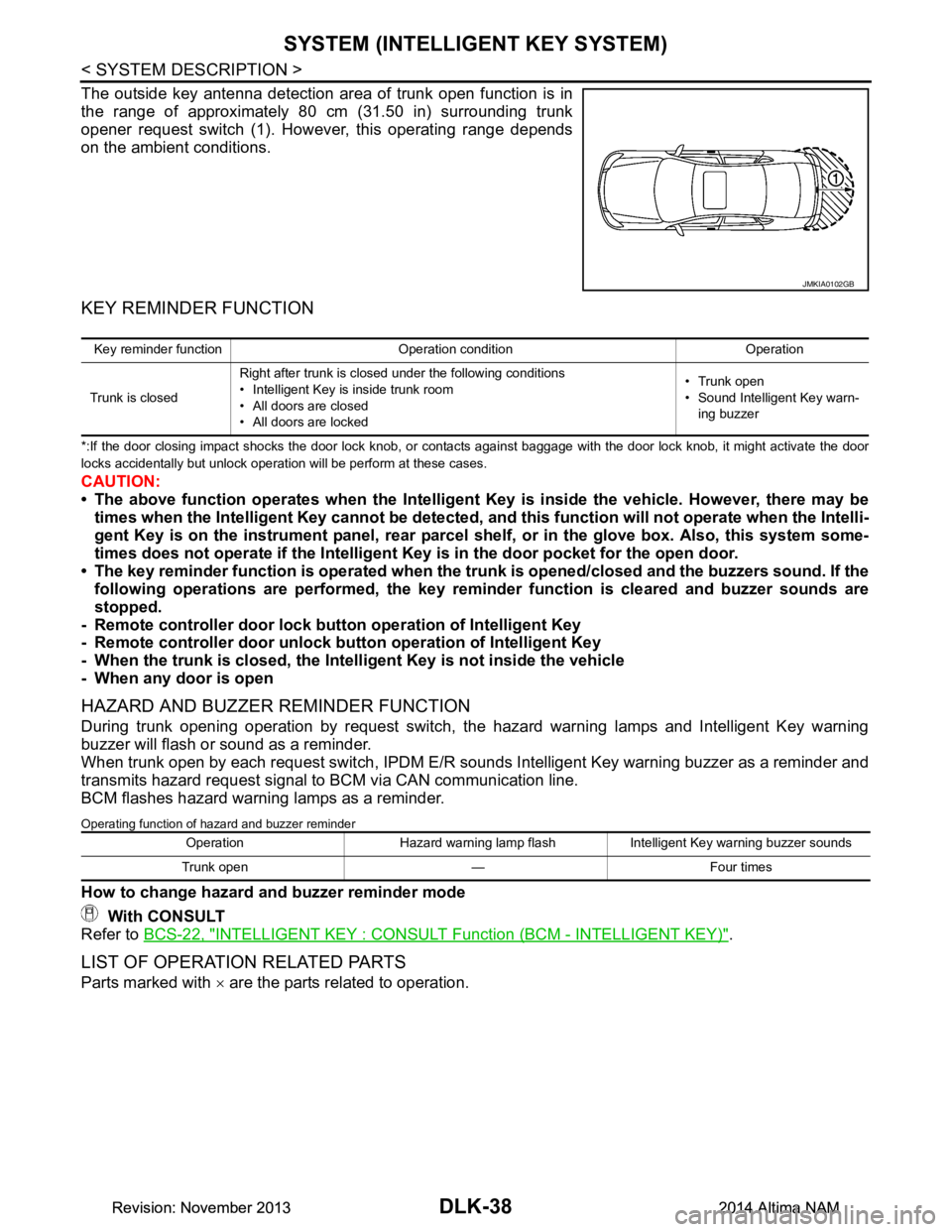
The outside key antenna detection area of trunk open function is in
the range of approximately 80 cm (31.50 in) surrounding trunk
opener request switch (1). However, this operating range depends
on the ambient conditions.
KEY REMINDER FUNCTION
*:If the door closing impact shocks the door lock knob, or contacts against baggage with the door lock knob, it might activate the door
locks accidentally but unlock operation will be perform at these cases.
CAUTION:
• The above function operates when the Intelligent Key is inside the vehicle. However, there may be
times when the Intelligent Key cannot be detected, an d this function will not operate when the Intelli-
gent Key is on the instrument panel, rear parcel shelf, or in the glove box. Also, this system some-
times does not operate if the Intelligent Key is in the door pocket for the open door.
• The key reminder function is operated when the tr unk is opened/closed and the buzzers sound. If the
following operations are performed, the key remind er function is cleared and buzzer sounds are
stopped.
- Remote controller door lock butt on operation of Intelligent Key
- Remote controller door unlock butt on operation of Intelligent Key
- When the trunk is closed, the Intell igent Key is not inside the vehicle
- When any door is open
HAZARD AND BUZZER REMINDER FUNCTION
During trunk opening operation by request switch, the hazard warning lamps and Intelligent Key warning
buzzer will flash or sound as a reminder.
When trunk open by each request switch , IPDM E/R sounds Intelligent Key warning buzzer as a reminder and
transmits hazard request signal to BCM via CAN communication line.
BCM flashes hazard warning lamps as a reminder.
Operating function of hazard and buzzer reminder
How to change hazard and buzzer reminder mode
With CONSULT
Refer to BCS-22, "INTELLIGENT KEY : CONSULT Function (BCM - INTELLIGENT KEY)"
.
LIST OF OPERATION RELATED PARTS
Parts marked with × are the parts related to operation.
JMKIA0102GB
Key reminder function Operation condition Operation
Trunk is closed Right after trunk is closed under the following conditions
• Intelligent Key is inside trunk room
• All doors are closed
• All doors are locked • Trunk open
• Sound Intelligent Key warn-
ing buzzer
Operation Hazard warning lamp flash Intelligent Key warning buzzer sounds
Trunk open — Four times
Revision: November 20132014 Altima NAMRevision: November 20132014 Altima NAM