sensor NISSAN TIIDA 2007 Service Repair Manual
[x] Cancel search | Manufacturer: NISSAN, Model Year: 2007, Model line: TIIDA, Model: NISSAN TIIDA 2007Pages: 5883, PDF Size: 78.95 MB
Page 3057 of 5883

EXL-56
< COMPONENT DIAGNOSIS >
LIGHT & RAIN SENSOR
4. Check continuity between the light and rain sensor harness connector R11 (A) terminal 2 and ground.
Are the continuity check results as specified?
YES >> Replace the light and rain sensor.
NO >> Repair harness or connector.
4.CHECK LIGHT AND RAIN SENSOR POWER SUPPLY FOR OPEN CIRCUIT
1. Turn the ignition switch OFF.
2. Disconnect the light and rain sensor connector R11 and BCM connector M20.
3. Check continuity between the light and rain sensor harness connector R11 (A) terminal 1 and the BCM
harness connector M20 (B) terminal 73.
jAre continuity check results as specified?
YES >> Replace the BCM.
NO >> Repair the harnesses or connectors.
AB
Continuity
Connector Terminal Connector Terminal
R11 2 M19 63 Yes
A
— Continuity
Connector Terminal
R11 2 Ground No
AB
Continuity
Connector Terminal Connector Terminal
R11 1 M20 73 Yes
Page 3074 of 5883
EXTERIOR LIGHTING SYSTEM SYMPTOMS
EXL-73
< SYMPTOM DIAGNOSIS >
C
D
E
F
G
H
I
J
K
MA
B
EXL
N
O
P
SYMPTOM DIAGNOSIS
EXTERIOR LIGHTING SYSTEM SYMPTOMS
Symptom TableINFOID:0000000001523287
CAUTION:
Perform the self-diagnosis with CONSULT-III before the symptom diagnosis. Perform the trouble diag-
nosis if any DTC is detected.
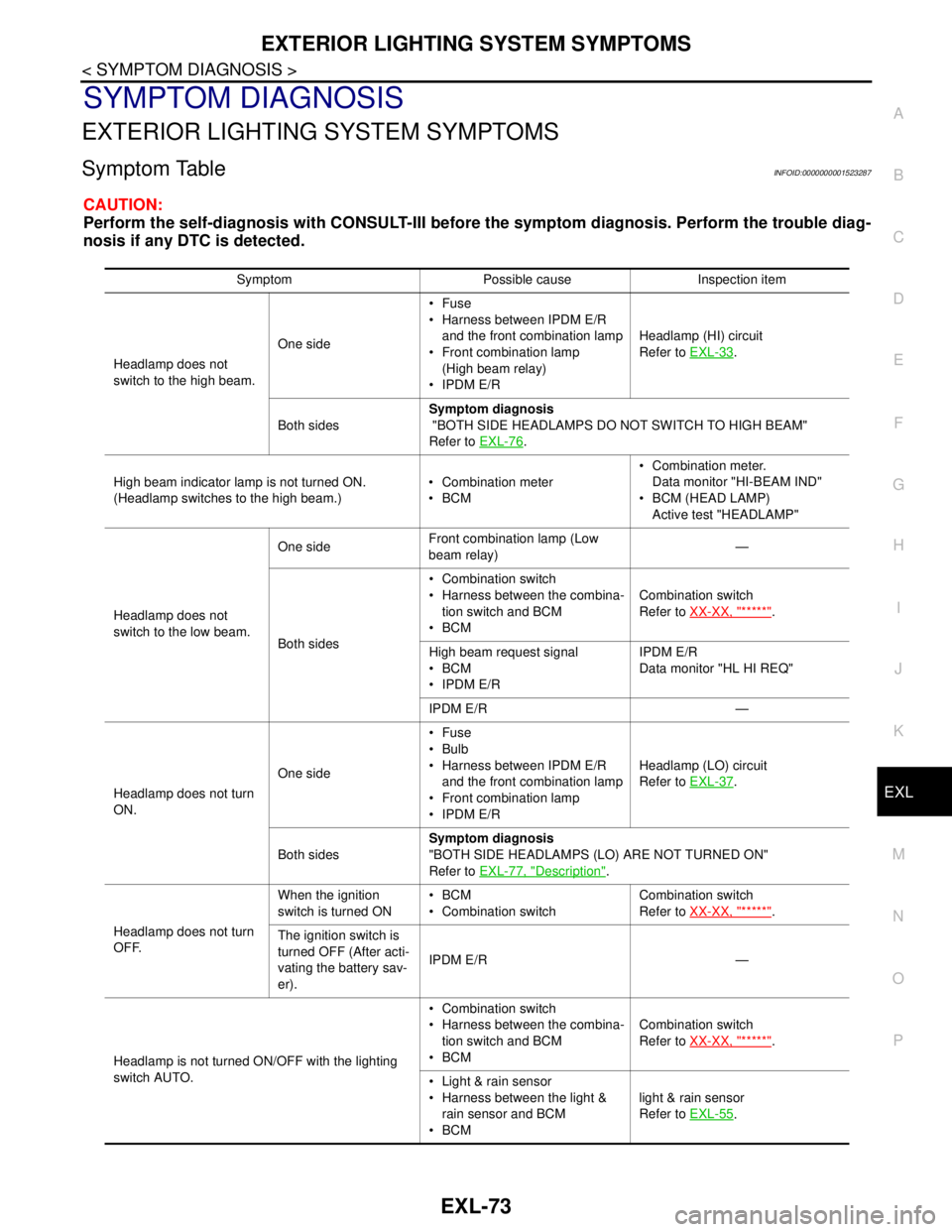
Symptom Possible cause Inspection item
Headlamp does not
switch to the high beam.One sideFuse
Harness between IPDM E/R
and the front combination lamp
Front combination lamp
(High beam relay)
IPDM E/RHeadlamp (HI) circuit
Refer to EXL-33
.
Both sidesSymptom diagnosis
"BOTH SIDE HEADLAMPS DO NOT SWITCH TO HIGH BEAM"
Refer to EXL-76
.
High beam indicator lamp is not turned ON.
(Headlamp switches to the high beam.) Combination meter
BCM Combination meter.
Data monitor "HI-BEAM IND"
BCM (HEAD LAMP)
Active test "HEADLAMP"
Headlamp does not
switch to the low beam.One sideFront combination lamp (Low
beam relay)—
Both sides Combination switch
Harness between the combina-
tion switch and BCM
BCMCombination switch
Refer to XX-XX, "*****"
.
High beam request signal
BCM
IPDM E/RIPDM E/R
Data monitor "HL HI REQ"
IPDM E/R —
Headlamp does not turn
ON.One sideFuse
Bulb
Harness between IPDM E/R
and the front combination lamp
Front combination lamp
IPDM E/RHeadlamp (LO) circuit
Refer to EXL-37
.
Both sidesSymptom diagnosis
"BOTH SIDE HEADLAMPS (LO) ARE NOT TURNED ON"
Refer to EXL-77, "
Description".
Headlamp does not turn
OFF.When the ignition
switch is turned ONBCM
Combination switchCombination switch
Refer to XX-XX, "*****"
.
The ignition switch is
turned OFF (After acti-
vating the battery sav-
er).IPDM E/R —
Headlamp is not turned ON/OFF with the lighting
switch AUTO. Combination switch
Harness between the combina-
tion switch and BCM
BCMCombination switch
Refer to XX-XX, "*****"
.
Light & rain sensor
Harness between the light &
rain sensor and BCM
BCMlight & rain sensor
Refer to EXL-55
.
Page 3090 of 5883
HEADLAMP AIMING CONTROL
EXL-89
< ON-VEHICLE REPAIR >
C
D
E
F
G
H
I
J
K
MA
B
EXL
N
O
P
Removal and Installation of Height SensorINFOID:0000000001530540
REMOVAL
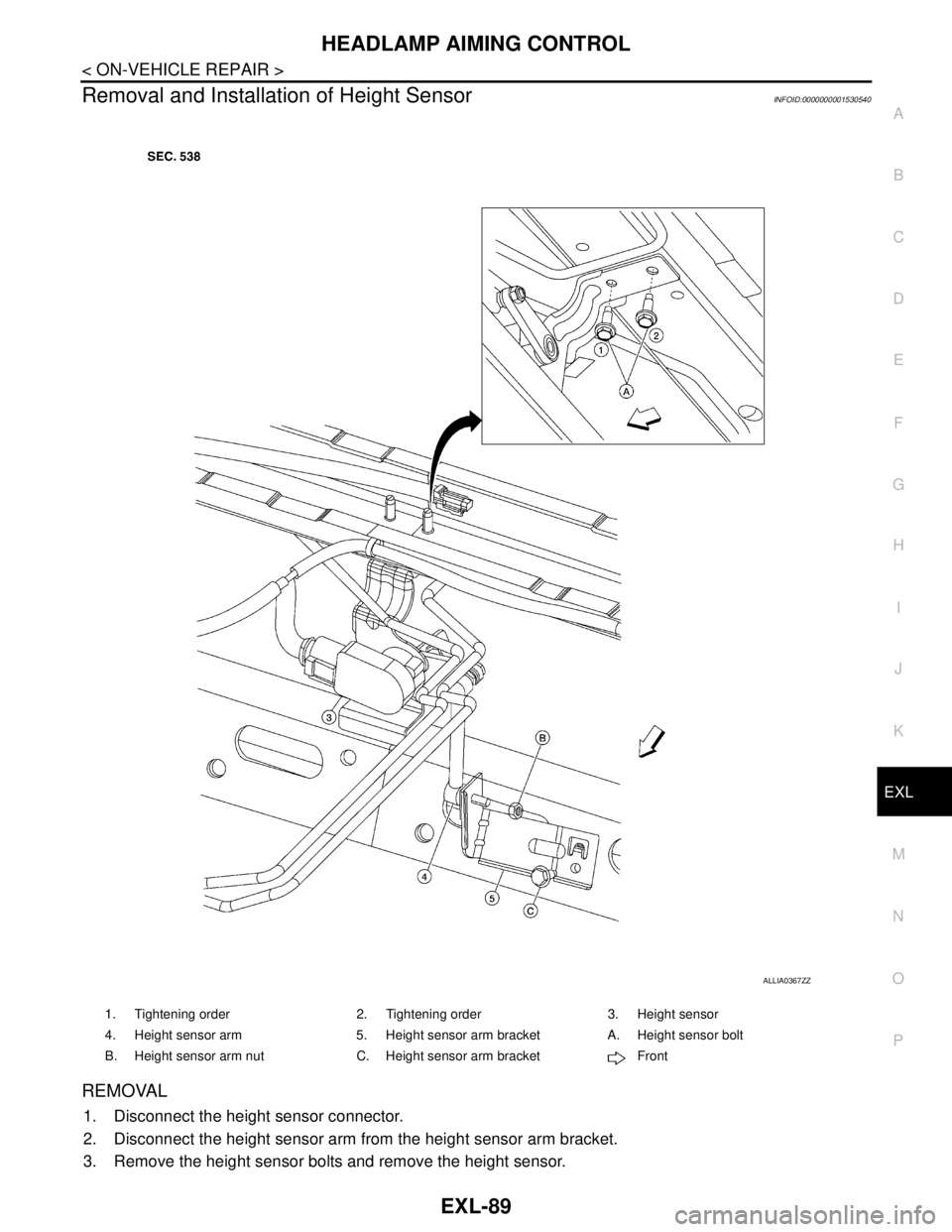
1. Disconnect the height sensor connector.
2. Disconnect the height sensor arm from the height sensor arm bracket.
3. Remove the height sensor bolts and remove the height sensor.
1. Tightening order 2. Tightening order 3. Height sensor
4. Height sensor arm 5. Height sensor arm bracket A. Height sensor bolt
B. Height sensor arm nut C. Height sensor arm bracket Front
ALLIA0367ZZ
Page 3091 of 5883

EXL-90
< ON-VEHICLE REPAIR >
HEADLAMP AIMING CONTROL
INSTALLATION
Installation is in the reverse order of removal.
Tighten the height sensor bolt closest to the vehicle front first when installing the height sensor.
The new height sensor must be initialized using Consult III for proper functioning of the automatic headlamp
aiming system.
Page 3092 of 5883
AUTO LIGHT SYSTEM
EXL-91
< ON-VEHICLE REPAIR >
C
D
E
F
G
H
I
J
K
MA
B
EXL
N
O
P
AUTO LIGHT SYSTEM
Removal and Installation of Light and Rain SensorINFOID:0000000001530408
REMOVAL
1. Remove the rear view mirror. Refer to MIR-9, "Removal and Installation".
2. Disconnect the light and rain sensor connector.
3. Remove the light and rain sensor.
INSTALLATION
Installation is in the reverse order of removal.
Page 3141 of 5883
FRONT WHEEL HUB AND KNUCKLE
FAX-7
< REMOVAL AND INSTALLATION >
C
E
F
G
H
I
J
K
L
MA
B
FA X
N
O
P
REMOVAL AND INSTALLATION
FRONT WHEEL HUB AND KNUCKLE
Removal and InstallationINFOID:0000000001716789
COMPONENT
REMOVAL
1. Remove wheel and tire using power tool. Refer to WT-6, "Rotation" .
2. Without disassembling the hydraulic lines, remove the torque member bolts using power tool. Then repo-
sition the torque member and brake caliper assembly aside with wire. Refer to BR-25, "
Removal and
Installation of Brake Caliper Assembly" .
CAUTION:
Do not depress brake pedal while brake caliper is removed.
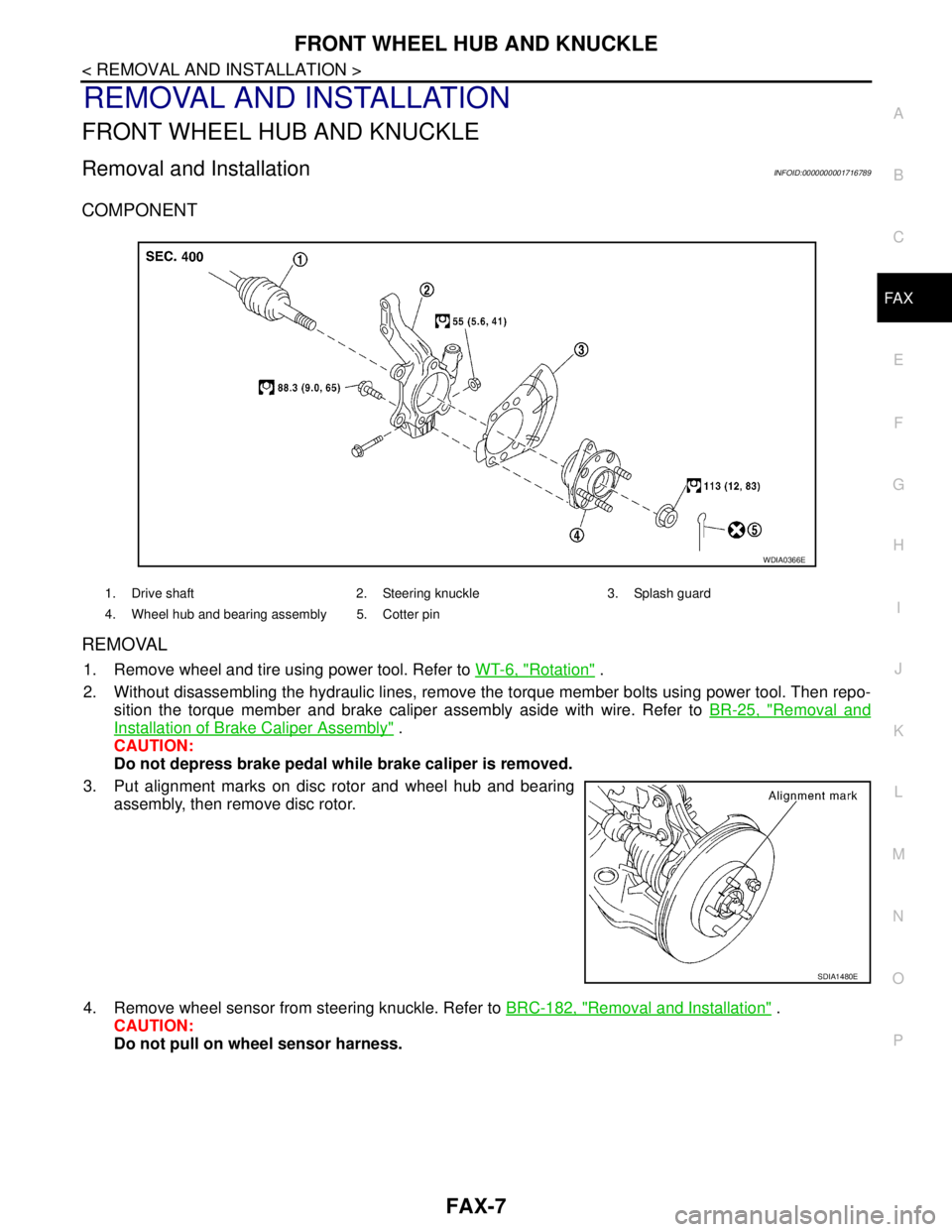
3. Put alignment marks on disc rotor and wheel hub and bearing
assembly, then remove disc rotor.
4. Remove wheel sensor from steering knuckle. Refer to BRC-182, "
Removal and Installation" .
CAUTION:
Do not pull on wheel sensor harness.
1. Drive shaft 2. Steering knuckle 3. Splash guard
4. Wheel hub and bearing assembly 5. Cotter pin
WDIA0366E
SDIA1480E
Page 3144 of 5883
FAX-10
< REMOVAL AND INSTALLATION >
FRONT DRIVE SHAFT
FRONT DRIVE SHAFT
Removal and Installation (Left Side)INFOID:0000000001716796
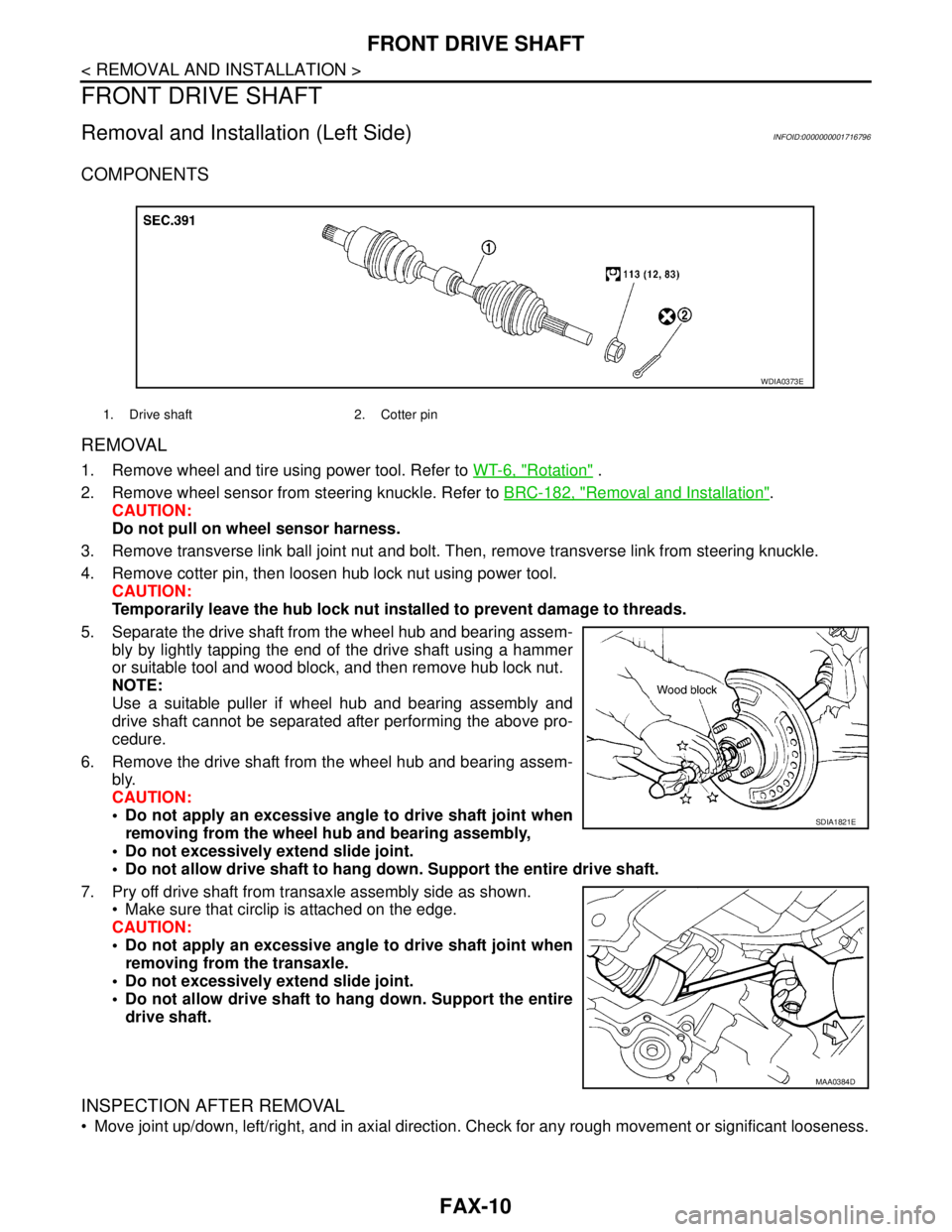
COMPONENTS
REMOVAL
1. Remove wheel and tire using power tool. Refer to WT-6, "Rotation" .
2. Remove wheel sensor from steering knuckle. Refer to BRC-182, "
Removal and Installation".
CAUTION:
Do not pull on wheel sensor harness.
3. Remove transverse link ball joint nut and bolt. Then, remove transverse link from steering knuckle.
4. Remove cotter pin, then loosen hub lock nut using power tool.
CAUTION:
Temporarily leave the hub lock nut installed to prevent damage to threads.
5. Separate the drive shaft from the wheel hub and bearing assem-
bly by lightly tapping the end of the drive shaft using a hammer
or suitable tool and wood block, and then remove hub lock nut.
NOTE:
Use a suitable puller if wheel hub and bearing assembly and
drive shaft cannot be separated after performing the above pro-
cedure.
6. Remove the drive shaft from the wheel hub and bearing assem-
bly.
CAUTION:
Do not apply an excessive angle to drive shaft joint when
removing from the wheel hub and bearing assembly,
Do not excessively extend slide joint.
Do not allow drive shaft to hang down. Support the entire drive shaft.
7. Pry off drive shaft from transaxle assembly side as shown.
Make sure that circlip is attached on the edge.
CAUTION:
Do not apply an excessive angle to drive shaft joint when
removing from the transaxle.
Do not excessively extend slide joint.
Do not allow drive shaft to hang down. Support the entire
drive shaft.
INSPECTION AFTER REMOVAL
Move joint up/down, left/right, and in axial direction. Check for any rough movement or significant looseness.
1. Drive shaft 2. Cotter pin
WDIA0373E
SDIA1821E
MAA0384D
Page 3145 of 5883
FRONT DRIVE SHAFT
FAX-11
< REMOVAL AND INSTALLATION >
C
E
F
G
H
I
J
K
L
MA
B
FA X
N
O
P
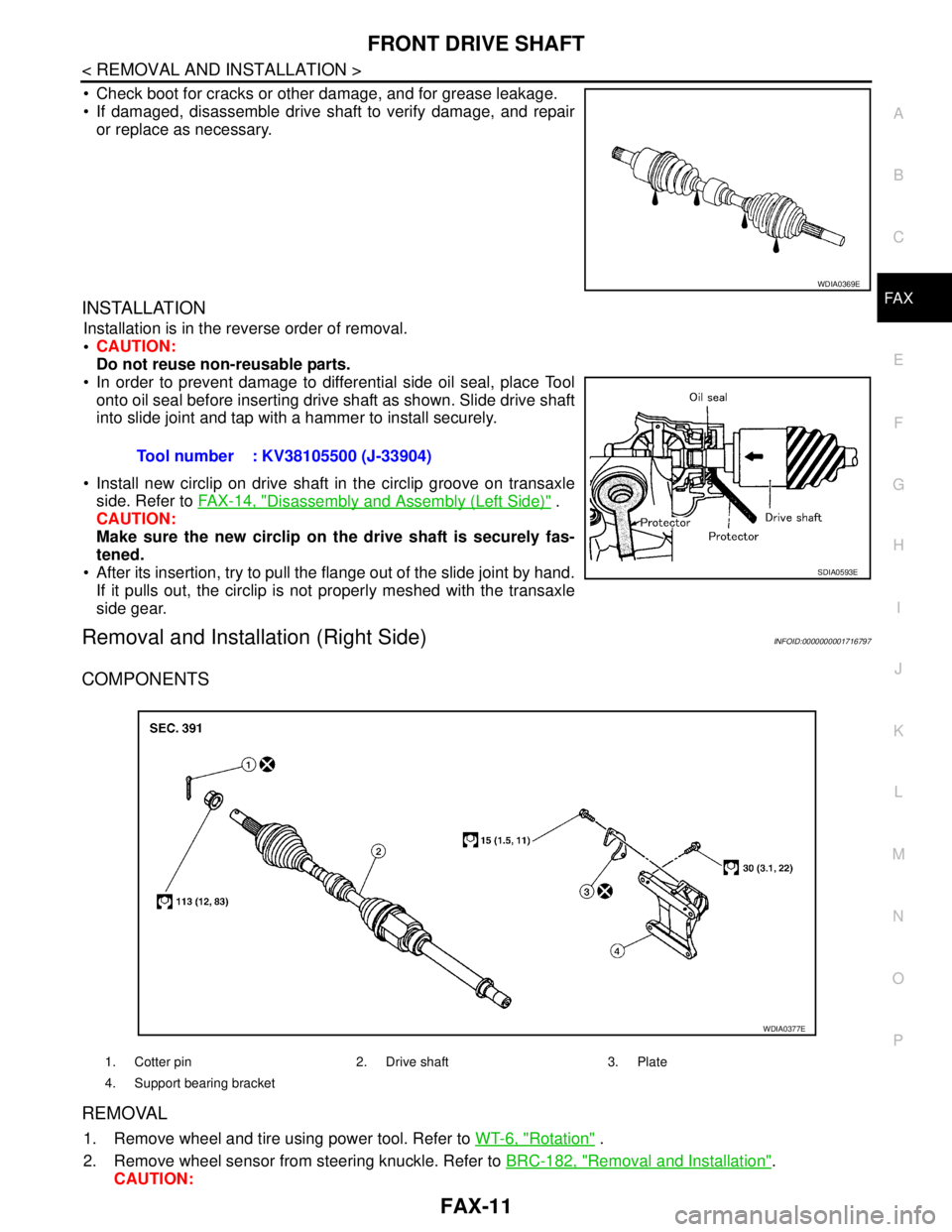
Check boot for cracks or other damage, and for grease leakage.
If damaged, disassemble drive shaft to verify damage, and repair
or replace as necessary.
INSTALLATION
Installation is in the reverse order of removal.
CAUTION:
Do not reuse non-reusable parts.
In order to prevent damage to differential side oil seal, place Tool
onto oil seal before inserting drive shaft as shown. Slide drive shaft
into slide joint and tap with a hammer to install securely.
Install new circlip on drive shaft in the circlip groove on transaxle
side. Refer to FAX-14, "
Disassembly and Assembly (Left Side)" .
CAUTION:
Make sure the new circlip on the drive shaft is securely fas-
tened.
After its insertion, try to pull the flange out of the slide joint by hand.
If it pulls out, the circlip is not properly meshed with the transaxle
side gear.
Removal and Installation (Right Side)INFOID:0000000001716797
COMPONENTS
REMOVAL
1. Remove wheel and tire using power tool. Refer to WT-6, "Rotation" .
2. Remove wheel sensor from steering knuckle. Refer to BRC-182, "
Removal and Installation".
CAUTION:
WDIA0369E
Tool number : KV38105500 (J-33904)
SDIA0593E
1. Cotter pin 2. Drive shaft 3. Plate
4. Support bearing bracket
WDIA0377E
Page 3146 of 5883
FAX-12
< REMOVAL AND INSTALLATION >
FRONT DRIVE SHAFT
Do not pull on wheel sensor harness.
3. Remove transverse link ball joint nut and bolt. Then, remove transverse link from steering knuckle.
4. Remove cotter pin, then loosen hub lock nut using power tool.
CAUTION:
Temporarily leave the hub lock nut installed to prevent damage to threads.
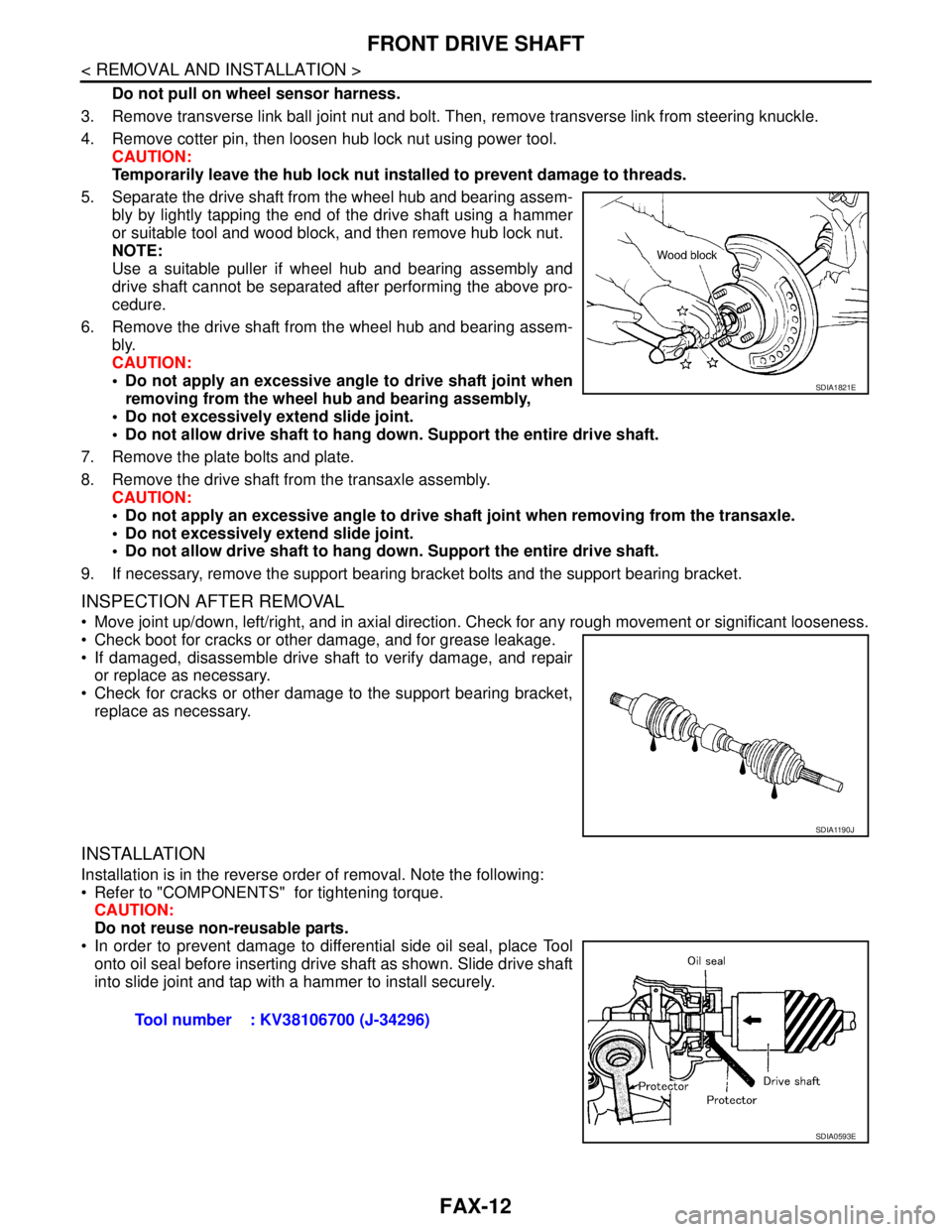
5. Separate the drive shaft from the wheel hub and bearing assem-
bly by lightly tapping the end of the drive shaft using a hammer
or suitable tool and wood block, and then remove hub lock nut.
NOTE:
Use a suitable puller if wheel hub and bearing assembly and
drive shaft cannot be separated after performing the above pro-
cedure.
6. Remove the drive shaft from the wheel hub and bearing assem-
bly.
CAUTION:
Do not apply an excessive angle to drive shaft joint when
removing from the wheel hub and bearing assembly,
Do not excessively extend slide joint.
Do not allow drive shaft to hang down. Support the entire drive shaft.
7. Remove the plate bolts and plate.
8. Remove the drive shaft from the transaxle assembly.
CAUTION:
Do not apply an excessive angle to drive shaft joint when removing from the transaxle.
Do not excessively extend slide joint.
Do not allow drive shaft to hang down. Support the entire drive shaft.
9. If necessary, remove the support bearing bracket bolts and the support bearing bracket.
INSPECTION AFTER REMOVAL
Move joint up/down, left/right, and in axial direction. Check for any rough movement or significant looseness.
Check boot for cracks or other damage, and for grease leakage.
If damaged, disassemble drive shaft to verify damage, and repair
or replace as necessary.
Check for cracks or other damage to the support bearing bracket,
replace as necessary.
INSTALLATION
Installation is in the reverse order of removal. Note the following:
Refer to "COMPONENTS" for tightening torque.
CAUTION:
Do not reuse non-reusable parts.
In order to prevent damage to differential side oil seal, place Tool
onto oil seal before inserting drive shaft as shown. Slide drive shaft
into slide joint and tap with a hammer to install securely.
SDIA1821E
SDIA1190J
Tool number : KV38106700 (J-34296)
SDIA0593E
Page 3161 of 5883
FL-1
ENGINE
C
D
E
F
G
H
I
J
K
L
M
SECTION FL
A
FL
N
O
P
CONTENTS
FUEL SYSTEM
PRECAUTION ...............................................2
PRECAUTIONS ...................................................2
Precaution for Supplemental Restraint System
(SRS) "AIR BAG" and "SEAT BELT PRE-TEN-
SIONER" ...................................................................
2
PREPARATION ............................................3
PREPARATION ...................................................3
Special Service Tool .................................................3
ON-VEHICLE MAINTENANCE .....................4
FUEL SYSTEM ....................................................4
Checking Fuel Line ...................................................4
General Precaution ...................................................4
ON-VEHICLE REPAIR ..................................5
FUEL LEVEL SENSOR UNIT, FUEL FILTER
AND FUEL PUMP ASSEMBLY ..........................
5
HR16DE, HR18DE ...................................................5
Exploded View ..........................................................5
Removal and Installation ..........................................5
K9K ...........................................................................8
Exploded View ..........................................................8
Removal and Installation ..........................................8
FUEL TANK ......................................................10
HR16DE, HR18DE ..................................................10
Exploded View .........................................................10
Removal and Installation .........................................10
K9K ..........................................................................13
Exploded View .........................................................13
Removal and Installation .........................................13
SERVICE DATA AND SPECIFICATIONS
(SDS) ............................................................
16
SERVICE DATA AND SPECIFICATIONS
(SDS) .................................................................
16
Standard and Limit ..................................................16