warning NISSAN TIIDA 2007 Service User Guide
[x] Cancel search | Manufacturer: NISSAN, Model Year: 2007, Model line: TIIDA, Model: NISSAN TIIDA 2007Pages: 5883, PDF Size: 78.95 MB
Page 151 of 5883

BCS-16
< FUNCTION DIAGNOSIS >
DIAGNOSIS SYSTEM (BCM)
DIAGNOSIS SYSTEM (BCM)
COMMON ITEM
COMMON ITEM : CONSULT-III Function (BCM - COMMON ITEM)INFOID:0000000001451463
APPLICATION ITEM
CONSULT-III performs the following functions via CAN communication with BCM.
SYSTEM APPLICATION
BCM can perform the following functions for each system.
NOTE:
It can perform the diagnosis modes except the following for all sub system selection items.
1: With remote keyless entry system
2: With Intelligent Key
BCM
Diagnosis mode Function Description
WORK SUPPORT Changes the setting for each system function.
SELF-DIAG RESULTS Displays the diagnosis results judged by BCM. Refer to BCS-54, "
DTCIndex".
CAN DIAG SUPPORT MNTR Monitors the reception status of CAN communication viewed from BCM.
DATA MONITOR The BCM input/output signals are displayed.
ACTIVE TEST The signals used to activate each device are forcibly supplied from BCM.
ECU IDENTIFICATION The BCM part number is displayed.
CONFIGURATION Enables to read and save the vehicle specification.
Enables to write the vehicle specification when replacing BCM.
System Sub system selection itemDiagnosis mode
WORK SUPPORT DATA MONITOR ACTIVE TEST
BCM BCM×
Door lock DOOR LOCK×××
Rear window defogger REAR DEFOGGER××
Warning chime BUZZER××
Interior room lamp timer INT LAMP×××
Remote keyless entry system
1MULTI REMOTE ENT×××
Exterior lamp HEAD LAMP×××
Wiper and washer WIPER×××
Turn signal and hazard warning lamps FLASHER××
Air conditioner AIR CONDITONER×
Intelligent Key system
2INTELLIGENT KEY×
Combination switch COMB SW×
Immobilizer IMMU××
Interior room lamp battery saver BATTERY SAVER×××
Trunk open (sedan)/Back door open
(hatch back)DOOR LOCK××
Vehicle security system THEFT ALM×××
Signal buffer system SIGNAL BUFFER××
PTC heater system PTC HEATER××
Page 153 of 5883

BCS-18
< FUNCTION DIAGNOSIS >
DIAGNOSIS SYSTEM (BCM)
*: With super lock
REAR WINDOW DEFOGGER
REAR WINDOW DEFOGGER : CONSULT-III Function (BCM - REAR DEFOGGER)
INFOID:0000000001451466
DATA MONITOR
ACTIVE TEST
BUZZER
BUZZER : CONSULT-III Function (BCM - BUZZER)INFOID:0000000001451467
DATA MONITOR
ACTIVE TEST
DOOR LOCK INDThis test is able to check door lock indicator (built in door lock and unlock switch on center
console) operation [ON/OFF].
TRUNK/BACK DOOR This test is able to check trunk/back door lock operation [LOCK (SET)/UNLOCK (RE-
LEASE)]. Test item Description
Monitor Item
[Unit]Description
ENGINE STATUS [RUN/
STOP]Indicates engine running status.
IGN ON SW [ON/OFF] Indicates condition of ignition switch in ON position.
REAR DEF SW [ON/OFF] Displays “Press (ON)/other (OFF)” status determined with the rear window defogger switch.
Test Item Description
REAR DEFOGGER Give a drive signal to the rear window defogger relay to activate it.
Monitor Item
[Unit]Description
IGN ON SW [ON/OFF] Ignition switch (ON) status judged by ignition power supply input.
PUSH SW
1 [ON/OFF]Ignition knob status.
KEY SW
2 [ON/OFF]Key switch status.
DOOR SW -DR [ON/OFF] Front door switch (driver side) status judged by BCM.
DOOR SW -AS [ON/OFF] Front door switch (passenger side) status judged by BCM.
DOOR SW -RR [ON/OFF] Rear door switch RH status judged by BCM.
DOOR SW -RL [ON/OFF] Rear door switch LH status judged by BCM.
BACK DOOR SW [ON/OFF] Back door switch status judged by BCM.
CDL LOCK SW [ON/OFF] Door lock/unlock switch status.
CDL UNLOCK SW [ON/OFF] Door lock/unlock switch status.
LIGHTING SW [ON/OFF]Lighting switch status judged by the lighting switch signal read with combination switch reading func-
tion.
TRNK OPNR SW [ON/OFF] Trunk switch status.
Test Item Description
LIGHT WARN ALM The light reminder warning operation can be checked by operating the relevant function (On/Off).
KEY REMINDER WARN The key reminder warning operation can be checked by operating the relevant function (On/Off).
Page 154 of 5883

BCS
DIAGNOSIS SYSTEM (BCM)
BCS-19
< FUNCTION DIAGNOSIS >
C
D
E
F
G
H
I
J
K
L B A
O
P N
INT LAMP
INT LAMP : CONSULT-III Function (BCM - INT LAMP)INFOID:0000000001451468
DATA MONITOR
1: With Intelligent Key
2: With remote keyless entry
ACTIVE TEST
MULTIREMOTE ENT
MULTIREMOTE ENT : CONSULT-III Function (BCM - MULTIREMOTE ENT)
INFOID:0000000001451469
WORK SUPPORT
BACK DR OPEN WARN The back door open warning operation can be checked by operating the relevant function (On/Off).
DOOR WARNING IND The door open warning operation can be checked by operating the relevant function (On/Off).Test Item Description
Monitor item
[Unit]Description
IGN ON SW [ON/OFF] Ignition switch (ON) status judges from IGN signal (ignition power supply)
PUSH SW
1 [ON/OFF]Push switch status received from Intelligent Key unit by CAN communication
KEY SW
2 [ON/OFF]The switch status input from key switch
DOOR SW-DR [ON/OFF] The switch status input from front door switch (driver side)
DOOR SW-AS [ON/OFF] The switch status input from front door switch (passenger side)
DOOR SW-RR [ON/OFF] The switch status input from rear door switch RH
DOOR SW- RL [ON/OFF] The switch status input from rear door switch LH
BACK DOOR SW [ON/OFF] The switch status input from back door switch
CDL LOCK SW [ON/OFF] Lock switch status input from door lock and unlock switch
CDL UNLOCK SW [ON/OFF] Unlock switch status input from door lock and unlock switch
KEYLESS LOCK
2 [ON/OFF]Lock signal status received from remote keyless entry receiver (integrated in the
BCM)
KEYLESS UNLOCK
2 [ON/OFF]Unlock signal status received from remote keyless entry receiver (integrated in the
BCM)
I-KEY LOCK
1 [ON/OFF]Lock signal status received from Intelligent Key unit by CAN communication
I-KEY UNLOCK
1 [ON/OFF]Unlock signal status received from Intelligent Key unit by CAN communication
I-KEY ALL UNL
1 [ON/OFF]Unlock signal status received from Intelligent Key unit by CAN communication
Test item Operation Description
INT LAMPONOutputs the interior room lamp control signal to turn the interior room lamps ON.
[Map lamp, personal lamp, room lamp, luggage room lamp (when applicable lamps
switch is in DOOR position.)]
OFF Stops the interior room lamp control signal to turn the interior room lamps.
Page 155 of 5883

BCS-20
< FUNCTION DIAGNOSIS >
DIAGNOSIS SYSTEM (BCM)
DATA MONITOR
ACTIVE TEST
HEADLAMP
HEADLAMP : CONSULT-III Function (BCM - HEAD LAMP)INFOID:0000000001451470
WORK SUPPORT
*: Initial setting
DATA MONITOR
Work Item Description
HAZARD LAMP SETAnswer back function (hazard) mode can be changed in this mode.
For the detail of the setting, refer to DLK-617, "
REMOTE KEYLESS ENTRY : System Descrip-
tion".
AUTO LOCK SETAuto door lock time can be changed in this mode.
MODE 1: 1 minute
MODE 2: 2 minutes
MODE 3: 3 minutes
MODE 4: 4 minutes
MODE 5: 5 minutes
Monitor Item
[Unit}Condition
IGN ON SW [ON/OFF] Indicates condition of ignition switch in ON position.
KEY SW [ON/OFF] Indicates condition of key switch.
KEYLESS LOCK [ON/OFF] Indicates condition of lock signal from keyfob.
KEYLESS UNLOCK [ON/OFF] Indicates condition of unlock signal from keyfob.
DOOR SW-DR [ON/OFF] Indicates condition of front door switch (driver side).
DOOR SW-AS [ON/OFF] Indicates condition of front door switch (passenger side).
DOOR SW-RR [ON/OFF] Indicates condition of rear door switch RH.
DOOR SW-RL [ON/OFF] Indicates condition of rear door switch LH.
BACK DOOR SW [ON/OFF] Indicates condition of back door switch.
CDL LOCK SW [ON/OFF] Indicates condition of door lock and unlock switch.
CDL UNLOCK SW [ON/OFF] Indicates condition of door lock and unlock switch.
RKE LOCK AND UNLOCK This item is indicated, but not monitored.
Test Item Description
DOOR LOCKThis test is able to check warning chime in combination meter operation. [ALL LOCK/ALL UN-
LOCK/DR UNLOCK/OTHER UNLOCK]
INT LAMP This test is able to check interior lamp operation [ON/OFF].
FLASHER This test is able to check flasher operation [LH/RH/OFF].
Work item Setting Description
BATTERY SAVER SETON*
Battery saver mode can be changed.
OFF
Monitor item
[Unit]Description
IGN ON SW [ON/OFF] Ignition switch (ON) status judged from IGN signal (ignition power supply)
Page 161 of 5883

BCS-26
< FUNCTION DIAGNOSIS >
DIAGNOSIS SYSTEM (BCM)
*: Each lamp switch is in ON position.
THEFT ALM
THEFT ALM : CONSULT-III Function (BCM - THEFT ALM)INFOID:0000000001451479
WORK SUPPORT
SIGNAL BUFFER
SIGNAL BUFFER : CONSULT-III Function (BCM - SIGNAL BUFFER)INFOID:0000000001451480
DATA MONITOR
ACTIVE TEST
PTC HEATER
PTC HEATER : CONSULT-III Function (BCM - PTC HEATER)INFOID:0000000001451481
DATA MONITOR
ACTIVE TEST
Work Item Description
SECURITY ALARM SETVehicle security function mode can be changed in this mode.
ON: Vehicle security function is ON.
OFF: Vehicle security function is OFF.
Monitor Item
[Unit]Description
OIL PRESS SW [ON/OFF] Displays the status of oil pressure switch received from IPDM E/R via CAN communication.
Test Item Operation Description
OIL PRESSURE SWOFF OFF
ONBCM transmits the oil pressure switch signal to the combination meter via CAN communica-
tion, which illuminates the oil pressure warning lamp in the combination meter.
Monitor Item
[Unit]Description
ELEC PWR CUT
[OFF/FREEZ/INHBT]Indicate [OFF/FREEZ/INHBT] condition of the PTC heater states.
FA N O N S I G
[On/Off]Displays [FAN (ON)/FAN (OFF)] status as judged from blower fan motor signal.
ENGINE STATUS
[STOP/STAL/RUN/CRA]Indicate [STOP/STALL/RUN/CRA] condition of the engine states.
ENG COOLNT T
[°C]The engine coolant temperature (determined by the signal voltage of the engine coolant tem-
perature sensor) is displayed.
BATTERY VOLT
[V]The power supply voltage of BCM is displayed.
ENGINE RPM
[rpm]Indicates the engine speed computed from the signal of the crankshaft position sensor.
OUTSIDE TEMP
[°C]The outside air temperature (determined by the signal voltage of the OAT sensor) is displayed.
Page 171 of 5883

BCS-36
< ECU DIAGNOSIS >
BCM (BODY CONTROL MODULE)
ENGINE RPM
NOTE:
Diesel engine models
onlyEngine runningApproximately the same as tachom-
eter reading
ENGINE RUNEngine stopped OFF
Engine running ON
ENGINE STATUS
NOTE:
Diesel engine models
onlyEngine stopped STOP
While the engine stalls STALL
Engine running RUN
At engine cranking CRA
FA N O N S I GFan switch OFF OFF
Fan switch ON ON
FR FOG SWFront fog lamp switch OFF OFF
Front fog lamp switch ON ON
FR WASHER SWFront washer switch OFF OFF
Front washer switch ON ON
FR WIPER LOWFront wiper switch OFF OFF
Front wiper switch LO ON
FR WIPER HIFront wiper switch OFF OFF
Front wiper switch HI ON
FR WIPER INTFront wiper switch OFF OFF
Front wiper switch INT ON
FR WIPER STOPAny position other than front wiper stop position OFF
Front wiper stop position ON
HAZARD SWWhen hazard switch is not pressed OFF
When hazard switch is pressed ON
LIGHT SW 1STLighting switch OFF OFF
Lighting switch 1st ON
H/L SW POSHeadlamp switch OFF OFF
Headlamp switch 1st ON
HI BEAM SWHigh beam switch OFF OFF
High beam switch HI ON
HOOD SWClose the hood
NOTE:
Vehicles without theft warning system are OFF-fixedOFF
Open the hood ON
H/L WASH SWNOTE:
The item is indicated, but not monitoredOFF
IGN ON SWIgnition switch OFF or ACC OFF
Ignition switch ON ON
IGN SW CANIgnition switch OFF or ACC OFF
Ignition switch ON ON
INT VOLUME Wiper intermittent dial is in a dial position 1 - 7 1 - 7
I-KEY LOCK
1LOCK button of Intelligent Key is not pressed OFF
LOCK button of Intelligent Key is pressed ON Monitor Item Condition Value/Status
Page 191 of 5883

BCS-56
< PRECAUTION >
PRECAUTIONS
PRECAUTION
PRECAUTIONS
Precaution for Supplemental Restraint System (SRS) "AIR BAG" and "SEAT BELT
PRE-TENSIONER"
INFOID:0000000001523305
The Supplemental Restraint System such as “AIR BAG” and “SEAT BELT PRE-TENSIONER”, used along
with a front seat belt, helps to reduce the risk or severity of injury to the driver and front passenger for certain
types of collision. Information necessary to service the system safely is included in the SR and SB section of
this Service Manual.
WARNING:
To avoid rendering the SRS inoperative, which could increase the risk of personal injury or death in
the event of a collision which would result in air bag inflation, all maintenance must be performed by
an authorized NISSAN/INFINITI dealer.
Improper maintenance, including incorrect removal and installation of the SRS, can lead to personal
injury caused by unintentional activation of the system. For removal of Spiral Cable and Air Bag
Module, see the SR section.
Do not use electrical test equipment on any circuit related to the SRS unless instructed to in this
Service Manual. SRS wiring harnesses can be identified by yellow and/or orange harnesses or har-
ness connectors.
Page 195 of 5883
PRECAUTIONS
BR-3
< PRECAUTION >
C
D
E
G
H
I
J
K
L
MA
B
BR
N
O
P
PRECAUTION
PRECAUTIONS
Precaution for Supplemental Restraint System (SRS) "AIR BAG" and "SEAT BELT
PRE-TENSIONER"
INFOID:0000000001716907
The Supplemental Restraint System such as “AIR BAG” and “SEAT BELT PRE-TENSIONER”, used along
with a front seat belt, helps to reduce the risk or severity of injury to the driver and front passenger for certain
types of collision. This system includes seat belt switch inputs and dual stage front air bag modules. The SRS
system uses the seat belt switches to determine the front air bag deployment, and may only deploy one front
air bag, depending on the severity of a collision and whether the front occupants are belted or unbelted.
Information necessary to service the system safely is included in the SR and SB section of this Service Man-
ual.
WARNING:
• To avoid rendering the SRS inoperative, which could increase the risk of personal injury or death in
the event of a collision which would result in air bag inflation, all maintenance must be performed by
an authorized NISSAN/INFINITI dealer.
Improper maintenance, including incorrect removal and installation of the SRS, can lead to personal
injury caused by unintentional activation of the system. For removal of Spiral Cable and Air Bag
Module, see the SR section.
Do not use electrical test equipment on any circuit related to the SRS unless instructed to in this
Service Manual. SRS wiring harnesses can be identified by yellow and/or orange harnesses or har-
ness connectors.
Precaution for Brake SystemINFOID:0000000001716908
Refill using recommended brake fluid. Refer to MA-19, "Fluids and Lubricants".
Never reuse drained brake fluid.
Be careful not to splash brake fluid on painted surface of body. If brake fluid is splashed on painted surfaces
of body immediately wipe it off with cloth and then wash it away with water.
To clean or wash all parts of master cylinder, disc brake caliper and wheel cylinder, use new brake fluid.
Never use mineral oils such as gasoline or kerosene. They will ruin rubber parts of the hydraulic system.
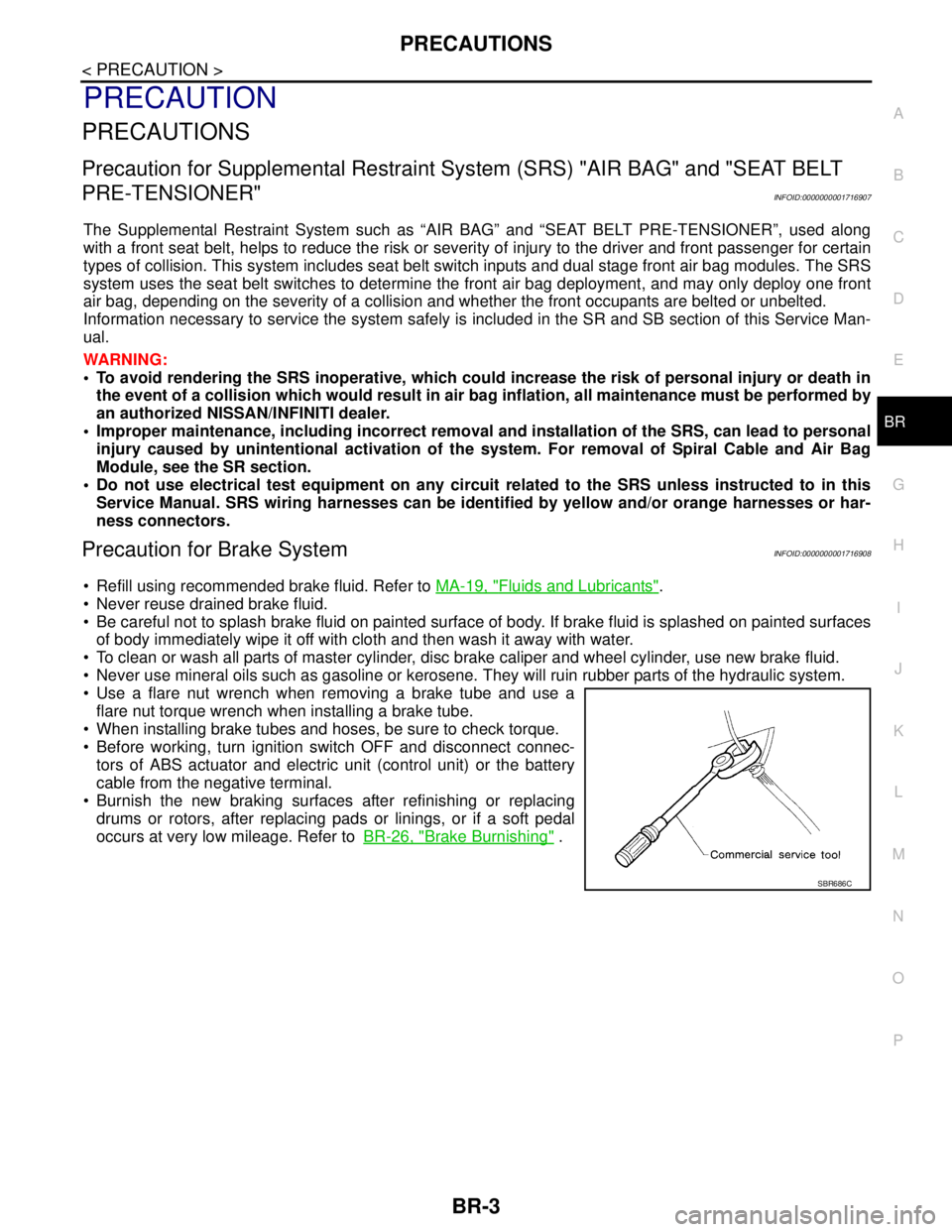
Use a flare nut wrench when removing a brake tube and use a
flare nut torque wrench when installing a brake tube.
When installing brake tubes and hoses, be sure to check torque.
Before working, turn ignition switch OFF and disconnect connec-
tors of ABS actuator and electric unit (control unit) or the battery
cable from the negative terminal.
Burnish the new braking surfaces after refinishing or replacing
drums or rotors, after replacing pads or linings, or if a soft pedal
occurs at very low mileage. Refer toBR-26, "
Brake Burnishing" .
SBR686C
Page 200 of 5883
BR-8
< ON-VEHICLE MAINTENANCE >
BRAKE FLUID
BRAKE FLUID
On Board InspectionINFOID:0000000001716919
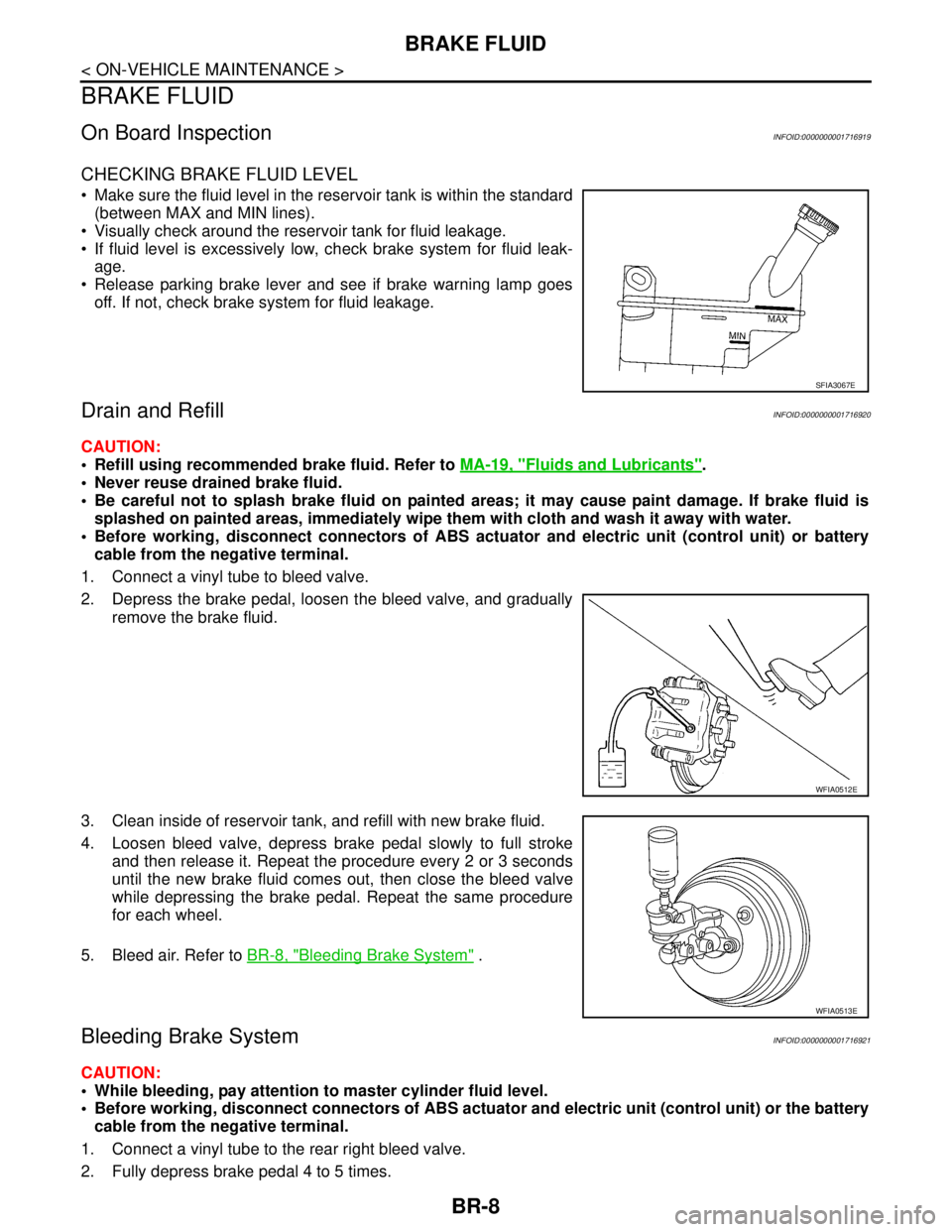
CHECKING BRAKE FLUID LEVEL
Make sure the fluid level in the reservoir tank is within the standard
(between MAX and MIN lines).
Visually check around the reservoir tank for fluid leakage.
If fluid level is excessively low, check brake system for fluid leak-
age.
Release parking brake lever and see if brake warning lamp goes
off. If not, check brake system for fluid leakage.
Drain and RefillINFOID:0000000001716920
CAUTION:
Refill using recommended brake fluid. Refer to MA-19, "
Fluids and Lubricants".
Never reuse drained brake fluid.
Be careful not to splash brake fluid on painted areas; it may cause paint damage. If brake fluid is
splashed on painted areas, immediately wipe them with cloth and wash it away with water.
Before working, disconnect connectors of ABS actuator and electric unit (control unit) or battery
cable from the negative terminal.
1. Connect a vinyl tube to bleed valve.
2. Depress the brake pedal, loosen the bleed valve, and gradually
remove the brake fluid.
3. Clean inside of reservoir tank, and refill with new brake fluid.
4. Loosen bleed valve, depress brake pedal slowly to full stroke
and then release it. Repeat the procedure every 2 or 3 seconds
until the new brake fluid comes out, then close the bleed valve
while depressing the brake pedal. Repeat the same procedure
for each wheel.
5. Bleed air. Refer to BR-8, "
Bleeding Brake System" .
Bleeding Brake SystemINFOID:0000000001716921
CAUTION:
While bleeding, pay attention to master cylinder fluid level.
Before working, disconnect connectors of ABS actuator and electric unit (control unit) or the battery
cable from the negative terminal.
1. Connect a vinyl tube to the rear right bleed valve.
2. Fully depress brake pedal 4 to 5 times.
SFIA3067E
WFIA0512E
WFIA0513E
Page 219 of 5883
REAR DISC BRAKE
BR-27
< ON-VEHICLE REPAIR >
C
D
E
G
H
I
J
K
L
MA
B
BR
N
O
P
REAR DISC BRAKE
ComponentINFOID:0000000001724666
WARNING:
Clean dust on caliper and brake pad with a vacuum dust collector. Do not blow with compressed air.
CAUTION:
While removing cylinder body, never depress the brake pedal because the piston will pop out.
It is not necessary to remove bolts on torque member and brake hose except for disassembly or
replacement of the cylinder body. In this case, hang cylinder body with a wire so that brake hose is
not under tension.
Do not damage piston boot.
Always replace shims and shim covers as a set when replacing brake pads.
Keep the rotor clean of brake fluid.
Burnish the brake contact surfaces when refinishing or replacing brake rotors, after replacing pads
or linings, or if a soft pedal occurs at very low mileage. Refer to BR-29, "
Brake Burnishing".
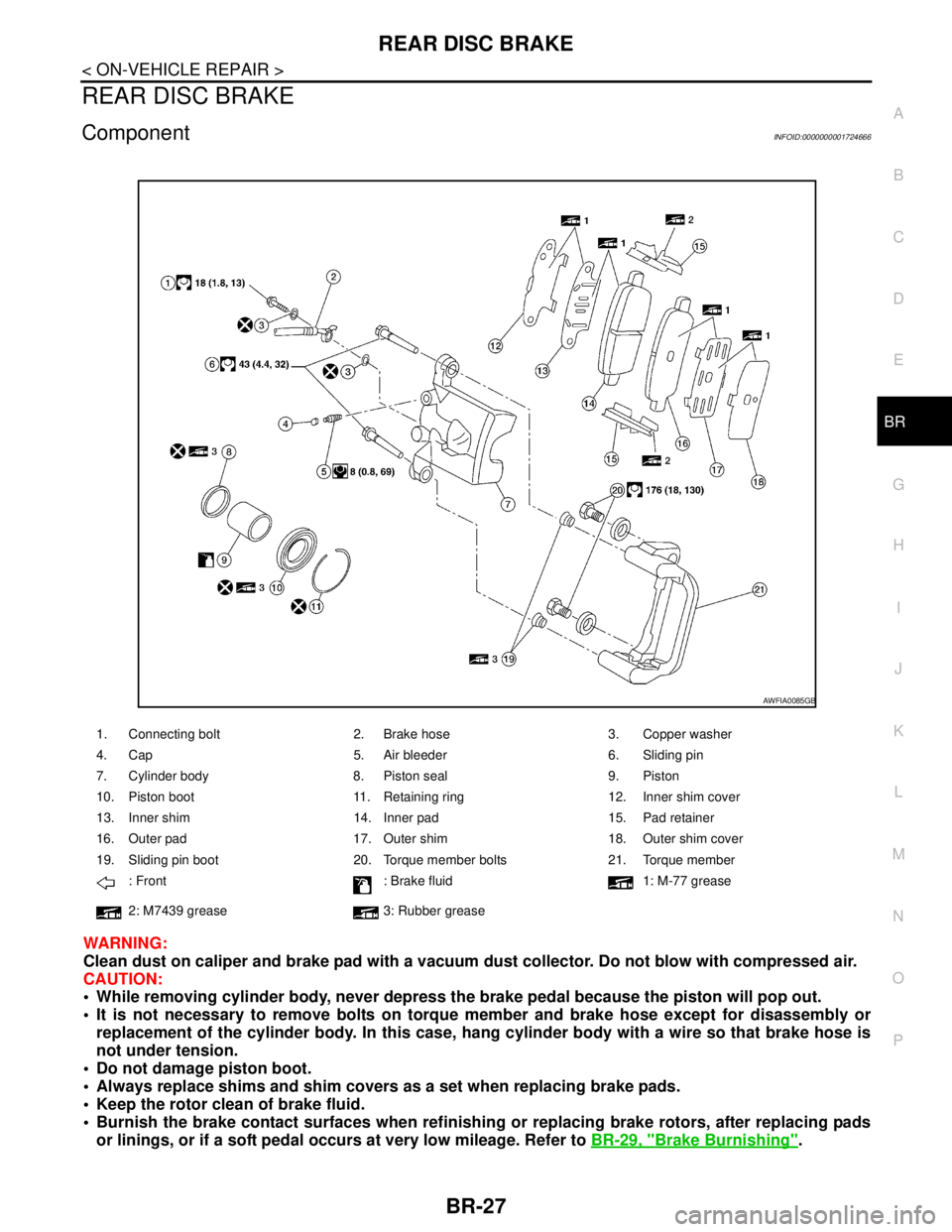
1. Connecting bolt 2. Brake hose 3. Copper washer
4. Cap 5. Air bleeder 6. Sliding pin
7. Cylinder body 8. Piston seal 9. Piston
10. Piston boot 11. Retaining ring 12. Inner shim cover
13. Inner shim 14. Inner pad 15. Pad retainer
16. Outer pad 17. Outer shim 18. Outer shim cover
19. Sliding pin boot 20. Torque member bolts 21. Torque member
: Front : Brake fluid 1: M-77 grease
2: M7439 grease 3: Rubber grease
AWFIA0085GB