fuse NISSAN X-TRAIL 2003 Electronic User Guide
[x] Cancel search | Manufacturer: NISSAN, Model Year: 2003, Model line: X-TRAIL, Model: NISSAN X-TRAIL 2003Pages: 3066, PDF Size: 51.47 MB
Page 455 of 3066
![NISSAN X-TRAIL 2003 Electronic User Guide A/T SHIFT LOCK SYSTEM
AT-449
[ALL]
D
E
F
G
H
I
J
K
L
MA
B
AT
4.CHECK INPUT SIGNAL (A/T DEVICE)
Turn ignition switch to “ON” position.
(Do not start engine.)
lCheck voltage between A/T device harne](/img/5/57402/w960_57402-454.png "NISSAN X-TRAIL 2003 Electronic User Guide A/T SHIFT LOCK SYSTEM
AT-449
[ALL]
D
E
F
G
H
I
J
K
L
MA
B
AT
4.CHECK INPUT SIGNAL (A/T DEVICE)
Turn ignition switch to “ON” position.
(Do not start engine.)
lCheck voltage between A/T device harne")
A/T SHIFT LOCK SYSTEM
AT-449
[ALL]
D
E
F
G
H
I
J
K
L
MA
B
AT
4.CHECK INPUT SIGNAL (A/T DEVICE)
Turn ignition switch to “ON” position.
(Do not start engine.)
lCheck voltage between A/T device harness terminal 7 and ground.
OK or NG
OK >> GO TO 5
NG >> Check the following items:
1. Harness for short and open between battery and stop
lamp switch harness connector 1.
2. Harness for short or open between stop lamp switch harness connector 2 and A/T device har-
ness connector 7.
3. Fuse
4. Stop lamp switch (Refer toAT- 4 5 0 , "
A/T DEVICE CHECK".)
5.CHECK GROUND CIRCUIT
1. Turn ignition switch to “OFF” position.
2. Disconnect A/T device harness connector.
3. Check continuity between A/T device harness terminal 6 and ground.
If OK, check harness for short to ground and short to power.
OK or NG
OK >> GO TO 6
NG >> Repair open circuit or short to ground or short to power
in harness or connectors. Voltage:
Brake pedal depressd:
Battery voltage
Brake pedal released:
0V
SCIA0783E
Continuity should exist.
SCIA0784E
Page 584 of 3066
ATC-6
PRECAUTIONS
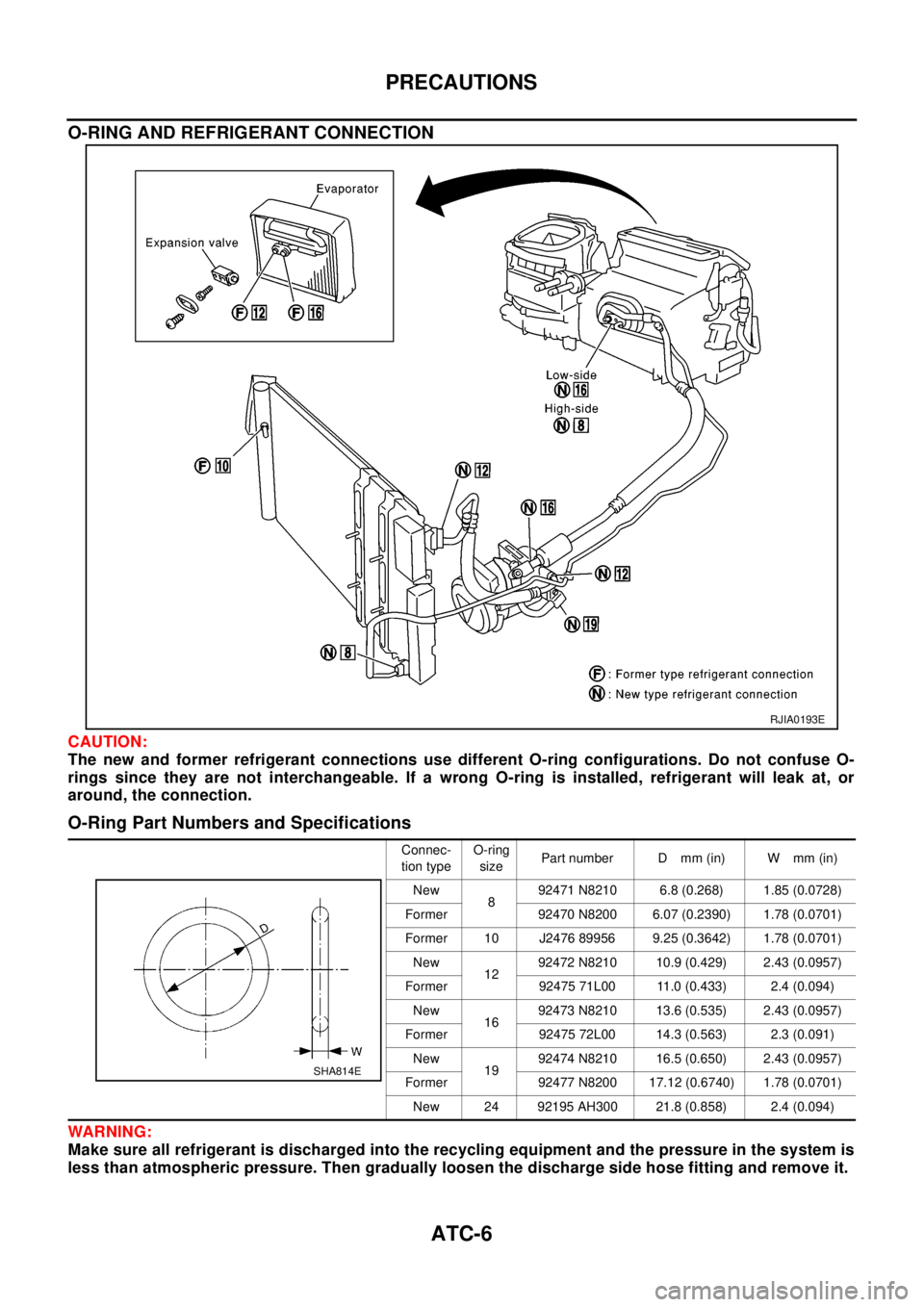
O-RING AND REFRIGERANT CONNECTION
CAUTION:
The new and former refrigerant connections use different O-ring configurations. Do not confuse O-
rings since they are not interchangeable. If a wrong O-ring is installed, refrigerant will leak at, or
around, the connection.
O-Ring Part Numbers and Specifications
WAR NIN G:
Make sure all refrigerant is discharged into the recycling equipment and the pressure in the system is
less than atmospheric pressure. Then gradually loosen the discharge side hose fitting and remove it.
RJIA0193E
Connec-
tion typeO-ring
sizePart number D mm (in) W mm (in)
New
892471 N8210 6.8 (0.268) 1.85 (0.0728)
Former 92470 N8200 6.07 (0.2390) 1.78 (0.0701)
Former 10 J2476 89956 9.25 (0.3642) 1.78 (0.0701)
New
1292472 N8210 10.9 (0.429) 2.43 (0.0957)
Former 92475 71L00 11.0 (0.433) 2.4 (0.094)
New
1692473 N8210 13.6 (0.535) 2.43 (0.0957)
Former 92475 72L00 14.3 (0.563) 2.3 (0.091)
New
1992474 N8210 16.5 (0.650) 2.43 (0.0957)
Former 92477 N8200 17.12 (0.6740) 1.78 (0.0701)
New 24 92195 AH300 21.8 (0.858) 2.4 (0.094)
SHA814E
Page 633 of 3066
TROUBLE DIAGNOSIS
ATC-55
C
D
E
F
G
H
I
K
L
MA
B
AT C
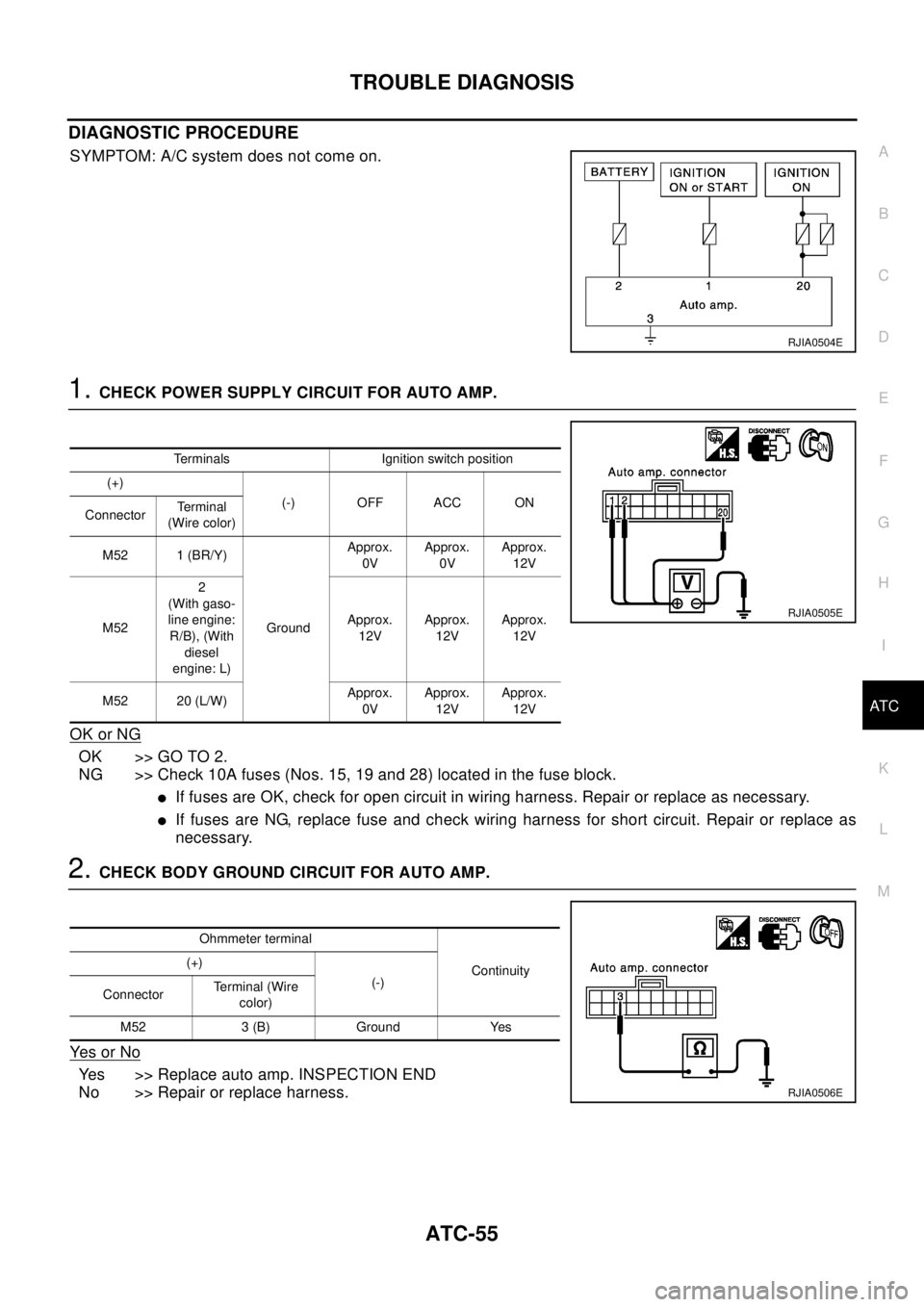
DIAGNOSTIC PROCEDURE
SYMPTOM: A/C system does not come on.
1.CHECK POWER SUPPLY CIRCUIT FOR AUTO AMP.
OK or NG
OK >> GO TO 2.
NG >> Check 10A fuses (Nos. 15, 19 and 28) located in the fuse block.
lIf fuses are OK, check for open circuit in wiring harness. Repair or replace as necessary.
lIf fuses are NG, replace fuse and check wiring harness for short circuit. Repair or replace as
necessary.
2.CHECK BODY GROUND CIRCUIT FOR AUTO AMP.
Ye s o r N o
Yes >> Replace auto amp. INSPECTION END
No >> Repair or replace harness.
RJIA0504E
Terminals Ignition switch position
(+)
(-) OFF ACC ON
ConnectorTe r m i n a l
(Wire color)
M52 1 (BR/Y)
GroundApprox.
0VApprox.
0VApprox.
12V
M522
(With gaso-
line engine:
R/B), (With
diesel
engine: L)Approx.
12VApprox.
12VApprox.
12V
M52 20 (L/W)Approx.
0VApprox.
12VApprox.
12V
RJIA0505E
Ohmmeter terminal
Continuity (+)
(-)
ConnectorTerminal (Wire
color)
M52 3 (B) Ground Yes
RJIA0506E
Page 649 of 3066
TROUBLE DIAGNOSIS
ATC-71
C
D
E
F
G
H
I
K
L
MA
B
AT C
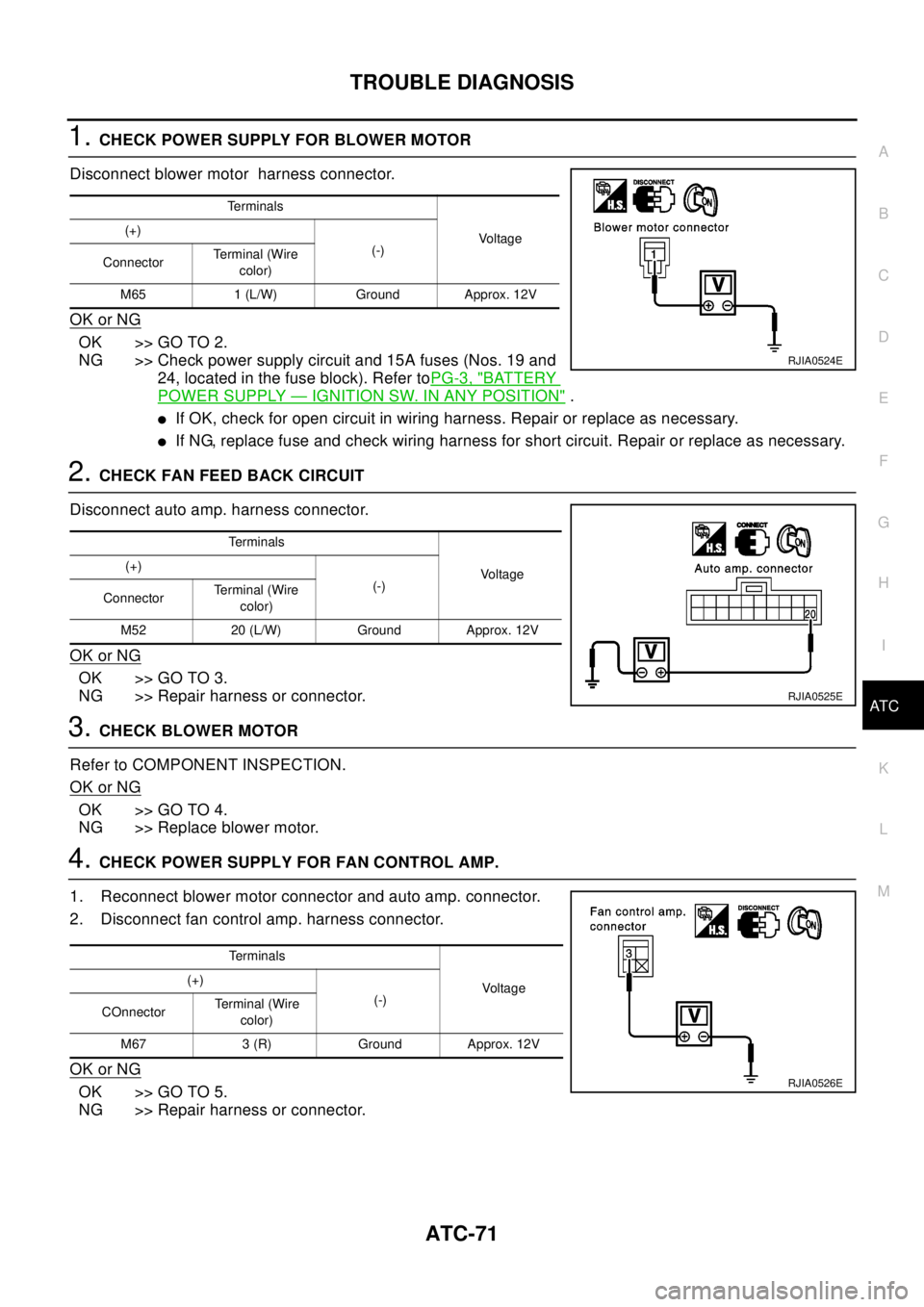
1.CHECK POWER SUPPLY FOR BLOWER MOTOR
Disconnect blower motor harness connector.
OK or NG
OK >> GO TO 2.
NG >> Check power supply circuit and 15A fuses (Nos. 19 and
24, located in the fuse block). Refer toPG-3, "
BATTERY
POWER SUPPLY—IGNITION SW. IN ANY POSITION".
lIf OK, check for open circuit in wiring harness. Repair or replace as necessary.
lIf NG, replace fuse and check wiring harness for short circuit. Repair or replace as necessary.
2.CHECK FAN FEED BACK CIRCUIT
Disconnect auto amp. harness connector.
OK or NG
OK >> GO TO 3.
NG >> Repair harness or connector.
3.CHECKBLOWERMOTOR
Refer to COMPONENT INSPECTION.
OK or NG
OK >> GO TO 4.
NG >> Replace blower motor.
4.CHECK POWER SUPPLY FOR FAN CONTROL AMP.
1. Reconnect blower motor connector and auto amp. connector.
2. Disconnect fan control amp. harness connector.
OK or NG
OK >> GO TO 5.
NG >> Repair harness or connector.
Te r m i n a l s
Vo l ta g e (+)
(-)
ConnectorTerminal (Wire
color)
M65 1 (L/W) Ground Approx. 12V
RJIA0524E
Te r m i n a l s
Vo l ta g e (+)
(-)
ConnectorTerminal (Wire
color)
M52 20 (L/W) Ground Approx. 12V
RJIA0525E
Terminals
Voltage (+)
(-)
COnnectorTerminal (Wire
color)
M67 3 (R) Ground Approx. 12V
RJIA0526E
Page 654 of 3066
ATC-76
TROUBLE DIAGNOSIS
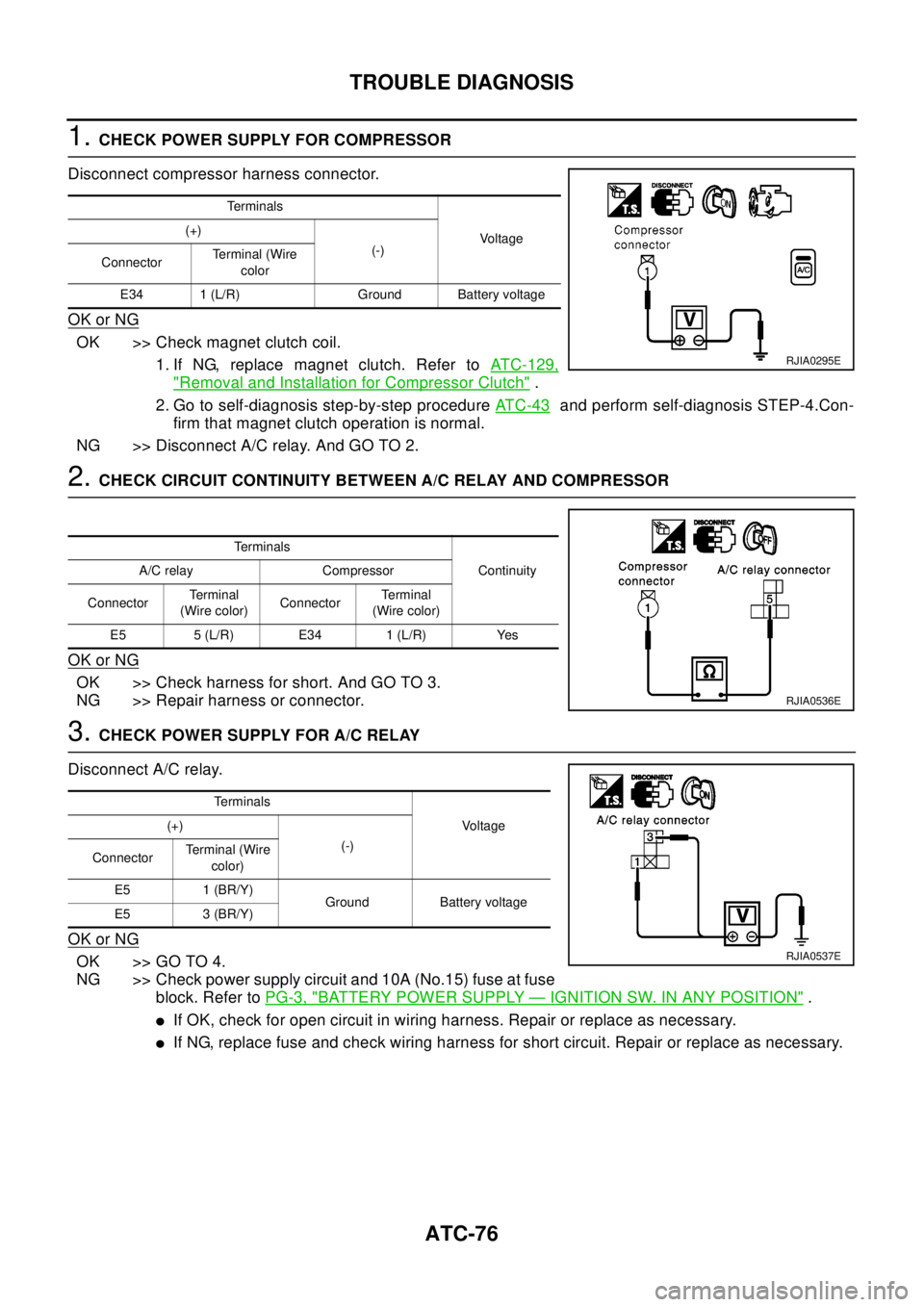
1.CHECK POWER SUPPLY FOR COMPRESSOR
Disconnect compressor harness connector.
OK or NG
OK >> Check magnet clutch coil.
1. If NG, replace magnet clutch. Refer toATC-129,
"Removal and Installation for Compressor Clutch".
2. Go to self-diagnosis step-by-step procedureAT C - 4 3
and perform self-diagnosis STEP-4.Con-
firm that magnet clutch operation is normal.
NG >>DisconnectA/Crelay.AndGOTO2.
2.CHECK CIRCUIT CONTINUITY BETWEEN A/C RELAY AND COMPRESSOR
OK or NG
OK >> Check harness for short. And GO TO 3.
NG >> Repair harness or connector.
3.CHECK POWER SUPPLY FOR A/C RELAY
Disconnect A/C relay.
OK or NG
OK >> GO TO 4.
NG >> Check power supply circuit and 10A (No.15) fuse at fuse
block. Refer toPG-3, "
BATTERY POWER SUPPLY—IGNITION SW. IN ANY POSITION".
lIf OK, check for open circuit in wiring harness. Repair or replace as necessary.
lIf NG, replace fuse and check wiring harness for short circuit. Repair or replace as necessary.
Te r m i n a l s
Vo l ta g e (+)
(-)
ConnectorTerminal (Wire
color
E34 1 (L/R) Ground Battery voltage
RJIA0295E
Te r m i n a l s
Continuity A/C relay Compressor
ConnectorTe r m i n a l
(Wire color)ConnectorTe r m i n a l
(Wire color)
E5 5 (L/R) E34 1 (L/R) Yes
RJIA0536E
Te r m i n a l s
Vo l ta g e (+)
(-)
ConnectorTerminal (Wire
color)
E5 1 (BR/Y)
Ground Battery voltage
E5 3 (BR/Y)
RJIA0537E
Page 725 of 3066

AUDIO
AV-3
C
D
E
F
G
H
I
J
L
MA
B
AV
AUDIOP F P : 2 8 111
System DescriptionEKS002F2
Refer to Owner's Manual for audio system operating instructions.
Power is supplied at all times
lthrough 15A fuse (No. 32, located in the fusible link and fuse block)
lto audio unit terminal 3
lto CD auto changer terminal 32.
With the ignition switch in the ACC or ON position, power is supplied
lthrough 10A fuse [No. 4, located in the fuse block (J/B)]
lto audio unit terminal 6,
lto CD auto changer terminal 36
Ground is supplied through the case of the audio unit.
Audio signals are supplied
lthrough audio unit terminals 5, 7, 9, 10, 11, 13, 15, 16
lto terminals 1 and 2 of front door speaker LH and RH,
lto terminals 1 and 2 of rear door speaker LH and RH and
lto terminals 1 and 2 of tweeter LH and RH (with 6 speakers)
NATS AUDIO LINK
Description
The link with the NATS IMMU implies that the audio unit can basically only be operated if connected to the
matching NATS IMMU to which the audio unit was initially fitted on the production line.
Since radio operation is impossible after the link with the NATS is disrupted theft of the audio unit is basically
useless since special equipment is required to reset the audio unit.
Initialization process for audio units that are linked to the NATS IMMU
New audio units will be delivered to the factories in the “NEW” state, i.e. ready to be linked with the vehicle's
NATS. When the audio unit in “NEW” state is first switched on at the factory, it will start up communication with
the vehicle's immobilizer control unit (IMMU) and send a code (the “audio unit Code”) to the IMMU. The IMMU
will then store this code, which is unique to each audio unit, in its (permanent) memory.
Upon receipt of the code by the IMMU, the NATS will confirm correct receipt of the audio unit code to the audio
unit. Hereafter, the audio unit will operate as normal.
During the initialization process, “NEW” is displayed on the audio unit display. Normally though, communica-
tion between audio unit and IMMU takes such a short time (300 ms) that the audio unit seems to switch on
directly without showing “NEW” on its display.
Normal operation
Each time the audio unit is switched on afterwards, the audio unit code will be verified between the audio unit
and the NATS before the audio unit becomes operational. During the code verification process, “WAIT” is
shown on the audio unit display. Again, the communication takes such a short time (300 ms) that the audio
unit seems to switch on directly without showing “WAIT” on its display.
When the radio is locked
In case of a audio unit being linked with the vehicle's NATS (immobilizer system), disconnection of the link
between the audio unit and the IMMU will cause the audio unit to switch into the lock (“SECURE”) mode in
which the audio unit is fully inoperative. Hence, repair of the audio unit is basically impossible, unless the
audio unit is reset to the “NEW” state for which special decoding equipment is required.
Clarion has provided their authorized service representatives with so called “decoder boxes” which can bring
the audio unit back to the “NEW” state, enabling the audio unit to be switched on after which repair can be car-
ried out. Subsequently, when the repaired audio unit is delivered to the final user again, it will be in the “NEW”
state to enable re-linking the audio unit to the vehicle's immobilizer system. As a result of the above, repair of
the audio unit can only be done by an authorized Clarion representative (when the owner of the vehicle
requests repair and can show personal identification).
Page 734 of 3066

AV-12
AUDIO
Trouble Diagnoses
EKS002F5
AUDIO UNIT
InspectionEKS002F6
AUDIO UNIT
All voltage inspections are made with:
lIgnition switch ON or ACC
lAudio unit ON
lAudio unit connected (If audio unit is removed for inspection, supply a ground to the case using a jumper
wire.)
ANTENNA
Using a jumper wire, clip an auxiliary ground between antenna and body.
lIf reception improves, check antenna ground (at body surface).
lIf reception does not improve, check main feeder cable for short circuit or open circuit.
Symptom Possible causes Repair order
Audio unit inoperative (no digital display
and no sound from speakers).1. 10A fuse
2. Poor audio unit case ground
3. Audio unit1. Check 10A fuse [No. 4, located
in fuse block (J/B)]. Turn ignition
switch ON and verify that battery
positive voltage is present at ter-
minal 6 of audio unit.
2. Check audio unit case ground.
3. Remove audio unit for repair.
Audio unit presets are lost when ignition
switch is turned OFF.1. 15A fuse
2. Audio unit1. Check 15A fuse [No. 32, located
in fuse block (J/B)] and verify
that battery positive voltage is
present at terminal 3 of audio
unit.
2. Remove audio unit for repair.
Individual rear speaker is noisy or inopera-
tive.1. Each speaker
2. Output circuit to each speaker1. Check speaker.
2. Check the output circuits to each
speaker between audio unit and
each speaker.
AM/FM stations are weak or noisy. 1. Roof antenna
2. Audio unit ground
3. Audio unit1. Check roof antenna.
2. Check audio unit ground condi-
tion.
3. Remove audio unit for repair.
Audio unit generates noise in AM and FM
modes with engine running.1. Poor audio unit ground
2. Loose or missing ground bonding straps
3. Ignition condenser or rear window defogger
noise suppressor condenser
4. Ignition coil or secondary wiring
5. Audio unit1. Check audio unit ground.
2. Check ground bonding straps.
3. Replace ignition condenser or
rear window defogger noise sup-
pressor condenser.
4. Check ignition coil and second-
ary wiring.
5. Remove audio unit for repair.
Audio unit generates noise in AM and FM
modes with accessories on (switch pops
and motor noise).1. Poor audio unit ground
2. Antenna
3. Accessory ground
4. Malfunctioning accessory1. Check audio unit ground.
2. Check antenna.
3. Check accessory ground.
4. Replace accessory.
Page 743 of 3066

TIME CONTROL UNIT
BCS-5
C
D
E
F
G
H
I
J
L
MA
B
BCS
Time Control Unit Inspection TableEKS002ZW
Te r m i n a l
No.Wire
colorConnections Operation conditionVo l ta g e
(Approxi-
mate values)
1 L/B Power source (Fuse) — 12V
3 L/Y Super lock actuator Door key cylinder switchFree 0V
Unlocked 12V
4G/RPassenger and rear doors lock
actuatorDoor lock/unlock switchFree 0V
Unlocked 12V
6 Y/R Super lock actuator Door key cylinder switchFree 0V
Locked 12V
10 W Power source (C/B) — 12V
11 L Driver's door lock actuator Door lock/unlock switchFree 0V
Unlocked 12V
14 R/B Door lock actuator Door lock/unlock switchFree 0V
Locked 12V
16 B Ground — 0V
17 G Ignition switch (ON) — 12V
18 W/L Ignition key switch (Insert) Key inserted®key removed from IGN key cylinder 12V®0V
19 R/L Lighting switch 1ST, 2ND position: ON®OFF 12V®0V
20 GY Door lock/Unlock switch Neutral®Locks 5V®0V
23 PU Door lock/Unlock switch Neutral®Unlocks 5V®0V
24 OR/L Door key cylinder switch OFF (Neutral)®ON (Locked) 5V®0V
25 W/L Door key cylinder switch OFF (Neutral)®ON (Unlocked) 5V®0V
26 R/Y Interior room lampWhen interior room lamp is operated using remote control-
ler (Lamp switch is “DOOR” position)12V®0V
27 G/W Rear window defogger relay OFF®ON (Ignition key is in “ON” position) 12V®0V
28 Y/G Driver door unlock sensor Driver door: Locked®Unlocked 5V®0V
29 Y/L Passenger door unlock sensor Passenger door: Locked®Unlocked 5V®0V
30 R Doorswitchdriverside OFF(closed)®ON (open) 5V®0V
31 R/W Passenger and rear doors switch OFF (closed)®ON (open) 5V®0V
32 OR Multi-remote control unitRemote controller lock button is pushed.
(Ignition switch is not at “ON” position)0V®5V
33 P/L Multi-remote control unitRemote controller unlock button is pushed.
(Ignition switch is not at “ON” position)0V®5V
35 LG/B Rear window defogger switch OFF®ON 5V®0V
Page 767 of 3066
POWERDOORLOCKSYSTEM
BL-23
C
D
E
F
G
H
J
K
L
MA
B
BL
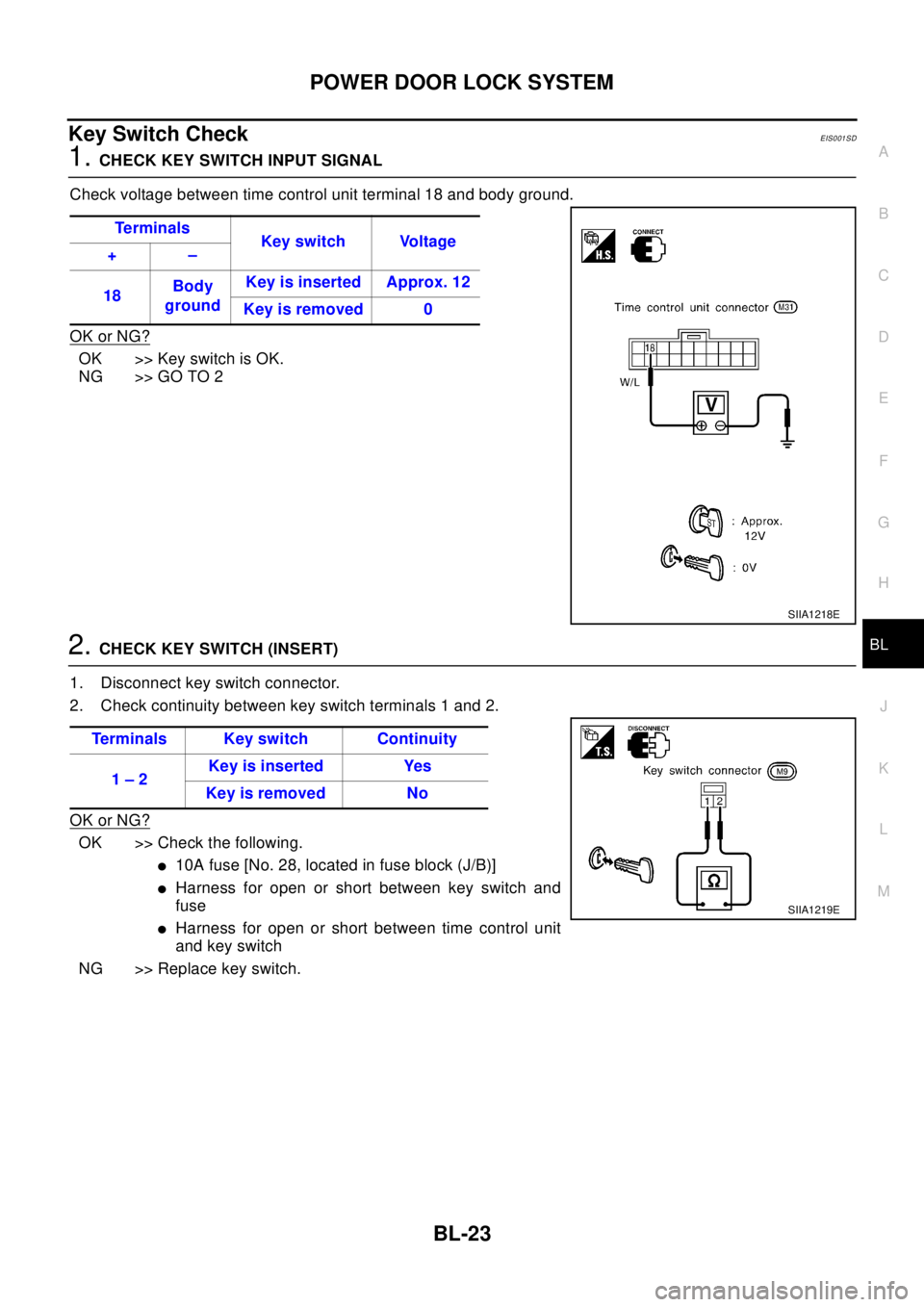
Key Switch CheckEIS001SD
1.CHECK KEY SWITCH INPUT SIGNAL
Check voltage between time control unit terminal 18 and body ground.
OK or NG?
OK >>KeyswitchisOK.
NG >> GO TO 2
2.CHECK KEY SWITCH (INSERT)
1. Disconnect key switch connector.
2. Check continuity between key switch terminals 1 and 2.
OK or NG?
OK >> Check the following.
l10A fuse [No. 28, located in fuse block (J/B)]
lHarness for open or short between key switch and
fuse
lHarness for open or short between time control unit
and key switch
NG >> Replace key switch.Te r m i n a l s
Key switch Voltage
+–
18Body
groundKey is inserted Approx. 12
Key is removed 0
SIIA1218E
Terminals Key switch Continuity
1–2Keyisinserted Yes
Keyisremoved No
SIIA1219E
Page 785 of 3066
POWER DOOR LOCK — SUPER LOCK —
BL-41
C
D
E
F
G
H
J
K
L
MA
B
BL
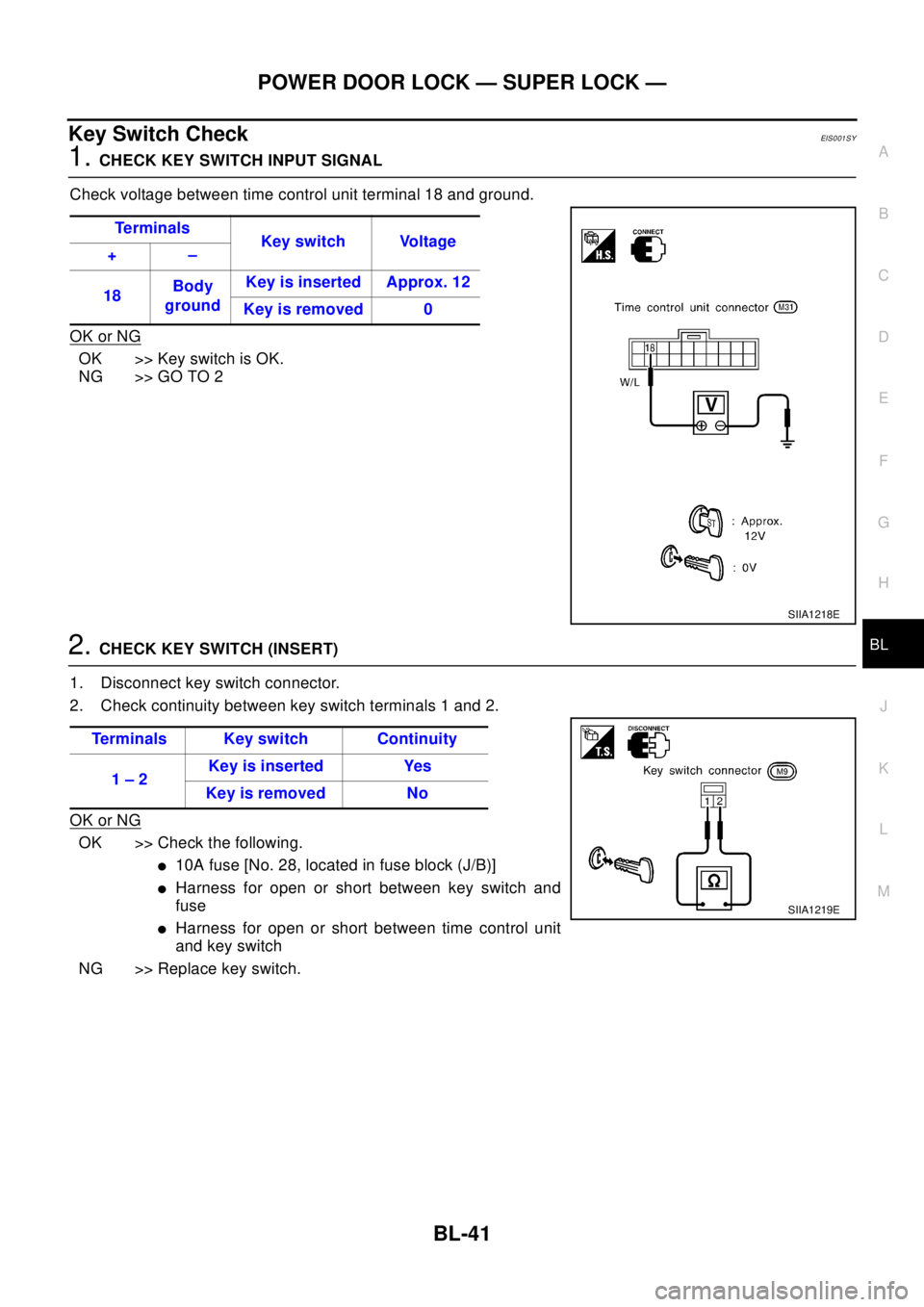
Key Switch CheckEIS001SY
1.CHECK KEY SWITCH INPUT SIGNAL
Check voltage between time control unit terminal 18 and ground.
OK or NG
OK >>KeyswitchisOK.
NG >> GO TO 2
2.CHECK KEY SWITCH (INSERT)
1. Disconnect key switch connector.
2. Check continuity between key switch terminals 1 and 2.
OK or NG
OK >> Check the following.
l10A fuse [No. 28, located in fuse block (J/B)]
lHarness for open or short between key switch and
fuse
lHarness for open or short between time control unit
and key switch
NG >> Replace key switch.Te r m i n a l s
Key switch Voltage
+–
18Body
groundKey is inserted Approx. 12
Key is removed 0
SIIA1218E
Terminals Key switch Continuity
1–2Keyisinserted Yes
Keyisremoved No
SIIA1219E