sensor NISSAN X-TRAIL 2003 Electronic Repair Manual
[x] Cancel search | Manufacturer: NISSAN, Model Year: 2003, Model line: X-TRAIL, Model: NISSAN X-TRAIL 2003Pages: 3066, PDF Size: 51.47 MB
Page 743 of 3066

TIME CONTROL UNIT
BCS-5
C
D
E
F
G
H
I
J
L
MA
B
BCS
Time Control Unit Inspection TableEKS002ZW
Te r m i n a l
No.Wire
colorConnections Operation conditionVo l ta g e
(Approxi-
mate values)
1 L/B Power source (Fuse) — 12V
3 L/Y Super lock actuator Door key cylinder switchFree 0V
Unlocked 12V
4G/RPassenger and rear doors lock
actuatorDoor lock/unlock switchFree 0V
Unlocked 12V
6 Y/R Super lock actuator Door key cylinder switchFree 0V
Locked 12V
10 W Power source (C/B) — 12V
11 L Driver's door lock actuator Door lock/unlock switchFree 0V
Unlocked 12V
14 R/B Door lock actuator Door lock/unlock switchFree 0V
Locked 12V
16 B Ground — 0V
17 G Ignition switch (ON) — 12V
18 W/L Ignition key switch (Insert) Key inserted®key removed from IGN key cylinder 12V®0V
19 R/L Lighting switch 1ST, 2ND position: ON®OFF 12V®0V
20 GY Door lock/Unlock switch Neutral®Locks 5V®0V
23 PU Door lock/Unlock switch Neutral®Unlocks 5V®0V
24 OR/L Door key cylinder switch OFF (Neutral)®ON (Locked) 5V®0V
25 W/L Door key cylinder switch OFF (Neutral)®ON (Unlocked) 5V®0V
26 R/Y Interior room lampWhen interior room lamp is operated using remote control-
ler (Lamp switch is “DOOR” position)12V®0V
27 G/W Rear window defogger relay OFF®ON (Ignition key is in “ON” position) 12V®0V
28 Y/G Driver door unlock sensor Driver door: Locked®Unlocked 5V®0V
29 Y/L Passenger door unlock sensor Passenger door: Locked®Unlocked 5V®0V
30 R Doorswitchdriverside OFF(closed)®ON (open) 5V®0V
31 R/W Passenger and rear doors switch OFF (closed)®ON (open) 5V®0V
32 OR Multi-remote control unitRemote controller lock button is pushed.
(Ignition switch is not at “ON” position)0V®5V
33 P/L Multi-remote control unitRemote controller unlock button is pushed.
(Ignition switch is not at “ON” position)0V®5V
35 LG/B Rear window defogger switch OFF®ON 5V®0V
Page 745 of 3066

BL-1
BODY, LOCK & SECURITY SYSTEM
IBODY
CONTENTS
C
D
E
F
G
H
J
K
L
M
SECTION
A
B
BL
BODY, LOCK & SECURITY SYSTEM
PRECAUTIONS .......................................................... 3
Precautions .............................................................. 3
HOOD ......................................................................... 4
Fitting Adjustment .................................................... 4
FRONT END HEIGHT ADJUSTMENT AND LAT-
ERAL/LONGITUDIAL CLEARANCE ADJUST-
MENT .................................................................... 4
SURFACE HEIGHT ADJUSTMENT ..................... 4
Removal and Installation of Hood Assembly ............ 5
Removal and Installation of Hood Lock Control ....... 6
REMOVAL ............................................................. 6
INSTALLATION ..................................................... 7
Hood Lock Control Inspection .................................. 7
DOOR ......................................................................... 8
Fitting Adjustment .................................................... 8
FRONT DOOR ...................................................... 8
REAR DOOR ........................................................ 8
STRIKER ADJUSTMENT ..................................... 9
Removal and Installation .......................................... 9
Door Weatherstrip .................................................. 10
POWER DOOR LOCK SYSTEM ...............................11
System Description .................................................11
OPERATION ........................................................11
Component Parts and Harness Connector Location....11
Schematic .............................................................. 12
Wiring Diagram — D/LOCK — ............................... 13
Terminal and Reference Value for Time Control Unit... 17
Symptom Chart ...................................................... 17
Power Supply and Ground Circuit Check ............... 18
Door Lock/Unlock Switch Check ............................ 18
Door Key Cylinder Switch Check ........................... 19
Door Lock Actuator Check ..................................... 20
Door Switch Check ................................................. 21
Door Unlock Sensor Check .................................... 22
Key Switch Check .................................................. 23
POWER DOOR LOCK — SUPER LOCK — ............ 24
System Description ................................................ 24
OUTLINE ............................................................. 24
OPERATION ....................................................... 24
Schematic .............................................................. 26Wiring Diagram — S/LOCK — ............................... 27
Terminal and Reference Value for Time Control Unit... 33
Trouble Diagnoses ................................................. 34
PRELIMINARY CHECK ....................................... 34
SYMPTOM CHART ............................................. 35
Power Supply and Ground Circuit Check ............... 36
Door Lock/Unlock Switch Check ............................ 36
Door Key Cylinder Switch Check ............................ 37
Door Lock Actuator Check ...................................... 38
Door Switch Check ................................................. 39
Door Unlock Sensor Check .................................... 40
Key Switch Check ................................................... 41
Super Lock Actuator Check .................................... 42
NATS Release Signal Check .................................. 43
Ignition Switch “ON” Circuit Check ......................... 44
Remote Controller Signal Check ............................ 44
MULTI-REMOTE CONTROL SYSTEM ..................... 45
Component Parts and Harness Connector Location... 45
System Description ................................................. 45
FUNCTION .......................................................... 45
LOCK OPERATION ............................................. 45
UNLOCK OPERATION ........................................ 46
HAZARD REMINDER ......................................... 46
MULTI-REMOTE CONTROLLER ID CODE
ENTRY ................................................................ 46
Wiring Diagram — MULTI — .................................. 47
Terminal and Reference Value for Multi-remote
Control Unit ............................................................. 49
Symptom Chart ....................................................... 49
Remote Controller Battery Check ........................... 49
Power Supply and Ground Circuit Check ............... 50
Hazard Reminder Check ........................................ 51
ID Code Entry Procedure ....................................... 52
Remote Controller Battery Replacement ................ 53
FRONT DOOR LOCK ............................................... 54
Component Parts Location ..................................... 54
Inspection and Adjustment ..................................... 54
OUT SIDE HANDLE ROD ADJUSTMENT .......... 54
Removal and Installation ........................................ 54
REMOVAL ........................................................... 54
Page 755 of 3066
POWERDOORLOCKSYSTEM
BL-11
C
D
E
F
G
H
J
K
L
MA
B
BL
POWER DOOR LOCK SYSTEMPFP:24814
System DescriptionEIS001SE
OPERATION
Power door lock/unlock operation by door key cylinder
lWith the key inserted into driver's door key cylinder, turning it to LOCK will lock all doors.
lWith the key inserted into driver's door key cylinder, turning it to UNLOCK will unlock all doors.
Power door lock/unlock operation by lock/unlock switch
lWith lock/unlock switch setting to LOCK will lock all doors.
lWith lock/unlock switch setting to UNLOCK will unlock all doors.
Key reminder system
lIf the ignition key is in the ignition key cylinder and driver door is open, setting lock/unlock switch, lock
knob, key or multi-remote controller to “LOCK” locks the door once but then immediately unlocks all doors.
(signal from door unlock sensor driver side)
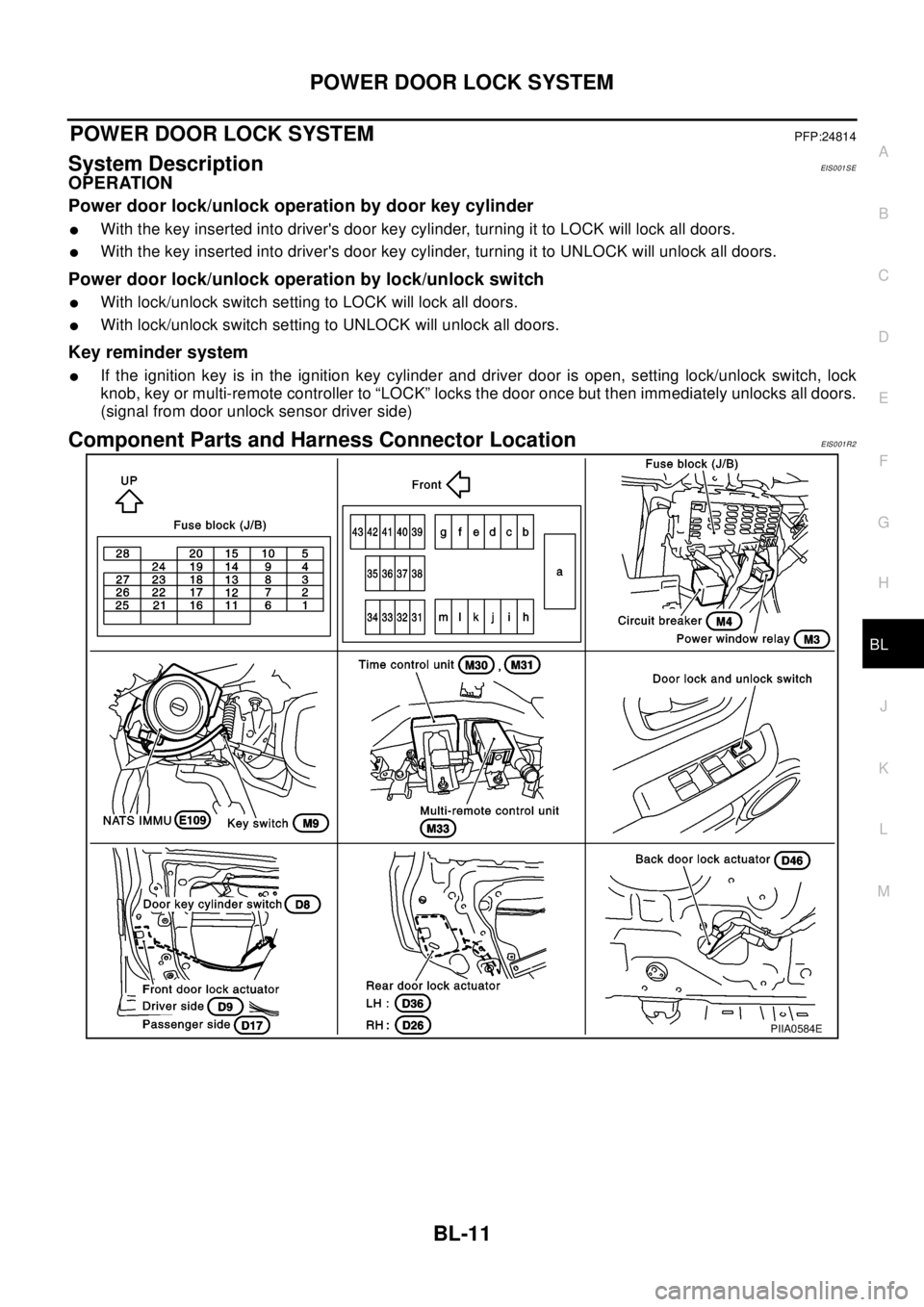
Component Parts and Harness Connector LocationEIS001R2
PIIA0584E
Page 761 of 3066
POWERDOORLOCKSYSTEM
BL-17
C
D
E
F
G
H
J
K
L
MA
B
BL
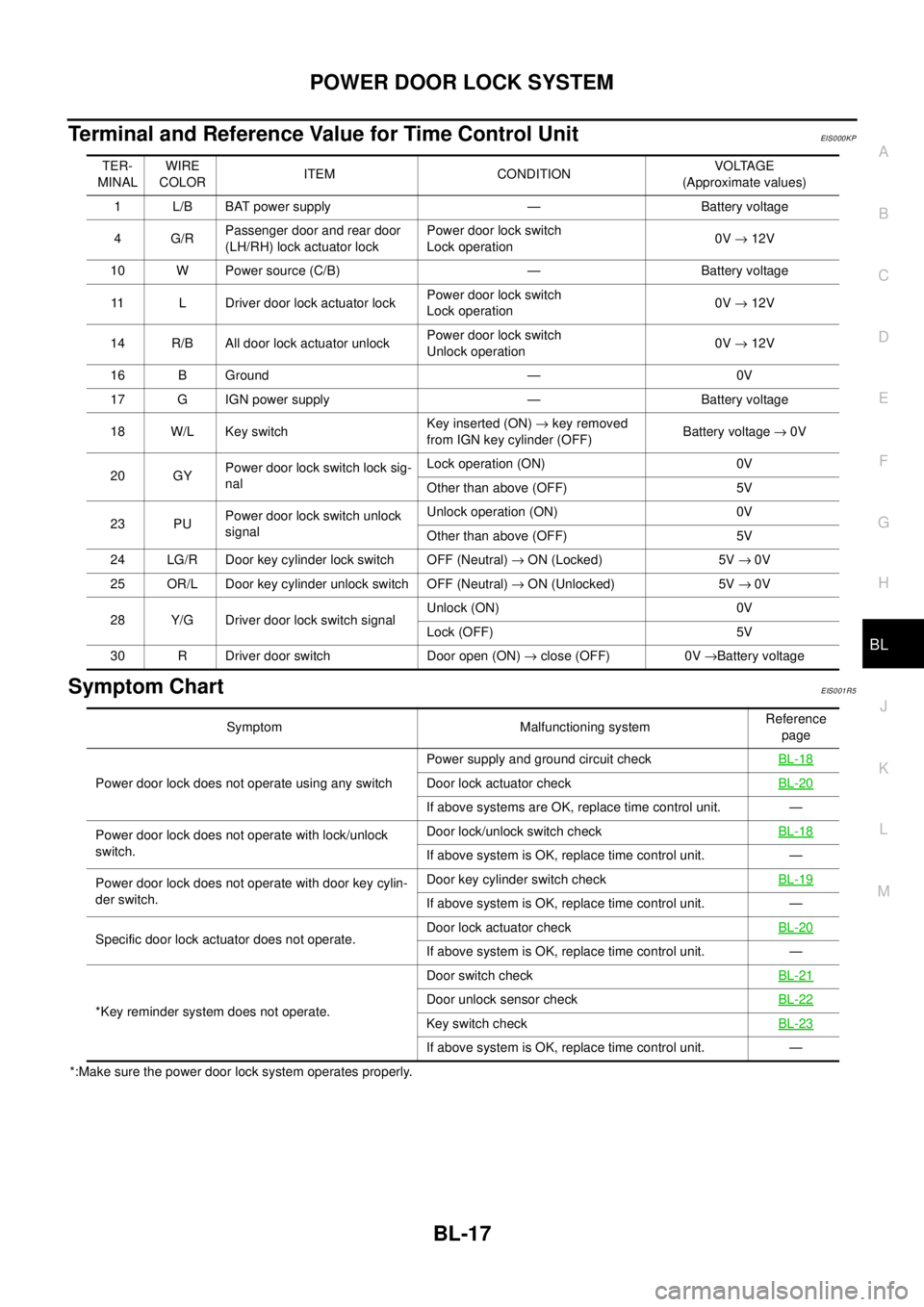
Terminal and Reference Value for Time Control UnitEIS000KP
Symptom ChartEIS001R5
*:Make sure the power door lock system operates properly.TER-
MINALWIRE
COLORITEM CONDITIONVOLTAGE
(Approximate values)
1 L/B BAT power supply — Battery voltage
4G/RPassenger door and rear door
(LH/RH) lock actuator lockPower door lock switch
Lock operation0V®12V
10 W Power source (C/B) — Battery voltage
11 L Driver door lock actuator lockPower door lock switch
Lock operation0V®12V
14 R/B All door lock actuator unlockPower door lock switch
Unlock operation0V®12V
16 B Ground — 0V
17 G IGN power supply — Battery voltage
18 W/L Key switchKey inserted (ON)®key removed
from IGN key cylinder (OFF)Battery voltage®0V
20 GYPower door lock switch lock sig-
nalLock operation (ON) 0V
Other than above (OFF) 5V
23 PUPower door lock switch unlock
signalUnlock operation (ON) 0V
Other than above (OFF) 5V
24 LG/R Door key cylinder lock switch OFF (Neutral)®ON (Locked) 5V®0V
25 OR/L Door key cylinder unlock switch OFF (Neutral)®ON (Unlocked) 5V®0V
28 Y/G Driver door lock switch signalUnlock (ON) 0V
Lock (OFF) 5V
30 R Driver door switch Door open (ON)®close (OFF) 0V®Battery voltage
Symptom Malfunctioning systemReference
page
Power door lock does not operate using any switchPower supply and ground circuit checkBL-18
Door lock actuator checkBL-20
If above systems are OK, replace time control unit. —
Power door lock does not operate with lock/unlock
switch.Door lock/unlock switch checkBL-18
If above system is OK, replace time control unit. —
Power door lock does not operate with door key cylin-
der switch.Door key cylinder switch checkBL-19
If above system is OK, replace time control unit. —
Specific door lock actuator does not operate.Door lock actuator checkBL-20
If above system is OK, replace time control unit. —
*Key reminder system does not operate.Door switch checkBL-21
Door unlock sensor checkBL-22
Key switch checkBL-23
If above system is OK, replace time control unit. —
Page 766 of 3066
BL-22
POWER DOOR LOCK SYSTEM
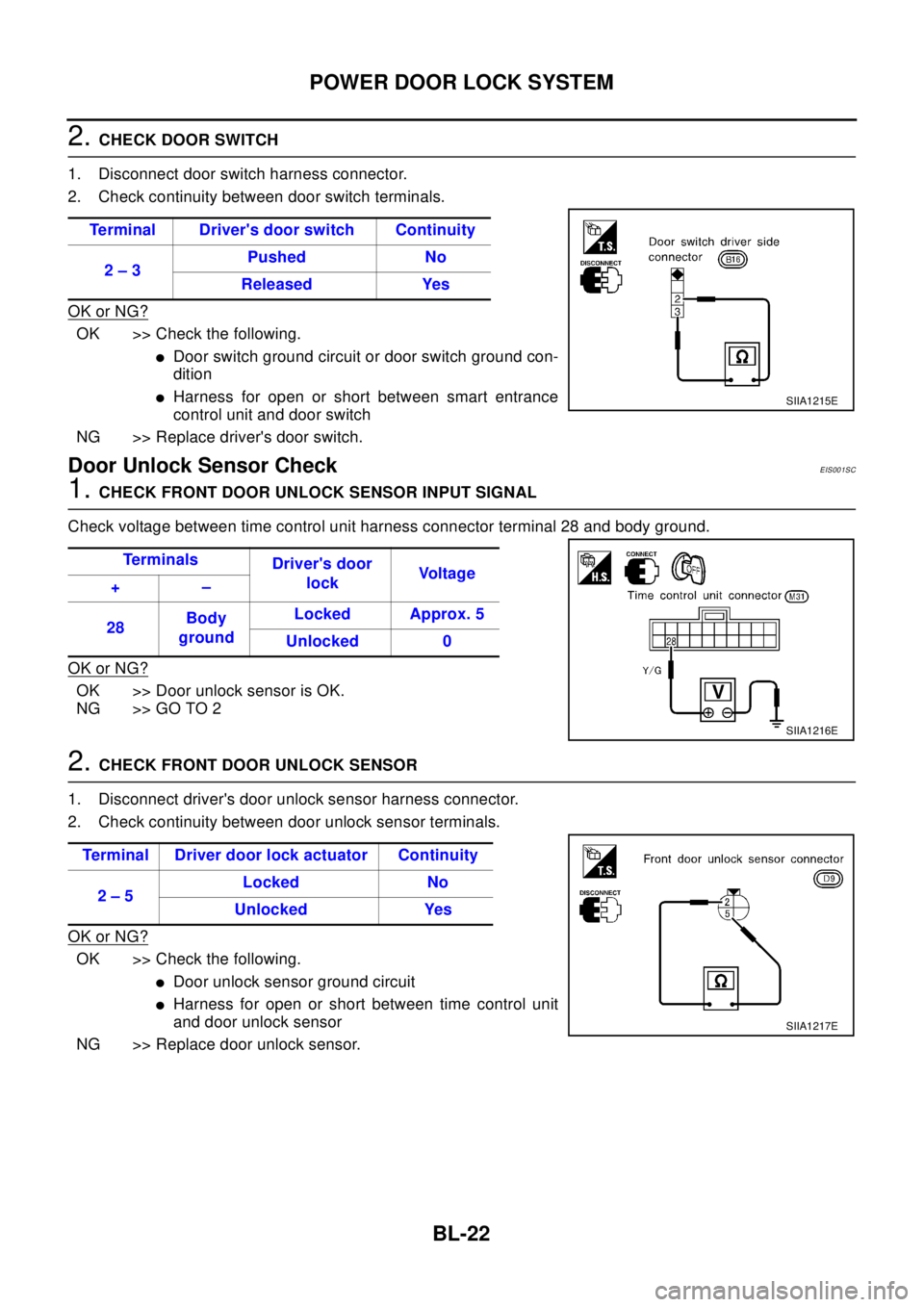
2.CHECK DOOR SWITCH
1. Disconnect door switch harness connector.
2. Check continuity between door switch terminals.
OK or NG?
OK >> Check the following.
lDoor switch ground circuit or door switch ground con-
dition
lHarness for open or short between smart entrance
control unit and door switch
NG >> Replace driver's door switch.
Door Unlock Sensor CheckEIS001SC
1.CHECK FRONT DOOR UNLOCK SENSOR INPUT SIGNAL
Check voltage between time control unit harness connector terminal 28 and body ground.
OK or NG?
OK >> Door unlock sensor is OK.
NG >> GO TO 2
2.CHECK FRONT DOOR UNLOCK SENSOR
1. Disconnect driver's door unlock sensor harness connector.
2. Check continuity between door unlock sensor terminals.
OK or NG?
OK >> Check the following.
lDoor unlock sensor ground circuit
lHarness for open or short between time control unit
and door unlock sensor
NG >> Replace door unlock sensor.Terminal Driver's door switch Continuity
2–3Pushed No
Released Yes
SIIA1215E
Te r m i n a l s
Driver's door
lockVo l t a g e
+–
28Body
groundLocked Approx. 5
Unlocked 0
SIIA1216E
Terminal Driver door lock actuator Continuity
2–5Locked No
Unlocked Yes
SIIA1217E
Page 769 of 3066

POWER DOOR LOCK — SUPER LOCK —
BL-25
C
D
E
F
G
H
J
K
L
MA
B
BL
Lock/unlock switch operation cannot control super lock
Key reminder system
lIf the ignition key is in the ignition key cylinder and driver door is open, setting lock/unlock switch, lock
knob, key or multi-remote controller to “LOCK” locks the door once but then immediately unlocks all doors.
(signal from door unlock sensor driver side)
System initialization
lSystem initialization is required when battery cables are reconnected. Conduct the following to release
super lock once;
–insert the key into the ignition key cylinder and turn it to ON.
–LOCK/UNLOCK operation using door key cylinder or multi-remote controller.
Page 779 of 3066
POWER DOOR LOCK — SUPER LOCK —
BL-35
C
D
E
F
G
H
J
K
L
MA
B
BL
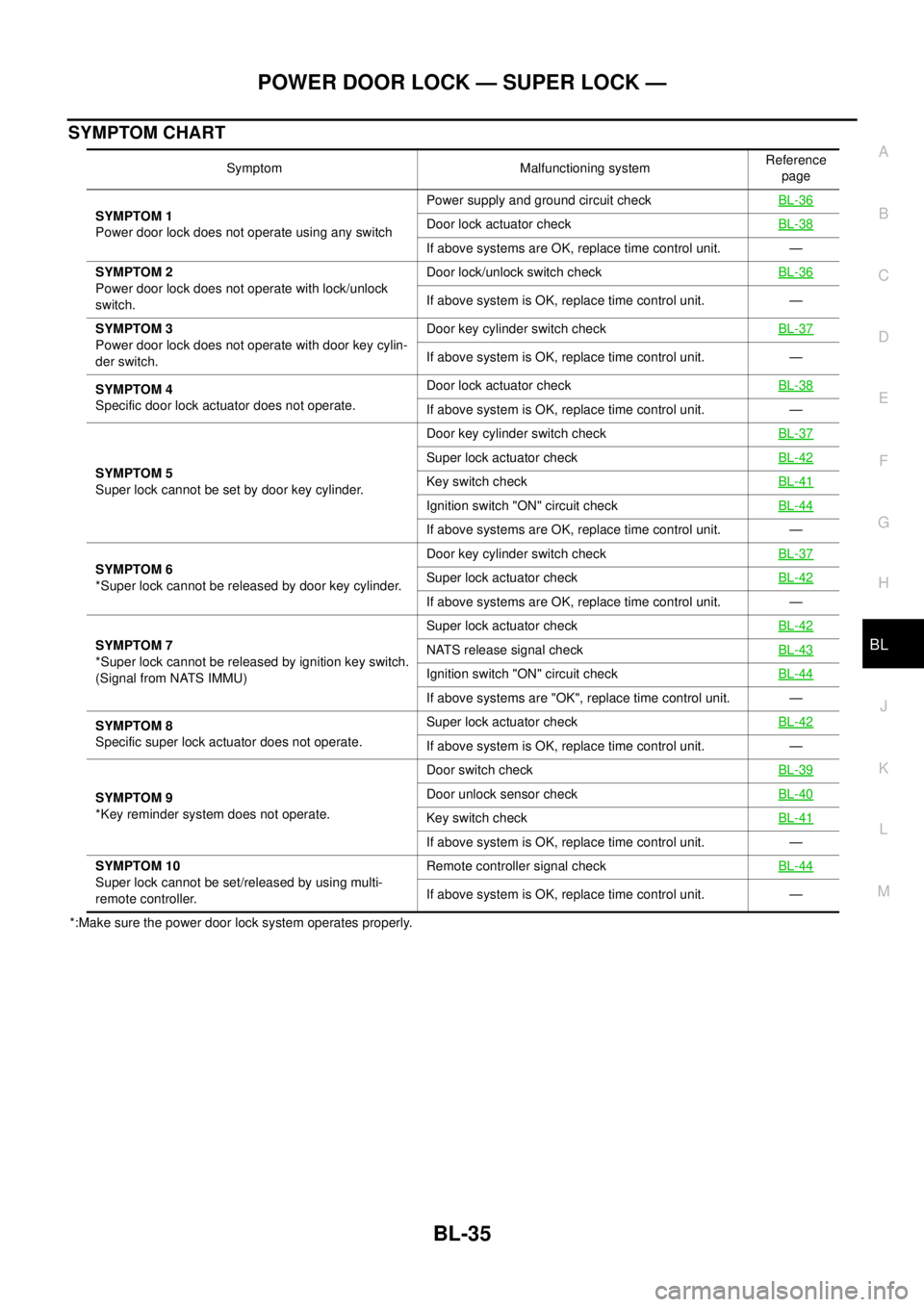
SYMPTOM CHART
*:Make sure the power door lock system operates properly.Symptom Malfunctioning systemReference
page
SYMPTOM 1
Power door lock does not operate using any switchPower supply and ground circuit checkBL-36
Door lock actuator checkBL-38
If above systems are OK, replace time control unit. —
SYMPTOM 2
Power door lock does not operate with lock/unlock
switch.Door lock/unlock switch checkBL-36
If above system is OK, replace time control unit. —
SYMPTOM 3
Power door lock does not operate with door key cylin-
der switch.Door key cylinder switch checkBL-37
If above system is OK, replace time control unit. —
SYMPTOM 4
Specific door lock actuator does not operate.Door lock actuator checkBL-38
If above system is OK, replace time control unit. —
SYMPTOM 5
Super lock cannot be set by door key cylinder.Door key cylinder switch checkBL-37
Super lock actuator checkBL-42
Key switch checkBL-41
Ignition switch "ON" circuit checkBL-44
If above systems are OK, replace time control unit. —
SYMPTOM 6
*Super lock cannot be released by door key cylinder.Door key cylinder switch checkBL-37
Super lock actuator checkBL-42
If above systems are OK, replace time control unit. —
SYMPTOM 7
*Super lock cannot be released by ignition key switch.
(Signal from NATS IMMU)Super lock actuator checkBL-42
NATS release signal checkBL-43
Ignition switch "ON" circuit checkBL-44
If above systems are "OK", replace time control unit. —
SYMPTOM 8
Specific super lock actuator does not operate.Super lock actuator checkBL-42
If above system is OK, replace time control unit. —
SYMPTOM 9
*Key reminder system does not operate.Door switch checkBL-39
Door unlock sensor checkBL-40
Key switch checkBL-41
If above system is OK, replace time control unit. —
SYMPTOM 10
Super lock cannot be set/released by using multi-
remote controller.Remote controller signal checkBL-44
If above system is OK, replace time control unit. —
Page 784 of 3066
BL-40
POWER DOOR LOCK — SUPER LOCK —
Door Unlock Sensor Check
EIS001SX
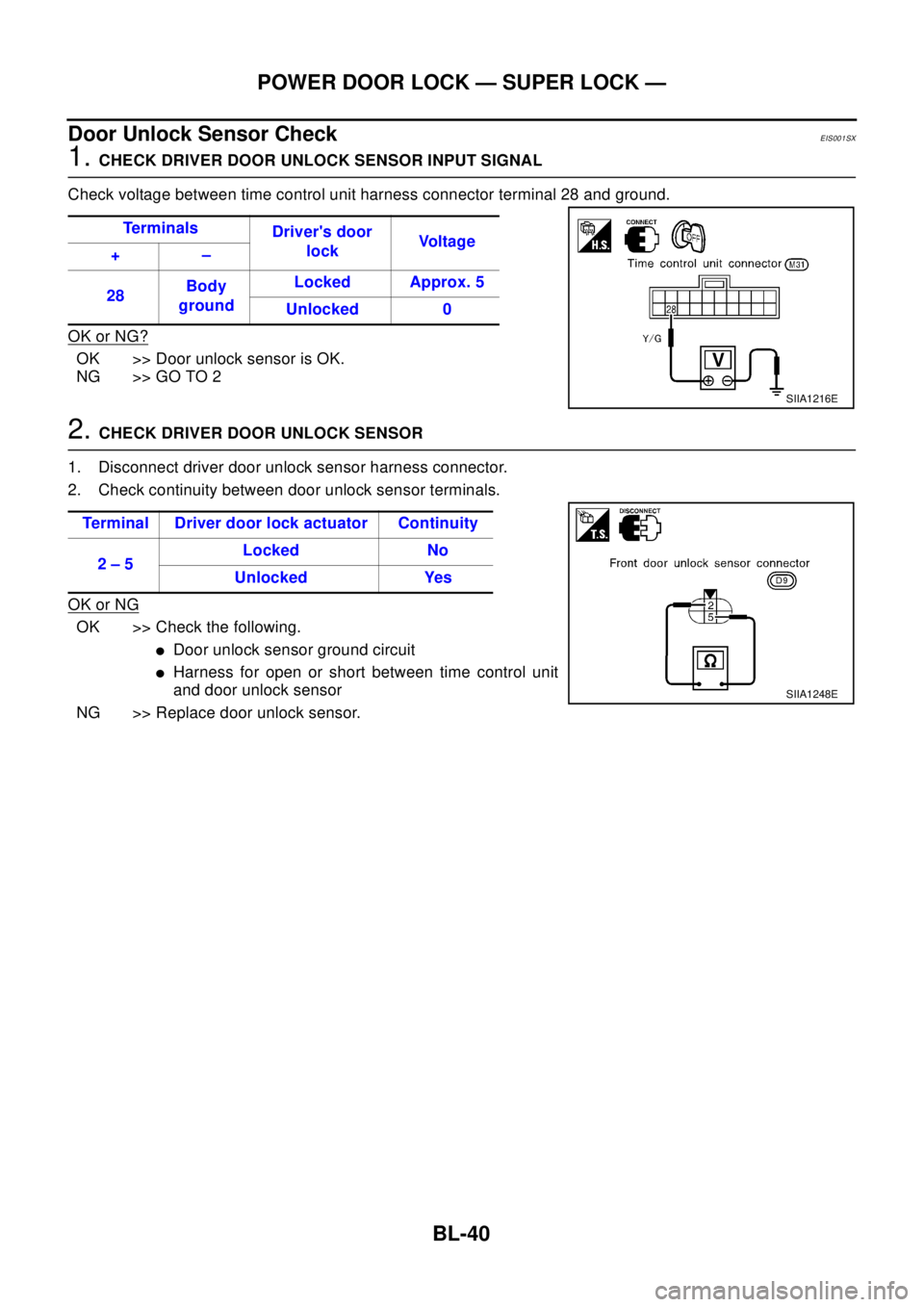
1.CHECK DRIVER DOOR UNLOCK SENSOR INPUT SIGNAL
Check voltage between time control unit harness connector terminal 28 and ground.
OK or NG?
OK >> Door unlock sensor is OK.
NG >> GO TO 2
2.CHECK DRIVER DOOR UNLOCK SENSOR
1. Disconnect driver door unlock sensor harness connector.
2. Check continuity between door unlock sensor terminals.
OK or NG
OK >> Check the following.
lDoor unlock sensor ground circuit
lHarness for open or short between time control unit
and door unlock sensor
NG >> Replace door unlock sensor.Te r m i n a l s
Driver's door
lockVo l t a g e
+–
28Body
groundLocked Approx. 5
Unlocked 0
SIIA1216E
Terminal Driver door lock actuator Continuity
2–5Locked No
Unlocked Yes
SIIA1248E
Page 790 of 3066

BL-46
MULTI-REMOTE CONTROL SYSTEM
lthrough multi-remote control unit terminal 5
lto time control unit terminal 32.
Then time control unit operates to lock doors and set super lock (models with super lock).
UNLOCK OPERATION
When the UNLOCK signal is input to multi-remote control unit (the antenna of the system is combined with
multi-remote control unit), ground is supplied
lthrough multi-remote control unit terminal 6
lto time control unit terminal 33.
Time control unit operates to unlock driver's door and release super lock (models with super lock).
Then, if an unlock signal is sent from the remote controller again within 5 seconds, all other doors will be
unlocked.
HAZARD REMINDER
When the doors are locked or unlocked by multi-remote controller (signal from driver side unlock sensor), sup-
ply power to hazard warning lamp flashes as follows
lLock operation: Flash once
lUnlock operation: Flash twice
MULTI-REMOTE CONTROLLER ID CODE ENTRY
A maximum of four remote controllers can be entered.
To enter ID code entry, the following signals must be input to the multi-remote control unit.
lIgnition switch (ON)
lSignal from remote controller
For detailed procedure, refer toBL-52, "
ID Code Entry Procedure".
Page 837 of 3066
PRECAUTIONS
BR-3
C
D
E
G
H
I
J
K
L
MA
B
BR
PRECAUTIONSPFP:00001
Precautions for Models with SRS Air Bag and Pre-Tensioner Seat BeltEFS000BY
WA RN ING:
lBefore removing and installing components and harnesses of SRS air bag and seat belt pre-ten-
sioner system, turn ignition switch OFF, disconnect battery ground cable, and wait at least 3 min-
utes. (This discharges electricity held in the air bag sensor unit's additional power circuit.)
lDo not use pneumatic or electric tools to remove and install the components.
lDo not solder SRS air bag and seat belt pre-tensioner system harnesses when making repairs.
Make sure harness is not pinched and there is no contact with other components.
lWhen checking the SRS air bag and the seat belt pre-tensioner circuit or the components of each
system, do not use an electric tester such as a circuit tester. (This is to prevent accidental trigger-
ing caused by the weak electric current of a tester.)
lNever insert foreign material (such as a screwdriver) in the air bag module and pre-tensioner seat
belt connectors. (The units may be actuated by mistake by static electricity.)
lSeat belt pre-tensioner and SRS air bag harnesses can be distinguished from other harnesses by
their yellow connectors.
lWhen servicing, refer to “SB Seat Belt” and “SRS Air Bag” for safety.
Precautions for Brake SystemEFS000BZ
lClean dust on brake pads, shoes, drums, and back plates with a vacuum dust collector. Do not blow with
compressed air.
lRecommended fluid is brake fluid “DOT 3” or “DOT 4”.
lNever reuse drained brake fluid.
lBe careful not to splash brake fluid on painted areas such as the body. If brake fluid is splashed or spilled
on paint, wipe it off and flush the area with water immediately.
lUse only clean brake fluid when cleaning master cylinder and disc brake components.
lNever use mineral oils such as gasoline or kerosene to clean. They will ruin the rubber parts and cause
improper operation.
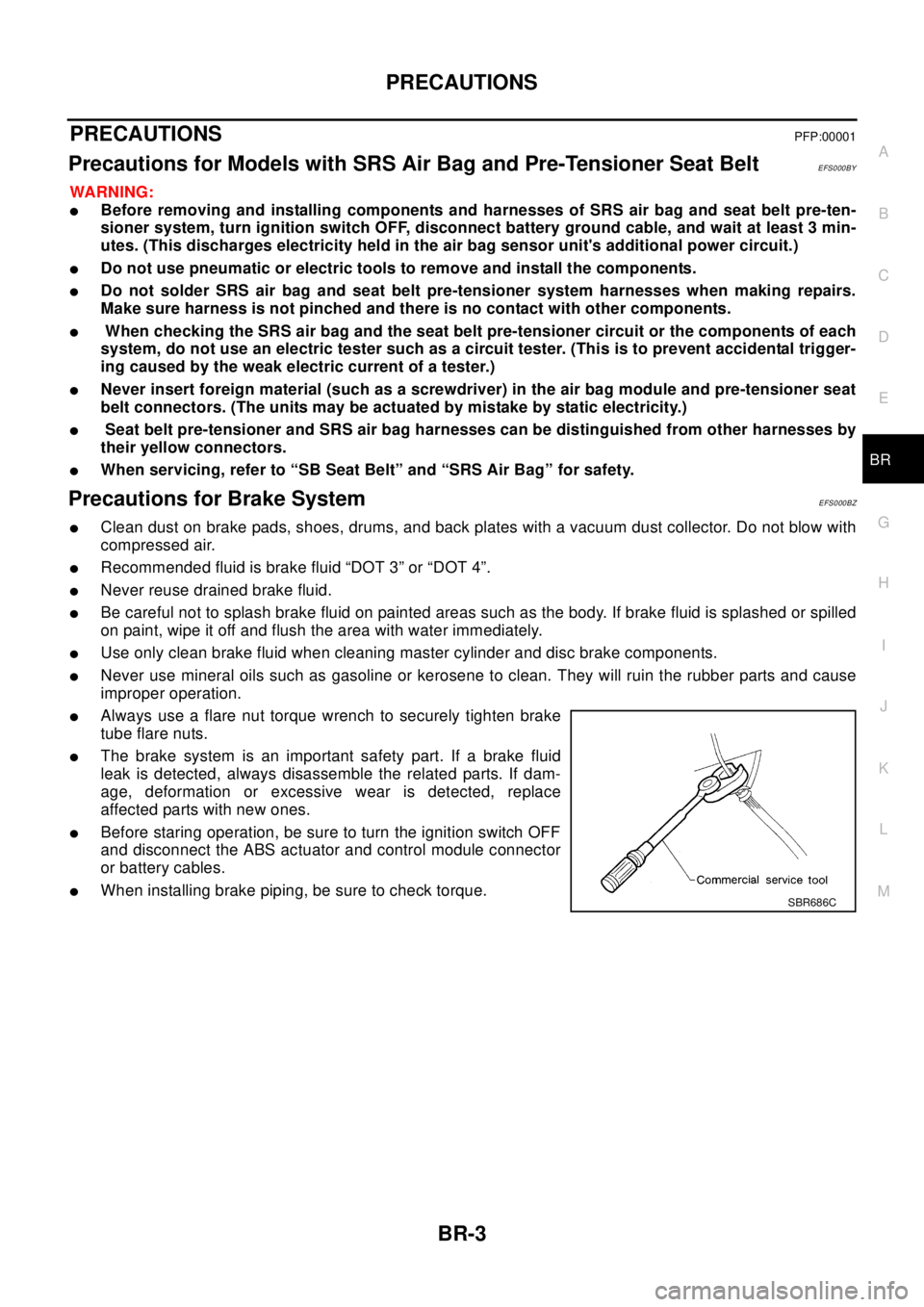
lAlways use a flare nut torque wrench to securely tighten brake
tube flare nuts.
lThe brake system is an important safety part. If a brake fluid
leak is detected, always disassemble the related parts. If dam-
age, deformation or excessive wear is detected, replace
affected parts with new ones.
lBefore staring operation, be sure to turn the ignition switch OFF
and disconnect the ABS actuator and control module connector
or battery cables.
lWhen installing brake piping, be sure to check torque.SBR686C