light NISSAN X-TRAIL 2003 Electronic Owner's Manual
[x] Cancel search | Manufacturer: NISSAN, Model Year: 2003, Model line: X-TRAIL, Model: NISSAN X-TRAIL 2003Pages: 3066, PDF Size: 51.47 MB
Page 485 of 3066
![NISSAN X-TRAIL 2003 Electronic Owners Manual DISASSEMBLY
AT-479
[ALL]
D
E
F
G
H
I
J
K
L
MA
B
AT
b. Remove side cover by lightly tapping it with a soft hammer.
lBe careful not to drop output shaft assembly. It might
come out when removing side co](/img/5/57402/w960_57402-484.png "NISSAN X-TRAIL 2003 Electronic Owners Manual DISASSEMBLY
AT-479
[ALL]
D
E
F
G
H
I
J
K
L
MA
B
AT
b. Remove side cover by lightly tapping it with a soft hammer.
lBe careful not to drop output shaft assembly. It might
come out when removing side co")
DISASSEMBLY
AT-479
[ALL]
D
E
F
G
H
I
J
K
L
MA
B
AT
b. Remove side cover by lightly tapping it with a soft hammer.
lBe careful not to drop output shaft assembly. It might
come out when removing side cover.
c. Remove adjusting shim.
d. Remove output shaft assembly.
lIf output shaft assembly came off with side cover, tap cover
with a soft hammer to separate.
SAT434D
SAT440D
SAT035F
SAT435D
Page 502 of 3066
![NISSAN X-TRAIL 2003 Electronic Owners Manual AT-496
[ALL]
REPAIR FOR COMPONENT PARTS
k. Install lower body on inter body using reamer boltsfas guides
and tighten reamer boltsfslightly.
2. Install O-rings to solenoid valves and terminal body.
lAp](/img/5/57402/w960_57402-501.png "NISSAN X-TRAIL 2003 Electronic Owners Manual AT-496
[ALL]
REPAIR FOR COMPONENT PARTS
k. Install lower body on inter body using reamer boltsfas guides
and tighten reamer boltsfslightly.
2. Install O-rings to solenoid valves and terminal body.
lAp")
AT-496
[ALL]
REPAIR FOR COMPONENT PARTS
k. Install lower body on inter body using reamer boltsfas guides
and tighten reamer boltsfslightly.
2. Install O-rings to solenoid valves and terminal body.
lApply ATF to O-rings.
3. Install and tighten bolts.
Bolt length, number and location:
SAT126DA
SCIA0804E
Bolt symbolabcde f g
Bolt length “ ” mm (in)
13.5
(0.531)58.0
(2.283)40.0
(1.575)66.0
(2.598)33.0
(1.299)78.0
(3.071)18.0
(0.709)
Number of bolts 6 3 6 11 2 2 1
SAT704J
Page 505 of 3066
![NISSAN X-TRAIL 2003 Electronic Owners Manual REPAIR FOR COMPONENT PARTS
AT-499
[ALL]
D
E
F
G
H
I
J
K
L
MA
B
AT
DISASSEMBLY
1. Remove valves at retainer plates.
lDo not use a magnetic pick-up tool.
a. Use a screwdriver to remove retainer plates.](/img/5/57402/w960_57402-504.png "NISSAN X-TRAIL 2003 Electronic Owners Manual REPAIR FOR COMPONENT PARTS
AT-499
[ALL]
D
E
F
G
H
I
J
K
L
MA
B
AT
DISASSEMBLY
1. Remove valves at retainer plates.
lDo not use a magnetic pick-up tool.
a. Use a screwdriver to remove retainer plates.")
REPAIR FOR COMPONENT PARTS
AT-499
[ALL]
D
E
F
G
H
I
J
K
L
MA
B
AT
DISASSEMBLY
1. Remove valves at retainer plates.
lDo not use a magnetic pick-up tool.
a. Use a screwdriver to remove retainer plates.
b. Remove retainer plates while holding spring, plugs or sleeves.
lRemove plugs slowly to prevent internal parts from jump-
ing out.
c. Place mating surface of valve body face down, and remove
internal parts.
lIf a valve is hard to remove, place valve body face down
and lightly tap it with a soft hammer.
lBe careful not to drop or damage valves and sleeves.
SAT551G
SAT553G
SAT554G
SAT137D
Page 548 of 3066
![NISSAN X-TRAIL 2003 Electronic Owners Manual AT-542
[ALL]
ASSEMBLY
9. Remove converter housing from transmission case.
10. Remove final drive assembly from transmission case.
11. Remove differential side bearing outer race from transmission
case](/img/5/57402/w960_57402-547.png "NISSAN X-TRAIL 2003 Electronic Owners Manual AT-542
[ALL]
ASSEMBLY
9. Remove converter housing from transmission case.
10. Remove final drive assembly from transmission case.
11. Remove differential side bearing outer race from transmission
case")
AT-542
[ALL]
ASSEMBLY
9. Remove converter housing from transmission case.
10. Remove final drive assembly from transmission case.
11. Remove differential side bearing outer race from transmission
case.
12. Reinstall differential side bearing outer race and shim(s)
selected from SDS table on transmission case.
13. Reinstall converter housing on transmission case and tighten
transmission case fixing bolts to the specified torque. Refer to
AT-461, "
OVERHAUL".
14. Insert Tool and measure turning torque of final drive assembly.
lTurn final drive assembly in both directions several times
to seat bearing rollers correctly.
lWhen old bearing is used again, turning torque will be
slightly less than the above.
lMake sure torque is close to the specified range.
REDUCTION PINION GEAR BEARING PRELOAD
1. Remove transmission case and final drive assembly from con-
verter housing.
2. Select proper thickness of reduction pinion gear bearing adjust-
ing shim using the following procedures.
a. Place reduction pinion gear on transmission case as shown.
b. Place idler gear bearing on transmission case.
c. Measure dimensions “B” “C” and “D” and calculate dimension
“A”.
SAT010FC
Turning torque of final drive assembly (New bearing) :
0.78 - 1.37 N-m (8.0 - 14.0 kg-cm, 6.9 - 12.2 in-lb)
Preload adapter : KV38105210
SAT188FA
SAT332DA
A=D-(B + C)
“A” : Distance between the surface of idler gear bear-
ing inner race and the adjusting shim mating
surface of reduction pinion gear.
SAT333DA
Page 590 of 3066
ATC-12
PREPARATION
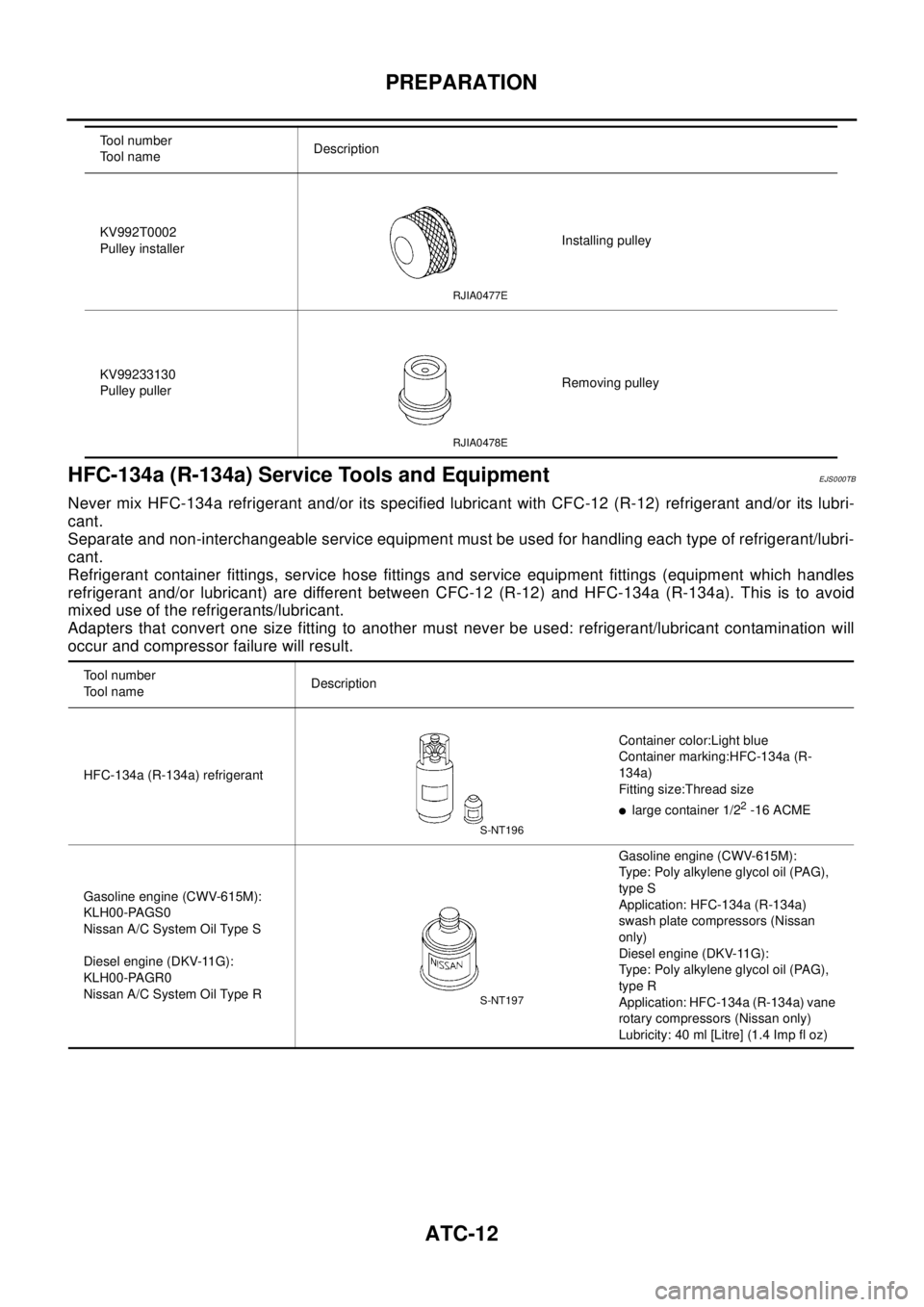
HFC-134a (R-134a) Service Tools and Equipment
EJS000TB
Never mix HFC-134a refrigerant and/or its specified lubricant with CFC-12 (R-12) refrigerant and/or its lubri-
cant.
Separate and non-interchangeable service equipment must be used for handling each type of refrigerant/lubri-
cant.
Refrigerant container fittings, service hose fittings and service equipment fittings (equipment which handles
refrigerant and/or lubricant) are different between CFC-12 (R-12) and HFC-134a (R-134a). This is to avoid
mixed use of the refrigerants/lubricant.
Adapters that convert one size fitting to another must never be used: refrigerant/lubricant contamination will
occur and compressor failure will result.
KV992T0002
Pulley installerInstalling pulley
KV99233130
Pulley pullerRemoving pulley Tool number
Tool nameDescription
RJIA0477E
RJIA0478E
Tool number
Tool nameDescription
HFC-134a (R-134a) refrigerantContainer color:Light blue
Container marking:HFC-134a (R-
134a)
Fitting size:Thread size
llarge container 1/22-16 ACME
Gasoline engine (CWV-615M):
KLH00-PAGS0
Nissan A/C System Oil Type S
Diesel engine (DKV-11G):
KLH00-PAGR0
Nissan A/C System Oil Type RGasoline engine (CWV-615M):
Type: Poly alkylene glycol oil (PAG),
type S
Application: HFC-134a (R-134a)
swash plate compressors (Nissan
only)
Diesel engine (DKV-11G):
Type: Poly alkylene glycol oil (PAG),
type R
Application: HFC-134a (R-134a) vane
rotary compressors (Nissan only)
Lubricity: 40 ml [Litre] (1.4 Imp fl oz)
S-NT196
S-NT197
Page 591 of 3066
PREPARATION
ATC-13
C
D
E
F
G
H
I
K
L
MA
B
AT C
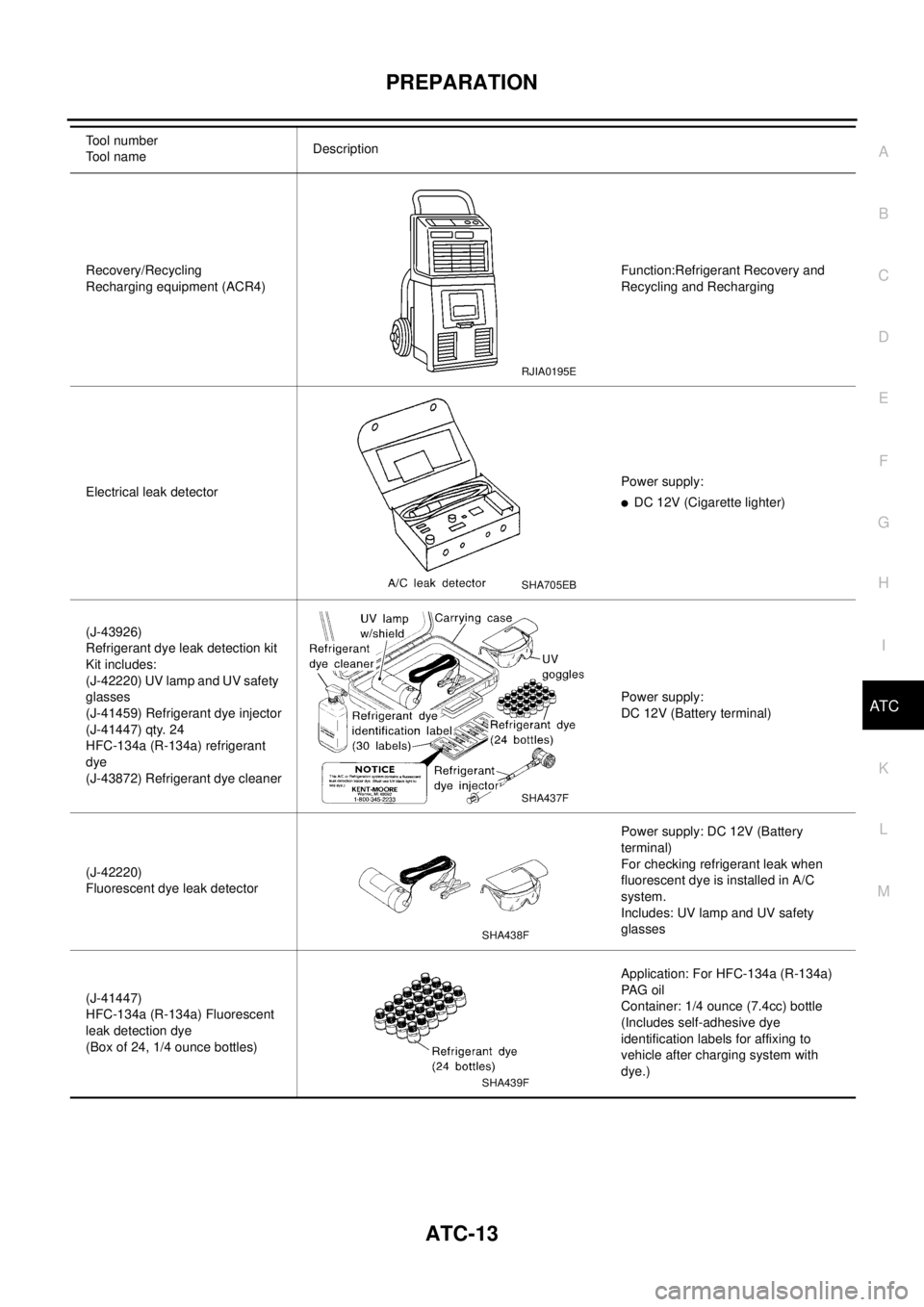
Recovery/Recycling
Recharging equipment (ACR4)Function:Refrigerant Recovery and
Recycling and Recharging
Electrical leak detectorPower supply:
lDC 12V (Cigarette lighter)
(J-43926)
Refrigerant dye leak detection kit
Kit includes:
(J-42220) UV lamp and UV safety
glasses
(J-41459) Refrigerant dye injector
(J-41447) qty. 24
HFC-134a (R-134a) refrigerant
dye
(J-43872) Refrigerant dye cleanerPower supply:
DC 12V (Battery terminal)
(J-42220)
Fluorescent dye leak detectorPower supply: DC 12V (Battery
terminal)
For checking refrigerant leak when
fluorescent dye is installed in A/C
system.
Includes: UV lamp and UV safety
glasses
(J-41447)
HFC-134a (R-134a) Fluorescent
leak detection dye
(Box of 24, 1/4 ounce bottles)Application: For HFC-134a (R-134a)
PA G o i l
Container: 1/4 ounce (7.4cc) bottle
(Includes self-adhesive dye
identification labels for affixing to
vehicle after charging system with
dye.) Tool number
To o l n a m eDescription
RJIA0195E
SHA705EB
SHA437F
SHA438F
SHA439F
Page 619 of 3066
TROUBLE DIAGNOSIS
ATC-41
C
D
E
F
G
H
I
K
L
MA
B
AT C
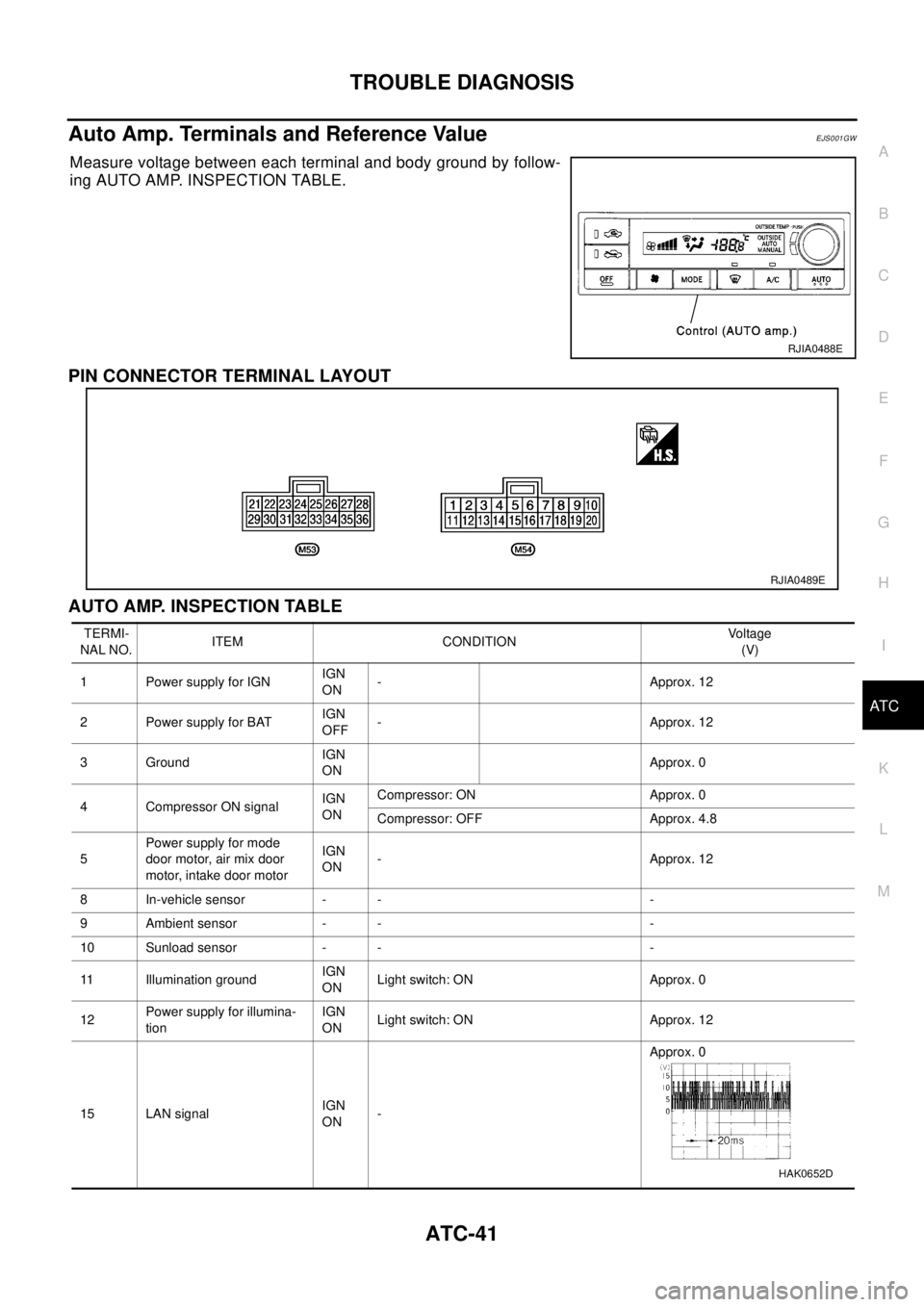
Auto Amp. Terminals and Reference ValueEJS001GW
Measure voltage between each terminal and body ground by follow-
ing AUTO AMP. INSPECTION TABLE.
PIN CONNECTOR TERMINAL LAYOUT
AUTO AMP. INSPECTION TABLE
RJIA0488E
RJIA0489E
TERMI-
NAL NO.ITEM CONDITIONVo l ta g e
(V)
1 Power supply for IGNIGN
ON- Approx. 12
2 Power supply for BATIGN
OFF- Approx. 12
3 GroundIGN
ONApprox. 0
4 Compressor ON signalIGN
ONCompressor: ON Approx. 0
Compressor: OFF Approx. 4.8
5Power supply for mode
door motor, air mix door
motor, intake door motorIGN
ON- Approx. 12
8 In-vehicle sensor - - -
9 Ambient sensor - - -
10 Sunload sensor - - -
11 Illumination groundIGN
ONLight switch: ON Approx. 0
12Power supply for illumina-
tionIGN
ONLight switch: ON Approx. 12
15 LAN signalIGN
ON-Approx. 0
HAK0652D
Page 626 of 3066
ATC-48
TROUBLE DIAGNOSIS
13.CHECK MALFUNCTIONING SENSOR
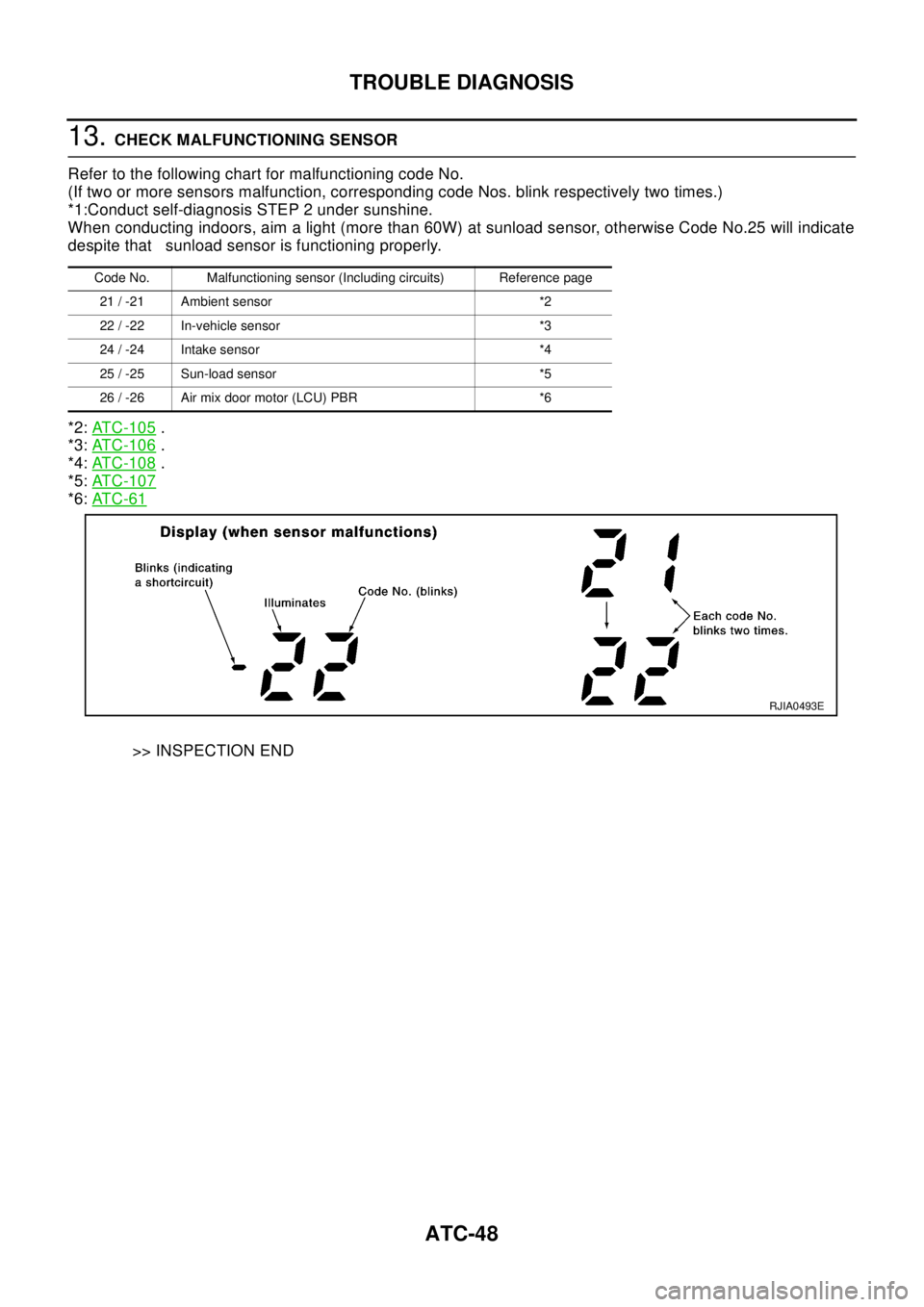
Refer to the following chart for malfunctioning code No.
(If two or more sensors malfunction, corresponding code Nos. blink respectively two times.)
*1:Conduct self-diagnosis STEP 2 under sunshine.
When conducting indoors, aim a light (more than 60W) at sunload sensor, otherwise Code No.25 will indicate
despite that sunload sensor is functioning properly.
*2:AT C - 1 0 5
.
*3:AT C - 1 0 6
.
*4:AT C - 1 0 8
.
*5:AT C - 1 0 7
*6:AT C - 6 1
>> INSPECTION END
Code No. Malfunctioning sensor (Including circuits) Reference page
21 / -21 Ambient sensor *2
22 / -22 In-vehicle sensor *3
24 / -24 Intake sensor *4
25 / -25 Sun-load sensor *5
26 / -26 Air mix door motor (LCU) PBR *6
RJIA0493E
Page 630 of 3066
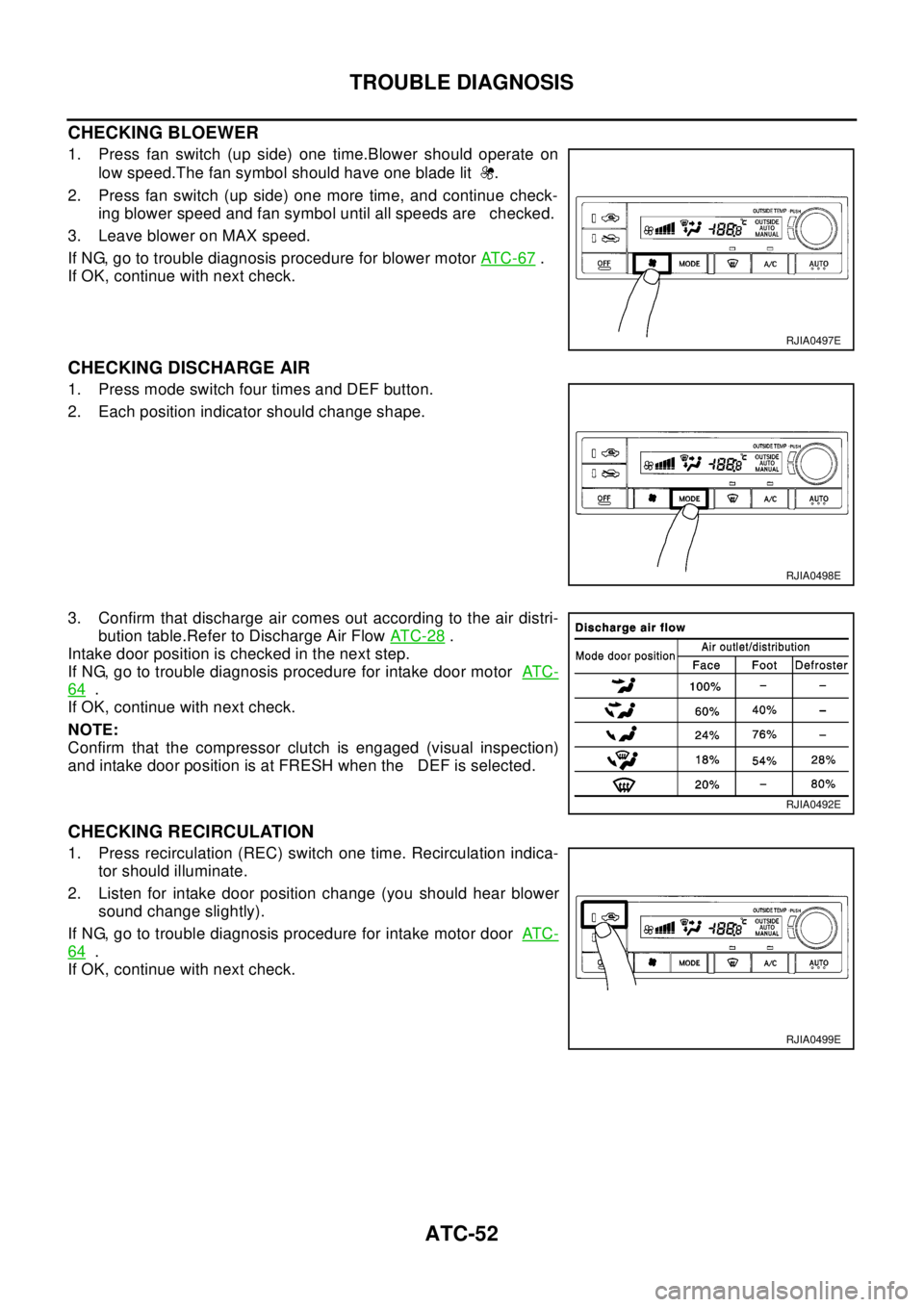
ATC-52
TROUBLE DIAGNOSIS
CHECKING BLOEWER
1. Press fan switch (up side) one time.Blower should operate on
low speed.The fan symbol should have one blade lit .
2. Press fan switch (up side) one more time, and continue check-
ing blower speed and fan symbol until all speeds are checked.
3. Leave blower on MAX speed.
If NG, go to trouble diagnosis procedure for blower motorAT C - 6 7
.
If OK, continue with next check.
CHECKING DISCHARGE AIR
1. Press mode switch four times and DEF button.
2. Each position indicator should change shape.
3. Confirm that discharge air comes out according to the air distri-
bution table.Refer to Discharge Air FlowAT C - 2 8
.
Intake door position is checked in the next step.
If NG, go to trouble diagnosis procedure for intake door motorAT C -
64.
If OK, continue with next check.
NOTE:
Confirm that the compressor clutch is engaged (visual inspection)
and intake door position is at FRESH when the DEF is selected.
CHECKING RECIRCULATION
1. Press recirculation (REC) switch one time. Recirculation indica-
tor should illuminate.
2. Listen for intake door position change (you should hear blower
sound change slightly).
If NG, go to trouble diagnosis procedure for intake motor doorAT C -
64.
If OK, continue with next check.
RJIA0497E
RJIA0498E
RJIA0492E
RJIA0499E
Page 666 of 3066
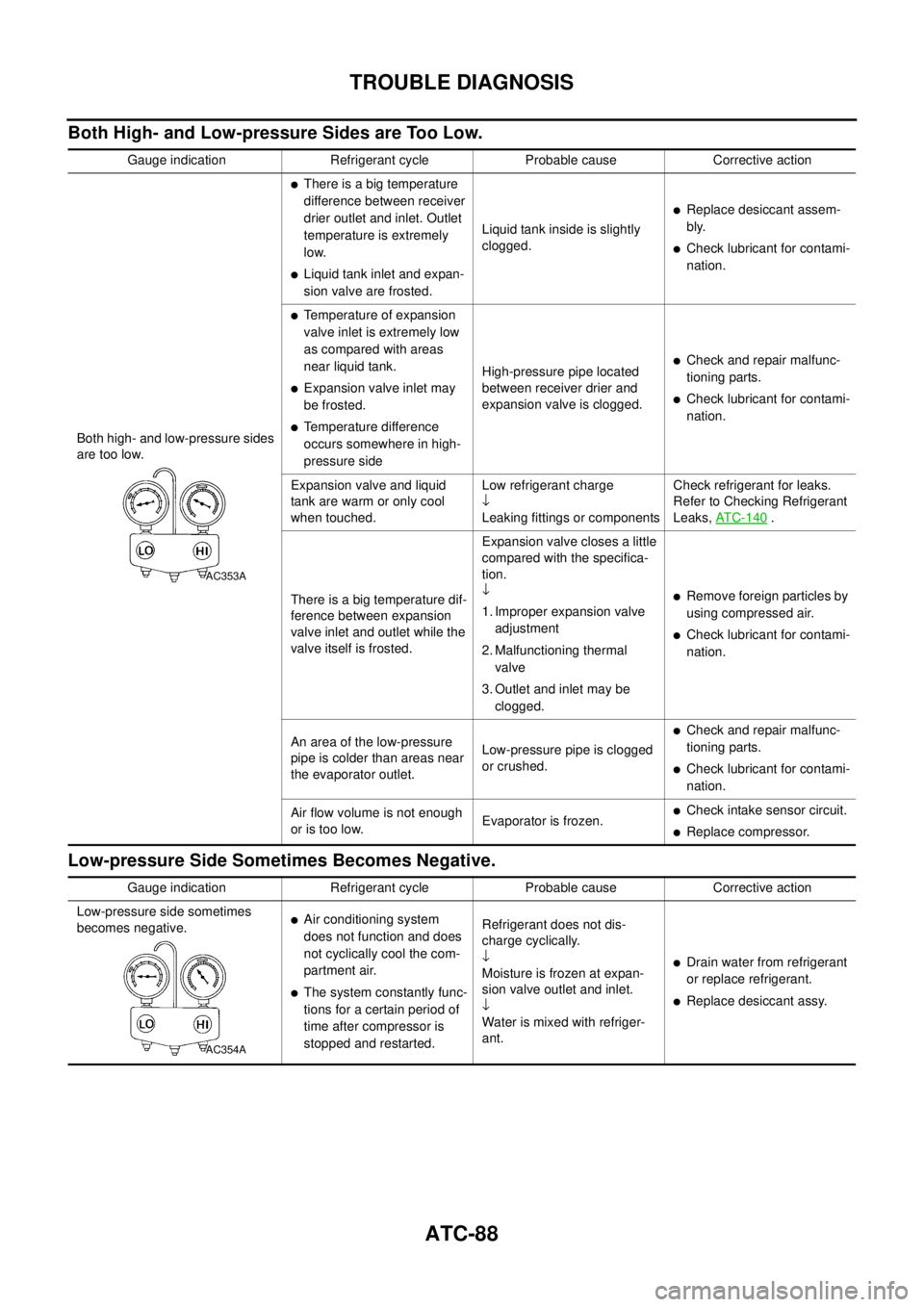
ATC-88
TROUBLE DIAGNOSIS
Both High- and Low-pressure Sides are Too Low.
Low-pressure Side Sometimes Becomes Negative.
Gauge indication Refrigerant cycle Probable cause Corrective action
Both high- and low-pressure sides
are too low.
lThere is a big temperature
difference between receiver
drier outlet and inlet. Outlet
temperature is extremely
low.
lLiquid tank inlet and expan-
sion valve are frosted.Liquid tank inside is slightly
clogged.
lReplace desiccant assem-
bly.
lCheck lubricant for contami-
nation.
lTemperature of expansion
valve inlet is extremely low
as compared with areas
near liquid tank.
lExpansion valve inlet may
be frosted.
lTemperature difference
occurs somewhere in high-
pressure sideHigh-pressure pipe located
between receiver drier and
expansion valve is clogged.
lCheck and repair malfunc-
tioning parts.
lCheck lubricant for contami-
nation.
Expansion valve and liquid
tank are warm or only cool
when touched.Low refrigerant charge
¯
Leaking fittings or componentsCheck refrigerant for leaks.
Refer to Checking Refrigerant
Leaks,AT C - 1 4 0
.
There is a big temperature dif-
ference between expansion
valve inlet and outlet while the
valve itself is frosted.Expansion valve closes a little
compared with the specifica-
tion.
¯
1. Improper expansion valve
adjustment
2. Malfunctioning thermal
valve
3. Outlet and inlet may be
clogged.
lRemove foreign particles by
using compressed air.
lCheck lubricant for contami-
nation.
An area of the low-pressure
pipe is colder than areas near
the evaporator outlet.Low-pressure pipe is clogged
or crushed.
lCheck and repair malfunc-
tioning parts.
lCheck lubricant for contami-
nation.
Air flow volume is not enough
or is too low.Evaporator is frozen.
lCheck intake sensor circuit.
lReplace compressor.
AC353A
Gauge indication Refrigerant cycle Probable cause Corrective action
Low-pressure side sometimes
becomes negative.
lAir conditioning system
does not function and does
not cyclically cool the com-
partment air.
lThe system constantly func-
tions for a certain period of
time after compressor is
stopped and restarted.Refrigerant does not dis-
charge cyclically.
¯
Moisture is frozen at expan-
sion valve outlet and inlet.
¯
Water is mixed with refriger-
ant.
lDrain water from refrigerant
or replace refrigerant.
lReplace desiccant assy.
AC354A