audio Peugeot Bipper 2015 User Guide
[x] Cancel search | Manufacturer: PEUGEOT, Model Year: 2015, Model line: Bipper, Model: Peugeot Bipper 2015Pages: 192, PDF Size: 7.97 MB
Page 94 of 192
2 1
92
Bipper_en_Chap05_technologie_ed02-2014
CD
PLAYING A CD OR AN MP3 COMPILATION
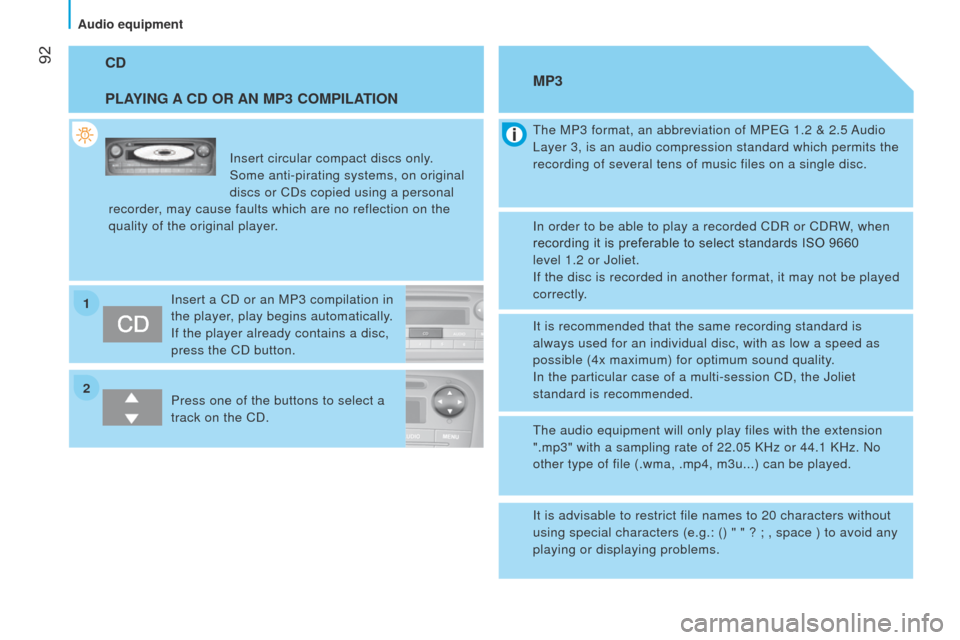
Insert circular compact discs only.
Some anti-pirating systems, on original
discs or CDs copied using a personal
recorder, may cause faults which are no reflection on the
quality of the original player.
Insert a CD or an MP3 compilation in
the player, play begins automatically.
If the player already contains a disc,
press the CD button.
Press one of the buttons to select a
track on the CD.
t
he MP3 format, an abbreviation of MP eg 1.2 & 2.5 Audio l
ayer 3, is an audio compression standard which permits the
recording of several tens of music files on a single disc.
MP3
In order to be able to play a recorded CDR or CDRW, when
recording it is preferable to select standards ISO 9660
level
1.2 or Joliet.
If the disc is recorded in another format, it may not be played
correctly.
It is recommended that the same recording standard is
always used for an individual disc, with as low a speed as
possible (4x maximum) for optimum sound quality.
In the particular case of a multi-session CD, the Joliet
standard is recommended.
t
he audio equipment will only play files with the extension
".mp3" with a sampling rate of 22.05 KHz or 44.1 KHz. No
other type of file (.wma, .mp4, m3u...) can be played.
It is advisable to restrict file names to 20 characters without
using special characters (e.g.: () " " ? ; , space ) to avoid any
playing or displaying problems.
Audio equipment
Page 95 of 192
93
Bipper_en_Chap05_technologie_ed02-2014
INTRODUCTION
this system allows you to:
-
send and receive calls via the Bluetooth® connection with your mobile telephone,
-
display the names of your contacts and numbers from the directory of you\
r mobile phone in the instrument panel screen,
-
use voice commands to make a call and manage your contacts while keeping\
both hands on the steering wheel,
-
hear your text messages via the voice synthesiser built into the system,\
-
listen to MP3, WMA,
AAC, M4A, MP4 and WAV audio files from a u SB storage device,
-
display information on the track being played in the radio screen (titl\
e, artist, etc…),
-
control vocally a portable music player (iPod® type),
-
recharge your portable music player (iPod® type) via the uSB port.
BLUETOOTH HANDS-FREE SYSTEM
K
EY
Indicates that a long press is required to start the action described.
Voice mode
Speak the designated voice command clearly and distinctly. Requires a press on the steering mounted "voice" control before speaking\
the desired voice command.
teCHNOlOgY on BOARD
Bluetooth hands-free system
5
Page 97 of 192
95
Bipper_en_Chap05_technologie_ed02-2014
PRESENTATION
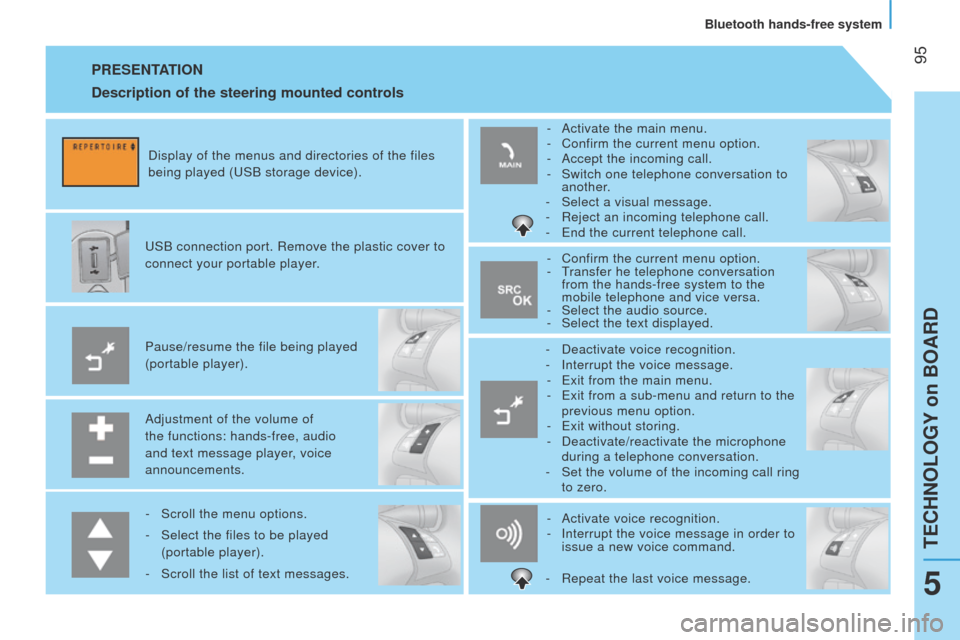
Adjustment of the volume of
the functions: hands-free, audio
and text message player, voice
announcements. Pause/resume the file being played
(portable player).
u
SB connection port. Remove the plastic cover to
connect your portable player. Display of the menus and directories of the files
being played ( u SB storage device).
-
Scroll the menu options.
-
Select the files to be played
(portable player).
-
Scroll the list of text messages. -
Activate voice recognition.
-
Interrupt the voice message in order to
issue a new voice command.
-
Deactivate voice recognition.
-
Interrupt the voice message.
-
e xit from the main menu.
- e xit from a sub-menu and return to the
previous menu option.
- e xit without storing.
-
Deactivate/reactivate the microphone
during a telephone conversation.
-
Set the volume of the incoming call ring
to zero.
-
Confirm the current menu option.
-
t
ransfer he telephone conversation
from the hands-free system to the
mobile telephone and vice versa.
-
Select the audio source.
-
Select the text displayed.
-
Activate the main menu.
-
Confirm the current menu option.
-
Accept the incoming call.
-
Switch one telephone conversation to
another.
-
Select a visual message.
-
Reject an incoming telephone call.
-
e nd the current telephone call.
Description of the steering mounted controls
- Repeat the last voice message.
teCHNOlOgY on BOARD
Bluetooth hands-free system
5
Page 102 of 192
100
Bipper_en_Chap05_technologie_ed02-2014
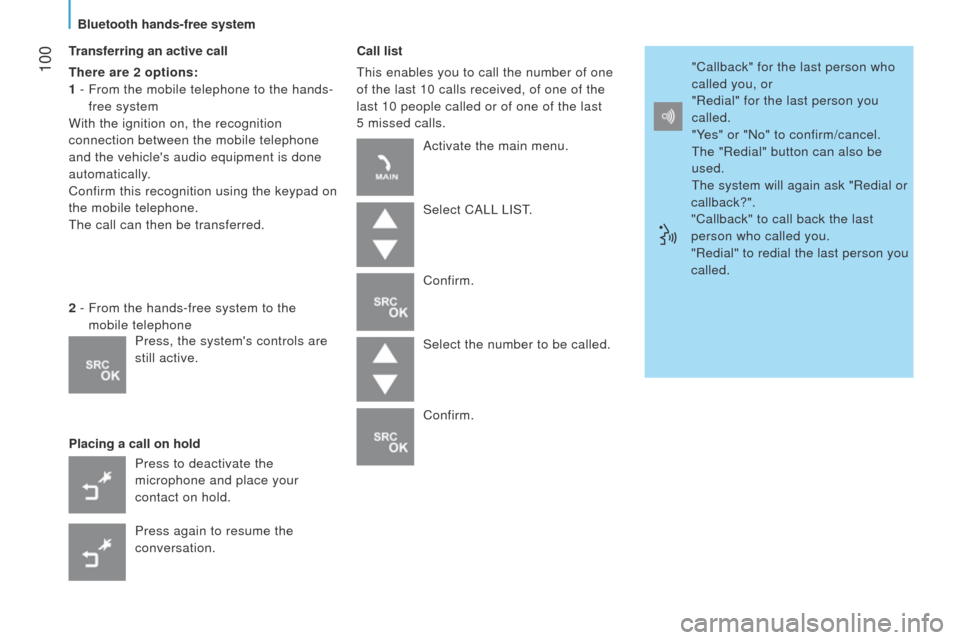
Transferring an active call
There are 2 options:
1 -
From the mobile telephone to the hands-
free system
With the ignition on, the recognition
connection between the mobile telephone
and the vehicle's audio equipment is done
automatically.
Confirm this recognition using the keypad on
the mobile telephone.
t
he call can then be transferred.
Placing a call on hold Call list
t
his enables you to call the number of one
of the last 10 calls received, of one of the
last 10 people called or of one of the last
5
missed calls.
2 -
From the hands-free system to the
mobile telephone
Press to deactivate the
microphone and place your
contact on hold.
Press again to resume the
conversation. Activate the main menu.
Select CA
ll
l IS t
.
Confirm.
Select the number to be called.
Confirm. "Callback" for the last person who
called you, or
"Redial" for the last person you
called.
"Yes" or "No" to confirm/cancel.
t
he "Redial" button can also be
used.
t
he system will again ask "Redial or
callback?".
"Callback" to call back the last
person who called you.
"Redial" to redial the last person you
called.
Press, the system's controls are
still active.
Bluetooth hands-free system
Page 106 of 192
104
Bipper_en_Chap05_technologie_ed02-2014
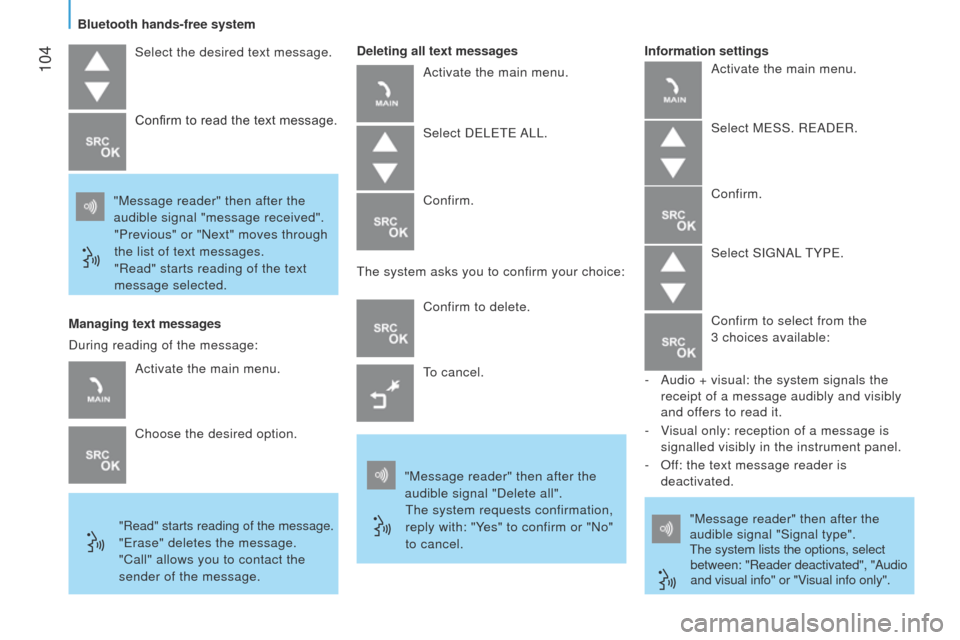
Select the desired text message.
"Message reader" then after the
audible signal "message received". "Previous" or "Next" moves through
the list of text messages.
"Read" starts reading of the text
message selected. Confirm to read the text message.
Managing text messages
"Read" starts reading of the message.
"erase" deletes the message.
"Call" allows you to contact the
sender of the message. Deleting all text messages
Activate the main menu.
Select D elete A ll .
Confirm.
t
he system asks you to confirm your choice:
Confirm to delete.
to cancel.
"Message reader" then after the
audible signal "Delete all".
t
he system requests confirmation,
reply with: "Yes" to confirm or "No"
to cancel. "Message reader" then after the
audible signal "Signal type".t
he system lists the options, select
between: "Reader deactivated", "Audio
and visual info" or "Visual info only".
Information settings
Activate the main menu.
Choose the desired option.
During reading of the message: Activate the main menu.
Select M e SS. R e AD e R.
Confirm.
Select SI g NA l
t YP e .
Confirm to select from the
3 choices available:
-
Audio + visual: the system signals the
receipt of a message audibly and visibly
and offers to read it.
-
V
isual only: reception of a message is
signalled visibly in the instrument panel.
-
Of
f: the text message reader is
deactivated.
Bluetooth hands-free system
Page 109 of 192
107
Bipper_en_Chap05_technologie_ed02-2014
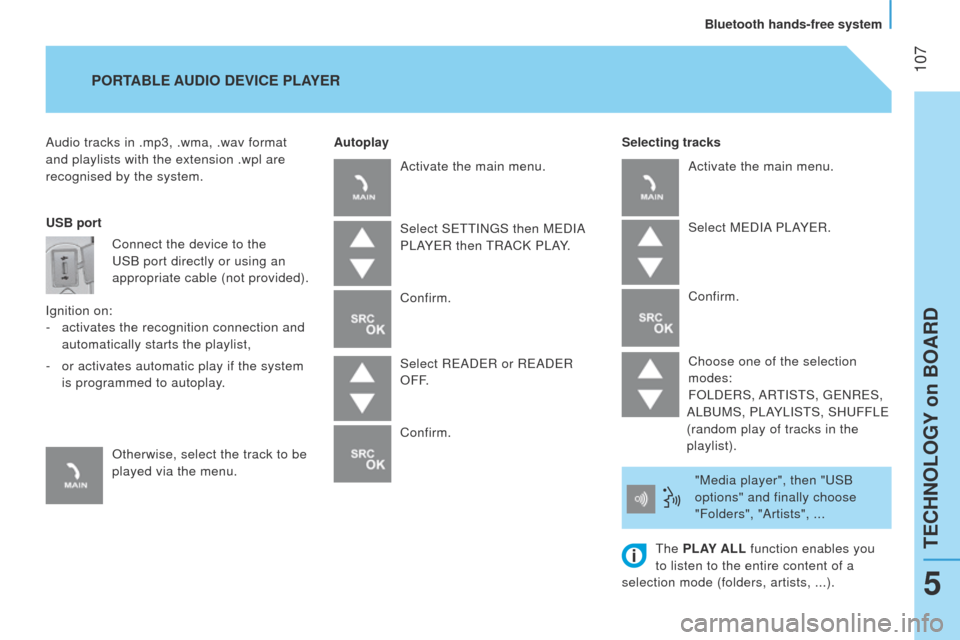
Audio tracks in .mp3, .wma, .wav format
and playlists with the extension .wpl are
recognised by the system.Selecting tracks
PORTABLE AUDIO
DEVICE PLAYER
Autoplay
USB port Connect the device to the
u
SB port directly or using an
appropriate cable (not provided).
Ignition on: -
activates the recognition connection and
automatically starts the playlist,
-
or activates automatic play if the system
is programmed to autoplay.
Otherwise, select the track to be
played via the menu. Activate the main menu.
Select S
ett IN g S then M e DIA
P
l AY e R then
t
RACK P l AY.
Confirm.
Select R
e AD e R or R e AD e R
OFF.
Confirm. Activate the main menu.
Select M
e DIA P l AY e R.
Confirm.
Choose one of the selection
modes:
FO
l D e RS, AR
t
IS t S,
ge
NR e S,
A
l B u MS, P l AY l IS t S, SH u FF le
(random play of tracks in the
playlist).
"Media player", then "
u SB
options" and finally choose
"Folders", "Artists", ...
t
he PLAY ALL function enables you
to listen to the entire content of a
selection mode (folders, artists, ...).
teCHNOlOgY on BOARD
Bluetooth hands-free system
5
Page 110 of 192
108
Bipper_en_Chap05_technologie_ed02-2014
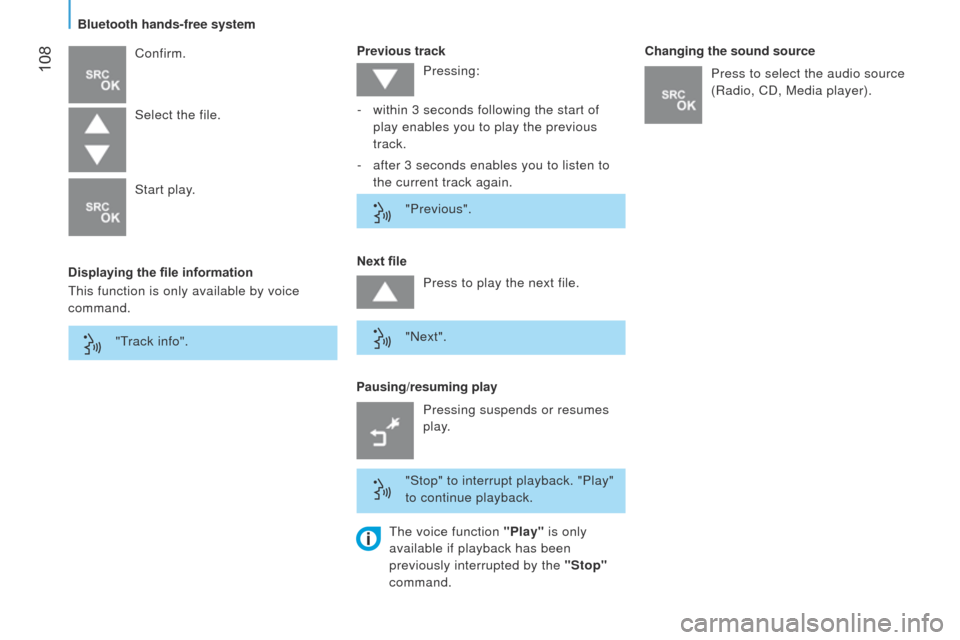
Displaying the file informationPrevious track
Confirm.
Pausing/resuming playNext file Changing the sound source
Select the file.
Start play.
t
his function is only available by voice
command. Pressing:
-
within 3 seconds following the start of
play enables you to play the previous
track.
-
after 3 seconds enables you to listen to
the current track again.
"Previous".
Press to play the next file.
"Next".
"Stop" to interrupt playback. "Play"
to continue playback. Press to select the audio source
(Radio, CD, Media player).
Pressing suspends or resumes
play.
"
t
rack info".
t
he voice function "Play" is only
available if playback has been
previously interrupted by the "Stop"
command.
Bluetooth hands-free system
Page 111 of 192
109
Bipper_en_Chap05_technologie_ed02-2014
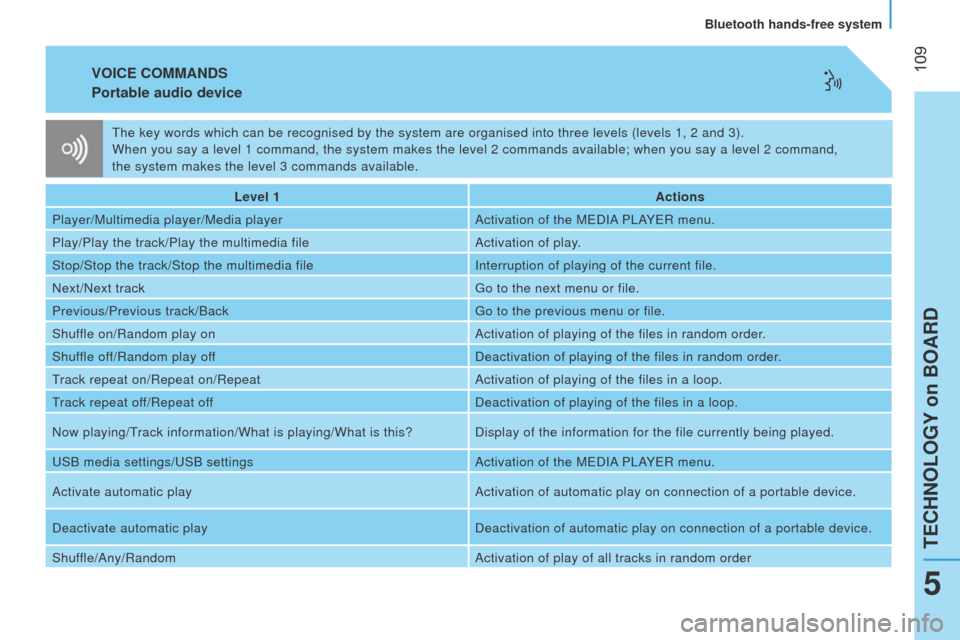
VOICE COMMANDS
Portable audio
device
Level 1 Actions
Player/Multimedia player/Media player Activation of the M
e DIA P l AY e R menu.
Play/Play the track/Play the multimedia file Activation of play.
Stop/Stop the track/Stop the multimedia file Interruption of playing of the current file.
Next/Next track
g
o to the next menu or file.
Previous/Previous track/Back
g
o to the previous menu or file.
Shuffle on/Random play on Activation of playing of the files in random order.
Shuffle off/Random play off Deactivation of playing of the files in random order.
track repeat on/Repeat on/RepeatActivation of playing of the files in a loop.
track repeat of
f/Repeat off Deactivation of playing of the files in a loop.
Now playing/
t
rack information/What is playing/What is this? Display of the information for the file currently being played.
u
SB media settings/
u
SB settings Activation of the M
e DIA P l AY e R menu.
Activate automatic play Activation of automatic play on connection of a portable device.
Deactivate automatic play Deactivation of automatic play on connection of a portable device.
Shuffle/Any/Random Activation of play of all tracks in random order
t
he key words which can be recognised by the system are organised into th\
ree levels (levels 1, 2 and 3).
When you say a level 1 command, the system makes the level 2 commands av\
ailable; when you say a level 2 command,
the system makes the level 3 commands available.
teCHNOlOgY on BOARD
Bluetooth hands-free system
5
Page 142 of 192
140
Bipper_en_Chap07_accessoire_ed02-2014
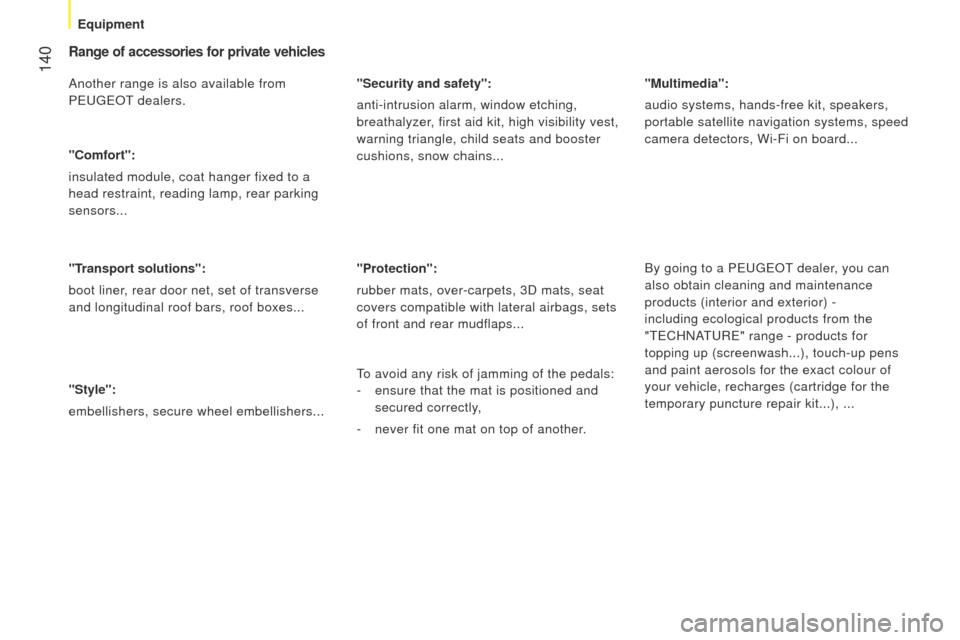
Range of accessories for private vehicles
Another range is also available from
Peuge O t
dealers.
"Comfort":
insulated module, coat hanger fixed to a
head restraint, reading lamp, rear parking
sensors...
"Transport solutions":
boot liner, rear door net, set of transverse
and longitudinal roof bars, roof boxes...
"Style":
embellishers, secure wheel embellishers... "Security and safety":
anti-intrusion alarm, window etching,
breathalyzer, first aid kit, high visibility vest,
warning triangle, child seats and booster
cushions, snow chains...
"Protection":
rubber mats, over-carpets, 3D mats, seat
covers compatible with lateral airbags, sets
of front and rear mudflaps...
"Multimedia":
audio systems, hands-free kit, speakers,
portable satellite navigation systems, speed
camera detectors, Wi-Fi on board...
By going to a P
euge O t dealer, you can
also obtain cleaning and maintenance
products (interior and exterior) -
including ecological products from the
"
te CHNA
tu
R e " range - products for
topping up (screenwash...), touch-up pens
and paint aerosols for the exact colour of
your vehicle, recharges (cartridge for the
temporary puncture repair kit...), ...
to avoid any risk of jamming of the pedals:
-
ensure that the mat is positioned and
secured correctly,
-
never fit one mat on top of another
.
Equipment
Page 170 of 192
168
Bipper_en_Chap09_aide-rapide_ed02-2014
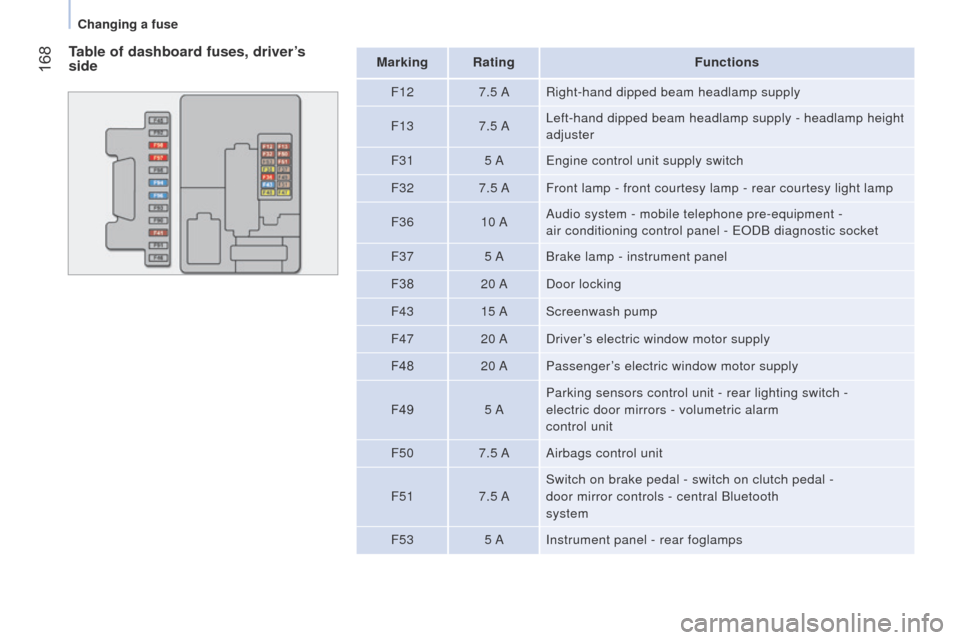
Table of dashboard fuses, driver’s
sideMarking RatingFunctions
F12 7.5 ARight-hand dipped beam headlamp supply
F13 7.5 A
l
eft-hand dipped beam headlamp supply - headlamp height
adjuster
F31 5 A
e
ngine control unit supply switch
F32 7.5 AFront lamp - front courtesy lamp - rear courtesy light lamp
F36 10 AAudio system - mobile telephone pre-equipment -
air conditioning control panel -
e ODB diagnostic socket
F37 5 ABrake lamp - instrument panel
F38 20 ADoor locking
F43 15 AScreenwash pump
F47 20 ADriver’s electric window motor supply
F48 20 APassenger’s electric window motor supply
F49 5 AParking sensors control unit - rear lighting switch -
electric door mirrors - volumetric alarm
control unit
F50 7.5 AAirbags control unit
F51 7.5 ASwitch on brake pedal - switch on clutch pedal -
door mirror controls - central Bluetooth
system
F53 5 AInstrument panel - rear foglamps
Changing a fuse