phone PEUGEOT PARTNER 2022 Owners Manual
[x] Cancel search | Manufacturer: PEUGEOT, Model Year: 2022, Model line: PARTNER, Model: PEUGEOT PARTNER 2022Pages: 324, PDF Size: 9.42 MB
Page 5 of 324
3
Contents
Memorising speeds 150
Active Safety Brake with Collision Risk Alert and
Intelligent emergency braking assistance
150
Active lane departure warning system 153
Blind spot monitoring 156
Distraction detection 158
Parking sensors 159
Reversing Camera 161
Surround Rear Vision 162
Visiopark 1 165
Park Assist 167
7Practical informationCompatibility of fuels 172
Refuelling 172
Misfuel prevention (Diesel) 173
Charging system (Electric) 174
Charging the traction battery (Electric) 181
Energy economy mode 185
Snow chains 186
Very cold climate screen 186
Towing device 187
Overload indicator 188
Roof bars / Roof rack 189
Bonnet 190
Engine compartment 191
Checking levels 191
Checks 194
AdBlue® (BlueHDi) 195
Free-wheeling 197
Advice on care and maintenance 198
8In the event of a breakdownRunning out of fuel (Diesel) 200
Tool kit 200
Temporary puncture repair kit 202
Spare wheel 204
Changing a bulb 207
Fuses 212
12
V battery
/ Accessory battery 212
Towing 216
9Technical dataDimensions 219
Engine technical data and towed loads 225
Petrol engine 226
Diesel engine 227
Electric motor 233
Identification markings 234
10Touch screen BLUETOOTH audio systemFirst steps 235
Steering mounted controls 235
Menus 236
Radio 237
DAB (Digital Audio Broadcasting) radio 238
Media 239
Telephone 240
Settings 242
Frequently asked questions 242
11PEUGEOT Connect RadioFirst steps 245
Steering mounted controls 246
Menus 247
Applications 248
Radio 248
DAB (Digital Audio Broadcasting) radio 250
Media 250
Telephone 251
Settings 254
Frequently asked questions 256
12PEUGEOT Connect NavFirst steps 258
Steering mounted controls 259
Menus 259
Voice commands 261
Navigation 264
Connected navigation 267
Applications 269
Radio 272
DAB (Digital Audio Broadcasting) radio 273
Media 273
Telephone 275
Settings 277
Frequently asked questions 279
13Event data recorders
■
Alphabetical index
http://q-r.to/bagGl9
Access to additional videos
Page 6 of 324
4
Overview
Presentation
Presentation
These illustrations and descriptions are intended
as a guide. The presence and location of some
components varies according to the version, trim
level and country of sale.
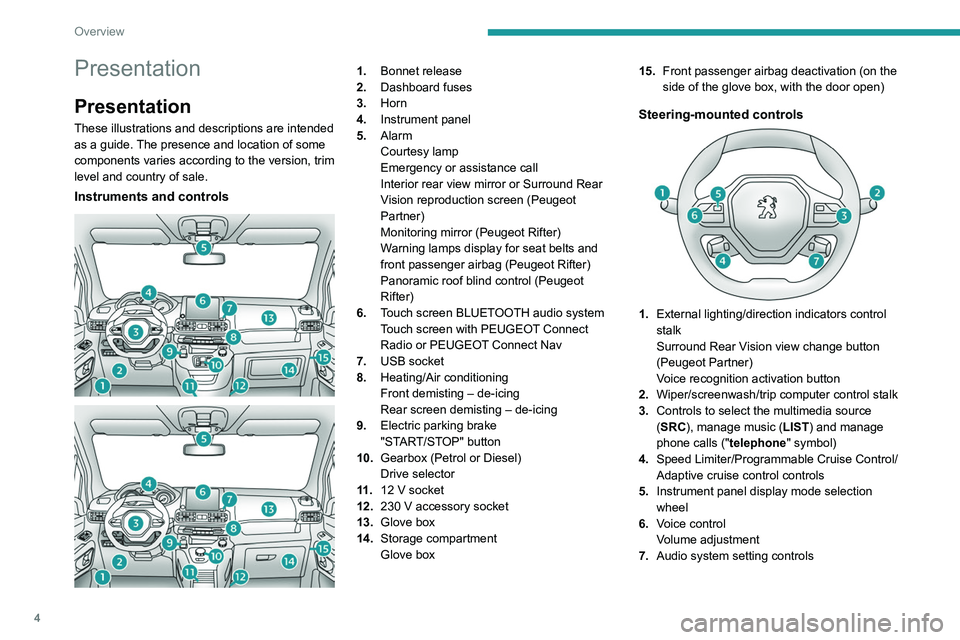
Instruments and controls
1. Bonnet release
2. Dashboard fuses
3. Horn
4. Instrument panel
5. Alarm
Courtesy lamp
Emergency or assistance call
Interior rear view mirror or Surround Rear
Vision reproduction screen (Peugeot
Partner)
Monitoring mirror (Peugeot Rifter)
Warning lamps display for seat belts and
front passenger airbag (Peugeot Rifter)
Panoramic roof blind control (Peugeot
Rifter)
6. Touch screen BLUETOOTH audio system
Touch screen with PEUGEOT Connect
Radio or PEUGEOT Connect Nav
7. USB socket
8. Heating/Air conditioning
Front demisting – de-icing
Rear screen demisting – de-icing
9. Electric parking brake
"START/STOP" button
10. Gearbox (Petrol or Diesel)
Drive selector
11 . 12
V socket
12. 230
V accessory socket
13. Glove box
14. Storage compartment
Glove box 15.
Front passenger airbag deactivation (on the
side of the glove box, with the door open)
Steering-mounted controls
1.External lighting/direction indicators control
stalk
Surround Rear Vision view change button
(Peugeot Partner)
Voice recognition activation button
2. Wiper/screenwash/trip computer control stalk
3. Controls to select the multimedia source
(SRC), manage music (LIST) and manage
phone calls (" telephone" symbol)
4. Speed Limiter/Programmable Cruise Control/
Adaptive cruise control controls
5. Instrument panel display mode selection
wheel
6. Voice control
Volume adjustment
7. Audio system setting controls
Page 8 of 324
6
Overview
represented by an indicator and a reserve power
warning lamp on the instrument panel.
The 12 V accessory battery 3 powers the
vehicle’s conventional electrical system. It is
recharged automatically by the traction battery
via the on-board charger.
The on-board charger
4
provides domestic
charging (mode
2) and accelerated charging
(mode
3) of the traction battery as well as
recharging of the 12
V accessory battery.
The electric motor
5 provides propulsion in
accordance with the selected driving mode and
driving conditions. It recovers energy during
vehicle braking and deceleration phases.
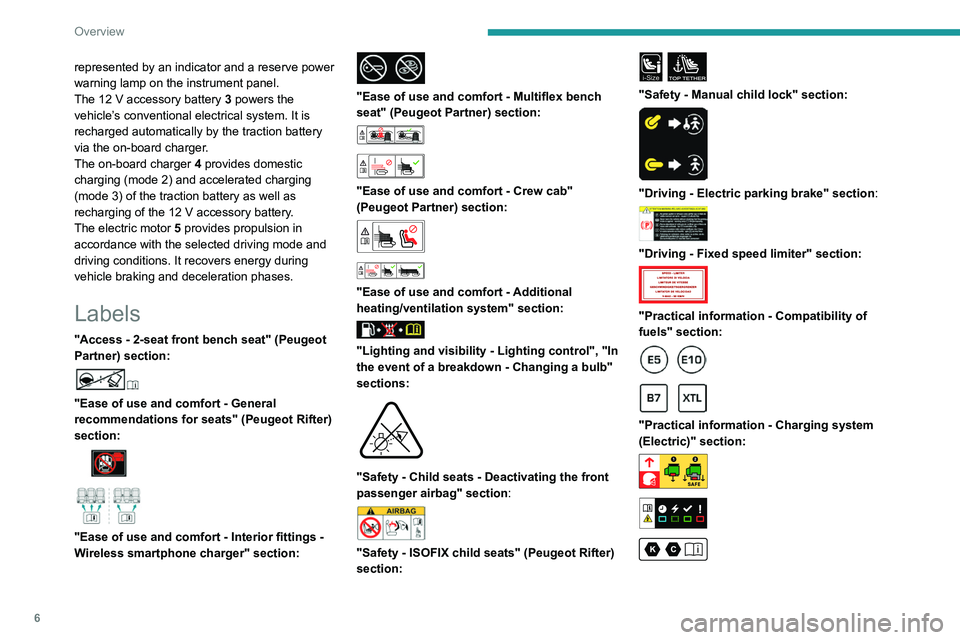
Labels
"Access - 2-seat front bench seat" (Peugeot
Partner) section:
"Ease of use and comfort - General
recommendations for seats" (Peugeot Rifter)
section:
"Ease of use and comfort - Interior fittings -
Wireless smartphone charger" section:
"Ease of use and comfort - Multiflex bench
seat" (Peugeot Partner) section:
"Ease of use and comfort - Crew cab"
(Peugeot Partner) section:
"Ease of use and comfort - Additional
heating/ventilation system" section:
"Lighting and visibility - Lighting control", "In
the event of a breakdown - Changing a bulb"
sections:
"Safety - Child seats - Deactivating the front
passenger airbag" section:
"Safety - ISOFIX child seats" (Peugeot Rifter)
section:
i-SizeTOP TETHER
"Safety - Manual child lock" section:
"Driving - Electric parking brake" section:
"Driving - Fixed speed limiter" section:
"Practical information - Compatibility of
fuels" section:
"Practical information - Charging system
(Electric)" section:
Page 30 of 324
28
Instruments
► Press the button on the end of the wiper
control stalk for more than two seconds.
►
Press the knob on the
steering wheel for
more than two seconds.
► Press this button for more than 2 seconds.
Definitions
Range
(miles or km)
(Traction battery charge level percentage)
(Electric)
/Distance that can still be travelled
with the fuel remaining in the tank
(based on the average fuel consumption over the
last few miles (kilometres) travelled) (Petrol or
Diesel).
Actual traction battery charge level and
remaining range (Electric).
This value may vary following a change in driving
style or terrain, leading to a significant change in
current fuel consumption.
Vehicle with Petrol or Diesel engine: When the range falls below 19 miles (30
km),
dashes are displayed.
After filling with at least 5 litres of fuel, the range
is recalculated and is displayed if it exceeds 62
miles (100 km).
Dashes appearing permanently in place of
numbers while driving indicates a malfunction.
Consult a PEUGEOT dealer or a qualified
workshop.
Vehicle with Electric motor:
Two successive alert levels indicate that the
energy available has dropped to a low level.
For more information on the Indicators, and in
particular the Charge level indicator (Electric),
refer to the corresponding section.
Current consumption
(mpg or l/100 km or km/l)
(miles/kWh or kWh/100 km or km/kWh) (Electric)
/Calculated during the last few
seconds.
This function is only displayed at speeds above
19 mph (30
km/h) (Petrol).
Average consumption
(mpg or l/100 km or km/l)
(miles/kWh or kWh/100 km or km/kWh) (Electric)
/Calculated since the last trip
computer reset.
Average speed
(mph or km/h)
Calculated since the last trip computer
reset.
Distance travelled
(miles or km)Calculated since the last trip computer
reset.
Stop & Start time counter
(minutes/seconds or hours/minutes)
If your vehicle is fitted with the Stop & Start
function, a time counter calculates the time spent
in STOP mode during a journey.
The time counter is reset each time the ignition is
switched on.
Touch screen BLUETOOTH audio
system
This system gives access to the following
elements:
–
Audio system and telephone controls and
display of
related information.
–
V
ehicle function and equipment setting menus.
Page 31 of 324
29
Instruments
1– Air conditioning system controls (depending
on version).
For safety reasons, always stop the
vehicle before performing operations
that require sustained attention.
Some functions are not accessible while
driving.
Recommendations
Do not use pointed objects on the touch screen.
Do not touch the touch screen with wet hands.
Use a soft, clean cloth to clean the touch screen.
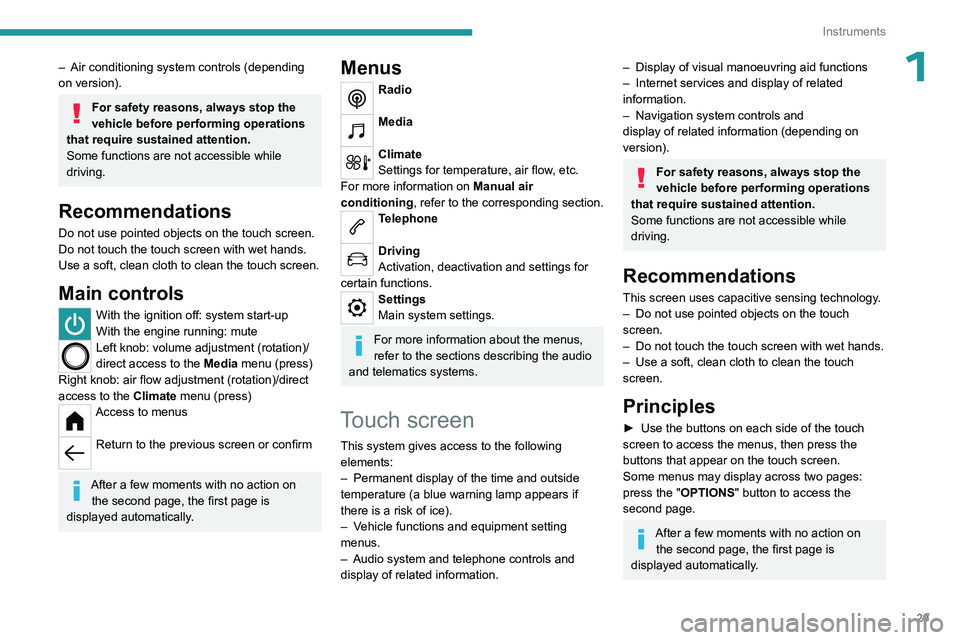
Main controls
With the ignition off: system start-up
With the engine running: mute
Left knob: volume adjustment (rotation)/
direct access to the Media menu (press)
Right knob: air flow adjustment (rotation)/direct
access to the Climate menu (press)
Access to menus
Return to the previous screen or confirm
After a few moments with no action on
the second page, the first page is
displayed automatically.
Menus
Radio
Media
Climate
Settings for temperature, air flow, etc.
For more information on Manual air
conditioning , refer to the corresponding section.
Telephone
Driving
Activation, deactivation and settings for
certain functions.
Settings
Main system settings.
For more information about the menus,
refer to the sections describing the audio
and telematics systems.
Touch screen
This system gives access to the following elements:
–
Permanent display of the time and outside
temperature (a blue warning lamp appears if
there is a risk of ice).
–
V
ehicle functions and equipment setting
menus.
–
Audio system and telephone controls and
display of related information.
– Display of visual manoeuvring aid functions
– Internet services and display of related
information.
–
Navigation system controls and
display
of related information (depending on
version).
For safety reasons, always stop the
vehicle before performing operations
that require sustained attention.
Some functions are not accessible while
driving.
Recommendations
This screen uses capacitive sensing technology.
– Do not use pointed objects on the touch
screen.
–
Do not touch the touch screen with wet hands.
–
Use a soft, clean cloth to clean the touch
screen.
Principles
► Use the buttons on each side of the touch
screen to access the menus, then press the
buttons that appear on the touch screen.
Some menus may display across two pages:
press the "OPTIONS" button to access the
second page.
After a few moments with no action on the second page, the first page is
displayed automatically.
Page 32 of 324
30
Instruments
To deactivate/activate a function, select "OFF"
or "ON".
Configuring a function
Access to additional information on the function
Confirm
Return to the previous page or confirm
Menus
Press the touch screen with three fingers
to show all of the menu buttons.
For more information about the menus,
refer to the sections describing the audio
and telematics systems.
Radio/Media
Navigation (Depending on equipment)
Driving or Vehicle (Depending on
equipment)
Activation, deactivation and settings for certain
functions.
The functions are organised in 2 tabs: " Driving
functions" and "Vehicle settings".
Telephone
Applications Display of available connected services.
Energy (with PEUGEOT Connect Nav)
Access the specific Electric functions
(energy flow, consumption statistics, deferred
charge) organised in the corresponding 3 tabs.
or
Settings
Main settings for the audio system and
touch screen.
Audio system on/off Volume adjustment/mute
Upper bar
Certain information is displayed permanently in
the upper bar of the touch screen:
–
T
ime and outside temperature (a blue warning
lamp appears if there is a risk of ice).
–
Reminder of information from the
RadioMedia
and Telephone menus and
navigation instructions (depending on
equipment).
–
Notifications.
– Access to the Settings.
Energy menu
This menu is only available with PEUGEOT
Connect Nav .
Depending on version, this is accessible either:
– directly, by pressing the button near the
touch screen.
– via the Applications menu.
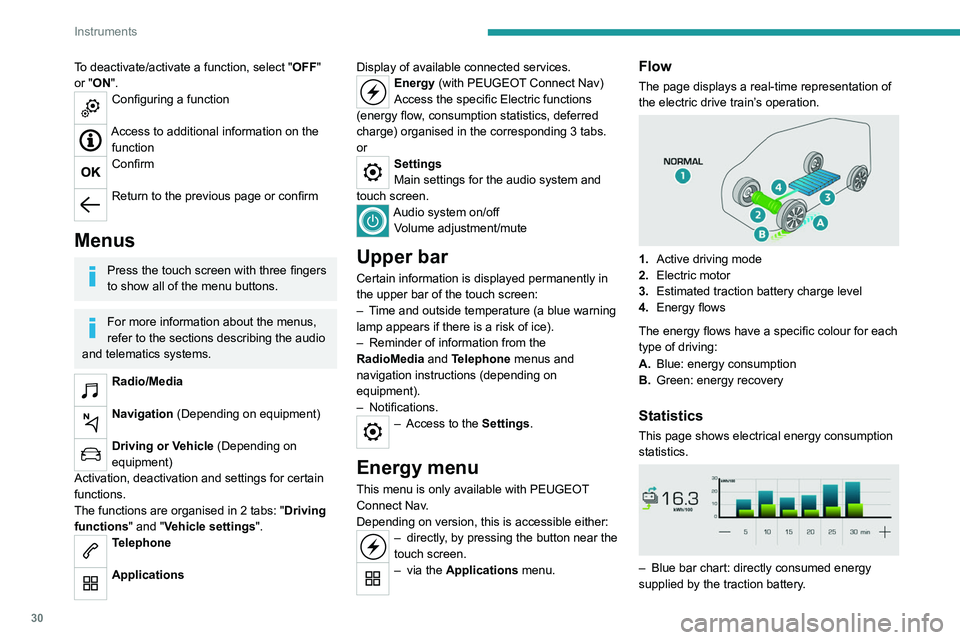
Flow
The page displays a real-time representation of
the electric drive train’s operation.
1.Active driving mode
2. Electric motor
3. Estimated traction battery charge level
4. Energy flows
The energy flows have a specific colour for each
type of driving:
A. Blue: energy consumption
B. Green: energy recovery
Statistics
This page shows electrical energy consumption
statistics.
– Blue bar chart: directly consumed energy
supplied by the traction battery .
Page 34 of 324
32
Access
Electronic key with
remote control function
and built-in key,
If one of the doors or the boot is still open
or if the electronic key for the Keyless
Entry and Start
system has been left inside
the vehicle, central locking will not take place.
However
, if the vehicle is fitted with an alarm,
it will be activated after 45
seconds.
If the vehicle is unlocked but the doors or
tailgate are not subsequently opened, the
vehicle will automatically lock itself again after
about 30
seconds. If the vehicle is fitted with
an alarm, it will be reactivated automatically.
Automatic door mirror folding and unfolding can be deactivated by a
PEUGEOT dealer or a qualified workshop.
As a safety measure, never leave the vehicle, even for a short time, without
taking the Keyless Entry and Start system’s
electronic key with you.
Be aware of the risk of theft of the vehicle if
the key is present in one of the defined areas
while the vehicle is unlocked.
To preserve the battery charge in the electronic key and the vehicle's battery,
the "hands-free" functions are set to
hibernation mode after 21 days without use.
To restore these functions, press one of the
remote control buttons or start the engine with
the electronic key in the reader.
For more information on starting with the
Keyless Entry and Start system, refer to the
corresponding section.
Electrical interference
The electronic key may not work if it is
close to an electronic device (e.g.
mobile
telephone (switched on or on standby), laptop
computer, strong magnetic fields). If this
occurs, move the electronic key away from
the electronic device.
Remote control key
This allows the central locking or unlocking of the
vehicle using the door lock or from a distance.
It also allows the vehicle to be located, the fuel
filler cap and charging flap to be opened and
closed and the engine to be started or switched
off, as well as providing protection against theft.
The remote control buttons are not active with the ignition switched on.
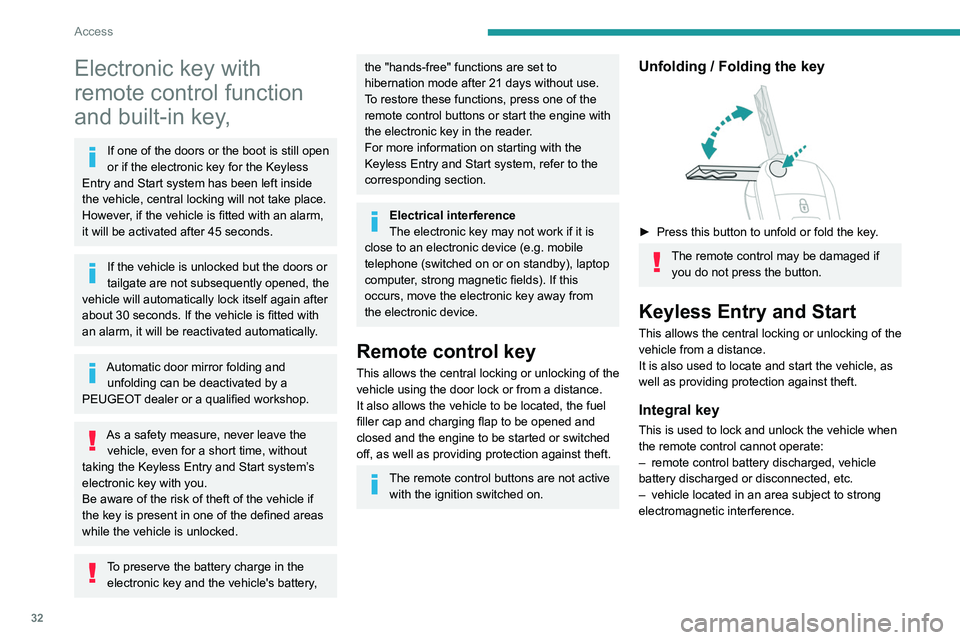
Unfolding / Folding the key
► Press this button to unfold or fold the key .
The remote control may be damaged if
you do not press the button.
Keyless Entry and Start
This allows the central locking or unlocking of the
vehicle from a distance.
It is also used to locate and start the vehicle, as
well as providing protection against theft.
Integral key
This is used to lock and unlock the vehicle when
the remote control cannot operate:
–
remote control battery discharged, vehicle
battery discharged or disconnected, etc.
–
vehicle located in an area subject to strong
electromagnetic interference.
Page 64 of 324

62
Ease of use and comfort
USB socket(s)
Socket 1 enables audio files sent to your audio
system to be played through the vehicle's
speakers.
When the USB socket is used, the
portable device charges automatically.
While charging, a message is displayed if the
power drawn by the portable device exceeds
the current supplied by the vehicle.
For more information about how to use this
equipment, refer to the sections describing
the audio and telematics systems.
* Only on the Peuge ot Partner.
Socket 1 allows a
smartphone to be
connected
by Android Auto
® or CarPlay®,
enabling certain smartphone applications to be
used on the touch screen.
Sockets 1 and 2* allow a portable device to be
connected in order to charge it.
For best results, use a cable made or approved
by the device manufacturer.
These applications can be managed using the
steering-mounted controls or the audio system
controls.
220 V/50 Hz socket
AC 220V
50Hz 120W
It is located on the side of the central storage
compartment.
This socket (max. power: 150
W) operates with
the engine running, and with the Stop & Start
system in STOP mode.
►
Lift the protective cover
.
►
Check that the green indicator lamp is on.
► Connect your multimedia or other electrical
device (telephone charger , laptop computer,
CD-DVD player, bottle warmer, etc.).
In the event of a malfunction, the
green
indicator lamp flashes.
Have the socket checked by a PEUGEOT dealer
or a qualified workshop.
Connect only one device at a time to the
socket (do not use extension leads or
multi-socket adapters).
Connect only devices with class II insulation
(shown on the device).
Do not use metal-cased devices (e.g. electric
shaver, etc.).
As a safety measure, if power consumption is high and power is
required by the vehicle's electrical system
(due to severe weather conditions, electrical
overload, etc.), power to the socket may be
cut off, in which case the green indicator lamp
goes off.
Wireless smartphone
charger
Page 65 of 324

63
Ease of use and comfort
3
This system allows wireless charging of a
portable device such as a smartphone, using the
magnetic induction principle, in accordance with
the Qi 1.1 standard.
The portable device to be charged must be
compatible with the Qi standard, either by design
or by using a compatible holder or shell.
A mat can also be used provided that it is
approved by the Manufacturer.
The charging area is identified by the Qi symbol.
The charger works with the engine running and
with the Stop & Start system in STOP mode.
Charging is managed by the smartphone.
With the Keyless Entry and Start system, the
charger’s operation may be briefly disrupted
when a door is opened or the ignition is switched
off.
Charging
► With the charging area clear, place a device
in its centre.
When the portable device is detected, the
charger’s indicator lamp lights up green. It
remains lit for the whole time that the battery is
being charged.
The system is not designed to charge multiple devices simultaneously.
Do not leave metal objects (e.g. coins,
keys, vehicle remote control) in the
charging area while a device is being charged
- Risk of overheating or interrupting the
charging!
When using applications for a long time
in combination with wireless charging,
some smartphones may switch to thermal
safety and cause some functions to stop.
Checking operation
The state of the indicator lamp allows the
operation of the charger to be monitored.
State of the
indicator lamp Meaning
Off Engine switched off.
No compatible devices
detected.
Charging complete.
Fixed green Compatible portable device detected.
Charging.
State of the
indicator lampMeaning
Flashing orange Foreign object detected in the charging zone.
Portable device not well
centred in the charging
zone.
Fixed orange Malfunction of the portable device's battery
meter.
Device battery
temperature too high.
Charger malfunction.
If the indicator lamp is fixed orange:
– remove the device, then place it back in the
centre of the charging zone.
or
–
remove the device and try again in a quarter
of an hour
.
If the problem persists, have the system checked
by a PEUGEOT dealer or a qualified workshop.
Floor boxes (Petrol or
Diesel)
Page 83 of 324
81
Ease of use and comfort
3workshop which is not equipped with an
exhaust gas extraction system.
Do not park the vehicle on a flammable
surface (dry grass, dead leaves, paper, etc.)
- Risk of fire!
Glazed surfaces such as the rear screen
or windscreen can become very hot in
places.
Never put objects on these surfaces; never
touch these surfaces - Risk of burns!
Do not throw remote control batteries
away, as they contain metals that are
harmful to the environment. Take them to an
approved disposal point.
Temperature conditioning (Electric)
This function allows you to programme the
temperature in the passenger compartment to
reach a pre-defined, non-modifiable temperature
(approx. 21°C) before you enter the vehicle, on
the days and at the times of your choice.
This function is available when the vehicle is
connected or not connected.
Programming
Programming can be carried out from a
smartphone using the MYPEUGEOT APP
application.
For more information on Remote functions,
refer to the corresponding section.
With PEUGEOT Connect Nav system
In the Applications menu:
Press " Car Apps" to display the applications
home page.
Select Temperature conditioning .
►
Press
+ to add a programme.
►
Select the time of entry into the vehicle and
the desired days. Press
OK.
►
Press
ON to activate this programme.
The temperature pre-conditioning sequence
begins approximately 45 minutes before the
programmed time when the vehicle is connected
(20 minutes when it is not connected) and is
maintained for 10 minutes after.
You can set multiple programmes. Each one is saved in the system.
To optimise the driving range, we recommend
starting a programme while the vehicle is
connected.
The fan noise that occurs during temperature pre-conditioning is perfectly
normal.
Operating conditions
– The function is only activated when the
ignition is switched off and the
vehicle
locked.
–
When the vehicle is not connected, the
function is only activated if the battery charge
level is greater than 50%.
–
When the vehicle is not connected and a
recurring programme is active (e.g. from Monday
to Friday), if two temperature pre-conditioning
sequences are run without the vehicle being
used, the programme will be deactivated.
Courtesy lamp
Automatic switching on/off
The front courtesy lamp comes on when the key
is removed from the ignition switch.
All courtesy lamps come on when the vehicle is
unlocked, when one of the corresponding doors
is opened and when locating the vehicle using
the remote control.
They fade to off after the ignition is switched on
and when the vehicle is locked.
Take care not to allow objects to come into contact with the courtesy lamp.