300 SUZUKI SX4 2006 1.G Service Workshop Manual
[x] Cancel search | Manufacturer: SUZUKI, Model Year: 2006, Model line: SX4, Model: SUZUKI SX4 2006 1.GPages: 1556, PDF Size: 37.31 MB
Page 918 of 1556
Downloaded from www.Manualslib.com manuals search engine 6C-38 Power Assisted Steering System:
2) Install steering gear case to vehicle, and then install
front suspension frame referring to “Front
Suspension Frame, Stabilizer Bar and/or Bushing
Removal and Installation in Section 2B”.
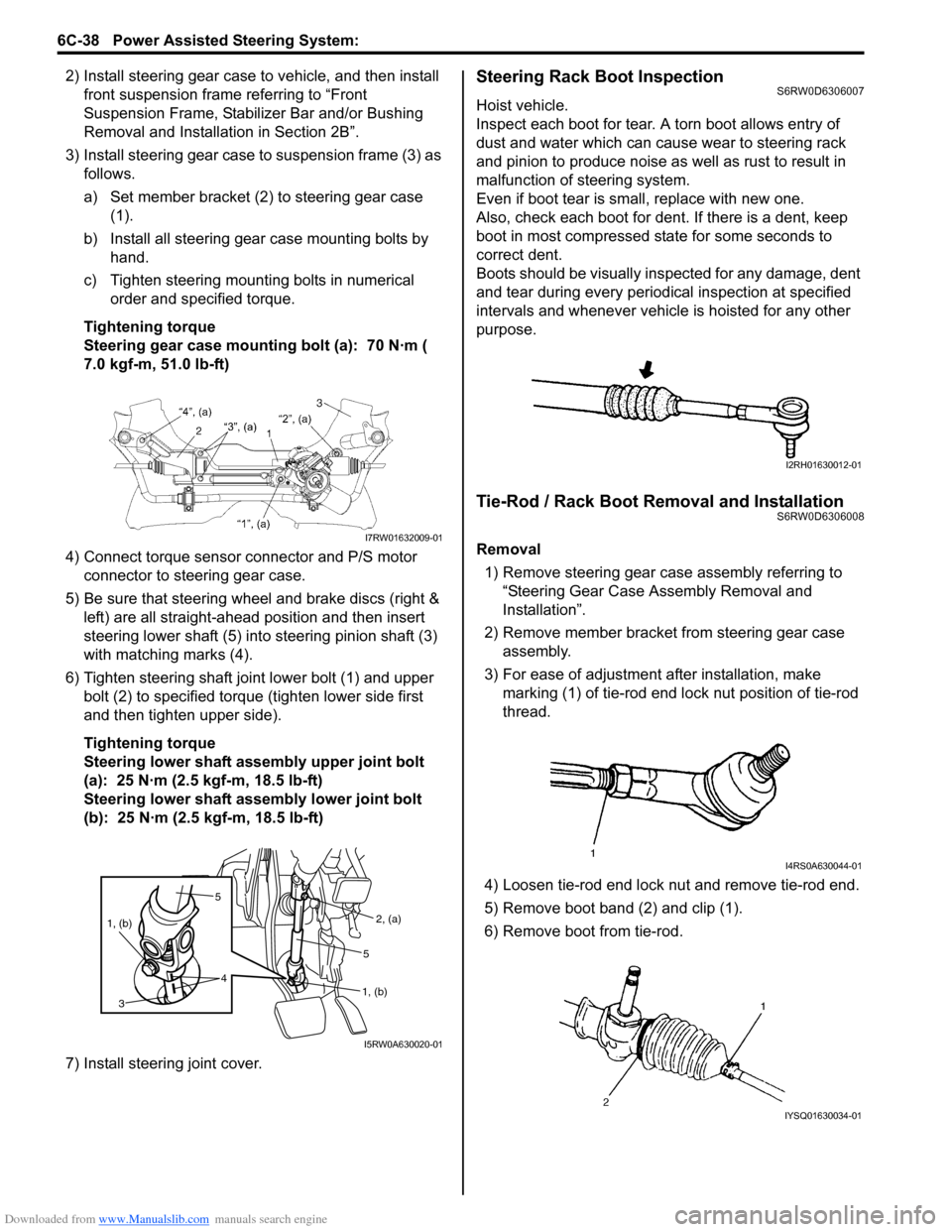
3) Install steering gear case to suspension frame (3) as
follows.
a) Set member bracket (2) to steering gear case
(1).
b) Install all steering gear case mounting bolts by
hand.
c) Tighten steering mounting bolts in numerical
order and specified torque.
Tightening torque
Steering gear case mounting bolt (a): 70 N·m (
7.0 kgf-m, 51.0 lb-ft)
4) Connect torque sensor connector and P/S motor
connector to steering gear case.
5) Be sure that steering wheel and brake discs (right &
left) are all straight-ahead position and then insert
steering lower shaft (5) into steering pinion shaft (3)
with matching marks (4).
6) Tighten steering shaft joint lower bolt (1) and upper
bolt (2) to specified torque (tighten lower side first
and then tighten upper side).
Tightening torque
Steering lower shaft assembly upper joint bolt
(a): 25 N·m (2.5 kgf-m, 18.5 lb-ft)
Steering lower shaft assembly lower joint bolt
(b): 25 N·m (2.5 kgf-m, 18.5 lb-ft)
7) Install steering joint cover.Steering Rack Boot InspectionS6RW0D6306007
Hoist vehicle.
Inspect each boot for tear. A torn boot allows entry of
dust and water which can cause wear to steering rack
and pinion to produce noise as well as rust to result in
malfunction of steering system.
Even if boot tear is small, replace with new one.
Also, check each boot for dent. If there is a dent, keep
boot in most compressed state for some seconds to
correct dent.
Boots should be visually inspected for any damage, dent
and tear during every periodical inspection at specified
intervals and whenever vehicle is hoisted for any other
purpose.
Tie-Rod / Rack Boot Removal and InstallationS6RW0D6306008
Removal
1) Remove steering gear case assembly referring to
“Steering Gear Case Assembly Removal and
Installation”.
2) Remove member bracket from steering gear case
assembly.
3) For ease of adjustment after installation, make
marking (1) of tie-rod end lock nut position of tie-rod
thread.
4) Loosen tie-rod end lock nut and remove tie-rod end.
5) Remove boot band (2) and clip (1).
6) Remove boot from tie-rod.I7RW01632009-01
5
4 1, (b)
3
2, (a)
1, (b)5
I5RW0A630020-01
I2RH01630012-01
I4RS0A630044-01
IYSQ01630034-01
Page 919 of 1556
Downloaded from www.Manualslib.com manuals search engine Power Assisted Steering System: 6C-39
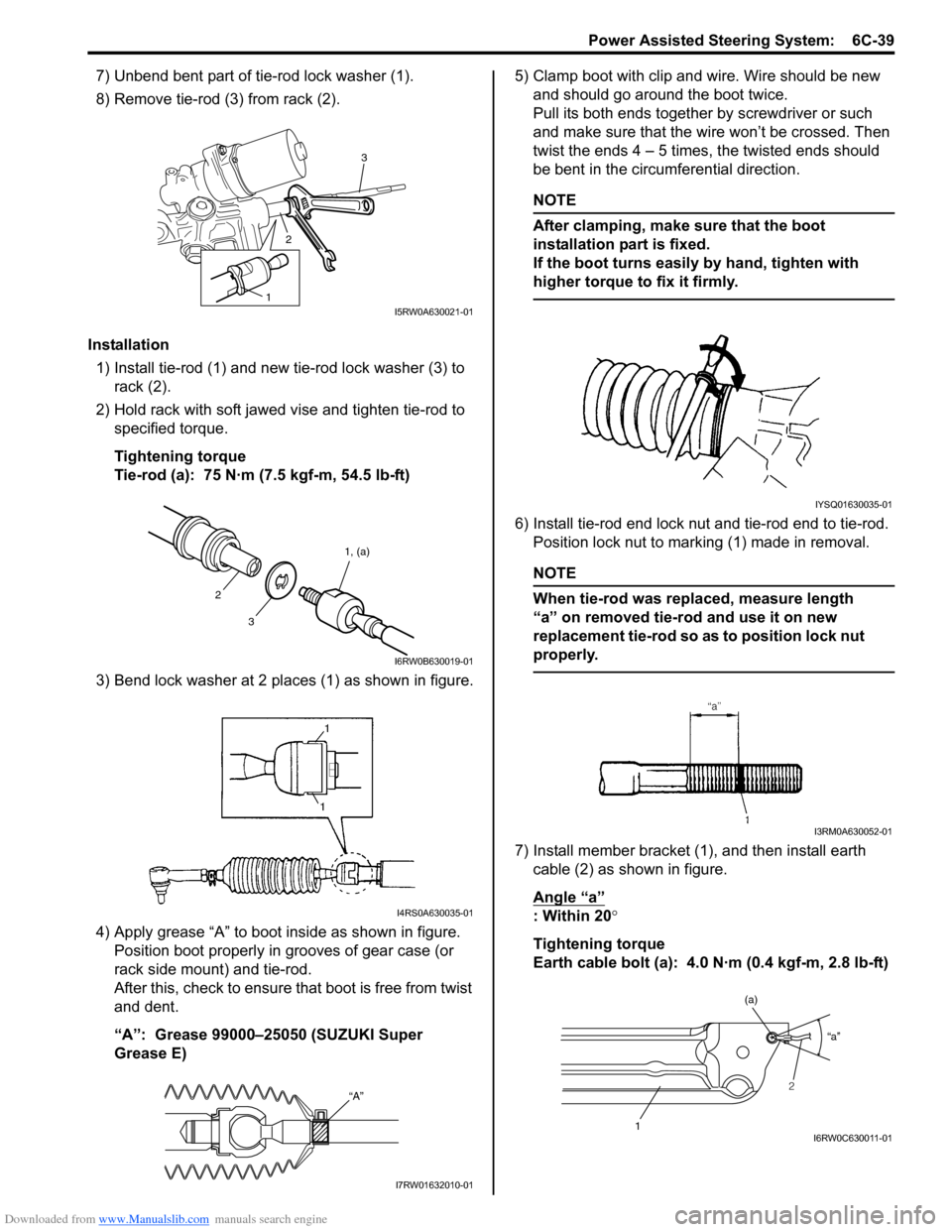
7) Unbend bent part of tie-rod lock washer (1).
8) Remove tie-rod (3) from rack (2).
Installation
1) Install tie-rod (1) and new tie-rod lock washer (3) to
rack (2).
2) Hold rack with soft jawed vise and tighten tie-rod to
specified torque.
Tightening torque
Tie-rod (a): 75 N·m (7.5 kgf-m, 54.5 lb-ft)
3) Bend lock washer at 2 places (1) as shown in figure.
4) Apply grease “A” to boot inside as shown in figure.
Position boot properly in grooves of gear case (or
rack side mount) and tie-rod.
After this, check to ensure that boot is free from twist
and dent.
“A”: Grease 99000–25050 (SUZUKI Super
Grease E) 5) Clamp boot with clip and wire. Wire should be new
and should go around the boot twice.
Pull its both ends together by screwdriver or such
and make sure that the wire won’t be crossed. Then
twist the ends 4 – 5 times, the twisted ends should
be bent in the circumferential direction.
NOTE
After clamping, make sure that the boot
installation part is fixed.
If the boot turns easily by hand, tighten with
higher torque to fix it firmly.
6) Install tie-rod end lock nut and tie-rod end to tie-rod.
Position lock nut to marking (1) made in removal.
NOTE
When tie-rod was replaced, measure length
“a” on removed tie-rod and use it on new
replacement tie-rod so as to position lock nut
properly.
7) Install member bracket (1), and then install earth
cable (2) as shown in figure.
Angle “a”
: Within 20°
Tightening torque
Earth cable bolt (a): 4.0 N·m (0.4 kgf-m, 2.8 lb-ft)
3
2
1I5RW0A630021-01
31, (a)
2
I6RW0B630019-01
I4RS0A630035-01
“A”
I7RW01632010-01
IYSQ01630035-01
I3RM0A630052-01
“a”
1
(a)
2
I6RW0C630011-01
Page 920 of 1556
Downloaded from www.Manualslib.com manuals search engine 6C-40 Power Assisted Steering System:
Steering Rack Plunger Removal and InstallationS6RW0D6306009
Removal
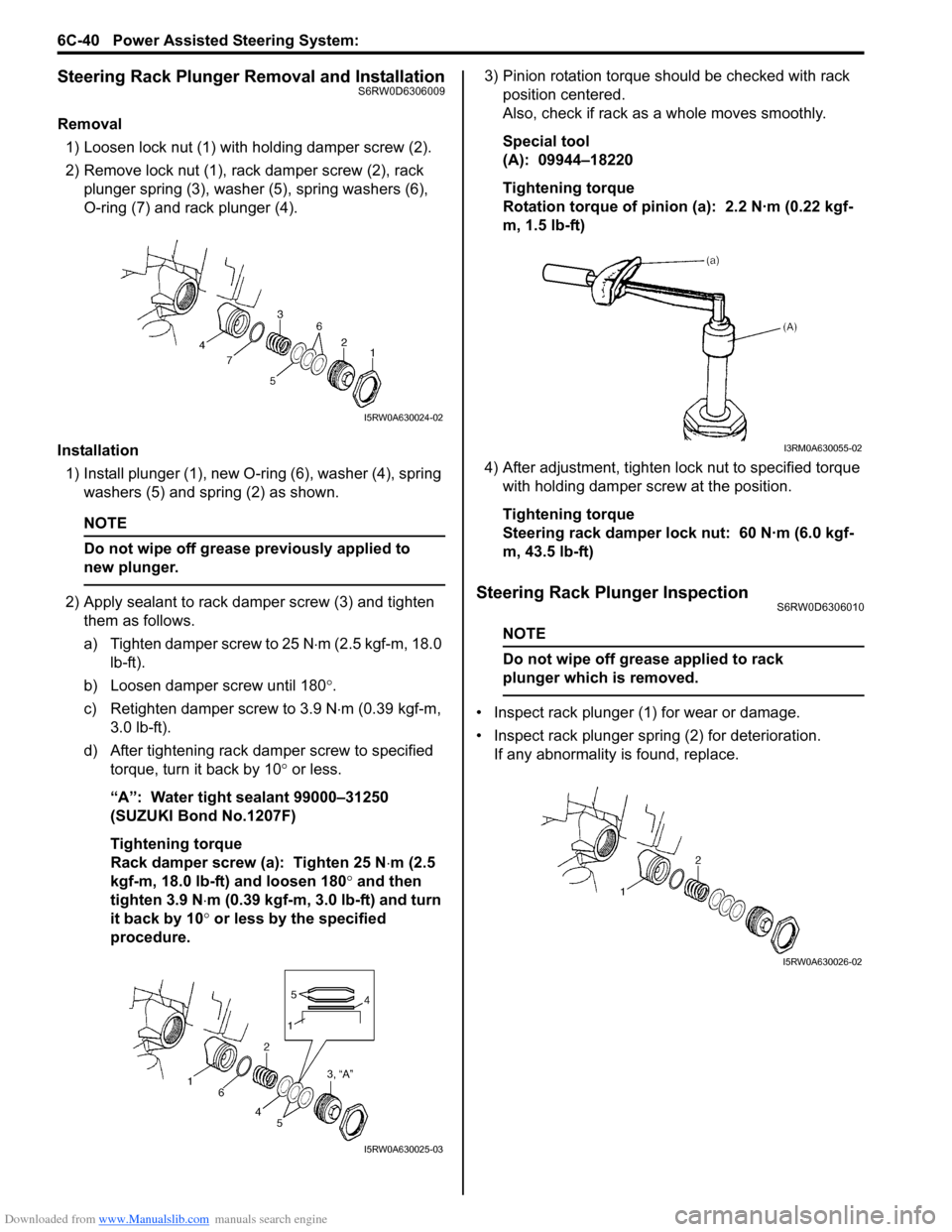
1) Loosen lock nut (1) with holding damper screw (2).
2) Remove lock nut (1), rack damper screw (2), rack
plunger spring (3), washer (5), spring washers (6),
O-ring (7) and rack plunger (4).
Installation
1) Install plunger (1), new O-ring (6), washer (4), spring
washers (5) and spring (2) as shown.
NOTE
Do not wipe off grease previously applied to
new plunger.
2) Apply sealant to rack damper screw (3) and tighten
them as follows.
a) Tighten damper screw to 25 N⋅m (2.5 kgf-m, 18.0
lb-ft).
b) Loosen damper screw until 180°.
c) Retighten damper screw to 3.9 N⋅m (0.39 kgf-m,
3.0 lb-ft).
d) After tightening rack damper screw to specified
torque, turn it back by 10° or less.
“A”: Water tight sealant 99000–31250
(SUZUKI Bond No.1207F)
Tightening torque
Rack damper screw (a): Tighten 25 N⋅m (2.5
kgf-m, 18.0 lb-ft) and loosen 180° and then
tighten 3.9 N⋅m (0.39 kgf-m, 3.0 lb-ft) and turn
it back by 10° or less by the specified
procedure.3) Pinion rotation torque should be checked with rack
position centered.
Also, check if rack as a whole moves smoothly.
Special tool
(A): 09944–18220
Tightening torque
Rotation torque of pinion (a): 2.2 N·m (0.22 kgf-
m, 1.5 lb-ft)
4) After adjustment, tighten lock nut to specified torque
with holding damper screw at the position.
Tightening torque
Steering rack damper lock nut: 60 N·m (6.0 kgf-
m, 43.5 lb-ft)Steering Rack Plunger InspectionS6RW0D6306010
NOTE
Do not wipe off grease applied to rack
plunger which is removed.
• Inspect rack plunger (1) for wear or damage.
• Inspect rack plunger spring (2) for deterioration.
If any abnormality is found, replace.
I5RW0A630024-02
I5RW0A630025-03
I3RM0A630055-02
I5RW0A630026-02
Page 921 of 1556
Downloaded from www.Manualslib.com manuals search engine Power Assisted Steering System: 6C-41
P/S Control Module Removal and InstallationS6RW0D6306011
Removal
1) Disconnect negative cable at battery.
2) Remove console box.
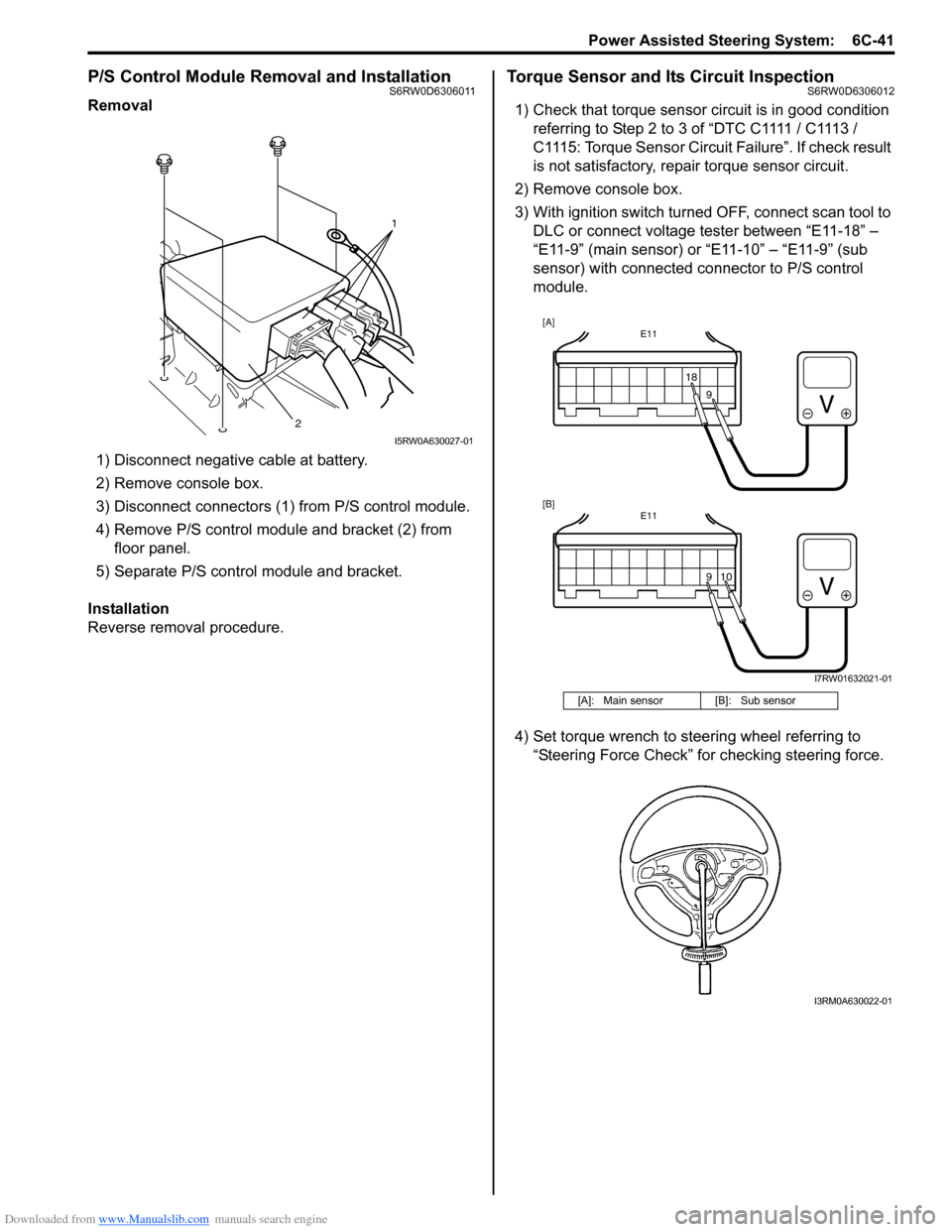
3) Disconnect connectors (1) from P/S control module.
4) Remove P/S control module and bracket (2) from
floor panel.
5) Separate P/S control module and bracket.
Installation
Reverse removal procedure.
Torque Sensor and Its Circuit InspectionS6RW0D6306012
1) Check that torque sensor circuit is in good condition
referring to Step 2 to 3 of “DTC C1111 / C1113 /
C1115: Torque Sensor Circuit Failure”. If check result
is not satisfactory, repair torque sensor circuit.
2) Remove console box.
3) With ignition switch turned OFF, connect scan tool to
DLC or connect voltage tester between “E11-18” –
“E11-9” (main sensor) or “E11-10” – “E11-9” (sub
sensor) with connected connector to P/S control
module.
4) Set torque wrench to steering wheel referring to
“Steering Force Check” for checking steering force.
1
2
I5RW0A630027-01
[A]: Main sensor [B]: Sub sensor
E11
1818
E11
10
[A]
[B]
9 9
I7RW01632021-01
I3RM0A630022-01
Page 922 of 1556

Downloaded from www.Manualslib.com manuals search engine 6C-42 Power Assisted Steering System:
5) Turn ON ignition switch without engine running and
select scan tool “Data List” mode due to checking
“Sensor (Main) Torque” and “Sensor (Sub) Torque”
displayed on scan tool when steering wheel turned
left and right (if used).
6) Check that characteristic of torque sensor (main and
sub) output voltage or scan tool data and steering
force is as following graph when steering wheel is
turned left and right. If sensor voltage or scan tool
data is out of specified value or does not vary linearly
as the following graph, check EPS control module
and its circuit referring to “Inspection of P/S Control
Module and Its Circuits”.
If they are OK, replace steering gear case assembly.P/S Motor and Its Circuit InspectionS6RW0D6306013
1) Check motor circuit referring to Step 2 to 3 of “DTC
C1141 / C1142 / C1143 / C1145: Motor Circuit
Failure”. If check result is not satisfactory, repair
motor circuit.
2) Disconnect motor connector from steering gear case
assembly with ignition switch turned OFF.
3) Check for resistance between terminals of motor
connector.
If check result is not as specified, check P/S motor
harness for continuity. If it is OK, replace steering
gear case assembly.
Motor circuit resistance
4) Check for insulation between each terminal of motor
connector and body ground.
If check result is not as specified, check P/S motor
harness for insulation. If it is OK, replace steering
gear case assembly.
Motor circuit resistance
5) Hoist vehicle
6) Check that steering wheel turns to left and right
smoothly. If steering wheel does not turn smoothly,
inspect and repair defective steering and suspension
parts.
7) Connect “E12” connector with ignition switch turned
OFF.
[A]: Main sensor
[B]: Sub sensor
[C]: Steering force at left turn
[D]: Steering force at right turn
[E]: Steering wheel at free
[F]: “Sensor (Main) Torque” in “Data List” displayed on scan tool
[G]: “Sensor (Sub) Torque” in “Data List” displayed on scan tool
0
[E][N.m]
MAX
MAX [D] [C]
[E][D] [C]
2.33 - 2.68[V] [F]
[G] [A]
[B]
66
1.65 - 1.9
(1.0 - 1.3)3.0 - 3.4 (3.7 - 4.0)
0 5
2.33 - 2.681.65 - 1.9
(1.0 - 1.3)3.0 - 3.4 (3.7 - 4.0)
0 5
0
[N.m]
MAX
MAX
[V]
6 11.76 11.7611.76 11.766
0 11.5
-12.00 -12.0
11.5
I7RW01632011-02
“E12-1” and “E12-2” (For motor) Approx. 1 Ω
Each terminal and body ground No continuity
[A]: Motor connector “E12” (viewed from harness side)
12
[A]
I6RW0C630012-02
Page 930 of 1556
Downloaded from www.Manualslib.com manuals search engine 7A-2 Heater and Ventilation:
Schematic and Routing Diagram
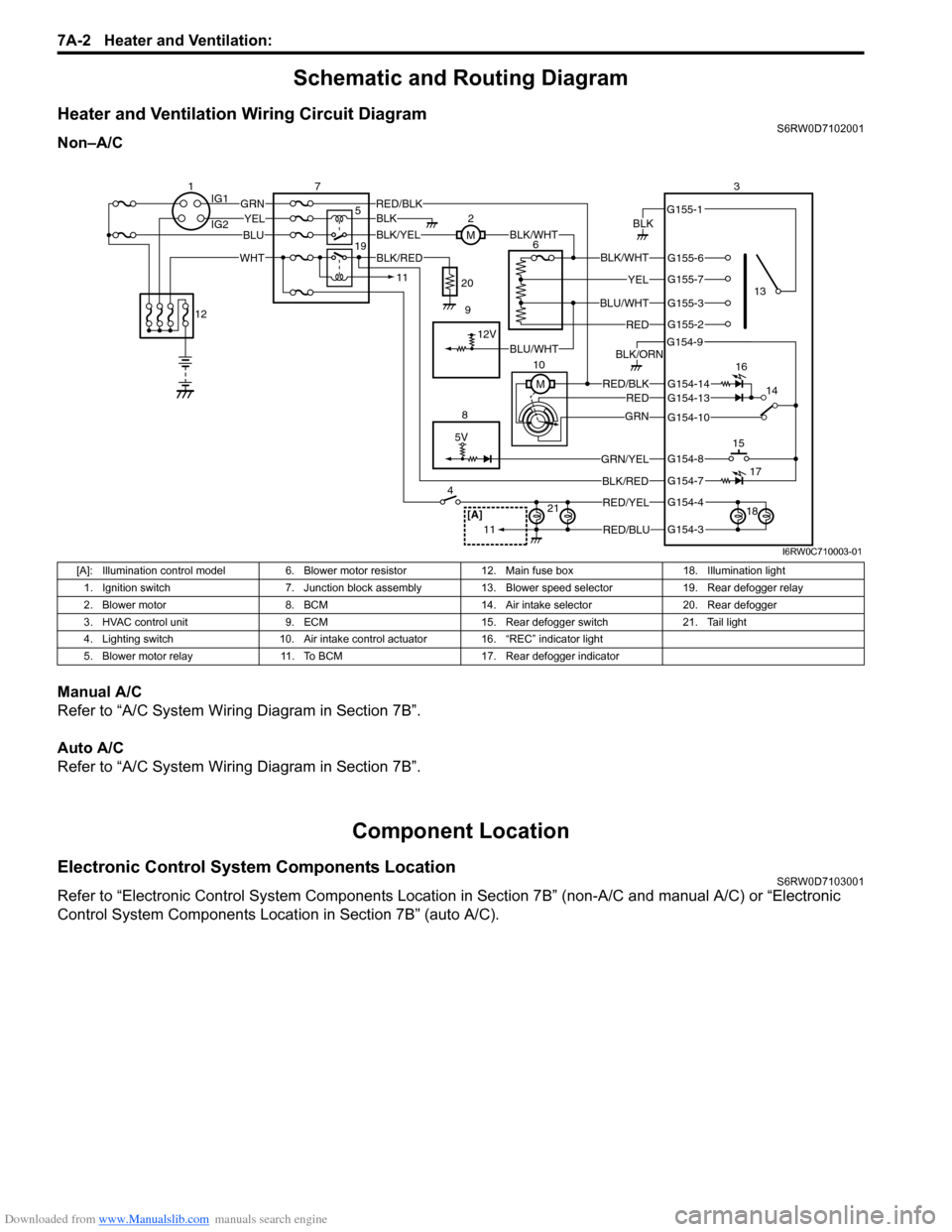
Heater and Ventilation Wiring Circuit DiagramS6RW0D7102001
Non–A/C
Manual A/C
Refer to “A/C System Wiring Diagram in Section 7B”.
Auto A/C
Refer to “A/C System Wiring Diagram in Section 7B”.
Component Location
Electronic Control System Components LocationS6RW0D7103001
Refer to “Electronic Control System Components Location in Section 7B” (non-A/C and manual A/C) or “Electronic
Control System Components Location in Section 7B” (auto A/C).
5V
BLK
RED/BLK3
5 72
G154-3
G154-4
G154-7
G154-8
G154-10
G154-13
G155-2
G155-3
G155-7
G155-6
G155-1
G154-9
G154-14
BLK/WHT
YEL
BLU/WHT
RED
RED/BLKRED
GRN
GRN/YEL
RED/YEL
RED/BLU
BLK/ORN
46
8
BLU
YELGRN
WHT
13
1514
[A]21
BLK/RED
12V
BLK/YELBLK/WHTM
BLK
1IG1
IG2
12
BLK/RED
M 10
11
11
BLU/WHT 19
16
17
18 9 20
I6RW0C710003-01
[A]: Illumination control model 6. Blower motor resistor 12. Main fuse box 18. Illumination light
1. Ignition switch 7. Junction block assembly 13. Blower speed selector 19. Rear defogger relay
2. Blower motor 8. BCM 14. Air intake selector 20. Rear defogger
3. HVAC control unit 9. ECM 15. Rear defogger switch 21. Tail light
4. Lighting switch 10. Air intake control actuator 16. “REC” indicator light
5. Blower motor relay 11. To BCM 17. Rear defogger indicator
Page 946 of 1556
Downloaded from www.Manualslib.com manuals search engine 7B-6 Air Conditioning System: Manual Type
Component Location
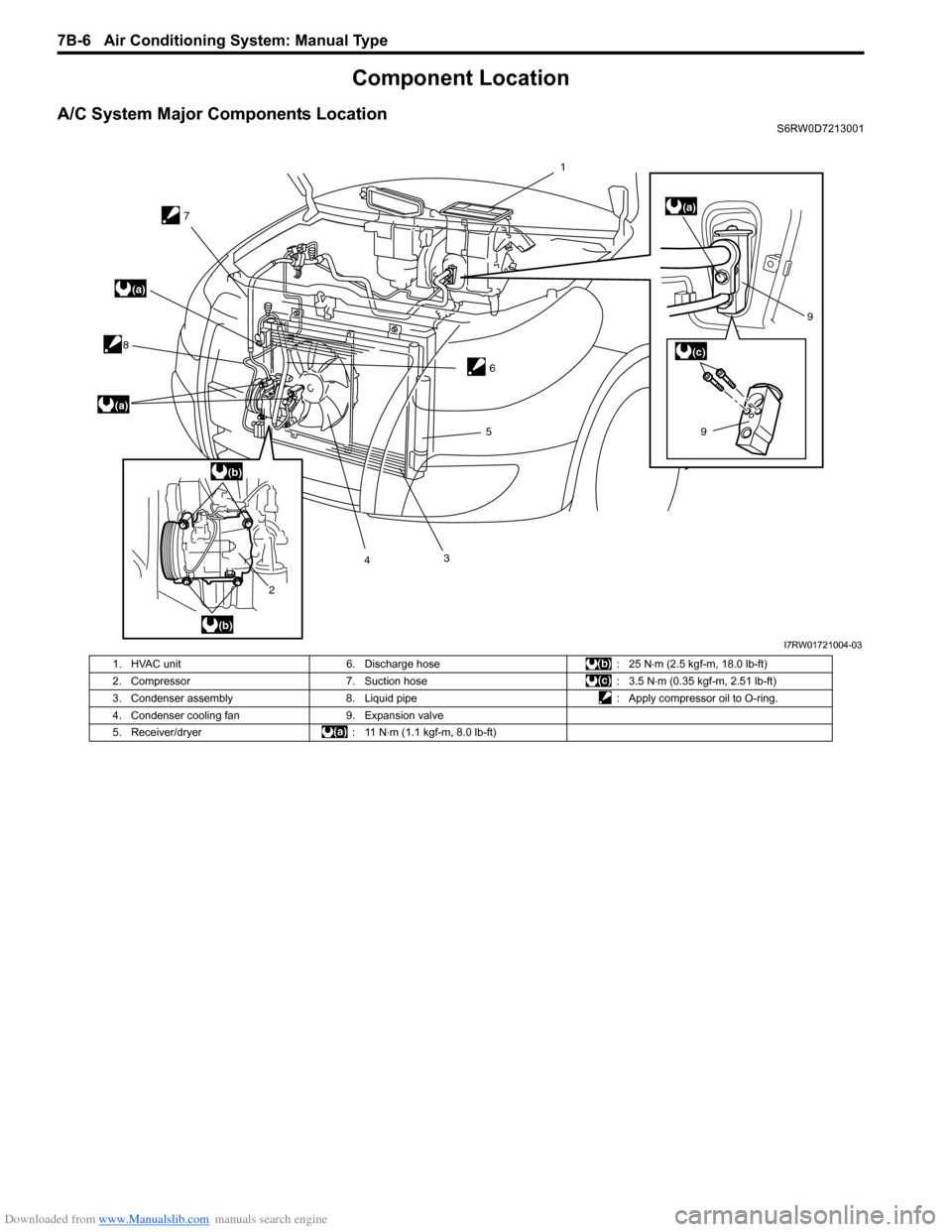
A/C System Major Components LocationS6RW0D7213001
7
8
2435
69
9
(a)
(a)
(a)
(b)
(b)
(c)
1
I7RW01721004-03
1. HVAC unit 6. Discharge hose : 25 N⋅m (2.5 kgf-m, 18.0 lb-ft)
2. Compressor 7. Suction hose : 3.5 N⋅m (0.35 kgf-m, 2.51 lb-ft)
3. Condenser assembly 8. Liquid pipe : Apply compressor oil to O-ring.
4. Condenser cooling fan 9. Expansion valve
5. Receiver/dryer : 11 N⋅m (1.1 kgf-m, 8.0 lb-ft)
Page 947 of 1556
Downloaded from www.Manualslib.com manuals search engine Air Conditioning System: Manual Type 7B-7
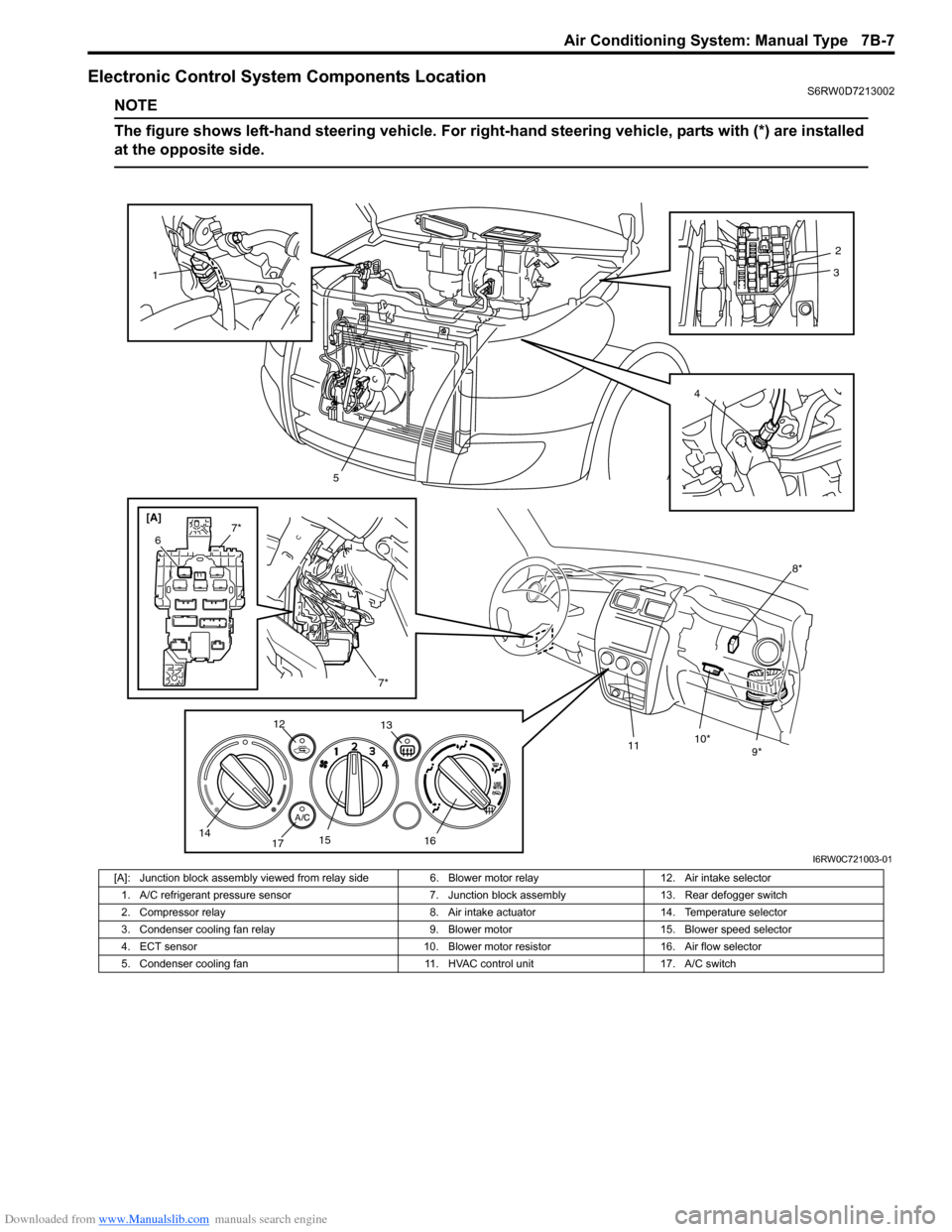
Electronic Control System Components LocationS6RW0D7213002
NOTE
The figure shows left-hand steering vehicle. For right-hand steering vehicle, parts with (*) are installed
at the opposite side.
[A]
8*
9* 10*
11
1
5
7*
6
7*
12
13
14
1715
1642
3
I6RW0C721003-01
[A]: Junction block assembly viewed from relay side 6. Blower motor relay 12. Air intake selector
1. A/C refrigerant pressure sensor 7. Junction block assembly 13. Rear defogger switch
2. Compressor relay 8. Air intake actuator 14. Temperature selector
3. Condenser cooling fan relay 9. Blower motor 15. Blower speed selector
4. ECT sensor 10. Blower motor resistor 16. Air flow selector
5. Condenser cooling fan 11. HVAC control unit 17. A/C switch
Page 949 of 1556
Downloaded from www.Manualslib.com manuals search engine Air Conditioning System: Manual Type 7B-9
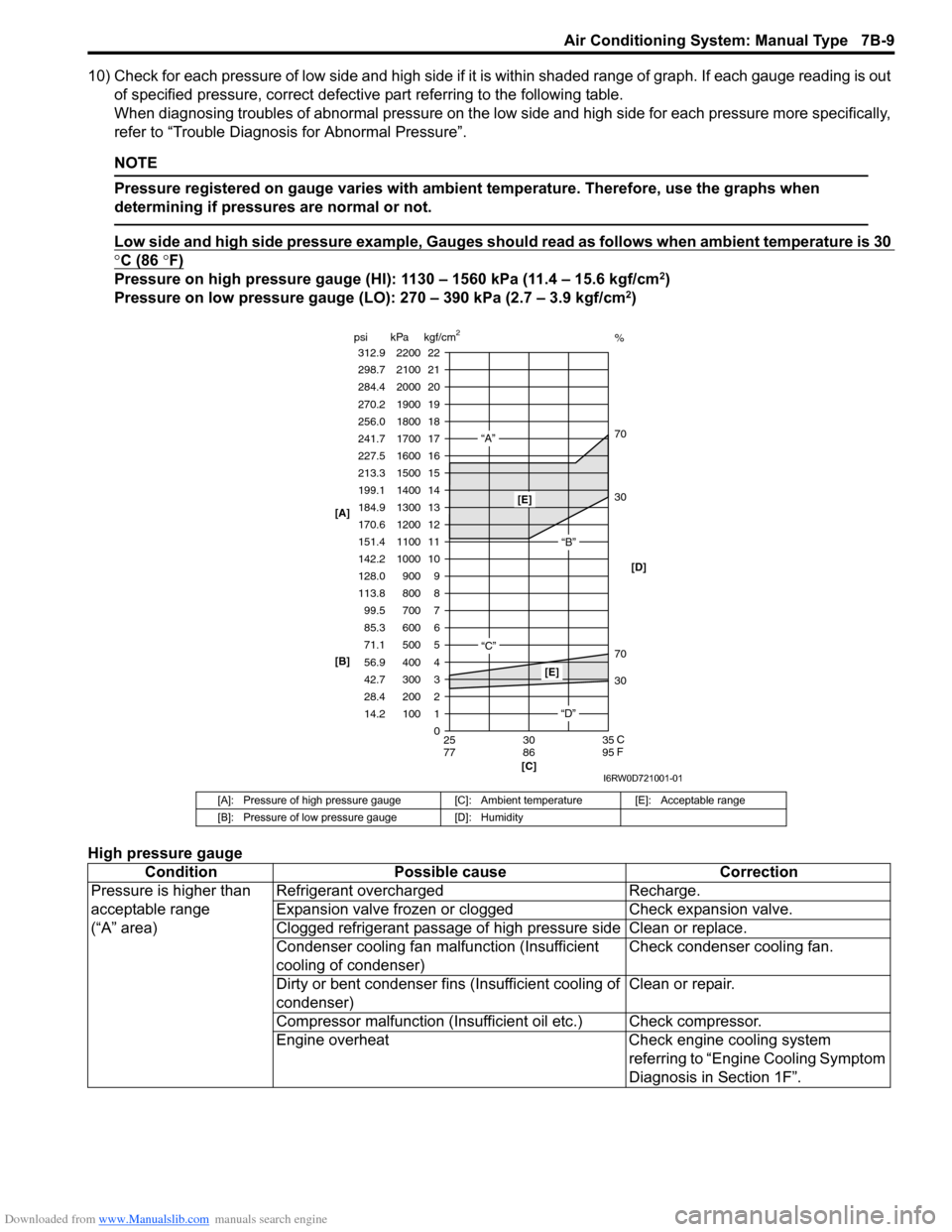
10) Check for each pressure of low side and high side if it is within shaded range of graph. If each gauge reading is out
of specified pressure, correct defective part referring to the following table.
When diagnosing troubles of abnormal pressure on the low side and high side for each pressure more specifically,
refer to “Trouble Diagnosis for Abnormal Pressure”.
NOTE
Pressure registered on gauge varies with ambient temperature. Therefore, use the graphs when
determining if pressures are normal or not.
Low side and high side pressure example, Gauges should read as follows when ambient temperature is 30
°C (86 °F)
Pressure on high pressure gauge (HI): 1130 – 1560 kPa (11.4 – 15.6 kgf/cm2)
Pressure on low pressure gauge (LO): 270 – 390 kPa (2.7 – 3.9 kgf/cm2)
High pressure gauge
[A]: Pressure of high pressure gauge [C]: Ambient temperature [E]: Acceptable range
[B]: Pressure of low pressure gauge [D]: Humidity
Condition Possible cause Correction
Pressure is higher than
acceptable range
(“A” area)Refrigerant overcharged Recharge.
Expansion valve frozen or clogged Check expansion valve.
Clogged refrigerant passage of high pressure side Clean or replace.
Condenser cooling fan malfunction (Insufficient
cooling of condenser)Check condenser cooling fan.
Dirty or bent condenser fins (Insufficient cooling of
condenser)Clean or repair.
Compressor malfunction (Insufficient oil etc.) Check compressor.
Engine overheat Check engine cooling system
referring to “Engine Cooling Symptom
Diagnosis in Section 1F”.
22 312.9 2200
0 1 2 3
30 70 30 70%
4 5 6 7 8 9 10
11 12 13
14
15
16
17
18
19 21 298.7 2100
20
14.2 28.4 42.7 56.9 71.1 85.3 99.5 113.8 128.0
142.2
151.4 170.6 184.9
199.1
213.3
227.5
241.7
256.0
270.2
284.4
100 200 300 400 500 600 700 800 900 1000
1100 1200 1300
1400
1500
1600
1700
1800
1900
2000
25 30 35
77 86 95 psi kPa kgf/cm
2
[C] [B] [A]
C
F
“A”
“B”
“C”
[E]
[E]
“D”[D]
I6RW0D721001-01
Page 983 of 1556
Downloaded from www.Manualslib.com manuals search engine Air Conditioning System: Automatic Type 7B-43
Component Location
A/C System Major Components LocationS6RW0D7223001
Refer to “A/C System Major Components Location”.
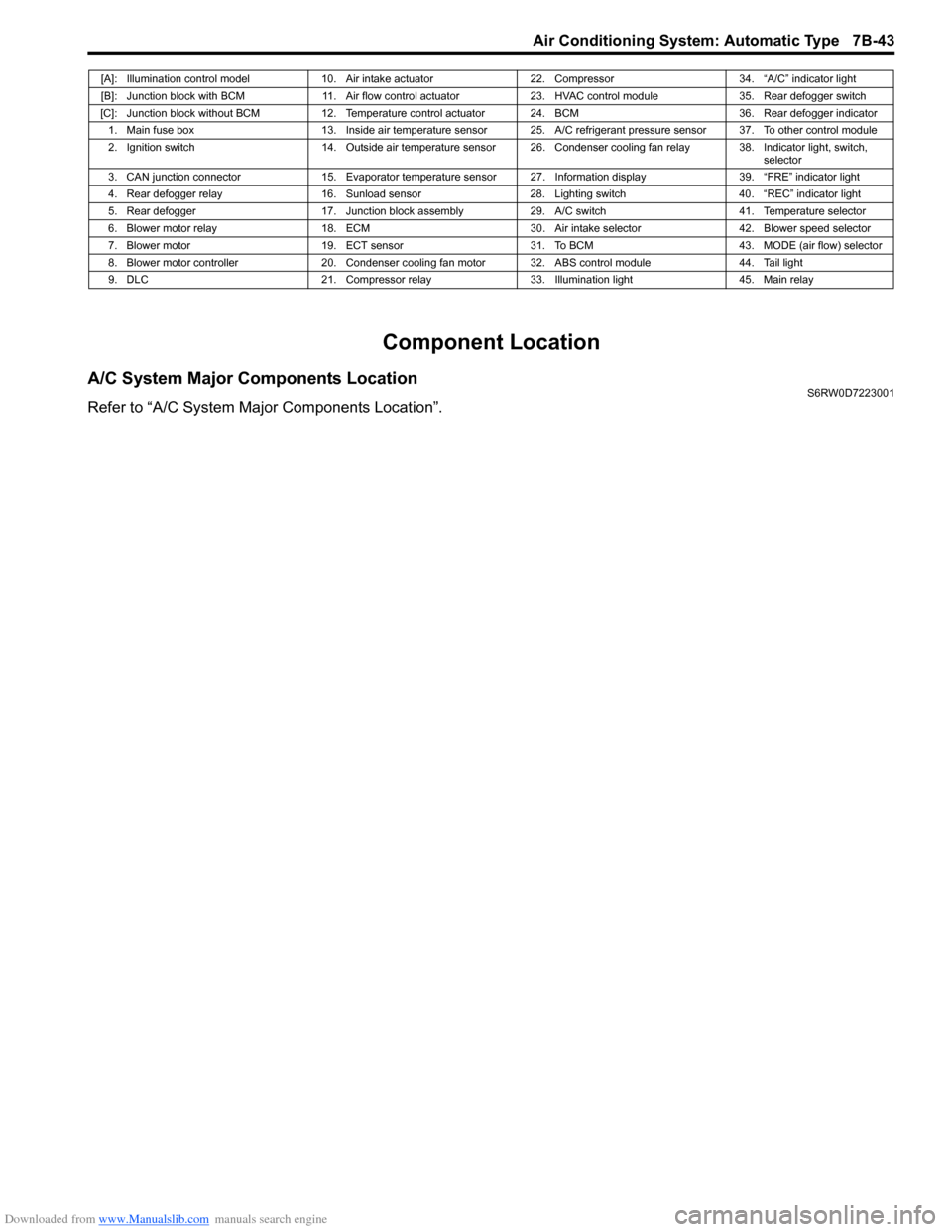
[A]: Illumination control model 10. Air intake actuator 22. Compressor 34. “A/C” indicator light
[B]: Junction block with BCM 11. Air flow control actuator 23. HVAC control module 35. Rear defogger switch
[C]: Junction block without BCM 12. Temperature control actuator 24. BCM 36. Rear defogger indicator
1. Main fuse box 13. Inside air temperature sensor 25. A/C refrigerant pressure sensor 37. To other control module
2. Ignition switch 14. Outside air temperature sensor 26. Condenser cooling fan relay 38. Indicator light, switch,
selector
3. CAN junction connector 15. Evaporator temperature sensor 27. Information display 39. “FRE” indicator light
4. Rear defogger relay 16. Sunload sensor 28. Lighting switch 40. “REC” indicator light
5. Rear defogger 17. Junction block assembly 29. A/C switch 41. Temperature selector
6. Blower motor relay 18. ECM 30. Air intake selector 42. Blower speed selector
7. Blower motor 19. ECT sensor 31. To BCM 43. MODE (air flow) selector
8. Blower motor controller 20. Condenser cooling fan motor 32. ABS control module 44. Tail light
9. DLC 21. Compressor relay 33. Illumination light 45. Main relay