display TOYOTA iQ EV 2013 (in English) Owner's Manual
[x] Cancel search | Manufacturer: TOYOTA, Model Year: 2013, Model line: iQ EV, Model: TOYOTA iQ EV 2013Pages: 444, PDF Size: 7.34 MB
Page 111 of 444

1113. Instrument cluster
3
Instrument cluster
Average vehicle speed/Elapsed time
Displays average vehicle speed and elapsed time.
Average vehicle speed: Displays the average vehicle speed
when the function is reset.
Elapsed time: Displays the elaps ed time since it was last reset.
• The function can be reset by pressing the “DISP” knob for longer than
1 second when the average vehicle speed/elapsed time is displayed.
Traction battery information
The battery temperature, motor regenerative performance and
motor output performance are displayed. ( P. 1 1 5 )
Screen settings
The meter settings can be changed. • Eco Driving Indicator Light settings
Eco Driving Indicator Light can be activated or deactivated.
• Clock settings
The clock can be adjusted.
• Ambient Light settings
The speedometer illumination color can be changed or turned off.
The light color will change in sync with the EV system indicator.
Timer charging set (start/finish) time
A timer charging start or finish time will be displayed.
A timer charging set time will be displayed only when the timer charging
has been scheduled. Timer charging set time will not be displayed when
the charging timer function has not been scheduled.
6
7
8
9
Page 115 of 444
1153. Instrument cluster
3
Instrument cluster
■Traction battery information
High or low temperatures of the traction battery, or traction battery’s remain-
ing charge being low may affect the motor performance.
Output performance: If the motor output performance has reduced, the maxi-
mum vehicle speed may be limited.
Regenerative performance: If the regenerative performance has reduced, the regenerative braking ability will be reduced.
Firmly depress the brake pedal.
■ Changes in possible driving range
●When the traction battery capacity has reduced, the possible driving range
will be calculated in accordance with such capacity. Therefore, the possible
driving ranges (highway, city) with the battery fully charged will be different
from those when the vehicle was new. ( P. 190)
● Estimated possible driving ranges are calculated based on power consump-
tion averages. Power-efficient driving manners ( P. 94) may increase the
estimated driving ranges.
● Air conditioning on or off affects possible driving ranges. Variation in possi-
ble driving ranges significantly varies depending on the previous energy
consumption of the air conditioning system, driving manners and weather.
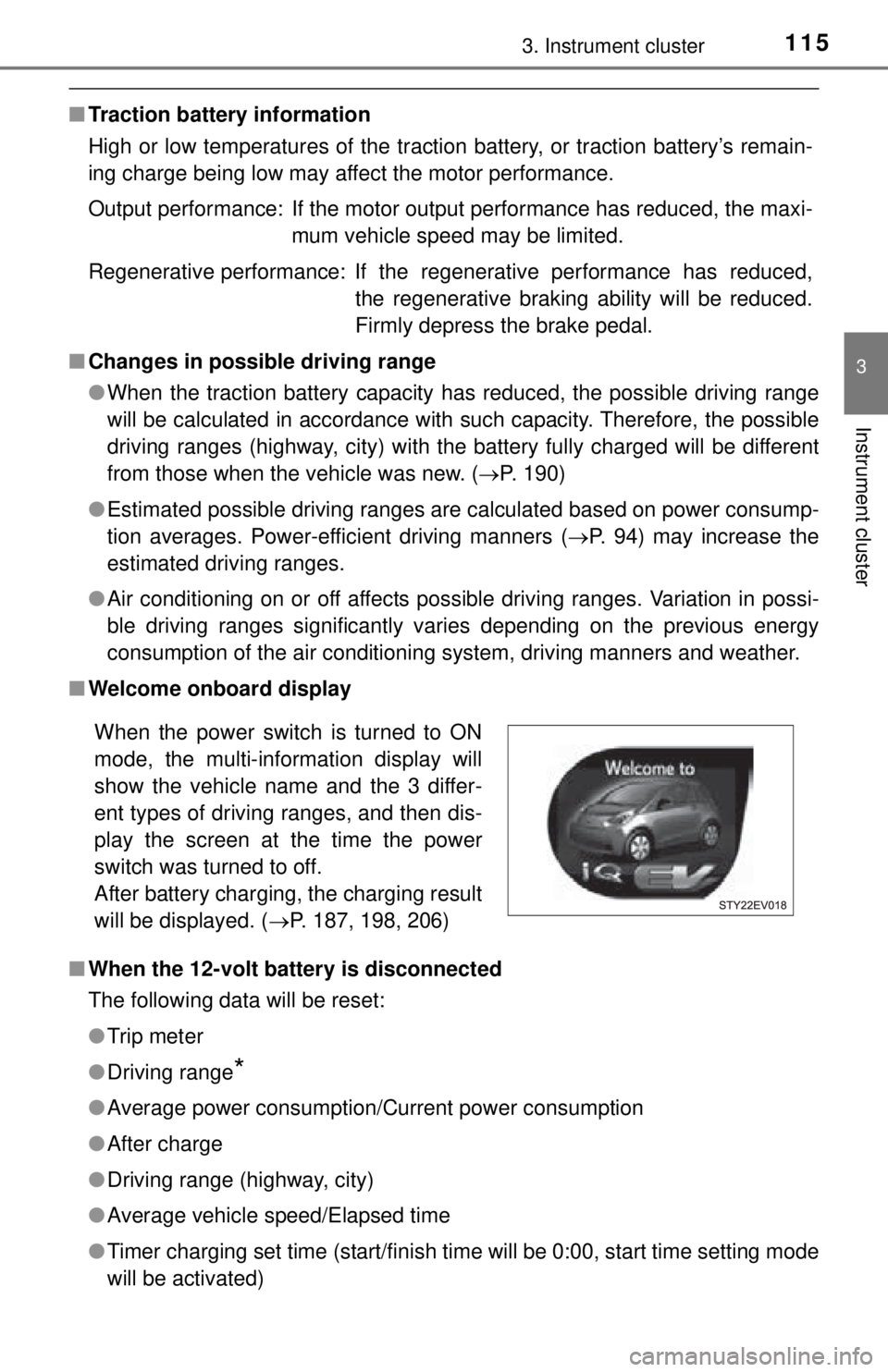
■ Welcome onboard display
■ When the 12-volt battery is disconnected
The following data will be reset:
●Trip meter
● Driving range
*
●Average power consumption/Current power consumption
● After charge
● Driving range (highway, city)
● Average vehicle speed/Elapsed time
● Timer charging set time (start/finish time will be 0:00, start time setting mode
will be activated)
When the power switch is turned to ON
mode, the multi-information display will
show the vehicle name and the 3 differ-
ent types of driving ranges, and then dis-
play the screen at the time the power
switch was turned to off.
After battery charging, the charging result
will be displayed. ( P. 187, 198, 206)
Page 116 of 444

1163. Instrument cluster
●Clock
● Instrument panel brightness levels (light intensity will become the maximum
level both when the tail lights are turned on and off)
*: Estimated driving ranges are calculated based on the previous power con-
sumption, which is leaned by the computer. When the 12-volt battery is dis-
connected, the previous power consumption averages will be reset. This
will result in different estimated driving ranges prior to the battery discon-
nection.
■ Adjusting to a full hour
The minute values will be rounded to the nearest hour. So, minute values
from “:00” to “:29” are rounded down, and values from “:30” to “:59” are
rounded up
*.
*: e.g.
1:00 to 1:29 1:00
1:30 to 1:59 2:00
■ Liquid crystal display
Small spots or light spots may appear on the display. This phenomenon is
characteristic of liquid crystal displays, and there is no problem continuing to
use the display.
NOTICE
■During setting up the display
To prevent 12-volt battery discharge, ensure that the EV system is operating
while setting up the display features.
■ The multi-information disp lay at low temperatures
Allow the interior of the vehicle to warm up before using the liquid crystal
information display. At extremely low temperatures, the information display
monitor may respond slowly, and display changes may be delayed.
Page 124 of 444
1244-2. Opening, closing and locking the doors
■Alarms and warning messages
A combination of exterior and interior alarms as well as warning messages
shown on the multi-information display is used to prevent theft of the vehicle
and accidents resulting from erroneous operation. Take appropriate mea-
sures in response to any warning message on the multi-information display.
(P. 350)
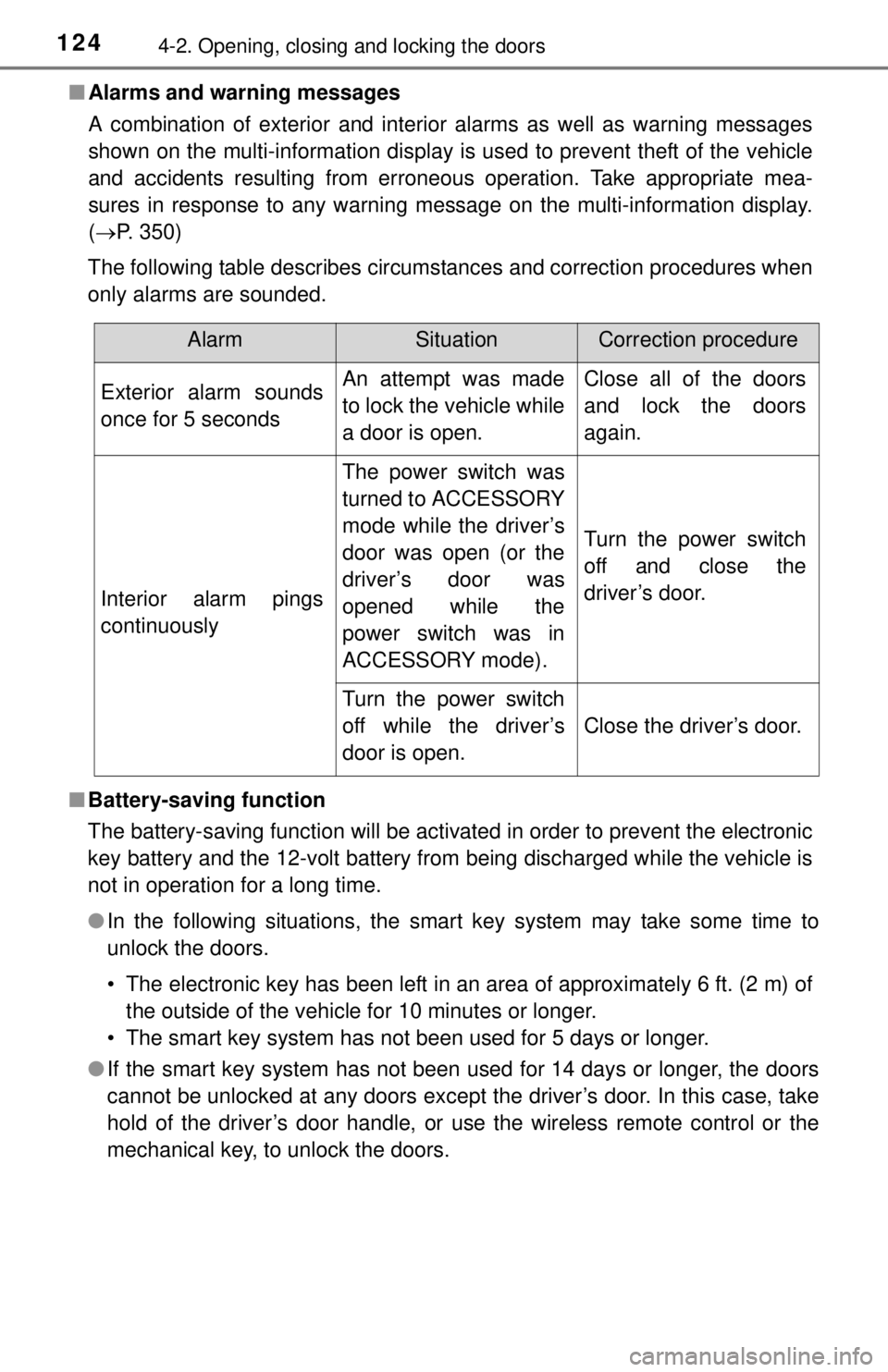
The following table describes circumstances and correction procedures when
only alarms are sounded.
■ Battery-saving function
The battery-saving function will be activated in order to prevent the electronic
key battery and the 12-volt battery from being discharged while the vehicle is
not in operation for a long time.
●In the following situations, the smart key system may take some time to
unlock the doors.
• The electronic key has been left in an area of approximately 6 ft. (2 m) of
the outside of the vehicle for 10 minutes or longer.
• The smart key system has not been used for 5 days or longer.
● If the smart key system has not been used for 14 days or longer, the doors
cannot be unlocked at any doors except the driver’s door. In this case, take
hold of the driver’s door handle, or use the wireless remote control or the
mechanical key, to unlock the doors.
AlarmSituationCorrection procedure
Exterior alarm sounds
once for 5 secondsAn attempt was made
to lock the vehicle while
a door is open.Close all of the doors
and lock the doors
again.
Interior alarm pings
continuously
The power switch was
turned to ACCESSORY
mode while the driver’s
door was open (or the
driver’s door was
opened while the
power switch was in
ACCESSORY mode).
Turn the power switch
off and close the
driver’s door.
Turn the power switch
off while the driver’s
door is open.
Close the driver’s door.
Page 152 of 444
1525-1. Before driving
■When “DRIVE FORCE LIMITED” is displayed on the multi-information
display
When driving on extremely rough roads, the driving force may be limited to
avoid damage to vehicle parts. This is not a malfunction.
■ To prevent the traction battery’s re maining charge from running out
Driving on highways is likely to accelerate the battery power consumption, so
do not rely too much on the possible driving ranges. If the SOC (State of
Charge) warning light comes on, avoid driving on highways and charge the
battery soon.
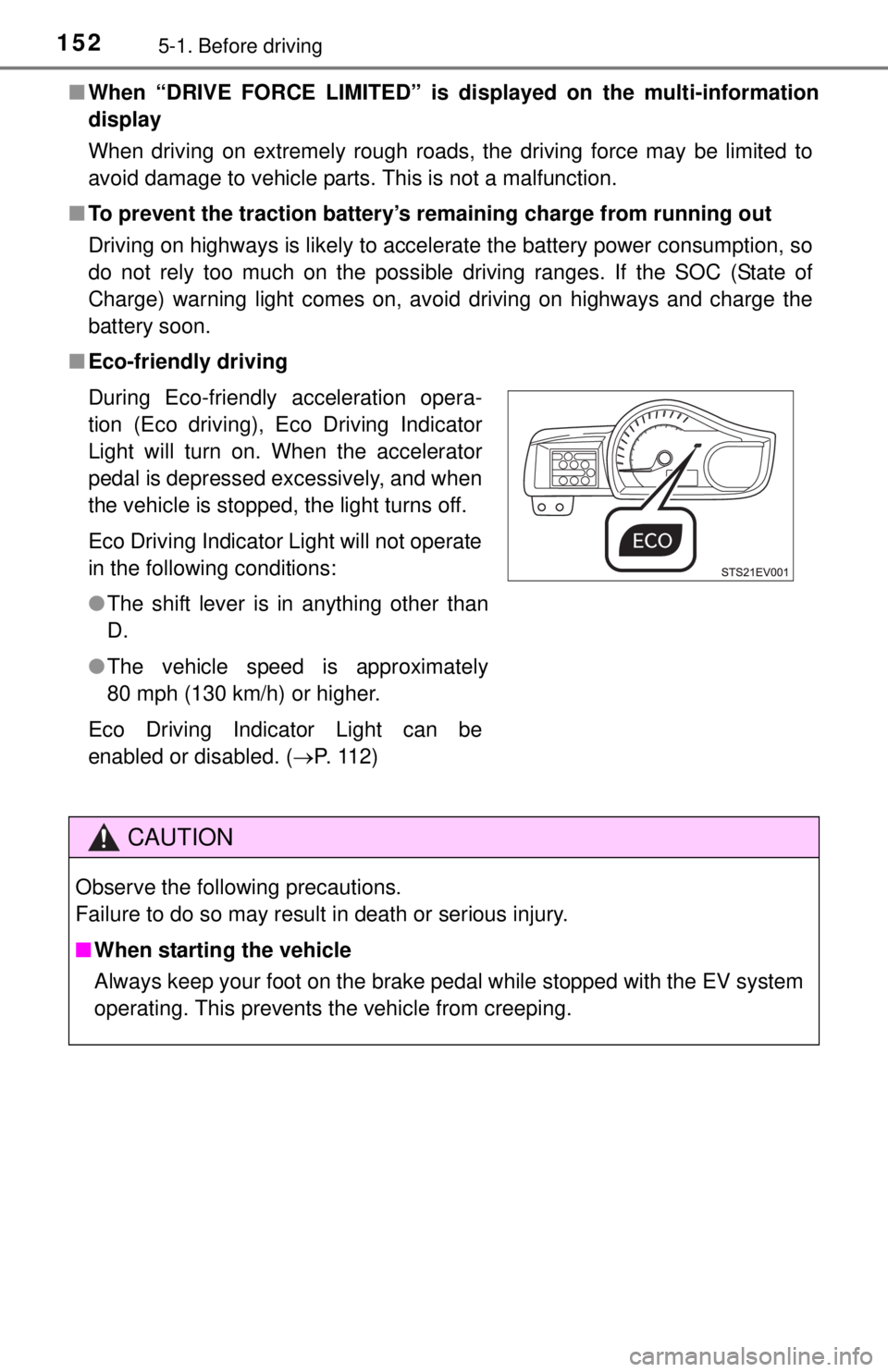
■ Eco-friendly driving
During Eco-friendly acceleration opera-
tion (Eco driving), Eco Driving Indicator
Light will turn on. When the accelerator
pedal is depressed excessively, and when
the vehicle is stopped, the light turns off.
Eco Driving Indicator Light will not operate
in the following conditions:
●The shift lever is in anything other than
D.
● The vehicle speed is approximately
80 mph (130 km/h) or higher.
Eco Driving Indicator Light can be
enabled or disabled. ( P. 112)
CAUTION
Observe the following precautions.
Failure to do so may result in death or serious injury.
■When starting the vehicle
Always keep your foot on the brake pedal while stopped with the EV system
operating. This prevents the vehicle from creeping.
Page 153 of 444

1535-1. Before driving
5
Driving
CAUTION
Observe the following precautions.
Failure to do so may result in death or serious injury.
■When driving the vehicle
● Do not drive if you are unfamiliar with the location of the brake and ac\
cel-
erator pedals to avoid depressing the wrong pedal.
• Accidentally depressing the accelerator pedal instead of the brake
pedal will result in sudden acceleration that may lead to an accident.
• When backing up, you may twist your body around, leading to a diffi- culty in operating the pedals. Make sure to operate the pedals properly.
• Make sure to keep a correct driving posture even when moving the vehicle only slightly. This allows you to depress the brake and accelera-
tor pedals properly.
• Depress the brake pedal using your right foot. Depressing the brake pedal using your left foot may delay response in an emergency, result-
ing in an accident.
● The driver should pay extra attenti on to pedestrians. Because there is no
engine noise, the pedestrians may misjudge the vehicle’s movement.
● During normal driving, do not turn off the EV system. Turning the EV sys-
tem off while driving will not cause loss of steering or braking control, but
the power assist to these systems will be lost. This will make it more diffi-
cult to steer and brake, so you should pull over and stop the vehicle as
soon as it is safe to do so.
However, in the event of an emergency, such as if it becomes impossible
to stop the vehicle in the normal way: P. 329
● Use regenerative braking to maintain a safe speed when driving down a
steep hill.
Using the brakes continuously may cause the brakes to overheat and lose
effectiveness. ( P. 171)
● If “REGENERATIVE BRAKING LIMITED” appears on the multi-informa-
tion display, firmly depress the brake pedal to decelerate the vehicle.
( P. 347)
● Do not adjust the positions of the steering wheel, the seat, or the inside or
outside rear view mirrors while driving.
Doing so may result in a loss of vehicle control.
● Always check that all passengers’ arms, heads or other parts of their body
are not outside the vehicle.
Page 155 of 444

1555-1. Before driving
5
Driving
CAUTION
■When shifting the shift lever
Observe the following precautions.
Failure to do so may result in death or serious injury.
● If a warning message appears on the multi-information display and warn-
ing buzzer sound when the shift lever is in P with the brake pedal
depressed, do not operate the shift lever. ( P. 349)
■ If you hear a squealing or scraping noise (brake pad wear limit indica-
tors)
Have the brake pads checked and replaced by your Scion dealer as soon
as possible.
Rotor damage may result if the pads are not replaced when needed.
It is dangerous to drive the vehicle when the wear limits of the brake pads
and/or those of the brake discs are exceeded.
■ When the vehicle is stopped
● Do not depress the accelerator pedal unnecessarily.
If the vehicle is in any gear other than P or N, the vehicle may accelerate
suddenly and unexpectedly, causing an accident.
● In order to prevent accidents due to the vehicle rolling away, always keep
depressing the brake pedal while the “READY” indicator is on, and apply
the parking brake as necessary.
● If the vehicle is stopped on an incline, in order to prevent accidents caused
by the vehicle rolling forward or backward, always depress the brake pedal
and securely apply the parking brake as needed.
■ When the vehicle is parked
● Do not leave glasses, cigarette lighters, spray cans, or soft drink cans in
the vehicle when it is in the sun.
Doing so may result in the following:
• Gas may leak from a cigarette lighter or spray can, and may lead to a
fire.
• The temperature inside the vehicle may cause the plastic lenses and plastic material of glasses to deform or crack.
• Soft drink cans may rupture, causing the contents to spray over the interior of the vehicle, and may also cause a short circuit in the vehicle’s
electrical components.
Page 167 of 444
1675-2. Driving procedures
5
Driving
If the EV system is stopped with the shift lever in a position other than
P, the power switch will not be turned off but instead be turned to
ACCESSORY mode. Perform the following procedure to turn the
switch off:Check that the parking brake is set.
Shift the shift lever to P.
Check that the power switch indicator is illu minated amber and then
press the power switch once.
Check that the power switch indicator goes out.
■ Auto power off function
If the vehicle is left in ACCESSORY mode for more than 20 minutes or ON
mode (the EV system is not operation) for more than an hour with the shift
lever in P, the power switch will automatically turn off. Furthermore, when the
mode is turned to ON mode while charging, the power switch will automati-
cally turn off after approximately 2 minutes have elapsed.
However, this function cannot entirely prevent 12-volt battery from discharge.
Do not leave the vehicle with the power switch in ACCESSORY or ON mode
for long periods of time when the EV system is not operating.
■ Sounds and vibrations speci fic to an electric vehicle
P. 7 7
■ Electronic key battery depletion
P. 128
■ When the ambient temperature is lo w, such as during winter driving con-
ditions
● When the temperature of the battery for driving power is low, a warning
message is displayed on the multi-information display and the output of the
electric motor will be restricted. ( P. 348)
● The “READY” indicator may flash for a long time when the EV system is
starting. Driving will become possible onc e the “READY” indicator has illumi-
nated. Wait until the “READY” indicator has illuminated.
■ Conditions affecting operation
P. 125
■ Notes for the entry function
P. 126
When stopping the EV system with the shift lever in a position
other than P
1
2
3
4
Page 168 of 444
1685-2. Driving procedures
■If the EV system does not start
●The charging cable may be attached to the vehicle. ( P. 188)
● The immobilizer system may not have been deactivated. ( P. 66)
Contact your Scion dealer.
● Check that the shift lever is securely set in P. The EV system may not start if
the shift lever is displaced out of P. “SHIFT TO P POSITION WHEN
STARTING” will be displayed on the multi-information display.
● The steering lock may not have been deactivated.
■ Steering lock
After turning the power switch off and opening and closing the doors, the
steering wheel will be locked due to the steering lock function. Operating the
power switch again automatically cancels the steering lock.
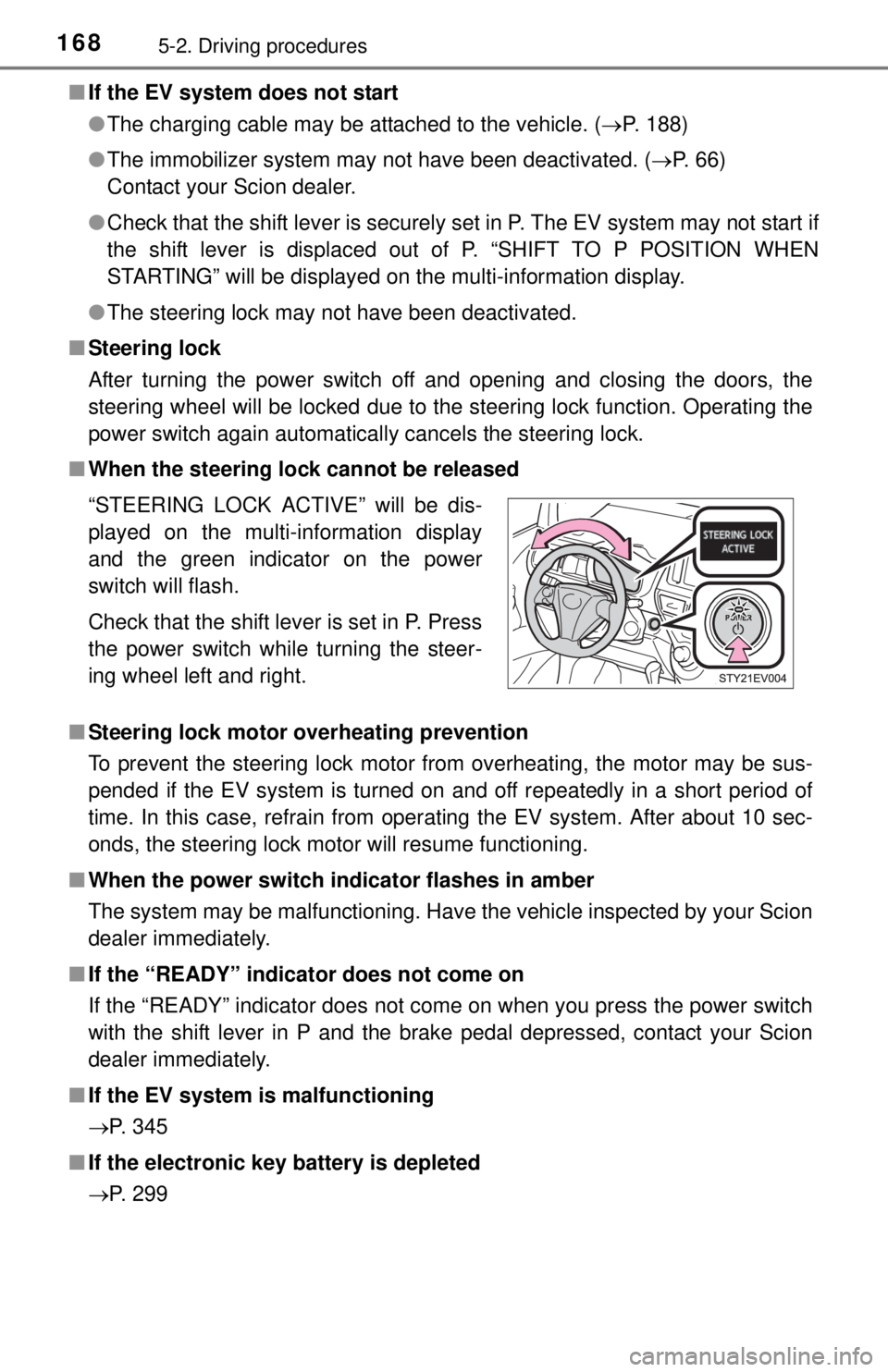
■ When the steering lock cannot be released
■ Steering lock motor overheating prevention
To prevent the steering lock motor from overheating, the motor may be sus-
pended if the EV system is turned on and off repeatedly in a short period of
time. In this case, refrain from operating the EV system. After about 10 sec-
onds, the steering lock motor will resume functioning.
■ When the power switch in dicator flashes in amber
The system may be malfunctioning. Have the vehicle inspected by your Scion
dealer immediately.
■ If the “READY” indicator does not come on
If the “READY” indicator does not come on when you press the power switch
with the shift lever in P and the brake pedal depressed, contact your Scion
dealer immediately.
■ If the EV system is malfunctioning
P. 345
■ If the electronic key battery is depleted
P. 299 “STEERING LOCK ACTIVE” will be dis-
played on the multi-information display
and the green indicator on the power
switch will flash.
Check that the shift lever is set in P. Press
the power switch while turning the steer-
ing wheel left and right.
Page 172 of 444

1725-2. Driving procedures
■Using regenerative brake
●When high speed driving, the feeling of deceleration with regenerative brak-
ing is smaller than the deceleration feeling obtained on conventional vehi-
cles.
● When strong regenerative braking is required, shift the shift lever to S or B.
Continuously running in S or B can lead to poor power consumption. Drive
normally in D.
● If “REGENERATIVE BRAKIN G LIMITED” appears on the multi-information
display, firmly depress the brake pedal to decelerate the vehicle. ( P. 347)
■ If the shift lever cannot be shifted from P
P. 383
CAUTION
■When driving on slippery road surfaces
Avoid sudden acceleration or sudden shifting operations. Take care that
sudden changes to the regenerative brake power can lead to the vehicle
skidding to side or spinning.