display TOYOTA iQ EV 2013 (in English) Workshop Manual
[x] Cancel search | Manufacturer: TOYOTA, Model Year: 2013, Model line: iQ EV, Model: TOYOTA iQ EV 2013Pages: 444, PDF Size: 7.34 MB
Page 344 of 444
3448-2. Steps to take in an emergency
If a warning message is displayed
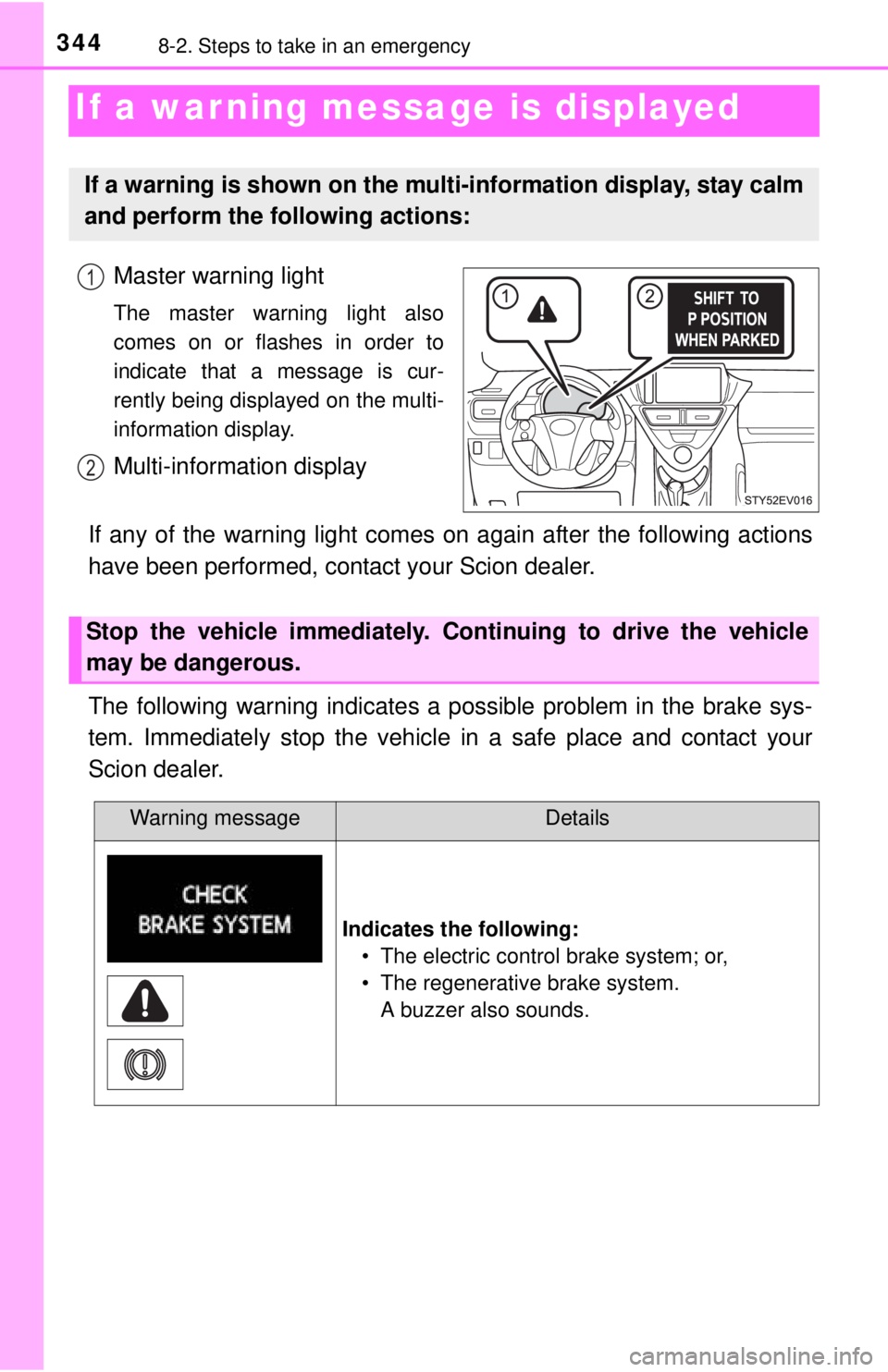
Master warning light
The master warning light also
comes on or flashes in order to
indicate that a message is cur-
rently being displayed on the multi-
information display.
Multi-information display
If any of the warning light comes on again after the following actions
have been performed, contact your Scion dealer.
The following warning indicates a possible problem in the brake sys-
tem. Immediately stop the vehicle in a safe place and contact your
Scion dealer.
If a warning is shown on the multi-information display, stay calm
and perform the following actions:
1
2
Stop the vehicle immediately. Continuing to drive the vehicle
may be dangerous.
Warning messageDetails
Indicates the following: • The electric control brake system; or,
• The regenerative brake system.A buzzer also sounds.
Page 345 of 444
3458-2. Steps to take in an emergency
8
When trouble arises
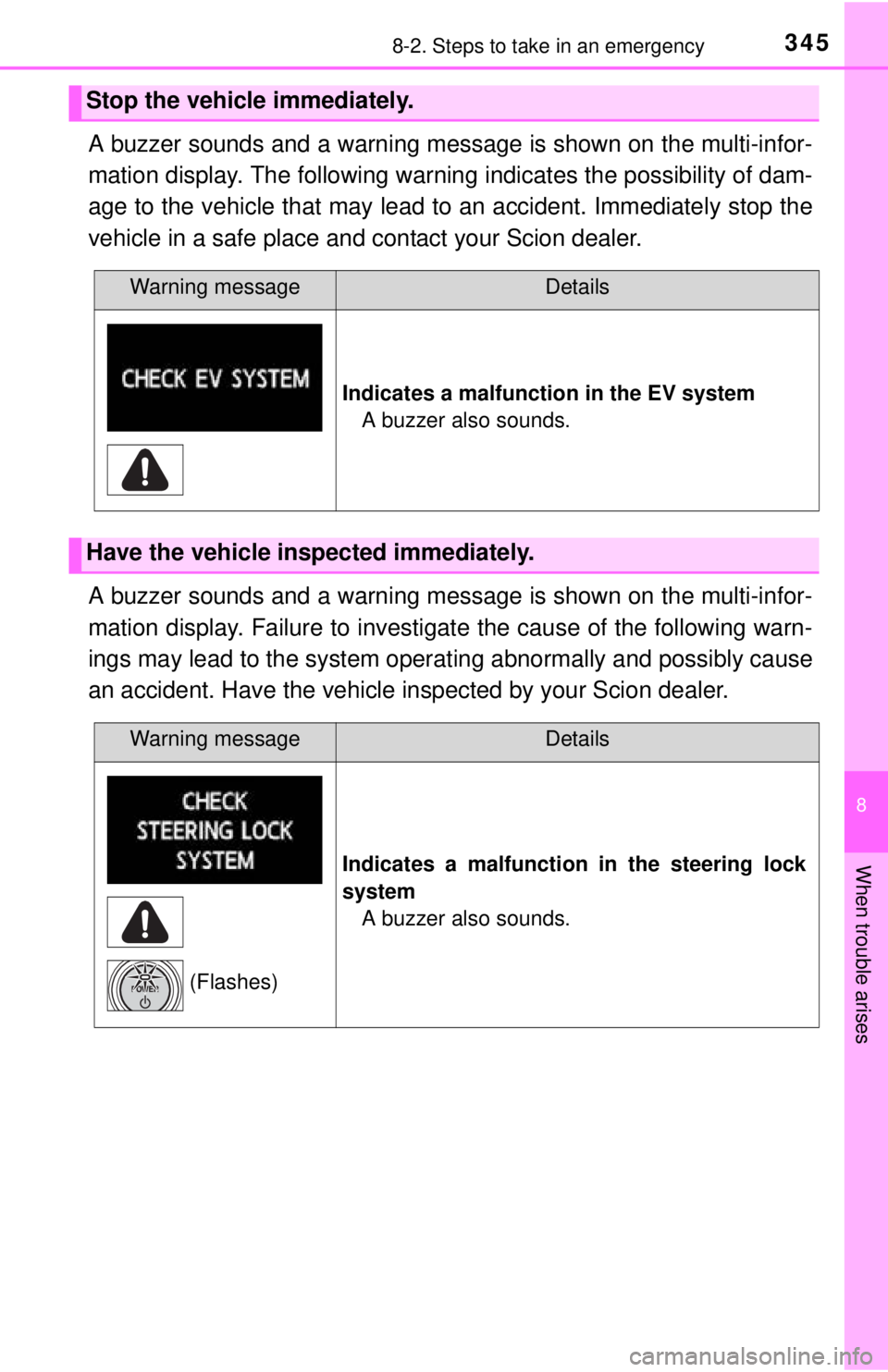
A buzzer sounds and a warning message is shown on the multi-infor-
mation display. The following warning indicates the possibility of dam-
age to the vehicle that may lead to an accident. Immediately stop the
vehicle in a safe place and contact your Scion dealer.
A buzzer sounds and a warning message is shown on the multi-infor-
mation display. Failure to investigate the cause of the following warn-
ings may lead to the system operat ing abnormally and possibly cause
an accident. Have the vehicle inspected by your Scion dealer.
Stop the vehicle immediately.
Warning messageDetails
Indicates a malfunction in the EV system A buzzer also sounds.
Have the vehicle inspected immediately.
Warning messageDetails
Indicates a malfunction in the steering lock
system A buzzer also sounds.
(Flashes)
Page 346 of 444
3468-2. Steps to take in an emergency
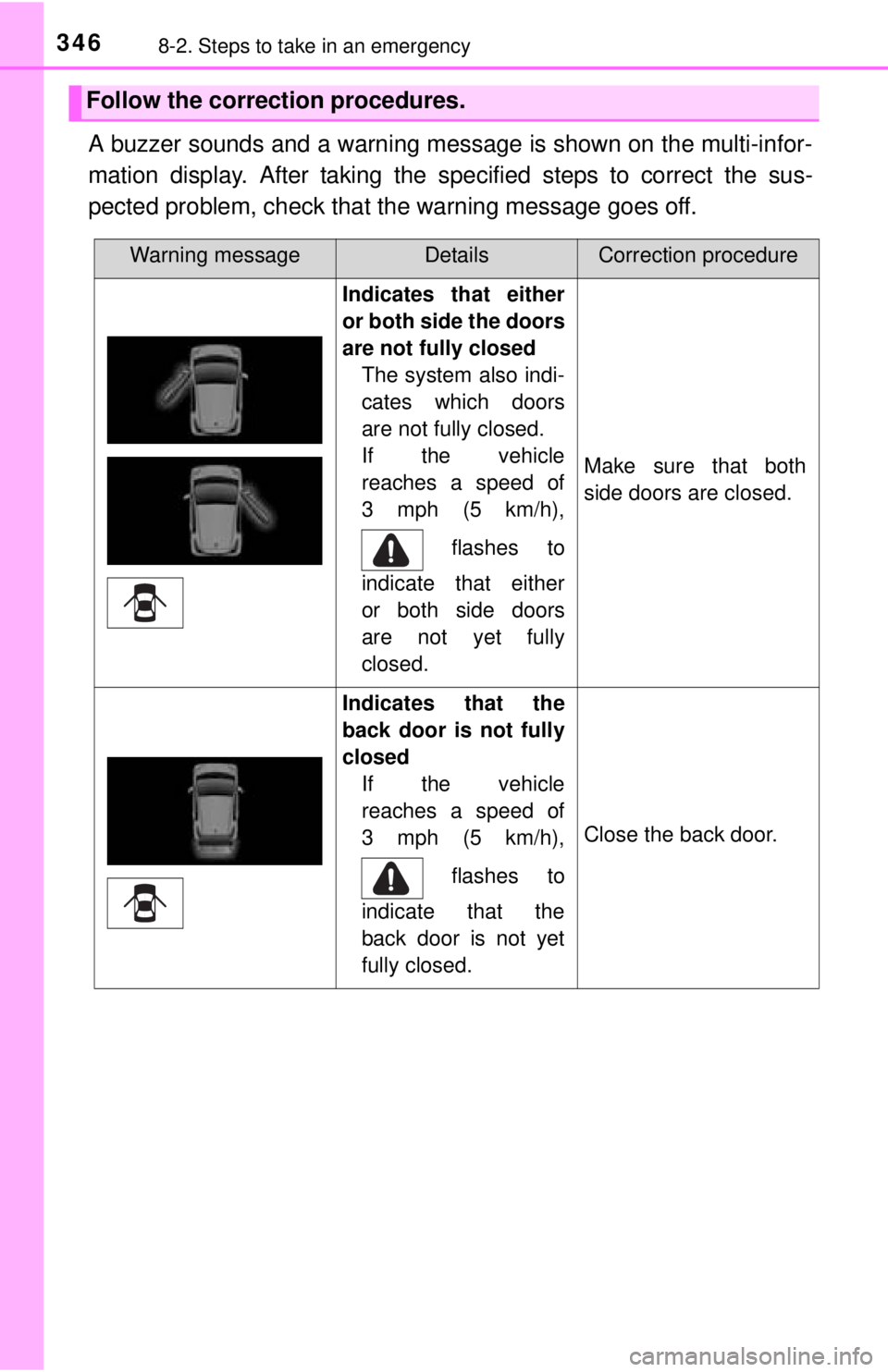
A buzzer sounds and a warning message is shown on the multi-infor-
mation display. After taking the specified steps to correct the sus-
pected problem, check that th e warning message goes off.
Follow the correction procedures.
Warning messageDetailsCorrection procedure
Indicates that either
or both side the doors
are not fully closed
The system also indi-
cates which doors
are not fully closed.
If the vehicle
reaches a speed of
3 mph (5 km/h),
flashes to
indicate that either
or both side doors
are not yet fully
closed.
Make sure that both
side doors are closed.
Indicates that the
back door is not fully
closed If the vehicle
reaches a speed of
3 mph (5 km/h),
flashes to
indicate that the
back door is not yet
fully closed.
Close the back door.
Page 347 of 444
3478-2. Steps to take in an emergency
8
When trouble arises
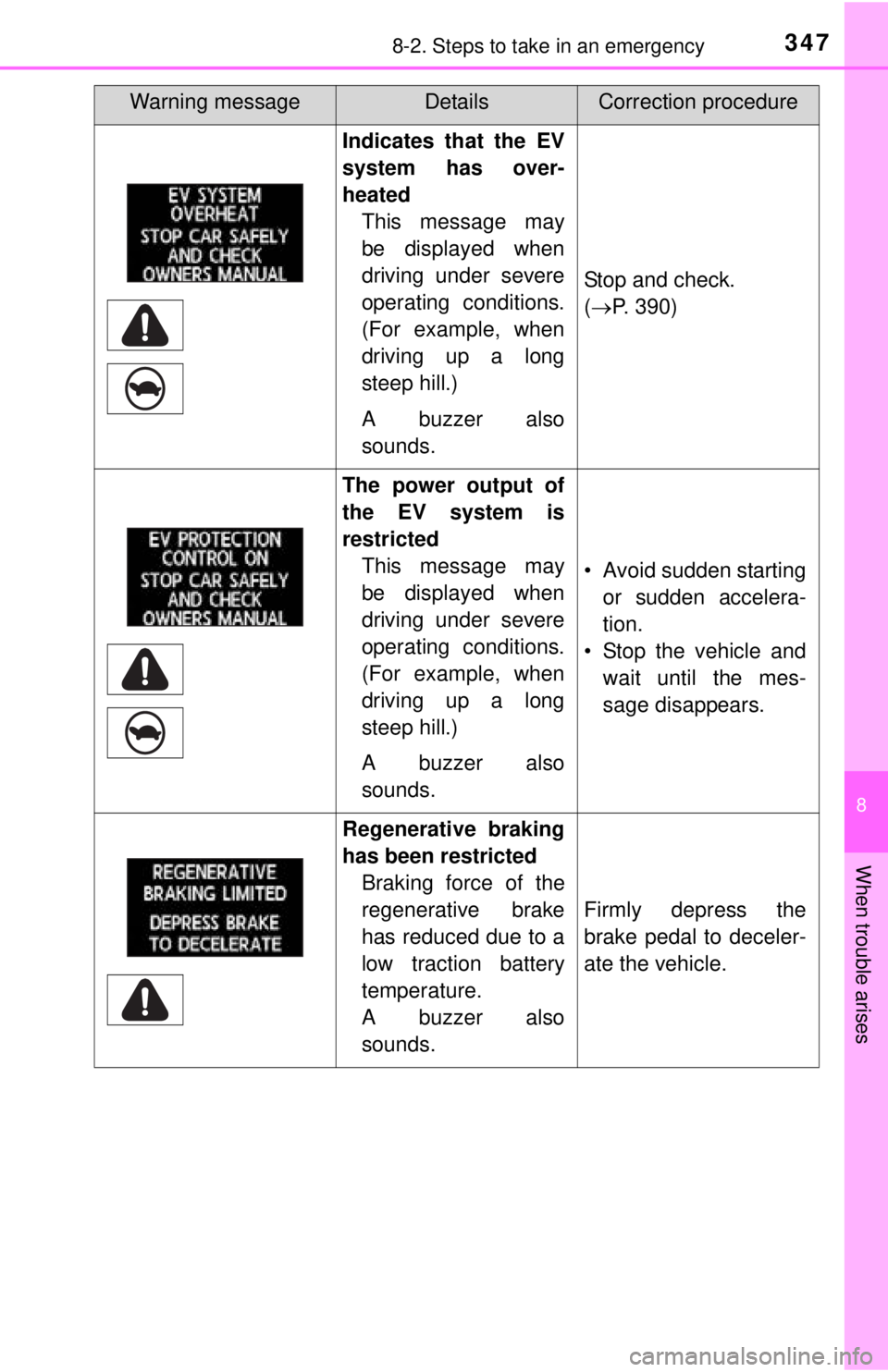
Indicates that the EV
system has over-
heatedThis message may
be displayed when
driving under severe
operating conditions.
(For example, when
driving up a long
steep hill.)
A buzzer also
sounds.
Stop and check.
(P. 390)
The power output of
the EV system is
restricted
This message may
be displayed when
driving under severe
operating conditions.
(For example, when
driving up a long
steep hill.)
A buzzer also
sounds.
• Avoid sudden startingor sudden accelera-
tion.
• Stop the vehicle and wait until the mes-
sage disappears.
Regenerative braking
has been restrictedBraking force of the
regenerative brake
has reduced due to a
low traction battery
temperature.
A buzzer also
sounds.
Firmly depress the
brake pedal to deceler-
ate the vehicle.
Warning messageDetailsCorrection procedure
Page 351 of 444
3518-2. Steps to take in an emergency
8
When trouble arises
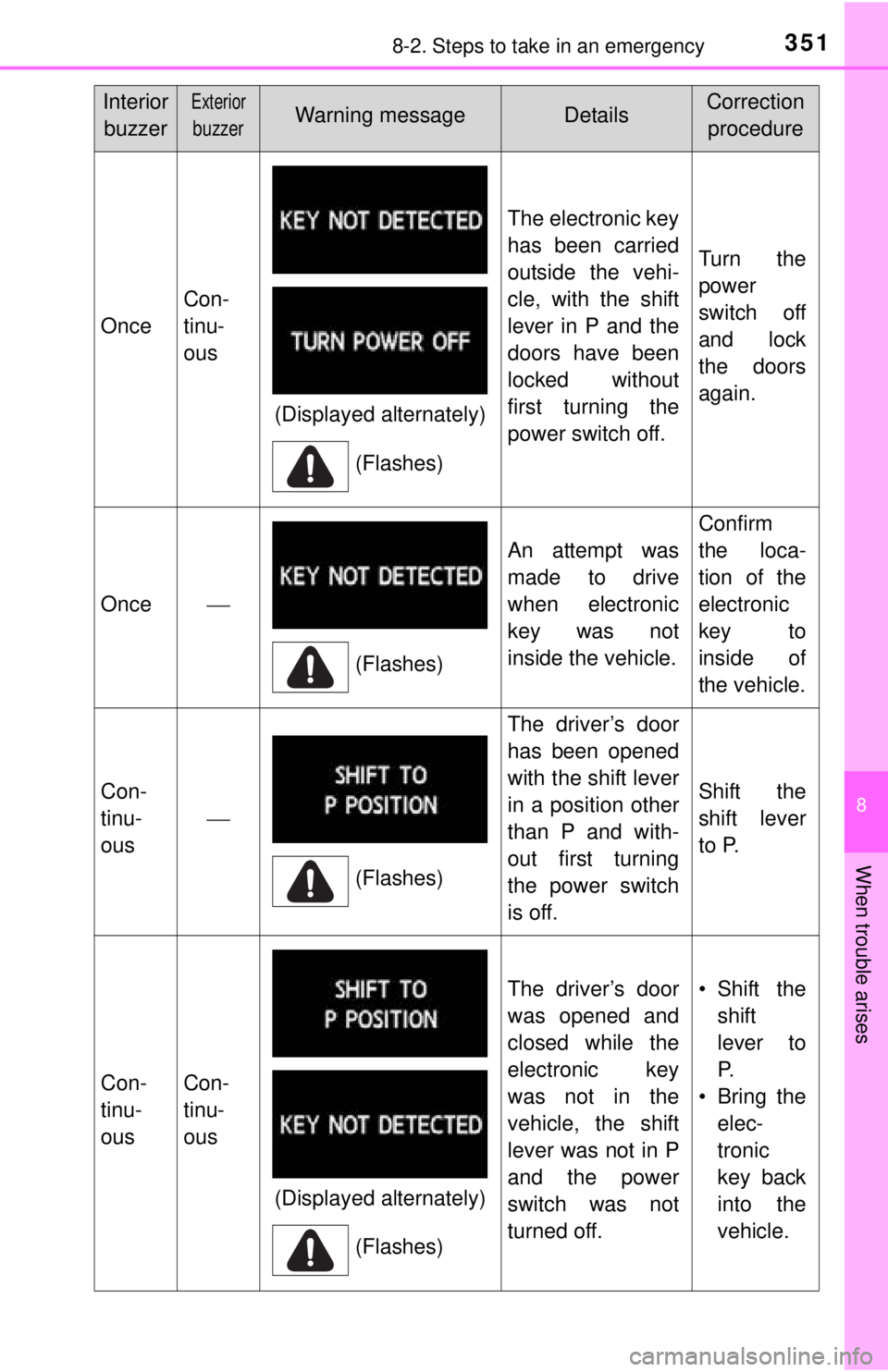
Once
Con-
tinu-
ous
The electronic key
has been carried
outside the vehi-
cle, with the shift
lever in P and the
doors have been
locked without
first turning the
power switch off.
Turn the
power
switch off
and lock
the doors
again.
Once
An attempt was
made to drive
when electronic
key was not
inside the vehicle.
Confirm
the loca-
tion of the
electronic
key to
inside of
the vehicle.
Con-
tinu-
ous
The driver’s door
has been opened
with the shift lever
in a position other
than P and with-
out first turning
the power switch
is off.
Shift the
shift lever
to P.
Con-
tinu-
ousCon-
tinu-
ous
The driver’s door
was opened and
closed while the
electronic key
was not in the
vehicle, the shift
lever was not in P
and the power
switch was not
turned off.•Shift theshift
lever to
P.
• Bring the elec-
tronic
key back
into the
vehicle.
InteriorbuzzerExterior
buzzerWarning messageDetailsCorrection procedure
(Displayed alternately)
(Flashes)
(Flashes)
(Flashes)
(Displayed alternately)(Flashes)
Page 355 of 444
3558-2. Steps to take in an emergency
8
When trouble arises
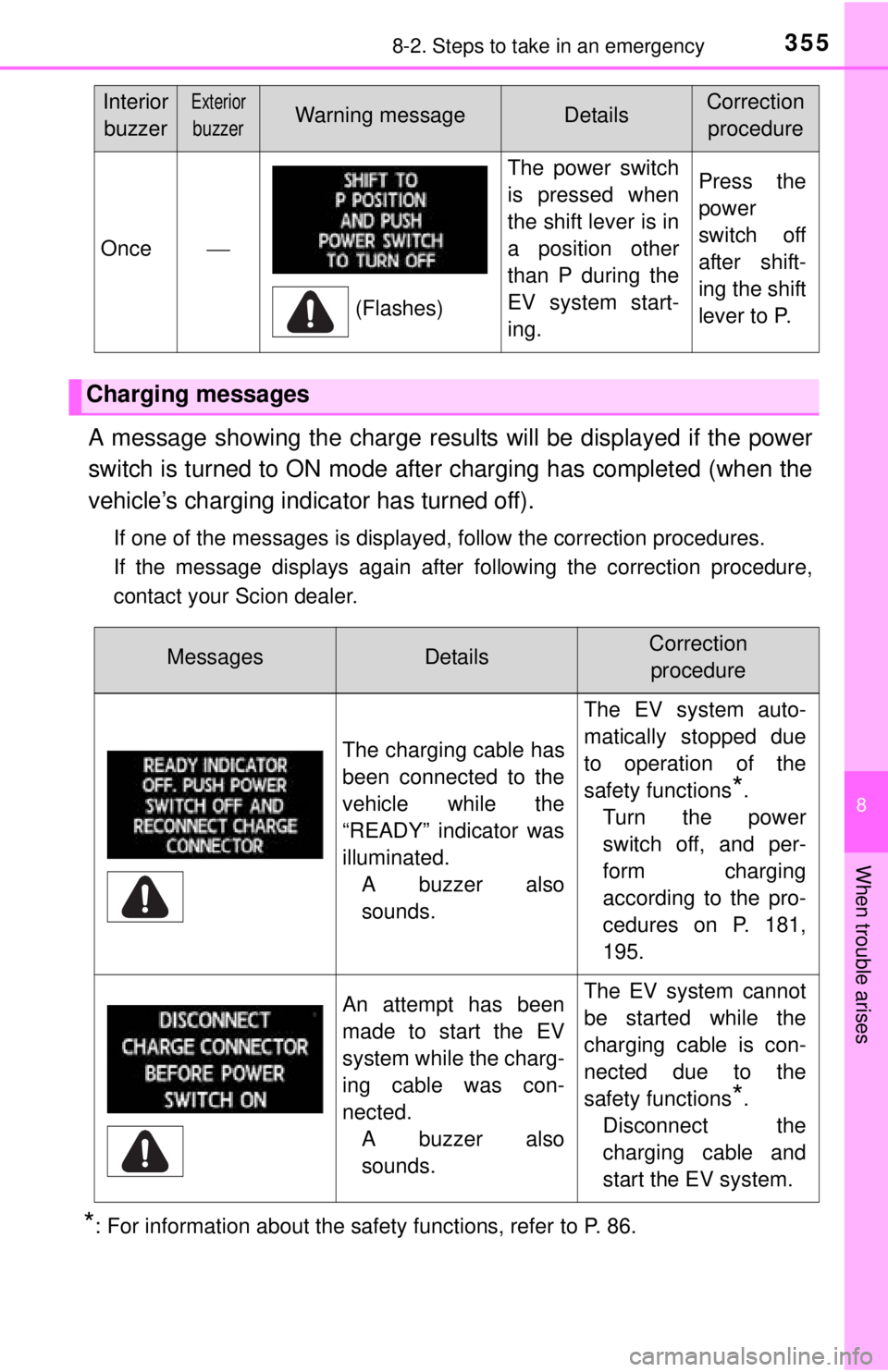
A message showing the charge results will be displayed if the power
switch is turned to ON mode after charging has completed (when the
vehicle’s charging indicator has turned off).
If one of the messages is displayed, follow the correction procedures.
If the message displays again after following the correction procedure,
contact your Scion dealer.
*: For information about the safety functions, refer to P. 86.
Once
The power switch
is pressed when
the shift lever is in
a position other
than P during the
EV system start-
ing.Press the
power
switch off
after shift-
ing the shift
lever to P.
Charging messages
InteriorbuzzerExterior
buzzerWarning messageDetailsCorrection procedure
(Flashes)
MessagesDetailsCorrection procedure
The charging cable has
been connected to the
vehicle while the
“READY” indicator was
illuminated. A buzzer also
sounds. The EV system auto-
matically stopped due
to operation of the
safety functions
*.
Turn the power
switch off, and per-
form charging
according to the pro-
cedures on P. 181,
195.
An attempt has been
made to start the EV
system while the charg-
ing cable was con-
nected. A buzzer also
sounds.The EV system cannot
be started while the
charging cable is con-
nected due to the
safety functions
*.
Disconnect the
charging cable and
start the EV system.
Page 357 of 444
3578-2. Steps to take in an emergency
8
When trouble arises
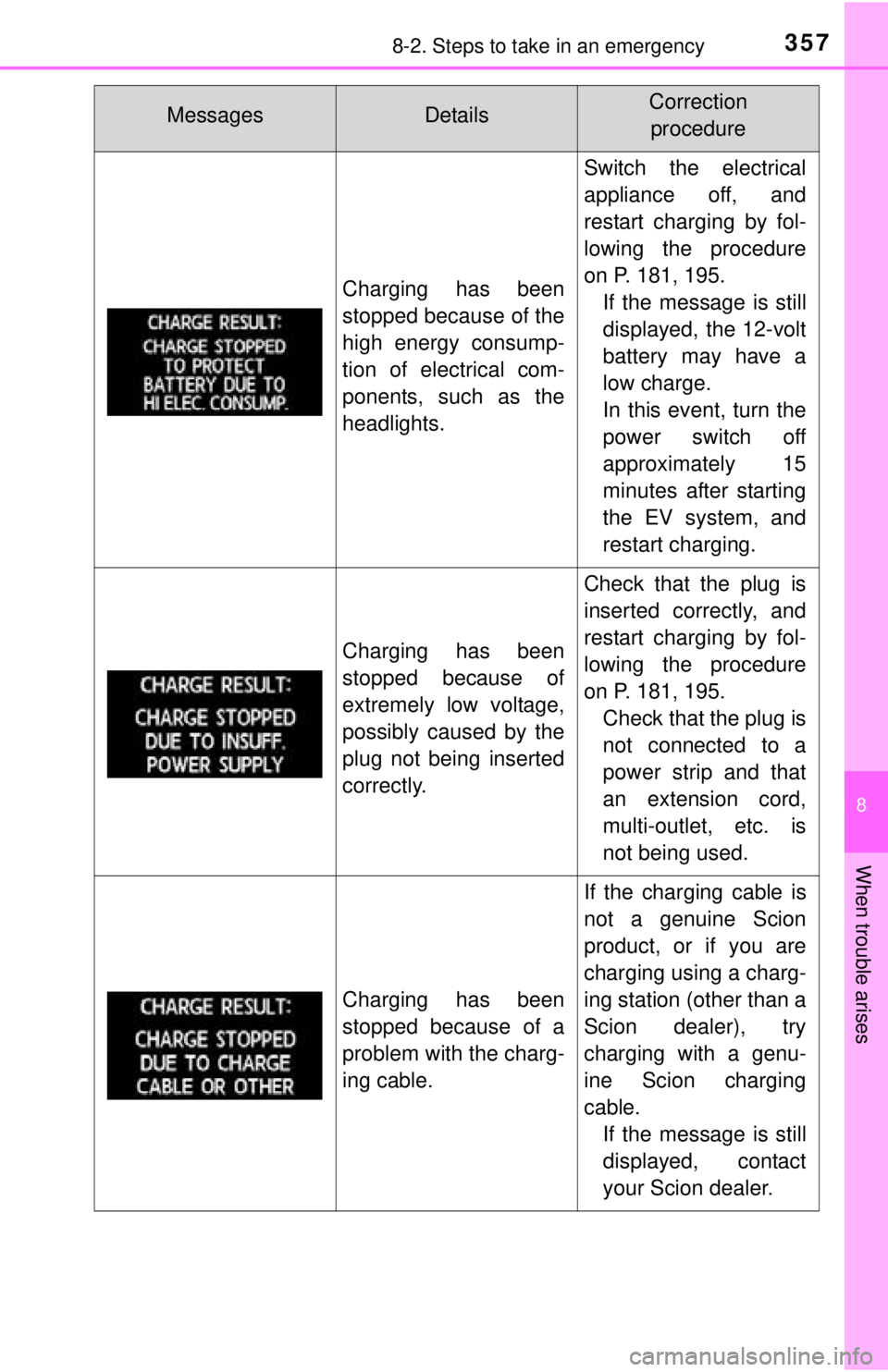
Charging has been
stopped because of the
high energy consump-
tion of electrical com-
ponents, such as the
headlights.
Switch the electrical
appliance off, and
restart charging by fol-
lowing the procedure
on P. 181, 195.If the message is still
displayed, the 12-volt
battery may have a
low charge.
In this event, turn the
power switch off
approximately 15
minutes after starting
the EV system, and
restart charging.
Charging has been
stopped because of
extremely low voltage,
possibly caused by the
plug not being inserted
correctly.
Check that the plug is
inserted correctly, and
restart charging by fol-
lowing the procedure
on P. 181, 195.Check that the plug is
not connected to a
power strip and that
an extension cord,
multi-outlet, etc. is
not being used.
Charging has been
stopped because of a
problem with the charg-
ing cable.
If the charging cable is
not a genuine Scion
product, or if you are
charging using a charg-
ing station (other than a
Scion dealer), try
charging with a genu-
ine Scion charging
cable.If the message is still
displayed, contact
your Scion dealer.
MessagesDetailsCorrection procedure
Page 367 of 444
3678-2. Steps to take in an emergency
8
When trouble arises
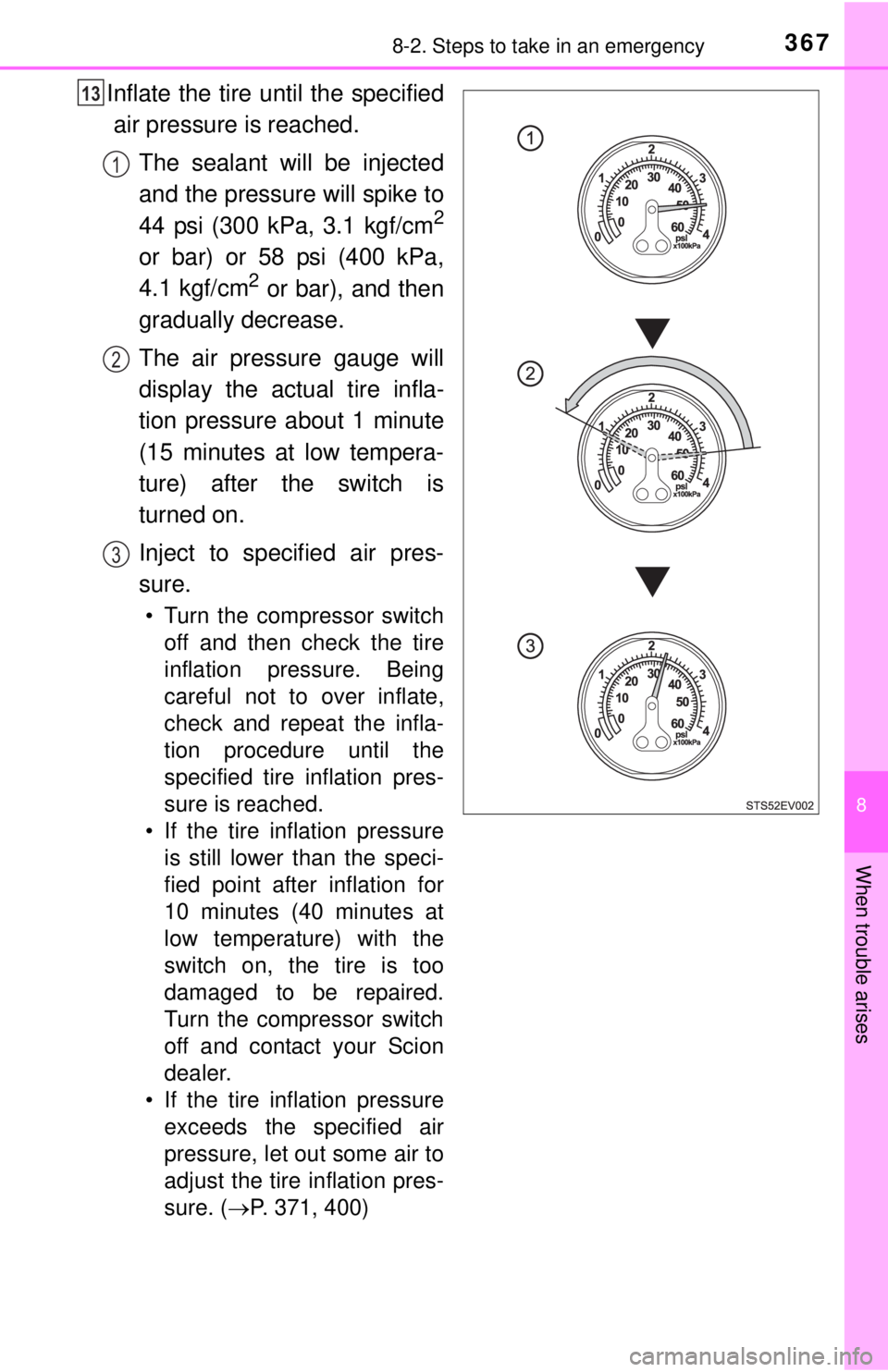
Inflate the tire until the specifiedair pressure is reached.
The sealant will be injected
and the pressure will spike to
44 psi (300 kPa, 3.1 kgf/cm
2
or bar) or 58 psi (400 kPa,
4.1 kgf/cm2 or bar), and then
gradually decrease.
The air pressure gauge will
display the actual tire infla-
tion pressure about 1 minute
(15 minutes at low tempera-
ture) after the switch is
turned on.
Inject to specified air pres-
sure.
• Turn the compressor switch off and then check the tire
inflation pressure. Being
careful not to over inflate,
check and repeat the infla-
tion procedure until the
specified tire inflation pres-
sure is reached.
• If the tire inflation pressure is still lower than the speci-
fied point after inflation for
10 minutes (40 minutes at
low temperature) with the
switch on, the tire is too
damaged to be repaired.
Turn the compressor switch
off and contact your Scion
dealer.
• If the tire inflation pressure exceeds the specified air
pressure, let out some air to
adjust the tire inflation pres-
sure. ( P. 371, 400)
13
1
2
3
Page 377 of 444
377
8
When trouble arises
8-2. Steps to take in an emergency
If charging cannot be done
Refer to the following table and carry out the appropriate correction
procedure.
If charging does not commence even though the correct proce-
dure has been carried out, and an error message is shown on
the multi-information display, try the correction procedures
listed in the table below.
A problem has occurred during charging
SituationReasonCorrection procedure
The power indicator on
the CCID (Charging Cir-
cuit Interrupting Device)
does not illuminate even
when connected to a
power source.
The plug is not properly
connected with the out-
let.Insert the plug firmly into
the outlet.
There is a power out-
age.Restart charging once
power has been
restored.
The circuit breaker has
been activated.
Check the circuit
breaker.
If there is nothing
unusual, connect to
another outlet and
check that charging is
possible.
If charging is possible,
there is probably a
problem with the first
outlet.
Contact your building
manager or an electri-
cian.
The charging cable con-
necting the CCID
(Charging Circuit Inter-
rupting Device) with the
plug is damaged.
Stop charging immedi-
ately, and contact your
Scion dealer.
Page 382 of 444
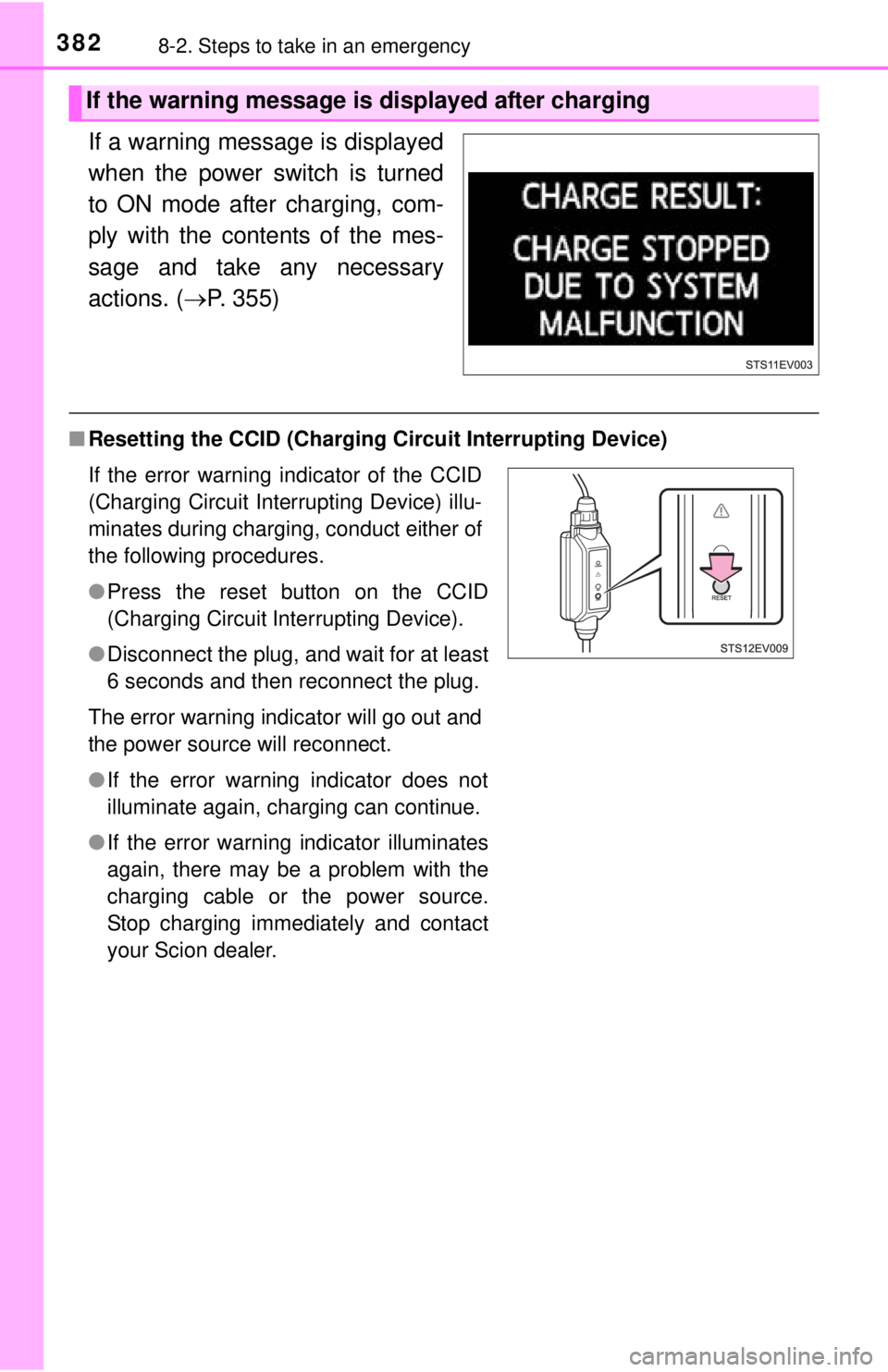
3828-2. Steps to take in an emergency
If a warning message is displayed
when the power switch is turned
to ON mode after charging, com-
ply with the contents of the mes-
sage and take any necessary
actions. (P. 355)
■Resetting the CCID (Charging Circuit Interrupting Device)
If the warning message is displayed after charging
If the error warning indicator of the CCID
(Charging Circuit Interrupting Device) illu-
minates during charging, conduct either of
the following procedures.
●Press the reset button on the CCID
(Charging Circuit Interrupting Device).
● Disconnect the plug, and wait for at least
6 seconds and then reconnect the plug.
The error warning indicator will go out and
the power source will reconnect.
● If the error warning indicator does not
illuminate again, charging can continue.
● If the error warning indicator illuminates
again, there may be a problem with the
charging cable or the power source.
Stop charging immediately and contact
your Scion dealer.