display TOYOTA iQ EV 2013 (in English) Service Manual
[x] Cancel search | Manufacturer: TOYOTA, Model Year: 2013, Model line: iQ EV, Model: TOYOTA iQ EV 2013Pages: 444, PDF Size: 7.34 MB
Page 205 of 444
2055-4. How to charge
5
Driving
Each type of information related to charging is displayed on the multi-
information display.
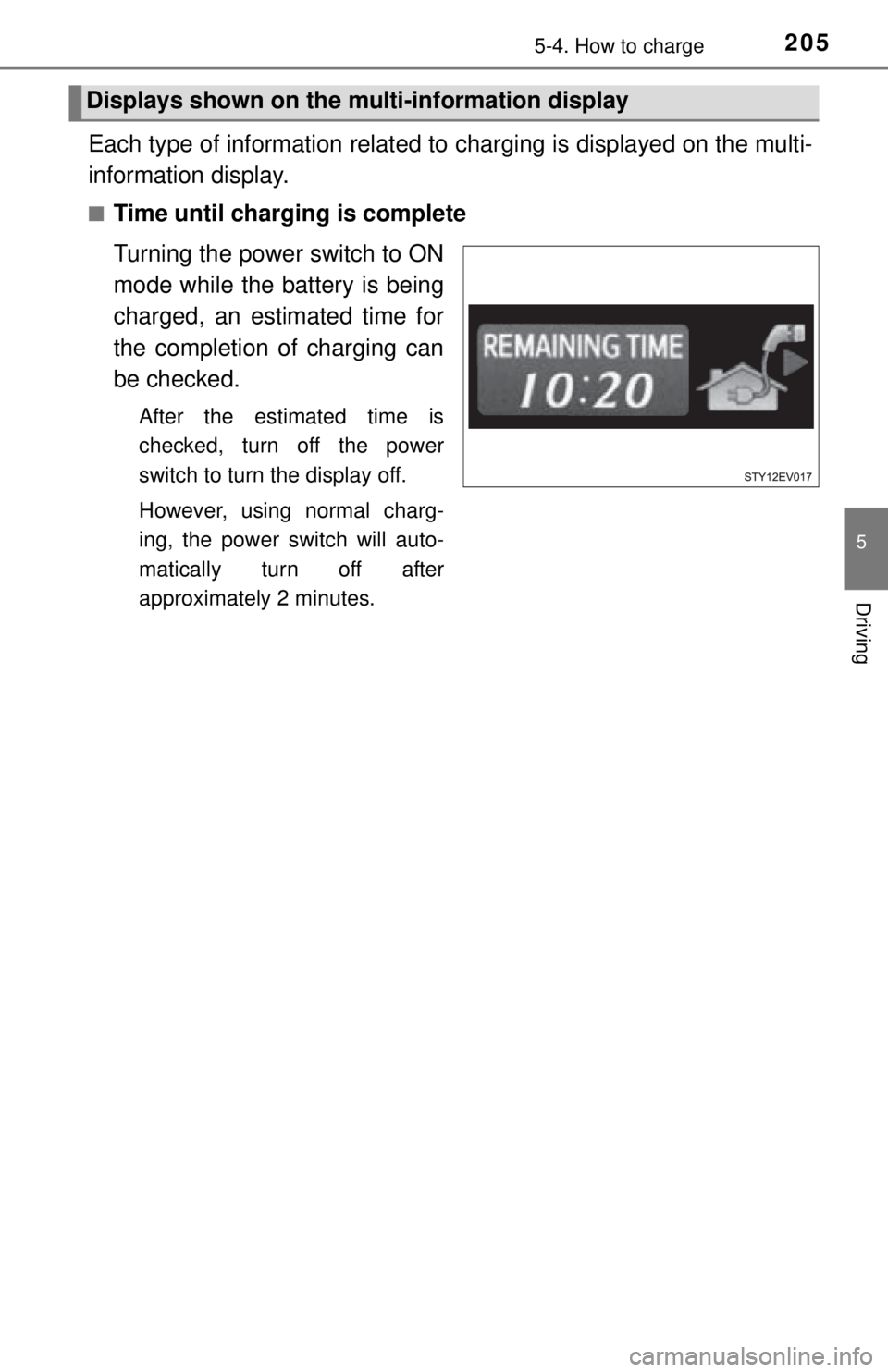
■Time until charging is complete
Turning the power switch to ON
mode while the battery is being
charged, an estimated time for
the completion of charging can
be checked.
After the estimated time is
checked, turn off the power
switch to turn the display off.
However, using normal charg-
ing, the power switch will auto-
matically turn off after
approximately 2 minutes.
Displays shown on the mu lti-information display
Page 206 of 444

2065-4. How to charge
■Charging messages
The first time the power switch
is turned to ON mode after
charging is completed
*, a mes-
sage detailing the results of the
charging will be displayed.
Also, if an operation which can-
not be carried out is attempted
during charging, a warning
message will be displayed.
If a message appears, perform
the operation required by the
message. ( P. 355)
If charging fails to finish suc-
cessfully, a message will remain
on the multi-information display.
To change the display, turn the
“DISP” knob.
*: The message may not be dis- played if the Remote Climate
Control ( P. 228) has been
used.
■ Safety functions
P. 188
■ If the traction battery becomes low
P. 7 5
■ Amount of time required fo r charging in normal charge
P. 188
■ Remaining charging time
P. 188
■ During normal charging
P. 188
■ If two charging connectors are used at the same time
P. 189
Page 219 of 444

219
6Interior features
6-1. Using the air conditioning system and defogger
Air conditioning system ..... 220
Remote Climate Control System for EV ................. 228
Rear window defogger ...... 232
HWD (Heated Windshield Defroster) ..... 233
6-2. Using the interior lights Interior lights list ................ 234• Interior light ................... 234
6-3. Using the storage features List of storage features ..... 236• Cup holders .................. 237
• Bottle holders ................ 237
Luggage compartment features ........................... 239
6-4. Other interior features Sun visors and vanity mirrors ........... 241
Outside temperature display............................. 242
Power outlet ...................... 243
Seat heaters...................... 244
Assist grips........................ 246
Page 220 of 444
2206-1. Using the air conditioning system and defogger
Air conditioning system
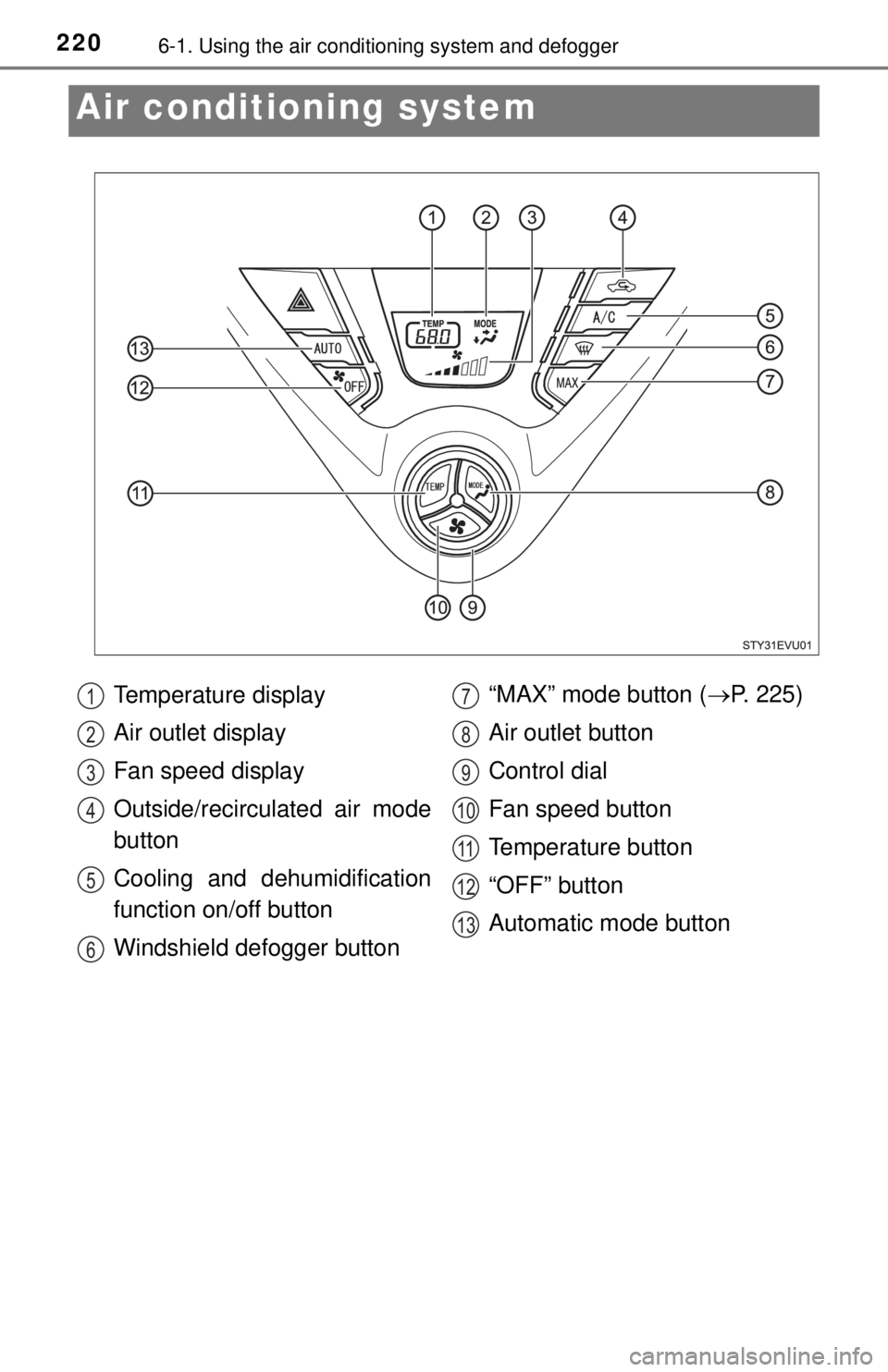
Temperature display
Air outlet display
Fan speed display
Outside/recirculated air mode
button
Cooling and dehumidification
function on/off button
Windshield defogger button “MAX” mode button (
P. 225)
Air outlet button
Control dial
Fan speed button
Temperature button
“OFF” button
Automatic mode button1
2
3
4
5
6
7
8
9
10
11
12
13
Page 225 of 444
2256-1. Using the air conditioning system and defogger
6
Interior features
■Heating
●Heating is done by an electric heat pump system.
● When the outside temperature is low or it is snowing, compared to conven-
tional vehicles, heating may be less effective and warm air may not come
out.
● When outside condenser is cold, condensed water from the condenser’s
surface may fall under the vehicle. However, it is not a malfunction.
● When the outside condenser is frosted over, the temperature display blinks,
fan speed declines and it may become harder to heat the interior. However,
it is not a malfunction.
■ How to defrost the outside condenser
If frost has formed of the outside condenser ( P. 277), the heating perfor-
mance will decline. The frost can be removed from the outside condenser by
either one of the following procedures.
● Operate the Remote Climate Control before driving. ( P. 228)
When frosted over, the heating operation starts after defrosting.
● Press and hold for approximately 2 seconds or more while the vehicle
is stopped to defrost. It will be canceled when the vehicle begins to mo\
ve.
■ Using automatic mode
Fan speed is adjusted automatically according to the temperature setting and
the ambient conditions.
Therefore, the fan may stop for a while until warm or cool air is ready to flow
immediately after is pressed.
■ “MAX” mode
●For quick warming or cooling, press .
Simultaneous use together with automatic mode will be more effective.
● When “MAX” mode is used, traction bat tery consumption is greater than
usual and the driving range decreases.
● If the amount of the remaining traction battery power is low, the “MAX” mode
operation may be limited.
● If the power switch is turned off while “MAX” mode is active, even if the
power switch is turned to ON mode again, “MAX” mode will remain off.
Page 229 of 444

2296-1. Using the air conditioning system and defogger
6
Interior features
■Operating conditions
The system will only operate if all of the following conditions are met:
●The shift lever is in P.
● The power switch is off.
● All doors are closed.
● The hood is closed.
● The brake pedal is not being depressed.
● The charging cable is plugged in.
● The SOC (State of Charge) gauge is 8/10 or greater.
■ When leaving the vehicle
●Check that the headlights are switched to either off or “AUTO”.
● Check that the wiper switch is turned off.
● Check that all windows are closed.
■ Remote Climate Control automatic shut-off
The system will automatically shut off under the following conditions:
●About 10 minutes have passed since operation began
● Any one of the operating conditions is not met
● There is only a slight difference between the air conditioning set tempera-
ture and the inside temperature.
■ Remote Climate Control operation
●After the air conditioning system has been remotely activated, it may take
approximately 1 minute before the air conditioning system starts operating.
During that time, the air conditioning monitor display and the instrument
panel may come on.
● The system may not start in the following situations:
• The charge level of the traction battery is low
• When there is little difference between the outside temperature and air
conditioning set temperature
• When the EV system is cold (for example, after being left for a long time in low temperatures)
■ Security feature
Any unlocked doors will be automatically locked when the system is operat-
ing. The buzzer will beep and the emergency flashers flash when the doors
have been locked or the system has been turned off.
(The doors locked: Once; The system turned off: Twice)
Page 230 of 444

2306-1. Using the air conditioning system and defogger
■Conditions affecting operation
P. 125
■ When using the Remo te Climate Control
A charging message will be displayed on the multi-information display. Differ-
ent messages will be displayed depending on when the Remote Climate Con-
trol was started (after charging or during charging). ( P. 355)
■ While the Remote Climate Control is operating
●Depending on the operating condition of the Remote Climate Control, the
electric fan may spin and an operating noise may be heard. However, this
does not indicate a malfunction.
● The Remote Climate Control may stop operating temporarily if other fea-
tures that use electricity (for example, the seat heater, lights, windshield wip-
ers) are in operation or if the charge level of the 12-volt battery becomes
low.
■ Electronic key battery depletion
P. 128
■ When the electronic key battery is fully depleted
P. 299
■ Automatic cancelation of the charging timer function
P. 208
■ Customization that can be configured at Scion dealer
Setting (e.g. Operation using the on the wireless remote control) can
be changed.
(Customizable features: P. 414)
Page 242 of 444
2426-4. Other interior features
Outside temperature display
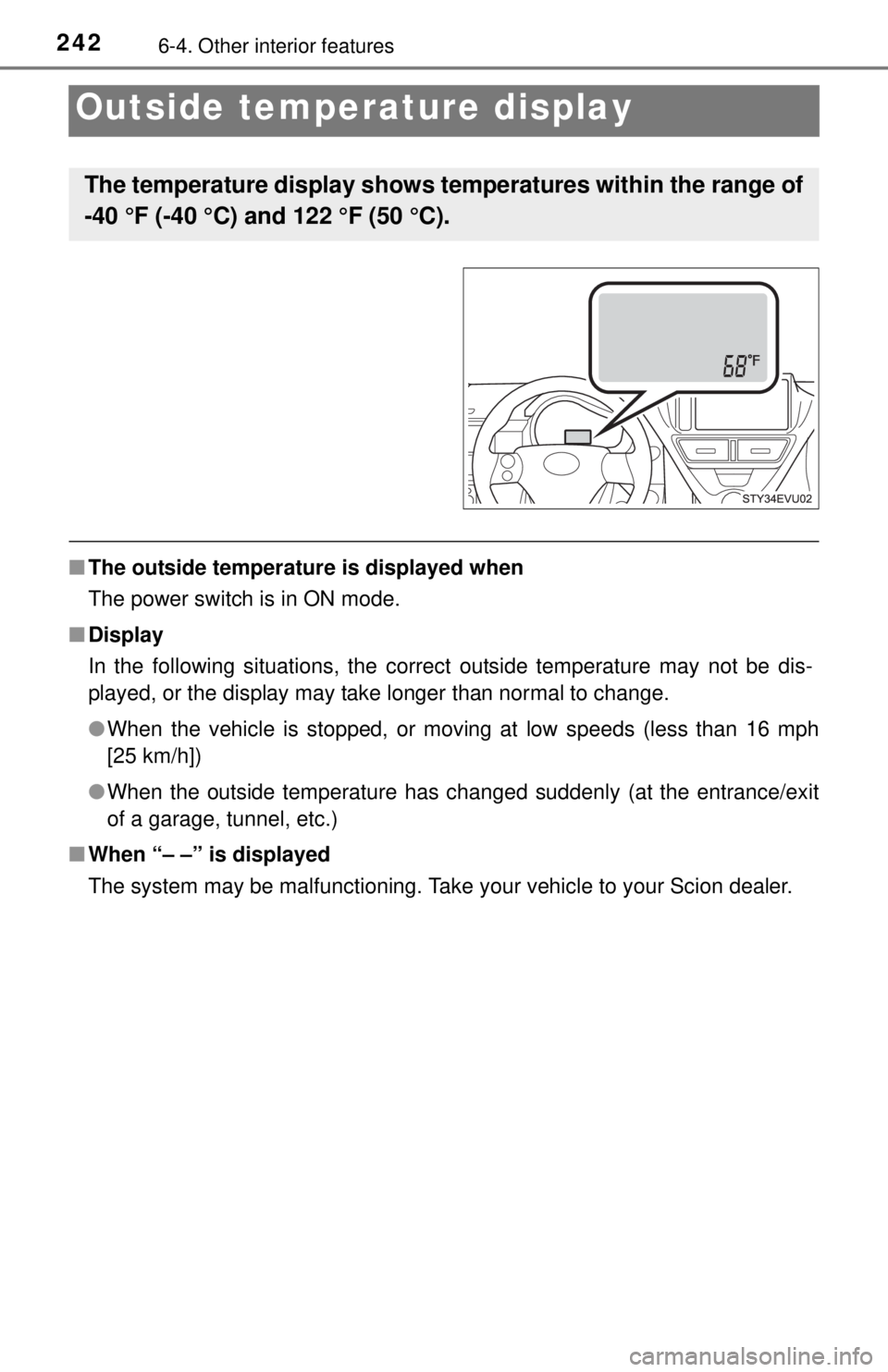
■The outside temperature is displayed when
The power switch is in ON mode.
■ Display
In the following situations, the correct outside temperature may not be dis-
played, or the display may take longer than normal to change.
●When the vehicle is stopped, or moving at low speeds (less than 16 mph
[25 km/h])
● When the outside temperature has changed suddenly (at the entrance/exit
of a garage, tunnel, etc.)
■ When “– –” is displayed
The system may be malfunctioning. Take your vehicle to your Scion dealer.
The temperature display shows temperatures within the range of
-40 °F (-40 °C) and 122 °F (50 °C).
Page 327 of 444

327
8When trouble arises
8-1. Essential informationEmergency flashers .......... 328
If your vehicle has to be stopped in an
emergency ...................... 329 8-2. Steps to take in an
emergency
If your vehicle needs to be towed ..................... 330
If you think something is wrong ......... 334
If a warning light turns on or a warning buzzer
sounds ............................ 335
If a warning message is displayed ..................... 344
If you have a flat tire.......... 359
If the EV system will not start ..................... 375
If charging cannot be done ................................ 377
If the shift lever cannot be shifted from P............. 383
If the electronic key does not operate properly........ 384
If the 12-volt battery is discharged ................... 386
If your vehicle overheats ... 390
If the vehicle becomes stuck ............................... 393
Page 337 of 444
3378-2. Steps to take in an emergency
8
When trouble arises
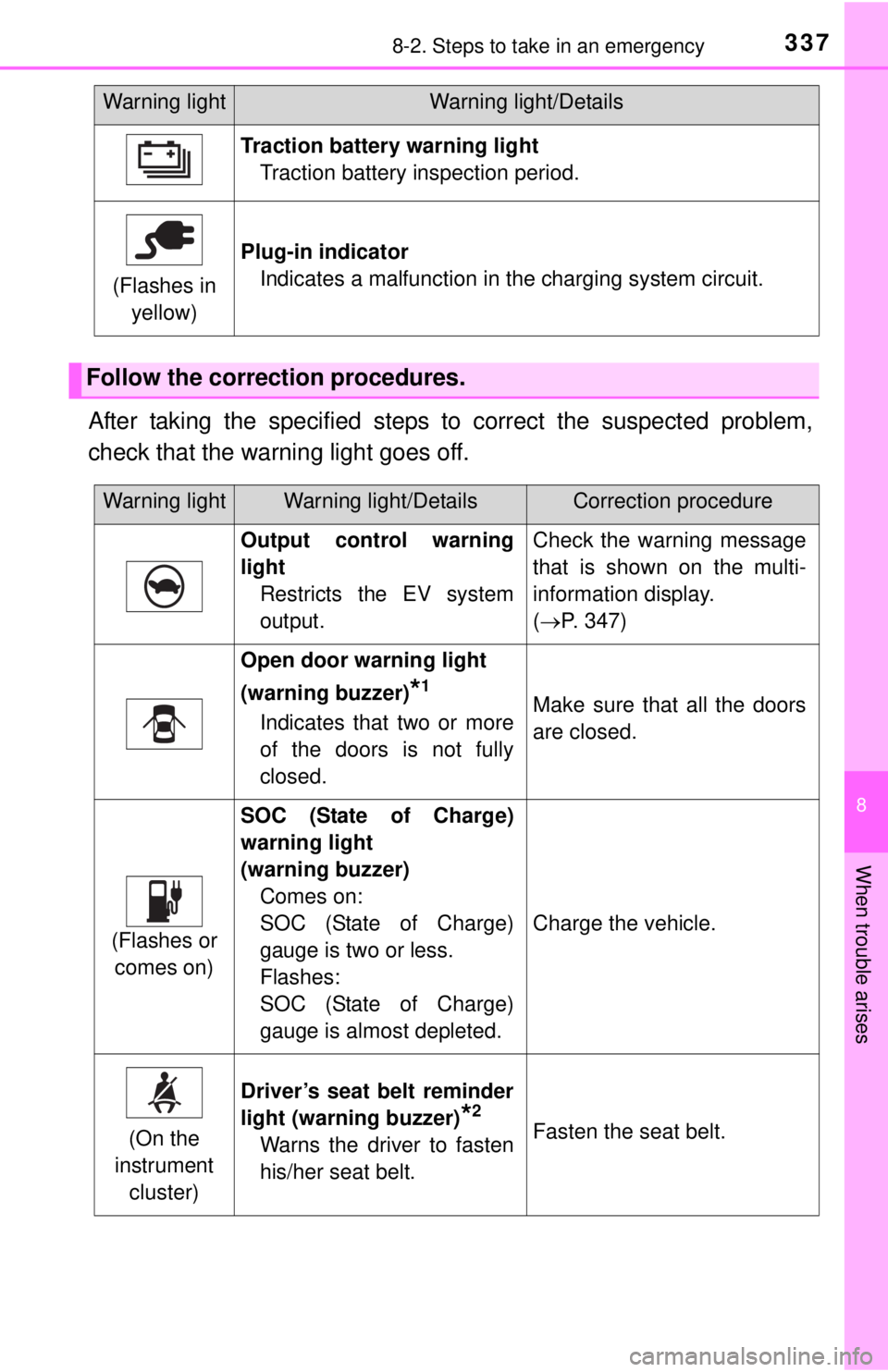
After taking the specified steps to correct the suspected problem,
check that the warning light goes off.
Traction battery warning lightTraction battery inspection period.
(Flashes in yellow)
Plug-in indicator Indicates a malfunction in the charging system circuit.
Follow the correction procedures.
Warning lightWarning light/Details
Warning lightWarning light/DetailsCorrection procedure
Output control warning
lightRestricts the EV system
output.Check the warning message
that is shown on the multi-
information display.
(P. 347)
Open door warning light
(warning buzzer)
*1
Indicates that two or more
of the doors is not fully
closed.Make sure that all the doors
are closed.
(Flashes or
comes on)
SOC (State of Charge)
warning light
(warning buzzer) Comes on:
SOC (State of Charge)
gauge is two or less.
Flashes:
SOC (State of Charge)
gauge is almost depleted.
Charge the vehicle.
(On the
instrument cluster)
Driver’s seat belt reminder
light (warning buzzer)
*2
Warns the driver to fasten
his/her seat belt.Fasten the seat belt.