display TOYOTA LAND CRUISER 2012 Service Manual
[x] Cancel search | Manufacturer: TOYOTA, Model Year: 2012, Model line: LAND CRUISER, Model: TOYOTA LAND CRUISER 2012Pages: 692, PDF Size: 29.3 MB
Page 247 of 692
247 2-4. Using other driving systems
2
When driving
L/C200_EE (OM60G38E)
CAUTION
When using the Toyota parking assist-sensor
Observe the following precautions.
Failing to do so may result in the vehicle being unable to be driven safely
and possibly cause an accident.
Do not use the sensor at speeds in excess of 10 km/h (6 mph).
The sensors’ detection areas and reaction times are limited. When moving
forward or reversing, check the areas surrounding the vehicle (especially
the sides of the vehicle) for safety, and drive slowly, using the brake to
control the vehicle’s speed.
Do not install accessories within the sensors’ detection areas.
NOTICE
When using Toyota parking assist-sensor
In the following situations, the system may not function correctly due to a
sensor malfunction etc. Have the vehicle checked by any authorized Toyota
dealer or repairer, or another duly qualified and equipped professional,
immediately.
A beep does not sound when you turn the main switch on.
The Toyota parking assist-sensor operation display flashes, and a beep
sounds when no obstacles are detected.
If the area around a sensor collides with something, or is subjected to
strong impact.
If the bumper collides with something.
If the display shows continuously without a beep.
If a display error occurs, first check the sensor.
If the error occurs even if there is no ice, snow or mud on the sensor, it is
likely that the sensor is malfunctioning.
Notes when washing the vehicle
Do not apply intensive bursts of water or steam to the sensor area.
Doing so may result in the sensor malfunctioning.
Page 248 of 692
248
2-4. Using other driving systems
L/C200_EE (OM60G38E)
4-Wheel AHC (Active Height Control Suspension)
The 4-Wheel AHC adjusts the vehicle height in accordance with driv-
ing conditions. There are 3 selectable modes, “HI” (high), “N” (nor-
mal), and “LO” (low).
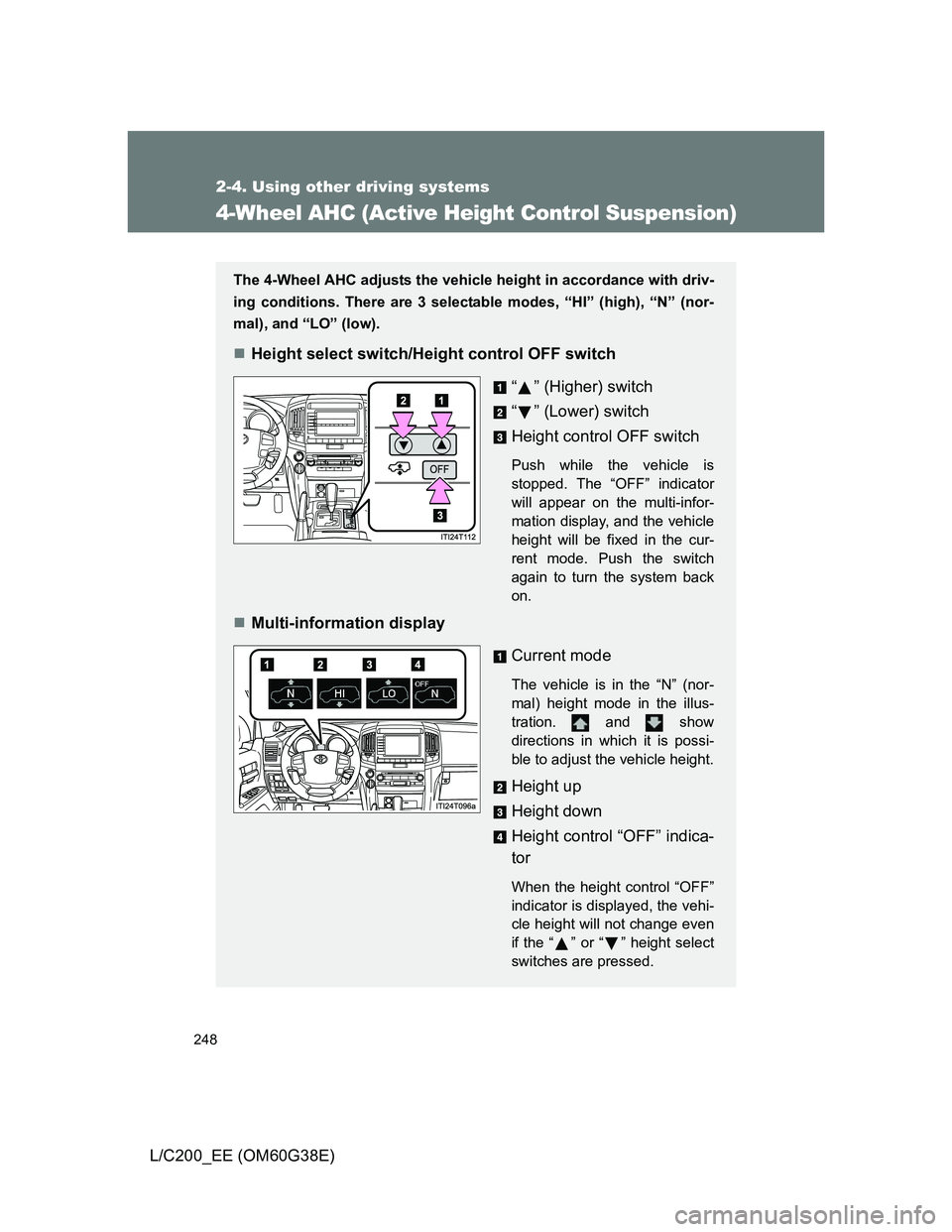
Height select switch/Height control OFF switch
“ ” (Higher) switch
“” (Lower) switch
Height control OFF switch
Push while the vehicle is
stopped. The “OFF” indicator
will appear on the multi-infor-
mation display, and the vehicle
height will be fixed in the cur-
rent mode. Push the switch
again to turn the system back
on.
Multi-information display
Current mode
The vehicle is in the “N” (nor-
mal) height mode in the illus-
tration. and show
directions in which it is possi-
ble to adjust the vehicle height.
Height up
Height down
Height control “OFF” indica-
tor
When the height control “OFF”
indicator is displayed, the vehi-
cle height will not change even
if the “ ” or “ ” height select
switches are pressed.
Page 250 of 692
250 2-4. Using other driving systems
L/C200_EE (OM60G38E)
Conditions for changing the vehicle height mode
Some modes may not be selectable depending on the vehicle speed
when the four-wheel drive control switch is in the “H4” position. Refer
to the following table.
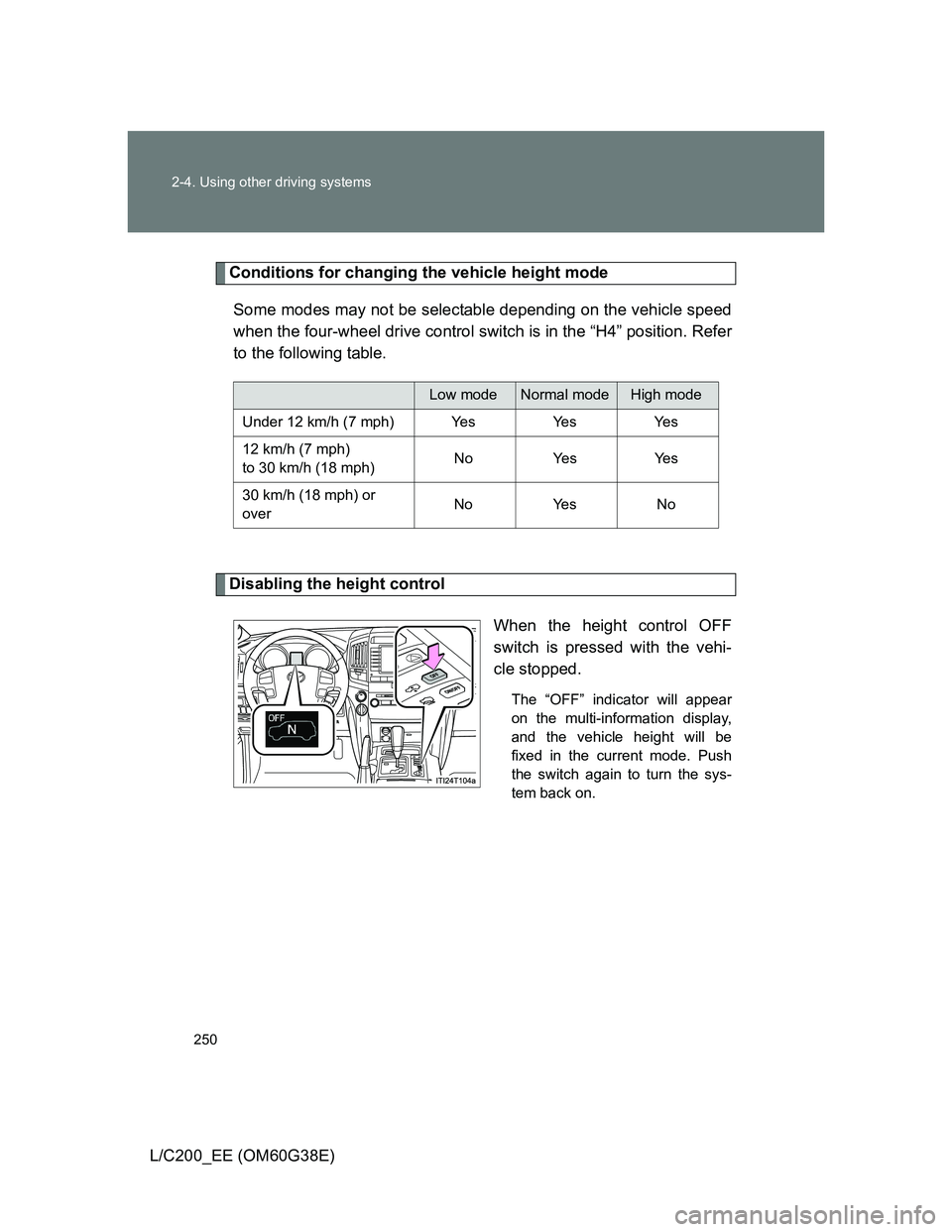
Disabling the height control
When the height control OFF
switch is pressed with the vehi-
cle stopped.
The “OFF” indicator will appear
on the multi-information display,
and the vehicle height will be
fixed in the current mode. Push
the switch again to turn the sys-
tem back on.
Low modeNormal modeHigh mode
Under 12 km/h (7 mph) Yes Yes Yes
12 km/h (7 mph)
to 30 km/h (18 mph)No Yes Yes
30 km/h (18 mph) or
overNo Yes No
Page 253 of 692
253 2-4. Using other driving systems
2
When driving
L/C200_EE (OM60G38E)
Automatic leveling function
The vehicle is adjusted to a fixed height for each mode, regardless of the
number of occupants and the luggage load.
However the vehicle cannot be raised if the vehicle load exceeds the fol-
lowing limits:
• Up to 4 occupants
* plus approximately 300 kg (661 lb.) in the normal
mode
• Up to 4 occupants
* plus approximately 200 kg (441 lb.) in the high
mode
*: average weight 68 kg (150 lb.) per person
If the vehicle height cannot be raised when in the normal mode, and “LO”
appears on the display, the vehicle is loaded too heavily. Take extra care
when driving in this condition.
If the vehicle height cannot be raised even after unloading the vehicle,
press “ ” then “ ” on the height select switch. If the vehicle height still
cannot be raised, turn the ignition off then on again, then try once more.
When the vehicle is stopped during driving
The activation of the automatic leveling function may cause the vehicle
height to change. This is not a malfunction.
If the vehicle height does not change
If the vehicle is loaded too heavily, or the undercarriage has come into con-
tact with the road surface, the vehicle height cannot be raised/lowered.
Page 255 of 692
255 2-4. Using other driving systems
2
When driving
L/C200_EE (OM60G38E)
Propeller shaft noise
If the vehicle height is adjusted on a slope, or with the shift lever in a position
other than “P” or “N” while the vehicle is stopped, you may hear a sound
caused by the expansion and contraction of the propeller shaft. This does
not indicate a malfunction.
4-Wheel AHC failure warning
If a malfunction occurs in the 4-Wheel AHC, normal mode is automatically
selected. However, the system may not switch to normal mode depending
on the location of the malfunction.
The warning message is displayed on the multi-information display, and the
4-Wheel AHC cannot be activated until the malfunction is corrected.
Stop the engine and start it again. If the warning message turns off, the sys-
tem is operating correctly. If the warning message continues to be displayed,
have the vehicle checked at any authorized Toyota dealer or repairer, or
another duly qualified and equipped professional as soon as possible.
Page 264 of 692
264
2-4. Using other driving systems
L/C200_EE (OM60G38E)
Crawl Control (with Tur n Assist function)
Allows travel on extremely rough off-road surfaces at a fixed low
speed without pressing the accelerator or brake pedal. Minimizes
loss of traction or vehicle slip when driving on slippery road sur-
faces, allowing for stable driving.
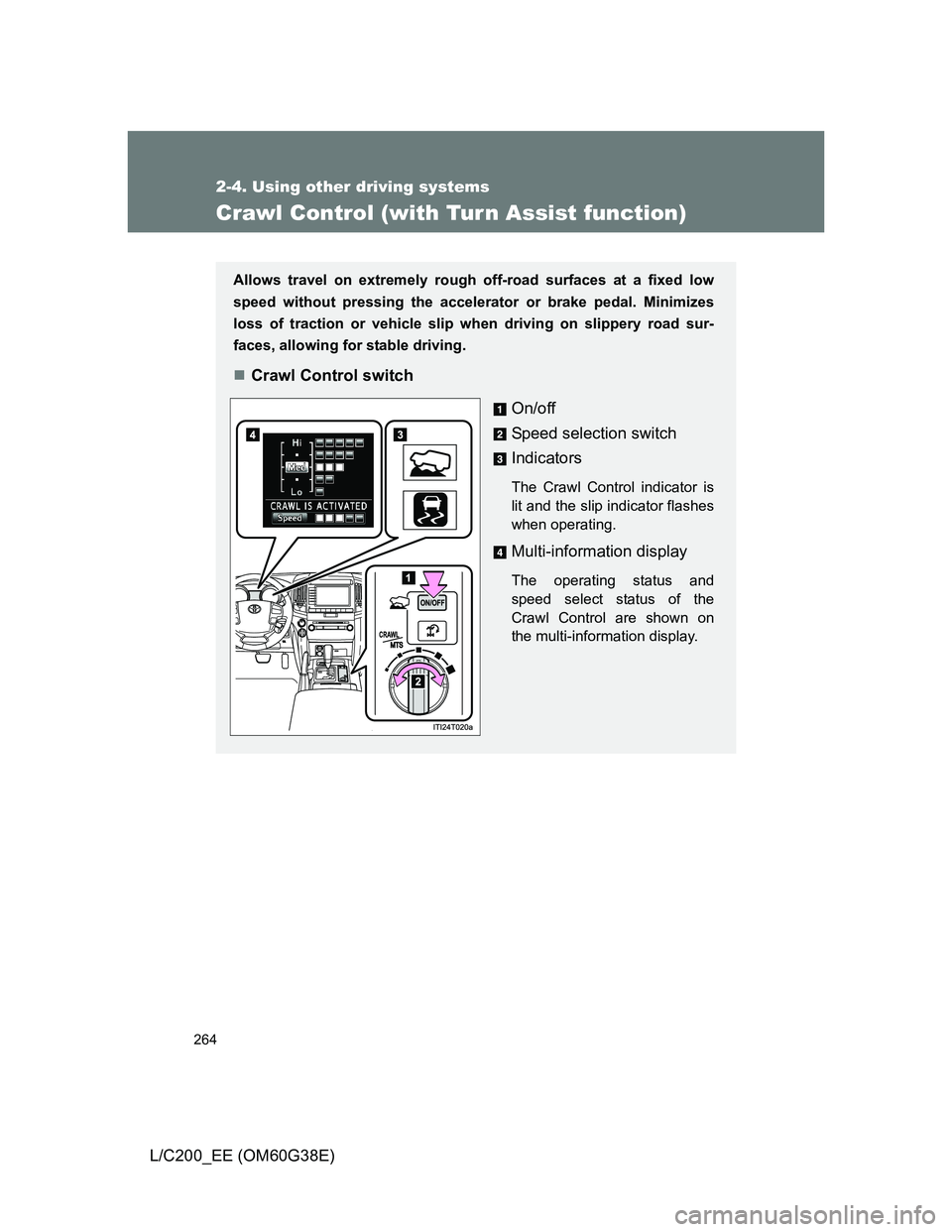
Crawl Control switch
On/off
Speed selection switch
Indicators
The Crawl Control indicator is
lit and the slip indicator flashes
when operating.
Multi-information display
The operating status and
speed select status of the
Crawl Control are shown on
the multi-information display.
Page 266 of 692
266 2-4. Using other driving systems
L/C200_EE (OM60G38E)
When the system is turned off
Crawl Control
Press the ON/OFF switch while Crawl Control is operating. If the
switch is turned off, the slip indicator and the Turn Assist indicator
will go off (if the Turn Assist function is in use), the Crawl Control
indicator will flash until the system has turned off completely, and a
message stating that Crawl Control has been turned off will be dis-
played on the multi-information display for several seconds.
When turning off Crawl Control while driving, stop the vehicle
before the Crawl Control indicator turns off, or drive extremely
carefully.
Turn Assist function
Press the Turn Assist switch while the Turn Assist function is oper-
ating. When the switch is pressed, the Turn Assist indicator will go
off, and a message stating that the Turn Assist function has been
turned off will be displayed on the multi-information display for sev-
eral seconds.
Page 267 of 692
267 2-4. Using other driving systems
2
When driving
L/C200_EE (OM60G38E)
The Crawl Control and Turn Assist function can be operated when
Crawl Control
The engine is running.
The shift lever is in any gear other than “P” or “N”.
The four-wheel drive control switch is in “L4”.
The driver’s door is closed.
Turn Assist function
Crawl Control is operating.
The center differential is not locked.
The accelerator and brake are not being operated.
The shift lever is in any gear other than “P”, “R” or “N”.
The steering wheel is turned very far.
Automatic system cancelation
Crawl Control
In the following situations, the buzzer will sound intermittently and Crawl
Control will be canceled automatically. In this event, the Crawl Control indi-
cator will flash and then go off, the Turn Assist indicator will go off (if the Turn
Assist function is in use), and a message stating that Crawl Control has
been turned off will be displayed on the multi-information display for several
seconds
When the shift lever is moved to “P” or “N”.
When the four-wheel drive control switch is in “H4”.
When the driver’s door is opened.
Turn Assist function
When the center differential is locked, the buzzer will sound intermittently
and the Turn Assist function will be canceled automatically. In this event, the
Turn Assist indicator will go off, and a message stating that the Turn Assist
function has been turned off will be displayed on the multi-information dis-
play for several seconds.
Page 268 of 692
268 2-4. Using other driving systems
L/C200_EE (OM60G38E)
Function limitations
Crawl Control
In the following situations, brake control can be used to drive downhill at
a constant speed. However, engine control is not available when driving
uphill at a constant speed.
• When switched to second start mode.
In the following situation, engine control and brake control will stop tem-
porarily. In this event, the Crawl Control indicator will flash.
• When the vehicle speed exceeds approximately 25 km/h (15 mph).
Turn Assist function
In the following situations, the Turn Assist function will stop temporarily. In
this event, the Turn Assist indicator will flash.
When the vehicle speed exceeds approximately 10km/h (6 mph).
When the shift lever is moved to “R”.
When the Crawl Control system is operated continuously
If Crawl Control is used continuously for a long time, the buzzer will
sound, a malfunction notification will be displayed on the multi-informa-
tion display, the Crawl Control indicator will go off, and Crawl Control will
be temporarily inoperable as a result of the brake system overheating. In
this event, stop the vehicle immediately in a safe place, and allow the
brake system to cool down sufficiently until the “TRC OFF” on the multi-
information display go off. (In the meantime, normal driving is possible.)
If Crawl Control is used continuously for a long time, the buzzer will
sound, the system will be temporarily canceled, and a malfunction notifi-
cation will be displayed on the multi-information display as a result of the
automatic transmission system overheating. Stop the vehicle in a safe
place until the display goes off.
Page 270 of 692
270
2-4. Using other driving systems
L/C200_EE (OM60G38E)
Multi-terrain Select
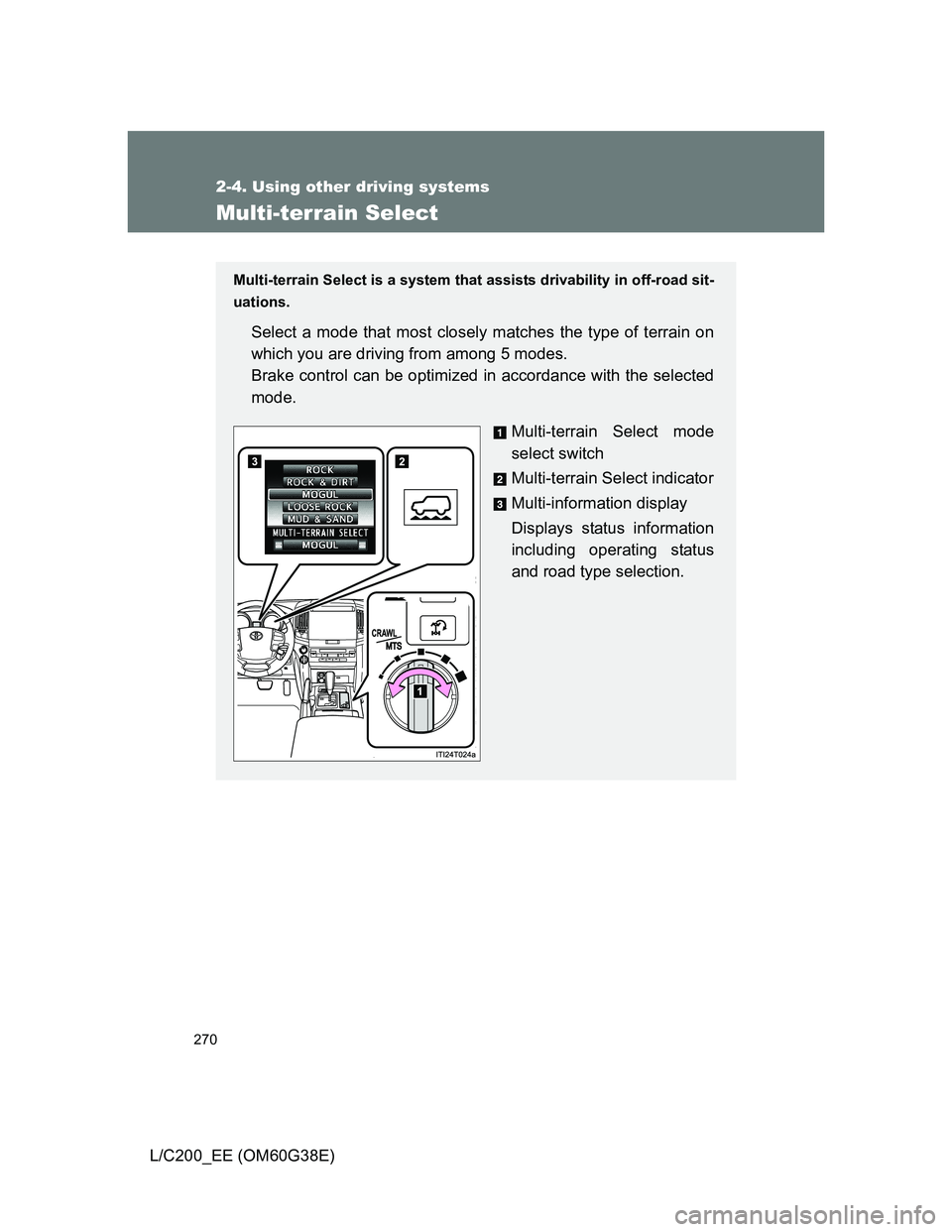
Multi-terrain Select is a system that assists drivability in off-road sit-
uations.
Select a mode that most closely matches the type of terrain on
which you are driving from among 5 modes.
Brake control can be optimized in accordance with the selected
mode.
Multi-terrain Select mode
select switch
Multi-terrain Select indicator
Multi-information display
Displays status information
including operating status
and road type selection.