display TOYOTA LAND CRUISER 2012 Manual PDF
[x] Cancel search | Manufacturer: TOYOTA, Model Year: 2012, Model line: LAND CRUISER, Model: TOYOTA LAND CRUISER 2012Pages: 692, PDF Size: 29.3 MB
Page 294 of 692
294 2-4. Using other driving systems
L/C200_EE (OM60G38E)
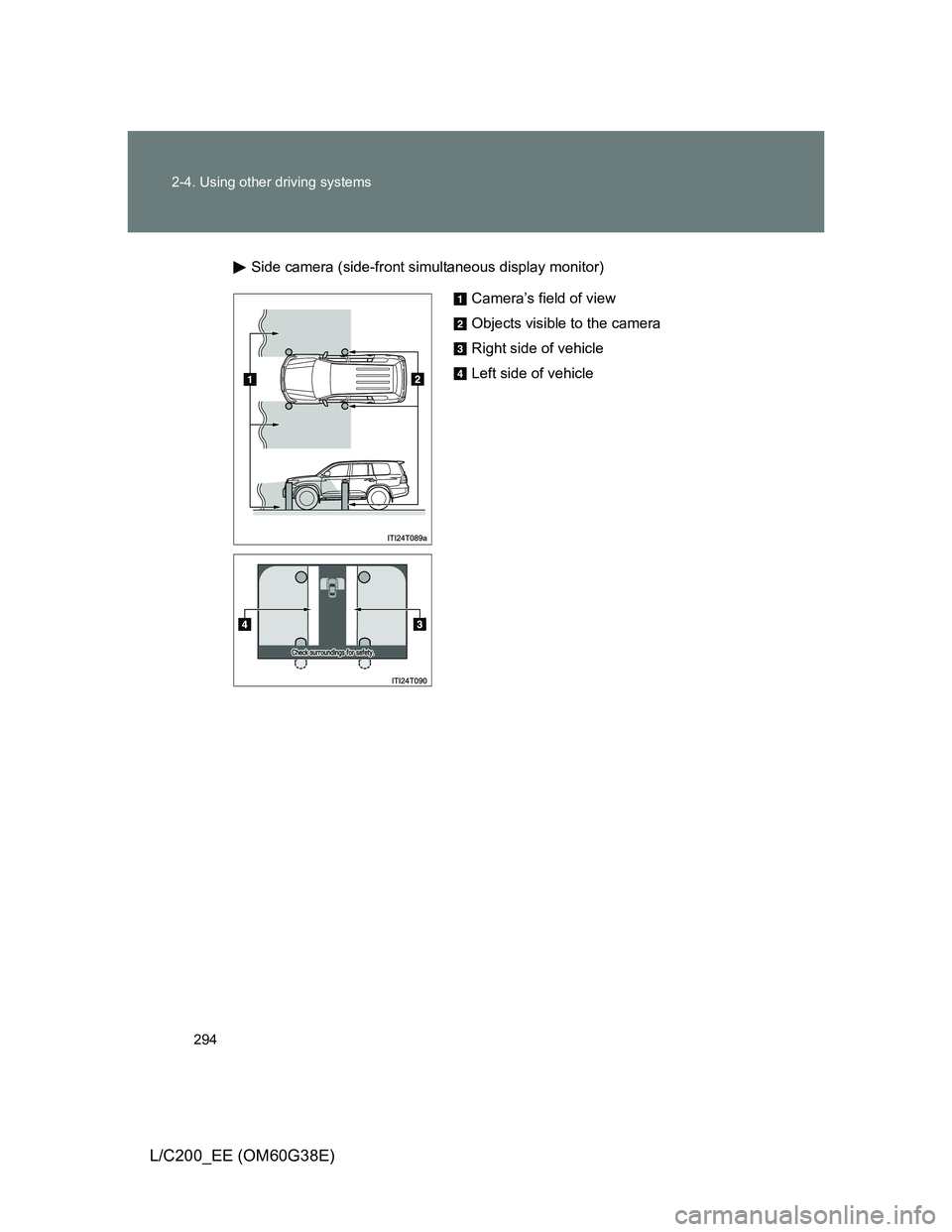
Side camera (side-front simultaneous display monitor)
Camera’s field of view
Objects visible to the camera
Right side of vehicle
Left side of vehicle
Page 295 of 692
295 2-4. Using other driving systems
2
When driving
L/C200_EE (OM60G38E)
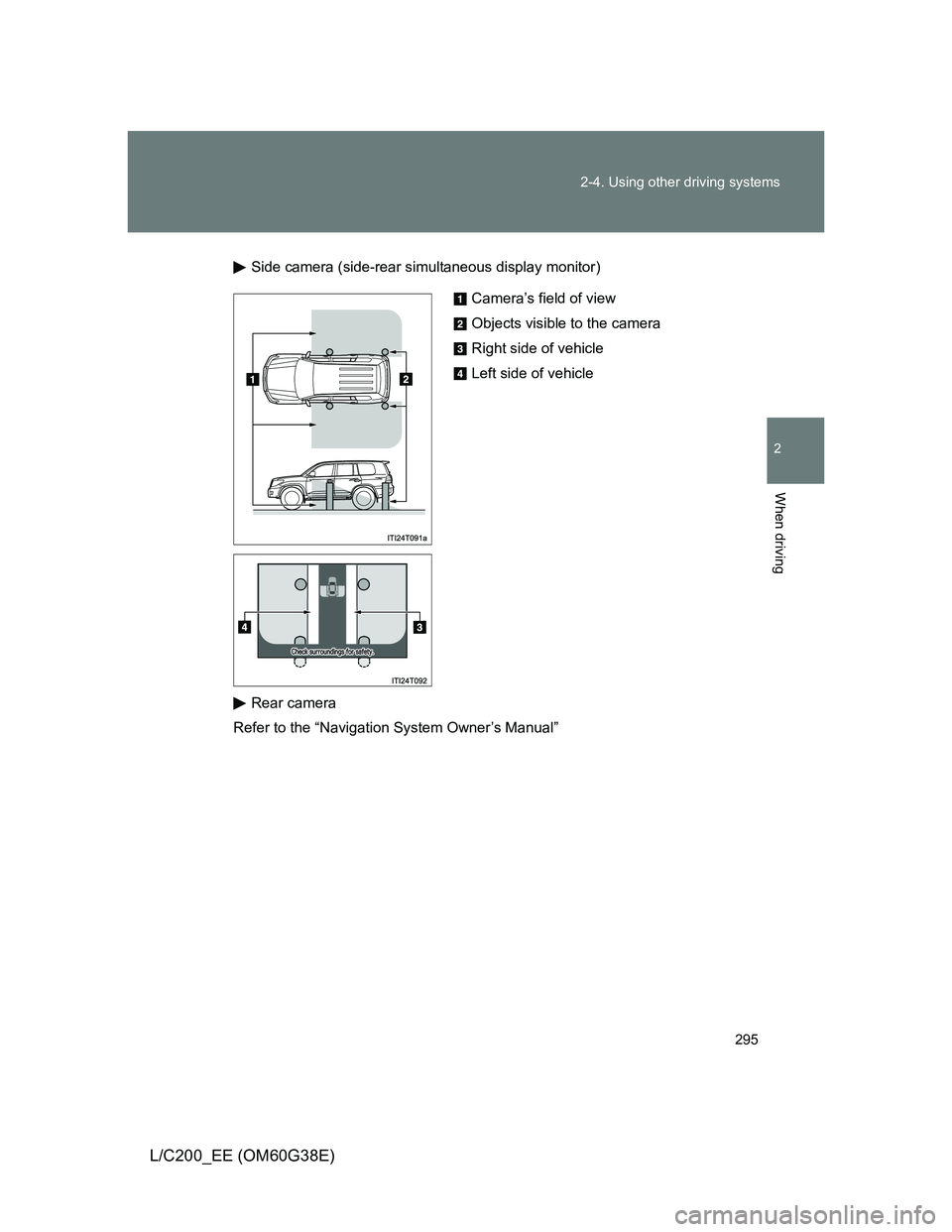
Side camera (side-rear simultaneous display monitor)
Rear camera
Refer to the “Navigation System Owner’s Manual”
Camera’s field of view
Objects visible to the camera
Right side of vehicle
Left side of vehicle
Page 297 of 692
297 2-4. Using other driving systems
2
When driving
L/C200_EE (OM60G38E)
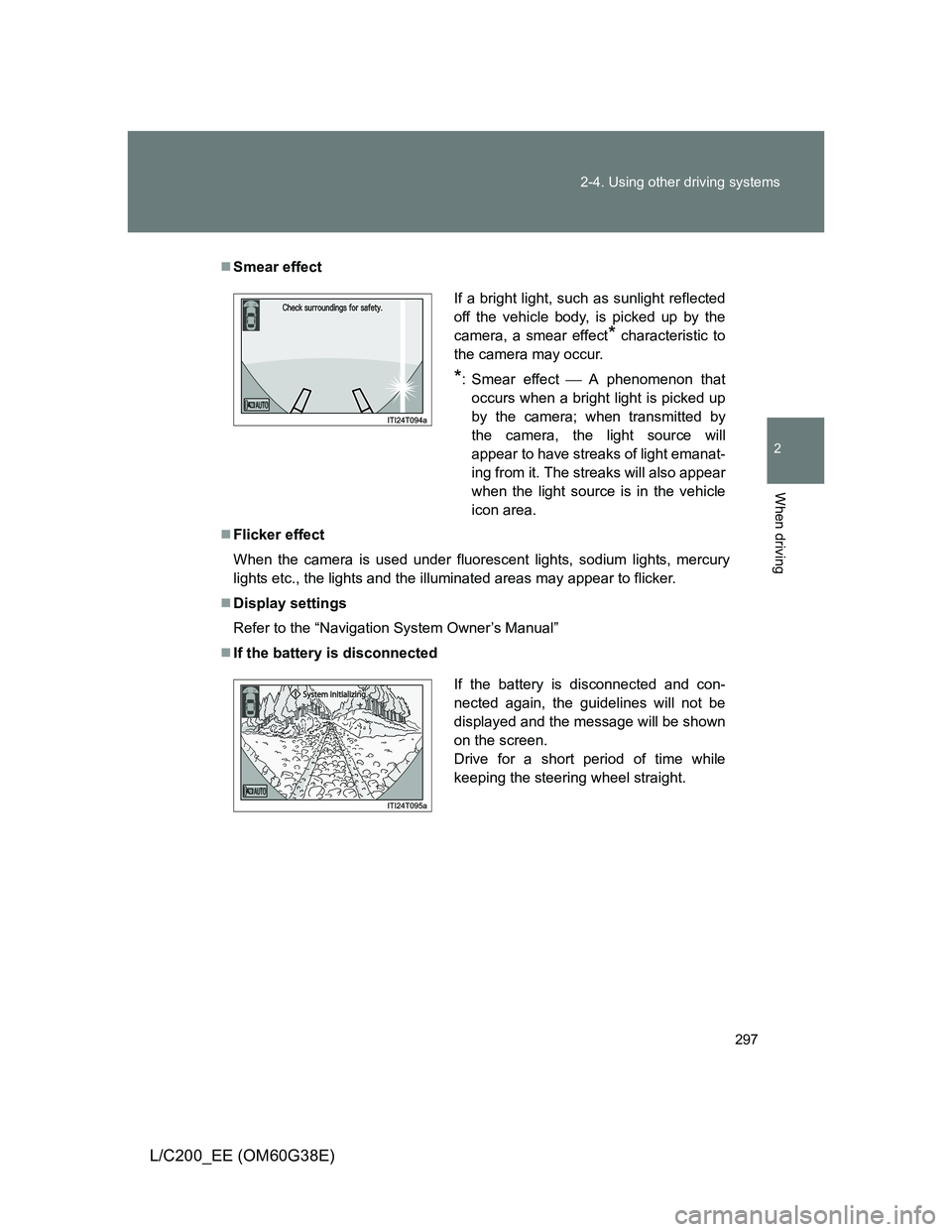
Smear effect
Flicker effect
When the camera is used under fluorescent lights, sodium lights, mercury
lights etc., the lights and the illuminated areas may appear to flicker.
Display settings
Refer to the “Navigation System Owner’s Manual”
If the battery is disconnected
If a bright light, such as sunlight reflected
off the vehicle body, is picked up by the
camera, a smear effect
* characteristic to
the camera may occur.
*: Smear effectA phenomenon that
occurs when a bright light is picked up
by the camera; when transmitted by
the camera, the light source will
appear to have streaks of light emanat-
ing from it. The streaks will also appear
when the light source is in the vehicle
icon area.
If the battery is disconnected and con-
nected again, the guidelines will not be
displayed and the message will be shown
on the screen.
Drive for a short period of time while
keeping the steering wheel straight.
Page 298 of 692
298 2-4. Using other driving systems
L/C200_EE (OM60G38E)
CAUTION
When using the Multi-terrain Monitor system
Observe the following precautions to avoid an accident that could result in
death or serious injuries:
Never depend solely on the monitor system.
Always check visually and with the mirrors to confirm your intended path is
clear.
Depicted distances between objects and flat surfaces differ from actual
distances.
Do not use the system if the hood or doors are open.
Conditions which may affect the Multi-terrain Monitor system
If the front or the rear of the vehicle or the outside rear view mirror has
been hit, the camera’s position and mounting angle may have changed.
Have the vehicle inspected by any authorized Toyota dealer or repairer, or
another duly qualified and equipped professional.
As the camera has a water proof construction, do not detach, disassemble
or modify it. This may cause incorrect operation.
Rapid temperature changes, such as when hot water is poured on the
vehicle in cold weather, may cause the system to function abnormally.
If the camera lens is dirty, it cannot transmit a clear image. Rinse with
water and wipe with a soft cloth. If the camera lens is extremely dirty, wash
with a mild cleanser and rinse.
Do not strongly rub the camera lens. If the camera lens is scratched, it
cannot transmit a clear image.
Do not allow organic solvent, car wax, window cleaner or glass coat to
adhere to the camera. If this happens, wipe it off as soon as possible.
The displayed image may be darker and moving images may be slightly
distorted when the system is cold.
Situations unsuitable for Multi-terrain Monitor
• On icy or slick road surfaces, or in snow
• When using tire chains
Page 299 of 692
299 2-4. Using other driving systems
2
When driving
L/C200_EE (OM60G38E)
CAUTION
Conditions which may affect the Multi-terrain Monitor system
If the tires are changed, the position of the guide lines displayed on the
screen may be incorrect. When changing the tires, consult any authorized
Toyota dealer or repairer, or another duly qualified and equipped profes-
sional.
Depending on the circumstances of the vehicle (number of passengers,
amount of luggage, etc.), the position of the guide lines displayed on the
screen may change. Be sure to check visually behind and all around the
vehicle before proceeding.
Depending on the overall length of the vehicle (if a frontal protection sys-
tem is installed or the bumper has been replaced, etc.), the position of the
distance guidelines displayed on the front monitor may change. Be sure to
check visually behind and all around the vehicle before proceeding.
When washing the vehicle, do not apply intensive bursts of water to the
camera or camera area. Doing so may result in the camera malfunction-
ing.
NOTICE
When using the Multi-terrain Monitor
Even if an obstacle is no longer visible on the side monitor, do not turn the
steering wheel further in the direction the vehicle is turning until the vehicle
has moved completely past the obstacle. If the steering wheel is turned to
full lock, the vehicle will turn in the smallest possible turning circle, and
may collide with the obstacle.
It may be difficult to judge distance with the image from the front camera
due to the characteristics of the lens. Drive carefully while checking the
actual distance to the obstacles displayed on the screen. Also, give your
full attention to sudden bumps in the road.
Page 302 of 692
302 2-4. Using other driving systems
L/C200_EE (OM60G38E)
To disable Active TRC and/or VSC system
If the vehicle gets stuck in fresh snow or mud, Active TRC and VSC
system may reduce power from the engine to the wheels. You may
need to turn the system off to enable you to rock the vehicle in order
to free it.
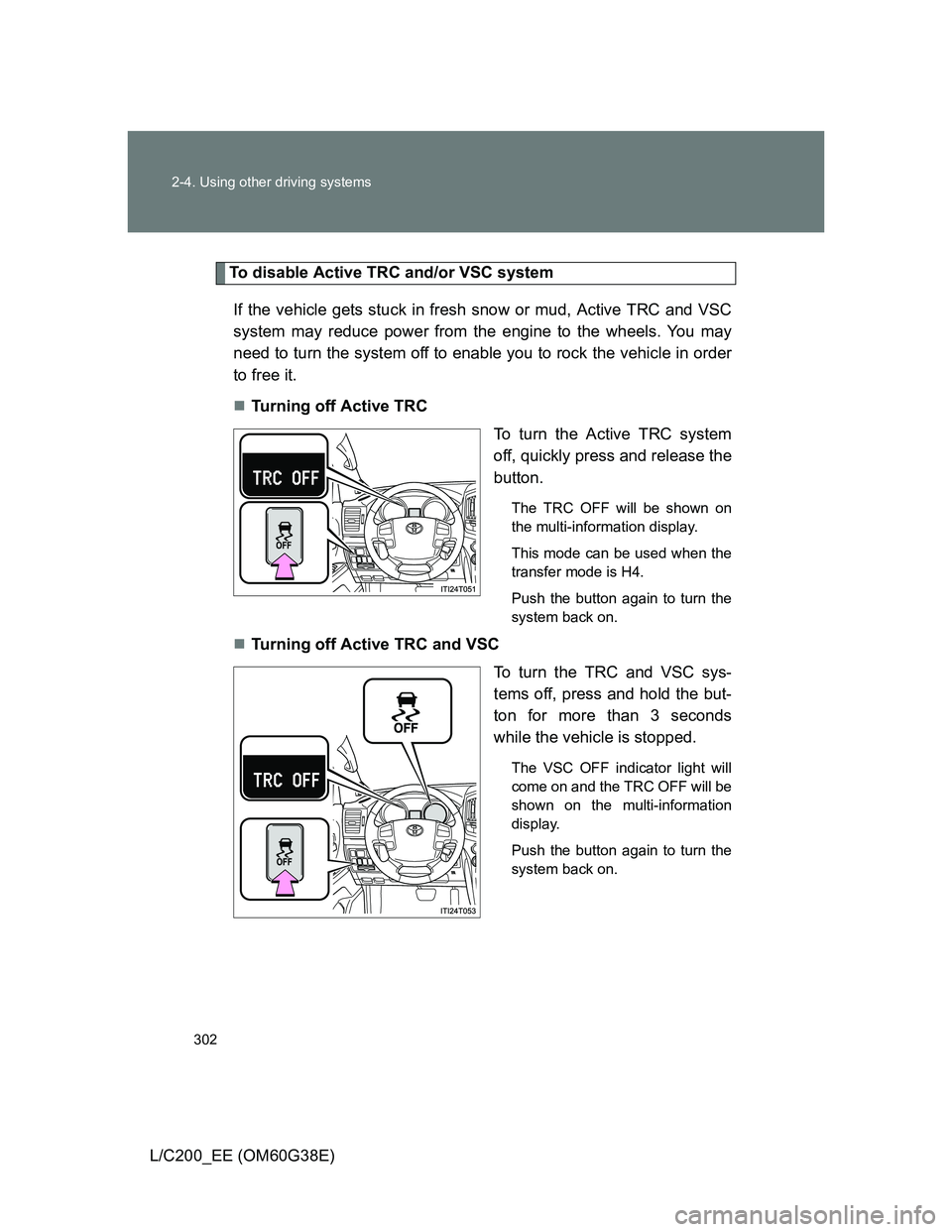
Turning off Active TRC
To turn the Active TRC system
off, quickly press and release the
button.
The TRC OFF will be shown on
the multi-information display.
This mode can be used when the
transfer mode is H4.
Push the button again to turn the
system back on.
Turning off Active TRC and VSC
To turn the TRC and VSC sys-
tems off, press and hold the but-
ton for more than 3 seconds
while the vehicle is stopped.
The VSC OFF indicator light will
come on and the TRC OFF will be
shown on the multi-information
display.
Push the button again to turn the
system back on.
Page 303 of 692
303 2-4. Using other driving systems
2
When driving
L/C200_EE (OM60G38E)
Automatic reactivation of Active TRC and VSC
Turning the “ENGINE START STOP” switch off after turning off the Active
TRC and VSC systems will automatically re-enable them.
Automatic Active TRC reactivation
If only the Active TRC system is turned off, the Active TRC system will turn
on when vehicle speed increases.
Automatic Active TRC and VSC reactivation
If the Active TRC and VSC systems are turned off, the systems will not turn
on even when vehicle speed increases.
If the brake system overheats
The brake system may overheat. In this case, a buzzer will sound, and the
“TRC OFF” will be displayed on the multi-information display, and Active
TRC and hill-start assist control will be temporarily inoperable. In this event,
stop the vehicle immediately in a safe place, and allow the brake system to
cool down sufficiently until the “TRC OFF” on the multi-information display
go off. (There is no problem with continuing normal driving.)
Sounds and vibrations caused by the Multi Terrain ABS, brake assist,
Active TRC, VSC, hill-start assist control and VGRS
A sound may be heard from the engine compartment when the engine is
started or just after the vehicle begins to move. This sound does not indi-
cate that a malfunction has occurred in any of these systems.
Any of the following conditions may occur when the above systems are
operating. None of these indicates that a malfunction has occurred.
• Vibrations may be felt through the vehicle body and steering.
• A motor sound may be heard after the vehicle comes to a stop.
• The brake pedal may pulsate slightly after the Multi Terrain ABS is acti-
vated.
• The brake pedal may move down slightly after the Multi Terrain ABS is
activated.
Page 307 of 692
307
2-4. Using other driving systems
2
When driving
L/C200_EE (OM60G38E)
PCS (Pre-Crash Safety)
: If equipped
The pre-crash safety is operational when
Vehicle speed exceeds 30 km/h (19 mph).
The system detects sudden braking or skidding.
The front occupants are wearing a seat belt.
When there is a malfunction in the system
Warning message will be displayed on the multi-information display.
(P. 579)
CAUTION
Limitations of the pre-crash safety
Do not rely on the pre-crash safety system. Always drive safely, taking care
to observe your surroundings and checking for any obstacles or other road
hazards.
The system detects emergency braking from the speed and force
with which the driver presses the brake pedal, and quickly tightens
the seat belt to assist the effectiveness of the seat belt pretension-
ers (P. 96). This system also operates in the same manner when
the driver loses control of the vehicle.
Page 309 of 692
309 2-4. Using other driving systems
2
When driving
L/C200_EE (OM60G38E)
DPF system failure warning
If the DPF system warning message “DPF FULL ENGINE SER-
VICE REQUIRED” appears on the display, have the vehicle
inspected by any authorized Toyota dealer or repairer, or another
duly qualified and equipped professional, immediately. (P. 579)
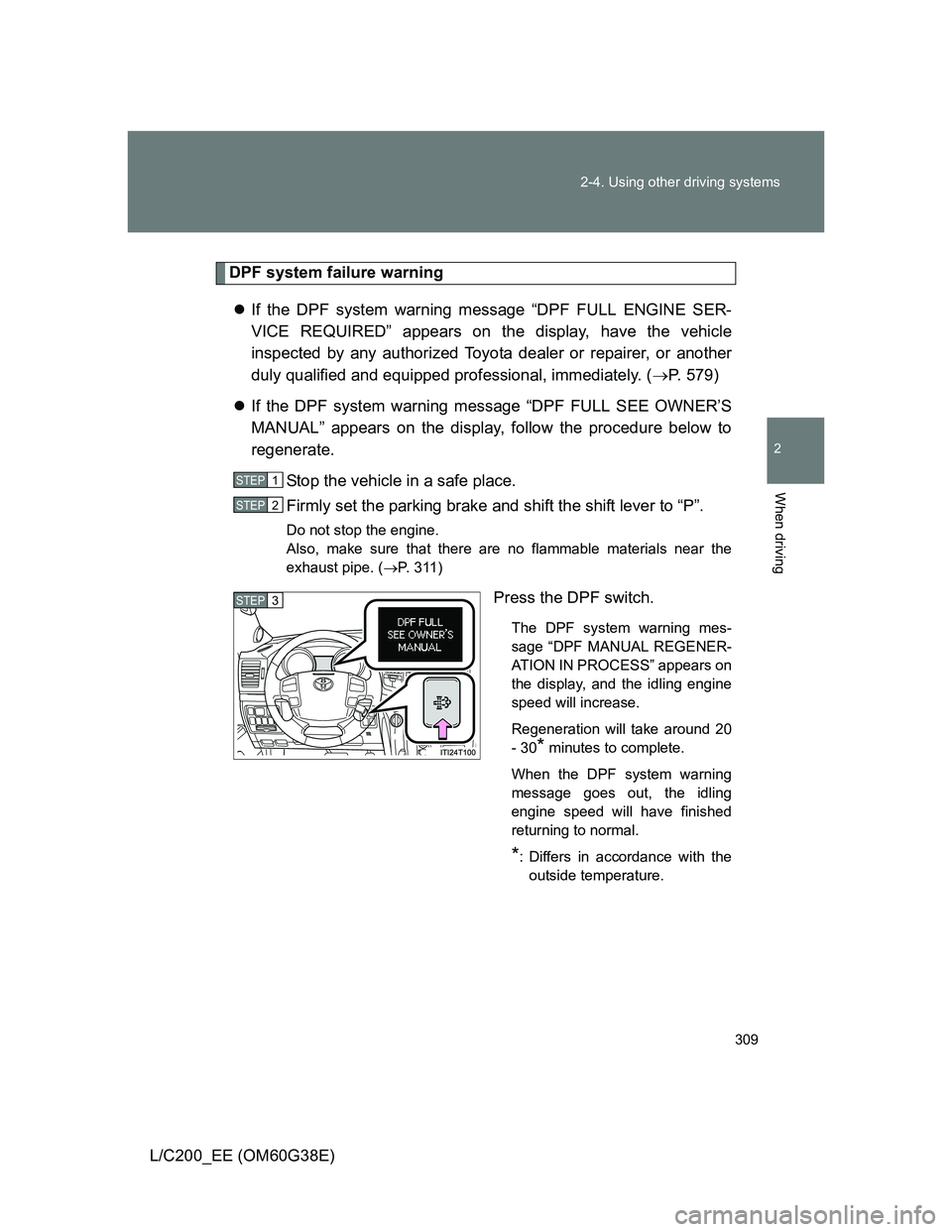
If the DPF system warning message “DPF FULL SEE OWNER’S
MANUAL” appears on the display, follow the procedure below to
regenerate.
Stop the vehicle in a safe place.
Firmly set the parking brake and shift the shift lever to “P”.
Do not stop the engine.
Also, make sure that there are no flammable materials near the
exhaust pipe. (P. 311)
Press the DPF switch.
The DPF system warning mes-
sage “DPF MANUAL REGENER-
ATION IN PROCESS” appears on
the display, and the idling engine
speed will increase.
Regeneration will take around 20
- 30
* minutes to complete.
When the DPF system warning
message goes out, the idling
engine speed will have finished
returning to normal.
*: Differs in accordance with the
outside temperature.
STEP1
STEP2
STEP3
Page 312 of 692
312 2-4. Using other driving systems
L/C200_EE (OM60G38E)
CAUTION
If the malfunction indicator light comes on
The malfunction indicator light comes on if you continue driving while the
DPF system warning message “DPF FULL ENGINE SERVICE REQUIRED”
appears on the display. In this event, damage may be caused to the vehicle
or an accident may occur. Have the vehicle inspected by any authorized Toy-
ota dealer or repairer, or another duly qualified and equipped professional,
immediately.
NOTICE
To prevent the DPF system from failing
Do not drive for long periods of time while the DPF system warning mes-
sage “DPF FULL ENGINE SERVICE REQUIRED” appears on the display
Do not use fuel other than the specified type
Do not use engine oil other than the recommended type
Do not modify the exhaust pipe