fuel consumption TOYOTA RAV4 PLUG-IN HYBRID 2023 User Guide
[x] Cancel search | Manufacturer: TOYOTA, Model Year: 2023, Model line: RAV4 PLUG-IN HYBRID, Model: TOYOTA RAV4 PLUG-IN HYBRID 2023Pages: 718, PDF Size: 167.55 MB
Page 206 of 718
2043-1. Instrument cluster
tion rate of the electricity when EV driv-
ing is performed and equivalent to the
fuel consumption for the gasoline vehi-
cles. For this vehicle, electricity con-
sumed per 100 km (“kWh/100 km”) is
displayed as electricity consumption on
each screen.
■EV driving range
●When the air conditioning system is
operating, is displayed next to
the EV driving range and the EV driv-
ing range with the air conditioning sys-
tem on is displayed.
●The EV driving range may shorten
even when not driving due to power
consumption by the system.
●For details, refer to “EV driving range”
(P.103)
■Distance to empty
●This distance is computed based on
your average fuel consumption. As a
result, the actual distance that can be
driven may differ from that displayed.
●When only a small amount of fuel is
added to the tank, the display may not
be updated. When refueling, turn the
power switch off. If the vehicle is refu-
eled without turning the power switch
off, the display may not be updated.
●When “Refuel” is displayed, the
remaining fuel amount is low and the
distance that can be driven with the
remaining fuel cannot be calculated.
Refuel immediately.
■ECO Accelerator Guidance/“Eco
Score” will not operate when
The ECO Accelerator Guidance/“Eco
Score” will not operate in the following
situations:
●The Hybrid System Indicator is not
operating.
●The vehicle is being driven using the
dynamic radar cruise control with full-
speed range.
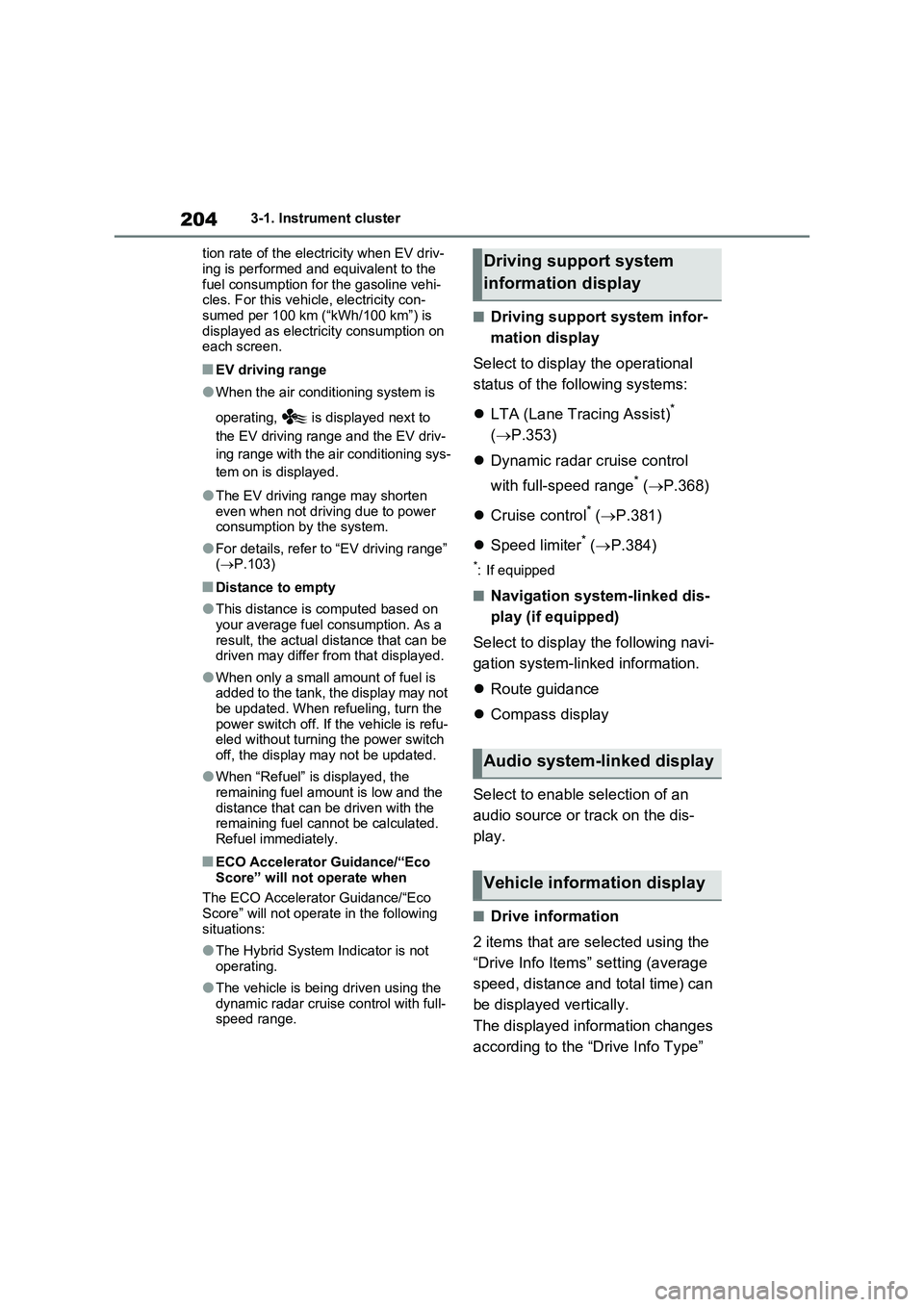
■Driving support system infor-
mation display
Select to display the operational
status of the following systems:
LTA (Lane Tracing Assist)
*
(P.353)
Dynamic radar cruise control
with full-speed range
* (P.368)
Cruise control
* (P.381)
Speed limiter
* (P.384)
*: If equipped
■Navigation system-linked dis-
play (if equipped)
Select to display the following navi-
gation system-linked information.
Route guidance
Compass display
Select to enable selection of an
audio source or track on the dis-
play.
■Drive information
2 items that are selected using the
“Drive Info Items” setting (average
speed, distance and total time) can
be displayed vertically.
The displayed information changes
according to the “Drive Info Type”
Driving support system
information display
Audio system-linked display
Vehicle information display
Page 210 of 718
2083-1. Instrument cluster
Select to enable/disable the battery
cooler. (P.128)
PBD (Power Back Door) (if
equipped) (P.243)
Select to set up the following items.
•System settings
Select to enable/disable the power
back door system.
•“Hands Free”
*
Select to enable/disable the Hands
Free Power Back Door.
• “Opening Adjustment”
Select the open position when power
back door is fully open.
•“Volume”
Select to set the volume of the buzzer
which sounds when the power back
door system operates.
*: Vehicles with Hands Free Power
Back Door
“TPWS” (Tire Pressure Warning
System) (P.488)
• “Setting Pressure”
Select to initialize the tire pressure
warning system.
• “Identifying Each Wheel & Position”
Select to register the ID codes of the
tire pressure sensors to the tire pres-
sure warning system.
•“Setting Unit”
Select to change the units of measure
displayed.
“Rear Seat Reminder” (P.237)
Select to enable/disable the rear seat
reminder.
■ Settings
“Language”
Select to change the language on the
multi-information display.
“Units”
Select to change the units of measure
displayed.
“Meter Type”
Select to change the speedometer dis-
play.
(EV indicator) (P.90)
Select to enable/disable the EV indica-
tor.
(Driving information display
settings)
Select to set up the following items.
•“Hybrid System”
Select to enable/disable the ECO
Accelerator Guidance (P.202).
• “Fuel Economy”
Select to change the display on Fuel
Economy (P.201).
• “Power Consumption”
Select to change the display on Power
Consumption (P.201).
(Audio settings)
Select to enable/disable screen.
(Vehicle information dis-
play settings)
• “Display Contents”
Select to set up the following items.
“Energy monitor”:
Select to enable/disable the Energy
monitor (P.226)
AWD:
Select to enable/disable the AWD sys-
tem display (P.205).
Page 213 of 718
211
3 3-1. Instrument cluster
Vehicle status information and indicators
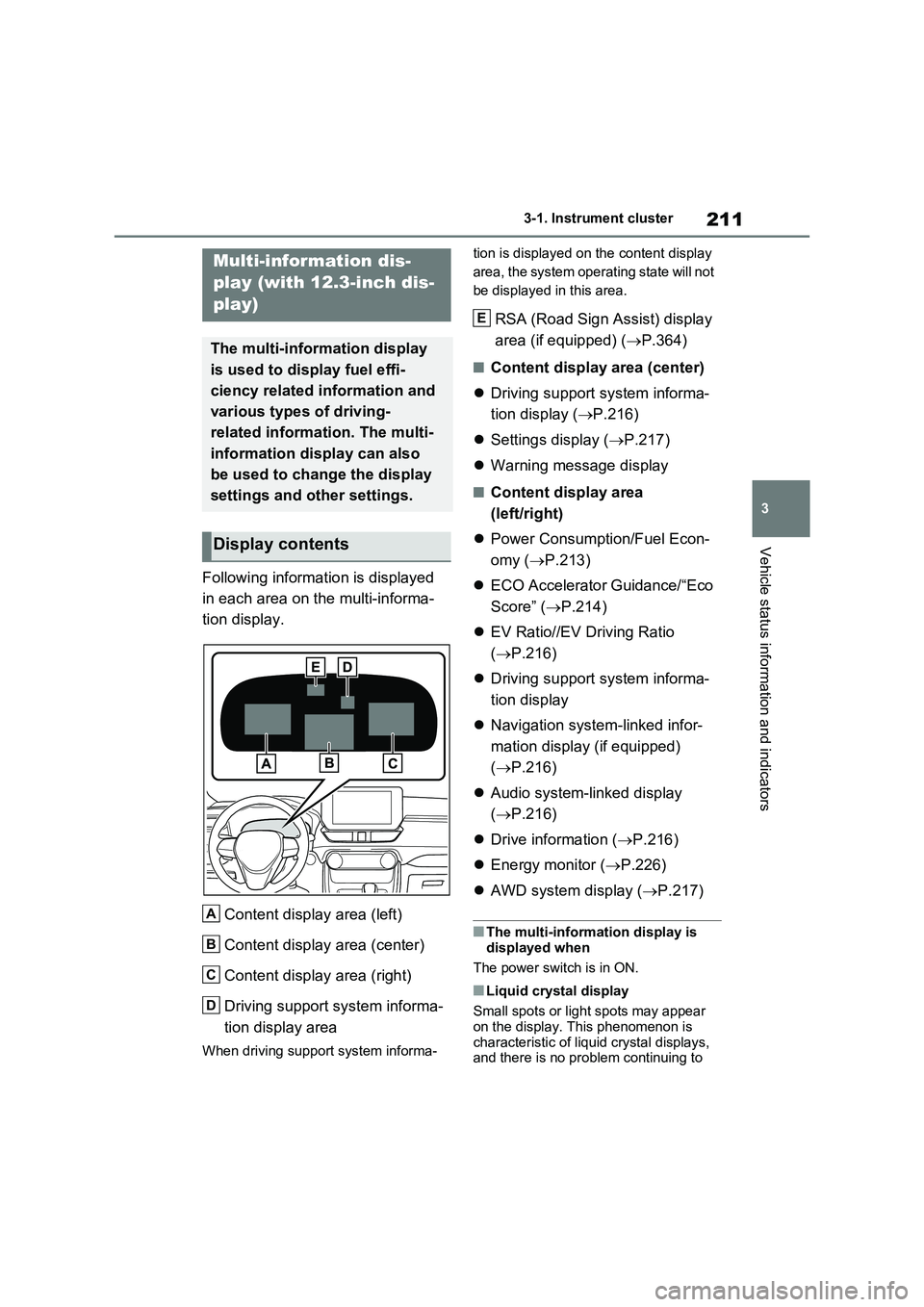
Following information is displayed
in each area on the multi-informa-
tion display.
Content display area (left)
Content display area (center)
Content display area (right)
Driving support system informa-
tion display area
When driving support system informa-tion is displayed on the content display
area, the system operating state will not
be displayed in this area.
RSA (Road Sign Assist) display
area (if equipped) (P.364)
■Content display area (center)
Driving support system informa-
tion display (P.216)
Settings display (P.217)
Warning message display
■Content display area
(left/right)
Power Consumption/Fuel Econ-
omy (P.213)
ECO Accelerator Guidance/“Eco
Score” (P.214)
EV Ratio//EV Driving Ratio
(P.216)
Driving support system informa-
tion display
Navigation system-linked infor-
mation display (if equipped)
(P.216)
Audio system-linked display
(P.216)
Drive information (P.216)
Energy monitor (P.226)
AWD system display (P.217)
■The multi-information display is
displayed when
The power switch is in ON.
■Liquid crystal display
Small spots or light spots may appear
on the display. This phenomenon is
characteristic of liquid crystal displays,
and there is no problem continuing to
Multi-information dis-
play (with 12.3-inch dis-
play)
The multi-information display
is used to display fuel effi-
ciency related information and
various types of driving-
related information. The multi-
information display can also
be used to change the display
settings and other settings.
Display contents
A
B
C
D
E
Page 215 of 718
213
3 3-1. Instrument cluster
Vehicle status information and indicators
■Changing the display contents
Switches items displayed on each
contents display area (left/cen-
ter/right).
1Press and hold to display
the cursor on the content display
area (center).
2Press or to move the
cursor and select the content
display area.
3Press or to select the
items.
■Items displayed in the content
display area
Select to enable/disable items on
the content display area (left/right).
1Press and hold to display
the cursor on the content display
area (center).
2Press or to move the
cursor and select the content
display area.
3Contents display area (left):
Press to display contents
list.
Contents display area (right):
Press to display contents
list.
4Press or to select the
items.
5Press to select/deselect
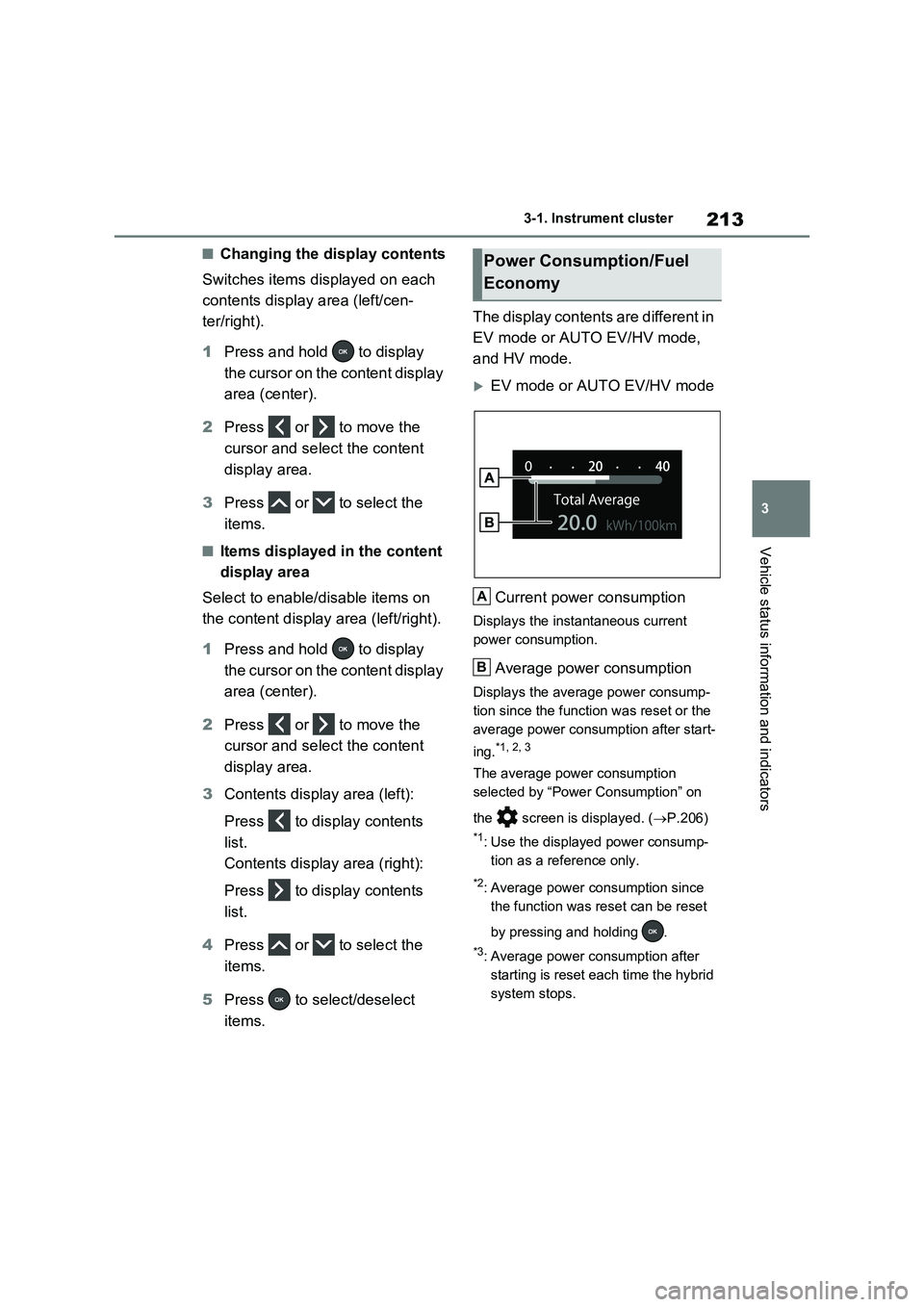
items.The display contents are different in
EV mode or AUTO EV/HV mode,
and HV mode.
EV mode or AUTO EV/HV mode
Current power consumption
Displays the instantaneous current
power consumption.
Average power consumption
Displays the average power consump-
tion since the function was reset or the
average power consumption after start-
ing.
*1, 2, 3
The average power consumption
selected by “Power Consumption” on
the screen is displayed. (P.206)
*1: Use the displayed power consump-
tion as a reference only.
*2: Average power consumption since
the function was reset can be reset
by pressing and holding .
*3: Average power consumption after
starting is reset each time the hybrid
system stops.
Power Consumption/Fuel
Economy
A
B
Page 216 of 718
2143-1. Instrument cluster
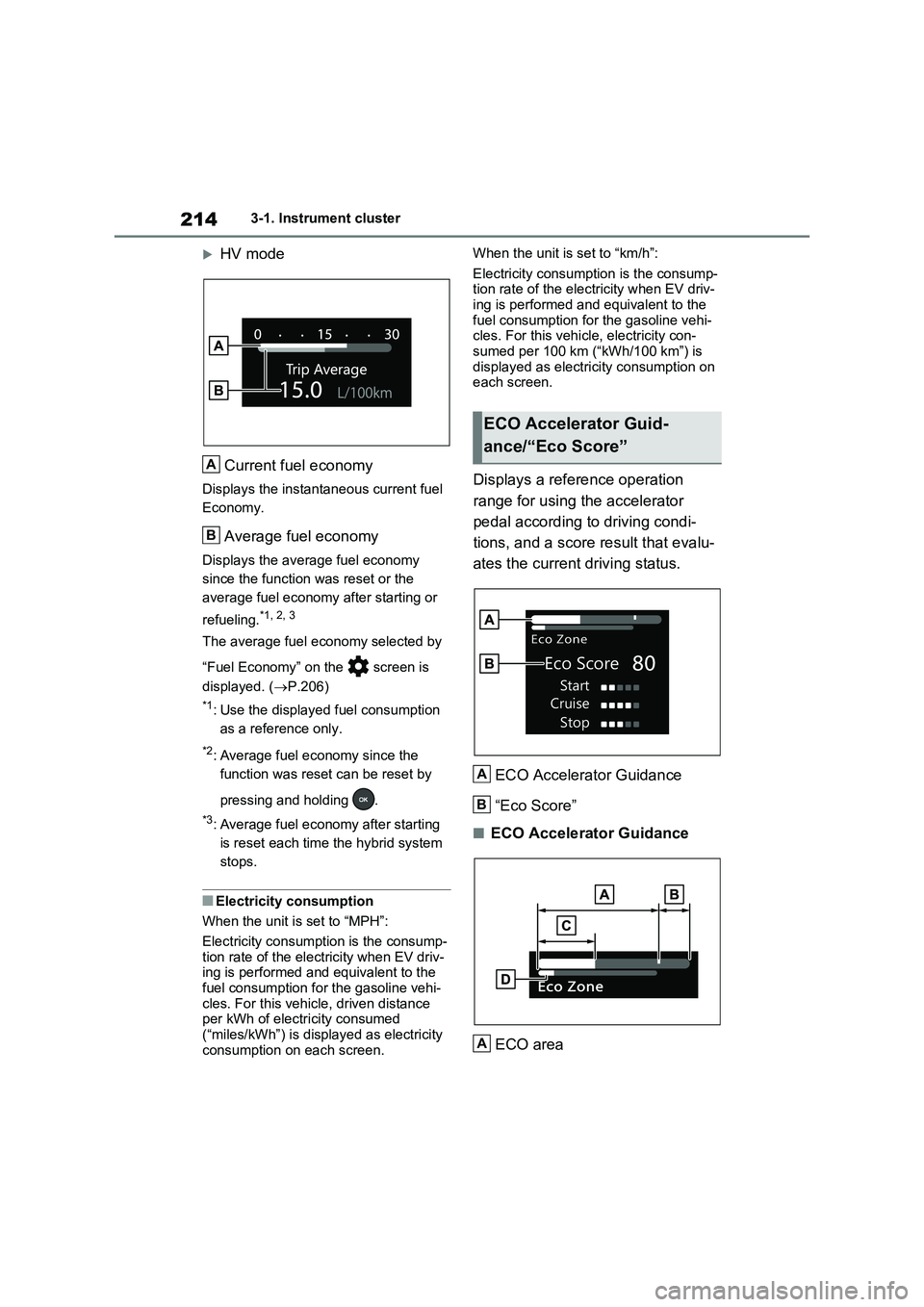
HV mode
Current fuel economy
Displays the instantaneous current fuel
Economy.
Average fuel economy
Displays the average fuel economy
since the function was reset or the
average fuel economy after starting or
refueling.*1, 2, 3
The average fuel economy selected by
“Fuel Economy” on the screen is
displayed. ( P.206)
*1: Use the displayed fuel consumption
as a reference only.
*2: Average fuel economy since the
function was reset can be reset by
pressing and holding .
*3: Average fuel economy after starting
is reset each time the hybrid system
stops.
■Electricity consumption
When the unit is set to “MPH”:
Electricity consumption is the consump- tion rate of the electricity when EV driv-ing is performed and equivalent to the
fuel consumption for the gasoline vehi- cles. For this vehicle, driven distance per kWh of electricity consumed
(“miles/kWh”) is displayed as electricity consumption on each screen.
When the unit is set to “km/h”:
Electricity consumption is the consump- tion rate of the electricity when EV driv-ing is performed and equivalent to the
fuel consumption for the gasoline vehi- cles. For this vehicle, electricity con-sumed per 100 km (“kWh/100 km”) is
displayed as electricity consumption on each screen.
Displays a reference operation
range for using the accelerator
pedal according to driving condi-
tions, and a score result that evalu-
ates the current driving status.
ECO Accelerator Guidance
“Eco Score”
■ECO Accelerator Guidance
ECO area
A
B
ECO Accelerator Guid-
ance/“Eco Score”
[ˆ[¦[²[c[–[¦[²[µ[¨
[–[·[¤[µ[·
[–[·[²[³
[†[µ[¸[¬[¶[¨
A
B
A
Page 222 of 718
2203-1. Instrument cluster
■ Settings
“Language”
Select to change the language
on the multi-information display.
“Units”
Select to change the unit of mea-
sure for fuel consumption.
Meter Type
Select to change the meter type
setting.
Meter Style
Select to change the meter style.
Dial Type
Select to change dial type.
( P.193)
Depending on the selected dial type,
this item will not be displayed.
EV indicator
Select to enable/disable the EV
indicator.
Fuel Economy
Select to change the display on
Fuel Economy. ( P.213)
“Hybrid System”
Select to enable/disable refer-
ence operation range.
“Power Consumption”
Select to change the display on
Power Consumption. ( P.213)
Drive Info
Select to change displayed items
on drive information display.
( P.216)
Pop-Up Display
Select to enable/disable the pop-
up displays, which may appear in
some situations.
“Calender”
Select to set up the calender.
This can only be set if GPS cali-
bration of clock is turned off in
the multimedia system settings.
Default Settings
Select to reset the meter display
settings.
■Suspension of the settings display
●In the following situations, operation of the settings display will be temporarily
suspended. • When a warning message appears on the multi-information display
• When the vehicle begins to move
●Settings for functions not equipped to
the vehicle are not displayed.
●When a function is turned off, the
related settings for that function are not selectable.
WARNING
■Cautions during setting up the
display
As the hybrid system needs to be operating during setting up the dis-
play, ensure that the vehicle is parked in a place with adequate ventilation. In a closed area such as a garage,
exhaust gases including harmful car- bon monoxide (CO) may collect and enter the vehicle. This may lead to
death or a serious health hazard.
NOTICE
■During setting up the display
To prevent 12-volt battery discharge, ensure that the hybrid system is oper-
ating while setting up the display fea- tures.
Page 228 of 718
2263-1. Instrument cluster
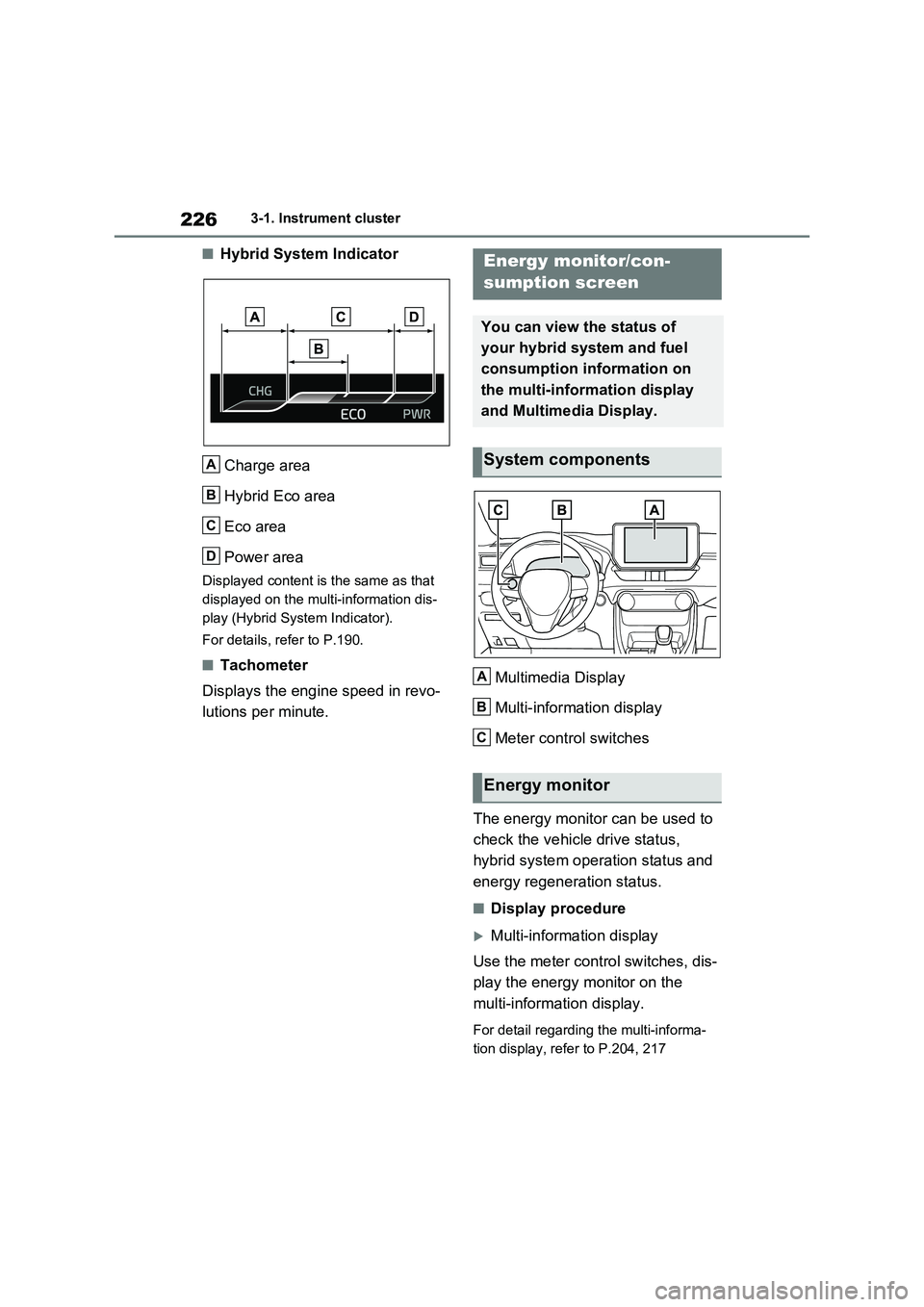
■Hybrid System Indicator
Charge area
Hybrid Eco area
Eco area
Power area
Displayed content is the same as that
displayed on the multi-information dis-
play (Hybrid System Indicator).
For details, refer to P.190.
■Tachometer
Displays the engine speed in revo-
lutions per minute.Multimedia Display
Multi-information display
Meter control switches
The energy monitor can be used to
check the vehicle drive status,
hybrid system operation status and
energy regeneration status.
■Display procedure
Multi-information display
Use the meter control switches, dis-
play the energy monitor on the
multi-information display.
For detail regarding the multi-informa-
tion display, refer to P.204, 217
A
B
C
D
Energy monitor/con-
sumption screen
You can view the status of
your hybrid system and fuel
consumption information on
the multi-information display
and Multimedia Display.
System components
Energy monitor
A
B
C
Page 230 of 718
2283-1. Instrument cluster
Rear electric motor (traction
motor)
Rear tires
Front tires
■Color of the hybrid battery (traction
battery) on the center display
It will be green when the hybrid battery
(traction battery) is being charged, and
yellow when the hybrid battery (traction
battery) is being used.
■Remaining charge amount warning
of hybrid battery (traction battery)
●The buzzer sounds intermittently
when the hybrid battery (traction bat-
tery) remains without charging while
the shift lever is in N, or the remaining
charge amount drops below a certain
level. If the remaining charge amount
drops further, the buzzer sounds con-
tinuously.
●When a warning message is shown
on the multi-information display and
the buzzer sounds, follow the instruc-
tions displayed on the screen to per-
form troubleshooting.
■Color of the gasoline engine on the
center display
It will be blue when the engine is warm-
ing up, and it will turn to red when the
warming up is finished.
Hybrid system output may be restricted
when the gasoline engine is displayed in
blue.
■Display procedure
Press from the main menu,
then press “Trip information”.
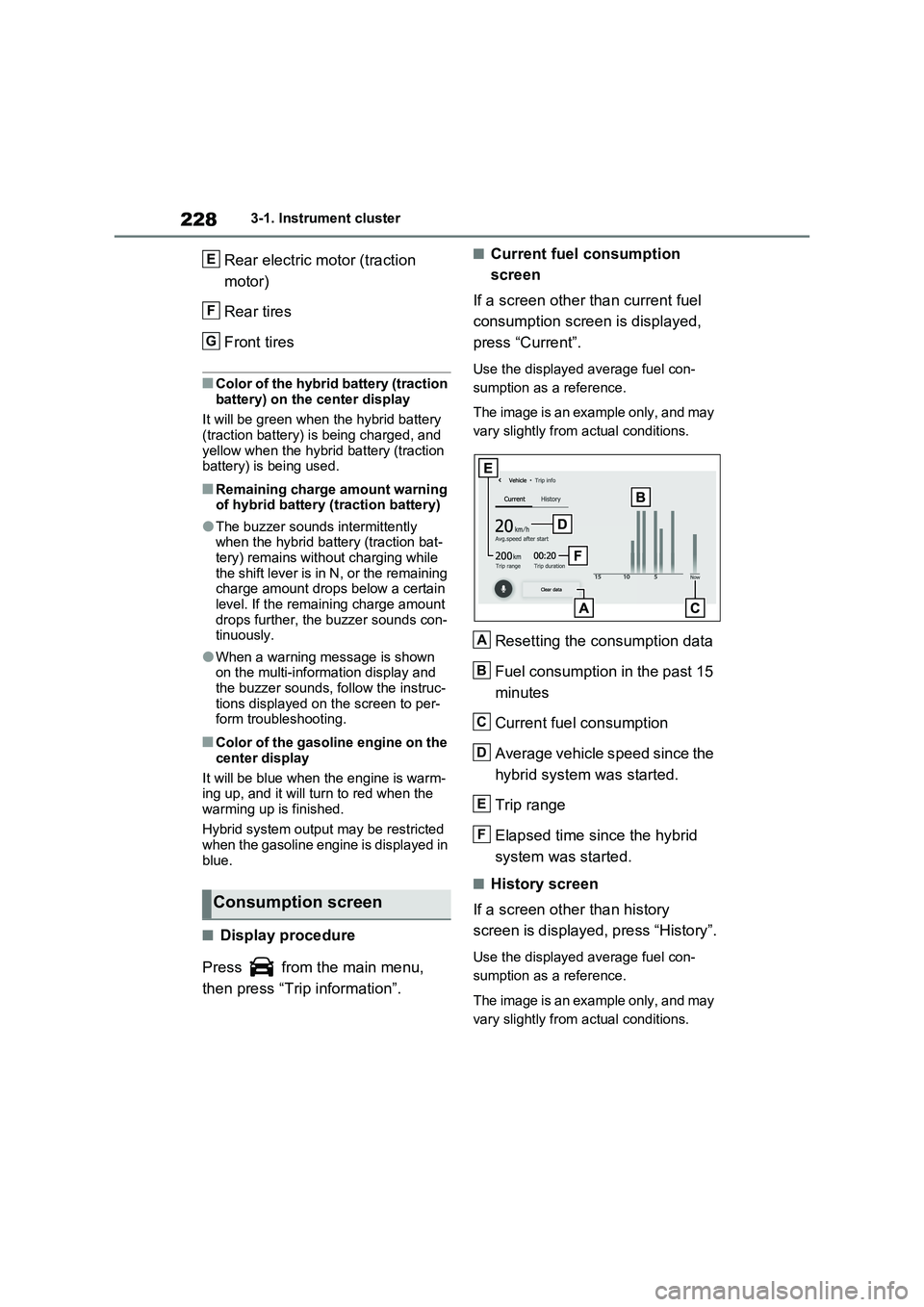
■Current fuel consumption
screen
If a screen other than current fuel
consumption screen is displayed,
press “Current”.
Use the displayed average fuel con-
sumption as a reference.
The image is an example only, and may
vary slightly from actual conditions.
Resetting the consumption data
Fuel consumption in the past 15
minutes
Current fuel consumption
Average vehicle speed since the
hybrid system was started.
Trip range
Elapsed time since the hybrid
system was started.
■History screen
If a screen other than history
screen is displayed, press “History”.
Use the displayed average fuel con-
sumption as a reference.
The image is an example only, and may
vary slightly from actual conditions.
Consumption screen
E
F
G
A
B
C
D
E
F
Page 231 of 718
229
3 3-1. Instrument cluster
Vehicle status information and indicators
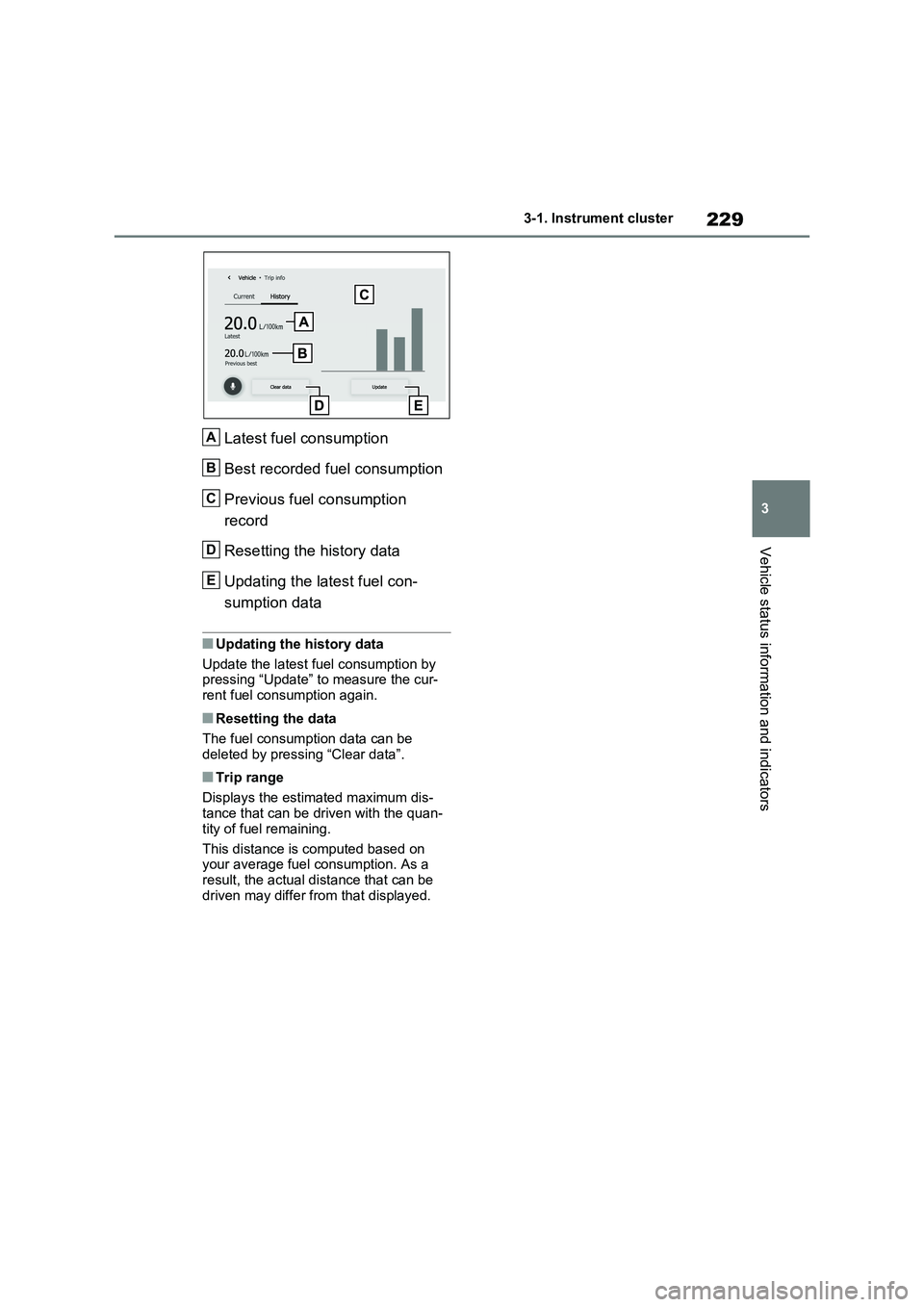
Latest fuel consumption
Best recorded fuel consumption
Previous fuel consumption
record
Resetting the history data
Updating the latest fuel con-
sumption data
■Updating the history data
Update the latest fuel consumption by
pressing “Update” to measure the cur-
rent fuel consumption again.
■Resetting the data
The fuel consumption data can be
deleted by pressing “Clear data”.
■Trip range
Displays the estimated maximum dis-
tance that can be driven with the quan-
tity of fuel remaining.
This distance is computed based on
your average fuel consumption. As a
result, the actual distance that can be
driven may differ from that displayed.
A
B
C
D
E
Page 426 of 718
4245-6. Driving tips
Vehicles with 225/60R18 tires
Use the correct tire chain size when
mounting the tire chains. Chain size
is regulated for each tire size.
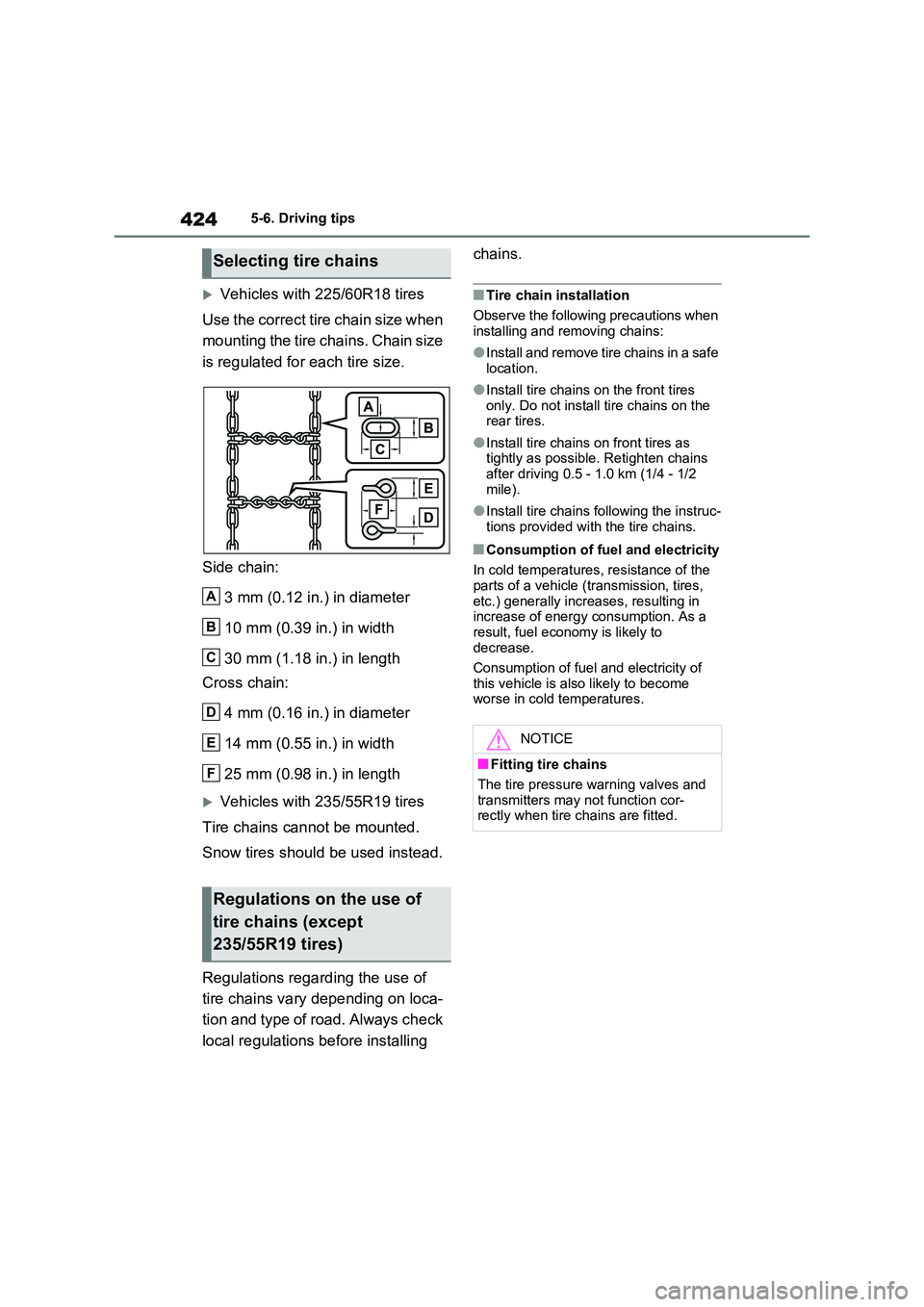
Side chain:
3 mm (0.12 in.) in diameter
10 mm (0.39 in.) in width
30 mm (1.18 in.) in length
Cross chain:
4 mm (0.16 in.) in diameter
14 mm (0.55 in.) in width
25 mm (0.98 in.) in length
Vehicles with 235/55R19 tires
Tire chains cannot be mounted.
Snow tires should be used instead.
Regulations regarding the use of
tire chains vary depending on loca-
tion and type of road. Always check
local regulations before installing
chains.
■Tire chain installation
Observe the following precautions when installing and removing chains:
●Install and remove tire chains in a safe location.
●Install tire chains on the front tires only. Do not install tire chains on the rear tires.
●Install tire chains on front tires as tightly as possible. Retighten chains
after driving 0.5 - 1.0 km (1/4 - 1/2 mile).
●Install tire chains following the instruc-tions provided with the tire chains.
■Consumption of fuel and electricity
In cold temperatures, resistance of the
parts of a vehicle (transmission, tires, etc.) generally increases, resulting in increase of energy consumption. As a
result, fuel economy is likely to decrease.
Consumption of fuel and electricity of
this vehicle is also likely to become worse in cold temperatures.
Selecting tire chains
Regulations on the use of
tire chains (except
235/55R19 tires)
A
B
C
D
E
F
NOTICE
■Fitting tire chains
The tire pressure warning valves and transmitters may not function cor-rectly when tire chains are fitted.