change wheel TOYOTA RAV4 PLUG-IN HYBRID 2023 Owner's Guide
[x] Cancel search | Manufacturer: TOYOTA, Model Year: 2023, Model line: RAV4 PLUG-IN HYBRID, Model: TOYOTA RAV4 PLUG-IN HYBRID 2023Pages: 718, PDF Size: 167.55 MB
Page 378 of 718
3765-5. Using the driving support systems
When the speed of the preceding
vehicle matches or exceeds your
vehicle speed
When the preceding vehicle is
traveling at an extremely slow
speed
Immediately after the cruise con-
trol speed was set
When depressing the accelerator
pedal
While driving in vehicle-to-vehicle
distance control mode, this function
will reduce the vehicle speed, if it is
determined to be necessary.
■Function operation
When the steering wheel begins to
be turned, the vehicle speed will
begin being reduced. When the
steering wheel is returned to the
center position, the vehicle speed
reduction will end.
Depending on the situation, the
vehicle speed will then return to the
vehicle-to-vehicle distance control
mode set speed.
In situations where vehicle-to-vehi-
cle distance control needs to oper-
ate, such as when a preceding
vehicle cuts in front of your vehicle,
the curve speed reduction function
will be canceled.
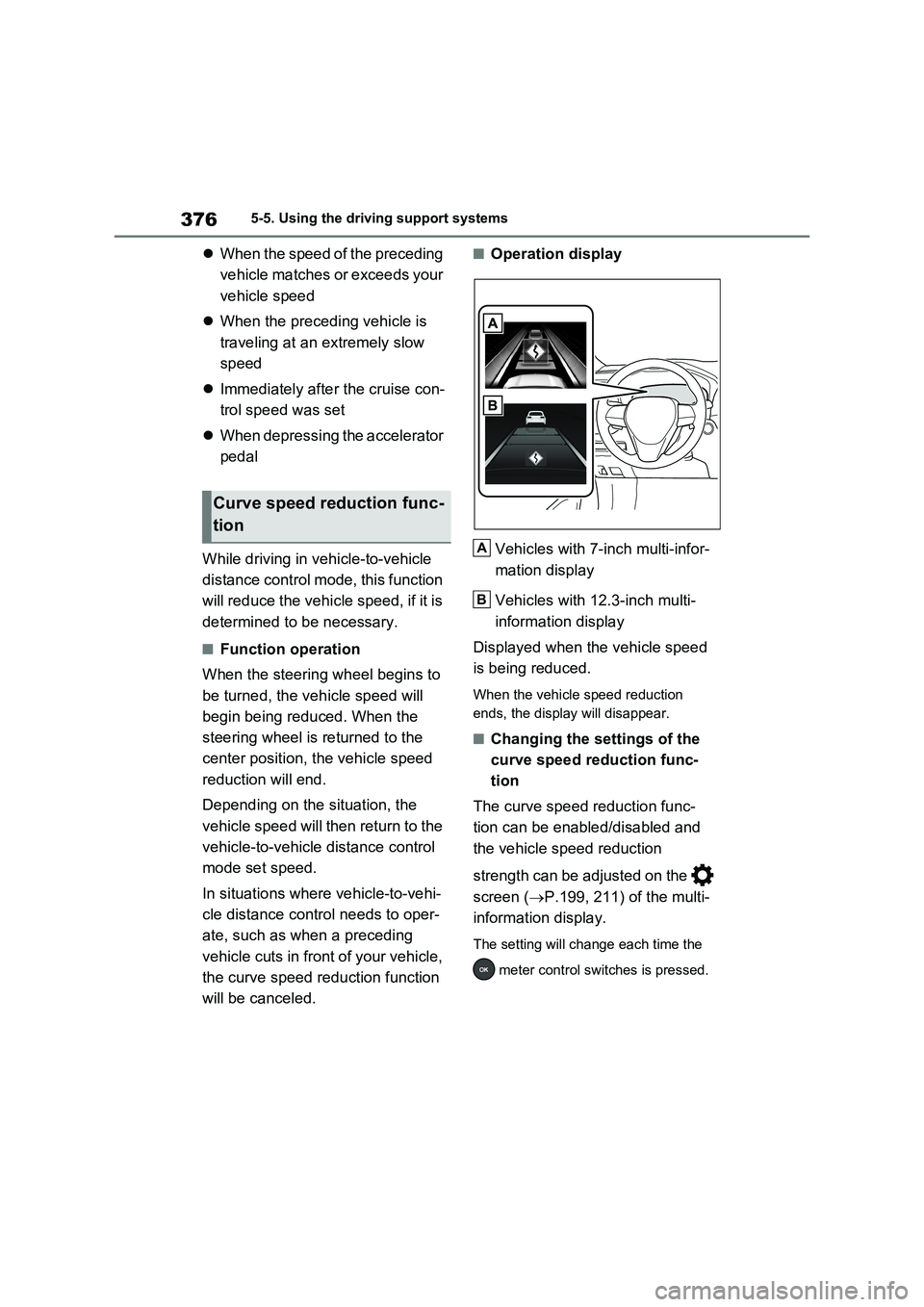
■Operation display
Vehicles with 7-inch multi-infor-
mation display
Vehicles with 12.3-inch multi-
information display
Displayed when the vehicle speed
is being reduced.
When the vehicle speed reduction
ends, the display will disappear.
■Changing the settings of the
curve speed reduction func-
tion
The curve speed reduction func-
tion can be enabled/disabled and
the vehicle speed reduction
strength can be adjusted on the
screen (P.199, 211) of the multi-
information display.
The setting will change each time the
meter control switches is pressed.
Curve speed reduction func-
tion
A
B
Page 416 of 718
4145-5. Using the driving support systems
and the system will operate properly.
■When Trail Mode is canceled
In the following situations, Trail Mode is automatically canceled even if it is selected:
●When the driving mode is changed. ( P.411)
●When the hybrid system is restarted.
■Sounds and vibrations when driv- ing in Trail Mode
Any of the following conditions may occur when Trail Mode is operating. None of these indicates that a malfunc-
tion has occurred:
●Vibrations may be felt throughout the
vehicle or steering wheel
●Sounds may be heard from the engine
compartment
■When the Trail Mode indicator does not illuminate
When the Trail Mode indicator does not
illuminate even though the Trail Mode switch is pressed, the system may be malfunctioning.
Have the vehicle inspected by any authorized Toyota retailer or Toyota authorized repairer, or any reliable
repairer immediately.
■If “Exhaust Filter Full See Owner’s
Manual” is shown on the multi- information display
●The message may be displayed while high load driving with particulate mat-ter accumulating.
●Hybrid system output (engine speed) is restricted when a certain amount of
particulate matter accumulates, how- ever, it is possible to drive the vehicle unless the malfunction indicator lamp
comes on.
●Particulate matter can accumulate
more quickly if the vehicle is fre- quently driven short trips or at low speeds, or if the hybrid system is reg-
ularly started in an extremely cold environment. Excessive accumula-
tion of particulate matter can be pre- vented by periodically driving long distances continuously with intermit-
tent releasing of the accelerator pedal, such as when driving on highways and freeways.
■If the malfunction indicator lamp
comes on or “Hybrid System Mal- function Output Power Reduced Visit Your Dealer” is shown on the
multi-information display
The amount of accumulated particulate matter has exceeded a certain level.
Have the vehicle inspected by any authorized Toyota retailer or Toyota authorized repairer, or any reliable
repairer immediately.
NOTICE
■In order to ensure that Trail Mode operates properly
Do not continuously use the Trail Mode for a long period of time. Depending on the driving conditions,
the load on related parts increases and the system may not operate prop-erly.
GPF (Gasoline Particu-
late Filter) system
The GPF system collects par-
ticulate matter in the exhaust
gas by using an exhaust gas
filter. The system will operate
to regenerate the filter auto-
matically, depending on the
vehicle conditions.
Page 423 of 718
421
5
5-5. Using the driving support systems
Driving
WARNING
■If trailer sway occurs
Observe the following precautions.
Failing to do so may cause death or serious injury.
●Firmly grip the steering wheel.
Steer straight ahead. Do not try to control trailer swaying by turning the steering wheel.
●Begin releasing the accelerator pedal immediately but very gradu-
ally to reduce speed. Do not increase speed. Do not apply vehicle brakes.
If you make no extreme correction
with the steering or brakes, your vehi-
cle and trailer should stabilize.
( P.296)
■Secondary Collision Brake (if
equipped)
Do not rely solely upon the Secondary Collision Brake. This system is
designed to help reduce the possibil- ity of further damage due to a second-ary collision, however, that effect
changes according to various condi- tions. Overly relying on the system may result in death or serious injury.
Page 428 of 718
4265-6. Driving tips
cautions to ensure your driving
enjoyment and to help prevent the
closure of areas to off-road vehi-
cles:
Drive your vehicle only in areas
where off-road vehicles are per-
mitted to travel.
Respect private property. Get
owner’s permission before enter-
ing private property.
Do not enter areas that are
closed. Honor gates, barriers
and signs that restrict travel.
Stay on established roads. When
conditions are wet, driving tech-
niques should be changed or
travel delayed to prevent dam-
age to roads.
WARNING
■Off-road driving precautions
Always observe the following precau- tions to minimize the risk of death, serious injury or damage to your vehi-
cle:
●Drive carefully when off the road. Do not take unnecessary risks by
driving in dangerous places.
●Do not grip the steering wheel
spokes when driving off-road. A bad bump could jerk the wheel and injure your hands. Keep both hands
and especially your thumbs on the outside of the rim.
●Always check your brakes for effec-tiveness immediately after driving in sand, mud, water or snow.
●After driving through tall grass, mud, rock, sand, rivers, etc., check that there is no grass, bush, paper,
rags, stone, sand, etc. adhering or trapped on the underbody. Clear off any such matter from the
underbody. If the vehicle is used with these materials trapped or adhering to the underbody, a break-
down or fire could occur.
●When driving off-road or in rugged
terrain, do not drive at excessive speeds, jump, make sharp turns, strike objects, etc. This may cause
loss of control or vehicle rollover causing death or serious injury. You are also risking expensive damage
to your vehicle’s suspension and chassis.
NOTICE
■To prevent the water damage
Take all necessary safety measures to ensure that water damage to the hybrid battery (traction battery),
hybrid system or other components does not occur.
●Water entering the engine compart-
ment may cause severe damage to the hybrid system.
●Water entering the hybrid transmis-sion will cause deterioration in transmission quality. The malfunc-
tion indicator may come on, and the vehicle may not be drivable.
●Water can wash the grease from wheel bearings, causing rusting and premature failure, and may
also enter the hybrid transaxle case, reducing the gear oil’s lubri-cating qualities.
Page 491 of 718
489
7 7-3. Do-it-yourself maintenance
Maintenance and care
The tire pressure warning light comes
on and a buzzer sounds when the tire
inflation pressure becomes low due to
natural air leakage or outside tempera-
ture. (Ways of coping: P.541, 590)
When “Immediately Check tire
when Safe” is displayed (Emer-
gency Warning)
The tire pressure warning light comes
on and a buzzer sounds when the tire
inflation pressure becomes low sud-
denly due to a blowout. (Ways of cop-
ing: P.541, 548, 559)
However, the system may not be able
to detect sudden tire ruptures (bursting,
etc.).
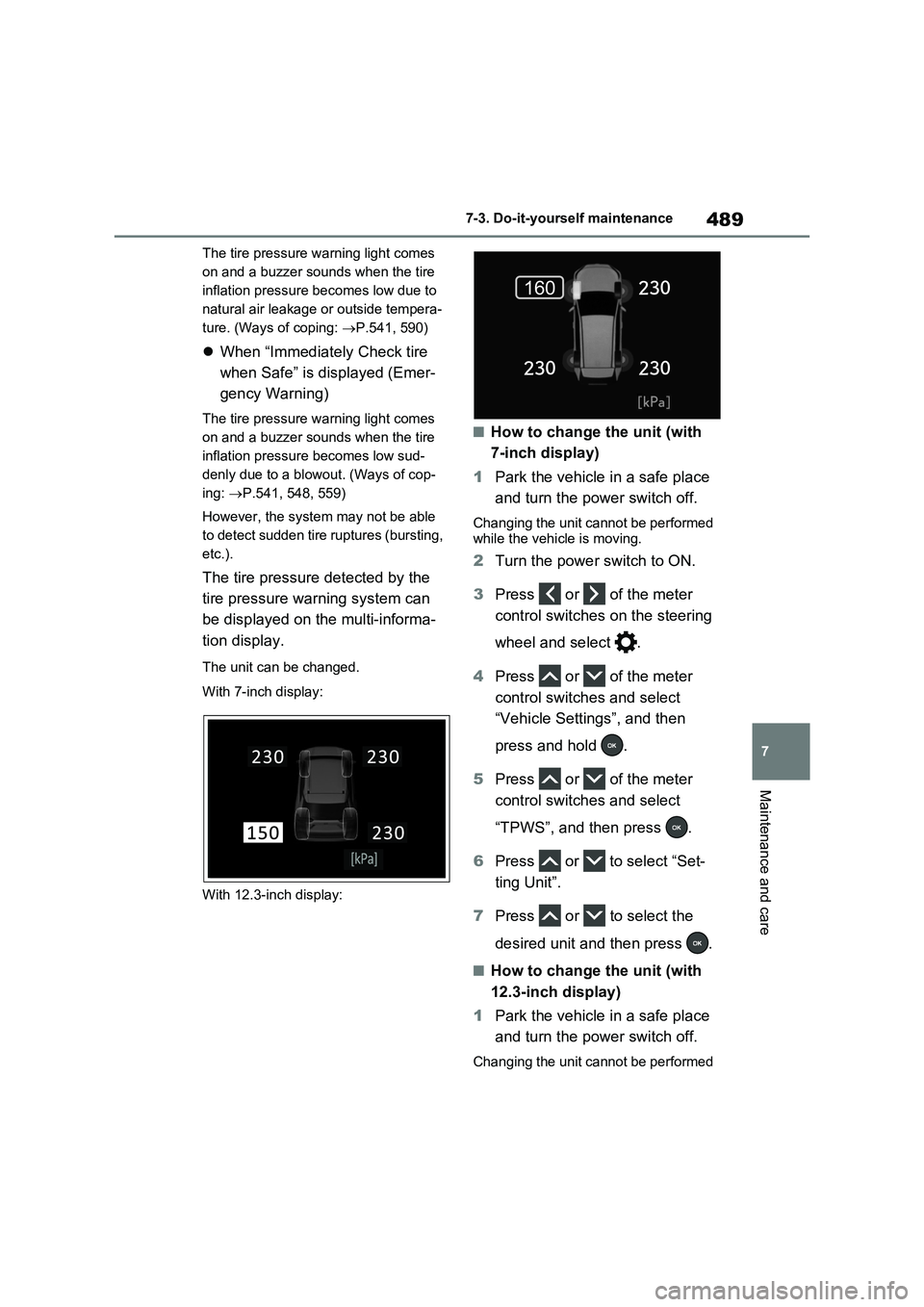
The tire pressure detected by the
tire pressure warning system can
be displayed on the multi-informa-
tion display.
The unit can be changed.
With 7-inch display:
With 12.3-inch display:
■How to change the unit (with
7-inch display)
1Park the vehicle in a safe place
and turn the power switch off.
Changing the unit cannot be performed
while the vehicle is moving.
2Turn the power switch to ON.
3Press or of the meter
control switches on the steering
wheel and select .
4Press or of the meter
control switches and select
“Vehicle Settings”, and then
press and hold .
5Press or of the meter
control switches and select
“TPWS”, and then press .
6Press or to select “Set-
ting Unit”.
7Press or to select the
desired unit and then press .
■How to change the unit (with
12.3-inch display)
1Park the vehicle in a safe place
and turn the power switch off.
Changing the unit cannot be performed
Page 492 of 718
4907-3. Do-it-yourself maintenance
while the vehicle is moving.
2Turn the power switch to ON.
3Press and hold to display
the cursor on the content display
area (center) of the multi-infor-
mation display.
4Press or of the meter
control switches to select
and then press .
5Press or of the meter
control switches and select
“ Vehicle Settings”, and
then press and hold .
6Press or of the meter
control switches and select
“TPWS”, and then press .
7Press or to select “Pres-
sure unit setting”.
8Press or to select the
desired unit and then press .
■Routine tire inflation pressure
checks
The tire pressure warning system does
not replace routine tire inflation pressure
checks. Make sure to check tire inflation
pressure as part of your routine of daily
vehicle checks.
■Tire inflation pressure
●It may take a few minutes to display
the tire inflation pressure after the
power switch is turned to ON. It may
also take a few minutes to display the
tire inflation pressure after inflation
pressure has been adjusted.
●Tire inflation pressure changes with temperature. The displayed values
may also be different from the values
measured using a tire pressure
gauge.
■Situations in which the tire pres-
sure warning system may not oper-
ate properly
●In the following cases, the tire pres-
sure warning system may not operate
properly.
• If non-genuine Toyota wheels are
used.
• A tire has been replaced with a tire
that is not an OE (Original Equipment)
tire.
• A tire has been replaced with a tire
that is not of the specified size.
• Tire chains, etc. are equipped.
• An auxiliary-supported run-flat tire is
equipped.
• If a window tint that affects the radio
wave signals is installed.
• If there is a lot of snow or ice on the
vehicle, particularly around the wheels
or wheel housings.
• If the tire inflation pressure is
extremely higher than the specified
level.
• If wheels without tire pressure warning
valves and transmitters are used.
• If the ID code on the tire pressure
warning valves and transmitters is not
registered in the tire pressure warning
computer.
●Performance may be affected in the
following situations.
• Near a TV tower, electric power plant,
gas station, radio station, large dis-
play, airport or other facility that gen-
erates strong radio waves or electrical
noise
• When carrying a portable radio, cellu-
lar phone, cordless phone or other
wireless communication device
If tire position information is not cor-
rectly displayed due to the radio wave
conditions, the display may be cor-
rected by driving and changing the
radio wave conditions.
●When the vehicle is parked, the time
taken for the warning to start or go off
Page 493 of 718
491
7
7-3. Do-it-yourself maintenance
Maintenance and care
could be extended.
●When tire inflation pressure declines rapidly for example when a tire has
burst, the warning may not function.
■Warning performance of the tire pressure warning system
The warning of the tire pressure warning
system will change in accordance with the conditions under which it was initial-ized. For this reason, the system may
give a warning even if the tire pressure does not reach a low enough level, or if the pressure is higher than the pressure
that was adjusted to when the system was initialized.
When replacing tires or wheels, tire
pressure warning valves and trans-
mitters must also be installed.
When new tire pressure warning
valves and transmitters are
installed, new ID codes must be
registered in the tire pressure warn-
ing computer and the tire pressure
warning system must be initialized.
( P.495)
■When replacing the tires and
wheels
If the ID code of the tire pressure warn- ing valve and transmitter is not regis-
tered, the tire pressure warning system will not work properly. After driving for about 10 minutes, the tire pressure
warning light blinks for 1 minute and stays on to indicate a system malfunc-tion.
Installing tire pressure warn-
ing valves and transmitters
NOTICE
■Repairing or replacing tires, wheels, tire pressure warning
valves, transmitters and tire valve caps
●When removing or fitting the
wheels, tires or the tire pressure warning valves and transmitters, contact any authorized Toyota
retailer or Toyota authorized repairer, or any reliable repairer as the tire pressure warning valves
and transmitters may be damaged if not handled correctly.
●Make sure to install the tire valve caps. If the tire valve caps are not installed, water could enter the tire
pressure warning valves and the tire pressure warning valves could be bound.
●When replacing tire valve caps, do not use tire valve caps other than
those specified. The cap may become stuck.
■To avoid damage to the tire pres-sure warning valves and trans-mitters (vehicles without spare
tire)
When a tire is repaired with liquid sealants, the tire pressure warning
valve and transmitter may not operate properly. If a liquid sealant is used, contact any authorized Toyota retailer
or Toyota authorized repairer, or any reliable repairer or other qualified ser-vice shop as soon as possible. After
use of liquid sealant, make sure to replace the tire pressure warning valve and transmitter when repairing
or replacing the tire. ( P.491)
Page 497 of 718
495
7
7-3. Do-it-yourself maintenance
Maintenance and care
Every tire pressure warning valve
and transmitter has a unique ID
code. When replacing a tire pres-
sure warning valve and transmitter,
it is necessary to register the ID
code.
When registering the ID codes, per-
form the following procedure.
■Registering procedure (with 7-
inch display)
1 Park the vehicle in a safe place,
wait for approximately 20 min-
utes, and then start the hybrid
system.
2 Press or of the meter
control switches on the steering
wheel and select .
3 Press or of the meter
control switches and select
“Vehicle Settings”, and then
press and hold .
4 Press or of the meter
control switches and select
“TPWS”, and then press .
5 Press or of the meter
control switches and select
“Identifying Each Wheel & Posi-
tion”. Then press and hold
until the tire pressure warning
light starts slowly blinking 3
times.
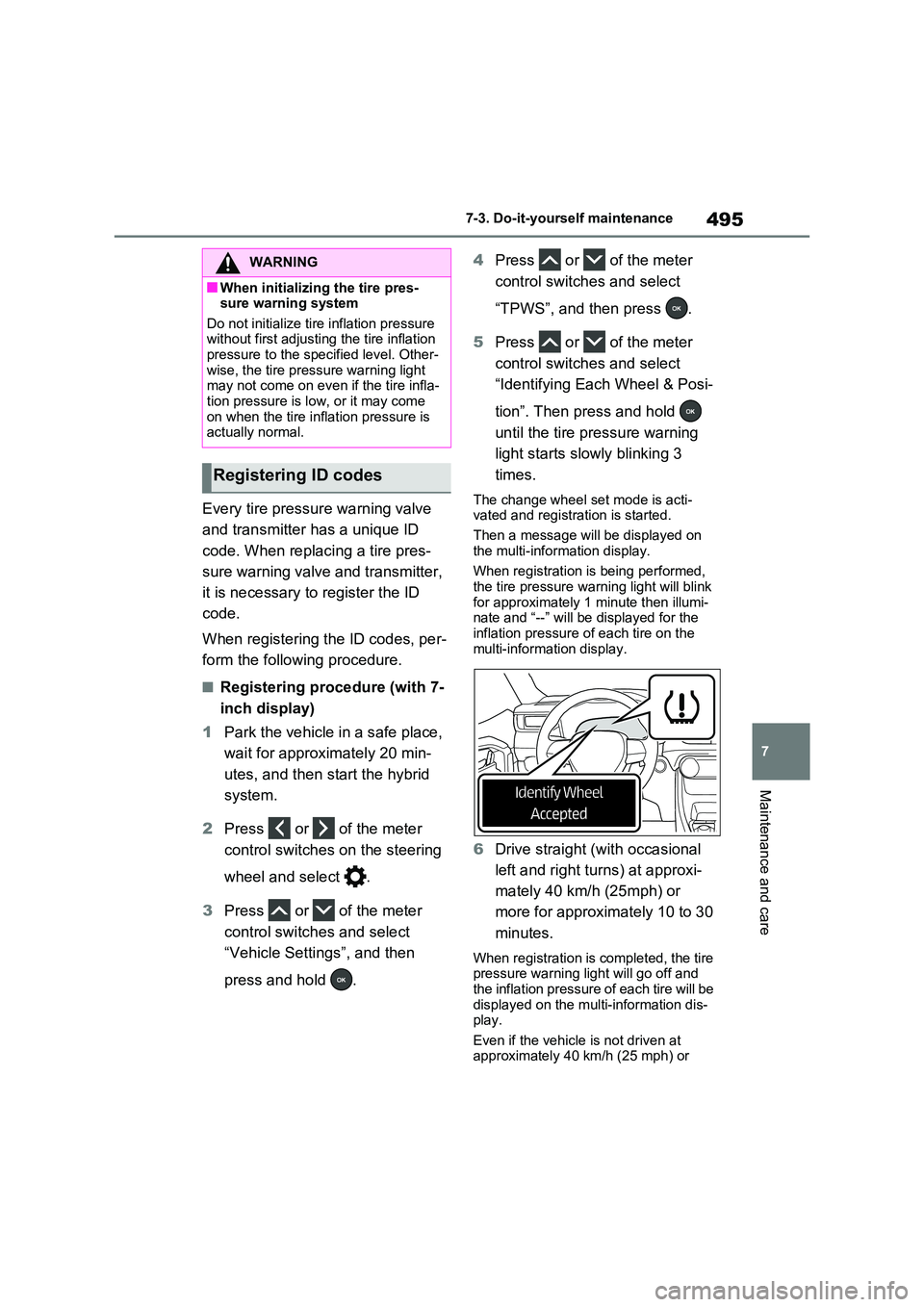
The change wheel set mode is acti- vated and registration is started.
Then a message will be displayed on
the multi-information display.
When registration is being performed, the tire pressure warning light will blink
for approximately 1 minute then illumi- nate and “--” will be displayed for the inflation pressure of each tire on the
multi-information display.
6 Drive straight (with occasional
left and right turns) at approxi-
mately 40 km/h (25mph) or
more for approximately 10 to 30
minutes.
When registration is completed, the tire pressure warning light will go off and
the inflation pressure of each tire will be displayed on the multi-information dis-play.
Even if the vehicle is not driven at approximately 40 km/h (25 mph) or
WARNING
■When initializing the tire pres-sure warning system
Do not initialize tire inflation pressure without first adjusting the tire inflation pressure to the specified level. Other-
wise, the tire pressure warning light may not come on even if the tire infla-tion pressure is low, or it may come
on when the tire inflation pressure is actually normal.
Registering ID codes
Page 498 of 718
4967-3. Do-it-yourself maintenance
more, registration can be completed by
driving for a long time. However, if reg-
istration does not complete after driving
for 1 hour or more, perform the proce-
dure again from the beginning.
7Initialize the tire pressure warn-
ing system. (P.492)
■Registering procedure (with
12.3-inch display)
1Park the vehicle in a safe place,
wait for approximately 20 min-
utes, and then start the hybrid
system.
2Press and hold to display
the cursor on the content display
area (center) of the multi-infor-
mation display.
3Press or of the meter
control switches to select
and then press .
4Press or of the meter
control switches and select
“ Vehicle Settings”, and
then press and hold .
5Press or of the meter
control switches and select
“TPWS”, and then press .
6Press or of the meter
control switches and select
“Identifying Each Wheel & Posi-
tion”. Then press and hold
until the tire pressure warning
light starts slowly blinking 3
times.
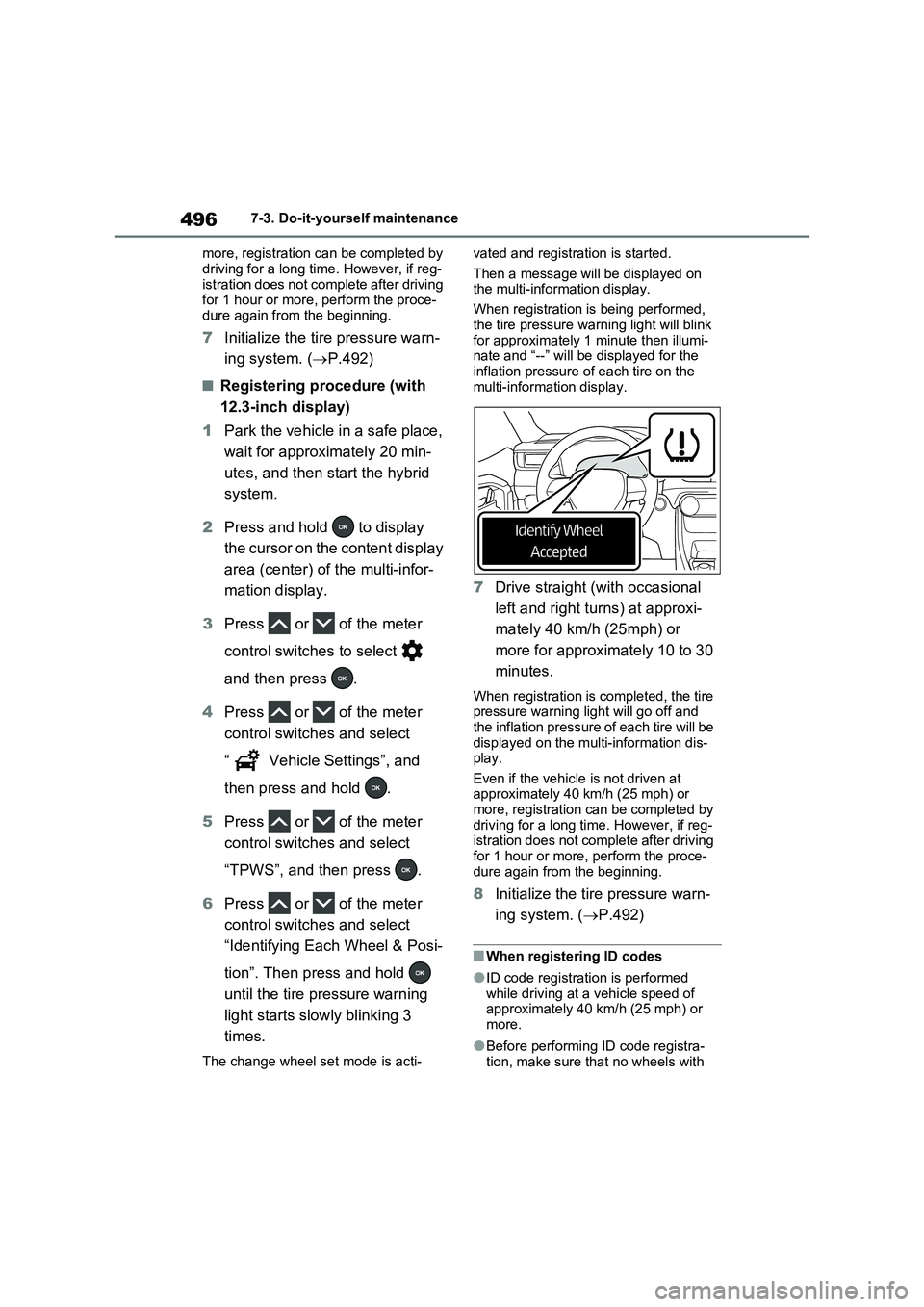
The change wheel set mode is acti-vated and registration is started.
Then a message will be displayed on
the multi-information display.
When registration is being performed,
the tire pressure warning light will blink
for approximately 1 minute then illumi-
nate and “--” will be displayed for the
inflation pressure of each tire on the
multi-information display.
7Drive straight (with occasional
left and right turns) at approxi-
mately 40 km/h (25mph) or
more for approximately 10 to 30
minutes.
When registration is completed, the tire
pressure warning light will go off and
the inflation pressure of each tire will be
displayed on the multi-information dis-
play.
Even if the vehicle is not driven at
approximately 40 km/h (25 mph) or
more, registration can be completed by
driving for a long time. However, if reg-
istration does not complete after driving
for 1 hour or more, perform the proce-
dure again from the beginning.
8Initialize the tire pressure warn-
ing system. (P.492)
■When registering ID codes
●ID code registration is performed
while driving at a vehicle speed of
approximately 40 km/h (25 mph) or
more.
●Before performing ID code registra-
tion, make sure that no wheels with
Page 502 of 718
5007-3. Do-it-yourself maintenance
Use only Toyota wheel nuts and
wrenches designed for use with
your aluminum wheels.
When rotating, repairing or
changing your tires, check that
the wheel nuts are still tight after
driving 1600 km (1000 miles).
Be careful not to damage the
aluminum wheels when using
tire chains.
Use only Toyota genuine bal-
ance weights or equivalent and a
plastic or rubber hammer when
balancing your wheels.
Left-hand drive vehicles
1 Turn the power switch off.
Confirm that the charging connector is not connected. Also, do not use the Remote Air Conditioning System during
the procedure.
2 Open the front passenger’s
door.
By keeping the door open, unexpected
operation of the Remote Air Condition- ing System can be prevent. ( P.438)
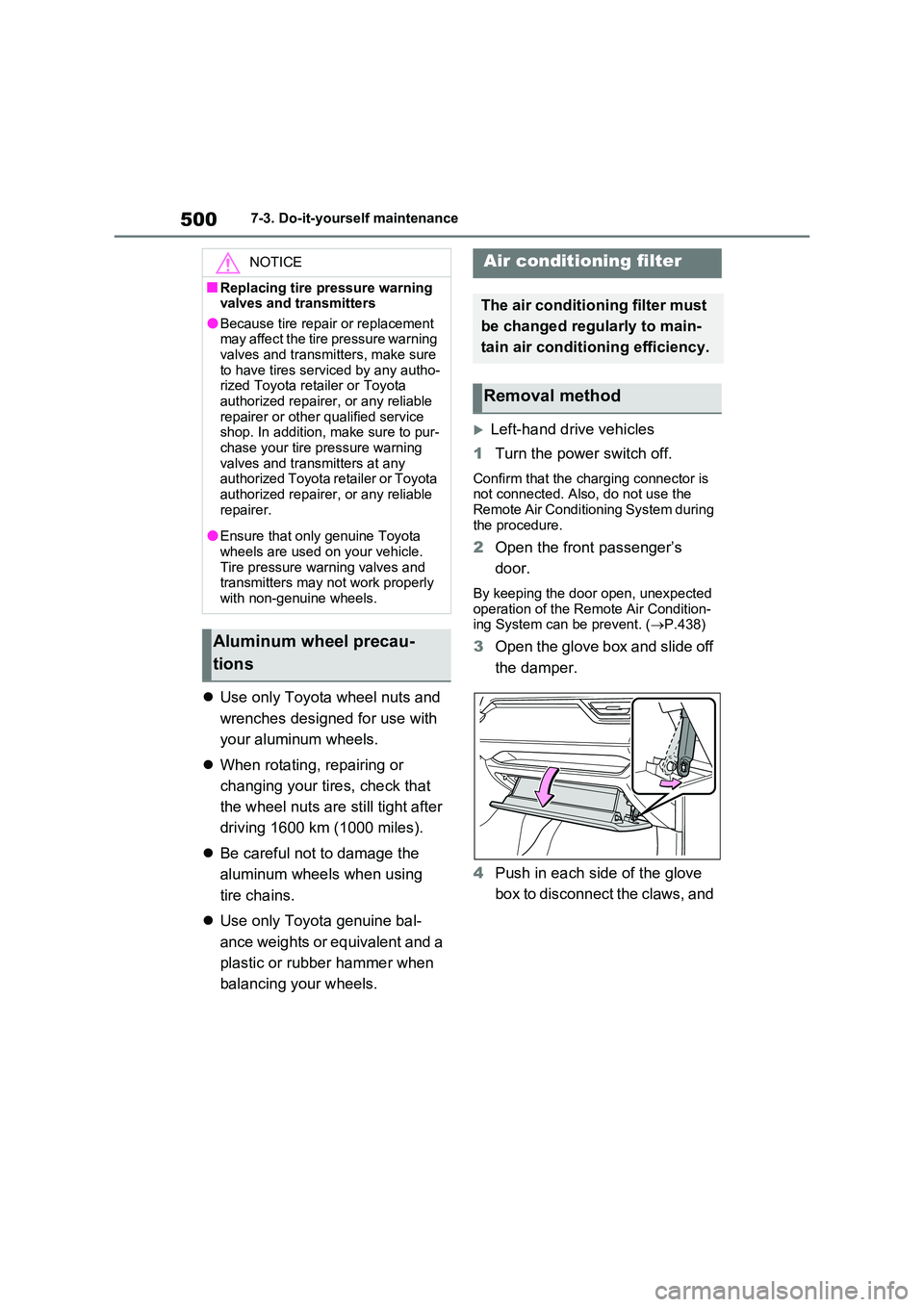
3Open the glove box and slide off
the damper.
4 Push in each side of the glove
box to disconnect the claws, and
NOTICE
■Replacing tire pressure warning valves and transmitters
●Because tire repair or replacement may affect the tire pressure warning valves and transmitters, make sure
to have tires serviced by any autho- rized Toyota retailer or Toyota authorized repairer, or any reliable
repairer or other qualified service shop. In addition, make sure to pur-chase your tire pressure warning
valves and transmitters at any authorized Toyota retailer or Toyota authorized repairer, or any reliable
repairer.
●Ensure that only genuine Toyota
wheels are used on your vehicle. Tire pressure warning valves and transmitters may not work properly
with non-genuine wheels.
Aluminum wheel precau-
tions
Air conditioning filter
The air conditioning filter must
be changed regularly to main-
tain air conditioning efficiency.
Removal method