maintenance TOYOTA RAV4 PLUG-IN HYBRID 2023 Workshop Manual
[x] Cancel search | Manufacturer: TOYOTA, Model Year: 2023, Model line: RAV4 PLUG-IN HYBRID, Model: TOYOTA RAV4 PLUG-IN HYBRID 2023Pages: 718, PDF Size: 167.55 MB
Page 507 of 718
505
7 7-3. Do-it-yourself maintenance
Maintenance and care
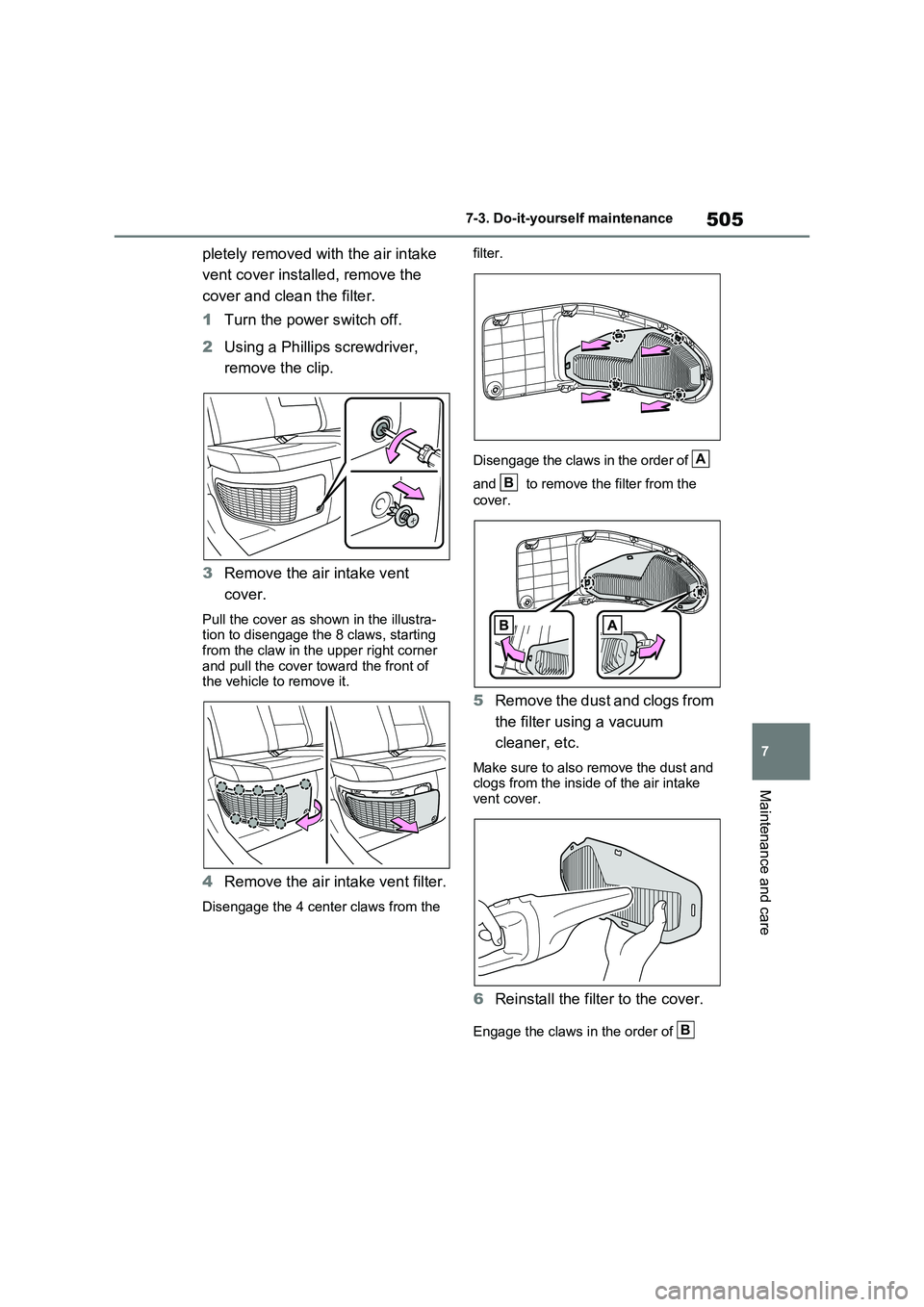
pletely removed with the air intake
vent cover installed, remove the
cover and clean the filter.
1Turn the power switch off.
2Using a Phillips screwdriver,
remove the clip.
3Remove the air intake vent
cover.
Pull the cover as shown in the illustra-
tion to disengage the 8 claws, starting
from the claw in the upper right corner
and pull the cover toward the front of
the vehicle to remove it.
4Remove the air intake vent filter.
Disengage the 4 center claws from the filter.
Disengage the claws in the order of
and to remove the filter from the
cover.
5Remove the dust and clogs from
the filter using a vacuum
cleaner, etc.
Make sure to also remove the dust and
clogs from the inside of the air intake
vent cover.
6Reinstall the filter to the cover.
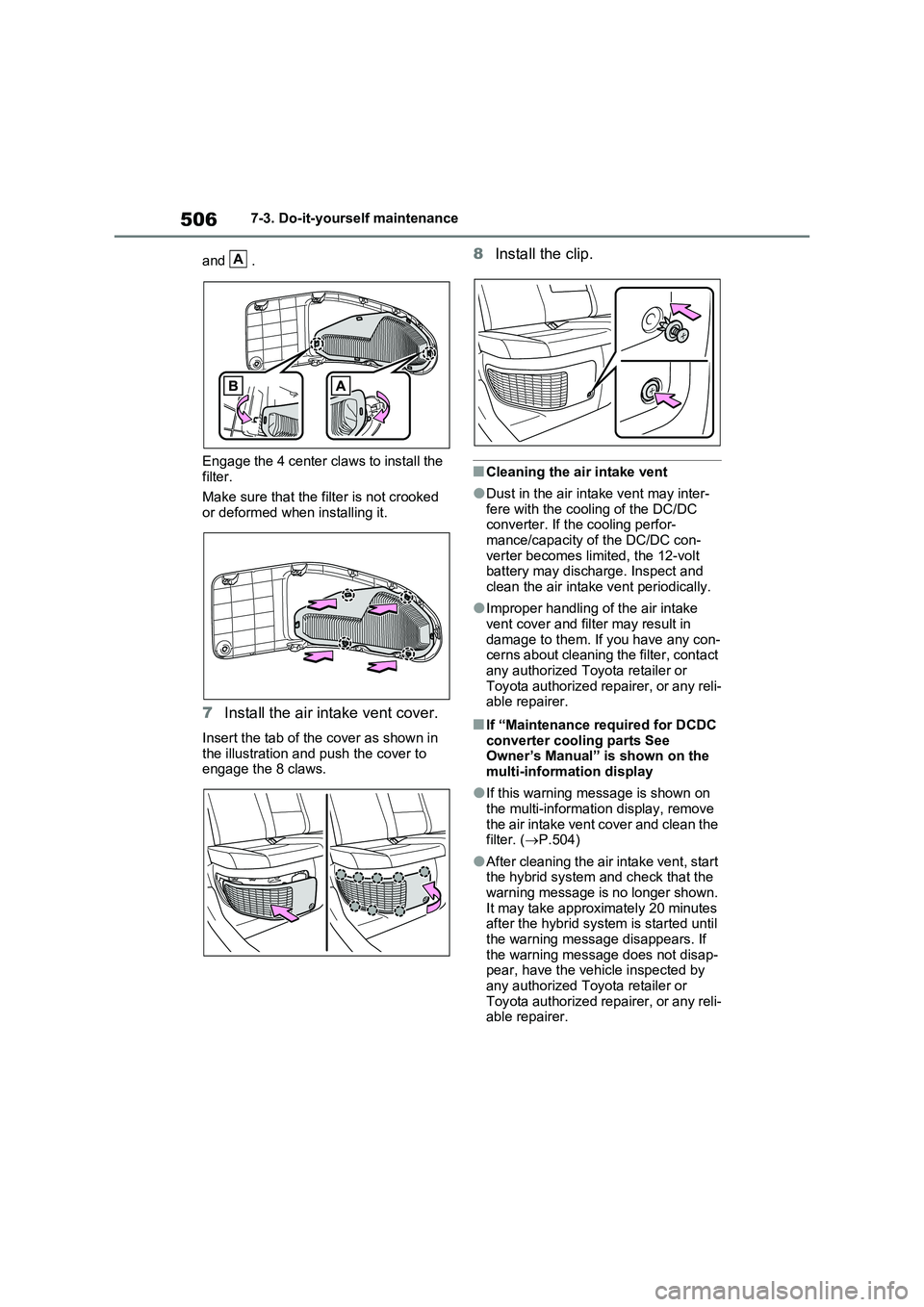
Engage the claws in the order of
A
B
B
Page 508 of 718
5067-3. Do-it-yourself maintenance
and .
Engage the 4 center claws to install the
filter.
Make sure that the filter is not crooked
or deformed when installing it.
7Install the air intake vent cover.
Insert the tab of the cover as shown in
the illustration and push the cover to
engage the 8 claws.
8Install the clip.
■Cleaning the air intake vent
●Dust in the air intake vent may inter-
fere with the cooling of the DC/DC
converter. If the cooling perfor-
mance/capacity of the DC/DC con-
verter becomes limited, the 12-volt
battery may discharge. Inspect and
clean the air intake vent periodically.
●Improper handling of the air intake
vent cover and filter may result in
damage to them. If you have any con-
cerns about cleaning the filter, contact
any authorized Toyota retailer or
Toyota authorized repairer, or any reli-
able repairer.
■If “Maintenance required for DCDC
converter cooling parts See
Owner’s Manual” is shown on the
multi-information display
●If this warning message is shown on
the multi-information display, remove
the air intake vent cover and clean the
filter. (P.504)
●After cleaning the air intake vent, start
the hybrid system and check that the
warning message is no longer shown.
It may take approximately 20 minutes
after the hybrid system is started until
the warning message disappears. If
the warning message does not disap-
pear, have the vehicle inspected by
any authorized Toyota retailer or
Toyota authorized repairer, or any reli-
able repairer.
A
Page 509 of 718
507
7
7-3. Do-it-yourself maintenance
Maintenance and care
WARNING
■When cleaning the air intake vent
●Before cleaning the air intake vent,
make sure to turn the power switch off to stop the hybrid system.
●Do not use water or other liquids to clean the air intake vent. If water is applied to the DC/DC converter or
other components, a malfunction or fire may occur.
NOTICE
■When cleaning the air intake vent
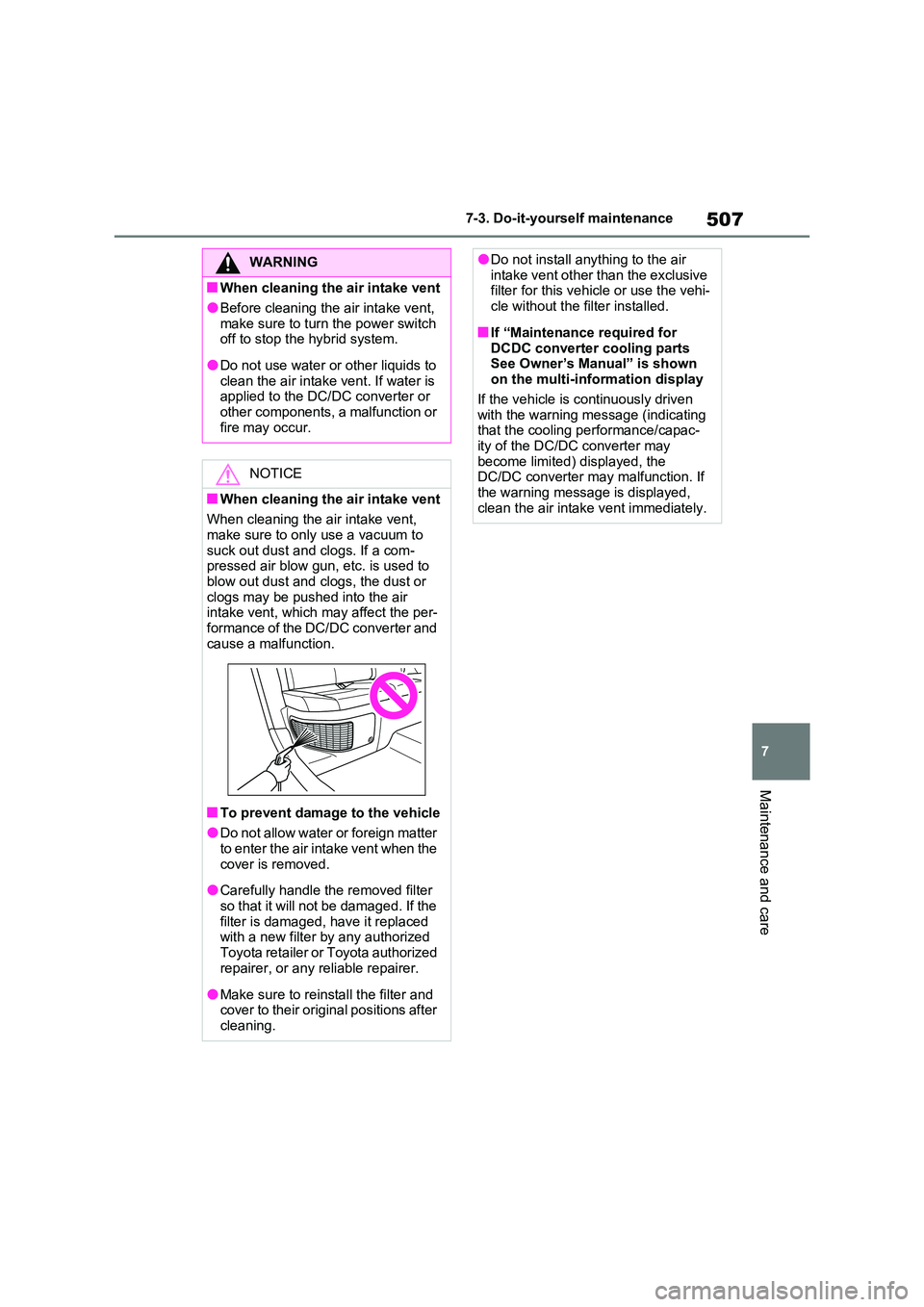
When cleaning the air intake vent, make sure to only use a vacuum to
suck out dust and clogs. If a com- pressed air blow gun, etc. is used to blow out dust and clogs, the dust or
clogs may be pushed into the air intake vent, which may affect the per-formance of the DC/DC converter and
cause a malfunction.
■To prevent damage to the vehicle
●Do not allow water or foreign matter to enter the air intake vent when the
cover is removed.
●Carefully handle the removed filter
so that it will not be damaged. If the filter is damaged, have it replaced with a new filter by any authorized
Toyota retailer or Toyota authorized repairer, or any reliable repairer.
●Make sure to reinstall the filter and cover to their original positions after cleaning.
●Do not install anything to the air intake vent other than the exclusive filter for this vehicle or use the vehi-
cle without the filter installed.
■If “Maintenance required for
DCDC converter cooling parts See Owner’s Manual” is shown on the multi-information display
If the vehicle is continuously driven with the warning message (indicating that the cooling performance/capac-
ity of the DC/DC converter may become limited) displayed, the DC/DC converter may malfunction. If
the warning message is displayed, clean the air intake vent immediately.
Page 510 of 718
5087-3. Do-it-yourself maintenance
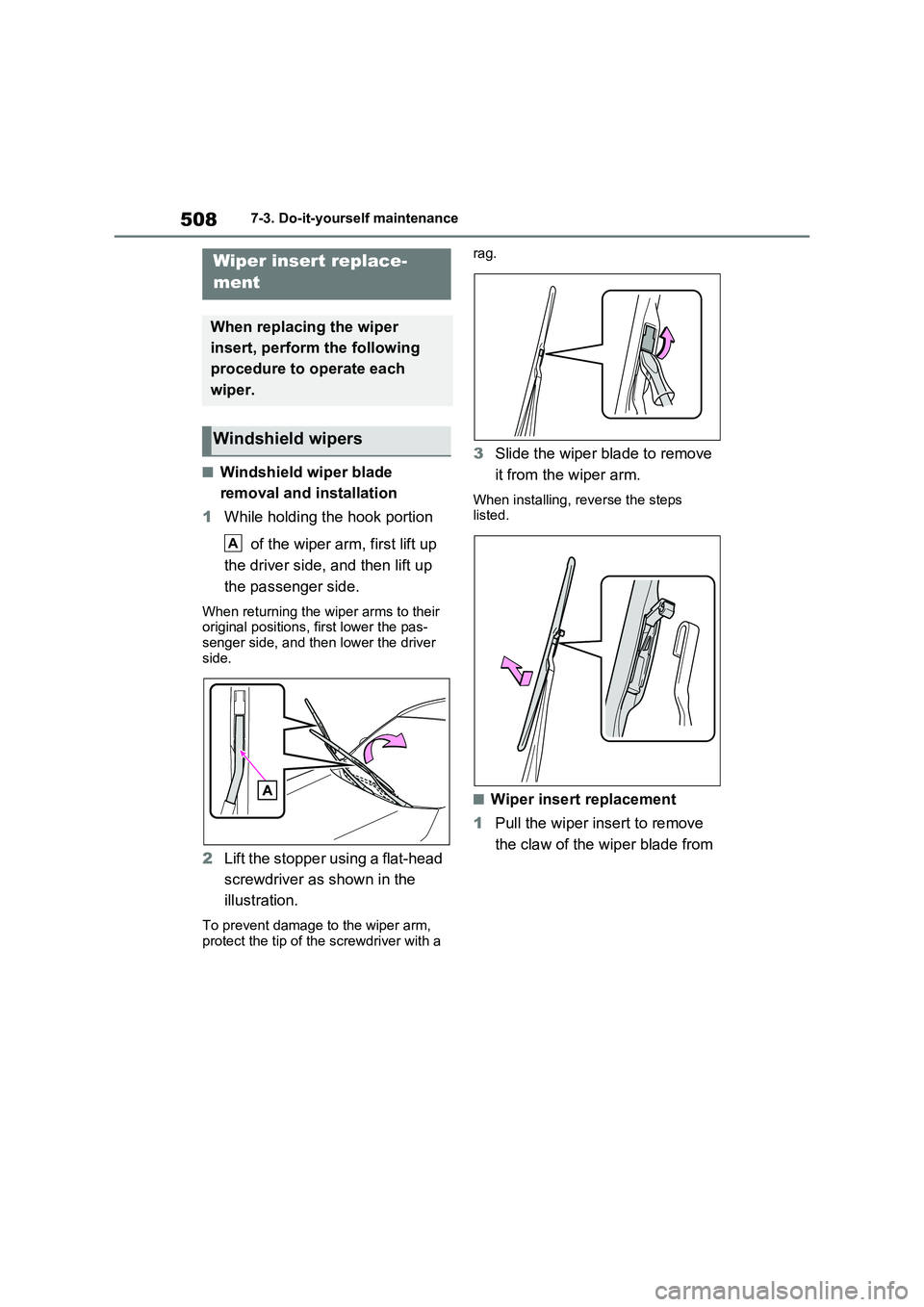
■Windshield wiper blade
removal and installation
1While holding the hook portion
of the wiper arm, first lift up
the driver side, and then lift up
the passenger side.
When returning the wiper arms to their
original positions, first lower the pas-
senger side, and then lower the driver
side.
2Lift the stopper using a flat-head
screwdriver as shown in the
illustration.
To prevent damage to the wiper arm,
protect the tip of the screwdriver with a rag.
3Slide the wiper blade to remove
it from the wiper arm.
When installing, reverse the steps
listed.
■Wiper insert replacement
1Pull the wiper insert to remove
the claw of the wiper blade from
Wiper insert replace-
ment
When replacing the wiper
insert, perform the following
procedure to operate each
wiper.
Windshield wipers
A
Page 511 of 718
509
7
7-3. Do-it-yourself maintenance
Maintenance and care
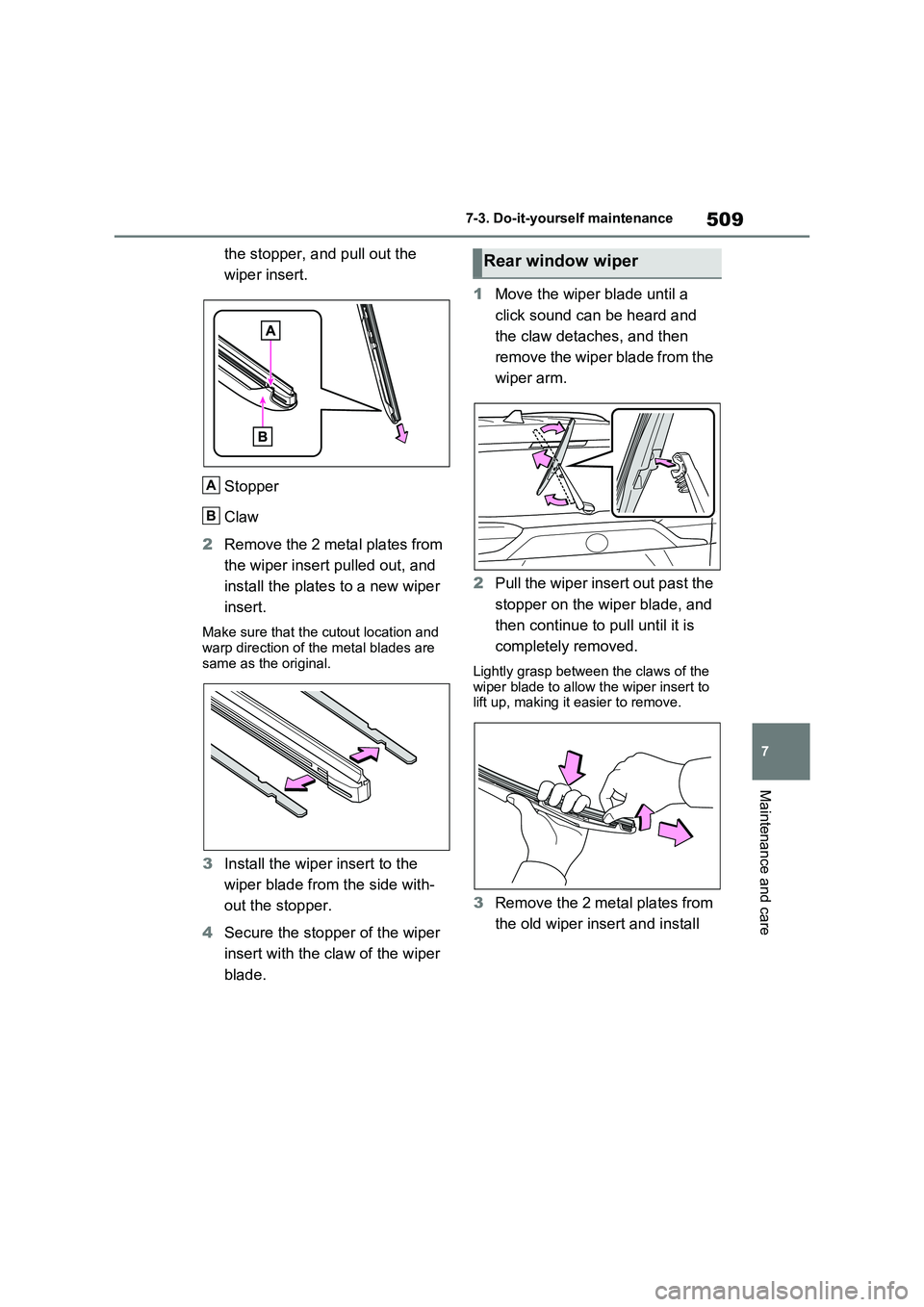
the stopper, and pull out the
wiper insert.
Stopper
Claw
2 Remove the 2 metal plates from
the wiper insert pulled out, and
install the plates to a new wiper
insert.
Make sure that the cutout location and warp direction of the metal blades are
same as the original.
3 Install the wiper insert to the
wiper blade from the side with-
out the stopper.
4 Secure the stopper of the wiper
insert with the claw of the wiper
blade.
1 Move the wiper blade until a
click sound can be heard and
the claw detaches, and then
remove the wiper blade from the
wiper arm.
2 Pull the wiper insert out past the
stopper on the wiper blade, and
then continue to pull until it is
completely removed.
Lightly grasp between the claws of the wiper blade to allow the wiper insert to lift up, making it easier to remove.
3 Remove the 2 metal plates from
the old wiper insert and install
A
B
Rear window wiper
Page 512 of 718
5107-3. Do-it-yourself maintenance
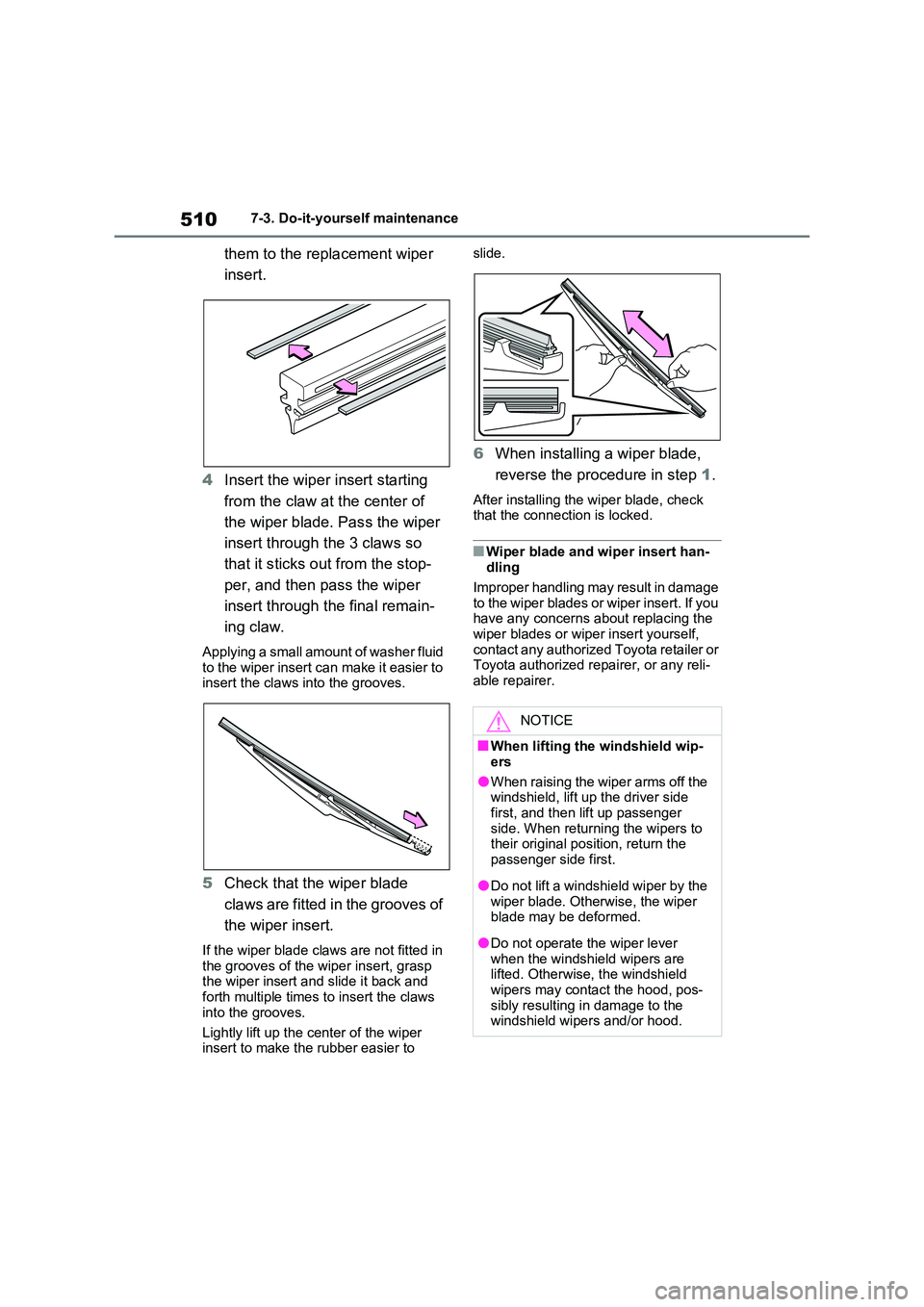
them to the replacement wiper
insert.
4 Insert the wiper insert starting
from the claw at the center of
the wiper blade. Pass the wiper
insert through the 3 claws so
that it sticks out from the stop-
per, and then pass the wiper
insert through the final remain-
ing claw.
Applying a small amount of washer fluid to the wiper insert can make it easier to insert the claws into the grooves.
5 Check that the wiper blade
claws are fitted in the grooves of
the wiper insert.
If the wiper blade claws are not fitted in
the grooves of the wiper insert, grasp the wiper insert and slide it back and forth multiple times to insert the claws
into the grooves.
Lightly lift up the center of the wiper insert to make the rubber easier to
slide.
6 When installing a wiper blade,
reverse the procedure in step 1.
After installing the wiper blade, check that the connection is locked.
■Wiper blade and wiper insert han-dling
Improper handling may result in damage to the wiper blades or wiper insert. If you have any concerns about replacing the
wiper blades or wiper insert yourself, contact any authorized Toyota retailer or Toyota authorized repairer, or any reli-
able repairer.
NOTICE
■When lifting the windshield wip-
ers
●When raising the wiper arms off the windshield, lift up the driver side
first, and then lift up passenger side. When returning the wipers to their original position, return the
passenger side first.
●Do not lift a windshield wiper by the
wiper blade. Otherwise, the wiper blade may be deformed.
●Do not operate the wiper lever when the windshield wipers are lifted. Otherwise, the windshield
wipers may contact the hood, pos- sibly resulting in damage to the windshield wipers and/or hood.
Page 513 of 718
511
7
7-3. Do-it-yourself maintenance
Maintenance and care
■If the key battery is depleted
The following symptoms may occur:
●The smart entry & start system and
wireless remote control will not func- tion properly.
●The operational range will be reduced.
Prepare the following before replac-
ing the battery:
Flathead screwdriver
Small flathead screwdriver
Lithium battery CR2450
■Use a CR2450 lithium battery
●Batteries can be purchased at any
authorized Toyota retailer or Toyota authorized repairer, or any reliable repairer, local electrical appliance
shops or camera stores.
●Replace only with the same or equiva-
lent type recommended by the manu- facturer.
●Dispose of used batteries according to the local laws.
NOTICE
■To prevent damage
●Be careful not to damage the claws
when replacing the wiper insert.
●After the wiper blade is removed
from the wiper arm, place a cloth, etc., between the rear window and wiper arm to prevent damage to the
rear window.
●Be sure not to pull excessively on
the wiper insert or deform its metal plates.
Electronic key battery
Replace the battery with a new
one if it is depleted.
Items to prepare
Page 514 of 718
5127-3. Do-it-yourself maintenance
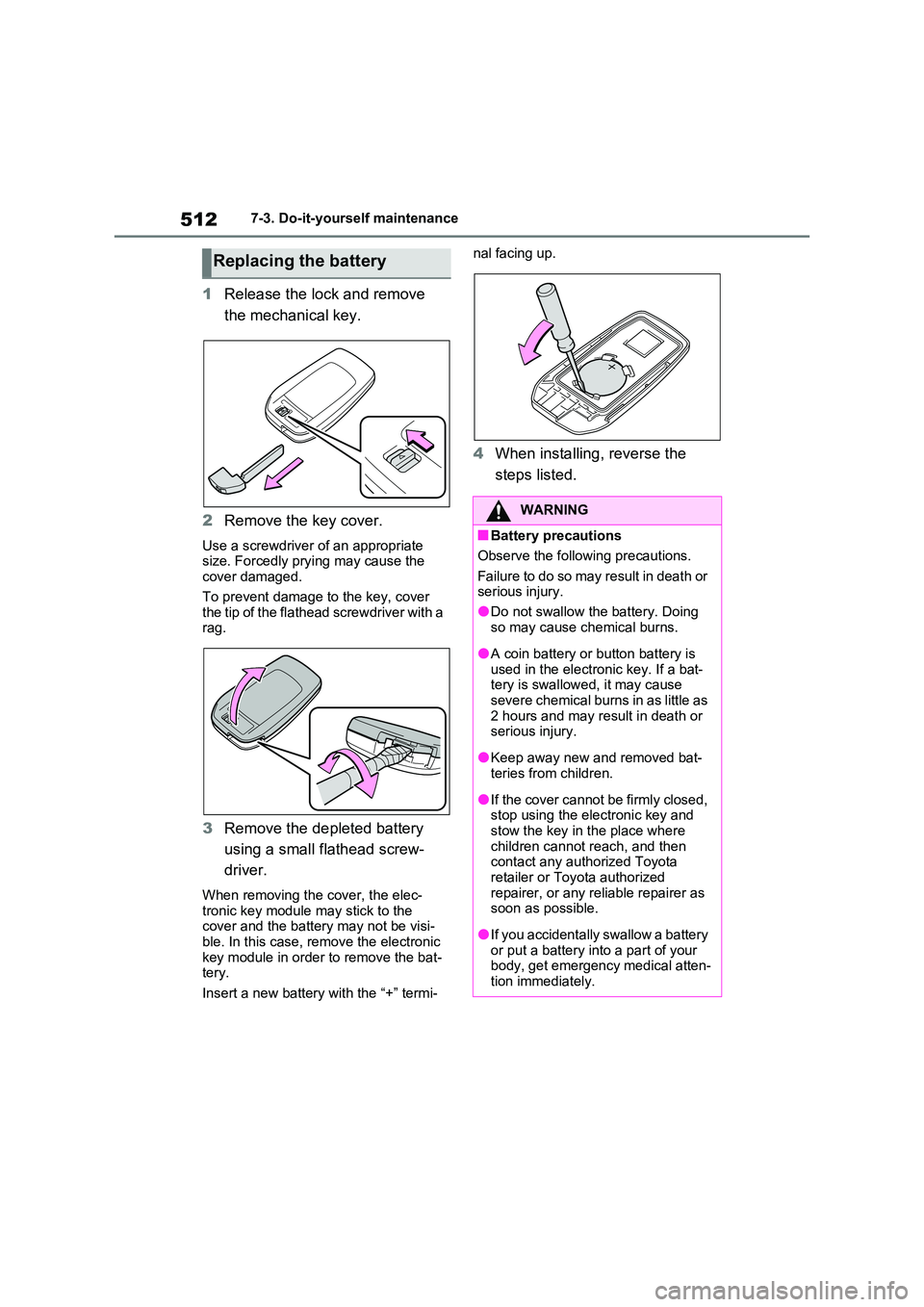
1Release the lock and remove
the mechanical key.
2 Remove the key cover.
Use a screwdriver of an appropriate size. Forcedly prying may cause the cover damaged.
To prevent damage to the key, cover the tip of the flathead screwdriver with a rag.
3 Remove the depleted battery
using a small flathead screw-
driver.
When removing the cover, the elec- tronic key module may stick to the cover and the battery may not be visi-
ble. In this case, remove the electronic key module in order to remove the bat-tery.
Insert a new battery with the “+” termi-
nal facing up.
4 When installing, reverse the
steps listed.
Replacing the battery
WARNING
■Battery precautions
Observe the following precautions.
Failure to do so may result in death or serious injury.
●Do not swallow the battery. Doing
so may cause chemical burns.
●A coin battery or button battery is
used in the electronic key. If a bat- tery is swallowed, it may cause severe chemical burns in as little as
2 hours and may result in death or serious injury.
●Keep away new and removed bat-teries from children.
●If the cover cannot be firmly closed, stop using the electronic key and stow the key in the place where
children cannot reach, and then contact any authorized Toyota retailer or Toyota authorized
repairer, or any reliable repairer as soon as possible.
●If you accidentally swallow a battery or put a battery into a part of your body, get emergency medical atten-
tion immediately.
Page 515 of 718
513
7
7-3. Do-it-yourself maintenance
Maintenance and care
1 Turn the power switch off.
Confirm that the charging connector is not connected. Also, do not use the
Remote Air Conditioning System during the procedure.
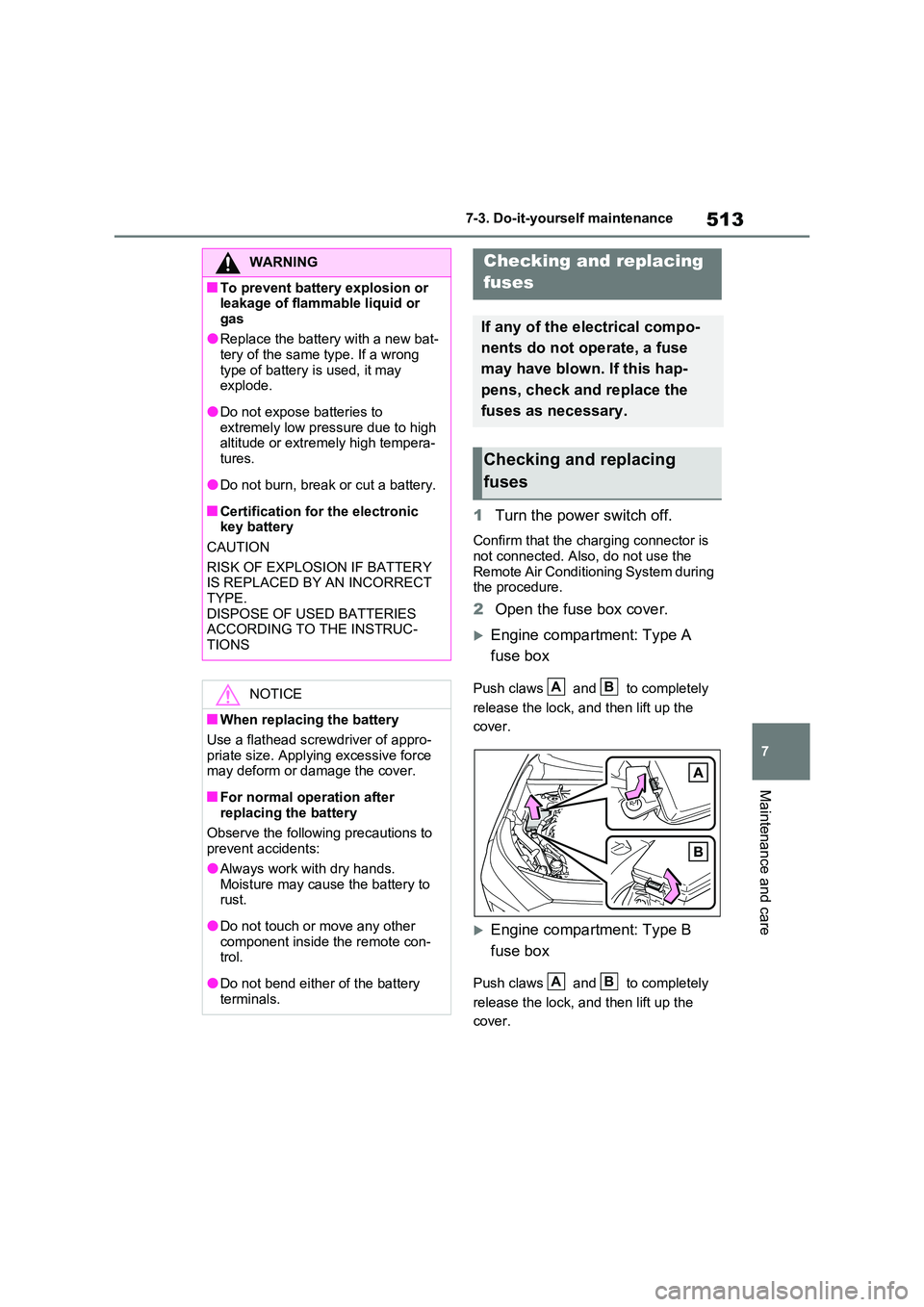
2 Open the fuse box cover.
Engine compartment: Type A
fuse box
Push claws and to completely
release the lock, and then lift up the
cover.
Engine compartment: Type B
fuse box
Push claws and to completely
release the lock, and then lift up the
cover.
WARNING
■To prevent battery explosion or leakage of flammable liquid or
gas
●Replace the battery with a new bat- tery of the same type. If a wrong
type of battery is used, it may explode.
●Do not expose batteries to extremely low pressure due to high altitude or extremely high tempera-
tures.
●Do not burn, break or cut a battery.
■Certification for the electronic key battery
CAUTION
RISK OF EXPLOSION IF BATTERY IS REPLACED BY AN INCORRECT
TYPE. DISPOSE OF USED BATTERIES ACCORDING TO THE INSTRUC-
TIONS
NOTICE
■When replacing the battery
Use a flathead screwdriver of appro- priate size. Applying excessive force may deform or damage the cover.
■For normal operation after replacing the battery
Observe the following precautions to prevent accidents:
●Always work with dry hands.
Moisture may cause the battery to rust.
●Do not touch or move any other component inside the remote con-trol.
●Do not bend either of the battery terminals.
Checking and replacing
fuses
If any of the electrical compo-
nents do not operate, a fuse
may have blown. If this hap-
pens, check and replace the
fuses as necessary.
Checking and replacing
fuses
AB
AB
Page 516 of 718
5147-3. Do-it-yourself maintenance
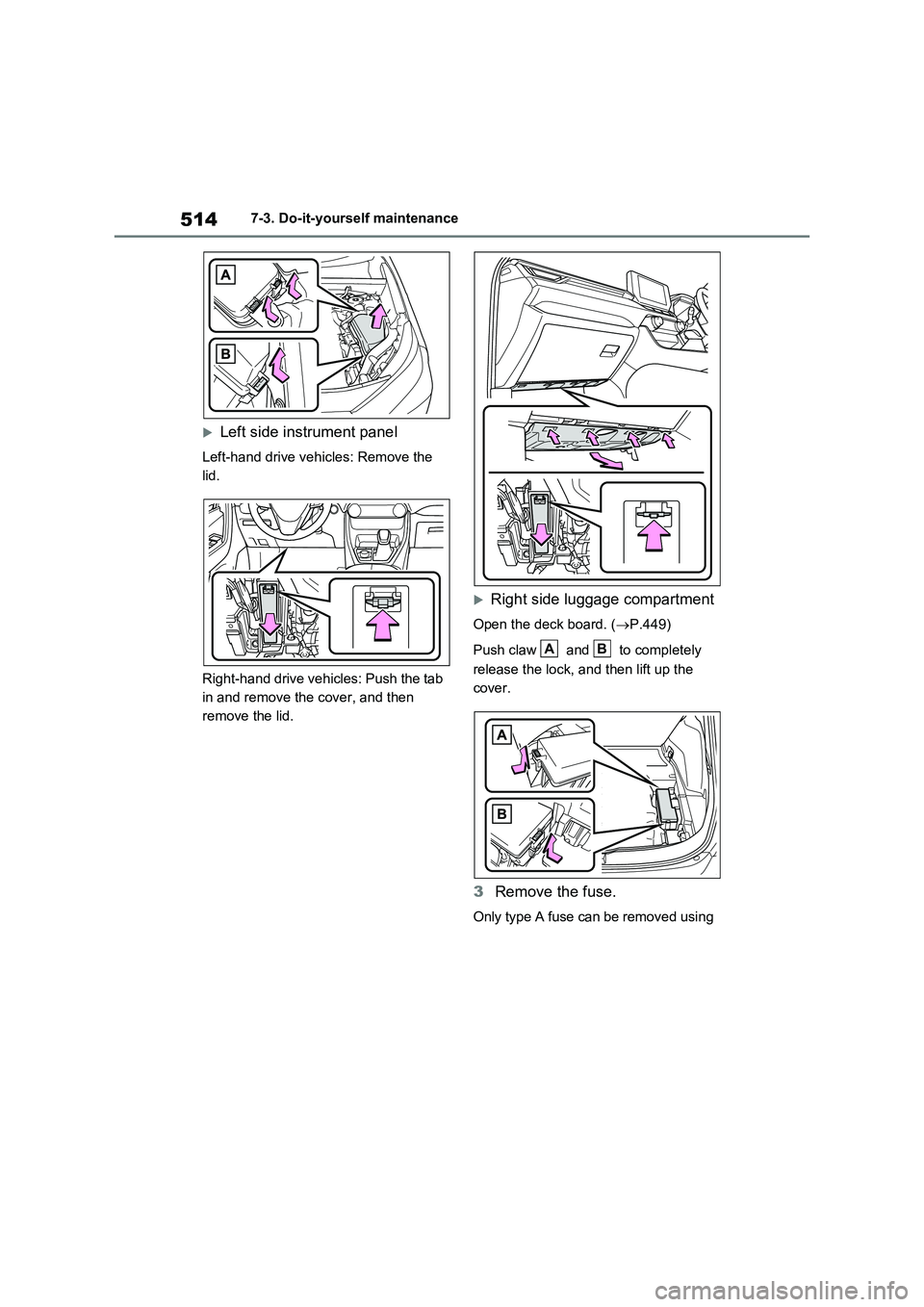
Left side instrument panel
Left-hand drive vehicles: Remove the
lid.
Right-hand drive vehicles: Push the tab
in and remove the cover, and then
remove the lid.
Right side luggage compartment
Open the deck board. (P.449)
Push claw and to completely
release the lock, and then lift up the
cover.
3Remove the fuse.
Only type A fuse can be removed using
AB