maintenance TOYOTA SUPRA 2022 User Guide
[x] Cancel search | Manufacturer: TOYOTA, Model Year: 2022, Model line: SUPRA, Model: TOYOTA SUPRA 2022Pages: 498, PDF Size: 104.06 MB
Page 291 of 498
5
289
5
MOBILITY
MOBILITY
.5-1. MOBILITY
Refuelling.......................... 290
Wheels and tyres .............. 292
Engine compartment ........ 319
Operating fluids ................ 322
Maintenance ..................... 330
Scheduled maintenance
(except for Europe and
Australia) ........................ 334
Replacing parts................. 339
Breakdown Assist ............. 350
General care ..................... 362
Page 332 of 498
3305-1. MOBILITY
This chapter describes all standard,
country-specific and special equip-
ment available for the model series.
It may therefore describe equip-
ment and functions which are not
installed in your vehicle, for exam-
ple on account of the special equip-
ment selected or the country
specification. This also applies to
safety-relevant functions and sys-
tems. Please comply with the rele-
vant laws and regulations when
using the corresponding functions
and systems.
The maintenance system indicates
what maintenance measures are
required and thereby assists in
maintaining the road safety and
operational safety of the vehicle.
The exact work required and the
maintenance intervals may vary
depending on the country specifica-
tions. Replacement work, spare
parts, operating materials and wear
materials are calculated sepa-
rately. Additional information is
available from a dealer of the man-
ufacturer or another qualified dealer
or a specialist workshop.
Condition Based Service CBS
determines the maintenance
requirement using sensors and
special algorithms which monitor
the conditions in which the vehicle
is used.
The system thus enables the scope
of the maintenance work to be
adapted to the individual usage
profile.
Information on service require-
ments, see page 170, can be
shown on the Control Display.
Periods when the vehicle is out of
use with its battery disconnected
are not taken into account.
In such cases, have any
time-dependent maintenance pro-
cedures, for example for the brake
fluid and, where applicable, the
engine oil and microfilter/activated
charcoal filter, updated by a dealer
of the manufacturer or another
qualified dealer or a specialist
workshop.
Maintenance
Vehicle equipment
Maintenance System
Condition Based Service
CBS
Principle
General
Periods out of use
Page 333 of 498
331
5
5-1. MOBILITY
MOBILITY
Have maintenance and repairs car-
ried out by a deal er of the manufac-
turer or another qualified dealer or
a specialist workshop.
The maintenance work carried out
is entered in the maintenance
records and the vehicle data. As
with a service booklet, the entries
provide evidence of regular mainte-
nance.
Maintenance entered is shown on
the Control Display, see page 170.
Scheduled maintenance should be
performed at specified intervals
according to the maintenance
schedule.
For full details of your maintenance
schedule, read the "Toyota Service
Booklet" or "Toyota Warranty Booklet".
Scheduled maintenance should be
performed at specified intervals
according to the maintenance
schedule.
For full details of your maintenance
schedule, refer to the "Warranty and
Service Booklet".
Scheduled maintenance should
be performed at specified inter-
vals according to the mainte-
nance schedule.
The interval for scheduled maintenance
is determined by the odometer reading
or the time interval, whichever comes
first, shown in the schedule.
Maintenance beyond the last period
should be performed at the same inter-
vals.
Where to go for maintenance
service?
It makes good sense to take your vehi-
cle to your local Toyota dealer for main-
tenance service as well as other
inspections and repairs.
Toyota technicians are well-trained spe-
cialists receiving the latest service infor-
mation through technical bulletins,
service tips and in-dealership training
programs. They learn to work on Toyota
before they work on your vehicle, rather
than while they are working on it.
Doesn’t that seem like the best way?
Your Toyota dealer has invested a lot of
money in special Toyota tools and ser-
vice equipment. It helps them to do the
job better and at less cost.
Your Toyota dealer’s service depart-
ment will perform all of the scheduled
Service history
Maintenance and repairs
Entries
Displays
Scheduled maintenance (for
Europe)
Scheduled maintenance (for
Australia)
Scheduled maintenance
(except for Europe and
Australia)
Page 334 of 498
3325-1. MOBILITY
maintenance on your vehicle reliably
and economically.
Rubber hoses (for cooling and heater
system, brake system and fuel system)
should be inspected by a qualified tech-
nician according to the Toyota mainte-
nance schedule.
Rubber hoses are particularly important
maintenance items. Have any deterio-
rated or damaged hoses replaced
immediately. Note that rubber hoses
will deteriorate with age, resulting in
swelling, chafing or cracking.
No maintenance work other than
normal maintenance is required to
keep the emission levels of your
vehicle within the design limits.
Devices connected to the OBD
socket trigger the alarm system
when the vehicle is locked.
Remove any devices connected to
the OBD socket before locking the
vehicle.
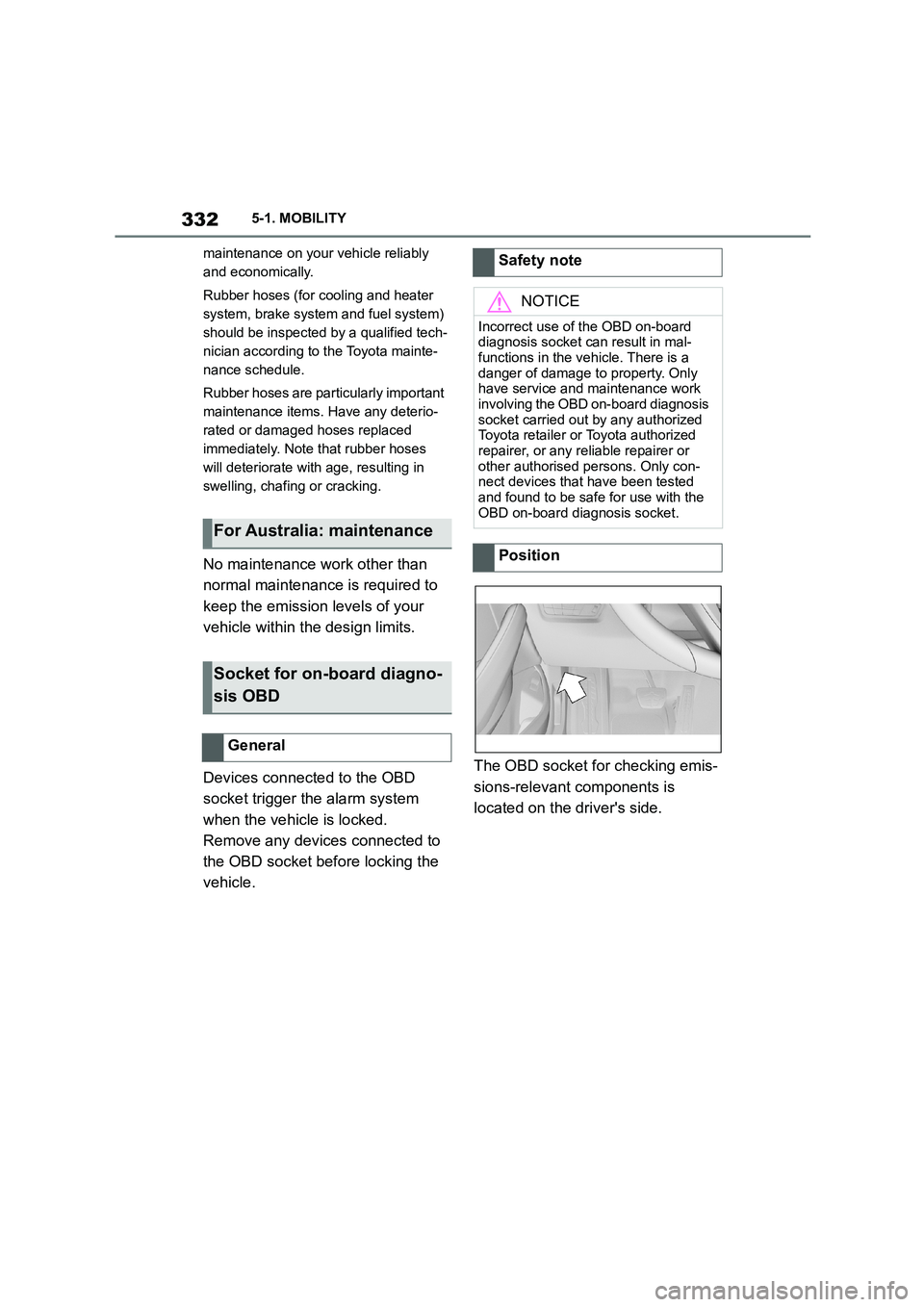
The OBD socket for checking emis-
sions-relevant components is
located on the driver's side.
For Australia: maintenance
Socket for on-board diagno-
sis OBD
General
Safety note
NOTICE
Incorrect use of the OBD on-board
diagnosis socket can result in mal- functions in the vehicle. There is a
danger of damage to property. Only
have service and maintenance work involving the OBD on-board diagnosis
socket carried out by any authorized
Toyota retailer or Toyota authorized
repairer, or any reliable repairer or other authorised persons. Only con-
nect devices that have been tested
and found to be safe for use with the OBD on-board diagnosis socket.
Position
Page 336 of 498
3345-1. MOBILITY
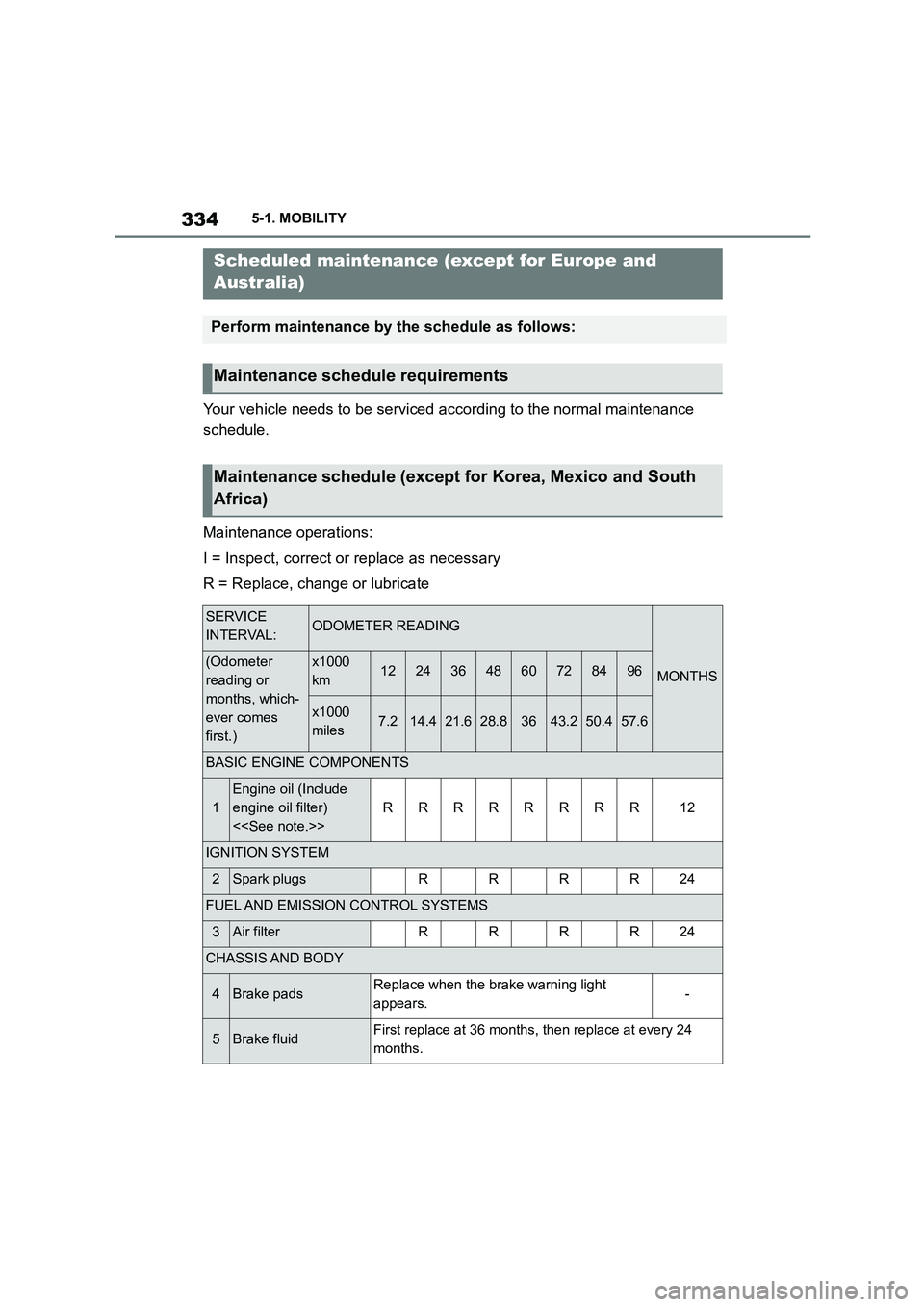
Your vehicle needs to be serviced according to the normal maintenance
schedule.
Maintenance operations:
I = Inspect, correct or replace as necessary
R = Replace, change or lubricate
Scheduled maintenance (except for Europe and
Australia)
Perform maintenance by the schedule as follows:
Maintenance schedule requirements
Maintenance schedule (except for Korea, Mexico and South
Africa)
SERVICE
INTERVAL:ODOMETER READING
MONTHS(Odometer
reading or
months, which-
ever comes
first.)
x1000
km1224364860728496
x1000
miles7.214.421.628.83643.250.457.6
BASIC ENGINE COMPONENTS
1
Engine oil (Include
engine oil filter)
<
RRRRRRRR12
IGNITION SYSTEM
2Spark plugsRRRR24
FUEL AND EMISSION CONTROL SYSTEMS
3Air filterRRRR24
CHASSIS AND BODY
4Brake padsReplace when the brake warning light
appears.-
5Brake fluidFirst replace at 36 months, then replace at every 24
months.
Page 338 of 498
3365-1. MOBILITY
NOTE:
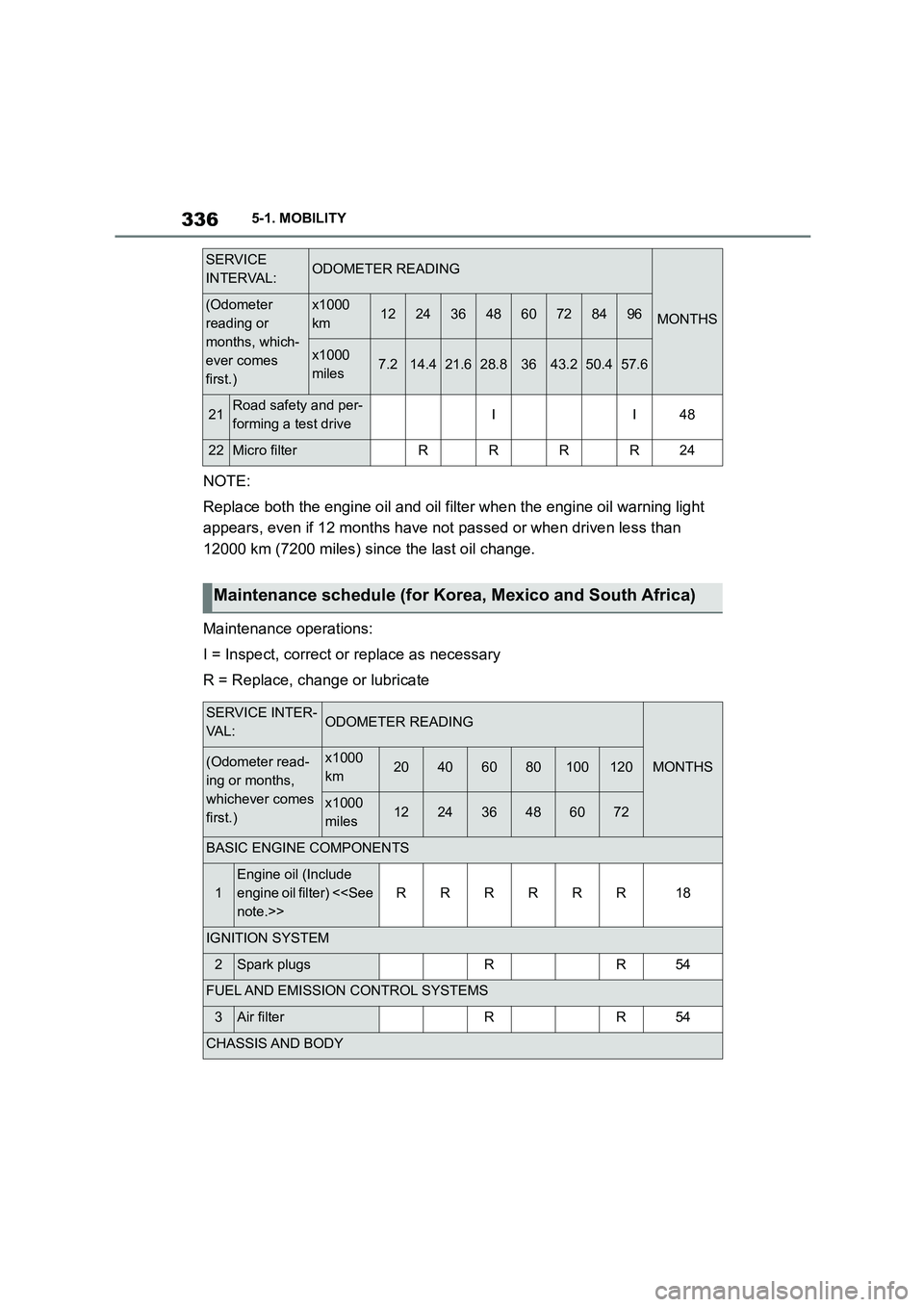
Replace both the engine oil and oil filter when the engine oil warning light
appears, even if 12 months have not passed or when driven less than
12000 km (7200 miles) since the last oil change.
Maintenance operations:
I = Inspect, correct or replace as necessary
R = Replace, change or lubricate
21Road safety and per-
forming a test driveII48
22Micro filterRRRR24
SERVICE
INTERVAL:ODOMETER READING
MONTHS(Odometer
reading or
months, which-
ever comes
first.)
x1000
km1224364860728496
x1000
miles7.214.421.628.83643.250.457.6
Maintenance schedule (for Korea, Mexico and South Africa)
SERVICE INTER-
VA L :ODOMETER READING
MONTHS(Odometer read-
ing or months,
whichever comes
first.)
x1000
km20406080100120
x1000
miles122436486072
BASIC ENGINE COMPONENTS
1
Engine oil (Include
engine oil filter) <
RRRRRR18
IGNITION SYSTEM
2Spark plugsRR54
FUEL AND EMISSION CONTROL SYSTEMS
3Air filterRR54
CHASSIS AND BODY
Page 343 of 498
341
5
5-1. MOBILITY
MOBILITY
The battery is maintenance-free.
More information regarding the bat-
tery can be obtained from any
authorized Toyota retailer or Toyota
authorized repairer, or any reliable
repairer.
The manufacturer of your vehicle
recommends having any author-
ized Toyota reta iler or Toyota
authorized repairer, or any reliable
repairer register the vehicle battery
to the vehicle after the battery has
been replaced. Once the battery
has been registered again, all com-
fort functions will be available with-
out restriction and any vehicle
messages relating to the comfort
functions will no longer be dis-
played.
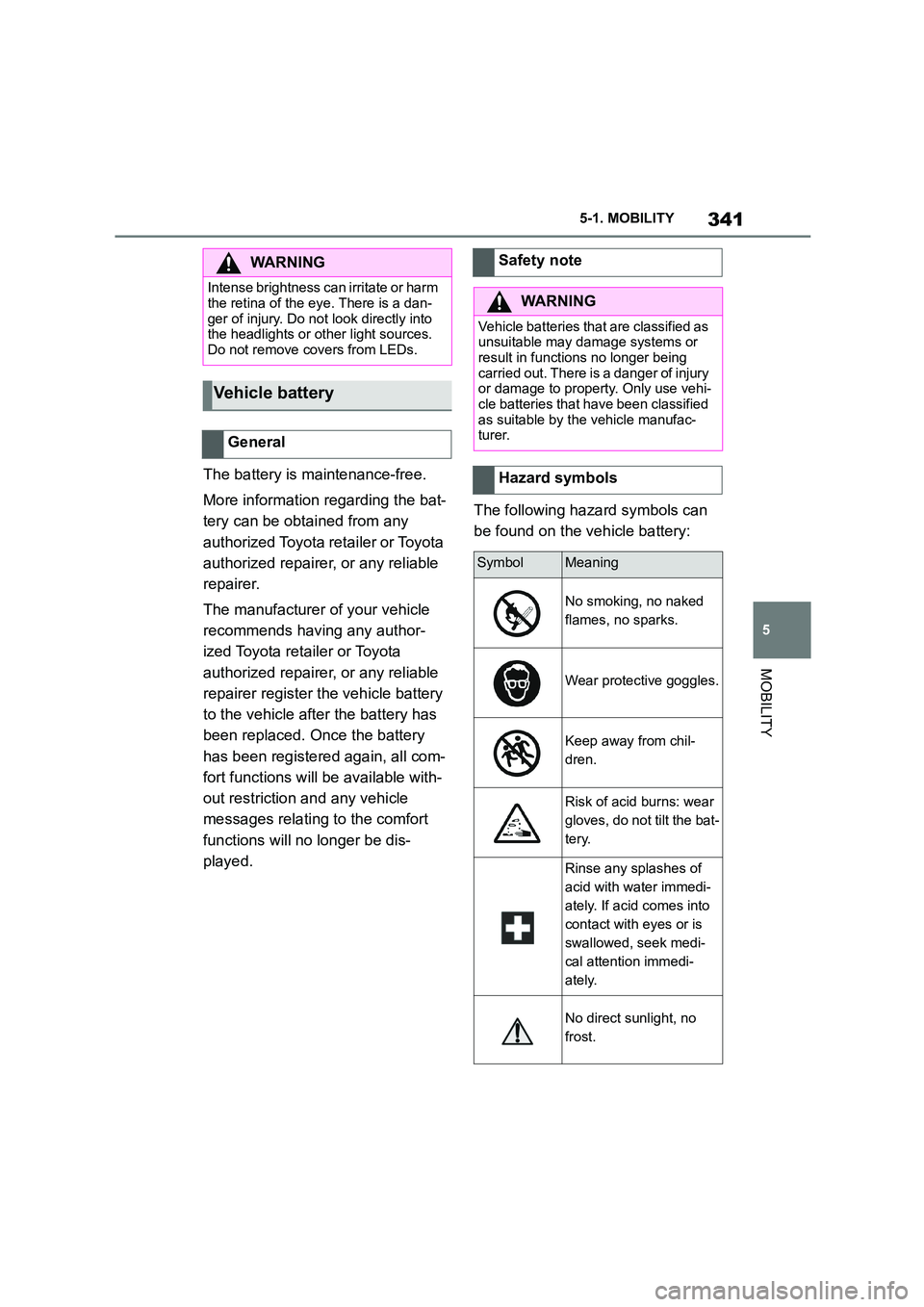
The following hazard symbols can
be found on the vehicle battery:
WA R N I N G
Intense brightness can irritate or harm
the retina of the eye. There is a dan-
ger of injury. Do not look directly into the headlights or other light sources.
Do not remove covers from LEDs.
Vehicle battery
General
Safety note
WA R N I N G
Vehicle batteries that are classified as
unsuitable may damage systems or result in functions no longer being
carried out. There is a danger of injury
or damage to property. Only use vehi- cle batteries that have been classified
as suitable by the vehicle manufac-
turer.
Hazard symbols
SymbolMeaning
No smoking, no naked
flames, no sparks.
Wear protective goggles.
Keep away from chil-
dren.
Risk of acid burns: wear
gloves, do not tilt the bat-
tery.
Rinse any splashes of
acid with water immedi-
ately. If acid comes into
contact with eyes or is
swallowed, seek medi-
cal attention immedi-
ately.
No direct sunlight, no
frost.
Page 359 of 498
357
5
5-1. MOBILITY
MOBILITY
Open the buckles on the retaining
strap.
To use the fire extinguisher, follow
the manufacturer's instructions on
the fire extinguisher and the infor-
mation supplied with it.
1 Insert the fire extinguisher into
the holder.
2 Hook in and close the buckles.
Have the fire extinguisher checked
every 2 years by any authorized
Toyota retailer or Toyota authorized
repairer, or any reliable repairer.
Take note of the next maintenance
date for the fire extinguisher.
Replace the fire extinguisher after
use or have it refilled.
If the vehicle battery is discharged,
the engine can be started from
another vehicle's battery using two
jump leads. Only use jump leads
with fully insulated terminal clamps.
1 Check whether the battery in the
other vehicle shows 12 volts.
Information about the voltage is
provided on the battery.
2 Switch off the engine of the
other vehicle.
WA R N I N G
Objects in the driver's footwell can
restrict the pedal travel or block a
pedal that has been pressed. There is a risk of accident. Ensure that items in
the vehicle are stowed securely and
cannot get into the driver's footwell.
Taking out the fire extin-
guisher
Using the fire extinguisher
Stowing the fire extinguisher
Maintenance and refilling
Starting assistance
General
Safety notes
WA R N I N G
Touching live components can result
in an electric shock. There is a danger
of injury or even death. Do not touch any components that could be live.
WA R N I N G
Connecting the jump leads in the wrong sequence can cause sparks.
There is a danger of injury. Please
comply with the correct sequence
when connecting up.
NOTICE
Contact between the bodywork of the
two vehicles can result in a short cir- cuit during starting assistance. There
is a danger of damage to property.
Make sure there is no contact between the bodywork.
Preparations
Page 492 of 498
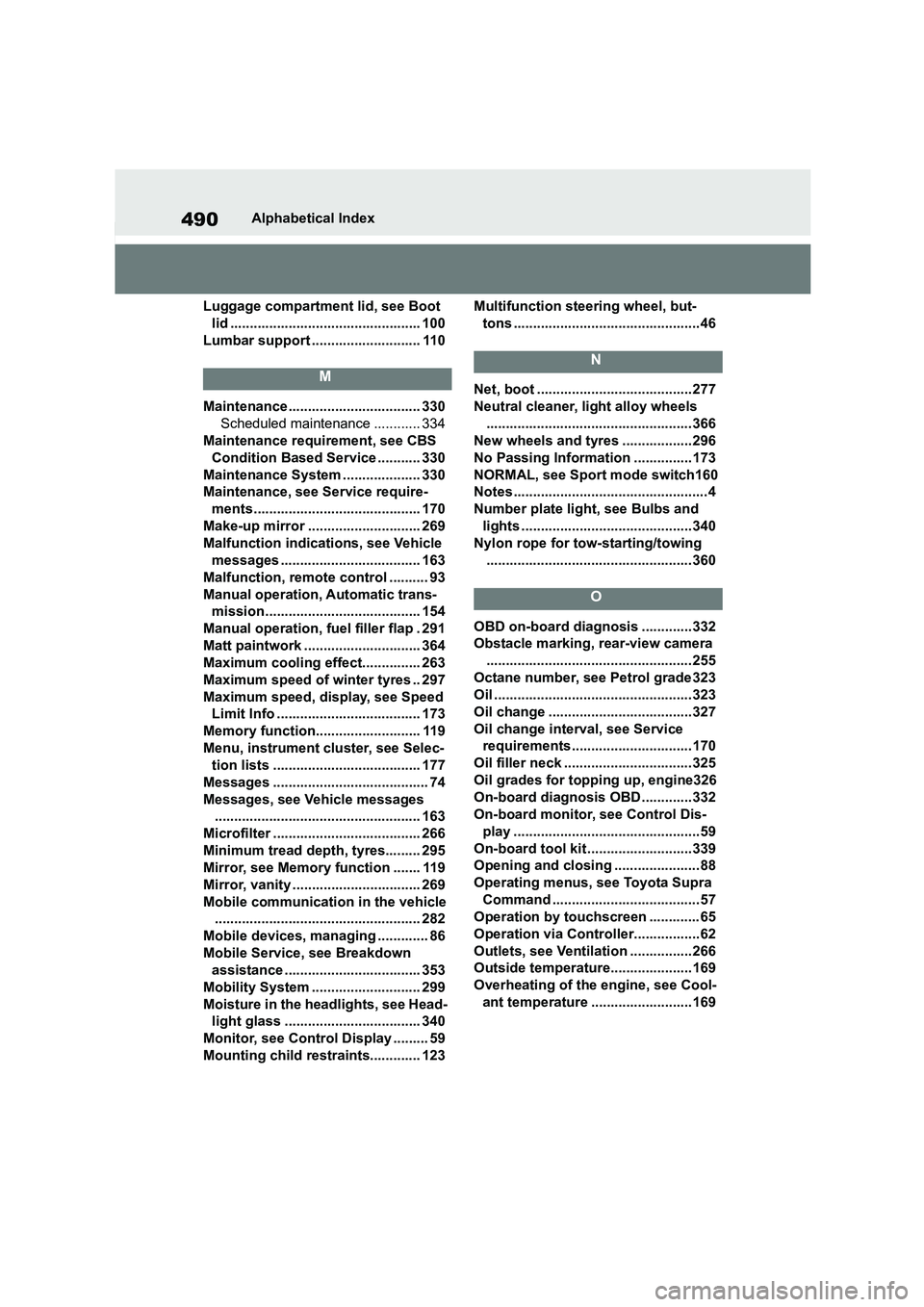
490Alphabetical Index
Luggage compartment lid, see Boot
lid ................................................. 100
Lumbar support ............................ 110
M
Maintenance.................................. 330
Scheduled maintenance ............ 334
Maintenance requirement, see CBS
Condition Based Service ........... 330
Maintenance System .................... 330
Maintenance, see Service require-
ments........................................... 170
Make-up mirror ............................. 269
Malfunction indications, see Vehicle
messages .................................... 163
Malfunction, remote control .......... 93
Manual operation, Automatic trans-
mission........................................ 154
Manual operation, fuel filler flap . 291
Matt paintwork .............................. 364
Maximum cooling effect............... 263
Maximum speed of winter tyres .. 297
Maximum speed, display, see Speed
Limit Info ..................................... 173
Memory function........................... 119
Menu, instrument cluster, see Selec-
tion lists ...................................... 177
Messages ........................................ 74
Messages, see Vehicle messages
..................................................... 163
Microfilter ...................................... 266
Minimum tread depth, tyres......... 295
Mirror, see Memory function ....... 119
Mirror, vanity ................................. 269
Mobile communication in the vehicle
..................................................... 282
Mobile devices, managing ............. 86
Mobile Service, see Breakdown
assistance ................................... 353
Mobility System ............................ 299
Moisture in the headlights, see Head-
light glass ................................... 340
Monitor, see Control Display ......... 59
Mounting child restraints............. 123
Multifunction steering wheel, but-
tons ................................................ 46
N
Net, boot ........................................277
Neutral cleaner, light alloy wheels
..................................................... 366
New wheels and tyres ..................296
No Passing Information ...............173
NORMAL, see Sport mode switch160
Notes ..................................................4
Number plate light, see Bulbs and
lights ............................................340
Nylon rope for tow-starting/towing
..................................................... 360
O
OBD on-board diagnosis .............332
Obstacle marking, rear-view camera
..................................................... 255
Octane number, see Petrol grade 323
Oil ................................................... 323
Oil change .....................................327
Oil change interval, see Service
requirements............................... 170
Oil filler neck ................................. 325
Oil grades for topping up, engine326
On-board diagnosis OBD .............332
On-board monitor, see Control Dis-
play ................................................ 59
On-board tool kit ...........................339
Opening and closing ...................... 88
Operating menus, see Toyota Supra
Command ...................................... 57
Operation by touchscreen ............. 65
Operation via Controller................. 62
Outlets, see Ventilation ................266
Outside temperature.....................169
Overheating of the engine, see Cool-
ant temperature ..........................169
Page 495 of 498
493Alphabetical Index
Spare wheel, see Emergency wheel
..................................................... 318
Special equipment, see Vehicle
equipment ....................................... 4
Speed Limit Assist ....................... 246
Speed Limit Device, see Manual
Speed Limiter ............................. 232
Speed Limit Info ........................... 173
Speed limit, display, see Speed Limit
Info............................................... 173
Speed Limiter, manual ................. 232
Sport displays............................... 180
Sport mode switch ............... 154, 160
Sport programme, Automatic trans-
mission........................................ 154
Sport suspension, see Adaptive vari-
able suspension ......................... 259
SPORT, see Sport mode switch .. 160
Stability control systems ............. 228
Standard equipment, see Vehicle
equipment ....................................... 4
Standard view, Head-Up Display. 182
Standby state, idle state and
drive-ready state .......................... 53
Start/stop button........................... 144
Starting assistance ...................... 357
Starting assistance, see VSC ...... 229
Status Control Display, tyres....... 306
Status information, Toyota Supra
Command...................................... 58
Status of the Owner's Manual ......... 5
Status, vehicle .............................. 181
Steering wheel, adjusting ............ 119
Steering wheel, buttons ................. 46
Steering wheel, see Memory function
..................................................... 119
Storage facilities........................... 274
Storage, see Laying up the vehicle
..................................................... 368
Storage, tyres ............................... 298
Stowing and securing a transported
load .............................................. 276
Stowing heavy transported loads276
Summer tyres, tread ..................... 294
Sun visor ....................................... 269
Supplementary text message ...... 164
Suspension settings, see Sport
mode switch................................160
Switch for driving dynamics, see
Sport mode switch .....................160
Switches, see Driving area ............ 46
Switching on the headlight courtesy
delay feature ................................. 92
Symbols and displays ......................4
T
Tail lights, see Bulbs and lights .. 340
Tailgate, see Boot lid .................... 100
Tank display .................................. 168
Technical changes, see Your own
safety ...............................................6
Technical data ............................... 370
Teleservice call .............................220
Temperature display, see Outside
temperature................................. 169
Temperature, automatic air condi-
tioning .........................................262
Temperature, engine oil ...............169
Tension belt, see Lashing eyes in the
boot..............................................276
Text message, supplementary..... 164
Thiefproof wheel studs ................314
Tilt alarm sensor ...........................104
Tilting down front passenger's mir-
ror, see Automatic parking function
..................................................... 118
Time ................................................. 72
Tire inflation pressure
Maintenance data....................... 374
Tires
Size ............................................374
Tool ................................................ 339
Topping up engine oil................... 325
Torque display, see Sport displays
..................................................... 180
Total weight, permitted................. 371
Touchscreen.................................... 65
Touchscreen, see Operation by
touchscreen .................................. 65