brakes TOYOTA SUPRA 2022 Owners Manual
[x] Cancel search | Manufacturer: TOYOTA, Model Year: 2022, Model line: SUPRA, Model: TOYOTA SUPRA 2022Pages: 498, PDF Size: 104.06 MB
Page 13 of 498
11
1
1-1. NOTES
NOTES
or the driver's behaviour.
These include, for example:
• Status reports relating to the
vehicle and its individual compo-
nents, for example wheel speed,
wheel circumferential velocity,
deceleration, lateral accelera-
tion, fastened seat belts.
• Ambient conditions, for example
temperature, rain sensor signals.
The data is processed within the
vehicle and is usually transient. It is
only saved for longer than the oper-
ating period if it is required in order
to perform services agreed with the
customer.
Electronic parts, for example con-
trol devices and vehicle keys, con-
tain components for storing
technical informat ion. Information
about the vehicle's condition, com-
ponent use and wear, maintenance
requirements, events or errors can
be stored temporarily or perma-
nently.
This information generally docu-
ments the condition of a compo-
nent, a module, a system or the
vehicle surroundings, including:
• Operating states of system com-
ponents, for examp le fill levels,
tyre inflation pr essure, battery
status.
• Malfunctions and faults of impor-
tant system components, for
example lights and brakes.
• Responses of the vehicle to par-
ticular driving situations, for
example triggering of an airbag,
activation of th e drive stability
control systems.
• Information on vehicle-damag-
ing events.
The data is required so that the
control units can perform their func-
tions. It is also used for detecting
and rectifying malfunctions, as well
as to optimise vehicle functions.
Most of this data is transient and is
only processed within the vehicle
itself. Only a small proportion of the
data is stored in event or error
memories in response to specific
circumstances.
Convenience functions, such as
seat, climate or light settings, make
every journey even more pleasant.
The personal settings for these
functions can be saved in a profile
within the vehicle and retrieved on
request, for example if the settings
have been changed by another
driver. Depending on the equip-
ment, these profiles can be saved
in the vehicle manufacturer's
secure data systems. When the
driver changes vehicle, these
saved profiles can simply be
applied to a different vehicle.
The vehicle settings saved in the
vehicle profile can be changed or
deleted at any time.
Electronic components
Personal settings
Page 15 of 498
13
1
1-1. NOTES
NOTES
only use this data for the purposes
of performing the service or repair
order in question. This prevents
work from being duplicated unnec-
essarily on the vehicle, for exam-
ple.
The data logs the technical condi-
tions of the vehicle and helps in
locating errors, complying with war-
ranty obligations and improving
quality.
To ensure product quality and the
development of new products, data
on the usage of individual compo-
nents and systems may be read
out, for example lights, brakes,
power windows, displays. This data
helps the vehicle manufacturer to
optimise the design of components
and systems. Data analysis also
provides the basis for Technical
Campaigns and statutory recalls.
Furthermore, the manufacturer has
product monitoring obligations to
meet in line with product liability
law. To fulfil these obligations, the
vehicle manufacturer requires tech-
nical data from the vehicle.
Data from the vehicle can also be
used to check customer warranty
claims. If goodw ill or warranty
claims are asserted, the read out
data is transferred to the vehicle
manufacturer to resolve the claims
promptly.
Error and event memories in the
vehicle can be reset when any
authorized Toyota retailer or Toyota
authorized repairer, or any reliable
repairer performs repair or servic-
ing work.
Data transferred to the vehicle
manufacturer for the purposes of
ensuring product quality or optimis-
ing service processes can be pre-
vented upon request.
According to current law, the vehi-
cle manufacturer is obliged to pro-
vide the authorities with any data it
has stored. Data is provided to the
extent required and on a
case-by-case basis, for example to
investigate a criminal offence.
The current law also gives state
bodies authorisation to read out
data from the vehicle themselves
for individual cases. This could
include reading out data from the
airbag control device to shed light
on the circumstances of an acci-
dent, for example.
In the context of legal obligations
within the EU, certain vehicle con-
sumption data, so-called OBFCM
data, are transmitted to the EU
Ensuring product quality
Goodwill and warr anty claims
Control over data
Legal requirements regard-
ing data disclosure
Page 39 of 498
37
2
2-1. QUICK REFERENCE
QUICK REFERENCE
briefly press the se lector lever in
the desired direction, possibly over-
coming a resistance point. Selector
lever returns to centre position in
each case.
Apply the brakes until ready to drive
off, otherwise the vehicle will move
when a drive position or reverse
gear is selected.
A selector lever lock prevents inad-
vertently shifting to selector lever
position R or inadvertently shifting
from selector lever position P.
Only engage selector lever posi-
tion R when the vehicle is station-
ary.
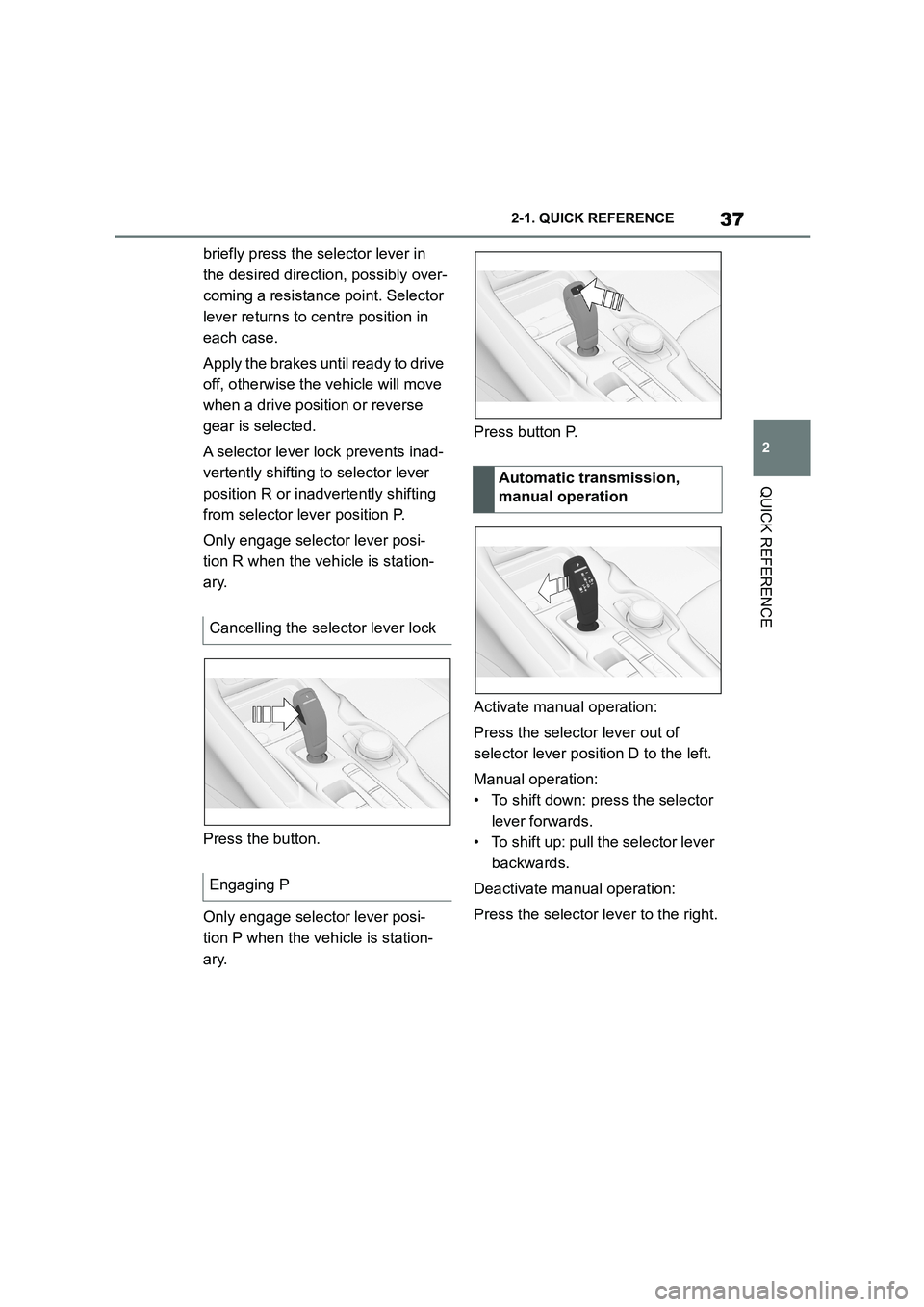
Press the button.
Only engage selector lever posi-
tion P when the vehicle is station-
ary.
Press button P.
Activate manual operation:
Press the selector lever out of
selector lever position D to the left.
Manual operation:
• To shift down: press the selector
lever forwards.
• To shift up: pull the selector lever
backwards.
Deactivate manual operation:
Press the selector lever to the right.
Cancelling the selector lever lock
Engaging P
Automatic transmission,
manual operation
Page 151 of 498
149
3
3-1. CONTROLS
CONTROLS
■General
Use during the journey serves as
an emergency brake.
Pull and hold the switch. Vehicle
brakes strongly for as long as the
switch is pulled.
A vehicle message is shown.
If the vehicle is braked to approxi-
mately 3 km/h, 2 mph, the parking
brake is engaged.
1 Switch on drive-ready state.
2 Press the switch with the
brake pedal depressed or selec-
tor lever position P engaged.
LED and indicator lamp turn off.
The parking brake is released.
The parking brake is automatically
released on driving off.
LED and indicator lamp turn off.
If the parking brake fails or malfunc-
tions:
After getting out, secure the vehicle
to prevent it from rolling away, for
example with a chock.
To restore parking brake functional-
ity after a power failure:
1 Switch on standby state.
2 Pull the switch with the
brake pedal depressed or selec-
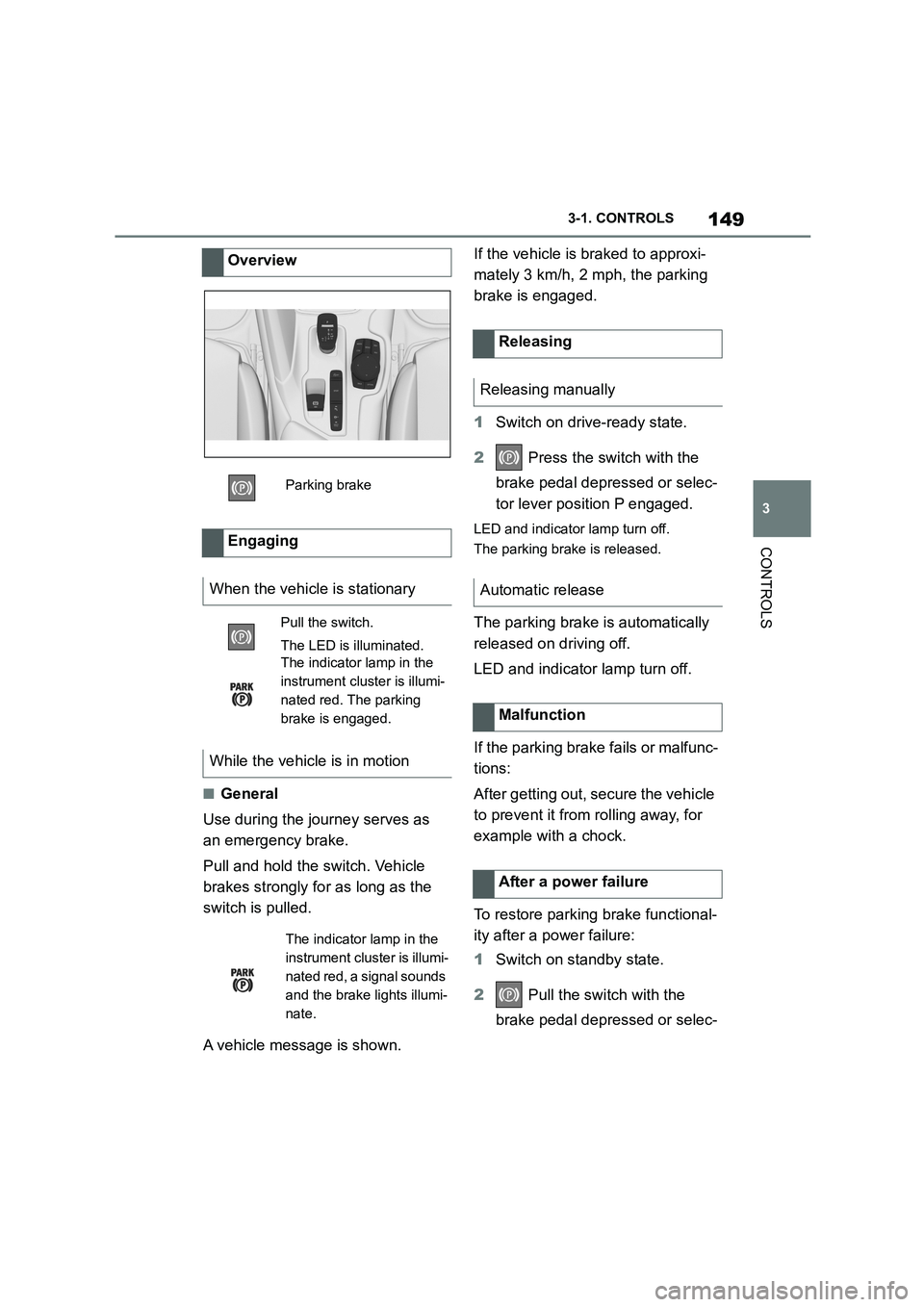
Overview
Parking brake
Engaging
When the vehicle is stationary
Pull the switch.
The LED is illuminated.
The indicator lamp in the
instrument cluster is illumi-
nated red. The parking
brake is engaged.
While the vehicle is in motion
The indicator lamp in the
instrument cluster is illumi-
nated red, a signal sounds
and the brake lights illumi-
nate.
Releasing
Releasing manually
Automatic release
Malfunction
After a power failure
Page 157 of 498
155
3
3-1. CONTROLS
CONTROLS
Selector lever posi tion for all nor-
mal driving. All gears for forward
driving are selected automatically.
Only engage selector lever posi-
tion R when the vehicle is station-
ary.
In selector lever position N, the
vehicle can be pushed or can roll
without power from the engine, for
example in car washes, see page
156.
Selector lever position for parking
the vehicle, for example. In selector
lever position P, the transmission
blocks the drive wheels.
Only engage selector lever posi-
tion P when the vehicle is station-
ary.
■P is engaged automatically
Selector lever position P is auto-
matically engaged in the following
situations, for example:
After switching off drive-ready
state if selector lever position R,
D or M is engaged.
After switching off standby state
if selector leve r position N is
engaged.
If, while the vehicle is at a stand-
still and selector le ver position D,
M or R is engaged, the driver's
seat belt is unfastened, the
driver's door is opened and the
brake pedal is not depressed.
Apply the brakes until you are
ready to drive off, otherwise the
vehicle will move wh en a drive posi-
tion is selected.
Safety note
WA R N I N G
An unsecured vehicle can start mov-
ing and rolling away. There is a dan- ger of accidents. Before leaving the
vehicle, secure it to prevent it from
rolling away, for example by applying the parking brake.
Observe the following to ensure that
the vehicle is secured against rolling away:
• Apply the parking brake.
• Turn the front wheels towards the
kerb on upward or downward gradi- ents.
• Additionally secure the vehicle on upward or downward gradients, for
example with a chock.
Selector lever positions
D drive position
R Reverse
N neutral
P Park
Engaging selector lever posi-
tions
General
Page 161 of 498
159
3
3-1. CONTROLS
CONTROLS
can turn the engine.
Before the transmission lockout is
released, apply the parking brake
to prevent the ve hicle from rolling
away.
1 Apply the brakes and keep them
applied.
2 Press the start/stop button. The
starter must be heard to start
turning. Press and hold the
start/stop button.
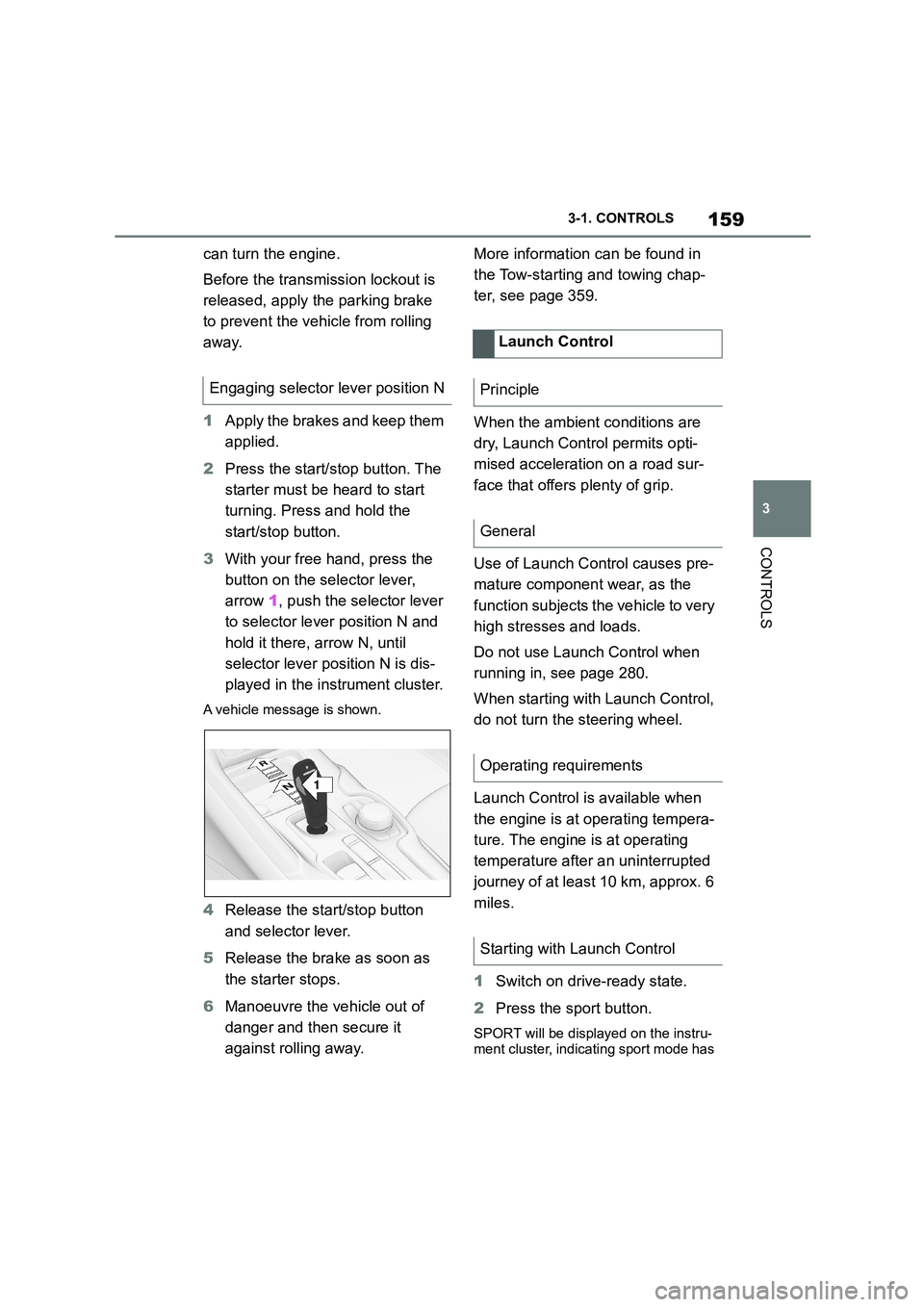
3 With your free hand, press the
button on the selector lever,
arrow 1, push the selector lever
to selector lever position N and
hold it there, arrow N, until
selector lever position N is dis-
played in the instrument cluster.
A vehicle message is shown.
4 Release the start/stop button
and selector lever.
5 Release the brake as soon as
the starter stops.
6 Manoeuvre the vehicle out of
danger and then secure it
against rolling away.
More information can be found in
the Tow-starting and towing chap-
ter, see page 359.
When the ambient conditions are
dry, Launch Control permits opti-
mised acceleration on a road sur-
face that offers plenty of grip.
Use of Launch Control causes pre-
mature component wear, as the
function subjects t he vehicle to very
high stresses and loads.
Do not use Launch Control when
running in, see page 280.
When starting with Launch Control,
do not turn the steering wheel.
Launch Control is available when
the engine is at operating tempera-
ture. The engine is at operating
temperature after an uninterrupted
journey of at least 10 km, approx. 6
miles.
1 Switch on drive-ready state.
2 Press the sport button.
SPORT will be displayed on the instru-
ment cluster, indicating sport mode has
Engaging selector lever position N
1
R
N
Launch Control
Principle
General
Operating requirements
Starting with Launch Control
Page 209 of 498
207
3
3-1. CONTROLS
CONTROLS
The menu for the Toyota Supra
Safety Systems is shown.
If all Toyota Supra Safety Systems
were switched off, all systems are
now switched on.
"Customise Settings": depending
on the equipment, the Toyota Supra
Safety Systems can be configured
individually. The custom settings
are activated and saved. As soon
as a setting is changed in the
menu, all settings in the menu are
activated.
"ALL ON": all Toyota Supra Safety
Systems are switched on. Basic
settings are activated for the
sub-functions, for example the set-
ting for warning time.
"Customise": the Toyota Supra
Safety Systems are switched on
according to the individual settings.
Some Toyota Supra Safety Sys-
tems cannot be switched off individ-
ually.
All Toyota Supra Safety Systems
are switched off.
The system can help avoid acci-
dents. If an accident cannot be
avoided, the system helps to
reduce the co llision speed.
The system warns of the possible
risk of collision and brakes auto-
matically, as necessary.
The system is controlled using the
following sensors, depending on
the equipment:
Camera in the area of the
rear-view mirror.
Radar sensor in front bumper.
The Pre-Collision System is opera-
tional even if Cruise Control is disa-
bled.
When deliberately moving closer to
a vehicle, the front-end collision
warning and braking intervention
are activated later to avoid unjusti-
fied system responses.
From speeds of approximately 5
km/h, 3 mph, the system provides a
two-stage warning of any possible
risk of collision with vehicles. The
timing of these warnings may vary
depending on the current driving
situation.
Press the button:
Press the button repeatedly.
The setting switches between
the following:
Press and hold the button:
Pre-Collision System
Principle
General
Page 212 of 498
2103-1. CONTROLS
An advance warning is given for
example if there is an impending
risk of collision or the distance from
the vehicle ahead is too short.
The driver must intervene person-
ally if there is an advance warning.
An acute warning is given when the
vehicle is approaching another
object at a high differential speed
and there is an immediate risk of a
collision.
The driver must intervene person-
ally if there is an acute warning.
Depending on the driving situation
and the vehicle's equipment, the
acute warning may be supported by
a brief jolt in the brakes.
If the warning time setting is "Late",
the jolt does not occur.
If necessary, the system can also
assist by braking the vehicle auto-
matically if there is a risk of a colli-
sion.
An acute warning can be triggered
even without a previous advance
warning.
The warning prompts the driver to
intervene actively. When the brake
is operated during a warning, the
maximum necessary braking force
is applied. Braking assistance
requires that the brake pedal is
depressed sufficiently quickly and
firmly beforehand.
The system can also assist by brak-
ing the vehicle automatically if there
is a risk of a collision.
At low speeds, the vehicle can be
braked to a stop.
City braking function: brake inter-
vention takes place at up to approx.
85 km/h, 53 mph.
With radar sensor: brake interven-
tion takes place at up to approx.
250 km/h, 155 mph.
At speeds above approx. 210 km/h,
130 mph, the brake intervention
takes the form of a brief jolt. There
is no automatic deceleration.
A brake intervention can be discon-
tinued either by depressing the
accelerator pedal or by actively
moving the steering wheel.
The detection of objects may be
limited. Take in to account the
detection range limits and the func-
tional limitations.
Advance warning
Acute warning with braking func-
tion
Brake intervention
Page 214 of 498
2123-1. CONTROLS
The system can help to avoid acci-
dents with pedestrians and cyclists.
If an accident cannot be avoided,
the system helps to reduce the col-
lision speed.
The system warns of the possible
risk of collision in the urban speed
range and brakes automatically, as
necessary.
At speeds above approx. 5 km/h, 3
mph, the system warns of the pos-
sible risk of collision with pedestri-
ans and cyclists.
Pedestrians and cyclists are taken
into account if they are located
within the detection range of the
system.
The system is controlled using the
following sensors, depending on
the equipment:
Camera in the area of the
rear-view mirror.
Radar sensor in front bumper.
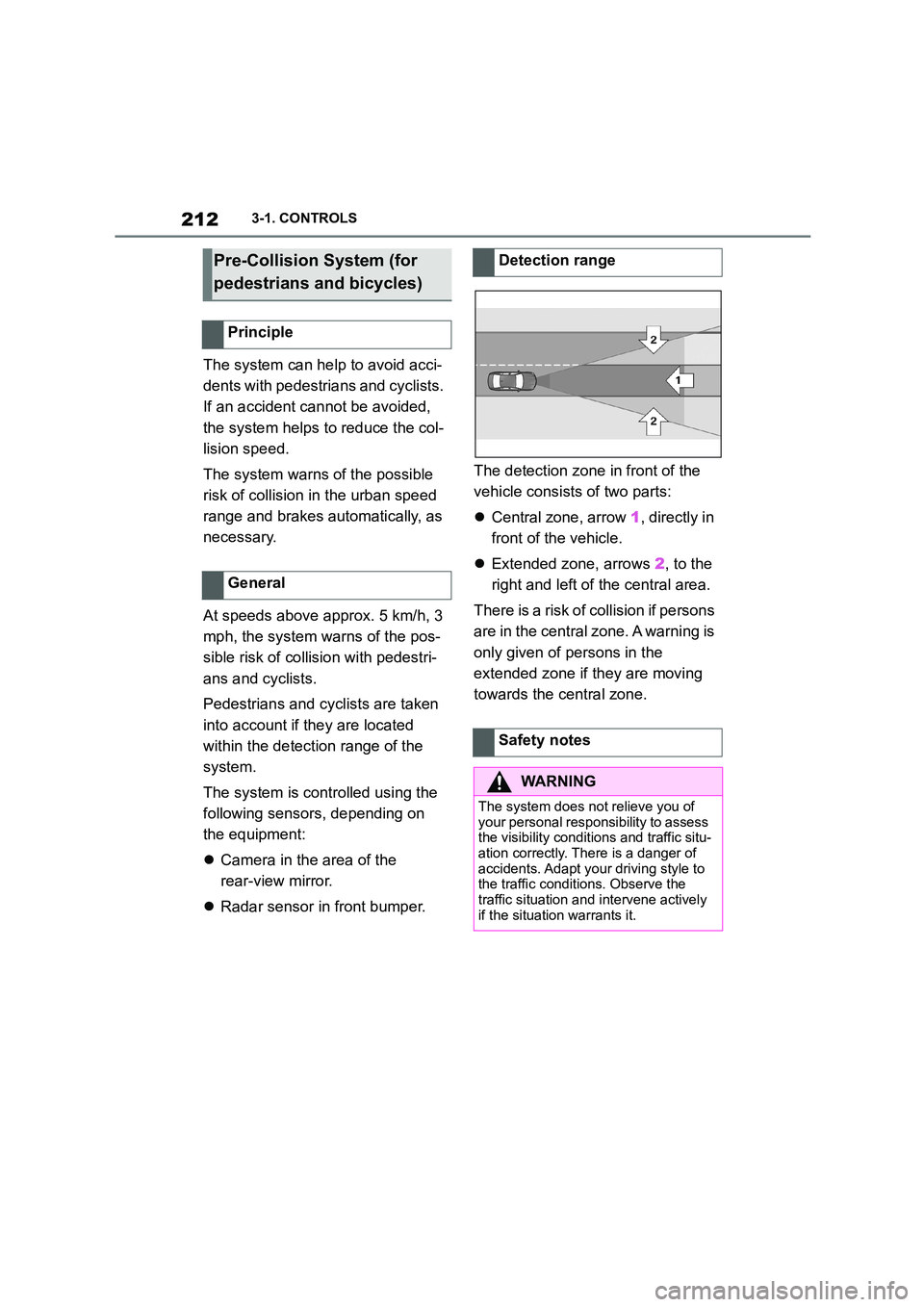
The detection zone in front of the
vehicle consists of two parts:
Central zone, arrow 1, directly in
front of the vehicle.
Extended zone, arrows 2, to the
right and left of the central area.
There is a risk of collision if persons
are in the central zone. A warning is
only given of persons in the
extended zone if they are moving
towards the central zone.
Pre-Collision System (for
pedestrians and bicycles)
Principle
General
Detection range
Safety notes
WA R N I N G
The system does not relieve you of
your personal responsibility to assess the visibility conditions and traffic situ-
ation correctly. There is a danger of
accidents. Adapt your driving style to the traffic conditions. Observe the
traffic situation and intervene actively
if the situation warrants it.
Page 230 of 498
2283-1. CONTROLS
This chapter describes all standard,
country-specific and special equip-
ment available for the model series.
It may therefore describe equip-
ment and functions which are not
installed in your vehicle, for exam-
ple on account of the special equip-
ment selected or the country
specification. This also applies to
safety-relevant functions and sys-
tems. Please comply with the rele-
vant laws and regulations when
using the corresponding functions
and systems.
ABS prevents the wheels from lock-
ing when the brakes are applied.
Steering control is retained even in
the event of full braking, thereby
enhancing active road safety.
ABS is ready to operate each time
the engine is started.
Situations which the ABS cannot
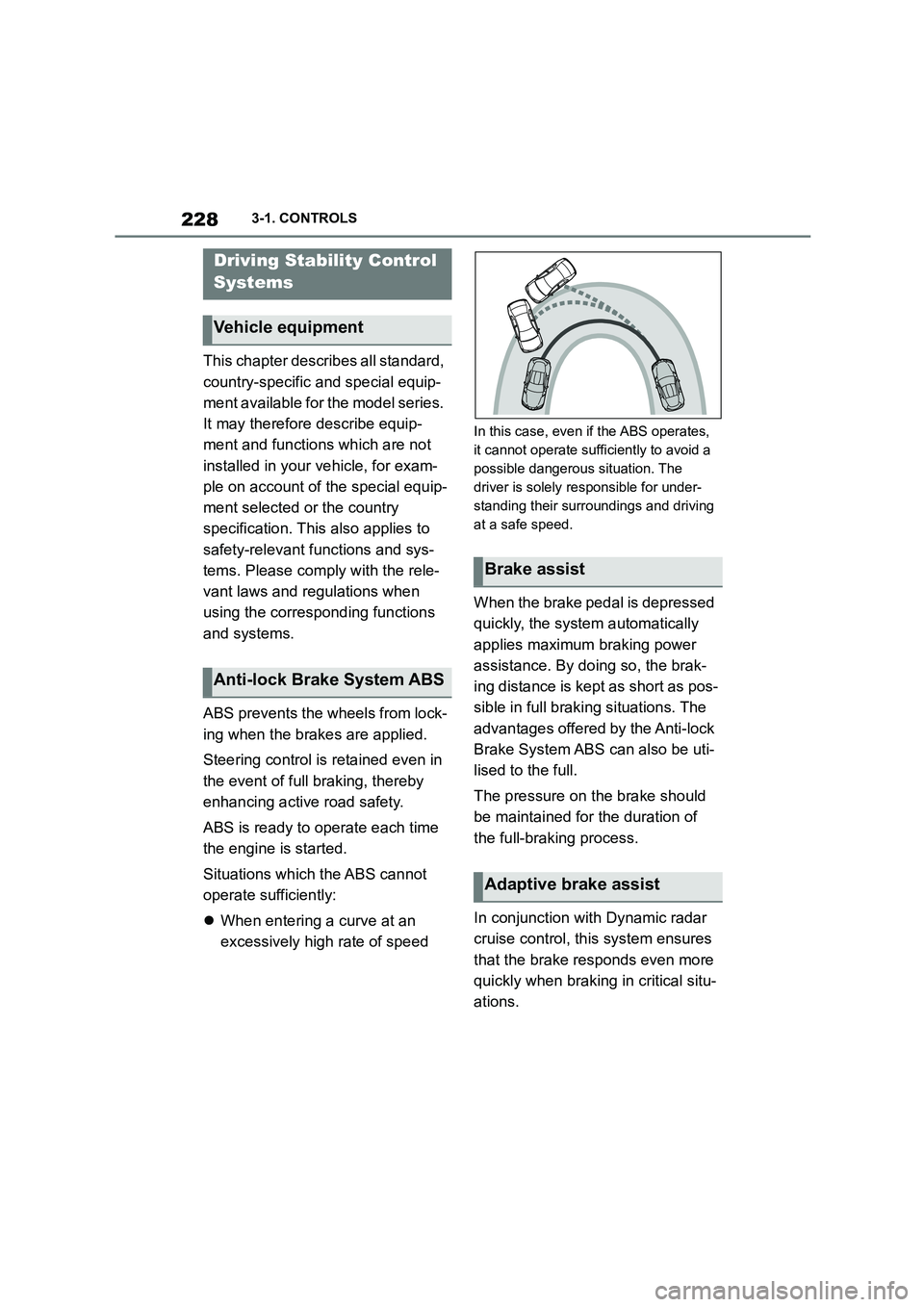
operate sufficiently:
When entering a curve at an
excessively high rate of speed
In this case, even if the ABS operates,
it cannot operate sufficiently to avoid a
possible dangerous situation. The
driver is solely responsible for under-
standing their surroundings and driving
at a safe speed.
When the brake pedal is depressed
quickly, the system automatically
applies maximum braking power
assistance. By doi ng so, the brak-
ing distance is kept as short as pos-
sible in full braking situations. The
advantages offered by the Anti-lock
Brake System ABS can also be uti-
lised to the full.
The pressure on the brake should
be maintained for the duration of
the full-braking process.
In conjunction with Dynamic radar
cruise control, th is system ensures
that the brake responds even more
quickly when braking in critical situ-
ations.
Driving Stability Control
Systems
Vehicle equipment
Anti-lock Brake System ABS
Brake assist
Adaptive brake assist