wipers TOYOTA SUPRA 2022 Owners Manual
[x] Cancel search | Manufacturer: TOYOTA, Model Year: 2022, Model line: SUPRA, Model: TOYOTA SUPRA 2022Pages: 498, PDF Size: 104.06 MB
Page 32 of 498
302-1. QUICK REFERENCE
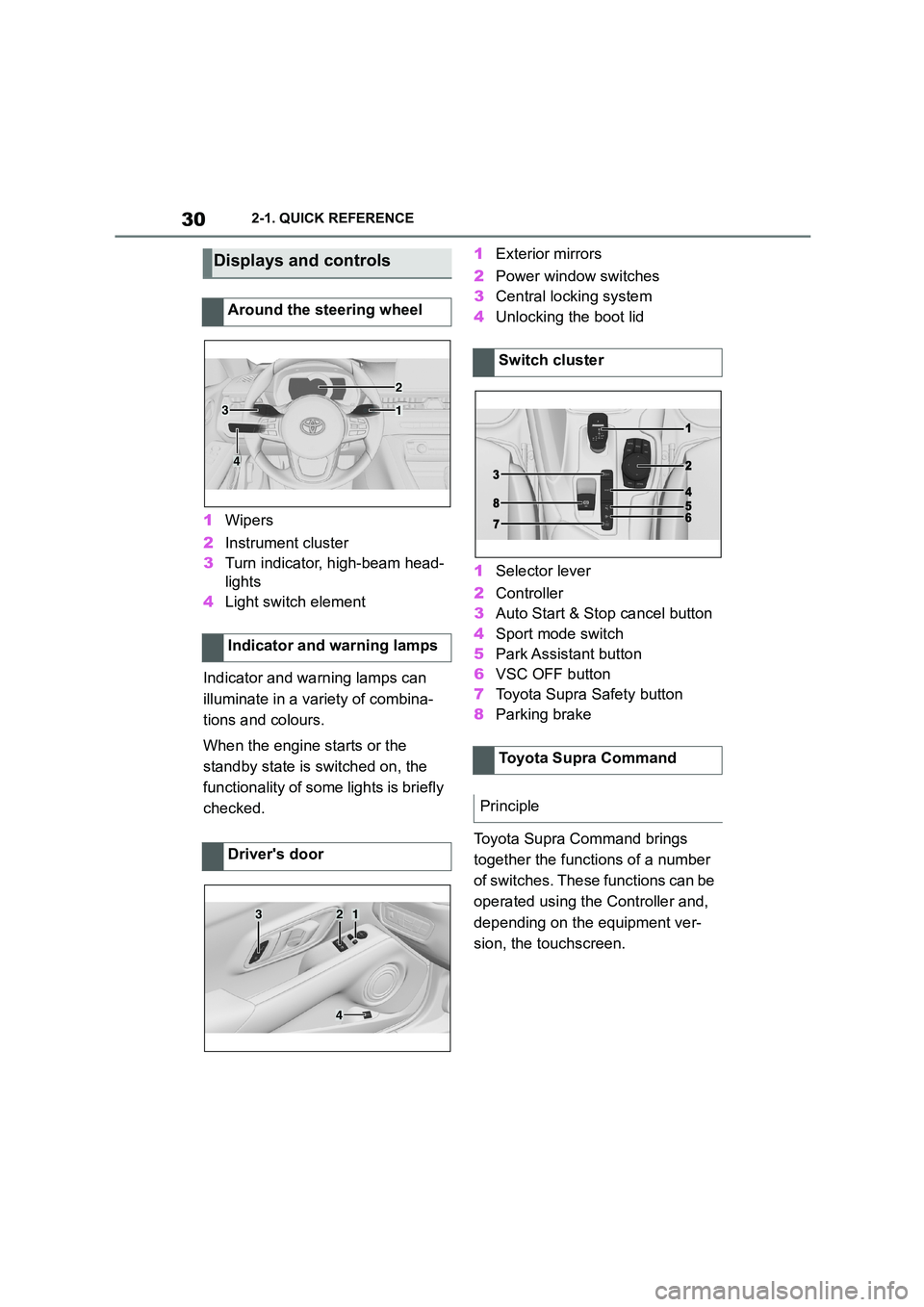
1Wipers
2 Instrument cluster
3 Turn indicator, high-beam head-
lights
4 Light switch element
Indicator and warning lamps can
illuminate in a variety of combina-
tions and colours.
When the engine starts or the
standby state is switched on, the
functionality of some lights is briefly
checked.
1 Exterior mirrors
2 Power window switches
3 Central locking system
4 Unlocking the boot lid
1 Selector lever
2 Controller
3 Auto Start & Stop cancel button
4 Sport mode switch
5 Park Assistant button
6 VSC OFF button
7 Toyota Supra Safety button
8 Parking brake
Toyota Supra Command brings
together the functions of a number
of switches. These functions can be
operated using the Controller and,
depending on the equipment ver-
sion, the touchscreen.
Displays and controls
Around the steering wheel
Indicator and warning lamps
Driver's door
1
2
3
4
321
4
Switch cluster
Toyota Supra Command
Principle
Page 40 of 498
382-1. QUICK REFERENCE
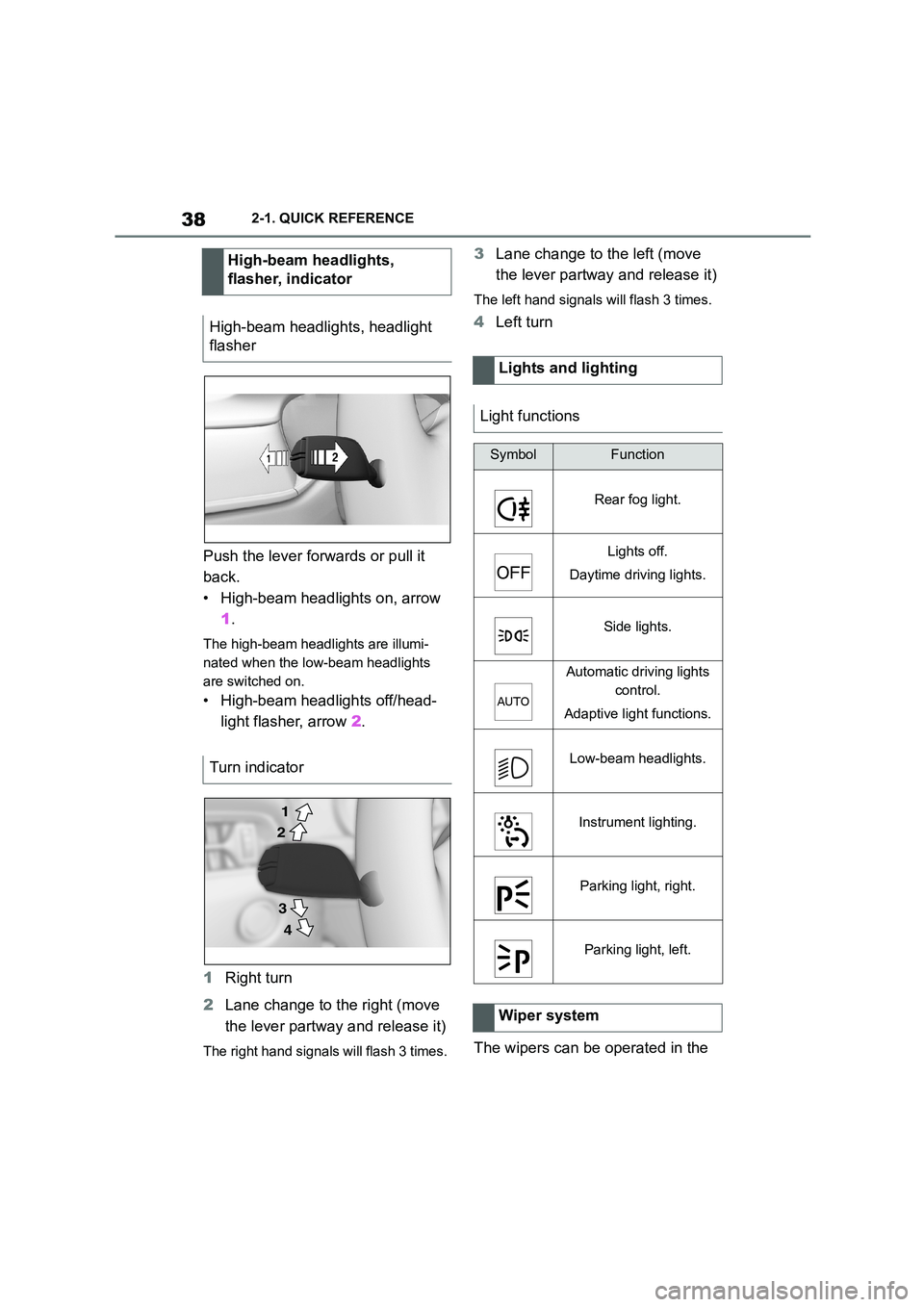
Push the lever forwards or pull it
back.
• High-beam headlights on, arrow
1 .
The high-beam headlights are illumi-
nated when the low-beam headlights
are switched on.
• High-beam headlights off/head-
light flasher, arrow 2.
1 Right turn
2 Lane change to the right (move
the lever partway and release it)
The right hand signals will flash 3 times.
3 Lane change to the left (move
the lever partway and release it)
The left hand signals will flash 3 times.
4 Left turn
The wipers can be operated in the
High-beam headlights,
flasher, indicator
High-beam headlights, headlight
flasher
Turn indicator
2
1
3
4
Lights and lighting
Light functions
SymbolFunction
Rear fog light.
Lights off.
Daytime driving lights.
Side lights.
Automatic driving lights
control.
Adaptive light functions.
Low-beam headlights.
Instrument lighting.
Parking light, right.
Parking light, left.
Wiper system
Page 41 of 498
39
2
2-1. QUICK REFERENCE
QUICK REFERENCE
standby state.
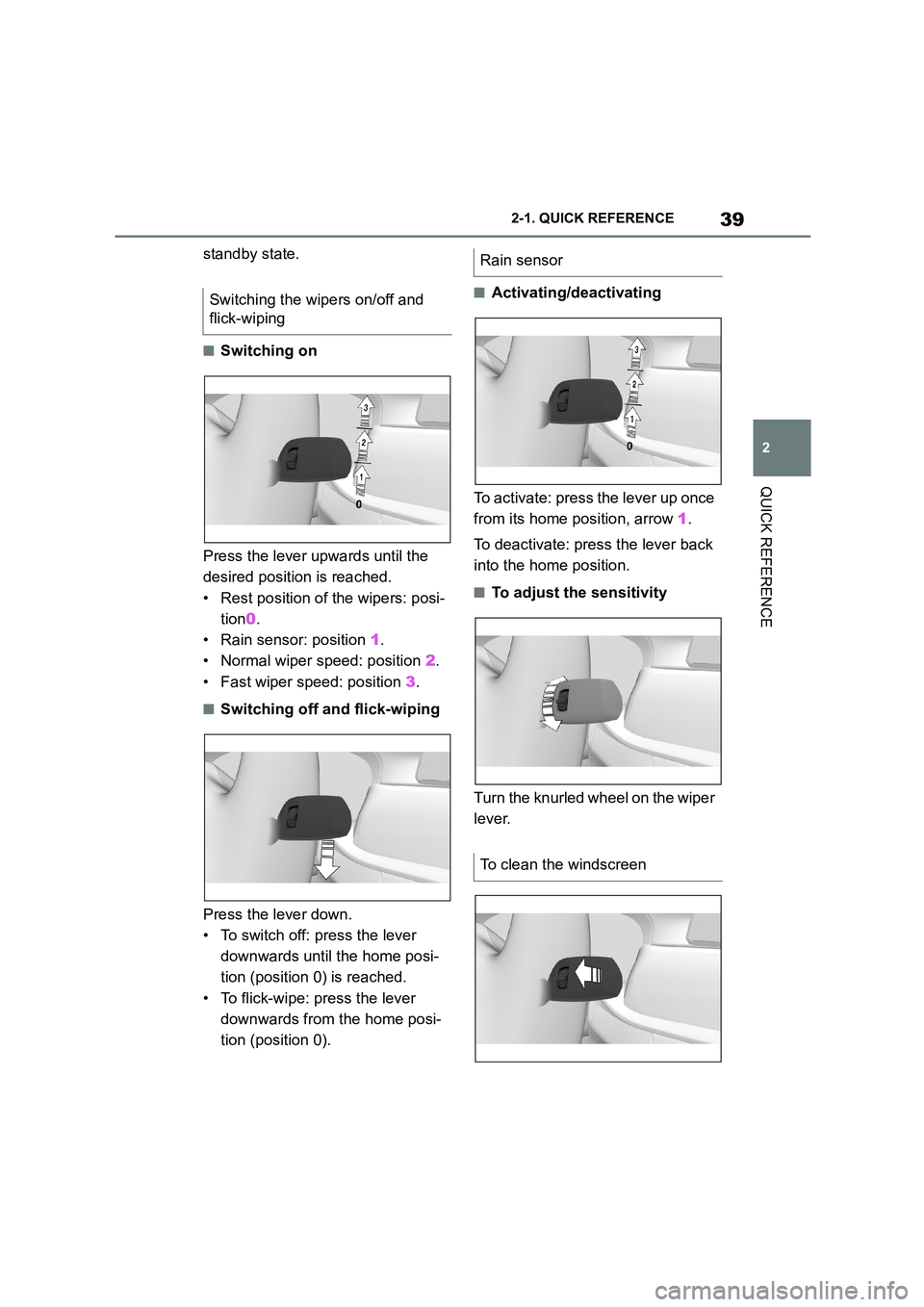
■Switching on
Press the lever upwards until the
desired position is reached.
• Rest position of the wipers: posi-
tion 0.
• Rain sensor: position 1.
• Normal wiper speed: position 2.
• Fast wiper speed: position 3.
■Switching off and flick-wiping
Press the lever down.
• To switch off: press the lever
downwards until the home posi-
tion (position 0) is reached.
• To flick-wipe: press the lever
downwards from the home posi-
tion (position 0).
■Activating/deactivating
To activate: press the lever up once
from its home position, arrow 1.
To deactivate: press the lever back
into the home position.
■To adjust the sensitivity
Turn the knurled wheel on the wiper
lever.
Switching the wipers on/off and
flick-wiping
Rain sensor
To clean the windscreen
Page 153 of 498
151
3
3-1. CONTROLS
CONTROLS
Do not use the wipers on a dry
windscreen, otherwise the wiper
blades will wear or become dam-
aged more quickly.
The wipers can be operated in the
standby state.
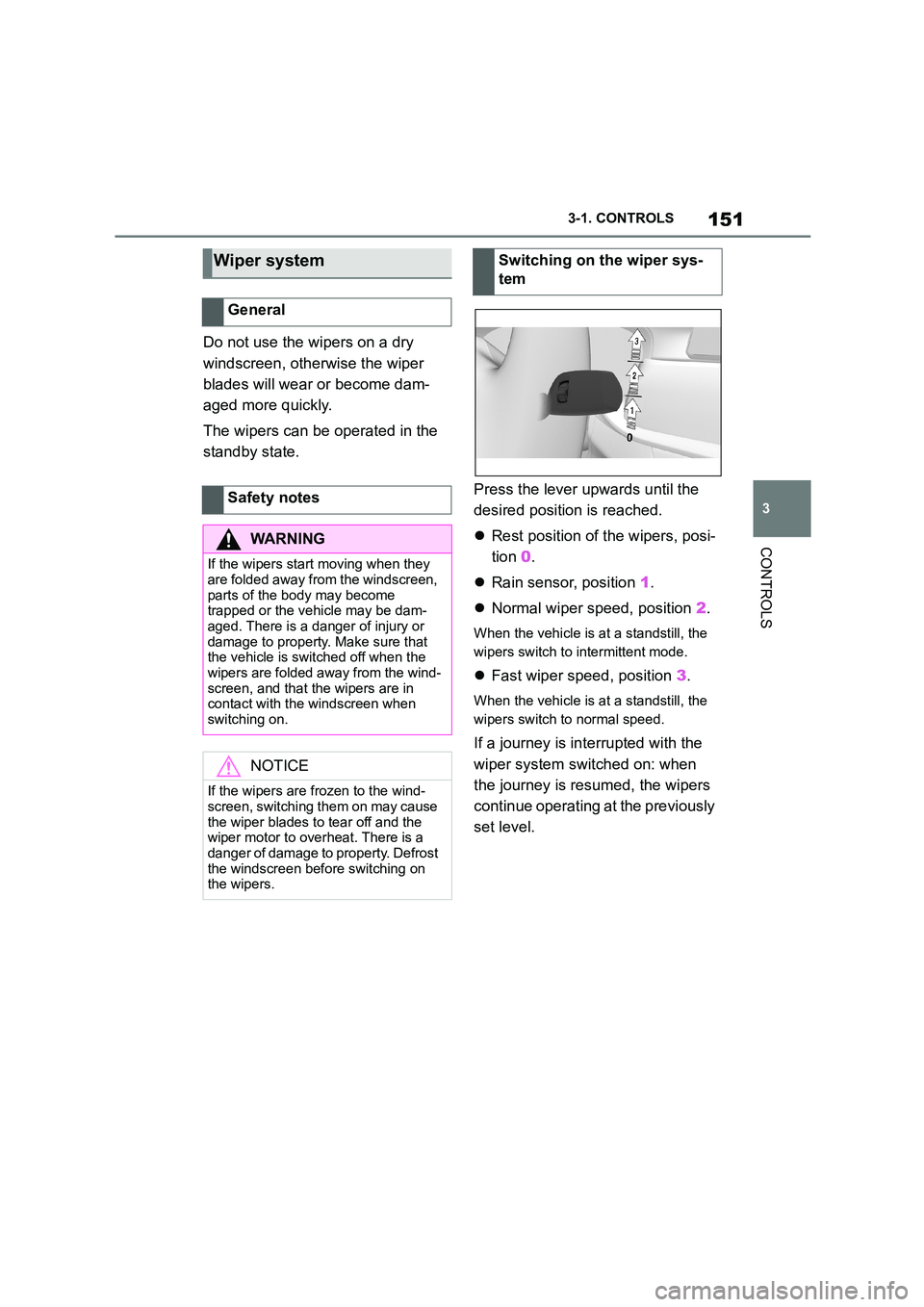
Press the lever upwards until the
desired position is reached.
Rest position of the wipers, posi-
tion 0.
Rain sensor, position 1.
Normal wiper speed, position 2.
When the vehicle is at a standstill, the
wipers switch to intermittent mode.
Fast wiper speed, position 3.
When the vehicle is at a standstill, the
wipers switch to normal speed.
If a journey is in terrupted with the
wiper system switched on: when
the journey is resumed, the wipers
continue operating at the previously
set level.
Wiper system
General
Safety notes
WA R N I N G
If the wipers start moving when they
are folded away from the windscreen,
parts of the body may become trapped or the vehicle may be dam-
aged. There is a danger of injury or
damage to property. Make sure that the vehicle is switched off when the
wipers are folded away from the wind-
screen, and that the wipers are in contact with the windscreen when
switching on.
NOTICE
If the wipers are frozen to the wind- screen, switching them on may cause
the wiper blades to tear off and the
wiper motor to overheat. There is a danger of damage to property. Defrost
the windscreen before switching on
the wipers.
Switching on the wiper sys-
tem
Page 154 of 498
1523-1. CONTROLS
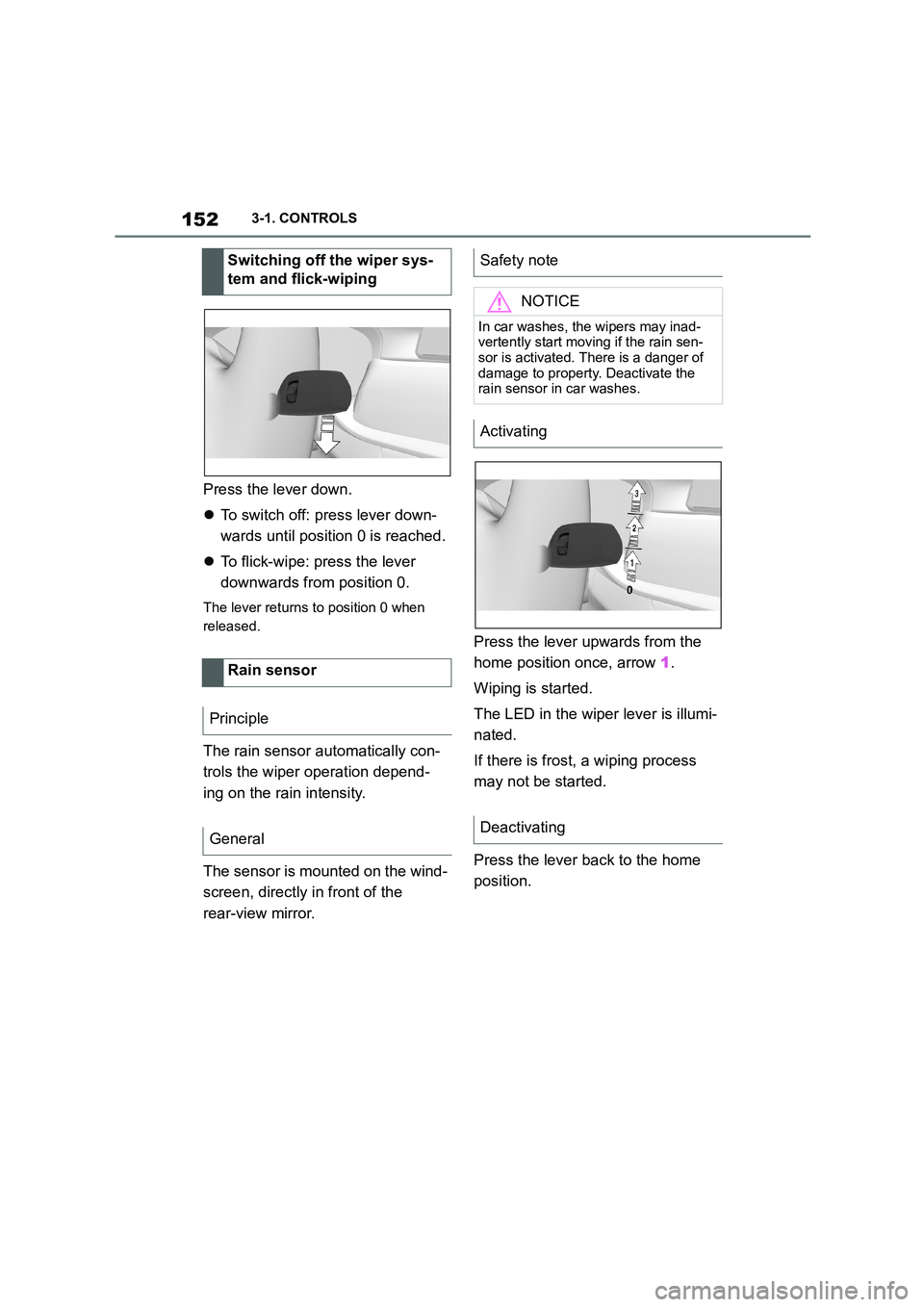
Press the lever down.
To switch off: press lever down-
wards until position 0 is reached.
To flick-wipe: press the lever
downwards from position 0.
The lever returns to position 0 when
released.
The rain sensor automatically con-
trols the wiper operation depend-
ing on the rain intensity.
The sensor is mounted on the wind-
screen, directly in front of the
rear-view mirror.
Press the lever upwards from the
home position once, arrow 1.
Wiping is started.
The LED in the wiper lever is illumi-
nated.
If there is frost, a wiping process
may not be started.
Press the lever back to the home
position.
Switching off the wiper sys-
tem and flick-wiping
Rain sensor
Principle
General
Safety note
NOTICE
In car washes, the wipers may inad-
vertently start moving if the rain sen- sor is activated. There is a danger of
damage to property. Deactivate the
rain sensor in car washes.
Activating
Deactivating
Page 155 of 498
153
3
3-1. CONTROLS
CONTROLS
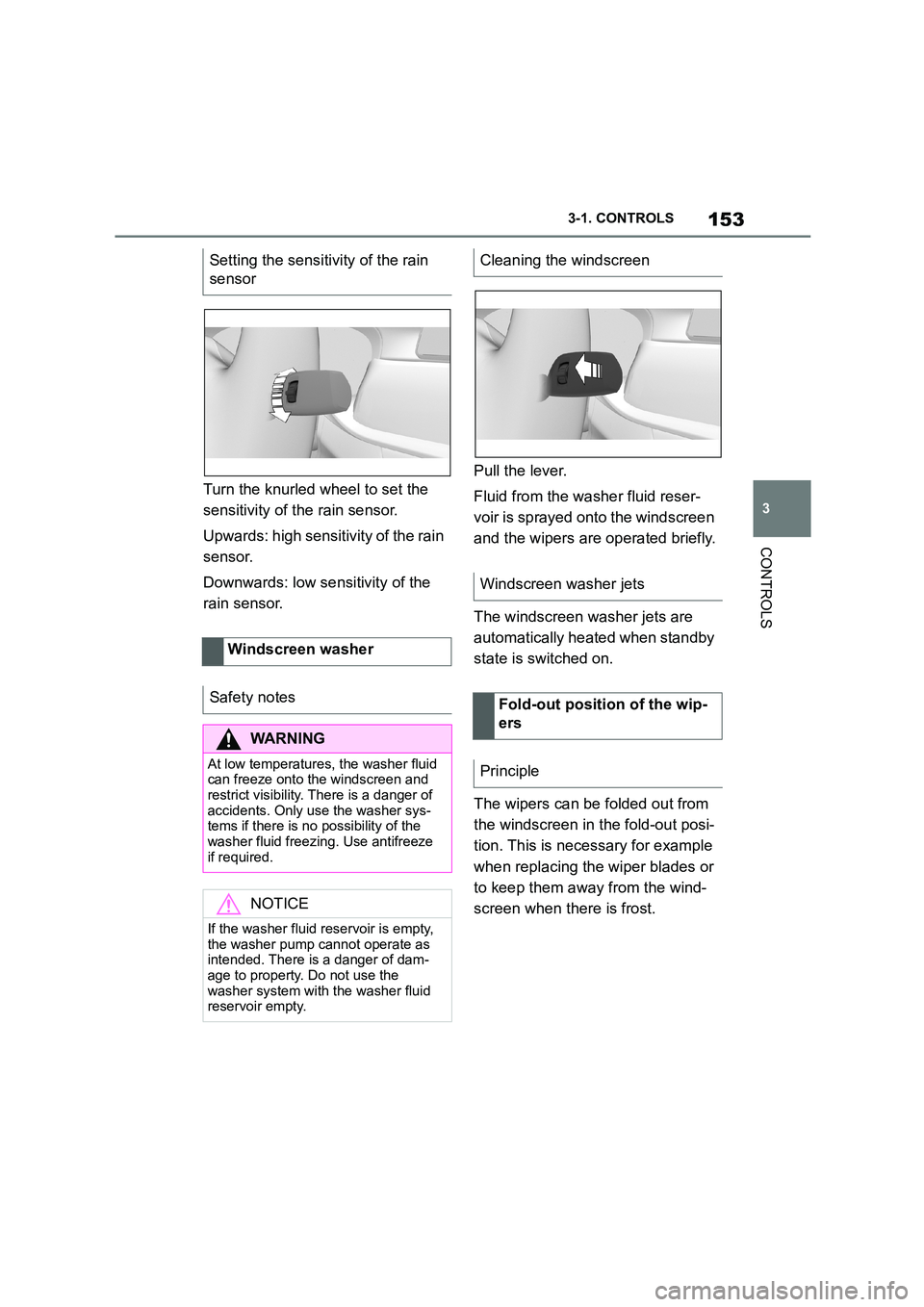
Turn the knurled wheel to set the
sensitivity of t he rain sensor.
Upwards: high sensitivity of the rain
sensor.
Downwards: low se nsitivity of the
rain sensor.
Pull the lever.
Fluid from the washer fluid reser-
voir is sprayed on to the windscreen
and the wipers are operated briefly.
The windscreen washer jets are
automatically heated when standby
state is switched on.
The wipers can be folded out from
the windscreen in the fold-out posi-
tion. This is necessary for example
when replacing the wiper blades or
to keep them away from the wind-
screen when there is frost.
Setting the sensitivity of the rain
sensor
Windscreen washer
Safety notes
WA R N I N G
At low temperatures, the washer fluid can freeze onto the windscreen and
restrict visibility. There is a danger of
accidents. Only use the washer sys- tems if there is no possibility of the
washer fluid freezing. Use antifreeze
if required.
NOTICE
If the washer fluid reservoir is empty,
the washer pump cannot operate as
intended. There is a danger of dam- age to property. Do not use the
washer system with the washer fluid
reservoir empty.
Cleaning the windscreen
Windscreen washer jets
Fold-out position of the wip-
ers
Principle
Page 156 of 498
1543-1. CONTROLS
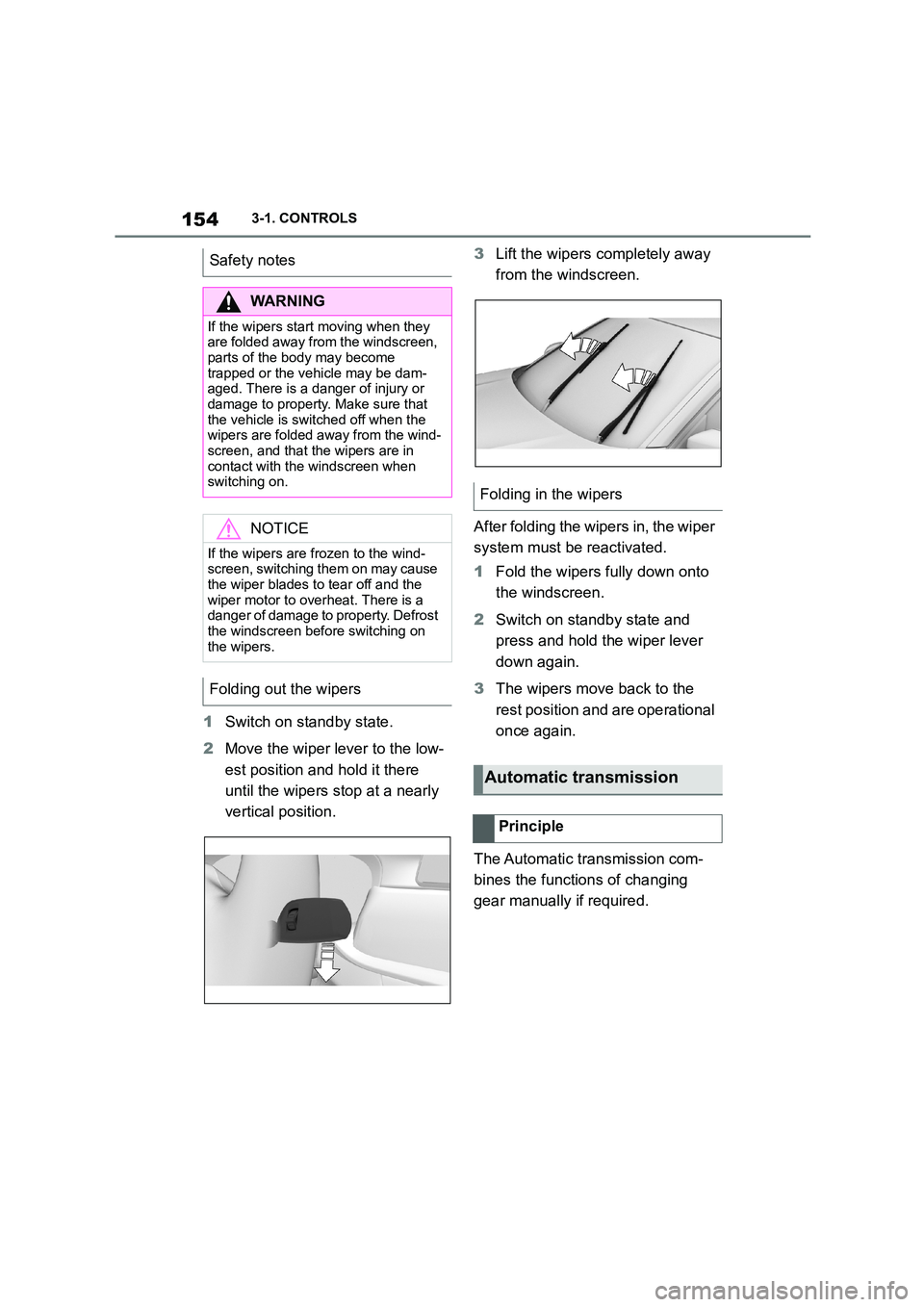
1Switch on standby state.
2 Move the wiper lever to the low-
est position and hold it there
until the wipers stop at a nearly
vertical position.
3 Lift the wipers completely away
from the windscreen.
After folding the wipers in, the wiper
system must be reactivated.
1 Fold the wipers fully down onto
the windscreen.
2 Switch on standby state and
press and hold the wiper lever
down again.
3 The wipers move back to the
rest position and are operational
once again.
The Automatic transmission com-
bines the functions of changing
gear manually if required.
Safety notes
WA R N I N G
If the wipers start moving when they
are folded away from the windscreen, parts of the body may become
trapped or the vehicle may be dam-
aged. There is a danger of injury or damage to property. Make sure that
the vehicle is switched off when the
wipers are folded away from the wind-
screen, and that the wipers are in contact with the windscreen when
switching on.
NOTICE
If the wipers are frozen to the wind-
screen, switching them on may cause
the wiper blades to tear off and the wiper motor to overheat. There is a
danger of damage to property. Defrost
the windscreen before switching on the wipers.
Folding out the wipers
Folding in the wipers
Automatic transmission
Principle
Page 323 of 498
321
5
5-1. MOBILITY
MOBILITY
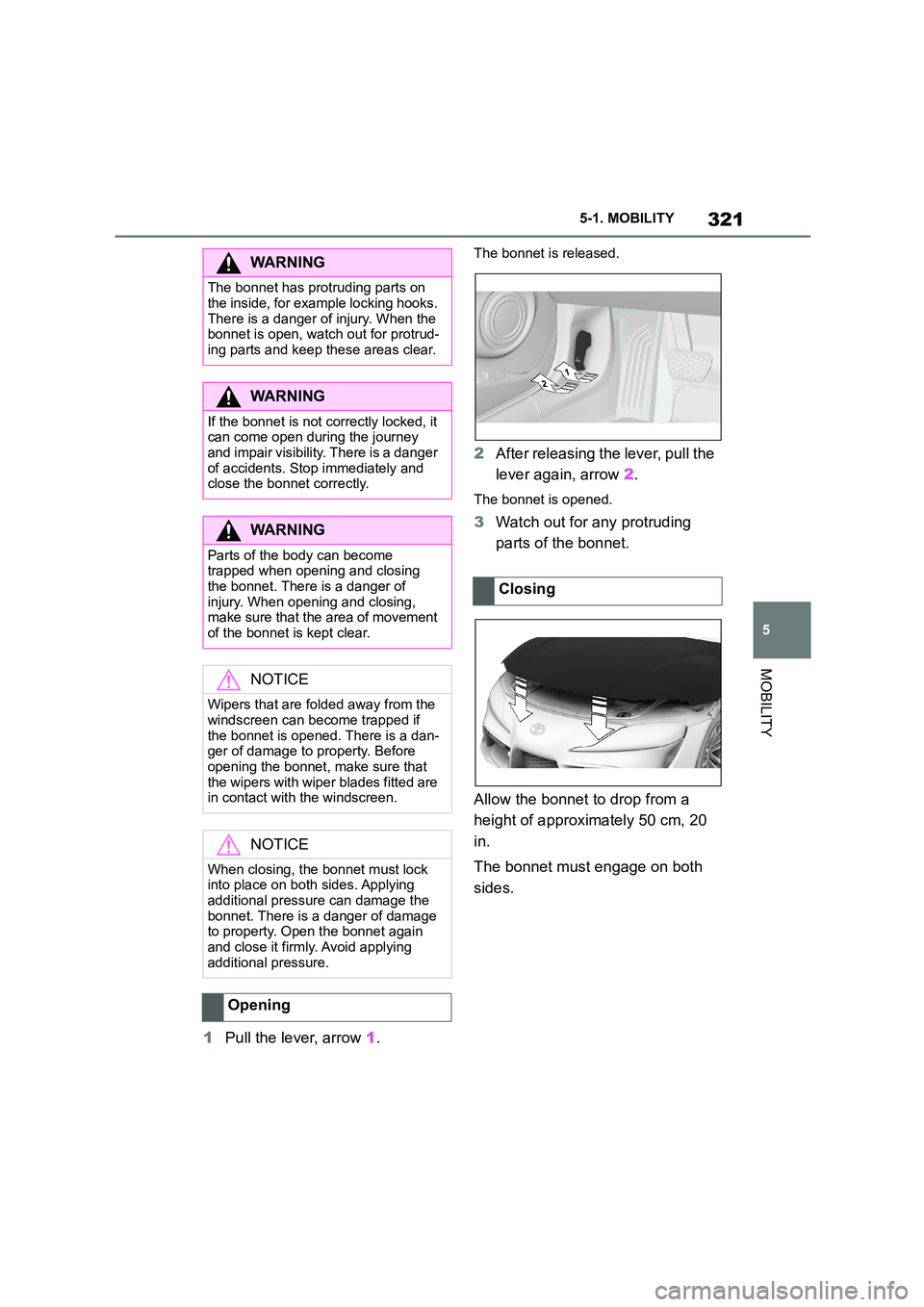
1 Pull the lever, arrow 1.
The bonnet is released.
2After releasing the lever, pull the
lever again, arrow 2.
The bonnet is opened.
3Watch out for any protruding
parts of the bonnet.
Allow the bonnet to drop from a
height of approximately 50 cm, 20
in.
The bonnet must engage on both
sides.
WA R N I N G
The bonnet has protruding parts on
the inside, for example locking hooks.
There is a danger of injury. When the bonnet is open, watch out for protrud-
ing parts and keep these areas clear.
WA R N I N G
If the bonnet is not correctly locked, it can come open during the journey
and impair visibility. There is a danger
of accidents. Stop immediately and close the bonnet correctly.
WA R N I N G
Parts of the body can become
trapped when opening and closing the bonnet. There is a danger of
injury. When opening and closing,
make sure that the area of movement of the bonnet is kept clear.
NOTICE
Wipers that are folded away from the
windscreen can become trapped if the bonnet is opened. There is a dan-
ger of damage to property. Before
opening the bonnet, make sure that the wipers with wiper blades fitted are
in contact with the windscreen.
NOTICE
When closing, the bonnet must lock into place on both sides. Applying
additional pressure can damage the
bonnet. There is a danger of damage to property. Open the bonnet again
and close it firmly. Avoid applying
additional pressure.
Opening
Closing
Page 341 of 498
339
5
5-1. MOBILITY
MOBILITY
This chapter describes all standard,
country-specific and special equip-
ment available for the model series.
It may therefore describe equip-
ment and functions which are not
installed in your vehicle, for exam-
ple on account of the special equip-
ment selected or the country
specification. This also applies to
safety-relevant functions and sys-
tems. Please comply with the rele-
vant laws and regulations when
using the corresponding functions
and systems.
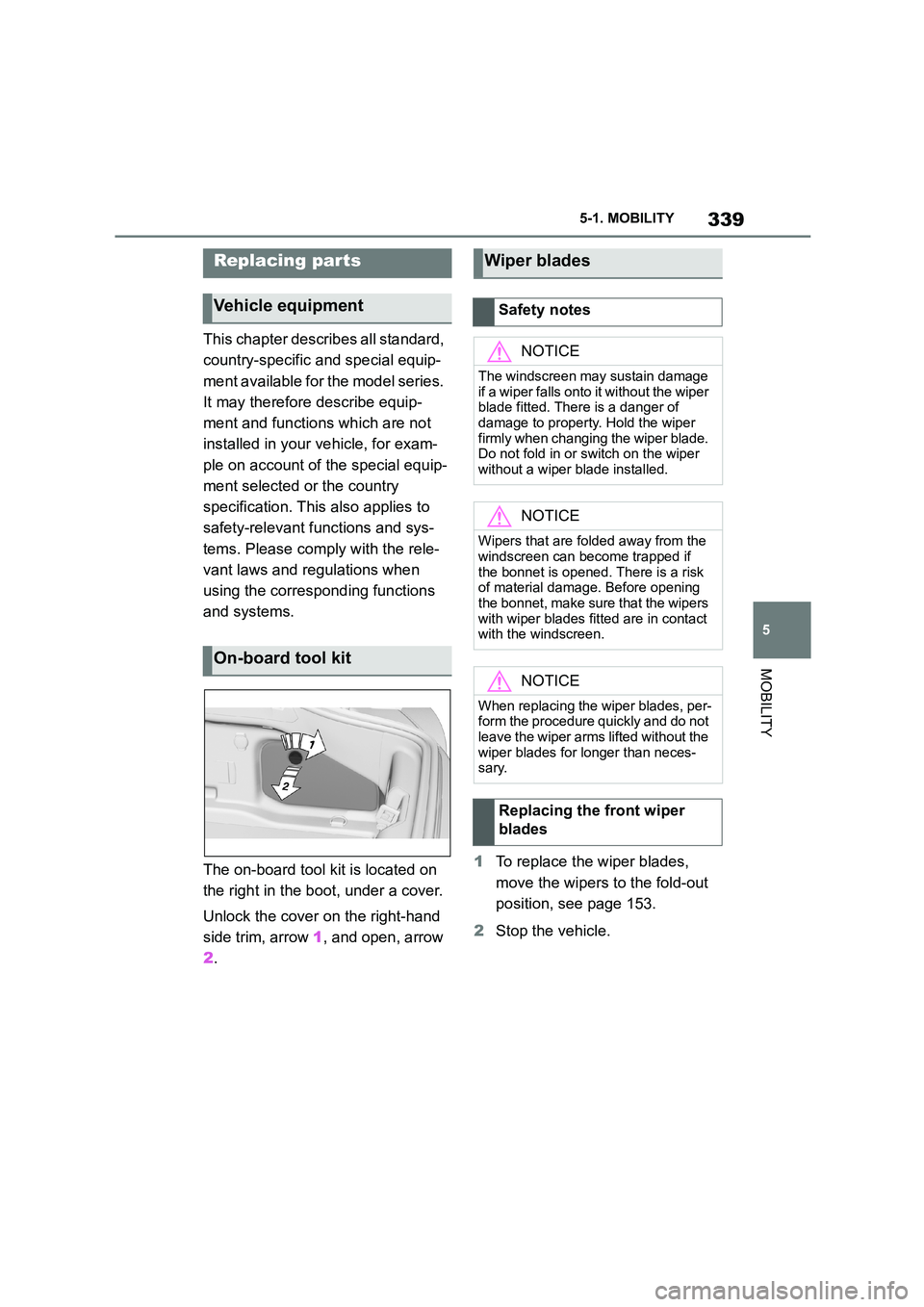
The on-board tool kit is located on
the right in the boot, under a cover.
Unlock the cover on the right-hand
side trim, arrow 1, and open, arrow
2 .
1 To replace the wiper blades,
move the wipers to the fold-out
position, see page 153.
2 Stop the vehicle.
Replacing par ts
Vehicle equipment
On-board tool kit
Wiper blades
Safety notes
NOTICE
The windscreen may sustain damage
if a wiper falls onto it without the wiper
blade fitted. There is a danger of
damage to property. Hold the wiper firmly when changing the wiper blade.
Do not fold in or switch on the wiper
without a wiper blade installed.
NOTICE
Wipers that are folded away from the
windscreen can become trapped if the bonnet is opened. There is a risk
of material damage. Before opening
the bonnet, make sure that the wipers with wiper blades fitted are in contact
with the windscreen.
NOTICE
When replacing the wiper blades, per- form the procedure quickly and do not
leave the wiper arms lifted without the
wiper blades for longer than neces- sary.
Replacing the front wiper
blades
Page 342 of 498
3405-1. MOBILITY
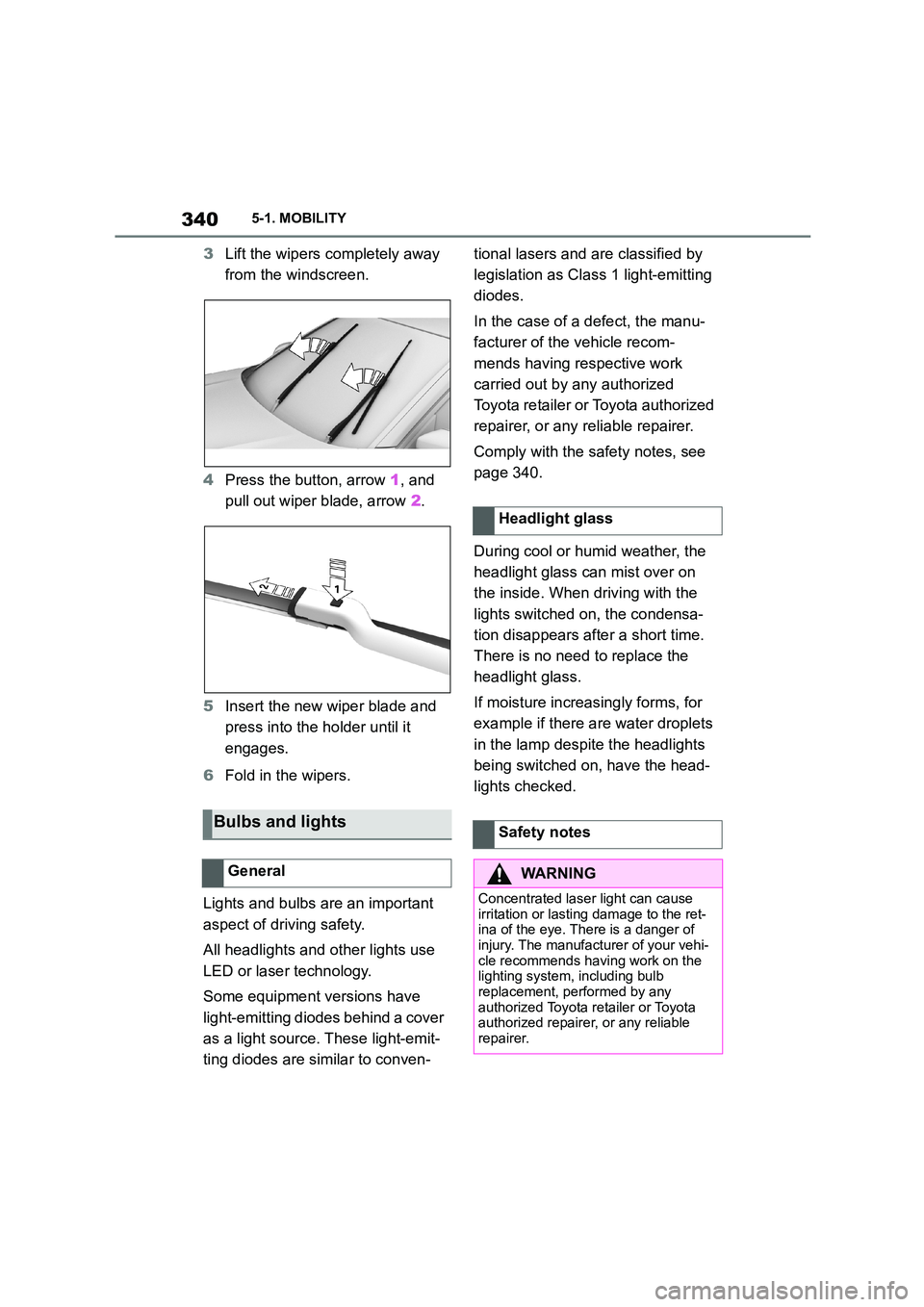
3Lift the wipers completely away
from the windscreen.
4 Press the button, arrow 1, and
pull out wiper blade, arrow 2.
5 Insert the new wiper blade and
press into the ho lder until it
engages.
6 Fold in the wipers.
Lights and bulbs are an important
aspect of driving safety.
All headlights and other lights use
LED or laser technology.
Some equipment versions have
light-emitting diodes behind a cover
as a light source. These light-emit-
ting diodes are similar to conven-
tional lasers and are classified by
legislation as Class 1 light-emitting
diodes.
In the case of a defect, the manu-
facturer of the vehicle recom-
mends having respective work
carried out by any authorized
Toyota retailer or Toyota authorized
repairer, or any reliable repairer.
Comply with the safety notes, see
page 340.
During cool or humid weather, the
headlight glass can mist over on
the inside. When driving with the
lights switched on, the condensa-
tion disappears after a short time.
There is no need to replace the
headlight glass.
If moisture increasingly forms, for
example if there are water droplets
in the lamp despite the headlights
being switched on, have the head-
lights checked.
Bulbs and lights
General
Headlight glass
Safety notes
WA R N I N G
Concentrated laser light can cause
irritation or lasting damage to the ret- ina of the eye. There is a danger of
injury. The manufacturer of your vehi-
cle recommends having work on the lighting system, including bulb
replacement, performed by any
authorized Toyota retailer or Toyota authorized repairer, or any reliable
repairer.