front VOLKSWAGEN T-ROC 2021 Owner´s Manual
[x] Cancel search | Manufacturer: VOLKSWAGEN, Model Year: 2021, Model line: T-ROC, Model: VOLKSWAGEN T-ROC 2021Pages: 502, PDF Size: 9.42 MB
Page 248 of 502

If the problem persists, switch off Front Assist and go to a qualified workshop.
Lane keeping system (Lane Assist)
Introduction
This chapter contains information on the followingsubjects:
⇒ Driving with the lane keeping system
⇒ Troubleshooting
The lane keeping system (Lane Assist) helps the driver stay in lane.
Using a camera in the windscreen, the lane departure warning system detects lane markings on the
road. If your vehicle moves too close to a recognised lane marking, the system will warn the driver
with a corrective steering intervention. The corrective steering intervention can be overridden by
the driver at any time.
Adaptive lane guidance (depending on vehicle equipment)
The adaptive lane guidance system detects the preferred position in a lane and keeps the vehicle in
this position.
Adaptive lane guidance is switched on and off in the Driver assistance menu in the Infotainment
system ⇒ Vehicle settings menu .
System limits
Use the lane keeping system only on motorways and good main roads.
The system is not active under the following conditions:
The lane keeping system has not detected any lane markings.
WARNING
The intelligent technology used in the lane keeping system cannot overcome the laws of physics, and
functions only within the limits of the system. Always take care when using the lane departure
warning system otherwise you could cause accidents or injuries. The system is not a substitute for
the full concentration of the driver.
Adapt your speed and distance from the vehicles ahead to suit visibility, weather, road and traffic
conditions.
Your hands should always be on the steering wheel so that you can steer at any time. The driver is
always responsible for staying in lane.
The lane keeping system cannot recognise all lane markings. Poor road surfaces, road structures or
objects could be recognised incorrectly as lane markings by the lane keeping system. The lane
keeping system should be switched off immediately in these situations.
Follow the information on the instrument cluster display and respond according to the commands.
Page 251 of 502

Traffic Jam Assist is an extension of the lane keeping system (Lane Assist) for vehicles with DSG ® and
combines its functions with the Adaptive Cruise Control (ACC). Please therefore read both these
chapters and observe the information about the system limits and warnings.
Traffic Jam Assist function
Traffic Jam Assist can maintain a time interval set by the driver to a vehicle in front and help the
vehicle to stay in lane ⇒ .
The system automatically controls acceleration, braking, steering and, if required, will decelerate to
a stop behind a vehicle that is stopping, and then pull away again automatically.
Use Traffic Jam Assist only on motorways and good main roads. Do not use Traffic Jam Assist in
urban traffic.
Switching Traffic Jam Assist on and off
Traffic Jam Assist is switched on and off together with the adaptive lane guidance of the lane
keeping system in the Infotainment system ⇒ Vehicle settings menu .
Traffic Jam Assist can also be switched off together with the lane keeping system via the button for
driver assist systems ⇒ Button for driver assist systems .
Technical requirements for using Traffic Jam Assist
The lane keeping system is switched on and active together with adaptive lane guidance ⇒ Driving
with the lane keeping system .
Adaptive Cruise Control (ACC) is switched on and active ⇒ Switching ACC on and off .
The selector lever is in position D/S or in the Tiptronic gate.
The system has detected a lane marking on both the right and left sides of the vehicle ⇒ Fig. 123① .
The speed is under 60 km/h (35 mph).
Traffic Jam Assist is not active (indicator lamp for the lane keeping system lights up yellow)
As soon as one of the conditions indicated in ⇒ Technical requirements for using Traffic Jam Assist is
no longer fulfilled.
If one of the conditions for the proper functioning of the lane keeping system is no longer fulfilled
⇒ .
If one of the conditions for the proper functioning of the Adaptive Cruise Control (ACC) is no longer
fulfilled ⇒ Limits of ACC .
Switch off Traffic Jam Assist in the following situations
Traffic Jam Assist should always be switched off in the following situations due to system limitations:
When a high level of concentration is required by the driver.
Very sporty driving.
In poor weather conditions, e.g. snow or heavy rain.
Page 256 of 502

Function
When switched on, the Blind Spot Monitor is active from a speed of approx. 15 km/h (9 mph).
In the following driving situations, the yellow indicator lamp will light up in the corresponding
exterior mirror: ⇒ Fig. 124
If your vehicle is being overtaken.
When overtaking another vehicle with a speed difference of up to approximately 10 km/h (6 mph).
No display will be shown if the takeover manoeuvre is much faster.
If a vehicle is detected in the blind spot and the turn signal is additionally activated in the direction
of the detected vehicle ⇒ , the yellow indicator lamp will flash.
In vehicles with the lane keeping system, the yellow indicator lamp will flash even if you do not
activate the turn signal when leaving your lane, provided that the lane keeping system is switched on
(Blind Spot Monitor Plus). The driver is warned by a corrective steering intervention when changing
lanes during a possible critical situation (information level, warning level). This also occurs when the
turn signal is activated for the corresponding direction. If the steering intervention is overridden by
the driver, the steering wheel vibrates to give an additional warning.
The quicker another vehicle approaches, the earlier there is a corresponding display in the exterior
mirror.
Automatic deactivation
The radar sensors for the Blind Spot Monitor will switch off automatically if, for example, the system
detects that a radar sensor is continuously covered. This can be caused by a layer of ice or snow in
front of the radar sensor, for example.
A text message will be shown on the instrument cluster display.
If the Blind Spot Monitor has been automatically deactivated, the system cannot be activated until
the ignition has been switched off and back on again.
The Blind Spot Monitor is automatically deactivated and cannot be activated when the factory-fitted
towing bracket is electrically connected to a trailer or similar ⇒ Trailer towing . Once a trailer is
electrically connected to the vehicle and the driver pulls away, a text message appears in the
instrument cluster display to inform the driver that the Blind Spot Monitor has been deactivated.
The Blind Spot Monitor will be automatically activated again when the trailer has been unhitched
from the vehicle. This applies if the function was previously activated. The Blind Spot Monitor must
be deactivated manually if you tow a trailer using a towing bracket that was not fitted at the factory.
Troubleshooting
First read and observe the introductoryinformation and safety warnings⇒Introduction
Blind Spot Monitor is not working
The indicator lamp lights up yellow.
Go to a qualified workshop.
Page 257 of 502

System fault
Clean the radar sensors or remove stickers or accessories from the radar sensors, mirrors and
bumper ⇒ Caring for and cleaning the vehicle exterior .
Check whether any damage is visible.
The system is not responding as expected
The radar sensors are dirty. The sensor visibility may be impaired by dirt and snow or also residue
from cleaning agents or coatings ⇒ Caring for and cleaning the vehicle exterior .
The prerequisites for system operation must be met ⇒ System limits .
The radar sensors are covered by water.
The vehicle is damaged in the area of the radar sensors, e.g. caused by parking collisions.
The detection ranges of the radar sensors are blocked by add-on parts, e.g. bicycle carriers.
Changes have been made to the paintwork in the area of the radar sensors or structural
modifications have been made, e.g. on the vehicle front end or the running gear.
Only Volkswagen-approved vehicle paints may be used on the rear bumper. Other vehicle paints can
restrict the function of the system or cause faults.
Tinting foils have been retrofitted on the side windows.
Parking and manoeuvring
Parking
Stopping and parking the vehicle
The actions should be carried out only in the given order:
Stop the vehicle on a suitable surface ⇒ .
Depress and hold the brake pedal until the engine has stopped.
Switch on the electronic parking brake ⇒ Electronic parking brake . The electronic parking brake is
switched on when the indicator lamp in the button ⇒ Fig. 125 lights up yellow and the indicator
lamp in the instrument cluster display lights up red.
On vehicles with a manual gearbox, either fully depress or disengage the clutch.
With an automatic gearbox, move the selector lever to position P.
Switch off the engine and take your foot off the brake pedal.
Turn the steering wheel slightly if necessary to engage the steering lock mechanism.
With a manual gearbox, select first gear for flat ground and uphill gradients, or reverse gear for
downhill gradients, and then release the clutch.
Please ensure that all occupants, in particular children, leave the vehicle.
Page 258 of 502

Take all vehicle keys with you when you leave the vehicle.
Lock the vehicle.
Additional points to note on uphill and downhill gradients
Before switching off the engine, turn the steering wheel so that the front wheels will roll against the
kerb if the parked vehicle starts to move.
When facing downhill, turn the wheels so that they face the kerb.
When facing uphill, turn the wheels so that they face the centre of the road.
WARNING
The components of the exhaust system become very hot. This can cause fires and serious injuries.
Never park the vehicle where parts of the exhaust system can come into contact with inflammable
material underneath the vehicle, e.g. undergrowth, leaves, dry grass, spilt fuel, oil etc.
WARNING
The vehicle may roll away if you leave and park the vehicle incorrectly. This can cause accidents and
serious injuries.
Ensure that the electronic parking brake is switched on before you leave the vehicle and the
indicator lamp in the instrument cluster lights up red after you switch off the ignition.
Never remove the vehicle key from the ignition if the vehicle is in motion. The steering lock may be
activated and you will no longer be able to steer or control the vehicle.
Never leave children or people requiring assistance alone in the vehicle. They could switch off the
electronic parking brake, or move the selector lever or gearshift lever, and thus set the vehicle in
motion.
Always take all vehicle keys with you every time you leave the vehicle. The engine can be started and
electrical equipment such as the window controls can be operated. This can cause serious injury.
Never leave children or people requiring assistance alone in the vehicle. They could become trapped
in the vehicle in an emergency and may not be able to get themselves to safety. For example, locked
vehicles may be subjected to very high or very low temperatures depending on the season. This can
cause serious injuries and illness or fatalities, especially in the case of small children.
NOTICE
Objects that protrude from the ground can damage the bumper and other components when
parking the vehicle or driving out of a parking space. Always take care when driving into parking
spaces with high kerbs or fixed boundaries. Stop before the wheels touch the fixed boundaries or
kerbs.
Page 264 of 502
When approaching objects at high speeds, the signals and displays of the parking systems may not
respond quickly enough to issue a warning.
Volkswagen recommends that drivers practise using the parking systems in a traffic-calmed area or
car park to allow them to familiarise themselves with the systems and their functions.
Park Distance Control
Introduction
This chapter contains information on the followingsubjects:
⇒ Switching on and off
⇒ Display representation
⇒ Troubleshooting
The Park Distance Control system assists the driver when manoeuvring and parking.
Park Distance Control detects the distance from an obstacle by means of sensors in the front and
rear areas of the vehicle. If there is an obstacle in the detection range of the sensors, the system
indicates this on the Infotainment system and by means of signal tones.
Settings
With some equipment levels, settings for Park Distance Control can be made in the Infotainment
system ⇒ Infotainment system controls and displays .
You can save some settings in the user accounts of the personalisation function. The settings change
automatically when the user account is changed ⇒ Personalisation .
Switching on and off
Fig. 127 In the centre console: button for switching Park Distance Control on and off (depending on
equipment).
First read and observe the introductoryinformation and safety warnings⇒Introduction
Switching on Park Distance Control
Press the button.
Page 265 of 502

Park Distance Control is switched on automatically when reverse gear is engaged or if the vehicle
rolls backwards.
With some equipment levels, Park Distance Control can also be activated automatically when driving
forwards ⇒ Automatic activation when driving forwards (with some equipment levels) .
Switching off Park Distance Control
Press the button.
Park Distance Control is switched off automatically when the vehicle is driven forwards at a speed of
more than 10–15 km/h (6–9 mph.
OR: the selector lever is moved to P position.
Automatic activation when driving forwards (with some equipment levels)
Park Distance Control also switches itself on automatically if the vehicle approaches an obstacle in
the front area of the vehicle when driving forwards at a speed of less than 15 km/h (9 mph).
Automatic activation can be switched on in the Infotainment system.
Automatic activation takes place only once. Renewed automatic activation is possible under the
following conditions:
Press the button.
Switch the ignition off and then back on again.
Manoeuvre braking
If the vehicle is equipped with manoeuvre braking, the manoeuvre braking function triggers
emergency braking as soon as an obstacle is detected while reversing.
Depending on the vehicle equipment, the manoeuvre braking function can also trigger emergency
braking when driving forwards.
The manoeuvre braking function helps to prevent collisions. The vehicle speed must not be higher
than 10 km/h (6 mph). The manoeuvre braking function is activated or deactivated when Park
Distance Control is switched on or off. The manoeuvre braking function is inactive for five metres
after a braking operation in the same direction of travel. The manoeuvre braking function is ready
for braking again after changing gear or position. The same restrictions apply as to Park Distance
Control.
Manoeuvre braking is not active if Park Distance Control was activated automatically.
Touch the function button in the Infotainment system to switch manoeuvre braking on and off.
Display representation
Page 266 of 502
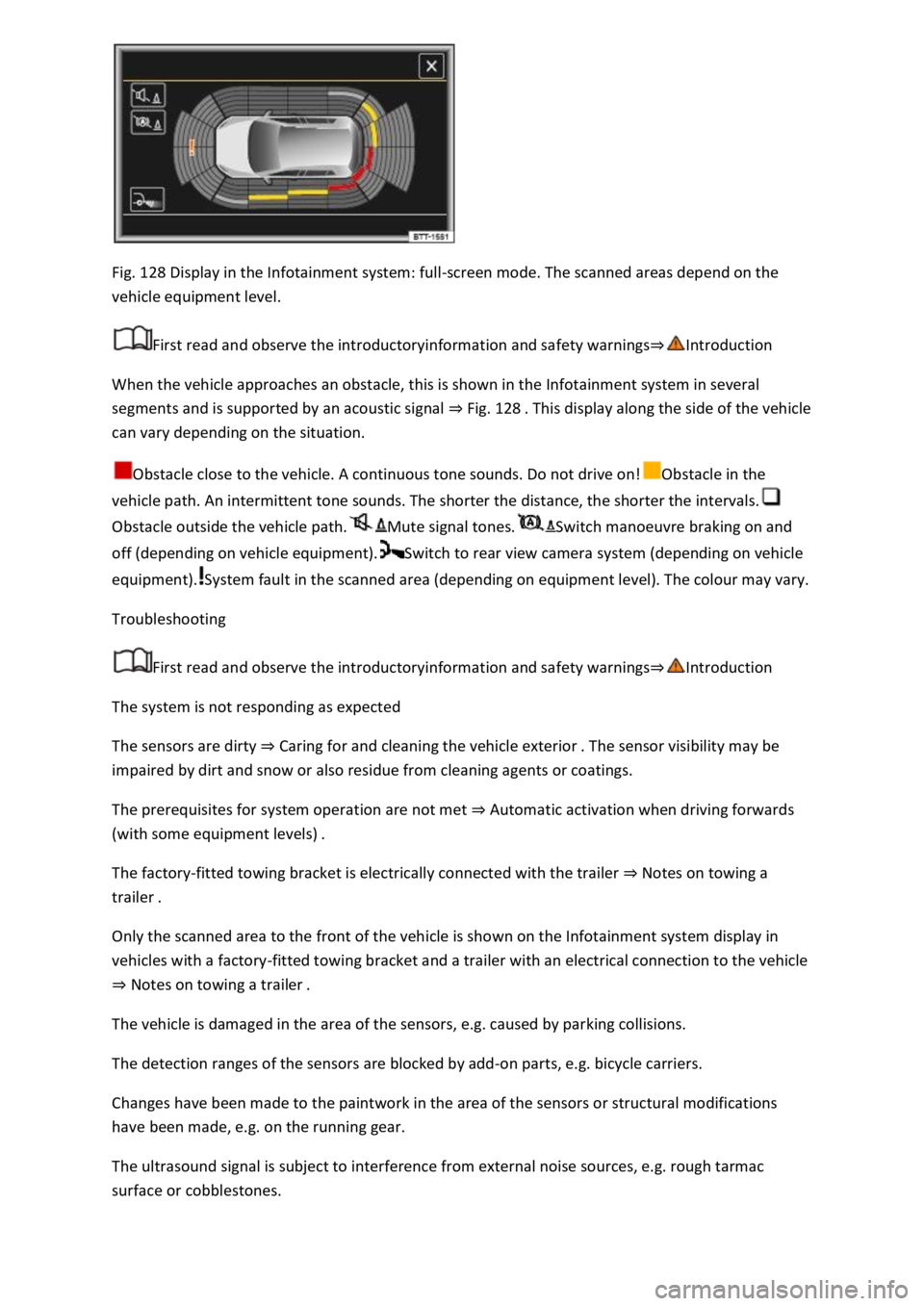
Fig. 128 Display in the Infotainment system: full-screen mode. The scanned areas depend on the
vehicle equipment level.
First read and observe the introductoryinformation and safety warnings⇒Introduction
When the vehicle approaches an obstacle, this is shown in the Infotainment system in several
segments and is supported by an acoustic signal ⇒ Fig. 128 . This display along the side of the vehicle
can vary depending on the situation.
Obstacle close to the vehicle. A continuous tone sounds. Do not drive on!Obstacle in the
vehicle path. An intermittent tone sounds. The shorter the distance, the shorter the intervals.
Obstacle outside the vehicle path.Mute signal tones.Switch manoeuvre braking on and
off (depending on vehicle equipment).Switch to rear view camera system (depending on vehicle
equipment).System fault in the scanned area (depending on equipment level). The colour may vary.
Troubleshooting
First read and observe the introductoryinformation and safety warnings⇒Introduction
The system is not responding as expected
The sensors are dirty ⇒ Caring for and cleaning the vehicle exterior . The sensor visibility may be
impaired by dirt and snow or also residue from cleaning agents or coatings.
The prerequisites for system operation are not met ⇒ Automatic activation when driving forwards
(with some equipment levels) .
The factory-fitted towing bracket is electrically connected with the trailer ⇒ Notes on towing a
trailer .
Only the scanned area to the front of the vehicle is shown on the Infotainment system display in
vehicles with a factory-fitted towing bracket and a trailer with an electrical connection to the vehicle
⇒ Notes on towing a trailer .
The vehicle is damaged in the area of the sensors, e.g. caused by parking collisions.
The detection ranges of the sensors are blocked by add-on parts, e.g. bicycle carriers.
Changes have been made to the paintwork in the area of the sensors or structural modifications
have been made, e.g. on the running gear.
The ultrasound signal is subject to interference from external noise sources, e.g. rough tarmac
surface or cobblestones.
Page 269 of 502
Parking
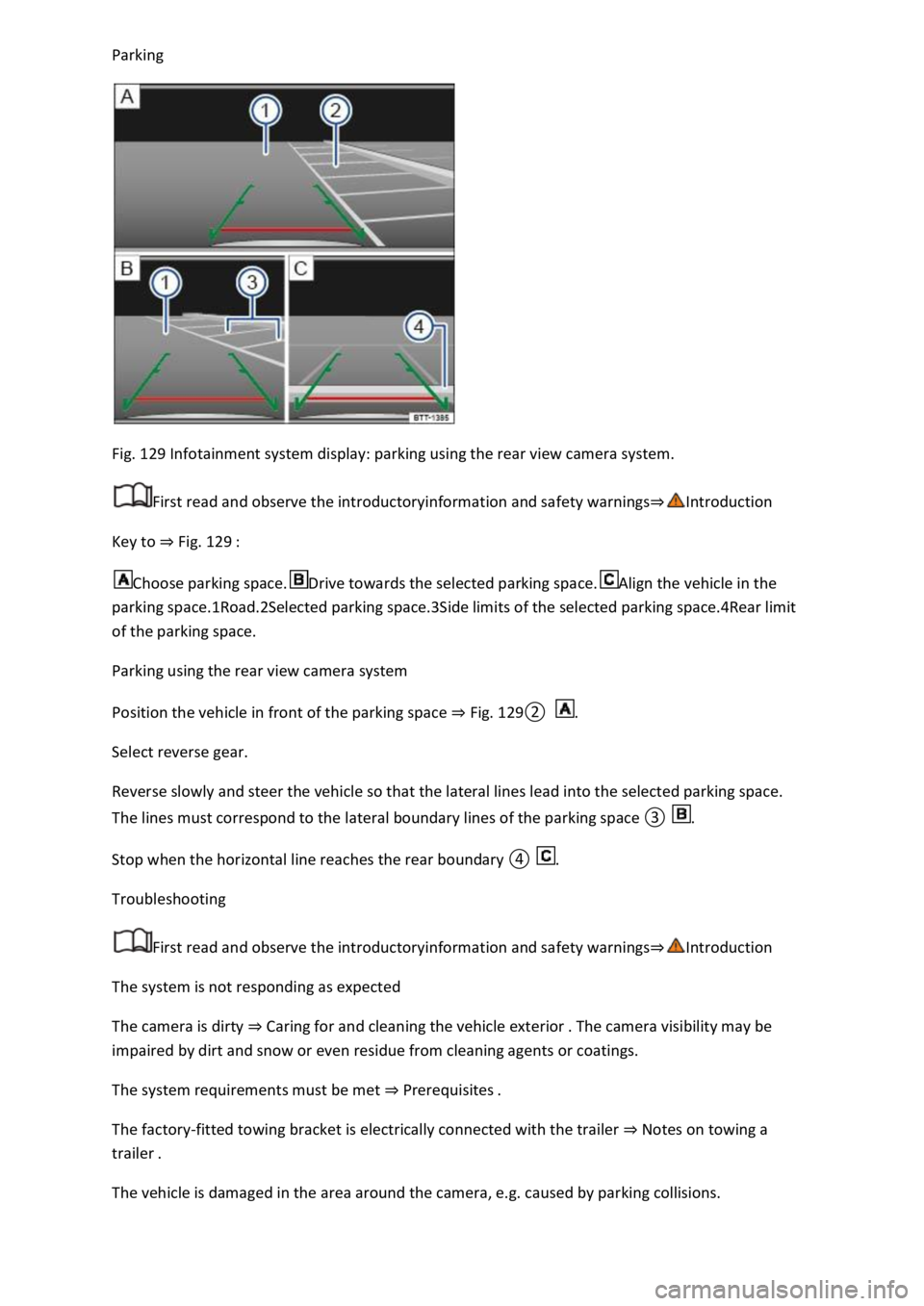
Fig. 129 Infotainment system display: parking using the rear view camera system.
First read and observe the introductoryinformation and safety warnings⇒Introduction
Key to ⇒ Fig. 129 :
Choose parking space.Drive towards the selected parking space.Align the vehicle in the
parking space.1Road.2Selected parking space.3Side limits of the selected parking space.4Rear limit
of the parking space.
Parking using the rear view camera system
Position the vehicle in front of the parking space ⇒ Fig. 129② .
Select reverse gear.
Reverse slowly and steer the vehicle so that the lateral lines lead into the selected parking space.
The lines must correspond to the lateral boundary lines of the parking space ③ .
Stop when the horizontal line reaches the rear boundary ④ .
Troubleshooting
First read and observe the introductoryinformation and safety warnings⇒Introduction
The system is not responding as expected
The camera is dirty ⇒ Caring for and cleaning the vehicle exterior . The camera visibility may be
impaired by dirt and snow or even residue from cleaning agents or coatings.
The system requirements must be met ⇒ Prerequisites .
The factory-fitted towing bracket is electrically connected with the trailer ⇒ Notes on towing a
trailer .
The vehicle is damaged in the area around the camera, e.g. caused by parking collisions.
Page 272 of 502
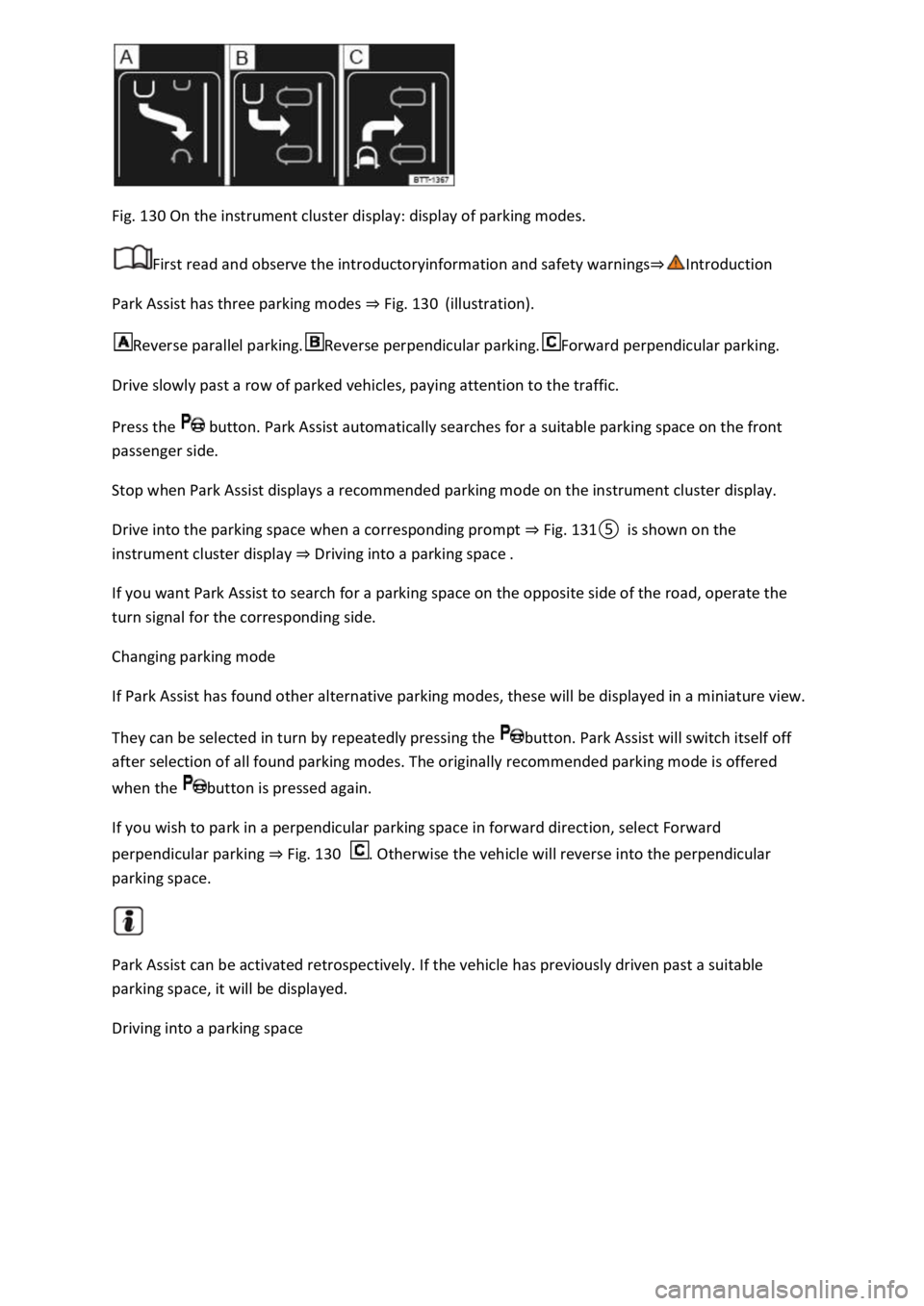
Fig. 130 On the instrument cluster display: display of parking modes.
First read and observe the introductoryinformation and safety warnings⇒Introduction
Park Assist has three parking modes ⇒ Fig. 130 (illustration).
Reverse parallel parking.Reverse perpendicular parking.Forward perpendicular parking.
Drive slowly past a row of parked vehicles, paying attention to the traffic.
Press the button. Park Assist automatically searches for a suitable parking space on the front
passenger side.
Stop when Park Assist displays a recommended parking mode on the instrument cluster display.
Drive into the parking space when a corresponding prompt ⇒ Fig. 131⑤ is shown on the
instrument cluster display ⇒ Driving into a parking space .
If you want Park Assist to search for a parking space on the opposite side of the road, operate the
turn signal for the corresponding side.
Changing parking mode
If Park Assist has found other alternative parking modes, these will be displayed in a miniature view.
They can be selected in turn by repeatedly pressing the button. Park Assist will switch itself off
after selection of all found parking modes. The originally recommended parking mode is offered
when the button is pressed again.
If you wish to park in a perpendicular parking space in forward direction, select Forward
perpendicular parking ⇒ Fig. 130 . Otherwise the vehicle will reverse into the perpendicular
parking space.
Park Assist can be activated retrospectively. If the vehicle has previously driven past a suitable
parking space, it will be displayed.
Driving into a parking space