front VOLKSWAGEN T-ROC 2021 Owner´s Manual
[x] Cancel search | Manufacturer: VOLKSWAGEN, Model Year: 2021, Model line: T-ROC, Model: VOLKSWAGEN T-ROC 2021Pages: 502, PDF Size: 9.42 MB
Page 235 of 502
If automatic deceleration by ACC is not sufficient, ACC will request you to brake additionally by a
corresponding message on the instrument cluster. In addition, the red warning lamp lights up
and an acoustic warning is given. Brake immediately!
Radar sensor
ACC detects driving situations by means of the radar sensor at the front of the vehicle ⇒ Front view .
The radar sensor has a range of up to approximately 120 m.
WARNING
The intelligent technology used in the ACC cannot overcome the laws of physics, and functions only
within the limits of the system. Never let the extra convenience tempt you into taking safety risks
when driving. Careless or unintentional use of the Adaptive Cruise Control (ACC) can cause accidents
and lead to serious injury. The system is not a substitute for the full concentration of the driver.
Adapt your speed and distance from the vehicles ahead to suit visibility, weather, road and traffic
conditions.
Never use the ACC in poor visibility, on steep or winding roads, or on slippery road surfaces e.g. due
to snow, ice, wet roads, loose chippings, or on flooded roads.
Never use the ACC offroad or on non-surfaced roads. The ACC is designed for use on surfaced roads
only.
The ACC will not react to stationary vehicles.
The ACC will not react to persons, animals or vehicles crossing or approaching in the same lane.
Brake immediately if speed reduction by ACC is not sufficient.
Brake immediately if a request to brake appears on the instrument cluster display.
Brake if the vehicle starts rolling unintentionally after a request to brake.
Be prepared to control the speed yourself at all times.
Special driving situations
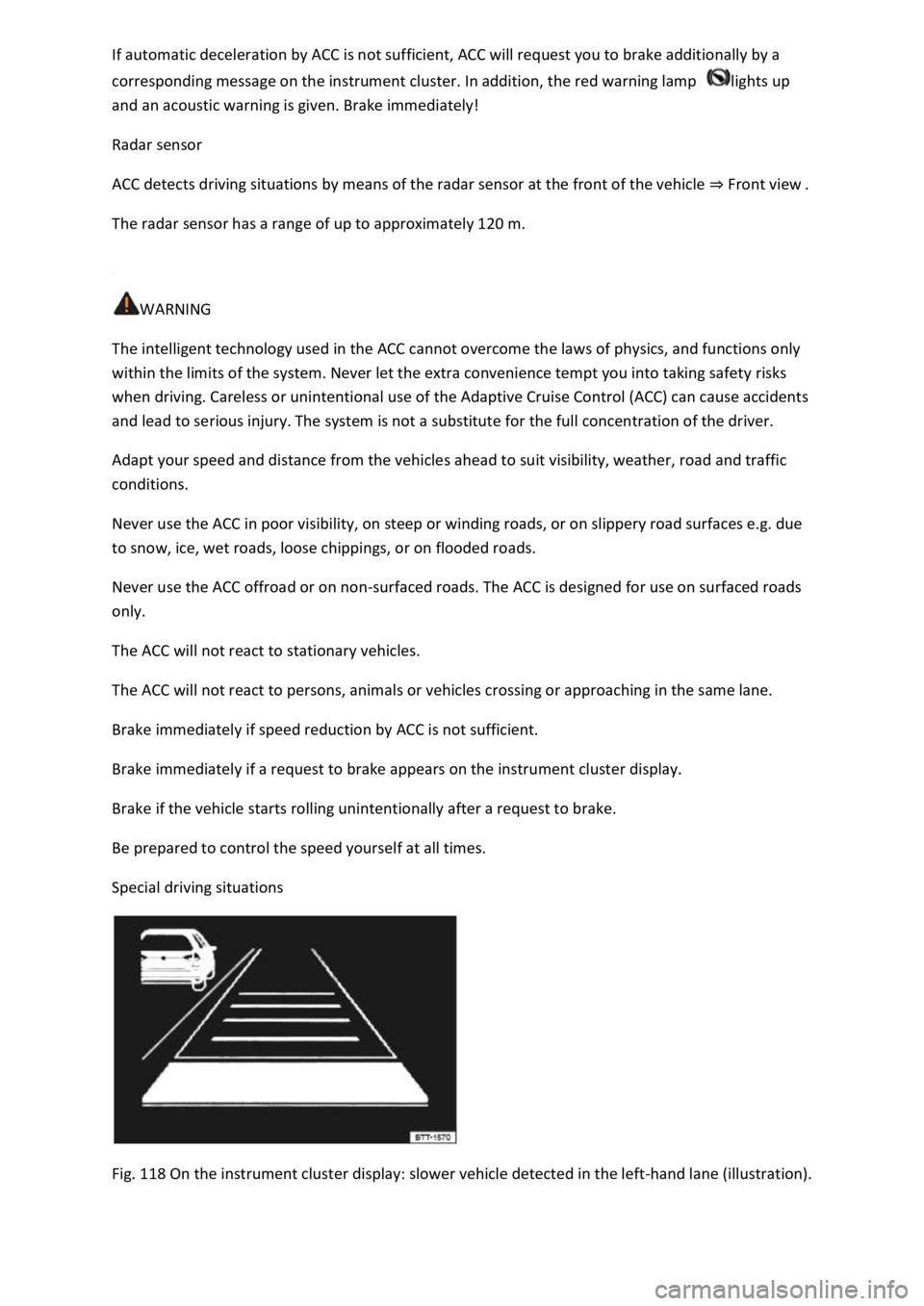
Fig. 118 On the instrument cluster display: slower vehicle detected in the left-hand lane (illustration).
Page 236 of 502

First read and observe the introductoryinformation and safety warnings⇒Introduction
Overtaking
If you indicate left (left-hand traffic: indicate right) to overtake, ACC will accelerate the vehicle and
reduce the distance from the vehicle in front. Your set speed will not be exceeded.
If ACC does not detect any vehicle in front after you have changed lane, ACC will accelerate the
vehicle up to the set speed.
Stop-and-go traffic
ACC can brake vehicles with DSG® dual clutch gearbox to a standstill and hold them stationary. ACC
remains active and the instrument cluster display shows ACC ready for a few seconds. During this
time the vehicle will move off again automatically as soon as the vehicle in front moves off
(depending on the vehicle equipment level and not available in all countries).
Press the button.
Press the button or briefly press the accelerator.
The vehicle is stationary for longer than approximately three minutes.
A vehicle door is opened.
The ignition is switched off.
Avoiding overtaking on the right (left-hand traffic: overtaking on the left)
If ACC detects a slower vehicle in the left-hand lane (left-hand traffic: in the right-hand lane), ACC
will brake the vehicle gently within the system limits and therefore prevent a prohibited overtaking
manoeuvre ⇒ Fig. 118 . The function is active from speeds of around 80 km/h (50 mph), but is not
available in all countries.
WARNING
If the message ACC ready is shown on the instrument cluster display and the vehicle in front moves
off, your vehicle will move off automatically. In some cases the radar sensor may be unable to detect
obstacles that are located in the vehicle's path. This can result in serious injury and accidents.
Always check the road ahead before moving off and brake the vehicle if necessary.
Limits of ACC
Page 238 of 502
If the radar sensor is exposed to environmental conditions that impair sensor functioning, the
system may detect this only after a certain time. For this reason, possible functional restrictions may
be displayed only after a delay at the start of the journey and when driving ⇒ .
Objects that cannot be detected
Persons.
Animals.
Stationary vehicles.
Crossing or oncoming vehicles.
Other stationary obstacles.
If a stationary vehicle is hidden behind a vehicle that has been detected by the adaptive cruise
control and this vehicle turns off the road or changes lane, the ACC will not react to the stationary
vehicle ⇒ Fig. 120 .
Bends
The radar sensor always measures straight ahead. For this reason, vehicles may be incorrectly
detected or vehicles driving ahead not detected in tight bends ⇒ Fig. 119 .
Vehicles outside the sensor range
Vehicles that are driving outside the sensor range in close proximity to your vehicle, e.g. motorbikes
⇒ Fig. 119 .
Vehicles that change into your lane directly in front of your vehicle ⇒ Fig. 120 .
Vehicles with bodies or attachments that project beyond the vehicle.
WARNING
If you use ACC in the above situations, this can result in accidents and serious injuries as well as
violation of legal regulations.
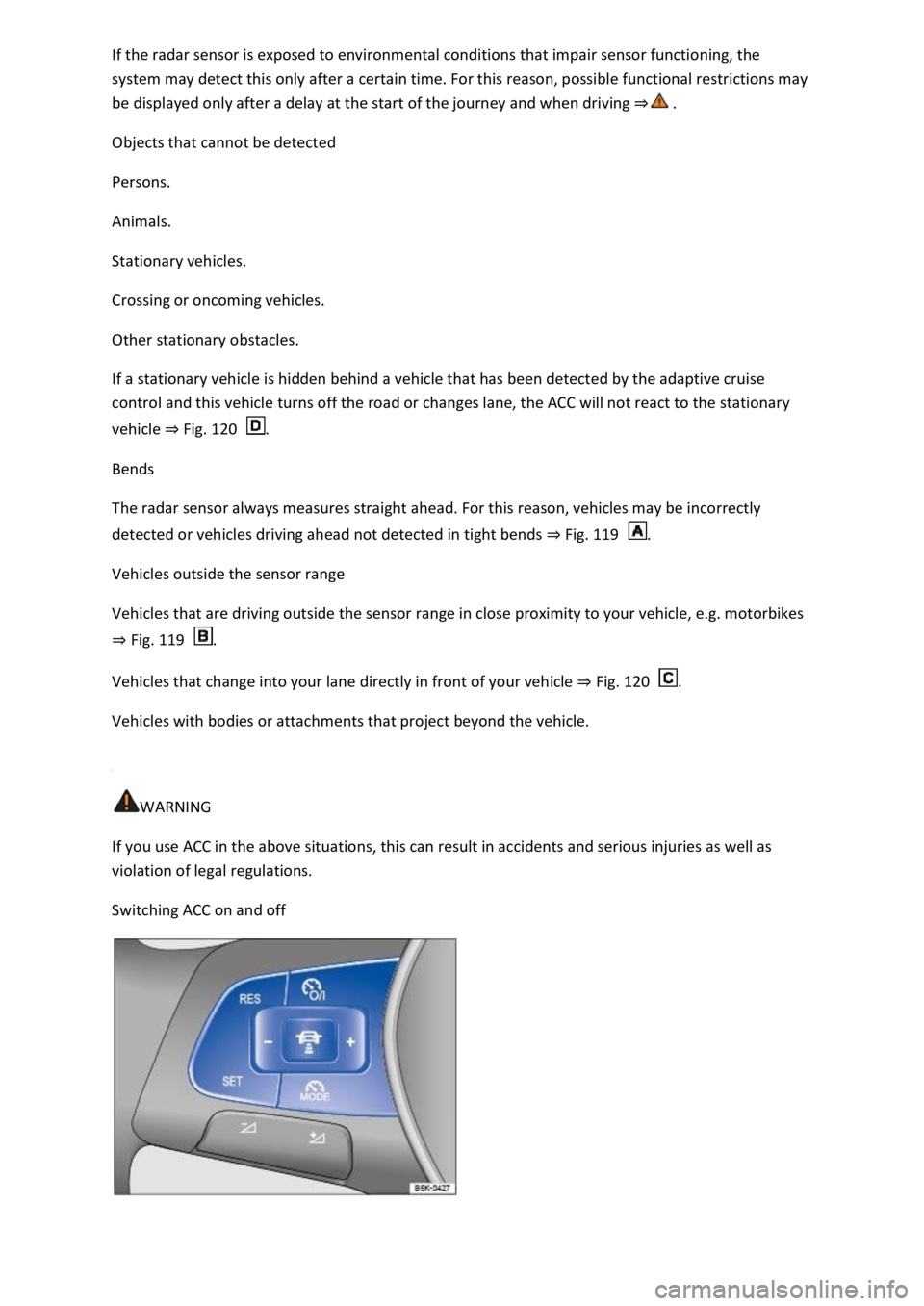
Switching ACC on and off
Page 241 of 502

WARNING
If you do not maintain the minimum distance to a vehicle in front and the difference in speed
between the vehicle in front and your own vehicle is so great that the braking action of the ACC is
insufficient, you are in danger of colliding with the vehicle in front. The braking distance is also
longer in rain and winter road conditions.
ACC may not be able to detect all driving situations correctly.
Always be prepared to brake the vehicle yourself.
Speed and distance control are overridden when you press the accelerator. ACC does not brake
automatically in this case.
Observe any country-specific regulations relating to the minimum distance.
Always set a larger distance in wet or snowy conditions or when visibility is poor.
Some settings can be stored in the user accounts of the personalisation function and therefore
change automatically when the user account changes ⇒ Personalisation .
Troubleshooting
First read and observe the introductoryinformation and safety warnings⇒Introduction
ACC not available.
The indicator lamp lights up yellow.
The radar sensor is dirty. Clean the radar sensor ⇒ Vehicle care .
The visibility of the radar sensor is impaired due to the weather conditions, e.g. snow, or due to
detergent deposits or coatings. Clean the radar sensor ⇒ Vehicle care .
The visibility of the radar sensor is impaired by add-on parts, the trim frames of number plate
holders or stickers. Keep the area around the radar sensor free.
The radar sensor has been displaced or damaged, e.g. due to damage to the front of the vehicle.
Check whether damage is visible ⇒ Repairs and technical modifications .
Fault or malfunction. Switch off and restart the engine.
Structural modifications have been made to the front of the vehicle.
The genuine Volkswagen badge is not used.
If the problem persists, go to a qualified workshop.
ACC does not function as expected.
The radar sensor is dirty. Clean the radar sensor ⇒ Vehicle care .
The system limits are not met ⇒ Limits of ACC .
Page 242 of 502

The brakes have overheated, control was interrupted automatically. Allow the brakes to cool down
and check functioning again.
If the problem persists, go to a qualified workshop.
Control cannot be started.
A forward gear other than first gear is selected (manual gearbox) or the selector lever is in selector
lever position D/S or the Tiptronic gate.
The speed is at least 25 km/h (16 mph) in the case of vehicles with manual gearbox.
The brake lights on the vehicle and trailer ⇒ are working.
ESC is not regulating.
The brake pedal is not depressed.
Unusual noises during automatic braking.
This is normal and is not a fault.
Area monitoring system (Front Assist)
Introduction
This chapter contains information on the followingsubjects:
⇒ Warning levels and braking intervention
⇒ Limits of Front Assist
⇒ Pedestrian Monitoring
⇒ Operating the area monitoring system (Front Assist)
⇒ Troubleshooting
The area monitoring system (Front Assist) with City Emergency Braking System and Pedestrian
Monitoring can help to avoid accidents.
Within the limits of the system, Front Assist can warn the driver about imminent collisions, prepare
the vehicle for emergency braking, assist with braking, and initiate automatic braking. The warning
time varies depending on the traffic situation and driver behaviour.
Front Assist is not a substitute for the full concentration of the driver.
Driving with Front Assist
You can cancel the automatic braking interventions of Front Assist by steering or pressing the
accelerator.
Automatic braking
Front Assist can decelerate the vehicle to a standstill. The vehicle will then not be held permanently.
Depress the brake pedal.
Page 243 of 502

The brake pedal will feel harder during an automatic braking operation.
Radar sensor
Front Assist detects driving situations by means of the radar sensor at the front of the vehicle
⇒ Front view . The radar sensor has a range of up to approximately 120 m.
Functions included in the system
The City Emergency Braking System and Pedestrian Monitoring (depending on vehicle equipment)
are part of Front Assist and are automatically active when Front Assist is switched on.
WARNING
The intelligent technology used in Front Assist cannot overcome the laws of physics, and functions
only within the limits of the system. Never let the extra convenience afforded by Front Assist tempt
you into taking safety risks when driving. The driver is always responsible for braking in time.
If Front Assist issues a warning, brake your vehicle immediately depending on the traffic situation or
avoid the obstacle.
Adapt your speed and distance from the vehicles ahead to suit visibility, weather, road and traffic
conditions.
Front Assist cannot prevent accidents and serious injuries on its own.
Front Assist can issue unnecessary warnings and carry out unwanted braking interventions in certain
complex driving situations, e.g. at traffic islands.
Front Assist can issue unnecessary warnings and carry out unwanted braking interventions when its
function is impaired, e.g. if the radar sensor is dirty or its position has been changed.
Front Assist without Pedestrian Monitoring does not react to persons. In addition, the system does
not react to animals or to vehicles that are crossing or approaching in the same lane.
If you are unsure whether your vehicle possesses Pedestrian Monitoring, please enquire about this
at a qualified workshop before starting your journey.
Be prepared to take over control of the vehicle yourself at all times.
Warning levels and braking intervention
First read and observe the introductoryinformation and safety warnings⇒Introduction
Distance warning
The system detects when safety is endangered by driving too close to the vehicle in front. The
warning lamp lights up. Increase the distance.
Speed range: around 65 km/h (40 mph) to 250 km/h (155 mph).
Advance warning
Page 244 of 502

The system is able to detect possible collisions with vehicles in front or pedestrians crossing in front
of the vehicle and prepares the vehicle for a possible emergency braking procedure.
A warning tone sounds and the red warning lamp lights up. Brake or take avoiding action.
Speed range: around 30 km/h (20 mph) to 250 km/h (155 mph).
Urgent warning
If the driver does not react to the advance warning, the system may initiate a short braking jolt in
order to draw attention to the increasing collision risk. Brake or take avoiding action.
Speed range: around 30 km/h (20 mph) to 250 km/h (155 mph).
Automatic braking
If the driver also does not react to the urgent warning, the vehicle can be braked automatically with
braking force that increases in several stages. The reduced speed means that it is possible to
minimise the consequences of an accident.
Speed range: around 5 km/h (3 mph) to 250 km/h (155 mph).
Braking intervention
If the system detects that the driver is braking insufficiently when there is a risk of collision, the
system can increase the braking force and help prevent a collision. The braking intervention takes
place only for as long as the brake pedal is pressed hard.
Speed range: around 5 km/h (3 mph) to 250 km/h (155 mph).
City Emergency Braking System
The City Emergency Braking System is part of Front Assist. If the driver does not react to a possible
collision, the system can also automatically brake the vehicle with increasing braking force without
any advance warning.
The red warning lamp lights up
Speed range: around 5 km/h (3 mph) to 30 km/h (20 mph).
Limits of Front Assist
First read and observe the introductoryinformation and safety warnings⇒Introduction
Front Assist is not available or its functions are restricted for a period of around 30 seconds (also
longer, depending on the driving situation) immediately after the vehicle is started.
Front Assist has physical and system-related limitations. You should therefore always be prepared to
take full control of the vehicle if necessary.
Delayed response
If the radar sensor is exposed to environmental conditions that impair sensor functioning, the
system may detect this only after a certain time. For this reason, possible functional restrictions may
be displayed only after a delay at the start of the journey and when driving ⇒ .
Page 245 of 502

Objects that cannot be detected
Vehicles that are driving outside the sensor range in close proximity to your vehicle, e.g. vehicles
that are driving offset to your vehicle or motorbikes.
Vehicles that change into your lane directly in front of your vehicle.
Vehicles with bodies or attachments that project beyond the vehicle.
Oncoming vehicles or vehicles crossing your path.
Pedestrians who are stationary, moving towards the vehicle or moving in the same direction as the
vehicle.
Function limitations
In tight bends.
Driving in heavy rain, snow or heavy spray.
Driving in multi-storey car parks.
Driving on roads with embedded metal objects, e.g. railway tracks.
Reversing.
If TCS is switched off manually.
If ESC is taking corrective action.
If the radar sensor is dirty or covered.
If there is a fault in several brake lights on the vehicle or on a trailer with an electrical connection to
the vehicle ⇒ .
If the vehicle accelerates hard or the accelerator is fully depressed.
In complex driving situations, e.g. at traffic islands.
In unclear traffic situations, e.g. vehicles ahead are braking heavily or turning off.
If there is a fault in Front Assist.
Switching off Front Assist
If the vehicle is used in a capacity other than driving in normal traffic, e.g. offroad.
If the vehicle is being towed or is loaded onto another vehicle.
If the radar sensor is covered temporarily by add-on parts, e.g. auxiliary headlights.
If the radar sensor is faulty.
After external force on the radar sensor, e.g. after a frontal collision.
In the event of multiple unwanted interventions.
Page 246 of 502
WARNING
Failure to switch off Front Assist in the situations mentioned can result in accidents and serious
injuries.
Pedestrian Monitoring
First read and observe the introductoryinformation and safety warnings⇒Introduction
Pedestrian Monitoring can help to avoid accidents with pedestrians crossing the vehicle's path or to
mitigate the consequences of an accident.
The system gives a warning when there is a risk of collision, prepares the vehicle for emergency
braking, helps to brake the vehicle or performs an automatic brake intervention. In the event of an
advance warning, the warning lamp lights up in the instrument cluster
When Front Assist is switched on, Pedestrian Monitoring is active as part of Front Assist in a vehicle
speed range from approx. 5 km/h (3 mph) to 65 km/h (40 mph).
Pedestrian Monitoring is not available in all countries, depending on the vehicle equipment level.
WARNING
The intelligent Pedestrian Monitoring technology cannot overcome the laws of physics, and
functions only within the limits of the system. Never let the extra convenience afforded by the
Pedestrian Monitoring system tempt you into taking any safety risks when driving. The driver is
always responsible for braking in time.
If Pedestrian Monitoring issues a warning, brake your vehicle immediately depending on the traffic
situation or avoid the pedestrian.
Pedestrian Monitoring cannot prevent accidents and serious injuries on its own.
Pedestrian Monitoring can issue unnecessary warnings and carry out unwanted braking
interventions in complex driving situations, e.g. on a main road that turns sharply.
Pedestrian Monitoring can issue unnecessary warnings and carry out unwanted braking
interventions when its function is impaired, e.g. if the radar sensor is covered or its position has
been changed.
Be prepared to take over control of the vehicle yourself at all times.
Operating the area monitoring system (Front Assist)
First read and observe the introductoryinformation and safety warnings⇒Introduction
Front Assist and the advance warning (in some countries) are automatically switched on when you
switch on the ignition.
However, the system is not available or its functions are restricted for a period of around 30 seconds
(also longer, depending on the driving situation).
Page 247 of 502
Volkswagen recommends that Front Assist and also the distance and advance warnings are switched
on at all times. Exceptions ⇒ Limits of Front Assist .
Switching on and off
Switch Front Assist on and off in the vehicle settings of the Infotainment system ⇒ Vehicle settings
menu .
Or: switch Front Assist on and off in the instrument cluster menus ⇒ Instrument cluster menus .
If you switch off Front Assist, the advance warning and distance warning will also be switched off.
The yellow indicator lamp lights up in the instrument cluster display. .
Setting the distance and advance warnings
Switch on Front Assist.
Switch the desired function on and off in the vehicle settings of the Infotainment system ⇒ Vehicle
settings menu .
Depending on the vehicle equipment, you can also set the warning time for the advance warning.
Some settings can be stored in the user accounts of the personalisation function and therefore
change automatically when the user account changes ⇒ Personalisation .
Troubleshooting
First read and observe the introductoryinformation and safety warnings⇒Introduction
Front Assist is not available, the radar sensor does not have sufficient visibility.
The radar sensor is dirty. Clean the radar sensor ⇒ Vehicle care .
The visibility of the radar sensor is impaired due to the weather conditions, e.g. snow, or due to
detergent deposits or coatings. Clean the radar sensor ⇒ Vehicle care .
The visibility of the radar sensor is impaired by add-on parts, the trim frames of number plate
holders or stickers. Keep the area around the radar sensor free.
The radar sensor has been displaced or damaged, e.g. due to damage to the front of the vehicle.
Check whether damage is visible ⇒ Repairs and technical modifications .
Structural modifications have been made to the front of the vehicle.
The genuine Volkswagen badge is not used.
If the problem persists, switch off Front Assist and go to a qualified workshop.
Front Assist does not function as expected or is triggered unnecessarily several times.
The radar sensor is dirty. Clean the radar sensor ⇒ Vehicle care .
The system limits are not met ⇒ Limits of Front Assist .