key YAMAHA TMAX 2016 User Guide
[x] Cancel search | Manufacturer: YAMAHA, Model Year: 2016, Model line: TMAX, Model: YAMAHA TMAX 2016Pages: 110, PDF Size: 6.26 MB
Page 22 of 110

Smart key system
3-8
1
2
3
4
5
6
7
8
9
10
11
12
13
14
EAU61633
Vehicle power on and steering
lock release
1. With the smart key on and in oper- ating range, press the “ON/ ”
switch for one second.
2. Upon authentication of the smart key, the beeper will sound twice,
the smart key system indicator
light will come on momentarily and
the steering lock (if applied) will re-
lease automatically.
TIP
The smart key system indicator
light will flash if the steering lock
cannot automatically release itself.
Try moving the handlebars gently
to the left or right and then press
the “ON/ ” switch.
If the steering continues to be
locked and will not release, the
smart key system indicator light
will flash 16 times and the steering
lock release operation will stop
midway. Move the handlebar gen-
tly to the left and right to help re-
lease the steering lock and then
press the “ON/ ” switch again.
NOTICE
ECA15825
If the steering lock will not release
and the smart key system indicator
light is flashing, have a Yamaha
dealer check the smart key system.
3. The power of the vehicle is turned on once the steering lock is com-
pletely released. The smart key
system indicator light will go off
and the multi-function meter dis-
play will come on.
4. The engine can now be started. (See page 6-2.)
1. “ON/ ” switch
1
2PW-9-E1.book 8 ページ 2015年9月10日 木曜日 午後5時17分
Page 23 of 110
Smart key system
3-9
1
2
3
4
5
6
7
8
9
10
11
12
13
14
EAU61693
Powering off the vehicle
To turn the vehicle power off (and stop
the engine if it is running), with the
smart key on and within operating
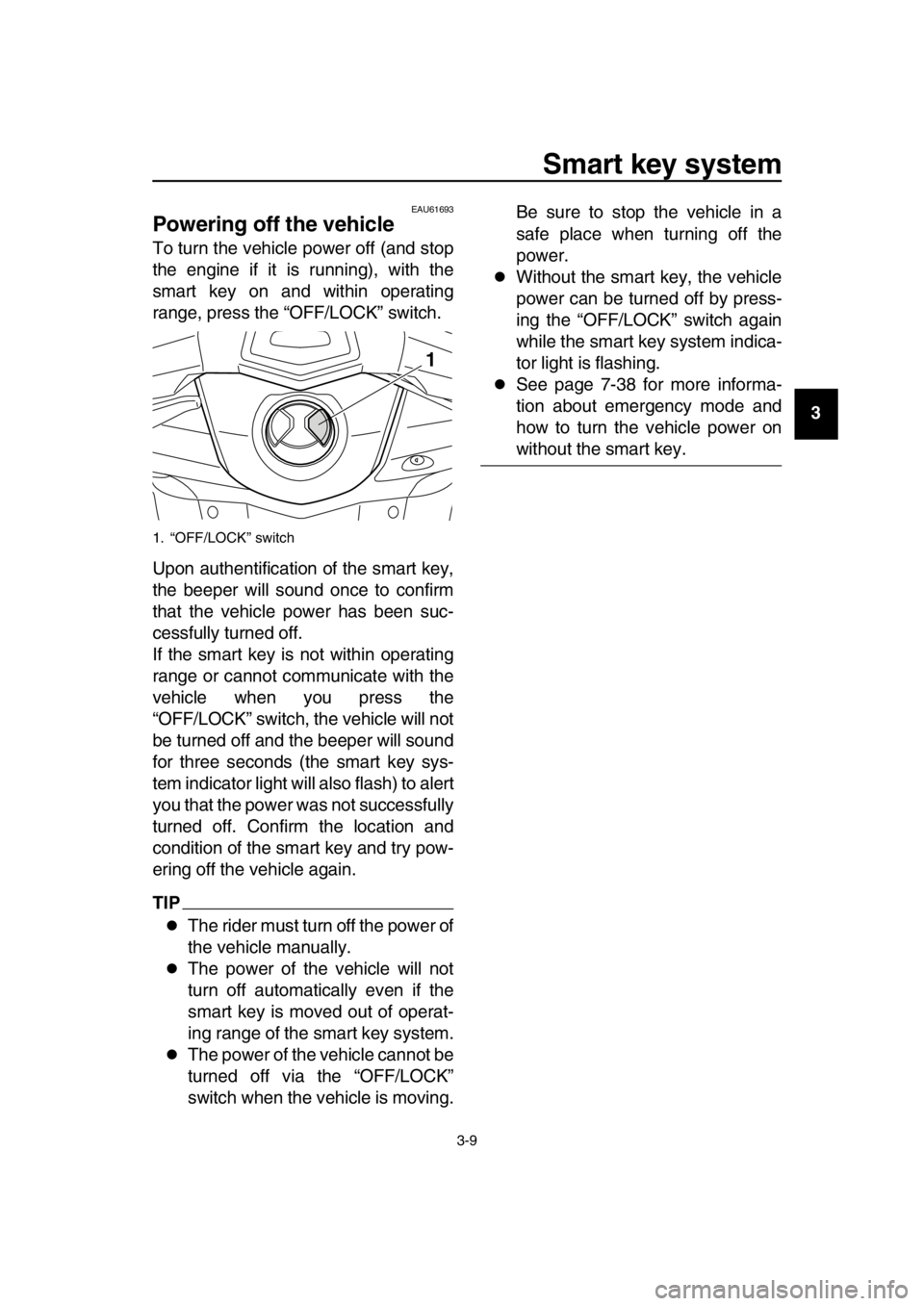
range, press the “OFF/LOCK” switch.
Upon authentification of the smart key,
the beeper will sound once to confirm
that the vehicle power has been suc-
cessfully turned off.
If the smart key is not within operating
range or cannot communicate with the
vehicle when you press the
“OFF/LOCK” switch, the vehicle will not
be turned off and the beeper will sound
for three seconds (the smart key sys-
tem indicator light will also flash) to alert
you that the power was not successfully
turned off. Confirm the location and
condition of the smart key and try pow-
ering off the vehicle again.
TIP
The rider must turn off the power of
the vehicle manually.
The power of the vehicle will not
turn off automatically even if the
smart key is moved out of operat-
ing range of the smart key system.
The power of the vehicle cannot be
turned off via the “OFF/LOCK”
switch when the vehicle is moving. Be sure to stop the vehicle in a
safe place when turning off the
power.
Without the smart key, the vehicle
power can be turned off by press-
ing the “OFF/LOCK” switch again
while the smart key system indica-
tor light is flashing.
See page 7-38 for more informa-
tion about emergency mode and
how to turn the vehicle power on
without the smart key.
1. “OFF/LOCK” switch
1
2PW-9-E1.book 9 ページ 2015年9月10日 木曜日 午後5時17分
Page 24 of 110
Smart key system
3-10
1
2
3
4
5
6
7
8
9
10
11
12
13
14
EAU61612
How to lock the steering
After moving the vehicle to a safe park-
ing place, turn off the power of the vehi-
cle. Turn the handlebars fully to the left
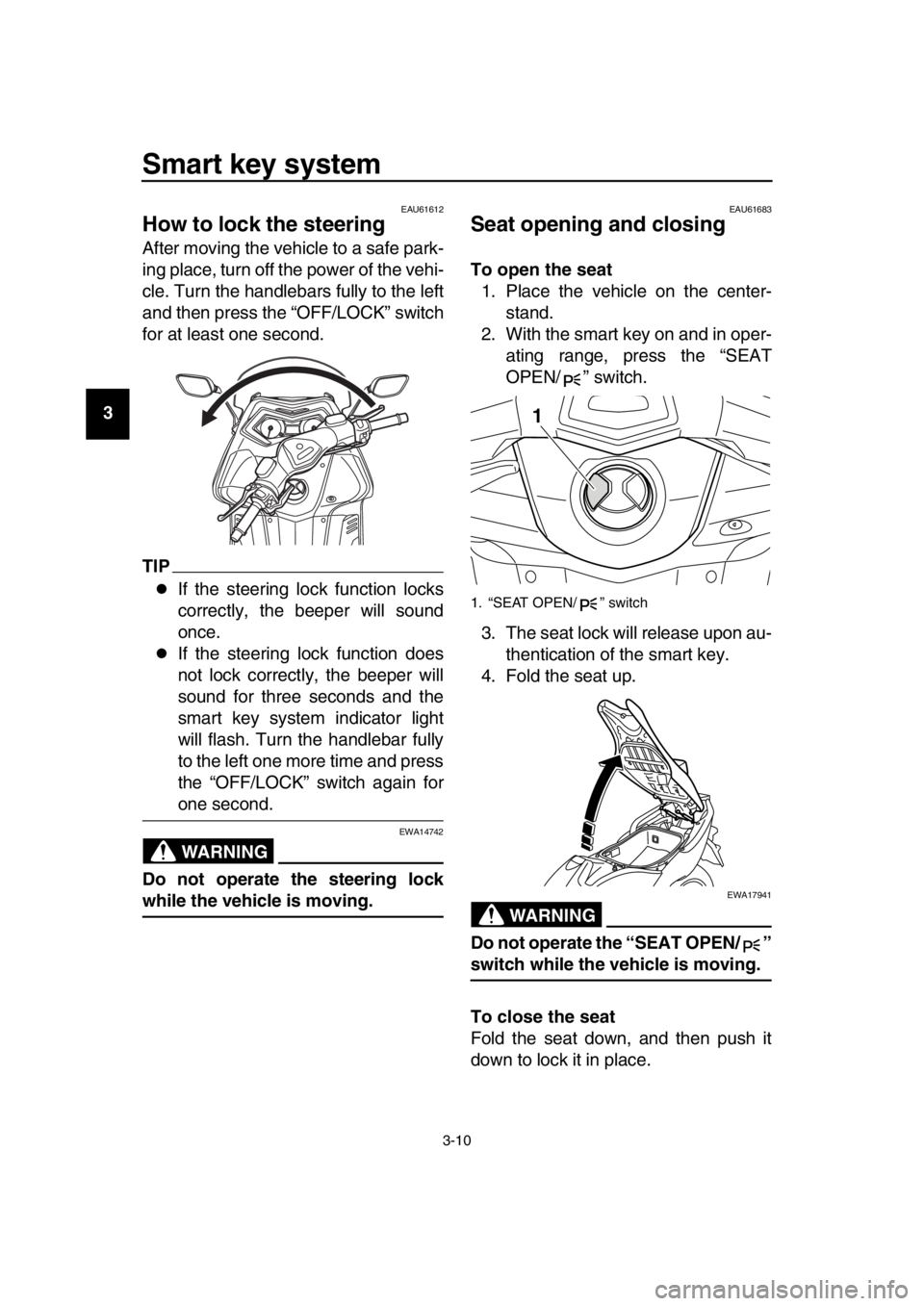
and then press the “OFF/LOCK” switch
for at least one second.
TIP
If the steering lock function locks
correctly, the beeper will sound
once.
If the steering lock function does
not lock correctly, the beeper will
sound for three seconds and the
smart key system indicator light
will flash. Turn the handlebar fully
to the left one more time and press
the “OFF/LOCK” switch again for
one second.
WARNING
EWA14742
Do not operate the steering lock
while the vehicle is moving.
EAU61683
Seat opening and closing
To open the seat 1. Place the vehicle on the center- stand.
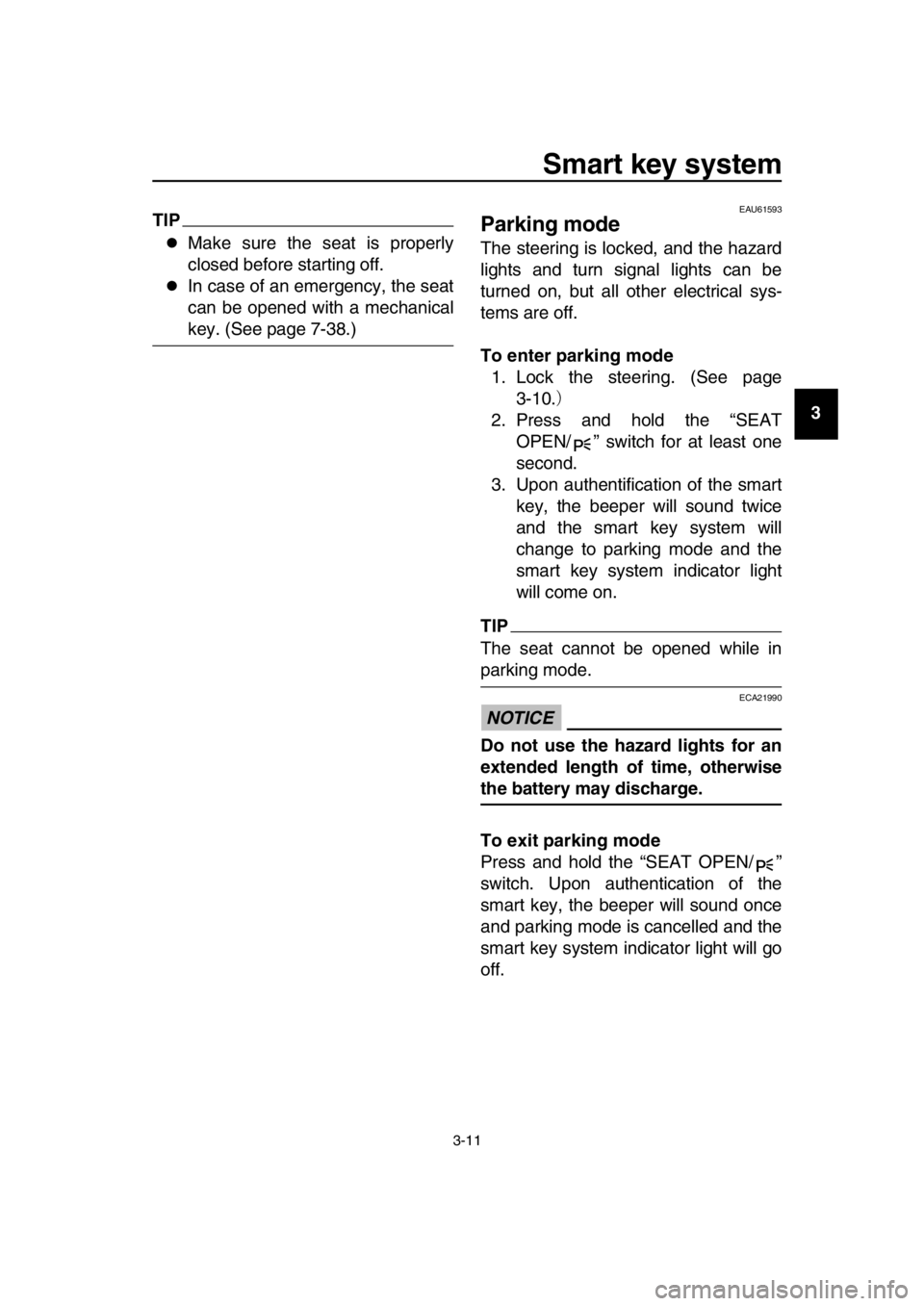
2. With the smart key on and in oper- ating range, press the “SEAT
OPEN/ ” switch.
3. The seat lock will release upon au- thentication of the smart key.
4. Fold the seat up.
WARNING
EWA17941
Do not operate the “SEAT OPEN/ ”
switch while the vehicle is moving.
To close the seat
Fold the seat down, and then push it
down to lock it in place.
1. “SEAT OPEN/ ” switch
1
2PW-9-E1.book 10 ページ 2015年9月10日 木曜日 午後5時17分
Page 25 of 110
Smart key system
3-11
1
2
3
4
5
6
7
8
9
10
11
12
13
14
TIP
Make sure the seat is properly
closed before starting off.
In case of an emergency, the seat
can be opened with a mechanical
key. (See page 7-38.)
EAU61593
Parking mode
The steering is locked, and the hazard
lights and turn signal lights can be
turned on, but all other electrical sys-
tems are off.
To enter parking mode 1. Lock the steering. (See page 3-10. )
2. Press and hold the “SEAT OPEN/ ” switch for at least one
second.
3. Upon authentification of the smart key, the beeper will sound twice
and the smart key system will
change to parking mode and the
smart key system indicator light
will come on.
TIP
The seat cannot be opened while in
parking mode.
NOTICE
ECA21990
Do not use the hazard lights for an
extended length of time, otherwise
the battery may discharge.
To exit parking mode
Press and hold the “SEAT OPEN/ ”
switch. Upon authentication of the
smart key, the beeper will sound once
and parking mode is cancelled and the
smart key system indicator light will go
off.
2PW-9-E1.book 11 ページ 2015年9月10日 木曜日 午後5時17分
Page 26 of 110
4-1
1
2
3
4
5
6
7
8
9
10
11
12
13
14
Instrument and control functions
EAU49398
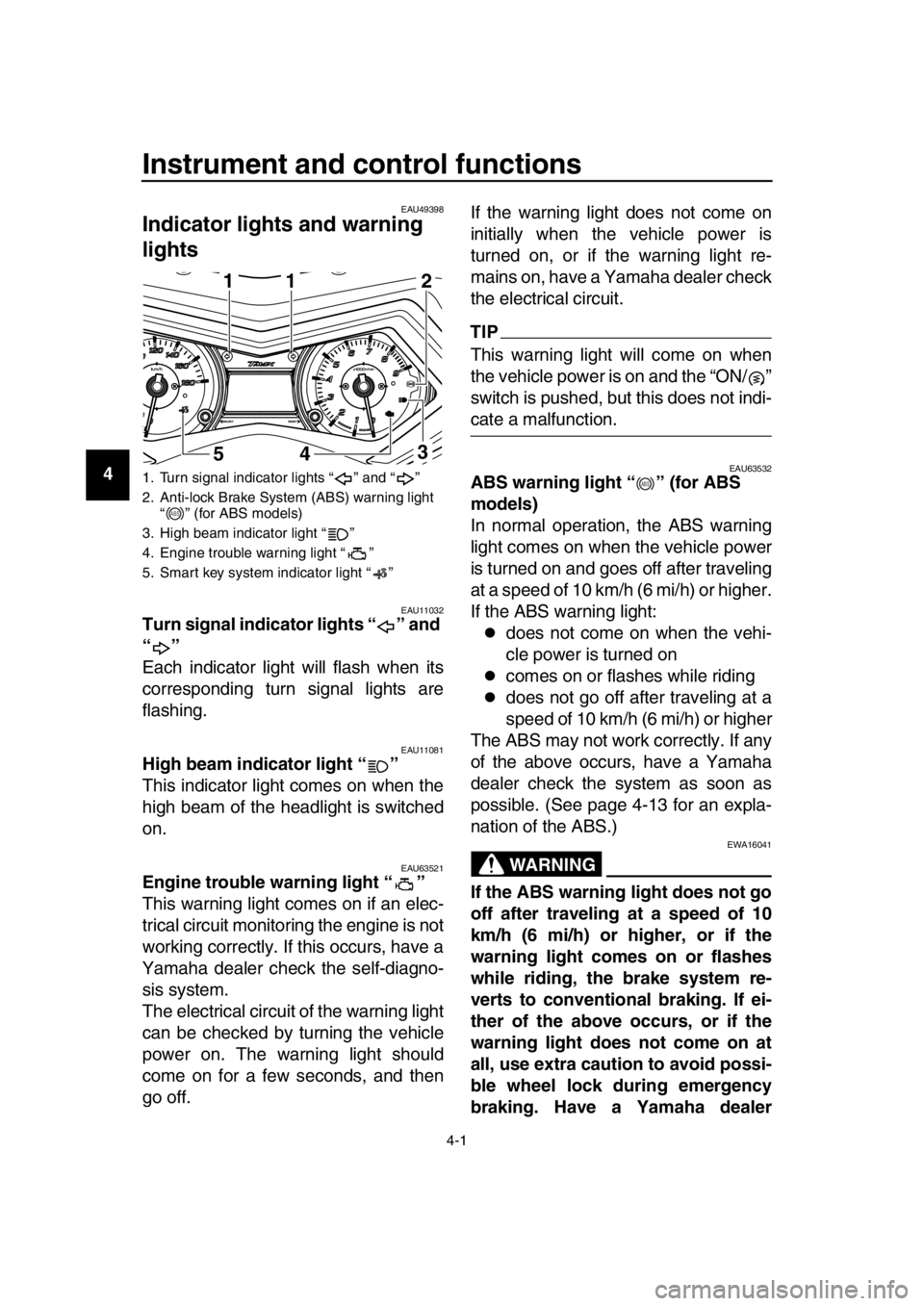
Indicator ligh ts and warning
lights
EAU11032Turn signal indicator lights “ ” and
“”
Each indicator light will flash when its
corresponding turn signal lights are
flashing.
EAU11081High beam indicator light “ ”
This indicator light comes on when the
high beam of the headlight is switched
on.
EAU63521Engine trouble warning light “ ”
This warning light comes on if an elec-
trical circuit monitoring the engine is not
working correctly. If this occurs, have a
Yamaha dealer check the self-diagno-
sis system.
The electrical circuit of the warning light
can be checked by turning the vehicle
power on. The warning light should
come on for a few seconds, and then
go off. If the warning light does not come on
initially when the vehicle power is
turned on, or if the warning light re-
mains on, have a Yamaha dealer check
the electrical circuit.
TIP
This warning light will come on when
the vehicle power is on and the “ON/ ”
switch is pushed, but this does not indi-
cate a malfunction.
EAU63532ABS warning light “ ” (for ABS
models)
In normal operation, the ABS warning
light comes on when the vehicle power
is turned on and goes off after traveling
at a speed of 10 km/h (6 mi/h) or higher.
If the ABS warning light:
does not come on when the vehi-
cle power is turned on
comes on or flashes while riding
does not go off after traveling at a
speed of 10 km/h (6 mi/h) or higher
The ABS may not work correctly. If any
of the above occurs, have a Yamaha
dealer check the system as soon as
possible. (See page 4-13 for an expla-
nation of the ABS.)
WARNING
EWA16041
If the ABS warning light does not go
off after traveling at a speed of 10
km/h (6 mi/h) or higher, or if the
warning light comes on or flashes
while riding, the brake system re-
verts to conventional braking. If ei-
ther of the above occurs, or if the
warning light does not come on at
all, use extra caution to avoid possi-
ble wheel lock during emergency
braking. Have a Yamaha dealer
1. Turn signal indicator lights “ ” and “ ”
2. Anti-lock Brake System (ABS) warning light “ ” (for ABS models)
3. High beam indicator light “ ”
4. Engine trouble warning light “ ”
5. Smart key system indicator light “ ”
1
5411
3 2
ABS
ABS
2PW-9-E1.book 1 ページ 2015年9月10日 木曜日 午後5時17分
Page 27 of 110
Instrument and control functions
4-2
1
2
3
4
5
6
7
8
9
10
11
12
13
14
check the brake system and electri-
cal circuits as soon as possible.
TIP
If the start switch is pushed while
the engine is running, the ABS
warning light will come on, but this
is not a malfunction.
The ABS warning light may come
on when revving the engine with
the scooter on its centerstand, but
this does not indicate a malfunc-
tion.
EAU61652Smart key system indicator light
“”
This indicator light communicates the
status of the smart key system. When
the smart key system is operating nor-
mally, this indicator light will be off. If
there is an error in the smart key sys-
tem, the indicator light will flash. The in-
dicator light will
also flash when
communication between the vehicle
and smart key takes place and when
certain smart key system operations
are carried out. (See page 3-1.)
TIP
When the start switch is pushed, the in-
dicator light will come on for about one
second and then go off. If the indicator
light does not come on or go off as nor-
mal, have a Yamaha dealer check the
vehicle.
EAU63541
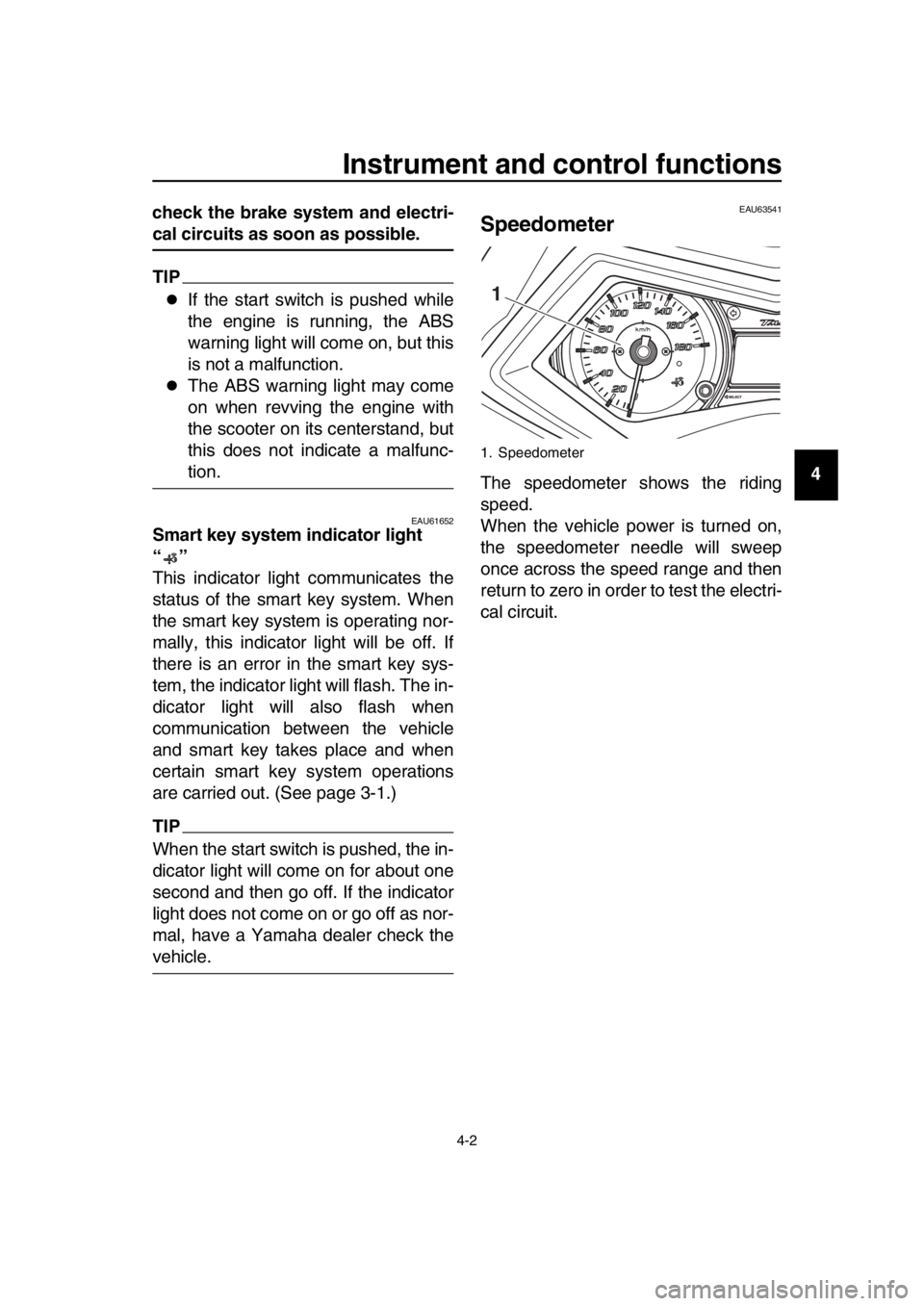
Speedometer
The speedometer shows the riding
speed.
When the vehicle power is turned on,
the speedometer needle will sweep
once across the speed range and then
return to zero in order to test the electri-
cal circuit.
1. Speedometer
1
2PW-9-E1.book 2 ページ 2015年9月10日 木曜日 午後5時17分
Page 29 of 110
Instrument and control functions
4-4
1
2
3
4
5
6
7
8
9
10
11
12
13
14
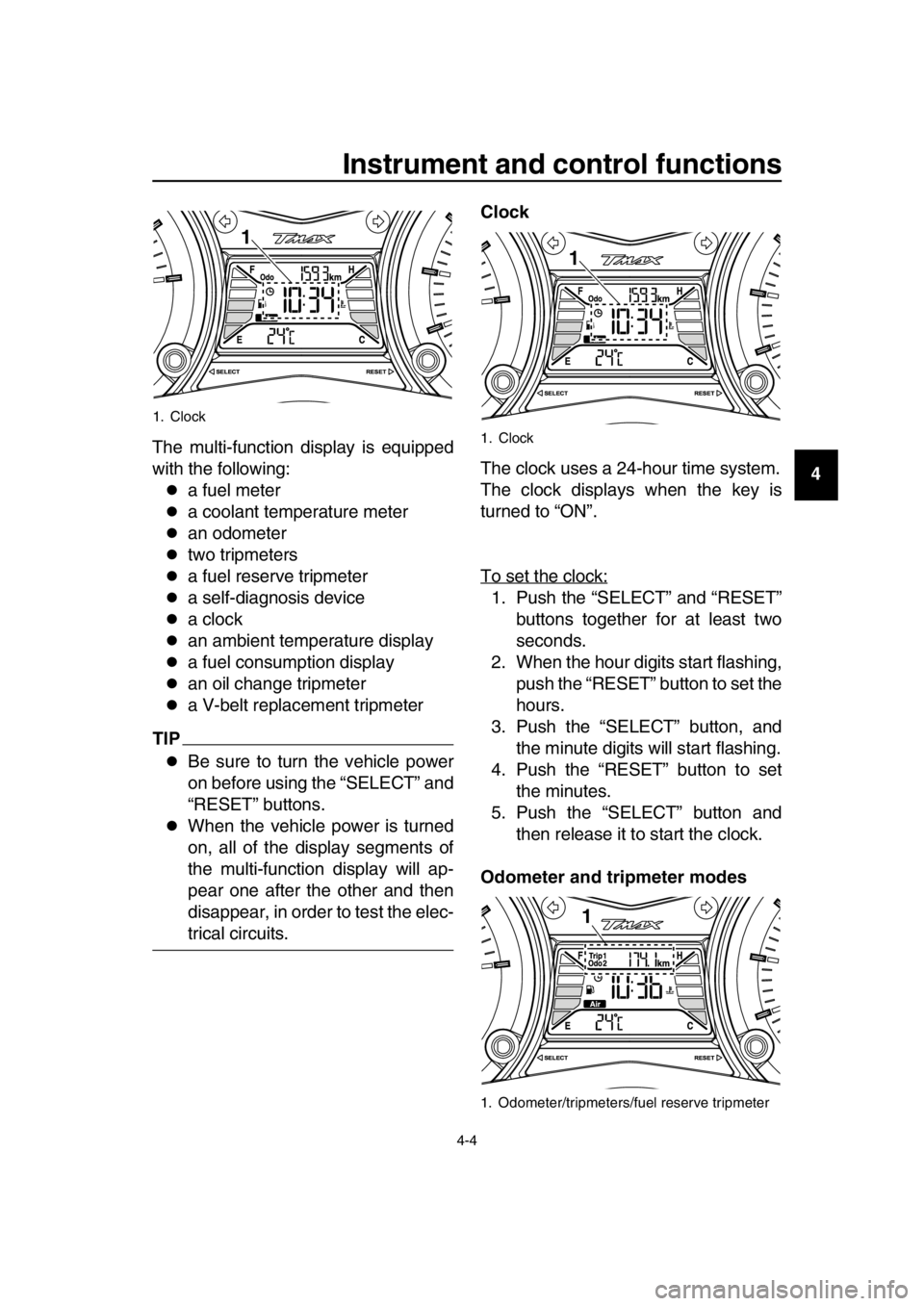
The multi-function display is equipped
with the following:a fuel meter
a coolant temperature meter
an odometer
two tripmeters
a fuel reserve tripmeter
a self-diagnosis device
a clock
an ambient temperature display
a fuel consumption display
an oil change tripmeter
a V-belt replacement tripmeter
TIP
Be sure to turn the vehicle power
on before using the “SELECT” and
“RESET” buttons.
When the vehicle power is turned
on, all of the display segments of
the multi-function display will ap-
pear one after the other and then
disappear, in order to test the elec-
trical circuits. Clock
The clock uses a 24-hour time system.
The clock displays when the key is
turned to “ON”.
To set the clock:
1. Push the “SELECT” and “RESET”
buttons together for at least two
seconds.
2. When the hour digits start flashing, push the “RESET” button to set the
hours.
3. Push the “SELECT” button, and the minute digits will start flashing.
4. Push the “RESET” button to set the minutes.
5. Push the “SELECT” button and then release it to start the clock.
Odometer and tripmeter modes
1. Clock
1
1. Clock
1. Odometer/tripmeters/fuel reserve tripmeter
1
1
2PW-9-E1.book 4 ページ 2015年9月10日 木曜日 午後5時17分
Page 35 of 110
Instrument and control functions
4-10
1
2
3
4
5
6
7
8
9
10
11
12
13
14
EAU1234H
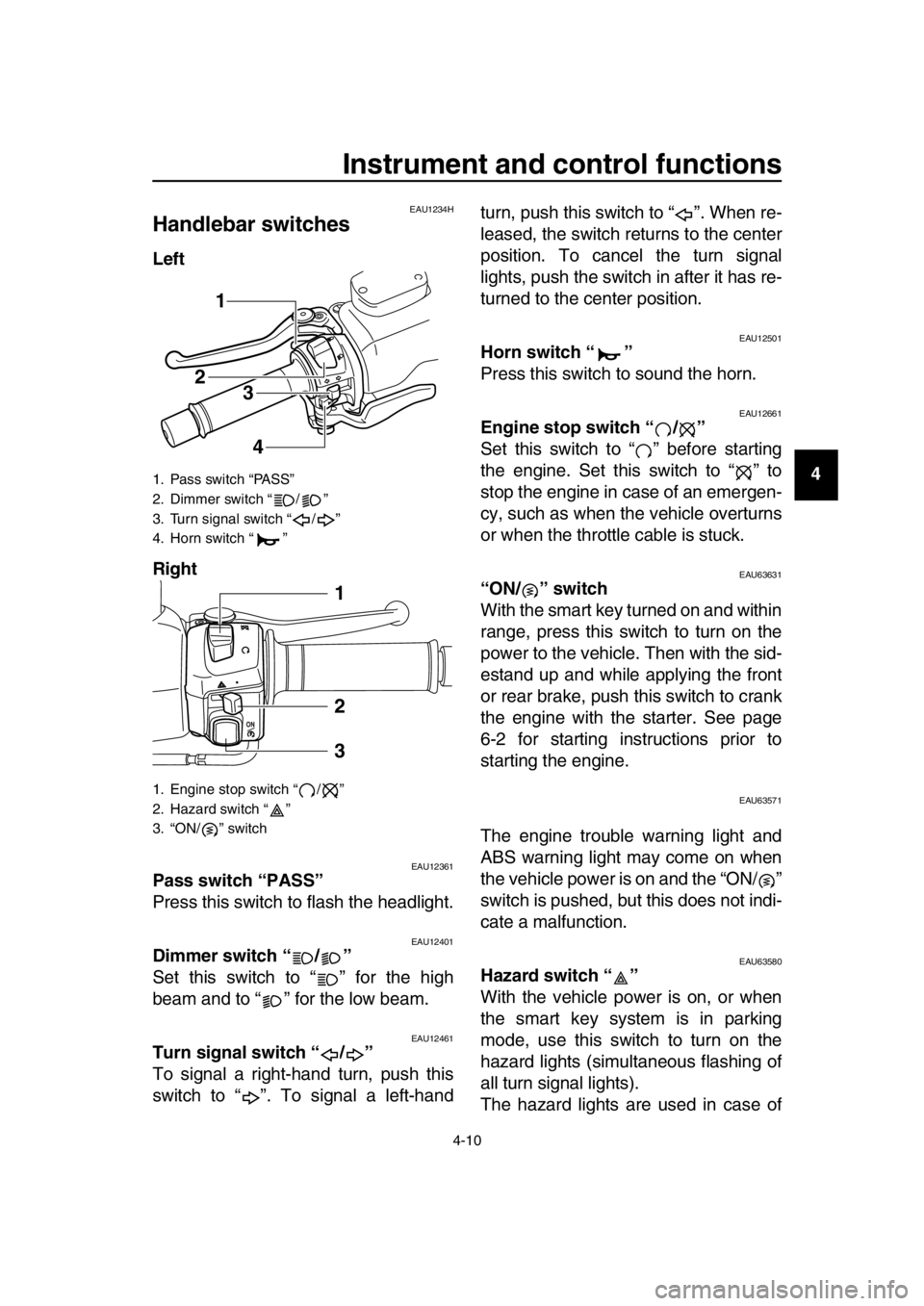
Handlebar switches
Left
Right
EAU12361Pass switch “PASS”
Press this switch to flash the headlight.
EAU12401Dimmer switch “ / ”
Set this switch to “ ” for the high
beam and to “ ” for the low beam.
EAU12461Turn signal switch “ / ”
To signal a right-hand turn, push this
switch to “ ”. To signal a left-hand turn, push this switch to “ ”. When re-
leased, the switch returns to the center
position. To cancel the turn signal
lights, push the switch in after it has re-
turned to the center position.
EAU12501Horn switch “ ”
Press this switch to sound the horn.
EAU12661Engine stop switch “ / ”
Set this switch to “ ” before starting
the engine. Set this switch to “ ” to
stop the engine in case of an emergen-
cy, such as when the vehicle overturns
or when the throttle cable is stuck.
EAU63631“ON/ ” switch
With the smart key turned on and within
range, press this switch to turn on the
power to the vehicle. Then with the sid-
estand up and while applying the front
or rear brake, push this switch to crank
the engine with the starter. See page
6-2 for starting instructions prior to
starting the engine.
EAU63571
The engine trouble warning light and
ABS warning light may come on when
the vehicle power is on and the “ON/ ”
switch is pushed, but this does not indi-
cate a malfunction.
EAU63580Hazard switch “ ”
With the vehicle power is on, or when
the smart key system is in parking
mode, use this switch to turn on the
hazard lights (simultaneous flashing of
all turn signal lights).
The hazard lights are used in case of
1. Pass switch “PASS”
2. Dimmer switch “ / ”
3. Turn signal switch “ / ”
4. Horn switch “ ”
1. Engine stop switch “ / ”
2. Hazard switch “ ”
3. “ON/ ” switch
1
23
4
1
2
3
2PW-9-E1.book 10 ページ 2015年9月10日 木曜日 午後5時17分
Page 39 of 110
Instrument and control functions
4-14
1
2
3
4
5
6
7
8
9
10
11
12
13
14
EAU63691
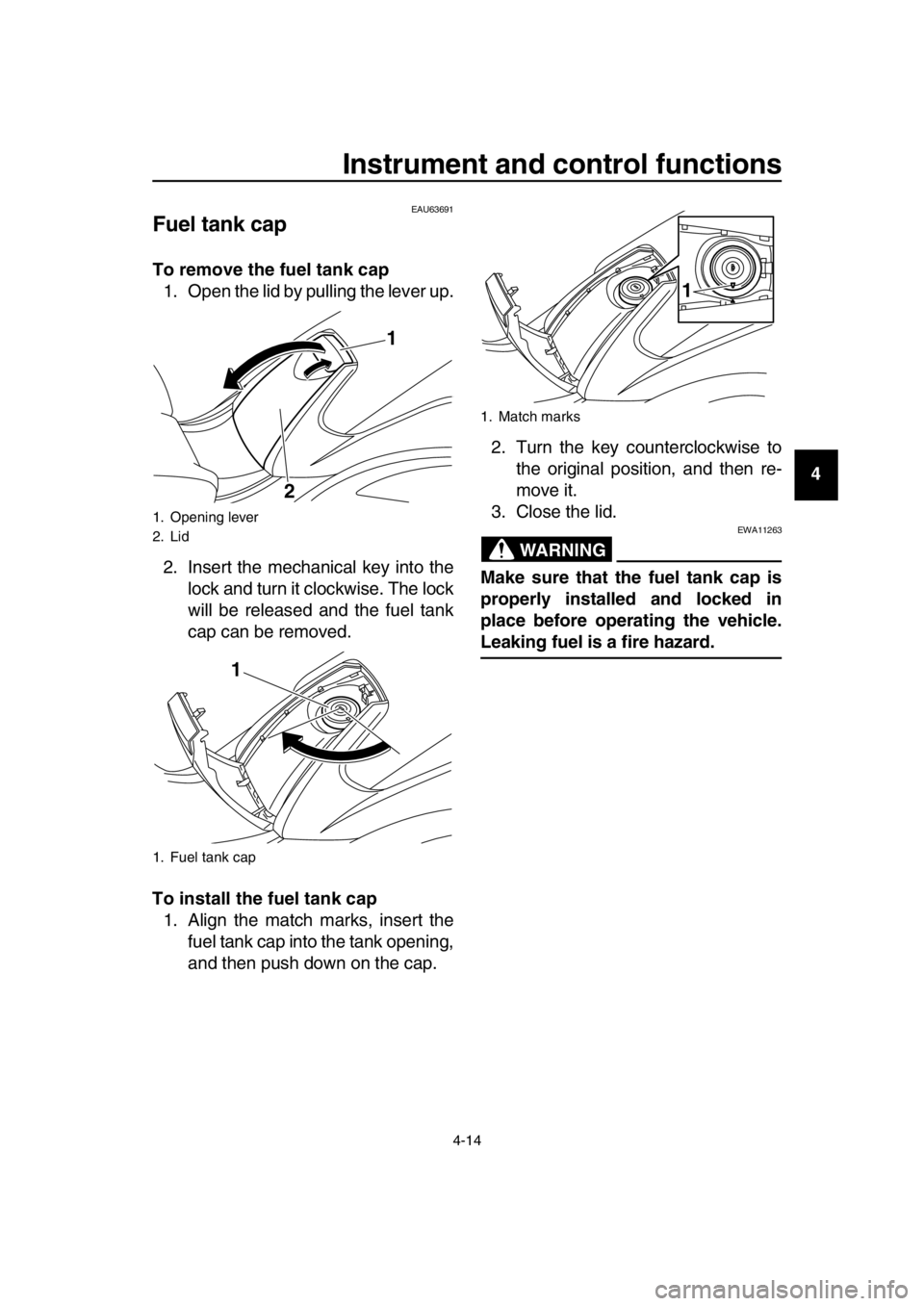
Fuel tank cap
To remove the fuel tank cap 1. Open the lid by pulling the lever up.
2. Insert the mechanical key into the lock and turn it clockwise. The lock
will be released and the fuel tank
cap can be removed.
To install the fuel tank cap 1. Align the match marks, insert the fuel tank cap into the tank opening,
and then push down on the cap. 2. Turn the key counterclockwise to
the original position, and then re-
move it.
3. Close the lid.
WARNING
EWA11263
Make sure that the fuel tank cap is
properly installed and locked in
place before operating the vehicle.
Leaking fuel is a fire hazard.
1. Opening lever
2. Lid
1. Fuel tank cap
1
2
1
1. Match marks
1
2PW-9-E1.book 14 ページ 2015年9月10日 木曜日 午後5時17分
Page 43 of 110
Instrument and control functions
4-18
1
2
3
4
5
6
7
8
9
10
11
12
13
14
EAU63510
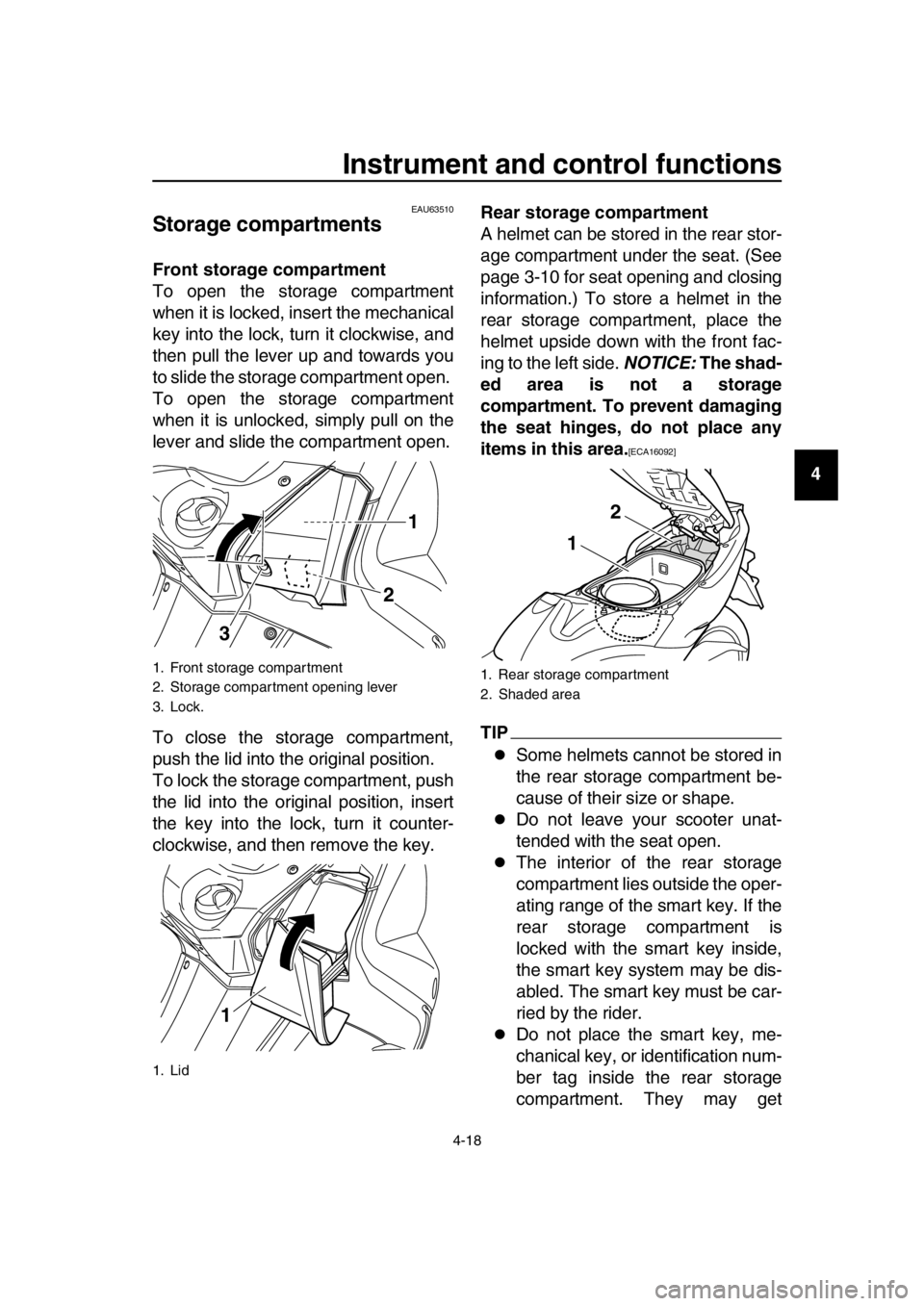
Storage compartments
Front storage compartment
To open the storage compartment
when it is locked, insert the mechanical
key into the lock, turn it clockwise, and
then pull the lever up and towards you
to slide the storage compartment open.
To open the storage compartment
when it is unlocked, simply pull on the
lever and slide the compartment open.
To close the storage compartment,
push the lid into the original position.
To lock the storage compartment, push
the lid into the original position, insert
the key into the lock, turn it counter-
clockwise, and then remove the key. Rear storage compartment
A helmet can be stored in the rear stor-
age compartment under the seat. (See
page 3-10 for seat opening and closing
information.) To store a helmet in the
rear storage compartment, place the
helmet upside down with the front fac-
ing to the left side.
NOTICE: The shad-
ed area is not a storage
compartment. To prevent damaging
the seat hinges, do not place any
items in this area.
[ECA16092]
TIP
Some helmets cannot be stored in
the rear storage compartment be-
cause of their size or shape.
Do not leave your scooter unat-
tended with the seat open.
The interior of the rear storage
compartment lies outside the oper-
ating range of the smart key. If the
rear storage compartment is
locked with the smart key inside,
the smart key system may be dis-
abled. The smart key must be car-
ried by the rider.
Do not place the smart key, me-
chanical key, or identification num-
ber tag inside the rear storage
compartment. They may get
1. Front storage compartment
2. Storage compartment opening lever
3. Lock.
1. Lid
1
2
3
1
1. Rear storage compartment
2. Shaded area
1
2
2PW-9-E1.book 18 ページ 2015年9月10日 木曜日 午後5時17分